Heat Training with CORE on Zwift, Part 3: Tips, Gains, and My Personal Experience

Yesterday, I published a post covering the CORE sensor’s metrics, the science backing them up, and how Zwift and the CORE sensor and app work together. Read it here >

Today, I’ll be discussing my personal experience heat training with CORE in recent weeks. Also included: a pile of tips to help you optimize your heat training. Let’s dive in!

My Heat Training Experience

Cycling provides such an interesting “laboratory” for testing our bodies, doesn’t it? I’m continually fascinated by how different training methods and tools lead to different adaptations in our bodies. Sometimes I feel like I’m more of a lab rat than a human as I test all this stuff out. But it’s just too much fun!

Heat training is particularly compelling because the science behind it is solid, and Zwift provides a well-controlled heat-training environment. It’s really interesting to watch (and feel) in real time as your body reacts to heat stress.

While I did a lot of heat sessions that were free rides or even Zwift group ride events, what I found I enjoyed the most was using ERG mode to precisely control my power output, clicking my Play controller buttons to adjust FTP bias to increase or decrease the power to keep my heart rate in its desired range.
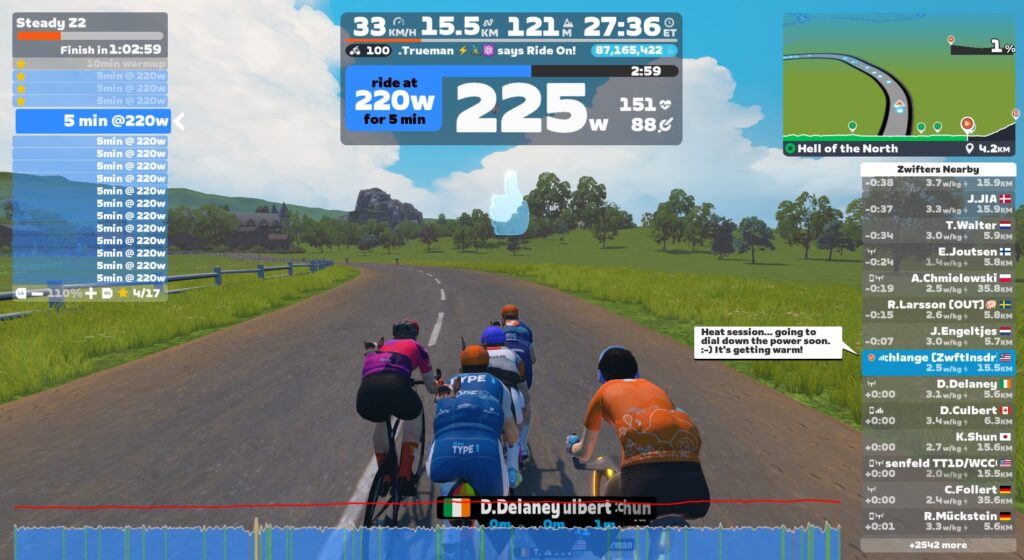
I built a custom ERG workout that was basically 90 minutes of 5-minute zone 2 blocks. I would start with the FTP bias adjusted up to 110% or even 125%, then drop it to keep my heart rate below ~150 (mid zone 3 HR for me).

As the workout progressed, eventually my heart rate would get up over 150 and not want to come down, even at low power numbers. That’s when I knew it was about time to wrap it up. Those ERG sessions would end up looking like this:
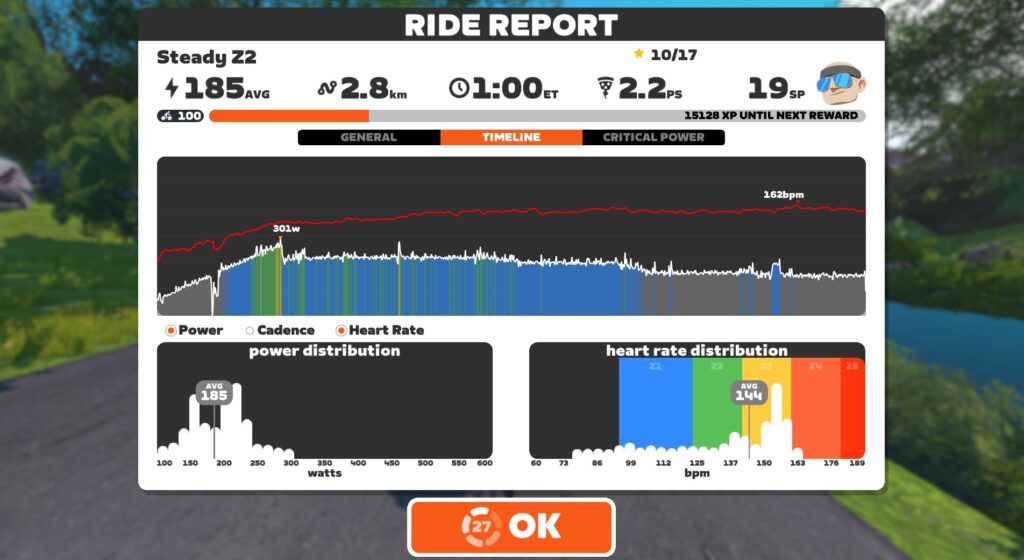
Note how power decreases over time, while heart rate increases. This is what an increasing core temperature does to your performance, and why you should have good ventilation and a good fan running if you want to perform your best on race day!

My (Anecdotal) Evidence

I’m sure readers will want to know if heat training boosted my performance, and by exactly how much. Unfortunately, I’m going to disappoint you here, because I didn’t go about this in a structured/scientific way.

In hindsight, I should have measured various performance metrics (VO2max, FTP) and even sweat metrics (I have two different sweat sensors sitting here to review) prior to starting my hard heat training block. Then I could have repeated those tests afterward.

But I didn’t do that. In the swirl of testing various trainers, Zwift updates, three different bikes/power meters, enjoying the holidays, and deciding to jump into heat training, I missed that crucial setup step.

So all I can share with you is some anecdotal “evidence.” My feelings. Perceived exertion. Subjective event results. Here they:

  • I definitely notice that I sweat earlier and more than I used to. This may seem counterintuitive (shouldn’t heat training help you sweat less?), but it’s the body doing a better job of keeping itself cool.
  • I sense a boost in VO2 power. Despite not training VO2 in a targeted way, I was able to go outside and do a 410W effort for 3 minutes, which is better than I’ve done in a few years. I also notice myself surviving those tough 3-6 minute climbs in Zwift races.
  • I feel like my aerobic engine has been boosted, allowing me to chug along for long periods of time between zone 2 and 3 power at a lower heart rate.

Heat Training Tips

There’s a lot of information in my heat training posts, but I think the most useful info is in this section. Here’s why: despite the promises of increased performance, I’ve historically struggled to fit heat training into my weekly schedule. Between ZRL races on Tuesdays, leading a 100km ride on Thursdays, and doing a long outdoor session on Saturdays, every time I decided to work on heat training I gave up because it was just too hard to dedicate enough training time to accumulate meaningful heat adaptation.

But then I booked a call with Brian Maiorano, Performance Coach at CORE. He gave me some tips to maximize my heat training sessions. I also saw that I had a 3-week block I could dedicate to heat training. Serendipity!

Here’s my distilled list of tips to help you train with heat successfully.

What To Wear

Unless you want to heat your Pain Cave to uncomfortable levels, you’ll need to wear warm clothing to get your core and skin temperatures high enough to accumulate a meaningful heat training load. Basically, what you’re looking for is clothing that keeps the air off your skin (which stops evaporative cooling) and keeps heat in.

Finding what works for you may take a bit of experimentation. We each have different clothes in our cycling wardrobes, bodies that work differently, and differing pain cave conditions.
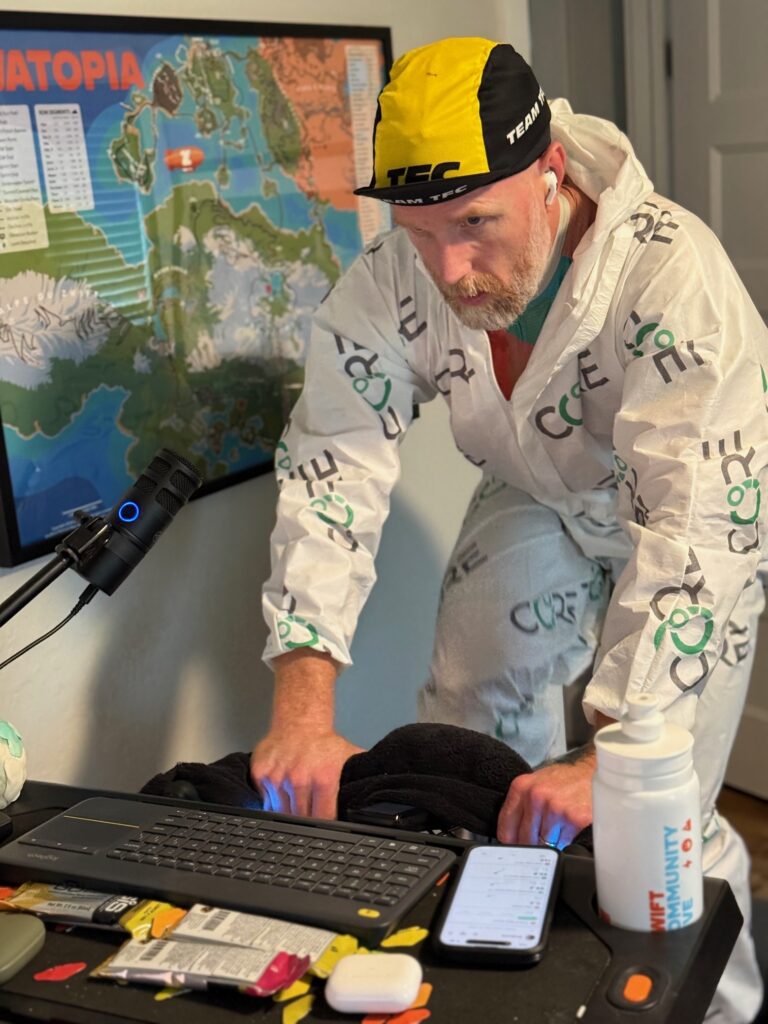

CORE sells a heat training suit, which I’m modeling above. This is what I wore for all my early heat sessions, and I also wore it when I started my big heat training block in December 2025. The suit is nice in that it’s a single article of clothing you can put on over your normal Zwifting kit, and it works, trapping heat and stopping evaporation. The downside of the suit, for me at least, is that it’s not terribly comfortable. The loose fabric can move around and bunch up, the hood can get pulled tight when you sit down after standing up, etc.

Eventually, I bought a cheap “sauna suit” on Amazon. Best $36 I’ve ever spent! The pants I didn’t need, but I wore thermal bibs I already owned, plus an old cycling jersey, plus the sauna suit jacket, a halo headband, and a casquette on top of the headband. Viola! This was the winning combo. It felt fairly comfortable, while also keeping the heat in.

Shoe Drying

While we’re talking about clothes, let’s give a nod to our poor cycling shoes. Mine would be soaked through by the end of a heat session, a pool of sweat having dripped out the holes in the bottom of the shoes, and I could actually pour sweat out of the shoes when I took them off.

A shoe dryer is handy if you want to wear your shoes the next day. Again, Amazon came to my rescue with a cheap one that works great (so far).

Fully-Clothed Showers

After each heat session I would be so sweaty, and my clothes so sweat-soaked, that I would just climb into the shower fully clothed. Shoes and all! I would let the water wash away much of the sweat, stripping off pieces of clothing and purposely rinsing then ringing them out and hanging them on the shower rack.

This removed most of the sweat from the clothes, so they didn’t sit around stinking all day. It also let me reuse my sauna jacket the next day without having to launder it, since it’s made of a material that doesn’t absorb sweat.

Three Sensor Notes

Here are three CORE sensor must-dos:

  1. Don’t wear it backward: What kind of idiot would wear it backward? Me, it turns out. When I first started using the version 2 sensor, it seemed impossibly hard to get my numbers high enough to accumulate meaningful head adaptation. Turns out, the portion of the sensor I was wearing against my skin was supposed to be facing outward. The CORE logo should face out. The side with all the grey text – including the text that says “THIS SIDE ON SKIN” – that goes against your skin.
  2. Enable Automatic Standby: This is enabled by default, but I had disabled it because the previous version of the app labeled it confusingly. Keep it enabled, as it greatly increases battery life!
  3. Pair your HRM: Pair your heart rate monitor to your CORE sensor via the CORE app, then connect directly to the CORE sensor in Zwift. This will deliver the CORE metrics plus your heart rate data to Zwift, while allowing the CORE app to see your heart rate data, increasing the accuracy of your metrics.

Hydration

Heat training shouldn’t involve massive dehydration. You’ll sweat a lot, but you want to be replacing that sweat! Be sure to fill at least two bidons per hour of heat training, and add electrolytes to your water, since you’ll be losing a lot of them.

Weighing myself before and after sessions, I learned that I sweat around 5 bidons worth in 1 hour. Amazing! Your sweat rate may be higher or lower, but I recommend weighing yourself before and after so you know how much you need to drink.

I settled on filling two bidons per hour of riding, along with drinking a lot following each session.

While I tried various electrolyte powders, I used EC Sports’ Electralyte the most due to its good taste, lower cost, and high potassium content. (I tend to be rather potassium-deficient, especially when doing a lot of sweaty training.)

Rehydrating fully/quickly and managing electrolytes isn’t as crucial if you aren’t doing heat training on back-to-back days, but it’s absolutely vital if you’re doing a heavily concentrated heat block like I did. And even then, there were days when it felt like my body was just confused. “You’re sweating out so many electrolytes, and ingesting a lot as well!”

Sweat Wrangling

You may not sweat as much as me, but I promise, you will sweat a lot. You’ll want to have some sort of sweat wrangling scheme in place, because it will get everywhere.

Think of what you’d need to do in your pain cave to keep things clean and undamaged if you were going to empty 4-5 bidons worth of liquid above your bike, then do that. You can always change the setup later, but it’s better to avoid regrets.

What I found worked for me was a beach-sized towel on the floor below my bike (beginning in front of my handlebars and ending past the back of my pedal stroke). This towel would be soaked by the end of the session. I would also have four hand towels within reach. Two would be used to dab my face for sweat, and two would be used on my handlebars to catch sweat before it dripped onto my bars or stem. (I used four towels because I would swap to a dry towel about halfway through the session.)

Session Structure: Start Fast, End Slow

To accumulate maximum Heat Training Load per session, the trick is raising your core and skin temperatures quickly, then keeping them high as long as possible.

Raising them quickly means ramping up your power quickly. The more watts you’re putting out, the more heat your body is dumping into your core. Simple as that. So get on the bike, spin a bit to wake up the legs and heart as long as you need, then ramp up the power for the next 10-20 minutes. This will quickly get your temperatures up.

How high you spike your power in these early minutes is entirely up to you. You could go really high (think race pace), get up into sweet spot territory (~85-95% of FTP), or go lower, perhaps just high tempo. What you do may depend on what sort of effort you’re looking to do that day, because you could do some hard intervals early in your ride, before you get overheated.

Me, I found that during my hard heat training block, I couldn’t hold my power any higher than sweet spot for very long, even early in the workouts. So I would sit in that power window for 10-20 minutes, then settle into zone 2 power, then eventually drop below zone 2 as my core temp continued to rise along with my heart rate.

The big tip CORE’s Brian Maiorano shared with me that helped me get more heat stress is this: when you’re done with your session, don’t just strip everything off and hit the showers to cool down. Instead, sit down and sweat. I would climb off my bike, spread my driest towels on the floor, then sit there for another 15 minutes or so, checking notifications on my phone.

The beauty of this is, you don’t feel like you’re suffering anymore. You’re just sitting there, still sweating, while your temperature and heart rate slowly come down. While this is happening, the CORE app is still recording your metrics, and your elevated temperature and heart rate are still combining to count for more heat training stress, which boosts your session’s Heat Training Load. This added a point or two to each session’s HTL (which is scored from 0 to 10). That’s huge!

Maintaining Adaptations

One interesting thing about heat training is that you don’t need to time it to “peak” at a particular time. You can maintain your high heat adaptation if you prioritize it and work it into your training schedule.

CORE says, “Once you are adapted to the desired level, you can maintain those adaptations by performing 1–3 heat sessions per week. Failure to continue heat training will result in loss of adaptations. Adaptations decrease by about 2.5% for every day without heat training, disappearing entirely within 5–6 weeks.”

10/10 Heat Training Load

Once I learned I’d been wearing the v2 sensor backward, I was looking forward to doing a session with it worn correctly, to see if I could get my numbers up! Here’s that first session, in late November of 2025, when I jumped into an Off the MAAP event and rode in the CORE suit for 90 minutes, accumulating the maximum Heat Training Load possible in one session: a 10 out of 10!

Your Thoughts

Have you done any heat training? Have you used the CORE sensor to do so? Share your thoughts, questions, and experiences below!

If you have questions about heat training, I highly recommend checking out CORE’s support articles, which are impressively detailed and thorough. Visit help.corebodytemp.com.

Meta reportedly plans to release a smartwatch this year

Meta is reportedly gearing up to enter another segment of the wearables market. According to The Information, the company is planning to release its first smartwatch sometime this year. Meta has revived its smartwatch initiative internally called “Malibu 2,” The Information says, which will come with Meta AI and health tracking.

The same publication reported back in 2021 that Meta was working on a smartwatch powered by an open-source version of Android. Over the next year, more details of its possible features emerged, including reports that it had a detachable camera and that Meta was developing a model with up to three cameras. But in 2022, the company was believed to have put the project on hold to focus on other wearable devices.

The Information says the decision to pause its smartwatch project was made as part of a broader cut in spending in the Reality Labs division. If you’ll recall, Meta laid off more than 1,000 employees from Reality Labs in January, because the division was hemorrhaging money. Mark Zuckerberg said during an earnings call after the layoffs started that when it comes to Reality Labs, the company was focusing most of its investment “towards glasses and wearables going forward.”

At the moment, Meta’s wearable products are comprised of virtual reality headsets and smartglasses. They include the Meta Ray-Bans, which are a hit in the US. Meta reportedly has four augmented reality and mixed-reality glasses in development, but it’ll take some time until we see them. Based on previous reports, it pushed back the unveiling of its next mixed reality headset model codenamed “Phoenix” to early 2027.

This article originally appeared on Engadget at https://www.engadget.com/wearables/meta-reportedly-plans-to-release-a-smartwatch-this-year-121247838.html?src=rss

Apple Vision Pro & Samsung Galaxy XR Get PC VR Foveated Streaming

Apple Vision Pro is officially getting PC VR foveated streaming, and Samsung Galaxy XR now has the feature via Guy Godin’s Virtual Desktop.

Before you continue reading, note that foveated streaming is not the same as foveated rendering, though the two techniques can be used alongside each other. As the names suggest, while foveated rendering involves the host device actually rendering the area of each frame you’re currently looking at with higher resolution, foveated streaming refers to sending that area to the headset with higher image quality than the rest of the frame.

It’s a term you may have heard in the context of Valve’s Steam Frame, where it’s a fundamental always-on feature of its PC VR streaming offering, delivered via the USB PC wireless adapter by default.

0:00

/0:05

Valve’s depiction of foveated streaming.

Given that the video decoders in headsets have a limited maximum resolution and bitrate, foveated streaming helps prioritize resolution and compression quality where you’re currently looking.

Apple Vision Pro: visionOS 26.4

visionOS 26.4 will bring foveated streaming to Apple Vision Pro, enabling higher-quality wireless VR remote rendering from a local or cloud PC.

Unlike the macOS Spatial Rendering introduced in the main visionOS 26 release last year, which is a relatively high-level system that only supports a local Mac as a host, Apple’s developer documentation describes the new Foveated Streaming as a low-level host-agnostic framework.

The documentation highlights Nvidia’s CloudXR SDK as an example host, while noting that it should also work with local PCs. Apple even has a Windows OpenXR sample available on GitHub, which to our knowledge is the first and only time the company has even mentioned the industry-standard XR API, never mind actually using it.

ALVR For Apple Vision Pro Brings PS VR2 Controllers To SteamVR
ALVR for Apple Vision Pro, the open-source wireless SteamVR tool, now supports the PS VR2 Sense controllers in its TestFlight build for visionOS 26.
UploadVRDavid Heaney

The lead developer of the visionOS port of the PC VR streaming app ALVR, Max Thomas, tells UploadVR that he’s currently looking into adding support for foveated streaming, but that it will likely be “a lot of work”.

Because of how the feature works, Apple’s foveated streaming might even enable foveated rendering for tools like ALVR.

Normally, visionOS does not provide developers with any information about where the user is looking – Apple says this is in order to preserve privacy. Instead, developers only receive events, such as which element the user was looking at as they performed the pinch gesture. But crucial to foveated streaming working, the API tells the developer the “rough” region of the frame the user is looking at.

This should allow the host to render at higher resolution in this region too, not just stream it in higher resolution. As always, this will require the specific VR game to support foveated rendering, or to support tools that inject foveated rendering.

0:00

/0:24

Clip from Apple’s visionOS foveated streaming sample app.

Interestingly, Apple’s documentation also states that visionOS supports displaying both rendered-on-device and remote content simultaneously. The company gives the example of rendering the interior of a car or aircraft on the headset while streaming the highly detailed external world on a powerful cloud PC, which would be preferable from a perceived latency and stability perspective to rendering everything in the cloud.

We’ll keep an eye on the visionOS developer community in the coming months, especially the enterprise space, for any interesting uses of Apple’s foveated streaming framework in practice.

Samsung Galaxy XR: Virtual Desktop

Meanwhile, Samsung Galaxy XR is getting foveated streaming via Guy Godin’s Virtual Desktop, a $25 third-party app available on Google Play.

Virtual Desktop’s latest update also brings foveated streaming to Meta Quest Pro and Play For Dream MR, though this is less notable as those headsets could already achieve foveated streaming through Valve’s Steam Link.

Virtual Desktop without foveated streaming (left) and with it (right).

The feature should also work on any future eye-tracked headset where Virtual Desktop is available, Guy Godin tells UploadVR.

Here’s the full changelog for Virtual Desktop 1.34.16:

• Added Foveated streaming with eye tracked headsets (Quest Pro, PFD & Galaxy XR)
• This uses eye tracking to improve the quality of the image where you are looking.

• Improved color gradients and color accuracy with all codecs by using the full RGB color range instead of limited range (for desktop and PCVR)

• Added 96 fps and 100 fps support on Quest 2, 3/3S (only available on Quest v85 PTC)

• Added Gamepad vibration support (also for controllers when emulating gamepad)

• Added adaptive quantization support with AMD GPUs using H.264/H.264+

• Improved initial connection reliability (for real this time)

• Added 21:9 resolutions for virtual monitor on macOS

• Improved thumbstick scroll on macOS and now it respects the natural scrolling option

• Fixed distorted image with some laptop monitor resolutions
• Fixed rare black flash issue when playing some PCVR games
• Fixed hand joints offsets and interference with other drivers in SteamVR
• Fixed compatibility with Roblox anti-cheat
• Fixed more issues with AndroidXR invalid controller poses
• Fixed button support for some recent UE5 games
• Fixed reprojection stutters with some Unity (OVRPlugin) games

Simdjson Shows More Speed-Ups Possible For SIMD In JSON Parsing: Another 30% Boost

Simdjson is the open-source project for high performance JSON parsing by leveraging SIMD instructions for “parsing gigabytes of JSON per second.” Notably it showed years ago the huge performance advantage to using AVX-512 in JSON parsing for surprisingly big benefits. Simdjson has continued advancing since then with various optimizations over the years and today is out with simdjson 4.3 that brings yet more SIMD optimizations…

The challenges of measuring AI literacy

Measuring student understanding in computing education is not an easy task. As AI literacy becomes an important pillar in computing education, defining and accurately measuring students’ understanding of concepts and their skills is an even greater challenge.

A girl doing Scratch coding in a Code Club classroom

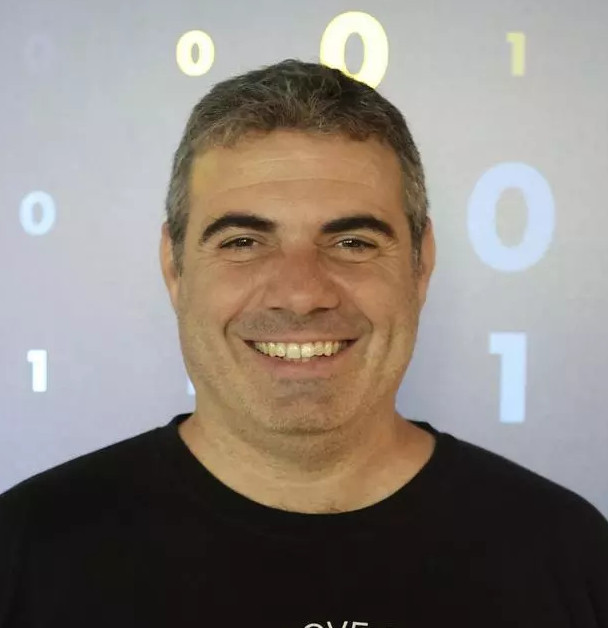
In a recent seminar in our series on teaching about AI and data science, researcher Jesús Moreno-León (Universidad de Sevilla) talked about his work in developing assessment tools for computational thinking (CT) and AI literacy. Jesús is also co-founder of Programamos, a non-profit organisation that promotes the development of computational thinking, supporting teachers through training and sharing resources.

Jesús Moreno-León (Universidad de Sevilla/Programamos).
Jesús Moreno-León (Universidad de Sevilla/Programamos)

Developing assessment tools in computer science

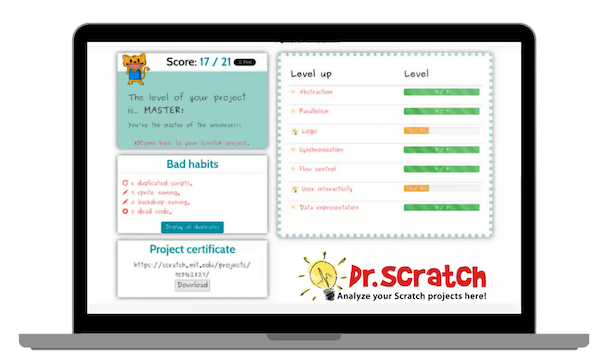
Jesús began by discussing the recent development of computer science assessment tools. Together with Gregorio Robles (Universidad Rey Juan Carlos), they created Dr Scratch, a web-based tool to assess the quality of Scratch projects and detect errors and bad programming habits (e.g. dead code). Projects are scored on the use of computational thinking concepts (e.g. parallelism, conditional logic) and the use of desirable programming practices (e.g. naming sprites, removing duplicate scripts) in order to give feedback to students and teachers to iteratively improve their Scratch projects.

Dr Scratch tool.
Dr Scratch tool.

Alongside measuring students’ programming skills, Jesús also shared work by Marcos Román-González (Universidad Nacional de Educación a Distancia) to develop the Computational Thinking test (CTt), a 28-item assessment tool designed to measure the computational thinking skills of students aged 10 to 16 years old. Two collaborators, María Zapata and Estafanía Martín (Universidad Rey Juan Carlos) further adapted these items to create the Beginners Computational Thinking test (or BCTt), an unplugged assessment suitable for younger learners aged 5 to 10 years old.

Teaching about AI in Spain

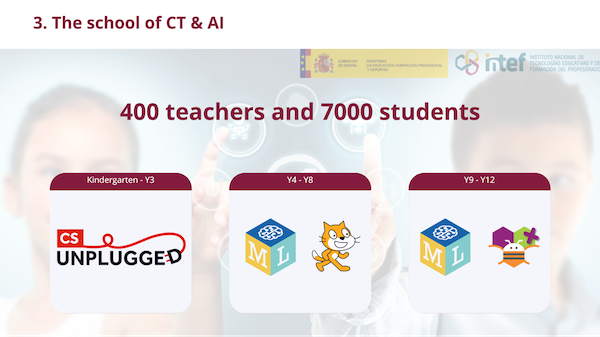
Jesús also described his more recent work at the Ministry of Education and Vocational Training in Spain to promote computer science at all educational levels. One initiative, La Escuela de Pensamiento Computacional e Inteligencia Artificial (or the School of Computational Thinking and Artificial Intelligence), supported Spanish teachers through training and resources to introduce CT and AI into the classroom. Over 400 teachers and 7000 teachers took part across Spain through unplugged activities and tools such as Machine Learning for Kids and LearningML, allowing students to classify text and images using machine learning. Older students created apps using the MIT App Inventor. When evaluating the design of the curriculum, they found they had strong instruments to measure the development of CT — such as the assessment tools described above — yet nothing to measure AI literacy.

The School of Computational Thinking and Artificial Intelligence curriculum.

A tool for measuring AI literacy

The lack of valid AI literacy assessment tools led the team to develop the AI Knowledge Test (or AIKT), a 14-item survey consisting of multiple-choice questions designed to measure students’ understanding of AI. The instrument was inspired by previous work in the field and relevant research (e.g. the AI4K12 framework).

An example from the AI Knowledge Test

An example of one of these items is presented below. Can you solve it? The answer is at the bottom of this article.

Q1. Which of the following strategies would be most appropriate for teaching a computer to recognise photos of apples?

  1. Train the computer with photos of dogs
  2. Train the computer with several photos of different apples, taken in different places and contexts
  3. Train the computer with several similar photos of the same apple, taken in the same place
  4. Train the computer with several identical copies of the same photo of an apple

Testing the test

In a study on the impact of programming activities on computational thinking and AI literacy in Spanish schools, the authors tested these knowledge-based items with over 2000 students to assess the reliability (e.g. internal consistency), or a measure of the quality of a survey or test. They found one item (“As a user, the legal regulation that is approved regarding AI systems will affect my life”) did not correlate with the other items. This left a total of 13 items which were found to have sufficient internal consistency — meaning how well each item correlated with one another to measure an underlying construct (i.e. “AI knowledge”). They concluded that the assessment tool needed a higher ceiling and needed to address common misconceptions. The authors also learned that teachers needed free and open-source tools with low barriers for entry, such as not needing registration, and were suitable for classroom use, such as limiting data sent to the cloud.

AI literacy in the generative era

With the rise of generative AI tools like ChatGPT or Google’s Gemini, Jesús and his colleagues felt their AI literacy assessment tool needed to focus on the capabilities of generative AI tools. They also felt they needed to take a broader view of AI and focus on additional dimensions, such as the social and ethical implications of AI tools. They are, therefore, currently revising their assessment items to align with several common frameworks, including the SEAME framework and AI Learning Priorities for All K–12 Students.

An example from the revised AI Knowledge Test

One of the revised items is presented below. Can you solve it? The answer is revealed below.

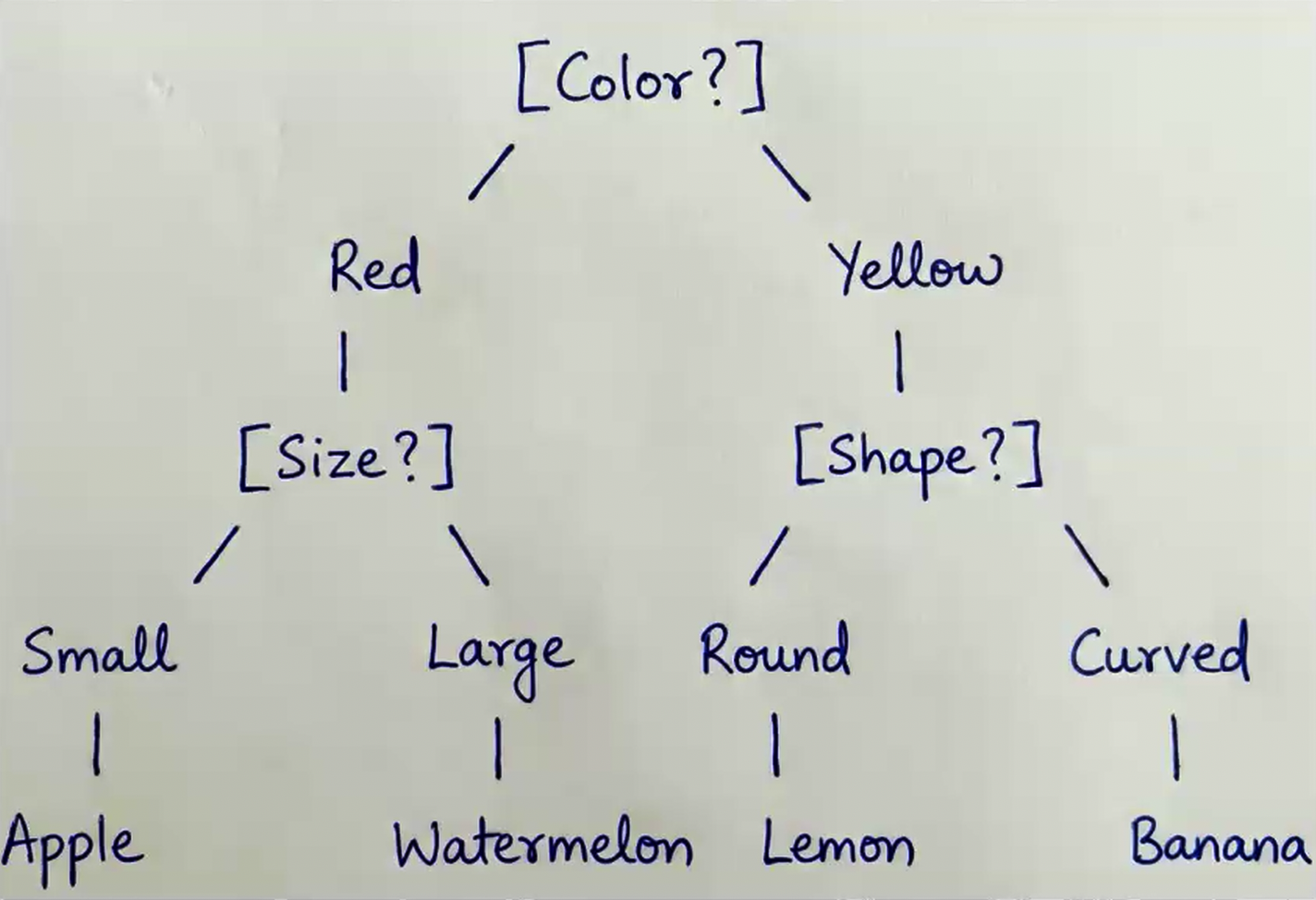
Q2. You have asked your students to design a decision tree to classify different fruits based on three characteristics: color, size, and shape. To check whether the following proposed solution is correct, you are going to test it with a small, round, yellow apple.

  1. Apple
  2. Watermelon
  3. Lemon
  4. Banana

Learn more about this work

Jesús concluded the seminar by describing his intentions to collaborate with others to test the revised AI literacy instrument with students in early 2026. We look forward to hearing about their results!

You can watch Jesús’s whole seminar here:

If you are interested to learn more about Jesús and his work, you can read about his development of the AI Knowledge Test (or AIKT) here and the Computational Thinking test (CTt) here or look at the original items here. You can also learn about the Beginners Computational Thinking test (BCTt) by watching a Raspberry Pi research seminar about it or reading about it here.

Join our next seminar

In our current seminar series, we’re exploring applied AI and how AI can be taught across the curriculum. In our next seminar in this series on 17 March at 17.00 UK time, we welcome Rebecca Fiebrink (University of the Arts London) who will explore the questions of how and why we might teach AI for creative practitioners, including children, students, and professionals.

To take part in the seminar, click the button below to register. We hope to see you there.

The schedule of our upcoming seminars is available online. You can catch up on past seminars on our blog and on the previous seminars and recordings page.


Answers

  • Q1: 2
  • Q2: 3

The post The challenges of measuring AI literacy appeared first on Raspberry Pi Foundation.

A $10 Plastic Speaker is the Most Durable Revenue Line in Indian Digital Payments

India’s digital payment platforms process trillions of dollars a year through UPI, the government-built real-time payments rail that handles more than 90% of all payment transactions in the country, but one of their largest net revenue line items is not a payment product at all: it’s a cheap plastic speaker that sits on a shopkeeper’s counter and reads out incoming payments aloud.

The roughly 23 million soundboxes deployed across India earn about $220 million a year in rental fees, more than every explicitly UPI-linked revenue line in the ecosystem combined, according to estimates from Bernstein. Each device costs $7-12 to manufacture and earns its platform $7-10 a year in rent. A story adds: PhonePe processes about 48% of all UPI transactions in India. Its net payment processing revenue in H1 FY26 was about $83 million. Its device revenue was about $34 million. Running nearly half of India’s real-time payment infrastructure earns PhonePe only 2.4 times what it makes from renting speakers to shopkeepers.


Read more of this story at Slashdot.

Claims That AI Can Help Fix Climate Dismissed As Greenwashing

An anonymous reader quotes a report from the Guardian: Tech companies are conflating traditional artificial intelligence with generative AI when claiming the energy-hungry technology could help avert climate breakdown, according to a report. Most claims that AI can help avert climate breakdown refer to machine learning and not the energy-hungry chatbots and image generation tools driving the sector’s explosive growth of gas-guzzling datacenters, the analysis of 154 statements found.

The research, commissioned by nonprofits including Beyond Fossil Fuels and Climate Action Against Disinformation, did not find a single example where popular tools such as Google’s Gemini or Microsoft’s Copilot were leading to a “material, verifiable, and substantial” reduction in planet-heating emissions. Ketan Joshi, an energy analyst and author of the report, said the industry’s tactics were “diversionary” and relied on tried and tested methods that amount to “greenwashing.”

He likened it to fossil fuel companies advertising their modest investments in solar panels and overstating the potential of carbon capture. “These technologies only avoid a minuscule fraction of emissions relative to the massive emissions of their core business,” said Joshi. “Big tech took that approach and upgraded and expanded it.” […] Joshi said the discourse around AI’s climate benefits needed to be “brought back to reality.” “The false coupling of a big problem and a small solution serves as a distraction from the very preventable harms being done through unrestricted datacenter expansion,” he said.


Read more of this story at Slashdot.

Trump Has Prepared Speech On Extraterrestrial Life

According to Lara Trump, Donald Trump has prepared but not yet delivered a speech about extraterrestrial life, though the White House says such a speech would be “news to me.” White House Spokesperson Karoline Leavitt continued: “I’ll have to check in with our speech writing team. Uh, and that would be of great interest to me personally, and I’m sure all of you in this room and apparently former President Obama, too.” The Hill reports: Lara Trump, speaking on the Pod Force One podcast, said the president has played coy when she and her husband Eric have asked about the existence of UFO’s and aliens. “We’ve kind of asked my father-in-law about this… we all want to know about the UFOs… and he played a little coy with us,” Lara Trump said. “I’ve heard kind of around, I think my father-in-law has actually said it, that there is some speech that he has, that I guess at the right time, I don’t know when the right time is, he’s going to break out and talk about and it has to do with maybe some sort of extraterrestrial life.”

Obama has clarified in recent days that he has seen no evidence that aliens are real, after comments he made on a podcast with Brian Tyler Cohen seeming to confirm his knowledge of extraterrestrial life went viral. “They’re real but I haven’t seen them,” Obama said on the podcast. “And they’re not being kept in… what is it? Area 51. There’s no underground facility unless there’s this enormous conspiracy and they hid it from the president of the United States.”

Later, in a post on Instagram, Obama clarified that he was trying to answer in the light-hearted spirit of a speed round of questions and that, “Statistically, the universe is so vast that the odds are good there’s life out there.” “But the distances between solar systems are so great that the chances we’ve been visited by aliens is low, and I saw no evidence during my presidency that extraterrestrials have made contact with us. Really!”


Read more of this story at Slashdot.

EPA Faces First Lawsuit Over Its Killing of Major Climate Rule

An anonymous reader quotes a report from the New York Times: The first shot has been fired in the legal war over the Environmental Protection Agency’s rollback of its “endangerment finding,” which had been the foundation for federal climate regulations. Environmental and health groups filed a lawsuit on Wednesday morning in the U.S. Court of Appeals for the District of Columbia Circuit, arguing that the E.P.A.’s move to eliminate limits on greenhouse gases from vehicles, and potentially other sources, was illegal. The suit was triggered by last week’s decision by the E.P.A. to kill one of its key scientific conclusions, the endangerment finding, which says that greenhouse gases harm public health. The finding had formed the basis for climate regulations in the United States.

The lawsuit claims that the agency is rehashing arguments that the Supreme Court already considered, and rejected, in a landmark 2007 case, Massachusetts v. E.P.A. The issue is likely to end up back before the Supreme Court, which is now far more conservative. In the 2007 case, the justices ruled that the E.P.A. was required to issue a scientific determination as to whether greenhouse gases were a threat to public health under the 1970 Clean Air Act and to regulate them if they were. As a result, two years later, in 2009, the E.P.A. issued the endangerment finding, allowing the government to limit greenhouse gas emissions, which cause climate change. “With this action, E.P.A. flips its mission on its head,” said Hana Vizcarra, a senior lawyer at the nonprofit Earthjustice, which is representing six groups in the lawsuit. “It abandons its core mandate to protect human health and the environment to boost polluting industries and attempts to rewrite the law in order to do so.”

[…] Also on Wednesday, two other nonprofit law firms filed their own lawsuit against the E.P.A. over the endangerment finding, on behalf of 18 youth plaintiffs. That suit, by Our Children’s Trust and Public Justice, argues that the E.P.A.’s move was unconstitutional. Separate legal challenges to E.P.A. rules are generally consolidated into one case at the D.C. Circuit Court, which is where disputes involving the Clean Air Act are required to be heard. But the sheer number of groups involved could make the legal battle lengthy and complicated to manage. A three-judge panel at the Circuit Court is expected to pore over several rounds of legal briefs before oral arguments begin. Those may not take place until next year.


Read more of this story at Slashdot.

Uber Putting $100 Million into EV Charging for Robotaxis

Uber plans to invest $100 million in EV charging infrastructure to support current and future robotaxi fleets in cities like Los Angeles, the Bay Area, and Dallas, “eventually partner[ing] with multiple robotaxi companies on actual robotaxi deployment — WeRide, Waabi, Lucid, Nuro, May Mobility, Momenta, and Waymo of course,” reports CleanTechnica. From the report: “Cities can only unlock the full promise of autonomy and electrification if the right charging infrastructure is built for scale. That infrastructure needs to work for today’s drivers and the fleets of the future,” said Uber’s global head of mobility, Pradeep Parameswaran. In addition to building some infrastructure itself, the company is making “utilization guarantee agreements” with EVgo for various major US cities as well as Electra, Hubber, and Ionity in Europe.

On Uber’s latest shareholder call, CEO Dara Khosrowshahi said that the company would make “targeted growth-oriented investments aligned with the 6 strategic areas of focus.” That includes self-driving vehicles/robotaxis. “With the benefit of learning from multiple AV deployments around the world, we’re more convinced than ever that AVs will unlock a multitrillion-dollar opportunity for Uber. AVs amplify the fundamental strengths of our platform, global scale, deep demand density, sophisticated marketplace technology, and decades of on-the-ground experience matching riders, drivers, and vehicles, all in real time,” Khosrowshahi added.


Read more of this story at Slashdot.

Google’s Pixel 10a Is the Same Damn Phone As the Pixel 9a

Google’s Pixel 10a is essentially a flatter version of last year’s Pixel 9a, keeping the same Tensor G4 chip, camera hardware, RAM, storage, and $500 price while dropping features like Pixelsnap Qi2 charging and advanced Gemini AI capabilities found in higher-end models. Gizmodo reports: We use words like “candy bar” or “slab” to describe our full-screen smartphones, but Google has designed what is likely the slabbiest phone of the modern era. During an hour-long hands-on with Google’s all-new Google Pixel 10a, I slid the phone across a desk and felt oddly satisfied that it could glide as neatly as a figure skater without any hint of a camera bump hindering its path. It’s the first thing I need to bring up regarding the Pixel 10a, because there’s no other discernible difference between this phone and the previous-gen Pixel 9a.

And that seems to be the point. The Pixel 10a starts at $500, exactly how much the Pixel 9a cost at launch. In a Q&A with journalists, Google told Gizmodo that the company wanted to offer the same price point as before. That apparently required Google to stick with the same Tensor G4 chip as last year. You still have the same storage options of 128GB or 256GB and the minimum of 8GB of RAM. Think of the Pixel 10a as a Pixel 9a with a reduced camera bump. If you’re one of the heretics who uses a phone without a case, that fact alone may be enough to pay attention. Otherwise, you’ll be scrounging to find any real difference between the Pixel 10a and one of last year’s best mid-range phones.


Read more of this story at Slashdot.

[$] LWN.net Weekly Edition for February 19, 2026

Inside this week’s LWN.net Weekly Edition:

  • Front: AI agent goes rogue; debuginfo; iocane; revocable resource-management patches; 7.0 merge window; AccECN; LLMs and security; Humanitarian OpenStreetMap Team.
  • Briefs: upki; Asahi Linux progress; DFSG processes; Fedora in Syria; Plasma 6.6.0; Vim 9.2; …
  • Announcements: Newsletters, conferences, security updates, patches, and more.