Vlad: Weston 15.0 is here: Lua shells, Vulkan rendering, and a smoother display stack

Over on the Collabora blog, Marius Vlad has an overview
of Weston 15.0
, which was released on February 19. Weston is the
reference implementation of a Wayland compositor. The new
release comes with a new shell that can be programmed using the Lua language, a new, experimental Vulkan
renderer, smoother media playback, color-management additions, and more.

One of Weston’s fundamental pillars has always been making the most efficient use of display hardware. Over time, all the work we did to track and offload as much work as possible to this efficient fixed-function hardware has come at the cost of eating CPU time. In the last couple of release cycles, we’ve focused really hard on improving performance on even the most low-end of devices, so not only do we make the most efficient use of the GPU and display hardware, but we’re also really kind on your CPU now. As part of that and to improve our tooling, Weston 15 now comes with support for the Perfetto profiler.

Nothing reveals the Phone 4a ahead of schedule

Nothing has been slow-dripping news about the upcoming Phone 4a for a few days now, with a promise to reveal the handset on March 5. However, the company jumped the gun a bit and just posted an actual photo of the hardware. It looks pretty nifty, even if we don’t have any real-deal specs just yet.

The image shows the handset from behind, displaying the company’s trademark transparent design. The picture also features the redesigned Glyph Bar, which was first teased last week. This is a light-based notification system that features individually controlled mini-LEDs that light up in various ways to notify the user of missed calls and stuff like that. You can spot it next to the camera bump.

Built different.
Phone (4a). 5 March, 10:30 GMT. pic.twitter.com/n3ZtbTmYIv

— Nothing (@nothing) February 23, 2026

That’s about all we know right now, though there are plenty of industry rumors. It’s been reported that the Nothing Phone 4a will feature a Snapdragon 7-series chip and that the reveal will be accompanied by a Pro model with a more powerful camera. The Nothing Phone 3a was also launched alongside the 3a Pro.

We loved the 3a and 3a Pro, calling both “an easy recommendation.” Let’s hope this carries through for the 4a. Also, you didn’t miss a release of the actual Nothing Phone 4. The company likes to release the a-series handsets before the flagship. Past as prologue, we’ll likely see that one in early summer.

This article originally appeared on Engadget at https://www.engadget.com/mobile/smartphones/nothing-reveals-the-phone-4a-ahead-of-schedule-181905011.html?src=rss

Anthropic Accuses Chinese Companies of Siphoning Data From Claude

U.S. artificial-intelligence startup Anthropic said three Chinese AI companies set up more than 24,000 fraudulent accounts with its Claude AI model to help their own systems catch up. From a report: The three companies — DeepSeek, Moonshot AI and MiniMax — prompted Claude more than 16 million times, siphoning information from Anthropic’s system to train and improve their own products, Anthropic said in a blog post Monday.

Earlier this month, an Anthropic rival, OpenAI, sent a memo to House lawmakers accusing DeepSeek of using the same tactic, called distillation, to mimic OpenAI’s products. Anthropic said distillation had legitimate uses — companies use it to build smaller versions of their own products, for example — but it could also be used to build competitive products “in a fraction of the time, and at a fraction of the cost.” The scale of the different companies’ distillation activity varied. DeepSeek engaged in 150,000 interactions with Claude, whereas Moonshot and MiniMax had more than 3.4 million and 13 million, respectively, Anthropic said.


Read more of this story at Slashdot.

10 Hacks Every PS5 Gamer Should Know

We may earn a commission from links on this page.

Sony’s PlayStation 5 is a powerful machine, but if you just plugged it right into your TV and never bothered to go into the settings, there’s a chance you’re not seeing its full potential. From enabling 120 fps gameplay to customizing your Welcome hub, there’s a lot you can do with the PS5, if you’re willing to tinker a little bit. Here are the 10 best tips and tricks to getting the most out of Sony’s current gaming console.

Enable 120Hz and 4K on your PS5

Just because you bought a fancy new PS5 doesn’t automatically mean you’re getting the best performance out of it possible. If you have a 4K TV or a monitor that can support a 120Hz refresh rate or above, you’ll want to double check your video output settings to ensure your console is taking advantage of it.

First, before even turning on your device, make sure it’s connected via an HDMI 2.1 cable. This is necessary for frame rates above 60 at 4K. Your PS5 should have come with one, and you’ll know if it’s the right one if it has a boxy rectangle on either side of the cable. Also ensure that you’re plugging your cable into a port that can accept HDMI 2.1, which will look different based on your screen. On my LG C1 TV, this port says “4K @ 120Hz” above it.

Next, while your console may detect what your screen can handle and adjust its settings accordingly, head to Settings > Screen and Video to manually check them and make some adjustments that need some human fine tuning. I like to leave most of the settings on this page to Automatic to allow the PS5 to pick the best choices for the wide variety of content it can play, but you can select any of the settings on this page to see your options and force an output. If you don’t see 4K (labeled as 2160p) or 120Hz as options here, this is your sign you might need to swap your HDMI cable.

To see what settings your PS5 is using at any particular moment, select “Current Video Output Signal” at the top of this page to check your work. While I mostly like to rely on the PS5’s Automatic settings, one specific change you might want to make would be applying VRR to unsupported games, which could improve fidelity at the cost of introducing instability. If you scroll down far enough on this page, you can also adjust when your console displays HDR, and go through an HDR setup wizard by selecting “Adjust HDR.”

You can also customize your console’s display area by selecting Screen from the sidebar on the left, which is handy if your display has an unusual aspect ratio. While you’re here, you can adjust how long you need to be away from your controller before the console dims your screen.

Finally, if you have a PS5 Pro, you can up the graphics quality on some supported PS4 games. This is under Settings > Screen and Video > Video Output > Enhance Image Quality for PS4 games.

Mute the PS5’s startup beep 

Let’s say you’re having trouble sleeping, and instead of rolling around in bed, you decide to sneak out to the PS5 for a secret gaming session. Except, uh-oh, the nasty beep that the console plays at startup alerts your partner, and now you have some explaining to do. To keep this from happening, let’s turn off that beep ahead of time.

Under Settings > System > Beep and Light, toggle on Mute Beep Sound to get rid of the sound your PS5 plays at startup. Or, if you just want to make it quieter, you can do that under Volume. 

While you’re here, you can also customize how bright the LED strip on the front of the console gets, under Power indicator > Brightness. Unfortunately, there isn’t a way to turn it off entirely.

Change the widgets on your PS5’s home screen

Welcome Hub widgets

Credit: Sony

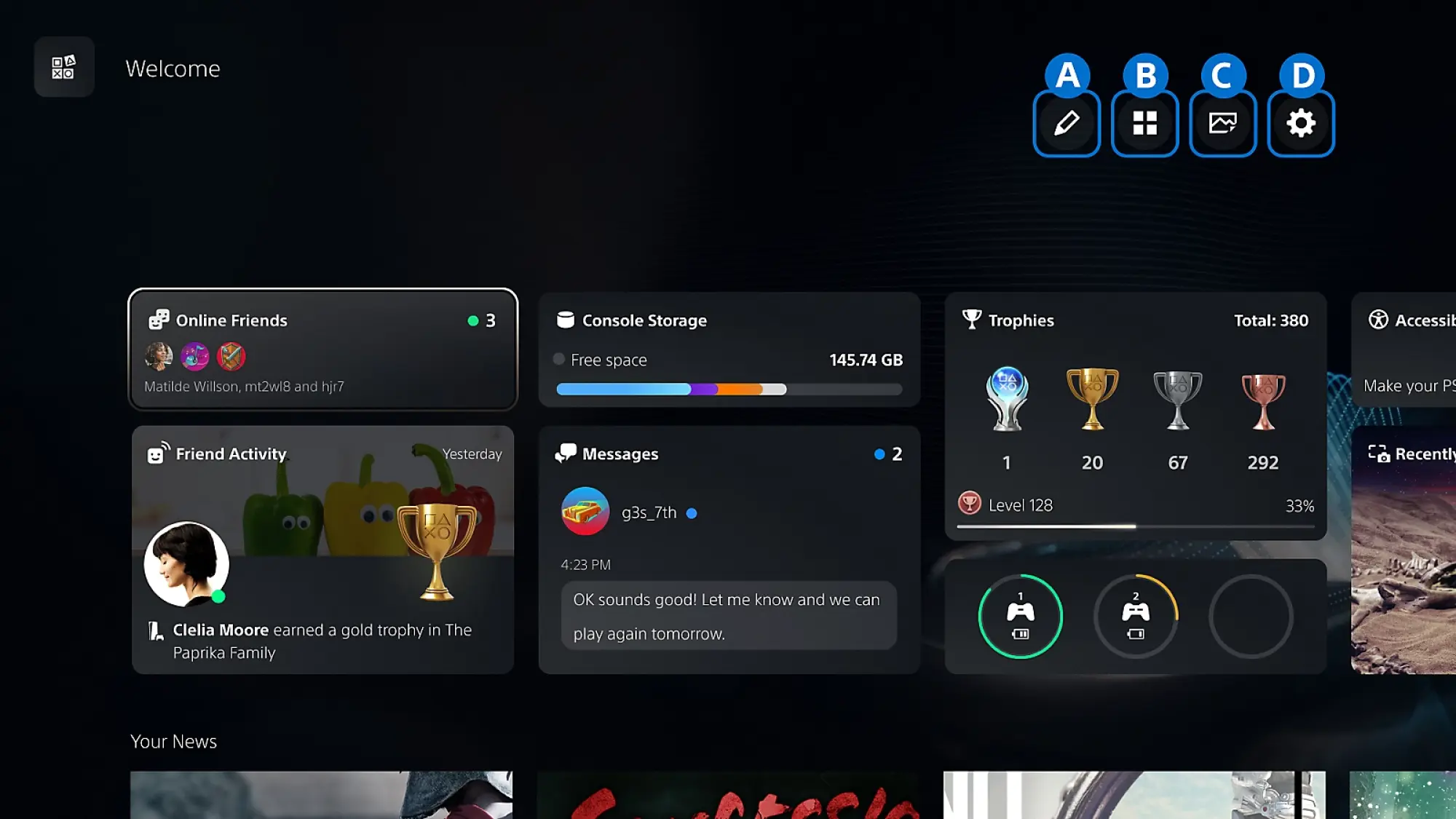
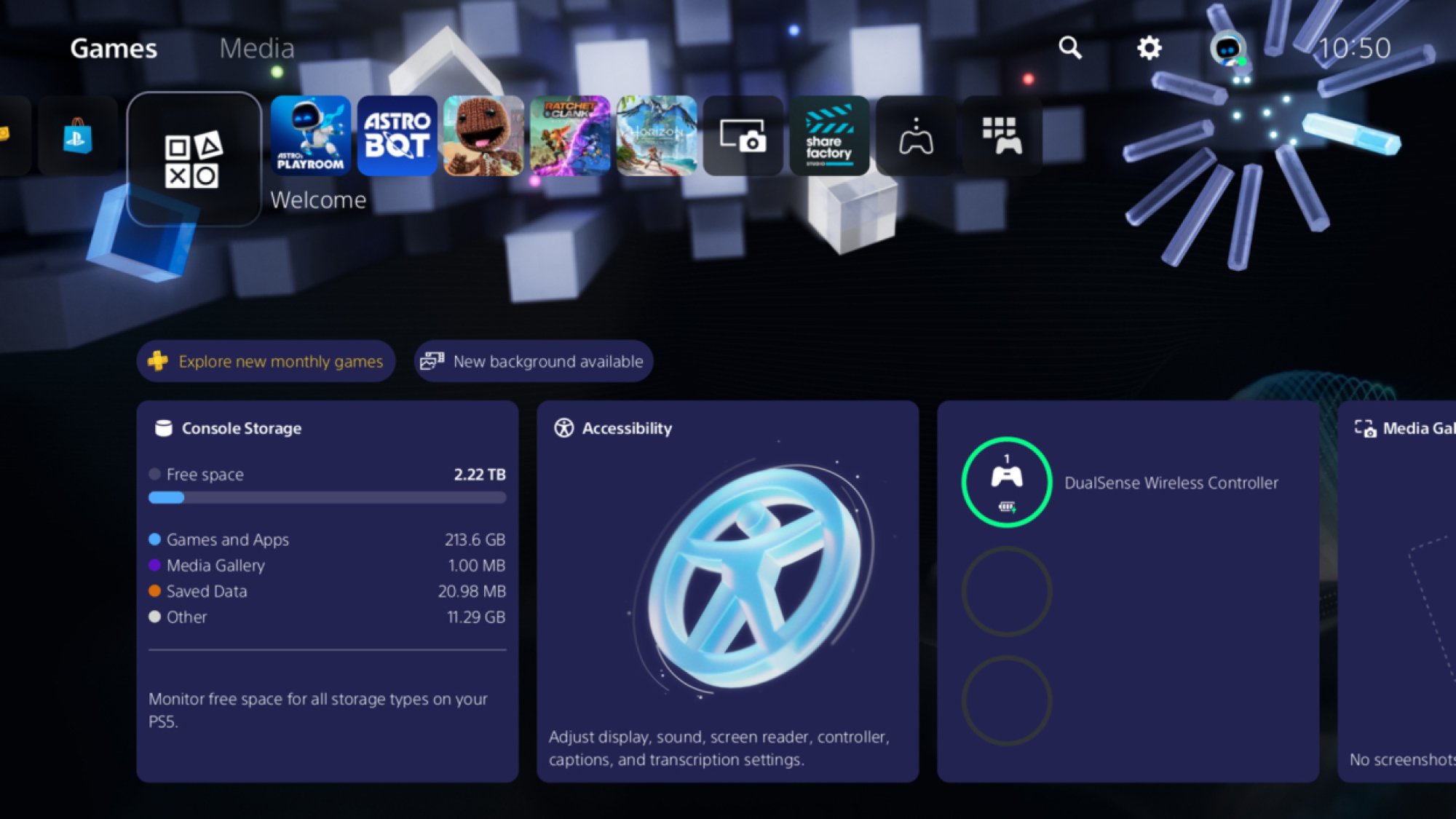
See all those widgets at the bottom of the Welcome Hub when you turn your PS5 on? Did you know that you can actually customize them? It’s especially handy if you’re like me and can’t stand seeing what are essentially ads taking up more than half of your display.

To adjust your PS5 Welcome Hub widgets, simply press X while hovering over the Welcome Hub tile, then navigate to the controls in the top-right corner. Here, you can select Presets to choose from various options set up by Sony, or select Edit Widgets to toggle specific widgets on and off. Personally, I disabled the News, PlayStation Plus, Wishlist, and PlayStation Store widgets, since they’re pretty much only there to sell you things.

Once you’re done selecting the widgets you want to see, before leaving Welcome Hub setup, navigate to the Settings cog and choose if you want to enable the carousel-like Large Layout, where you want notifications (Temporary Widgets) to show up, and if you want your widgets to match your broader System Appearance settings (more on that later). If you have the News widget active, you can also customize which games show news here.

Finally, to the left of the Settings cog, you can choose a background for the Welcome Hub, picking from options either prepared by Sony, bundled with certain games you own, or pulled from your Media Gallery.

Turn on your PS5’s surround sound and connect Bluetooth headphones

Your PS5 can do more than basic stereo sound, even if you don’t own a physical surround sound setup. That’s thanks to the power of various virtual surround sound codecs, which come baked into the console. To turn these on, head over to Settings > Sound > Audio Output > Audio Format (Priority). Here, you can choose between Linear PCM, Dolby Atmos, Dolby Audio, and DTS. Not all of these options support virtual surround sound, and I’ll admit I’m not enough of an audiophile to know the best one for every setup, but because it supports height data, Dolby Atmos has been the most versatile pick for my soundbar.

Alternatively, you can also use Sony’s own 3D Audio technology by selecting 3D Audio (TV) or 3D Audio (Headphones) from the sidebar. Personally, I haven’t found the results here to be as rich as Dolby Atmos, but that makes sense. These are built for gamers using TV speakers or headphones, so they aren’t the best option if you’ve got a soundbar or external speaker setup. Still, they’re worth trying out if you listen over your TV’s internal speakers or via a headset. Note that only Sony’s own headsets will connect to the console wirelessly by themselves, but there are ways around that, which my colleague Jake Peterson has written about here.

Make rumble more responsive on the PS5

Sony’s so proud of the rumble and haptics in the PS5 controller that it updated its classic DualShock branding to DualSense alongside the controller’s launch. But weirdly, the haptics aren’t as strong as they could be out of the box. That’s because the PS5 controller has a microphone built-in, and Sony has intentionally weakened its haptics to prevent interference from being picked up on the mic.

If you’re like me, and you barely use the microphone in your controller, there are two ways to fix that. The first is more temporary, and simply involves pressing the clear button above the microphone icon on your controller to mute it, which will strengthen the haptics until you turn it back on. It’ll also display an orange light while the mic is off.

The second doesn’t require you to manually flip your mic on and off, and will get rid of that orange light. You can enable it by toggling on Mute under Settings > Sound > Microphone > Microphone Status When Logged In, but know that you’ll need to toggle this back to On if you need to use the microphone again.

Turn off (or reduce) the PS5’s DualSense trigger haptics

DualSense Controller

Credit: Michelle Ehrhardt

Sony might be proud of the haptics in its brand new controller, but personally, I think they’re a little bit too strong, especially when it comes to the triggers. With the PS5, Sony introduced its new adaptive triggers, which add resistance to trigger pulls in certain games for heightened realism. But while having the controller fight back against you the first time you try to tighten a bowstring in a Horizon game might be a fun novelty, it gets tiring pretty quick.

Luckily, you can customize this, as well as fine tune any of the other haptics. Under Settings > Accessories > Controller (General), select Trigger Effect Intensity to choose how strong the adaptive trigger resistance should be, and select Vibration Intensity to set the strength for more general rumble. Personally, I have Vibration Intensity set to Strong, and Trigger Effect Intensity turned off. 

Install SSD or use HDD for PS4 games or offloaded PS5 games

The PS5 comes with a good amount of storage by default, and while amounts differ depending on your model, it’s usually enough for five to seven AAA games. But if you want more storage, you can actually install a supported M.2 SSD into your PS5 without much hassle. Sony has exact installation instructions here, plus a guide on determining if an SSD is supported. While specific steps will vary depending on your PS5 model and which SSD you get, you generally only need a screwdriver to complete installation. Even better? The new SSD won’t replace your existing internal storage, so you can use them in tandem.

To install games to your SSD once it’s installed, you’ll first need to change your Installation Location to M.2 SSD under Settings > Storage. Then, simply install a game as usual. If you want to move games that are already installed on your PS5’s internal storage to your SSD, head to your Game Library, highlight the games you want to move, press the Options button, and select Move Games and Apps. If you’re also using expanded USB storage, select Movable to M.2 SSD Storage after this step.

Speaking of USB storage, the PS5 also supports external USB drives. You can see requirements here—not every device is guaranteed to work. Also note that while you can play PS4 games directly off USB storage, PS5 games need to be installed to an SSD to work. However, you can keep a PS5 game offloaded to USB storage and then load it onto either your console’s SSD or your custom M.2 SSD when you’re ready to play, bypassing the need for a download.

Quickly customize game difficulty, subtitles, and graphics on the PS5

The first thing I do whenever I boot up a new game isn’t start my adventure, but dive deep into the settings to see what I can customize. It’s not the best first impression, but there’s usually a switch I can flip that will make the game play much better for me, especially if it ups the frame rate. Luckily, Sony’s aware of this optimization sickness I suffer from, and is doing its best to help.

Under Settings > Saved Data and Game/App Settings > Game Presets, you can set a number of preferences for how your games should play ahead of time, and your PS5 will automatically configure them for you when you boot up a supported game. It’s not a fully robust selection, since Sony can’t predict every game’s needs, but you can choose a preferred difficulty here, whether the game should be played in first-person or third-person (if both are available), which language you’d like to play in, whether subtitles should be turned on, your online multiplayer permissions, and most crucially for me, whether your games prefer Performance Mode or Quality Mode (called Resolution Mode here). Finally, I can set my PS5 games to default to smooth performance over the prettiest visuals.

Get hints from the PS5’s Game Help feature

Let’s say you’re struggling in a game, but you don’t want to bother to pull up an internet browser and look up a walkthrough. This is where the PS5’s Game Help feature comes in. It’s not available for every game, but if you’re stuck, it’s worth looking for. Just press the PlayStation logo button on your controller, and if it’s there, select the Game Help card. From here, your PS5 will suggest hints towards specific goals based on where you are in your game, and might even show you videos from other players. It’ll also warn you if you’re about to see spoilers, so you can back out before looking at a hint. 

It’s fairly self explanatory, and while the hints aren’t always detailed enough for my needs, I do appreciate that Game Help also estimates how long it’ll take you to complete certain goals, as well as show you your progress towards them. As a busy 30-something, it’s a great way to know how long my play sessions might be ahead of time.

As for where Game Help gets its gameplay videos, it’s from players who’ve opted in to share them. To start sending videos to Game Help, head to Settings > Captures and Broadcasts > Auto-captures > Community Game Help. Select On next to Participate, and Sony may occasionally look at your gameplay and upload select sections from it to its servers to serve as a guide towards other players. Voice or party chat audio won’t be recorded and uploaded videos won’t take up space on your console, but depending on the game, usernames or text-based chat messages shown in gameplay footage might be shared.

Change your PS5 console’s theme to a retro style

PS2 theme for PS5

Credit: Sony

Finally, this one’s just for fun. Back in 2024, Sony introduced themes to the PS5 home screen that mimicked the look of the PS1, PS2, PS3, and PS4. These left the system shortly afterwards, but came back for good in April of last year. To try them out, head to Settings > System > Appearance > Appearance and Sound and choose a console you’d like to mimic. Personally, I like the PS2 theme, but I’ve gone for the PS3 look for now, because my husband has a lot of fondness for that console’s XMB menu. Now, if only Sony would add even more themes to the list. Maybe an Astro Bot look?

Intel Aims To Hire A Unified Core Engineer, What Does This Mean For Hybrid Designs?

Intel Aims To Hire A Unified Core Engineer, What Does This Mean For Hybrid Designs?
Enthusiast and frequent leak-spotter Gray (@Olrak29_ on Xwitter) spied a fresh job posting from Intel that’s got the tight-knit community of hardware nerds buzzing with speculation on Chipzilla’s plans. Intel’s on the lookout for a Senior CPU Verification Engineer to join the team in Austin, Texas. Base pay kicks off at around $142K (the national

Ball x Pit will land on iOS and Android on March 12

Ball x Pit, a delightful roguelite that was one of our favorite games of last year, is on the way to mobile devices. The chaotic brick-breaking action is coming to iOS and Android on March 12. There will be a free trial with no ads, and you can unlock the full game with an in-app purchase. This is Ball x Pit “for your pants pocket,” according to the latest trailer.

For the uninitiated, Ball x Pit is sort of a mix of Breakout and Vampire Survivors with some base building (and elements of many other genres) blended in. It’s all about finding powerful synergies between the character(s) you select, passive abilities and the balls you use to take out enemies before they get too close to damage you. These balls are regular ones that deal damage on impact (aka baby balls) or special balls that are infused with a range of effects and powers, such as Lightning, Ghost and Poison. These special balls can be fused to combine their effects or evolved into more powerful versions.

BALL x PIT is going MOBILE! ��

�️ Launching on iOS & Android March 12

� Try-before-you-buy: try it for free, no ads! Love it? Unlock the full game with a single in-app purchase and keep BALLing forever!

Pre-order now on the App Store and Google Play! pic.twitter.com/3MmJ6dGNzp

— BALL x PIT � REGAL UPDATE OUT NOW (@BALLxPIT) February 23, 2026

On each run, you’ll collect blueprints and resources that you’ll use to reconstruct a fallen town. Buildings unlock new characters and abilities that can aid you on your next run. Everything synergizes beautifully in Ball x Pit.

Ball x Pit should work well with touch controls on mobile. You can set the balls to fire automatically, so all you really need to worry about is moving your character and aiming, as well as choosing your next upgrade when you earn enough experience gems.

The first of three planned updates for this year arrived in January. I’m still waiting for developer Kenny Sun to add cross-progression since I’ve already plowed dozens of hours into this game on PS5, PC and Xbox — it’s available on Nintendo Switch and Switch 2 as well. Ball x Pit is also currently on Game Pass Ultimate and PC Game Pass.

This article originally appeared on Engadget at https://www.engadget.com/gaming/ball-x-pit-will-land-on-ios-and-android-on-march-12-175159137.html?src=rss

New Microsoft gaming chief has “no tolerance for bad AI”

Last week’s surprise departure of Phil Spencer from Microsoft led to the promotion of Asha Sharma, who comes to head Microsoft’s gaming division after two years as president of the company’s CoreAI Product group. Despite that recent history, Sharma says in a new interview that she has “no tolerance for bad AI” in game development.

Speaking with Variety, Sharma noted that “AI has long been part of gaming and will continue to be,” before adding that “great stories are created by humans.” The interview comes after Sharma promised in an introductory memo: “We will not chase short-term efficiency or flood our ecosystem with soulless AI slop. Games are and always will be art, crafted by humans, and created with the most innovative technology provided by us.”

Those statements seem like a clear line in the sand from Sharma against the use of AI tools in Microsoft’s first-party game development, at the very least. But what separates “bad AI” and “soulless AI slop” from “innovative technology” that humans can use to create artful games is a matter of some significant debate in the gaming world.

Read full article

Comments

Lamborghini ditches plans for its all-electric supercar due to ‘close to zero’ buyer interest

Looks like we won’t get to hear the powerful hum of an all-electric Lamborghini on the streets anytime soon. According to a report from The Sunday Times, Lamborghini has abandoned making a production version of the Lanzador EV concept, which was expected to hit the market in 2029.

Stephen Winkelmann, chairman and CEO of Lamborghini, told The Sunday Times that there was “close to zero” interest from its customer base for battery-powered EVs. Winkelmann also revealed that the verdict to kill off the Lanzador was made late last year, but this is the first public confirmation of the decision after Lamborghini’s grand reveal of the EV concept in August 2023. The automaker’s CEO told The Sunday Times that “EVs, in their current form, struggle to deliver this specific emotional connection,” adding that the lack of noise could have played a part in failing to attract customers.

Instead, Lamborghini will replace the Lanzador with another plug-in hybrid electric vehicle, like its Reveulto and Urus. With this change, Lamborghini’s entire lineup will be hybrid EVs by 2030, with Winkelmann confirming that the company would continue making internal combustion engines “for as long as possible.” Still, the CEO hinted to The Sunday Times that Lamborghini could pursue another all-electric car in the future, but “only when the time is right.”

This article originally appeared on Engadget at https://www.engadget.com/transportation/evs/lamborghini-ditches-plans-for-its-all-electric-supercar-due-to-close-to-zero-buyer-interest-173441263.html?src=rss

Iron Guard: Salvation Is Coming To PlayStation VR2 Next Month

Iron Guard: Salvation, a VR sci-fi tower defense game, is launching on PlayStation VR2 in March.

Iron Guard: Salvation is a tower defense strategy game in which players must build and upgrade bases and weapons while managing resources and fending off waves of enemies in VR. A story-driven campaign mode offers a cinematic experience across 30 hand-crafted missions.

Iron Guard: Salvation is a direct sequel to Xlab Digital’s Iron Guard, which first debuted in 2021 and was ported to PS VR2 last year.

0:00

/0:41

We previously reviewed Iron Guard: Salvation when it released on Quest, where our reviewer found it to be a strong tower defense game that might have benefitted from heavier implementation of RTS mechanics and inclusion of a multiplayer mode.

Iron Guard: Salvation launches March 5th on PlayStation VR2. It’s out now on Quest and PC VR.

Say Goodbye to the Undersea Cable That Made the Global Internet Possible

The first fiber-optic cable ever laid across an ocean — TAT-8, a nearly 6,000-kilometer line between the United States, United Kingdom, and France that carried its first traffic on December 14, 1988 — is now being pulled off the Atlantic seabed after more than two decades of sitting dormant, bound for recycling in South Africa.

Subsea Environmental Services, one of only three companies in the world whose entire business is cable recovery and recycling, began the operation last year using its new diesel-electric vessel, the MV Maasvliet, and had already brought 1,012 kilometers of the cable to the Portuguese port of Leixoes by August.

TAT-8, short for Trans-Atlantic Telephone 8, was built by AT&T, British Telecom, and France Telecom, and hit full capacity within just 18 months of going live. A fault too expensive to repair took it out of service in 2002. The recovered cable is being shipped to Mertech Marine in South Africa, where it will be broken down into steel, copper, and two types of polyethylene — all commercially valuable, especially the high-quality copper at a time when the International Energy Agency projects global shortages within a decade.


Read more of this story at Slashdot.

A new Evangelion series is coming from Studio Khara and Yoko Taro, creator of NieR

Anime fans rejoice, as there’s a new Neon Genesis Evangelion series on the horizon. This was announced during a 30th anniversary event held in Japan. The bad news? Franchise creator Hideaki Anno won’t be writing the scripts.

However, his replacement will be Yoko Taro, the guy who created the video game NieR. He also wears a giant and rather unsettling moon mask for some reason. The NieR franchise is known for rich and complex lore, with a story spanning thousands of years that occasionally dips into a parallel universe.

It's him in a moon mask.
Wikimedia Commons

Evangelion veteran Kazuya Tsurumaki will be on hand to direct episodes, which is nice for long-time fans. He directed the Rebuild of Evangelion films and the recent Mobile Suit Gundam GQuuuuuuX anime. Composer Keiichi Okabe, from the NieR franchise, is scoring the new show. The new series will be produced by Studio Khara and Cloverworks.

While we know a fair bit about who’s behind the scenes of the upcoming show, we don’t know anything about the plot. We don’t know if it’s yet another remake of the original story, a sequel or some kind of spin-off like the chibi-inspired Petit Eva: Evangelion@School. There’s a trailer, but it’s light on details.

New “Neon Genesis Evangelion” ANIME SERIES NEW TRAILER

Written by Yoko Taro
Directors: Kazuya Tsurumaki & Toko Yatabe
Music: Keiichi Okabe
Animation Production: CloverWorks x Khara pic.twitter.com/jnJZ12XSRb

— Captain Melvin Seahorse⚘️ (@sshiroux19) February 23, 2026

With Taro on board, it could really go in any direction. It’s worth remembering, after all, that NieR is actually a spin-off of a PS2 game called Drakengard. In one of the multiple endings of that game, a final boss is transported from a fantasy realm to modern-day Tokyo. Slaying this beast releases a virus that plagues humankind, which is what eventually leads to the post-apocalyptic setting of NieR. This is sort of like if the events of a Dragon Quest game somehow led to the world of Resident Evil.

If there’s anyone who can breathe fresh life into the Evangelion franchise, it’s Taro. Did I mention he wears a gigantic moon mask? Also, this isn’t his first time penning TV scripts. He co-wrote the NieR: Automata anime spinoff.

This article originally appeared on Engadget at https://www.engadget.com/entertainment/tv-movies/a-new-evangelion-series-is-coming-from-studio-khara-and-yoko-taro-creator-of-nier-170916543.html?src=rss

The 2026 Mazda CX-5, driven: It got bigger; plus, radical tech upgrade

ENCINITAS, Calif.—Its sales may have been buoyed of late by the big CX-90 and CX-70 SUVs, but for Mazda, the CX-5 is still where most of the action is. Unlike the similar-sized, similar-priced CX-50, which was designed just for North America, the all-new CX-5 is a global car, and it’s also Mazda’s standard-bearer for a range of new technologies. Gone is the basic but effective infotainment system, replaced by an all-new Google-based experience as Mazda starts its journey toward software-defined vehicles. There’s even an in-house hybrid on the way, albeit not until next year. And it starts at a competitive $29,990.

The new CX-5 is bigger than the car it replaces, 4.5 inches (114.5 mm) longer and half an inch (13 mm) wider than before, at 184.6 inches (4,689 mm) long, 73.2 inches (1,859 mm) wide, and 66.7 inches (1,694 mm) tall. Much of that extra space is between the axles—the wheelbase is now 110 inches (2,794 mm) long, which translates to more interior space. From the outside, there’s a new light signature, and the way the bodywork curves around the front and wraps down the fenders gives me strong Range Rover vibes, even if I could never adequately capture what I’m talking about with a camera. As ever, Mazda’s arresting Soul Red Crystal metallic paint (a $595 option) sparkles, even on a day when the sun remained hidden from view.

The last time that Mazda evolved this compact crossover, it did so with a new upmarket interior. Since then, the brand has staked out that space across its model lineup, with cabins that punch well above their price tags. Happily, the company’s designers haven’t lost much mojo since then, with a restrained approach that looks good across the five different trim levels, each of which is a $2,000 step up from the one that precedes it. But if you’re a current CX-5 driver, you’ll find much has changed, perhaps not entirely for the better.

Read full article

Comments

10 Hacks Every WhatsApp User Should Know

WhatsApp is the most popular messaging app in most parts of the world, and in my decade or so of using it, I’ve learned a few important tips that make it a much more convenient and secure experience. I use the following WhatsApp hacks to keep my account safe, stop the app from overloading my notifications and storage, and save myself a lot of time. If you’re like me, and your entire social circle is on WhatsApp, then you’re absolutely going to need tips like these to stop from feeling overwhelmed.

Use advanced chat privacy to block exports and Meta AI

WhatsApp has end-to-end encryption, which means that the company itself cannot read the contents of your messages, but that doesn’t stop recipients from easily exporting your conversations. If you don’t want anyone to export your message history, make sure to enable Advanced Chat Privacy in WhatsApp. This feature needs to be enabled individually for each chat (including group chats).

With Advanced Chat Privacy enabled, photos won’t be automatically saved to recipients’ phones, AI features will be disabled, and no one will be able to export that chat’s history to their devices. Note that people can still forward your messages and take screenshots or screen recordings of them, but every little bit helps. You can enable Advanced Chat Privacy by opening any chat in WhatsApp, tapping the name of the contact or group, and going to Advanced Chat Privacy.

You can lock individual chats, too

Everyone knows that you can put an app lock on WhatsApp, which means that you’ll need a passcode (or biometric authentication) to view your messages whenever you open the app. A lesser known feature is that you can lock individual chats, too. This allows you to put chats with certain people or groups into a hidden folder. These hidden chats won’t show up in your list of WhatsApp conversations and can only be found by searching for the name of the contact or group. Even if someone else gains access to your WhatsApp, they also won’t be able to open these chats without an additional passcode or biometric authentication.

To use this, open any chat in WhatsApp, tap the name of the contact or group, and enable Lock chat.

Make your WhatsApp account more secure

WhatsApp's account security page.

Credit: Pranay Parab

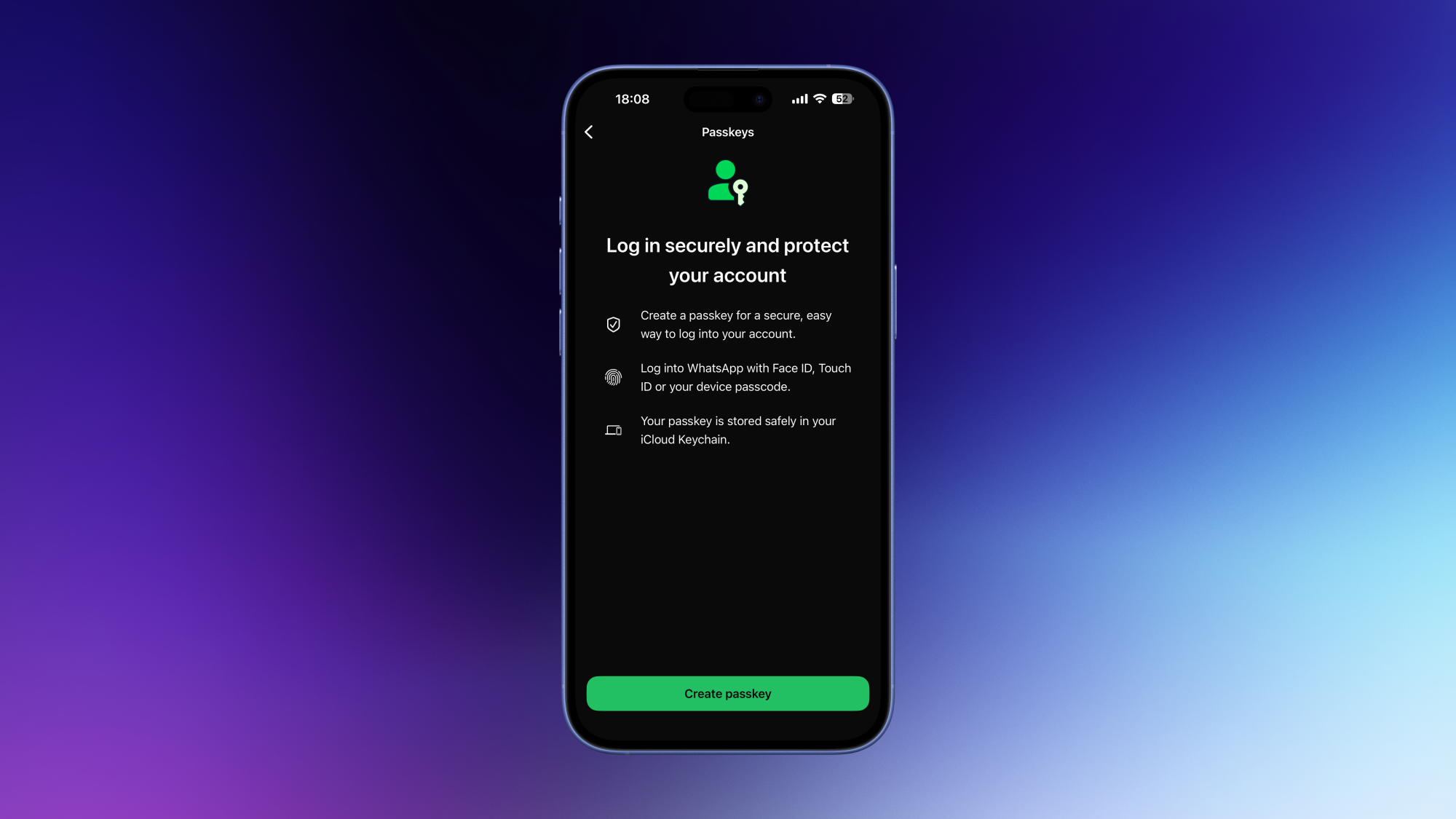
There are a few easy steps you can take in the WhatsApp settings to reduce the chances of unauthorized access to your WhatsApp account. Get started by going to WhatsApp Settings > Account. First, tap on Two-step verification and enable it. WhatsApp will ask you to create a 6-digit PIN, and the next time you log in to the app on a different device, you’ll be prompted to enter this PIN in addition to your other credentials.

When you set up two-step verification, the app will also ask you to add an email address to help recover the PIN in case you forget it. Once you’ve done that, feel free to add a passkey via the same account settings page, if you wish. The final step in securing your WhatsApp account involves locking your SIM card. Go to your phone’s cellular service settings and set up a SIM PIN there. This locks your SIM card or eSIM, and means that if someone tries to add your number to another device, they’ll need this PIN to get in. Since WhatsApp requires your phone number for activation, this step could prevent unauthorized access to your account.

Optionally, you can also add a password to your WhatsApp backups. Go to WhatsApp Settings > Chats > Chat backup > End-to-end encryption. You can either set up a passkey or a password to encrypt your backups. No one will be able to access your WhatsApp backups without this password, which will help keep your extra copies of important messages secure.

Stop unknown people from adding you to groups

As a heavy WhatsApp user, one of the biggest annoyances I used to face was people adding me to WhatsApp groups without my permission. I wasn’t too bothered when my friends did this, but eventually I started getting added to random spam groups by strangers, which is when I decided to put an end to it. You can keep strangers from adding you to WhatsApp groups by going to WhatsApp Settings > Privacy > Groups and selecting My contacts. This allows only saved contacts to add you to groups. Feel free to choose My contacts except… if you want to block specific people from adding you to groups.

The best WhatsApp hack for sending voice notes

If you like sending voice notes on WhatsApp, then I’ve got a few quick tips for you that will make your life easier. You might know that you can open any chat and hold the microphone icon to send a voice note. But did you know that if you slide this icon upwards towards the lock icon, you can let go of it and keep recording? This way, you don’t have to keep holding the mic icon while recording long voice notes. You can also hit the pause button to pause the recording and come back to it later, in case there’s an interruption while you’re recording a voice note. Once you’re done recording, you can also press the 1 button if you want your voice note to be deleted after the recipient hears it once.

I’ll admit, though, that I sometimes tend to ignore long voice notes. Instead, I use transcripts to quickly skim through them, and decide if they need an immediate response. Voice note transcripts are disabled by default, but you can enable them by going to WhatsApp Settings > Chats > Voice message transcripts > Manually. While you’re here, also tap Transcript language and select the language that you want to see your transcripts in.

Archive unwanted chats and groups

If you’re getting too many messages from certain WhatsApp chats or groups, they’ll always show up at the top in the list of your chats. To get these off the main window, head to the chat list and press and hold on the chats you want to banish. Then tap Mute. To ensure that these archived chats don’t reappear in the main window when you receive a new message from them, go to WhatsApp Settings > Chats and enable Keep chats archived.

Reduce notification spam

WhatsApp's notification settings page

Credit: Pranay Parab

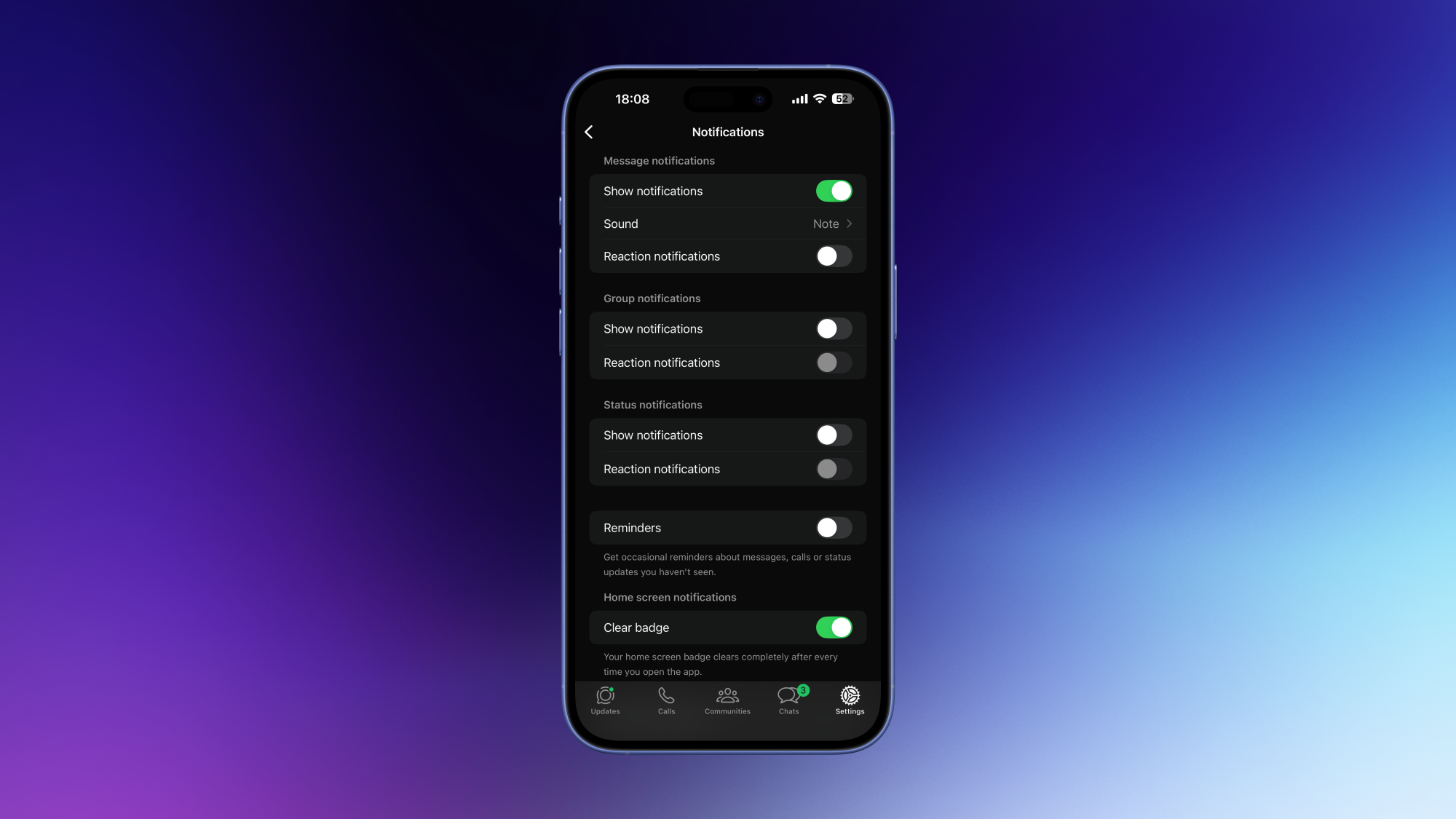
It’s really easy to get overwhelmed by notifications in WhatsApp. If you’re an even moderately social person, you’ll quickly find yourself receiving way more messages than you can reasonably be expected to handle. I’ve found that disabling WhatsApp notifications entirely works best to counter the problem, but that’s not the best solution for everyone.

Instead, you can try a few things to seriously reduce the amount of pings you get from WhatsApp. Go to WhatsApp Settings > Notifications and review every setting on this page. Personally, I’ve disabled all notifications for emoji reactions, group messages, and reminders. This way, I only get notified when individuals message me.

Create chat folders to manage message overload

WhatsApp’s chat folders are a great way to triage your conversations. In your chat list, press and hold on any conversation. From there, you can select either Add to Favorites or Add to list to get started. The first option adds these messages to the Favorites folder, and the second one lets you choose a custom folder name. These chat folders will appear above all your conversations, and you can quickly tap any of them to focus on specific conversations.

The real hack is to reorder these folders to your liking. You can do that by holding the name on any of these chat folders and selecting Reorder lists. I’ve used this to prioritize messages from loved ones, my meditation group, running friends, and so on.

How to stop “WhatsApp storage full” errors

Unfortunately, I know too many people whose phone storage is almost full because of WhatsApp. If you’re in this situation, go to WhatsApp Settings > Storage and data > Manage storage to start the cleanup. Tap Larger than 5 MB and you’ll be able to review everything that takes up a lot of storage space on your device. In the bottom-left corner, there’s a button that lets you sort these files by recency or storage size. I’ve used this to identify lots of duplicate files and delete all but one copy of such items. You can also see a list of the chats occupying the most storage space on your device. Tap each item to manually review your files.

It’s pretty easy to set up a few preventative measures to stop this error, too. You can go to WhatsApp Settings > Storage and data and turn off everything under Media auto-download.

Double check settings and privacy

It’s important to note that if you use WhatsApp’s apps on both your desktop and your phone, any settings changes you’ve made on one device might not sync to the other. You should review all settings to see if everything is syncing correctly.

While you’re double checking account details, you should also review your WhatsApp privacy settings. Go to WhatsApp Settings > Privacy, scroll to the bottom and select Privacy checkup for a quick overview. This is a step-by-step guide to enabling the most important privacy settings in WhatsApp, and is much faster than doing it manually.

Underwater PC VR Narrative Puzzler Echoes Of Mora Release Date Revealed

Underwater PC VR narrative puzzle game Echoes of Mora will launch in April on Steam.

Selkies Interactive announced at the recent Convergence Games Showcase that their debut title, Echoes of Mora, will launch April 29 on Steam. The announcement comes alongside a haunting story trailer and a 30-minute playable demo during Steam Next Fest, which begins today.

Echoes of Mora is described by its makers as an exploration-driven mystery with high emotional stakes, a fusion of Subnautica’s atmospheric aquatic exploration and Everybody’s Gone to the Rapture’s melancholic storytelling. You follow and guide Mora. After her brother disappears near a cursed lake, Mora sets out to find him. As the lake’s water rises, threatening the village, your help is crucial. You’ll share clues you find in the underwater world, guide Mora in the past, and accompany her on a time-bending journey that could decide the fate of her family and village.

0:00

/1:00

When we previously covered Echoes of Mora, our writer felt that “While [Echoes of Mora] is by no means a seamless swimming simulator, its compelling narrative beats and dreamy world design provide more than enough intrigue to earn it a place on my wishlist.”

You can wishlist Echoes of Mora on Steam today in advance of its full release in April.

PayPal Attracts Takeover Interest After Stock Slump

An anonymous reader shares a report: PayPal, the digital payments pioneer, is attracting takeover interest from potential buyers after a stock slide wiped out almost half of its value, according to people familiar with the matter.

The San Jose, California-based company has fielded meetings with banks amid unsolicited interest from suitors, the people said. At least one large rival is looking at the whole company, while some other suitors are only interested in certain PayPal assets, the people said, asking not to be identified because the information is private.

Buyer interest in PayPal is still at a preliminary stage and may not lead to a transaction, the people cautioned. Founded in the late 1990s, PayPal was an early mover in the world of digital payments. But the company now finds itself in a rut with its customers increasingly turning to alternative ways to pay for things. PayPal’s shares have fallen around 46% in New York trading over the last 12 months, giving the company a market value of about $38.4 billion.


Read more of this story at Slashdot.

Fixer Undercover Spies A Quest Release This Week

Macguyver-esque narrative VR puzzler hits Quest on February 26, with PlayStation VR2 and PC VR to come later.

Fixer Undercover was first revealed as a demo on the now defunct Meta Quest App Lab in 2024 and officially announced at the UploadVR Summer Showcase last year, promising a return to the VR escape room style puzzles popularized by games like the I Expect You To Die series and The Room VR: A Dark Matter.

As a special agent codenamed ‘The Fixer’, players will infiltrate a prison under the guise of a maintenance worker. Alongside a witty drone named Winston, a set of basic handyman tools like a hammer, grinder, pliers, and pipe wrench are used to solve a series of environmental puzzles.

Per a post on developer Creativity AR’s Discord, it expects a full playthrough to take roughly six to eight hours.

0:00

/2:02

Fixer Undercover Gameplay Trailer

Fixer Undercover was originally planned as an Early Access release in late January, but Creativity changed course in a social media post, saying “To be completely honest: we looked at the project and realized it wasn’t ready to open its doors yet… We want to release a complete game, not a broken one. We apologize for the delay.”

Fixer Undercover releases this Thursday on Meta Quest 3, 3S, and Pro for $14.99. The game’s official website states that versions for Steam and PlayStation VR2 are planned for “a later date.” The game can be wishlisted on Steam now.