Mozilla has released Firefox 148 for Windows, macOS and Linux, bringing a new AI Settings section that lets users disable all of the browser’s AI-powered features in one click and then selectively re-enable the ones they actually want, such as the local translation tool that works locally rather than in the cloud.
The update also patches more than 50 security vulnerabilities — none known to be under active exploitation — over half of which Mozilla classifies as high risk, including five sandbox escape flaws and eight use-after-free bugs in the JavaScript engine that could allow code execution.
eBay announced that it is cutting about 800 jobs from its global staff. “We are taking steps to reinvest across our business and align our structure with our strategic priorities, which will affect certain roles across our workforce,” the retailer said in a statement as reported by Bloomberg. This move will see about 6 percent of eBay’s current full-time workers laid off. Bloomberg noted that eBay would continue hiring in “key areas” but did not specify what those fields are.
The downsizing follows a week of business updates for eBay. On the same day it shared its latest financial results, the company announced that it would acquire Depop, a consumer-to-consumer secondhand fashion retailer, from Etsy. The Depop purchase carried a $1.2 billion price tag, which could put at least a small dent in the $11.1 billion it reported in 2025 full-year revenue.
This article originally appeared on Engadget at https://www.engadget.com/big-tech/ebay-will-lay-off-800-workers-or-6-percent-of-its-staff-191500844.html?src=rss
We’ve known Apple would follow up its blockbuster film F1: The Moviewith live coverage of F1 races in 2026. Now that we’re approaching the first grand prix weekend of the year, the company has provided details on what fans can expect to see inside the Apple TV app and beyond.
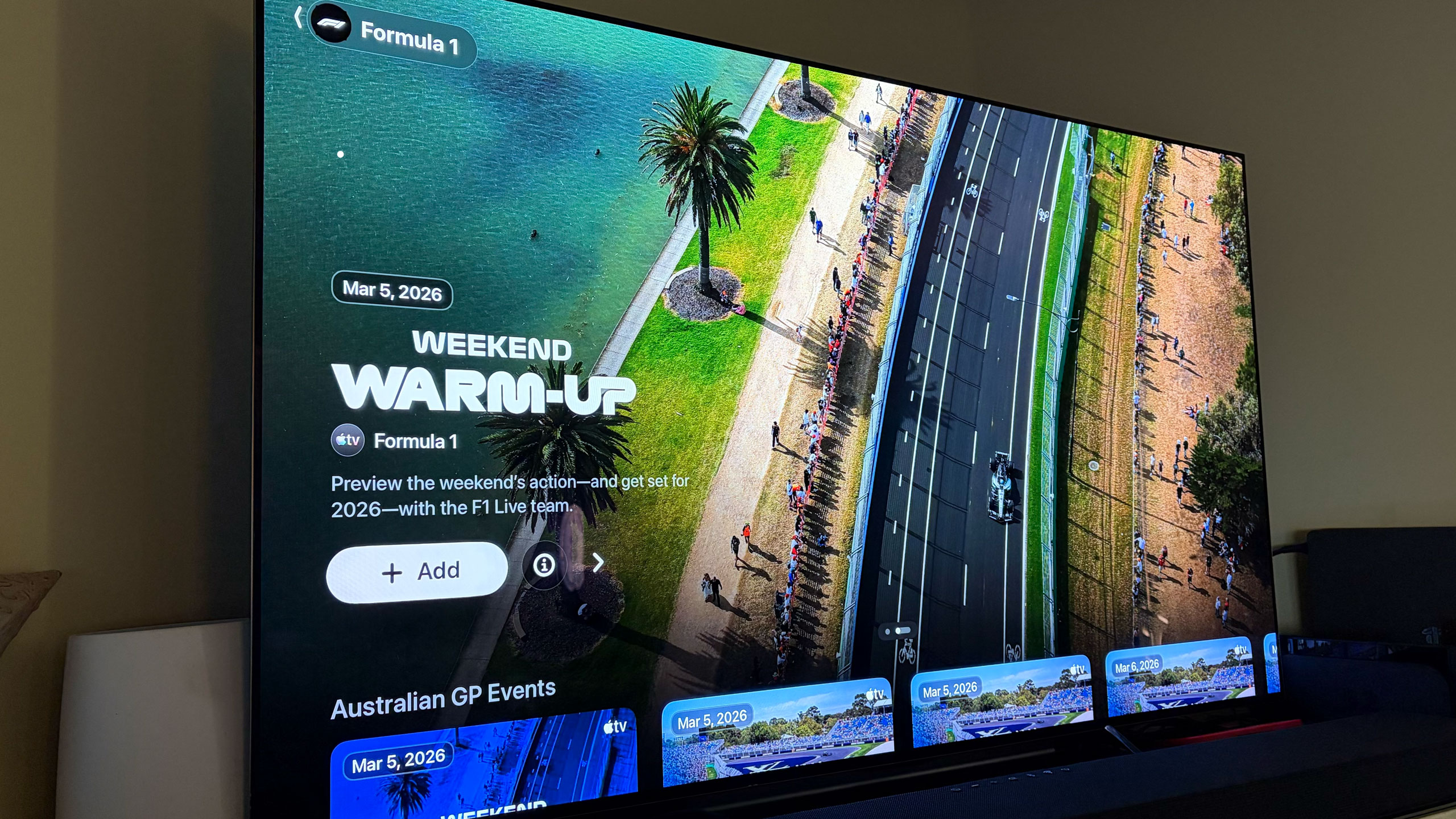
There’s already a dedicated F1 channel in the Apple TV app, which is where you’ll stream races live when the time comes. You can also watch practice sessions, sprint races and both pre- and post-race coverage. Apple offers a number of additional F1 videos there (I’d recommend watching the one on the new rules) and you’ll be able to stream the latest season of Drive To Survive on Apple TV as well.
Apple will offer the F1 TV feed as the main broadcast alongside the Sky Sports feed for all races. If you’ll recall, ESPN used to show the Sky Sports feed with Sky’s commentary team for its coverage of F1. Apple says it’ll broadcast every grand prix in 4K (Dolby Vision) with 5.1 audio (no mention of Dolby Atmos).
As part of Apple’s deal with F1, Apple TV subscribers get F1 TV Premium for the 2026 season. This gives you access to things like onboard cameras, team radios and live telemetry in addition to live coverage of the entire grand prix weekend. So, you can watch races on Apple TV or F1 TV, depending on your app preferences, or use the additional features of F1 TV Premium as a second (or third, etc.) screen setup. Netflix will also broadcast the Canadian Grand Prix in May as part of the deal that brought Drive To Survive to Apple TV.
F1 TV Premium
F1
Full replays for all sessions will be available in the Apple TV app as well. Apple will offer a condensed race in 30 minutes replay option too, and the company says it’s working to hide spoilers in case users are watching after the race begins or concludes.
Apple has cooked up some new features for F1 grands prix as it takes over broadcast rights in the US. When you click on the F1 channel in the Apple TV app, the current grand prix week’s content is up top and you have the option to follow F1 so that you get notifications about the various events. Apple will provide a Driver Tracker, Driver Data and dedicated feeds for P1, P2 and P3. You can also watch the driver onboard cameras for each car in the Apple TV app. So, you don’t necessarily have to venture out to F1 TV for those things.
Apple will provide various Multiview options so you can put the main broadcast next to driver cams and race data. The company will offer some preset configurations, but you can make your own Multiview mix too. If you like Mercedes, for example, you can watch the main feed with driver cameras from Russell and Antonelli right beside it. Apple says Multiview will support up to five feeds at once (one main in the middle with two smaller ones on each side).
The Formula 1 channel on Apple TV
Billy Steele for Engadget
If you can only listen to races, you can hear live coverage and commentary in Apple Music through a dedicated radio streaming channel. There are also updated features for Apple News, Apple Sports and Apple Maps, the latter of which will have detailed info for fans attending in-person so they can hopefully avoid any surprises — like road closures — on race day.
The first race of the season is next week in Australia (March 6-8). Practice begins Friday with qualifying on Saturday and the grand prix on Sunday. Or if you live in the US, that will be Thursday night through Saturday night (race begins at 11PM ET).
This article originally appeared on Engadget at https://www.engadget.com/entertainment/streaming/everything-you-need-to-know-about-streaming-f1-on-apple-tv-190600771.html?src=rss
When selling a home, it’s natural for folks to want to get as much money as possible for their property. That’s why people often put money into repairs and upgrades right before listing their house, and why people hire stagers to make the place look its best. But not all home-selling tactics are above board: Some unscrupulous home sellers resort to dirty tricks to convince you to overpay for their homes. Here are some of the tricks you should watch for on your next open-house tour.
Home sellers might try to hide the true age of an appliance
A key consideration when buying a home is the condition and age of everything in it, and unscrupulous home sellers might try to hide how old their stuff actually is in order to avoid giving you a credit or being forced to replace aging infrastructure like the furnace or HVAC system. They can always claim they don’t know when something was installed and try to dance around the units’ actual ages, but, typically, a competent home inspector can take one look at the serial number on every appliance and determine when it was manufactured and likely installed.
Which is why some home sellers might try to deter this by simply removing serial number stickers or plates from appliances, or scratching them to make them unreadable. Sometimes they might even use a marker to try to change installation dates, if they’re marked on the unit. If you can’t easily locate and read the serial numbers on appliances, be suspicious at the very least and insist on finding out how old the units actually are.
Sellers could try to re-label appliances with high-end brand badges
Most people aren’t experts in kitchen appliances, but most people are aware of the hierarchy of brands, and that certain brands—like Viking—are extremely expensive and high-end. So if you walk into a kitchen and the shiny, stainless-steel appliances have Viking badges on them, you might be thrilled to think you’re about to buy the most luxurious kitchen you’ve ever had. You might even be okay with paying a bit more if the appliances are included.
And it might be a ruse. You can actually buy appliance badges for brands like Viking online, adhere them on your mid-range appliances (covering or removing the real emblem), and hope buyers don’t know what the actual high-end models look like. This obviously won’t work on anyone who knows their way around appliances (or who has used high-end models in the past), but for a few bucks, it’s an easy way to make a kitchen look way more upgraded than it is. It’s only slightly less terrible than folks who leave brand-new appliances in place for the open house, then swap them for old, beat-up versions after closing—taking the good stuff with them.
Sellers might use these tricks to make old appliances look newer and more expensive
Appliances can make or break a kitchen—and a sale price. A kitchen that looks new and recently remodeled can boost the sale price of a house significantly. This inspires some cash-strapped sellers to try to make the kitchen look as new as possible with some cheap tricks.
There’s nothing wrong with sprucing up a tired old kitchen using some of these techniques, of course—as long as you’re open about it. It becomes problematic when a seller lets you assume things are newer and in better condition than they are and does nothing to disabuse you of the notion. A few common tricks include:
Fake stainless steel. People love the look of stainless steel, and tend to assume that stainless steel appliances are higher-end than white or black versions. It’s pretty easy and cheap to apply decals, contact paper, or vinyl wrap that will give an appliance a stainless steel look, making it just as easy for a buyer to assume those shiny appliances are newer and higher-end than they really are. Always check serial numbers—and be wary if they’re obscured or missing.
Upgraded oven grates, knobs, and hardware. Combined with a stainless steel decal, swapping out old, crusty burner grates for fancier new ones and replacing plastic knobs with metal versions can make an old oven look brand new. Again: If disclosed, there’s nothing wrong with this.
Dishwasher cabinet panel. One easy way to obscure the condition of an old dishwasher is to add a cabinet panel that matches the rest of the cabinetry. This gives it a high-end, built-in look that might cause buyers to overlook the actual age and functionality of the appliance. This can be a DIY job for anyone who’s reasonably handy—and might even be considered a nice upgrade, as long as you know what’s lurking beneath that panel.
Home sellers could make isolated upgrades to high bigger problems
Everyone does some work to get a house ready for sale. Deep cleaning, fresh paint, and necessary repairs get done shortly before the listing goes live so the house looks its best and looks well-maintained. But sometimes those necessary repairs are hiding a chronic problem the seller is hoping no one will notice because they’ve fixed it “for now” and covered up the damage.
The tell-tale sign is an isolated upgrade—a single wall painted in a room, a spot of new shingle on the roof, brand new carpet in the third bedroom but nowhere else, for example. A single, lonely upgrade or renovation, no matter how nicely done, might be a sign that something happened in that spot that the seller doesn’t want you to know about. At the very least, isolated upgrades should be pointed out to your home inspector for extra attention.
Sellers can stage furniture and decor to hide defects in the home
Another way home sellers try to trick potential buyers and hide problems is probably the oldest trick in the book: Simply hiding the problem under something else. If the house is being shown furnished and possibly staged, the clutter and interior design can distract you from checking out the bones of the place—and, after all, we don’t often move furniture around when checking out an open house. A few common tricks to watch for include:
Oddly-placed furniture. If a room has way too much furniture in it, or the couches and chairs are placed in strange ways that make the room uncomfortable, it’s time to look underneath and behind to see if there’s damage to walls and floors the seller doesn’t want you to see.
For-show drapes and curtains. If you see voluminous, floor-to-ceiling drapes and curtains in a room, pause to ask yourself if there’s actually a window behind them. They may have been added to hide a water-damaged wall or other problem.
Brand new area rug or carpet. If there’s a brand-new area rug or carpet in one area of the house but the flooring is tired and worn everywhere else, take a peek under it, if you can. It may have been added to quickly hide a problem.
Door propping. Did the seller helpfully prop open all the doors so you could move freely through the open house? That’s nice. Now remove the doorstops and make sure the doors actually close properly.
The freshest air. Making a house smell nice is an old technique when selling a home. A fresh batch of cookies or a quick airing-out is fine, of course, but if the house smells like someone splashed a gallon of Febreze everywhere they might be hiding an ominous smell—like mold, or cigarette smoke.
Meta has sued the people and groups behind three scam operations that used images and deepfakes of celebrities to lure users to scam websites. According to the company, the three entities were based in China and Brazil and targeted people in the US, Japan and other countries. The ads promoted fraudulent investment schemes and fake health products.
Meta said that it had filed lawsuits against several people in Brazil who promoted fake or unapproved healthcare products and online courses promoting them. The company also sued a China-based entity it says used ads featuring celebrities “as part of a larger fraud scheme that lured people into joining so-called investment groups.” The company didn’t provide details on how many ads these groups had run on Facebook, how many social media users had seen or interacted with the ads or how long the scammers had been operating on the platform.
So-called “celeb bait” ads have been a long-running issue for the company. Engadget has previously documented celeb bait scams on Facebook, including ones that frequently use Elon Musk and Fox News personalities to hawk fake cures for diabetes. The Oversight Board has also criticized the company for not doing enough to combat such scams. In its update, Meta says that “because scam ads are designed to look real, they’re not always easy to detect.” The company also noted that it has now enrolled “more than 500,000” celebrities and public figures into its facial recognition system that’s meant to automatically detect scam ads using the faces of famous people.
Meta’s handling of scammy advertisers has come under increased scrutiny in recent months after Reutersreported that researchers at the company at one point estimated that as much as 10 percent of its ad revenue could be coming from scams. The fact that Meta has made billions of dollars from problematic advertisers has also caused the company to be slow to take action against repeat offenders.
In addition to the groups behind the celeb bait ads, Meta says that it’s upgraded its ability to detect scam ads that use cloaking, which has at times hindered its internal review systems. The company also sued a Vietnam-based advertiser it says used scam ads to hawk “deeply discounted items from well-known brands,” including Longchamp.
Meta also took legal action against eight former “Meta Business Partners,” who promoted services that would “un-ban” or other “account restoration services.” The company says it will “consider taking additional legal action, including litigation, if they don’t comply” with cease and desist orders.
This article originally appeared on Engadget at https://www.engadget.com/social-media/meta-sues-advertisers-in-brazil-and-china-over-celeb-bait-scams-190000268.html?src=rss
Fixer Undercover is a terrific escape room adventure limited only by your tolerance for jank.
Are you a fan of the I Expect You To Die trilogy, but always wish you could get up and walk around the room to figure out what to do? That’s Fixer Undercover in a nutshell, an escape room spy thriller using handyman tools (a wrench, hammer, pliers, electric drill, and grinder) along with whatever happens to be in the room to get to the next room. Fixer Undercover adds full artificial locomotion to IEYTD’s established formula and the ability to move around and get more hands-on with the environment is both a strength and a weakness.
The Facts
What is it?: A spy-themed escape room adventure Platforms: Meta Quest 3, 3S, and Pro (played on a Quest 3) Release Date: February 26, 2026 Developer: Creativity AR Publisher: Creativity AR Price: $ 14.99
Fixer Undercover stars a character codenamed, wait for it, The Fixer, a secret agent for an unnamed organization sent to a prison under the guise of a handyman. We’re not alone though as a cute drone named Winston accompanies us for the duration of the game. Winston serves multiple functions: an extra set of holsters for tools, the source of the game’s soundtrack via a radio it carries (with multiple stations to choose from), and the game’s built-in hint system via a projector for a UI.
Winston, Fixer Undercover’s drone assistant. Images captured by UploadVR
Fixer Undercover’s story is told in media res, meaning most of the narrative has already happened and intermissions between chapters see Fixer and Winston recounting the mission and reading news articles written about it. It’s an interesting choice because it removes virtually any sense of peril. For players who don’t like to feel a time crunch or danger in their games, like a wall of lasers bearing down on them while trying to decipher a code on a keypad, this could be a good thing.
It’s a narrative choice I’ve never really cared for, but it doesn’t drag the game down at all. Fixer Undercover’s tone is mostly light anyway, with Winston’s stellar voice acting doing most of the tone setting. The story is perfunctory at best and I had already guessed the villain’s true plan hours before it was revealed, but Fixer Undercover’s gameplay is where it shines. Walking around a room looking for clues, places to use your tools (most of the time clearly marked yellow), or other random objects to get to hard-to-reach places is a genuine joy. The dopamine hit when finally exiting a room (even if a hint was used) was always there during my six hour playthrough.
0:00
/0:41
Solving a puzzle in Fixer Undercover captured by UploadVR
The aforementioned weakness stems from something most VR players are used to: jank. Have you ever opened a drawer in VR and reached inside only to get a hand stuck and watch it violently vibrate and contort into inhuman angles before it snaps back to normal? There’s a lot of that here. If two items are near each other, it’s a coin toss on which one gets grabbed. More than once, I got a chair or a barrel or box stuck to my hand and had to move it completely across the room to avoid triggering it again.
If this is something you’re used to from other games, it won’t hinder your experience. This is the unintended side effect of allowing a VR player to be more hands-on with everything. It thankfully never prevents solving a puzzle, but getting a pair of jumper cables stuck on a chair one too many times can become a nuisance.
Using the hammer in Fixer Undercover. Image captured by UploadVR
Graphically, Fixer Undercover is your average standalone VR game. Everything has that plastic looking sheen most Quest players will be accustomed to. I’m interested to see if the visuals get an uplift when the planned PC VR and PlayStation VR2 ports are released down the line. Ironically, that actually helps when solving puzzles. Items that cannot be touched are very easy to distinguish, which saves time that could be wasted trying to open or mess with anything non-interactable. Most of what can be touched, aside from all the food laying around, serves some sort of purpose.
Fixer Undercover, jank aside, is also a clean experience. No major bugs or performance issues to speak of and the game only hitched very briefly during scene loads. The only glitch I experienced was when I replayed the first room to record it. I moved a little too fast since I already knew what to do and one of Winston’s lines (“you know you can open that flap, right?”) got stuck on a loop for the rest of the room, repeating roughly every 30 seconds. There were times when lines of dialogue trampled one another, but that happens to me personally quite often because I move around a lot during chatty scenes and sometimes trigger a proximity based line.
Comfort
Fixer Undercover uses stick-based movement with options for smooth or teleport locomotion and smooth or snap turning. It also has motion vignettes that can be turned off for experienced players.
There are multiple sections of climbing that may be tough for some users. The game also can be comfortably played seated and the hip holster even adds a wrap around method for easier grabbing when in the seated mode.
Fixer Undercover Review – Final Verdict
VR has always had a penchant for great puzzle games and Fixer Undercover is no exception. The heavy emphasis on VR interactions and encouragement to think outside the box on solutions makes for a highly entertaining spy caper. The game is only held back by a healthy dose of grab jank, average graphics, and a fairly predictable story. None of those should be dealbreakers though. Fixer Undercover is a worthy addition to any puzzle lover’s library.
UploadVR uses a 5-Star rating system for our game reviews – you can read a breakdown of each star rating in our review guidelines.
How much would you pay for a good night’s sleep? This is a question I’ve asked myself repeatedly over the last few weeks as I’ve been testing the Dreamie, a $250 alarm clock and “bedside companion” that I couldn’t stop thinking about after I first encountered it at CES.
Ambient’s Dreamie offers many of the conveniences of a smartphone-connected device — highly customizable alarm schedules, a library of soundscapes and noise masks, Bluetooth so you can connect earbuds and podcasts (soon). But it is phone-free every step of the way, with all controls and features built-in so you don’t end up getting sucked into a doomscroll while you’re trying to wind down. It also has a light ring for ambient lighting modes and sunrise wakeups. This spring, it’s expected to start providing sleep insights as well for users who opt-in, using its microphone and motion sensors to get a reading on their nightly habits.
All of that’s meant to work together to, according to the website, “help you sleep better and break free from your phone,” a goal I was eager to explore. This may be one of the least unique problems to have as an adult in today’s world, but sleep has become a really complicated thing for me.
Falling asleep is hard because my brain is always racing, my quality of the sleep is trash and waking up every day feels like an act of torture. It’s gotten so bad that at some point in the last couple of years, I started using three alarms to make sure I get out of bed in time for work: a dedicated sunrise alarm clock, my smartwatch and my phone as the final, 11th hour save in case the other two methods don’t do the trick. As you might imagine, my partner, who is forced to also endure this horrid morning ritual, hates it.
So if there’s a device that can help fix this mess, I’m open to it. And after some time with the Dreamie, I think I’ve found a promising contender.
Getting into a sleep routine
There’s no companion app with the Dreamie and no subscription service you need to sign up for, which feels like a breath of fresh air in 2026. (I’m so tired of subscriptions, free us from this hell!) Your one-time purchase gives you access to everything it offers now and the updates that are in the pipeline.
After taking it out of the box and plugging it in, you’ll have to connect to your home Wi-Fi. Then, the Dreamie presents you with a tutorial to walk you through navigating its menus and physical controls. There’s a touch strip on the top of the device to turn on the lamp and adjust its brightness, as well as the brightness of any ambient color “scene” that’s active. By dragging the dot at the center of the lamp screen, you can throw the light in any particular direction. Volume is adjusted by turning the dial that’s around the clockface. To access the menu for alarms and other settings, swipe up. To cycle through the different content modes — ambient, wind down and noise mask — just swipe down from the top of the screen. Easy peasy.
Setting up your actual Sleep Routine takes a little more time and intention. A Dreamie Sleep Routine consists of multiple steps, which you can use all, some or none of for your custom routine. Those include the Bedtime Cue, which lets you know it’s the time to start getting ready for bed (you designate this time); the Wind Down, or the sounds you’ll fall asleep to; and the Noise Mask, the sounds that keep you asleep. If you wake up in the middle of the night, there’s a Back To Sleep option too.
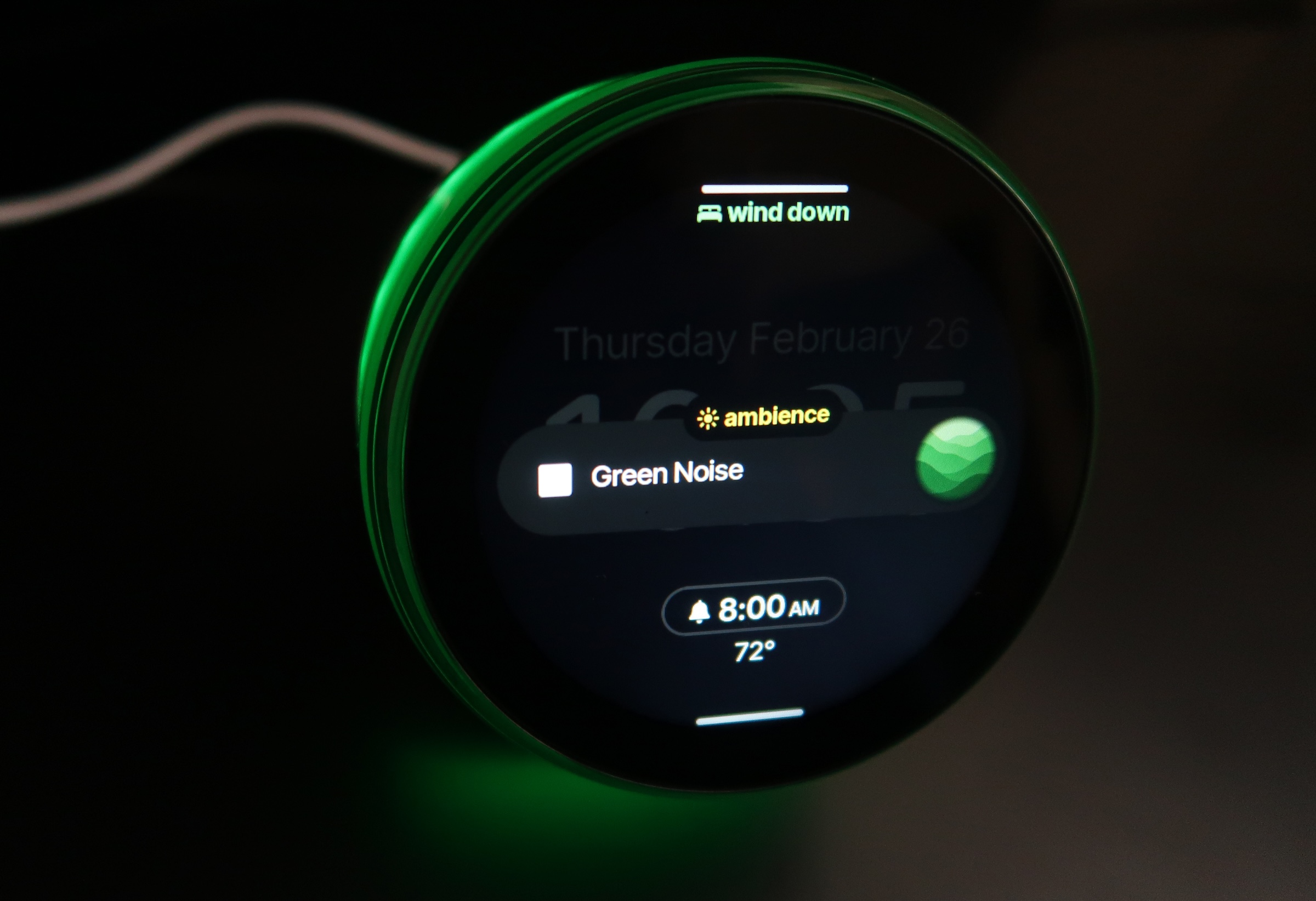
You can choose different sounds from Dreamie’s library for each category. Some options come with ambient lighting effects, too. There’s a decent selection of soundscapes, from the dramatic Aurora Borealis and the sounds of storms and rivers to different “colors” of noise.
Some noise masks, like Green Noise, coming with lighting effects.
Cheyenne MacDonald for Engadget
The quality of the Dreamie’s sound is what initially sold me during my demo at CES, and it holds up in daily use. The Dreamie has a 50 millimeter speaker inside, and the 360-degree grille on the bottom of the device makes it so the sound seems to come from everywhere. (My cats were extremely confused when I first turned it on). It really fills a room, and you don’t have to crank it up to achieve that. When Bedtime Cue comes on, I typically turn it down to about 25, and then raise it back up to 45 when I flip it to Wind Down mode. I’ve never once set it higher than 50, and the alarm in the morning has still been loud enough to wake me up.
After taking a few days to tweak my choices and figure out what I like best, I’ve settled into a really nice routine: Aurora Borealis as the Bedtime Cue, an hour of Forest Wind as my Wind Down and a Noise Mask of Brown Noise to play throughout the night. I love how easy it is to set the nighttime routine in motion once it’s established. When I hear the Aurora Borealis come on, I start making my preparations for bed. Brush teeth, take meds, lights out and, crucially (I’m trying really hard to be disciplined, here), my phone goes face-down on the nightstand until morning. If I want to stay up late that night and ignore the Bedtime Cue, I can just hit the little stop button on the display. But once I’m ready to actually try to fall asleep, all I need to do is swipe down on the display to initiate the Wind Down, and Forest Wind will start playing.
I have my Wind Down set for one hour, after which the Noise Mask begins. And man, that Forest Wind knocks me out. So far, I haven’t found myself still up and staring at the ceiling by the time Brown Noise comes on. I’ve only been able to confirm that it is indeed working and switching to the Noise Mask because my cats regularly wake me up in the middle of the night, and it’s been on each time that’s happened. But aside from those instances where my head is being used as a springboard by the creatures that share my home, I’ve been sleeping pretty well through the night.
To minimize distractions when you’re trying to sleep, the Dreamie’s display will dim in response to the surrounding darkness. There’s also a Redshift toggle to make the nighttime display easier on the eyes, a Dark Mode with a simplified appearance and the option to have the display turn off completely when you’ve been inactive for a while. I set the Dreamie on my nightstand close to where my face is at night, and I haven’t had any problems with light from the display keeping me up.
Waking up with Dreamie
In the morning, the light begins to come on 20 minutes before I want to be awake, followed by the gradually increasing sound of the alarm. There are only a handful of alarm sounds at the moment, but the options are all fine. There are no jarring, grating alarms here — even the bird calls option sounds rich and natural, rather than the too-shrill, piercing recordings I’ve grown used to avoiding on other alarm clocks and sound machines.
You can set multiple alarms with different bedtimes and wakeup times, which is really handy if your schedule is all over the place or you want to allow yourself to sleep in more on certain days. My only real complaint so far is that the sunrise feature isn’t quite as strong as I want it to be. The Dreamie’s sunrise goes from a warm glow to a bright blue-white, but it never gets big enough to wash over me in the way I expect a sunrise alarm to. Having the light on is helpful for orienting yourself when you’re groggy and half-asleep, but it doesn’t feel like it’s having much effect on my actual wakeup process.
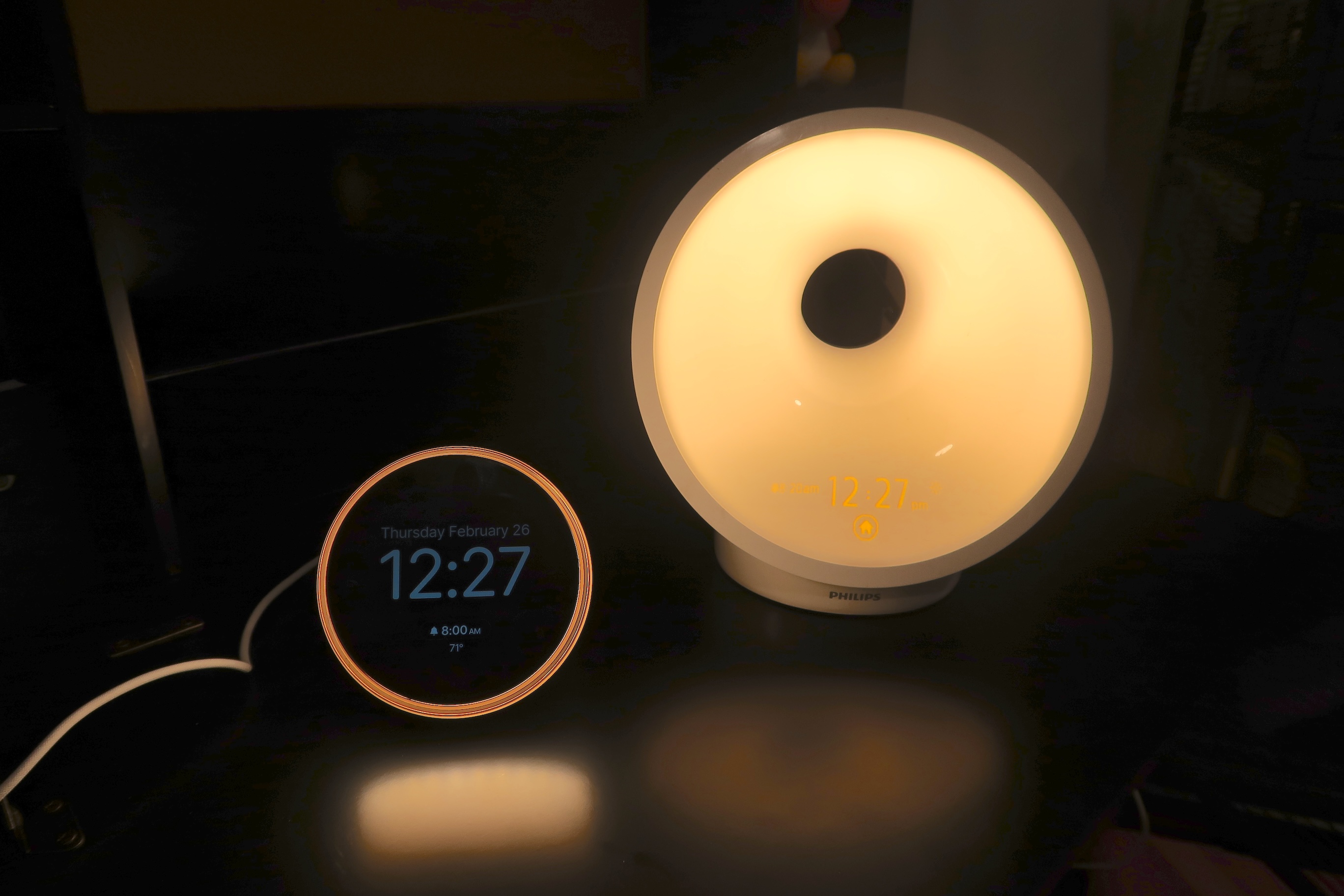
Dreamie next to a Philips Wake-Up Light.
Cheyenne MacDonald for Engadget
Part of the problem may be that none of the light is really directed forward and at the sleeper’s face. Even the Dreamie’s lamp mode at maximum brightness seems to have more reach than the sunrise feature. (And a note on the lamp, while it’s decently bright, it’s still a bit too dim for reading in bed unless I’m huddled up to it.)
Still, I’ve been sleeping well enough that I’ve been waking up alright most days even without being bathed in artificial sunlight. Don’t get me wrong, I’m still hitting snooze a few times before dragging myself out of bed, but there’s been a noticeable improvement in both the quality of my sleep and how miserable I feel come morning. I’m even down to using just two alarms: the Dreamie as my primary alarm, which is getting me up on its own for the most part, and my watch as a backup. At this point, I’m kind of attached to this thing.
The Dreamie is refreshingly compact, too. It takes up significantly less real estate on my nightstand than the Philips Wake-Up Light I’ve been using forever, or something like a Hatch Restore. The smaller footprint is something I appreciate as a person always battling cluttered surfaces. That also makes it better for travel. Since podcasts and sleep insights aren’t available yet, I haven’t been able to test those out, but they’re non-critical features for me. The company has shared an estimated timeline of Q1-Q2 for these features to arrive, with podcasts likely coming first. They’ll be nice to have, podcasts especially, but the Dreamie is more than able to do its main job of creating an environment that supports better sleep without those things.
Wrap-up
All of this brings me back to the question that’s been haunting me since discovering the Dreamie: Is it ridiculous to spend $250 on an alarm clock/noise machine? At a different time in my life, I would have said yes without hesitation. But the current version of me, who knows what it’s like to move through each day like a zombie because I’m sleeping so terribly, would begrudgingly disagree. As I pack up this review unit to ship it back, I’ll also be putting in an order for my own so I can keep my cherished new sleep routine going.
This article originally appeared on Engadget at https://www.engadget.com/home/ambient-dreamie-bedside-companion-review-the-best-sleep-ive-had-in-years-184019430.html?src=rss
Speaking of the Citrini’s blog post, which imagines a near-future AI-driven economic collapse, and which ended up help triggering the S&P 500’s worst single-day drop in nearly two weeks on Monday, FT Alphaville decided to track how US stock markets have moved on the release days of notable dystopian speculative fiction throughout history. The story adds: You may contend that this is facile. We would agree. You might contend that the comparisons make no sense because it’s possible to read a blog post during a single work shift, but it’s tricker to complete a whole novel (or sneak out to watch a movie). We would contend: do you really think traders read? Let’s begin. The methodology — tracking S&P 500 daily moves for post-1986 releases and DJIA moves for pre-1986 ones — crowned The Matrix as the all-time leader, its March 1999 US debut coinciding with a 1.11% drop in the index. Citrini’s “The 2028 Global Intelligence Crisis” came in a close second at -1.04%. On the positive end, the 2013 release of Her, a film about a man falling in love with an AI agent, coincided with the largest gain in the set at +1.66%.
Spotify’s adding a new way to sort playlists for paying subscribers. The feature is called Smart Reorder, and it allows you to automatically sort your songs by BPM (beats per minute) and key. This is great for those who want to gradually bump up the intensity of the songs they listen to.
It’s worth noting that this feature only works for playlists you’ve created or those you’ve mixed using the Spotify Mix feature, which lets you add or customize song transitions like a DJ would. Also, because Smart Reorder is an extension of Spotify Mix, you can’t have one without the other. Spotify Mix hasn’t yet been launched in all markets where the streaming service is present, including where I live, and as such, Smart Reorder isn’t available in those regions yet. It’s a shame, because I’m really excited to try it.
How to use Smart Reorder in Spotify
If you’re a Spotify Premium subscriber, using the Smart Reorder feature is easy. Just open any of the playlists you’ve created or mixed, and tap the Edit button above the first song. Scroll to the bottom and select Smart Reorder. Spotify will automatically rearrange your songs by BPM, and you can tap the Save button up top to confirm the changes.
Smart Reorder should be a very useful feature for people like me, who prefer workout playlists that slowly bump up in intensity. I like to hear high BPM songs towards the end of my gym sessions or runs, but that might not be ideal for everyone. Some types of exercises, such as spin workouts, might be better off switching between high and low BPM songs as the intensity varies, and Smart Reorder wouldn’t be great for those use cases. Some users on Reddit also suggested that you should create a copy of your playlists before using Smart Reorder on them, since you can’t automatically restore playlists to their original order if you end up not liking the changes after saving them. To duplicate a Spotify playlist, open the playlist and tap the three-dots button above the list of songs. Select Add to other playlist > New playlist, then add a name for the copy and and tap Create.
This is another example of Spotify doing more with its AI DJ feature than Apple Music, where the AutoMix AI DJ feature has been more of a mixed bag for me. At the moment, AutoMix just handles song transitions, and Apple hasn’t added any kind of custom playlist reordering to it.
Tech and financial writer Dana Blankenhorn drops in to explain why he’s contributing to our Independence 2026 fundraiser — and why you might want to join in, too.
An anonymous reader shares a report: It might look like something from the early days of the internet, with its aggressively grey color scheme and rectangles nested inside rectangles, but FPDS.gov is one of the most important resources for keeping tabs on what powerful spying tools U.S. government agencies are buying. It includes everything from phone hacking technology, to masses of location data, to more Palantir installations.
Or rather, it was an incredible tool and the basis for countless of my own investigations and others. Because on Wednesday, the government shut it down. Its replacement, another site called SAM.gov with Uncle Sam branding, frankly sucks, and makes it demonstrably harder to reliably find out what agencies, including Immigration and Customs Enforcement (ICE), are spending tax payers dollars on.
“FPDS may have been a little clunky, but its simple, old-school interface made it extremely functional and robust. Every facet of government operations touches on contracting at one point, and this was the first tool that many investigative journalists and researchers would reach for to quickly find out what the government is buying and who is selling it, and how these contracts all fit together,” Dave Maass, director of investigations at the Electronic Frontier Foundation, told me.
Burger King, the chain that leans into creepy when others don’t dare, is at it again. The Vergereported on Thursday that the company is rolling out a new voice-controlled AI chatbot for its workers. That may sound like business as usual in 2026, but this assistant doesn’t just help with meal prep and monitor inventory. It also has an unsettling habit of surveilling employees’ voices for “friendliness.”
The voice-controlled chatbot will live inside employees’ headsets. The company said the AI is trained to recognize when its low-paid workers utter phrases like “welcome to Burger King,” “please” and “thank you.” Managers can then keep tabs on their location’s “friendliness” performance.
“This is meant to be a coaching tool,” Thibault Roux, Burger King’s chief digital officer, told The Verge. However, he added that the company is also “iterating” the system to detect tone in conversations. Is there a chatbot that can warn Burger King executives about off-putting ideas?
Burger King retired its Creepy King mascot in 2025.
Burger King / YouTube (Commercial Ads)
The OpenAI-powered assistant’s other duties sound potentially useful (and decidedly less creepy). It can answer workers’ meal prep questions, like how many strips of bacon to put on burgers or instructions for cleaning the shake machine. It’s also integrated into the chain’s point-of-sale system, so it can tell managers when items are out of stock or machines are down.
The “Patty” chatbot is part of a broader BK Assistant platform the company is launching. It will roll out to all US locations by the end of 2026. Meanwhile, its “restaurant maintenance with a side of mass surveillance” chatbot is currently being piloted in 500 restaurants.
This article originally appeared on Engadget at https://www.engadget.com/ai/burger-king-will-use-ai-to-monitor-employee-friendliness-173349148.html?src=rss
If you follow tech news, you’re likely familiar with Apple’s two big events each year: WWDC in June, where the company reveals new OS updates (like iOS 26), and its fall event, where it typically announces the latest round of iPhones. But while these are Apple’s best known events, they’re not the only ones. The company does mix things up, hosting mid-year keynotes every now and then to announce new products, especially when those products aren’t the latest flagship iPhones. The March event is just the latest such example.
Apple will be hosting this special event Wednesday, March 4, live from New York City. While we won’t know exactly what the company has in store until they make their announcements, there are plenty of rumors from leakers who seem quite confident in their reporting. Here are the six products we expect to see during Apple March event:
Apple will replace the iPhone 16e with the new iPhone 17e
The iPhone 16e is Apple’s option for customers looking for the essential iPhone experience, without spending close to $1,000 to get it. The iPhone 17e will likely continue that mantle, with some small upgrades to separate it from its predecessor. The display likely won’t be among them, though. Rumors suggest Apple will keep the same 6.1-inch display with the lower 60Hz refresh rate. And despite having an OLED panel, the 17e will likely not have an Always-On display. Again, Apple cuts corners with the “e” series to bring the cost down. Apple could, however, upgrade the camera notch for the 17e, adding the Dynamic Island from its recent flagship iPhones.
The biggest upgrade for the 17e will likely be the A19 chip, the same SoC Apple put in the iPhone 17 series. That’s the benefit here: You get the power of the iPhone 17 without paying the iPhone 17 MSRP. I expect Apple will keep the $599 price tag from the 16e here, which means you save $200 by not opting for the iPhone 17.
Apple will reveal the A18 iPad and M4 iPad Air
Rumors suggest Apple will also refresh its base model iPad, as well as its iPad Air. You wouldn’t know it from the design, however, as leakers expect both iPads to look identical to the current models. That’s not necessarily a bad thing, though: Apple’s recent iPad designs look modern, with large edge-to-edge displays and thin bezels. If Apple shrunk the bezels any further, there wouldn’t be much room to hold onto the iPad without accidentally touching the screen.
The advantage with these new iPads is in power: The base iPad will upgrade from the A16 chip to the A18, the same chip found in the iPhone 16 series. That should offer some good performance, especially for the price, if Apple keeps things starting at $349. On the flip side, the iPad Air will likely move from the M3 to the M4. M4 is more powerful than M3, but it’s not necessarily a reason to upgrade from the current Air to the new one. Still, it could be a good option for anyone upgrading from an older iPad Air—though iPadOS isn’t the most demanding software.
We’re about to get our first look at Apple’s “cheap” MacBook
Apple’s MacBook Air is a great value at $999, and an even better one when you get it on sale. But the company seems poised to reveal an even better-value laptop. The company will announce a new MacBook—likely just called “MacBook”—that will start at just $599. To drive down the cost, the company is rumored to be using an A-series chip from its iPhone line, rather than its M-series chips that power all of Apple’s modern Macs—possibly the A18 Pro. This laptop may also have a smaller 12.9-inch display compared to the Air’s 13.6-inch screen, with 8GB of RAM and a 256GB SSD. That’s not much RAM by today’s standards, as Apple’s MacBooks all ship with 16GB by default, but it might make sense for users who want a better price and don’t mind the cut in performance.
To win even more customers over, Apple may introduce new colors for this MacBook line, including light yellow, light green, blue, and pink. Apple’s MacBooks don’t typically come in fun colors, so this could add some novelty to push buyers to pick them up. That certainly has my attention: I usually only spring for the MacBook Pros, but if I could get a MacBook in light blue to match my iMac, I’d consider it.
Apple will likely take this opportunity to introduce the M5 MacBook Air. This won’t be an exciting update: Aside from the bump from the M4 to the M5 chip, the computer should essentially be the same. It’ll still come in both 13 and 15-inch options, with the same overall design. However, new buyers will probably notice the boost in graphics and NPU performance, even compared to the M4. CPU performance is also improved, though it’s not quite so sharp. Still, the M5 Air may just be the best overall MacBook package, for anyone looking for the best balance of power and price.
Apple will introduce M5 Pro and M5 Max with new MacBook Pros
But for anyone looking for the most powerful MacBooks, no matter the price, Apple’s new M5 Pro and M5 Max MacBooks should do it. These will follow the M5 MacBook Pro, and while we don’t know the exact performance gains yet, expect these to be Apple’s most powerful chips yet. Like some of Apple’s other upgrades this year, the rumors don’t suggest any design changes here, so the overall laptops should look and feel about the same—minus the boost in performance.
A fictional memo set in June 2028, published by short seller Citrini Research, wiped roughly $10 billion off Indian IT stocks in a single trading session on February 24 and sent the Nifty IT index down as much as 5.3% — its worst single-day fall since August 2023 — on the argument that AI coding agents have collapsed the cost advantage of Indian developers to the price of electricity. The index has shed more than $68 billion in market value in February alone, its worst month since 2003.
But the core claim that India’s entire $205 billion software export industry rests on cheap labor is roughly 15 years out of date, an analysis argues, custom application maintenance alone accounts for about 35% of a typical Indian IT firm’s revenue, per HSBC, and enterprise platforms require deterministic outputs that probabilistic AI systems cannot wholesale replace. HSBC estimates gross AI-led revenue deflation for the sector at 14-16%, a measured headwind rather than an extinction event. The story adds: 24 years of software export data that has never posted a decline, $200 billion in annual revenue, partnerships with the very AI labs whose products are supposed to be the instrument of the sector’s destruction, possibly a new $1.5 trillion market category emerging at the intersection of services and software, and the largest U.S. corporates in the middle of mapping their entire workforces into process architectures that require technology partners to modernise. I think India’s IT is going to be fine.