Microsoft warns that the powerful XCSSET macOS malware is back with new tricks

Microsoft said it has detected a new variant of XCSSET, a powerful macOS malware family that has targeted developers and users since at least 2020.

The variant, which Microsoft reported Monday, marked the first publicly known update to the malware since 2022. The malware first came to light in 2020, when security firm Trend Micro said it had targeted app developers after spreading through a publicly available project the attacker wrote for Xcode, a developer tool Apple makes freely available. The malware gained immediate attention because it exploited what, at the time, were two zero-day vulnerabilities, a testament to the resourcefulness of the entity behind the attacks.

In 2021, XCSSET surfaced again, first when it was used to backdoor developers’ devices and a few months later when researchers found it exploiting what at the time was a new zero-day.

Read full article

Comments

The Truth About Cortisol, the Hormone That Health Influencers Like to Blame for Everything

Do sweet and salty foods taste good to you? Is your sleep maybe not the best? Do you have some belly fat? The answer to these questions is probably yes, because you are human, but that’s not important right now! TikTok influencers would like you to consider another possibility: that your cortisol is too high, and that you should buy their supplements (link in bio!) to control it. Then you’ll be relaxed at night and energetic in the morning, you’ll enjoy the taste of kale, and—most importantly—you’ll become thin and beautiful.

This cortisol dysregulation idea has become a sort of mega-phenomenon, absorbing the power and anxieties of anything it touches. If you look up cortisol on TikTok, you’ll find weight loss tips, sleep hygiene tips, massage techniques, and more. You’ll be served videos not only on cortisol, but also on gut issues, mood issues, healing from trauma, smoothie recipes, menstrual cycle syncing, when you should and shouldn’t use caffeine, and just about any other health issue a woman might search for. (Sorry, men—most of this content isn’t for you. Yet.)

Scroll those videos long enough, and you’ll see a claim about any symptom or inconvenience you’ve ever experienced. It’s all due to your high cortisol, they say.

What is cortisol, anyway?

Stepping away from TikTok-land for a moment to talk about actual physiology, cortisol is a hormone that we produce from our adrenal glands, which sit on top of our kidneys.

The adrenal glands most famously produce epinephrine, which you might recognize as the “fight or flight” hormone we call adrenaline. (In the United States, epinephrine is the medical name. Both words refer to the same thing: ad + renal is the Latin way you say “on top of the kidneys,” and epi + nephro is the same in Greek.)

Besides epinephrine/adrenaline, the adrenal gland also produces hormones that regulate water and electrolyte balance, and small amounts of sex hormones. And—relevant to our topic today—they also produce cortisol. Where epinephrine is involved in momentary “fight or flight” reactions, cortisol is the hormone that helps us deal with stress in the longer term, like days to weeks or longer.

Your cortisol levels increase when you’re sick, pregnant, severely dehydrated, recovering from surgery, or your body is otherwise dealing with major stress. And these cortisol levels should go up—this is a good thing! People who don’t produce enough cortisol in these situations can experience an adrenal crisis, which can be deadly.

In other words, cortisol helps our bodies respond appropriately to stress, especially serious, life-threatening physical stress. If you’ve ever taken a glucocorticoid medication (with a name like cortisone, prednisone, or dexamethasone), or used hydrocortisone cream on a rash, those are all variations of cortisol.

There are medical conditions where your body doesn’t make enough cortisol, like Addison’s disease, and medical conditions where your body makes too much, like Cushing’s disease. Both of these are issues to discuss with your doctor, not your friendly local TikToker, but more about those in a bit.

What people say about cortisol on social media

We’ve covered some of the claims about cortisol above, but to give you a few more examples, here are some of the things healthfluencers say are signs that your cortisol is too high:

  • Waking up between 2 a.m. and 4 a.m. at night

  • Being tired in the morning and “wired” or overthinking at night

  • Craving sweet and/or salty foods

  • Having belly fat or love handles (“cortisol belly”)

  • Round face (“moon face”)

  • Cognitive difficulties like “brain fog” or trouble making decisions

  • Feeling anxious or irritable

  • Acne

  • Swelling or fluid in the face, belly, or other areas

  • Gut issues (any kind)

  • Feeling shaky due to (presumed) high blood sugar

What “high cortisol” symptoms actually mean

In reality, these symptoms aren’t specific enough to point to elevated cortisol, or to anything else, really. Some of these are common and minor enough that probably everybody experiences them sometimes; who doesn’t crave candy?

I find it especially interesting that these symptoms are trendy among women who promote weight loss tips or who search for weight loss tips. If you’re dieting all the time, you might have a lot of these symptoms! Being low on energy (calories) is associated with poor sleep, brain fog, gut issues, feeling irritable, feeling lightheaded or shaky due to low blood sugar—and, for many people, obsessing over whatever fat they have, be it a small or large amount.

Others could signal serious medical issues if they are severe enough. For example, you might think you have a “moon face” if your normal face shape is round; that’s not actually a problem. But if your face has always been thin and then becomes round over the span of a few months or years, that’s a textbook symptom of Cushing syndrome; you should go see an endocrinologist.

This is “adrenal fatigue” all over again

The “high cortisol” branding for these symptoms is new, but it seems to have evolved from the exact opposite. About five years ago, adrenal fatigue was the bugbear of the day. Remember when Gwyneth Paltrow launched a vitamin packet specifically to address it?

The idea behind adrenal fatigue was that your body is so stressed it has burned out and stopped producing stress hormones; the symptoms include fatigue, weight gain, and cravings for salt and sugar. Sound familiar? Adrenal fatigue has been thoroughly debunked by scientists; the symptoms don’t even match the supposed cause.

On the other hand, those symptoms do match—sort of—with high cortisol. Somewhat hilariously, there are TikToks that call “adrenal fatigue” another name for “high cortisol,” which is nonsensical; both can’t be true. But the high-cortisol myth collects other myths as it goes, so it seamlessly absorbed this one, too.

Another phrase that’s now used, both by medical professionals and (perhaps more often) by TikTokers who are making shit up, is “HPA axis dysfunction.” Those letters refer to three parts of your body that are involved in regulating cortisol levels:

  • The hypothalamus (H) is a part of your brain that can produce corticotropin-releasing hormone, or CRH, which signals the pituitary.

  • The pituitary (P) gland sits just below the hypothalamus, and when it receives CRH, it produces adrenocorticotropic hormone, or ACTH, to signal the cortisol-producing portion of the adrenal gland.

  • The adrenal (A) gland releases cortisol in response to ACTH.

High cortisol causes the hypothalamus and pituitary to stop making, or to make less of, their respective cortisol-triggering hormones. If something in this system were to get screwed up—one of the components not properly responding to its signals, perhaps—that would be a problem. “HPA axis dysfunction” is an umbrella term (not a specific diagnosis) for ways that this can go wrong. On TikTok, though, it’s sometimes used as a drop-in replacement for “adrenal fatigue.”

What influencers say causes high cortisol

Influencers are much bigger on spotting symptoms of high cortisol than they are at explaining why we all have this supposed hormone dysfunction.

Still, there are a few scapegoats. Since cortisol is often described (legitimately) as a stress hormone, the TikTok hormone gurus seem to assume that it affects everybody who feels stressed or leads a busy life—which is basically all of us. Caffeine is also mentioned in some of these social media posts, but there isn’t any strong evidence to suggest that your morning coffee is messing with your hormones.

Where the fearmongering really goes off the rails, though, is in implicating exercise. Longtime Lifehacker readers will remember when I covered the popular TikTok myth that HIIT (interval training) and lifting weights increase your cortisol and make you fat, while Pilates keeps you lean. (This is not true.) Please indulge me while I quote myself:

“Cortisol levels in the blood are elevated after high intensity exercise, but these levels return to normal within an hour. We also adapt pretty quickly to high intensity exercise, as exercise physiologist John Hough points out here: Work from his research group showed that after 11 days of high-intensity cycling, those transient cortisol spikes got a lot lower. (Other research backs this up.) In other words, we get better at handling physiological stress the more practice we get—which any athlete or trainer could have told you. The cortisol release that’s triggered by exercise is just not considered to be a significant factor in weight gain, when you talk to actual endocrinologists (hormone specialists) or scientists who study exercise or metabolism.”

There’s another myth connected to this one: the idea that, if you ovulate and menstruate (as many women who aren’t on hormonal birth control do), that intense exercise during certain phases of your cycle will increase your cortisol to extreme levels and cause the symptoms previously discussed. This is not true either.

What actually causes high cortisol

Here’s where we’ll make a brief stop in reality-land: There are medical conditions that cause high cortisol levels in the body, and these can be serious and even life-threatening.

Keep in mind that cortisol is a hormone that is supposed to rise in response to stress; levels are two to four times higher than normal during pregnancy, for example. It also rises and falls each day, typically peaking in the morning around the time we wake up; it’s lowest at night. (The size of this fluctuation, and even whether you have it, varies considerably from person to person. Don’t trust a naturopath or chiropractor who wants to diagnose you with high cortisol based solely on a measurement of this curve.)

So, slightly elevated cortisol as a result of normal life stresses is not usually a medical issue. But abnormally elevated cortisol is.

Here’s a great example that shows both what the TikToks get right and what they get wrong. Bridget Houser, profiled in the Washington Post’s medical mysteries series, experienced headaches, anxiety, thinning hair, and a tendency toward weight gain that she managed by exercising more. Her face became round. Several doctors suggested her symptoms might be due to stress from her impending (or, as the symptoms continued, recent) wedding.

Ultimately, she turned out to have cancer—a tumor in her lung was sending out ACTH, a hormone that normally is a signal from the pituitary gland (located in your head, under your brain) that adjusts levels of cortisol in the body. Rogue cancer cells can sometimes butt into that hormonal conversation, and that’s what happened to Houser. After she got surgery to remove the tumor, her cortisol levels subsided and her symptoms went away.

There are other conditions besides cancer that can cause similar symptoms, but they occur under extreme stress. This review article lists several scenarios where pathologically high cortisol has been observed, including:

  • alcohol use disorder

  • late stage chronic kidney disease

  • major depression, anxiety, and some other mental health diagnoses

If you think you have high cortisol, to the point where it’s affecting your health, please go see a real doctor.

How to lower your cortisol, according to TikTok

Unscrupulous influencers, having convinced you that you have a health problem, have no shortage of answers for you. Most of these answers end up putting money in their pocket: There are dozens if not hundreds of “adrenal support” supplements out there, which TikTokers with affiliate codes will happily sell you. You can also part with your money by purchasing courses on specific types of massage or meditation, like EFT tapping (you tap on “meridian points” on your body while focusing on negative emotions) or “trauma-releasing” floor exercises.

Influencers are always happy to pick you up on the “food is medicine” bandwagon, so there are plenty of video clips showing foods you should or should not eat, and “adrenal cocktails” you can mix up and drink every morning. Among the supplements you “should” take are plenty of ordinary vitamins (specific B vitamins, sometimes) and recommendations to take supplements with adaptogens like ashwagandha. There is no solid research connecting these recommendations with adrenal health, but eating veggies and protein are good for us anyway. If TikTok tells you to eat more kale, you may not need to, but it won’t necessarily hurt.

Along the same lines, social media posts will call out sleep disturbances as a symptom of high cortisol, and then recommend basic sleep hygiene steps as a supposed treatment for high cortisol. Cortisol is an unnecessary middleman here, whether it’s actually involved or not; if your sleep sucks, you should try to sleep better. I’ll just add that if your sleep still sucks after setting up a no-phone bedtime routine and taking morning walks in the sunshine, maybe you should ask your doctor about getting evaluated for sleep apnea.

Why you should not listen to TikTok about how to lower your cortisol

According to TikTok, high cortisol is so significant that you must fix it, and fixing it will change your life; but it’s also minor enough that you don’t need to seek medical care for it, and you can fix it yourself. Those two ideas don’t really fit together.

That combination gets dangerous when real medical issues are involved—imagine if Bridget Houser, the woman with cancer, had taken to TikTok to diagnose and treat herself. Or to take another example, there’s a corner of TikTok where women tell each other that your husband’s “short fuse” is really a sign of high cortisol. I’m sorry, but if your husband has anger management issues, the type of help you need is not a video instructing you on what supplements to tell him to take.

Ultimately, if you think you have symptoms of high cortisol, it’s important that you consider how severe your symptoms are—and act accordingly. If you feel stressed and think you might benefit from some yoga or an “adrenal cocktail” of orange juice and coconut water, be my guest. Maybe it will help, and if not, no harm, no foul.

On the other hand, if you’re having symptoms that are seriously affecting your life and your health, see a real doctor. An endocrinologist can diagnose hormonal problems, but you might have better luck starting with your symptoms instead of guessing at the cause. For example, if you often wake up in the night and feel groggy in the morning, you might want to consider talking to a sleep specialist.

One last note: If you’re scrolling TikTok and think you might have a problem with your hormones, there are plenty of “hormone balance coaches” who will offer to take you under their wing and order a bunch of expensive tests to figure out what’s going on. This is not the same as going to a doctor who actually knows what they are doing. These hormone coaches may order the wrong kinds of tests, and usually do not have access to the types of tests used in medical diagnosis of hormone issues. Please go see a real doctor.

The Powerbeats Pro 2 Track Your Heart Rate From Your Ears (but Not Very Well)

We may earn a commission from links on this page.

The Powerbeats Pro 2 are a new set of headphones with a really interesting feature—Apple says they can measure your heart rate during workouts. Huge if true—imagine if you could leave your watch at home (or not bother to buy one in the first place) and still get a heart rate reading to go with your workout. But that’s only going to be a useful feature if the data is reasonably accurate. I was curious how good a reading they can actually get from your ears, so I compared the Powerbeats Pro 2 to a traditional chest strap, and to the Apple Watch for good measure. So how do these headphones stack up against those established methods? Not well, I’m afraid. Not well at all. 

My first hint that the heart rate functionality may be a bit underwhelming was that Apple says on their support page for the Powerbeats Pro 2 that “If you’re wearing an Apple Watch during your workout…the Apple Watch heart rate monitor data is prioritized,” suggesting that the headphones’ heart rate data isn’t as good as the Apple Watch’s heart rate data, and they know it. 

Okay, so, maybe the headphones’ data is slightly less accurate, or slightly less reliable. But how much less? I’ve been doing heart rate comparisons whenever I review or compare devices, wearing a chest strap alongside the device I’m testing and seeing whether the device can keep up. For some examples, see my reviews of the Coros Pace 3 for a watch with an impressively accurate heart rate sensor, and of Whoop for one that tries hard to keep up, but doesn’t always succeed.

So I ran the same type of test for the Powerbeats Pro 2, and got some surprising data—that is, when I could get the headphones to pair and the “compatible” apps to play nice. The bottom line: These aren’t going to replace a heart rate monitor for serious athletes, and probably aren’t even good enough for casual use for anyone who wants to track their heart rate. But take a look at my results and see for yourself.

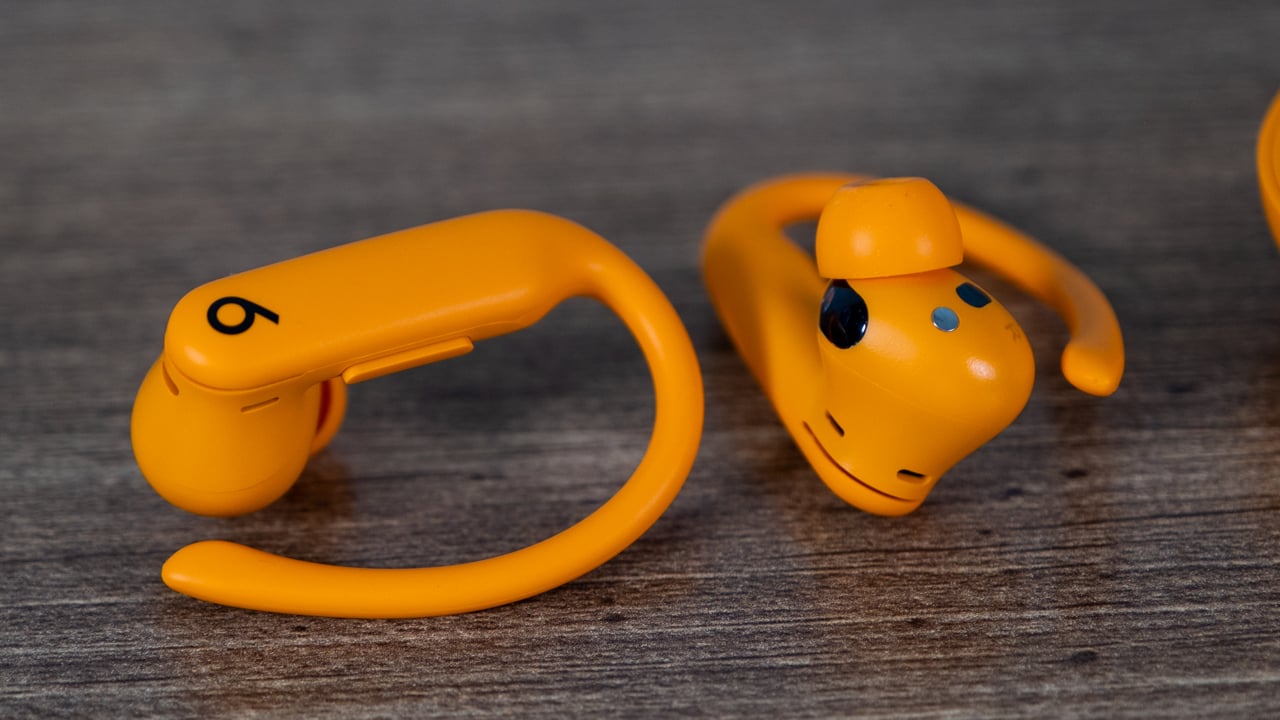
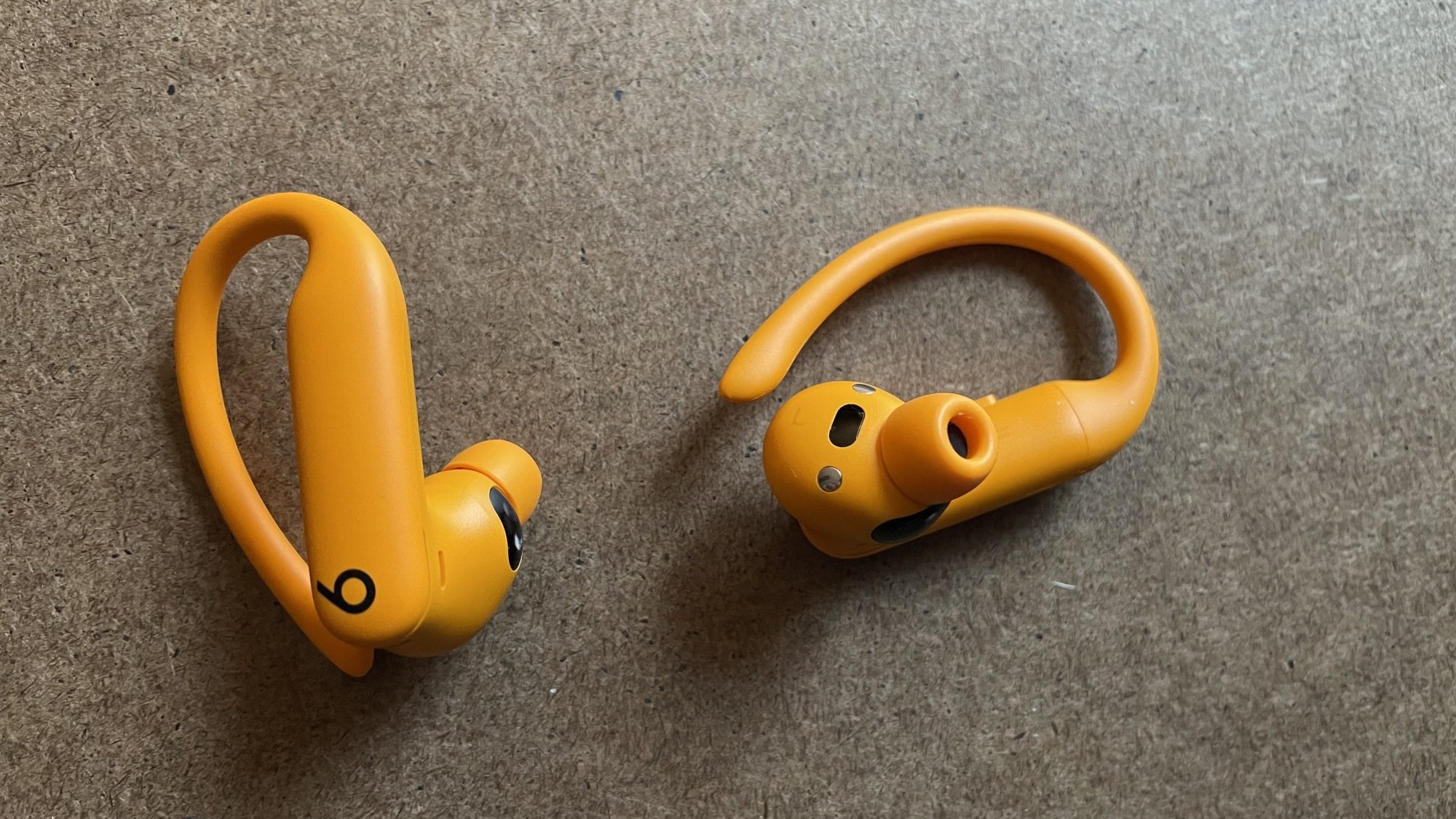
Powerbeats Pro 2, showing the sensor
The little black window next to the ear tip is the heart rate sensor.
Credit: Beth Skwarecki

How I tested the Powerbeats Pro 2’s heart rate functionality

I took these headphones for several runs, some outdoors and some on a treadmill. I tried a variety of apps, but most of the data you see below is from tests done with Runna on iPhone (iPhone 12 Mini) and Strava on Android (Pixel 9). Outdoors, it was cold, and I wore a buff over my ears. Indoors, I was in a busy public gym, with nothing on my ears but the Powerbeats Pro 2. 

I did the same mini workout for each test, except where noted. This was: 

  • Two minutes warmup (if on a treadmill, this was a jog at 5-6 mph)

  • Five rounds of one minute running (7.0 mph) followed by one minute walking (3.0 mph)

  • No cooldown—I typically rested or walked while reviewing my results and setting up the next test. 

(Quiz for those following my fitness coverage: is this a SIT or a HIIT workout? Answer key here.) 

I chose this interval workout because intervals do the best job of showing the performance of a heart rate sensor. If I just did a steady run, you’d expect a more or less steady line, and we’d be quibbling over whether the line is a little more (or less) wobbly than it’s supposed to be. But when my actual heart rate surges up and drops down repeatedly, it’s easy to see when a sensor lags behind, or doesn’t quite reach the peak, or stays consistently too high or too low compared to the chest strap. 

A chest strap, by the way, is as close as you can get to a gold standard for heart rate field tests like this. I used my trusty Coospo paired to a Garmin 265S. For each of the graphs below, the data from both devices was collected at the same time. The software used to make the graphs is DC Rainmaker’s analyzer.

The heart rate data was often inaccurate or just plain useless

Testing a heart rate feature on a device is usually simple: I record a workout on the new device, compare to the readings I get from a heart rate chest strap, and report here on how it did its job. But testing the Powerbeats Pro 2 was more like solving a mystery. I believe I’ve figured out what the heck is going on here, and it’s not good news. 

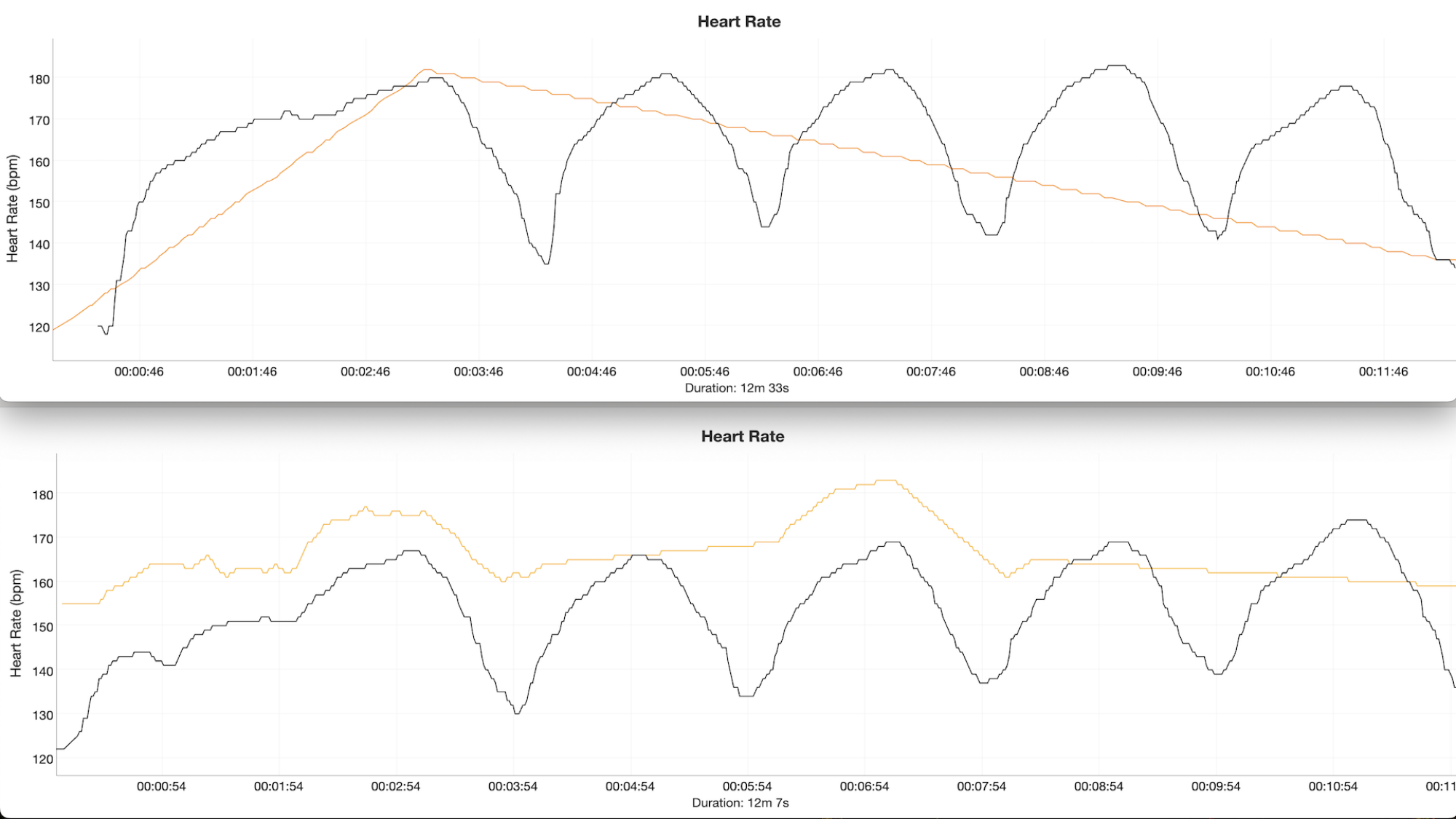
The first time I took the headphones out for testing, with the iPhone app Runna, I got laughably poor readings—two or three data points each, instead of the hundreds that should have been there. Was it Runna’s fault? The headband I wore over my ears on that cold day? Or are the headphones really that bad? 

Two graphs with a reference heart rate in black, and an orange line that does not follow the data at all.
Powerbeats Pro 2 in orange, chest strap heart rate monitor (for reference) in black.
Credit: Beth Skwarecki

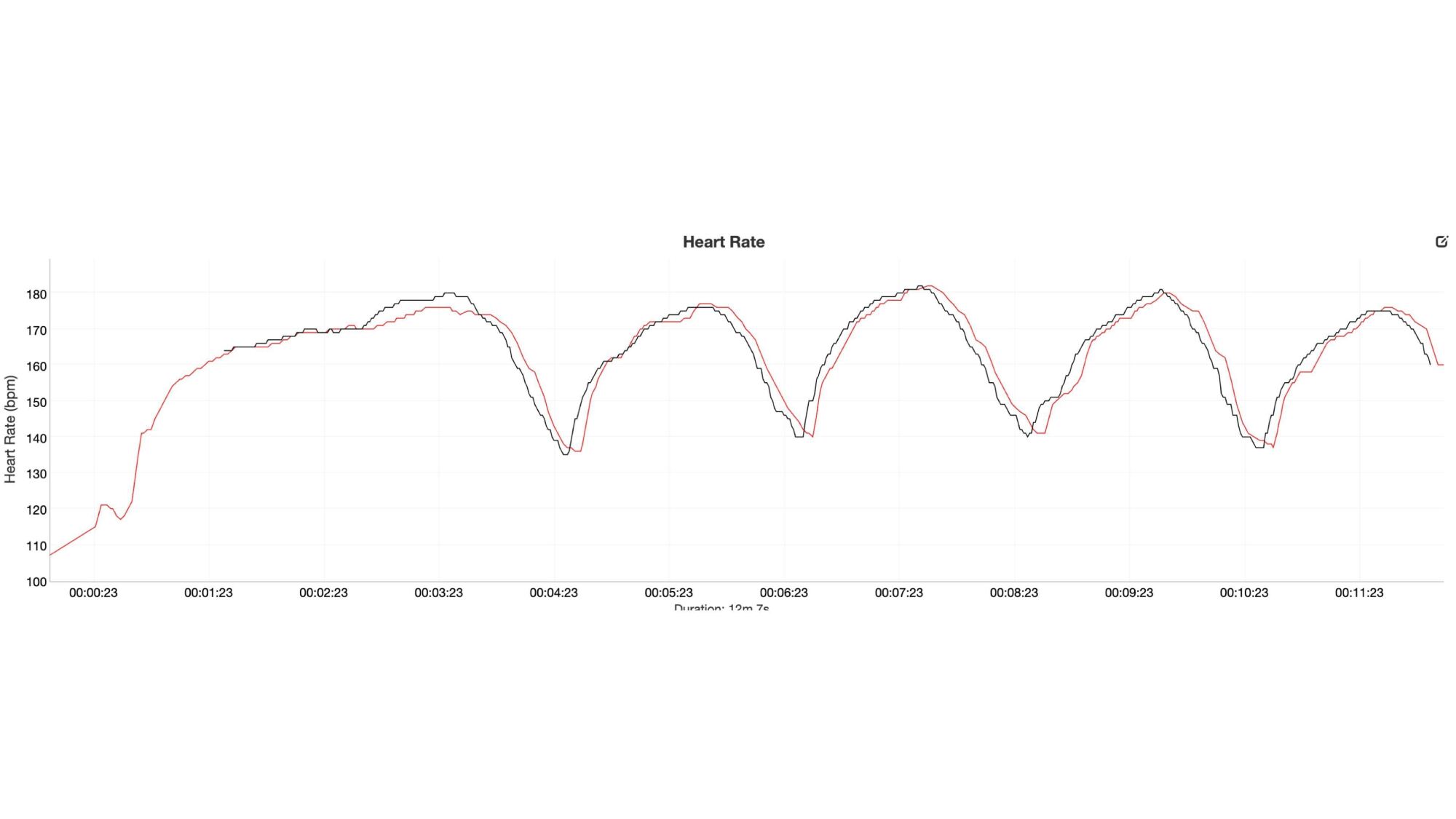
For comparison, I did another interval run with the Runna app but using a Series 10 Apple Watch as the sensor. Apple Watches have always had pretty good heart rate sensors, and you can see the drastic difference here. (The Apple Watch is in red.) 

Two heart rate graphs closely matching
Apple Watch in red, chest strap heart rate monitor (for reference) in black.
Credit: Beth Skwarecki

Strangely, one of my tests that day—on an Android phone, with the headphones paired to the Strava app—saw the heart rate trace meander aimlessly, and then suddenly snap on to the true data for the second half of the workout. OK, so the headphones can report a correct heart rate, but when and how? And why don’t they do it more often? 

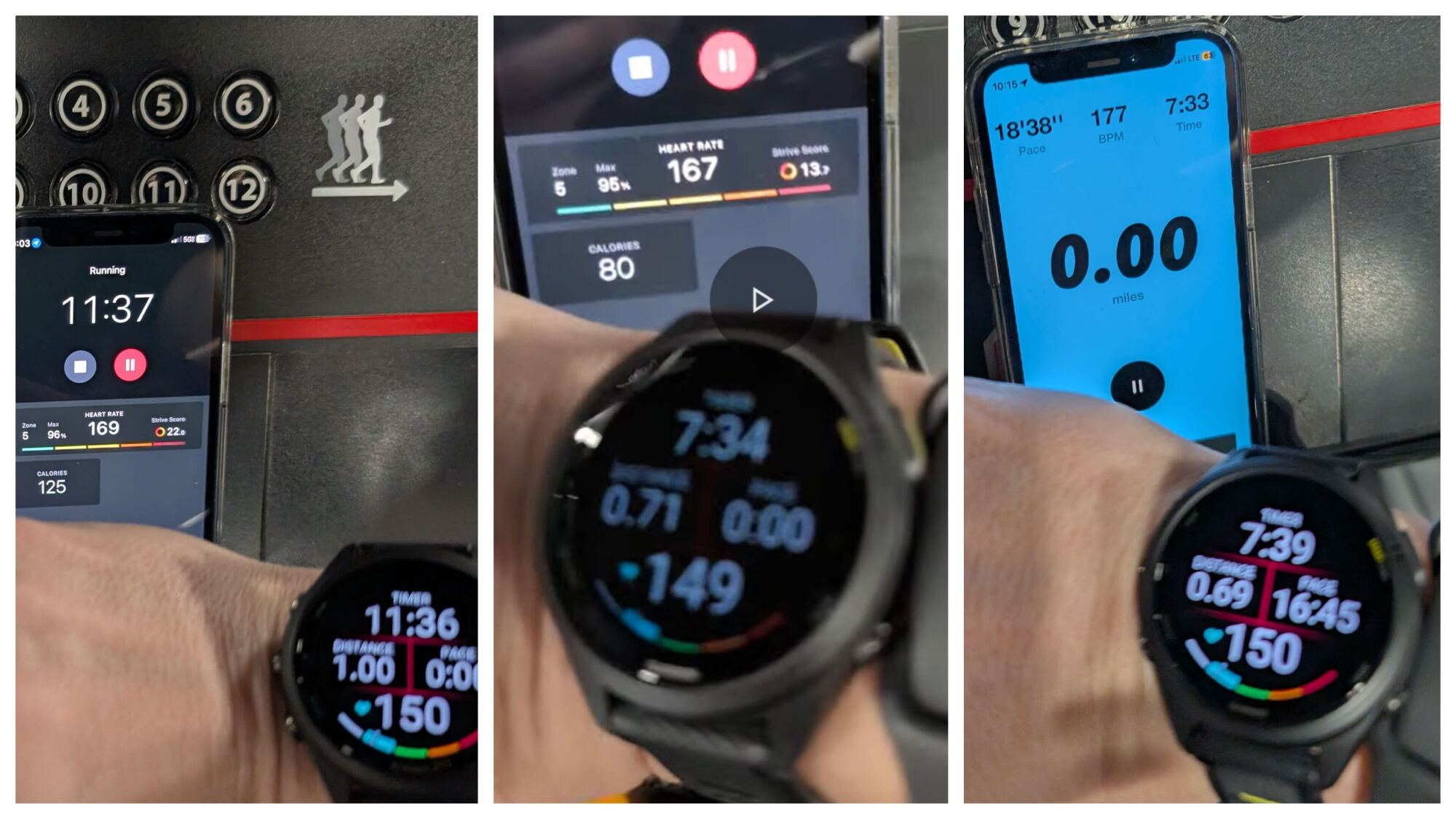
More research was needed. The next day, I took the headphones to a gym to use the treadmill (meaning that there was no ear covering for the rest of my tests). With the headphones paired to an app on a phone in front of me, and my Garmin on my wrist, I could compare the two mid-run and clearly see that the headphones were just not doing their job in the heart rate department. The headphones would often report a heart rate that was far higher than what the watch was showing, often by 10 beats or more. (The worst I noticed was a 34-beat difference, where the headphones reported 168 while the chest strap was reading 134.)

Three photos of Peloton and NRC apps next to Garmin watch showing different heart rates
Sorry for the blurry photos, but this is a representative sample of what I saw while I was running. Heart rate is the bottom number on the watch.
Credit: Beth Skwarecki

I had to choose between sound quality and accurate heart rate readings

I gave this mystery a good long think. I thought about all the factors that may have influenced the readings. I checked out other reviews of the Powerbeats Pro 2, and saw that, while they were also disappointed in its performance, they got more usable heart rate graphs than I did. What could be going wrong? 

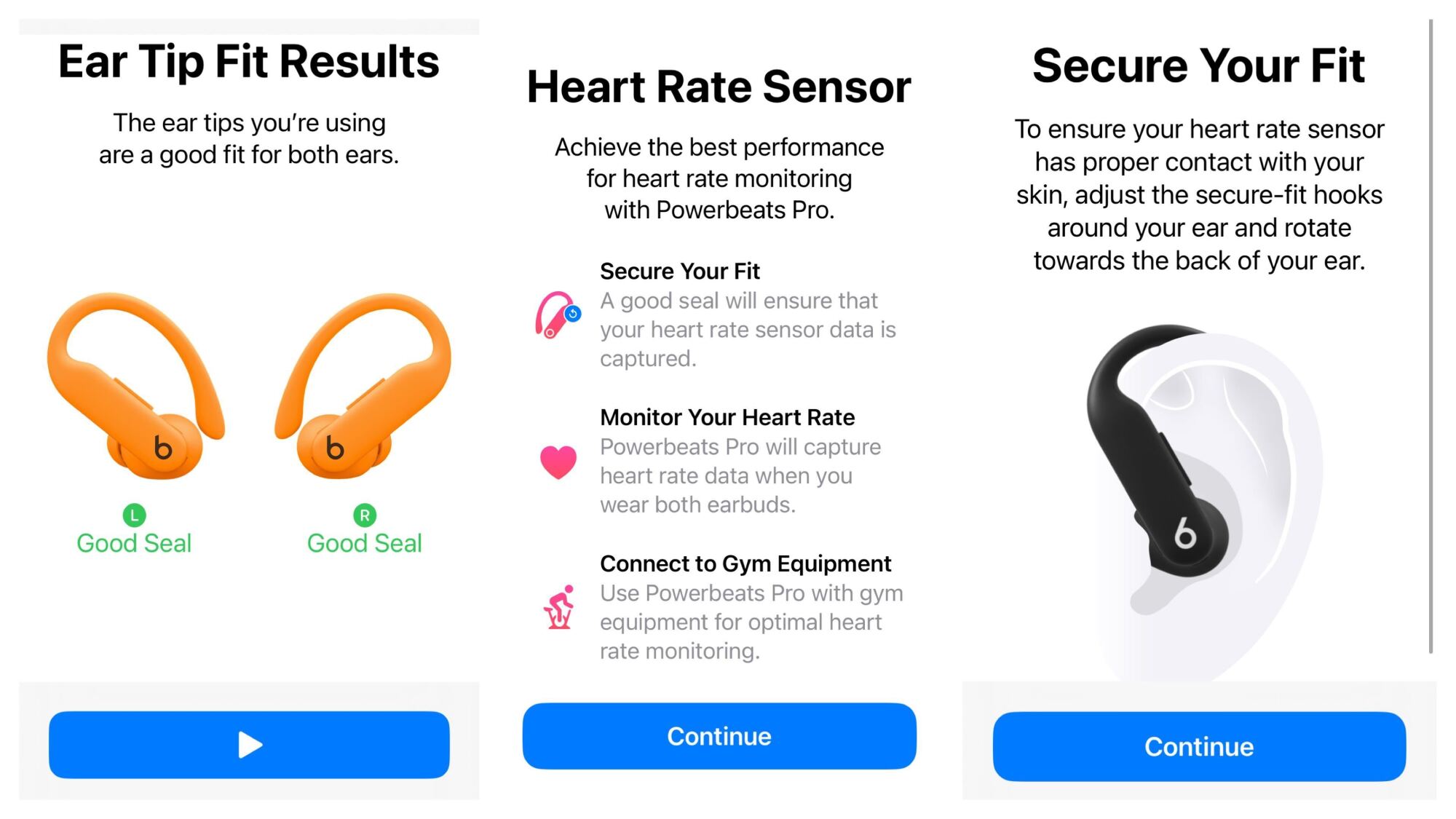
In the settings for the Powerbeats Pro 2, I noticed something—an “ear tip fit test.” I had already selected the rubbery ear tips that fit my ears the best (XS), so I didn’t think I needed this. But I did the test, and the app told me that I needed to adjust something, either the ear tips or the position of the headphones in my ears. I finally got a good seal by angling the headphones a lot further forward than I would have expected. The marketing photos typically show people with the ear hooks right in front of their ears, nearly vertical, but mine had to be pointing forward at least at a 45-degree angle for Apple to give me the all-clear. Maybe fit was the answer to my mystery. So I hit the gym again. 

Screenshots of ear tip fit results (both good), and instructions from the heart rate sensor telling me to wear the hooks vertically
Left: results of the fit test telling me I had a good seal. Right: instructions to wear the headphones in a way that did not give me a good seal.
Credit: Beth Skwarecki

(Fun fact: the fit test requires a quiet environment. I wanted to do the fit test immediately before my run, so I started it while standing on the treadmill at the gym. I got an error message saying my environment was too noisy. Oh well. I did my best to get the headphones in the same position as when I had done the test, and I made sure that it felt and sounded like I was getting a good seal.)

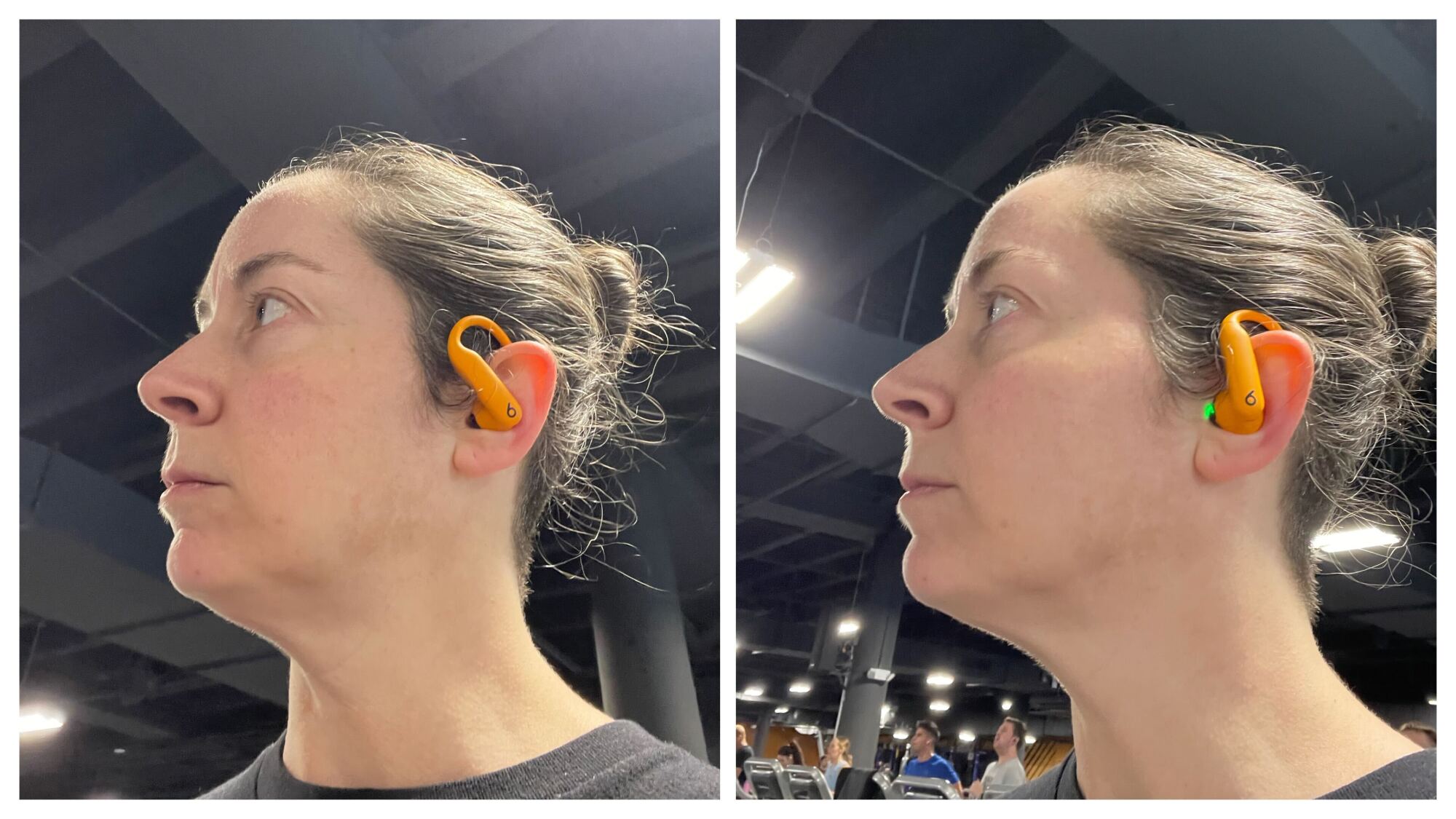
Two photos of me wearing the headphones in different positions
Left: the results of the fit test, which felt and sounded great. Right: the only position I could find that got me good heart rate data (and terrible sound quality)
Credit: Beth Skwarecki

It turns out that fit was the answer, but not the way I expected. I ran with the ear hooks in their approved position, and got terrible readings. Often 20-30 beats too high, and occasionally the headphones would fail to send data to the app they were paired to, leaving a blank “- -” in the space where heart rate was supposed to appear.

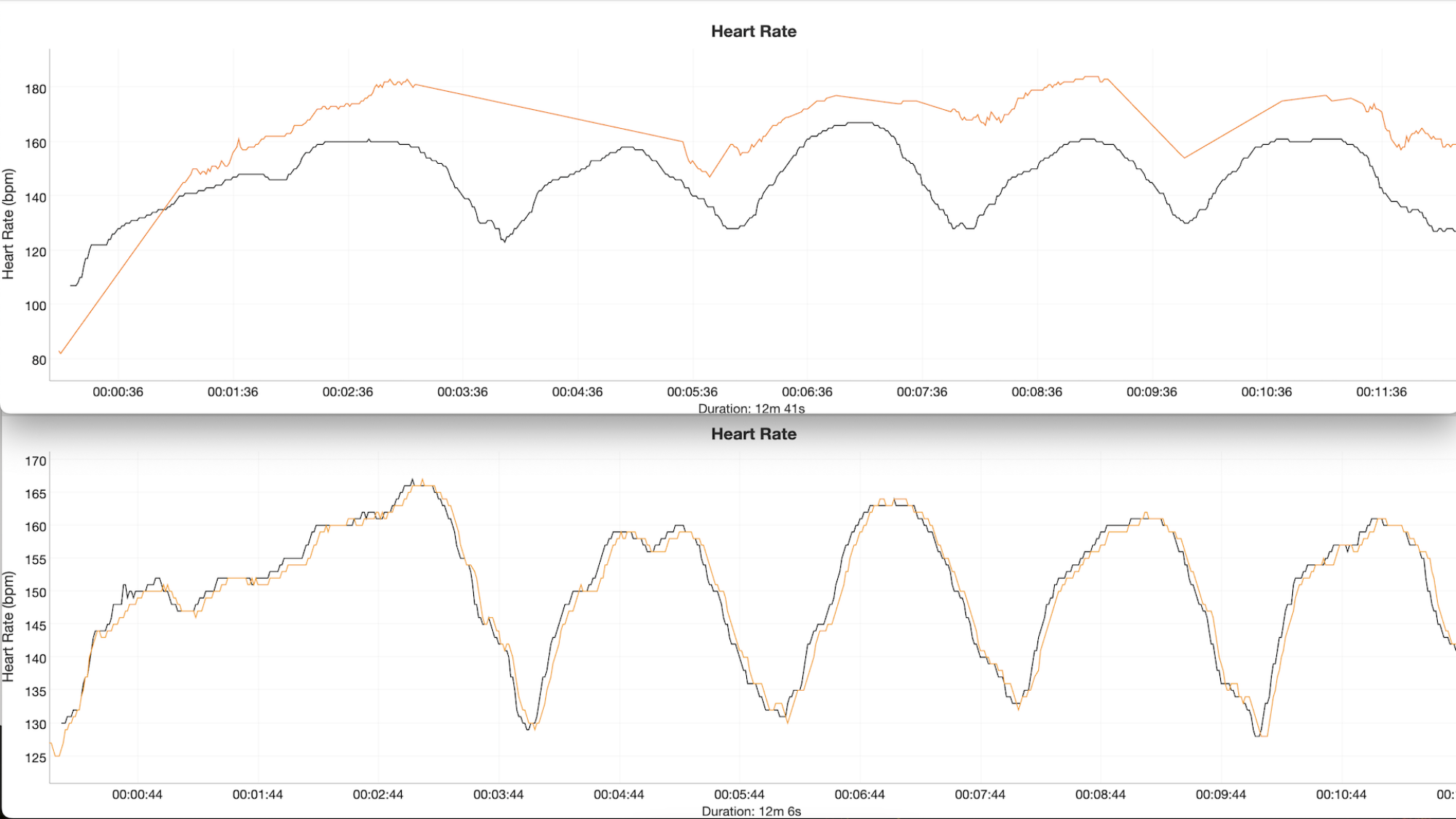
And then I had an idea. What if I deliberately fit the headphones as badly as possible? I cranked them backward so the ear hooks were vertical. The sound got tinny, the active noise canceling did nothing, and they kind of hurt. I could hear the guy on the treadmill next to me breathing and messing with his phone. You know, the stuff that you wear headphones to block out. But my heart rate data? It was nearly perfect. 

Two heart rate graphs. The top one shows the orange line floating above the reference. The bottom shows it matching perfectly.
Top: wearing the headphones as recommended by the ear tip fit test. Bottom: wearing the headphones with ear hooks vertical and sound quality terrible. In both graphs, orange is the Powerbeats Pro 2 and black is the chest strap reading used for reference.
Credit: Beth Skwarecki

I did a few more tests in each headphone position, and confirmed that—whether I paired them to an Android running Strava or an iPhone using Runna—I had the choice of two experiences: 

  1. Uncomfortable fit, tinny music, poor audio seal, but good heart rate data

  2. Good seal, comfortable fit, music sounds great, sounds of the gym are blocked out—but useless heart rate data

I’m not sure if this is a “me” problem or an “everyone” problem. Maybe I have weird ears. But even if so, I can’t be the only one with weird ears. Will you, dear reader, find that you pay $249 for a pair of headphones only to find one of their touted features is unusable? I can’t tell you the odds, but I can tell you they’re much greater than zero.

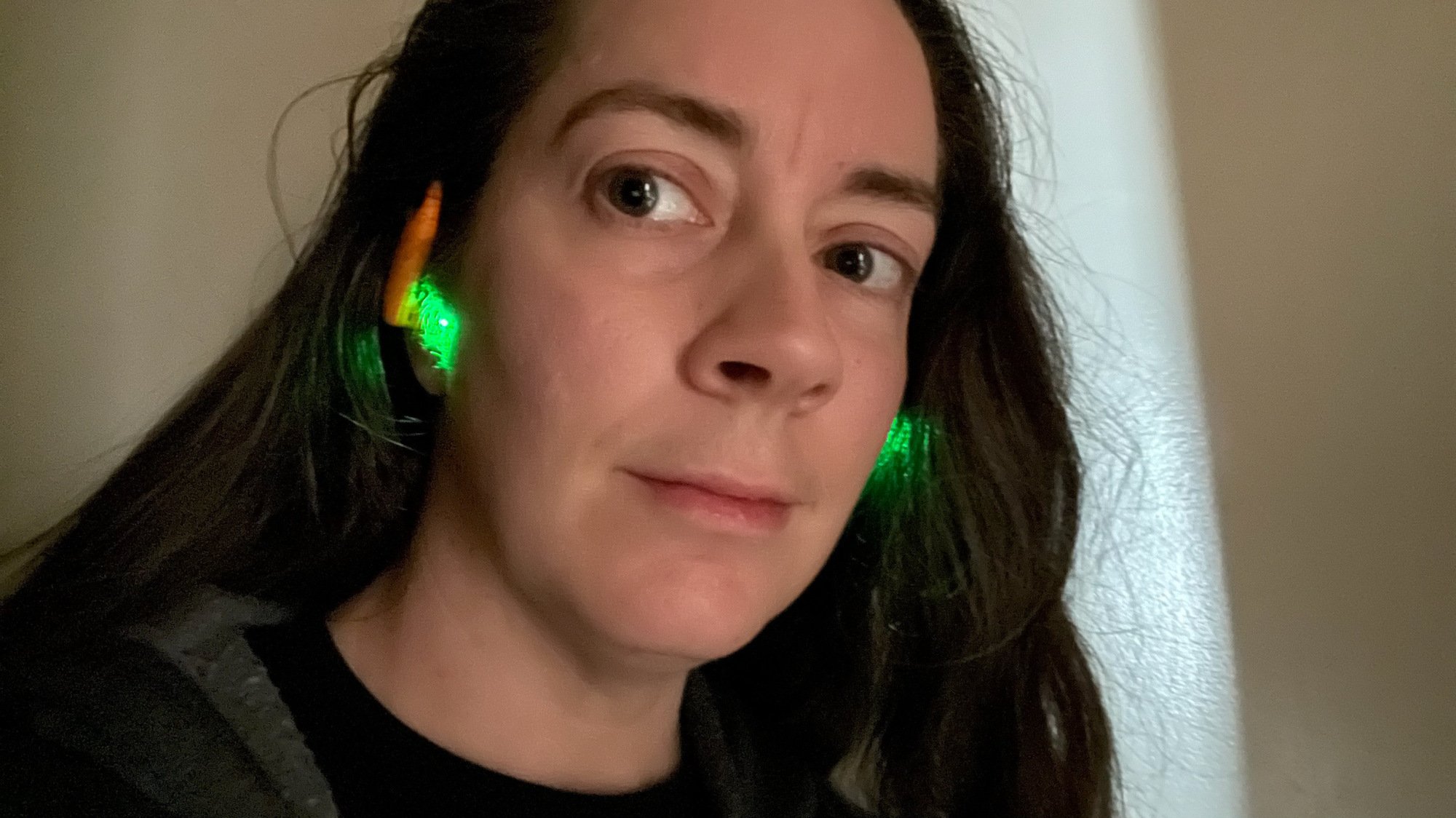
Oh, and you’ll have a green light shining from your ears

Me with green light pouring from my ears
How you’ll look in dim light.
Credit: Beth Skwarecki

The first night I had the headphones, I used them in the evening while I was doing my nightly wind-down routine of playing word games while listening to music. (Yes, I use my phone in bed. Sleep experts, you may disapprove.) My husband was trying to sleep next to me, and I became aware of a bright green light somewhere in the room. Was it coming from some device of his? It sure wasn’t anything of mine. Then I realized: It must be coming from my ears. (He looked over and groggily confirmed.) 

As with other photoplesmythographic devices, these things measure heart rate by shining a green light through your skin and measuring how much gets reflected back. This can be used to give a (theoretically) fairly accurate reading of your heart rate. That’s why the back of your smartwatch glows green from time to time, and why even the Oura ring (generations 3 onward) shines at you when you’re trying to sleep. (I miss the Oura gen 2’s decision to use non-visible infrared light, but those days are in the past. Sigh.)

To confirm, I went to the Settings app on my iPhone, selected the Powerbeats Pro, and switched off heart rate sensing. The room went dark. I turned heart rate sensing back on. Green light again. I turned the sensing back off for the night, and then the next day was perplexed at why I couldn’t get the heart rate feature working before I realized, duh, I turned it off. 

How to use the heart rate feature on iPhone

Ironically for an Apple product, the heart rate feature is less accessible on an iPhone than it is on Android. The headphones pair nicely, and you get a dedicated section for them in the main Settings app, which is where you can adjust their noise-canceling or transparency mode, try the fit test, or turn heart rate monitoring on or off. But when it comes to actually using the heart rate feature during a workout, you need to use one of seven “partner apps.” A reviewer’s guide from Apple lists these as: Nike Run Club, Runna, Ladder, Slopes, Open (a meditation app), Peloton, and YaoYao (a jump rope app).

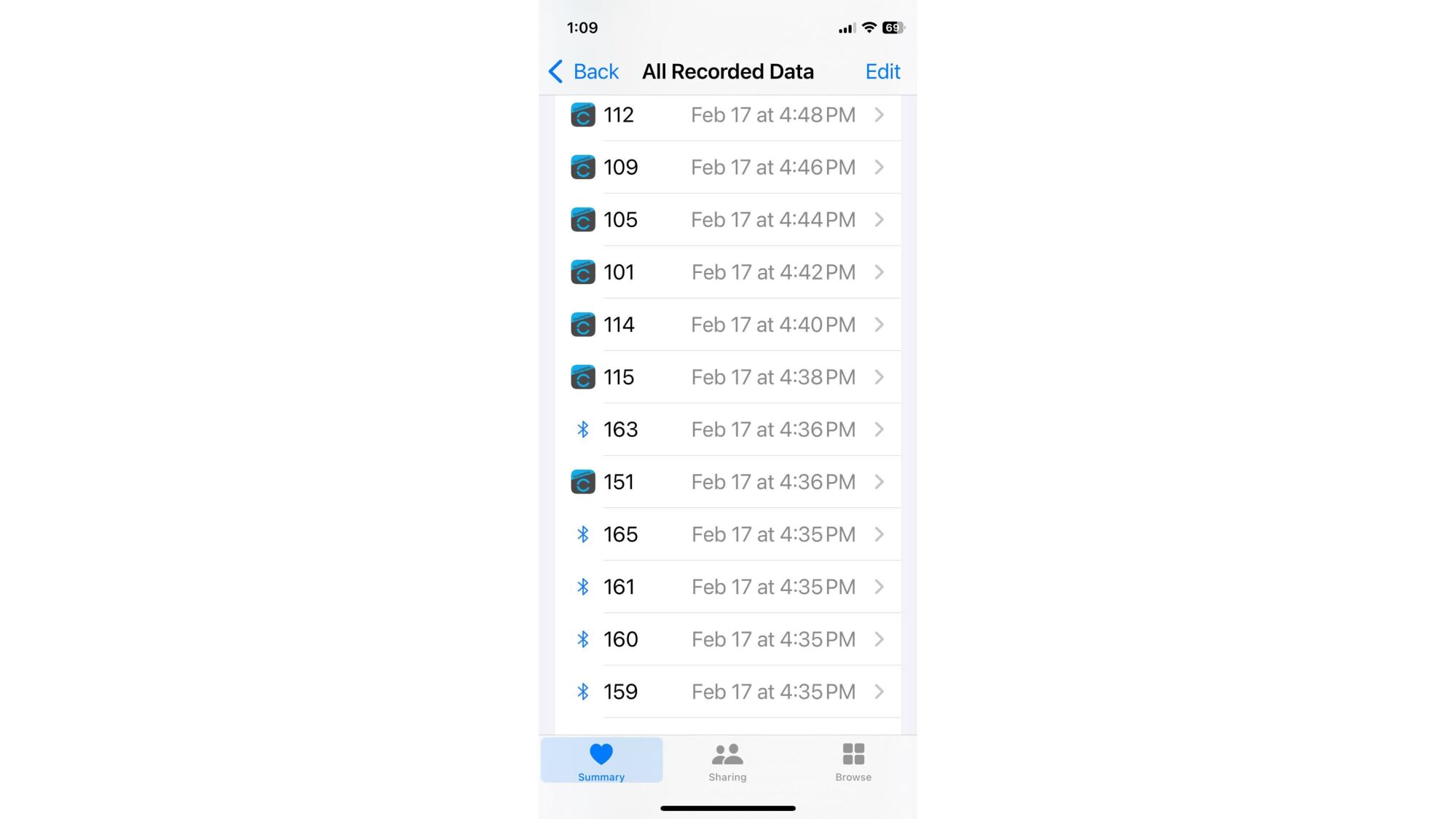
Notably, there are no “just track a run” apps in this list—no Strava, for example—so even my testing was tricky. Nike Run Club is free, but doesn’t export files that include heart rate data. Peloton is a paid app, and I couldn’t find a way to export data without an active subscription (paid members may be able to export to Strava). Runna is paid, but I was able to use the “free run” feature on a free trial. Ladder is a paid workout app. Slopes is for skiing—and admittedly I didn’t try that one. Open is a meditation app, and I couldn’t find any way to use it as a replacement for a workout app. Apple says that the data from your Powerbeats Pro 2 will end up in the Apple Health app, but it’s not in any usable format like a graph of heart rate from your workout.

Screenshot of numbers and dates/times, just all in a list. Some have a Garmin logo and some have a Bluetooth logo
Heart rate data as shown in the Apple Health app. The data next to a bluetooth symbol is from the Powerbeats Pro 2. I think.
Credit: Beth Skwarecki

The above is what you’ll see if you go into Apple Health, then Heart Rate, then Show All Data.

All right, how do you actually turn this on? Here’s what I did.

  1. Pair the Powerbeats Pro 2 to your phone using the instructions that came with them. (You’ll open the case, headphones still inside, near your phone. Then just follow the prompts.)

  2. Make sure the heart rate sensor is on (it is by default).

  3. Go into the Health app, then Heart Rate, then Data Sources and Access. Make sure your chosen app has access to read heart rate data.

  4. Do a workout from one of those partner apps (Runna, etc).

How to use the heart rate feature on Android

Android users, this is an easier one for you, and you have a much broader choice of apps. You can use any app that can connect to a bluetooth heart rate monitor, like Strava, or Wahoo, or Polar Beat. (I used Strava for my testing.)

  1. Pair the headphones as you would any Bluetooth headphones

  2. Download the Beats app if desired—I did this first, but it didn’t seem to be necessary to pair the sound or heart rate.

  3. Go into your chosen app—say, Strava. Tap whatever icon or menu allows you to connect to a heart rate sensor.

  4. Double click and hold the “b” button on your headphones (either side works). So that’s click, release, then click and hold.

  5. The Powerbeats Pro 2 should show up as an available heart rate sensor. Select it, and then go ahead and do your workout.

The bottom line: Don’t rely on the Powerbeats Pro 2 for accurate heart rate data

If you train by heart rate in any kind of serious way, do not bother with this feature. Sometimes it may not work (as in my initial tests with Runna). Sometimes it may show that your heart rate is 15, 20, even 34(!) beats higher than it really is. Sometimes it may be correct, or close to correct—but if you don’t know when a heart rate sensor is correct and when it’s way off, what good is it? 

This isn’t just a small difference, either. If the headphones were a few beats off here and there, I wouldn’t worry about it. But these 20+ beat discrepancies are enough to make you think you’re in zone 4 when you’re actually in zone 2 or 3. That’s enough to throw off your workout, and if this data ends up being used for a VO2max calculation, it will give you a wildly inaccurate idea of your cardio fitness. The heart rate data from the Powerbeats Pro 2 is just not good enough to do the job it’s trying to do. Which is sad! I wish this could work! But, alas, it does not.

NVIDIA GeForce RTX 5080/5090 Performance With Neat Video 6 On Linux

Last week NeatLab released Neat Video 6 as the newest version of their video engine to reduce noise and enhance video quality that can be used with the likes of DaVinci Resolve, Final Cut, and Premiere Pro software. Neat Video 6 features a faster render engine, optimized CPU + GPU performance, enhanced memory management, and other improvements. Neat Video 6 continues to support Linux natively when it comes to DaVinci Resolve usage as well as various OFX hosts like Natron / Flame / Mistika / Fusion Studio / Nuke. As they also updated their NeatBench benchmark, I was curious to see how the performance of Neat Video 6 is for the new NVIDIA GeForce RTX 50 Blackwell GPUs.

This Kindle Paperwhite Kids Is at Its Lowest Price (and Adults Can Use It, Too)

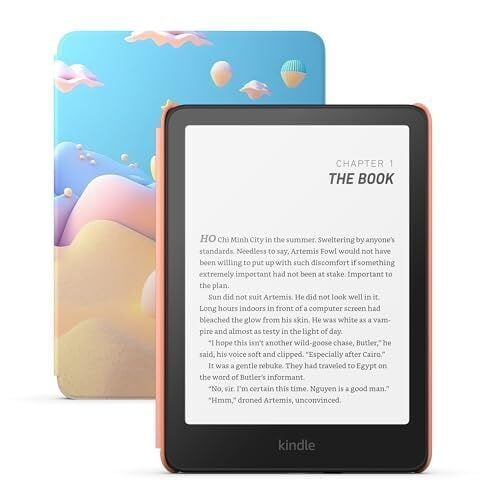
If you’ve never considered the Kindle Kids e-reader because of the label, you’ve been missing out on some sweet perks. The 16 GB Amazon Kindle Paperwhite Kids is $139.99 (originally $179.99), the lowest price it has ever been, according to price-tracking tools. Here’s why this is a great deal for everyone, not just kids.

The kids’ Kindle version includes a free case (about a $30 value), an ad-free experience ($20 value), six months of Amazon Kindle Kids + subscription ($36 value), and a two-year warranty (as opposed to the one-year warranty on the standard version). All that value for $20 less than the “adult” version is a no-brainer.

The cases for these models are obviously tailored for kids, but it’s hard to argue with free. The Amazon Kindle Kids + subscription will charge you automatically after the first six months, but you can cancel it beforehand. On these Kindle models, the kids’ mode feature is turned on by default. You can easily turn it off in the settings, but this will bring the ads back to the lock screen—the Kindle Kids also has some cool features even adults will appreciate, like the awards feature, as this video explains.

With the six months of Amazon Kindle Kids + subscription, you can get unlimited access to thousands of kids’ books, including all of the Harry Potter series. The Paperwhite Kindle is the same as the adults, in the sense that it’s waterproof, has adjustable warm light, a 12-week battery, and Audible access through Bluetooth. You can read the full review of the 2024 Amazon Kindle Paperwhite Kids from PCMag here. If you still don’t know which Kindle is best for you, check out our complete breakdown.

Linus Torvalds Would Reportedly Merge Rust Kernel Code Over Maintainer Objections

The drama surrounding Rust code within the Linux kernel continues… Christoph Hellwig is the maintainer of the DMA mapping helpers and several other areas of the kernel has been an outspoken critic of Rust code or secondary programming languages within the Linux kernel kernel. Hellwig has been critical of Rust code for the Linux kernel and its long-term maintainability. Today he’s out with another mailing list post where he notes that Linus Torvalds mentioned in private he would override maintainer vetoes on Rust code within the kernel…

What is an SPF Record?

SPF or Sender Policy Framework is a DNS record that indicates mail exchanges in which hosts are authorized to send mail for a domain. An SPF record is a type of TXT(text), and its purpose includes essential notices regarding the domain. They are used because the SMTP protocol does not authenticate the “from” address in an email. Without it, attackers may easily impersonate the sender’s email address. This works so that the attackers or spammers can edit the From address to make it look like they are sending from an email address to your domain. This action is also known as email spoofing, which uses the user’s private information and can decrease the reputation of the IP address where the domain is pointed, which may lead to blocking. That is why using the SPF record is crucial when configuring the domain.

The post What is an SPF Record? appeared first on Linux Today.

How to watch Annapurna’s publisher showcase on February 24

Annapurna Interactive is holding a games showcase on February 24. It streams live at 12PM ET via the company’s YouTube page. The publisher has released a short teaser video to hold us over until Monday.

This is the first event Annapurna Interactive has held since the entire staff, including the executives, resigned from the company last year. That mass walkout occurred after a failed attempt to spin off the games division from the remainder of the company.

“All 25 members of the Annapurna Interactive team collectively resigned,” the team said in a joint statement. “This was one of the hardest decisions we have ever had to make and we did not take this action lightly.”

Annapurna hired new people to replace those who left, which was pretty much everyone. This is the first time we’ll get to see what the revamped publishing house has been working on.

So what can we expect? The company says the showcase will be 30 minutes long and will focus on its 2025 lineup of releases. These include titles like Wanderstop, Skin Deep, Wheel World, Faraway, Lushfoil, To a T and Morsels, among others. We are especially excited for Wheel World, which was formerly called Ghost Bike. Faraway also looks pretty cool. Annapurna promises “a few more surprises” in addition to the aforementioned games.

The publisher is primarily known for games like Stray, which recently launched for Nintendo Switch, and What Remains of Edith Finch. It also published Cocoon, Outer Wilds and the absolutely fantastic Lorelei and the Laser Eyes.

This article originally appeared on Engadget at https://www.engadget.com/gaming/how-to-watch-annapurnas-publisher-showcase-on-february-24-193539718.html?src=rss

You Can Now Restrict Replies to Followers Only on Bluesky

It feels like every social media site now has a ‘reply guy’ problem. You’ll post about something that you know your followers will get, but if the post goes any degree of viral, multiple random strangers will appear in the replies questioning all your decisions and putting you down for making a harmless quip or a minor error. Bluesky is now helping you do something to address this problem.

The site’s moderation tools are among the best I’ve seen on social media platforms and in its latest update (1.98), Bluesky is doubling down on its efforts to help you keep harassment at bay. You can now restrict replies to only your followers, which is another great tool to reduce the negative effects of going viral.

How to restrict replies to followers only on Bluesky

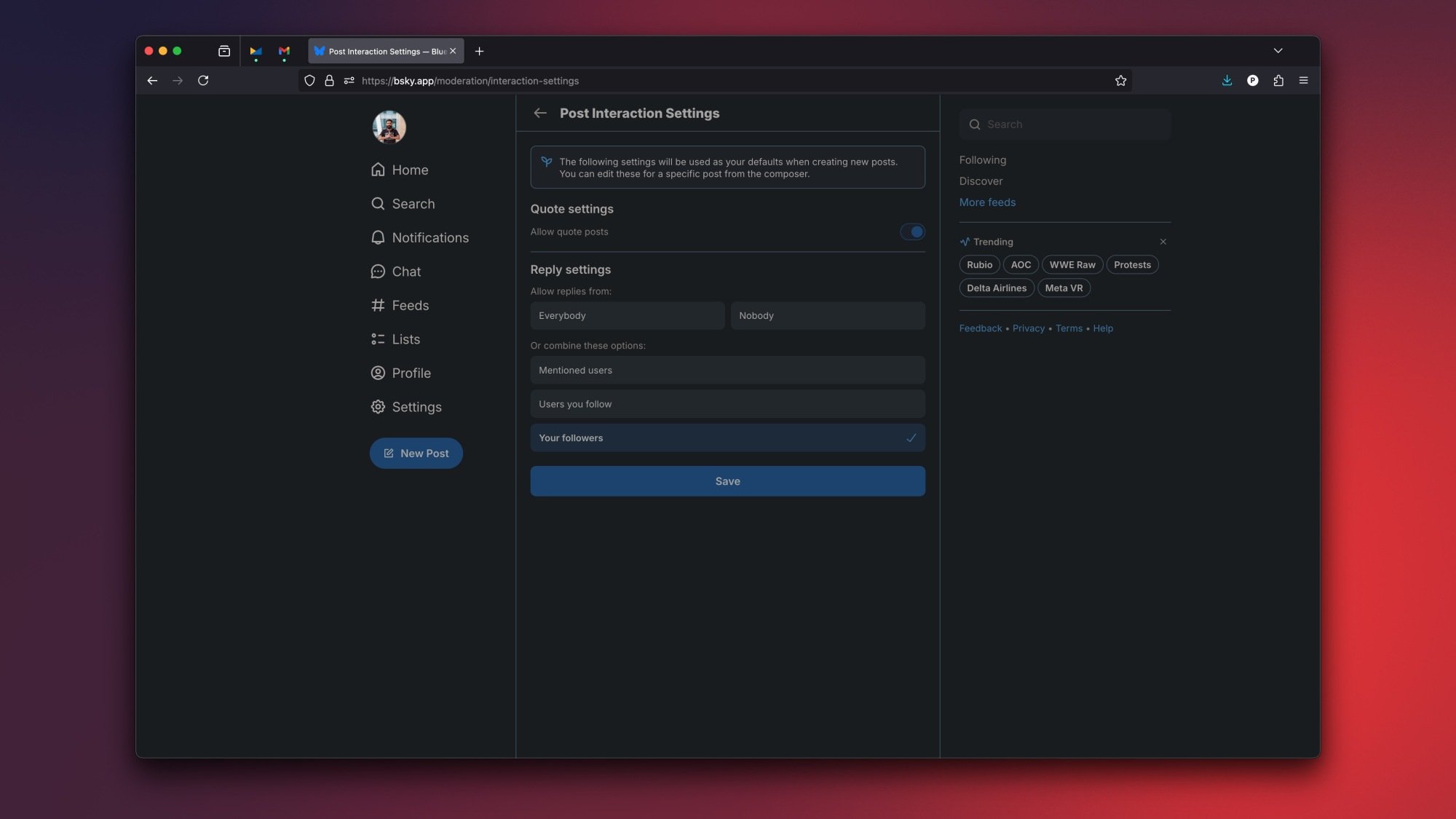
Bluesky's post interaction settings page.

Credit: Pranay Parab

There are two easy ways to restrict replies on Bluesky. One way is to open any of your posts on and click the Everybody can reply button next to the post date. This will open a small pop-up, where you can select Your followers and hit Save. In my experience, Bluesky’s community has been pretty civil, but you can use this option in case your post gets a little too popular on the Discover feed and invites unwanted attention.

Alternatively, you can go to a new settings page, also introduced with Bluesky 1.98, to automate setting your replies to followers only. To do this, click Settings in the left pane on Bluesky’s desktop site (or on the app, tap the three-lines menu in the top-left and select Settings). Now, go to Moderation > Interaction settings and select your preferred defaults for all new posts. Even if you select a restrictive reply preferences here, you can always change it for individual posts, just in case you’re open to inviting opinions from strangers on specific topics.

Other Bluesky updates

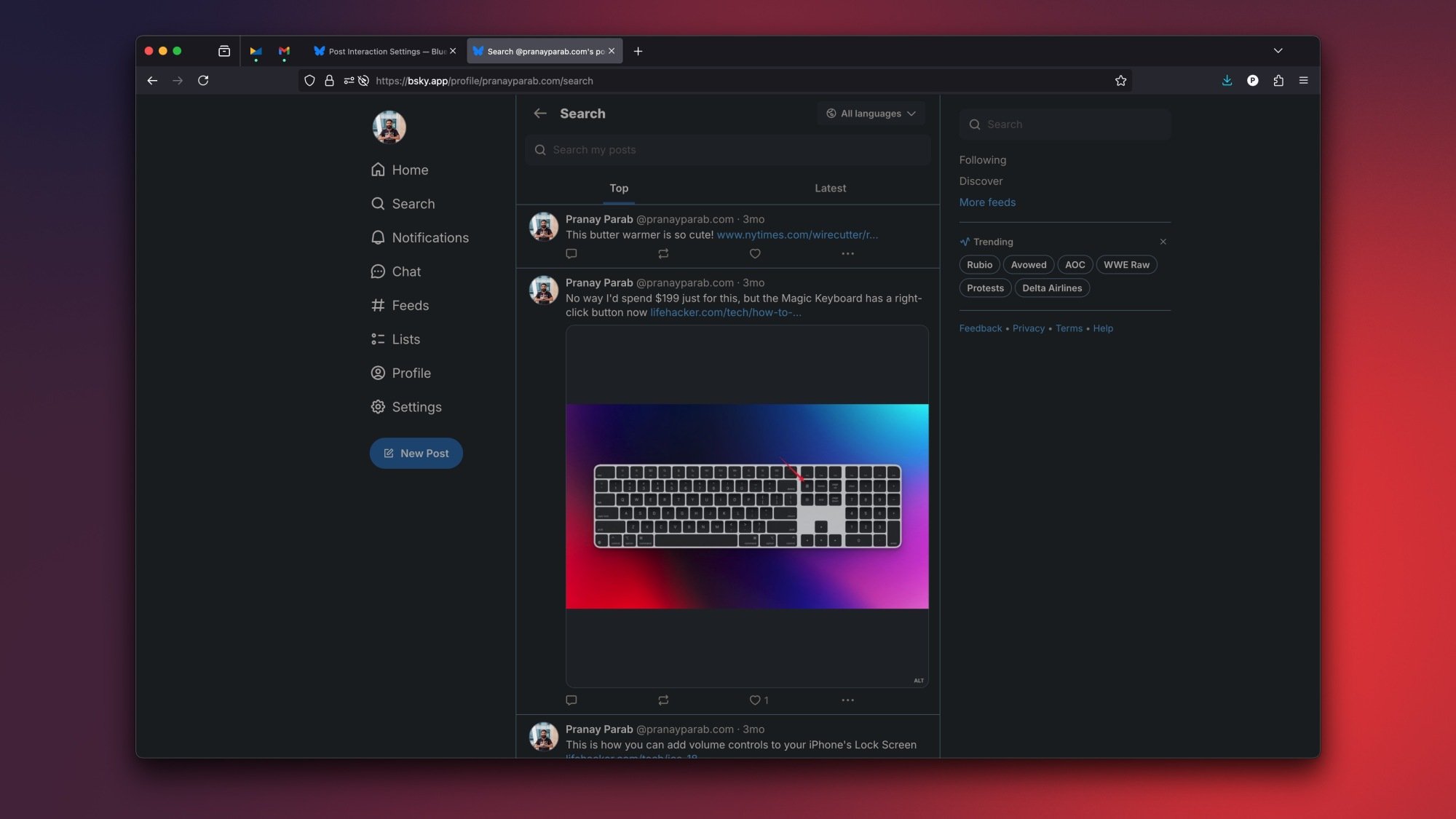
The search posts page on the author's Bluesky profile.

Credit: Pranay Parab

The latest update also included a few search improvements. You can now go to any user’s profile on Bluesky to search through their posts. This is an easy way to find a useful post from a specific person. For instance, you can visit my profile on Bluesky, hit the three-dots button in the top-right, and select Search posts. Use the search bar up top to look for “iPhone” or any other search term you like. You can do this for any profile on Bluesky.

Other than this, there are minor improvements to Bluesky’s search page, and the site’s translation feature now supports Interlingua.

Pi-hole v6 released

Pi-hole v6 has been released. The
latest version of the popular ad-blocking software sports a redesigned
user interface, has support for subscribing to allowlists, and brings
a new REST API and embedded web server. Its Docker/OCI image is now
based on Alpine Linux
rather than Debian to reduce image
size. See the announcement for guidance on upgrading existing Pi-hole
installations.