By late 2024, however, Rust enthusiasts were frustrated with stalls and blocks on their efforts, with the Rust for Linux lead quitting over “nontechnical nonsense.” Torvalds said at the time that he understood it was slow, but that “old-time kernel developers are used to C” and “not exactly excited about having to learn a new language.” Still, this could be considered a normal amount of open source debate.
On March 3, Mobile World Congress will kick off in Barcelona, Spain. While it’s not the premier show it once was, many of the smartphone industry’s leading players still attend the conference and frequently launch new devices there. Typically, we hear from companies like Lenovo, Arm, Xiaomi, Dell and more at the conference, as well as standards organizations like the GSMA on developments in areas like 5G or SIM technology. And judging by the event agenda on the MWC website, we will be seeing at least some kind of presence from Meta about Whatsapp, though it’s unlikely anything major gets announced at that event. Below, you’ll find a list of the more notable devices we expect to be launched at MWC 2025.
Nothing Phone 3a series
At MWC 2022, Nothing’s Carl Pei showed off a prototype of what would become the company’s first handset, the Nothing Phone 1, behind closed doors, and at last year’s event, Nothing announced the Phone 2(a). This year, we’re definitely getting at least one new device from the company at MWC, with Nothing teasing something for March 4, the second day of the show.
I say at least one device because Nothing’s invite says “Phone 3a Series.” To add to that, recent reports suggest the company is preparing to announce a Phone (3a) Pro alongside a regular offering. Why would Nothing release a “Pro” version of a midrange device, you ask? I’m not sure, but this is Nothing we’re talking about and the company has frequently done things a bit differently from the rest of the pack.
In 2024, the Xiaomi 14 Ultra made its global debut ahead of MWC, and it’s looking like history will repeat. Before the start of this month, there was some evidence to suggest Xiaomi would launch its new flagship at MWC 2025, but more recent rumors suggest the company plans to announce the 15 Ultra on February 26. In any case, Xiaomi is listed as an exhibitor at MWC 2025, so if the phone does debut before the end of this month, there’s a good chance it will be on the show floor for people to try out. Like the 14 Ultra before it, it looks like the 15 Ultra will be a photography powerhouse, with the phone rumored to feature a 1-inch main sensor and 200-megapixel periscope telephoto lens.
HMD Global
Since 2017, HMD Global has been a mainstay at MWC. First, with its Nokia-branded phones, including retro throwbacks like the 8110 Reloaded, and now more recently with devices carrying its own name. Given that history, it seems a safe bet the company will have something to announce at the show. What that could be is more of a mystery, though it’s possible the sub-$100 HMD Key could get a global release.
Samsung Galaxy S25 Edge
Samsung
After Samsung teased the Galaxy S25 Edge at Unpacked last month, you might think it would be fitting for the company to launch the phone in Barcelona next month. After all, MWC was the venue where, up until the Galaxy S10 in 2019, Samsung announced every S series phone beginning with the S2 back in 2011, and the company’s presence at MWC was the highlight of the event. Unfortunately, it doesn’t seem Samsung is feeling nostalgic for and the sunny boulevards of Barcelona, with little in the way of rumors suggesting we could see the S25 Edge at MWC 2025. Still, never discount the chance Samsung may have a surprise up its sleeve.
Everything else
As Engadget’s resident AI reporter, I’m obligated to mention a lot of companies will probably have AI-related announcements to share at MWC 2025. Don’t expect anything from the big players like OpenAI — the company isn’t registered as an exhibitor — but with artificial intelligence being the trendy thing in the industry right now, everyone will be trying to cash in on the hype; in fact, “AI+” is one of the main themes of MWC 2025.
Update, February 21 2025, 1:45PM ET: This story has been updated to add more context in the intro, calling out a few more companies that typically present at MWC, as well as some additional info pulled from the MWC agenda page.
This article originally appeared on Engadget at https://www.engadget.com/mobile/smartphones/what-to-expect-at-mobile-world-congress-2025-nothing-samsung-xiaomi-and-more-140057306.html?src=rss
Chinese startup DeepSeek will make its models’ code publicly available, it said on Friday, doubling down on its commitment to open-source artificial intelligence. From a report: The company said in a post on social media platform X that it will open source 5 code repositories next week, describing the move as “small but sincere progress” that it will share “with full transparency.”
“These humble building blocks in our online service have been documented, deployed and battle-tested in production.” the post said. DeepSeek rattled the global AI industry last month when it released its open-source R1 reasoning model, which rivaled Western systems in performance while being developed at a lower cost.
System76 engineers remain quite busy working on their Rust-written COSMIC desktop environment to be used by their Pop!_OS operating system as well as other Linux distributions moving forward…
Dell UltraSharp 40 Curved Thunderbolt Hub Monitor U4025QW: MSRP $1919, Currently $1489 The Dell UltraSharp 40 U4025QW is a big, beautiful, curved Thunderbolt-enabled 5K2K resolution monitor featuring IPS Black technology. It’s ideal for creators and productivity workers who need excellent color fidelity and a ton of high resolution screen…
A committee for Meta’s board of directors approved the change on February 13, on the grounds that the “target total cash compensation” for its executives “was at or below the 15th percentile of the target total cash compensation of executives holding similar positions” at rival companies. It’s worth noting that the new bonus plan doesn’t apply to CEO Mark Zuckerberg. Don’t worry about his bottom line, however, as he’s worth nearly $250 billion.
Meta has also decided to slash its annual distribution of stock options by around ten percent for thousands of its regular employees, according to a report by The Financial Times. The exact reduction could differ depending on where the employees live and what they do, but Meta hasn’t commented further on the decision.
As previously noted, Meta is in the process of laying off five percent of its global workforce. This is despite the fact that company shares are up nearly 50 percent over the past year, with a current stock price of around $687 per share. Also, it recently announced that its fourth-quarter revenue grew 21 percent year-over-year to more than $48 billion. The company has cut more than 20,000 jobs in the past couple of years.
“A leaner org will execute its highest priorities faster. People will be more productive, and their work will be more fun and fulfilling,” Zuckerberg said at the tail-end of last year. Nothing says “fun and fulfilling” more than watching your co-workers get laid off while the executives get massive bonuses.
If you’re a current or former Meta employee with thoughts on this new executive bonus structure, hit me up on Signal at LawrenceBonk.96. I’ll ensure that things are kept anonymous.
This article originally appeared on Engadget at https://www.engadget.com/big-tech/meta-approves-massive-bonuses-for-executives-after-broad-layoffs-183222951.html?src=rss
Paint is among the cheapest of home renovations—it freshens things, covers old chips and scratches, and it can make your whole house feel brand new in just a few days. Even if you hire someone to paint a room, the cost isn’t entirely prohibitive—between $350 and $850, on average, per room. That’s pretty cheap compared to other renovation projects, but it’s still a chunk of change. Since painting is generally within most people’s DIY skill set, a lot of folks decide to set aside a weekend, buy some painter’s tape, and tackle the job themselves. If that’s you, here are some tips to make the job a little easier.
Liquid masking tape
If you’re painting a room with windows or any other glass features, you know the pure tedium of applying traditional painter’s tape around the edges of the glass (plus the tedium of having to scrape paint off the glass anyway because you got sloppy). That’s where liquid masking tape comes into play: You slather this stuff on your windows (you don’t need to worry about getting it on the trim, because it will act as a primer coating on anything that’s not glass), let it dry, then slather your paint on, let that dry, then just peel the masking tape off like a plastic film. As you can see here, it works like a charm and will save you a lot of time.
Catch drips
Painting a ceiling? Sorry to hear that—be prepared to emerge absolutely drenched in paint as it drips down on you, and you’d better have a sturdy drop cloth over everything in the room.
That is, unless you use an inverted umbrella. This might sound silly, but it actually works—poke a hole in an umbrella, push your paint roller handle through, seal it up with tape, and proceed to paint the ceiling. The umbrella will catch all the paint drips, and you can safely paint the whole ceiling without worrying about spending the next day scraping tiny drops of paint off of every surface. Pro tip: Buy a cheap clear plastic umbrella so you can actually see what you’re doing. Alternatively, a clear plastic paint tray liner can do the same job with less bulk to maneuver.
A dirty paint tray
You may have been advised at some point to line your paint tray, either with a cheap plastic liner or any plastic bag you have lying around (or even aluminum foil). Yes, that spares you a lot of cleanup—but the real hack is to just not clean your paint tray at all. Drain excess paint back into the can, then just let your tray dry out. A layer of old paint won’t affect the tray’s usefulness.
The cardboard method
Painting floor trim can be a real challenge. You can either spend a lot of time applying painter’s tape all around the edge of the room to protect the floor, or you can try to spread a drop cloth near the trim—but drop cloths will always get in the way of your brush or roller, and have a tendency to shift away from the wall just when you need it to protect everything.
Instead, use a piece of cardboard (or other thin, impermeable material, like a plastic sheet). Insert the sheet into the gap between the wall or trim and the floor, paint that section with wild abandon, then slide the sheet forward and paint the next section. The sheet protects the floor, you get paint all the way to the edge, and you didn’t spend the last hour putting down and endlessly adjusting tape.
Petroleum jelly
When it comes to painting around fixtures and hardware like doorknobs, it’s best to either remove them completely or mask them well with tape. But if you want to avoid that or you have small areas you want to avoid painting—screws, for example—where dabbing a tiny square of painter’s tape is both annoying and ineffective, you have an alternative: Use some petroleum jelly. Dab a bit onto the spot you want to skip painting and any paint that accidentally gets on it will just wipe away when everything’s dried.
Paint pens
Whether touching up a spot you missed or correcting a mistake, any spot in your room that requires a very fine paint line (like around a wall plate or fixture you can’t or simply don’t want to remove) can be incredibly challenging for even the smallest brush. That’s where a paint pen comes in. These refillable devices make it super easy to get into tight spaces and do quick touch-ups without having to tape the whole area off and try to awkwardly angle a brush. Inspect your work the next day and fill in any thin spots right away, with zero extra prep.
Gloves and socks
If you’ve ever painted stair balusters or furniture legs, you know it’s a pain to get good coverage all around with a brush. So, skip the brush: Put on a nitrite glove, pull an old sock over that, dip into your paint can, and just grab whatever it is you’re trying to paint with your hand. This technique is a lot faster when painting any kind of oddly-shaped element, because your hand is a lot more flexible and dexterous than a paintbrush or roller.
Radiator brushes and paint pads
Trying to paint behind something you’d really rather not remove, like a radiator or toilet? You can get in as close as you can and hope the blank spot behind it isn’t noticeable, or you could buy a specific tool like a radiator brush or a paint pad that allows you to easily and quickly paint the area behind these fixtures—no removal necessary.
Caulk
Getting crisp, clean lines with painter’s tape sometimes seems like an impossible task. There’s always some element of bleed-through that needs to be cleaned up when the tape is peeled away. But you can avoid this and guarantee sharp lines with something called Back Caulking:
Leave a thin space between the edge of your tape and the wall—about the thickness of a dime.
Fill that space with a thin bead of caulk.
Smooth the bead with your finger and/or a damp cloth as you would with any caulking job.
The pytest-mh
project is a plugin that provides a multi-host test framework for the
popular pytest
unit-testing framework and test runner. Work on pytest-mh
started in 2023 to solve a multitude of issues that
cropped up for developers and testers when testing the SSSD project, which is a client for
enterprise identity management. I was not happy with the state of
testing of the SSSD project and wanted to create something that would
increase test readability, remove duplication, eliminate errors, and
provide multi-host testing capabilities, while having the flexibility
to build a new API around it. Finally, I also wanted something that
can be used by anyone to test their projects as well.
In December, roughly a dozen employees inside a manufacturing company received a tsunami of phishing messages that was so big they were unable to perform their day-to-day functions. A little over an hour later, the people behind the email flood had burrowed into the nether reaches of the company’s network. This is a story about how such intrusions are occurring faster than ever before and the tactics that make this speed possible.
The speed and precision of the attack—laid out in posts published Thursday and last month—are crucial elements for success. As awareness of ransomware attacks increases, security companies and their customers have grown ever savvier at detecting breach attempts and stopping them before they gain entry to sensitive data. To succeed, attackers have to move ever faster.
Breakneck breakout
ReliaQuest, the security firm that responded to this intrusion, said it tracked a 22-percent reduction in the “breakout time” threat actors took in 2024 compared with a year earlier. In the attack at hand, the breakout time—meaning the time span from the moment of initial access to lateral movement inside the network—was just 48 minutes.
After creating a stir with the $200 Neo, DJI is back at it with another innovative drone, the Flip. It has a first-of-a-kind folding design and shrouded propellers to keep people safe. It also integrates 3D infrared obstacle detection to track subjects and has a long list of impressive features.
With a camera borrowed from the Mini 4 Pro, the Flip can take high-quality 4K 60p video indoors or out with little risk. It comes with vlogger-friendly features like Direction Track and Quickshots for social media. And it can be flown with either DJI’s controllers, a smartphone, voice control or the push of a button.
There’s no need for a permit to fly it, and best of all, it’s priced at $439 with an RC-N3 controller included — making it one of the more affordable drones available. To see how well it serves creators, I flew it inside a castle, a 500-year-old house and out in nature. It’s not perfect (hello, stiff winds and obstacles), and it has some stiff competition with the HoverAir X1 Pro, but it’s one of the most useful creator drones yet.
Design
The Flip has a clever, user-friendly design. All four propellers fold down and stack below the body like some kind of Star Wars spacecraft. DJI chose this construction so that it could incorporate permanent (rather than detachable) shrouds that protect the props to limit damage or injury in case of a collision. The design also employs large propellers that aid performance and reduce noise. By comparison, DJI’s Neo has tiny, fast-spinning propellers that make a high-pitched shrieking noise.
DJI kept the takeoff weight including battery and microSD card under 250 grams by using carbon fiber and other lightweight materials. This means the Flip can be flown without special permits. It’s still rather bulky though, especially compared to the sleek HoverAir X1 Pro.
The Flip has far better battery life than its rival, however. DJI promises up to 34 minutes max flight time (about 27 minutes in real-world conditions), compared to just 16 minutes for the X1 Pro. The batteries can be charged up quickly as well, taking about 35 minutes each with the optional four-battery charger. You’ll need a memory card, though, as the Flip only has 2GB of internal storage.
The Flip is DJI’s first lightweight drone with a 3D infrared sensor for forward obstacle avoidance and it also has a downward vision sensor for landing spot detection and stability. However, unlike the Mini 4 Pro and other DJI drones, it has no side or rear obstacle sensors.
One small issue is that the Flip’s propellers don’t have much clearance, so they can snag even in short grass on takeoffs. Like the Neo, though, it’s designed more for takeoffs and landings from your hand. To that end, it has a button on the opposite side of the power switch to select a flight mode and takeoff automatically, just like the Neo. It can also be flown with the app, voice control or manually with a controller — either the DJI RC-N3 controller (which requires a smartphone) or the RC 2 controller with a built-in 5.5-inch display.
Features and performance
Steve Dent for Engadget
The Flip can hum along at up to 26 mph in sport mode, which isn’t bad for a light drone, but a good bit slower than the Mini 4 Pro (37 mph). However, the reduced weight and large surface area means it’s not the best in high winds. When it flew over the roof of a castle, for example, it got hit by a gust that pushed it nearly backwards.
However, the Flip can do things that you’d never attempt with a Mini 4 Pro. The full propeller protection, stability and relatively low noise make it well-suited for flying inside large rooms full of fragile objects and people. That, along with the excellent picture quality, means it’s a great choice for event professionals and content creators working in public spaces.
It’s also perfect for beginners, because like the Neo, you can launch the Flip off your hand at the push of a button. It will then fly a pre-programmed mode and land back where it started. One of those modes, Direction Track, allows the drone to fly backwards and follow you for vlogging. There’s also a follow mode for activities like running and hiking, along with social media-friendly flight modes like Dronie, Rocket, Circle, Helix and Boomerang. Note that video in these automatic modes is limited to 4K 30 fps.
At the same time, the Flip is easy to fly manually either with a smartphone or the supported controllers. Though not as maneuverable as the Mini 4 Pro, it’s easier for novices to fly and makes a stable camera platform. You do need to be careful in areas with untextured floors (painted concrete, for instance), as it can throw off the Flip’s sensors and make it unstable. When that happens, your best bet is to switch it into sport mode to disable the vision-based flight stability sensors (and then fly carefully because obstacle detection will also be disabled).
Steve Dent for Engadget
Oddly, the Flip doesn’t work with DJI’s Goggles N3 and Motion 3 controller, unlike the much cheaper Neo. That’s because DJI sees it predominantly as a camera drone rather than an acrobatic device.
If you’re hoping to use the Flip to track yourself or others, there’s a big issue: It lacks obstacle detection in any direction except forward or down. If you’re flying the drone backwards, for instance, you have to make sure there’s nothing behind it can crash into. And automatic obstacle avoidance doesn’t work at all when you use the Flip’s smart features like Direction Track or ActiveTrack, though the drone will stop 10 feet before hitting anything it detects. The lack of that feature is odd, since obstacle avoidance is an important part of subject tracking, and DJI didn’t say if it had plans to rectify that issue via a future update. None of this is an issue with the HoverAir X1 Pro, which can track forwards, backwards and even sideways with full obstacle detection enabled.
The Flip has excellent range for such a tiny drone at up to eight miles, thanks to DJI’s O4 transmission system. At the same time, it can send a high quality 1080p 60 fps video signal that can be recorded to the controller as a backup. However, if you’re flying using your smartphone with a Wi-Fi connection, range is limited to just 165 feet.
Camera
Samuel Dejours for Engadget
The cameras are the biggest difference between the Flip and the Neo. The Flip comes with a much larger 1/1.3-inch 48-megapixel sensor and a 24mm-equivalent wide angle F/1.7 lens. It’s the same as the one on the Mini 4 Pro and provides sharp, noise-free video in good light.
You can shoot 4K video at up to 60 fps (100 fps in slow-mo mode), rather than just 30 fps like the Neo. In addition, the Flip supports 10-bit D-LogM video that allows for improved dynamic range in bright lighting, like on ski slopes. You can also capture 12MP or 48MP RAW (DNG) photos.
Video quality is noticeably sharper than on the Neo and the Flip is a far better drone for night shoots or dimly lit indoor settings thanks to the lower noise levels. Though the DJI Air 3S and Mavic 4 offer higher quality due to the larger sensors, there isn’t a large difference in good light. Since the Flip has just a single camera, video is noticeably more noisy when using the 2x zoom. Note that when shooting in the automated modes (Direction Track, Dronie, etc.) there is no manual control of the camera to adjust exposure, shutter speed and ISO.
The HoverAir X1 Pro has the same-sized 1/1.3-inch sensor and offers very similar video quality (with a log mode as well), though I find DJI’s colors to be a touch more accurate. The HoverAir has slightly inferior 4K 60p video unless you spend an extra $200 for the Pro Max version to get 8K 30fps and 4K 120fps.
With a three-axis gimbal, the Flip shoots silky smooth video even if it’s being buffeted by winds. You can choose Follow mode to keep the camera level even when the drone banks, or FPV mode that allows the camera to tilt for a more exciting first-person perspective. Generally, video remains smooth even with sudden maneuvers, while footage from the HoverAir X1 Pro exhibits occasional jolts and janky movements.
The Flip’s camera doesn’t rotate 90 degrees like the one on the Mini 4 Pro, so maximum resolution for vertical video is 2.7K — a step backwards from the 4K 60 fps 9:16 vertical video on the Mini 4 Pro.
Wrap-up
Steve Dent for Engadget
The Flip represents a bold change in direction (and design) for DJI. Unlike open prop drones, it gives creators the ability to shoot indoors and around people with relatively high video quality. And it does this for just $439 — much less than the $759 Mini 4 Pro. However, the Flip isn’t perfect, with its main flaws being the reduced maneuverability, problems in wind and lack of obstacle avoidance when using smart modes like ActiveTrack.
As I mentioned, DJI also has some serious competition in this category, namely the $500 HoverAir X1 Pro. Both offer features like palm takeoff, intelligent flight modes and subject tracking and have similar quality, but the HoverAir X1 Pro offers rear-side active collision detection, a wider lens and more internal storage. It’s also about half the size of the Flip. For its part, the Flip has double the flight time and a much longer transmission range.
The choice then depends on what you want. If portability, subject tracking and obstacle avoidance are key, the HoverAir X1 Pro is a better option. Others who prioritize battery life, smoother video and a more established company should choose the Flip. In any case, DJI usually dominates all drone categories, so it’s nice to see multiple products facing off in this creator-centric space.
This article originally appeared on Engadget at https://www.engadget.com/cameras/dji-flip-review-a-unique-and-useful-creator-drone-with-a-few-flaws-181507462.html?src=rss
Avowed features very customizable characters, so you’ll likely spend quite a while in the character creation suite getting things just right. Granted, you won’t be able to see your character very often if you play the game entirely in first-person, but you’ll be able to admire them in all their glory if you switch to…
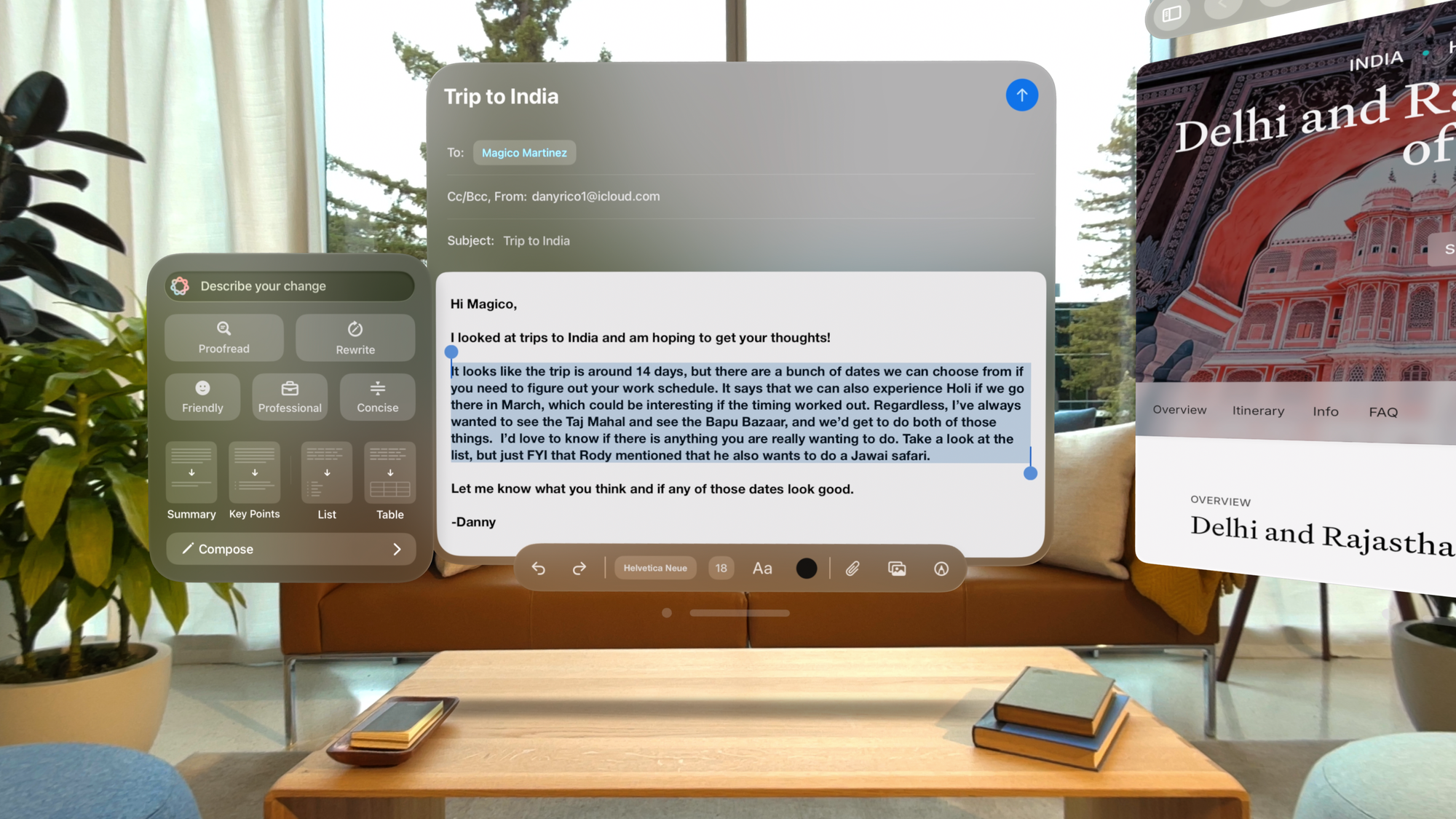
The rumors are true: Apple confirmed today that the Vision Pro will get Apple Intelligence features in April with the arrival of visionOS 2.4. A developer beta is also rolling out today for the less patient. As we’ve seen on other devices, Apple is starting out the Vision Pro’s AI rollout with basic features. Those include Writing Tools, which can help you summarize, rewrite and proofread text, as well as generate text with ChatGPT; Image Playground for creating AI imagery; and Genmoji for building custom AI generated emojis and stickers.
It really was only a matter of when Apple would bring Apple Intelligence to the Vision Pro. It’s available on current Macs running the M1 chip, so the spatial headset’s M2 hardware is clearly more than capable. Apple Intelligence on VP only supports English for now, but the company says more languages and AI features will be coming throughout the year. As for other minor Apple Intelligence capabilities, the Vision Pro will also be getting Priority Notifications and summaries, Smart Reply in Mail and Messages, and the ability to create Memory Movies in Photos.
Arguably more useful to Vision Pro users, Apple is also introducing several apps and tweaks to make the headset a bit more useful. There’s a new Spatial Gallery app exclusive to Vision Pro that will highlight spatial videos, photos and panoramas from Apple. Think of it as another way to enjoy the VP’s immersive capabilities without waiting for another big budget Immersive Video to drop. The company says the Spatial Galllery app will include “stories and experiences” from brands like Red Bull (which is well known for making 360-degree videos for VR), as well as behind the scenes material from Apple shows like Severance and Shrinking. (Let’s hope we can actually sit inside the creepy Lumon offices.)
Apple
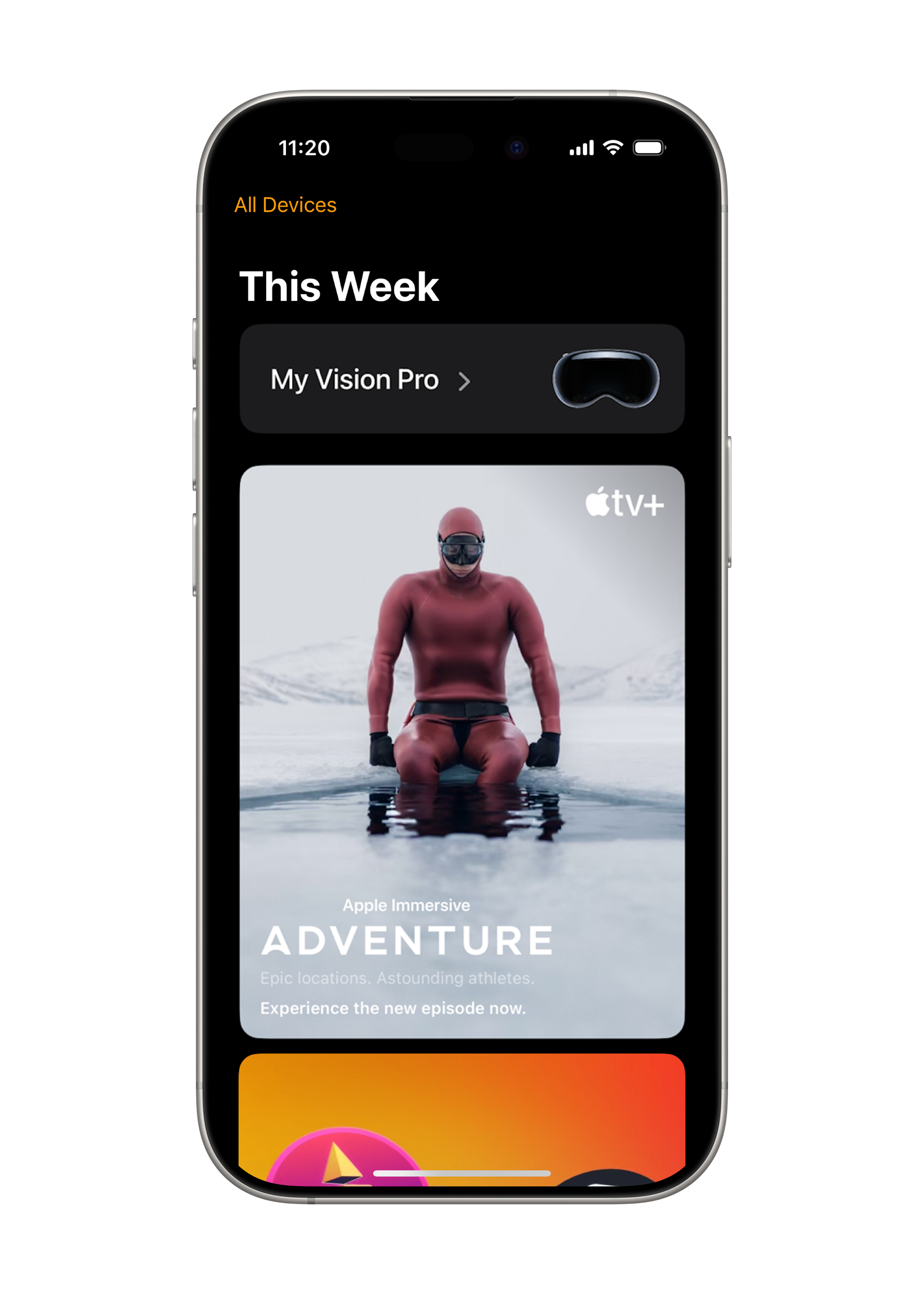
Additionally, a new Apple Vision Pro app for iPhone will let users better manage their headset experience. They can remotely add apps and games to the Vision Pro, as well as explore content to check out later. The app will also serve as a way to owners you know when new content drops for the Vision Pro (like a new “Arctic Surfing” episode of the Boundless Immersive series, which arrives today), as well as explore other videos for the headset, including a library of nearly 300 3D movies.
A standalone mobile Vision Pro app also makes sense, especially since Meta has offered something similar for its headsets for years. It’s a sign that Apple is slowly making the Vision Pro platform a bit more consumer friendly, instead of just being a testbed for developers working in spatial computing. I don’t think Apple will be lowering the Vision Pro’s price anytime soon, but whenever we get a cheaper headset from the company, it’ll be helpful to have content discovery features like the Spatial Gallery and the Vision Pro iPhone app.
And speaking of user-friendly tweaks, Apple is also improving Guest User mode with visionOS 2.4 Now headset owners will be able to start guest sessions with their iPhone and iPad, remotely choose which apps are available to guests wearing your Vision Pro, and also kick off AirPlay mirroring remotely. Previously, that process involved putting on the Vision Pro first, enabling Guest User mode, and then passing it to someone else to test out.
This article originally appeared on Engadget at https://www.engadget.com/ar-vr/apple-intelligence-is-headed-to-the-vision-pro-in-april-dev-beta-available-today-181014106.html?src=rss
The Eclipse Foundation enhances security with SBOM integration and improved vulnerability management, backed by a €515K investment from the Sovereign Tech Fund.
The Vision Pro’s visionOS 2.4 update will let you blast friends with “Genmojis,” but the more useful feature is the ability to stream what your friends see inside Apple’s headset.
visionOS 2.4 will bring Apple Intelligence to Vision Pro, a Spatial Gallery app, an iPhone app for remote installs, and a new iPhone/iPad-driven guest flow.
The last significant visionOS update was 2.2 in December, which brought the Wide and Ultrawide Mac Virtual Display modes. visionOS 2.3 instead focused on bug fixes and security updates.
The first visionOS 2.4 developer beta is available to install now, and Apple says the stable release will arrive in April. Note that the first beta does not contain all the coming features.
How To Install visionOS Developer Betas
To enable downloading beta Apple operating systems you just need to sign in with your Apple ID on the Apple Developer Center website at least once. You don’t need to join the paid Apple Developer Program, but you will need to accept the terms of the Apple Developer Agreement.
Then, in the headset, navigate to Settings -> General -> Software Update -> Beta Updates and select “visionOS 2 Developer Beta”.
Note that installing a beta version of an operating system is only recommended if you’re willing to accept bugs, instability, and the small chance it could put your device in a state requiring a factory reset. Some apps may even stop working. In exchange, you’ll get to try out the new features and improvements in advance.
Apple Intelligence
Apple Intelligence is the company’s name for its generative AI features. Some features run on-device, while others are offloaded to the company’s Private Cloud Compute (PCC) servers, and certain requests reach out to OpenAI’s ChatGPT, if you give permission for that.
Apple Intelligence arrived on iPhones (15 Pro and later), iPads (M-series or A17 Pro chips only), and Macs (M-series chips only) late last year, and Apple didn’t say at the time whether Vision Pro would get it too.
With visionOS 2.4 Apple is bringing the following Apple Intelligence features to Vision Pro: Priority Notifications, Notification Summaries, Smart Reply, Memory Movie creation and Natural Language Search in Photos, Priority Messages & Mail Summaries In Mail, Writing Tools, Image Wand in Notes, Genmoji, and Image Playground.
At launch, Apple Intelligence on Vision Pro will only support US English, with support for “additional languages” coming later this year.
Priority Notifications & Notification Summaries
Apple Intelligence will automatically decide which notifications are most important, such as messages from loved ones about imminent events, and surface them at the top of the notification stack.
Further, longer notifications and groups of notifications from the same apps will show an AI-generated summary in place of its content. We should note that this feature has been widely criticized for sometimes misconstruing the content of notifications, however.
Tapping the notification summary will bring up the original notification.
Smart Reply In Messages & Mail
Smart Reply “identifies questions and suggests relevant replies” to messages and emails, which Apple says will let you “easily respond to texts and emails with just a few taps” on Vision Pro.
Smart Reply on iPhone, as an example.
This feature should be particularly useful for when you don’t have a Bluetooth keyboard connected at least, since floating virtual keyboards are slower to type on than touchscreen keyboards.
Memory Movies & Natural Language Search In Photos
In the Photos visionOS app, Apple Intelligence will bring the ability to generate a Memory Movie, as well as more advanced search.
“Simply type a description, and Apple Intelligence will pick out the best photos and videos, craft a storyline with chapters based on themes identified from the photos, and arrange them into a movie with its own narrative arc and a soundtrack,” Apple explains.
0:00
/0:33
Meanwhile, the Natural Language Search feature promises to let you find photos and videos in your library by just describing them.
Priority Messages & Mail Summaries In Mail
Just like with notifications, in the visionOS Mail app Apple Intelligence should surface the most salient messages at the top of the stack.
Each email in the list will have an AI-generated short summary of its content, instead of just the first line as in traditional email clients.
Further, upon opening an email you can choose to AI generate a medium-length summary of its content.
Writing Tools
The Writing Tools feature will offer four kinds of tools for “rewriting, proofreading, and summarizing” long-form text that you type or dictate “nearly everywhere” in visionOS, including Mail, Notes, and many third-party apps.
These tools are:
Proofread: “checks grammar, word choice, and sentence structure with suggested edits”.
Rewrite: “adjust the tone of text to make it more friendly, professional, or concise”, or use Describe Your Change to specify the exact kind of change you want.
Summarize: recap the text, break it out into Key Points, or turn it into a bullet point list or table.
Compose: leverages OpenAI’s ChatGPT to generate any kind of textual content.
Image Wand In Notes
Image Wand in the visionOS Notes app will let you “create images based on rough sketches you create”, or AI generate an entirely new image “based on words and images from the surrounding area”.
Genmoji In iMessage
Genmoji is Apple’s feature to generate your own custom emoji in iMessage by typing or speaking a description of it.
0:00
/0:14
Within iMessage, these Genmoji can “be added inline to messages, shared as a sticker, or sent as a Tapback”.
Image Playground
Image Playground lets you AI generate “fun and unique images from themes, costumes, accessories, and places”.
0:00
/0:37
According to Apple, “users can add their own text descriptions, and can even create images in the likeness of a family member or friend using photos from their photo library.”
Image Playground is integrated into apps like Messages and Freeform, and is also available as a new standalone visionOS app.
Spatial Gallery
Spatial Gallery is a new visionOS app from Apple that “features a curated collection of spatial photos, spatial videos, and panoramas from artists, filmmakers, photographers, and more.”
At launch, Apple says it will offer “remarkable perspectives from photographers like Jonpaul Douglass and Samba Diop; new stories and experiences from iconic brands including Cirque du Soleil, Red Bull, and Porsche; behind-the-scenes moments from Apple Originals like Disclaimer, Severance, and Shrinking; and special moments from top artists.”
0:00
/0:26
Rather than being an open platform like YouTube or Vimeo, which added spatial video support in October, Apple’s Spatial Gallery sounds like a highly curated closed platform, offering quality over quantity.
Spatial Gallery will be available in all Apple Vision Pro countries except for mainland China.
Apple Vision Pro iPhone App
Apple says the new Apple Vision Pro app for iPhone will let you remotely queue apps to download & install to your headset, see device information, and browse curated recommendations of the best visionOS content.
The My Vision Pro interface will show device tips, the current visionOS version, and the serial number, and will let you set up Personalized Spatial Audio by scanning your face shape with your iPhone’s TrueDepth sensor.
Meanwhile, Apple says the Discovery interface will show “popular apps and games on the App Store; nearly 300 3D movies, Apple Immersive titles, and more video content on the Apple TV app; and the latest spatial photos, spatial videos, and panoramas featured in the Spatial Gallery”.
The Apple Vision Pro app will be part of iOS 18.4 (stable), and will also be downloadable from the iOS App Store.
iPhone/iPad-Driven Guest User Mode
Currently, initializing Guest User mode on Vision Pro requires putting on the headset and unlocking it first, and if there are any issues you need to adjust for after the guest puts the headset on, you need to do that all over again. From experience, this can lead to frustration.
With visionOS 2.4, Apple is adding the ability to approve Guest User mode from a nearby iPhone or iPad signed into the same Apple Account.
0:00
/0:09
As with the in-headset Guest User interface, this iPhone/iPad interface will let you choose which apps the guest has access to, as well as initiate View Mirroring with AirPlay.
Editor’s Note: Article updated briefly after publication to remove mention of Keynote, which Apple removed from draft press materials.
While Apple’s new iPhone 16e may be the big tech news of the week, it’s one of Google’s Pixel phones that leads our latest weekly deal roundup. More specifically, the Pixel 9 Pro — our pick for the best Android handset — is down to $799 at several retailers, a $200 drop that represents the lowest price we’ve tracked for an unlocked model. If you don’t need a new phone, a few other gadgets we recommend are also on sale, including Crucial’s X9 Pro portable SSD, Apple’s AirTag trackers, ASUS’ ROG Zephyrus G14 gaming laptop and Ultimate Ears’ Wonderboom 4 speaker. Here are the best tech deals from this week that you can still buy today.
Spotlight deal
The rest of the best tech deals this week
Ultimate Ears Wonderboom 4 for $70 at Amazon ($30 off MSRP): We’ve previously recommended the adorably compact Wonderboom 3 in our guide to the best Bluetooth speakers. The Wonderboom 4 is more or less the same device, only it charges over USB-C instead of microUSB and adds a “Podcast Mode” that better tunes the sound profile for, well, podcasts. Otherwise, it still sounds punchy and spacious for a speaker that’s only four inches tall, and its IP67-rated design is both rugged and easy to control. The battery typically lasts more than 10 hours on a charge as well. Just don’t expect super-high volume or bass response. The speaker fell to $60 for a week back in December, but this discount ties its lowest price outside of that. Also at B&H and Best Buy.
Crucial X9 Pro (1TB) for $70 at Amazon ($31 off): This deal has popped up a few times in recent months, but it matches the lowest price in a year for the 1TB version of our favorite portable SSD. While the drive itself isn’t the absolute fastest model out there, it’s quick enough for most needs at a more reasonable price, it stays cool with extended use, and its rugged design is shorter than a credit card. Also at B&H and Best Buy.
The Crucial X9 Pro portable SSD.
Jeff Dunn for Engadget
JLab Go Air Sport for $13 at Amazon ($17 off): This is the lowest price we’ve tracked for the budget pick in our guide to the best running headphones. You should see the full discount at checkout. The catch is that the offer only applies to the neon yellow model, which, let’s say, won’t be for everyone. This pair’s boomy sound isn’t the best, either, and it’s light on features, with no active noise cancellation, multi-device pairing, wireless charging or automatic wear detection. Still, its sweat-resistant design stays secure during workouts, and its battery life is solid at roughly eight hours per charge. For $13, it’s hard to complain if you just want a cheap set of beater headphones for the gym.
LG C3 OLED TV (65-inch) for $1,197 at Amazon ($303 off): The LG C3 was released in 2023, but it’s not a huge downgrade from last year’s LG C4, so it’s worth considering when it’s discounted to this extent. While it can’t quite match the brightness and color volume of a QD-OLED set like the Samsung S90D, it still gets you the usual benefits of a good OLED panel: excellent contrast, vibrant colors, wide viewing angles and minimal blurring from objects in motion. It’s also equipped with four HDMI 2.1 ports that support a fast 120Hz refresh rate, so it can make the most of a PlayStation 5 or Xbox Series X. This discount ties the lowest price we’ve seen for the 65-inch version outside of a handful of in-store-only and eBay coupon deals. LG will release a new “C5” TV in the coming months, but we doubt it’ll be available at this price anytime soon.
The LG C3 OLED TV.
LG
Alan Wake 2 (PC) for $25 at Epic Games Store ($25 off): This matches the lowest price to date for the surreal survival horror game Alan Wake 2, which we recommend in our guide to the best PC games. The PS5 version is also on sale for $30, which is an all-time low for that platform. You shouldn’t go into this one expecting tons of action, and the story definitely isn’t immune to navel-gazing, but it’s delightfully tense and voice-y in a way most high-production games are not nowadays. It’s graphically gorgeous, too.
Baseus Blade Laptop Power Bank for $48 at Amazon ($52 off, Prime only): The Baseus Blade is the budget pick in our guide to the best laptop power banks. At 20,000 mAh, it doesn’t have enough juice to completely refill larger notebooks, but it can deliver a relatively speedy 100W charge from either of its two USB-C ports. There are two USB-A ports and a battery status display on top of that, and its tablet-like shape is fairly easy to tuck in a bag. This deal is only for Amazon Prime members, but it comes within a couple bucks of the lowest price we’ve seen. To see the full discount, click the 10 percent coupon on the product page and use the code BGAEY8HX at checkout.
The Baseus Blade power bank.
Amy Skorheim for Engadget
PlayStation Plus Premium (12-month) for $100 at PlayStation ($60 off, new and returning subscribers only): Through February 24, new and lapsed subscribers can get a year-long PlayStation Plus Premium subscription for $100. That’s $60 less than usual. As a refresher, this is the top-end tier of Sony’s online service. It gets you the core benefits of any PS Plus subscription — online play, cloud saves and a selection of free titles every month — plus access to a Game Pass-style catalog (including several retro PlayStation games), time-limited game trials and cloud streaming support. Most people will be fine without it, and Sony has only jacked up the service’s price over time, but any sort of discount should be welcome if you’re interested in the retro catalog and want to stream games remotely. Just remember to cancel before the subscription ends if you don’t want to be auto-renewed at the standard rate.
Apple Music (6-month) for $3 at Apple ($52 off, new subscribers and select devices only): Apple is running a promo that gives six months of Apple Music for $3 total. Normally, a solo subscription costs $11 per month after a 30-day free trial (or a three-month trial if you recently bought an Apple device). This offer comes with a few caveats, though: You must be new to Apple Music, not eligible for the aforementioned three-month trial and able to redeem the offer through an iPhone, iPad or Mac. If you meet all of that, however, this is a nice way to get a half-year of music streaming for cheap. We praise Apple Music in our guide to the best music services for its lossless streaming quality, ease of use with Apple devices and emphasis on letting actual people introduce you to new music. This deal runs through February 27, but remember your subscription will be set to auto-renew until you cancel.
The ASUS ROG Ally.
Photo by Sam Rutherford/Engadget
ASUS ROG Ally (Z1 Extreme) for $450 at Best Buy ($200 off): The original ROG Ally isn’t as powerful, ergonomic or long-lasting as the newer ROG Ally X, and all Windows gaming handhelds are stuck with clunkier software than Valve’s Steam Deck, which remains the top pick in our buying guide. But when it’s discounted to this extent, the older Ally is worth considering if you really want a handheld PC that can play games from any client, be it Steam, the Epic Games Store or the Xbox app. It’s still a touch more powerful than the Deck, too, and its 120Hz VRR display does wonders to keep games looking smooth. And for as sloppy as Windows can be, ASUS has made its Armoury Crate app at least a little easier to navigate over time. Just don’t expect more than a couple hours of battery life, and don’t bother using the microSD slot. This deal ties the all-time low for the model with an AMD Ryzen Z1 Extreme chip.
ASUS ROG Zephyrus G14 (2024) for $1,074 at Best Buy ($525 off): Here’s the lowest price we’ve seen for this configuration of the ROG Zephyrus G14, which includes a Ryzen 9 8945HS chip, a GeForce RTX 4060 GPU, 16GB of RAM, a 1TB SSD and a 14-inch 2.8K OLED display with a 120Hz refresh rate. Be aware that this is last year’s model; ASUS has already announced an upgraded version for 2025 that should arrive in the coming weeks. That said, the current G14 is the top pick in our gaming laptop buying guide, and it remains a decent buy at this price if you want a gaming machine that’s premium-feeling and long-lasting enough to delight as an everyday laptop. The main downsides are that the memory isn’t upgradeable and the design can get toasty under load. You’ll also have to turn down graphics settings to get some games to run well at the display’s native resolution. Still, that OLED screen is gorgeous, and there’s enough power to play many titles just fine. We gave the ROG Zephyrus G14 a score of 91 in our review last year.
The ASUS ROG Zephyrus G14.
Photo by Sam Rutherford/Engadget
Chipolo One (4-pack) for $68 at Chipolo ($32 off): The Chipolo One tops our guide to the best Bluetooth trackers. While it doesn’t have the enormous crowd-sourcing network of Apple’s AirTags, we’ve found it send separation alerts faster when you’ve left an item behind and ring louder when you’re back in the vicinity. It also has a hole for attaching to key rings, unlike Apple’s tracker. It may not be the safest choice if you’re worried about losing your luggage on a long-distance trip, but as a security blanket for keys, wallets or handbags, it’s convenient. This discount on a four-pack isn’t the lowest price we’ve seen, but it’s still a bit lower than its usual street price. Use the code ENGADGET10 at checkout to get the full deal. If you do want a set of AirTags, meanwhile, a four-pack of those is also on sale for $70 at Amazon and other retailers.
ThermoWorks Thermapen One for $79 at ThermoWorks ($30 off): The Thermapen One is a buttonless instant-read meat thermometer that we highlight in our guide to the best grilling gear. It reads temperatures quickly and accurately, its backlit display is easy to read and the whole thing sleeps and wakes automatically. It’s definitely not the cheapest option, but its faster readings may be worth the extra cost for frequent grillers. While not an all-time low, this Engadget-exclusive deal marks the lowest price we could find in the last couple of months.
Follow @EngadgetDeals on Twitter and subscribe to the Engadget Deals newsletter for the latest tech deals and buying advice.
This article originally appeared on Engadget at https://www.engadget.com/deals/googles-pixel-9-pro-is-200-off-plus-the-rest-of-the-weeks-best-tech-deals-180041864.html?src=rss