

Rockstar Games wasn’t planning to unveil its highly anticipated first trailer for Grand Theft Auto VI, the next major installment in one of the most popular game franchises of all time, until Tuesday, December 5. Rather than wait, however, Rockstar has released the trailer a day early in response to a now-banned X (formerly Twitter) account
Source: Hot Hardware – Official Grand Theft Auto 6 Trailer Filled With Hints Drops Early With A Launch Date
Monthly Archives: December 2023
Don’t count on NASA to return humans to the Moon in 2025 or 2026, GAO says

Enlarge / A crescent Earth rises over the horizon of the Moon in this view from NASA’s Orion spacecraft on the unpiloted Artemis I test flight in December 2022. (credit: NASA)

A new report from the Government Accountability Office suggests NASA’s Artemis III mission, which aims to return humans to the Moon’s surface for the first time in more than 50 years, could be delayed from late 2025 until 2027.
The readiness of SpaceX’s human-rated lander and new commercial spacesuits developed by Axiom Space are driving the schedule for Artemis III. Both contractors have a lot of work to do before the Artemis III landing, and the government watchdog’s report said delays with SpaceX’s Starship program and design challenges with Axiom’s spacesuits threaten NASA’s schedule.
“NASA and its contractors have made progress, including completing several important milestones, but they still face multiple challenges with development of the human landing system and the space suits,” the GAO said in a report published Thursday. “As a result, GAO found that the Artemis III crewed lunar landing is unlikely to occur in 2025.”
Read 15 remaining paragraphs | Comments
Source: Ars Technica – Don’t count on NASA to return humans to the Moon in 2025 or 2026, GAO says
Texas sues Pfizer with COVID anti-vax argument that is pure stupid

Enlarge / Texas Attorney General Ken Paxton. (credit: Getty | Brett Coomer/Houston Chronicle)

Texas Attorney General Ken Paxton sued Pfizer last week, claiming the pharmaceutical giant “deceived the public” by “unlawfully misrepresenting” the effectiveness of its mRNA COVID-19 vaccine and sought to silence critics.
The lawsuit also blames Pfizer for not ending the pandemic after the vaccine’s release in December 2020. “Contrary to Pfizer’s public statements, however, the pandemic did not end; it got worse” in 2021, the complaint reads.
“We are pursuing justice for the people of Texas, many of whom were coerced by tyrannical vaccine mandates to take a defective product sold by lies,” Paxton said in a press release. “The facts are clear. Pfizer did not tell the truth about their COVID-19 vaccines.”
Read 15 remaining paragraphs | Comments
Source: Ars Technica – Texas sues Pfizer with COVID anti-vax argument that is pure stupid
Hackers stole ancestry data of 6.9 million users, 23andMe finally confirmed

Enlarge (credit: Bloomberg / Contributor | Bloomberg)

It’s now been confirmed that an additional 6.9 million 23andMe users had ancestry data stolen after hackers accessed thousands of accounts by likely reusing previously leaked passwords.
This is a much larger number of accounts than 23andMe previously disclosed in a Securities and Exchange Commission filing, which estimated that 0.1 percent of users—approximately 14,000, TechCrunch estimated—had accounts accessed by hackers using compromised passwords.
After the cyberattack was reported, Wired estimated that “at least a million data points from 23andMe accounts” that were “exclusively about Ashkenazi Jews” and data points from “hundreds of thousands of users of Chinese descent” seemed to be exposed. But beyond those estimates, for two months, all the public knew was that 23andMe’s filing noted that “a significant number of files containing profile information about other users’ ancestry” were also accessed.
Read 9 remaining paragraphs | Comments
Source: Ars Technica – Hackers stole ancestry data of 6.9 million users, 23andMe finally confirmed
These Beats Headphones Are up to 50% Off Right Now
Amazon has been having a great sale on Beats headphones since Black Friday, and some of them are still active despite Cyber Monday already being over. Right now, you can still nab Beats headphones for up to 50% off. That’s not quite as low in price as they were for Black Friday, but it’s still a great deal.
Beats Solo3 headphones are 50% off
If you’re still trying to take advantage of the holiday deals, consider the Beats Solo3, which are 50% off at $99.99 (originally $199.95). This is the cheapest they’ve ever been and matches the deals offered on Black Friday, according to Camelcamelcamel’s price history. These headphones give you up to 40 hours of listening time with fast charging (3 hours of playtime with just a 5-minute charge) and have a microphone so you can take calls with them. Remember that Apple bought Beats, so there are Apple features like seamless Bluetooth connections to Apple Watch, iPad, and Macs, as well as easy Siri activation with the on-ear controls. You can read the full Beats Solo3 PCMag review here.
The Beats Studio Buds are $50 off
For those who want noise-cancelling earbuds, the Beats Studio Buds for $99.95 (originally $149.95) are a good pick. The earbuds are just $10 more than they were on Black Friday, according to Camelcamelcamel’s price history, and still a great deal. These earbuds are very well-priced for active noise cancellation (ANC). According to PCMag’s review, they also have a strong bass with crisp and balanced highs. You’ll also like the easy-to-use on-ear controls and one-touch pairing with Android and iOS. You can expect about 5 hours with ANC on and 8 hours with ANC off, plus an additional 10 hours with the charging case.
Beats Powerbeats Pro are $70 off
If you’re looking for more outdoor and sweat-resistant earbuds that you can take to the gym with you, consider the Powerbeats Pro for $179.95 (originally $249.95). These earbuds hit $150 during Black Friday, according to Camelcamelcamel’s price history, but are still a good deal at the current price. These earbuds give you 1 more hour of listening time than the Studio Buds, for a total of 9 hours. Keep in mind that these earbuds have no ANC, but they have spatial audio, which creates a neat surround-sound effect. Some other features, like audio sharing, allow you to pair the earbuds with other Beats or AirPods to an iPhone and listen to the same media. You can also use the “locate my device” feature to find your earbuds if you are prone to misplacing them. You can read the full PCMag review here.
Source: LifeHacker – These Beats Headphones Are up to 50% Off Right Now
Cyberpunk 2077's 2.1 Update Adds New Vehicles, Revamped Bosses, Metro Rides, And More

When Cyberpunk 2077 got its Phantom Liberty expansion and 2.0 update, CD Projekt Red said that was the end of the line for major content updates to the title. Well, the company appears to have done a little fibbing, because a new trailer just dropped for Update 2.1, and it’s coming along with a whole pack of new pieces for the PC’s premier
Source: Hot Hardware – Cyberpunk 2077’s 2.1 Update Adds New Vehicles, Revamped Bosses, Metro Rides, And More
After a chaotic three years, GPU sales are starting to look normal-ish again

Enlarge / AMD’s Radeon RX 7600. (credit: Andrew Cunningham)

It’s been an up-and-down decade for most consumer technology, with a pandemic-fueled boom in PC sales giving way to a sales crater that the market is still gradually recovering from. But few components have had as hard a time as gaming graphics cards, which were near impossible to buy at reasonable prices for about two years and then crashed hard as GPU companies responded with unattainable new high-end products.
According to the GPU sales analysts at Jon Peddie Research, things may finally be evening out. Its data shows that GPU shipments have returned to quarter-over-quarter and year-over-year growth after two years of shrinking sales. This is the second consecutive quarter this has happened, which “strongly indicates that things are finally on the upswing for the graphics industry.”
JPR reports that overall GPU unit shipments (which include integrated and dedicated GPUs) are up 16.8 percent from Q2 and 36.6 percent from a year ago. Dedicated GPU sales increased 37.4 percent from Q2. When comparing year-over-year numbers, the biggest difference is that Nvidia, AMD, and Intel all have current-generation GPUs available in the $200–$300 range, including the GeForce RTX 4060, the Radeon RX 7600, and the Arc A770 and A750, all of which were either unavailable or newly launched in Q3 of 2022.
Read 4 remaining paragraphs | Comments
Source: Ars Technica – After a chaotic three years, GPU sales are starting to look normal-ish again
A Meteor Lake Laptop Breaks Cover At Retail Ahead Of Intel's Next-Gen CPU Launch

With Intel’s upcoming Meteor Lake-based mobile processors launching soon, various design wins are started to leak. This time, an upcoming Samsung laptop was spotted — the Galaxy Book 4 Ultra –featuring a Core Ultra 7 155H CPU and GeForce RTX 4050 graphics. Samsung’s new laptop will be the successor to the outgoing Galaxy Book 3 Ultra, which
Source: Hot Hardware – A Meteor Lake Laptop Breaks Cover At Retail Ahead Of Intel’s Next-Gen CPU Launch
Intel's Linux CPU Temperature Driver Being Adapted To Handle 128+ CPU Cores
Intel’s CPU temperature driver “coretemp” within the Linux kernel is being adapted so it can report CPU core temperatures in excess of 128 cores…
Source: Phoronix – Intel’s Linux CPU Temperature Driver Being Adapted To Handle 128+ CPU Cores
The Google Pixel 7 Pro Is on Sale for Its Lowest Price Ever
The Google Pixel 7 Pro was recently eclipsed by the Google Pixel 8 in October, meaning, this holiday season, you’ll see the Pixel 7 Pro at its lowest price yet. The first retailer to do just that is none other than Woot, Amazon’s subsidiary online retailer. Until Dec. 9, or while Pixels last, Woot is selling new, 256GB unlocked Google Pixel 7 Pros for $599 (originally $999).
Keep in mind that Woot only ships to the 48 contiguous states in the U.S. If you have Amazon Prime, you get free shipping; otherwise, it’ll be $6 to ship.
Get these Pixel 7 Pro essentials:
It would be a shame if you dropped your new Pixel 7 Pro right out of the box :
-
Pixel 7 Pro clear case $15.99 (was $29.99)
-
MagSafe case with kickstand $29.98
-
MagSafe case with wallet $29.98
-
Pixel 7 Pro screen protector $5.99 (was $9.99)
Get the Pixel 7 Pro $100 cheaper than Black Friday
For those who didn’t buy a new cell phone during the Black Friday and Cyber Monday deals, I have good news for you: Woot’s current deal for the Pixel 7 Pro is the best one yet. During Black Friday and Cyber Monday, you could only get the 256GB version for $699 from Best Buy or Amazon, which was, at the time, the lowest price it had ever been. But Woot’s current deal is even better, according to Honey’s price history.
At its current price, you can get the 7 Pro for the same price that Amazon is selling the Pixel 7, making this a no-brainer deal. You should not consider the Pixel 7 when you can get the Pro version for the same price. You can see some of their main differences in our breakdown here. If you are considering switching to the Pixel 7 Pro, make sure to transfer your Google Authenticator codes before factory resetting your old phone. Also, keep in mind that if your phone breaks, you can now fix it yourself to save yourself a good chunk of money. You can read the full Pixel 7 Pro review from PCMag here.
Source: LifeHacker – The Google Pixel 7 Pro Is on Sale for Its Lowest Price Ever
Dragon Age: Dreadwolf teaser proves EA hasn’t forgotten about the game
Hey, remember Dragon Age: Dreadwolf? It has been over a year now since the game’s title was first revealed and almost exactly five years since the then-unnamed sequel was first announced at the 2018 Game Awards. And today, just to make sure you didn’t forget about the long-in-development game completely, Bioware and EA are out with yet another teaser presaging a “full reveal” planned for summer 2024.
The short “Dragon Age Day” video, titled “Thedas Call,” features unseen voiceovers speaking over airborne, still-life shots of three locations that will feature in the new game. An accompanying blog post goes into a bit more detail on the locations, describing “the desolate, beautiful badlands of the Anderfels with curtains of distant mountainous spires. The twisting channels and gleaming towers of Antiva, where Crows may lurk in any shadow. The turquoise seas of Rivain with its rushes of greenery and hardy sea-faring people.”
The short teaser concludes with a statement that seemingly comes from Solas (a.k.a. Fen’harel), the Dread Wolf that will serve as the game’s antagonist: “All the world will soon share the peace and comfort of my reign.” And EA’s blog post expands a bit on Solas’ motivation as “not a man who sees himself as evil, but someone who believes he’s fighting for a good cause and is willing to get his hands dirty.”
Read 5 remaining paragraphs | Comments
Source: Ars Technica – Dragon Age: Dreadwolf teaser proves EA hasn’t forgotten about the game
Judge: Amazon “cannot claim shock” that bathroom spycams were used as advertised

Enlarge (credit: zhihao | Moment)

After a spy camera designed to look like a towel hook was purchased on Amazon and illegally used for months to capture photos of a minor in her private bathroom, Amazon was sued.
The plaintiff—a former Brazilian foreign exchange student then living in West Virginia—argued that Amazon had inspected the camera three times and its safety team had failed to prevent allegedly severe, foreseeable harms still affecting her today.
Amazon hoped the court would dismiss the suit, arguing that the platform wasn’t responsible for the alleged criminal conduct harming the minor. But after nearly eight months deliberating, a judge recently largely denied the tech giant’s motion to dismiss.
Read 14 remaining paragraphs | Comments
Source: Ars Technica – Judge: Amazon “cannot claim shock” that bathroom spycams were used as advertised
How That Viral Wedding Dress Photo Showed a Bride In 3 Different Poses Simultaneously
Over the weekend, some parts of the internet were fixated on figuring out why an otherwise normal photo of a bride trying on wedding dresses turned out so bizarre.
At first glance, there’s nothing strange about the image—simply a bride standing in front of two mirrors in a wedding dress. However, if you look closely at the bride and both mirrors, you’ll see she’s striking in a different pose in all three locations, all within the same photo.
The bride in question, Tessa Coates, took to her socials to ask the internet for an explanation. Coates swore the photo was just a normal snapshot taken on an iPhone 12, with no added effects or features like Live Photo or panoramic. She even shared a screenshot of the metadata of the photo as proof:
With all this in mind, the situation was a bit of a stumper. How could a standard photo capture three different poses at once? Coates shared on her story that she visited an Apple Store, where a Genius told her that it was the result of the iPhone taking multiple frames at once, then intelligently stitching them together. That is, for simplicity’s sake, how an iPhone takes HDR photos, however, it doesn’t seem to be the cause here. MKBHD writer and researcher David Imel didn’t even think the photo was real, poking holes in HDR theory, as the process happens way too fast to allow for photographing multiple poses.
Spoiler alert: It was panoramic mode all along
However, the case seems to have been solved. Faruk from the YouTube channel iPhonedo highlighted that the resolution of the photo (3028 x 3928) isn’t the standard resolution of an iPhone 12 image. When Faruk took a photo on his iPhone 12, the resolution comes back as 3024 x 4032. A small difference, but the clue Faruk needed to figure out what was going on. He correctly identified this resolution as being a panoramic photo after all, even though the photo wasn’t labeled as “Pano” as they usually are. As it turns out, if you don’t move the iPhone enough when taking a panoramic shot, it won’t label the photo as Pano. Go figure.
Panoramic shots work by taking a lot of photos in succession as you move the camera from left to right. It then stitches those photos together, to create the illusion of one long image. So, based on Faruk’s theory, what most likely happened here was Coates’ photographer actually took the photo in Pano mode, but didn’t move the camera enough to register as as panoramic photo. However, they moved it just enough to take multiple photos of the scene, including Coates in three different poses. The left mirror was captured first, then Coates herself, then, finally, the mirror on the right.
You should be able to replicate the situation yourself, at least with one mirror. If you place your subject in the frame with at least one mirror to their side, switch to Pano mode in the camera app, then take a photo slightly moving the phone left to right, the subject in the mirror should look different than they do themselves.
On to the next internet mystery.
Source: LifeHacker – How That Viral Wedding Dress Photo Showed a Bride In 3 Different Poses Simultaneously
Mainline Linux Support Is Being Worked On For A $100~200 ARM Handheld Gaming Console
If the likes of the Steam Deck or ASUS ROG Ally are out of your budget or you just prefer enjoying more classic, less demanding games, there are Linux kernel patches being floated to allow mainline support for a sub-$200 ARM-powered handheld gaming console…
Source: Phoronix – Mainline Linux Support Is Being Worked On For A 0~200 ARM Handheld Gaming Console
Streaming apps are trying to bundle their way out of customer disenchantment

Enlarge / Michael Keaton in The Flash, which is streaming on Max. (credit: YouTube/Warner Bros.)

Streaming services are on thin ice with many customers. With price hikes becoming a norm for streaming services, subscribers are reconsidering the value of streaming apps and whether subscriptions are worth the cost. In a bid to mollify disgruntled customers and make their packages seem more economical and simple, streaming services are bundling up.
Verizon announced today that its myPlan wireless phone customers will be able to get Netflix and Max, both with ads, for $10 per month total per phone line. Netflix with ads is usually $6.99 per month, while Max’s ad tier is $9.99 per month or $99.99 per year. That means Verizon customers can save up to $6.98 per month with the new bundle, which Verizon will begin offering on December 7.
The new offer joins two other deals that Verizon already offers that bundle its wireless service with TV streaming. One lets customers add ad-free Disney+ and Hulu and ESPN with ads for $10 per month per line. Another lets customers add Apple One, which includes Apple TV+, Apple Music, Apple Arcade, and iCloud+, for $10 per month per line.
Read 14 remaining paragraphs | Comments
Source: Ars Technica – Streaming apps are trying to bundle their way out of customer disenchantment
The Best Apps for Improving Memory
Whether you want to improve your memory for everyday life, school, or work, it’s kind of hard to know where to start. After all, memory is kind of mushy and not a traditional “hard skill” like coding. In general, I recommend outsourcing everything possible to your phone. Why not use your smart device to enhance your original smart device, your brain?
There are many apps out there that purport to beef up your memory skills, though research on whether they work has been spotty and conclusions about efficacy are pretty limited. One thing we do know is that they’re not going to magically cure major cognitive decline. Still, if a few puzzles a day help you feel better and get your gears going, it could be worth a download just to get that rush. Apps are just one of many ways to get a little brain boost, but below are some of the better ones out there.
Old reliable: Lumosity
Lumosity is the app that crops up most often when you’re looking for a tech tool to improve your memory and overall thinking power. Basic functionality is free, but to unlock all the features—and there are a lot of features—you’re looking at $15 per month. You can pick a track to focus on, from memory to attention to processing speed, among others, and play games once a day to improve your skills. The app even allows you to track not only your own progress, but your progress against others, in case you’re into a more competitive element.
For customizable content: Elevate
Elevate advertises itself as “your personal brain trainer” and makes good on that by making its content pretty customizable. You take a pre-test to determine your skill levels in reading, writing, speaking, and math, then get an “Elevate Proficiency Quotient” to represent your proficiency. You can play three games per day for free, but there are over 40 games you can access if you pay $4.99 per month. Some games can even be downloaded for offline use, so if you spend a lot of time on planes or subways, you can use your commutes to your (brain’s) advantage.
To compete with friends: CogniFit Brain Fitness
CogniFit makes a big deal of its games being designed by neuroscientists and its product being “trusted by doctors.” That’s great. But you know what’s also great? Beating your friends at stuff. CogniFit allows you to compete against other people (and has nearly 5 million users already), plus get detailed insights into your own cognitive strengths and weaknesses, from contextual memory to hand-eye coordination. You can play four games for free, but beyond that you’ll have to pony up $13 per month.
To spend no money: Brain Games
If you want to improve your cognitive skills without taking a toll on your wallet, consider Brain Games, which is ad-supported and doesn’t even ask you to create an account when you download it. It’s only available on Android, but it features enough games and features that you can complete three tasks a day for a month. The levels get harder as you go and you can even compete against other users.
To remember specific things: Eidetic
The other apps on this list are for enhancing your memory overall, but why not practice that with things you actually need to remember? Enter Eidetic, which uses spaced repetition to help you remember anything from account numbers to long quotes. The app takes care of the “spaced” part of the repetition for you, sending you push alerts whenever it’s time to review. It’s also free!
Source: LifeHacker – The Best Apps for Improving Memory
Watch An ASUS ROG Ally Get Upgraded To 32GB Of DDR5-7500 RAM With A Risky Mod

There’s a whole bunch of PC gaming handhelds on the market now, and just about every one has its advantages and disadvantages. The Steam Deck has the most varied inputs (and now with the OLED model, arguably the best screen), the Lenovo Legion Go has the biggest screen and detachable controls, and the various Ayaneo, One-Notebook, and GPD
Source: Hot Hardware – Watch An ASUS ROG Ally Get Upgraded To 32GB Of DDR5-7500 RAM With A Risky Mod
Gmail’s AI-powered spam detection is its biggest security upgrade in years

Enlarge (credit: Getty Images | pagadesign)

The latest post on the Google Security blog details a new upgrade to Gmail’s spam filters that Google is calling “one of the largest defense upgrades in recent years.” The upgrade comes in the form of a new text classification system called RETVec (Resilient & Efficient Text Vectorizer). Google says this can help understand “adversarial text manipulations”—these are emails full of special characters, emojis, typos, and other junk characters that previously were legible by humans but not easily understandable by machines. Previously, spam emails full of special characters made it through Gmail’s defenses easily.
If you want an example of what “adversarial text manipulation” looks like, the below message is something from my spam folder. My personal Gmail experience with these emails is that they used to be a major problem during the 1st half of the year, with emails like this regularly landing in my inbox. It does seem like this RETVec tech upgrade really works, though, because emails like this haven’t been a problem at all for me in the last few months.
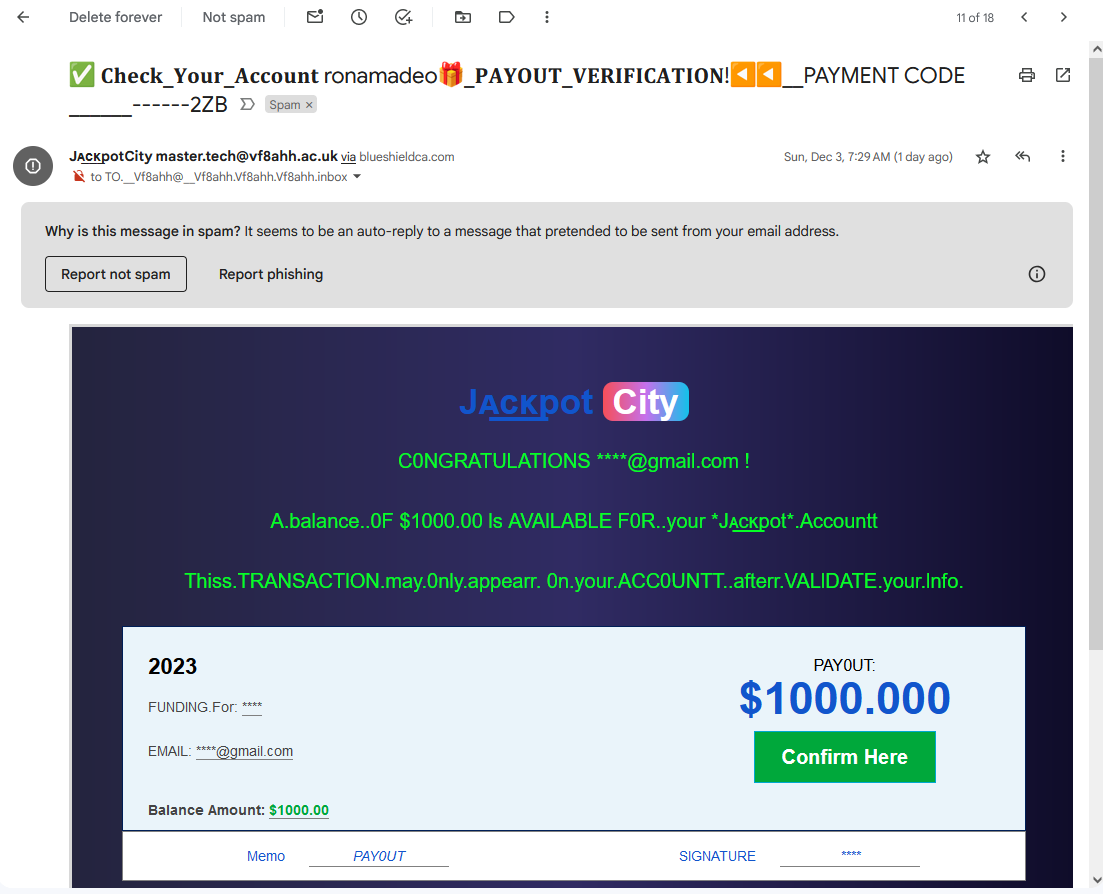
An example of “adversarial text manipulation” from my spam folder. (credit: Ron Amadeo)
The reason emails like this have been so difficult to classify is that, while any spam filter could probably swat down an email that says “Congratulations! A balance of $1000 is available for your jackpot account,” that’s not what this email actually says. A big portion of the letters here are “homoglyphs“—by diving into the endless depths of the Unicode standard, you can find obscure characters that look like they’re part of the normal Latin alphabet but actually aren’t.
Read 5 remaining paragraphs | Comments
Source: Ars Technica – Gmail’s AI-powered spam detection is its biggest security upgrade in years
The Latest Printer Headache Caused By A Windows Update Is A Doozy
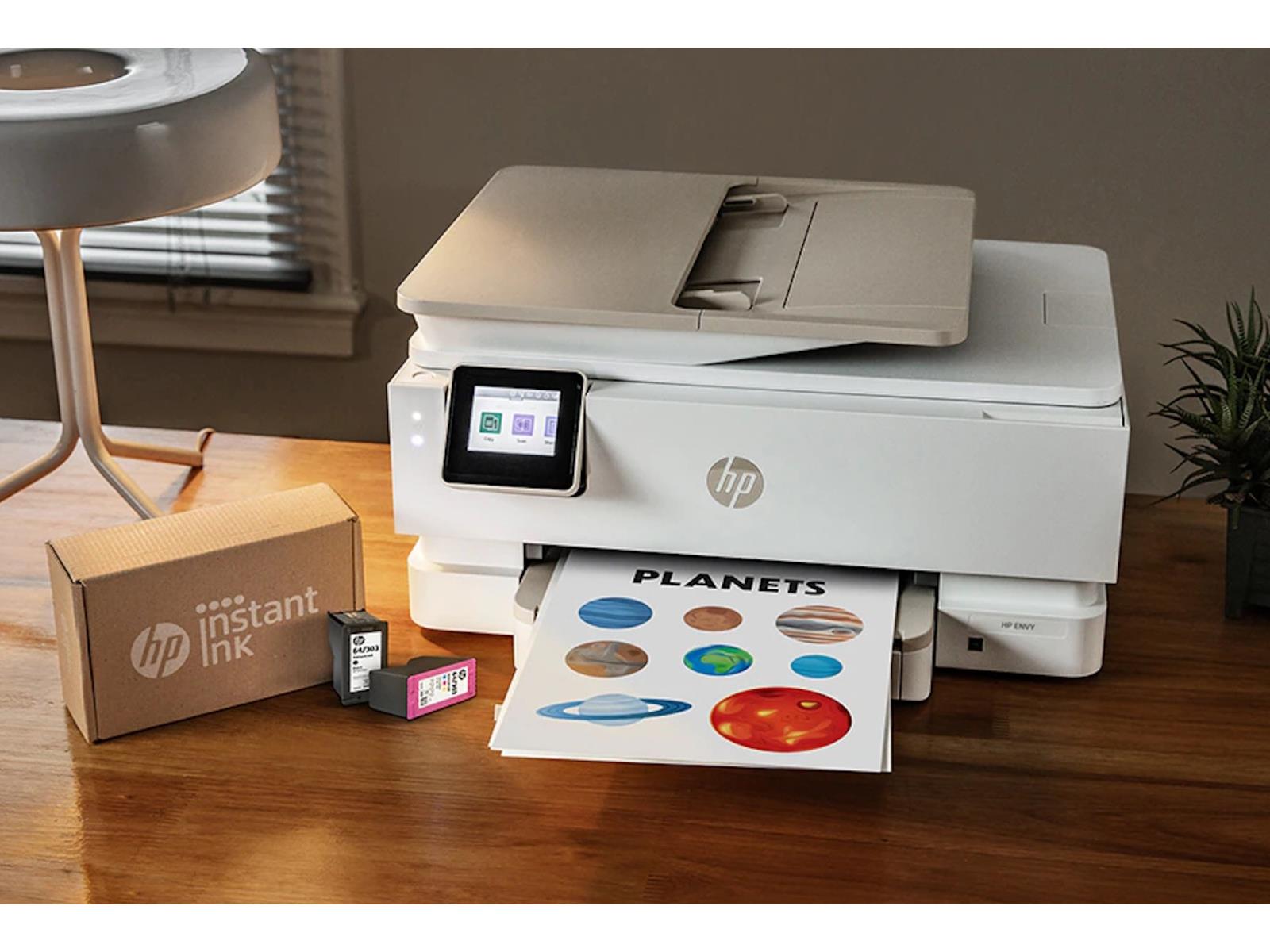
After numberous printing related bugs this year, you’d think Microsoft would be particuarly cautious and do some additional Q&A on its latest printing-related patches, but that doesn’t appear to be the case. A newly discovered bug affecting Windows 10 and 11 seems to be renaming all printers on a system “HP M101-M106”.
At the turn of the
Source: Hot Hardware – The Latest Printer Headache Caused By A Windows Update Is A Doozy
How to Reset Your Windows PC for a Fresh Start
Resetting your Windows PC can be a good way to clear out old junk files and help troubleshoot technical issues your computer is experiencing. In the past, you used to have to rely on physical disk media and ISO files to reinstall Windows. Now, though, Microsoft has made it much easier—you can reset your PC to get a fresh start, directly from the operating system and without completely reinstalling Windows. Here’s how to do it.
How to reset a Windows 11 PC
Reseting a Windows 11 PC only requires a few steps. Microsoft offers two options for resetting your PC—you can keep your files, which makes the process easier, or you can delete everything. If you want to delete everything and start completely fresh, make sure to back up any important files to an external drive and/or to your preferred cloud service before getting started.
Once you have everything backed up, go to Start > Settings > System > Recovery and then select Reset this PC.
At this point, you’ll be faced with the two options I mentioned before. If you want to keep your files and just reinstall Windows, choose Keep my files, select your preferred storage option (cloud or local), and change any other settings you see that you want to change. (If you aren’t sure about a setting, leave it set to default.) When you’re ready to continue, set Restore preinstalled apps to no and then continue through the process. If you don’t see Restore preinstalled apps in the settings, it means your PC didn’t come with any preinstalled apps that you can configure.
The process for wiping everything is pretty much the same, though you’ll have to confirm that you do indeed want to wipe all your files before continuing. Now all you need to do is let Windows complete the process, and then run through the setup to get everything back to where you want it.
How to reset a Windows 10 PC
Depending on which version of Windows 10 you are running, you will have to go about this process a little differently.
If you’re running a version of Windows 10 that is older than version 2004, you’ll need to utilize the Fresh Start option. Start > Settings > Update & security > Windows Defender > Device performance & health > Fresh Start. Next, select Additional info, then hit Get Started and follow the settings here.
If you’re running a version of Windows 10 that is newer than version 2004, follow these steps:
Start > Settings > Update & Security > Recovery > Reset this PC > Get Started. Select Keep my files if you want to start over with all your files still saved, or backup all your important files beforehand and choose to delete everything. Make sure to change Restore preinstalled apps to No and then click continue to finish the process and reset your PC.
Source: LifeHacker – How to Reset Your Windows PC for a Fresh Start