Trump admin using AI to deny medical care for seniors in disastrous experiment

In January, the Trump administration rolled out a pilot program that uses artificial intelligence to authorize or deny certain types of care for patients with Medicare—a federal healthcare program for seniors that previously hasn’t required doctors to get any such pre-approval, called prior authorization.

Not long after, media outlets began relaying the disastrous outcomes: technical difficulties, long delays in decisions and care, puzzling denials, frustrated doctors, and patients suffering in pain. Those reports were largely confirmed earlier this month when the Electronic Frontier Foundation released a tranche of federal documents about the program, called WISeR, that the group obtained amid litigation. The documents included feedback from healthcare providers, including one who called the program “a disgrace to the human race” and reported seeing patients crying in pain as they waited for care.

Amid the worrying reports, lawmakers have been trying to get answers and shut the program down. Meanwhile, the Government Accountability Office determined in May that Trump officials did not follow proper procedure in setting up the program, calling its legality into question. Still, it appears to be moving ahead unabated, with plans to expand in the years to come.

Read full article

Comments

Rocket Report: Era of cheap launch is over? Astra sets early 2027 target for return

Welcome to Edition 9.12 of the Rocket Report! The big story in the global launch industry remains SpaceX’s plans to wind down Falcon 9 operations for commercial launches, possibly within the next two or three years. That has created a scramble among satellite operators and some positioning among up-and-coming launch providers. Notably, in this week’s newsletter, there’s a story about how Firefly expects launch to become more expensive, and that customers got too used to rapid, reliable launch with the Falcon 9. I’m not sure that philosophy will work out long term.

As always, we welcome reader submissions, and if you don’t want to miss an issue, please subscribe using the box below (the form will not appear on AMP-enabled versions of the site). Each report will include information on small-, medium-, and heavy-lift rockets as well as a quick look ahead at the next three launches on the calendar.

The best-named rocket in the world is sadly delayed. French launch startup HyPrSpace announced that it has pushed the inaugural flight of its Baguette One suborbital rocket to 2027, European Spaceflight reports. The 10-meter Baguette One rocket is a single-stage vehicle is capable of carrying up to 300 kg. It is powered by the company’s hybrid propulsion system, which combines liquid oxygen with solid polyethylene fuel.

Read full article

Comments

Review: The iPhone 18 Pro is Apple’s coolest smartphone (but only literally)

As Apple’s Tim Cook era draws to a close, we’re seeing more experimentation with the iPhone’s design than we’ve seen in a long time, but you wouldn’t know it from the iPhone 18 Pro. This absurdly fast, full-featured handset might be eclipsed by the hype around the iPhone Duo this year, but it’s still just as good as its immediate predecessor.

Of course, not too much has changed since the iPhone 17 Pro. There’s the new variable aperture and other camera controls for those who want to get granular with their mobile photography, a welcome addition given the iPhone’s reputation for inflexibly opinionated computational photography.

Beyond that, though, all the most important changes are under the hood: a new chip, better battery life, and much-improved thermals that both give the phone better sustained performance and make it cooler to the touch in many situations.

Read full article

Comments

This Credit Card-Sized E-Reader Is 15% Off in Amazon’s October Prime Day Sale

We may earn a commission from links on this page. Deal pricing and availability subject to change after time of publication.

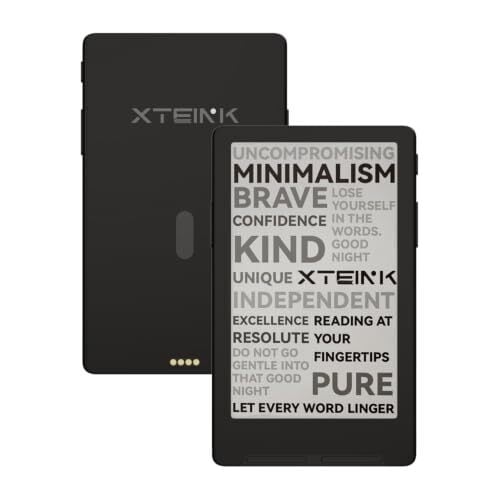
Prime Day is usually a great time to score a good deal on a Kindle device, but in the lead-up to Amazon’s “Prime Big Deal Days” event, taking place Oct. 6-7, I would like to redirect your attention to another category of e-readers entirely. Tiny e-ink devices—I’m talking credit card-sized, with screens that measure around 4 inches—are all the rage in 2026, and if you too can see the appeal of carrying all of your books with you on a device so small you’ll forget it’s even in your pocket, it’s not a bad time to jump in: One of the best options on the market, the recently released Xteink X4 Classic, is 15% off ahead of the big sale.

Xteink is a Chinese startup that shook up the e-reading world last year with the launch of the X4, a super bare-bones device that made up for its lack of features and usability with a cheap sub-$70 price point. Since then, a huge online community of fans has formed around the device, sharing tips on Reddit and even coming together to crowdsource an alternate operating system that fixes a lot of its early problems. Xteink quickly followed up the X4 with a slate of other devices, including the even smaller X3 and the X4 Pro, which adds a front light and touchscreen (at the cost of screen clarity and two physical buttons).

The X4 Classic was released earlier this month, replacing the original X4 and adding in some of the quality-of-life improvements that were made with subsequent devices, including a larger battery, relocated page-turn buttons, a real-time clock, USB drive support, and a tilt-to-turn-page feature. The X4 Classic is also 6g lighter and a millimeter thinner than the X4, though there is a trade-off involved there with the latter’s USB-C charging port swapped out for magnetic pogo pins that require a separate cable or adapter.

These upgrades also increased the cost: The X4 Classic retails for $89, $20 more than the discontinued X4 and only $10 less than the X4 Pro. But right now on Amazon, the Classic has dropped in price by 15% to $75.99—its lowest price ever—in advance of Prime Big Deal Days. It’s a good option for those who prioritize crisp, readable text above the conveniences of a built-in light or touchscreen, as those add extra layers between the inner screen and outer glass, and provided you understand what you’re getting into: These devices support only e-books without Digital Rights Management (DRM), which means you can’t use them to read your existing library of Kindle books.

Our Best Editor-Vetted Early Prime Day Deals Right Now

Deals are selected by our commerce team

A $20 Multimeter Might Reveal Your CPU’s Overclocking Potential

A $20 Multimeter Might Reveal Your CPU's Overclocking Potential
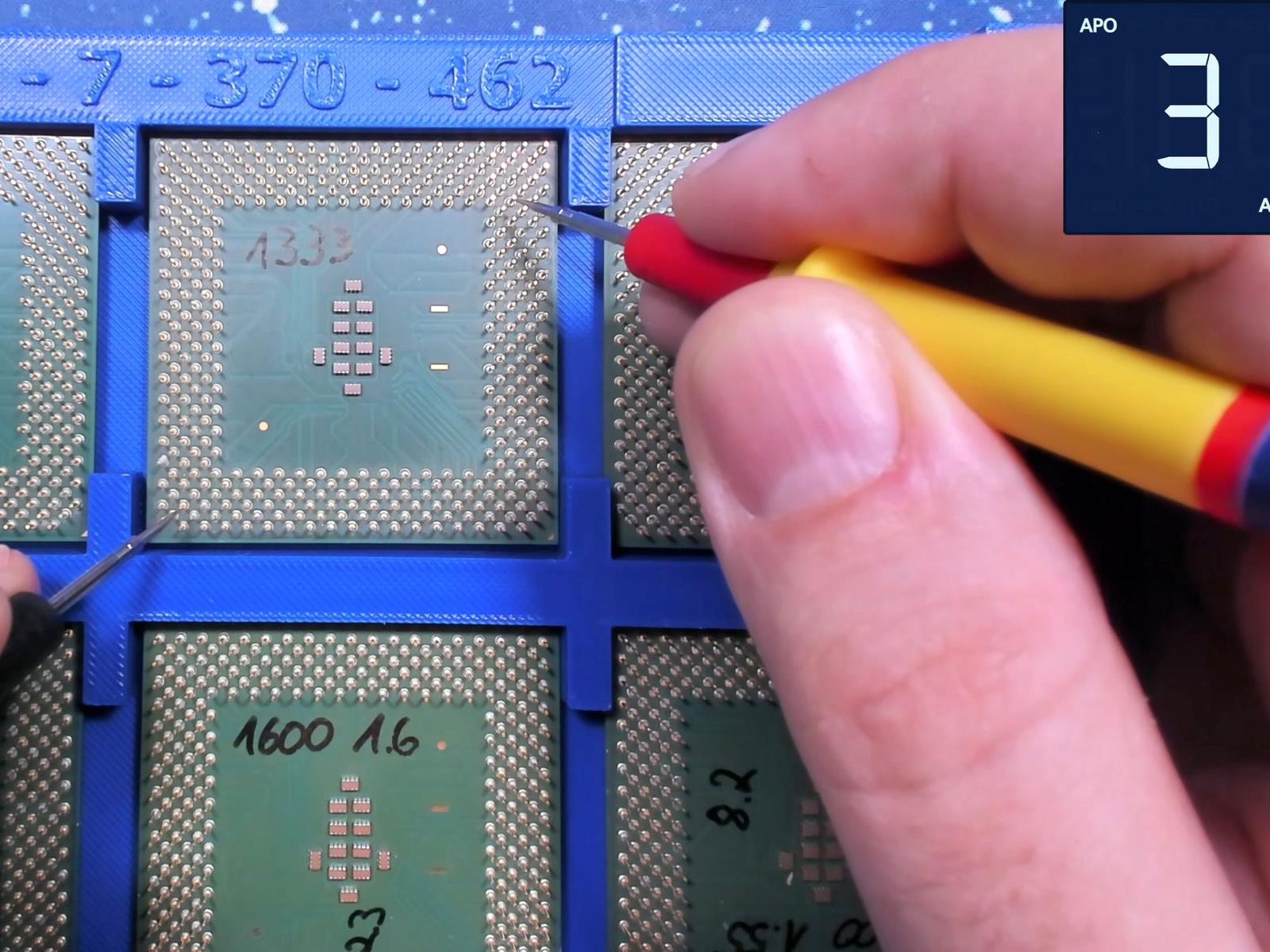
Can you predict how well your CPU will overclock by probing it with a multimeter? Before you start pulling out the Fluke, let’s go over the details of this story, because it’s both more and less interesting than you might expect from the headline. The short version is that retro tech YouTuber Bits und Bolts has been overclocking a whole lot

Reddit Pirate Who Mocked Nintendo Slammed With $4.5 Million Judgment

Reddit Pirate Who Mocked Nintendo Slammed With $4.5 Million Judgment
As expected, Nintendo’s historically-high $4.5 million lawsuit against a single Nintendo Switch piracy subreddit operator has proven successful, likely thanks to the assortment of at least 4 “Pirate Shops” and numerous piracy-related subreddits under the belt of one James C. Williams, also known as u/Archbox on Reddit.

Besides running a

Asteroids Named After Tom Lehrer and ‘Weird Al’ Yankovic

“Weird Al” Yankovic’s name has just been approved for a new asteroid — (14331) Alyankovic = 1981 EC26 — by the International Astronomical Union, reports Space.com.

Yankovic’s asteroid was championed by planetary scientist Allison McGraw joined by “several heavy hitters in the planetary science field, according to the Tucson Star. (Astrophysicist Steve Desch from the School of Earth and Space Exploration at Arizona State University; Tim McCoy, one of the main curators of meteorites at the Smithsonian Institution; and University of Arizona research scientist Melissa Brucker, leader of the Spacewatch program, which has discovered more than 179,000 asteroids.)

The scientists also convinced the International Astronomical Union to name an asteroid after one of Yankovic’s major influences, famous musical humorist and political satirist Tom Lehrer, who died last year at age 97. Lehrer’s work includes “The Elements,” a 1959 song in which he recites the entire periodic table to the tune of Gilbert and Sullivan’s “Major-General’s Song.” “He was a mathematician and teacher and also wrote math- and science-themed songs,” McGraw said. “We felt that someone who had that kind of science enthusiasm really deserved to have their name up in the sky….” McGraw is hoping that naming space rocks after stars like Lehrer and “Weird Al” will cast some reflected light on two things she’s passionate about: asteroid research and science communication.

Six years ago a 92-year-old Tom Lehrer released all his lyrics into the public domain. (Wikipedia notes he’d “largely retired” by the 1970s to become a mathematics teacher at the University of California, Santa Cruz.) Slashdot ran a brief career retrospective when Lehrer died last year at age 97.

And the IAU writes that “Generations of scientists have been inspired” by Weird Al Yankovic’s “comedic musical works, including ‘It’s All About the Pentiums’ and ‘White and Nerdy’.” (“I’m fluent in JavaScript as well as Klingon,” Yankovic sings in the latter.) He appears in a song envisioning a rap battle between Bill Nye the Science Guy and Sir Isaac Newton… And in 1999 he recorded a five-minute summation of Star Wars: Phantom Menace, sung to the wistful tune of Don McLean’s American Pie. Performing it last month in a NPR Tiny Desk concert, “most of the audience was singing along,” remembers an interviewer at NPR. “It felt like something that was very personal to them.”

Weird Al: It’s one of those songs that means a lot to people, particularly “Star Wars” fans, of course. But I mean, I see a lot of people in the audience cosplaying as Jedi Knights and waving their light sabers… I’ve even heard that, you know, they play that song at “Star Wars” conventions, and people get weepy, you know… [I]t really hits people in a tender place somehow…

“Oh my, my, this here Anakin guy
may be Vader someday later, now he’s just a small fry.
And he left his home and kissed his mommy goodbye,
sayin’ soon, I’m gonna be a Jedi.”

Yankovic has led a geek-friendly career. In the heyday of Napster, he released an anthem-style parody mocking the arguments of the Recording Industry Association of America, titled “Don’t Download This Song. (“Even Lars Ulrich knows it’s wrong…”)

“Once in a while maybe you will feel the urge
To break international copyright law…
you start out stealing songs, then you’re robbing liquor stores
And selling crack and running over school kids with your car…”

As a student at Cal Poly, San Luis Obispo, Yankovic bootstrapped a career in 1979 by recording his first novelty song “My Bologna” (a parody of “My Sharona” by the Knack) while playing his accordion in a bathroom for its acoustics. And even the IAU acknowledged the geeky themes in his 1999 song “It’s All About the Pentiums” (a filk on Puff Daddy’s “It’s All About the Benjamins”).

“You’re usin’ a 286? Don’t make me laugh
Your Windows boots up in what, a day and a half?
You could back up your whole hard drive on a floppy diskette
You’re the biggest joke on the Internet…”


Read more of this story at Slashdot.

This Massive Paper-Like TCL Tablet Is 26% Off for October Prime Day

We may earn a commission from links on this page. Deal pricing and availability subject to change after time of publication.

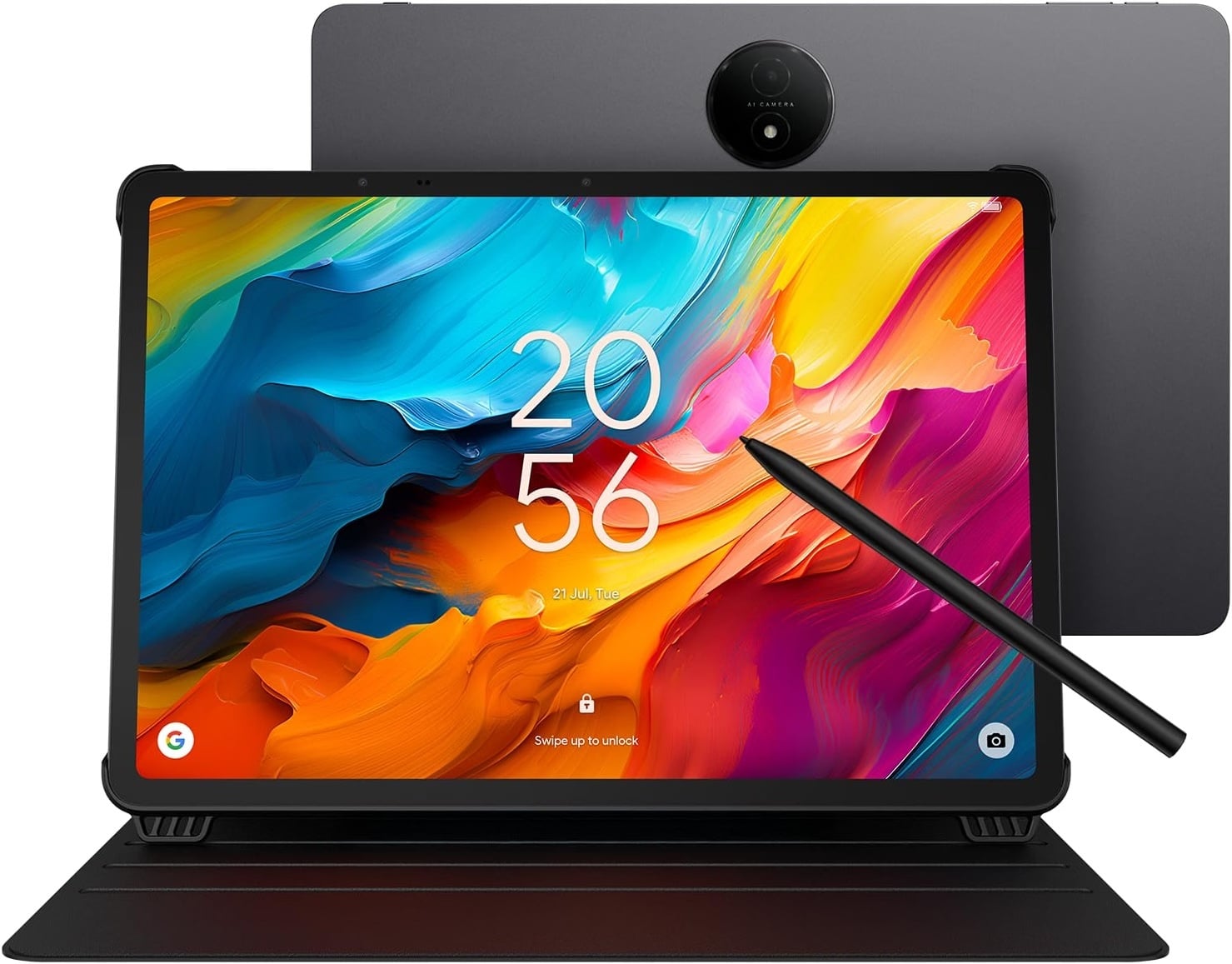
Amazon’s Prime Big Deal Days are approaching, but the early deals are already live. If you’re looking for a versatile Android tablet, you need not wait for the sale: TCL’s NXTPAPER 14 Android tablet, which has a massive matte screen with different viewing modes for reading, streaming video, and writing, is 26% off in the lead-up to the big October Prime Day sale.

With a 14.3-inch display, the NXTPAPER 14 might not be as portable as other tablets on the market, but the screen itself is the biggest perk. The matte display has a paper-like feel and three different viewing modes: You can switch from black-and-white Ink Paper Mode to Color Paper Mode (a must for comics) to full color (for streaming video or using other full-motion apps) with the push of a button. Under harsh, direct lighting, it does an impressive job of reducing glare and reflections. It also has 8GB of RAM, 256GB of storage, and a large 10,000mAh battery. TCL claims up to 10.8 hours of video playback, though actual battery life will vary depending on use.

The tablet comes with a folio-style case with a magnetic cover that doubles as a stand, a long charging cable, and a pressure-sensitive rechargeable stylus called the T-Pen, which offers 4,096 levels of pressure sensitivity. Combined with the matte texture of the display, the T-Pen creates a distinctive drag that you don’t get when using an Apple Pencil on an untreated glass screen. The tablet also has a useful Edge Bar feature: Swipe inward from the edge and hold to reveal a customizable mini dock containing shortcuts and tools. The 14.3-inch display makes these productivity features particularly useful, giving you enough room to keep reference material, notes, and other apps visible at once.

The NXTPAPER 14 isn’t a true e-ink device; it remains a backlit LCD, so it won’t provide Kindle-like battery life or outdoor visibility, but the matte screen aims to be easier on your eyes. Its 60Hz refresh rate is also less fluid than the screens on many premium tablets, and it lacks a microSD slot to expand the included 256GB of storage. Whether you’re an artist, love sketching or reading comics, need to review and sign documents, or simply want a larger screen without all the bells and whistles of a premium tablet, the sizable NXTPAPER 14 is an excellent multitasking canvas with some of the reading and writing benefits associated with paper-like displays without the limitations of e-ink.

Amazon October Prime Day FAQ

What time does Prime Day start?

October Prime Day starts Tuesday, October 6, 2026, at 12:00 a.m. PT / 3:00 a.m. ET.

How does Prime Day work?

Prime Day lets Prime Members shop online for thousands of products with big discounts. It only lasts two days, so make sure you check out everything we know about the sale before it starts.

Is Prime Day only for Prime Members?

Yes, you will need to be a Prime Member to shop the exclusive sales during Amazon’s Prime Big Deal Days. Prime membership starts at $14.99 per month.

Our Best Editor-Vetted Early Prime Day Deals Right Now

Deals are selected by our commerce team

Rockstar Packs A $400 GTA 6 Box With Vice City Swag But Skips The Game

Rockstar Packs A $400 GTA 6 Box With Vice City Swag But Skips The Game
Grand Theft Auto VI players won’t be able to get their hands on a physical release of the game, but Rockstar is still making plenty of goodies available for fans who want to bring a piece of Vice City into their homes. Last week the studio unveiled some slick vinyl sets of the game’s soundtrack for fans to enjoy. Now it has announced a collector’s

I Tried Google’s New Image Editor, and It Could Replace Canva and Photoshop

Google launches (and retires) apps at a rapid rate, so it’s not always easy to keep track of everything that’s coming and going. One of the more recent launches we’ve had is Google Pics, which is now available to users subscribed to Google AI Pro ($19.99 a month) or Google AI Ultra ($99.99 or $199.99 a month).

It sits alongside Google Docs, Slides, and Sheets in your Google Drive Workspace, and it’s part Canva, part Photoshop: It does a bit of graphic design (like putting together an event poster), and a bit of image editing (like cutting unwanted objects out of your vacation photos), and if you’re paying for one of those Google AI plans mentioned above, you might find Google Pics is the only image creation app you need.

The web app incorporates the Nano Banana AI image generation model, and, as well as working as a standalone entity, will also pop up inside the other Google Workspace apps as and when you need it. Here’s what you get and how it works.

How to use prompts with Google Pics

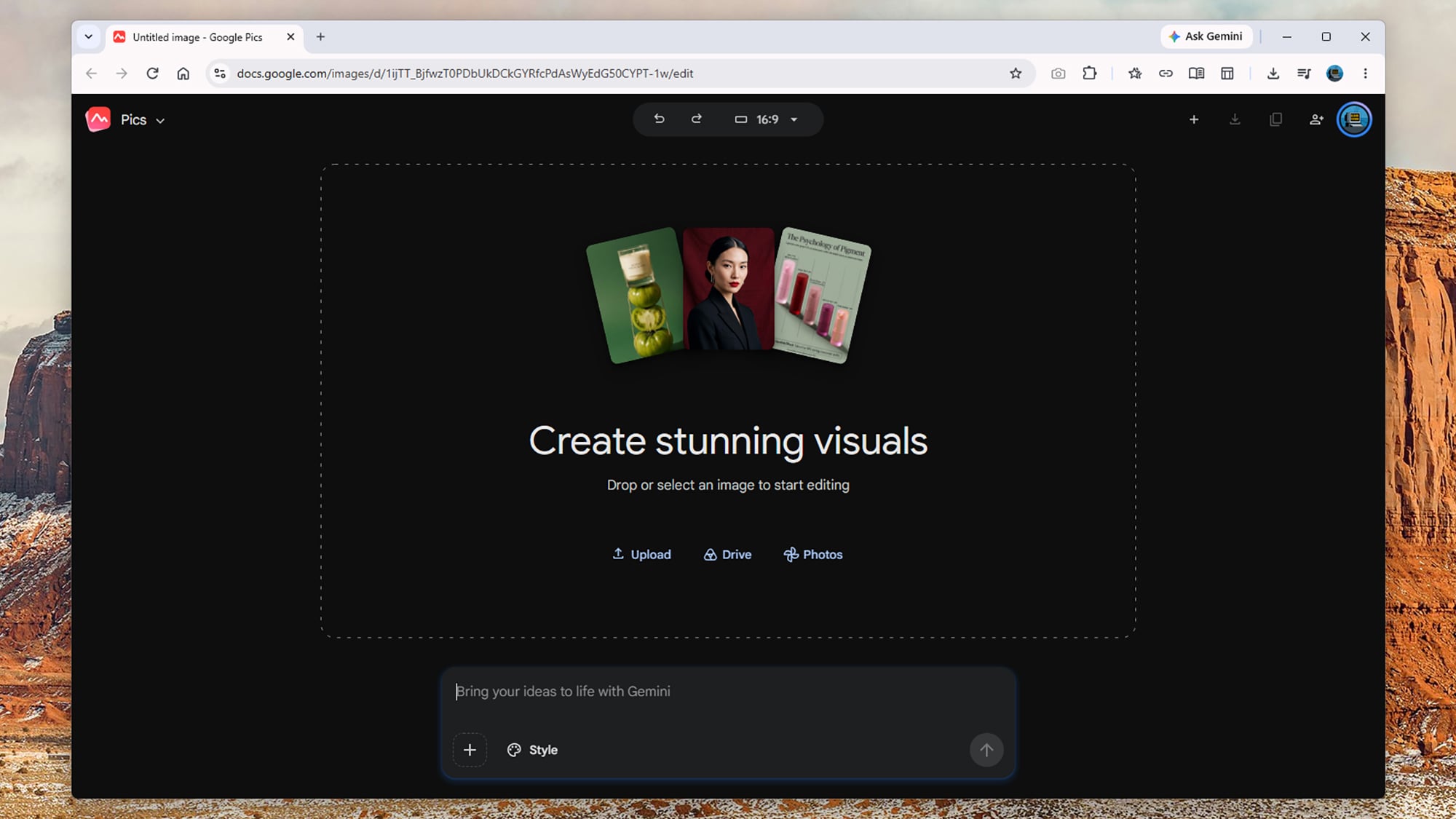
Google Pics is driven primarily through text prompts, whether it’s creating something new from scratch or making edits to something you’ve made elsewhere. From the opening screen, you can type in an image prompt just as you would with the Gemini app: Prompts for anything from photorealistic scenes to printed materials will work, and the more detail you add, the better.

The Style box lets you give Google Pics a reference to work from in terms of the overall image look and feel, while clicking on the Upload, Drive, or Photos links lets you load in an existing image ready for editing. At the very top is an aspect ratio drop-down, so you can specify the dimensions of new images, though this can be edited later too.

Google Pics
You can create new images or edit existing ones.
Credit: Lifehacker

When you make something new, you get four or five alternatives shown as thumbnails on the left, so you can click through them to find the one you want. There’s also the option to generate four more pictures from your prompt, if you don’t mind the extra usage. As it often is, Google is rather vague when it comes to limits: It says “higher access” will be available to users until February 2027, and that factors like image resolution affect how quickly you reach the limits.

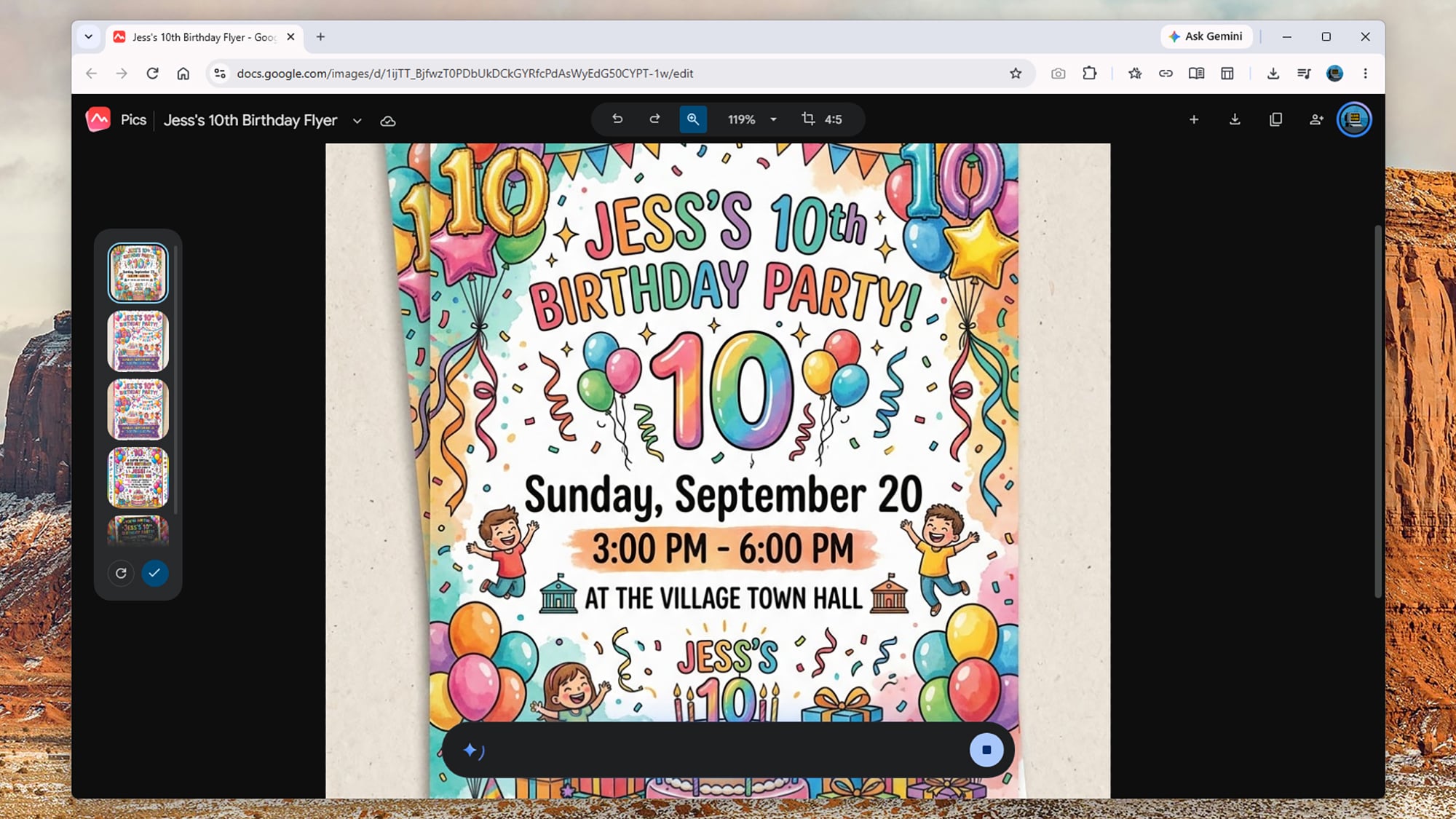
So, you could prompt Google Pics like this: “Create an A5 flyer for a 10th birthday party for Jess, happening at the village town hall at 3 p.m.-6 p.m. on Sunday, September 20. Include lots of party decorations, including balloons, streamers, and cake, and include some small print about food and drink being provided and there being plenty of on-site parking.”

From that prompt, Google Pics gave me a selection of suitable vibrant and fun-looking flyers I could choose from—all of them carrying that familiar AI “sheen” you’ve no doubt seen everywhere from restaurant menus to school event posters in recent times. It followed the brief directions and took seconds to do.

Google Pics
Google Pics does graphic design and image editing.
Credit: Lifehacker

I also tried loading in my own photos and using Google Pics to manipulate them: You can very easily turn your photos into watercolors or comics, giving you what’s effectively an unlimited box of Photoshop filters to play around with. The results aren’t perfect every time, but they’re usually more than good enough.

This is a pretty bare-bones app though. You can undo recent edits, zoom in and out, and change the aspect ratio, but outside of the prompt box, that’s just about it. You don’t have any of the traditional resizing options or tools to do any drawing or touching up yourself, and there’s no support for layers—so you’re still going to need Photoshop and Canva around for more advanced tasks.

How to edit images in Google Pics

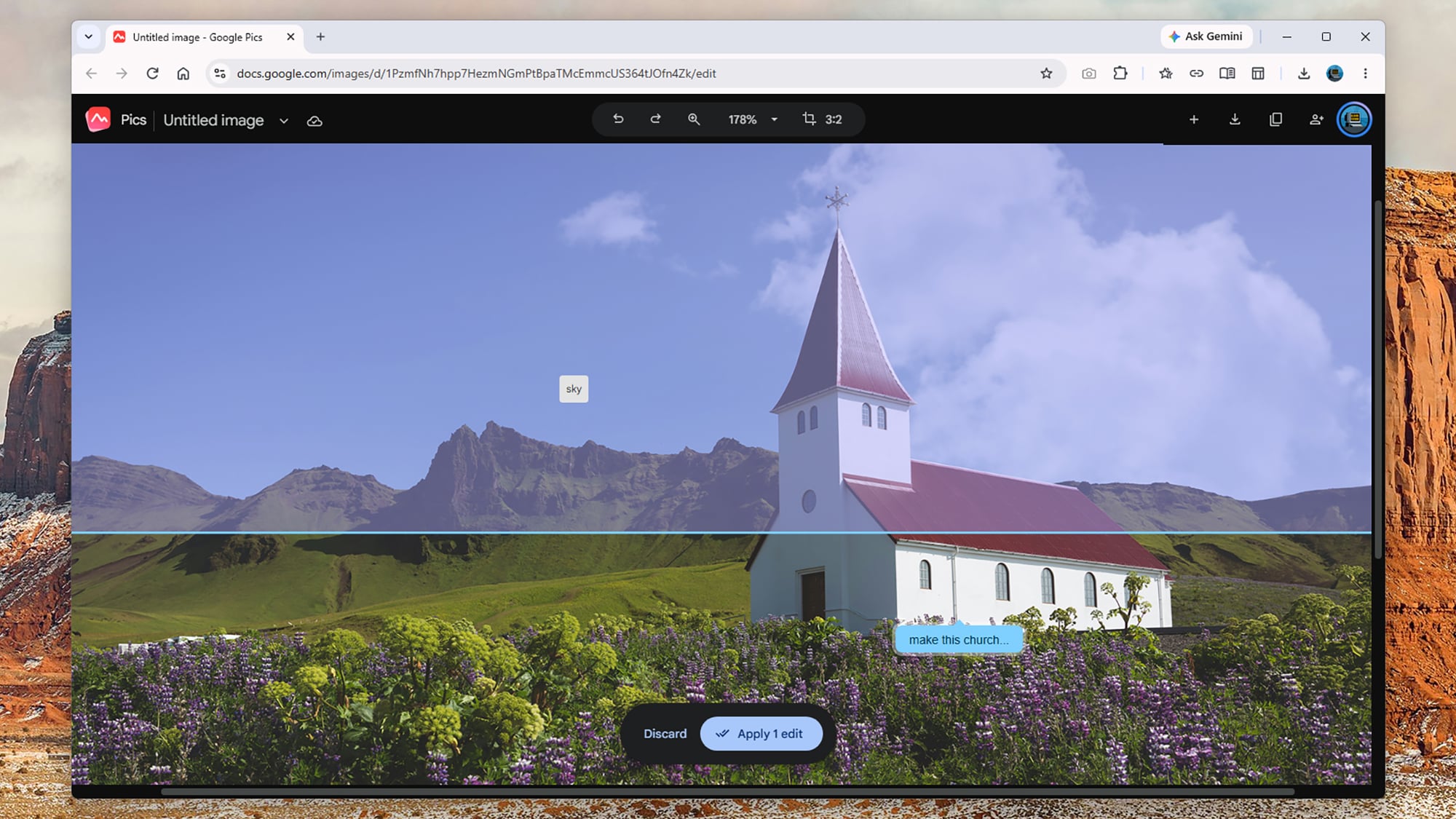
Where Google Pics really impresses is with the editing tools, which become available after you’ve created something from scratch or loaded in an existing image. First of all, the app identifies parts of the image you can click on—so “church”, “sky”, and “mountains,” for example. You can click on these specific elements to get a prompt box to make changes.

You can also just drag a box around something on screen to bring up a prompt box: Maybe drag a box around a party balloon and add the prompt “make this blue,” or select a random stranger in your family vacation photo and say “remove this person”. Any edit you can describe, you can make (or at least attempt).

Google Pics
You’re able to select specific image elements to edit.
Credit: Lifehacker

As always with this kind of trickery, Google Pics doesn’t know what’s actually behind the people and objects it’s removing, but it can make a decent AI-inspired guess based on the rest of the image and background. The results I got were mostly fine, and usually you wouldn’t know an edit had been made—though bigger changes to more detailed photos, like removing buses and cars, can be difficult for Google Pics to handle.

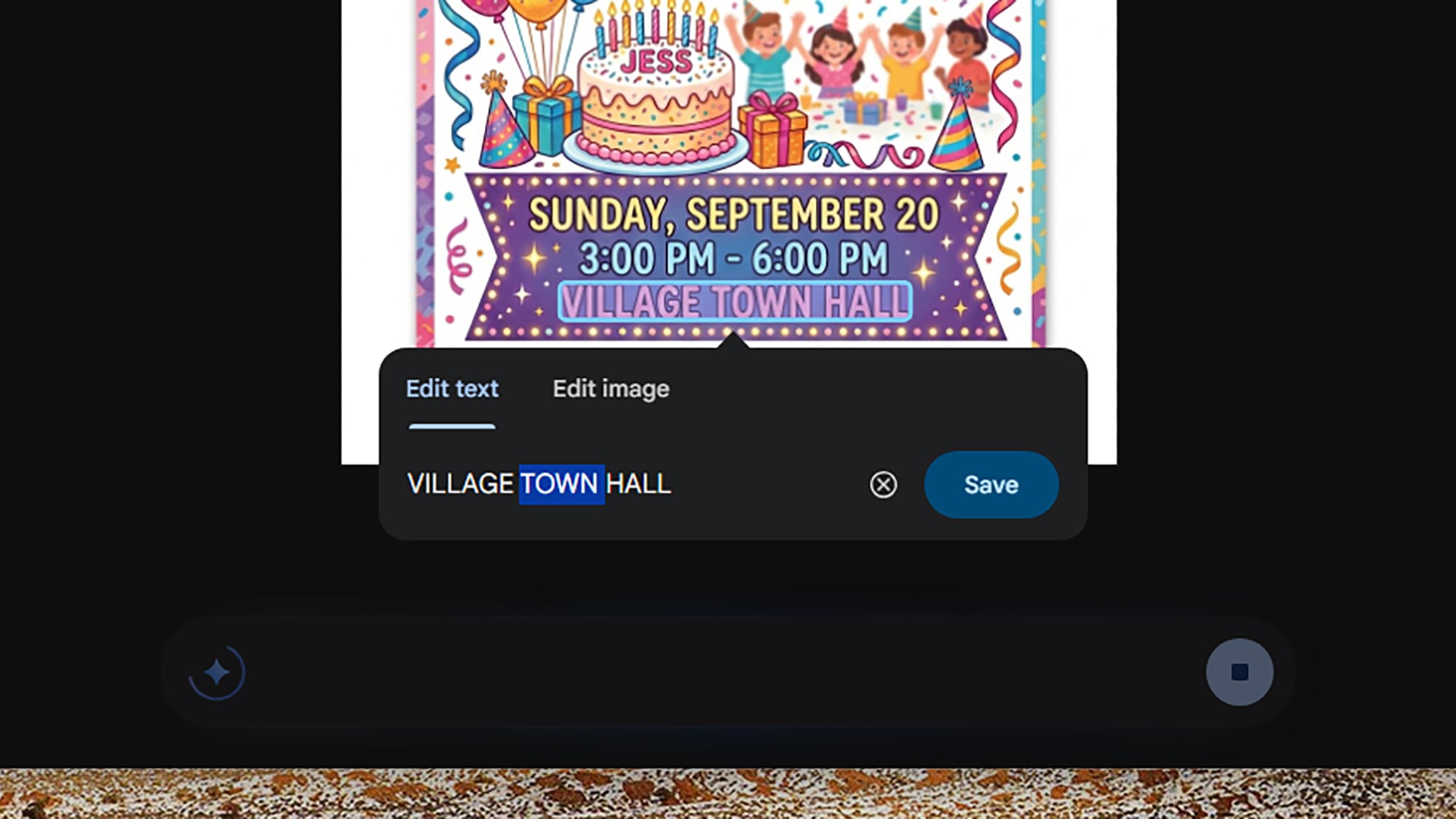
You can save up all of these various edits and apply them together, which saves quite a bit of waiting and working forwards and backwards. In the case of my birthday party flyer, I was able to add lines of text, change various colors, add in new elements, and more—and if you select blocks of text, you can edit them directly without a new prompt.

Besides being useful practically, it can also be a lot of fun playing around with different edits and seeing what’s possible. I got quite addicted to playing around with different photos, making changes that ranged from the large scale (“turn this into a night scene”) to the small scale (“add an extra cloud here”).

Google Pics
Image text can be edited directly.
Credit: Lifehacker

One of the edits I made was to age a car in a scene by five years, something which I’ve got no idea how to do in a full image editor, and which would’ve probably taken me an hour or so even if I did. The end results might not be quite as precise or polished as they would be if done by a human hand, but these kinds of tools expand what’s possible with quick and casual image editing.

I won’t be ditching Canva and Photoshop just yet, as they’re still essential for different kinds of tasks, including projects where pixel-level precision is required and where various elements need to be combined together in layers—but I can also see Google Pics proving very useful, especially with its integration with the rest of Workspace.


These Are the Best October Prime Day Deals on Tools

We may earn a commission from links on this page. Deal pricing and availability subject to change after time of publication.

If you need to tackle some DIY projects this fall, you might be looking to beef up your DIY tool kit. But if you’ve looked for tools recently, you may have also noticed that getting quality tools that will last can be expensive. Here are some deals on some of my favorite tools ahead of Amazon’s Big Deal Days sale.

Best Prime Day 2026 deals on tool sets

If you’re just starting out on your DIY adventure, beginning with a tool set will give you a solid foundation. Here are some deals on quality tools that will be with you for years to come.

The DeWalt 20-volt oscillating multitool set is on sale for $157, 47% off its regular price. The set comes with the multitool, a 2-amp-hour battery, a charger, three starter blades, a sanding attachment, and some sandpaper. This tool can be used to cut metal, wood, plaster, drywall, PVC, and tile, and you can also use it for sanding and polishing. It’s a good deal for expanding your existing DeWalt set or if you’re just starting out with DIY projects.

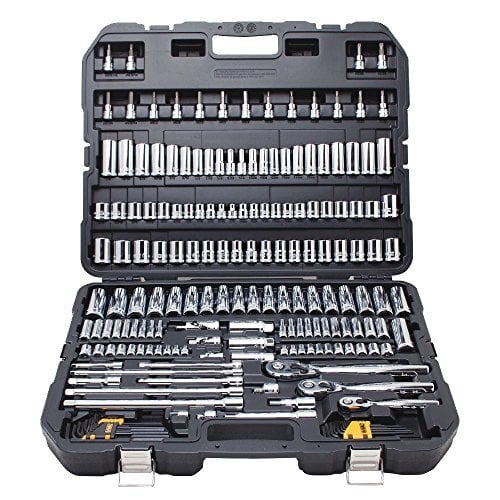
The DeWalt 192-piece mechanic’s tool set is on sale for $169.94, 41% off its usual price. This set comes with ½-inch, ⅜-inch, and ¼-inch ratchets, sockets in SAE and metric sizes, a set of spark plug sockets, driver bits, a set of hex wrenches, and adapters. This is a full tool set that will allow you to work on cars, as well as do maintenance on small home appliances like changing filters and replacing hoses.

The Craftsman 10-piece mechanics tool set is on sale for $14.99, 51% off its typical price. The set comes with a ⅜-inch ratchet and nine metric sockets. This compact set is good for most beginner DIY projects and can be used for light vehicle maintenance; it’s also perfect for an emergency roadside kit.

Best Prime Day 2026 deals on cutting and shaping tools

Saws are essential for many DIY projects, like repairing fencing or building shelves, and they’re also excellent for yard work and demolition. Having the right tools for making precision cuts will make your projects go more smoothly. Here are some deals on saws for all your DIY needs.

The DeWalt 7 ¼-inch cordless compound miter saw is on sale for $296.65, 20% off its regular price. This is a tool-only deal, so you’ll need a DeWalt 20-volt battery and charger to use it. This saw is compact and portable so it’s useful for situations where you don’t have a permanent home shop set up. You can use it to cut molding and trim for door frames, stairs, and finishing decks.

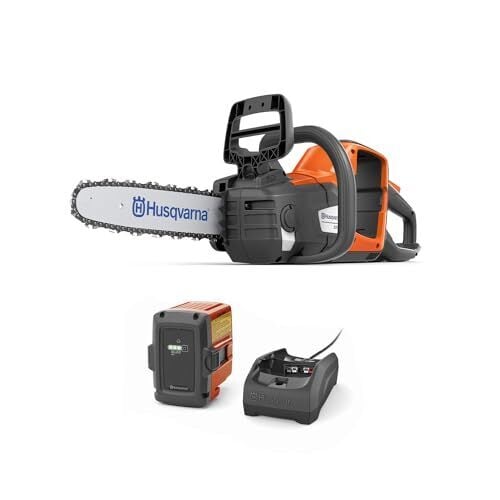
The Husqvarna 14-inch 225i battery-powered chainsaw is on sale for $264.99, 30% off its regular price. The saw comes with a chain, a battery, and a charger. It can make up to 190 cuts on a single charge, and you can use it to cut up downed tree limbs and clear thick branches.

The DeWalt 20-volt jig saw is on sale for $139.90, 41% off its usual price. This is a tool-only deal, so you’ll need a DeWalt 20-volt battery and charger to use it. A jigsaw can be used to cut curves and irregular shapes and is useful for making specialty cuts in fencing or for making decorative cuts on decor or furniture.

Best Prime Day 2026 deals on bits and accessories

Bits and accessories for your power tools don’t seem like they’ll be a big expense until you’ve made your third trip to the hardware store for a size you don’t have on hand. Having a wide range of sizes for drivers and drill bits will allow you to keep working on your project instead of running out for one more thing. Here are some of the best deals on bits and accessories.

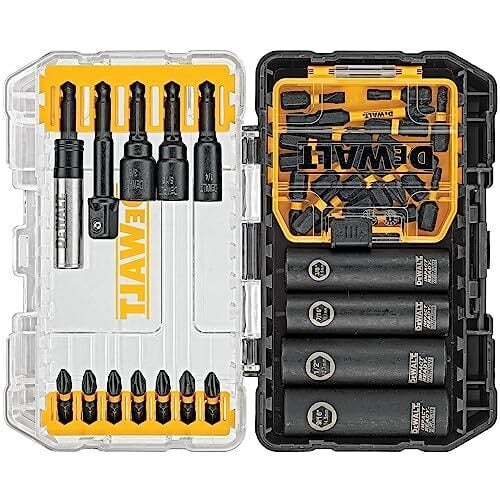
The DeWalt 35-piece impact bit set is on sale for $29.98, 66% off its regular price. The set comes with a bit holder, a socket adapter, several types of driver tips, and a set of sockets. It’s a good set for driving fasteners, but you’ll need drill bits if you want to drill holes.

The Bosch 41-piece drilling and driving combo set is on sale for $21.47, 57% off its usual price. This set comes with drill bits up to ¾”, several types of driver tips, an adapter, and a case. This bit set is a good starter set because it has both driver tips and drill bits, so you could use it with a drill for hanging pictures or curtains, or for assembling flat-packed furniture.

The Milwaukee socket adapter set is on sale for $8.21, 47% off its regular price. This set comes with socket adapters for ¼-inch, ½-inch, and ⅜-inch sockets. This is a tool that you won’t know you need until you don’t have it. I use mine all the time to switch between driving screws and driving nuts for installing wheels and assembling metal parts.


What time does Prime Day start?

October Prime Day starts Tuesday, October 6, 2026, at 12:00 a.m. PT / 3:00 a.m. ET.

How does Prime Day work?

Prime Day lets Prime Members shop online for thousands of products with big discounts. It only lasts two days, so make sure you check out everything we know about the sale before it starts.

Is Prime Day only for Prime Members?

Yes, you will need to be a Prime Member to shop the exclusive sales during Amazon’s Prime Big Deal Days. Prime membership starts at $14.99 per month.