
Nintendo’s remake has already reached 70 percent of the first game’s lifetime sales in just four days
Monthly Archives: November 2026
AMD AOCC 6.0 Brings Zen 6 Optimizations, New “aof” Fortran Compiler, aoc / aoc++ Branding
With yesterday’s launch availability of the AMD EPYC 9006 “Venice” SP7 processors headlined by the incredibly fast EPYC 9996 and EPYC 9686F processors, AMD also launched AOCC 6.0 as the newest version of their in-house LLVM/Clang-based compiler stack…
Intel Releases New CPU Microcode To Fix A Variety Of Functional Issues
Intel on Tuesday released the microcode-20261110 package that ships updated CPU microcode binaries for recent Intel Core (Ultra) and Xeon processors. The updated CPU microcode is for Core Gen 13 “Raptor Lake” and newer while on the Xeon server side is for Sapphire Rapids and newer. This is also the first time Clearwater Forest has seen microcode updates…
Disney+ App Update Brings 3D Movies & Immersive Environments To Quest
A new update released for the Disney+ app on Quest 3 and 3S brings 3D content and immersive environments to Meta’s headsets.
The update adds 60 3D movies, including films from the Marvel and Star Wars catalogues including Black Panther, The Avengers, and Star Wars: The Force Awakens. Other properties such as Avatar are also available in 3D, as well as 3D versions of Disney’s more traditional offerings like the live action remake of Beauty and the Beast.
0:00
/0:50
The update also brings immersive environments to Quest users. These immersive environments can best be described as 3D spatial theaters in which you exist and watch a film. For example, you can watch Star Wars on Tatooine or catch Monsters, Inc. on that film’s famous “Scare Floor.”
Quest Now Has A Disney+ App With Downloads & Dolby Atmos
Quest headsets now have an official Disney+ app, with support for downloads and Dolby Atmos immersive audio — but not for 3D.
 UploadVRDavid Heaney

Prior to today’s update, Disney+ on Meta headsets had been simply an app that allowed you to watch 2D media. Disney+ 3D experiences had previously been exclusively available on Apple’s Vision Pro.
This new Disney+ functionality will also land on Meta’s upcoming VR Glasses headset when it debuts in spring of 2027.
An active Disney+ subscription is naturally required to access the app’s content, and availability of 3D, Dolby Vision, and Dolby Atmos playback varies by region and subscription plan. You can grab the Disney+ app on Quest today.
Haiku OS Now Has A UFS Driver, Two & Three Finger Tap Gestures
The BeOS-inspired Haiku open-source operating system project has seen new work on drivers and other improvements during the course of October…
Tumbleweed ARM Monthly Update – November 2026
This past month has brought several software package updates for openSUSE Tumbleweed ARM with less than a handful of snapshots reaching the ARM port. The second half of October brought a two-version jump of GRUB2 to 2.16 with serial console and NVMe boot features, a security-focused Linux kernel 7.2.11 and…
US and Rest of World Must Follow China’s Lead On Green Energy, Says John Kerry
Longtime Slashdot reader AmiMoJo shares a report from The Guardian: China is leading the world in moving away from fossil fuels, and the rest of the globe — including the US — must now follow, the former US secretary of state John Kerry has told the Guardian, as Cop watchers wonder exactly how China is going to approach this year’s climate summit. As Cop31 opens — this year the climate conference is in Turkey — there is plenty of speculation about whether China will finally step into the leadership role that it has long avoided. In its latest “five-year plan” adopted in March 2026, China for the first time pledged to “actively participate in and lead global climate governance”. Cop31 could provide the first indications Beijing is ready to put that rhetoric into action, something it has historically been reluctant to do.


In 2025, clean-tech exports surpassed $220 billion, and they should grow again this year; the world’s largest emitter is now the world’s leading supplier of clean energy technology. China accounts for about 85% of solar and 80% of lithium-ion battery supply chain production capacity, and in 2025, nearly 75% of electric cars were manufactured there. Smart moves now by China would position it as a linchpin in a future electrostate world order, persuade rivals to cooperate, and solidify its influence in the global south. “The only country that has hugely accelerated is China,” said Kerry. “The rest of the world is stumbling along while Mother Nature is sending us more powerful signals every week, every day.”
“[China] realized suddenly they had way too much dependency on oil and gas from other places, and they decided they needed to be independent. Other countries, since the war in Iran, and since the strait of Hormuz has been interrupted, have made a similar decision, and they’re moving independently. There’s been a massive uptick in deployment of renewables. Thank you, Donald Trump.”
For autocratic states without free and fair elections, seeing the economic benefits reaped by China would be the spur to adopt low-carbon growth, he added. “They’ll see where the market is going, and they will recognize where the cheaper alternatives are. Even they can read a spreadsheet, and understand where costs are exorbitant [in fossil fuels], and where you have a better deal,” Kerry said. “Right now, renewables together with storage, together with some transitional gas, is cheaper and more effective, than just going with fossil fuels.”
He added: “The marketplace has made its decision and globally is moving to electrons, and electrostate status. People are going to electricity and they’re going to try to do that as clean as humanly possible. That’s the choice that I see being implemented in many different places. It is unstoppable.”
Read more of this story at Slashdot.
Samsung Gallery now syncs with Google to back up your photos
You can now sync your photos and videos on select Samsung devices to your Google account.
Nautilus file manager may section headers
Nautilus might be getting a neater way to organise its file views, with section headers breaking up long lists of content into groups. GNOME’s Christian Hergertr recently added support for section headers to GTK’s gridView, the widget Nautilus (among other apps) use to display items, noting it is ‘useful for organising items’ being displayed. Nautilus developer Peter Eisenmann commented to say he…
M John Harrison Becomes First Sci-Fi Author To Win Booker Prize
An anonymous reader quotes a report from The Guardian: Eighty-one-year-old M John Harrison has won the Booker prize for The End of Everything, a postapocalyptic novel set on a near-future Kent coast, becoming the oldest winner in the award’s history. Gaby Wood, chief executive of the Booker Prize Foundation, said that while plenty of previous winners had dabbled in science fiction, Harrison’s was “the first Booker winner to have emerged from the bona fide SF world.” She called it “a historic win, for a writer whose decades of work are lightly worn on every page”.


Harrison, who has been publishing for six decades, overtakes Margaret Atwood, who was 79 when she shared the prize in 2019 for The Testaments. He received the 50,000-pound award and trophy at a ceremony in London on Monday evening. The End of Everything, Harrison’s first Booker nomination, is set a few decades from now, years after a disaster nobody can properly account for. Set on the Kent coast, the novel sees Phillip Tennent and his ageing aunt Marnie attempting to survive alongside the looming threat of the mysterious iGhetti: vast, shape-changing beings whose origins and intentions are never explained. At 198 pages, it was the shortest book on the shortlist.
Mary Beard, chair of the judges, said the decision was unanimous, reached after a full day of discussion. “It’s a book that turns you upside down, raises a wry smile — and surprisingly, given the subject matter, leaves you with a twinge of optimism,” she said. “One main point of the book is that if, or when, such an apocalypse comes it will be incomprehensible. And the old rules won’t matter either This is the politics of now seen through the lens of the future.”
Read more of this story at Slashdot.
Anthropic tiptoes into MS Office territory
Sheets, Whiteboards, and Data artifact types bring Claude closer to a productivity suite
What is the average lifespan of recordable Blu-ray discs?
How long they will last depends on a few factors.

14-year-old creates tool for AI agents to band together like a team
Autark can act without constant prompting, but leaves users to enforce their own security boundaries
Ubuntu 26.10 Begins Rolling Out upki Support For Certificate Revocation
With Ubuntu 26.10 that shipped in October there is a little talked about feature with upki revocation support beginning to roll out. Due to the late change, upki for certificate revocation was only enabled for Ubuntu 26.10’s curl package but with more plans ahead…
The DCU Is Reportedly In Reboot Mode, Even David Corenswet’s Superman Could Be Replaced, And I’m Just So Tired
I don’t have it in me to keep caring
Hackers Now Want Your Browser Sessions More Than Your Passwords, but You Can Stop Them
In April of 2023, the FBI took down an invite-only dark web marketplace called Genesis Market. The seizure was part of “Operation Cookie Monster,” a DOJ collaboration with law enforcement agencies across 17 countries. They discovered 80 million stolen credentials from approximately 1.5 million devices, including session cookies that let scammers log into a user’s account without even entering a password.
Genesis Market may be gone, but bundles of leaked session cookies called “stealer logs” are still harvested and sold in other dark web spaces. In fact, NordVPN researchers counted more than 52.4 billion stolen cookies in infostealer data between June 2025 and 2026. That said, the good news is that stolen session cookies stop working as soon as you revoke active sessions from your account settings. As such, it’s important to find out if your session cookies ended up on the dark web, remediate your account if necessary, and avoid such leaks in the first place.
What makes browser sessions so valuable?
Every time you successfully log into an account, the website hands your browser a small text file called a session cookie. Inside the text file is a unique session ID that lets the website instantly recognize you for as long as you’re logged in. That way, you don’t have to keep entering your login credentials every time you navigate to a new page or make a fresh request on that website.
Session cookies typically come with an expiration period that ranges from a few hours to several weeks, at the end of which you’re logged out and have to re-enter your credentials again. But the catch is, if someone else gets their hands on your session cookies, they can piggyback off of that logged-in session by pretending to be you.
To accomplish this, hackers use a type of malware called infostealers, which includes infamous names like Lumma, Vidar, StealC, Acreed, and Atomic Stealer (AMOS). They make their way onto your device through infected websites, pirated software, and fake installers. Once in, they quietly spy on your activities to extract passwords, PINs, autofill data, and session cookies—all of which goes into a file called a stealer log that’s delivered straight to the hacker.
Once a hacker has access to these stealer logs, they can either sell them or use them for themselves. Either way, as soon as someone imports those logs into their browser, they can effectively take over your logged-in accounts using those session cookies from your device. They can even use that window to log you out and reset your passwords.
How stealer logs get sold on the dark web
There’s a very organized dark web supply chain that attackers use to trade in stealer logs. Russian Market has effectively replaced Genesis Market as the new storefront for black hat cybercriminals, although much of the market has also shifted to private channels on Telegram.
According to threat analysts at DarkOwl, approximately 180,000 stealer logs were sold on Russian Market in just the first half of 2025. What’s more, Russian Market is a well-designed storefront that users can access even without Onion links or the Tor browser. That means anyone could go there and buy a bunch of stealer logs to start attempting account takeovers at scale.
Meanwhile, Flare Research estimates that this isn’t even close to the actual scale of the threat, because 90% of stealer logs now surface privately on Telegram. There, automated chatbots let scammers shop for stealer logs like it’s Amazon, with options to filter by country, app, and account privilege. Logs sell for anywhere between $5 and $500 a piece, depending on the estimated value of the target accounts.
How to check if your session cookies have leaked
There isn’t one single database that keeps track of every stolen cookie or credential, but there are a few consumer-friendly ways to check if you’re feeling suspicious that your account has been compromised. More options exist for enterprise users who can afford to spend hundreds or even thousands of dollars a month in subscriptions to keep track of dark web threats, but those are mostly overkill for regular users.
The easiest way to go about this is to take a look through all your active devices and their locations in your account settings on most websites. If you see a device or location you don’t recognize, you are likely the subject of an ongoing breach. However, keep in mind that this may not always be a reliable method if you use iCloud Private Relay or a VPN. Still, it’s generally best practice to log out of all active sessions every once in a while and perform a fresh login to invalidate any unauthorized sessions.
Secondly, Have I Been Pwned is a free service that tracks stolen credentials across major dark web forums and markets. It doesn’t actually track session cookies, but if your email address or password ended up in a breach, it’s safe to say that they probably have your session cookies too. You can even sign up for notifications so you get alerted the moment one of your accounts shows up in a data leak. While there aren’t many consumer-focused dark web monitoring tools that track session cookies, NordVPN’s Complete or Prime plans include a real-time monitoring service for hijacked sessions that actively scans the dark web for leaks that might affect you.
What to do if your sessions are compromised
Now that we’ve covered detection, let’s talk about what to do when you’ve confirmed that your session cookies are stolen and you’re the victim of an ongoing breach. Remember, the order in which you follow the steps below matters. If you do them in the wrong sequence, that’ll give attackers all the opportunity they need to take over your accounts again after you’re done.
-
Begin by running a full antivirus scan on any devices you own. Attackers can’t get their hands on your session cookies unless they infect your device first. Remove any malware that your antivirus flags during the scan, then do a clean install of your operating system if you can spare the time.
-
Reset the passwords on your email account, enable two-factor authentication for added protection, and sign out of all sessions before doing a fresh login. Your email inbox is the single point of entry for most attacks because that’s where most websites send their verification codes or magic links.
-
Sign out of all active sessions on every account that you suspect is compromised. This will log out any attackers who are currently on a hijacked browsing session.
-
Change your passwords on every platform in order of priority. Start with banking websites, cloud storage providers, and password managers first.
-
Look through each compromised account’s third-party integrations and app permissions. Revoke access if you can’t recognize an app, or it looks suspicious. Also make sure to rotate any API keys that you’re currently using, since those may have been compromised as well.
Reducing security risk from session cookies
While there’s no foolproof way to keep your browser sessions safe for now, that might soon change with the Device Bound Session Credentials (DBSC) initiative. This is an open-web standard that will effectively lock each logged-in online session with a private key protected by your computer’s security chip, so that attackers can’t use session cookies to impersonate you from a different device. Google has already implemented DBSC on Chrome for Windows and Google accounts; Chrome users on macOS are also getting access to this feature gradually.
But while the initiative has already been open-sourced, no other major online provider has begun offering native support for it as of this article. That means DBSC’s security benefits are limited to Google services like Gmail and Docs, Chrome for Windows, and third-party websites that offer single sign-on (SSO) options for your Google account. We might see a wider rollout in the near future, though.
How to get this Siri camera upgrade for your iPad before its public release
You’ll be able to access Visual Intelligence from a new tab in the tablet’s Camera app.

Seagate’s new hybrid drive raises some old questions
Seagate doesn’t think hybrid drives are done just yet. On Tuesday, the company announced the launch of the new FireCuda Forge line of storage drives. The new drives combine the high capacity of a traditional plattered HDD with the speed and responsiveness of a user-supplied solid-state drive (SSD). The new hybrid storage solution is Seagate’s first to be powered and managed by the new Alkemi intelligent storage platform.
The FireCuda Forge is available right now through Seagate’s web store, and comes in 8TB ($699) or 20TB ($899) HDD configurations—neither of which includes the required SSD. Users will have to bring their own SSD, with some specific restrictions. The FireCuda Forge is compatible with M.2 2280 NVMe drives that are PCIe Gen3 or higher. The maximum supported NVMe capacity is 1TB, which means that’s as much data as you’ll be able to dedicate to storage on the “fast side” of the hybrid setup. The NVMe will require minimum speeds of 2,400MB/s read and 2,000MB/s write, and a unit with DRAM cache is recommended. Seagate claims 2,500MB/s read and 2,000MB/s write speeds for the combined system, along with USB4 and support for Windows 11 and macOS 26+.

Credit:
Seagate
Google Fi Brings Back Network Switching With ‘Secondary’ Partner
Google Fi is bringing back network switching through an unnamed “secondary” 5G carrier. “Most users will be on the ‘Primary network,’ but Google Fi will automatically switch users to the ‘Secondary network’ if it meaningfully improves performance with so-called ‘smart thresholds’ for doing so,” reports 9to5Google. “At launch, there is no manual switching.” When Project Fi first launched the service included support with both Sprint and T-Mobile. That went away when T-Mobile acquired Sprint in 2020. 9to5Google reports: Google is not naming the second network today, but did share that Ultra Wideband is supported. Officially, you are switching between “two of America’s fastest 5G networks.”


Fi Wireless does note that users have top priority, so data is never deprioritized on the Primary network. Meanwhile, there’s “highest QCI priority” on the backup network that means subscribers are among the last to be slowed down when there’s congestion. This is also available internationally when local partner networks are available with the Flexible and Unlimited Premium plans.
Network switching will first be supported on Pixel 9 and newer devices that have a Google Fi eSIM (and no other SIM active). It makes use of Android’s Multiple Enabled Profiles (MEP) eSIM technology that allows for two carrier profiles on a single chip. […] These Google Fi updates start rolling out today, with network switching seeing gradual availability.
Read more of this story at Slashdot.
Why Websites Show the Wrong Server Location When You Use a VPN
There are many reasons why someone might use a VPN, but most often, it’s to conceal your real geographic location or prevent websites from tracking your online activity. It can also be a way to get around location-based restrictions that stop you from accessing certain websites or platforms.
When you connect to a VPN server in the United States, websites are supposed to detect that your online traffic is originating from the U.S. That way, you can access online platforms that use IP filters to block non-U.S. traffic or circumvent regional censorship when travelling outside the U.S. But if you connect to a VPN server in the United States while you’re vacationing in Mexico, and a website thinks your IP address is from Brazil, that might not solve your problem and may even add unnecessary complications.
If you’ve encountered something similar with your VPN provider, there are several fixes you can try. Depending on why your IP location is being misinterpreted, one of these should help you access the internet from the server location of your choice.
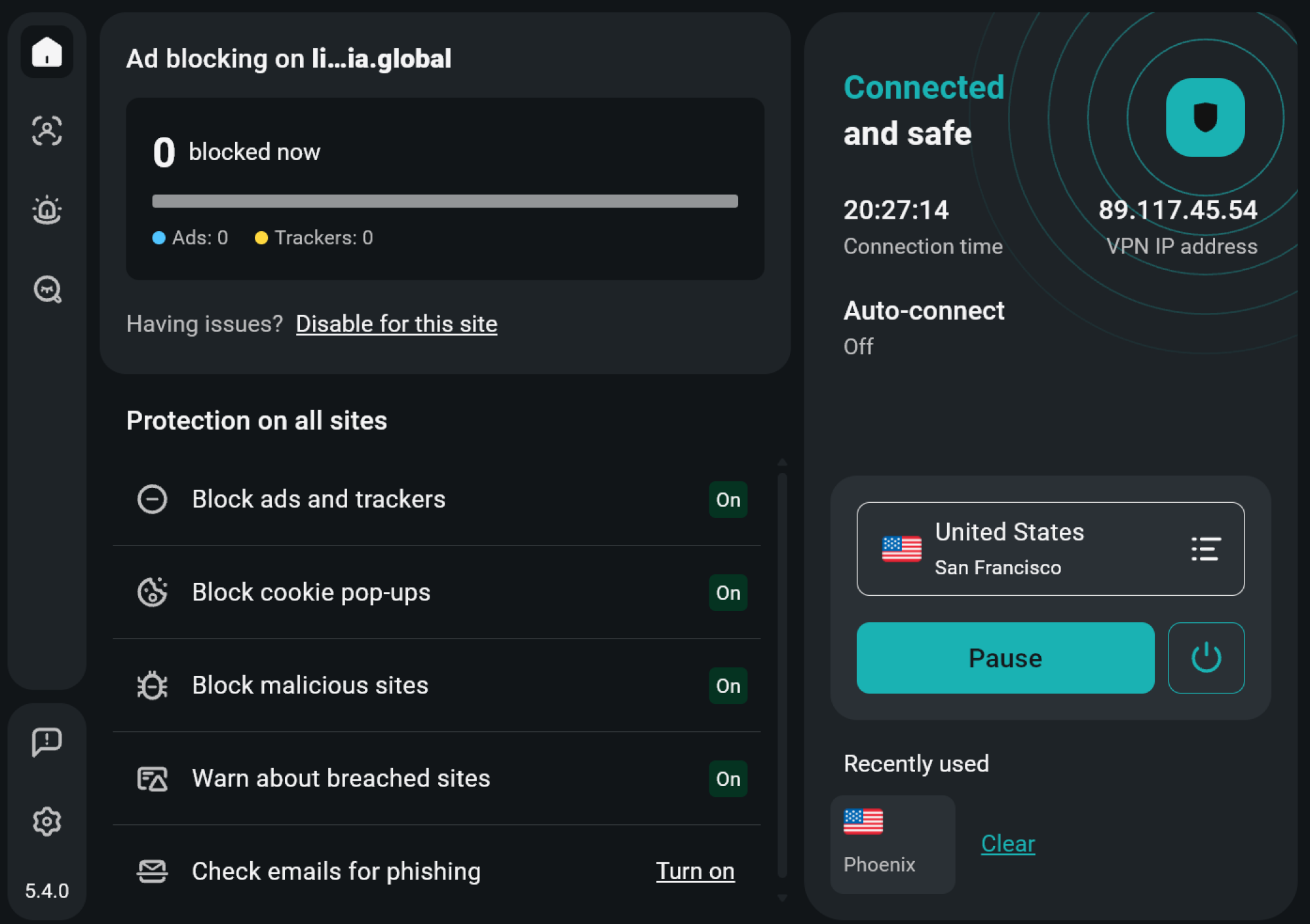
Some websites fail to read your correct IP address when you’re using a VPN service.
Credit: Surfshark
Why websites misread your VPN location
IP geolocation isn’t infallible. Websites rely on third-party IP databases to look up your location based on your current IP address. Maxmind, which has one of the largest such databases in existence, claims that its GeoIP products have a 99.8% accuracy. Lesser-known providers with smaller IP databases may be far less accurate.
Websites can also use more than just your IP address to estimate your location. For example, they can send WebRTC requests to your browser or directly query your device’s GPS. Moreover, VPN providers often have physical servers in one country while their IP addresses are registered to another country, and this discrepancy can also create issues. Let’s take a closer look at each of these problems individually, so you can find the fix that works best for you.
WebRTC leaks expose your real IP address
WebRTC is an open-source technology that lets your browser reduce latency when engaged in high-bandwidth tasks like streaming or video calls. Based on the IETF standard RFC 8828, it lets a website choose between your VPN server and your real IP address so it can establish the quickest path to transmit large amounts of data and reduce wait times or buffering.
But the catch with WebRTC is that it exposes both your VPN server and ISP-assigned addresses to websites, which can reveal your real IP location and cause websites to reject your VPN server country. Firefox now comes with built-in protections to prevent WebRTC leaks, while Chrome and Edge support third-party extensions like WebRTC Control that you can use to eliminate these issues. To check if your browser is leaking your real IP address during WebRTC requests, you can use a free tool like BrowserLeaks.
DNS lookups point to the wrong country
Even when a browser isn’t leaking your real IP address, DNS resolvers may fetch inaccurate location information if their nearest servers are too far from your current location. For example, a user in São Paulo may be geolocated to Chile when using Google Public DNS because that’s where Google’s nearest resolvers are located.
If you toggle on DNS leak protection in your VPN app, this will force websites to use your VPN’s resolver to perform DNS lookups. That often solves the problem, but, again, you can confirm the fix worked through a service like BrowserLeaks or IPLeaks.
Outdated databases point to wrong locations
Websites rely on IP databases like Maxmind, IP2Location, IPinfo, etc. to look up your exact location, but these databases get outdated quickly and need constant updating. Most of these databases also correct errors on request, but that takes some time. Also, each website has its own rules for how often it queries IP databases for updates.
Even when locations are updated in the actual database, a website may be sitting with outdated information unless it actively has refreshed it recently. MaxMind recommends doing this at least twice a week, but that’s ultimately up to the specific website.
Virtual servers don’t match their physical location
VPN providers often rely on virtual servers that use IP addresses registered in a different region than the server’s physical location. For example, ExpressVPN notes that it serves IP addresses in Bolivia, Ecuador, Peru, Uruguay, and Venezuela through servers located physically in Brazil.
While this is usually to help with the lack of local infrastructure or strict surveillance laws in the region, many databases and analytics tools will flag the discrepancy for websites, leading to confusion and inconsistency regarding your actual server location. In these cases, your best bet is to switch your VPN server or use a dedicated IP address by signing up for a paid add-on for your VPN.
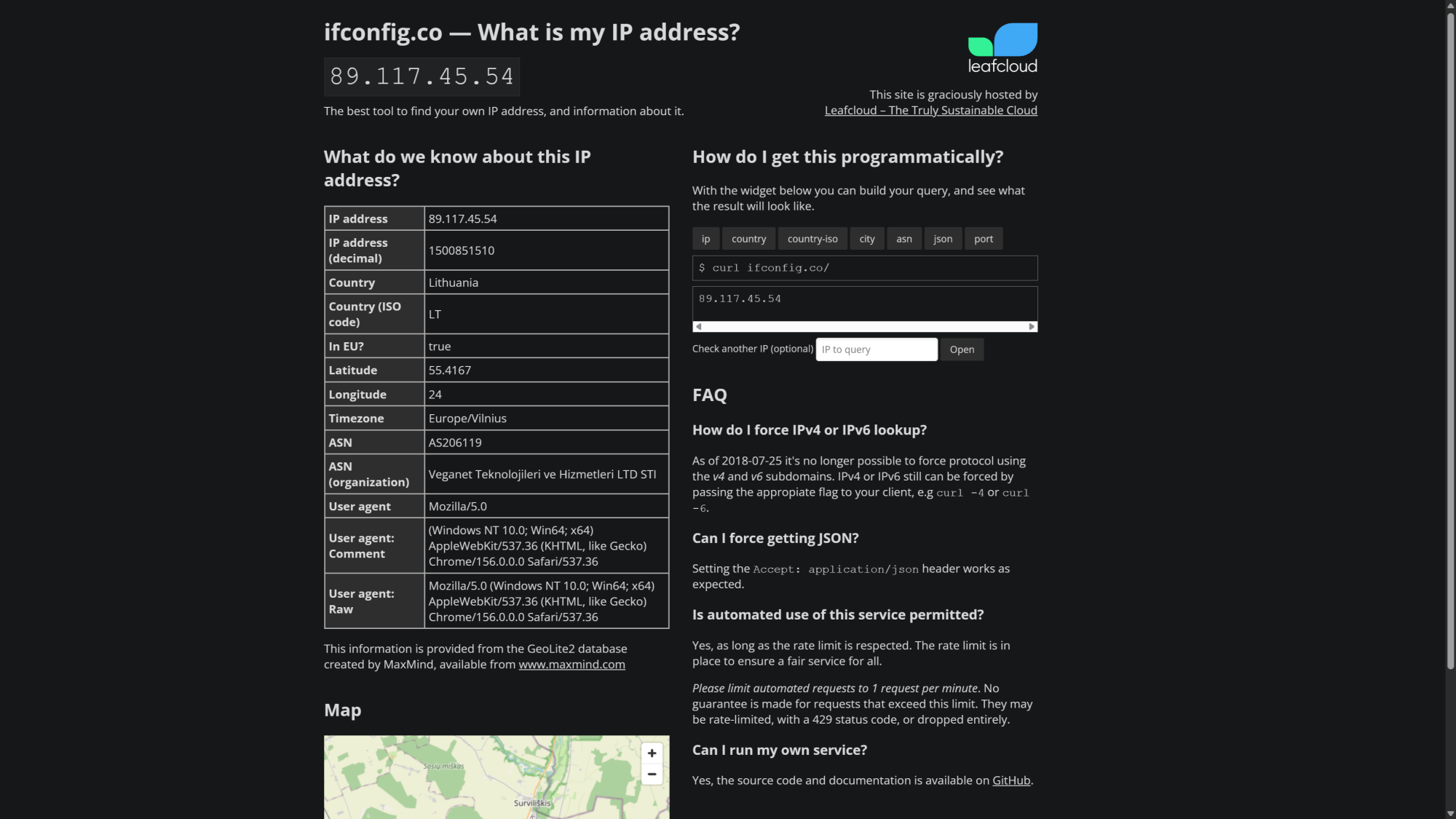
You can run a free scan on your browser to detect your current IP address, geolocation, and servers.
Credit: IPConfig.co
How to check for IP location mismatches for free
Before investing in a specific solution, it’s better to do a thorough lookup to make sure why your IP address is pointing to the wrong location and whether a WebRTC or DNS issue, virtual servers, or something else is the cause. Here’s how I’d go about it, step by step:
-
We’ll start by recording your baseline IP address, country, city, and ASN. With your VPN disconnected, navigate to IPConfig.co on your browser to grab your default IP details. I like this tool because it’s free and uses echoip to pull your location data straight from Maxmind. If you prefer using Terminal instead of your browser, you can also run curl ifconfig.co/json to grab these details in plain text format.
-
Now connect your VPN server. Then visit IPConfig.co again to note down the changed details.
-
Make sure the Country and Timezone fields match your current VPN server location. Also make sure the ASN (organization) field does not list your home ISP.
-
In case these details do not match your VPN server, run a WebRTC leak test and a DNS leak test using BrowserLeaks. If either of these tests doesn’t return your VPN server’s IP address, you’ve found your culprit.
-
If both the leak tests come back clean but a specific site still gets your location wrong, the issue is likely originating from an outdated database or virtual server.
There’s no surefire way to solve IP location mismatches for good. But if it happens often enough to disrupt your internet use, you can consider switching to a different VPN server and getting a browser add-on that prevents WebRTC leaks. If that doesn’t work, I’d consider buying a dedicated IP address that isn’t based on a virtual server. While many IP databases like MaxMind or IP2Location also have ways to request a location correction, that takes a while to go through and isn’t worth the effort unless it’s a permanent IP address registered through your ISP.