Sunken SS United States Set To Become World’s Largest Artificial Reef

An anonymous reader quotes a report from PBS: The historic ocean liner SS United States will be intentionally sunk Wednesday off the coast of the Florida panhandle. Live coverage of the sinking of the SS United States is expected to start at 1 p.m. EST, with the sinking expected at 2 p.m. EST. Watch live in the video player above. In its heyday, the SS United States crushed the trans-Atlantic speed record, which it still holds. The luxury ocean liner took only three days to cross from New York to Europe on its maiden voyage in 1952. Carrying presidents and Hollywood stars, the nearly 1,000-foot vessel was a technical marvel of its time. However, the rise of air travel and high operating costs sunk its economic viability, and the ship was pulled from service in 1969. The ocean liner sat at Philadelphia’s Pier 82 for nearly 30 years.

After a contentious back and forth with a pier landlord over rent and docking fees, Okaloosa County in Florida eventually stepped in to purchase the ship and bring it to the Gulf of Mexico to become the world’s largest artificial reef. The multi-million dollar project is also aimed at creating an economic development opportunity as a major diving attraction. “It was our goal to make sure that she wasn’t lost forever,” said David Lawrence, a member of the board for the SS United States Conservancy, the group that sold the vessel to the Florida county.

Like the ship’s unconventional life, it will also have an unconventional sinking. Federal environmental and explosives rules prevent the county from using explosives. Instead, tanks inside the ship have been removed and large holes were cut into the decks. Once the valves are opened, water will flood the hull, sinking the ship. Resting at 180 feet below the surface of the water, the SS United States will join more than 500 artificial reefs in Okaloosa County, which the county relies on to support the underwater ecosystem.


Read more of this story at Slashdot.

United Airlines Bans AI Agents From Booking Flights On Behalf of Travelers

United Airlines is banning unauthorized third-party AI agents from booking flights, checking in passengers or making account changes on travelers’ behalf. CBS News reports: To make an airline booking, an AI agent requires access to a customer’s personal information, including credentials like payment information. United has a problem with that, saying that “sharing account credentials with personal, third-party, AI assistants can expose sensitive information, and actions taken by these tools may result in unintended purchases, account changes, or use of MileagePlus miles.”

The carrier also said that using an AI agent to, for example, check in for a flight could violate federal regulations, including rules requiring travelers to verify in person that their luggage does not contain banned substances. “As a result, United is taking steps to restrict access — directly within our digital platforms and indirectly via travel agencies and aggregators — to prohibit use by unauthorized, third-party personal AI agents or assistants,” said the airline, which is updating its booking and ticketing policies to reflect the new rule. “United is saying they don’t want to add yet another, and potentially even more powerful, intermediary than they already face in terms of Google search, price-comparison metasearch sites and online travel agencies,” said Henry Harteveldt, an aviation analyst at Atmosphere Research Group. “Flight searches cost airlines money, and undoubtedly United wants to avoid the expense associated with the surge of AI bot flight searches.”


Read more of this story at Slashdot.

How to Make Sure an ‘Onion’ Site on the Dark Web Is Legitimate

The dark web isn’t just for illicit activities. In fact, many legitimate online platforms maintain a “.onion” domain on the dark web for privacy reasons, including media outlets like ProPublica and BBC News, social media sites like Facebook, and privacy-conscious communication platforms like Proton Mail and SecureDrop. 

But this also provides perfect cover for criminals and hackers who create clones of legitimate dark web sites to steal sensitive data and cryptocurrency from privacy-conscious users. And given that onion links are long and jumbled, it’s easy for users to accidentally click on the wrong link and end up on a fake website instead of the real one. When the FBI seized 276 onion addresses during 2014’s Operation Onymous, they found that 153 of them were phishing sites.

Thankfully, Tor Browser already has a cryptography-backed feature that can verify the authenticity of an onion site, by confirming whether it has end-to-end encryption and extended validation certificates. Here’s how this feature works, where it falters, as well as what other red flags you should look for. 

How phishing works on the dark web

While phishing on the dark web works as it does on the clear web, scammers have a few unique advantages due to the secretive nature of the environment. Most importantly, you can’t just glance at an onion link to tell if the site is genuine. Normal website URLs tend to be short and memorable, while onion links are 56-character strings of alphanumeric text that look mostly like gibberish. 

When you try to connect, Tor Browser verifies the URL against the originating website’s cryptographic key, which is how you know nobody has hijacked the address or tampered with it midway. But since this has the unwanted effect of making domains harder to recall, scammers have a much easier time generating lookalike addresses or creating website clones. 

For example, many popular websites use “vanity prefixes” to make their onion addresses more easily identifiable or to add some branding appeal. That means their 56-character onion link starts with something like “facebook,” “bbcnews,” or “ciadotgov.” But scammers can use a free tool like mkp224o to generate lookalike addresses with the same vanity prefix as the legitimate website, which gives users a false sense of security. 

Of course, most dark web users don’t type addresses directly into Tor Browser; they use dark web directories like the Hidden Wiki to find useful onion sites relevant to their search. Scammers will create fake search engines or link directories to point users to their fake websites, like when the Ahmia search engine discovered that a copy of its platform was directing users to 255 cloned services back in 2015. 

Of course, it’s possible to orchestrate phishing attempts that don’t involve cloning sites at all. Researchers at Freie Universität Berlin describe a sophisticated technique where attackers serve the real website through their own reverse proxy, which lets them manipulate parts of the site or log your online activity without your awareness. In 2019, ESET even found a trojanized version of Tor Browser that replaced Bitcoin addresses on websites to direct payments to hackers. So both genuine websites and your browser itself are also vulnerable to manipulation if you download or access them from an unverified source. 

How to verify an onion site in Tor Browser

There are a few best practices to avoid phishing attacks when using the dark web. None of them are foolproof on their own, but together, they considerably lower the risk of ending up on a fake or manipulated website. 

  1. The Tor Project has a feature called Onion-Location, which lets clear web websites advertise that they have a dark web version available for users who prefer more privacy. If opening a regular TLS-backed website using the Tor Browser reveals a purple “onion available” button in the address bar, you can click on it and be redirected to the official onion link associated with that site. 

  2. On the desktop version of Tor Browser, you can access an onion site using a shortened version of its URL called an Onion Name. For now, this feature only works with SecureDrop, so newsrooms can establish tip lines with addresses like mysitename.securedrop.tor.onion, which would then redirect to the 56-character original onion address. This feature is in active development, so more platforms might support it in the future.

  3. When you load up an onion site using the Tor Browser, you’ll see an onion icon on the address bar, which confirms that your connection is end-to-end encrypted. But you can also click on the onion icon to check if the site has an Extended Validation (EV) certificate, which tells you that its authenticity has been verified by a trusted certificate authority like DigiCert. While not every legitimate onion site will have an EV certificate, famous ones like Facebook tend to. 

  4. On the other hand, if you see a caution sign next to the onion icon, that means the site is using a self-signed or expired certificate that isn’t guaranteed by a trusted authority. It may also imply that the site is being served over an insecure URL. This doesn’t definitely tell you it’s a phishing site, but it’s a red flag to watch out for nevertheless.

  5. Don’t rely on search engines, link directories, Reddit threads, or Telegram channels too heavily on the dark web. Once you’re sure you’ve found the onion address for a genuine site, bookmark it so you can access it directly the next time you want to visit. 

What to do if you think you’ve been phished

If you realized that you’ve been the victim of a phishing attempt, the first step is to close the browser window with the fake site and access the real onion address to reset any account passwords you may have accidentally divulged. 

Also, generally try to enable two-factor authentication and PGP logins on any dark web account that supports it for added security. And if you downloaded Tor Browser from anywhere other than the official Tor Project site, uninstall it now and grab a fresh copy from the official address. 

CEO Jensen Huang’s job is suddenly on the line at Nvidia

Nvidia’s board is set to hold urgent talks about the future of its founder Jensen Huang after revelations that he had an affair with a top executive at the company, according to people familiar with the matter.

The meeting on Wednesday comes amid a deepening scandal at the $4.2 trillion group, after Donald Trump said the FBI was investigating allegations that Huang was romantically involved with an alleged Chinese spy.

The Nvidia chief executive had a romantic relationship with Kimberly Powell, the chipmaker’s vice-president of healthcare, according to two people familiar with the matter. Powell, a more than 18-year veteran at Nvidia, is among the company’s more prominent public figures.

Read full article

Comments

These Are the Best Early Black Friday Deals on Samsung Devices

We may earn a commission from links on this page. Deal pricing and availability subject to change after time of publication.

Black Friday might be a couple of weeks away, but Samsung is rolling out the discounts early, with deals on its entire lineup of devices, including smartphones, tablets, laptops, and wearables. While not all of these early Black Friday offers are true discounts, you can find ways to save money on some devices through these promotions. Here’s what Samsung’s offering ahead of the official Black Friday discounts.

Early Black Friday deals on Samsung smartphones

Samsung is offering some decent discounts on both its flagship smartphones and its midrange and budget lines. However, as part of its early Black Friday sale, the company is also offering increased trade-in credits towards these devices. While all of the devices here have trade-in credit options, only some have optional discounts for early Black Friday. Here’s what you can expect:

Early Black Friday deals on Samsung wearables

Samsung’s wearable deals are much like its smartphone deals: mostly trade-in offers, but some traditional discounts if you don’t have a trade-in as well:

Early Black Friday deals on Samsung tablets

For some of its tablets this early Black Friday, Samsung is advertising that it will take off a certain amount in “total savings.” That’s a wiggily way of saying that to get the best deal, you’ll need to stack together multiple offers at once: certain trade-in values, per-device discounts, as well as discounts from the Samsung Offer Program.

Early Black Friday deals on Samsung computers

Samsung has early Black Friday deals on both laptops (specifically Galaxy Book 6 devices) and external monitors, particularly ones meant for gaming:

Early Black Friday deals on Samsung TVs

Samsung doesn’t have as many TV deals as it does for its other devices, but there are some good options here—particularly for the company’s more expensive offerings:


Early Black Friday FAQs

Are Samsung’s Black Friday deals worth it?

In short, yes, Black Friday still offers discounts that can be rare throughout the rest of the year. If there’s something you want to buy, or you’re shopping for gifts, it’s a good time to look for discounts on what you need, especially tech sales, home improvement supplies, and fitness tech. Of course, if you need to save money, the best way to save is not to buy anything. 

How do I make the most of Samsung’s Black Friday deals? 

Use price tracking tools to determine if the deals you’re keeping tabs on are actually a deal. If you feel like that’s too much work, we already do that for you, so follow our Black Friday coverage for the latest and best deals our team finds. Another good tip is to only buy what you need. It sounds simple, but making a list of the things you want before jumping into a sale with millions of products helps you focus and make smarter decisions.

Our Best Editor-Vetted Early Black Friday Deals Right Now

Deals are selected by our commerce team

Nvidia and Jensen Huang Face Shareholder Lawsuit Alleging Investors Were Misled About Spy Affair

Charlotte Web shares a report from the Associated Press: A shareholder has sued Nvidia and its CEO, Jensen Huang, accusing them of deceiving investors in their responses to media reports about Huang’s affair with a purported Chinese spy that threatens national security. […] The news reports said that the Commerce Department was investigating Alice Huang’s company, Singapore-based Megaspeed, on suspicions that it was helping to sidestep U.S. export restrictions blocking Nvidia chips from being sold to China. But Nvidia said then that its compliance team checked and determined that Megaspeed wasn’t doing anything illegal.

But, according to the complaint, the statements were misleading because they were made when Jensen Huang was having an affair with Alice Huang, who is “suspected of seeking to help smuggle Nvidia products into China.” It accuses Nvidia and Huang of failing to disclose the affair and issuing false statements about Nvidia’s relationship with Megaspeed, which posed a “material risk” to Nvidia’s reputation and business prospects.

[…] “As a result of Defendants’ wrongful acts and omissions, and the precipitous decline in the market value of the Company’s securities, Plaintiff and other Class members have suffered significant losses and damages,” the complaint said. Had investors known the truth, they wouldn’t have purchased Nvidia’s shares “at the artificially inflated prices that they did, or at all,” the complaint said. “Fun fact: Nvidia donated $25 million to Trump’s White House ballroom fund,” notes Slashdot reader Charlotte Web.

UPDATE: The New York Times reports that Huang also also had an extramarital relationship with Kimberly Powell, the company’s vice president of health care and a direct report.


Read more of this story at Slashdot.

10 Hacks Every Hulu User Should Know

As streaming platforms go, Hulu has a lot to offer, with curated TV shows and movies as well as live TV. Hulu is also fairly flexible when it comes to curating separate profiles, watching across multiple devices, and accessing content while traveling. If you’re a Hulu subscriber, these are the best hacks to maximize your streaming experience.

Curate your Hulu watch history to avoid cluttered suggestions

If you don’t like the content Hulu is suggesting for you, you have several options to curate your recommendations. “Disliking” a show or movie removes it from your Home view and You May Also Like entirely, so the only way you’ll see that content is if you search for it. You can dislike on the Details page if you’re watching on your TV or use the thumbs down on mobile or web. (The “Like” button will obviously influence your algorithm in the opposite way). If your “Continue Watching” queue is cluttered with shows you started but didn’t like enough to finish, you can remove them from your watch history as well as the My Stuff list. This, too, will allow content to remain searchable but not suggested in other areas of the app.

Add a PIN to your profile to prevent other viewers from influencing your algorithm

If PIN protection is enabled, users must enter a four-digit PIN when switching between profiles on a single account. This is intended as a parental control feature, since it’s available on non-Kids profiles and can keep children from accessing more mature content on an adult’s profile. However, you can also enable this feature to keep other users from seeing your viewing history and preferences or influencing your algorithm by watching their content under your profile (accidentally or on purpose). To set up a PIN, log into your account on Hulu’s website, select your profile, and go to Manage Profiles > Parental Controls. You’ll have to choose a PIN and enter your password to confirm the changes.

Create a dedicated guest or watch party profile to keep your profile private

Another approach to protecting your profile and algorithm is to set up separate profiles for specific use cases, such as when you have guests or if you host watch parties for certain shows. This keeps content from influencing your recommendations and prevents other viewers from seeing what’s in your watch history or saved content (especially if there are things you want to keep private).

Change your subtitle settings to manage how they appear on your screen

If you find that subtitles and captions are too bold—or not visible enough—you can change the font, color, size, and style from the default so they enhance your viewing experience rather than detracting from it. Hulu allows you to adjust the color and opacity of the font, background, and window so you get the right contrast, and you can also select the specific font and font scaling. On your streaming device, go to Settings > Subtitles & Captions, then hit the back button on your remote to save your preferences. You can update these settings on mobile and desktop as well.

Pause your subscription instead of canceling while you travel or wait for new content

If you won’t be using your Hulu account for several weeks or months but don’t want to cancel your account entirely, you can pause billing so you’re not paying for time you’re not watching. This is a good option if you have extended travel planned or are waiting for new seasons of specific shows to drop. Pauses can last up to 12 weeks for monthly subscribers. Note that if you do cancel Hulu, you can simply resubscribe to regain access to your profile. You can request a pause and set the duration under Account > Your Subscription > Pause Your Subscription.

Use the expiring content badge to prioritize your watch list

If you have a long list of shows and films to watch but can’t decide what to start next, look for the “Expiring Soon” badge to see which titles are leaving the service in the next two weeks. Badges display the number of days remaining, so you can determine what to prioritize and whether it’s worth diving in based on how much time you have to finish before the expiration date. Go to “My Stuff” to monitor saved titles that are expiring soon.

Transfer your profile to keep what you’ve curated when switching to a new account

If you’ve been watching Hulu under an account shared with family or friends and need to switch to your own subscription, you can transfer your profile to keep your watch history and settings intact instead of starting from scratch. You can initiate a profile transfer on a TV-connected device. Note that account holders have to approve transfer requests within seven days, and once expired, transfer requests cannot be resubmitted—so be sure to let the primary user know that you’ve made the request.

Use Manage Devices to remove your account from hotel, Airbnb, or friends’ TVs

If you’ve shared your Hulu login information with friends or activated your account on devices you don’t own, you may want to regularly audit where your account is being used and remove any that don’t need access. This includes TVs in Airbnbs and hotels. If you stay logged in, unauthorized users may have access to your Hulu account and personal data. You can see activated devices (and their activation date) under Your Account > Watch Hulu on Your Devices > Manage Devices. Click Remove next to old or unrecognized devices.

Manage download resolution for offline viewing to save space on your device

Hulu has an offline mode that allows you to download shows and movies to watch when you don’t have a network connection. This is useful for traveling or when you know your wifi or cell service will be limited. Downloads are only available on supported iOS and Android devices, which means you may have to consider how much space your content takes up. You can select High for video quality if you want maximum resolution, but you may want to choose Standard if you are short on storage. This option is available under Downloads > Settings > Video Quality on iOS and Account > Settings > Downloads > Video Quality on Android. Note that once you click play on downloaded content, you have 48 hours to watch it before it expires—so don’t start it unless you are ready.

Log into Hulu on home wifi to prevent losing access to live TV while on the road

If you have a Hulu + Live TV subscription, you must designate a “Home” network, which determines the local channels included in your plan. You can update your location up to four times within a 12-month period, but this limitation is meant to prevent viewers outside a household from sharing a subscription. Hulu does allow you to stream live TV on mobile when you’re away from your home network (within the U.S.) as long as you access your account on that network every 30 days. If you travel often, check in with your mobile device frequently to avoid being locked out when you’re away. Note that you can still watch streaming content with no restrictions.

Jensen Huang Said to Have Had Relationship With Nvidia Executive Who Reports to Him

Nvidia CEO Jensen Huang is facing scrutiny over an affair with an alleged Chinese spy. Now, The New York Times reports that Mr. Huang also had an extramarital relationship with Kimberly Powell, the company’s vice president of health care and a direct report, raising questions about conflicts of interest and compliance with the company’s policies governing personal relationships. From the report: The relationship, which has not been previously reported, was with Kimberly Powell, Nvidia’s vice president of health care, said the people, who spoke under the condition of anonymity to describe sensitive information. Under Nvidia’s code of conduct, employees are told to “avoid situations where our actions create conflict” including “personal relationships,” and the company states that it “promptly investigates reports of misconduct.” Many corporations have policies against managers having relationships with subordinates.

Mr. Huang, 63, and Ms. Powell, 48, were captured on video being affectionate at a San Jose, Calif., hotel during a Nvidia conference in March, according to two of the people who worked at the company. The New York Times has not seen the video. Both Mr. Huang and Ms. Powell are married to other people. […] One bystander captured the interaction on their phone, three people briefed on the incident said. Mr. Huang’s security witnessed the bystander with their phone and sequestered them, the people said. They made the person an offer to sign a nondisclosure agreement. Further reading: Nvidia and Jensen Huang Face Shareholder Lawsuit Alleging Investors Were Misled About Spy Affair


Read more of this story at Slashdot.

10 Hacks Every Reddit User Should Know

If you’re looking for discussions, recommendations, or advice online, it’s hard to avoid Reddit. From mainstream sports to niche crafts, it does seem that there’s some kind of Reddit community for everyone. (And if there’s not one, you can make one yourself.) If you’re using Reddit, here are 10 hacks you should know about to improve your experience on the site.

Hide your post history to keep your profile private

Reddit used to let everyone view your post and comment history, but in recent years, you can make your profile private. You can hide your posts, comments, and the subreddits you’re a part of. If you want to do this, click your profile icon once you’ve logged in to Reddit, and go to Settings > Profile. Alternatively, you can follow the direct link to Reddit’s profile settings page. Click the drop-down menu next to Content & Activity, and select Hide all. You should also turn off Online Status on the same page to stop people from seeing when you’re using Reddit.

Use Old Reddit by default to disable infinite scrolling

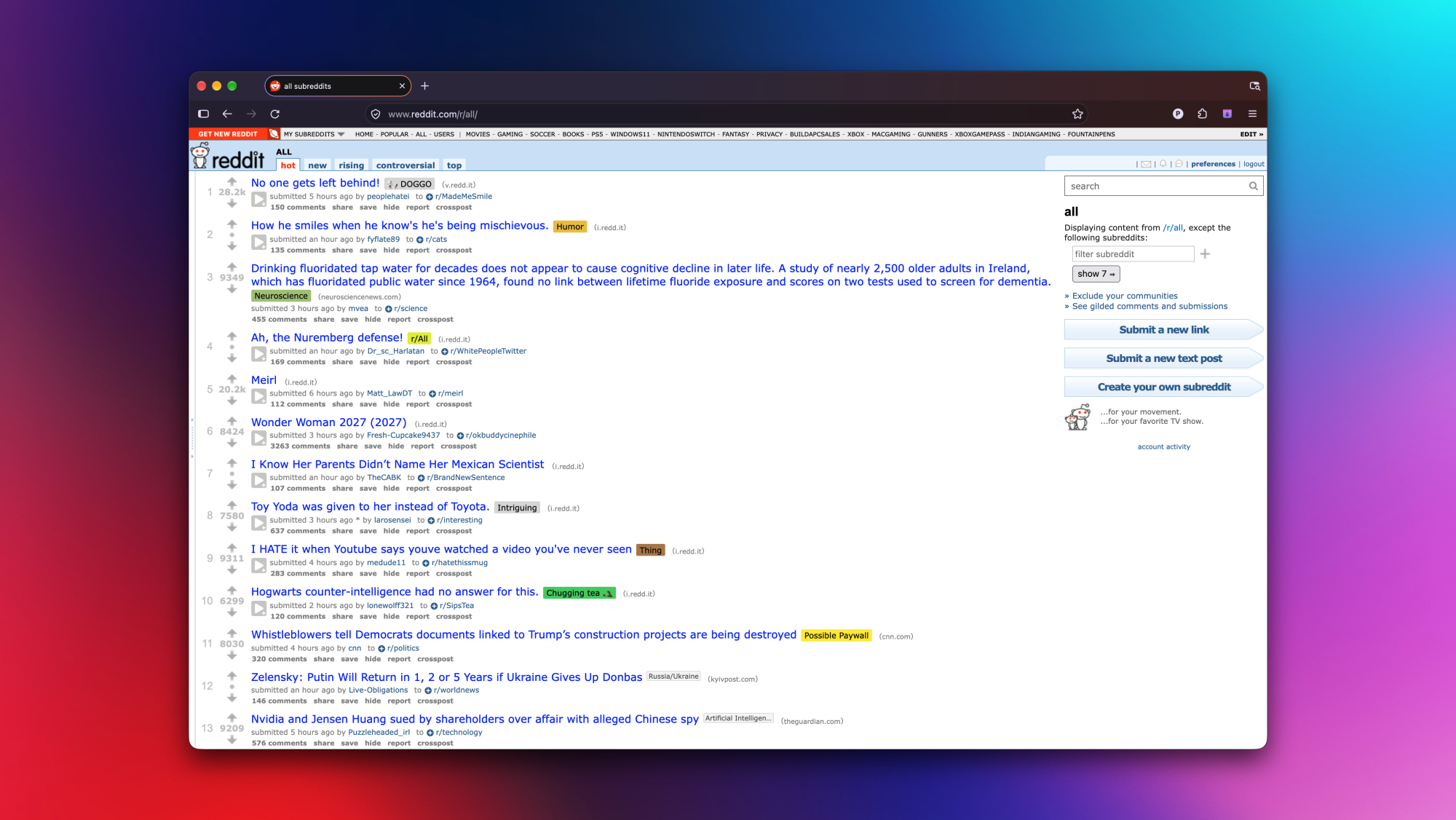
Old Reddit on desktop.

Credit: Pranay Parab

Old Reddit lets you use the site’s classic design, and I prefer it to the more modern UI. Old Reddit looks dated, but it doesn’t have infinite scrolling, distracting animations, and a bunch of features designed to increase the time you spend on the platform. It’s no wonder that Reddit is making it harder to access this version of the site. As long as it’s around, you should switch to Old Reddit for a cleaner reading experience. You can do that by going to Reddit Settings > Preferences and enabling Default to Old Reddit. You can also visit old.reddit.com, though you’ll need to sign in for access

Turn off annoying subreddit styles to make reading easier

Many subreddits use custom themes that range from beautiful to borderline unusable. If you want a more consistent UI across the site, you should disable these custom subreddit styles. Go to Reddit Settings > Preferences and turn off Use community themes. If you’re using Old Reddit, click the preferences button in the top-right corner, and under “display options,” disable allow subreddits to show me custom themes.

Disable social features to stop strangers from bothering you

Reddit’s social features are useful if you have friends on the site, but in most cases, those features are annoying at best. If your post or comment goes viral, be prepared to deal with waves of weirdos who find it entertaining to send unsolicited advice or opinions. To keep all of this at bay, you should disable the site’s social features. Go to Reddit Settings > Privacy, and turn off Allow people to follow you. On the same page, click Who can send you chat requests, and pick Nobody. You can also turn off Show up in search results to remove your profile from Google searches.

Create multireddits to follow your favorite hobbies

A multireddit is a feed that shows posts from a customized group of subreddits. You can think of it as a way to break out of Reddit’s algorithms, and create your own Reddit feed. I use multireddits to follow all sports-related subs I’m interested in. I even have one for gaming, and one for fountain pens. It’s a great way to create interest-specific feeds, and if you make them private, no one else can see them. To create one, click the Create custom feed button in the left pane in new Reddit. In the Old Reddit design, click the Create button in the left pane. Be sure to select the Private button to keep it from showing up for others. You can add as many subreddits as you like to the list, and bookmark the feed to access it whenever you wish to.

Turn off ad personalization and block ads to reduce tracking

If you want to reduce Reddit’s tracking, you should turn off ad personalization. Go to Reddit Settings > Privacy, and turn off Personalize ads. To block Reddit’s ads altogether, you can use any ad blocker you like. I recommend uBlock Origin, which is one of the best ad blockers you can install, though most can hide Reddit’s ads on desktop. On mobile, you can try using AdGuard or Wipr to hide in-app ads in Reddit.

Disable all email alerts to stop Reddit’s spammy messages

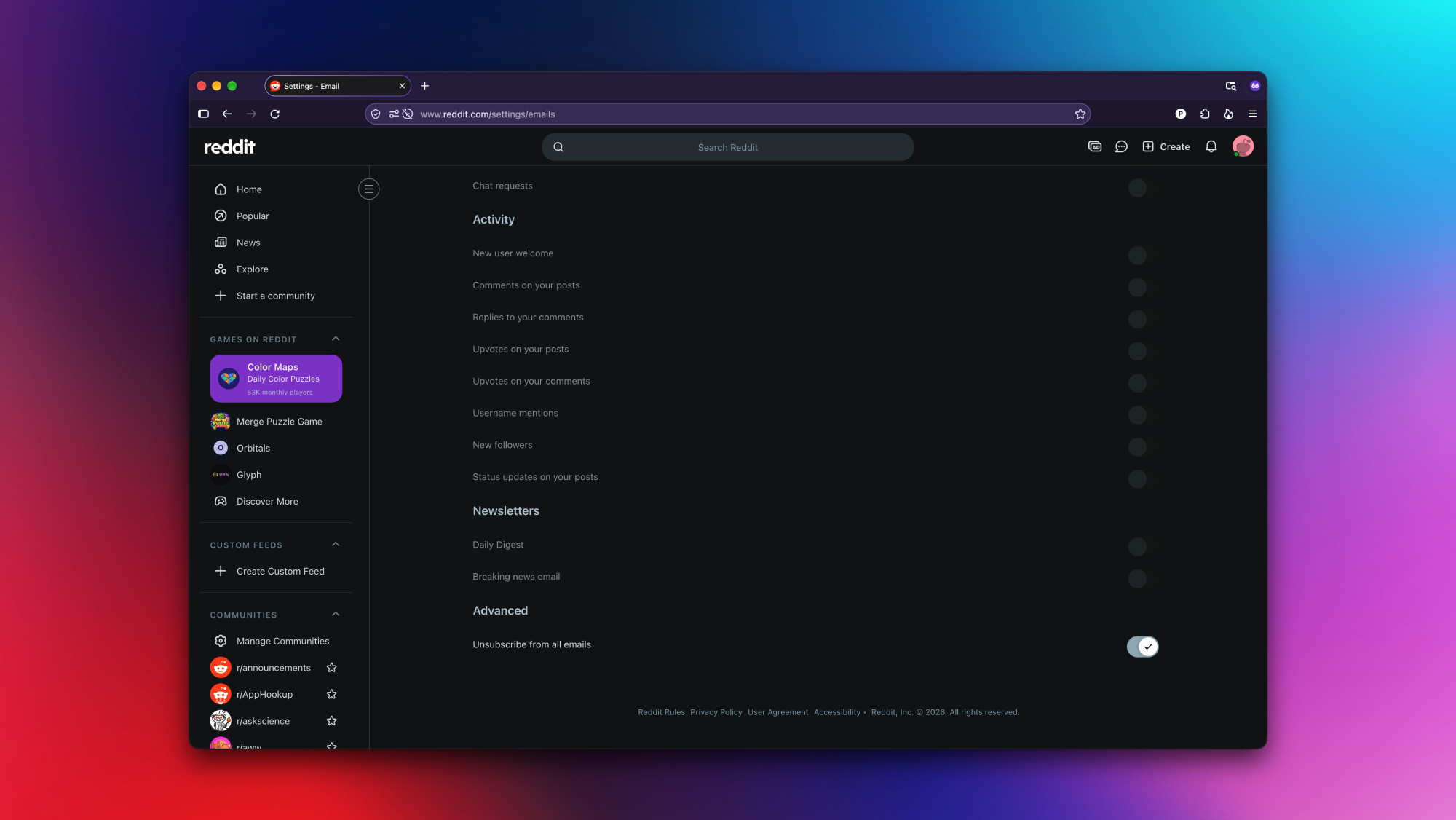
Unsubscribe from Reddit emails.

Credit: Pranay Parab

Reddit’s notifications are spammy enough that I have no desire to get a copy of those alerts via email. You can easily disable all of Reddit’s email alerts by going to Reddit Settings > Email, and enabling Unsubscribe from all emails.

Bypass Reddit’s new feeds to sort posts in your preferred order

Reddit has recently adopted an Instagram-like experience for its feeds. It removed the ability to sort posts by new, controversial, best, etc., and instead offers “For You” and “Following.” If you dislike this change, you can bypass it. I use Reddit on mobile Safari, and I recommend an extension called Sink It for Reddit. It can automatically redirect you to Old Reddit, and there’s a feature that optimizes it for mobile, which brings back the old sorting options. You can also use third-party apps such as RedReader for Android, or RDX for Reddit on an iPhone or iPad to restore the old sorting options for Reddit posts.

Use a throwaway email ID to create burner accounts on Reddit

Reddit doesn’t let you sign up without an email address or phone number anymore. This makes it a little annoying to create burner accounts, but it’s not impossible. In fact, you can create multiple Reddit accounts with the same email address, as long as you use aliases on Gmail or any other email service of your choice. For more privacy, you can use services that provide disposable email addresses, such as Yopmail.

Use advanced search filters to search Reddit like a pro

After all these years, Reddit’s built-in search still leaves something to be desired—at least, on the surface. To find posts on Reddit faster, use search filters on the site. For instance, adding “title:” to your search will limit the results to post titles, and boolean operators such as AND, OR, and NOT also work for advanced searches on the site.

New York Forces T-Mobile to End Data Caps On Low-Income Plans

New York has forced T-Mobile to remove a 50GB monthly data cap from its $15 low-income broadband plan after regulators found customers who exceeded the limit had their speeds cut by more than 97%, to just 650 Kbps. “Additionally, the [Office of the Attorney General (OAG)] found T-Mobile restricted [New York’s Affordable Broadband Act (ABA)] plans to areas with 5G coverage, despite offering standard-rate 25 Mbps plans in 4G areas, and intentionally coded its website to hide affordable plans from search engines,” reports RochestFirst. From the report: Under the terms of the settlement, T-Mobile must:
– Eliminate data caps on its ABA plans and deliver guaranteed 25 Mbps download speeds.
– Expand ABA plan availability to all geographic areas where it offers fixed-wireless home internet service.
– Make its ABA webpage indexed and easily discoverable via standard web searches.


Read more of this story at Slashdot.