Microsoft details how three problems combined for a global outage

A hidden defect in Microsoft’s cloud gateway, dormant since July, was to blame for one of the largest outages in the company’s history last week. A preliminary Post-Incident Report (PIR) released by the company outlines how the latent bug, changes in traffic, and reduced server capacity combined to knock much of Microsoft 365 and Exchange infrastructure offline at the end of last week. Microsoft’s report lists the incident’s final status as “a technical issue not related to cyber or AI/agents.”

Microsoft’s preliminary report places the outage between November 12 at 16:20 UTC and November 13 at 16:10 UTC, just under 24 hours total, and additional monitoring remained in place for any affected systems through November 14.

The outage started on November 12 and quickly rippled through businesses and public offices that depend on Microsoft’s cloud and email exchange infrastructure. The outage is covered in Microsoft’s incident IDs EX1550543 and MO1550821. You need Microsoft 365 admin credentials to see the full report on the company’s status pages, but Office Watch has reproduced the preliminary report, and the University of Pennsylvania maintains an archive of Microsoft’s service-health updates.

Read full article

Comments

Eight Important Router Settings You Should Check (or Change)

Your router is a key piece of your home network, as it connects all of your other devices to the internet. This also makes it a highly valuable target for attackers and can leave your data vulnerable—especially if you simply plug your router in with its default settings unchanged. Whether your router is brand new or it’s been a while since you audited your existing setup, these are the key settings to check and change right now.

Check the security protocol and set to WPA3

Your router’s security protocol determines how encryption and authentication work to protect data that’s transmitted over your network. WPA3 Personal is the newest standard and the most secure, so if it’s available on your router, enable it. It’s compatible with devices that support Wi-Fi 6. Some older devices may not work with WPA3, in which case the WPA2/WPA3 Transitional mixed mode is a good alternative. At minimum, set your router to WPA2 Personal (AES).

Change the default admin credentials and enable 2FA

Some routers ship with factory default login credentials, which are the username and password you need to access your device’s admin dashboard. (This is not the same as your network name or wifi password, which you set up later.) Default router passwords are searchable online, which leaves your router’s admin settings open to anyone. Once you get into your dashboard for the first time, change the default credentials and enable two-factor authentication for your admin account if available.

While some newer routers do have unique, device-specific defaults, it’s a good idea to check this setting and ensure it’s secure. If you’re prompted to create custom admin credentials during the setup process, do it.

Customize the default SSID

Your network name, or SSID, is how your network appears when you search for available wifi. By default, this may be the name of the router brand or a short string of characters, but you should choose something unique to your network. Make sure there’s no identifying personal information, such as your name or house number. While you may be tempted to hide your network and obscure your SSID, this may actually make your information less secure, so keep this setting disabled. You can, however, add “_nomap” to the end of your network name, which prevents your router’s physical coordinates from being mapped by location databases.

Set up a strong Wi-Fi password

The password to access your network should also be unique and secure and should not include obvious personal information. One option to keep it memorable and easy to type is to create a passphrase using five to seven unrelated words that, combined, have at least 16 characters.

Disable remote management

Being able to log into your router’s admin dashboard from anywhere may be useful if you have complex networking needs or troubleshooting issues that often have to be addressed when you’re away from home, but it also leaves an entry point open for attackers. Turn off remote management to prevent anyone from accessing your dashboard unless they are on your network. (This is also a great reason to have strong, unique admin credentials.)

Disable WPS and UPnP

Two additional settings that leave your network vulnerable are Wi-Fi Protected Setup (WPS) and Universal Plug and Play (UPnP). The former lets users connect to your network with a PIN, which can be vulnerable to brute-force attacks. The latter allows smart devices to easily connect to your network—but this also allows malware to spread more readily. You may need to have UPnP on in order to connect devices initially but should disable it afterward.

Set up separate wifi networks for guests and IoT devices

Any easy win for your network security is segmenting traffic to different networks, so if one is compromised, the data on the others remain unaffected. Many wifi routers have a “guest mode,” which creates a separate SSID and password that you can share with visitors instead of giving them your primary network credentials. You can also set up a separate network for all of your smart home and IoT devices so exploitable vulnerabilities in these devices don’t put your computers, phones, and other connected devices at risk too.

Enable automatic firmware updates

Routers run a type of software—called firmware—just like any other device. Firmware controls the router’s core functions and is not immune to vulnerabilities, which can be exploited by bad actors. And, just like other types of software, manufacturers occasionally push updates to patch these flaws. Check your router’s dashboard to see if automatic updates are toggled on. Some devices require an opt-in for auto updates during setup, so you should enable them if they are off. Some routers may even require manual updates—in this case, set a monthly or quarterly (at minimum) calendar reminder to check for patches.


Apple Eyes 2027 Launch For AI-Powered Smart Glasses

Apple is reportedly targeting WWDC 2027 to unveil its first smart glasses, with shipments planned before the end of that year. According to Bloomberg’s Mark Gurman (paywalled), the company has hopes of making them its flagship new product for 2027. Forbes reports: It’s no secret that Meta with its Ray-Ban Meta and Oakley Meta glasses, for instance, lead the field when it comes to smart specs. “Apple is counting on integration with the apps people already use on their iPhones to be a key differentiator for the glasses,” Gurman said. The App Store has millions of apps while Meta’s apps are far fewer. It seems the smart glasses will use a version of the software used on the Vision Pro.

“The thinking inside Apple is that while Meta has the increasingly popular Muse agent, Apple has the App Store. Because the Siri integrations are being developed for the iPhone first, software makers won’t need to build separate applications for the glasses,” Gurman insisted. It seems the glasses will do a lot, from making restaurant reservations to booking cars, ordering coffee or buying movie tickets. “It’s also Apple’s big AI monetization opportunity,” Gurman believes.

Part of the experience will depend on Apple’s own AI agent system, it seems. There won’t be augmented reality in the glasses and they will be lighter than the competition, but with longer battery life and more sensors. Gurman refers to cameras, in the plural, while current models only have one camera, or none at all in the case of Even Realities which tout their privacy aspects. “Apple is also emphasizing the sound quality,” Gurman says, “which employees have said is industry-leading, with support for phone calls, music playback and FaceTime audio communication.”


Read more of this story at Slashdot.

Supreme Court keeps injunction against DEI grant defunding in place

On Monday, the Supreme Court announced it would not hear an appeal of a lower court decision that blocked the government from canceling the grants of a handful of researchers whose funding had been revoked during the Trump administration’s purge of DEI-related work. While the decision applies to only seven researchers in California, the lower court had ruled that the government’s actions violated the First Amendment and so may have broad implications.

The Supreme Court provided no discussion of its rejection, and no justices filed a dissent regarding the decision.

The suit was initially filed by a large group of researchers at the University of California, contesting grants originally issued by a large number of federal agencies, from the National Institutes of Health to the Department of Transportation. At issue were grants that had been terminated because the agencies decided they violated a Trump executive order blocking the use of DEI. This occurred despite the fact that the government hadn’t bothered to define DEI, and targeted grants were often identified by little more than a keyword search.

Read full article

Comments

Shareholders sue Intel, its CEO and CFO after stock drops 28.6 percent in one day

Intel is being sued by shareholders, who are accusing the chipmaker of misleading them about the impact of the PC sales slump that contributed to a drop of 28.6 percent in the price of Intel’s stock on October 30.

The lawsuit (PDF), filed on Friday in the San Jose, California, federal court, is seeking class-action certification and lists the City of Southfield Fire and Police Retirement System and “all others similarly situated” as plaintiffs. In addition to Intel, Intel CEO Lip-Bu Tan and Intel’s EVP and CFO David Zinsner are listed as defendants.

The plaintiffs claim that Intel made “materially false and misleading statements and omissions” between July 23 and October 29. They are seeking unspecified compensatory damages, plus legal and other associated fees, for shareholders during that period.

Read full article

Comments

Snap Store saw several hundred new apps added in one weekend

Canonical’s Snap Store has seen a huge uptick in app uploads over the past few days – one account publishing more than 100 utilities and games in 24 hours. What gives? Is the snap store finally seeing a second wind? Typically, the snap store sees between 15-30 new app uploads (not updates) a day, per a quick eyeball of the ‘new’ graph on Alan Pope’s SnapUpdates site. But since the 13 November…

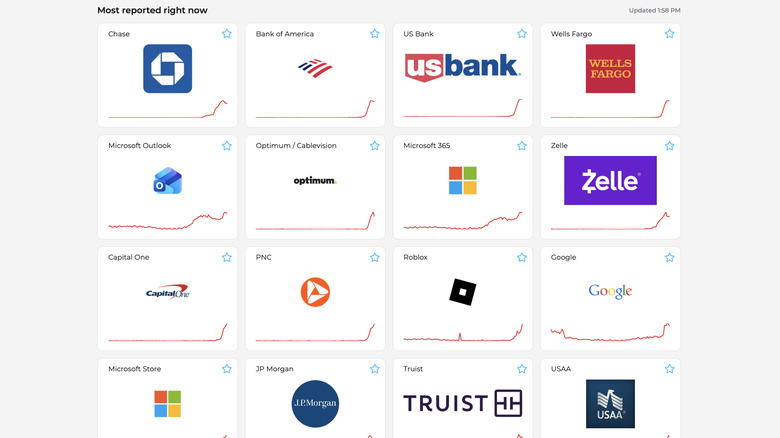
A Number of Banks Are Experiencing Outages Right Now

If you’re having trouble accessing your bank right now, you aren’t alone. As of Monday afternoon, a number of banks are experiencing outages and interruptions to service.

That’s according to Downdetector, which collects user reports of issues to different sites and services. As of this article, the site shows notable numbers of user reports with the following banks and credit companies: American Express, Ally, Bank of America, Capital One, Chase, Citi, Huntington Bank, JP Morgan, Navy Federal Credit Union, USAA, US Bank, and TD Bank, Visa, Wells Fargo. Even PayPal, Venmo, and Zelle, money-transferring services, are showing user reports as well.

There isn’t a clear reason why these various companies are currently experiencing issues. The timing is suspicious, of course: These interruptions come after last week’s massive Microsoft outage, which took down services like Outlook, Teams, and Microsoft 365. It also comes just days after the FAA unexpectedly grounded all flights in the U.S. There’s no evidence there’s any link between these events, but the frequency of these developments is concerning on the surface.

This story is developing. Please check in for future updates.

Comcast’s “fiber-powered Wi-Fi” is just cable, AT&T says in false advertising case

AT&T on Friday accused Comcast of false advertising in a lawsuit challenging the marketing claim that Comcast’s cable broadband service and Wi-Fi is “fiber-powered.”

“This case challenges Comcast’s false advertising campaign for its residential Internet service, marketed under the Xfinity brand to consumers nationwide,” AT&T’s lawsuit said. “At the center of that campaign is Comcast’s claim that Xfinity Internet and its associated Wi-Fi service are ‘Fiber-Powered.'”

While Comcast has deployed plenty of fiber throughout the US, its cable Internet service makes the final connection to homes with coaxial cable. This results in upload speeds being far slower than download speeds.

Read full article

Comments

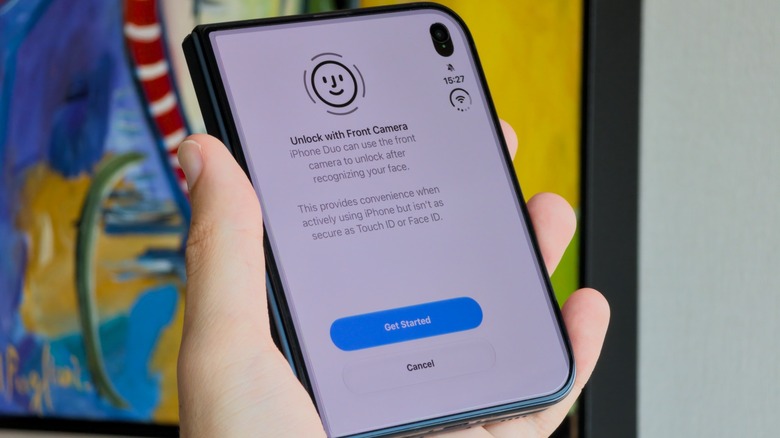
The iPhone Duo Is Getting Face Unlock

Apple dropped iOS 27.2.1 last week, patching a handful of security vulnerabilities and bugs—including two iMessage flaws that let people read messages they shouldn’t. But while most of us are running this version (or should install it as soon as possible), others are running something different—iOS 27.3.

Apple is currently beta testing the third major update in the iOS 27 era, and anyone—developer and public tester alike—is free to install it at their leisure. With it, comes the return of the Health app, vertical Safari tabs, and Siri AI app actions, among other new features. But for users of Apple’s first foldable, the iPhone Duo, iOS 27.3 brings two rather notable changes—both of which are for the better.

The iPhone Duo is getting face unlock

With the second iOS 27.3 developer beta, Apple is introducing face unlock for the iPhone Duo. The foldable famously ships with Touch ID, the first new iPhone since the third-gen iPhone SE to do so. While that isn’t a problem per se, many of us are used to unlocking our iPhones with our faces. This update just lets new Duo owners keep up with that muscle memory.

Now, take note: This isn’t Face ID. No software update can introduce new hardware, so the iPhone Duo still doesn’t have the camera tech required to power Apple’s Face ID system. As such, the Duo’s face unlock is likely not as secure as Face ID on other iPhones. Perhaps that’s why your iPhone Duo will require Touch ID for Apple Pay and passwords, or after 45 minutes of inactivity. This feature seems to be one of pure convenience: If you want to be able to unlock your Duo with your face (at least, some of the time), you can.

What’s more, this isn’t a default setting. If you’re running the beta, or if you’re reading this after iOS 27.3 drops, you can find the option in Settings > Touch ID & Passcode.

You can now lock your iPhone Duo by closing it

Apple made a big deal about the continuity involved with opening and closing the iPhone Duo. As you do, your content moves with you seamlessly—a very Apple thing to do. That said, you might expect folding the Duo to lock it, but it doesn’t. You need to hit the side button to actually put the phone to sleep.

iOS 27.3 changes that. If you so choose, you can enable a setting to lock your Duo whenever you close it. That won’t work for everyone, of course—some users may still want to move between modes without worrying about locking their Duos. But for those who would rather lock their devices whenever they fold them up, the new option is under Settings > Display & Brightness.

How to Transfer Your Playlists to Tidal Music for Free

I recently switched music streamers from Apple Music to Tidal. I like Tidal’s strict anti-AI features, the fact that it pays higher royalties to artists than other major streamers, and its focus on high quality audio. I wrote a post featuring eight hacks for Tidal users, but I wanted to highlight one in particular: How to transfer playlists without paying anything.

Tidal points new users toward third-party transfer tools like TuneMyMusic and Soundizz, which are both easy to use, but they’re subscription services, and they only transfer a few hundred tracks for free. I have thousands of tracks, saved in a ton of playlists. The easy solution was to grumble and sign up for a month, then cancel when the tracks were transferred, but it just didn’t sit well with me. A playlist is just a collection of song names, so why should I have to pay anything to transfer it? To solve the problem, I came up with a simple script that transfers playlists from Apple Music, Spotify, and any other service that lets you download your tracks as a text file to Tidal. I will not be charging a fee.

How to migrate your tracks from other streaming services for free

  1. Download your playlist as a .txt file. You can do this directly from Apple Music under File>Library>Export Playlist. You can’t from Spotify, but the free site Exportify will download any of your playlists as a spreadsheet file you can save.

  • Install Python on your system. Double click “install certificates” in the folder that opens after installation.

  • Download this script. Save it in the same file as your playlist.

  • Run the script: (For Mac, open Terminal. For Windows, go to the Command prompt. Type python3 on a Mac or py on Windows.) Drag the script into the terminal window and press enter. It should ask you to drag your downloaded playlist into the window next.

  • Sign in to Tidal. Hit “Approve” to give permission for Tidal to run the script.

  • Have a banana. The script is going to search for all the songs on your playlist and match them to Tidal’s library, so it can take a little while. I tested it with a playlist from Apple Music with 2,397 songs. It took about 20 minutes and found 2,362 of my tracks, a 99% success rate.

  • Fix the leftovers: The program creates two separate text files for “orphans.” One is songs it couldn’t find and one is songs it might be worth double-checking manually.

  • If everything goes well, your large playlist should be available on Tidal.

Note: The script uses a community-created library to talk to Tidal, so it could stop working if Tidal changes things up.

Corporations Are Using Trump’s Tariff Refunds On Bonuses Rather Than Reimbursing

An anonymous reader quotes a report from ProPublica: When Stanley Black & Decker, one of the world’s largest tool companies, got hit with President Donald Trump’s tariffs last year, the firm made clear that it would be sharing the pain with its customers. The Connecticut-based company raised prices again and again, moves its executives said were necessary because of the new fees on imports. Now, after the Supreme Court struck down Trump’s most sweeping tariffs earlier this year, the company is getting at least $298 million refunded. Instead of sharing that bounty with its customers, however, the firm has chosen different recipients: Its own leaders. The company is one of at least nine that have disclosed that they are using their refunds not to pay back the cash-strapped consumers who generally covered much of the tariff costs through higher prices, but to give bonuses, according to a ProPublica analysis of thousands of securities filings and earnings calls for publicly traded companies.

Other recognizable companies include the owners of discount department stores TJ Maxx and Marshalls and the golf equipment brand Titleist. Dozens of other firms have said little about how they plan to use the money other than to characterize the windfall as the kind of earnings they use to determine executive bonuses. The Trump administration has not publicly detailed which companies are getting the roughly $170 billion in refunds or how much they’ve asked for, and it has denied ProPublica’s requests for this information. But reporters found some of these details while reviewing the disclosures of thousands of publicly traded companies.

Some have described vague plans to pay the money forward by, for example, “returning tariff refunds to our members through pricing,” though they generally don’t say whether that involves price cuts or limiting future increases. Others are paying back businesses they sold products to because they had itemized receipts that detailed the tariff markups. But consumers hoping for refunds appear to be largely out of luck. With the help of artificial intelligence, ProPublica identified companies that said they planned to refund customers with their tariff windfalls. Almost all of them deal with other businesses, not consumers. “Executive bonuses are probably the least just way to use this money because it wasn’t anything the executives did that they should be rewarded for. It was a government mistake that resulted in a refund,” said Gregory Germain, a corporate law professor at Syracuse University. “It really explains why it’s so important for the government, when they’re doing something like this, to think it through to make sure consumers don’t pay extra money and not get it back.”


Read more of this story at Slashdot.

When will humans actually fly on Starship?

The stunning return of Starship from the skies to a launch tower in South Texas answered some questions about the future of SpaceX’s ambitious rocket program. Namely, it is now rapidly moving toward rapidly reusable launch.

However, it raises other questions. For example, as Starship becomes fully reusable, when might humans fly on the vehicle?

The short answer is pretty simple: If SpaceX prioritizes human spaceflight on Starship, it could happen reasonably quickly. The longer answer becomes more complicated and depends on what one means by human spaceflight. The first people to fly on Starship probably won’t launch from Earth, or land here. Rather, they will probably be NASA’s lunar astronauts. So there are different timelines for humans flying aboard Starship and landing on Earth.

Read full article

Comments