Luke Ross Releases PC VR Mod Suite for Free, Excluding Contentious ‘Cyberpunk 2077’ Mod

Prolific VR modder Luke Ross has re-released his R.E.A.L. VR mod suite following a DMCA takedown issued by CD Projekt in January for his paywalled Cyberpunk 2077 VR mod—this time making a bulk of the work free for anyone to download.

The News

Following the Cyberpunk 2077 controversy, Ross pulled all VR mods from his Patreon under the reasoning that piracy of his work had increased in addition to avoiding other publishers issuing similar claims.

Now, Ross has partially reinstated the R.E.A.L VR mod suite on his Patreon for free, which includes instructions on how to install and use. Supporters are offered advanced access to new features, however anyone can install the current version for free.

Notably, this doesn’t include the VR mod for Cyberpunk 2077, as Ross is not including any games possibly in violation of DMCA claims for now.

It is however possible Ross could eventually re-release the Cyberpunk 2077 mod, as CD Projekt says it allows “reasonable donations” in connection with fan content—just not anything behind any sort of paywall.

Prior to the CD Projekt takedown, mods were only available to Patreon subscribers who paid $10 per month, which included VR mod support for a host of popular flatscreen titles, including Elden Ring, Far Cry, Final Fantasy VII Remake, and Ghostrunner.

Important to note is that none of Ross’ VR mods contain(ed) game files, as they primarily only include custom code for PC games to force stereoscopic 3D, head-tracking, and OpenXR compatibility.

My Take

The reasoning behind Ross’ change of heart is still a mystery, as many of his Patreon posts moving forward now include a form of “legal notice” that he says prohibits readers from copying or otherwise disclosing the contents of posts, which is his intellectual property.

Ostensibly though, Ross seems to have found the right legal strategy that won’t risk running afoul of individual studios’ terms of service, which typically prohibits putting mods or other forms of user-generated DLC behind paywalls. It seems the “release mostly everything for free and collect donations” is the current move forward.

And after a few sobering weeks, I can imagine this was actually the only strategy left, as 505 Games issued a similar takedown of Ghostrunner shortly after Cyberpunk 2077, which could have led to racking up multiple DMCA strikes on his Patreon page, risking indefinite suspension and a total stop of all incoming funds.

That said, it’s good to see Ross come to a conclusion that benefits (most) everyone. And now that Meta is not longer committed to funding big and expensive VR games, Ross’ role as a modder could be even more important now than ever.

The post Luke Ross Releases PC VR Mod Suite for Free, Excluding Contentious ‘Cyberpunk 2077’ Mod appeared first on Road to VR.

The PS Plus Games Catalog is getting Space Marine 2 and Persona 5 Royal in March

Sony has announced its latest additions to the PlayStation Plus Game Catalog. While they might not top last month’s introduction of Marvel’s Spider-Man 2, Extra and Premium subscribers are still getting access to some notable games.

In March, the new additions include Warhammer 40,000: Space Marine 2 (PS5), one of Engadget’s picks for the Best Games of 2024, and Persona 5 Royal (PS5 and PS4). The PS4 version of Persona 5 Royal – Ultimate Edition, the complete version of one of Atlus’ most popular RPGs, will also be available alongside a collection of other fun additions.

Warhammer 40,000: Space Marine 2 is a third-person action game reminiscent of Gears of War, but set in Games Workshop’s elaborate Warhammer 40,000 universe. If you’re a fan of the larger franchise, Space Marine 2 is well worth a look, especially with a third entry on the way, but the game is also a solid option if you’re just looking for a new co-op game to try with friends.

Persona 5 Royal is a known-quantity among fans of Atlus’ social simulation/RPG series, and the way it both expands on and streamlines the original Persona 5 also makes it a suitable entry point to the series as a whole. If seeing Japanese teenagers deal with their personal problems while embarking on Inception-style missions into the hearts of the corrupt adults of Tokyo sounds interesting, you’ll love Persona 5 Royal.

Alongside those standouts, PS Plus Game Catalog is also getting:

  • EA Sports Madden NFL 26 (PS5)

  • Blasphemous 2 (PS5 and PS4)

  • Metal Eden (PS5)

  • Lord of the Rings: Return to Moria (PS5)

  • Astroneer (PS5 and PS4)

And as promised last month, the PS Plus Classics Catalog is expanding to include Tekken: Dark Resurrection, a revamped and rebalanced version of Tekken 5 that includes expanded character customization options and new stages that weren’t in the original 2004 fighting game. This one’s only for PS Plus Premium subscribers on PS4 and PS5.

All of these will be available on the PS Plus Game Catalog on March 17.

This article originally appeared on Engadget at https://www.engadget.com/gaming/playstation/the-ps-plus-games-catalog-is-getting-space-marine-2-and-persona-5-royal-in-march-162716284.html?src=rss

Splatsplasm Impressions: A Fun But Uneven Swat-a-Thon

Splatsplasm is a frantic VR rhythm game that puts you in the role of an astronaut fending off flying aliens.

It’s the first VR game developed by PRPVFX, a renowned New Zealand-based special effects company known for its work on shows like Xena: Warrior Princess, Power Rangers, and Spartacus – on top of numerous movies such as 30 Days of Night and Bridge To Terabithia.

Splatsplasm was initially released for Meta Quest headsets back in 2024, and has recently launched for Steam VR. The game puts you in the role of an astronaut who discovers an abandoned space ship that has been overrun by flying aliens. To fend them off, you have to knock them away with color-coded bats, paddles, and other blunt instruments in time to music, like Beat Saber if it was set in the far reaches of space.

The Facts

What is it?: A frantic VR rhythm game where you have to protect a spaceship from color-coded aliens by knocking them back with paddles.
Platforms: Meta Quest, Steam VR
Release Date: November 28, 2024 (Meta Quest), March 9, 2026 (Steam VR)
Developer: PRPVFX LTD
Publisher: PRPVFX LTD
Price: $9.99

Splatsplasm’s tone is comical, to say the least.

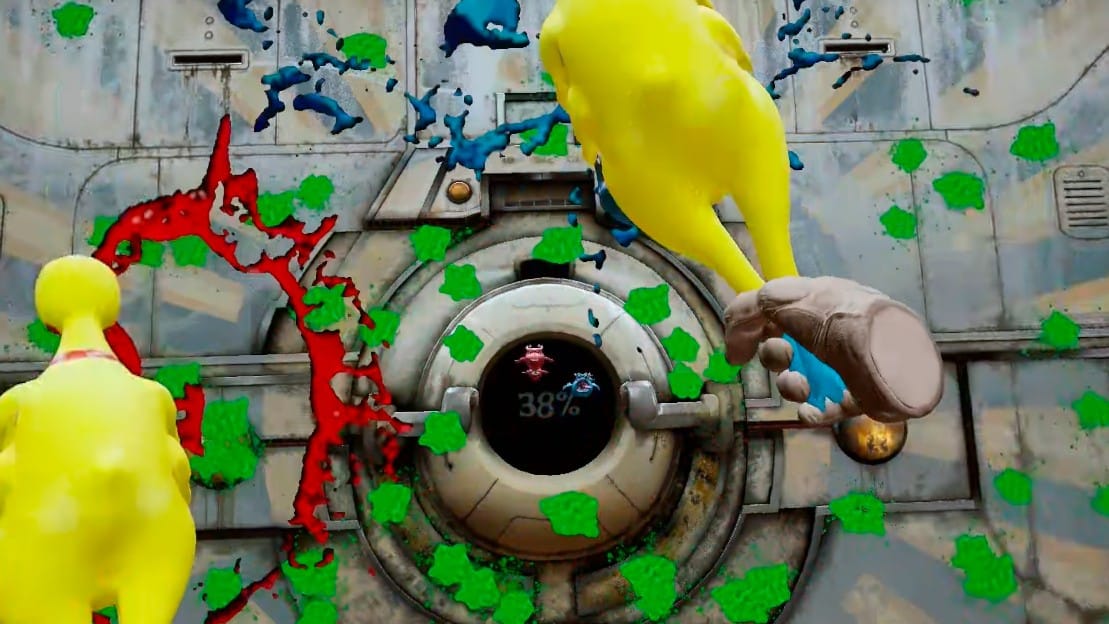
When you hit the aliens with the right weapon, they are sent flying toward the walls of the space station and leave a large, green splatter behind. The object is to cover the walls with alien viscera and fill a gauge in the center of the screen up to a certain percentage. Be careful though, as there are also yellow sponges that can set your progress back if you hit them. Once you complete a level, the game gives you a tally of how many points you gained and lost, then the wall in front of you dissolves and the process begins again.

Each weapon gives the round a different feel, like hockey sticks and tennis rackets requiring you to aim lower or higher in order to strike the speeding aliens. My personal favorite is the boxing gloves, which allow you to punch the aliens like you would in Creed: Rise To Glory or Knockout League. Meanwhile, my least favorite is the hockey sticks, which require you to invert the usual gameplay approach.

The controls are mostly 1-to-1, but I did encounter some framerate and collision detection issues. This can make it hard to land hits, especially given how many aliens can be flying at the screen at one time. Due to this and the large hit requirements to advance, some campaign levels can last surprisingly long and overstay their welcome at higher difficulty settings. Prepare for sore arms if you plan on playing this for longer stretches of time.

0:00

/0:20

Timing is the name of the game.

After you’re finished with Splatsplasm’s short campaign, there is Fun Mode, which lets you pick your own stage and weapons to play through songs from the game. There is also a wide selection of layouts featuring real-life music, ensuring that you’ll never run out of tunes to smack space creatures to.

Splatsplasm’s in-game tracks cover a wide range of genres, from techno, soft rock, and even country. Many of these tracks are surprisingly subdued for the game’s frantic action, but there are a few of them that will have you on the ropes should you pick them at one of the higher difficulty settings.

The game’s art style is quite basic, though there is plenty of variety in the level environments that can be easy to miss at first due to how fast everything moves. Such environments include ship halls, tennis courts, and hockey rinks, with the campaign levels matching up with the weapon used. The aliens and sponge creatures also have some character to them, and as I noted before a lot of them can fill the screen at one time.

Splatsplasm might be a little uneven at times, but I did find its rhythm gameplay enjoyable in the long run. It also makes for a decent workout for your arms at higher difficulty levels, making this an interesting option for fans of Beat Saber and other music-based VR titles.

AMD Ryzen AI NPUs Are Finally Useful Under Linux For Running LLMs

Over the past two years AMD has developed the AMDXDNA accelerator driver in the mainline Linux kernel for supporting the AMD Ryzen AI NPUs. But when it comes to user-space software on Linux actually able to leave the Ryzen AI NPUs it’s been… extremely limited with nothing really useful besides some niche bits of code. Even AMD’s own software like their GAIA on Linux has used Vulkan with their iGPUs rather than any NPU support. But finally today there is a significant shift with the Ryzen AI NPUs becoming useful on Linux and able to handle LLMs…

Virtual Hunter PlayStation VR2 & Quest Ports Delayed To May

The PlayStation VR2 and Quest ports of Virtual Hunter have been pushed back two months.

The PS VR2 version will utilize adaptive triggers and headset haptics, according to the publisher.

PS VR2 and Quest players will need to wait an additional two months to get their five point bucks. We previously reported in our upcoming VR games for March that Virtual Hunter, an animal hunting simulator, would release on March 25.

Publisher VRKiwi announced in a post on X.com that the PS VR2 and Quest versions of the game have been delayed to May 27. VRKiwi says the delay will “allow us to finalize performance consistency and overall polish so the day-one experience feels as smooth and immersive as possible across the full open world.”

Virtual Hunter PS VR2 and Meta Quest Release Date Trailer

In replies to comments left on the post, VRKiwi did clarify that at least part of the delay was to polish up the integration of PS VR2’s additional features.

For an authentic hunting simulation we’ve paid special attention to the PSVR2 haptics and adaptive triggers.

The bow doesn’t use adaptive triggers since it’s a draw-and-release mechanic, but for the firearms we’ve tried to simulate their behavior as closely as possible. We spent a lot of time iterating on trigger distance and resistance curves so each weapon feels distinct and closer to its real-life counterpart.

We’re also using headset haptics in subtle ways for example when branches or leaves brush past your head while moving through bushes.

Virtual Hunter originally released in Early Access on Steam in December 2021 and moved to a full release in January 2025. VRKiwi confirmed the game will feature co-op gameplay for up to six players.

Virtual Hunter can be wishlisted right now on Quest and PS VR2. It is out now on Steam for $24.99.

Fortnite’s original Save the World mode will be free to play starting on April 16

Fortnite’s original Save the World game mode will be free to play beginning on April 16. This is not the battle royale mode that went on to take over the world, but rather a PvE co-op campaign that focuses on crafting and survival. It currently costs $9 but that ends soon.

As a matter of fact, Epic Games will stop selling the paid version of the content tonight, March 11, at 8PM ET. If you have $9 burning a hole in your pocket to spend on something that’ll be free next month, go for it. Current players will still be able to access the content, so there are no worries there.

Once the free version goes live, pre-existing players will get a bunch of perks as a thank you of sorts. This includes vouchers for V-bucks, gold bars and end-game resources that are used to boost player and item levels.

Save the World will still be a great way to gather V-bucks, for those worried the freemium shift will change things. Epic says players will earn this currency “through Daily Quests, Mission Alerts, Storm Shield Defense Missions and existing Challenges.”

Pre-registration for the free mode is already live and there’s a welcome bit of news here. For the first time, Save the World will be available on Switch 2. It’ll remain unavailable on the original Switch and smartphones. The mode is also playable on PC, PlayStation and Xbox.

Epic promises those who pre-register will get perks when the free version launches, but says the specifics will vary depending on how many people sigh up by April 16. Save the World originally came out in 2017 and was a modest success that was immediately dwarfed by the PUBG-inspired battle royale mode.

This article originally appeared on Engadget at https://www.engadget.com/gaming/fortnites-original-save-the-world-mode-will-be-free-to-play-starting-on-april-16-160757693.html?src=rss

Strayed, A Rust-Inspired Multiplayer VR Survival Game, Gets Massive Update & Price Drop

The early-access survival game gets its biggest update yet, adding new biomes, new game systems, and a price drop on Quest and Steam.

“New Frontiers” is the latest (and one of the largest) updates to hit Strayed, a Rust-inspired multiplayer VR survival game. The update introduces a full overhaul of Strayed’s terrain systems, with rebuilt shaders, vegetation, rock formations, and biome assets for the game’s procedurally generated island environments.

Additionally, the update brings two totally new biomes: Snow, a harsh frozen tundra, and Desert, a stark and unforgiving zone. The Snow biome also brings a new gameplay mechanic through the “Temperature System.” Without proper clothing or heat source, the cold will gradually damage you over time and can eventually become fatal.

The game also gets a new price point of $14.99 (down from $19.99) on Quest and Steam.

0:00

/0:44

Alongside these major changes, the New Frontiers update brings dozens more updates, fixes, and user-experience improvements. The entire patch notes can be seen here.

Developed by Crustacean Interactive, Strayed tasks players with surviving on a procedurally-generated island, where you begin with just a rock and a torch. From there you’ll craft, loot, gather, and build a base along with up to 100 concurrent users on the game’s dedicated servers. Weekly wipes keep things fresh and balanced, and PvP combat with guns and melee weapons allows you to defend against raids and take the fight to others.

Strayed is available now in Early Access on Meta Quest and Steam today for the new price of $14.99.

Epomaker Galaxy100 Lite Review: A Quality Budget Keyboard With Thocky Sound

Epomaker Galaxy100 Lite Review: A Quality Budget Keyboard With Thocky Sound
Epomaker Galaxy100 Lite Mechanical Keyboard: $109 (MSRP), $91 On-Sale The Epomaker Galaxy100 Lite is a highly customizable and solidly built wireless keyboard that won’t break the bank. Sturdy build quality Hot swappable switches Stock switches come pre-lubed Smooth typing action out of the box Reasonably priced for the features offered Open-source…

10 Hacks Every iPad User Should Know

The boundaries between the Mac and iPad have blurred in recent years—especially with the release of iPadOS 26. Apple’s tablet now has a capable windowed multitasking system, a better file management app, and powerful apps. But the software can still sometimes be a limitation. It is, after all, a sandboxed environment, and the touch-first interface can hide a lot of pro-level features. But those pro-level features are still there, if you know where to look. Whether you’re a casual or a pro iPad user, you can make the most out of your tablet with these 10 hacks.

Use this hidden gesture to drag and drop multiple items at once

Drag and drop hidden gesture on the iPad.

Credit: Khamosh Pathak

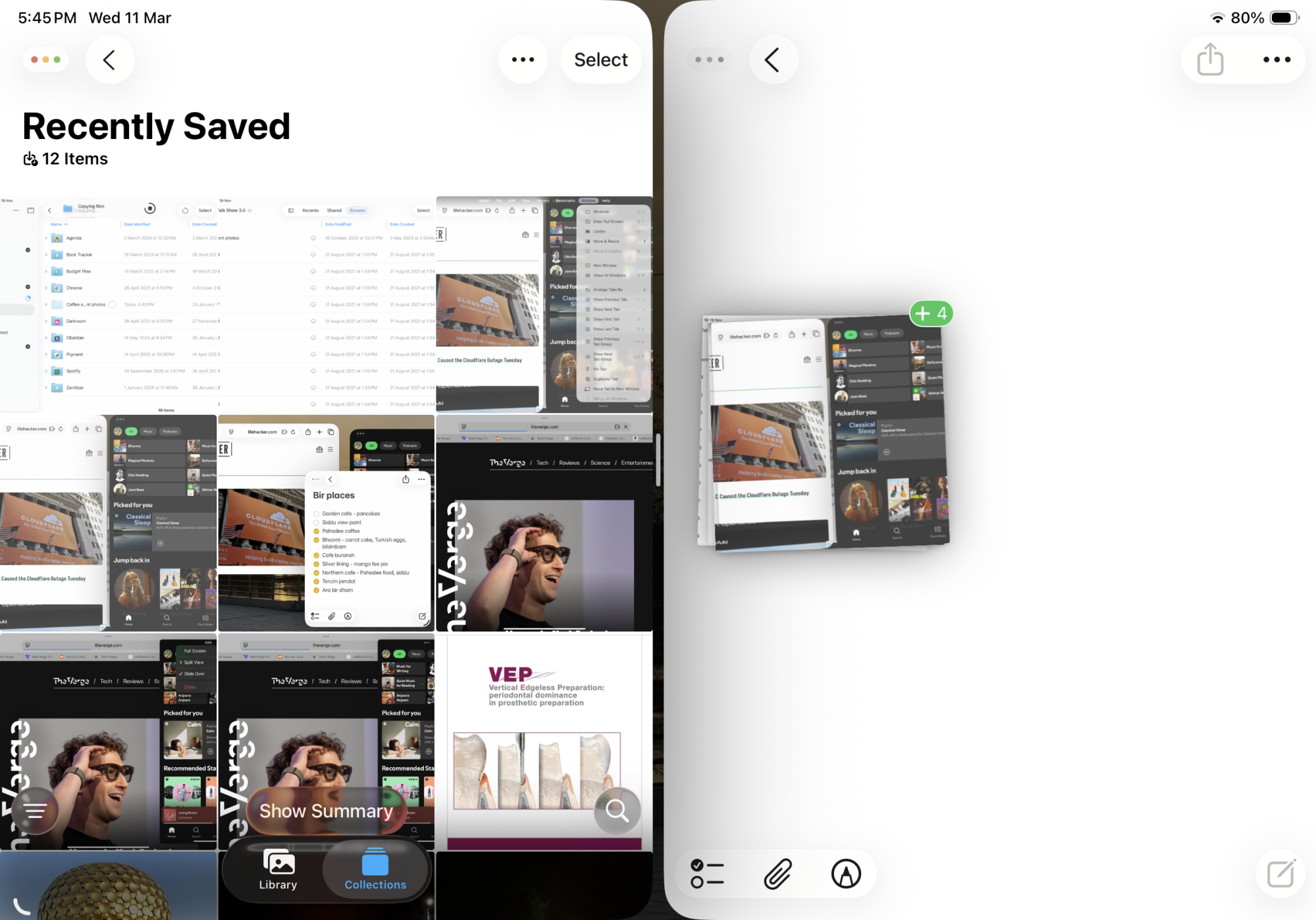
You might be familiar with all the ways you can swipe and slide around iPadOS to get things done. But if you’re still dragging and dropping files and photos one-by-one, you should know you can move multiple items at once.

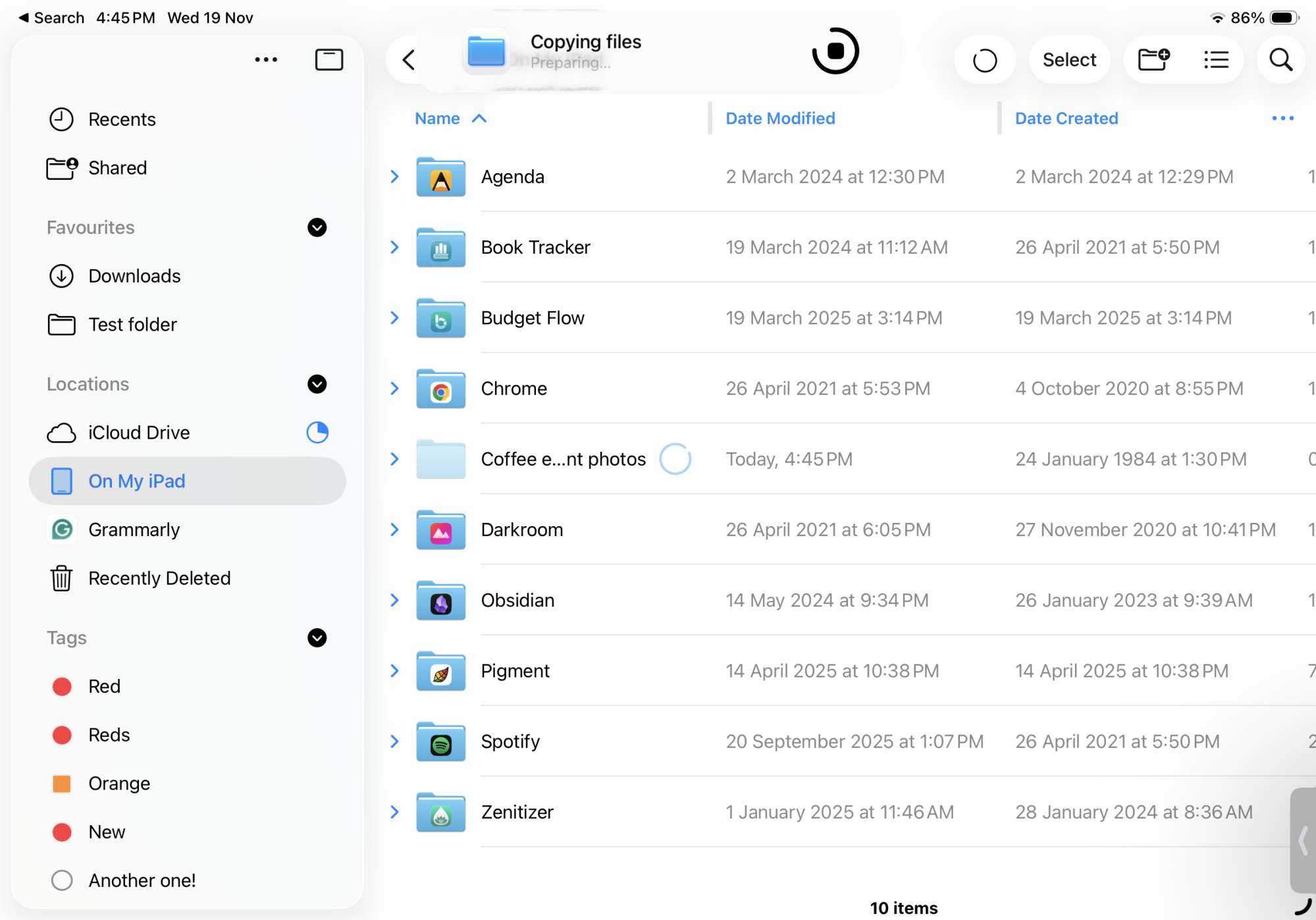
When you tap and hold to select one item, drag your fingers out from the file to “pick” it up, but don’t let go just yet. With another finger, tap to pick up as many more files, photos, or links as you wish. They’ll all get collected under the finger you’re holding on to. Then, use your free hand to go to the Home Screen and open the app you want to drop everything off (like Notes or Mail). Once you let go, all the files will follow suit. This works within the Files app as well, which makes it a great way to move multiple files together. If you’re using the latest iPadOS version, you’ll also see a progress bar for transferring files at the top of the screen.

Use “Windowed Apps” to turn your iPad into a computer

Floating windows on iPad

Credit: Khamosh Pathak

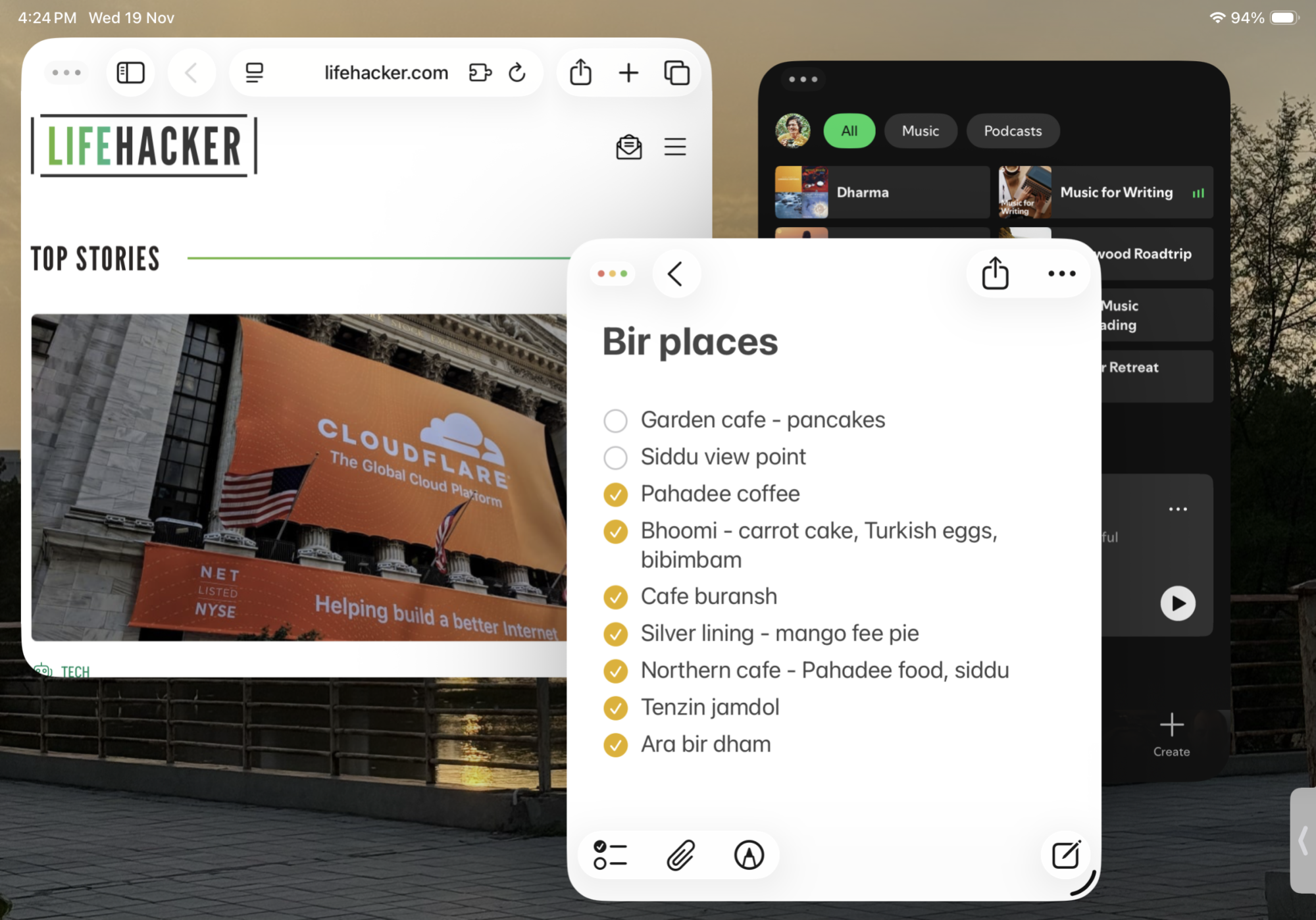
With iPadOS 26, Apple finally introduced true windowed multitasking. You can now have up to 12 apps open at the same time, all with their own free-floating windows. But it’s not the default state, so if you’re still using your iPad as-is, you’ll have to shift gears into Windowed Apps mode. You can do this from Settings > Multitasking & Gestures, but there’s a faster way from wherever you are in iPadOS. Open Control Center, tap the new Multitasking toggle and switch to Windowed Apps mode.

Now, every app on the screen, even a full-screen one, will have a little handle in the bottom-right corner, which you can pull to make the window larger or smaller. You can grab the top toolbar from any app to move it around. Apple also included the “Stop Light” controls from Mac here: Tap on them to close, minimize, or maximize the app. If you tap and hold the Stop Light buttons, you’ll also get an option to move or arrange the window into a grid layout, like the Mac.

Use this gesture for quick side-by-side app views

Split View with gestures on iPad.

Credit: Khamosh Pathak

Coming from the iPhone, you might be familiar with some multitasking gestures. You swipe up to go Home, and you can swipe on the Home bar to switch between apps. These exist on the iPad too, but iPadOS adds more gestures to the mix.

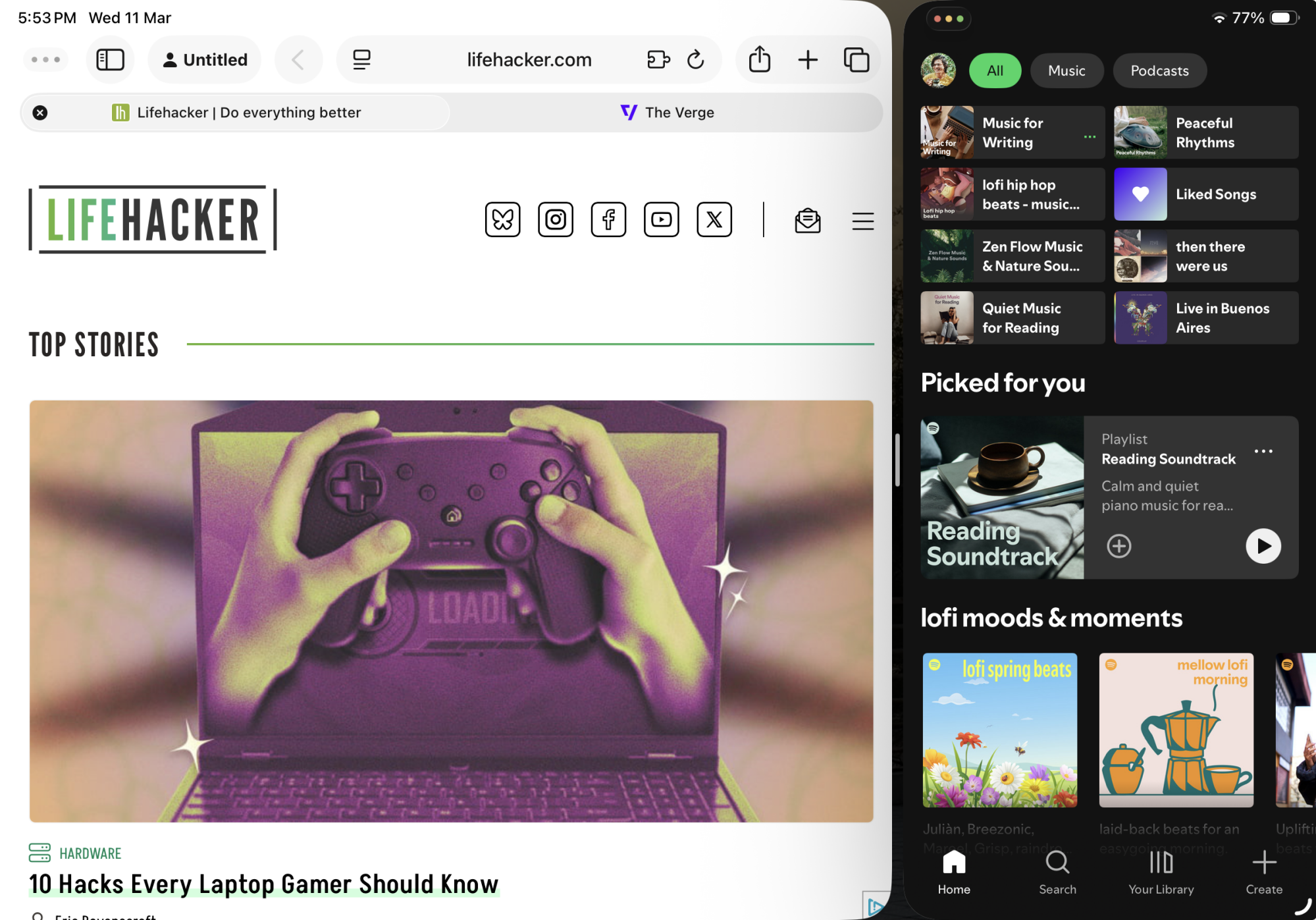
One of the best new gestures added in iPadOS 26 is the flick gesture. Pick up a window when you’re in Windowed Apps mode, and just flick it to the right or the left of the screen. The window will then automatically resize itself to fit to half of the screen. When two apps are docked like this, you’ll see a new handlebar appear. You can drag it to resize the window split (going to a 70/30 split is a great ratio for multitasking, as one app essentially goes down to iPhone size).

There are more gestures to know about, too. Using four or five fingers, swipe left or right on the screen to switch between apps, or app pairs. Swipe up and hold to enter app switcher mode (and to see a preview of all open apps). And of course you can swipe up with four fingers to go home. You can also swipe down from the top of the screen to reveal the Menu bar at any time.

Change this setting to make the Files app more like Finder on Mac

Column view and file transfer progress in the Files app.

Credit: Khamosh Pathak

The iPad’s Files app is not exactly like the Finder on the Mac, but with iPadOS 26, it’s more similar than ever. You finally have background processing, so you can monitor large file transfers from the top toolbar in the Files app, or from Live Activities.

But to get the most out of the Files app, you should turn to a different view. From the top toolbar you can now switch from the default Icons view to either a List view or a Column view. Column view is like Finder, where you can drill down into a folder structure while still maintaining easy access to top folders in columns to the left. On the other hand, if you manage a lot of files, and you like to see all file information, along with sort options, you should try List view. You can sort based on name, date created, date modified, size, or tags. And you can add or remove columns to customize exactly what shows up.

Use “Sidecar” to turn your iPad into a second screen

Using the iPad as a second screen for Mac.

Credit: Khamosh Pathak

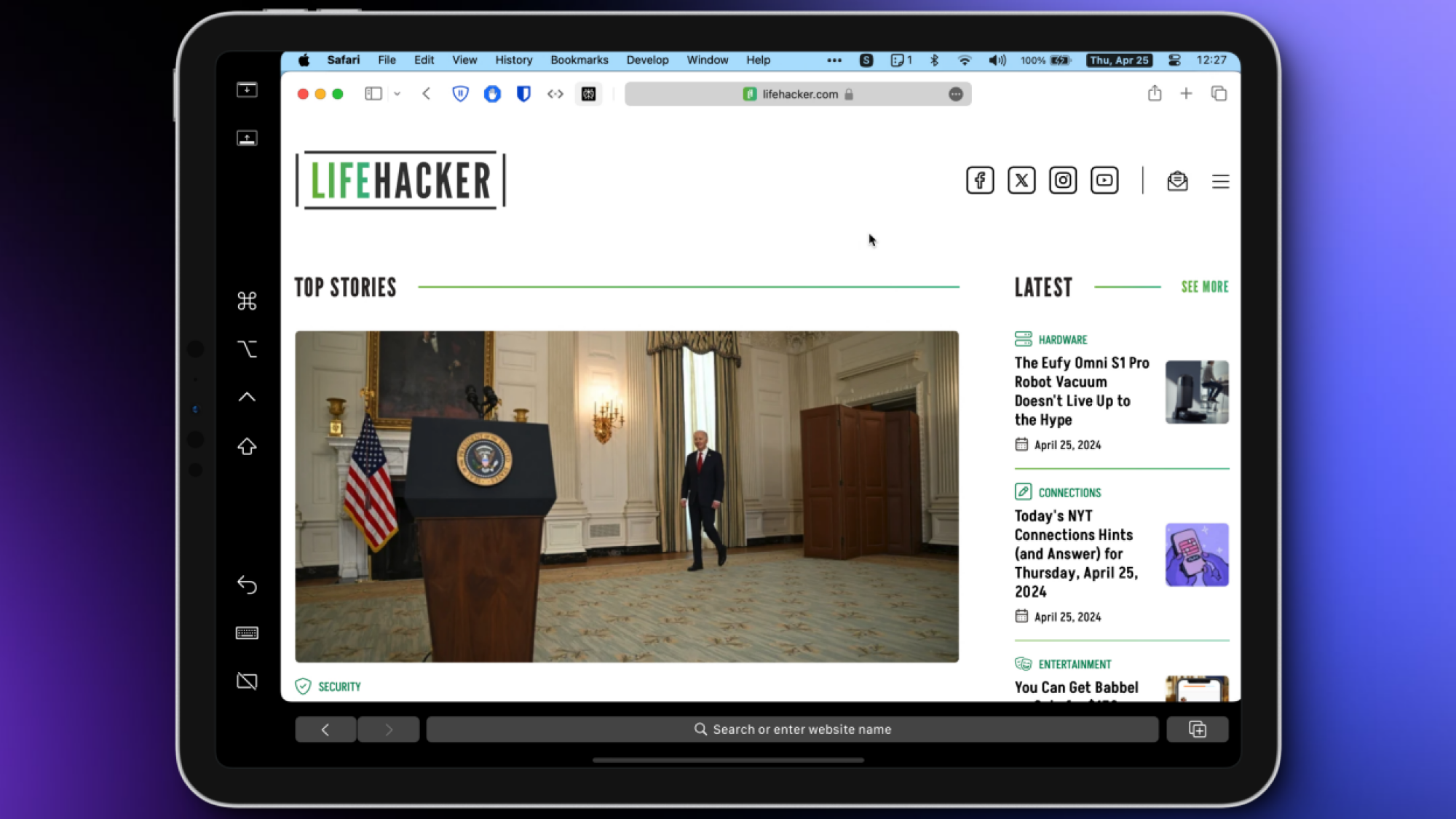
If you work on your Mac most of the time, you can still use the iPad as a copilot. Apple has a built-in feature called Sidecar that turns the iPad into a second screen—no wires or setup needed. Just make sure that Handoff on your iPad is enabled (and that you’re using wifi and not tethering). To enable Handoff, go to Settings > General > Airplay & Handoff > Handoff.

Make sure the iPad is unlocked and nearby. Then, go to Control Center > Screen Mirroring and pick the iPad from your list. To use it as an external monitor, choose the Use As Separate Display option. If you want to use the iPad as a drawing surface for a Mac app, with Apple Pencil support, choose the Mirror Display option instead.

You can now move freely between the iPad screen and the Mac. To arrange the layout for the screens, go to System Settings > Displays. For more tips, take a look at our detailed guide on using Sidecar.

Use your iPad’s hidden “iPhone” keyboard to type with one hand

Mini keyboard on the iPad

Credit: Khamosh Pathak

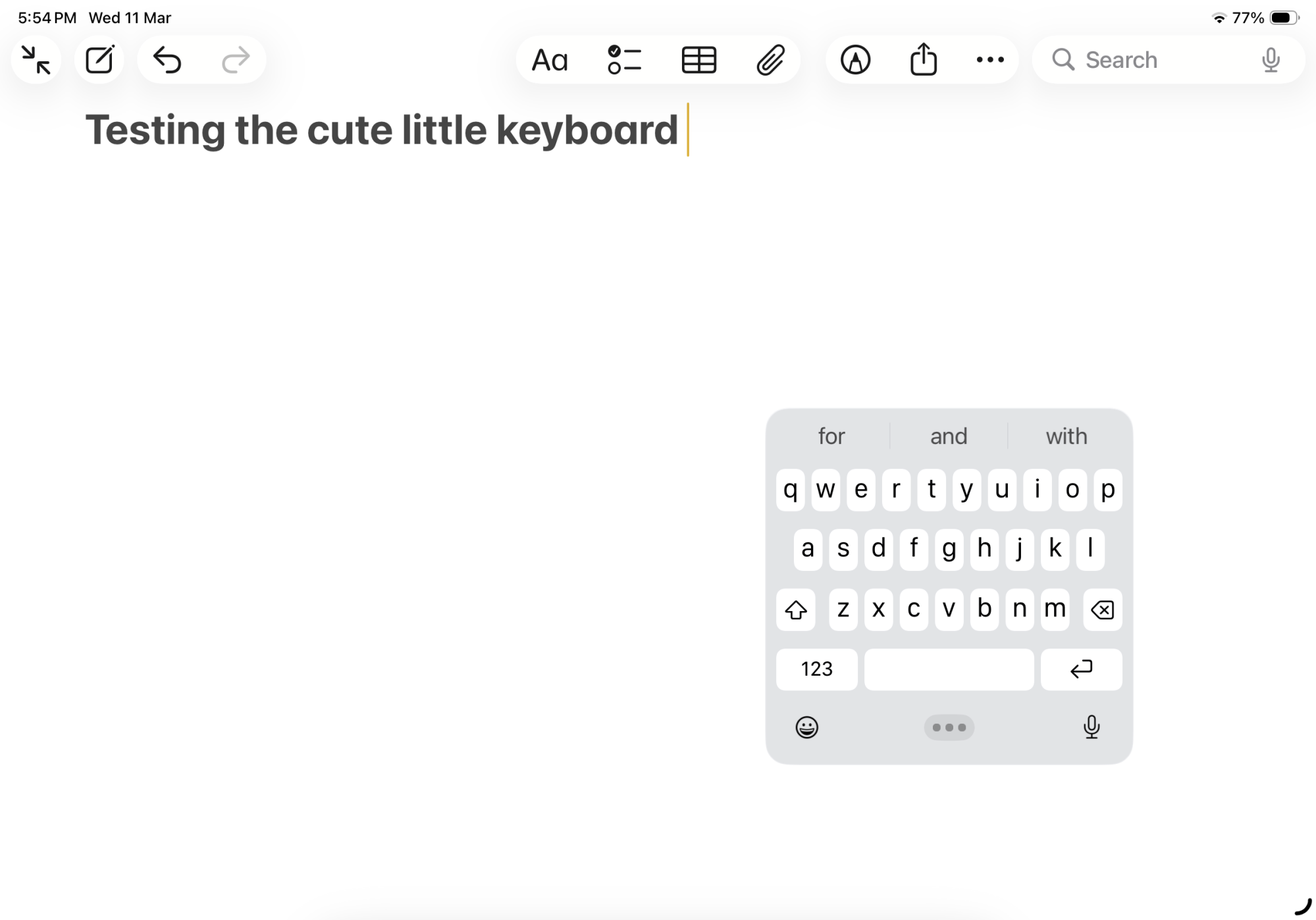
The software keyboard takes up half of the screen when you’re trying to take notes in the Notes app. But it doesn’t have to be that way. If you need to see more of the screen, you can turn the full-size keyboard into an iPhone keyboard using a simple gesture. Just pinch in with two fingers in the middle of the keyboard to switch to a floating mini-keyboard. You can drag it anywhere you please. (Alternatively, long-press the keyboard icon in the bottom right, then choose “Floating.”)

Use Slide Over to pin a window to the top of the screen

Slide Over pinned app on top.

Credit: Lifehacker

You can pin an app to the top of the screen using Slide Over if you want to refer to something else for a task (without shifting gears into the multitasking mode). First, you need to be in either Stage Manager or Windowed Mode. Then, open an app, long-press on the Stop Lights control in the top left, then tap “Enter Slide Over.” The app will shift to the side, and will always remain there, even when switching between apps. You can even resize the Slide Over window to make it as big or small as you want. You can hide the current Slide Over window by swiping the window to the edge of the screen. A small arrow button will appear in its place, which you can use to bring the window back. If you have a keyboard attached, use the keyboard shortcut Globe + Option + Right Arrow to send an app to Slide Over mode.

Edit your handwritten text with Apple Pencil gestures

Editing handwritten text using Apple Pencil on iPad.

Credit: Apple

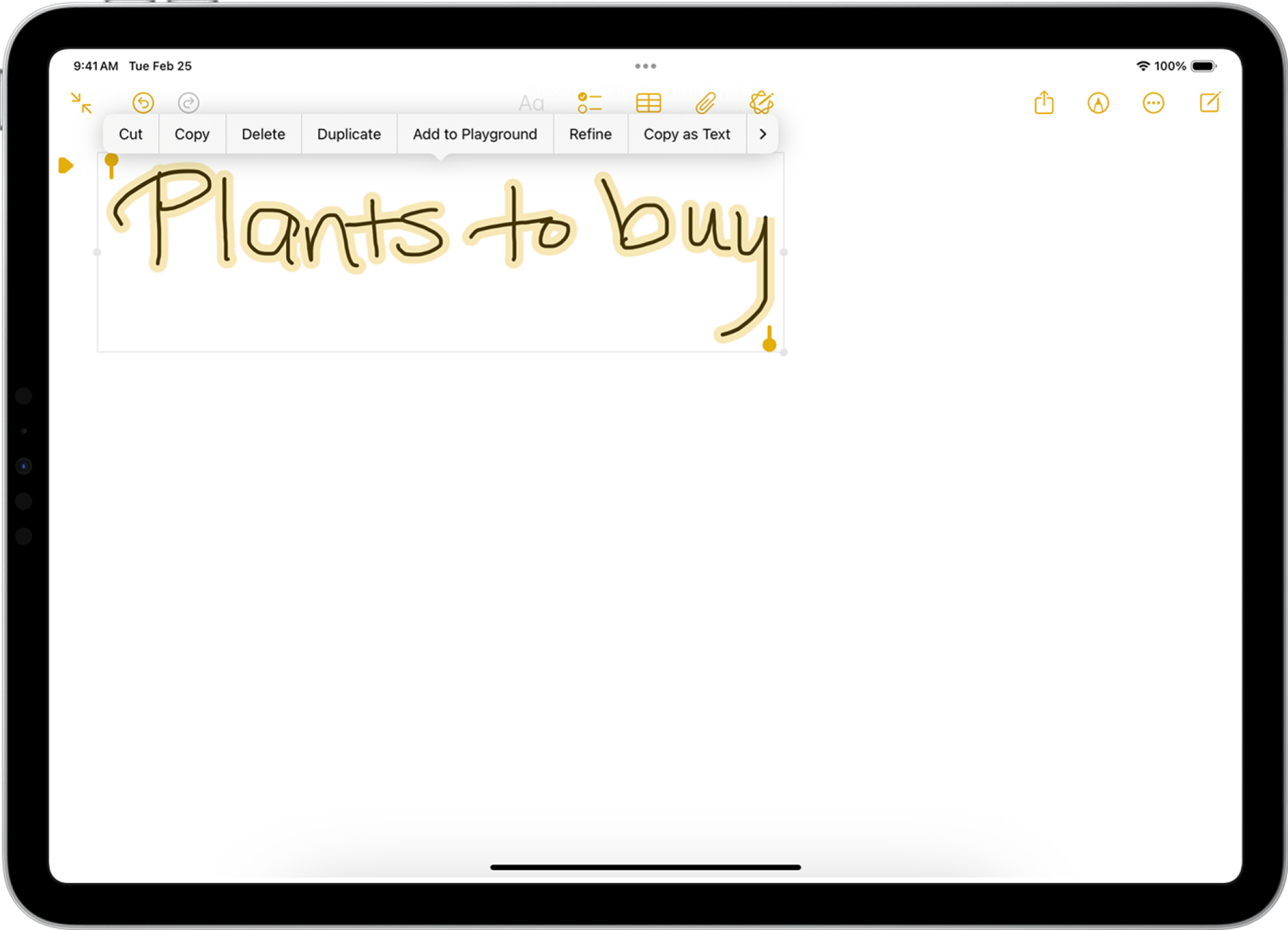
If you’re writing a note with your Apple Pencil, and you make a mistake, you might think you need to switch to the eraser mode, erase the error, then switch back to the pen mode to keep writing. There are other ways, however.

To remove an error, just scratch or scribble over a word or sentence to delete it. To rearrange handwritten text, you can draw a circle around a word to pick it up. Then, you can move the word around and place it where you’d like it to go. If two words are too close to each other, you can draw a vertical slice between them to insert some space. Similarly, just press and hold the Pencil in between two words to insert text in the middle.

Change default apps for your frequently used file types

Choosing default apps for a file type in Files app.

Credit: Khamosh Pathak

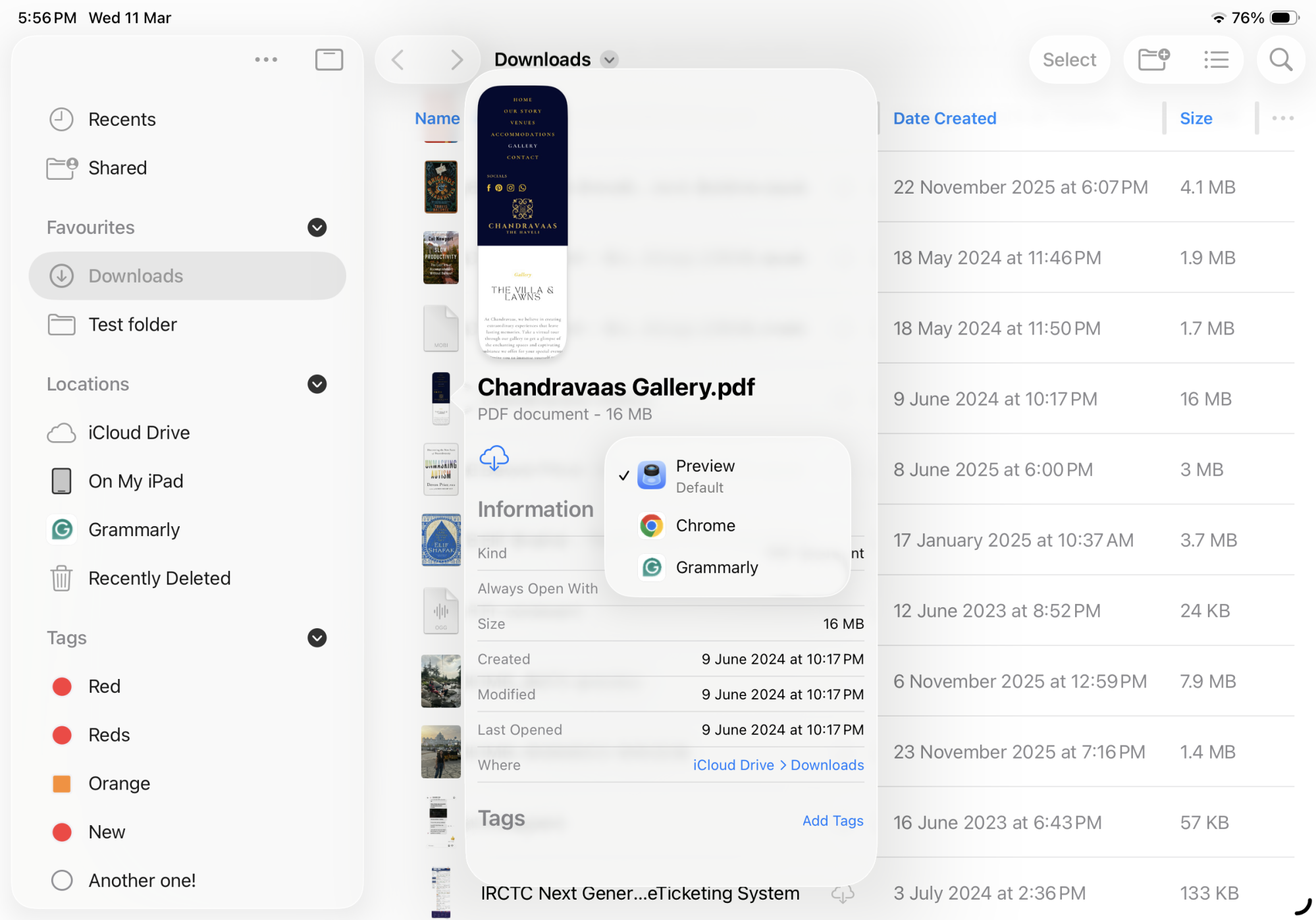
For years, when you’d open a file on your iPad, it would open in the app of Apple’s choice. If you wanted to open the file in a different app, you’d have to open that app first, then select the file to open. Luckily, that’s a thing of the past. The Files app now has an option to choose default apps for particular file types, just like your Mac.

Open the Files app, then find a file type that you want to change (for example, always opening PNG files in Pixelmator instead of the Preview app). Tap and hold on the file, then tap “Get Info.” Here, choose “Always Open With,” and switch to a different app from the list. Apple will bring up a confirmation box. Here, select “Always Open.” The next time you tap on the file with the particular file extension, it will open in the app of your choice.

Add folders to the Dock to access your files anywhere

Adding interactive folders to the Dock

Credit: Apple

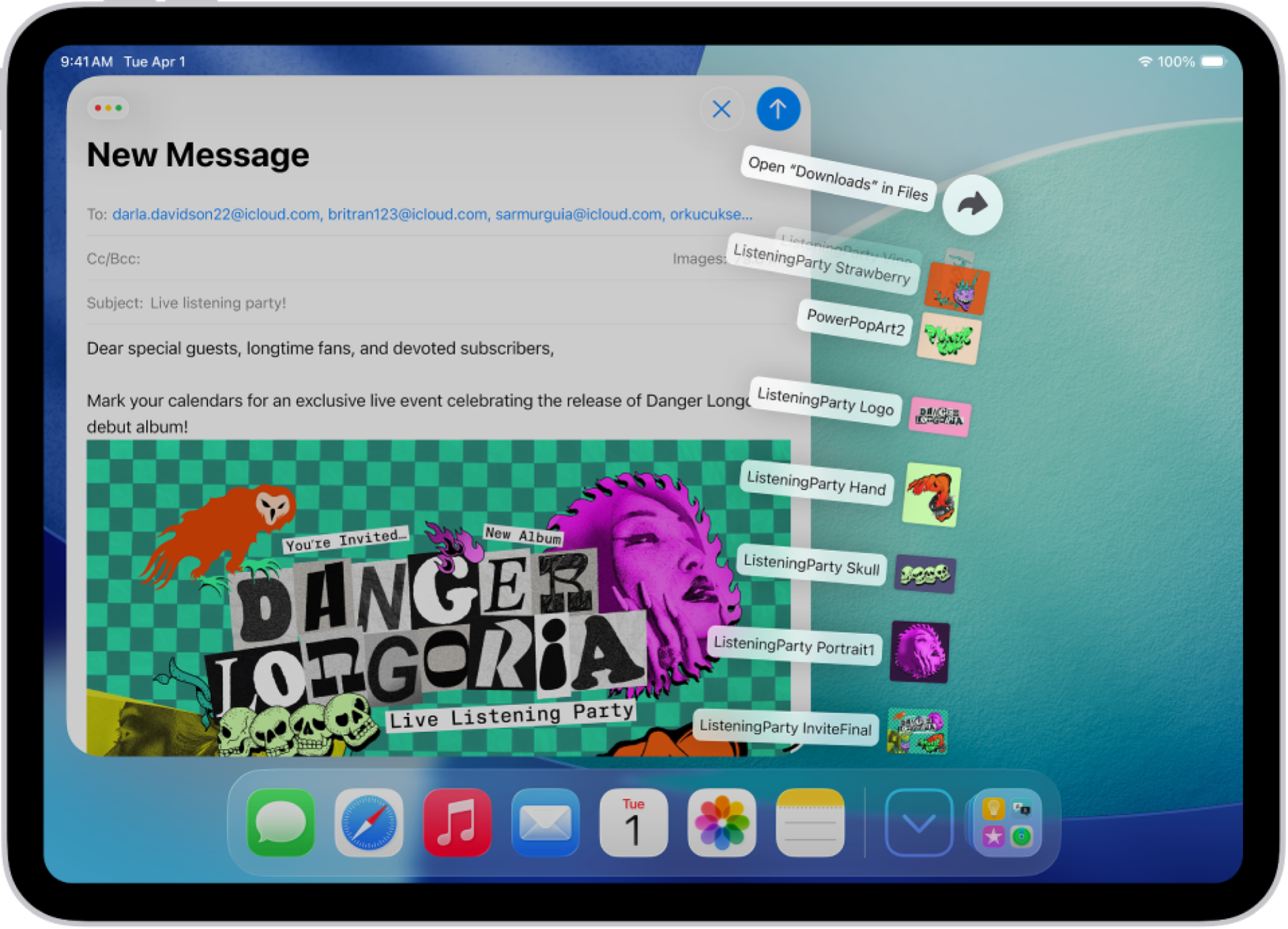
With iPadOS 26, Apple added a Mac-inspired folder system directly to the Dock, where a folder expands to show recently added files right on top of your screen. When multitasking on your iPad, you might routinely need to drag and drop files from Downloads or your work folder. You can add that folder directly to the Dock to quickly access the files within, without even opening the Files app.

From the Files app, press and hold any folder that you want to add to the Dock, and tap “Add to Dock.” Or, you can simply drag and drop a folder to the Dock itself. Now, when you tap the folder icon in the Dock, you’ll see recently added files, or folders within it. You can then drag and drop any file you see here onto any app, or you can open the folder using the Open Folder option at the top of the file’s preview.


China Moves To Curb OpenClaw AI Use At Banks, State Agencies

An anonymous reader quotes a report from Bloomberg: Chinese authorities moved to restrict state-run enterprises and government agencies from running OpenClaw AI apps on office computers, acting swiftly to defuse potential security risks after companies and consumers across China began experimenting with the agentic AI phenomenon. Government agencies and state-owned enterprises, including the largest banks, have received notices in recent days warning them against installing OpenClaw software on office devices for security reasons […]. Several of them were instructed to notify superiors if they had already installed related apps for security checks and possible removal, some of the people said.

Certain employees, including those at state-run banks and some government agencies, were banned from installing OpenClaw on office computers and also personal phones using the company’s network, some of the people said. One person said the ban was also extended to the families of military personnel. Other notices stopped short of calling for an outright ban on OpenClaw software, saying only that prior approval is needed before use, the people said. The warning underscores Beijing’s growing concern about OpenClaw, an agentic AI platform that requires unusually broad access to private data and can communicate externally, potentially exposing computers to external attack. […]

Despite the potential security risks, companies from Tencent to JD.com Inc. have been rolling out OpenClaw apps to try and capitalize on the groundswell of enthusiasm, while several local government agencies have declared millions of yuan in subsidies for companies that develop atop the platform. […] Tech giants like Tencent and Alibaba, along with AI upstarts ranging from Moonshot to MiniMax, have rolled out their own tweaks of the software touting simple, one-click adoption. A slew of government agencies, in cities from Shenzhen to Wuxi, have issued notices offering multimillion-yuan subsidies to startups leveraging OpenClaw to make advances. The frenzy has helped drive up shares of AI model developer MiniMax nearly 640% since its listing just two months ago. It’s now worth about $49 billion, surpassing Baidu — once viewed as the frontrunner in Chinese AI development — in market value. The company launched MaxClaw, an agent built on OpenClaw, in late February.


Read more of this story at Slashdot.

Ubuntu 26.04 With GNOME 50 Offering Some Performance Benefits For NVIDIA Linux Gaming

With GNOME 50 that is being used by default with the upcoming Ubuntu 26.04 LTS release, you may be curious about the out-of-the-box performance especially compared to prior Ubuntu Linux releases — especially with Mutter 50 having some NVIDIA optimizations. In today’s article is a first look at how the NVIDIA Linux gaming performance on Ubuntu 26.04 is looking compared to the current Ubuntu 25.10 release.

NIH director launches “Scientific Freedom” lectures with non-scientist

On Tuesday, word spread that the National Institutes of Health was launching a series of what it’s calling “Scientific Freedom Lectures,” with the first scheduled for March 20. The “freedom” theme echoes one of the major concerns of the director of the NIH, Jay Bhattacharya, who feels he suffered outrageous censorship of his ideas during the pandemic and is using his anger about it to fuel his efforts to bring change to the NIH. Given that scientific freedom is a major interest of the director, you might think that the first lecture would be delivered by a distinguished scientist. Guess again.

The speaker at the first lecture will be a former journalist best known for his fringe ideas on COVID and the climate. The topic will be the possibility that SARS-CoV-2 was accidentally released from a lab, an idea for which there is no scientific evidence.

Freedom for me

Bhattacharya was one of the signatories of the Great Barrington Declaration, which argued that we should try to protect the elderly and vulnerable but otherwise enable COVID to spread through the rest of the population. By and large, public health officials were aghast at the likely consequences—overwhelmed hospital systems, a still-substantial rate of mortality among healthy adults, the consequences of more cases of long COVID, etc.—and argued strongly against it.

Read full article

Comments

Rabbit’s Cyberdeck is a modern take on a netbook

When you think of an AI-forward PC, you might think of something like NVIDIA’s $3,999 DGX Spark — a computer with enough computing power to run complex large language models locally. That’s not what Rabbit is trying to build with Project Cyberdeck. Instead, the company’s goal is to produce a device tailored for vibe coding, and Engadget was given an exclusive first look at the upcoming PC. 

Rabbit began working on Project Cyberdeck after the company’s CEO, Jesse Lyu, saw how much his software engineers were using Claude Code. Lyu thought a small form factor PC, like the netbooks that were popular in the late aughts, with a command line interface would be ideal for on-the-go vibe coding, but when he went online to look for something that fit the bill, he was disappointed.

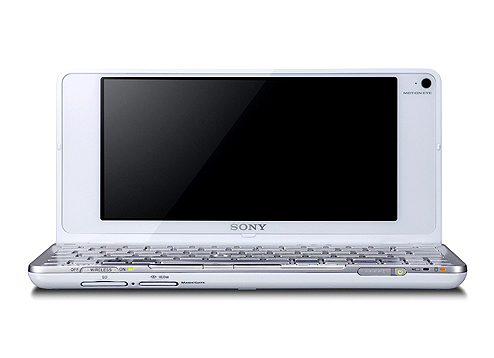
“They all come with shitty rubber dome keyboards,” Lyu says of low-cost PCs like the latest Chromebooks, which use flexible silicone sheets under their keys to save on space and cost. “They’re not something you would enjoy typing on for an extended period of time.” So Rabbit decided to build its own device. For inspiration, Lyu and company looked to an unlikely source: the Sony Vaio P. 

The Cyberdeck takes inspiration from the Sony Vaio P.
Sony

Sony’s netbook was only briefly available from the start of 2009 to about the end of 2010. At the time, the 8-inch Vaio P was the world’s lightest netbook, weighing just 1.4 pounds, but it had a host of issues. It was also expensive, costing considerably more than other Intel Atom notebooks of the time. In 2009, the most affordable Vaio P would set you back $900 (about $1,365 adjusted for inflation). With Project Cyberdeck, Rabbit is aiming for a device that costs about $500, and hopefully avoids a similar fate.

I saw a few early renders of Project Cyberdeck, which Rabbit isn’t ready to share publicly yet. Imagine a cross between the Rabbit R1, Vaio P and the original Nintendo DS. It looks cute. All the renders had four USB-C ports to allow users to connect the device to external monitors and peripherals, though the actual IO specs are as-yet undecided. 

The company is in the process of sourcing components and working towards a final design, so details can — and will — change. I saw some of the parts Lyu has been testing in his office, but no final prototype as such. 

For one, Rabbit still needs to decide on a chipset. The company is aiming for a performance benchmark relative to the Raspberry Pi 5, which has a Broadcom BCM2712 quad-core Arm Cortex A76 processor clocked at 2.4GHz. With 16GB of RAM, the Raspberry Pi 5 can run two external monitors, a capability Rabbit hopes to match with the Cyberdeck. The idea here is to make a device that’s powerful enough it won’t feel slow when it’s communicating with Anthropic and OpenAI’s servers, but affordable enough to make it a no-brainer purchase for developers. 

The company confirmed Project Cyberdeck will run Linux. Rabbit will allow users to modify the operating system and install any third-party tools they want. Additionally, all the software features the company has developed for RabbitOS will be available through command-line prompts. 

Two parts of the device Lyu hopes are major differentiating factors are the keyboard and screen. Lyu appears set on shipping a computer with a 40 percent keyboard that has low-profile mechanical switches and a fully hot swappable PCB, so users can tweak the typing feel to their liking. Lyu also had a sample 7-inch OLED screen on his desk when I spoke to him. That specific panel offers touch input, a 165Hz refresh rate and 815 nits of brightness. While it might not be the one Rabbit settles on, OLED is the goal, because of what it would mean for battery life. 

For the uninitiated, OLED panels produce black values by turning off individual diodes, and since each diode is self-emitting, there’s no need for a power-hungry backlight. Like every smartphone manufacturer, Rabbit is taking advantage of this by planning to offer a dark mode interface from day one. 

One aspect of the Cyberdeck’s design Lyu can’t definitively speak to is how much RAM it will feature. The entire industry is dealing with datacenter demand for high-bandwidth memory that has sent the price of computers, smartphones and other electronics soaring. Lyu believes Rabbit won’t be forced to delay the Cyberdeck out of 2026, but he also didn’t rule out the possibility either. If things change for the better, he’s confident Rabbit would be able to take advantage, since it took the company about 93 days to ship the first R1 device after it began working on the design.      

Separately, I wonder if people will want to carry around a second device solely for their coding needs? You don’t need a dedicated machine to access Claude Code or OpenAI Cursor. Even companies like Apple have begun integrating vibe coding services into their development environments. Rabbit could be on track for a repeat of the R1, but with so many details of the Cyberdeck left undecided, for now, it’s too early to know for sure. The company will get to make its case when it shares more details in the coming weeks and months.  

This article originally appeared on Engadget at https://www.engadget.com/ai/rabbits-cyberdeck-is-a-modern-take-on-a-netbook-151907273.html?src=rss

Gateworks GW16168 M.2 AI accelerator features NXP Ara240 DNPU with up to 40 eTOPS

Gateworks has introduced the GW16168, an M.2 AI acceleration card designed to add dedicated neural network processing to embedded and industrial systems. The module integrates NXP’s Ara240 discrete neural processing unit (DNPU) and is designed, tested, and assembled in the United States for industrial edge AI deployments. The GW16168 uses NXP’s Ara240 DNPU to deliver […]

Valve Reveals Steam Machine Verified Badge Requirements At GDC 2026

Valve Reveals Steam Machine Verified Badge Requirements At GDC 2026
It’s already been four months since Valve announced a series of new hardware products that are coming out this year, including a modern reincarnation of the Steam Machine, the Steam Frame for VR gaming, and a retooled Steam Controller. The Steam Machine is the most interesting product of the bunch, and we now have more details about the validation

Here’s everything we know about Rivian R2 pricing and specs

Between a certain car company’s antics and the industrial chaos set off by COVID (and then compounded by Russia’s invasion of Ukraine), it’s easy to be cynical about production timelines. But when Rivian showed off a midsize electric vehicle in 2024 and said it would be available in the first half of this year, it meant it. Deliveries of the first R2 SUVs will begin this spring.

As a new automaker, Rivian often does things its own way, but with the R2 launch, it’s following industry practice and starting with the superlative version first. That’s the R2 Performance, which starts at $57,990 with the launch package (excluding a $1,495 delivery charge). You get quite a lot of electric SUV for that, however: up to 330 miles (531 km) from a single charge of the 87.9 kWh battery pack, with 656 hp (489 kW) and 609 lb-ft (825 Nm) from the dual motor powertrain. Fast charging takes 29 minutes from 10 to 80 percent.

AWD first

The Performance features semi-active suspension, a rear window that drops into the tailgate, an interior with birch accents, heating for the front and rear seats and ventilation for the former, a nine-speaker sound system, matrix LED headlights, and some other neat touches like the flashlight that lives in the side of the door, similar to how some cars hide an umbrella there.

Read full article

Comments