Tadej Pogačar added the fourth of five Monuments to his one-day race tally this weekend, leaving only Paris-Roubaix remaining to finish the set.
Should he win Paris-Roubaix, Pogačar would become only the fourth rider – behind the Belgians Eddy Merckx, Roger De Vlaeminck and Rik Van Looy – to complete the feat, with all three of those winning between 1958 and 1979. There’s even talk of Pogačar becoming the first rider to win all five Monuments in one year.
Pogačar has already won Strade Bianche in 2026 and seems to be in unstoppable form again this year. But what does it take to win road cycling’s longest race? Here are the key numbers that underpinned Pogačar‘s 2026 Milan-San Remo win.
45.5
Pogačar completed the 298km race at just over 45km/h. Dario Belingheri/Getty Images
Pogačar covered the race’s 298km at an average speed of 45.5km, finishing after 6hrs 35mins 49secs in the saddle. That’s a little slower than Mathieu van der Poel’s average of 47.70km/h for the 2024 Paris-Roubaix. But Milan-San Remo has over 2,000m of ascent en route, including the Passo del Turchino and the five climbs in the final 50km.
79.9
Pogačar‘s maximum speed during the race was 79.9km/h, according to Strava, recorded on the run-in to the Cipressa climb. His maximum cadence shown on Strava was 129rpm, apparently on the same stretch of road.
8.49
Pogačar set a record time over the Cipressa, moving from towards the back to the front of the race. Marco Bertorello / AFP via Getty Images)
Pogačar‘s time to the top of the Cipressa, the penultimate climb of the race and the longest in the finale, was 8mins 49secs. This beat by a few seconds his time in last year’s race, when he set a time of 8mins 57secs, before finishing third behind van der Poel and Filippo Ganna.
It was all the more impressive, considering Pogačar had started towards the back of the field, having crashed along with others as he approached the base of the climb.
According to Strava, Pogačar also recorded the third fastest time ever on the 6.84km ascent and descent of the Poggio, the last climb before the finish, where he was bested by Matej Mohorič in 2024.
5
The number of times Pogačar has ridden Milan-San Remo. His first Milan-San Remo was in 2022, when he finished fifth, having been out-descended by Mohorič with his dropper seatpost.
He was back in 2023, finishing fourth in a race won by van der Poel. The next year, Pogačar was up to third, behind Jasper Philipsen and Michael Matthews, then third again in 2025.
It’s only at the fifth attempt, this year, that Pogačar has added this fourth Monument to his tally, leaving him only a win in Paris-Roubaix needed to have completed all five. We reckon he might win all five this year, becoming the first rider to do so.
35
Pogačar beat Tom Pidcock by just half a wheel after six-and-a-half hours of riding. David Pintens / Belga Mag / Belga / AFP via Getty Images)
Pogačar beat Tom Pidcock by around 35cm in the final two-up sprint to the line. Although Pidcock won the unofficial sixth Monument, Strade Bianche, in 2023, he’s yet to garner a Monument win. Pogačar was only four seconds ahead of the charging bunch, led in by Wout van Aert.
415
Pogačar‘s estimated FTP in watts is 415. The actual numbers are kept a close secret within his UAE Team Emirates-XRG team, but this is a value that’s been estimated based on ride data shared in 2024. That gives him a power-to-weight figure close to 7W/kg and he can keep up 340 watts on a five-hour zone two training ride. His resting heart rate? That’s around 37.
3,898
The number of calories Pogačar burned during the race, as estimated by Strava. According to Mark Zuckerberg, founder of Facebook, he was matching that number in 2023. Maybe he should take to the start line next year…
Computershack shares a report from NBC News: Leonid Radvinsky, the owner of adult-content platform OnlyFans, has died of cancer at the age of 43, the company said in a statement on Monday. “We are deeply saddened to announce the death of Leo Radvinsky. Leo passed away peacefully after a long battle with cancer,” an OnlyFans spokesperson said. “His family have requested privacy at this difficult time.”
Radvinsky, a Ukrainian-American entrepreneur, acquired Fenix International Limited, the parent company of OnlyFans, in 2018 and served as its director and majority shareholder. He also runs Leo, a venture capital fund he founded in 2009 that focuses primarily on investments in technology companies. According to Reuters, OnlyFans is valued at around $5.5 billion, including debt.
Generally, when you hear “water use” and “sustainability,” you expect those words to be followed by some bad news. Humanity’s enduring ability to ignore the math of declining water supplies is almost impressive. But there are cases where actions have successfully reversed our loss of water resources. A new paper in Science by Scott Jasechko of the University of California, Santa Barbara, examines documented cases of groundwater recovery around the world to identify which strategies have worked.
Groundwater is invaluable for many reasons. For one, it’s (usually) cleaner than surface water. It’s also right under your feet and often close enough to the surface that it doesn’t take much energy to pump it up. And there’s loads of it down there, no matter the season. Because of this, humans use a lot of it for drinking water, agriculture, and every other use you can think of.
Unfortunately, in many places, the rate of groundwater use has grown to exceed the rate at which precipitation soaks into the ground to replenish it.
BPF programs can run in both sleepable and non-sleepable (atomic) contexts.
Currently, sleepable BPF programs are not allowed to enter an atomic context.
Puranjay Mohan has a
new patch set that changes that. The patch set would let BPF programs called
in sleepable contexts temporarily acquire locks that cause the programs to
transition to an atomic context. BPF maintainer Alexei
Starovoitov objected to parts of the implementation, however, so acceptance of
the patch depends on whether Mohan is willing and able to straighten it out.
The Darts VR sequel arrives on major VR gaming platforms nine years after its PC VR predecessor.
We covered the announcement of Darts VR2 earlier this month, but at the time, there was no release date available. Developer Gamitronics and publisher Evolution Publishing have now announced that Darts VR2: Bullseye will release on April 9 for Meta Quest, PlayStation VR2, and PC VR.
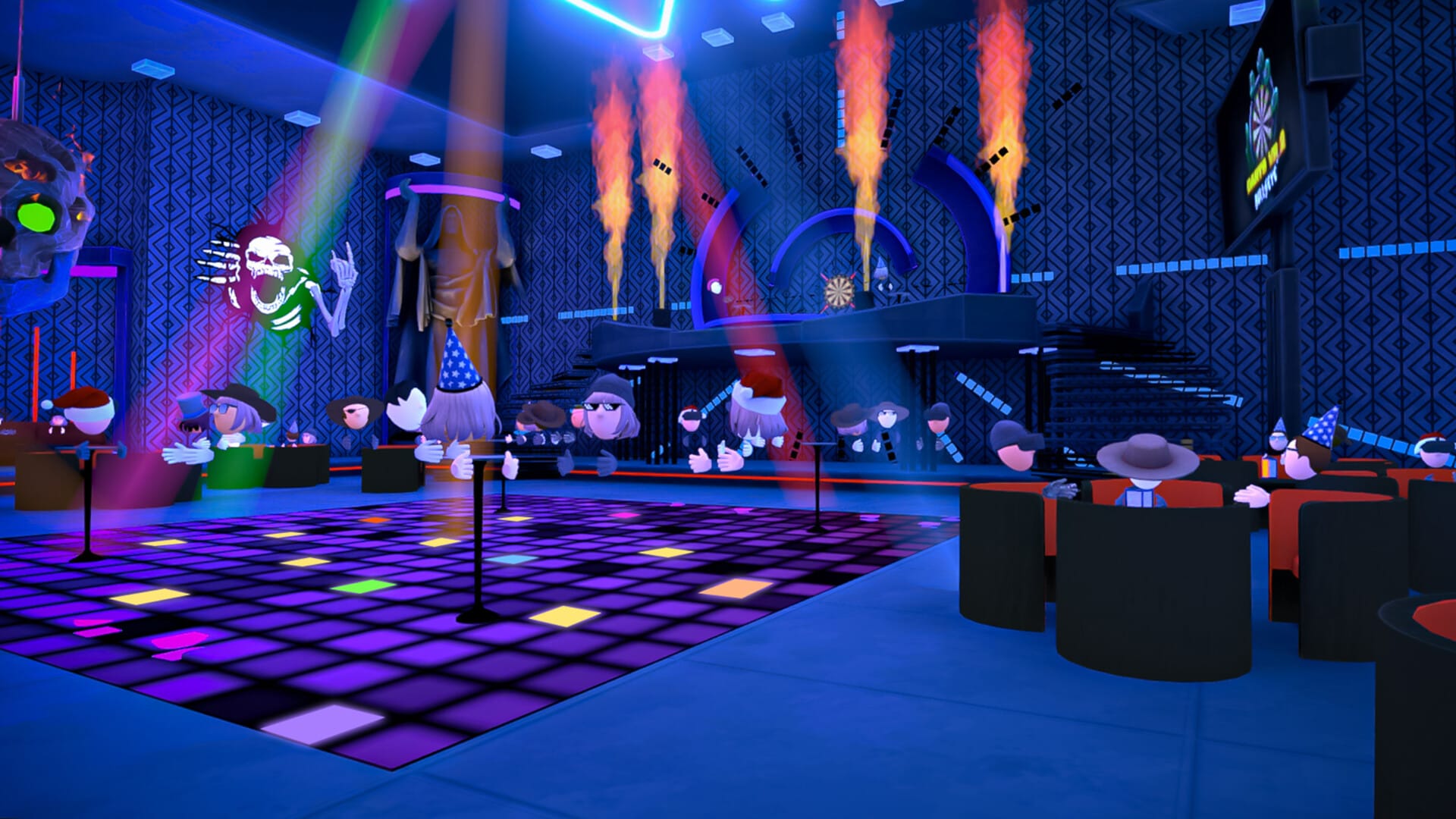
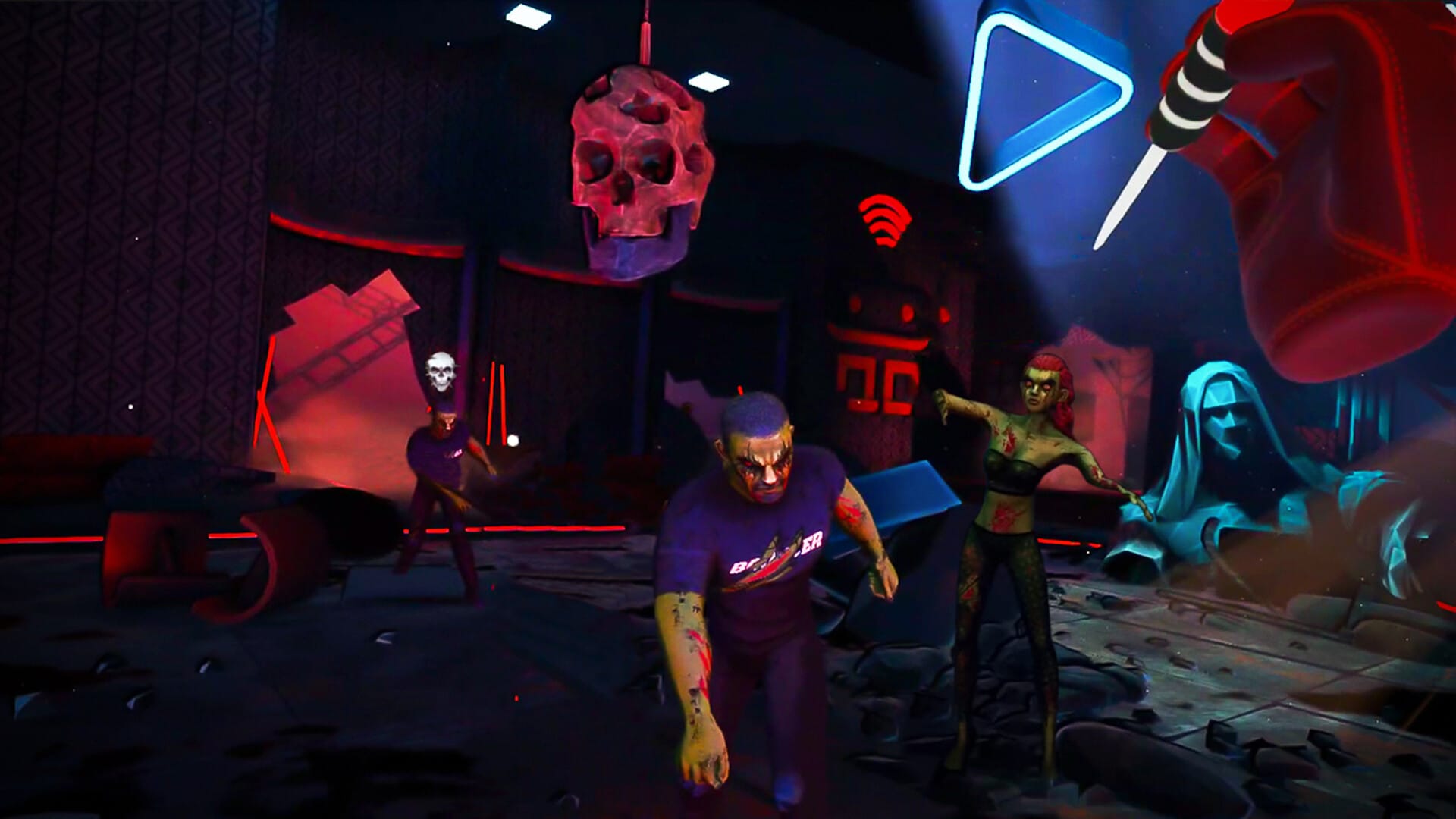
Darts VR2 promises a physics-based darts experience across multiple gameplay options including 501, Around The World, arcade mode Killstreak, and even a Zombies mode. There will also be online leaderboards to chase and customization options for your darts, hats, and sunglasses. Players can also create or join worldwide tournaments.
A new cinematic trailer can be seen here with gameplay screenshots further down in this article.
0:00
/1:22
The original Darts VR first released on Viveport in May 2017, with Oculus Rift to follow in June 2017. Steam saw a release in August 2017. According to SteamDB, the game was ‘retired’ (delisted) at the publisher’s request from Steam in April 2025. It has also been removed from Viveport and the Rift store, likely at the same time.
Darts VR2: Bullseye screenshots provided by Evolution Publishing
Darts VR2: Bullseye can be wishlisted now for Quest, Steam, and PS VR2 ahead of its April release.
Almost everything we do digitally leaves a trace of some kind, and while it can be useful to look back on this past activity—when trying to remember where that great coffee shop you stumbled across is, perhaps—this continual logging and tracking doesn’t really align with best privacy and security practices.
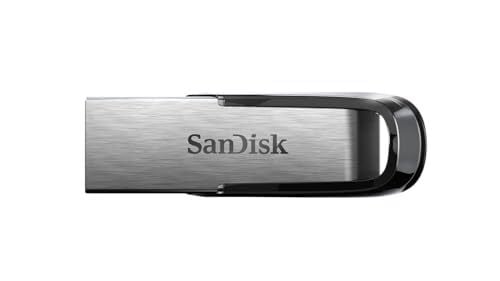
Meet Tails (The Amnesic Incognito Live System), a Linux distro based on Debian that maximizes user security and privacy. It can run from a USB drive, which means you’re able to plug it into any laptop or desktop with a free port (Mac or PC) and take it away again when you’re done, with nothing left behind on the computer you borrowed. Tails also comes with anonymous internet browsing built in as standard, through the Tor browser and the Tor network that reroutes your online activity across several private web nodes. No one can tell who you are or where you are, and you can get online without all the tracking and monitoring that’s usually associated with opening up a browser.
It’s perfect for hiding who you are online, and for dialing up your privacy and security protections to the absolute maximum—not to mention getting around state-level censorship, if that applies to you. Here’s what you need to know, and how to get started.
What you get with Tails
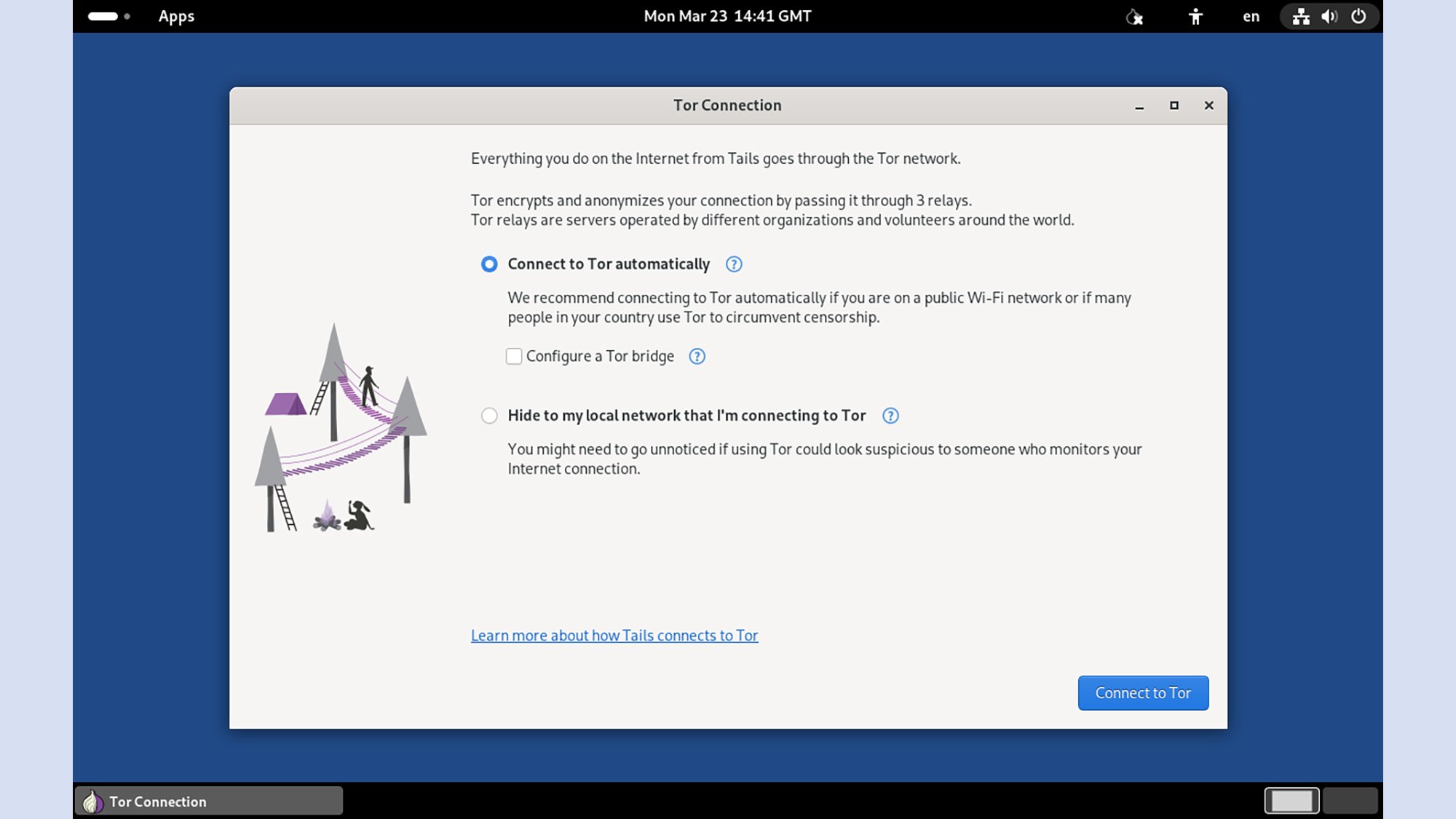
Tails will connect you to the Tor network right away. Credit: Lifehacker
Tails includes everything you need to get your computing done, as is the case with most Linux distros: You’ve got the Tor Browser on there, office applications courtesy of LibreOffice, image editing with GIMP, graphic design with Inkscape, and a variety of audio and video utilities too.
As soon as you start up the operating system from your USB drive for the first time, you’ll be prompted to get online through the Tor network. This reroutes your browsing through several different relay points, so it’s very difficult for websites to tell who you are or where you’re from (unless you start logging into them, of course). It also keeps your browsing hidden from your internet service provider, law enforcement agencies, and anyone else who might be tempted to take a peek. To make sure you’re running Tails and the Tor Browser with as much security protection as possible, check out our tips for browsing the dark web.
One big difference with Tails is that you can’t actually save anything by default—it’s one of the ways the operating system prioritizes privacy and security. If you do want a space on the USB drive to save files permanently, you need to specifically create it: Click Apps > Tails > Persistent Storage and then follow the instructions. When you’re done, you can just click the power button (top right), choose Power Off, unplug the USB drive and be on your way.
How to start using Tails
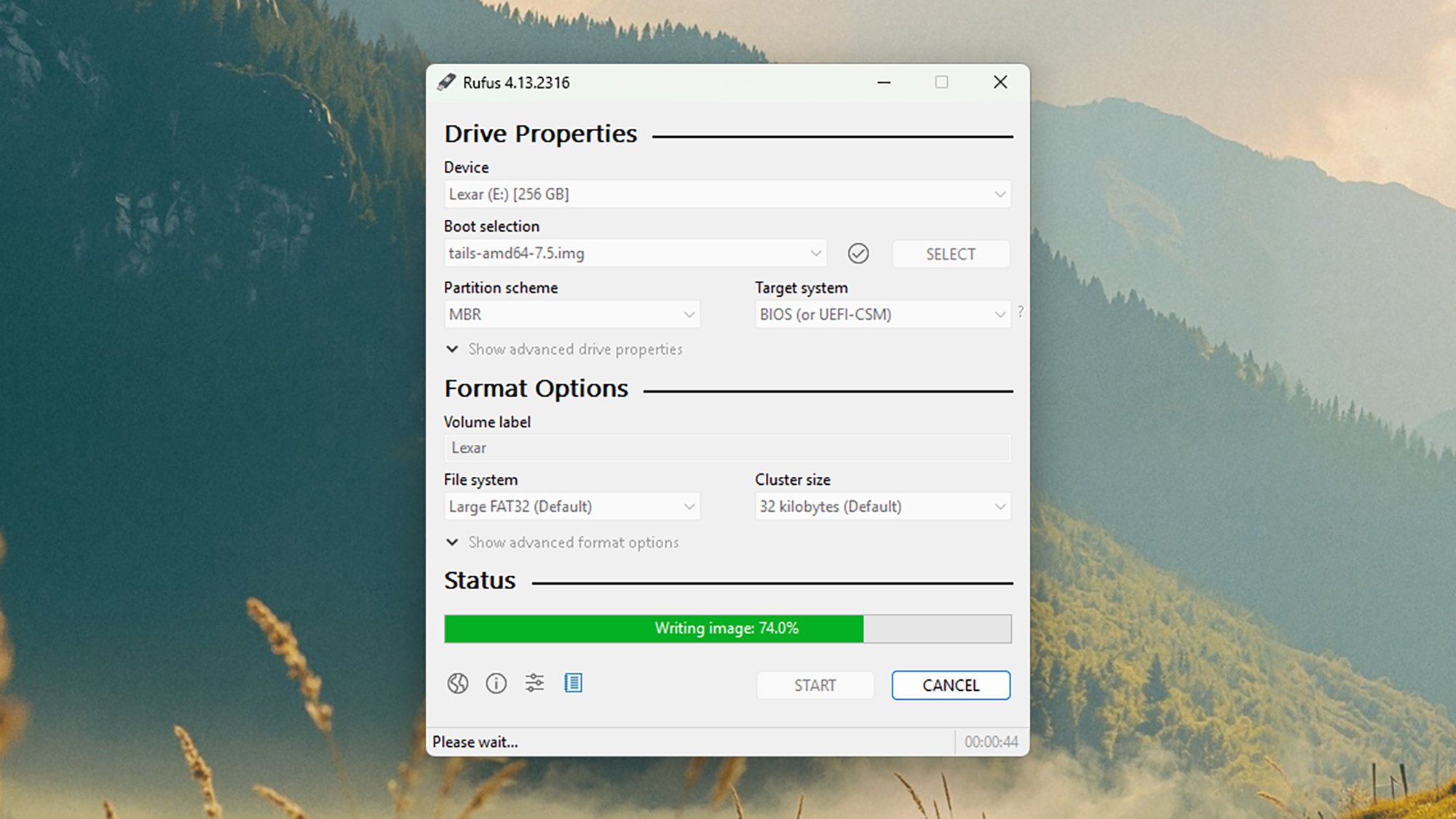
Using Rufus to create a Tails USB stick. Credit: Lifehacker
To get started, head over to Tails’ website, follow the Install Tails link, then click Download Tails only (for USB sticks). This gives you a file roughly 2GB in size, which you need to put on a USB drive. This drive must have a capacity of 8GB or higher, and can’t have anything else on it (anything already saved on the USB drive storage will be wiped when you add Tails).
For actually putting the operating system image on your USB drive, Tails recommends Rufus for Windows and Etcher for macOS. Both tools are simple to use and free: All you have to do is point these programs towards your Tails download, and your USB drive, and they’ll do the rest.
In the case of Rufus, the Device drop-down menu is where you pick your USB drive. From here, click Select to point the app towards the Tails file. You can leave the other settings on the program interface as they are, and click Start to create your bootable USB drive, which should only take a minute or two.
You’re then ready to boot from the USB drive, either on your own computer or someone else’s. This should work on most systems, with the exception of Macs that use Apple Silicon. The Tails team is busy trying to add compatibility for newer Macs, but it’s not completed yet, so you’ll mainly be looking for Windows PCs to boot from.
The specifics of how you do this depends on the computer you’re using, but typically you’ll need to hit a key like F8 as the computer boots up to pick the Tails USB drive rather than the main hard drive system—instructions for this may well appear on screen during start up, but if you’re unsure, consult the documentation that came with the laptop or desktop, or check online.
The premise seems simple enough. LG promises that you can set its Sound Suite speakers anywhere and Dolby’s home theater tech will make them perform well. The soundbar, subwoofer and speakers don’t have to go in prescribed locations for the best results, which means you can place them where you need to and move them as you see fit. Of course, this all hinges on the reliability of the underlying tech and LG’s ability to make individual speakers that actually sound good.
Like most premium soundbars and complete home theater setups these days, a complete Sound Suite collection is expensive. The centerpiece alone, a soundbar that most people will want in their customizable configuration, is $1,000. However, if you have a recent LG TV, or are planning to buy a 2026 model when those arrive, there’s no better option for boosting your living room entertainment experience.
The components of the LG Sound Suite
There are four different devices that make up the Sound Suite. The centerpiece is the H7 soundbar ($1,000), which is the first one that works with Dolby Atmos FlexConnect (DAFC) technology. Then there’s the 8-inch W7 subwoofer ($600) and the M5 and M7 speakers ($250 and $400). LG allows you to pick and choose between these products to build a home theater set up that suits your needs — up to four speakers and one subwoofer. The only real caveat is that you need the H7 soundbar or a recent LG TV (2025 OLED G5, C5, CS5 and QNED 9M, or an upcoming 2026 model) to serve as the primary device for Sound Suite to work. That’s because the underlying tech requires LG’s alpha 11 Gen 3 AI processor, which is inside the soundbar and the company’s newer TVs.
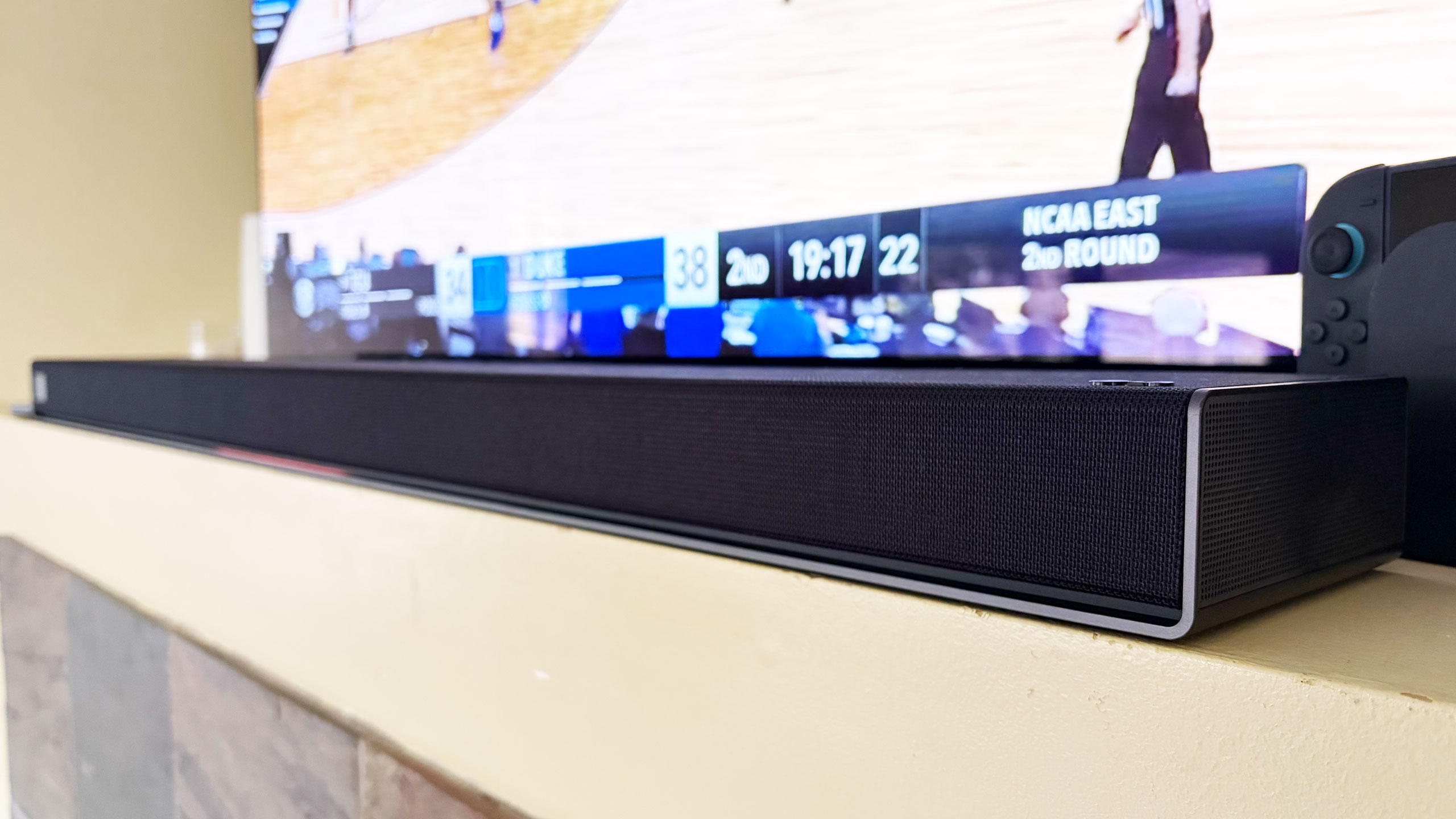
The H7 houses a dozen Peerless drivers comprising front, side and up-firing units. There’s also four woofers and eight passive radiators for bass and low-frequency audio. The soundbar has a pretty basic design, plain enough to sit in front of an LG OLED (or other premium TV) without being a distraction, and short enough not to block it. Both Bluetooth and Wi-Fi are available here, so AirPlay 2, Google Cast, Spotify Connect and Tidal Connect are all supported.
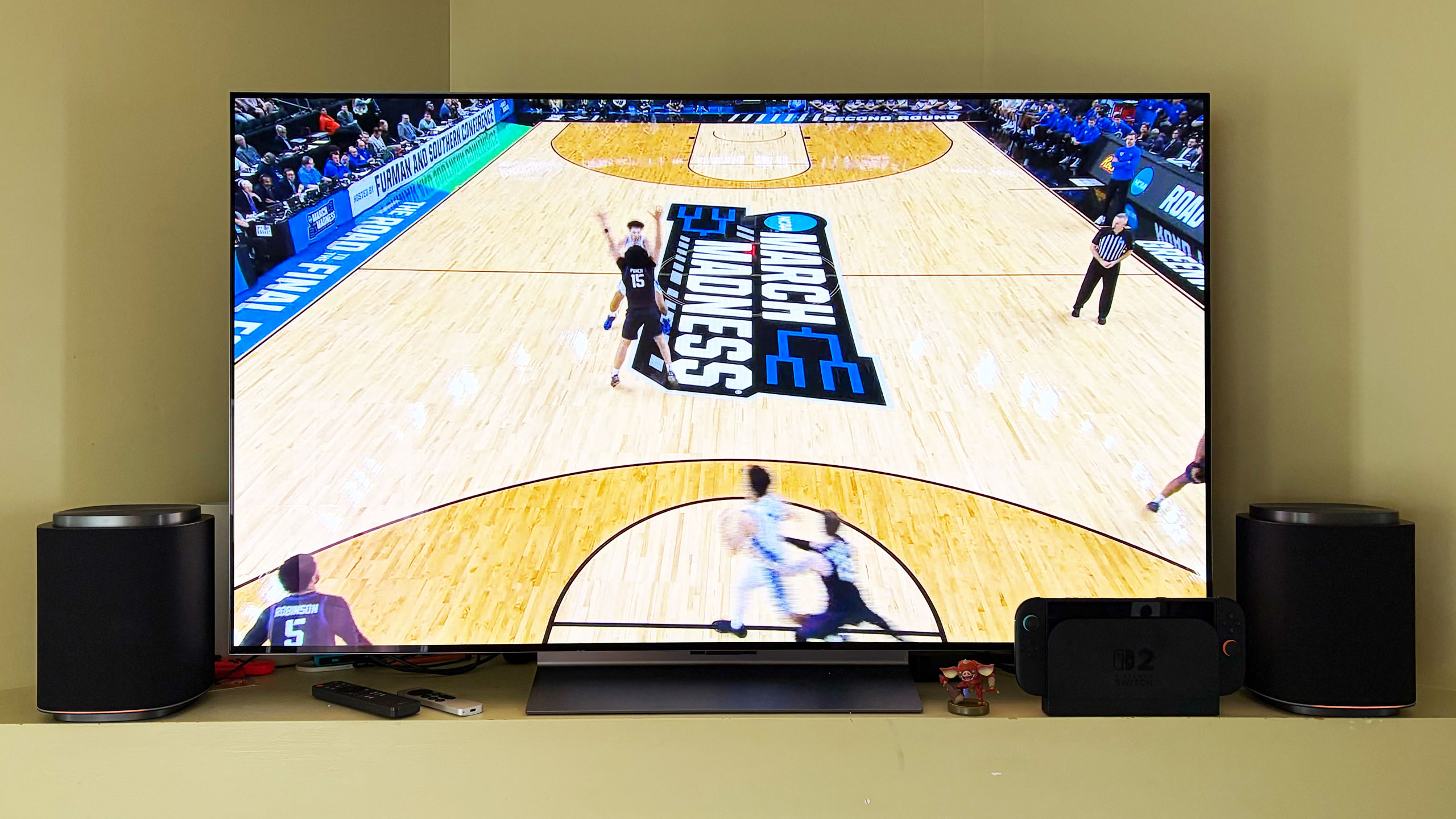
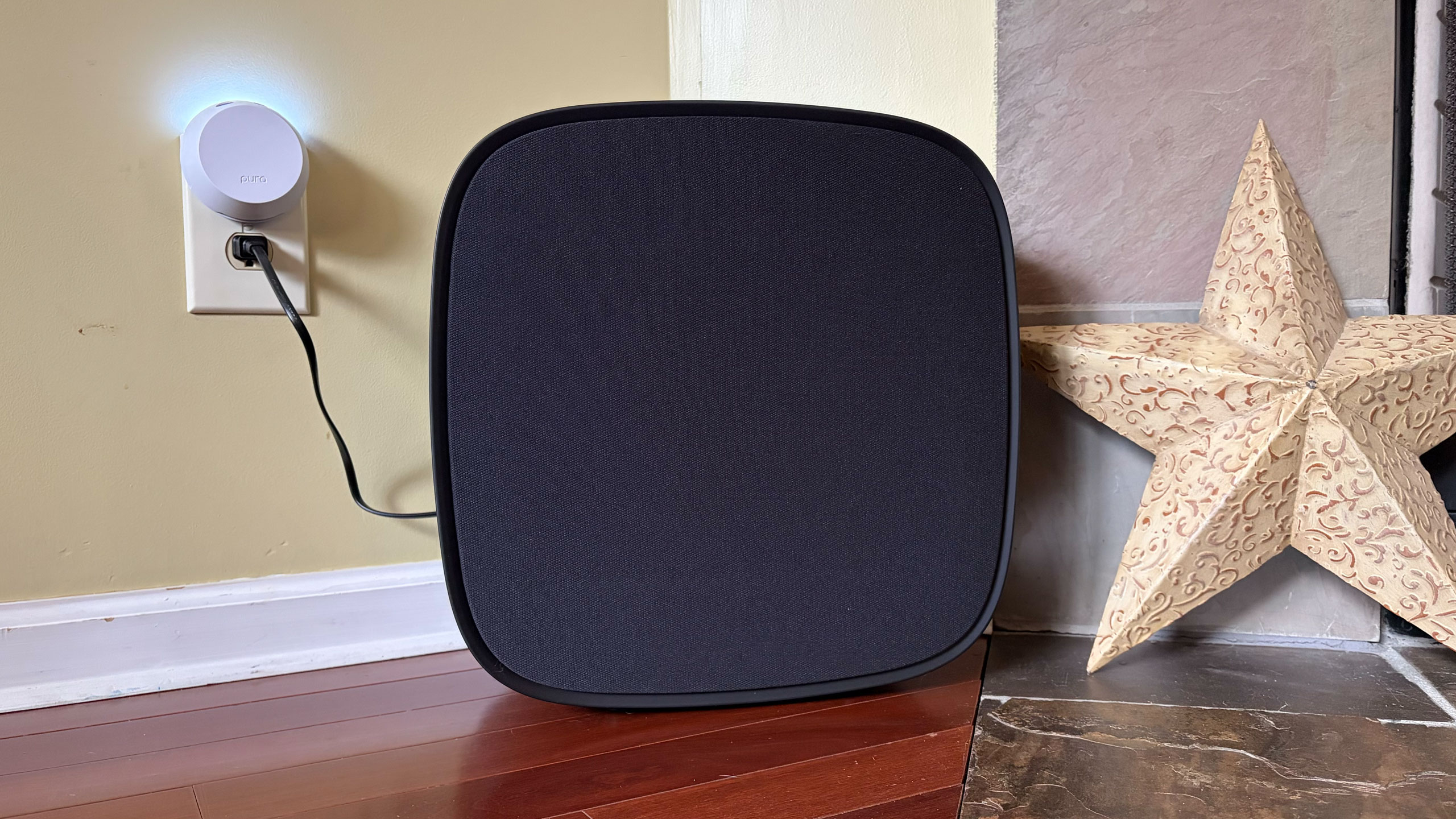
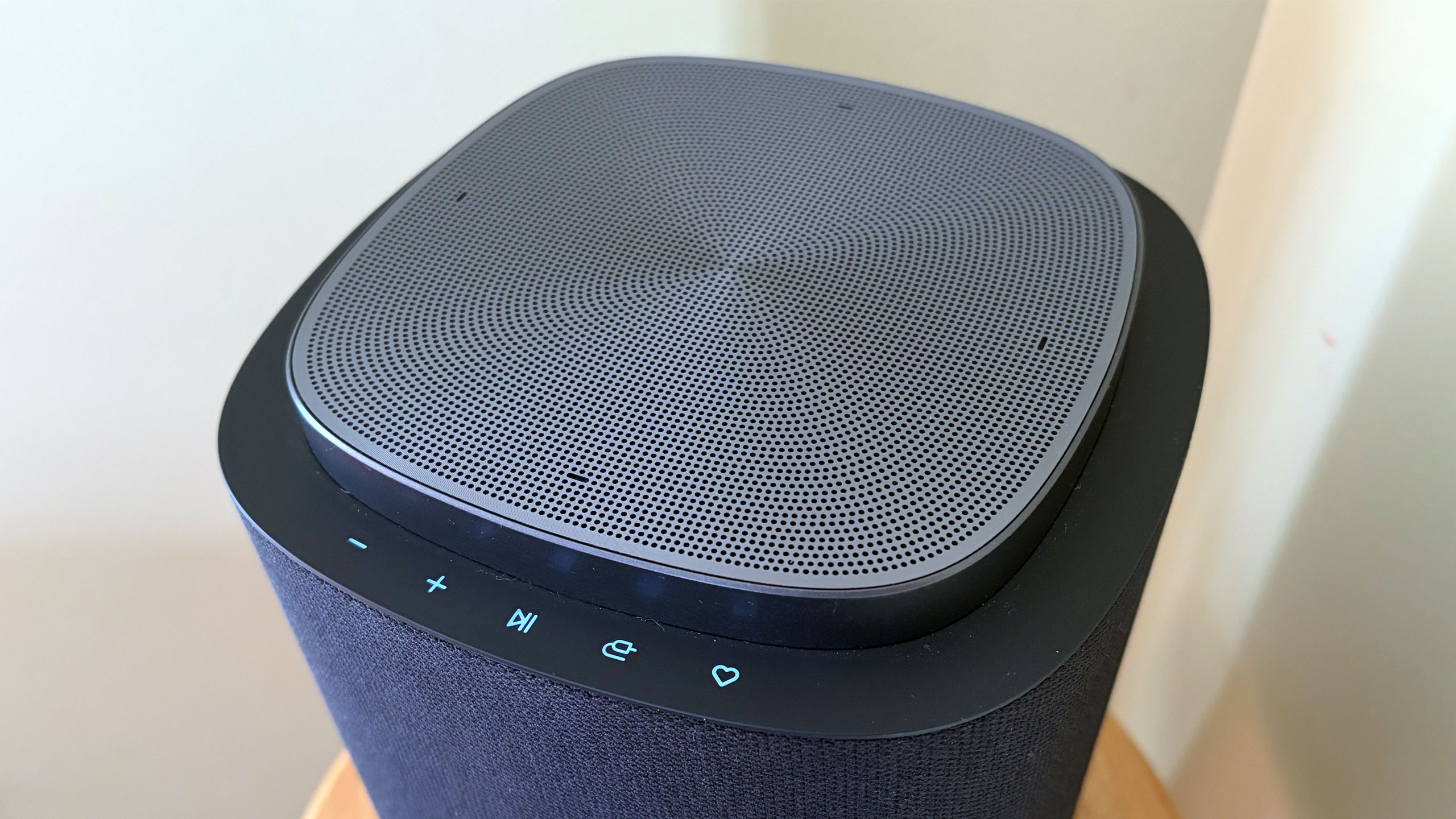
The W7 wireless sub has an 8-inch woofer that gets really boomy at times. It’s quite large at 16.1 x 16.3 x 7.6 inches, but you can use it standing up vertically or laying down horizontally — whichever orientation fits your needs or available space. The M5 and M7 speakers offer basically the same features, including AirPlay and Cast, and can be used either by themselves, as a stereo pair, as a four-speaker array or as rear satellite speakers with the H7 soundbar. The main difference is the M7 has two full-range drivers, one up-firing driver and a woofer while the M5 only has a tweeter, an up-firing driver and a woofer.
What is Dolby Atmos FlexConnect?
FlexConnect is a home theater audio technology that Dolby announced in 2023. It was available on TCL’s Z100 speakers last year, but LG’s Sound Suite marks the first time the feature has been available on a more robust living room product that includes a soundbar. FlexConnect allows you to position speakers anywhere in a room without sacrificing audio performance. The tech uses a TV or soundbar as the lead device to locate speakers so it can tune the sound to match their positioning. The system can also quickly adapt when you move a speaker — maybe for a party or other special occasion.
FlexConnect works as advertised, but there is one caveat that should’ve been obvious, although I didn’t anticipate it. Every time you add or remove speakers from a DAFC group, you’ll need to recalibrate the system, which includes the software playing sounds from the speakers so that the TV or soundbar can locate them and Dolby’s tech adjusts their output. It doesn’t take long, but there is audible noise from each unit in the group, so you’ll want to factor in that time — and potential annoyance for anyone else in the house.
Other Sound Suite features
LG Sound Suite H7 soundbar
Billy Steele for Engadget
Sound Suite offers some of the same features as LG’s other home theater products. Those include Night Mode, Room Calibration Pro, AI Sound Pro+ real-time audio upscaling and Clear Voice Pro+ for enhanced dialogue. For the Sound Suite, LG has also introduced Sound Follow, a feature that allows you to adjust the “sweet spot” for the system based on where you’re sitting.
Once you set your current position with a tap in the ThinQ app, Sound Follow is supposed to change the levels and tuning accordingly. I’m not entirely sure this was working on my system. Unlike my demo at CES, the seating position on the FlexConnect layout in the app was never updated. And while the UI seemed to indicate the change was made when I tapped the buttons, I couldn’t hear any difference in the audio. I asked LG for more information to ensure Sound Follow is functioning properly.
A word about setup
Like most soundbars and speakers these days, you have to use an app to get them all connected and properly set up. And like Samsung, LG makes you do that through the same app that handles all of its connected devices — including appliances. Once you unbox and plug in the Sound Suite speakers, you add them in the ThinQ app as a new home theater arrangement. The software shows you which speakers are available to use and allows you to select which ones you want in the initial Dolby Atmos FlexConnect grouping.
The app will ask you to set the distance between the soundbar and your primary seating area before running the sound optimization (tuning) process. ThinQ will display the speaker layout and you can edit the DAFC group at any time. If you move a speaker though, you’ll need to run the optimization again for the best audio performance. And if you’re using an LG TV as the lead device, all of this is sorted onscreen rather than in the app.
Overall, the process is pretty straightforward, although I encountered some pretty significant connectivity issues that were very frustrating. I review soundbars and speakers regularly, so I’m familiar with the process of using an app to connect devices to my home Wi-Fi in order to get them up and running. With the H7, it took a few days to get it connected, which meant I could only use the soundbar with the audio options available on LG C5’s menu and wasn’t able to set up a larger Sound Suite configuration. After several router and soundbar reboots, I was finally able to get the H7 to connect and become available to finish the install. I’ve never had this problem before, so perhaps LG did something different with the Wi-Fi components here.
LG Sound Suite M7 speakers
Billy Steele for Engadget
When I was adding the M7 speakers to my DAFC setup, I had no issues connecting them to Wi-Fi initially. However, I did have trouble adding them to the FlexConnect group, which required each piece of the Sound Suite playing an audio calibration clip. Repeatedly, the ThinQ app told me there was a connection issue with one of the M7s, although eventually they all somehow got added anyway. I also had trouble removing speakers from the arrangement. Even though the app said sound was only coming from the H7 soundbar, one of the two M7 speakers was still connected and emitting sound when I didn’t want it to. For some reason, this only happened when playing music over AirPlay — TV audio over HDMI eARC always functioned as intended.
If you’re using the TV as the lead device, you do all of the setup on the screen. I found this method to be more straightforward and reliable, although it blasted the calibration sounds at a deafening volume. There is a big issue though: Once connected to the TV as a DAFC setup, the speaker settings weren’t available in either the ThinQ app or on-screen menus. This meant I was stuck in standard mode, with things like AI Sound Pro+ inaccessible. I asked LG for more info on this because it greatly impacts the overall experience.
Which configuration sounds best?
Before I get into describing the various Sound Suite configurations, I need to make an important note about the limitations for the possible setups. LG only allows a maximum of five speakers in any Sound Suite arrangement, but you can mix and match however you want. Just remember if you don’t opt for the H7 soundbar, you’ll need a compatible LG TV as the lead device for FlexConnect to work.
You can also use the M5 and M7 as standalone speakers in another room and swap them in and out of your living room or home theater setup as needed. In the multi-room scenario, Sound Suite speakers function much like a Sonos system would, and the M7 is more than capable of being a standalone music speaker with plenty of detail and decent bass. I wasn’t able to test the M5, so I can’t vouch for that one. Keep in mind that if you opt for the M5 or the M7 for your living room, you’ll need at least two of either one to use FlexConnect with your LG TV.
After testing multiple configurations of the Sound Suite, I think the combination of the H7 soundbar, W7 subwoofer and two M7s is the ideal arrangement. I’ll hedge that a bit as I prefer to disable the M7s in the rear of the room when watching live TV — especially sports — as the same audio coming from the soundbar and those speakers didn’t really enhance the experience. Plus, arena noise seemed overly echo-y and off-putting. This setup is well-suited for streaming TV shows and movies, things where Dolby Atmos, or at least LG’s spatial upscaling, is at the height of its powers.
The LG Sound Suite W7 subwoofer is quite large
Billy Steele for Engadget
In this setup with the H7 as the lead, you get Sound Suite in its most immersive form. I always use Netflix’s Drive to Survive as my first test of a new home theater system, and LG’s lineup handled it like a champ. You get excellent directional audio, which makes the cars sound like they’re zooming around your living room. And the in-car shots are so enveloping, it’s like you’re sitting right behind the driver. This configuration also works well for music, though I preferred to use either one of the M7 speakers or the soundbar/sub duo rather than the whole shebang.
My second favorite setup is four M7s. Once again, this configuration requires an LG TV as the lead device, but if you have that, you can definitely save some room in front of your television with separate front speakers. Unfortunately, you can’t use a subwoofer too because if you’re using a TV to power the speakers, you can only add up to four. That’s a real bummer, but the TV speakers will be used as a center channel (dialogue) boost, so it’s not a complete waste. However, this arrangement would benefit from more bass.
The four-speaker setup could be particularly beneficial for people who mount their TVs on the wall and don’t want a soundbar underneath. And, again, FlexConnect allows you to put the speakers anywhere, not necessarily flanking your TV. You also get the option of moving these smaller speakers around when you need to — something you can’t really do with a soundbar. The only sacrifice I noticed audio-wise is that two M7s in the front doesn’t offer the same overhead sensation for Atmos content as the H7’s up-firing drivers.
If you’re just using four M7 speakers for home theater duties, you’ll enjoy the immersive audio these Sound Suite speakers will provide. There’s lots of directional sounds with Atmos content, and there’s plenty of subtle detail that comes through on movies and shows. However, for live sports, this arrangement pulls commentary audio from the TV speakers and puts much of the arena/stadium noise in the rear M7s, which makes it difficult to hear the announcers at times. This is one area where the inability to adjust the audio settings really hampers the experience.
If you’re hoping to invest in something that can pull double duty for music, I prefer one or two M7s for that purpose. And while there’s decent low-end thump, streaming your favorite tunes is where you’ll notice the absence of that W7 subwoofer.
The competition
The controls on the LG Sound Suite M7 speaker
Billy Steele for Engadget
If you’re looking for alternatives to LG’s Sound Suite, you have to make some sacrifices. The only other option right now that offers Dolby Atmos FlexConnect is the TCL Z100 speaker. Obviously, you’ll need multiples of this $300 device, and you’ll probably want to add the $350 subwoofer, too. Like the LG M7, you’ll need a compatible TCL TV to serve as the lead device for FlexConnect (a QM6K, QM7K, QM8K, QM9K or X11L model). I haven’t tested these 1.1.1-channel units, so I can’t provide a direct comparison to the Sound Suite’s M5 or M7.
For those who can live without FlexConnect, Samsung’s Q990 series is consistently the best all-in-one setup you can buy. I haven’t reviewed one since 2024 because the company has been keen on shipping new models with minimal updates, which means the hardware and most of the features remain the same. The HW-Q990H will be the latest installment when it arrives later this year, with the biggest differentiator being a new dialogue boost called Sound Elevation.
While the Q990 always comes with rear speakers and a subwoofer alongside a powerful soundbar, some features will only be available if you also have a Samsung TV. One of those is Q-Symphony, which utilizes TV speakers alongside the Q990’s drivers for more detailed and immersive sound. For the entire Q990 package, you’re looking at $2,000 — $100 less than the comparable Sound Suite arrangement of the H7 soundbar, two M5 speakers and a W7 sub.
Wrap-up
There’s no denying that LG has created a powerful and immersive living room experience with its Sound Suite lineup. I also like that the company allows customers to decide what they need without sacrificing the main draw of FlexConnect. While I did experience some setup and software issues, those are things LG can iron out over time — Sound Suite is still brand new, after all. I would like to see the company offer some discounted bundles and continue to add more audio features over time to justify the hefty investment. If you’ve got a couple grand to spend, especially if you have a recent LG TV, Sound Suite will be your best option for building out a home theater setup.
This article originally appeared on Engadget at https://www.engadget.com/audio/speakers/lg-sound-suite-review-dolby-atmos-flexconnect-in-a-powerful-package-160000544.html?src=rss
Uber is aggressively partnering with multiple robotaxi companies to avoid a future dominated by Waymo or Tesla. The ride-hailing giant has struck deals with at least a dozen autonomous vehicle players in recent years. Just last week, it announced a $1.25 billion partnership with Rivian, with plans to deploy up to 50,000 driverless vehicles over the next decade. Business Insider reports: Uber announced three new robotaxi partnerships in the past few weeks with Zoox, Wayve-Nissan, and Rivian. In less than half a decade, the company has secured at least a dozen deals, including with WeRide, AVride, May Mobility, Momenta, Pony.AI, Wayve, Baidu’s Apollo Go, Motional, and Lucid-Nuro. Still, less than a half-dozen of Uber’s partners have deployed fully driverless, paid robotaxi operations, and only one, Waymo, operates in the US. Uber has a joint deployment with Waymo in Atlanta, Austin, and Phoenix, but in other cities, Waymo is a competitor.
Uber’s partnership spree is less about seeking the singular, dominant player of autonomous driving. Instead, analysts told Business Insider that Uber is ensuring multiple vendors can participate in the expensive business of robotaxis — fending off the real risk of a Waymo or Tesla scaling on its own — and giving itself a stake in the robotaxi economy by being the aggregator of choice. “The more diversified the supplier base, the better for the network in the middle, which is Uber,” Mark Mahaney, an Uber analyst for Evercore ISI, told Business Insider.
Sony’s lead systems architect, Mark Cerny, has confirmed that AI-powered frame generation is indeed on the roadmap for PlayStation hardware, stressing that the feature isn’t yet ready for prime time in 2026. While the PlayStation 5 Pro recently introduced a PlayStation Spectral Super Resolution (PSSR) 2 upscaler that gave the APU a chance
With Intel’s new Core Ultra Series 3 “Panther Lake” laptop SoCs, the Xe3-based Arc B390 graphics and much improved CPU performance capture much of the spotlight. One new capability with Panther Lake that isn’t featured as much though is the new FRED capability with Flexible Return and Event Delivery. Today’s Intel Panther Lake testing is looking at the very interesting performance impact of FRED on Linux.
Elon Musk’s latest industrial gambit, called Terafab, aims to interrupt the semiconductor supply chain by building a massive $25 billion chip fabrication facility in Austin, Texas. As a joint venture between Tesla, SpaceX, and xAI, the ambitious project has ambitions of producing a terawatt of computing power yearly to fuel Musk’s most ambitious
Forget for a moment that PC memory and storage prices are getting out of control. If you’re building a new gaming PC or upgrading and existing one, you could do a lot worse than assembling a system around AMD’s spunky Ryzen 7 9800X3D (see our review). It’s a stout chip for gaming, and even better, it’s on sale for the lowest price it’s ever
Apple and Google have recently been removing barriers and implementing features that make it easier for users to switch between rival platforms, which includes finally opening up compatibility between Quick Share and AirDrop. The latter first became available on the Pixel 10 late last year, with Google promising to bring this feature to the
M5Stack has added the M5StampS3 BAT, a compact embedded module based on the ESP32-S3 platform with integrated battery power management. The module is intended for IoT and low-power applications requiring wireless connectivity and flexible GPIO access in a small form factor. The module is built around the ESP32-S3-PICO-1-N8R8 system-in-package, featuring a dual-core Xtensa LX7 processor […]
Rock sample analysis from the asteroids Ryugu and Bennu (collected in 2018) has confirmed that the entire library of the chemical code for DNA and RNA exists in space.
The space-delivery theory for life’s origins has been missing several chapters. While meteorites that crashed into Earth often contained some of these ingredients, scientists