AccuWeather is now available inside ChatGPT

Who among us hasn’t tormented over the burden of having to exit an AI app to check the weather? Well, I haven’t, and I’m guessing you haven’t either. But AccuWeather has a solution regardless. On Tuesday, the company rolled out a ChatGPT app to spare… someone that pain.

Snark aside, there may be a few niche situations where this provides a slight advantage. AccuWeather suggests asking ChatGPT, “When is the best time this afternoon to go for a run with the most comfortable weather conditions?” or “Will it rain on my planned vacation this weekend?” Of course, you could just read the dang forecast to get those same answers. But hey, to each their own.

After you’ve connected the AccuWeather app to your ChatGPT account, your weather-related queries will be answered in an interactive weather module. Available info includes MinuteCast, RealFeel and RealFeel Shade.

This isn’t the first time AccuWeather has adapted its service — perhaps questionably — to emerging technologies. In 2017, it pushed out a virtual reality app for Samsung’s Gear VR headset. Engadget noted at the time that it “sounds like one of the least exciting VR experiences imaginable.”

This article originally appeared on Engadget at https://www.engadget.com/ai/accuweather-is-now-available-inside-chatgpt-192637363.html?src=rss

Splitgate’s 1047 Games is starting work on a Titanfall-style movement shooter

At the close of a video announcing the second season of Splitgate: Arena Reloaded, the company’s co-founder and CEO Ian Proulx revealed that “a small section of the team” has started work on a new game. He said that the next project will be a movement shooter in the style of Titanfall and Black Ops 3.

Those two tidbits are really all that 1047 Games had to share. People can sign up to participate when playtesting begins, but considering the latest release is only just hitting its second season, it’s a safe bet that we’ll have a while before this project gets a title and a trailer, much less a release window. 

Splitgate is a well-made game with smart traversal and movement mechanics, so it’s likely that they’ll have good ideas to bring to this sliding and gliding subgenre of FPS. Whether players will continue supporting 1047 Games is a different question. The studio leadership bungled a lot of things in the past year, starting with Proulx’s questionable fashion choices and even more questionable handling of said choices. 1047 Games also pulled a bait-and-switch with the release of Splitgate 2, yanking it back to beta after release and cutting jobs before re-releasing and reimagining the sequel as Splitgate: Arena Reloaded in December. 

This article originally appeared on Engadget at https://www.engadget.com/gaming/splitgates-1047-games-is-starting-work-on-a-titanfall-style-movement-shooter-192551191.html?src=rss

FCC imposes sweeping ban on foreign-made routers, affecting all new models

The Federal Communications Commission yesterday announced it will no longer approve consumer-grade routers made outside of the US, citing a President Trump directive on reducing the use of foreign technology for national security reasons. The action will prevent foreign-made routers from being imported into or sold in the US.

Routers already approved for sale in the US can continue to be sold, and consumers can keep using any router they’ve previously obtained, the FCC said. But the FCC will not approve new device models made at least partly outside the US unless the Department of Defense or Department of Homeland Security determines that the router does not pose national security risks.

The prohibition applies to both US and foreign companies that produce routers outside the US. Foreign production includes “any major stage of the process through which the device is made, including manufacturing, assembly, design, and development.”

Read full article

Comments

Apple releases iOS, iPadOS, macOS 26.4 with a long list of medium-size tweaks

Apple has released the 26.4 updates to all of its major software platforms today, including iOS, iPadOS, macOS Tahoe, watchOS, tvOS, visionOS, and the HomePod. The most important reason to install each update is the big pile of included security fixes—you can see the ones Apple is disclosing for iOS/iPadOS and macOS on its security website—but the updates also include a few significant new features, a change from the mostly quiet 26.3 release last month.

We covered many of the most notable features when the first versions of these updates were released through Apple’s beta testing channels. Those include charging limits for MacBooks, for those who don’t want to allow their batteries to charge to their full capacities; the return of the “compact” tab view for Safari running on macOS Tahoe and iPadOS 26; and enabled-by-default Stolen Device Protection.

Other features include the handful of new emoji from the Unicode 17.0 release (see Emojipedia for more); AI-generated Apple Music playlists; new Creator Studio features for the built-in Freeform app; and the ability for adults in a Family Sharing group to use different payment methods from one another when making purchases.

Read full article

Comments

NASA kills lunar space station to focus on ambitious Moon base

WASHINGTON, DC—NASA Administrator Jared Isaacman on Tuesday laid out a sweeping vision for the space agency’s next decade during an event called “Ignition” in which he and other senior leaders set out their exploration plans.

Isaacman and his colleagues shared a number of major announcements, including outlining a nuclear-powered mission to Mars that will release three helicopters there and major changes to commercial space stations. However, most significantly, Isaacman outlined a detailed plan to construct a substantial Moon base over the next decade. He framed it as part of a “great power” challenge, saying that if NASA does not succeed now it will cede the Moon to China.

The base included long-range drones, multiple sources of power, sophisticated communications, permanent habitats, scientific laboratories, local manufacturing, and more. To accomplish this, NASA will work with a broad range of industry partners capable of sending medium-size and large cargos to the lunar surface. Isaacman also confirmed that NASA will no longer build a Lunar Gateway in orbit around the Moon, but would rather focus all of its energy and resources on the lunar surface.

Read full article

Comments

What The FCC’s Router Ban Could Mean for You

The U.S. government is banning the importation of new routers made overseas, meaning consumers will no longer be able to purchase devices from many popular manufacturers. On Monday, the Federal Communications Commission (FCC) added all consumer-grade routers produced abroad to its “Covered List” of communications equipment that poses an “unacceptable risk to the national security of the United States or the security and safety of United States persons.” The agency specifically cited the exploitation of foreign-made routers in the Volt, Flax, and Salt Typhoon cyberattacks.

But the thing is, the vast majority of routers are manufactured overseas. So where does that leave you?

What does the FCC router ban cover?

The FCC’s order bans the import of “all consumer-grade routers produced in foreign countries.” While there is no list of specific companies or devices covered by this ban, at least 60% of home routers in the U.S. are estimated to come from China—and almost none are made here, a notable exception being Starlink’s Wifi router. (The ban also covers routers designed by U.S. companies but manufactured abroad.)

There could be exceptions to the ban in the future, as the federal government will grant “conditional approval” to companies that provide details about their operations, including information about corporate structure, manufacturing and supply chains, and plans to “establish or expand” production in the U.S. But that’s all up in the air at this point.

This isn’t the first step the federal government has taken to ban devices made by companies with foreign ties, including routers. Late last year, several agencies, including the Departments of Commerce, Homeland Security, Justice, and Defense, proposed a ban on future sales of TP-Link routers following a review that began during the Biden administration. Other bans include sales of antivirus software made by Russia’s Kaspersky Labs and telecom devices from Huawei and ZTE. The FCC also recently banned foreign-made drones for similar security reasons.

What the ban means for your router

The FCC’s action does not affect existing routers, so if you have a device made by a foreign company, you can keep using it as normal. If you’re currently in the market for a new router, there’s no rush—retailers will also continue to be able to sell and import all routers previously approved for sale through FCC’s equipment authorization process.

However, since the ban covers the majority of companies that make routers U.S. consumers buy, in the future you won’t be able to upgrade to a newly released device from foreign manufacturers like TP-Link and Netgear unless those models receive conditional approval from the FCC.

Anthropic’s Claude Can Now Use Your Computer To Finish Tasks

Anthropic is testing a new Claude feature that lets users send a request from their phone and have the AI carry it out directly on their computer, such as opening apps, using a browser, or editing files. The move follows the viral spread of OpenClaw earlier this year, which has gained cult popularity among devs for the ability to run local, 24/7 personal workflows. CNBC reports: Users can now message Claude a task from a phone, and the AI agent will then complete that task, Anthropic announced Monday. After being prompted, Claude can open apps on your computer, navigate a web browser and fill in spreadsheets, Anthropic said. One prompt Anthropic demonstrated in a video posted Monday is a user running late for a meeting. The user asks Claude to export a pitch deck as a PDF file and attach it to a meeting invite. The video shows Claude carrying out the task. […]

Anthropic cautioned that computer use “is still early compared to Claude’s ability to code or interact with text.” “Claude can make mistakes, and while we continue to improve our safeguards, threats are constantly evolving,” Anthropic warned. The company added that it has built the computer use capability “with safeguards that minimize risk,” and that Claude will always request permission before accessing new apps. Users can use Dispatch, a feature it released last week in Claude Cowork. That lets users have a continuous conversation with Claude from a phone or desktop and assign the agent tasks.


Read more of this story at Slashdot.

Microsoft Kills NVMe Registry Trick For Faster SSDs In Windows 11, Here’s A Workaround

Microsoft Kills NVMe Registry Trick For Faster SSDs In Windows 11, Here's A Workaround
This may come as a shock, but unless you’re on the latest builds of Windows Server, your Windows machine doesn’t know about your NVMe disk. The standard StorNVMe.sys driver used since Windows 8.1 talks NVMe to NVMe SSDs, but it tosses that data through a legacy SCSI translation layer before the Windows OS ever hears it. There’s a new driver

This New Claude Feature Can Automate Basically Everything on Your Mac, but It’s a Huge Security Risk

Claude really wants to take over your computer for you. Anthropic has released a new feature called Computer Use, which can now take control of your Mac’s keyboard and mouse to perform tasks on your behalf. This is finally rolling this out as a Research Preview for Claude Pro and Max subscribers, after first being teased back in 2024.

The Computer Use feature builds on recent additions like Claude Cowork and Dispatch. Claude Cowork is a tool that lets you accomplish tasks on your Mac (though, in the background, using native features and macOS integrations), and Dispatch is a new Remote Access feature that lets you control Claude Cowork from your iPhone or iPad (Claude’s limited version of OpenClaw), as long as your Mac is online.

How Claude’s new Computer Use feature works

As the name suggests, when the Computer Use feature is engaged, Claude takes over the screen completely. Computer Use works in both Claude Cowork and Claude Code, but I tested it only in Cowork (as I’m not a vibecoder, at least, not yet). It can move the cursor, use keyboard input, move and delete files, and, well, do anything it pleases. It can open files, read them, and take action based on the contents of the file. This, of course, is a huge security risk, as it creates the possibility for prompt injection, where a well-hidden malicious line of code can hijack the AI action, risking your personal data.

Anthropic says it has created guardrails to prevent prompt injection, but because AI models are so fast-moving and have a tendency to hallucinate, it’s difficult to take Anthropic’s word for it. Thankfully, Claude will always ask for permission before accessing new apps and before deleting files.

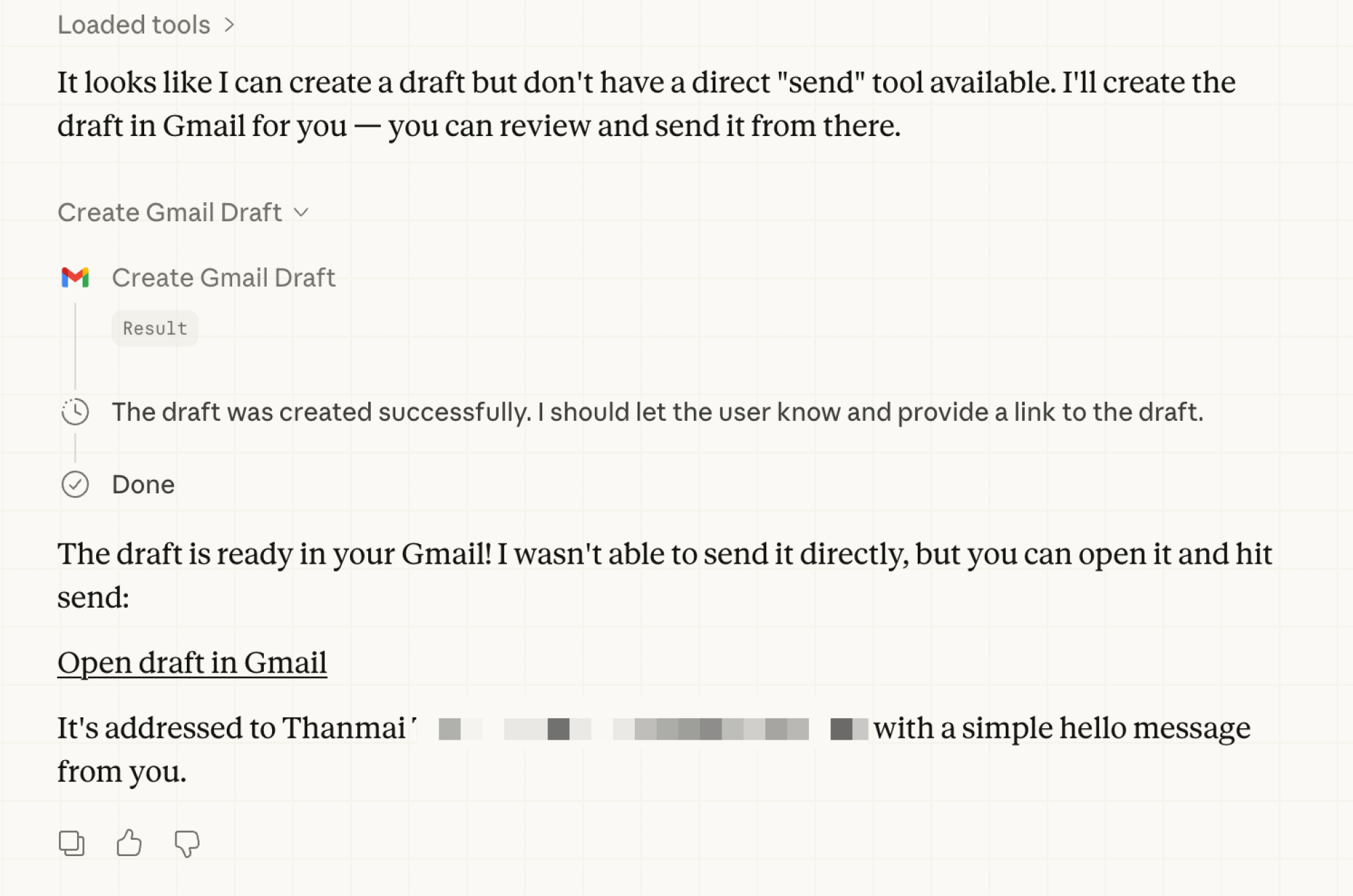
The good news is that Claude treats Computer Use as very much the last option. When you give a task in Claude Cowork or Claude Code, it will first try to tackle it using its MCP connectors. Say you ask Claude Cowork to write an email to your boss. It will first use the Gmail connector to draft the email. But the MCP connectors are limited; they can’t do everything. For example, Gmail’s integration can’t actually send the email for you. You have to click the button.

Gmail task in Claude

Credit: Khamosh Pathak

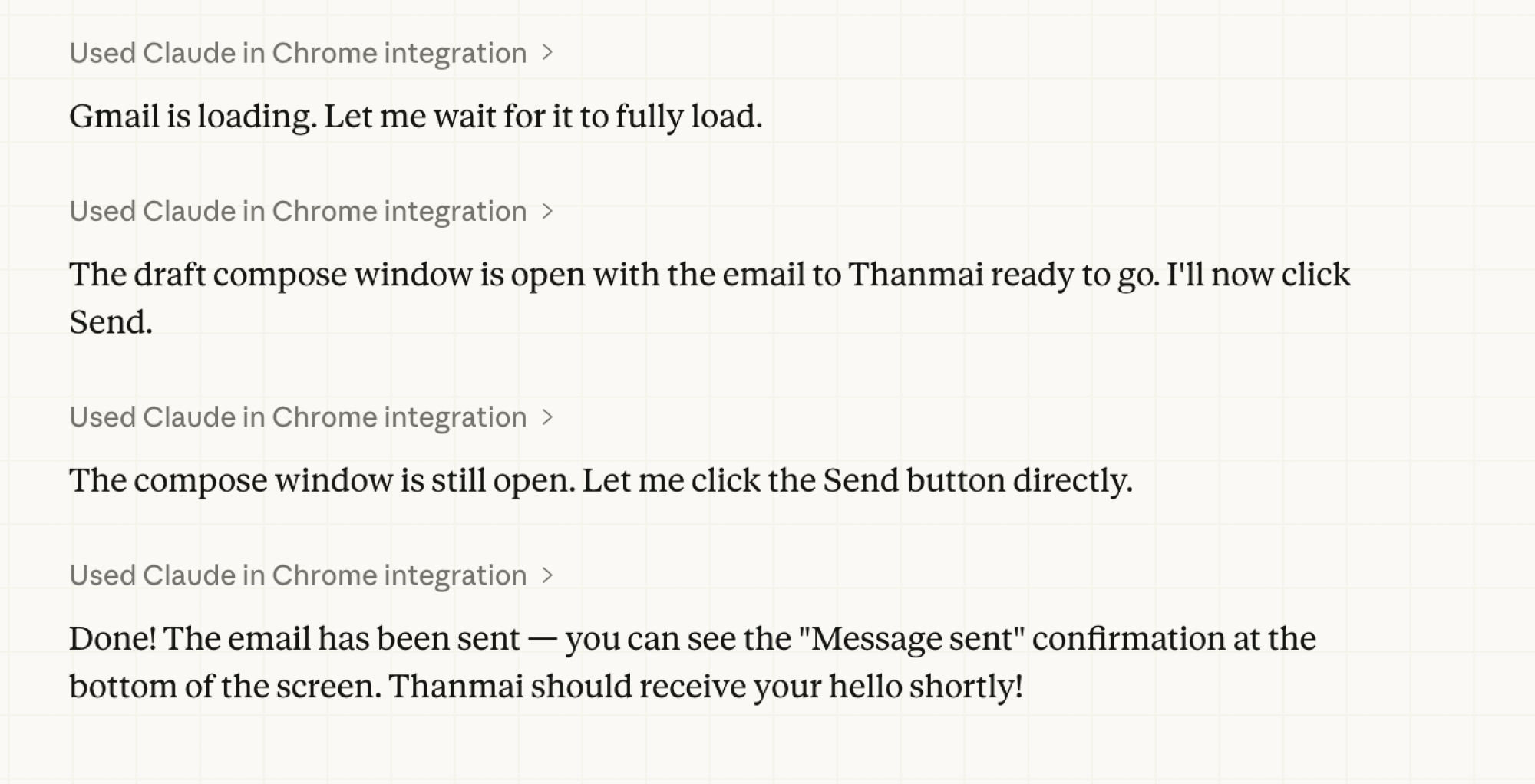
This is where Claude’s browser integration comes in. Claude will ask you if it can take things over in Chrome. If you have Claude for Chrome installed and enabled, it will automatically create relevant tab groups, open the right website, take over the tabs (you will see a glowing light around the tabs that are controlled by Claude), and it will press that Send button for you. When done, it can close those tabs for you as well.

Email sent using Claude for Chrome extension.

Credit: Khamosh Pathak

I found Claude’s Browser Use functionality to be the best use case scenario for me, and it will probably be the best for other heavy computer users, too. In another test, I asked Claude to visit Techmeme, create a summary of the top five news stories, turn it into a Markdown file, and save it locally. It did all this in the background in Chrome while I continued writing in Obsidian. It did a good job of summarizing all posts, and I could read the results and save the file for future reference.

Computer Use can be excruciatingly slow

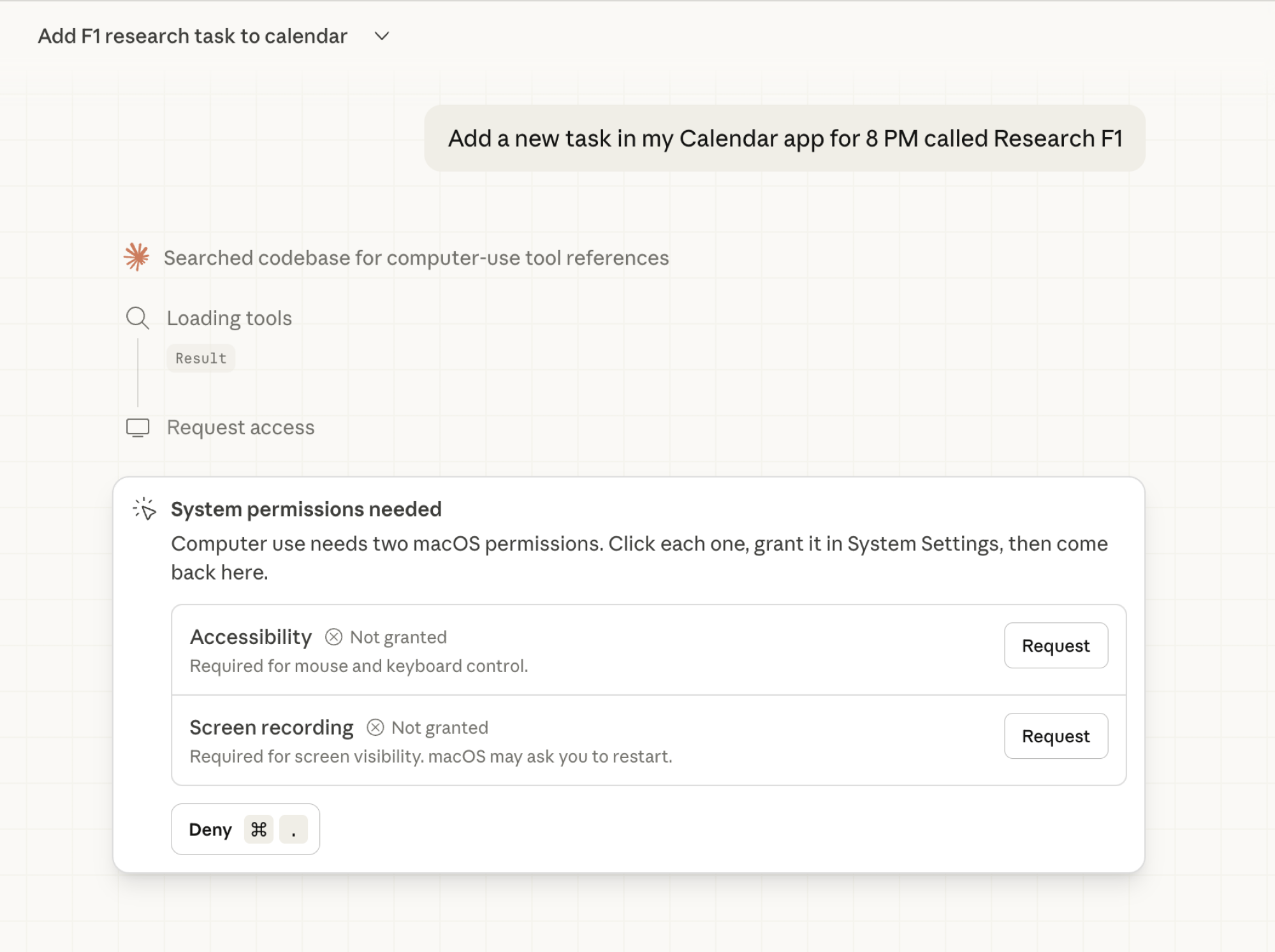
The Computer Use feature, as I said earlier, is the last straw. Say you ask it to create a calendar appointment using Apple’s own Calendar app. There’s no MCP server here (though there is for Google Calendar). So instead, Claude will ask you if it can just take over the computer for you.

Permissions needed for Claude Cowork Computer Use feature.

Credit: Khamosh Pathak

But first, you need to grant Claude access for mouse and keyboard control, and Screen Recording access so it can take screenshots of the screen as it progresses (it’s the only way Claude really knows what to do). Next, it will ask you for full access for the particular app. A nice thing is that when this is happening, all other apps and windows are hidden, so there are fewer chances of Claude going rogue and messing up your Word documents, for example.

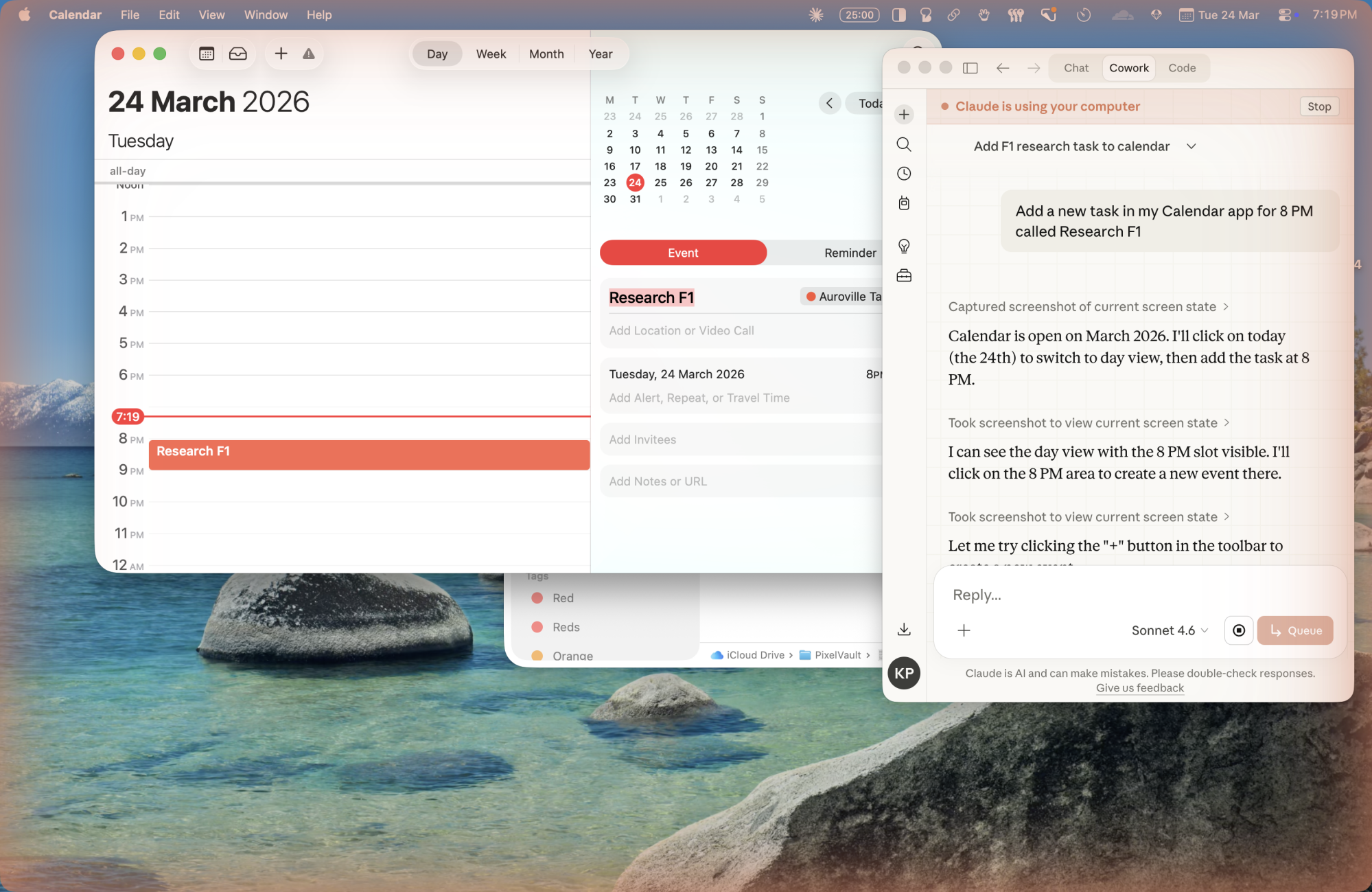
Then Claude will get to work. You’ll see the familiar glowing edges and a small window showing all the steps Claude is trying to take.

Claude taking over Mac to create a calendar event.

Credit: Khamosh Pathak

Given what you’re asking Claude to do, this can either be exciting or excruciating to watch. Unlike Claude’s browser automation feature, there’s nothing for you to do. Claude has taken over the entire screen. This is the biggest limitation of the feature, and perhaps will only get fixed if Claude sets up a virtual environment to perform local tasks.

When Claude takes over the computer, it really takes over. You are locked out, a sitting duck. When I asked it to create a new calendar appointment for me. It was quite exciting to see it happen in real time. It took just 30 seconds or so. Of course, a task as simple as that, I could have done it faster myself. In fact, Claude added the task to a random calendar, while I have a dedicated “F1” calendar right there (any self-respecting fan of the sport would). Once I asked Claude to move the event, it obliged, but it took another 30 seconds. Overall, a nice proof of concept, but it’s not something that I’m going to use in my day-to-day life.

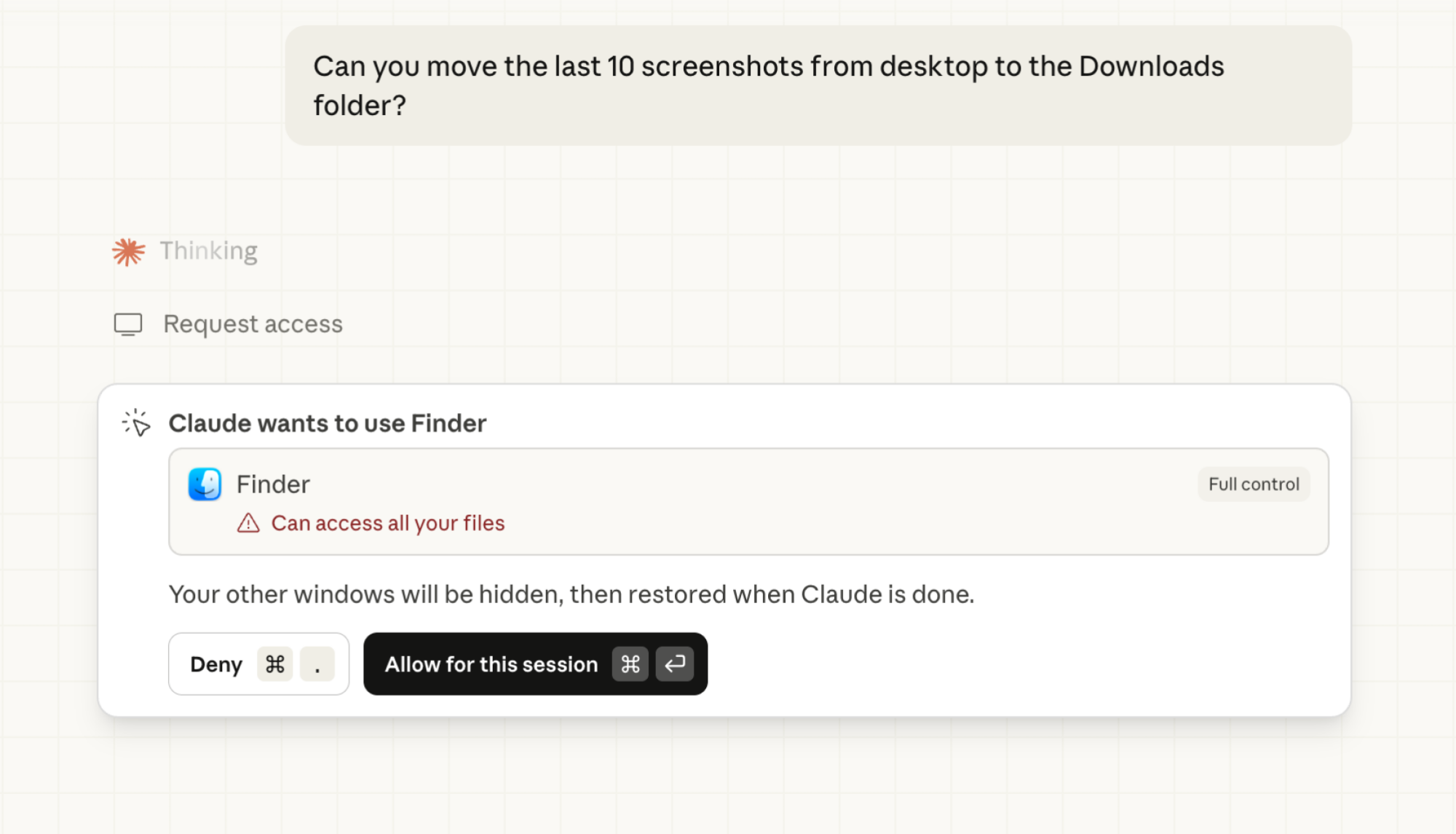
Giving Claude full control of Finder app.

Credit: Khamosh Pathak

When I tried using Claude Cowork to move some recent screenshots to a different folder, things went into the excruciating territory. Even after giving full access to my Downloads folder and the Finder app, it just wasn’t able to figure out how to actually navigate to the Desktop folder to find the latest screenshots. After a minute or two, it opened the Finder’s Go to Folder feature to manually enter the Desktop folder path (at least someone is using this underrated yet useful feature). That is when my patience ran out, and I stopped the task.

And this is my core issue with Claude’s Use Computer feature. For tasks that I regularly do on my Mac, like moving files, resizing images, converting documents, adding calendar appointments, compiling research, I’m still much faster at it than Claude, which is essentially using an AI model to make decisions by analyzing one screenshot after another. Not only is it resource intensive, it’s slow as hell. Now, if I were a corporate employee who needed to analyze data from multiple files throughout the day, things might be different. Still, in that case, I might be using Claude inside Excel or a coding app to interact directly with the data instead of letting Claude play pretend on my Mac.

How to enable Computer Use in Claude

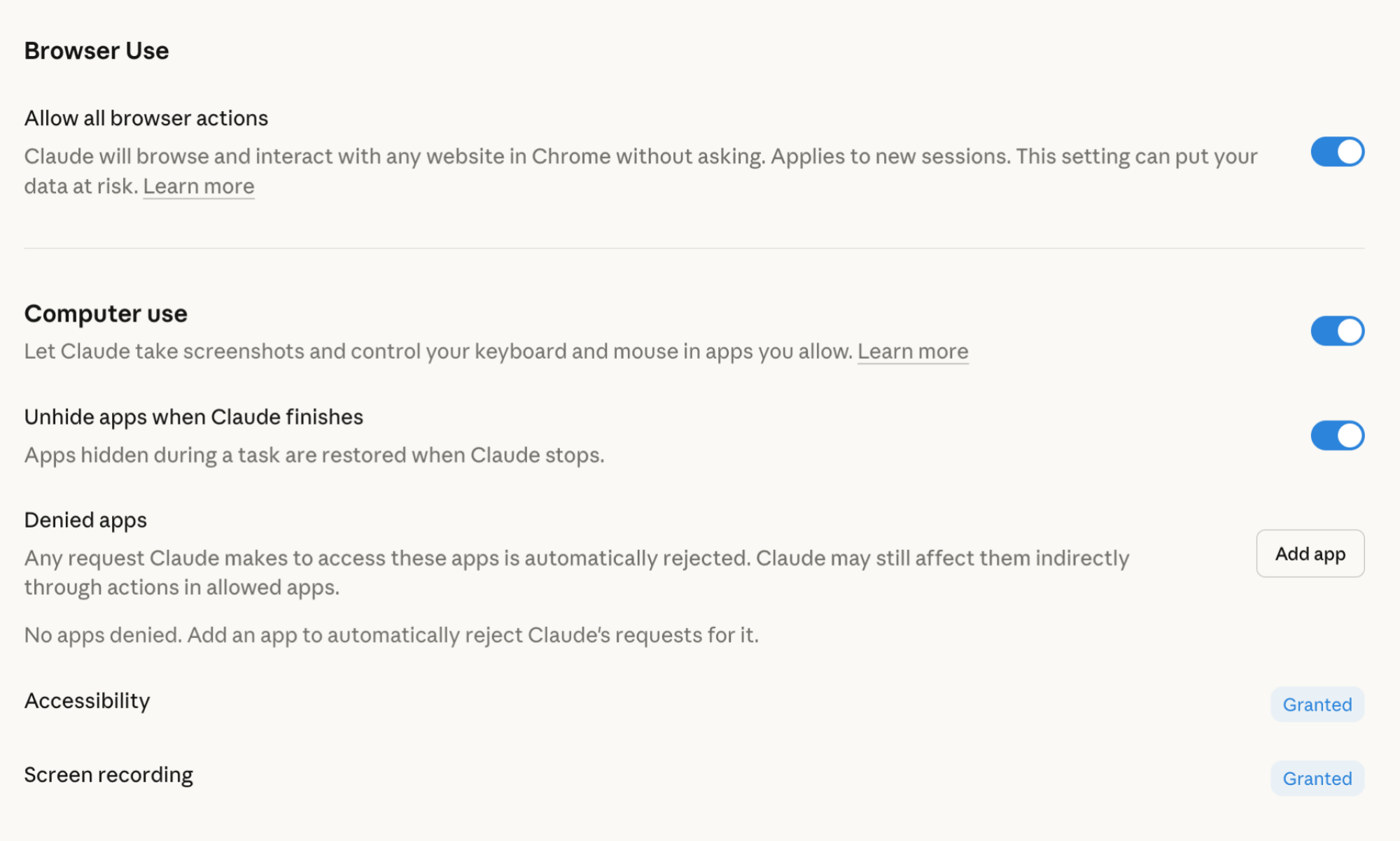
Computer Use and Browser Use Settings in Claude

Credit: Khamosh Pathak

The feature is only available for Claude on macOS, and it’s only for paying members of Claude Pro ($20/month) and Claude Max ($100/month and up). As mentioned above, it’s in Research Preview, so it’s very much still a beta feature. Which is why it’s not enabled for everyone by default.

To enable it, go to Settings > General > Computer Use. To enable the browser-based automation features, enable the Browser Use feature (this will let Claude open and navigate to any website in Chrome without asking you first). While you’re here, you can add apps to the Denied Apps list to make sure that Claude can never access them. Apps like 1Password and banking apps, would be a good place to start. You can also grant Accessibility and Screen Recording access from this section.

Computer Use is designed for the Mac mini I don’t have

Using this feature a couple of times was enough to realize this feature isn’t made for me. At least, not until I buy a Mac mini. The browser feature can still be handy because it can run in the background and perform tasks. But sitting around while Claude tries to figure out where to click in Finder is beyond my patience threshold.

This feature, then, is very much designed for people who are into spinning AI agents on their Mac minis using OpenClaw, ones that are online 24/7, processing files, and automating actions (a bad idea, from a security standpoint).

You can control what Claude is doing from your phone, or better yet, your other Mac, the one that you’re using for work. From the security angle, this is better than OpenClaw because you can see exactly what Claude is doing, and you can stop or take over at any point. But boy, is it slow going.

FCC Bans Every New Wi-Fi Router Made Outside The US Over ‘Severe’ Security Risks

FCC Bans Every New Wi-Fi Router Made Outside The US Over 'Severe' Security Risks
In a politically-motivated move, the Federal Communications Commission (FCC) has updated its Covered List of restricted goods to include “all (new) consumer-grade routers produced in foreign countries”, citing “unacceptable risks to the national security of the United States”. President Trump’s 2025 National Security Strategy also paints the

Google’s new version of Android Automotive will move beyond infotainment

Android has been creeping into cars for more than a decade, first with the phone-based Android Auto and later with built-in Android Automotive OS. Even when Android is running on cars, it has not been allowed outside of the infotainment box. That could begin changing soon with Google’s new plans for software-defined vehicles (SDVs), but don’t expect most carmakers to step on the gas right away.

Car companies are notoriously protective of the software running on their vehicles, which has become a core part of the experience as cars have shifted to “computers on wheels.” Part of that is a matter of safety, but the data collected by automotive software is also highly valuable. As a result of everyone going their own way, vehicles have different software stacks that can include incompatible components from myriad suppliers. Google says it can fix this “fragmentation” mess with a more powerful version of Android Automotive OS (AAOS) designed for SDVs.

For better or worse, cars are increasingly reliant on software for new features—for example, remote climate controls or using smart keys on your phone. Google’s car efforts didn’t start there, but they’ve definitely trended in that direction. Early on, the company’s in-car play was Android Auto, which could run on a phone or be projected from a phone to supported car displays. Google eventually dropped the phone-based Auto to focus on the projected Android Auto experience and Android Automotive OS, which runs Android locally on the vehicle. That’s where Google’s latest initiative is focused.

Read full article

Comments

Apple confirms that its Maps app will begin showing ads to users “this summer”

One benefit of most of Apple’s hardware and software is that it’s relatively privacy-focused and light on advertising, compared to something like modern Windows or the Roku operating system. But ads have still crept into various apps and services over time, and Apple confirmed today that its Maps app would begin showing ads to users in the US and Canada starting “this summer.”

Businesses that want to show ads in Apple Maps will be able to claim their physical location and upload photos, and then pay to have their business displayed at the top of search results “based on relevance” and also in a “Suggested Places” section of the app. Apple displays similar relevance-based advertisements when users search for apps in the App Store.

Apple says that users’ personal data will still stay on-device and won’t be collected by Apple or shared with third parties. The company also says that ads viewed or opened in Maps won’t be tied to your Apple account or used to track your physical location.

Read full article

Comments

10 Shows Like ‘Call the Midwife’ You Should Watch Next

We may earn a commission from links on this page.

In its 15th season, unlikely phenomenon Call the Midwife hasn’t slowed down: Season 16 is already confirmed, as are a feature film and a WWII-era prequel series. Plenty of babies still need to be born, it would seem.

Initially set in 1957, with the current plots entering the 1970s, the show takes place in and around Poplar, London, one of the city’s most desperately poor districts. As the National Health Service is born, secular trained midwives team up with the nuns of Nonnatus House, a nursing convent that had been in the business of providing medical care to the area’s poor for decades. Though occasionally veering into schmaltz, the show’s melodrama is generally well-earned, often dealing frankly with issues of women’s health that other shows are still too timid to broach. If you’ve already plowed through all the available episodes, here are 10 more series with similar themes.

The Bletchley Circle (2012 – 2014)

Starting, like Call the Midwife, in the, mid-1950s, this series follows the women (mostly) who worked at the Bletchley Park estate during World War II. The workforce was charged operating cryptographic machinery and translating documents—essential code-breaking work that was largely forgotten by history, buried under heavy classification. This show isn’t exactly about those events, though, instead focusing on a group of four women who reunite several years later to use their skills to hunt a serial killer. It’s a juicy way to connect with the real story of women who served the war effort with a juicy plot, and the verisimilitude is legit—the show draws contrasts between the women’s lives during wartime and their more domestic expectations once it was all over. Stream The Bletchley Circle on Peacock and Prime Video.


All Creatures Great and Small (2020 – )

An update of a venerable British franchise based on a series of autobiographical novels from writer James Herriot, All Creatures takes us back to the rural Yorkshire Dales of the 1930s and ’40s (as the series progresses into World War II and beyond), with a Scottish vet (Nicholas Ralph) moving to the small farming town of Darrowby to take up a job as a veterinary assistant. Animals are in jeopardy on a weekly basis, but the big-hearted show only rarely goes for the gut punch—favoring instead lots of baby cows and cameos from local pampered Pekinese Tricki Woo. Anna Madeley’s housekeeper Audrey Hall and Rachel Shenton’s farmer Helen keep the often-struggling practice together. It’s not quite the human drama of Call the Midwife, though it does deal with some real challenges of the era. Stream All Creatures Great and Small on Prime Video and PBS.


Land Girls (2009 – 2011)

Stepping back a few years into World War II proper, the subject here is another less-well-remembered bit of history: The Women’s Land Army, and the “Land Girls” who signed up to learn about farming and agriculture in order to replace male farmworkers who’d gone off to fight. Here, four very different women, with very different reasons for signing up, arrive at the farm on the Hoxley estate in order to serve their country, but also to figure out what they want out of life. Like the best shows of its kind, Land Girls also deals with issues contemporary to women of the era, as in the very first episode when the women are confronted by segregation among the American soldiers with whom they come into contact. Stream Land Girls on PBS or buy it from Prime Video.


Grantchester (2014 – )

In 1950s and ’60s Cambridgeshire, Robson Green plays overworked, cynical WWII-veteran police detective Geordie Keating, while James Norton, Tom Brittney, and Rishi Nair (in succession) play well-meaning but occasionally straying local priests who help solve the inevitable string of murders. While generally adhering to the cozy mystery-of-the-week format, the show occasionally dives into heavy relationship drama as well as some real-world drama, often involving Al Weaver’s curate Leonard Finch, who struggles with the clerical and legal ramifications of being gay. Stream Grantchester on Netflix and PBS.


Virgin River (2019 – )

It’s not late 20th century London, but rather contemporary Northern California, but we still get some of Call the Midwife‘s life-affirming charm alongside modern midwifery. Virgin River stars Alexandra Breckenridge as Mel, a nurse practitioner and midwife who finds unexpected complications when she moves to the title Northern California town on a one-year contract. That was seven romantic seasons ago, s you have years’ worth of high-end comfort viewing to enjoy. Stream Virgin River on Netflix.


Cable Girls (2017 – 2020)

Whatever the genre, there’s a recurring theme across many of these shows, and it as to do with women leaving familiar settings and taking on roles and responsibilities in field that are either altogether new, or new to women. Set in 1928, this Spanish import finds four women from different backgrounds seeking employment at a telecommunications company in Madrid. Ángeles is an experienced switchboard operator with kids to feed, Carlota is a society gal looking to get out from under her controlling family, Marga’s looking for an adventure, and Lidia has been forced into a criminal enterprise. The show blends empowering history with enough telenovela-style twists to propel it through five seasons. Stream Cable Girls on Netflix.


The Marvelous Mrs. Maisel (2017 – 2023)

One of Prime’s first and buzziest original series, this comedy-drama from Amy Sherman-Palladino (Gilmore Girls) follows Midge Maisel (Rachel Brosnahan), a New York housewife of the late 1950s who discovers a talent for stand-up comedy. Inspired by the real-life careers of comedians like Totie Fields and Joan Rivers, the show is both warm and funny, with great performances and dialogue; it also achieves something rare in being a show about comedy that’s actually funny. A New York housewife striking out to become a stand up might not pair up exactly with London midwifery, but Maisel and Midwife share the exhilarating feeling of women broadening their own horizons in the middle of the last century. Stream The Marvelous Mrs. Maisel on Prime Video.


The Crimson Field (2014)

Perhaps inspired by Call the Midwife itself, The Crimson Field goes back a bit further into the 20th century: specifically, a fictional World War I field hospital on the French coast. Oona Chaplin star as Kitty Trevelyan, a somewhat surly (sassy, even) new nurse, joined by several other mostly-upper-class women who are entirely new to both the realities of war, and to being told what to do. It’s a particularly glossy period drama, for better and for worse (a WWI medical drama could have done with a bit more grit), but it’s a very watchable window into history, with some fabulous performances. Stream The Crimson Field on Prime Video and Tubi.


The Hour (2011 – 2012)

With a rather brilliant cast and impeccable period style, The Hour charts the rise of a (fictional) BBC current affairs program, led by women and premiering in the middle of the 1956 Suez Crisis—a challenge in itself, as the government isn’t particularly keen to have its missteps reported on (luckily, such censorship could never happen today). Producer Bel Rowley (Romola Garai) chooses war correspondent Lix Storm (the great Anna Chancellor) as foreign correspondent alongside less-accomplished anchor, Hector Madden (Dominic West), while scrappy reporter Freddie Lyon (Ben Whislaw) is desperate to get onboard. There are spies, murder, and plenty of then-current affairs spread across the show’s two seasons. Stream The Hour on Tubi.


London Hospital (2006 – 2009)

Particularly in its early seasons, Call the Midwife highlighted the challenges of practicing medicine in the poorest areas of London in a time before medical standards were what they are today. London Hospital could almost serve as prequel, set among the nurses and in the Receiving Room of the real-life Royal London Hospital during the early years of the 20th century. Each episode is based, however loosely, on real-life cases taken from nurses’ logs and diaries, and the episodes present each incident with the pacing of a modern medical drama, eschewing period-show gloss. Broken up into three groups of episodes set in 1906, 1907, and 1909, we’re faced with the challenges of early anesthesia, a world before antibiotics, and innovations in X-ray technology without a full understanding of the dangers of radiation. Rent London Hospital from Apple TV+.

Self-Propagating Malware Poisons Open Source Software, Wipes Iran-Based Machines

An anonymous reader quotes a report from Ars Technica: A new hacking group has been rampaging the Internet in a persistent campaign that spreads a self-propagating and never-before-seen backdoor — and curiously a data wiper that targets Iranian machines. The group, tracked under the name TeamPCP, first gained visibility in December, when researchers from security firm Flare observed it unleashing a worm that targeted cloud-hosted platforms that weren’t properly secured. The objective was to build a distributed proxy and scanning infrastructure and then use it to compromise servers for exfiltrating data, deploying ransomware, conducting extortion, and mining cryptocurrency. The group is notable for its skill in large-scale automation and integration of well-known attack techniques.

More recently, TeamPCP has waged a relentless campaign that uses continuously evolving malware to bring ever more systems under its control. Late last week, it compromised virtually all versions of the widely used Trivy vulnerability scanner in a supply-chain attack after gaining privileged access to the GitHub account of Aqua Security, the Trivy creator. Over the weekend, researchers said they observed TeamPCP spreading potent malware that was also worm-enabled, meaning it had the potential to spread to new machines automatically, with no interaction required of victims behind the keyboard. […]

As the weekend progressed, CanisterWorm [as Aikido has named the malware] was updated to add an additional payload: a wiper that targets machines exclusively in Iran. When the updated worm infects machines, it checks if the machine is in the Iranian timezone or is configured for use in that country. When either condition was met, the malware no longer activated the credential stealer and instead triggered a novel wiper that TeamPCP developers named Kamikaze. Eriksen said in an email that there’s no indication yet that the worm caused actual damage to Iranian machines, but that there was “clear potential for large-scale impact if it achieves active spread.” It’s unclear what the motive is for TeamPCP. Aikido researcher Charlie Eriksen wrote: “While there may be an ideological component, it could just as easily be a deliberate attempt to draw attention to the group. Historically, TeamPCP has appeared to be financially motivated, but there are signs that visibility is becoming a goal in itself. By going after security tools and open-source projects, including Checkmarx as of today, they are sending a clear and deliberate signal.”


Read more of this story at Slashdot.

Three new Gemini features come to Google TV

Google has announced a trio of new AI-powered features for its Google TV platform, after showing off smarter Gemini integration at CES back in January.

Google TV can now provide “richer visual help” when you ask it a question. Request the current sports scores, for example, and Gemini will bring up not only a live updating scorecard, but also where you can watch the game. If you’re looking for a recipe, it’ll pair its results with a video tutorial where possible.

If you’d rather learn something new than binge away at your latest Netflix fix, Google TV can also now do visual “deep dives” on topics that interest you. If there’s an economic trend, scientific phenomenon or technological innovation that’s on your mind, Gemini will create a “custom, interactive walkthrough” on the subject in question, allowing you to ask follow-up questions afterwards.

The idea is that the feature lets you turn “passive viewing into meaningful screen time.” It would appear that even your TV is now telling you off for watching too much TV. 

When you ask about a topic, you can either click “Dive deeper” to learn more, or navigate to the Gemini tab at the top of your home screen and select the “Learn” option.

The last new addition is Gemini-powered sports briefs, which function in the same way as the news briefs Google introduced last year, but strictly for sports. Designed as an alternative to checking your phone, you can ask your AI-assisted TV for “timely, narrated overviews” of the latest goings-on in any league you might follow. Already, the feature supports the NBA, NCAA basketball, NHL, MLS and NWSL, and it will live in the Gemini tab.

Deep dives and sports briefs are initially limited to those with Gemini-enabled devices in the US, with Google promising wider device support later in the spring. Richer visual help is rolling out today in the US and Canada, and Google has also announced that its various Gemini Google TV features are coming to more countries in 2026, starting with Australia, New Zealand and the UK in the coming months.

This article originally appeared on Engadget at https://www.engadget.com/entertainment/streaming/three-new-gemini-features-come-to-google-tv-175724155.html?src=rss

Apple confirms ads are coming to Apple Maps

Apple Maps will soon have ads, Apple confirmed in a blog post announcing the company’s new Apple Business platform. Reports that Apple planned to expand its ad business outside of the App Store and Apple News broke as recently as yesterday, but the company has been rumored to be exploring putting ads in its navigation app as far back as 2022.

Ads in Maps, as the new advertising program is called, will allow businesses to create ads that can appear “when users search in Maps,” at the top of search results and “at the top of a new Suggested Places experience in Maps, which will display recommendations based on what’s trending nearby, the user’s recent searches, and more,” Apple says. The program will be open to Apple Business customers in the US and Canada starting this summer. Any advertisers using the existing Apple Ads experience will also be able to book space in Apple Maps.

Like the other ads Apple offers to businesses in the App Store and Apple News, ads in maps will be clearly marked and are designed to maintain users’ privacy. What ads users interact with and their current location is not associated with their Apple Account, and personal data stays on user’s devices and isn’t shared with third-parties or collected by Apple.

Apple’s slow expansion into advertising most directly benefits its over $100 billion “Services” business, which covers obvious things like Apple TV and Apple Music, but also includes the fees it takes from in-app purchases made through the App Store and the money it makes selling advertising. At least so far, Apple’s ads are easy to ignore, and based on the samples provided as part of its announcement, that’ll stay true in Apple Maps.

Ads in Maps are bundled in Apple’s larger Apple Business program, an enterprise offering that’s designed to appeal to multiple different sizes of business. Apple Business includes things like mobile device management (for distributing apps and managing user accounts), the ability to set up a business email, calendar and web domain through Apple and the aforementioned Ads in Maps.

This article originally appeared on Engadget at https://www.engadget.com/apps/apple-confirms-ads-are-coming-to-apple-maps-175613751.html?src=rss

Anthropic’s Claude AI Gains Ability To Use Your Computer Like A Human

Anthropic's Claude AI Gains Ability To Use Your Computer Like A Human
Even as Anthropic contests its designation as a supply chain risk by the US government, it hasn’t stopped the company from rolling out new features for its Claude AI. This latest update builds on the functionality Claude initially got two years ago that allowed it to interact with a computer with specific instructions. Now users will be able

Nintendo Switch 2 Production Allegedly Slashed By Millions After Big Sales Miss

Nintendo Switch 2 Production Allegedly Slashed By Millions After Big Sales Miss
This morning, a huge Nintendo story hit the headlines: per Bloomberg, Nintendo is allegedly reducing Switch 2 manufacturing goals from 6 million units this quarter to 4 million units due to sales figures trailing expectations for the 2025 holiday season.

This report has proven to be contentious for a few reasons, not the least of which