How the Race Was Won: Club Ladder on London Uprising

Have you tried Club Ladder racing? Last week, I jumped into my first Ladder race in almost two years. The concept is simple: two teams battle head-to-head, 5v5. Riders earn points based on finishing position, and the team with the most points wins. moving up the ranking “ladder.”

It’s such a strategic and engaging format; a tactical Zwift race experience that’s wholly different from what ZRL, ZRacing, or any Zwift scratch race. Read this post to learn more about Club Ladder racing, or visit the Club Ladder website (in particular the Rule Book) to learn all the nitty-gritty details.

This would be my first race with a new Ladder squad, Coalition’s Taraxyl. We were racing the new London Uprising route, with a custom finish near the bottom of the Fox Hill descent over climbing Box Hill. Interesting. Let’s go!

Race Prep

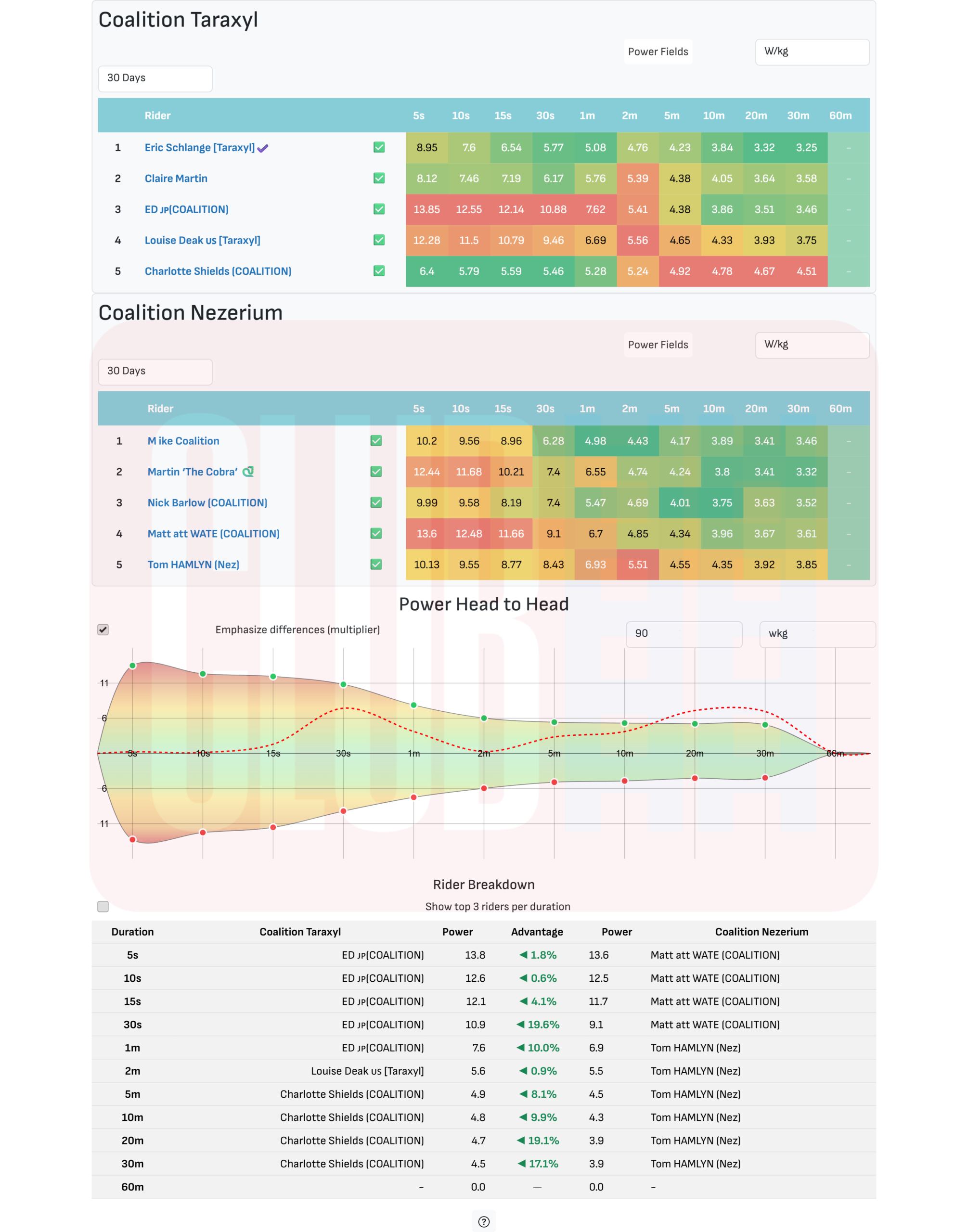
Heading into the race, we were doing what Ladder racers do: chatting on Discord to formulate a plan! Looking at power numbers, we thought we would have the advantage on the climbs, while our opponents (Coalition Nezerium, aka “Nez”) would have the pure watts to do well on flats and descents. So our plan was to make them work hard on Fox Hill, without breaking the race apart. We could then stay together for the descent and flats that followed, then go hard on Box Hill to (hopefully) drop some opponents.

The Club Ladder site produces lots of cool charts to help you plan your race. Here’s the data for this match:
On the morning of the race, one of our riders had to call in sick. Without a sub on hand, our captain reached out to the Nez squad to ask if we could make it a 4v4 race, and they agreed to do so (#sporting).

With that, our squad of four was finalized:

  • Louise Deak
  • Ed H
  • Claire Martin
  • Eric Schlange

We would be racing these Nez riders:

  • Mike
  • Martin
  • Matt
  • Tom

The Start: Fox Hill

Sitting in the London start pens, my team chatted on Discord as we spun our legs to stay warm. One of the Nez riders was wearing the wrong jersey (our jersey), and we messaged a request for him to change to his team’s kit… but that never happened. (This may seem like a small thing, but in a Ladder Race especially, wearing the right kit is important. Those visuals help you make split-second decisions and, in fact, this would cause issues later in the race.)

With DS Beccah in our ears, we headed out of the pens and turned left to cross Tower Bridge, go through The Underground tunnel, then start climbing Fox Hill.

The pace was easy until we hit Fox Hill, then it picked up predictably. Our group strung out into a single-file line, but I was able to stay in the wheels where I wanted to be, in that “comfortably suffering” place bike racers know so well.

Five minutes into the climb, we were nearing the top. Nez’s Mike was clearly struggling near the back, and Martin seemed to be hanging back to assist him. With those two dangling off the back, things felt like they were going our way.

Then suddenly, everything exploded!

I went from being well-positioned to being gapped in the span of a few seconds as Nez’s Matt (wearing our team kit) sprinted me off his wheel. By the time I realized what was happening, a sizeable gap had opened, and Claire was on my wheel, and DS Beccah was telling us not to drop Claire!
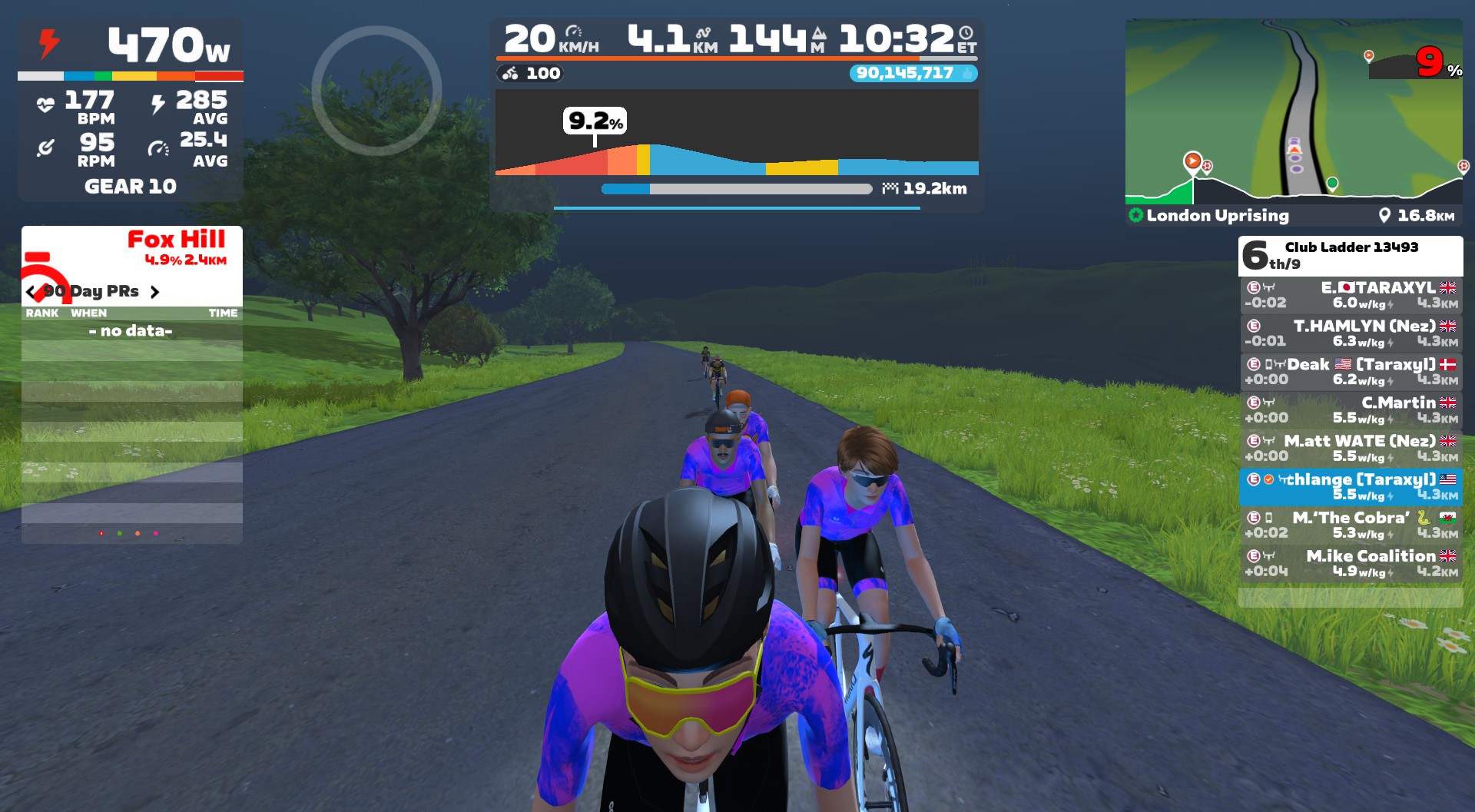
So I made the split-second decision to ease a bit to make sure Claire stayed on my wheel, because we didn’t want her in a 1v2 matchup against two bigger guys heading into the descent and flats. I figured we’d catch the group of 4 up the road on the Box Hill descent.

But I was wrong.

At the start of the descent, we were just 4 seconds behind the front group. But the two Nez riders in that group (Matt and Tom) wisely began pushing to keep their speeds high descending Box Hill, and even though we put in some digs, we weren’t able to close down the gap. In fact, it grew to 10 seconds by the bottom! Fox Hill had taken too much out of my legs, and I just didn’t have the gas in the tank to pull us back.

The Middle: Flat and Chill

With our teammates not pushing the pace in the 2v2 front group, and the Nez riders in our group not working to bridge up, Claire and I tried to keep our speed steady and high enough to chase back to the front on the flat Classique section that followed. But the Nez riders in front weren’t having it, putting in strong pulls that kept pushing that gap out. Smart.

Eventually, Claire and I pulled the plug on the chase. The race would be two groups of 2v2.

Claire and I tried a little attack on the Classique hairpin (where riders are slowed), but Mike and Martin clearly had the pure watts to hold our wheels on flat roads, and we didn’t want to burn out our legs heading into Box Hill.

With a small number of riders in our group, and no chance to bridge up to the group ahead, strategic decisions crystallized. We were confident Claire had the w/kg to drop the two Nez riders with us. And I figured I could at least drop Mike, based on how he struggled up Fox Hill. My only question was, had Martin hung back with Mike just to help, or because Martin was struggling, too?

We would know soon enough. My plan was to let Claire attack first and get a gap while I sat back and made the Nez riders chase. Then, closer to the top, if I felt up to it, I would attack and try to drop both Nez riders as well.

The Final Climb: Box Hill

Each team’s final strategies would be put to work on Box Hill. Up the road, Ed and Louise were playing chess with Nez riders Matt and Tom, each team trying to figure out how tired the other riders were, who should follow who on attacks, etc.

My group started the Box Hill KOM together, then as we turned right and began the steepest part of the climb, Claire ramped up to 4.5-5 W/kg. Martin was trying to chase, but he was slowly losing her wheel. I was sitting on his wheel, benefiting slightly from his draft while he was forced to work a little extra if he wanted to close the gap to Claire.
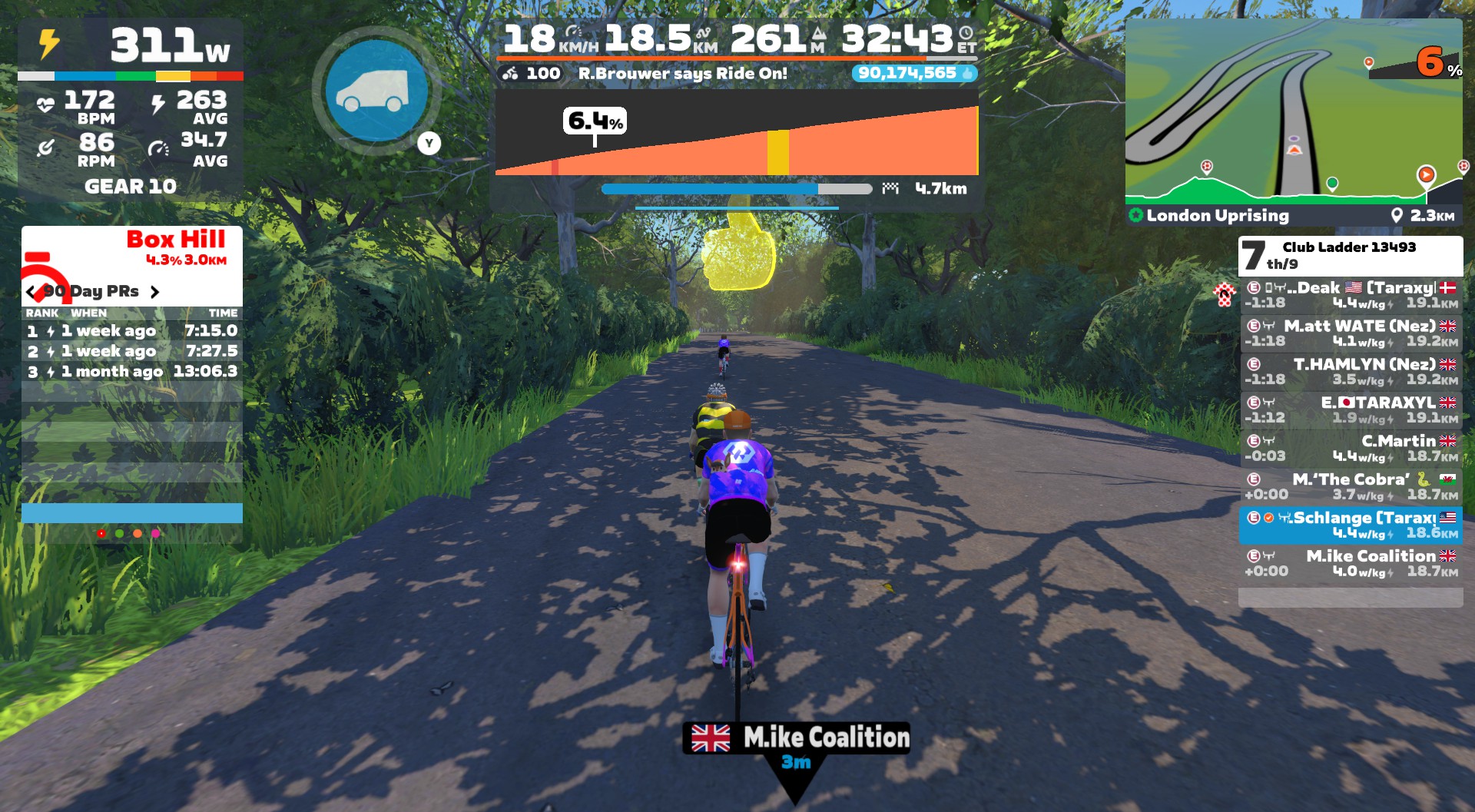
After a minute or so, Martin gave up the chase. We hit the hard left turn and the road flattened a bit, so I activated my draft powerup, grabbing just a bit of recovery and steeling myself mentally for my planned attack.

We turned the next hairpin, and as the road ramped back up to 5%, I attacked hard from Martin’s slipstream, with Claire 35 seconds up the road. I quickly opened up a gap of 10, 15, 20 meters. It was working! I gritted my teeth, trying to keep my power steady and high to the top.
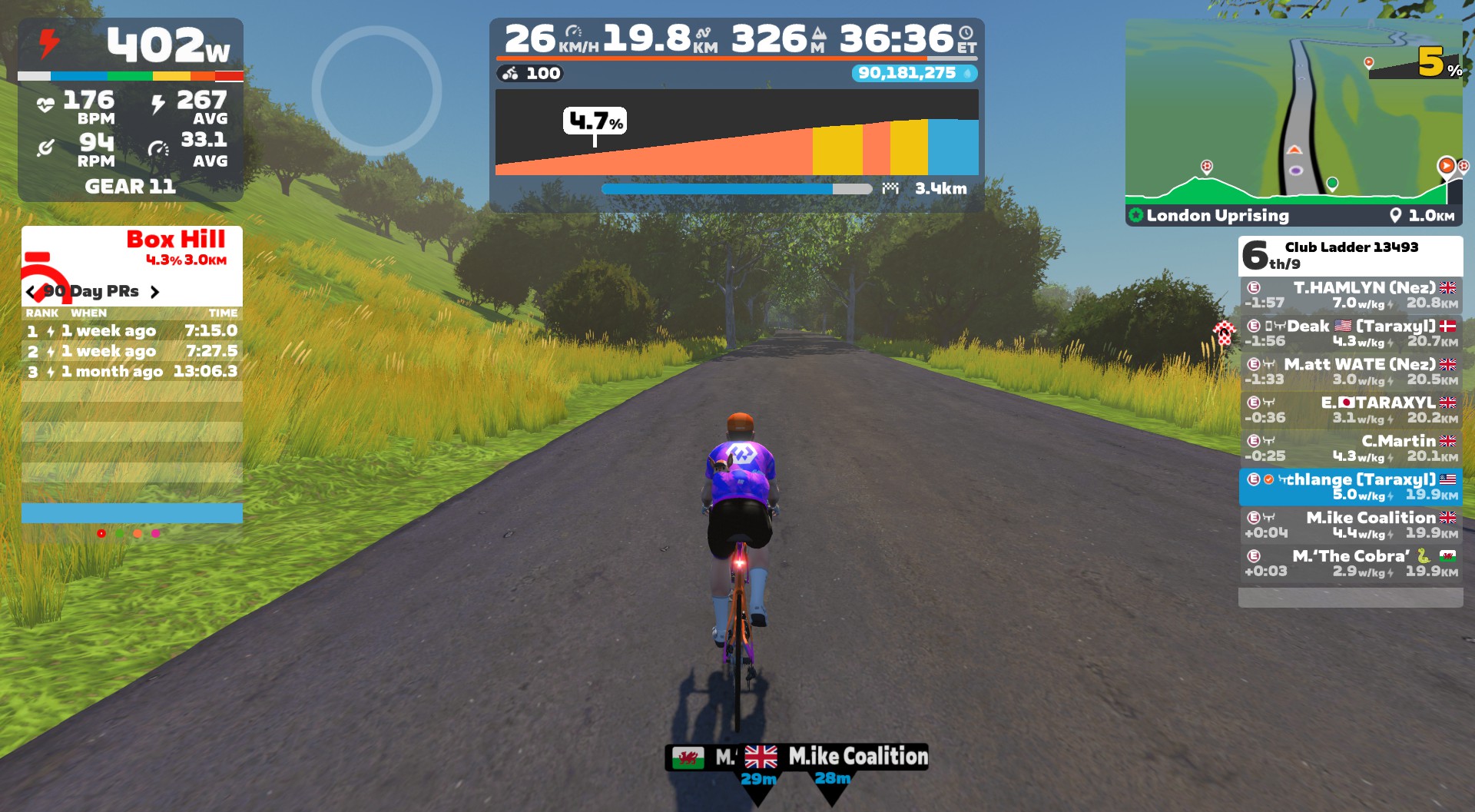
Beccah was in my ear, cheering on the effort and letting me know I had to beat both Martin and Mike for us to win. Ed chimed in, “You’ve broken them Eric, keep going.” I could see the gap growing behind me, and I kept pushing, wanting at least 10 seconds once I hit the flats so they wouldn’t have time to work together and pull me back.

The Finish

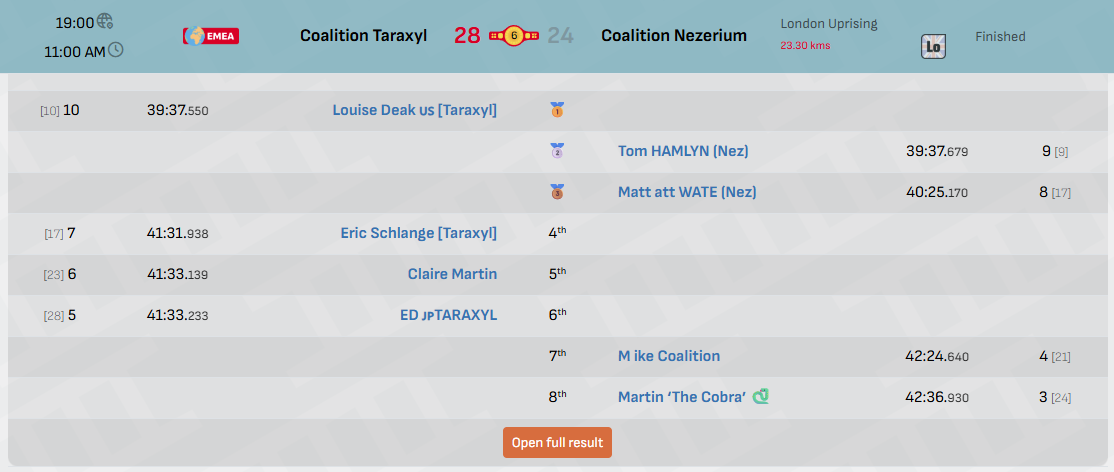
Through the Box Hill banner, I was now 30+ seconds ahead of Mike and Martin, who seemed to have given up the chase. Up the road, teammate Louise was facing off with Tom to see who would take 1st on the fast downhill finish, while Nez’s Matt was solo in the 3rd slot, and Ed and Claire were working together in the 4th and 5th slots.

In Discord, I heard the action as Louise executed a perfectly-timed sprint to take the win. Chapeau!

I hammered up the little kicker after Box Hill, keeping the power up until I could stop pedaling and supertuck. All that was left was to coast across the line near the bottom of Fox Hill…
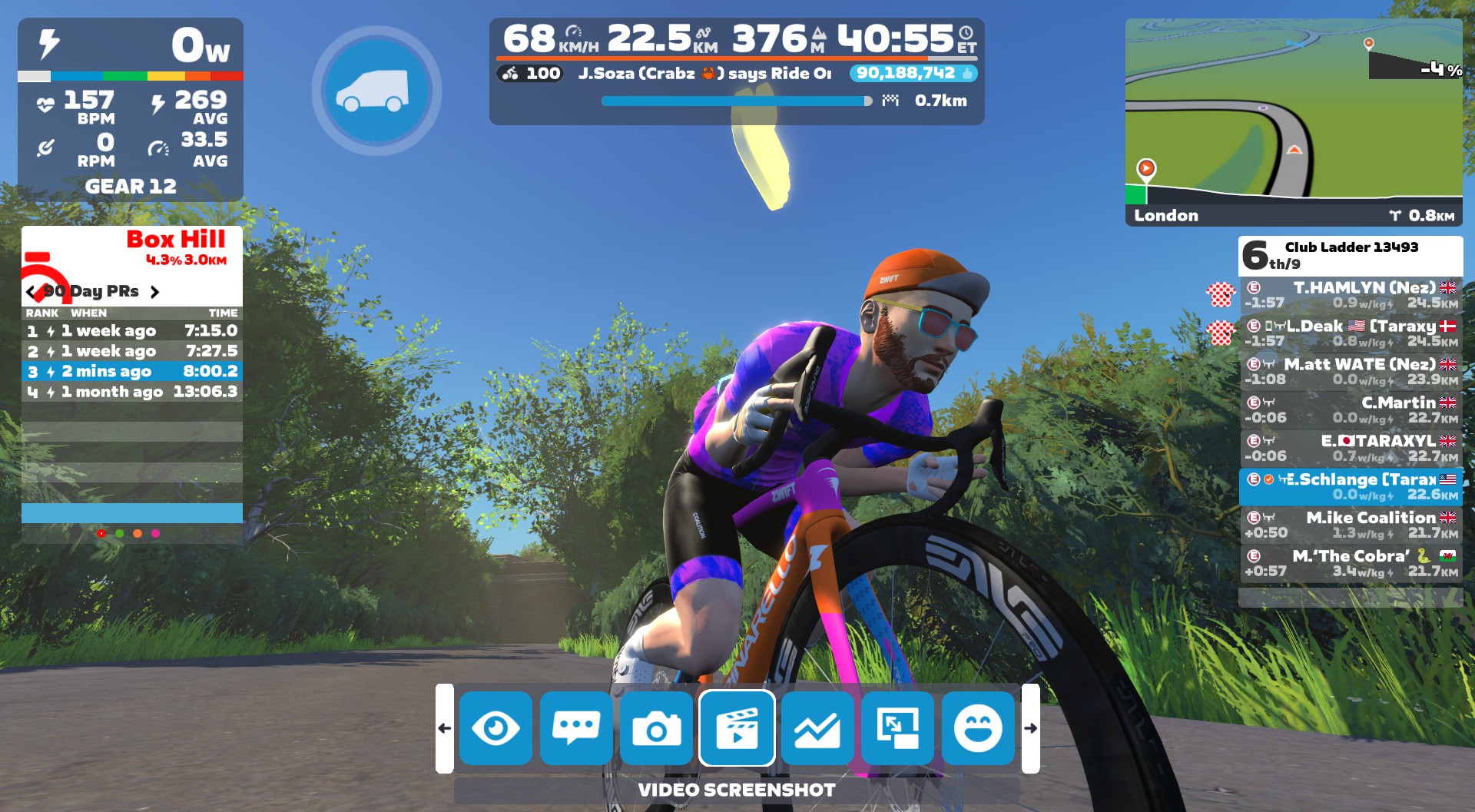
(As it turns out, my “overmuscled cyclist” physique and masterful (lazy) supertucking served me well, and I flew past Ed and Claire just before the finish, landing 4th overall.)

See final result on the Club Ladder site >
See my ride on Strava >

Watch the Video

Takeaways

It may seem counterintuitive, but these Ladder races with 2 teams and only 8-10 riders often feel like they have a lot more action than a typical Zwift race with 50+ riders. I think it’s because you’re noticing more of what’s going on, and every rider’s actions have real implications for the race. It’s a super engaging format, both mentally and physically.
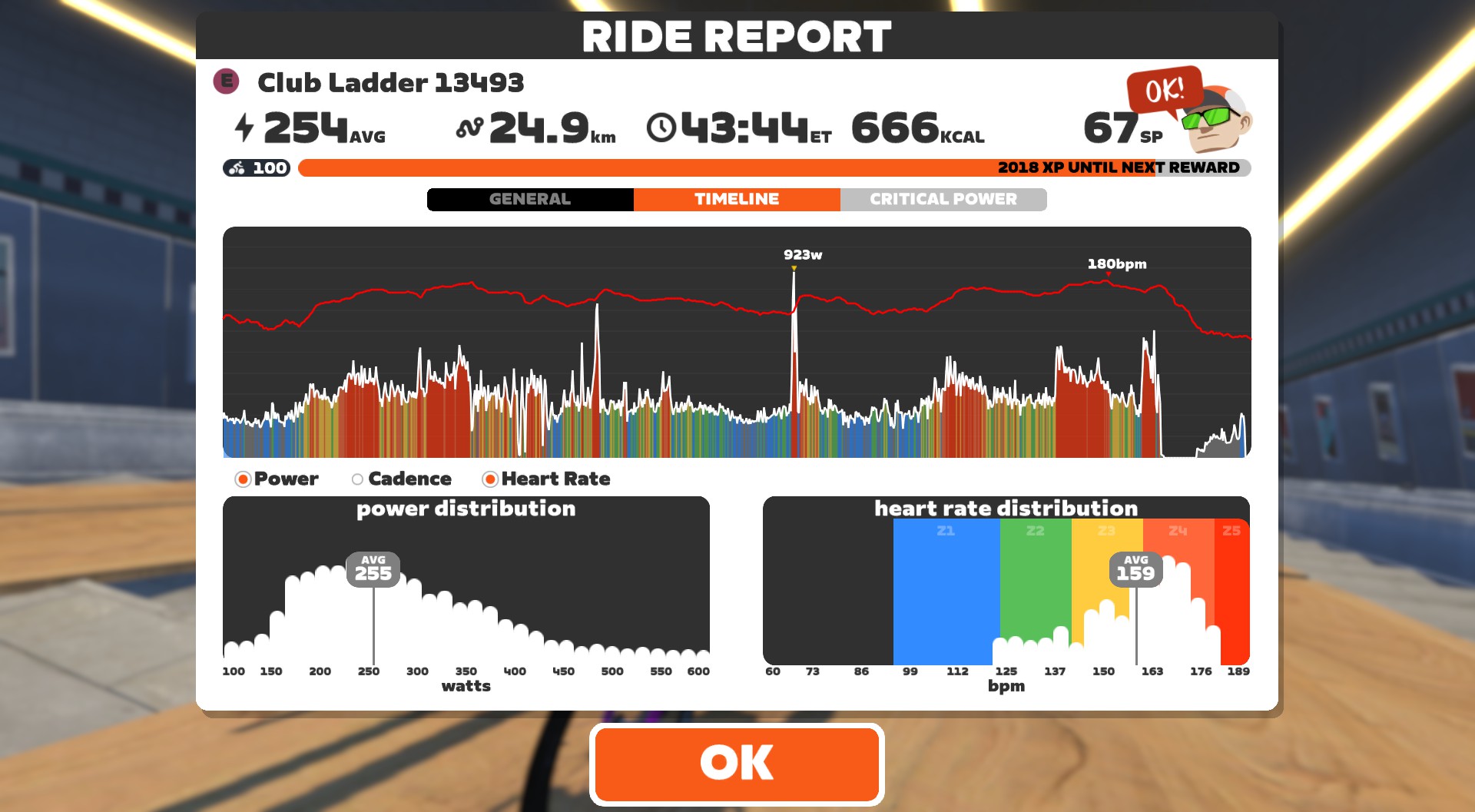
While I kicked myself a bit for being inattentive and getting gapped near the top of Fox Hill, it turned out to be a mistake that worked in our favor. (Or at least, didn’t hurt us.) Apart from that little snafu, this race had everything that makes bike racing fun for me:

  • hard efforts that put me on the rivet
  • teamwork
  • a successful attack
  • a team win

I think this is my first time riding in a mixed-gender Ladder squad, too, and that was a cool experience as well. Claire and Louise are both significantly lighter riders than the six guys in the race, and that really changes how you approach things strategically.

The Club Ladder website delivers cool post-race charts as well:
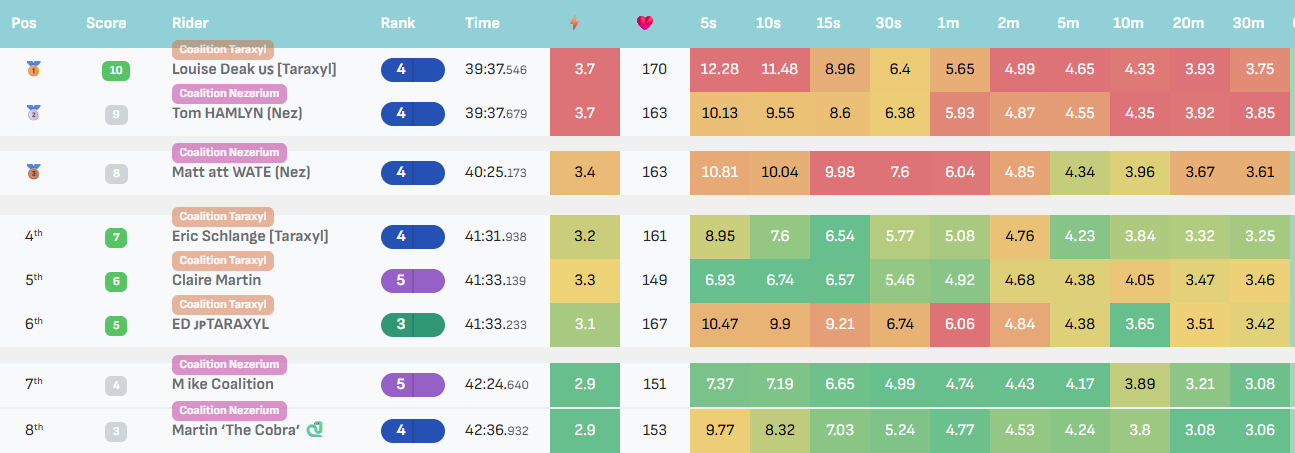
And here are the final placings and points:
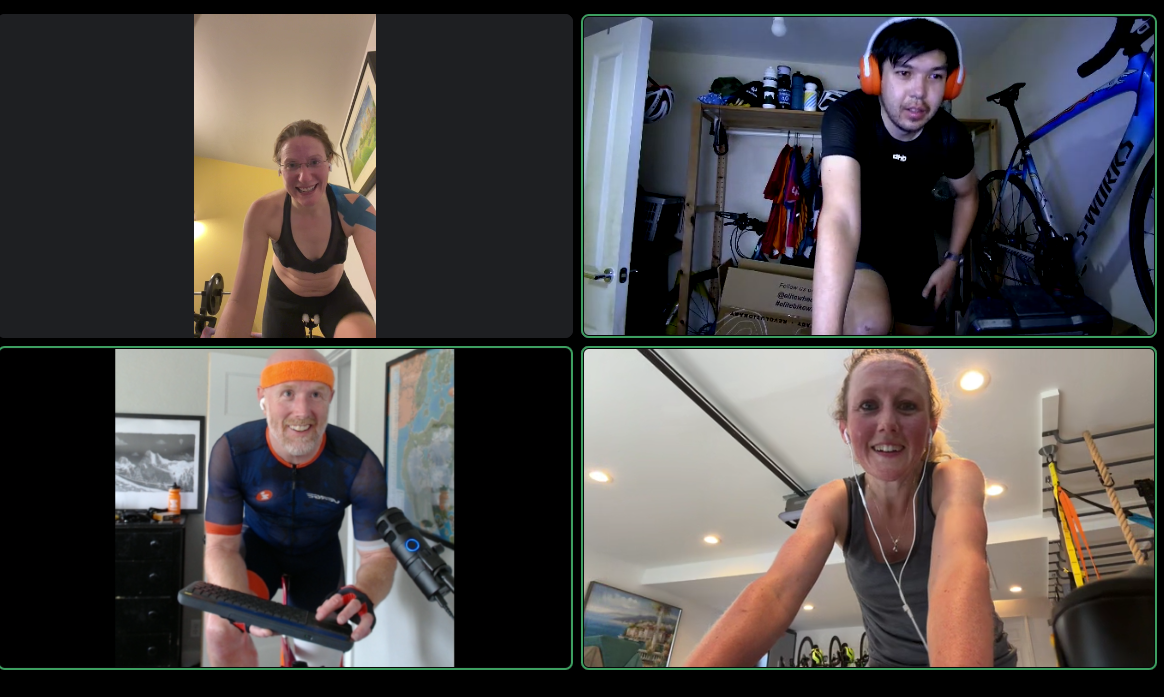
Lastly, of course, we have the traditional team shot!
Your Thoughts

Have you tried Club Ladder racing? Share your thoughts and questions below!

X adds ‘Paid Partnership’ labels so users can more easily identify ads

X is rolling out a built-in “Paid Partnership” label that creators can apply to sponsored posts, replacing the hashtag workarounds they’ve had to rely on until now. The feature, announced by the platform’s head of product Nikita Bier, adds a toggle that places a disclosure label directly below a post’s content. It can also be applied retroactively.

The label is meant to help creators comply with years-old FTC regulations requiring clear disclosure of sponsored content. The agency sent out letters reminding influencers about this requirement in 2017, and Instagram added a disclosure feature that same year. Without a native tool, X creators had been left to use hashtags like #ad and #paidpartnership.

X has been trying to court creators for some time with tools like ad-revenue sharing and creator subscriptions, but the platform still struggles with major image issues following a string of scandals like Grok creating CSAM. The Elon Musk-owned platform is under investigation both domestically and abroad for the AI agent’s behavior.

This article originally appeared on Engadget at https://www.engadget.com/social-media/x-adds-paid-partnership-labels-so-users-can-more-easily-identify-ads-183528227.html?src=rss

Apple Just Announced the M4 iPad Air

We may earn a commission from links on this page.

Apple is gearing up for a series of product announcements on Wednesday. So, naturally, the company revealed two of those products on Monday. There’s the iPhone 17e, Apple’s latest “affordable” iPhone, which largely just updates the chip to the A19. In the same vein, the company is updating its iPad Air line with the M4 chip. If you’re hoping for other big iPad Air upgrades, however, keep waiting.

The iPad Air is the same, just now with M4

If you put the M4 iPad Air side-by-side with the M3 iPad Air, you might mix the two up. That’s because Apple has changed virtually nothing about the overall design and appearance of these tablets. The 11-inch M4 Air looks like the 11-inch M3 Air, as do the two 13-inch variants.

Just about the only thing new about the M4 Air, is, well, M4. This isn’t Apple’s newest chip—that would be the M5—but the M4 is one generation newer than the M3, so you should expect some performance gains between the two. The M4 chip in the Air comes with an eight-core CPU with three performance cores and five efficiency cores, a nine-core GPU, 120GB/s memory bandwidth, and 12GB of RAM. That’s one less performance core than the M3 Air, but one more efficiency core. What’s likely going to be more dramatic is the extra 4GB of RAM, as the M3 Air only comes with 8GB. You should be able to run more tasks at once on the new Air without iPadOS needing to refresh an app or page.

We won’t know exactly how those changes will affect performance until testers get their hands on the M4 iPad Airs. However, Apple says the new iPad is up to 30% faster than the previous generation, and up to 2.3 times faster than the M1 iPad Air. (Apple tends to compare its latest products to those from multiple generations past, as the difference is often more subtle from generation to generation). To me, that means this is certainly not an iPad that M3 Air users need to consider upgrading to, but if it would likely be a good option for anyone with an older Air—or older iPad—to jump to.

With that M4 chip, Apple is adding the N1 chip and C1X modem to the iPad Air. The N1 chip comes with all M4 iPad Airs, and supports standards like Wi-Fi 7, Bluetooth 6, and Thread, a smart home standard. If you buy the cellular iPad Air, you’ll get C1X, Apple’s in-house modem that it says is 30% more efficient than the modem in the M3 iPad Air.

Aside from those points, this is the same iPad Air as the M3 model. It comes in an 11- or 13-inch option, with 12MP rear and front cameras; USB-C connectivity with Touch ID; the same battery life (Apple says 10 hours of video playback); and both still start with 128GB of storage. And, notably, it still omits a high-refresh 120Hz display for the usual 60Hz. That’s disappointing.

How to buy the M4 iPad Air

You can preorder an M4 iPad Air on March 4, starting at $599 (the same starting price as Apple’s newly-announced iPhone 17e) for the 11-inch 128GB model. The 13-inch starts at $799 for the 128GB model. Adding cellular adds $150 to the price. Apple says that the M4 iPad Air will officially launch on Wednesday, March 11—the same day as the iPhone 17e, as well as Samsung’s Galaxy S26 series.

iPad Air M4 vs. iPad Air M3: The few new things in Apple’s midrange tablet

The iPad Air, the middle child in Apple’s tablet lineup, has been upgraded to the M4 chip with increased RAM and… Well, there’s not a whole lot else if I’m being honest. At the very least, the new iPad Air M4 models remain at the same price as the iPad Air M3, with the 11-inch version starting at $599 and the 13-inch at $799. I would give Apple more credit if it had increased the starting storage or added literally anything else.

If you put them side by side, you might not be able to tell the difference, but this upgrade would benefit creatives and professionals more than anything. There’s a significant performance bump from the M3 to the M4, and the increased RAM is doing a lot of work, especially if you’re taking advantage of Apple Intelligence.

If you’re using an M1-powered iPad Air or something even older, though, the new iPad Air M4 should be a compelling upgrade. Pre-orders start at 9:15AM ET on March 4, with the units arriving a week later. We expect full reviews will be published by then. But in the meantime, let’s dive into what the performance gains might look like and what we’re missing out on in this year’s iteration of the iPad Air.

iPad Air M4 vs. iPad Air M3: Performance and battery life

The most significant difference between the two iPad Air generations is their chipsets. The latest iPad Air launches with the M4 chip versus its predecessor’s M3 chip, and it gets a bump in RAM from 8GB to 12GB.

I don’t give much fanfare to incremental chip increases because the performance gain is usually minimal. However, the M4 is up to 30 percent faster than the M3, according to Apple. That might be noticeable to even casual users, especially as the years go on and iPadOS becomes more demanding. For power users, it’ll mean more demanding work like video editing will be noticeably quicker.

For those in need of the fastest internet speeds, the new iPad Air is also equipped with Apple’s N1 chip, which enables Wi-Fi 7 and Bluetooth 6, the latest connectivity technology. However, I really don’t imagine the average user needing up to 46 gigabits per second of internet speed compared to the iPad M3’s 9.6 Gbps on Wi-Fi 6. If you do, you’re in the tax bracket for an iPad Pro.

Now, despite the increase in speeds, the battery life between the M4 and M3 models remains the same. Apple claims all four models get up to 10 hours of battery life surfing the web on Wi-Fi or watching video (up to 9 hours on cellular). No complaints here.

iPad Air M4 vs. iPad Air M3: Design, display, audio and cameras

For better or worse, we’re not getting any changes in any of these departments, which is why I’m lumping them together.

The iPad Air comes in blue, purple, beige and gray. The 11-inch option measures 9.74 x 7.02 x 0.24 inches and the 13 comes in at 11.04 x 8.46 x 0.24 inches. As their names suggest, they’re both rather light, at 1.01 pounds (1.02 pounds for M4) and 1.36 pounds, respectively. My only wish was that we got new colors that popped a bit more.

Then there’s the displays. All four versions of the iPad Airs sport a Liquid Retina LED display at 264 ppi. The 11-inch supports a 2,360 x 1,640 resolution with a peak brightness of 500 nits, while the 13-inch offers a 2,732 x 2,048 resolution at 600 nits. It would’ve been nice to see an OLED or even Mini-LED panel make its way to the iPad Air, which could’ve made the screen more vivid and vibrant. But it’s more disappointing that we’re stuck at 60Hz unlike the Pro models that offer 120Hz, making their visual experience smoother.

Both products feature landscape stereo speakers. The iPad Air M3’s audio quality couldn’t live up to the iPad Pro, so I doubt the M4 model will.

You won’t catch me taking photos with an iPad, but for those of you who do, the iPad Air M4 features the same 12MP cameras on the front and back as its predecessor.

iPadOS 26, Apple Intelligence and Apple accessories

Nothing huge is happening to iPadOS or the Apple accessories in the iPad Air refresh. The revamped Magic Keyboard from last year still works with these new models, as does the Apple Pencil Pro. iPadOS 26, released last fall, was a major update but will still be familiar enough to anyone who has used an iPad before. The new iPad Air M4 is getting a significant boost in AI processing speeds, though, thanks to its new chip and 50 percent increase in RAM. However, unless you’re an AI power user, you probably won’t notice a difference there.

All that said, if your love language is spreadsheets, the full specs are helpfully laid out below:

iPad Air M4 vs. iPad Air M3: Specs at a glance

Spec

iPad Air M4

iPad Air M3

Price

$599 (11-inch), $799 (13-inch)

$599 (11-inch), $799 (13-inch)

Processor

M4

M3

Display

11-inch: Liquid Retina, 2,360 x 1,640, LED display at 264 ppi

13-inch: Liquid Retina, 2,732 x 2,048, LED display at 264 ppi

11-inch: Liquid Retina, 2,360 x 1,640, LED display at 264 ppi

13-inch: Liquid Retina, 2,732 x 2,048, LED display at 264 ppi

RAM

12GB

8GB

Storage

128GB, 256GB, 512GB, 1TB

128GB, 256GB, 512GB, 1TB

Battery

Up to 10 hours (Wi-Fi), 9 hours (Cellular model)

Up to 10 hours (Wi-Fi), 9 hours (Cellular model)

Cameras

12MP Wide (rear), 12MP Center Stage (front)

12MP Wide (rear), 12MP Center Stage (front)

Apple accessories

Apple Pencil Pro, Apple Pencil, Magic Keyboard Folio

Apple Pencil Pro, Apple Pencil, Magic Keyboard Folio

Dimensions

11-inch: 9.74 x 7.02 x 0.24 inches

13-inch: 11.04 x 8.46 x 0.24 inches

11-inch: 9.74 x 7.02 x 0.24 inches

13-inch: 11.04 x 8.46 x 0.24 inches

Weight

11-inch: 1.02 pounds

13-inch: 1.36 pounds

11-inch: 1.01 pounds

13-inch: 1.36 pounds

This article originally appeared on Engadget at https://www.engadget.com/mobile/tablets/ipad-air-m4-vs-ipad-air-m3-the-few-new-things-in-apples-midrange-tablet-182701520.html?src=rss

The Analogue Pocket will be back in stock this week, but there’s a tariff-related price increase

The Analogue Pocket handheld retro console has proven to be extremely popular, as initial runs have sold out. The company just announced the system will be back in stock this week, along with the dock accessory. Preorders open up on March 4 at 11AM ET, with shipments going out this June.

Analogue Pocket & Analogue Dock – restock.

A tribute to portable gaming. Out of the box, Pocket is compatible with the 2,780+ Game Boy, Game Boy Color & Game Boy Advance game cartridge library and more.

Available March 4th, 8am PST.
Ships June 2026. pic.twitter.com/8XZ3fbh87a

— Analogue (@analogue) March 2, 2026

That’s the good news. The bad news? The little console is getting slapped with a price increase. It’s shooting up to $240 from the recent price of $220, with the company placing the blame squarely on President Trump’s neverending tariffs. The device is assembled in China and Trump just hit the region with even more tariffs after the Supreme Court struck down the old ones. We love to suddenly pay more for gadgets that have been out in the wild for nearly six years, don’t we folks?

For the uninitiated, the Pocket isn’t an emulation machine. It plays actual Game Boy, Game Boy Color and Game Boy Advance cartridges. It also integrates with various Game Boy accessories, like the camera and printer. The console can even handle Game Gear, TurboGrafx-16 and Atari Lynx games, but those require separate adapters.

We praised the Analogue Pocket in our official review, calling it “a clever little thing” that is sure to light up the nostalgia center of your brain. It even made our list of the best handheld consoles, which is notable given competition included stuff like the Steam Deck.

In any event, this drop will likely sell out quickly. We recommend parking a browser on the company website just prior to 11AM ET if you can stomach the new price.

This article originally appeared on Engadget at https://www.engadget.com/gaming/the-analogue-pocket-will-be-back-in-stock-this-week-but-theres-a-tariff-related-price-increase-182226016.html?src=rss

Charter gets FCC permission to buy Cox and become largest ISP in the US

Charter Communications, operator of the Spectrum cable brand, has obtained Federal Communications Commission permission to buy Cox and surpass Comcast as the country’s largest home Internet service provider.

Charter has 29.7 million residential and business Internet customers compared to Comcast’s 31.26 million. Buying Cox will give Charter another 5.9 million Internet customers. The FCC approved the deal on Friday, but the companies still need Justice Department approval and sign-offs from states including California and New York.

Opponents of Charter’s $34.5 billion acquisition told the FCC that eliminating Cox as an independent entity will make it easier for Charter and Comcast to raise prices. But the FCC dismissed those concerns on the grounds that Charter and Cox don’t compete directly against each other in the vast majority of their territories.

Read full article

Comments

EcoFlow’s Most Powerful Portable Power Station Is 46% Off Right Now

We may earn a commission from links on this page. Deal pricing and availability subject to change after time of publication.

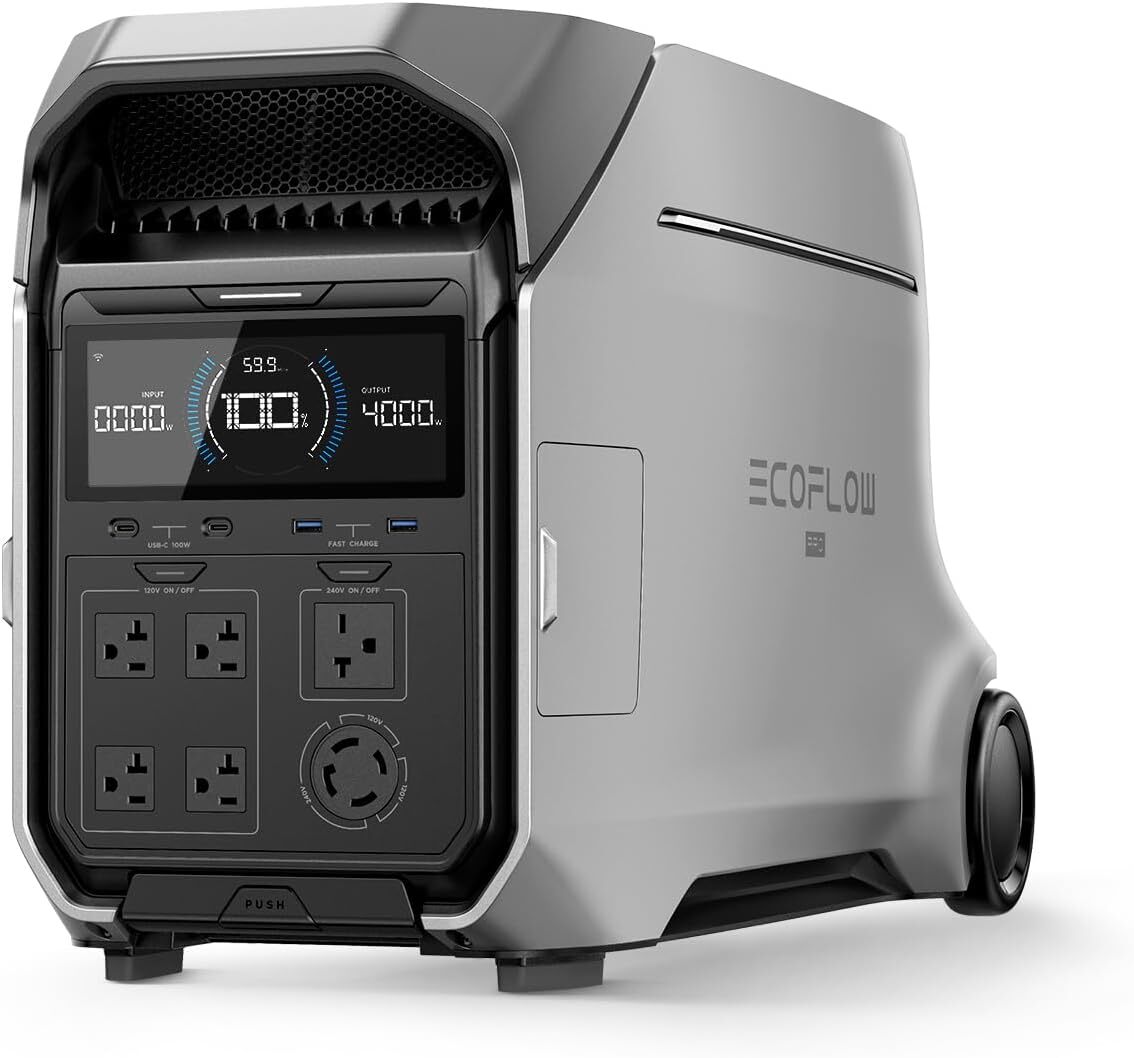
I didn’t understand the need for a power station until this past winter gave me a rude awakening. Although I ultimately didn’t lose power, the prep for that what-if scenario of facing freezing temperatures without power was enough for me to decide to get one. While I went with the EcoFlow DELTA 3 Ultra Plus, I should have waited, because the more powerful EcoFlow Delta Pro 3 is $1,999 right now—a steep 46% discount from the $3,699 list price. This is its lowest price ever, according to price tracking tools.

While I haven’t had a chance to put the power station to the test during a full blackout, I am impressed by the functionality of the EcoFlow app. You get the ability to prioritize which devices receive power the longest, so when battery power is scarce, the essentials will keep running while the other devices shut off. How that might work in the real world: You leave your refrigerator plugged in overnight, along with your phones and a heater. You can prioritize your refrigerator so if the battery runs low during the night, it will shut off power to your phone and heater to keep you fridge running longer. You can also monitor your energy use, and the app will automatically start charging your power station if it detects a storm is coming.

The power station is extremely quiet when in use. Although it’s heavy, it’s still easily portable with its handle and rear wheels. The unit has seven AC outlets total, including standard, RV, 240 V, and twist‑lock, four USB ports (A and C), two 12 V DC outputs, and solar charging inputs if you ever want to get extra accessories down the road.

The 4096 Wh battery can keep essentials running for a while—it can power the average fridge for up to 28 hours while keeping other essentials like Wi-Fi, lights, phone charging, and AC running simultaneously.

Our Best Editor-Vetted Tech Deals Right Now

Deals are selected by our commerce team

Editor At 184-Year-Old Ohio Newspaper Pushes To Let AI Draft News Articles

An anonymous reader quotes a report from the Washington Post: The Plain Dealer, Cleveland’s largest newspaper, has begun to feature a new byline. On recent articles about an ice carving festival, a medical research discovery and a roaming pack of chicken-slaying dogs, a reporter’s name is paired with the words “Advance Local Express Desk.” It means: This article was drafted by artificial intelligence. “This article was produced with assistance from AI tools and reviewed by Cleveland.com staff,” reads a note at the bottom of each robot-penned piece, differentiating it from those still written primarily by journalists. The disclosure has done little to stem the backlash that caromed across the news industry after the paper’s editor, Chris Quinn, published a Feb. 14 column lamenting that a fresh-out-of-college job applicant withdrew from a reporting fellowship when they found out the position included no writing — just filing notes to an AI writing tool.

“Artificial intelligence is not bad for newsrooms. It’s the future of them,” Quinn wrote, adding that “by removing writing from reporters’ workloads, we’ve effectively freed up an extra workday for them each week.” […] Quinn, for his part, says his paper’s use of AI to find, draft and edit stories is a success story that others must emulate if they want to survive. “It’s a tool,” he said in a phone interview last week. “If AI can do part of our job, then why not let it — and have people do the part it can’t do?” He added that the paper’s embrace of technology — including using AI to write stories summarizing its reporters’ podcasts and its readers’ letters to the editor — is already boosting its bottom line, helping it retain staff at a time when other newspapers are shrinking or even shutting down. Just 130 miles east of Cleveland, the 240-year-old Pittsburgh Post-Gazette said in January that it will close its doors this spring.

Quinn, who has led the Plain Dealer’s newsroom since 2013, said its newsroom has shrunk from some 400 employees in the late 1990s to just 71 today. Over the past three years, Quinn has implemented a suite of AI tools with various purposes: transcribing local government meetings, scraping municipal websites for story leads, cleaning up typos in story drafts, suggesting headlines and helping reporters draft follow-ups to articles they’ve already written. He said he is particularly pleased with an AI tool that turns podcasts by the paper’s reporters into stories for the website, which he said generated more than 10 million page views last year. He has documented those efforts in letters to readers and sought their feedback. But the paper’s latest experiment — using AI to turn reporters’ notes into full story drafts — has aroused indignation online and anxiety within the paper’s ranks.


Read more of this story at Slashdot.

Intel’s Powerhouse BMG-G31 GPU For Arc Pro B70 Breaks Cover In Official Document

Intel's Powerhouse BMG-G31 GPU For Arc Pro B70 Breaks Cover In Official Document
We’ve believed with confidence for a while now that Intel was bringing out its BMG-G31 “Big Battlemage” GPU as the Arc Pro B70 first, foremost, and possibly exclusively. Now we have explicit proof straight from Intel, in the form of the patch notes for the company’s LLM-Scaler-vLLM, which is a containerized, Intel-optimized distribution of

Pico’s Next Headset Has 4K Micro-OLEDs, Powerful New Chip & Next-Gen OS

ByteDance’s Pico announced the key display and compute specs of its “Project Swan” headset, coming later this year, and detailed the revamped XR operating system it will run.

Project Swan Headset

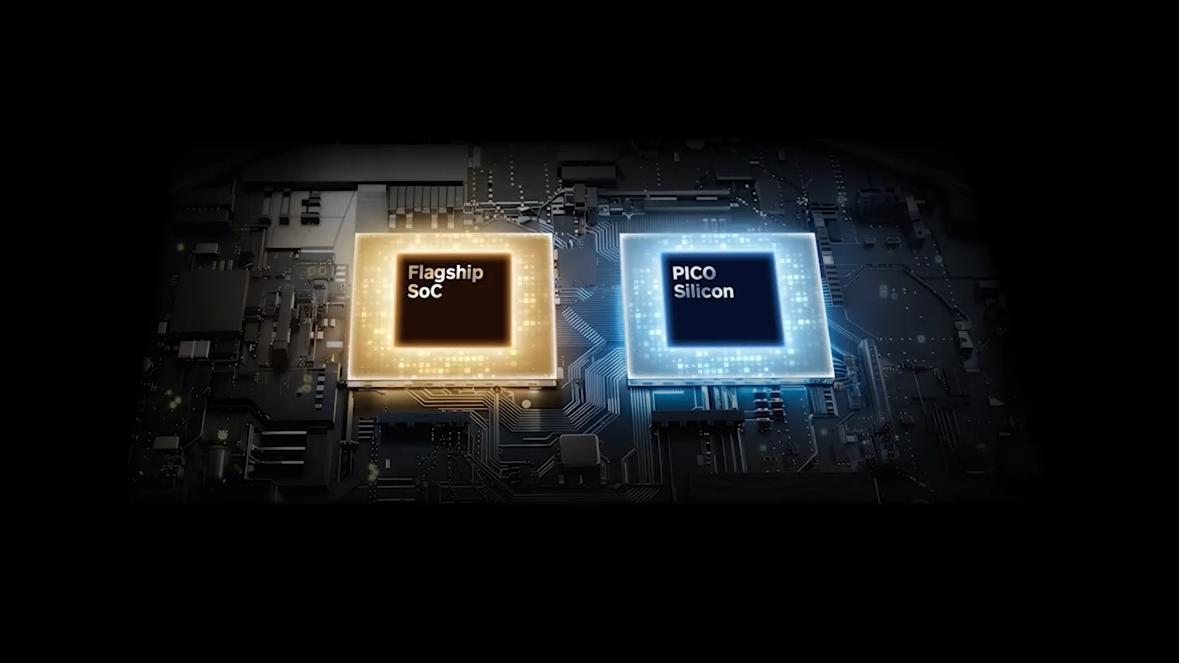
After years of rumors, ByteDance first officially teased a high-end Pico headset back in November, when its VP of Technology said during a talk in China that it would arrive in 2026 with micro-OLED panels with 4000 pixels per inch (PPI) and a dual-chip architecture with a self-developed coprocessor for computer vision and image processing.

Now, Pico has officially announced these details to the world, and also says that the main processor will have double the CPU and GPU performance of the Snapdragon XR2 Gen 2 in today’s Pico 4 Ultra and Meta Quest 3 headsets.

0:00

/0:20

Pico’s graphic depicting the “new generation” micro-OLED displays.

Pico says the “new generation” 4000 PPI micro-OLED panels will deliver an average angular resolution of 40 pixels per degree (PPD) and peak of 45 PPD, greater than that of Apple Vision Pro and good enough for text on virtual monitors. That strongly suggests 4K per-eye resolution, though this will depend on the field of view.

Meanwhile, the custom chip that powers computer vision and image processing will deliver “approximately 12 milliseconds of latency”, the company says, the same figure Apple gives for the R1 chip in Vision Pro headsets.

Other than these display and compute specs, and confirming that it will feature hand and eye tracking, Pico isn’t yet revealing specific details about Project Swan, including who is providing the powerful new primary chipset. It’s possible it could be a Snapdragon XR2 Gen 3 from Qualcomm, but there’s no direct indication of this.

Pico’s graphic depicts the two chips beside each other.

Last year, The Information reported that Pico was working on an ultralight headset a fraction of the weight of typical VR headsets, achieved via the use of a tethered compute puck. But the company isn’t yet confirming the form factor, and a graphic during the announcement depicted the primary and secondary chipsets positioned alongside each other, not one separated into a puck. It’s possible that report referred to a different in-development Pico headset.

Pico OS 6 & Pico Spatial Engine

While Project Swan is what will draw headlines, Pico’s main focus with today’s announcement is actually Pico OS 6, the revamped version of its XR operating system that the new headset will run.

We first learned of Pico OS 6 and some of its standout features last month via the listing for a talk the company is set to give next week at GDC 2026. The listing referred to Pico OS 6 supporting “a new paradigm for spatial experiences in which games and apps coexist, allowing a primary experience to run alongside companion applications in a shared environment”, and today the company has explained what that means.

0:00

/0:20

Pico OS 6

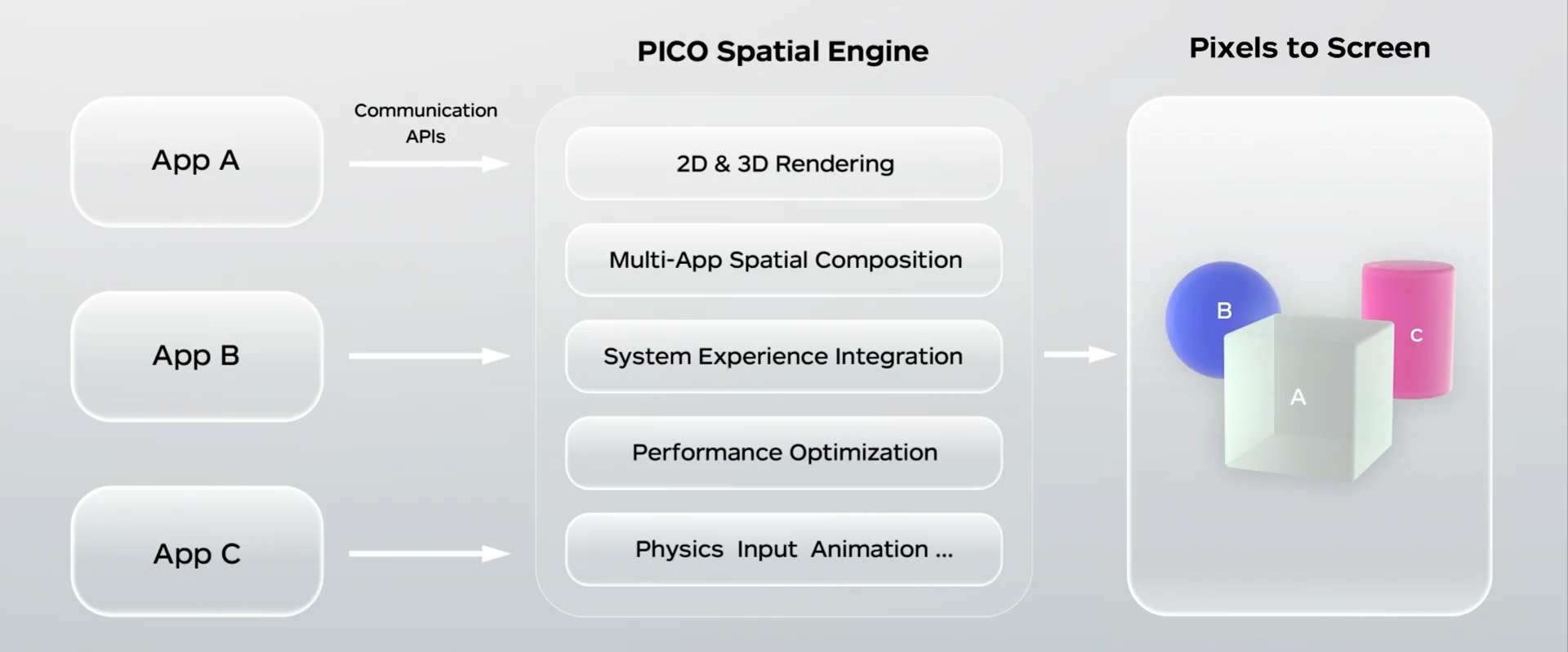
Like Apple’s visionOS, Pico OS 6 features an advanced OS-level compositor with a unified rendering architecture that enables both 2D and 3D apps to run alongside each other, with either a virtual environment or physical reality as the background. The operating system handles rendering and interaction, enabling a cohesive experience where all system-level features are supported and consistent. That includes environmental lighting, dynamic occlusion, spatial audio, physics with real-world surface collisions, and scene understanding.

The company calls this system Pico Spatial Engine, and says it has spent the past two years building it.

This is in stark contrast to Meta’s Horizon OS and Google’s Android XR, which only support running a single 3D app at a time.

The general architecture of Pico Spatial Engine.

Pico OS 6 features a visionOS-like design language that the company calls Cloud Crystal, and developers will be able to use the Pico Spatial UI system to build interfaces that feel consistent with the OS and adapt to real-world lighting, leveraging Pico Spatial Engine.

0:00

/0:20

A mixed reality game running on Pico OS 6.

Developers can build apps using Pico Spatial SDK, with support for Android Studio and Kotlin, or continue to use Unreal and Unity, with Pico Spatial Support for both engines providing the key features of the Pico Spatial Engine.

Pico says the OS continues to fully support OpenXR, and that all apps that run on Pico 4 Ultra today will be able to run on Project Swan.

The company also introduced an open-source WebXR framework called WebSpatial, which it calls an “open, minimal extension to HTML, CSS, and JS” that lets web developers easily build spatial experiences.

Global Early Access Program

Pico has opened applications for closed beta access to Pico OS 6 and the Project Swan headset.

The company says it will choose “a select few with deep expertise across XR platforms” to join the program, and wants “rigorous feedback” on the hardware and software before a wider release.

Pico’s full announcement video.

Interested developers and XR experts can apply using this ByteDance form.

You Can Get This Highly Rated Smartphone Gimbal for $99 Right Now

We may earn a commission from links on this page. Deal pricing and availability subject to change after time of publication.

Smartphone cameras have reached a point where the weak link in most videos is no longer image quality—it’s shaky hands. The DJI Osmo Mobile 7P is built to fix that, and it’s currently down to $99 from $129.99, its lowest price so far, according to price-trackers. It’s a foldable three-axis gimbal that supports larger phones like the iPhone 16 Pro Max and Galaxy S25 Ultra without feeling strained. Once your phone is mounted and balanced, the motors keep footage level and smooth in a way that built-in stabilization still can’t fully match.

Getting started does not require much setup. You unfold it, snap your phone into the clamp, and it balances itself in seconds. The controls are straightforward and placed where your fingers naturally rest. The joystick lets you nudge the frame left or right, and the record button is easy to hit without shifting your grip. A rear trigger switches between portrait and landscape instantly, so you can move from TikTok to YouTube framing without taking the phone off. There’s also a built-in extension rod for higher or wider angles, and a small tripod in the base for hands-free filming. The magnetic multifunction module is where it becomes more than just a stabilizer. It enables gesture control and subject tracking even inside third-party apps, so you are not locked into DJI’s app ecosystem.

In actual use, the tracking is what changes the experience most. The gimbal locks onto your face and follows you as you move across a room, which makes solo filming feel far less awkward. You do not have to keep checking whether you are still centered in the frame; that alone can save time during retakes. It’s one reason why PCMag gave the Osmo Mobile 7P an “outstanding” rating, and Lifehacker’s Associate Tech Editor Michelle Ehrhardt said it feels like having “your own dedicated camera person” once you learn the basics. Battery life will depend on how many of those features you keep running. DJI estimates up to 10 hours if you are just using the gimbal. Turn on the tracking module, and you are closer to 4.5 hours. Add the fill light, and it drops to around three. For short sessions or content captured in bursts, that is workable. For long events or full-day shoots, you may need a power bank.

If you mostly film static videos at a desk, a simple tripod is probably enough. But if your content involves movement, walking shots, or filming yourself without help, the Osmo Mobile 7P can make your footage look more controlled without making your setup complicated.


Our Best Editor-Vetted Tech Deals Right Now

Deals are selected by our commerce team

The Supreme Court doesn’t care if you want to copyright your AI-generated art

As AI-generated artwork becomes more commonplace, it still won’t be able to be copyrighted, according to US courts. On Monday, the US Supreme Court declined to hear a case about whether an artwork generated with the help of AI can be copyrighted. The refusal means that a lower court’s decision to reject the copyright request will stand.

The case dates back to 2018 when Stephen Thaler applied for a copyright of an artwork called A Recent Entrance to Paradise. Unlike using ChatGPT or Midjourney, Thaler, a computer scientist, created an AI system that generated the artwork in question. However, the US Copyright Office rejected his application in 2022 on the grounds that it wasn’t made by a human author. Thaler sought appeals at higher courts, but ultimately had to escalate the case to the Supreme Court after both a federal judge in Washington and the US Court of Appeals ruled against him.

With a refusal from the highest court in the US, it’s unlikely Thaler’s case can continue. The US Supreme Court could always hear a related case in the future, but Thaler’s lawyers said, “even ⁠if it later overturns the Copyright Office’s test in another case, it will be too late,” adding that the decision will have negatively impacted the creative industry during “critically important years.” It’s worth noting that Thaler also filed applications to the US Patent and Trademark Office for AI-generated inventions, which were rejected for similar reasons.

This article originally appeared on Engadget at https://www.engadget.com/ai/the-supreme-court-doesnt-care-if-you-want-to-copyright-your-ai-generated-art-171849407.html?src=rss

These Stylish Marshall Headphones Are Over $100 Off Right Now

We may earn a commission from links on this page. Deal pricing and availability subject to change after time of publication.

Marshall’s Monitor III ANC headphones have the kind of design that makes you want to show them off. The textured earcups and gold logo lean fully into the amp-inspired look, and at $249.99 (down from $379.99, and currently their lowest price ever, according to price trackers), they’re finally priced in a way that feels competitive.

These are over-ear Bluetooth headphones with active noise cancellation, and they’re clearly aimed at people cross-shopping Bose and Sony. The difference is that Marshall is selling a vibe along with the sound. The build feels sturdy, and small details like replaceable ear cushions and a swappable silicone headband strap suggest they’re made to last longer than most. They fold down neatly into a compact hard case (included), but they’re not water-resistant, so they’re better suited for travel and home listening than sweaty workouts.

Living with them day to day is mostly smooth. The small gold joystick handles volume and track controls in a way that feels intuitive after a few minutes. There’s a separate button to toggle noise cancellation and transparency, plus a customizable shortcut button you can set up in the Marshall app. The app itself is simple, with a five-band EQ and a few presets, though it’s not especially deep if you like fine-tuning every frequency. Bluetooth 5.3 keeps connections stable, but you’re limited to AAC and SBC codecs, so there’s no hi-res audio support. You also can’t charge and listen through a traditional 3.5mm cable at the same time, since the single USB-C port handles both charging and wired playback.

Battery life is where these headphones stand out. Up to 70 hours with ANC on is more than enough for long trips, and turning ANC off stretches that to an almost excessive 100 hours. As for sound, they deliver strong bass and crisp highs, with enough punch to make hip-hop and electronic tracks feel lively. Noise cancellation reduces plane engine rumble and city noise well, but it does not match leaders like Bose in blocking midrange chatter, notes this PCMag review. If top-tier ANC is your priority, Bose still has the edge. If you want bold design, long battery life, and lively sound at a significant discount, this deal makes the Monitor III ANC worth a look.


Our Best Editor-Vetted Tech Deals Right Now

Deals are selected by our commerce team

Apple Introduces iPhone 17e With MagSafe and A19

Apple today announced the iPhone 17e with support for MagSafe and an upgraded A19 chip. The base model also gets a bump to 256GB of storage at $599, and Apple is equipping the device with its new scratch-resistant Ceramic Shield 2 glass that’s supposedly 3x more durable than the 16e. Macworld reports: MagSafe would normally mean significantly faster wireless charging speeds too: the 16e is capped at 7.5W, whereas recent iPhones can wirelessly charge using MagSafe at up to 22W or even 25W. Unfortunately the iPhone 17e has not been given access to the full extent of MagSafe’s powers in this regard, and has a limit of 15W. That’s the same as MagSafe on the iPhones 12 through 15, and remains an improvement on the 16e, but is still disappointing. […]

It was also expected that the 17e would get a new processor, as this is a standard upgrade for almost every refresh of almost every Apple product. The iPhone 16e came with an A18 chip; the 17 has an A19, which, according to Apple, “delivers exceptional performance for everything users do.” Of course that depends on the user and their needs, and it’s important to point out that, just like last year, Apple has chosen to use “binned” units of the chip in order to save money. Binned chips have failed manufacturing tests in some minor way and don’t have the full complement of cores. […]

And although the cameras are still disappointingly few in number — one on the front and one on the back — the wording for the portrait mode has been updated from “Portrait mode with Depth Control” (the same as on the iPhone 12) to “Next-generation portraits with Focus and Depth Control” (same as on the iPhone 17). This appears to highlight the fact that you can change the focus point. The 17e is available in white, black, and soft pink starting at $599.


Read more of this story at Slashdot.