Highguard has raided its last fortress, will shutdown on March 12

Highguard, the live-service multiplayer shooter that was announced at the Game Awards 2025, is shutting down on March 12. Developer Wildlight Studios shared that the game would be winding down alongside details of its final update, which include a new character, weapon and skill trees.

“Today we’re sharing difficult news. We have made the decision to permanently shut down Highguard on March 12,” Wildlight Studios shared via a statement on the Highguard X account. “Since launch, more than two million players stepped into Highguard’s world. You shared feedback, created content, and many believed in what we were building. For that, we are deeply grateful. Despite the passion and hard work of our team, we have not been able to build a sustainable player base to support the game long term. Servers will remain online until March 12. We hope you’ll jump in with us one more time to show your support and get those final great matches in while we still can.”

When Highguard shuts down next week, it will have been available to play for a grand total of 46 days. That’s longer than the two weeks Concord received, but tragic for an online multiplayer game that was still in some form of active development. Wildlight Studios laid off some of its staff not long after Highguard launched, but a smaller team of developers has been supporting the game with new content since then, adding things like a “5v5 raid mode” and today’s final update.

While it’s easy to chalk up Highguard‘s failure to a shrinking appetite for live-service games or an inability to find an audience for the game’s mix of competitive hero shooter and MOBA strategy mechanics, the reality is more complicated. The first hint that Highguard‘s launch might be troubled was the dearth of information or marketing shared about the game after its debut at the Game Awards. Wildlight Studios’ staff was full of former Respawn employees who shadowdropped Apex Legends to great success, and Bloomberg reports Wildight’s executives thought they could pull off something similar with Highguard. The difference is, little was known about Apex Legends until after it launched, while players had over a month to stew on the Highguard trailer and form all sorts of opinions.

Wildlight’s inability to keep players coming back — SteamDB shows the game peaked at over 97,000 concurrent players and is now sitting at around 300 — also hurt its chances. Dwindling player counts reportedly played a role in one of Wildlight’s investors, Tencent, pulling funding, which reduced the runway the studio had to continue working on the game and likely prompted its layoffs. It would be simple if the lesson here was for future studios to give up developing online multiplayer games, but it really seems like not one, but all of these elements led to Highguard‘s ultimate demise.

This article originally appeared on Engadget at https://www.engadget.com/gaming/highguard-has-raided-its-last-fortress-will-shutdown-on-march-12-225531035.html?src=rss

No fooling: NASA targets April 1 for Artemis II launch to the Moon

NASA has fixed the problem that forced the removal of the rocket for the Artemis II mission from its launch pad last month, but it will be a couple of weeks before officials are ready to move the vehicle back into the starting blocks at Kennedy Space Center in Florida.

The 322-foot-tall (98-meter) rocket could have launched as soon as this week after it passed a key fueling test on February 21. During that test, NASA loaded the Space Launch System rocket with super-cold propellants without any major problems, apparently overcoming a persistent hydrogen leak that prevented the mission from launching in early February.

However, another problem cropped up just one day after the successful fueling demo. Ground teams were unable to flow helium into the rocket’s upper stage. Unlike the connections to the core stage, which workers can repair at the launch pad, the umbilical lines leading to the upper stage higher up the rocket are only accessible inside the cavernous Vehicle Assembly Building (VAB) at Kennedy.

Read full article

Comments

You Can Now Customize Your Calling Card on Android

If you’re an Android user, you can now design what shows up on your contacts’ caller ID when you make calls in the Google Phone app. The Calling Cards feature is getting an upgrade that brings it more in line with Apple’s customizable Contact Poster on iOS.

Google’s Calling Cards update

Google first introduced Calling Cards for the Google Phone app last year, which allowed users to manually create full-screen calling cards for individual contacts with photos and customizable text. The feature was originally designed to have these cards show up on your device when contacts call you, but it didn’t allow you to create your own card to broadcast when you call other users.

Now, you’ll be able to select a photo and add text with customizable fonts and font colors for your own personal Calling Card. Recipients will see your card when you call them—and you can choose whether to send your calling card to everyone or just those in your contacts.

Once the update is rolled out to your device, you should see a pop-up on the Home tab in Google Phone prompting you to “Create your calling card.” Tap Get Started to link your Google Account. You’ll then be able to select a photo and add text as well as enable who will receive your calling card. Note that you can always edit or remove your customized calling card under Settings > Calling card.

Again, Apple users have been able to send a custom calling card to other iPhone users since the launch of iOS 17. The Contact Poster feature has even more design options, including photos, Memojis, and Monograms plus customizable text and backgrounds.

Downdetector, Speedtest sold to IT service provider Accenture in $1.2B deal

IT consultant and services provider Accenture has agreed to buy Speedtest and Downdetector owner Ookla from Ziff Davis for $1.2 billion in cash.

Accenture plans to integrate Ookla’s data products into its own offerings that are targeted at helping communications service providers, hyperscalers, government entities, and other types of customers “optimize … mission-critical Wi-Fi and 5G networks,” Accenture’s announcement today said.

Ookla’s platform also includes Ekahau, which offers tools for troubleshooting and designing wireless networks, and RootMetrics, which monitors mobile network performance.

Read full article

Comments

FCC chair calls Paramount/WBD merger “a lot cleaner” than defunct Netflix deal

Paramount Skydance’s $111 billion purchase of Warner Bros. Discovery (WBD) has a notable supporter in Federal Communications Commission Chairman Brendan Carr. The FCC boss told CNBC today that the Paramount/WBD combination “is a lot cleaner” than the now-defunct Netflix deal to buy WBD.

Netflix “would have had a very difficult path forward from a regulatory perspective” because of “the scope and scale” of the streaming service that would have been created by combining Netflix with WBD property HBO Max, Carr said. There were “a lot of concerns in DC” about Netflix buying the company, he said.

Netflix backed out of its deal with Warner Bros. instead of matching the Paramount offer. Although Paramount plans to merge its own Paramount+ streaming service with HBO Max, Carr said the Paramount/WBD merger “does not raise at all the same types of concerns [as Netflix]. I think there’s some real consumer benefits that could emerge from it.”

Read full article

Comments

Apple March Event Live Blog: MacBook Neo, iPhone 17e, M5 Macs, and More

It’s time for another Apple event! On Wednesday, March 4, Apple will announce new products, and despite the company’s commitment to secrecy, we know what most of the revelations are already. In fact, Apple has already announced a number of new products this week in lead up to the event, including the iPhone 17e, M4 iPad Air, and new Macs—including M5, M5 Pro, and M5 Max variants.

But even though the company has already shared a bunch of news across Monday and Tuesday, that doesn’t mean Wednesday’s event is going to be a bore. In fact, Apple may announce one of its most interesting products in years during its March 4 keynote: the MacBook “Neo.” This is a “budget” MacBook, smaller in size than the 13-inch MacBook Air, that may come in a variety of fun colors. Imagine the iPods of old, but now, as an ultra-portable (and potentially affordable) MacBook.

Nothing is set in stone, of course. Apple could defy the leaks and rumors and announce other products instead. But I highly suspect the MacBook Neo will be among the show stoppers at Wednesday’s event. Other rumors suggest Apple is gearing up to announce the first-ever touch-screen MacBook, and Apple’s own announcements seem to play into those claims. Tim Cook posted this video on X on Feb. 26, featuring an Apple logo being “sculpted” by a user on a MacBook’s lid. It could be nothing, or it could suggest that users will be interacting with their MacBooks with more than just a trackpad and keyboard.

We’ll only know once Apple makes its announcement during Wednesday’s keynote. For all those news, make sure to keep tabs on the live blog below. I’ll be updating it before, during, and after the event, with any and all news Apple happens to share.

LibreOffice Says Its UI Is Way Better Than Microsoft Office’s

darwinmac writes: While many users choose Microsoft Office over LibreOffice because of its support for the proprietary formats (.docx, .xlsx, and .pptx), others prefer Office for its “better” ribbon interface. These users often criticize LibreOffice for having a “clunky” UI instead of the “standard” ribbon interface you would find in Word, Excel, and other Office apps.

Now, Neowin reports that LibreOffice is fighting back, arguing that its UI is actually superior because it is customizable, with several modes such as the classic toolbar interface, an Office-inspired ribbon layout, a sidebar-focused design, and more. Furthermore, it argues that there is no evidence that the ribbon offers “superior usability” over other interface modes. LibreOffice says in a blog post: Incidentally, the characterization of ribbon-style interfaces as “modern” or “standard,” used by several users, is not based on any objective usability parameter or design principle, but is the result of Microsoft’s dominance in the market and the huge investments made when the ribbon was introduced in Office 2007 as a new paradigm for productivity software. The idea that “modern” equals “similar to a ribbon” is a normalization effect: the Microsoft interface has become a benchmark because of its ubiquity, not because of its proven advantages in terms of usability. Added to this is the fact that many users evaluate office software through the lens of familiarity with Microsoft Office and consider deviation from it as a problem rather than a design choice. Before this, LibreOffice had also criticized its competitor OnlyOffice, accusing it of being “fake open source” because it believes OnlyOffice is working with Microsoft to lock users into the Office ecosystem by prioritizing the formats mentioned earlier instead of LibreOffice’s own OpenDocument Format (ODF).


Read more of this story at Slashdot.

Ratatan is marching its way into your console library on July 16

The indie gaming news has been flying out of Nintendo’s event today at a rapid-fire pace. One of the announcements came from rhythm game Ratatan, which will release on July 16. The title will be arriving that day on the Nintendo Switch 2, PlayStation 5 and Xbox Series X/S. It’s already been available on PC since September as an early access game. 

Unfortunately, readers may notice that the original Switch isn’t on that list, which is not an oversight. “At this time, we have determined that the multiplayer experience on Nintendo Switch has not yet reached the quality level we aim to deliver,” the team said in a post on Steam. “As a result, we have decided not to proceed with a Nintendo Switch version for now.”

We first got our hands on Ratatan during Summer Games Fest 2025. Although the studio of Ratata Arts may not sound familiar, this group includes several devs from team that created the Patapon games, a series that began in 2007. That lineage is clear in the core concept and in the slightly brain-breaking level of attention required to keep your little army of Cobuns in sync and on beat. Ratatan brings some roguelite and RPG customization into the mix along with the familiar rhythm mechanics.

This article originally appeared on Engadget at https://www.engadget.com/gaming/ratatan-is-marching-its-way-into-your-console-library-on-july-16-214540775.html?src=rss

Here’s What’s Happening (and Not Happening) With Smart Rings in 2026

We may earn a commission from links on this page.

Smart rings are already having a strange year. In January, I saw smart rings taking on all kinds of tasks at CES, looking like some kind of wave of the future. Then I came home and discovered that the brand-new Luna smart ring I was reviewing had already been pulled off the U.S. market. I think it’s time to take a look at why the smart ring market is so weird, where I see its potential, and what I miss about the earlier days of this technology. 

The lawsuit that’s keeping some smart rings off the U.S. market

To understand why some rings have disappeared (or aren’t launching here), you need to know about a U.S. International Trade Commission verdict from 2025. Oura sued two of its competitors, Ultrahuman and RingConn, claiming they infringed on a patent it had for the design of a smart ring. The ITC agreed, and those companies had to pull their rings from the U.S. market by October of 2025. Ultrahuman did so; RingConn instead made a deal to license Oura’s patent and pay them royalties. 

The patent at issue is this one. It describes a smart ring in such general terms that Oura is able to claim that pretty much all smart rings violate it. I’m no patent lawyer, but it seems strange to me that a company should be able to use a 2024 patent to force competitors off the market in a product category that’s been around longer than that. 

Oura called the ITC ruling a “decisive legal victory,” and published this blog post explaining why they won. Ultrahuman published its own blog post detailing why it thinks the decision was a mistake, giving some background on the patent at issue. I’d recommend reading both of those if you want to get up to speed on who is claiming what. 

Oura then brought legal action against yet more smart ring makers, including Noise (which makes the Luna ring), Amazfit, Reebok, and Samsung. Ironically, Samsung had tried to get a judgment before all this saying that its patents don’t infringe on Oura’s, but that suit was thrown out because Oura had not yet tried to sue Samsung. 

I’ve asked several of these companies about where the legal action stands from their point of view, but understandably they’re all guarded and don’t want to say much. Here’s my best understanding of the current state of the market for the major brands I’ve reviewed or that I personally find interesting: 

  • Oura: The Oura ring is still going strong, of course. Here’s my review of the Oura Ring 4.

  • Ultrahuman: Not available in the U.S., but there’s a chance that could change. Here’s my review of the Ring Air, and my announcement about the new Ring Pro. The Pro uses a different design than the Air, and Ultrahuman has hinted that it hopes to be able to bring it to the U.S. market legally. 

  • RingConn: Reached an agreement to keep selling its rings in the U.S. by making royalty payments to Oura. I’m working on a review of RingConn 2, and there is a RingConn 3 coming later this year.

  • Luna: The ring is not available in the U.S.; here is my review of it anyway. The company seems to be bringing the same software features to a smart band due to launch this year. 

  • Samsung: The Galaxy Ring is still available in the U.S. as far as I can tell. I’ll be reviewing it soon. 

  • Amazfit: The Helio Ring still seems to be available as well.

Why rings are exciting right now

I’ve been following the smart ring market since 2018, when I found the Motiv ring (now defunct) to be the “perfect minimalist fitness tracker” except for the teensy problem that it didn’t capture heart rate very well during workouts. (Motiv was bought in 2020 by Proxy, and Proxy was bought in 2023 by Oura.)

Oura first got around the heart rate accuracy problem by marketing the ring for sleep; it’s a lot easier to get good measurements when a person is lying completely still. But the technology has improved, and now all of the products I listed above can get mostly-plausible heart rate readings in a variety of contexts, although none of them let you look very closely at the graphs. Smart rings now also have blood oxygen sensing, better battery life, and more options for colors and finishes. They don’t all have sensor bumps on the interior anymore. In short, smart rings have been working better and looking nicer over time. 

So now we have sleek, decently accurate wearables that you can slip on your finger and pretty much ignore. That ability to ignore the ring while you go about your day is why I’ve managed to use my Oura ring for so long. It becomes a part of you like a wedding ring does—you wear it all the time, whether you’re thinking about it or not, and it feels weird not to have it on. 

It’s impressive how many more features companies have been putting into rings. RingConn’s next ring will have haptic alerts. Ultrahuman’s new ring packs features like alarms and diagnostics into its charging case. But even though the hardware is getting better, and many companies are developing more and more software features (especially Oura and Ultrahuman), it’s arguable whether the experience of using a ring has actually gotten better, or if it’s just more complicated. 

Where rings still struggle

Rings have some inherent issues, and I’m going to lay out my standard list of complaints here. First, smart rings are just not good workout trackers. They’re too chunky to allow for a proper grip in weightlifting workouts, and they’re not comfortable for exercises that require you to grip or pull anything with your hands (deadlifts, the rowing machine, even chores like shoveling snow). 

Since rings don’t have their own display, you need to use a phone app to start and stop workouts or to monitor your data. Auto-detection of workouts is an OK way to bridge that gap, but it’s not good. You’ll get plenty of workouts detected at the wrong time, or of the wrong type, or your hair brushing session will get tagged as a swim. Meanwhile, smart rings may measure heart rate better than they used to, but they still don’t give reliable, exportable heart rate data. 

Sizing will probably always be an issue. You need to get a sizing kit to know what size ring to buy, and makers tend to only offer rings in whole sizes within a certain range. Our fingers swell and shrink from hour to hour and season to season, so there isn’t necessarily a single reliable size that will always fit. There’s no ring equivalent to a watch band you can adjust and tighten. 

Finally, one of the biggest issues with smart rings, and one that I don’t think gets talked about enough, is battery lifetime. Not how long you can go between charges, but how many years you can use the ring before it stops holding a charge. 

I’ve had multiple Oura rings die right around the two-year mark. No smart ring company wants to go on the record with an estimate of battery life, but whenever I’ve mentioned that my smart rings have all died after about two years, I tend to get nods of agreement. Sometimes on social media you’ll see a couple exchanging smart rings in place of traditional wedding rings. I always wonder how they’ll feel about replacing them in a few years.

Ring companies are running out of ideas for things we actually want

Despite all the innovation in recent years, the smart ring I liked the most was Oura’s gen 2 (RIP, 2018-2021). And you know why? Besides the Oura app not having a subscription fee at that time, the best feature was that the LEDs used infrared rather than visible light. There was no green glow from your finger at night. It was beautifully ignorable.

I didn’t use it for workouts, and the app didn’t support workout tracking or even step tracking at that time. It just gave me data on my sleep and HRV. If I wanted to know what heart rate zones I hit during workouts, I could use another device for that, or just go without knowing. 

But in the years since, Oura has tried to be more things. It’s now a fitness tracker, a blood oxygen sensor, a tracking app for your continuous glucose monitor, and more. All wearables seem to be heading this direction, trying to swallow up their competitors’ features the same way every social media app is trying to also be Snapchat and TikTok in addition to whatever it was in the first place. 

I’m not sure if we all want this plethora of features from our smart rings. A smart ring is never going to be an Apple Watch. I miss the gen 2 Oura ring that just tracked my sleep without shining lights in my face. I want that back, and I’d love for it to be inexpensive since it doesn’t need to do all that much. 

But the companies aren’t going to go that direction, and I get why (capitalism). Instead, they’re looking for features and services they can add to justify charging more. Oura added a subscription in 2021, then in 2025 rolled out new colors of rings and “multi-ring support” in hopes you might want to buy two $500 rings. 

Other ring companies have figured out that being “subscription-free” is their best counter to Oura’s business model. That said, they’re still competing in the same world. So Ultrahuman’s main features are free to use, but you’re invited to pony up for a number of mini-subscriptions that provide extra features. Smart ring companies are also looking to other offerings, especially services you can pay for more than once. 

Both Oura and Ultrahuman will sell you a panel of blood tests, and recommend repeat testing. Both of these companies also have partnerships with the makers of continuous glucose monitors (which themselves run about $100/month) so you can use the smart ring app to monitor your blood glucose throughout the day—a controversial offering for people without a medical need. (CGMs are, of course, incredibly valuable to people with diabetes.) 

So the inexpensive, unobtrusive smart ring of my dreams isn’t likely to occur anytime soon. It may be what I want, but it doesn’t seem to be a viable business model. Looking to the future, I hope to see more rings on the U.S. market, with more of a variety in what they offer. I’m excited to see where Ultrahuman goes with its superpowered charging case. But it’s hard to imagine smart rings coming up with many more features that are actually worth paying for. 

Our Best Editor-Vetted Tech Deals Right Now


Amazon Fire TV Soundbar


—
$99.99

(List Price $119.99)

Deals are selected by our commerce team

AMD DPTCi Driver Posted For Linux To Better Enhance Ryzen Gaming Handhelds

A request for comments (RFC) patch series was posted today to the Linux kernel mailing list to introduce the AMD Dynamic Power and Thermal Configuration Interface “DPTCi” driver. With this driver it would provide better upstream Linux kernel support for tuning the power / performance / thermals of modern Ryzen-powered gaming handheld devices. Though don’t get too excited right away as the driver was assembled in part by AI that is already causing a bit of a ruckus on the LKML due to lack of disclosure…

Skateboarding train game Denshattack! is out on June 17

Denshattack!, the skateboarding game that manages to mix an anime-inspired narrative with Tony Hawk Pro Skater-style grinding and wall-riding, is coming out on June 17. The game’s publisher Fireshine Games announced its launch date alongside a new trailer at Nintendo’s recent Indie World event.

If it wasn’t clear from previous trailers, Denshattack! remains stylish as hell, filled to the brim with bright colors and over-the-top animation. The new trailer doesn’t offer much more in terms of what the story of the game will be, but it does highlight its fast-paced gameplay, which will have you flipping and grinding a tiny train through settings like a futuristic cityscape, jungles and a snowy mountain region.

Among the other charms of Denshattack!, the game also features original songs from composers Tee Lopes (Sonic Mania), Ryo Nagamatsu (Splatoon series), Richard Jacques (Jet Set Radio series) and Takenobu Mitsuyoshi (Daytona USA). If you’re at all curious to try Denshattack! before it comes out this summer, demos of the game are available to download right now for PC and Switch 2.

Denshattack! will be available on PC, PlayStation 5, Switch 2 and Xbox Series X/S when it launches June 17. The game will also be available to play via Xbox Game Pass.

This article originally appeared on Engadget at https://www.engadget.com/gaming/skateboarding-train-game-denshattack-is-out-on-june-17-210314631.html?src=rss

Meta’s AI Display Glasses Reportedly Share Intimate Videos With Human Moderators

An anonymous reader quotes a report from Engadget: Users of Meta’s AI smart glasses in Europe may be unknowingly sharing intimate video and sensitive financial information with moderators outside of the bloc, according to a report from Sweden’s Svenska Dagbladet released last week. Employees in Kenya doing AI “annotation” told the journalists that they’ve seen people nude, using the toilet and engaging in sexual activity, along with credit card numbers and other sensitive information.

With Meta’s Ray-Ban Display and other glasses with AI capabilities, users can record what they’re looking at or get answers to questions via a Meta AI assistant. If a wearer wants to make use of that AI, though, they must agree to Meta’s terms of service that allow any data captured to be reviewed by humans. That’s because Meta’s large language models (LLMs) often require people to annotate visual data so that the AI can understand it and build its training models.

This data can end up in places like Nairobi, Kenya, often moderated by underpaid workers. Such actions are subject to Europe’s GDPR rules that require transparency about how personal data is processed, according to a data protection lawyer cited in the report. However, Svenska Dagbladet’s reporters said they needed to jump through some hoops to see Meta’s privacy policy for its wearable products. That policy states that either humans or automated systems may review sensitive data, and puts the onus on the user to not share sensitive information.


Read more of this story at Slashdot.

Call Of Duty Reboots Blackout As Black Ops Royale With New Rules And Upgrades

Call Of Duty Reboots Blackout As Black Ops Royale With New Rules And Upgrades
Call of Duty: Warzone is introducing a new Black Ops Royale mode with some very familiar elements reminiscent of both Call of Duty: Black Ops 4 and last year’s Black Ops 7. From Black Ops 7, we have a port of the large-scale Endgame mode Avalon map, and from Black Ops 4 we have a renewed take on the Blackout mode, breaking away from some of

Drinkbox Studios’ Blighted will be out for Switch 2 and PC this fall

During today’s Nintendo Indie World presentation, we got a narrower time frame for when and where we’ll be able to play the next project from Drinkbox Studios. The team announced that Blighted will be coming out in this fall for both the Nintendo Switch 2 and for PC. It’ll arrive on the same date for both platforms, but we don’t have any more specific timeline than the season.

We first heard about Blighted during last year’s Summer Games Fest. With past credits such as Guacamelee!, Guacamelee! 2 and Severed, the studio is now turning its eye toward a 3D Metroidvania-RPG. It may be a new direction in genre, but Drinkbox’s signature moody, eerie vibes do seem to be returning in heaps for Blighted. The core premise of the game revolves around the player regaining lost communal memories and also eating brains, so it’s definitely heavy on the surreal and slightly macabre. Blighted will also have options for both solo and co-op play of its story.

This article originally appeared on Engadget at https://www.engadget.com/gaming/drinkbox-studios-blighted-will-be-out-for-switch-2-and-pc-this-fall-203638261.html?src=rss

10 Hacks Every Bluesky User Should Know

If you’re tired of X and Threads, it might be time to move to greener, or perhaps bluer, pastures. Lifehacker’s own Joel Cunningham moved to Bluesky way back in 2024, and since then, a lot of our writers and editors have followed suit and are living it up over on the butterfly site. It turns out that, with the right platform, it’s possible to like social media again.

Bluesky is quite unlike most other social media networks. You have a lot of control over who sees your posts and how they reply to them, plus you can block and mute users en masse and tweak moderation settings just so. If you’re new to Bluesky, or if you’ve just been using the default settings, it’s time to dig deeper into all the ways you can customize your experience.

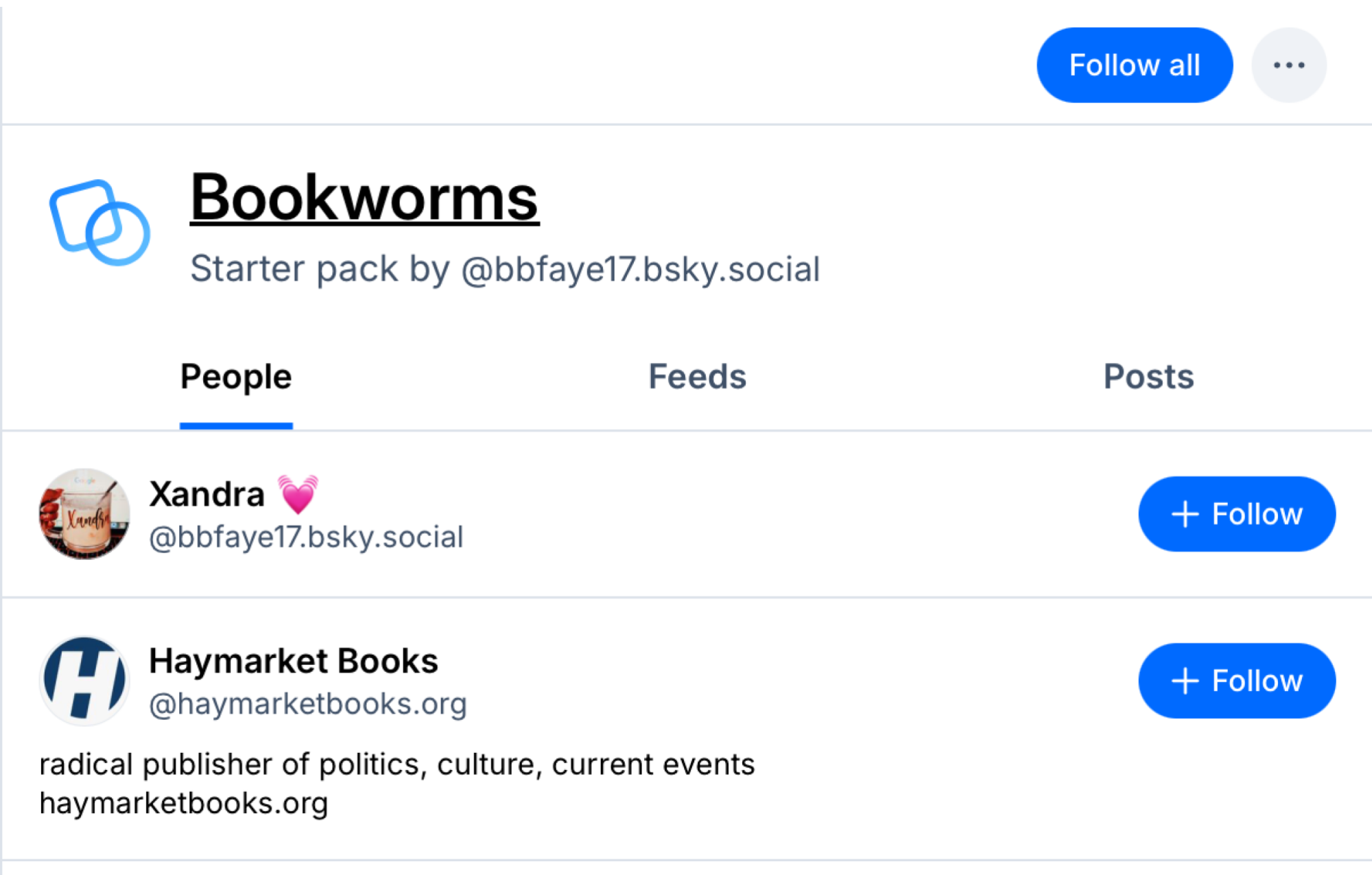
Use starter packs to find people to follow

Bluesky Starter Packs

Credit: Khamosh Pathak

If you’ve just started using Bluesky, your feed will feel quite light, especially if you want to venture outside of the algorithmically driven Discover feed and look at what makes the app unique.

But there are ways to get past this issue. Bluesky calls them Starter Packs, and anyone can create and share them. Starter Packs are essentially lists of profiles that you can follow with just one click. A website like Bluesky Starter Pack is a great place to discover these packs, since it lets you search and filter based on your interests or even which accounts are the most popular. Open a Starter Pack and click the Follow All button if you want to follow everyone in the list. Or, you can open a Starter Pick and pick and choose people to follow individually.

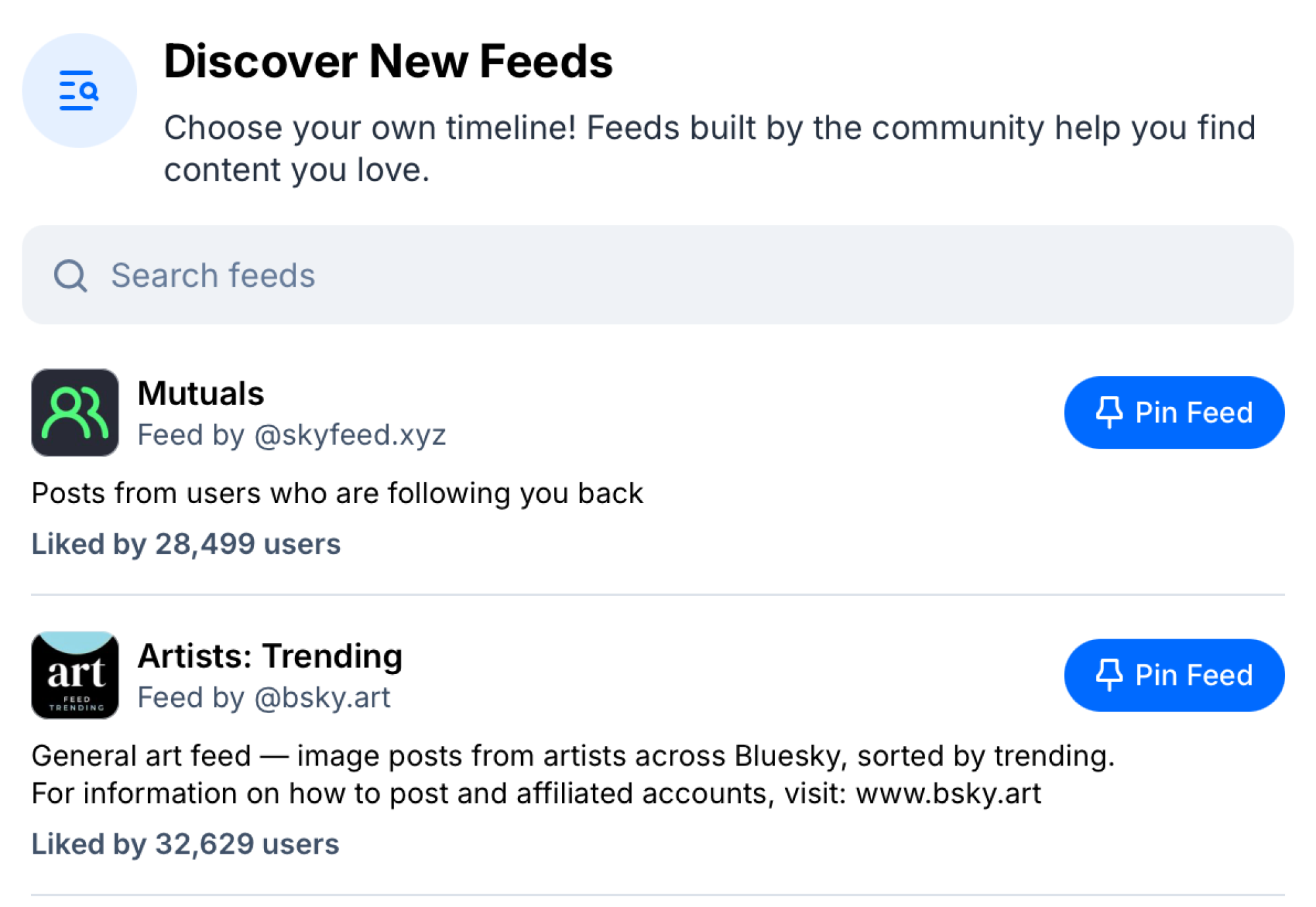
Find and pin feeds

Discover and Pin Feeds in Bluesky

Credit: Khamosh Pathak

Bluesky really encourages you to go outside of your typical network of mutuals, and that’s why there’s a Feeds section in the sidebar. Anyone in the community can build a custom feed, and you can subscribe to it with just a click. That means you don’t have to stick to the usual defaults, like your Following feed, and can instead browse through posts however you wish.

Bluesky has a few algorithmically generated feeds like Discover and Popular with Friends, but the vast majority of feeds are custom-made. You can search for any topic, and when you like what you see, you can click Pin Feed to add it to the top of your scrolling window. Then, all you need to do is tap or click on a pinned feed to swap to it.

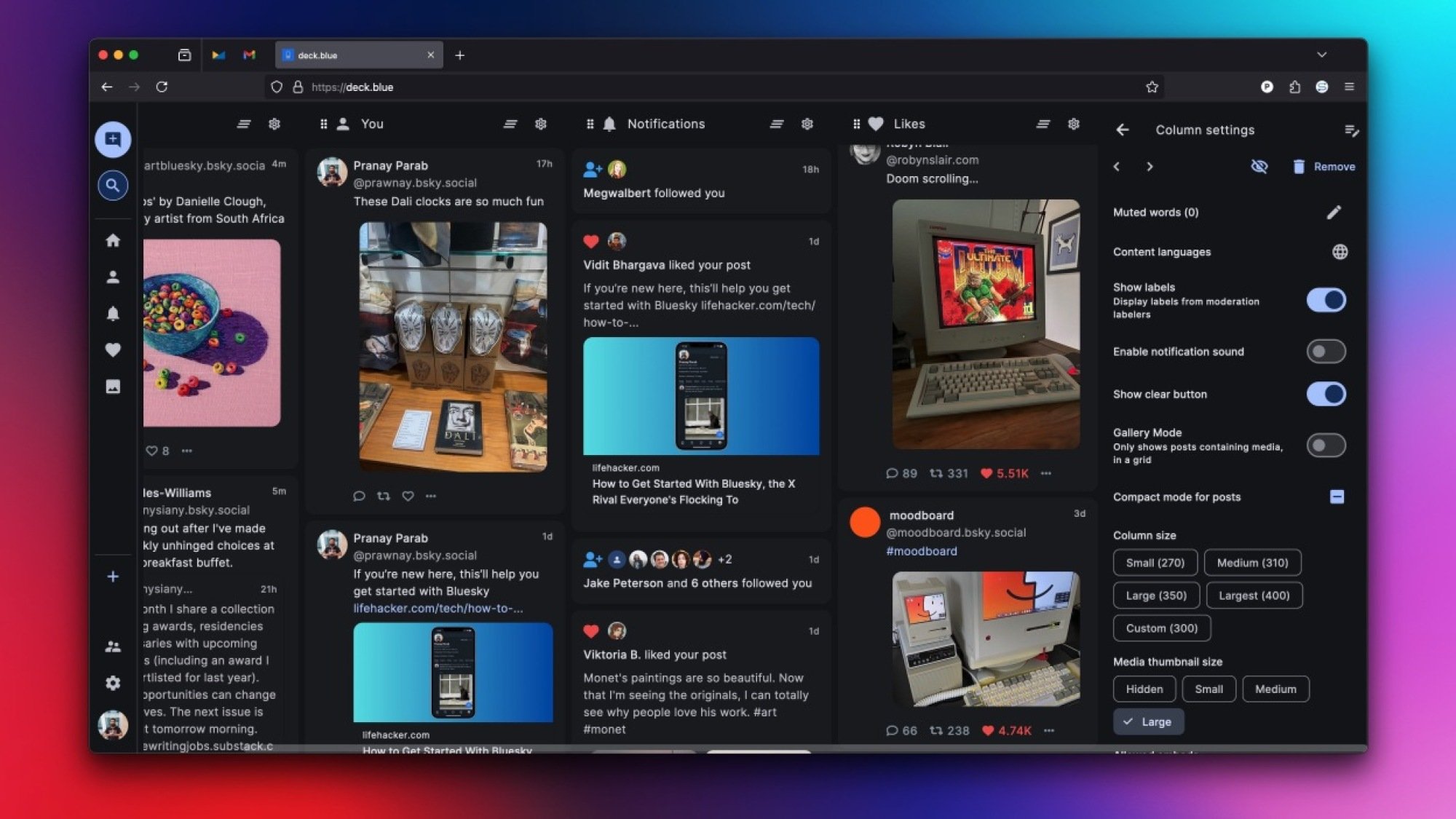
Try AT Protocol apps like Flashes and Deck Blue

TweetDeck style layout for Bluesky.

Credit: Pranay Parab

Just like Mastodon, Bluesky encourages third-party apps. Developers can directly plug in to the underlying AT Protocol and create their own apps on top of Bluesky.

This means, yes, there is a TweetDeck alternative for Bluesky, in both a website form and as a Mac app (I prefer the Mac app, honestly). If you’re more into photos, you can also try out Flashes or Pinksky, which recreate the Instagram experience by focusing on photos and videos.

Securely sign up for third-party apps using app passwords

App Passwords in Bluesky

Credit: Khamosh Pathak

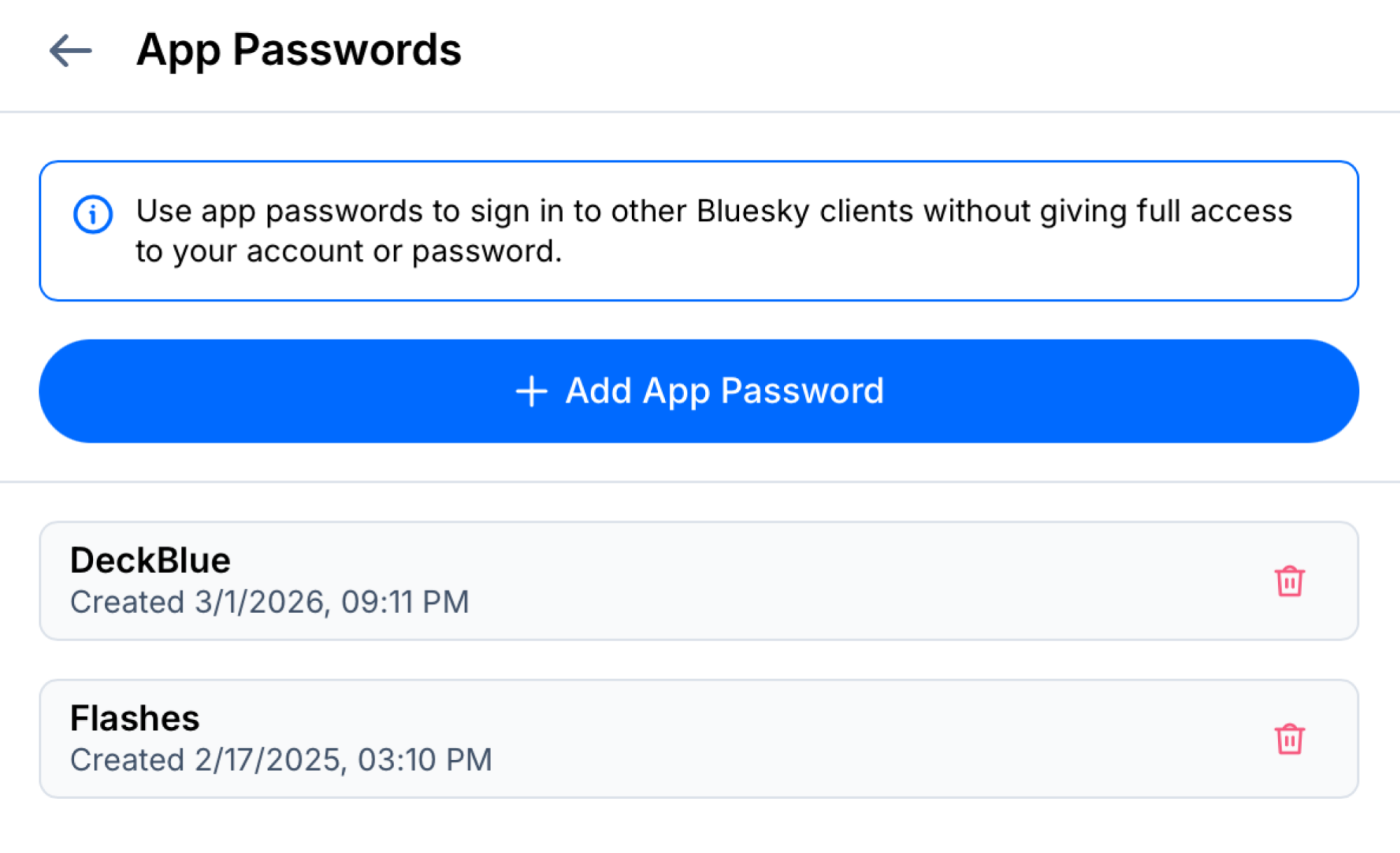
Bluesky doesn’t have a traditional authentication system where you can sign into third-party apps by simply connecting them to your Bluesky account (like you can using your Google or Apple accounts). So how do you use all those third-party apps built on the AT Protocol? Simple: uniquely generated app passwords. Each Bluesky service or app will ask you for a unique app password that will only work for that particular service, and isn’t the same as your main Bluesky password. This way, your Bluesky account won’t be compromised even if the app has a leak, and you can quickly change the password or revoke access if you no longer want to use that service.

Go to Settings > Privacy and Security > App Passwords > Add App Password to create a new app password. Make sure to give it a unique name, so you can easily find it. You can delete an app password using the Delete button next to the service name.

Choose who gets to reply to you, and how

Post Interaction Settings in Bluesky

Credit: Khamosh Pathak

As social media platforms go, Bluesky offers perhaps the best moderation tools in the business. A prime example is how you can restrict replies to your posts.

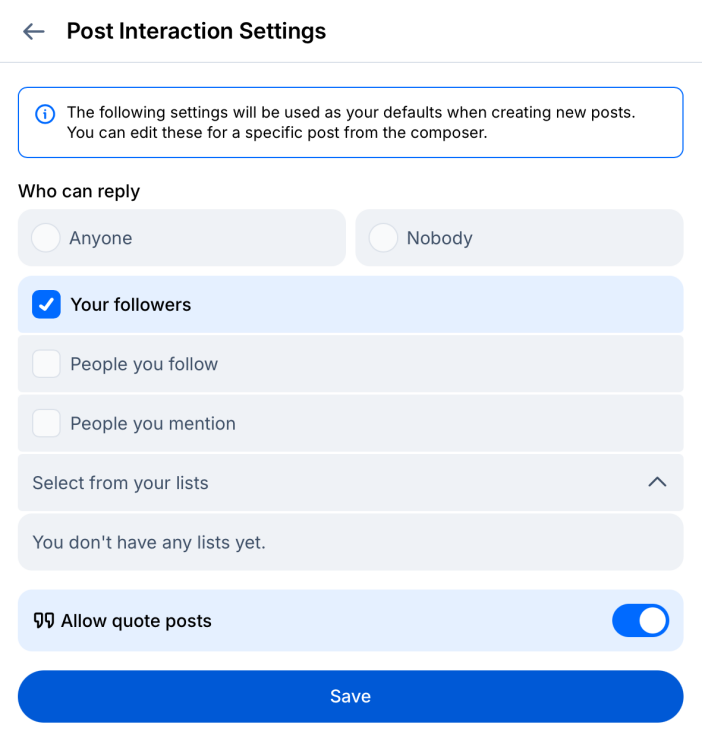
Go to Settings > Moderation > Interaction Settings, and you’ll find a plethora of options. You can open up replies to everyone, or you can even go nuclear and block anyone from replying to your posts.

Then there are the granular options. You can restrict replies to just your followers, people you follow, people you mention, or you can create a list of people who are allowed to reply to you.

While you’re here, you can also disable the “Allow Quote Posts” feature, so others on the platform can’t repost your posts directly on their pages.

Take control of your posts, even after they’re in the wild

Detach Quote on Bluesky

Credit: Bluesky

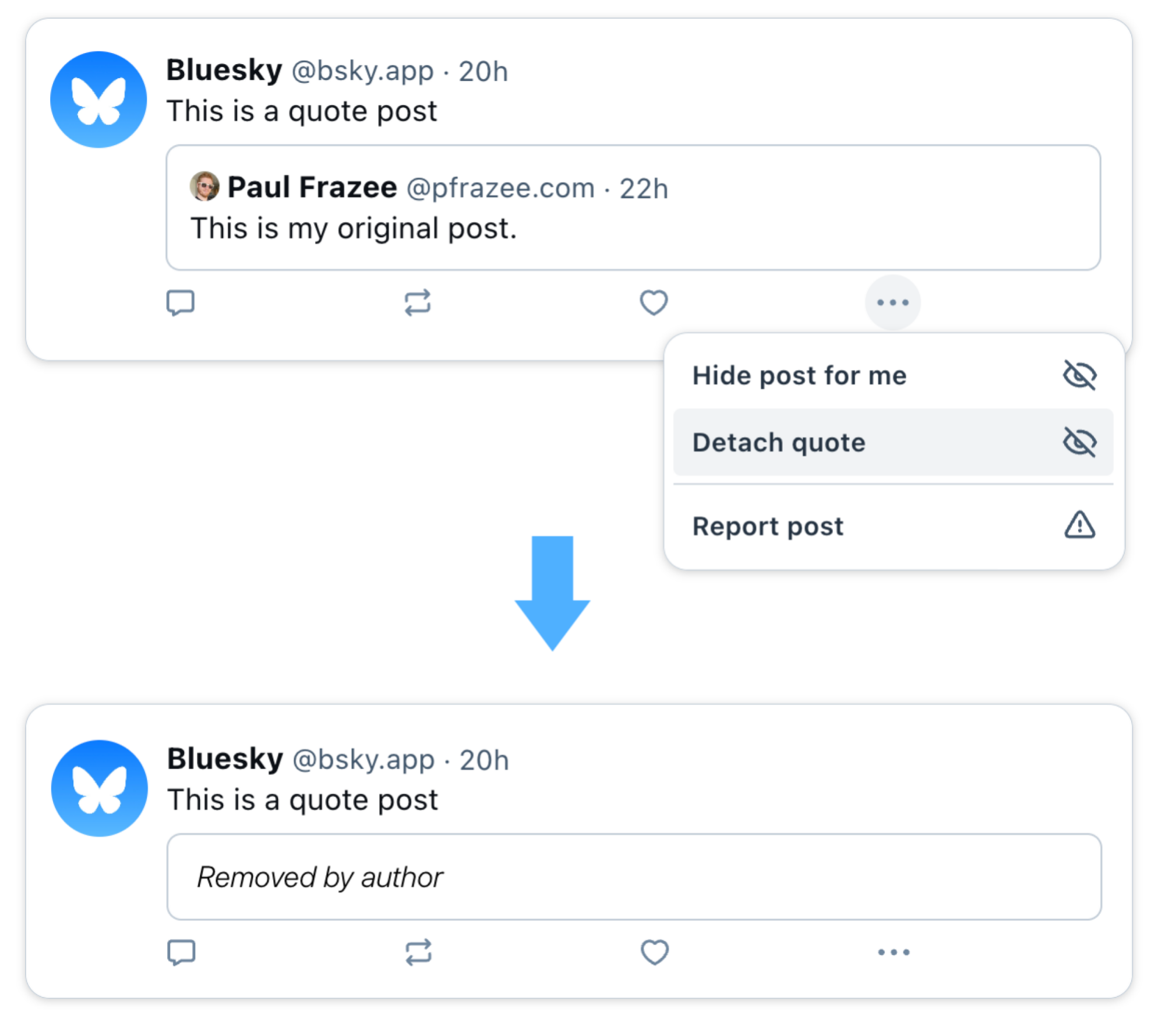
If someone has quoted your post and you would rather they didn’t, you can quickly fix that. Go to the post, click the three-dots menu, and choose the Detach quote option. The post will remain as is, but your quote wll be removed.

Similarly, you can quickly hide replies to a post. Choose a reply, click the three-dots menu, and from here, you can choose to hide the reply for you, or for everyone.

Note that this won’t prevent people who can see your posts from screenshotting them to share as images.

Use community-created mute and block lists

Block or Mute accounts in bulk.

Credit: Khamosh Pathak

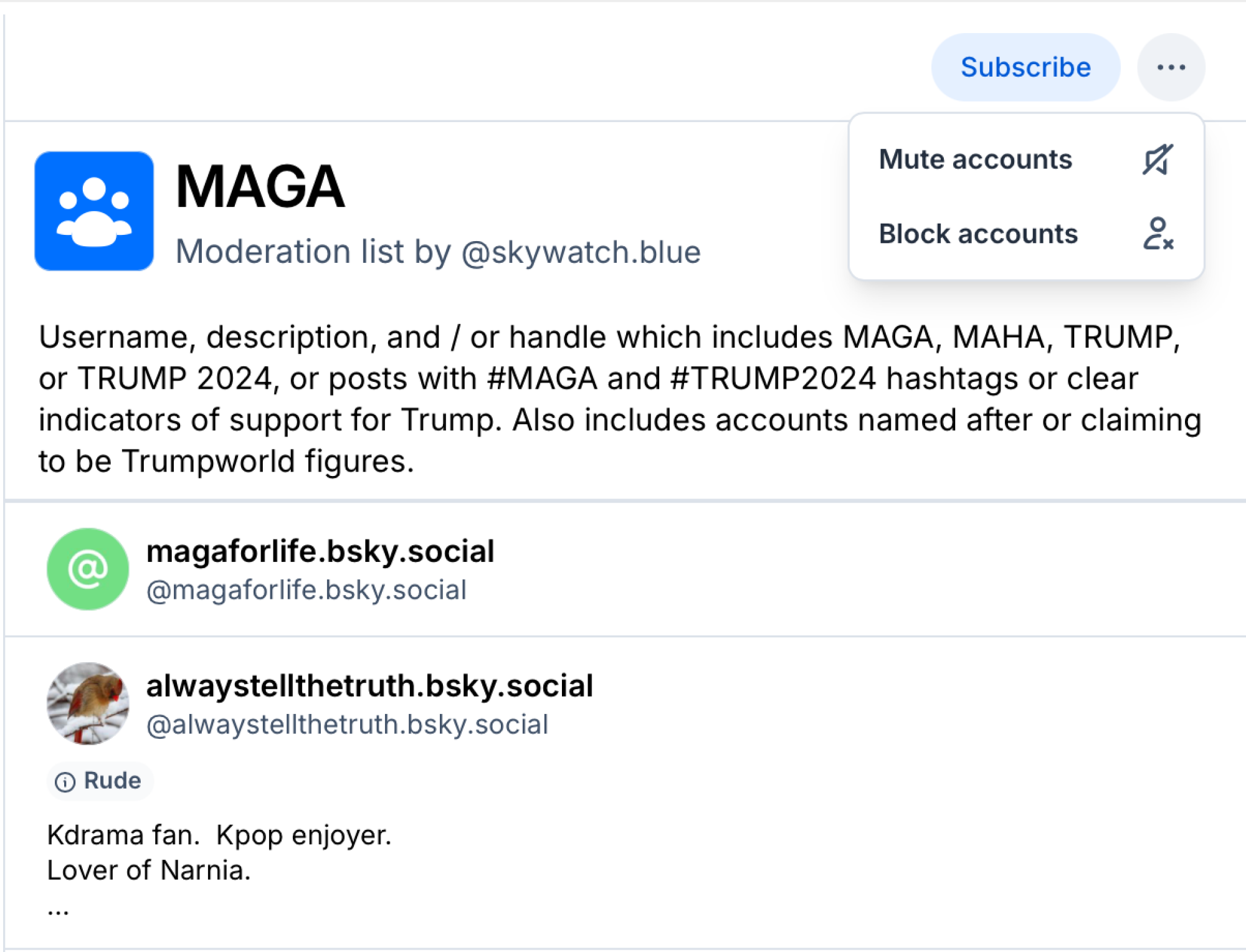
Bluesky has community lists to help you subscribe to new accounts, and also to block accounts en masse. You’ll find many moderation lists for different types of posters online, either by searching on Bluesky or looking at third-party websites like ClearSky. This way, you can quickly block brands, grifters, or whoever else you might not want to see in one click. This is a great way to sort out at least the more infamous or nefarious profiles. To use a moderation list, open it, click Subscribe, and then choose either Mute accounts or Block accounts.

Follow any profile using RSS

Bluesky Posts in RSS Reader

Credit: Khamosh Pathak

We say it often at Lifehacker: you really should be using RSS. Just like Bluesky, it’s another way to find or read new blogs and news without relying on an algorithm. And you can even follow Bluesky profiles in your RSS reader of choice, no setup required. Go to a Bluesky profile and add ‘/rss’ to the end of the URL. Then, copy it and add it as a source in your RSS reader of choice. Easy peasy.

Repeat this for as many profiles as you want, sort them in easy to access folders, and you can now read posts and links from your favorite Bluesky profiles right in your RSS reader, so you can easily mix them in with your articles and blogs.

Use your own domain name as your username

Change handle to domain in Bluesky.

Credit: Khamosh Pathak

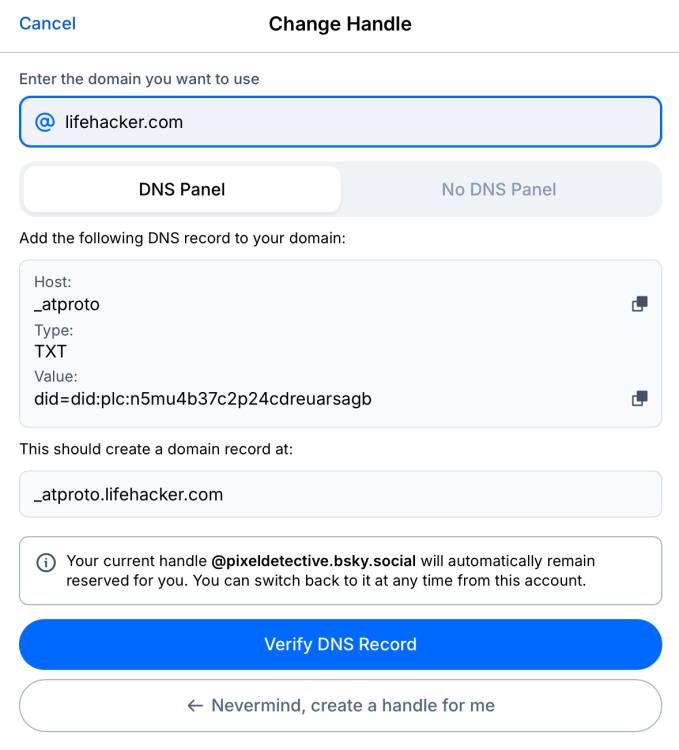
This is one of my favorite features. Bluesky lets users and organizations change their handles to their own, custom domain addresses. A handle like “@lifehacker.bsky.social,” which is written in the default format, can be changed to just say “lifehacker.com”.

This works through a form of simplified self-verification (though Bluesky now also offers a traditional verification system). You’ll need access to your domain manager to pull it off.

Go to Settings > Account > Handle and choose I have my own domain. Then, input your domain address. Bluesky will show you the DNS records that you need to update using your domain manager. Once that’s done, click Verify DNS Record and wait for the handle to update automatically.

Post to Bluesky, Threads, and Mastodon at the same time

Cross posting using Croissant app

Credit: Justin Pot

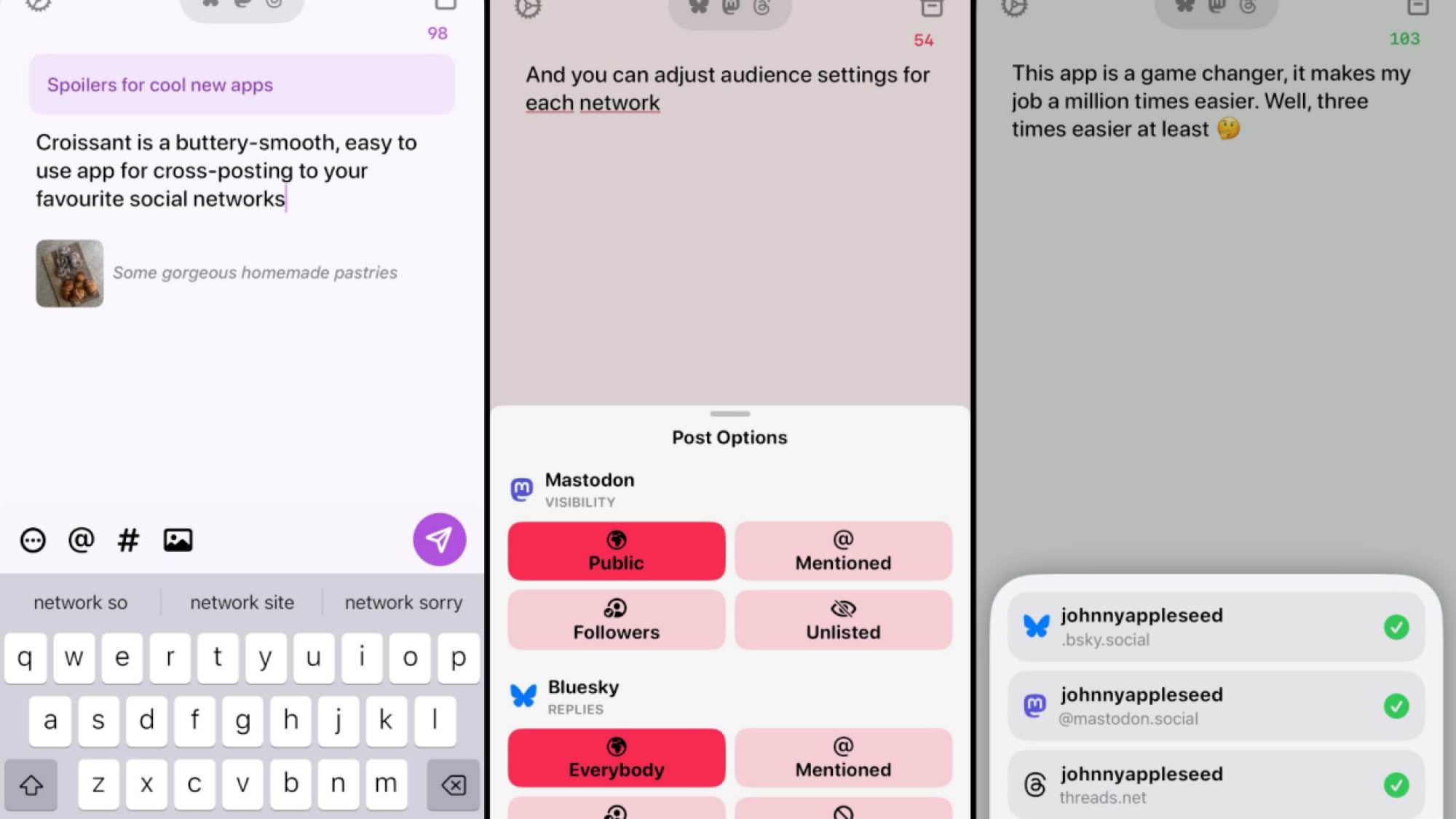
Even if you’re on Bluesky, that doesn’t mean you only have to use Bluesky. You can treat Bluesky as your home base, and still post your content to other networks like Threads and Mastodon at the same time, using an app like Croissant. It’s a simple app that lets you connect your Bluesky, Threads, and Mastodon accounts all at once, taking advantage of their fediverse connectivity. You can then use Croissant to draft your posts, and send them out to all three networks at once. You can schedule posts, too, which is helpful if you’re using Bluesky in a professional capacity. Croissant costs $2.99/month, or $19.99/year.