
The x86/cpu changes have been merged for Linux 7.0 and include finally setting the default Intel TSX mode to “auto” rather than being off by default…
Monthly Archives: February 2026
T-Mobile Will Live Translate Regular Phone Calls Without an App
T-Mobile is opening registration today for a beta test of Live Translation, an AI-powered feature that will translate live phone calls into more than 50 languages when it launches this spring.
The feature operates at the network level, so it doesn’t require any specific app or device — beta participants simply dial 87 to activate it on a call. T-Mobile President of Technology and CTO John Saw told The Verge that Live Translation works over VoLTE, VoNR and VoWiFi, meaning it isn’t limited to 5G. The only requirement is that a T-Mobile customer must initiate the translation. The beta will be free, though T-Mobile has not said whether the feature will eventually be paywalled.


Read more of this story at Slashdot.
No Man’s Sky REMNANT Update Adds Gravity Gun & More
As the space-faring simulator orbits into its tenth year, its latest update adds new tools, gear, and gameplay.
Hello Games has launched an update for No Man’s Sky, called Remnant, which adds a new tool to the game’s ever-expanding arsenal – the Gravitino Coil. This anti-gravity “gun” is described by the game-makers as “a powerful […] module for your multi-tool. Allowing you to grab large objects and fling, toss or carefully carry them around the world.”
More than just a toy or industrial tool, the Gravitino Coil doubles as an improvised ballistic weapon, with heavy objects becoming deadly projectiles (should the need arise).
0:00
/1:09
In addition to the gravity gun, the Remnant update also adds a new game loop centered on scavenging and recycling. Working alone or in groups with others, players and crews can scavenge debris from planets and wrecks, loading the collected salvage materials onto cargo trucks to be driven to industrial yards where the materials may be recycled to gain new loot and rewards including dozens of new vehicle parts and an all-new armor set.
A limited-time community expedition has been added, too, in which travelers will work in convoys to clean up and reclaim a planet covered in wrecks and garbage. Full patch notes for the latest No Man’s Sky update can be seen here.
Remnant builds on the previous No Man’s Sky update, Breach, which added explorable derelict space wrecks. It is the latest in a long string of No Man’s Sky updates, a game which launched nearly ten years ago on flatscreen platforms and which has received continuous updates and improvement ever since.
No Man’s Sky Breach Update Lets You Salvage Parts From Space Wrecks
No Man’s Sky adds explorable space wrecks you can salvage, new ship parts, and more in today’s Breach Update on PS VR2 and PC VR.
 UploadVRSarah Thwaites
In the VR space, too, No Man’s Sky has been a trailblazer. It was the first PlayStation VR2 game to use PS5 Pro’s PSSR AI upscaling, technology which uses a neural network trained on game footage to upscale games with much higher quality results than traditional image upscaling techniques.
No Man’s Sky’s Remnant update is available today on Steam, PS VR2, and flatscreen platforms.
The 2024 Kindle Scribe With Premium Pen Is Over $100 Off Right Now
We may earn a commission from links on this page. Deal pricing and availability subject to change after time of publication.
The 64GB refurbished Amazon Kindle Scribe is down to $278.99 right now, which is its lowest price to date, according to price trackers. A brand-new model costs $449.99, so the savings are significant. In this case, “like-new” means Amazon has cleaned, inspected, and cleared the device to function like a new unit, just without the shrink wrap. That price gap makes this Scribe more approachable, especially if you were curious about combining an e-reader with a digital notebook but did not want to pay flagship-tablet money.

This is the Scribe with the Premium Pen bundled in, and paired with its 10.2-inch E Ink screen, it offers a nice balance of size and sharpness, with 300 ppi, and an adjustable cool to warm-toned front light, which helps during long reading sessions. But even with that crisp display, it’s still grayscale, and the lack of color does feel limiting when compared to competitors (if you’re curious about your options, PCMag has a comprehensive roundup of the best e-readers for 2026). The software has gotten better, though—note-taking now includes direct annotation on books via something called Active Canvas. Just don’t expect the fluidity of an iPad or Supernote. Also, according to this PCMag review, things like drawing arrows or circling aren’t supported, and even Amazon’s AI features (like cleaning up your notes or summarizing) feel a little half-baked, considering the Scribe’s price point.
That said, for pure reading, the Scribe still holds up. It’s light, looks good with its aluminum frame, has ample storage, and offers a battery that can last over two months with basic use. If you’re writing or sketching regularly, that drops to around three weeks—but even then, it’s more than respectable. You do need your own USB-C charging brick, though. And unless you like slippery backs, a case is basically required. At $278.99, this version makes more sense than it ever did at launch. Just know going in that while the writing feel is great, thanks to the paper-like texture of the screen, the software may not be as smooth or intuitive as you’d expect from a premium device trying to be both a digital notebook and Kindle.
Our Best Editor-Vetted Tech Deals Right Now
Deals are selected by our commerce team
Pokemon Pokopia is so damn cozy
Pokémon Pokopia can be described as a pocket monster-themed take on Animal Crossing with a hint of Stardew Valley thrown in for good measure. And if you’re like me, that alone is probably enough to sell you on the game. However, after getting a chance to play a preview of it for around half an hour, it became immediately clear that the game’s coziness levels are off the charts, but it also offers some fun twists on the genre.
Co-developed by The Pokémon Company, GAME FREAK and KOEI TECMO, instead of playing as a generic trainer, you take control of a lonely Ditto who wakes up in a cave only to be greeted by Professor Tangrowth, the last surviving inhabitant of what used to be a bustling town. While the professor might look like an extra-large version of the original pokémon with glasses, its role is to guide you as you rebuild and hopefully repopulate the surrounding area.

Nintendo
As a Ditto, you naturally have the ability to transform into other Pokémon, though the process is sort of incomplete, meaning you can only learn one skill from the monsters you befriend instead of their entire moveset like in the mainline games. This is where the first twist on the traditional life sim comes in. Instead of crafting them or earning money to buy tools, you can transform into other Pokémon (like Lapras or Dragonite) to use their abilities to traverse obstacles or shape the world around you. For example, turning into a Squirtle lets you shoot a water gun that will revitalize dry patches or thirsty plants, while transforming into a Scyther lets you slice through objects similar to the HM Cut.
From there, you can use these skills to do things like create clusters of shrubs that will serve as homes for other Pokémon, allowing you to entice fellow creatures to return to the once desolate landscape. Another twist I really appreciate is that after appearing, new monsters will give you quests or just hang out. They will even talk and respond, and I don’t mean like the 8-bit cries from other Pokémon games. They speak in full sentences, which is a wonderful departure from previous titles that really gives you the feeling that you’re making friends and rebuilding a community instead of just being on a crusade to catch them all.
The Stardew Valley part of the equation comes into play after you leave the first tutorial area and you come upon an abandoned Pokémon Center that’s in dire need of a renovation. You can do things like collect materials and do more quests to clean up the area to eventually turn the building in the heart of the town. Unfortunately, that’s where my preview ended, aside from quickly hopping into a multiplayer session where I was able to see a much more developed village, complete with multiple buildings, roads and benches. You know, all the sorts of things you used to furnish and decorate your island with in Animal Crossing.
This gave me a nice glimpse at just how many things you can build in Pokopia and how easy it is to visit other people’s towns. However, it didn’t answer some of my bigger questions about the game, like what’s the deal with Peakychu and Mosslax, whom we’ve seen before in previous trailers. Are they just one-off versions of existing ‘mons with unusual typings (i.e. ghost and grass) only for this game, or are they going to be a bigger part of the Pokémon world going forward? Perhaps more importantly, it was hard to tell if there will be any sort of PVE content like The Mines or Skull Cavern in Stardew Valley. I’m really hoping there is because it seems like Ditto’s abilities could translate quite seamlessly to spelunking or battling your way through dungeons in search of rare items or building materials.

Nintendo
That said, just being able to build a community of friendly monsters while injecting life back into a forgotten town has good vibes radiating from every corner. So if you need a super cozy game to keep you busy this winter/spring, Pokémon Pokopia is shaping up to be the digital version of a fluffy blanket and a cup of hot chocolate filled to the brim with all of your favorite ‘mons.
Pokémon Pokopia is available for pre-order now, with official sales slated for March 5.
This article originally appeared on Engadget at https://www.engadget.com/gaming/nintendo/pokemon-pokopia-is-so-damn-cozy-140000954.html?src=rss
‘Star Citizen’ VR Support Isn’t Prime Time Yet, But It’s Getting There


Cloud Imperium Games (CIG) added experimental PC VR support to Star Citizen late last year, taking a first step in fulfilling a more than decade-old promise. Things are getting increasingly serious though after the release of its second post-VR update.
Update Alpha 4.5 initially brought a VR theater and full VR mode to the game in December, which lets users play the bulk of the game in PC VR headsets for the first time, including walking, flying, EVA, combat, and using menus.
Granted, it’s still a (very) experimental mode, which initially required some users to even add VR config lines to the game’s directory to get it working, done in addition to keeping track of keybinds to cycle through VR modes on the fly.
Now the studio has released Star Citizen 4.6, adding for the first time an official VR option in the settings menu, making managing and enabling VR mode at startup a much easier affair.
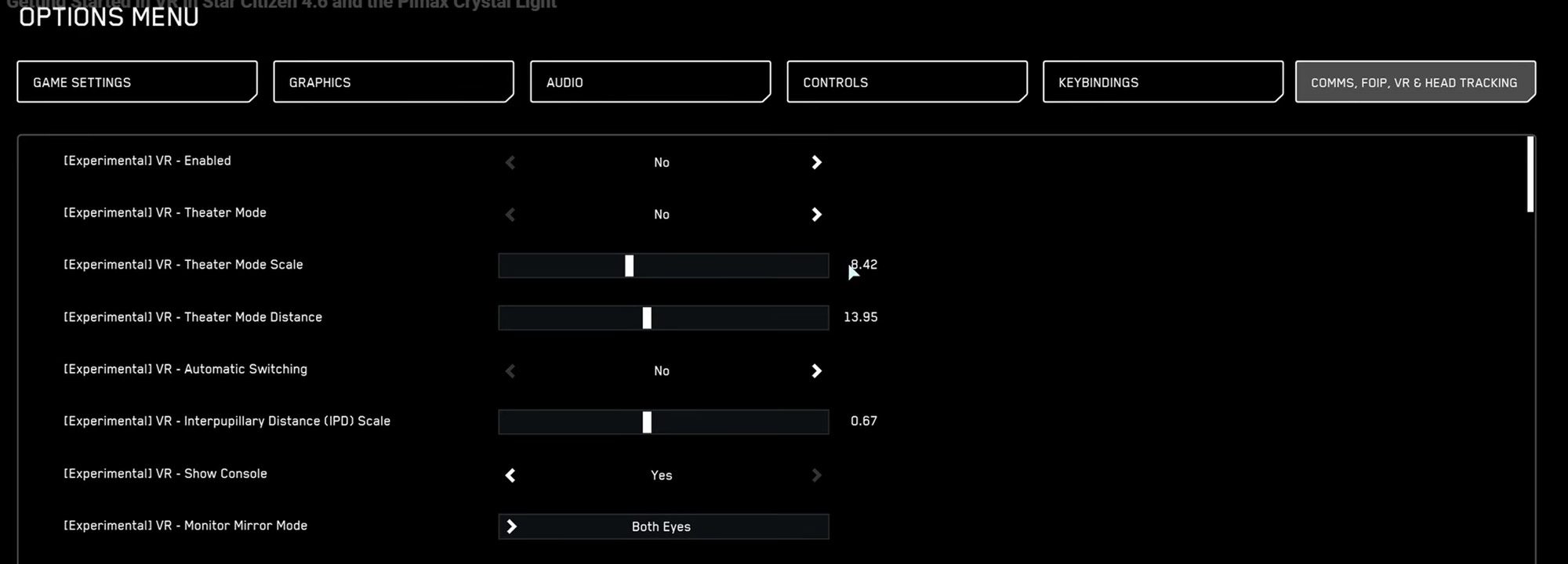
Although 4.6 doesn’t radically expand VR features, it’s certainly a vote of confidence that VR support is not only still on track, but moving closer to the core of the game. Still, it’s polished a number of usability issues, such as better menus and a smoother overall experience.
That said, as mentioned in a recent ‘Ray’s Guide’ video, players still need to carefully tune OpenXR settings, upscaling options, and in-game VR stuff, such as UI scale, distance, and IPD alignment just to get comfortable results. Users also typically need to switch between full VR and theater mode constantly for inventory and kiosk interactions, which is a definite immersion breaker.
That, and it doesn’t include VR motion controller support yet, making control remapping almost mandatory at this point, with many users relying on a mix of controllers, keyboards, HOTAS, and voice command software to manage the game’s enormous number of bindings.
As Silvan-CIG says in the 4.5 update announce in December though, all of its done in the spirit of open development.
“This is not our full VR launch. When that day arrives, we will make plenty of noise about it. What we are rolling out today is an opportunity for some early hands-on time, very much in the spirit of Open Development, so you can jump in, see how things are shaping up, and help guide what comes next.”
That said, creating a VR-native out of a Star Citizen is a tall order. Looking ahead, CIG’s biggest challenges will probably be centered around balancing those ambitions with the rest of the game’s development, which is constantly growing in scope and graphical complexity.
The post ‘Star Citizen’ VR Support Isn’t Prime Time Yet, But It’s Getting There appeared first on Road to VR.
COSMIC Desktop 1.0.6 Released With Clipboard, File Manager, and Applet Fixes
System76 has released COSMIC Desktop 1.0.6, which brings file manager fixes, better clipboard support, new terminal hotkeys, and more.
Asymmetric VR Horror Game Inverse Shutting Down In March
The developers of the 4v1 multiplayer horror game Inverse announced that servers will shut down at the end of March.
MassVR, who originally started developing location-based (LBE) VR experiences in 2017, posted an update on Inverse’s Steam page announcing the shutdown. Per the post, the game servers will shut down on March 31, 2026. MassVR clarified “Until that time, all online features/servers will remain active, and you can continue to play and enjoy the game as usual.”
Inverse: Stave Off Demons In 4v1 Multiplayer Horror Action
Inverse brings more 4v1 multiplayer horror action to Quest headsets – here are our hands-on impressions.
 UploadVRCharlie Wacholz
Inverse is a 4v1 asymmetric survival horror game drawing inspiration from the popular flatscreen title, Dead by Daylight. Four players play as HAZMAT suit-clad agents against one opponent playing as a monster. The agents have to repair three control panels within a short time limit to unlock gun cases and kill the monster. The monster can either kill all of the agents or simply outlast the time limit to win.
0:00
/0:25
Inverse Release Trailer
Inverse first launched on Quest App Lab in June 2023 as a limited-feature free-to-play title. A PCVR version followed in November of the same year. Its full release was priced $29.99 and was later dropped to $14.99. The game has already been delisted on Steam. At the time of this article, it remains available on Meta Quest 2/Pro/3/3S for $9.99.
Microsoft Briefly Wipes Minecraft-Like Indie Game From Steam Over A Single Screenshot

An executive at Mojang reached out to rectify the issue
These Nothing Headphones Are at Their Lowest Price Ever Right Now
We may earn a commission from links on this page. Deal pricing and availability subject to change after time of publication.
At $239, down from its usual $299, the Nothing Headphone (1) is currently at its lowest price ever, according to price trackers—and that might just be the nudge you needed if you’ve had your eye on them.

In line with Nothing’s design language, these over-ear headphones feature transparent elements and bold, geometric detailing that make them stand out from typical matte-black pairs. But it’s not just about aesthetics. These IP52-rated headphones come packed with 40mm drivers, hybrid ANC, and both USB-C and 3.5mm connectivity. They support high-res audio via LDAC, and Nothing’s companion app gives you both a basic and advanced EQ for fine-tuning sound. Battery life is impressive, too: 35 hours with ANC on, up to 80 without.
But the hardware alone doesn’t define the experience—Nothing’s control scheme is what makes these wireless headphones stand out. Instead of touch panels or clunky buttons, you get a satisfying volume scroll wheel (they call it the Roller), a multi-function Paddle for track navigation, and a customizable Button that can switch EQ profiles or noise modes. The tactile design takes a minute to learn, but once you do, it’s intuitive and genuinely useful. You also get spatial audio and multipoint Bluetooth support, which work well across Android and iOS. That said, comfort may vary. The earcups aren’t the softest for long sessions, and while they’re padded, the shape might not suit everyone. Performance-wise, the ANC handles low-end noise well (think airplane engines and AC hum) but struggles with sharper, unexpected sounds like clanging dishes or chatter nearby. The sound profile is punchy, especially with a bit of EQ tweaking in the app, but you’ll need to put in some effort if you want the best results, notes this PCMag review.
Our Best Editor-Vetted Tech Deals Right Now
Deals are selected by our commerce team
OpenVPN 2.7 Released With Multi-Socket Server & DCO Linux Kernel Driver Support
For those using the open-source OpenVPN for your virtual private networking (VPN) needs, OpenVPN 2.7 is out today with some notable improvements…
Intel Releases New Compute Runtime, Upstreams More SYCL Code To LLVM
Intel today released a new version of their Compute Runtime stack and IGC graphics compiler for Level Zero and OpenCL usage with their integrated and discrete graphics. Separately they also upstreamed more SYCL code this week into mainline LLVM…
Feds end “10-day” closure of El Paso airspace after less than 10 hours
The Federal Aviation Administration halted flights into and out of El Paso International Airport on Tuesday night at 11:30 pm local time (1:30 am EST Wednesday) and said the restrictions would remain in place for 10 days.
In its notice, the FAA also restricted air space extended in a radius of 10 nautical miles from the airport.
However, less than 10 hours later and without any additional explanation, the FAA ended the restrictions. “The temporary closure of airspace over El Paso has been lifted,” the federal agency said on social media. “There is no threat to commercial aviation. All flights will resume as normal.”
The Witcher 3 Gets An Unofficial Ciri Quest To Bridge The Gap With The Witcher 4

Dawn over Kovir is a mod that’s the next best thing to more DLC
The 25 Horniest Horror Movies of All Time
We may earn a commission from links on this page.
Many academically minded types have written at great length and with fascinating eloquence on the connection between sex and death in horror movies. We’ll cut right to the chase, offering up some of the best and most potent examples of sexuality in the horror-movie genre.
But first, a disclaimer: These are horror movies, spanning decades, and, thus, don’t always, or often, offer up the healthiest representations of human sexuality. Whether it’s vampire eroticism or horny teen campers, sex in movies is complicated, and not always sex-positive, even as we’re being invited to be aroused.
Some of these movies have deep and complex, if often uncomfortable, things to say about the links between sex and death; others are pure titillation—movies that throw in some nude bodies and sweaty, writhing flesh in order to get more butts in seats. We’re not here to make a distinction between high-minded horniness and baser sexual impulses—if it’s sexy, it’s under consideration.
The Untamed (2016)
Alejandra (Ruth Ramos) and Angel (Jesus Meza) don’t have the greatest sex life: she’s bored and frustrated, he’s sleeping with her brother Fabian (Eden Villavicencio) on the side while acting like a homophobic creep in public. All typical family drama, until we meet Veronica (Simone Bucio), a new friend of Fabian’s who’s had a satisfying years-long sexual relationship with a many-tentacled creature that came from a meteor and now resides in an old couple’s barn. But even the best relationships can take dark turns, and the sexy tentacle thing gets aggressive, causing an injury that raises questions and draws in the other characters. Things quickly get violent, but who can resist the allure of hot tentacle monster? Stream The Untamed on Tubi or rent it from Prime Video.

Don’t Look Now (1973)
Mourning the recent death of their child, Julie Christie and Donald Sutherland take off for Venice to get away from things—and then almost immediately run into a psychic who claims to be in contact with their daughter. Adapted from a Daphne du Maurier story, and ultimately about the ways in which grief and loss can profoundly alter a relationship for better or for worse, the movie includes one major sex scene involving the couple, but it quickly went down in horny horror history: Not only does it include a depiction of oral sex, unheard-of for a mainstream movie in 1973 and rare even today, given that it’s a woman on the receiving end, but the scene is both emotionally raw and impressively frank. So much so that rumors have persisted in the decades since that the scene itself was entirely unsimulated. Probably not true, despite the Paramount executive who claims he saw it, but still gives you a sense of the scene’s hold on imaginations. Warren Beatty (of all people) even fought to have the scene removed from the film, horrified that his then-girlfriend Christie would be involved in such a sordid business. Stream Don’t Look Now on Kanopy or rent it from Prime Video.

Knife + Heart (2018)
Yann Gonzalez’s slick and stylish French slasher is set, quite reasonably, in the world of ‘70s gay porn. Anne Parèze (Vanessa Paradis) runs a production company that makes the exploitation movies Knife + Heart centers on, but the series of murders that occur on set barely draw the attention of the local police, who aren’t terribly torn up about the deaths of gay porn actors. Anne decides that her next film will be about the murders themselves, unfolding a movie-within-a-movie that only draws the attention of the killer (and his spiked dildo). The movie celebrates giallo, with plenty of deep cuts for fans of classic Italian horror, and ‘70s sleaze more generally, but with a gorgeous look all its own. Stream Knife + Heart on Shudder and AMC+ or rent it from Prime Video.

Mulholland Drive (2001)
I think we’re supposed to call this a thriller to distinguish it from less-reputable horror movies like Friday the 13th, but no one evokes nightmarish disconnection and existential dread like David Lynch, and this story of the descent into madness by an aspiring actress is as horrific as they come. But it’s not all bad for Naomi Watts’ Diane Selwyn—or is it Betty Elms? She finds herself in a very hot, very heavy relationship with Laura Harring’s Rita, climaxing (ahem) in one of mainstream cinema’s hottest same-sex love scenes this side of Bound. It’s also very nearly the moment when everything bright and hopeful turns dark and forbidding for our heroine, but I think that’s more to do with the type of movie we’re in than with the sexy gay stuff. Rent Mulholland Drive from Prime Video.

The Hunger (1983)
There’s only so much plot here, but who needs plot when charting a stylish and sexy vampire love triangle among Catherine Denueve, David Bowie, and Susan Sarandon, all three at approximately their most beautiful. Deneuve is vampire Miriam Blaylock, while Bowie plays her longtime companion John. Miriam is truly immortal, but John is fading after centuries, and desperate to preserve not just his life but his youth. Enter Sarah (Sarandon) the doctor whom he seeks out for help, and who quickly becomes the latest target of Miriam’s erotic fascination. Director Tony Scott’s movie is all glossy, gauzy style and set design—but the chemistry (and sex) between Miriam and Sarah is delicious. Stream The Hunger on Tubi or rent it from Prime Video.

Def by Temptation (1990)
K (Kadeem Harrison) and Joel (James Bond III, who also wrote and directed) have been best friends since childhood—but while Joel has become a minister, K has put his similarly religious upbringing aside to move to New York and become an actor. Still, it’s Joel who becomes enamored of the mysterious woman that they meet during a night out in NYC. She’s known only as Temptress (novelist Cynthia Bond), and she’s been seducing and murdering men in seedy NYC bars for some time, what with being a succubus and all. It’s a smart, stylish, and erotic bit of early 1990s horror that comes with more than its share of sex and nudity. Stream Def by Temptation on Prime Video, AMC+, Shudder, and Tubi.

Hellraiser (1987)
She did it all for love, you see. Julia Cotton (Clare Higgins) will do whatever it takes to bring back her lost lover (who happens to be her husband’s brother). He died while occupied with freaky cult stuff involving a particularly memorable puzzle box, and Julia’s “whatever it takes” involves hooking up with guys in bars, bringing them back to her place, and killing them so her man can soak up the blood and gradually reconstitute his body. As anyone would. In the process, though, she invokes the Cenobites, who are hells kinkiest priests—a goth group inspired by writer-director Clive Barker’s obsession with BDSM. Judge Julia if you will, but only if you’ve never made questionable choices to get laid. Stream Hellraiser on Prime Video and Tubi.

Species (1995)
There’s an alien on the loose—and she must mate! The setup here is very 1950s monster movie, and that’s what makes it fun. Scientists at SETI receive an alien genome from space and, believing the senders to be benevolent, go right ahead and splice it with human DNA. As you do. The result is SIl (Natasha Henstridge), a hybrid who grows to adulthood in just months, and who the scientists quickly realize is impossible to control. Fearing that she’ll mate with humans (will she ever!) and eventually wipe out our gene pool, they try to kill her before she escapes and, as predicted, starts looking for humans to fuck. It might not be high art, but the movie’s soft-core thrills inspired several sequels and even a couple of novels. Stream Species on Tubi or rent it from Prime Video.

Cat People (1982)
A loose remake of 1942’s similarly sensual, if far less overt, original, Cat People stars Nastassja Kinski as Irena, who reconnects with her brother Paul (Malcolm McDowell) in New Orleans while learning some old family history. It turns out, you see, that they come from a long line of werepanthers (not as silly as it sounds, at least in the context of the movie), and the transformation tends to happen in moments of maximum passion. Sex transforms them, and only killing a human can turn them back. This complicates her crush on zookeeper Oliver (John Heard), and introduces a weird tension with Paul, who informs her that their kind are typically incestuous. The result is an erotic fever dream of a movie, with an absolutely wild ending. Rent Cat People from Prime Video.

Bram Stoker’s Dracula (1992)
Not unlike Tod Browning’s 1931 adaptation of Dracula, this Francis Ford Coppola take is an often unwieldy assortment of stunning imagery and more forgettable moments. Like that earlier movie, though, what works here works impeccably, and remains as haunting as it is hot. Gary Oldman’s performance here is a campy career best, his entire motivation coming down to love (i.e. erotic obsession) for/with Winona Ryder’s Mina Harker, who he believes to be the reincarnation of his beloved wife, Elisabeta (and why shouldn’t he, given that they’re played by the same actress). Come for the blood drinking, wolf-man sex, and passionate longing, stay for the horny and half-naked vampire thralls who populate Dracula’s Castle and who can’t keep their hands off of Keanu Reeves’ Jonathan Harker. Stream Bram Stoker’s Dracula on Netflix or rent it from Prime Video.

Knock Knock (2015)
Since we’re talking about Keanu Reeves, we’ll just forward to this 2015 sexy home invasion (-ish) horror movie from writer/director Eli Roth (Hostel, Thanksgiving). Family man Evan (Reeves) is left home alone when two very wet young women (Ana de Armas and Lorenza Izzo, who’ve been caught in a storm, you see) come to the door and quickly get flirty with the middle-aged dad. The three of them have fairly aggressive sex, which winds up being an understandable but extremely bad decision on poor Evan’s part. It’s a sexier and slightly more satirical take on more serious torture thrillers like Funny Games, and a solid reminder that you’re absolutely correct to never answer your doorbell. Rent Knock Knock from Prime Video.

Stranger by the Lake (2013)
This slasher/horror movie also echoes the erotic thrillers of the good old days. Here, Pierre Deladonchamps plays Franck, a regular visitor to a nude beach and the surrounding woods, both popular cruising spots. Franck begins a passionate relationship (meaning: lots of pretty explicit sex in the woods) with Michel (Christophe Paou), who Franck later spots drowning someone in the lake. As the investigation into that event heats up, Franck finds himself struggling to give up a good thing, even in the face of murder. Rent Stranger by the Lake from Prime Video.

Daughters of Darkness (1971)
Ah, yes: the erotic bisexual vampire genre, which definitely had a moment in the 1970s. Daughters of Darkness is better than most, and certainly more genuinely sexy. Eschewing the hot-lesbians-for-straight-guys vibe of other movies, Daughters has a look and feel that borders on arthouse, with a grand and elegant style, as well as a willingness to go deeper. Delphine Seyrig plays Countess Elizabeth Báthory, who happens upon a newlywed couple honeymooning in a remote region, and immediately sets about seducing the wife away from her boring human sexual and moral conformity. Stream Daughters of Darkness on Tubi and Shudder or rent it from Prime Video.

Daniel Isn’t Real (2019)
After witnessing a mass shooting as a child, Luke (Miles Robbins) develops an imaginary friend, the title’s Daniel (played by White Lotus‘ Patrick Schwarzenegger). Perfectly reasonable response, until Daniel tells Luke to poison his mother. Years later, Luke’s a shy college student struggling with his mental health and whaddaya know? Daniel is back. At first, he’s helpful, encouraging Luke in his schoolwork and toward a relationship with an artist; before long, though, he’s asserting his own will and taking over fully to engage in behavior that’s increasingly erratic and sometimes violent. Daniel is also perfectly content endanger Luke’s new relationship by having sex with other women, and not entirely on the sly. Or maybe this is all just Luke’s subconscious acting out and…Daniel isn’t real? Stream Daniel Isn’t Real on Prime Video and Tubi.

Interview With the Vampire (1994)
The recent AMC series adaptation is great, and dispenses with any subtext where Lestat and Louis (and Armand!) are concerned. Subtext is way overrated when it comes to queer themes, but this 1994 adaptation walks impressively close to that edge, and seeing a couple of big-name male stars set up house and raise their surly vampire daughter while sucking each other’s blood was thrilling back in the day. As threeways go, you could have done a helluva lot worse in the mid-1990s than to assemble Tom Cruise, Brad Pitt, and Antonio Banderas. The movie remains a thoroughly entertaining, and very, very sweaty, story of housekeeping and murder in New Orleans. Rent Interview with the Vampire from Prime Video.

Titane (2021)
Just another movie about a gender-fluid erotic dancer and serial killer (Alexia/Adrien, played by Agathe Rousselle) who fucks a car, gets pregnant as a result, and is then taken in by a man (Vincent Lindon) who believes that, in Alexia (soon to identify as Adrien), he’s found his long lost son. You know. Typical Hollywood. There’s a lot going on in writer/director Julia Ducournau’s wild love story, and the sex and eroticism aren’t entirely conventional (unless Crash-style car sex is your thing), but the movie definitely has an undeniable, and undeniably weird, sensuality. Stream Titane on Tubi.

Shivers (1975)
What looks like an STI outbreak at a luxury apartment tower is something quite a bit more gruesome, which would have been immediately obvious had I mentioned that we’re in a David Cronenberg film (one of his earliest body horror classics). A weird science experiment has created a parasite that spreads via sexual contact and, helpfully enough, turns its victims into endlessly horny nymphomaniacs (the alternate title, They Came from Within, feels more apt). The veil of upper-middle-class respectability falls away entirely as the residents of Starliner Towers give in to an endless and increasingly violent orgy. Stream Shivers on Prime Video and Tubi.

Lair of the White Worm (1988)
The fact that it’s a loose (very) adaptation of the Bram Stoker novel of the same name offers this one some plausible deniability when it comes to the nature of the titular white worm—but just barely, given that the plot turns first on Amanda Donohoe’s typically nude priestess, and later on some weaponized dildos. Future Doctor Who Peter Capaldi plays an archaeology student investigating the skull of a rather alarmingly large snake in the East Midlands, and Hugh Grant is the local lord on whose land all of this horny folderol is unfolding. Stream Lair of the White Worm on Prime Video and Tubi.

Birder (2024)
Lots of movies beat around the bush (ahem) before delivering sexy scares, but Nate Dushku’s indie horror gem Birder builds its premise around giving the people what they want. It’s set at a clothing-very-optional campground, so most everyone is immediately naked. Michael Emery plays Kristian Brooks, a bird enthusiast who’s sweet, charming, and conventionally hot in a way that draws attention from the camp’s regulars, who soon discover that he’s also phenomenal in the sack (or on a towel, more typically). Which is all well and good, until Kristian’s body count becomes more literal. There are underlying themes about the horror inherent in the violation of a positive, queer-friendly space but, for our purposes, feel free to focus on the serial killer running amok among naked people. Rent Birder from Prime Video.

Hatchet II (2010)
Adam Green’s slasher series was created as an explicit tribute to the trashy slashers of yore, with roles and appearances from actors better known for A Nightmare on Elm Street, Friday the 13th, Candyman, Halloween, etc. That means not only lots of gruesome practical effects, but also plenty of nudity (i.e. boobs) and sex. The second movie in the series, which finds the first movie’s Final Girl Marybeth (Danielle Harris) returning to the swamp with plans to take revenge on murderous Victor Crowley (Kane Holder), goes further than the others in its (non-male) nudity and sex. Try to beat the sex scene involving the corpse that won’t stop thrusting for intentional tastelessness. Stream Hatchet II on Prime Video and Tubi.

Nadja (1994)
Riffing on the classic 1936 Dracula’s Daughter (with its extremely thinly veiled lesbian subtext and its “Save the women of London from Dracula’s Daughter!” tagline, this film opens with the death of Count Dracula at the hands of his old nemesis, Van Helsing (Peter Fonda)—traumatizing the vampire’s daughter, Nadja (Elina Löwensohn). On a sullen quest for revenge, she seeks out the daughter of Van Helsing to have sex with—Nadja will make her a thrall and use her to destroy the whole family. A late example of the sexy queer lady vampire genre, Nadja brings some arthouse style (David Lynch produces and has a cameo) to its blood, gore, and horny gay vamps. Stream Nadja on Prime Video.

Swallowed (2022)
Ben (Cooper Koch) just wants to pop off to Los Angeles for an exciting new life as a gay porn star—but, first, his friend Dom (who has a secret crush) has a great idea: They’ll make a quick drug run across the Canadian border for some seed money, if you will. Actually, and unsurprisingly, it’s a very bad idea, as the two are forced to swallow condoms full of a mysterious…something. Some of the condoms are broken during a confrontation with a bigot in a bathroom truck stop, and things go from bad to worse when they finally meet the drug boss (Mark Patton) who’s simultaneously ruthless, and also extremely hot for Ben. Oh, and did I mention that the condoms are filled with the larvae of a bug that bites to get you high and or erect? Classify this one as Boner Body Horror. Stream Swallowed on Prime Video.

Thirst (2009)
If you want subversive, it’s hard to beat the great South Korean director Park Chan-wook (Oldboy, Decision to Leave), and he’s at the height of his powers with this erotic vampire horror movie. Christian priest Sang-hyun (Song Kang-ho) volunteers to be infected by a virus for research, but finds himself with an endless hunger for blood, and also sex, as a result. It builds to a gory climax as Sang-hyun finds himself gradually shedding his earlier morality, but in the meantime there’s a passionate affair, as well as some more uncomfortable moments of sexual violence. Genuinely a vampire film like no other. Rent Thirst from Prime Video.

Possession (1981)
A horror movie about a bad divorce written during the director’s real-life marital split, Andrzej Żuławski’s Possession deals with an allegory for marriage going wrong in the form of a literal monster. As her marriage to Sam Neill’s Mark disintegrates, Isabelle Adjani’s Anna is nurturing a creature whom seems to have taken Mark’s place in her affections; the movie includes a memorable sex scene with the shapeless mass of a monster that put it on the radar of the anti-video nasty crusaders in Britain, where it was banned. It’s been recently restored to its full length, and makes a compelling case for the Isabelle Adjani and Sam Neill as two of the hottest actors in the game circa 1981. Stream Possession on The Criterion Channel and Shudder or rent it from Prime Video.

An American Werewolf in London (1981)
Hardly the most graphically sexual horror movie, An American Werewolf in London still more than makes the cut for the presence of, and movie-length chemistry between, David Naughton and Jenny Agutter. It doesn’t get much hotter than the movie’s central shower-sex scene. Stream An American Werewolf in London on Tubi or rent it from Prime Video.

Mullvad VPN review: Near-total privacy with a few sacrifices
Mullvad, a virtual private network (VPN) named after the Swedish word for “mole,” is often recognized as one of the best VPNs for privacy. I put it on my best VPN list for exactly that reason. I’ve got huge respect for the extra lengths Mullvad goes to in order to ensure its user’s privacy.
To give you a preview, Mullvad is one of the few VPNs — other than my normal privacy recommendation, Proton VPN — that lets users pay entirely in cash. But even Proton VPN asks for an email address to make an account and uses a few marketing cookies on its own website. Mullvad represents every account as a randomly generated 16-digit code and uses no marketing cookies whatsoever.
That’s just one example of how Mullvad goes beyond the call of duty to keep users private. But while privacy is the most important aspect of a VPN alongside security, it’s not the only thing that matters. For this review, I set out to investigate whether Mullvad pairs its rights-protecting bonafides with versatile, convenient and enjoyable VPN apps. Using our rigorous VPN testing procedure, I’ll rate Mullvad in 11 areas. You can find a summary of my results in the table below, skip to the sections that matter most to you or just read my final advice in the conclusion.
Editor’s note (2/11/26): We’ve overhauled our VPN coverage to provide more detailed, actionable buying advice. Going forward, we’ll continue to update both our best VPN list and individual reviews (like this one) as circumstances change. Most recently, we added official scores to all of our VPN reviews. Check out how we test VPNs to learn more about the new standards we’re using.
Findings at a glance
|
Category |
Notes |
|
Installation and UI |
All apps share roughly the same user interface Apps are responsive and easy to navigate, with no design choices that would threaten beginners Lack of “fastest server” button is an issue Browser extension is only available on Firefox and still in beta |
|
Speed |
Reasonably good average latency Reduces download speeds by 26 percent and upload speeds by 17 percent Speed declines are consistent and chartable All speed metrics are quite good on nearby servers |
|
Security |
Only uses WireGuard protocol No IP address leaks, even when switching servers Packet test showed successful encryption |
|
Pricing |
Always costs 5 Euro per month, though prices outside Europe depend on exchange rates No auto-renewal — membership lasts until money runs out Can pay using cash or by purchasing scratch-off vouchers on Amazon 14 day money-back guarantee, except on cash payments |
|
Bundles |
Only app besides the VPN is the free Mullvad Browser, which removes the tracking habits of typical web browsers Allows several smaller VPNs to use its servers in their networks |
|
Privacy policy |
No vague lines or loopholes in privacy policy Only saves account numbers and expiration dates for each user Uses an extremely limited range of cookies with no marketing trackers Has undergone a total of 17 audits of different aspects of its service Swedish police demanded customer information in 2023; Mullvad couldn’t comply because the data wasn’t logged |
|
Virtual location change |
Unblocked Netflix 13 out of 15 times When it failed, virtual location was still changed |
|
Server network |
90 locations in 50 countries, majority in North America and Europe No virtual servers whatsoever |
|
Features |
DAITA conceals traffic patterns that might let an AI identify what sites you visit Uses quantum-resistant encryption on WireGuard Can choose your own multihop entry and exit points Several options for getting around nation-level firewalls Can block ads, trackers, malware and other unwanted content using predetermined DNS block lists Supports IPv6 traffic Kill switch and stronger lockdown mode Split tunneling by app |
|
Customer support |
Help center includes useful filters to find the topic Well-written articles with good internal linking No live chat support, but staff answers emails quickly Can view app logs at any time |
|
Background check |
Founded in 2009 in Sweden; still owned and operated by initial founders User account numbers were exposed in a 2023 incident, but Mullvad quickly closed the leak |
Installing, configuring and using Mullvad
Let’s start by examining how Mullvad feels as a piece of software. In this section, I’ll be testing its desktop apps for Windows and Mac, its mobile apps for Android and iOS and its browser extension for Firefox. To start with the installation process, Mullvad downloads and installs in a snap on mobile. On desktop, installation requires a few more steps than is typical, but the app guides you quickly through everything.
Across the board, my only serious complaint is that there’s no option for automatically choosing the fastest server. You can usually assume that the nearest one to you will be the fastest, but there’s always the chance of an unusual server overload. It’s a bizarre oversight for an app that otherwise goes out of its way to be usable.
Windows
Mullvad’s Windows app has a slim UI that uses space efficiently without being too cramped. It doesn’t give you a lot of information, such as live speed tests or data in transit, but I’ve mostly found that to be needless filler on VPN apps.

Sam Chapman for Engadget
Speaking of needless filler, the map may be a little bigger than it needs to be, but maps on VPN clients aren’t just about teaching you geography — they do a lot to make the apps more welcoming to casual users who might not otherwise fire up security software. In fact, Mullvad’s UI is admirably beginner-friendly, befitting its focus on privacy for everybody rather than just the tech-savvy.
All the settings are accessed by clicking the gear in the top-right. Here, you can turn on DAITA (Mullvad’s defense against AI traffic scanning), activate multihop and control Mullvad’s other features. There are also some quality-of-life features for the UI itself, such as whether it remains pinned to the taskbar or operates as a standalone window. Some options, especially under the VPN settings tab, are a bit technical, but don’t need to be touched for a good experience.
Mac
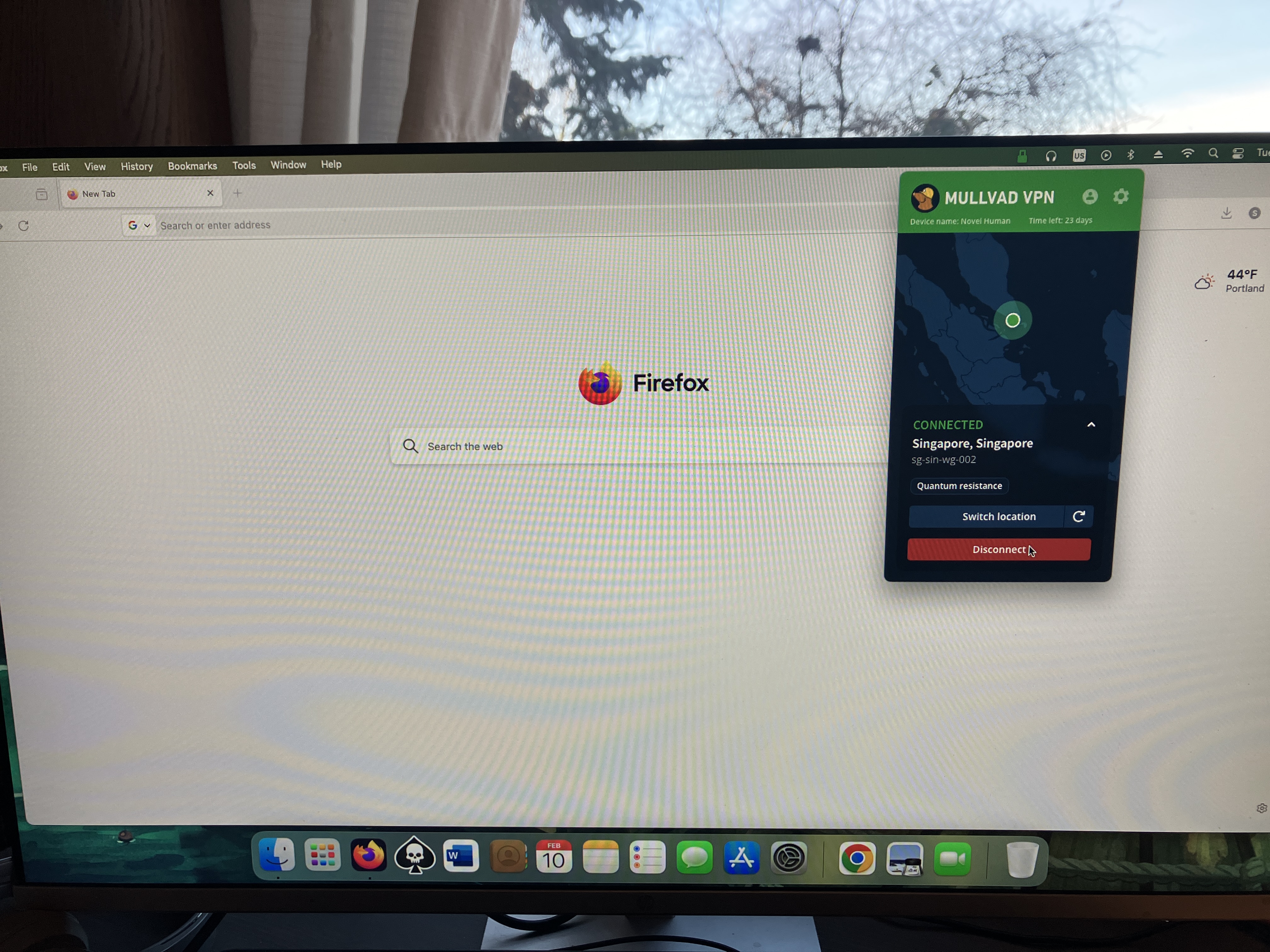
Mullvad’s macOS app is quite similar to its Windows app, both in terms of the interface and the features offered. The big difference used to be that macOS lacked split tunneling, but that’s been added in a recent update. The only serious distinction now is that the Mac client can’t be unpinned from the taskbar, which is just a little bothersome.
Sam Chapman for Engadget
Other than that, you’ll find every setting you need under the gear, just like on Windows. Similarly, connections to VPN servers happen quickly, and selecting locations from the menu is very straightforward. While connected on either app, you can click the circular arrow by your location to swap to another server in the same location — highly convenient if you’re trying to unblock Netflix.
Android
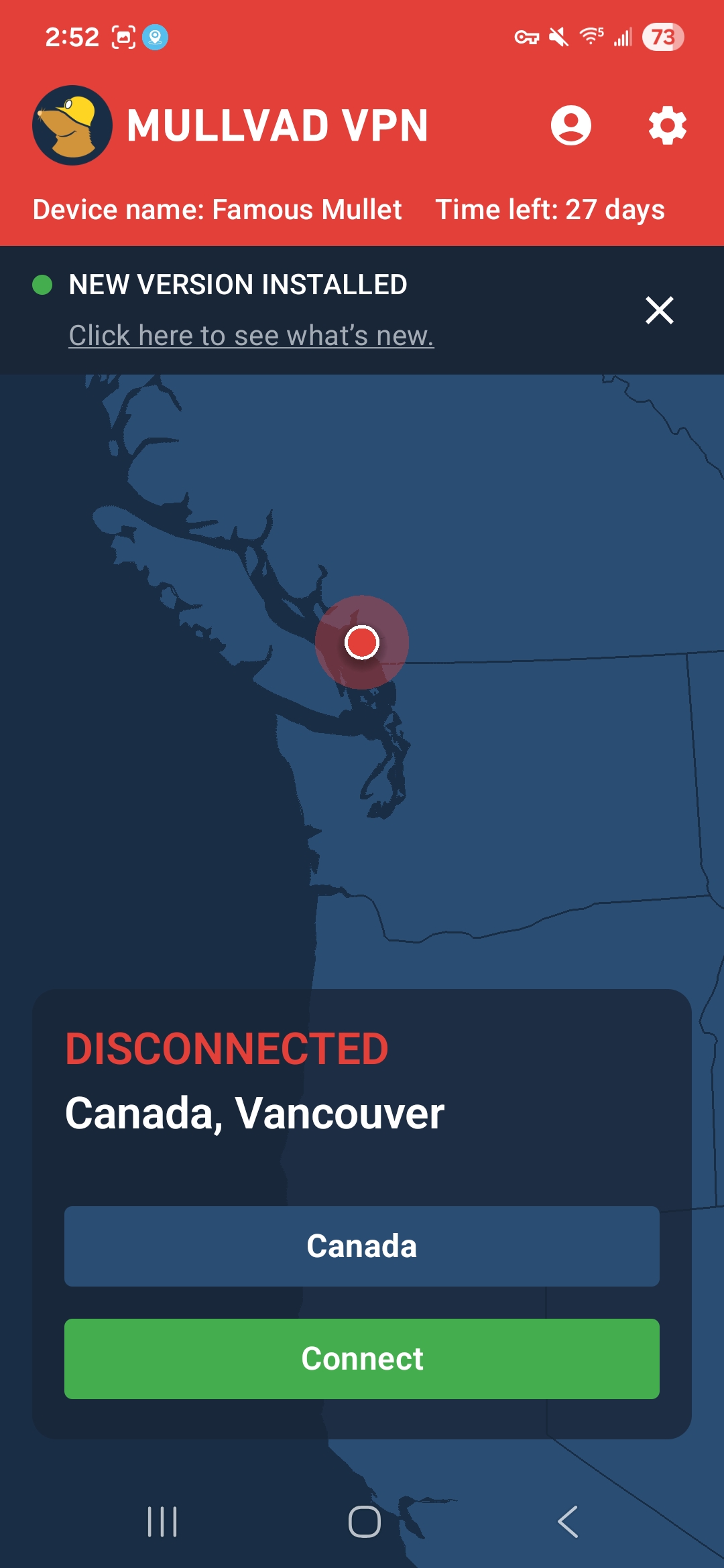
Mullvad’s Android app has the same nearly-perfect design approach as all its other apps. The main page has nothing on it but the connect/disconnect button, the choice of server locations, a map and the buttons for your account information and preferences. Those preferences are a manageable set of options that are almost all managed with simple on-off switches. It’s all highly responsive and annoyance-free.
Sam Chapman for Engadget
iOS
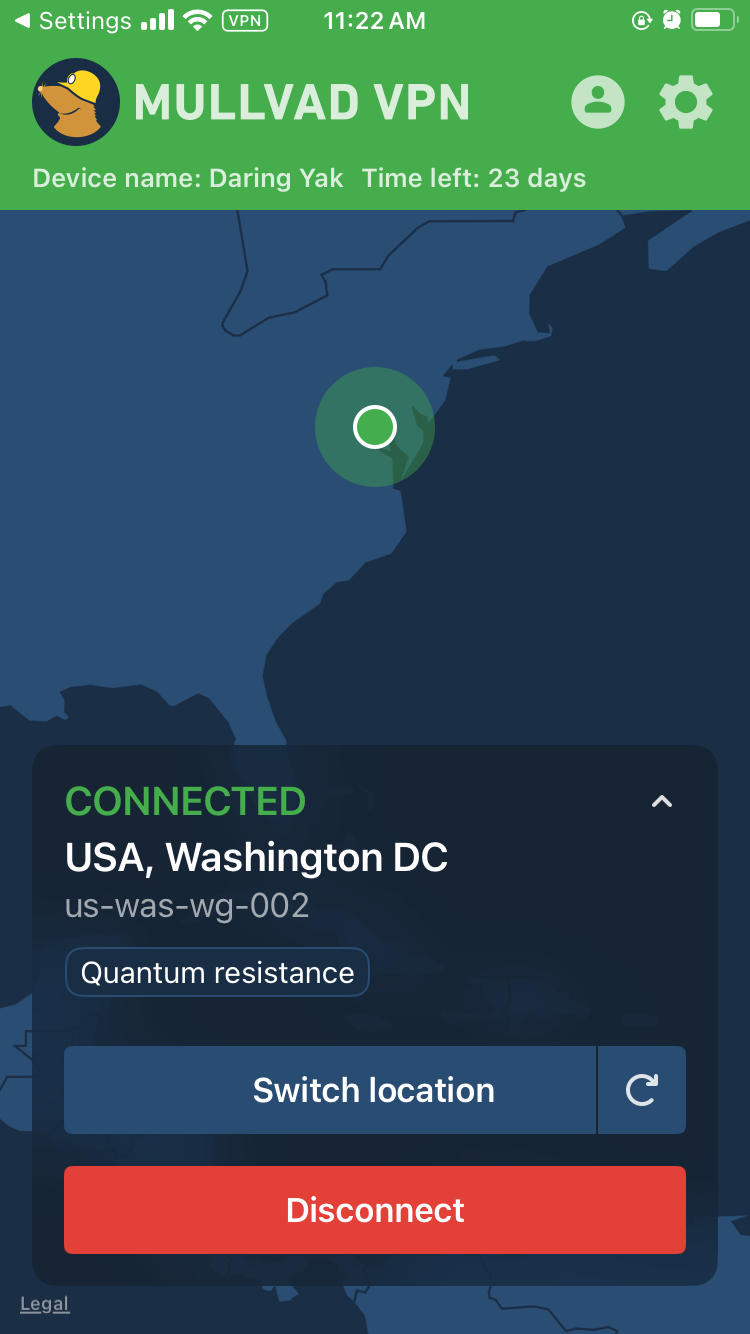
Mullvad’s iOS app looks very similar to its apps on every other platform. The front page is kept simple, with large controls in the foreground and a map taking up most of the space. Everything else is located in the menu accessed through the gear icon at top right. Neither mobile app has the options for toggling the UI itself that the desktop apps have, but it’s mostly free of quality-of-life problems to start with.
Sam Chapman for Engadget
Browser extensions
Mullvad’s browser extension is only compatible with Firefox. You can’t actually connect to the VPN through this extension. Its main functions are to tell you whether you’re connected to a Mullvad server and to connect to a SOCKS5 proxy in a Mullvad location. If you do this while connected to Mullvad through the desktop app, you’ll get a second layer of protection, similar to the multi-hop feature.
The Firefox extension is a rare misfire for Mullvad — perhaps fair, since it’s still in beta. Its only real feature is something that the desktop app already does perfectly well, and it looks like a software malfunction to boot. However, given Mullvad’s track record, I’m confident they’ll figure out what to do with it in time.
Mullvad speed test
A VPN almost always slows browsing speeds and increases latencies. It’s unavoidable, given the extra steps a VPN protocol adds to the process of getting online. The trick is to find VPNs that keep the slowdown to a minimum, using a combination of regular maintenance, good planning and smart load balancing.
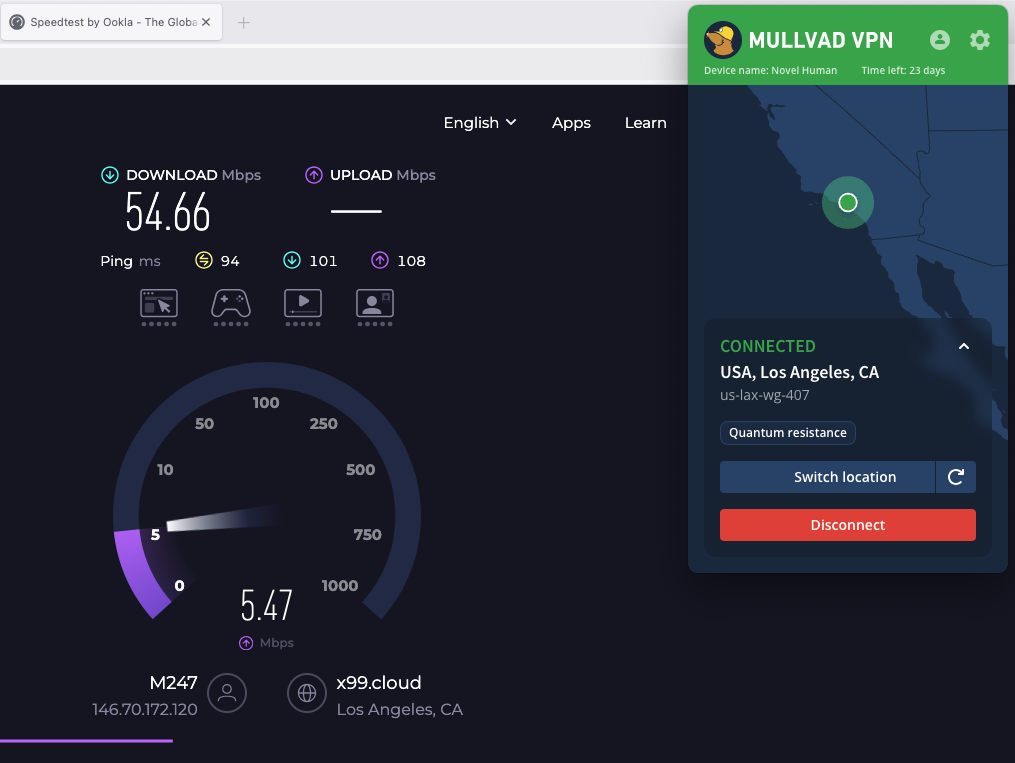
For this test, I used speedtest.net to check how six of Mullvad’s server locations influenced three key speed metrics. Ping measures latency, the time in milliseconds (ms) that one data packet needs to travel between a client device and an ISP. Download speed measures the amount of data in Megabits that a web browser can download in one second. Upload speed tracks how much data can be uploaded in a second. We’re looking for low latencies and high download and upload speeds.
|
Server location |
Ping (ms) |
Increase factor |
Download speed (Mbps) |
Percentage drop |
Upload speed (Mbps) |
Percentage drop |
|
Portland, USA (unprotected) |
15 |
— |
58.96 |
— |
5.85 |
— |
|
Seattle, USA (fastest location) |
23 |
1.5x |
55.07 |
6.6 |
5.51 |
5.8 |
|
Montreal, Canada |
165 |
11.0x |
44.28 |
24.9 |
4.62 |
21.0 |
|
Fortaleza, Brazil |
307 |
20.5x |
40.96 |
30.5 |
4.65 |
20.5 |
|
Prague, Czechia |
368 |
24.5x |
43.17 |
26.8 |
5.47 |
6.5 |
|
Lagos, Nigeria |
528 |
35.2x |
37.41 |
36.6 |
4.61 |
21.2 |
|
Bangkok, Thailand |
473 |
31.5x |
39.76 |
32.6 |
4.13 |
29.4 |
|
Average |
311 |
20.7x |
43.44 |
26.3 |
4.83 |
17.4 |
I’ll start with the bad news: the tests didn’t exactly make Mullvad look like a speed demon. Its speeds have gone up and down in the years I’ve been using it, and right now they appear to be on the downswing. If you use locations all around Mullvad’s server network, you can expect your download speeds to decrease by about 26 percent and your upload speeds to decline by 17 percent.
However, it’s important to put those numbers in perspective. First, Mullvad’s numbers aren’t markedly worse than the ones I got when testing CyberGhost. Its speeds are average, but by definition, most things are average. Its average worldwide latency is actually better than Surfshark, the current champion of download and upload speeds.
Sam Chapman for Engadget
It’s also nice that Mullvad’s speed drops follow a predictable curve. Lots of VPNs have unexpectedly sharp declines in certain locations, frequently in Africa. By contrast, Mullvad’s speed decreases pretty much as a direct function of how far from the server you are. This not only makes speed drops easier to plan around, but also means you can expect very good speeds on nearby servers.
This property of being fastest on servers near the user is another sign of Mullvad’s focus on its core privacy mission. If anonymity is your main reason for using a VPN, it doesn’t matter what your IP address is, so long as it’s not your real one. Using a nearby Mullvad server should guarantee you an internet connection that’s both fast and private.
Mullvad security test
To be secure, a VPN has to check two critical boxes. It must provide you with a secondary IP address without leaking your real one, and it must encrypt your communications with its servers so your activity can’t be traced. In the sections below, I’ll see whether Mullvad meets those requirements.
VPN protocols
VPNs use protocols to mediate between end devices, ISPs and their own servers. The first step is to ensure that the service you’re considering uses protocols that have expert confidence. Mullvad has kindly made this step easy for me by using only WireGuard on all its apps, with no OpenVPN, IKEv2 or in-house unique protocols.
There’s no question that WireGuard is a solid protocol. It uses the ChaCha20 stream cipher for symmetric encryption and Poly1305 for authentication, both uncrackable with current technology. Mullvad has even added its own fix for WireGuard’s one flaw, its need to save static IP addresses — the Mullvad implementation is set up to delete the IP address if it goes 10 minutes without being used.
Even so, it’s unfortunate to lose the ability to change protocols, which is one of the most common steps for troubleshooting a VPN connection. I understand Mullvad’s reasoning for cutting out OpenVPN (it claims the cryptography isn’t strong enough) but don’t agree. It’s one of this provider’s few unforced errors.
Leak test
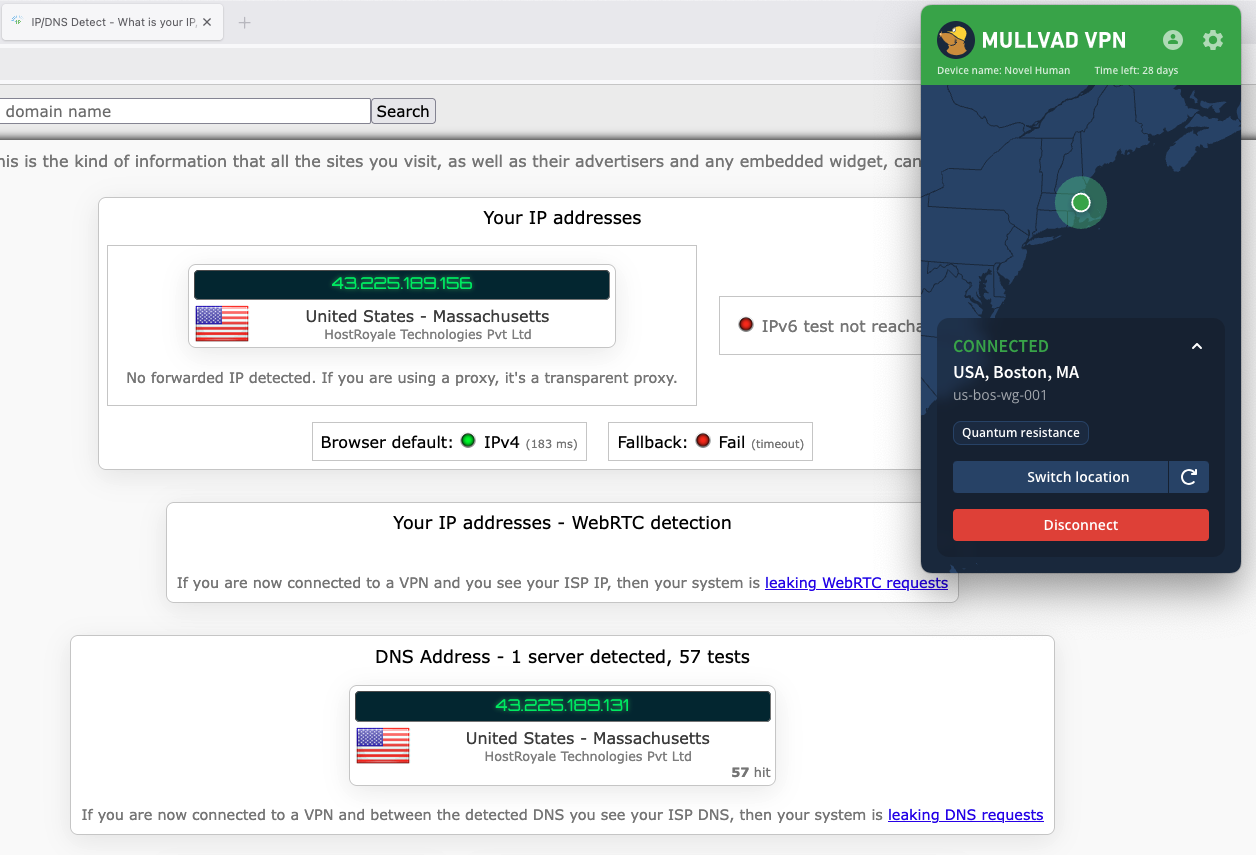
There’s a straightforward test to determine if your VPN is leaking. Load up any website that shows your IP address — I personally use ipleak.net — and see what IP and location it reveals without your VPN active. Then activate the VPN and refresh the page. If you see your real IP address anywhere, your VPN is leaking.
Sam Chapman for Engadget
I ran that test on five Mullvad servers. Each time, the website showed me the IP address of the VPN server, concealing my real one. To keep things simple, I ran the initial tests with IPv6 blocked via the Mullvad client. When I turned it on and tried again, the IPv6 traffic didn’t leak any more than the IPv4 did. I also saw no signs of WebRTC leaks. Unless you set up a custom DNS server, Mullvad also uses its own DNS, which remains entirely within the VPN tunnel.
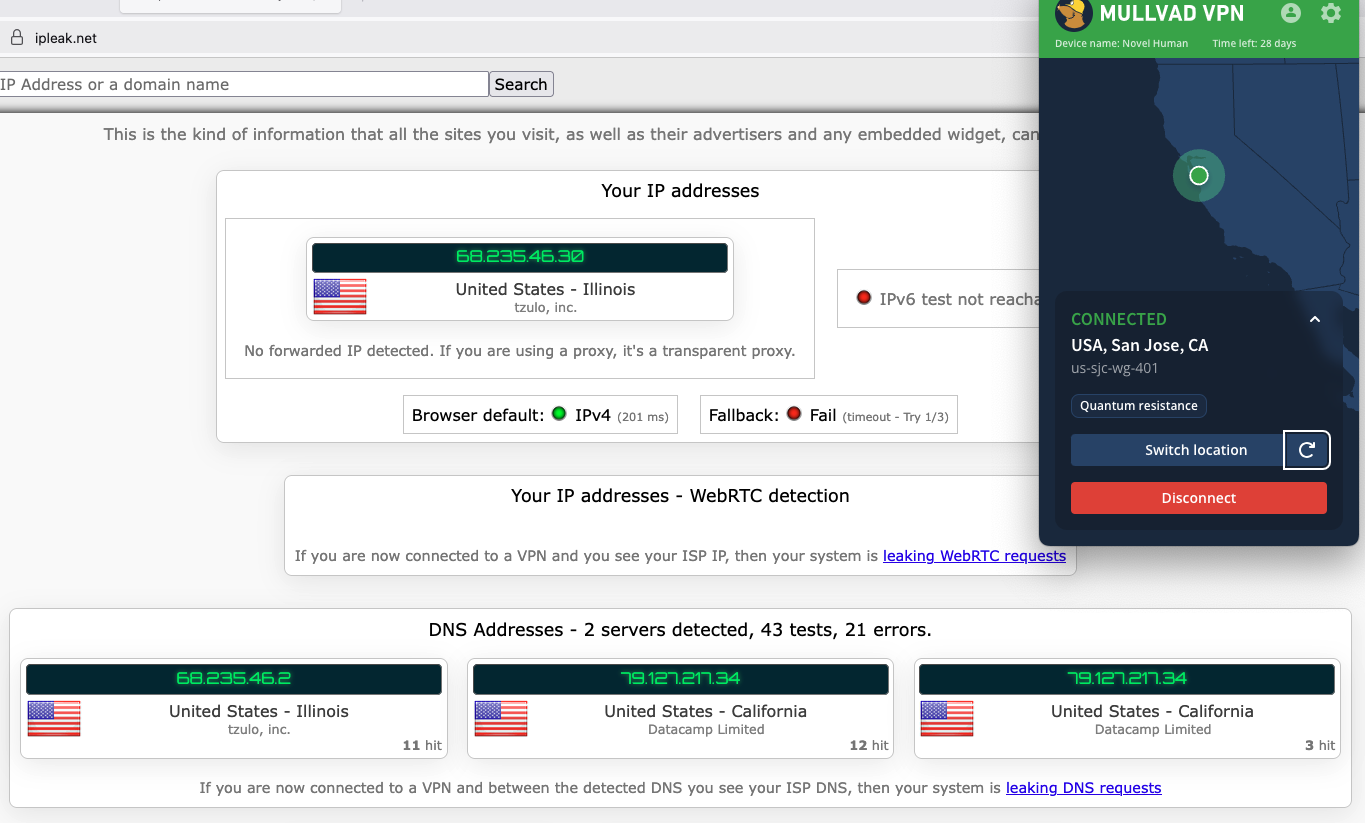
I had one more leak test to try. Frequently, VPNs are leak-proof when maintaining a connection to one server but drop encryption when switching between servers. That problem is why I ultimately couldn’t recommend Norton VPN. Luckily for me, Mullvad has a button that lets you shuffle to another server in the same location, so I used that to see if it stayed leak-proof.
Sam Chapman for Engadget
As you can see in the screenshot, Mullvad jumped seamlessly from one server to another without showing my real location in-between. On a practical level, that’s enough for me to declare Mullvad leak-proof.
Encryption test
For one final experiment, I used the WireShark packet sniffer to see whether the data Mullvad sent from my computer to my ISP was encrypted. After capturing a few packets, I was gratified to see that they were totally unreadable to interlopers. Most established VPNs pass this test, but it’s still important for due diligence.
How much does Mullvad cost?
Mullvad’s pricing structure is one of the most unusual things about it. This is normally the section where I untangle 47 different Pro+ and Business- accounts that are all sold at three different durations. Mullvad couldn’t be further from that. It costs 5 Euro a month — that’s it. Each 5-Euro subscription can be used on five devices at once.
It manages payments through a system inspired by parking meters. When you sign up for Mullvad, you’ll buy as much time as you want. That time will count down until it expires, unless you top it up with more 5-Euro payments. If you run out of money, Mullvad won’t charge you a new subscription fee because you didn’t tell it not to. It’ll just stop working until you pay again. Every payment also comes with a 14-day money-back guarantee, except for payments made in cash.

Sam Chapman for Engadget
The only real complexity in the process is that Mullvad always figures out its prices in Euro, so outside the EU, the cost per month is affected by exchange rates. If you happen to live in a country where the government’s economic policy shuttles between capricious and arbitrary, you might want to grab a few months in advance.
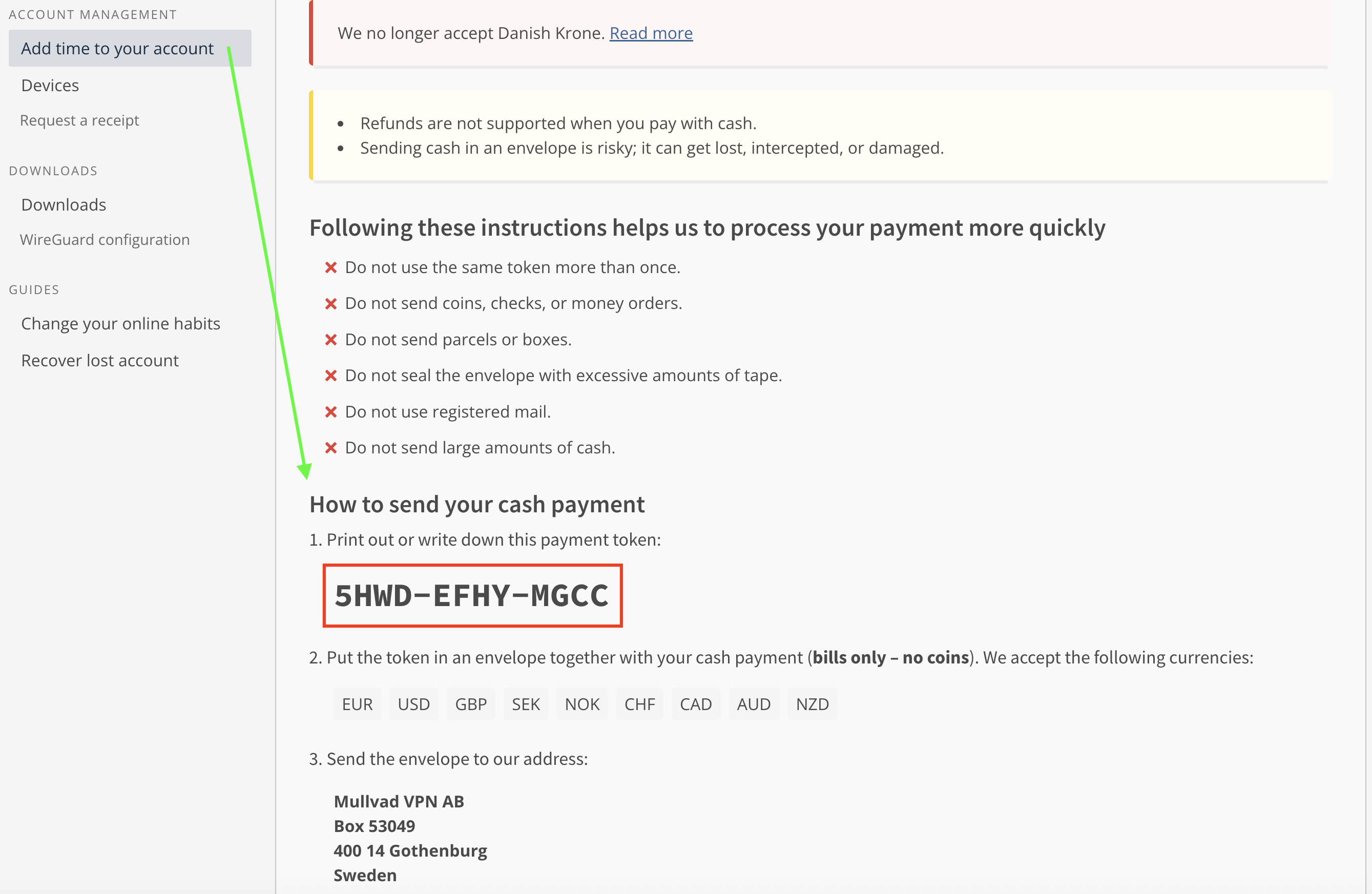
The other most interesting thing about Mullvad’s pricing is the options you can use to pay. For maximum privacy, you can pay with cash using the payment token you’ll find on your account page. Note that this is not the same as your account number. To find it, log into your dashboard on Mullvad.net, click Add time to your account in the left-hand bar, then click the button labeled Cash and scroll down. Make your cash payment by writing the token on an envelope and mailing it to Sweden (full instructions here).
Sam Chapman for Engadget
You can also get untraceable Mullvad vouchers by paying cash at participating retail locations. Most of them are in Europe, but you can order them from Amazon. While your payment to Amazon won’t be private, the voucher can’t be linked directly to your VPN account, since the actual number is hidden behind a scratch-off panel. It’s actually pretty ingenious.
Of course, you can also pay using any of the normal methods, including credit cards, cryptocurrency and bank wires (though not PayPal). But the more private methods are always there for people who need them.
Mullvad side apps and bundles
Mullvad is that rare VPN that’s still content to be a VPN and not an all-inclusive security suite. No shade to NordVPN or Surfshark, whose extra features are generally quite good, but it’s nice to see at least one of the top providers staying focused.
Although Mullvad doesn’t have any partners that sell their products alongside its VPN, it does have several partnerships with other VPNs who use its network as the basis for their own products. MalwareBytes Privacy VPN, Mozilla VPN, Tailscale and Obscura can all be considered Mullvad side apps if you squint.
Mullvad Browser
Mullvad’s only product other than the VPN is Mullvad Browser, which is free to download and works on Windows, macOS and Linux. Mullvad Browser works in the background, blocking common methods of browser fingerprinting that can be used to deduce your identity even when you have a VPN running.
For example, it automatically reports your time zone as UTC, disguises personal preferences like font and window size, scrambles information sent by APIs and conceals your browser version and computer operating system. It’s also in private mode by default, which doesn’t hide what your ISP sees but is useful for concealing your activity from other people that might use your computer.
Close-reading Mullvad’s privacy policy
Since privacy is Mullvad’s main selling point, this section is even more important than usual. Loopholes in the privacy policy of the privacy VPN would be deeply ironic. Fortunately, Mullvad’s privacy policy backs up its high-flying rhetoric. It’s a short, pointed and readable document with no problems I could discern. Mullvad has no parent company or subsidiary it might use as a loophole, and no clauses in its policy are left open to interpretation. It’s a masterpiece of the privacy-policy genre.
The document is actually three policies: a privacy policy, a no-logging policy and a cookie policy. The privacy policy lists all the times Mullvad might collect data about a user. That’s exactly two situations — using financial information to process payments (which will be entirely anonymous if you use cash or a voucher) and using your email address to track support tickets you open. That’s it.
The no-logging policy is a bit longer, but mostly because it’s explaining exactly how Mullvad manages to run a VPN service with so little information on individual users. For each account, it stores a number and an expiration date, plus public keys and tunnel addresses if you’re using WireGuard (deleted at most 10 minutes after your session ends). Everything else is completely anonymized. Mullvad even claims that its 500,000 or so user accounts could have been created by the same user 500,000 times, which I suppose is one way to spend 2.5 million Euro.
The cookie policy is the shortest because Mullvad uses exactly five cookies. One saves your login status in your browser, one saves your language preferences, one protects its site from being used in a specific kind of forgery hack and the other two are for handling Stripe payments.
Independent privacy audits
Mullvad corroborates its privacy policy with regular audits of various aspects of its service. Currently, there are 17 audits listed on its website, including four infrastructure audits by Cure53. All of its apps have been separately audited and found to be solid. It has been a couple of years since the last full infrastructure audit in 2024, but given how many other targeted reviews Mullvad has gone through since then, it’s hard to be too upset about the pause.
In 2023, Mullvad achieved the holy grail of VPN privacy: being ordered by subpoena to turn over customer information and not being able to comply because that information didn’t exist. Nothing compares to a VPN’s privacy being tested in the wild like this.
Can Mullvad change your virtual location?
Sometimes, a VPN appears to be working, but still reveals your real location to websites. Netflix is a useful proxy for this. To unblock a streaming site like Netflix, a VPN needs to change your virtual location while not appearing to do so — if Netflix sees any hint of VPN traffic, you’ll get blocked with the hated proxy error. I used five different locations to check whether Mullvad is up to the streaming task.
|
Server location |
Unblocked Netflix? |
Changed content? |
|
Vancouver, Canada |
3/3 |
3/3 |
|
Gothenberg, Sweden |
2/3 |
2/3 |
|
Istanbul, Turkey |
3/3 |
3/3 |
|
Johannesburg, South Africa |
3/3 |
3/3 |
|
Singapore, Singapore |
2/3 |
2/3 |
Mullvad did well for streaming, but it didn’t manage a perfect score like its fellow anti-establishment VPN Windscribe did. Two of the 15 servers I tested failed to unblock Netflix, one in Singapore and one in Mullvad’s hometown of Gothenburg. I also had trouble logging into Netflix while connected to a Vancouver server, though that server did unblock the site consistently once I got inside.

Sam Chapman for Engadget
In Mullvad’s defense, no location failed more than once. It’s completely possible to get good streaming performance out of this VPN; you just have to be willing to click the server refresh button a few times. Privacy is still the main use case for Mullvad, but it’s fine for streaming too.
Investigating Mullvad’s server network
Mullvad has 90 server locations in 50 countries and territories. Unusually for a VPN, users can choose between all 590 of its total servers, including several in each location. There’s even a list on its website that shows you the status of every server.
Mullvad does not use virtual server locations, so every server is physically located in the place where it claims to be. Here’s how they’re distributed.
|
Region |
Countries with servers |
Total server locations |
|
North America |
3 |
25 |
|
South America |
5 |
6 |
|
Europe |
29 |
41 |
|
Africa |
2 |
2 |
|
Middle East |
2 |
2 |
|
Asia |
7 |
8 |
|
Oceania |
2 |
6 |
|
Total |
50 |
90 |
Over half the countries with servers are in Europe and over two-thirds of the cities with servers are in either Europe or North America. That lopsided network is a limitation of Mullvad’s refusal to use virtual server locations, since its real servers have to be concentrated in nations developed enough to host data centers. With an all-real network, it’s easier to tell which servers will give you the fastest performance, but you can’t simulate as much of the world as you can with larger services like ExpressVPN.
The good news is that there’s at least two real server locations on every continent. Mullvad has a surprisingly robust presence in South America and two bare-metal servers in Africa, which is more than some other VPNs have. In the end, though, the best application of Mullvad is to protect the online privacy of users in North America, Europe and eastern Asia.
Extra features of Mullvad
Most of Mullvad’s features are augmentations to the VPN itself, rather than side options that do other things. Some of them are bread-and-butter, like the kill switch and split tunneling, but a few you won’t find anywhere else. Note beforehand that Mullvad does not support port forwarding, so if you depend on that for your torrenting, try another VPN.
DAITA AI defenses
Mullvad’s most novel feature is a recent one. DAITA, which stands for Defense against AI-guided Traffic Analysis, can be toggled on and off in the Mullvad app. According to Mullvad, certain patterns in how browsers communicate with websites can be analyzed by AI to reveal the truth behind encrypted internet history. DAITA hides those packets by filling communications with background noise so the AI won’t know what’s real.

Sam Chapman for Engadget
DAITA is a laudably forward-looking feature, but as Mullvad itself admits, it will make your browsing speeds slower and drain your battery. I recommend only using it for activities you really want to hide.
Quantum resistance
Mullvad’s desktop apps establish quantum-proof WireGuard tunnels by default. Quantum computing isn’t yet a threat to WireGuard, but it may become dangerous in the future, so Mullvad is getting ahead of the problem (along with a few other services like NordVPN). When quantum resistance is active, Mullvad encapsulates its keys using the current standard mechanism, ML-KEM.
Anti-censorship
If you find yourself in a country where government censorship makes it hard to access the internet, Mullvad has options that might help. These anti-censorship features can be used to get around firewalls that block visible VPN traffic. You have several options, including changing your WireGuard port, randomizing your port number, disguising your VPN traffic as an ordinary HTTPS connection or using an obfuscated Shadowsocks proxy.
Mullvad’s anti-censorship involves more features than most VPNs have in this area. This makes it a bit less user-friendly, but a lot more likely to work. If you’re new to getting around censorship, Mullvad’s help center has a helpful page about using its anti-censor settings.
Multihop
Many VPNs offer a double-hop connection that routes your traffic through two servers instead of one, adding a redundant layer of encryption in case one server malfunctions. Mullvad pulls ahead of the competition (except Surfshark, which also does this) by allowing you to choose your entry and exit servers. When you activate the multihop option and open the server list, you’ll be prompted to pick two locations instead of one.

Sam Chapman for Engadget
This means you can select an entry server that’s close to you and an exit server in any country whose location you want to spoof, letting you fine-tune your own performance. It’s way nicer than being railroaded into certain paths.
DNS content blockers
Mullvad includes six blocklists that can keep you or your family members from looking at unwanted content: ads, trackers, malware, gambling, adult content and social media. These lists can’t be customized like Windscribe’s R.O.B.E.R.T. blocks can, so you’re limited to just turning them on and off.
IPv6 support
The internet is gradually transitioning from the old IPv4 standard over to IPv6, which will allow many more addresses to be shared out. Mullvad is one of a few VPNs looking ahead to the IPv6 era. You can leave it to block all IPv6 traffic, but if you do need IPv6 for any reason, you can enable it while still being connected to a Mullvad server.
Kill switch and lockdown mode
Mullvad comes with two features that protect against unexpectedly losing your VPN defenses. The first is a kill switch, a common VPN option that cuts off internet access if the VPN tunnel ever fails. This simple measure helps guard against accidental leaks.
Lockdown mode is the stronger option. While it’s active, you will be unable to get on the internet unless you connect to a Mullvad server first. This will remain true if you turn the connection off yourself and even if you quit the app.
Split tunneling
Split tunneling is available on Mullvad’s apps for every system except iOS. It lets you send some apps outside the VPN tunnel so they get online with your normal IP address. It’s helpful if you have some apps that don’t work with the VPN active — this is common with online banking, as an example. Another common application is to protect a torrenting client in the background while using your browser unprotected for better speeds.
Mullvad customer support options
Mullvad makes two forms of support available in the app. You can report a problem by going to Settings -> Support -> Report a problem, typing your question (requested to be in either English or Swedish, though they’d probably be able to read a question run through Google Translate) and optionally providing your email. You can also view the app’s logs at any time, which can be useful to help a technician diagnose your problem.
If you’d rather search for a solution at your own pace, you can go to that same page and click FAQs and Guides instead. This opens the help center in a browser.
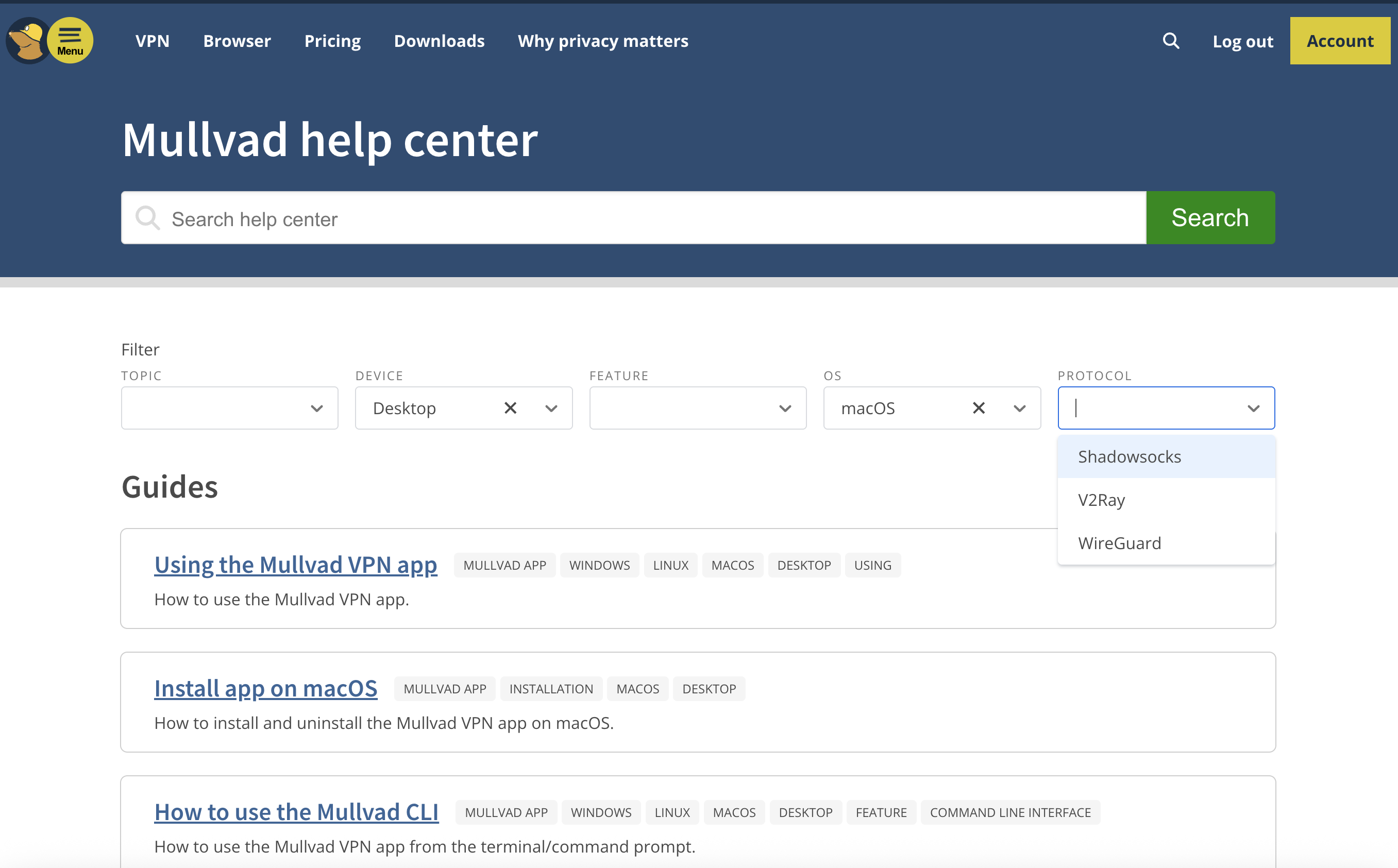
Sam Chapman for Engadget
I love Mullvad’s approach to laying out its FAQs. Instead of crowding topics into five or six categories and making you guess whether your problem falls under setup, usage or troubleshooting, Mullvad gives you a set of dropdown filters to narrow down the articles which might relate to your problem.
By the time you’ve named which device, OS and protocol you’re dealing with, you won’t have many articles left to sift through. There is an annoying tendency for certain sets of filters to reduce the number of surfaced links to zero, but for those cases, there’s a search bar that also works well.
The articles themselves are good enough that I referred to them several times while writing this review. Some of them are a bit overlong, but they’re diligent about including both internal and external links to get you where you’re going fast.
Live support experience
This is normally where I cover how it feels to get live chat support from the VPN I’m reviewing. However, Mullvad doesn’t have live chat support. That’s unfortunate, although it’s still better than Windscribe’s approach of forcing you to banter with a sarcastic robot. Instead, I sent a question via email to Mullvad’s support team, and got a response within 24 hours.
Mullvad background check
Mullvad was founded in 2009 in Sweden. It’s still owned and operated by its original founders. According to a detailed timeline on its website, its 16-year history has been as uneventful as any user could ask for, with not much changing except updates to stay on the technological leading edge. The only controversy mentioned in Mullvad’s own materials is the 2023 police raid of its headquarters, which (as I covered in the privacy section) only makes them look better.
So as not to take Mullvad at its word, I scoured the last 16 years of news items and user reports to search for any other blemishes on its record. Based on that research, I found no reason to doubt Mullvad’s honesty about its location, owners or team.
I found just one leak that wasn’t noted on Mullvad’s own site. In 2023, a security research group called ZATAZ alleged that it found anonymized information on Mullvad users saved on an Internet Archive page, including account numbers (linked article is in French). According to ZATAZ, Mullvad contacted the Archive and got the page deleted.
To my mind, the only mistake Mullvad made in response to the ZATAZ allegations was not making a public statement about the incident. I can see why they didn’t think it was a big deal, since even logging into someone else’s Mullvad account wouldn’t show you their browsing history, but it’s always better to communicate about these things.
Final verdict
Mullvad is a VPN that knows what it wants to be and achieves that goal with flying colors. It’s not trying to be an everything app — it does privacy and does it well. That’s not to say it has nothing going on outside the VPN itself, as its DNS blockers, AI defenses and split tunneling all work smoothly. But if you want a VPN that’s not ashamed to be a VPN, Mullvad is the right choice.
Of course, it has its own compromises. It’s solidly in the middle of the speed pack and occasionally trips up when unblocking streaming sites. The lack of any protocols other than WireGuard grates on me a bit, since it reduces the user’s options for troubleshooting. With all that said, those are minor hiccups on a VPN that does such a thorough job keeping you anonymous online.
This article originally appeared on Engadget at https://www.engadget.com/cybersecurity/vpn/mullvad-vpn-review-near-total-privacy-with-a-few-sacrifices-130000056.html?src=rss
A mid-range Campagnolo groupset, sensible alloy frame and £599 price – this bargain bike is a throwback to 2008
This Tifosi Rostra road bike, equipped with a mid-range Campagnolo Centaur 11-speed groupset, has a chunky 52 per cent off, bringing the price down to £599.
That price, in combination with the rim brakes, rarely seen groupset and boxy alloy wheels, lends this bike a circa-2008 sensible road bike vibe that’s got us feeling nostalgic.
The bike is designed as an all-season whip, with room for 35c tyres and mudguards – although not at the same time.
While it’s not going to win any awards for speed, the 6061-T6 aluminium frame looks to offer great versatility, with rack and mudguard mounts making this a potential lightweight touring bike or commuter bike.

Tifosi says the bike has an endurance-oriented geometry, and the carbon fibre fork should add a touch of extra comfort.
Carrying on the Italian theme, the bike comes with a Selle Italia Model X saddle and Miche Reflex DX wheels.

At the time of writing, the bike is available in M and L sizes.
Other options

There are other bikes of this ilk available at around this price, such as the Cannondale CAAD Optimo 2 for £690, down from £1,150. It features a similar spec, although it’s rare to find bikes at this price point with a Campagnolo groupset.
The CAAD Optimo 2 ticks the boxes of beginners and those looking for a hack bike.
It goes to show that if you can forgo disc brakes, there are some bargains to be picked up.
While I’m a fan of all things disc brake, I never feel under-braked on my rim-brake equipped touring bike, even when descending in the Pyrenees with full panniers.
There are also plenty of high-end wheelsets from the rim-brake era that can be picked up for fractions of their original price – whether that’s new or second-hand.
Run Tracking Added to Zwift’s Fitness Trends, Goals, Streaks
Yesterday, Zwift rolled out a much-requested upgrade to the Fitness Trends feature, adding running as a second activity type. This means that, effective immediately, your Zwift runs and outdoor runs will count toward Fitness Metrics, Week Streaks, and (optionally) Weekly Goals. Read on for details…
Fitness Trends + Running
Everyone’s Fitness Trends now include Zwift running activities back to January 2025, as well as outdoor runs tracked on Garmin or Wahoo. Runs show up as pink bars in the weekly Fitness Trends chart in the Companion app:
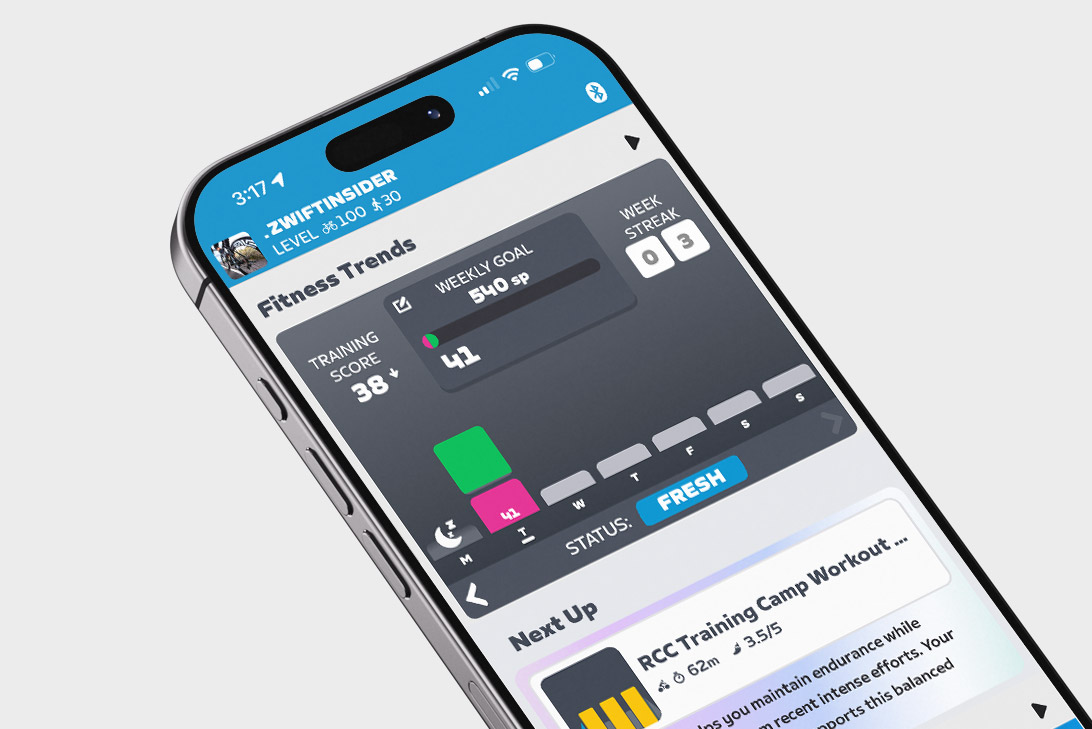
(Not seeing it? You need to be running Zwift Companion version 3.78 or later, so you may need to force the update from your app store.)
This means your current Training Score is now a combination of Stress Points (SP) accumulated via riding and running. If you’re an athlete whose primary training consists of riding and running, your Training Status (Fresh, Overreaching, etc.) should now be more accurate, whereas it was previously understated.
Related: All About Zwift’s Fitness Trends Metrics: Training Score, Training Status, Stress Points, and More
How Zwift Calculates Stress Points (SP) For Running
Zwift uses industry-standard algorithms to compute SP for your virtual and outdoor runs:
- If your run includes heart rate data, this is used to calculate the SP for that activity based on the hrTSS formula.
- If an outdoor run lacks heart rate data, Zwift uses the RPE (Rate of Perceived Exertion) from that activity as synced from Garmin or Wahoo to estimate SP using the method shown here.
- For Zwift activities without heart rate data, SP is calculated with a default RPE of 5 using the method shown here.
Importing Outdoor Runs (History, XP, De-Duping)
Many runners track their outdoor runs using a Garmin watch. If you haven’t yet connected your Garmin account to Zwift, you’ll want to do so, as it allows those outdoor rides to automatically sync to your Zwift account!
To do so, go to Settings>Connections in the Companion app. You can also do it via the web by signing into your account at zwift.com, then going to Connections. Tap on Garmin, walk through connecting your account, and you’ll be all set.
The past 90 days of runs are “backfilled” into Zwift’s Fitness Trends system when you connect your Garmin or Wahoo account. If you connected Garmin or Wahoo back in April when the Fitness Tracker was first released, that means you’ll have your outdoor runs stored in Zwift’s system going back to early 2025. If you connect it to today, it will backfill 90 days (approximately November 10, 2025).
Outdoor runs, like outdoor rides, now earn in-game XP. Outdoor runs earn 8 XP/km, which is 1/5 the rate of XP earned for Zwift runs (40 XP/km).
Some runners who dual-record their Zwift runs on a Garmin watch are already reporting duplicate entries in their Zwift activity lists. There’s a bug in the system currently where runs flagged as virtual runs are still being imported from Garmin to Zwift – this should be fixed soon. Zwift is also working on implementing further de-duping for rides and runs, but have shared no additional info at this time. For now, my best advice is to use Companion to manually delete duplicate activities from your Zwift activities feed to maintain accurate Fitness Trends.
More Running Platforms?
Zwift currently supports syncing outdoor rides and runs from Garmin. Garmin is, of course, a popular platform for tracking outdoor runs, since Garmin’s watches and fitness tracking ecosystem are mature and feature-rich. Zwift also supports Wahoo and Hammerhead, who are less popular with runners, although their phone apps can be used for tracking runs.
The community of runners on Zwift is already asking for integration with additional popular run-tracking platforms, namely Suunto and Coros. Hopefully Zwift is working with these (and other?) partners to broaden their outdoor activity tracking ecosystem.

Weekly Goals + Running
You can now choose to include running activities in your Weekly Goal. Do this by tapping the “Weekly Goal” box in the Fitness Trends window of the Companion app:
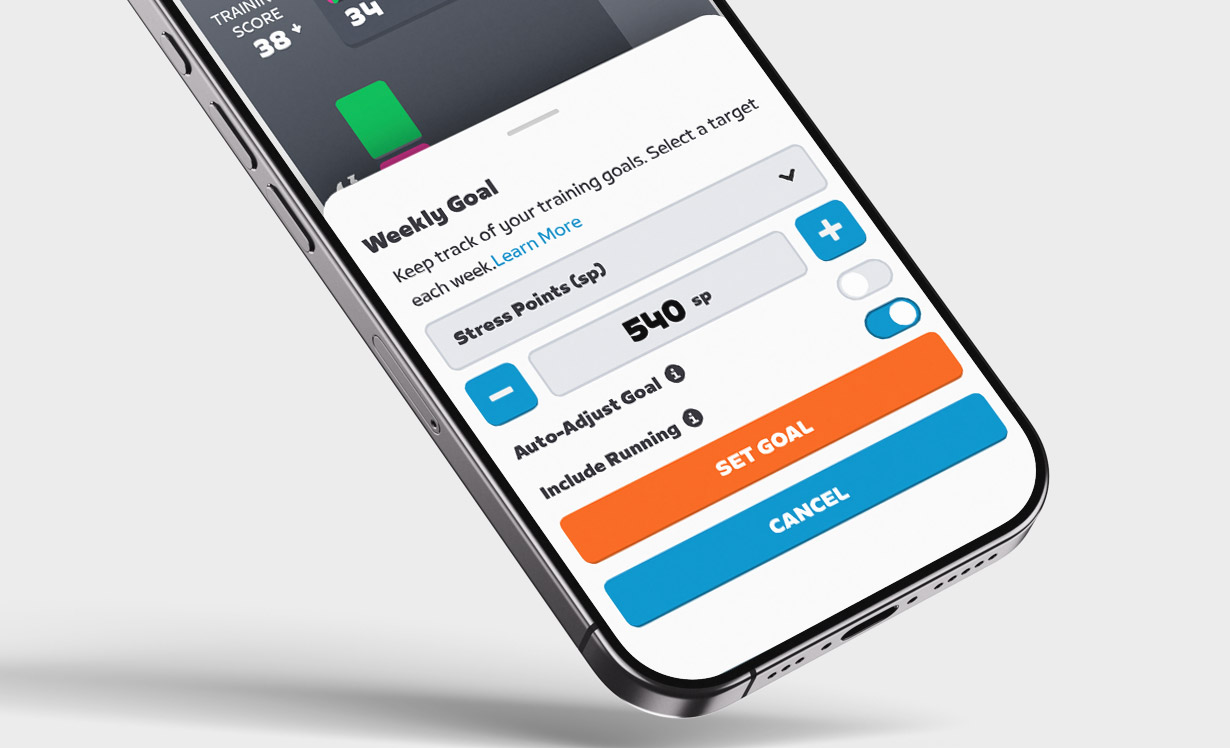
Weekly Goals can be set based on Distance, Kilojoules, Stress Points, Calories, or Time.
Zwift says, “…if the Include Running toggle is on, goals will be a single overarching target covering both running and cycling rather than sport-specific. Expect this to evolve over time.” So it sounds like Zwift is planning to let us set Weekly Ride goals separately from Weekly Run goals in the future.
Week Streaks + Running
One last bit of news re: running on Zwift. Beginning at midnight on Monday, February 16 (2026), Week Streaks can now be extended by logging a run!
Questions or Comments?
Share below! You might also want to check the official announcement thread on Zwift’s forum.
A New Era of Influence: Why Ariel Kelman is the CMO AMD Has Been Waiting For
The semiconductor industry is often viewed through the lens of benchmarks, nanometers, and thermal design power. For years, AMD has fought a grueling war of attrition on these technical fronts, successfully transforming itself from an underdog into a dominant architectural powerhouse under the leadership of Dr. Lisa Su. However, while the “Zen” era proved that AMD could out-engineer the competition, the company has historically struggled with a “fame gap”—a disconnect between the quality of its silicon and the strength of its brand pull in the enterprise and consumer mindsets.
On February 9, 2026, AMD announced the hiring of Ariel Kelman as its new Senior Vice President and Chief Marketing Officer. This isn’t just another executive reshuffle; it is a strategic shot across the bow of the industry. Kelman, formerly the CMO of Salesforce and a pivotal marketing leader at Amazon Web Services (AWS), brings a pedigree that suggests AMD is finally ready to stop acting like a component manufacturer and start acting like a platform leader.
The Dennis Carter Template: What AMD Needs in a CMO
To understand what AMD needs, one must look back at the most successful marketing campaign in the history of silicon: “Intel Inside.” Dennis Carter, the architect of that movement, understood a fundamental truth that many tech companies miss: end-users don’t buy transistors; they buy confidence.
Before Carter, microprocessors were “invisible” components. He realized that by branding the “ingredient,” Intel could create a pull-through effect where consumers would demand a specific brand of chip, forcing OEMs (Original Equipment Manufacturers) to prioritize Intel. This created a moat that lasted decades.
AMD currently finds itself in a position similar to Intel in the late 1980s. It has the performance, but it lacks the “ubiquity of preference.” AMD needs a CMO who can move beyond the “speeds and feeds” and create an emotional and professional resonance with the brand. Kelman’s task is to make “AMD” a synonym for “Modern AI Infrastructure” in the same way Carter made “Intel” a synonym for “Personal Computing.”

The Kelman Pedigree: A Background Built for Scale
Ariel Kelman’s resume reads like a roadmap for AMD’s future growth. At AWS, he was instrumental in taking a nascent cloud service and turning it into a global utility. AWS didn’t just win on price; it won because it built a developer ecosystem and a brand that felt like the “safe” and “innovative” choice simultaneously.
Later, at Salesforce, Kelman operated at the highest levels of SaaS marketing, where the focus is on business transformation and customer success stories rather than technical specifications. This is exactly where AMD needs to pivot. As the company pushes deeper into the AI data center market with its Instinct line of accelerators, it needs to sell a vision of “AI Productivity,” not just a faster GPU. Kelman knows how to talk to CEOs and CTOs who care about ROI and competitive advantage, not just TFLOPS.
Unique Skills for the AI Era
Kelman brings a unique blend of “developer-first” marketing and “enterprise-scale” storytelling. In the current AI arms race, the winner isn’t just the one with the best hardware; it’s the one with the best software ecosystem and developer mindshare. AMD’s ROCm software stack has made massive strides, but it still lacks the mindshare of NVIDIA’s CUDA.
Kelman’s experience at AWS—where he had to convince developers to build their entire futures on a new type of infrastructure—is invaluable. He understands how to build community, how to incentivize developers, and how to create the “halo effect” around a technical platform. If he can apply the AWS playbook to AMD’s AI and Ryzen AI initiatives, he can help AMD meet its goal of becoming the end-to-end leader in AI computing.
The Growth Challenge: Ingredient Marketing
Despite his stellar record, Kelman will face a steep learning curve in one specific area: ingredient marketing. Most of his career has been spent in “direct-to-customer” environments (SaaS and Cloud). Selling a chip is different. You are selling a component that goes into someone else’s product (a Dell server, an HP laptop, a Lenovo workstation).
Few CMOs have mastered the art of “B2B2C” (Business to Business to Consumer) marketing. Kelman will need to learn how to navigate the complex relationships with OEMs who are often wary of their component suppliers becoming “too famous.” He must figure out how to incentivize partners to put the AMD logo on the box and in the commercials without alienating them. This “pull-marketing” strategy is a dark art that requires a different kind of budget allocation and partner-co-marketing savvy than what is typically found in the SaaS world.
Initial Drivers: The 100-Day Strategy
To be successful, Kelman should initially focus on three pillars:
- Simplifying the AI Narrative: AMD’s AI story is currently fragmented across data center, edge, and client. Kelman needs to unify this under a single, powerful brand promise that is easily understood by investors and non-technical decision-makers.
- The “Ryzen AI” Offensive: In the consumer space, the “AI PC” is the next big battleground. Kelman should drive a massive brand awareness campaign that positions Ryzen AI as the pioneer and leader in this space before Intel’s marketing machine can regain its footing.
- Audit the Developer Experience: He needs to look at AMD’s developer relations through the lens of a cloud provider. Is it easy to get started? Is the documentation world-class? Is the “vibe” of the brand one that developers want to be associated with?

Overcoming Historical Hurdles: The Engineer’s Trap
The greatest threat to a CMO at a company like AMD isn’t the competition; it’s the internal culture. Engineering-heavy companies often suffer from a “logic bias,” where the leadership assumes that if you build the best product, customers will magically find it. In these environments, marketing is often viewed as “fluff” or “overhead.”
Historically, CMOs at chip companies have been undermined by engineers who believe they know more about marketing than the experts. This leads to marketing-by-committee, where bold ideas are sanded down into bland, technical jargon.
This is where Dr. Lisa Su becomes the most important factor in Kelman’s success. For Kelman to succeed, Dr. Su must give him the “air cover” to be bold. She needs to signal to the entire organization that marketing is now a first-class citizen at AMD. If she supports his vision even when it feels “non-technical” to the engineers, she will empower him to build the brand equity that has been the missing piece of the AMD puzzle.
The Future of AMD Under Kelman
If Ariel Kelman is successful, the future of AMD looks fundamentally different. We will move from an era where people buy an “AMD laptop because it was a good deal” to an era where they buy it “because it’s an AMD.”
In the data center, success means that “Powered by AMD” becomes a badge of honor for cloud providers and enterprises—a signal of efficiency, modern AI capability, and ethical tech leadership. Kelman has the opportunity to turn AMD into a “lifestyle brand” for the high-performance computing world. This would not only increase margins but also stabilize the stock price against the cyclical nature of the chip industry, as brand loyalty is far stickier than a 5% lead in benchmarks.

Wrapping Up
The hiring of Ariel Kelman is a clear signal that AMD is no longer content being the “alternative” choice. By bringing in a leader with deep roots in the cloud and enterprise SaaS worlds, Lisa Su is doubling down on the idea that AMD’s future is as a platform and AI powerhouse. Kelman’s challenge will be to master the nuances of ingredient marketing and navigate a culture that has traditionally prioritized the lab over the billboard. However, if he can successfully apply the lessons of the “Intel Inside” era to the modern AI landscape, he won’t just be marketing chips; he will be defining the next decade of the digital world. For AMD, the “Zen” of engineering has been achieved; now, it’s time for the “Zen” of the brand.
Moderna Says FDA Refuses To Review Its Application for Experimental Flu Shot
An anonymous reader shares a report: The Food and Drug Administration has refused to start a review of Moderna’s application for its experimental flu shot, the company announced Tuesday, in another sign of the Trump administration’s influence on tightening vaccine regulations in the U.S. Moderna said the move is inconsistent with previous feedback from the agency from before it submitted the application and started phase three trials on the shot, called mRNA-1010. The drugmaker said it has requested a meeting with the FDA to “understand the path forward.”
Moderna noted that the agency did not identify any specific safety or efficacy issues with the vaccine, but instead objected to the study design, despite previously approving it. The company added that the move won’t impact its 2026 financial guidance. Moderna’s jab showed positive phase three data last year, meeting all of the trial goals. At the time, Moderna said the stand-alone flu shot was key to its efforts to advance a combination vaccine targeting both influenza and Covid-19.


Read more of this story at Slashdot.