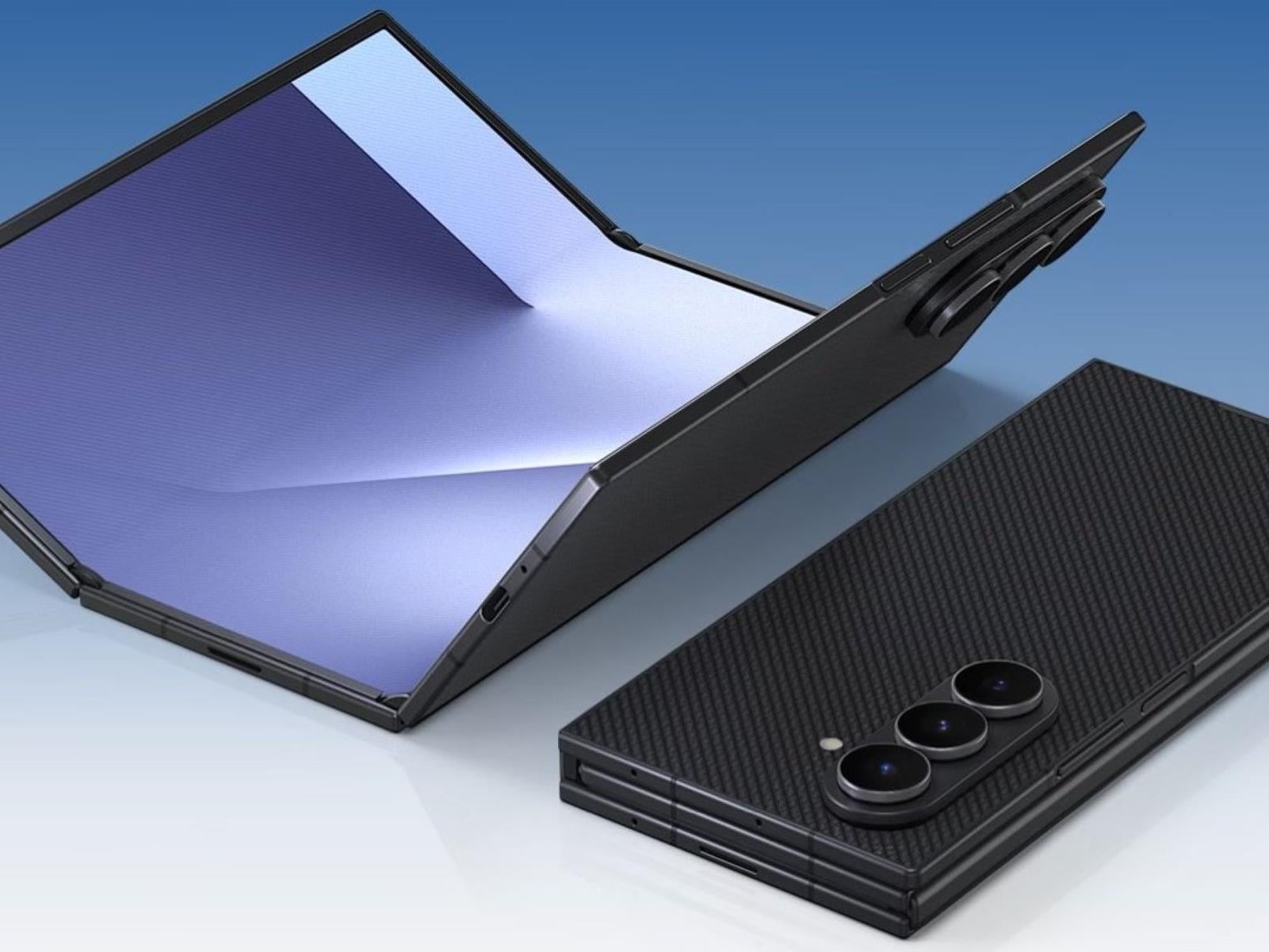
Even with a conservative rollout, Samsung’s nearly $3,000 Galaxy Z TriFold sold like hot cakes, with limited runs in South Korea being restocked six times and, just as impressively, selling out in less than half an hour after release here in the United States. For those of you missed out, more units are reportedly on the way.
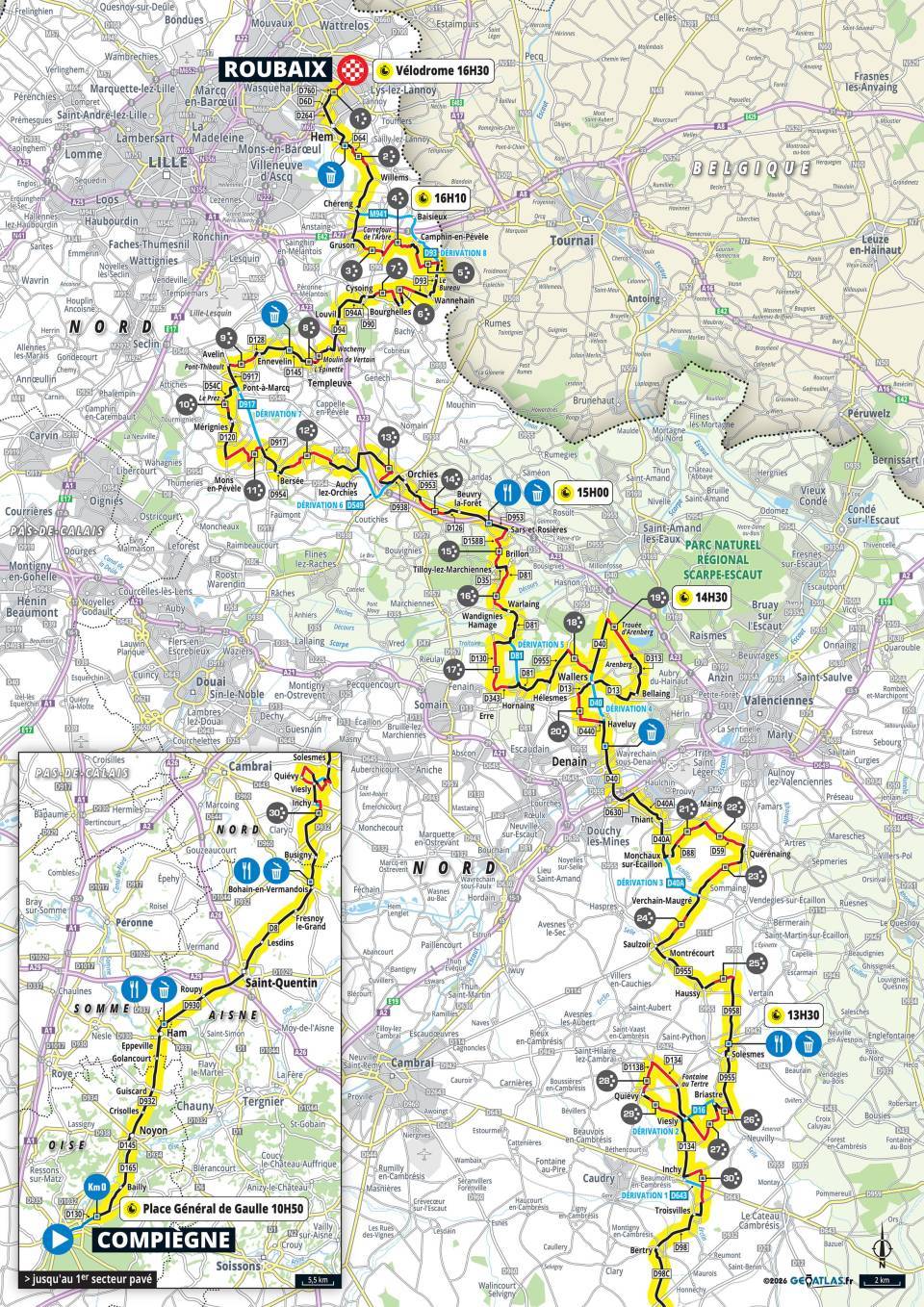
The route of this year’s Paris-Roubaix has been revealed. The men’s race, on Sunday 12 April, is slightly shorter than in 2025, at 258.3km versus 259.2km last year. It includes 30 cobbled sectors for a total of 54.8km of pavé and is expected to finish at 4.30pm local time.
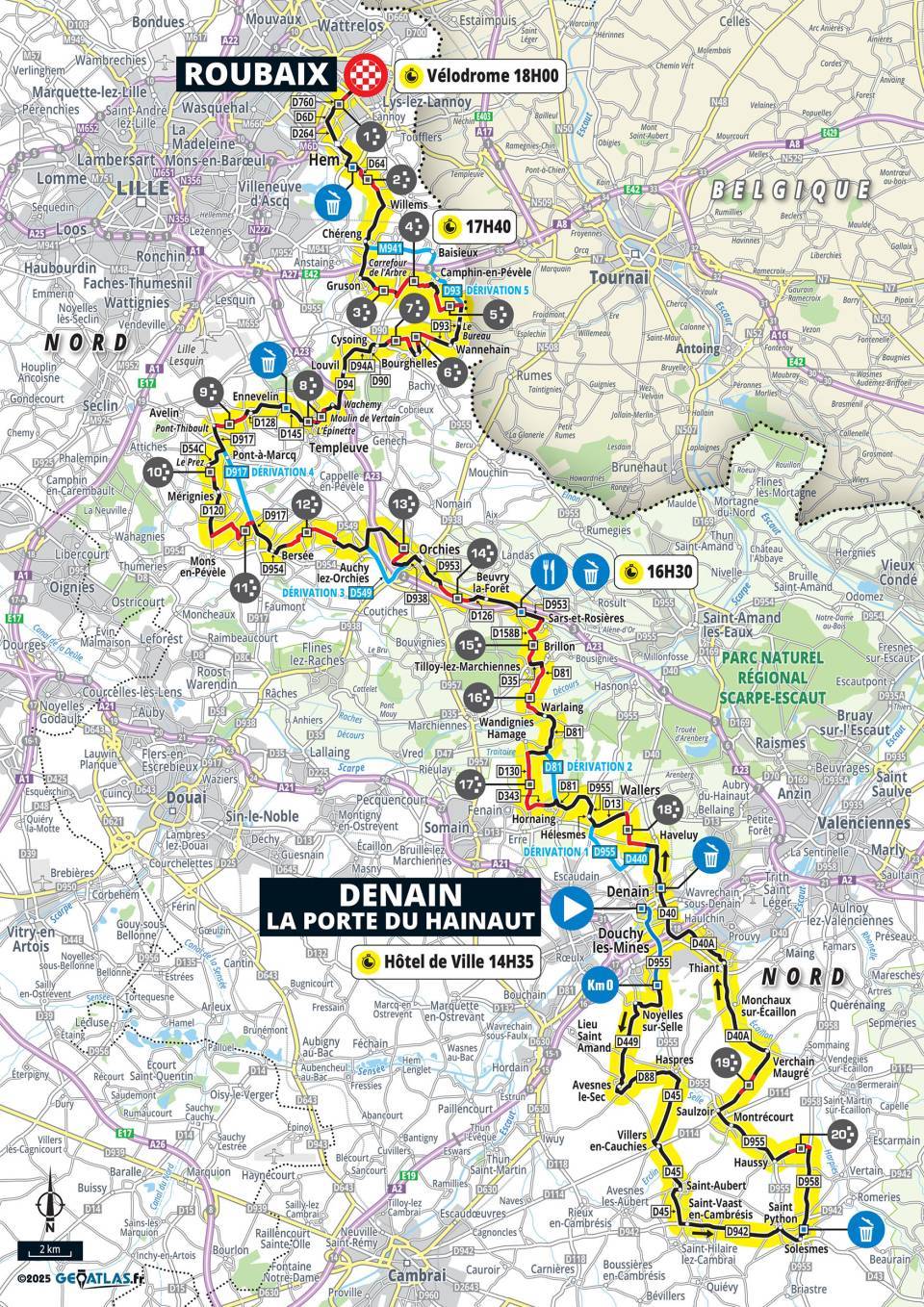
Meanwhile, the sixth edition of the women’s race, also held on 12 April rather than a day earlier as was the case for previous editions, will be 5km shorter than last year, but adds three extra cobbled sections. It’s slated to finish at the Roubaix velodrome later in the day than the men’s race, at around 6.20pm local time.
The Roubaix velodrome will be busy because there are also Junior and Under-23 races scheduled for the same day.
Reconfigured men’s route
As usual, the race begins in Compiègne, with the riders hitting the cobbles at around 100km for the Troisvilles sector, which always features as the first cobbled run. This year, it’s followed by a cluster of four closely packed sectors, a configuration that was used for the 2024 edition.
Route planner Thierry Gouvenou points out that in 2024, the race began to split here under pressure from Alpecin-Deceuninck. To up the ante, the route will next return to the rarely used sector 26, which adds an 800m climb to the predominantly flat parcours.
Gouvenou reckons the tweaks to the route might catch some riders off-guard and result in an early pre-selection, as well as speeding up the race overall – maybe eclipsing the 2024 edition, which was the fastest ever.
The classic five-star sectors remain, with the Trouée d’Arenberg tackled at kilometre 163, Mons-en-Pévèle at kilometre 210 and Carrefour de l’Arbre at kilometre 241.
The men’s race will feature 25 teams – the 18 WorldTour teams plus seven invited UCI ProTeams.
More cobbles for the women’s race
The women’s Paris-Roubaix race route again starts in Denain, but the three new cobbled sectors add 4.5km of pavé, bringing the total to 33.7km. The new sectors include the four-star Haveluy at kilometre 52, before the women cover the same final 17 sectors as the men.
21 teams have been invited to the women’s race – the 14 Women’s WorldTour teams plus seven Women’s ProTeams.
As usual, there’s the Paris-Roubaix challenge for amateurs, which takes place on Saturday 11 April, the day before the pro races.
Where do great research ideas come from in computer science education? We might think of research breakthroughs as a single moment of genius, but in reality impactful research is often the result of many years of iterative development. In November’s research seminar, we heard from Karl-Emil Kjær Bilstrup, a researcher at the University of Copenhagen, about his work to develop ML-Machine. This work uses embodied learning principles and the BBC micro:bit to introduce learners to machine learning concepts. Findings from this research have been used to develop the micro:bit CreateAI resources, and in this blog, we will explain the research journey from initial small-scale work to educational resources used by many young learners around the world.
Karl-Emil Kjær Bilstrup, a tool designer and researcher from the University of Copenhagen
From hypothetical ethics to concrete machines
In Karl-Emil’s first research study, students used prompt cards to develop ideas for machine learning applications that could solve real-world problems, and to discuss the ethical dilemmas associated with their solutions. Students found it difficult to address these ethical dilemmas in their designs; for example, their ideas often featured a trade-off of user privacy. The findings from this research informed Karl-Emil’s next study, which moved from hypothetical scenarios to implementing machine learning in real-world settings.
The ‘Machine Learning Machine’ study made machine learning processes tangible for students through the use of two physical boxes, shown in the picture below. Students created drawings and fed them into the first box to train a model, and then tested the model by placing new drawings under a camera in the second box and having the model produce predictions of what the drawings showed. For example, students could draw pictures of the sun to represent daytime and the moon to represent nighttime to train a model to predict whether new drawings represented day or night. The machine was built for slow interaction, giving students time to think about the concepts and practices that they were developing. In a follow-up study, a new version of the Machine Learning Machine had been designed, which was controlled using a graphical user interface (GUI). This allowed users to “unbox” and influence parts of the machine learning process. For example, students could adjust the number of complete passes (called ‘epochs’) through the training data to improve the model’s accuracy.
The two components of the Machine Learning Machine: the training box (left) and the evaluator box (right)
The two studies with the Machine Learning Machines provided many useful findings for teaching about machine learning with K–12 (primary and secondary) learners. However, two constraints remained: firstly, there were limited opportunities for whole-class work because there was only one Machine Learning Machine, and secondly, learning experiences needed to be better connected to examples from students’ daily lives. As a result, the next iteration in Karl-Emil’s research involved using the micro:bit, which ensured access to a tangible device for every student, and a new graphical platform called ML-Machine that students could interact with.
Machine learning and the micro:bit
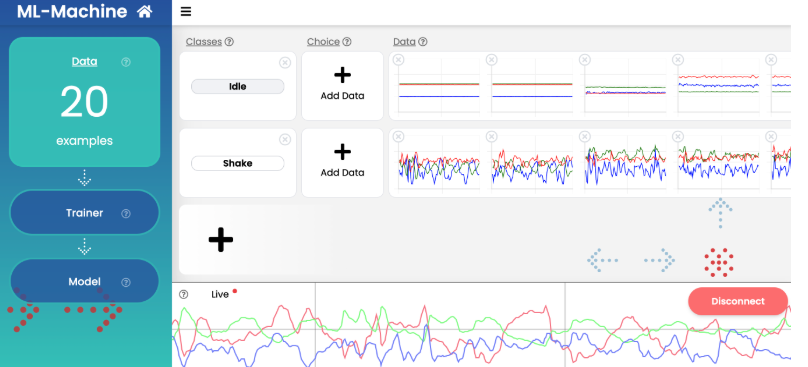
The micro:bit is a small, programmable computing device that features sensors to gather data from the immediate environment. For example, the accelerometer is a motion sensor that can detect when the micro:bit is tilted from left to right, backwards and forwards, and up and down. Using the micro:bit with ML-Machine and some common household objects, students can create simple machine learning models that use data from the micro:bit’s accelerometer to detect whether the micro:bit is moving. This is a very different approach from rule-based programs on the micro:bit, where students might use programming constructs such as if statements to detect movement if the numerical reading from the accelerometer is above a certain value. Here, a machine learning model trained using a set of 20 examples is used to analyse live data readings and produce predictions about whether the micro:bit is moving.
A visualisation of a simple machine learning model to detect whether a micro:bit is being shaken or is still
In our seminar, Karl-Emil gave a live demonstration of the ML-Machine toolkit, so we highly recommend watching the recording to see how this toolkit brings machine learning concepts to life.
ML-Machine is the precursor to the micro:bit CreateAI resources, and the software is fully open-source. However, the innovation doesn’t stop there: Karl-Emil also explained that he is currently developing a new tool called math.ml-machine.org, where students can train a neural network and see a visualised k-nearest neighbour model to explore how a model makes predictions. The research journey is continuing, with new possibilities for educational opportunities to teach about machine learning.
Embodied learning
The idea of embodied learning is interwoven throughout all of Karl-Emil’s research projects and is a cornerstone of all of his work. Embodied learning suggests that we learn more effectively when our whole body is involved in the learning process, not just our minds. For example, in the work described in this seminar, the Machine Learning Machines and the micro:bit were all tangible devices that students could touch and see.
Embodied learning is particularly important in activities that involve working with data-driven systems. In traditional programming activities, the flow of code can be traced transparently through a program. However, machine learning models are more opaque, and their outputs cannot be traced step by step. Students can benefit from using bodily movements and sensorimotor information to help understand machine learning concepts.
The ML-Machine toolkit was designed to support students to learn through embodied learning in three different ways:
Enacting machine learning processes: Students used bodily movement to collect the data samples needed for the ML-Machine model to detect and predict gestures
Using machine learning as a design material: Students created concrete ‘objects-to-think-with’, which helps form deeper connections to abstract concepts
Embodied exploration of machine learning: Students experienced how their bodily movements were translated into data points on the screen
Embodied learning helped students grasp concepts such as data quality. They could see how their bodily movements were being translated into digital data, and could spot when movements that appeared different to them were being classified as similar by the ML-Machine model. One case study participant described that the immediate feedback on screen made the concept of machine learning feel as if it were “coming to life as they [the students] manipulate something themselves and they’ve got control over it”.
Find out more
Karl-Emil’s work shows how research ideas can be used in the classroom through a cycle of discovery, design, and reflection. From prompt cards exploring ethics to tangible machines and the micro:bit-based ML-Machine, his research shows how embodied learning can make complex ideas like machine learning not only understandable, but deeply engaging for young learners. The micro:bit CreateAI resources are a great example of how research findings can evolve into accessible, hands-on tools that empower educators and students alike. As this work continues to grow, it invites us to imagine new ways for learners to experience machine learning not as abstract theory, but as something they can see, feel, and shape with their own hands.
If you’d like to try out some of the ideas from this seminar, here are some useful resources:
Explore machine learning projects using the micro:bit: micro:bit CreateAI and our Dance detector project are great places to start
Find out more about the research: Read more about Karl-Emil’s work in this open-access paper
Investigate new tools: Explore neural networks and k-nearest neighbours algorithms in the new maths-focused version of ML-Machine at math.ml-machine.org
Join our next seminar
Join us at our next seminar on Tuesday 17 March from 17:00 to 18:30 GMT to hear Rebecca Fiebrink (University of the Arts London speak about teaching AI for creative practitioners. This will be the second seminar in our new series on how to teach about AI across disciplines. We hope to see you there!
To sign up and take part in our research seminars, click below:
Reinhard Tartler of Debian’s new DFSG,
Licensing & New Packages Team, or simply “DFSG Team”, has announced
that the team is now operational and is deploying new tooling to
improve the NEW queue experience for Debian developers and
maintainers.
Our primary and immediate goal is simple: get the queue down.
We are currently settling in and refining our processes to ensure
stability and consistency. While our focus right now is on clearing
the backlog, our long-term vision is to enable all Debian Developers
to meaningfully contribute to DFSG reviewing activities, distributing
the workload and knowledge more effectively across the project.
The announcement includes information on the new dashboard for
packages in the NEW queue, the rationale for the new tooling, and
an introduction to the members of the team.
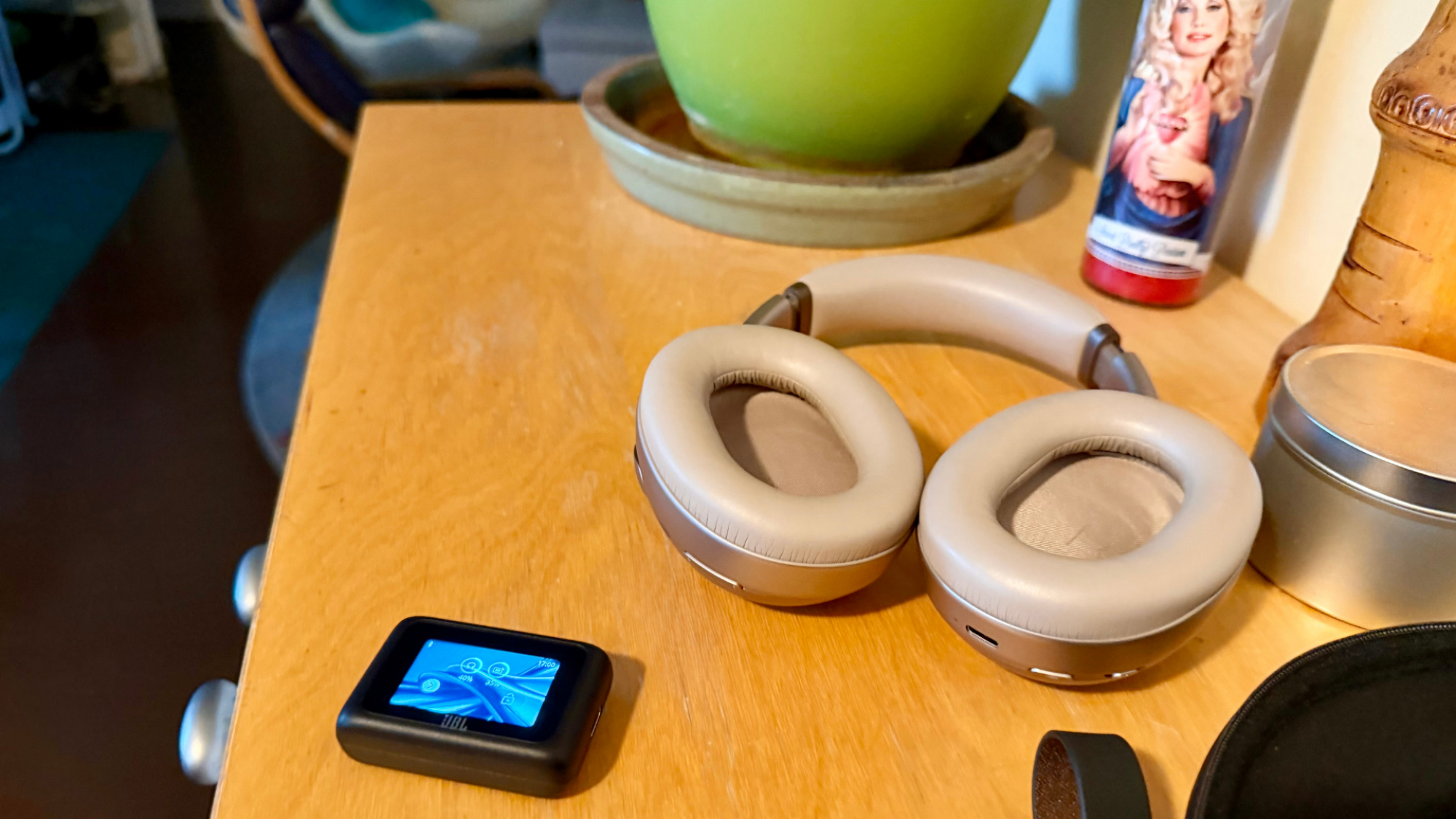
I’d never owned a really good pair of headphones; it’s just not something I’ve really cared about. But the JBL Tour One M3s I recently acquired changed my mind forever. (Our resident audio expert Daniel Oropeza went in depth about these headphones in his review, which you should read.)
I’ve always taken a punk-rock approach to sound gear—cheap and loud has been good enough for me—but using these headphones non-stop for the past couple of weeks proves I’ve been very wrong. Music is better when played through decent equipment. There’s so much more there, even in songs I’ve listened to a million times: I can finally make out what’s actually being said in the “party chatter” that provides atmosphere in Marvin Gaye’s “What’s Going On,” and who knew there was so much going on in The Dead Boys “Sonic Reducer?” And the spatial audio? Forget it: Hearing different instruments from different parts of 3D space is amazing. These headphones have me thinking seriously about stereo separation, constantly messing with the EQ, and turning my nose up to every format that isn’t lossless. I’m listening to damn jazz. What’s even happening?
Silence is better when it’s truly silent
Okay, I know active noise-cancelling has been around for 20 years, but I never cared about it—most of the music I like is mostly noise, so why would I want to cancel it?—but it’s for cancelling all that other noise that surrounds us. These are perfect for an airplane or car trip but also for just wearing around. I had no idea how much ambient sound I’m swimming in all day at my home office—the fridge running, the cars on the road, the wind—all gone in an instant. Nothing to hear but silence and tinnitus (from too much punk rock).
What the audio transmitter does
Credit: Stephen Johnson
When I first opened the box and saw the smart transmitter/controller thing that comes with these phones, I was like, “What’s this dumb thing?” But it turns out it’s not dumb. It’s a Smart Tx Audio Transmitter. You can plug it into almost anything audio and it will wirelessly stream 24-bit audio. Plug the AUX-to-USB-C cable into the beat-up jack at the gym, or an airplane’s headphone jack ,and you can listen with full noise-canceling and high-quality audio. (Now that I’m an audiophile, this is important to me.) It’s also a touch screen controller so you can mess around with the EQ to hear Art Pepper’s dulcet saxophone tone without taking your phone out, and trust me, you haven’t heard Art Pepper if it’s not lossless and tuned with JBL’s “personal sound amplification.” I mean, you might as well be listening to The Dead Boys or something.
It comes with a traveling case
In my old life, I would have left the Smart Tx Audio Transmitter on a bus, but these phones come with a little carrying case where all my little cords have places to live, and I put my audio transmitter right where it goes, because I never want to be burdened with inferior audio again.
I could go on about these headphones, but I’ve realized that air is an imperfect medium for sound vibrations, so I’m going to sit and stare at the sheet music of Coltrane’s A Love Supreme and listen to pure theory.
Samsung Display is touting its new QD-OLED Penta Tandem technology as a major advancement in premium displays, claiming that its proprietary five-layer structure brings with it numerous benefits compared to its four-layer QD-OLED, not the least of which is double the lifespan. It also purportedly improves luminous efficiency by 1.3 times to
Greg Kroah-Hartman has released the 6.12.71 stable kernel. He writes,
“All users of the 6.12 kernel series that had issues with 6.12.69
or 6.12.70 should upgrade, as some regressions are fixed
here.“
We may earn a commission from links on this page. Deal pricing and availability subject to change after time of publication.
The Apple Watch Series 9 [GPS + Cellular, 41mm] is currently going for $299.99 on Woot, which is a solid deal considering the same model starts at $399 new and about $226 refurbished on Amazon. This one’s brand-new and comes with a full one-year Apple warranty. With Prime, you also get free standard shipping (while non-Prime members are levied a $6 shipping fee), and the offer is live for four more days or until it sells out.
It’s the model with cellular connectivity, so with an active carrier plan, you can call, message, or stream music even when your iPhone’s not nearby—something the cheaper GPS-only versions can’t do. That’s a big plus if you run without your phone or want to stay reachable while leaving it behind.
The Series 9 runs on Apple’s S9 processor, which makes everything feel faster, and the screen gets much brighter. At 2,000 nits, it’s easy to read even when the sun’s beating down on your wrist. It also adds a double-tap gesture, so you can control things like answering a call or scrolling through widgets with just a pinch of your fingers. The onboard Siri lets you start a workout or set a timer with your voice, and it’s the first Apple Watch that’s carbon-neutral (at least in this aluminum and sport band combo). It also has access to the App Store, so apps like Spotify, Strava, and Calm run directly on the watch, notes this PCMag review.
Battery life is around 32.5 hours, even with the always-on display enabled, which holds up fine for a full day and night of use, though heavy cellular use will shorten that.
Health tracking is comprehensive. You get heart rate monitoring, ECG, blood oxygen readings, temperature sensing, sleep tracking, GPS, and fall detection. The watch is also IP6X dust resistant and WR50 water resistant, making it suitable for swimming and gym sessions. At $299.99, this is a strong price for a new cellular Apple Watch, making it one of the better deals for lifestyle smartwatches right now.
Our Best Editor-Vetted Presidents’ Day Deals Right Now
Amazon is launching a feature that will add a new artificial intelligence layer to its writing tablets. “Send to Alexa+” is rolling out to the current generation of Kindle Scribe and Kindle Scribe Colorsoft devices. This concept was announced when Amazon first debuted the Kindle Scribe Colorsoft last fall, but the company said that the feature wouldn’t be available until this year.
As the name implies, “Send to Alexa+” lets users share their notebooks and documents from their supported Kindle with the Alexa+ AI assistant, making their information accessible on other Amazon platforms, including Alexa.com and the Alexa app. Prime members and Alexa+ subscribers will also be able to reach their Kindle documents on Echo and Fire TV devices. Alexa+ will be able to perform additional tasks such as summarizing notes, creating to-do lists and adding either calendar items or reminders.
This article originally appeared on Engadget at https://www.engadget.com/mobile/tablets/amazons-send-to-alexa-feature-arrives-on-kindle-scribe-and-scribe-colorsoft-140000093.html?src=rss
NVIDIA’s cloud gaming service, GeForce Now, has expanded to another platform. Starting today, folks with select Amazon Fire TV sticks can install a native GeForce Now app. While it was already possible to access GeForce Now through the Fire TV platform, you won’t necessarily need to sideload an Android app to do so anymore.
At the outset, the new app is compatible with the second-gen Fire TV Stick 4K Plus and second-gen Fire TV Stick 4K Max (running Fire OS 8.1.6.0 and later). It also works with the original Fire TV Stick 4K Max if you’re running Fire OS 7.7.1.1 or later.
On the Fire TV platform, GeForce Now streaming quality tops out at a resolution of 1080p and a frame rate of 60 fps, with SDR visuals, H.264 video encoding and stereo audio. So you won’t necessarily get the best GeForce Now experience here as the service has support for up to 5K resolution and up to 360 fps, along with HDR10 and 7.1 audio at the highest tier. But it’s not a bad option if you already have the right hardware. You’ll need a controller too, of course.
NVIDIA announced the GeForce Now app for Fire TV during CES last month. It joins other cloud gaming services on the Fire TV platform, including Xbox Cloud Gaming (PC Game Pass titles are available on GeForce Now as well) and Amazon’s own Luna.
This article originally appeared on Engadget at https://www.engadget.com/gaming/nvidias-geforce-now-app-lands-on-amazon-fire-tv-sticks-140000516.html?src=rss
AI startup Anthropic says it will ensure consumer electricity costs remain steady as it expands its data center footprint. From a report: Anthropic said it would work with utility companies to “estimate and cover” consumer electricity price increases in places where it is not able to sufficiently generate new power and pay for 100% of the infrastructure upgrades required to connect its data centers to the electrical grid.
In a statement to NBC News, Anthropic CEO Dario Amodei said: “building AI responsibly can’t stop at the technology — it has to extend to the infrastructure behind it. We’ve been clear that the U.S. needs to build AI infrastructure at scale to stay competitive, but the costs of powering our models should fall on Anthropic, not everyday Americans. We look forward to working with communities, local governments, and the Administration to get this right.”
Join the Fedora Council public video meeting on Wednesday, February 25, 2026, at 14:00 UTC. Fedora Project Leader Jef Spaleta will share outcomes from the recent 2026 Strategy Summit and outline the strategic direction for the upcoming year. Attendees can ask questions live on Google Meet or submit them early via the Fedora Discussion topic. This is your opportunity to engage directly with leadership regarding Fedora’s future.
The performance “perf” events changes for the Linux 7.0 kernel are continuing to prepare for next-generation Xeon Diamond Rapids processors as the successor to current Xeon 6 Granite Rapids…
MasterClass is offering 50 percent off its annual memberships right now, cutting the cost of its plans in half for a limited time. That brings the Premium tier down to $10 per month when billed yearly, while the Plus and Standard plans are also discounted to $8 monthly and $5 monthly, respectively. Each tier unlocks the full catalog of classes, with the main differences coming down to how many devices can stream at once and whether offline viewing is included.
There are more than 200 classes on MasterClass now, and many are led by big names at the top of their fields. Depending on your interests, you might pick up cooking tips from Gordon Ramsay, learn storytelling from Margaret Atwood, explore business strategy with Richard Branson or get insights into performance and mindset from athletes and entertainers. The catalog spans everything from film and TV to wellness, music, science, leadership and photography, so it’s easy to dip in and find something that holds your attention.
Over the years, MasterClass has expanded into a broad learning platform that feels like part streaming service and part educational library. The catalog spans categories like food, film, music, wellness, sports and entrepreneurship, with lessons designed to be short and easy to follow. Since every plan includes access to the full course library, the choice mostly comes down to convenience. The Standard tier supports one device and doesn’t include offline mode, the Plus plan allows streaming on two devices with downloads, and the Premium tier increases that to six devices with offline access as well.
Classes are structured to be approachable whether you want to learn a new skill or just explore a topic out of curiosity. Lessons are broken into bite-sized segments, so it’s easy to watch one or two at a time on a commute or in the evening. Members also get access to a global community, occasional newsletters and the ability to switch between video and audio listening on supported classes.
If you’ve been considering trying MasterClass, this deal makes it a more affordable way to see if it works for you. A subscription can also double as a thoughtful gift, which is one reason it has appeared in Engadget’s roundup of the best subscription gifts to send to loved ones. With the current 50 percent discount applied across all tiers, it’s a relatively low-cost way to get access to a large library of professionally produced courses that you can watch at your own pace throughout the year.
This article originally appeared on Engadget at https://www.engadget.com/deals/masterclass-deal-get-half-off-subscriptions-ahead-of-presidents-day-130500563.html?src=rss
After leading the Thursday Pizza Burner 100km for over a year (sign up at zwift.com/events/tag/blameeric), I’ve started wishing for longer Zwift routes that are also fairly flat.
I want longer routes because seeing different sites and riding different roads is more interesting/engaging than riding multiple laps of the same circuit.
But the routes need to be fairly flat, because the Pizza Burner is about putting in a longer, steadier effort with a group.
Here’s the thing about Zwift’s current route library, though: all the long routes have too much climbing.
The mega-flat Tempus Fugit has only 1.5 meters of climbing per kilometer of distance, and routes typically feel “flat” to me if they have around 5.5m/km or less. But all of Zwift’s truly long routes (100km+) are over 12m/km (save the France Classic Fondo at 7.6km, which has two Petit KOM climbs early on, so that’s a no-go). And even if I wanted to do multiple laps of a shorter ~50km circuit, these medium-length routes typically have way too much climbing as well, or a key longer/steeper climb that would break up my group ride. (Watopia’s only exception is The Big Ring, and even that route takes us up through the Jungle each lap.)
So I got to thinking: surely we could piece together a 100km flat route using Fuego Flats, the Southern Coast, and the rest of Watopia’s flatter roads. We could pull various tricks to make it happen, including starting from a higher elevation and riding big flat sections in both directions.
What I’ve settled on is a non-loopable route with only 489 meters of elevation gain over 102 kilometers (so 4.8m/km). That makes this the 13th-flattest route in Watopia, and by far the least climby “long route” in the entire game.
Or looking at it another way: there are flatter routes in Zwift, but they are all much shorter (the longest is around 36km). Unless you include Litus Fugit, a 60km 4.4m/km loopable Rebel Route I created which hasn’t yet been added to the game but really should be.
I hope you enjoy The Marvelous Metric. And I hope someday Zwift adds it to the game, so I can lead The Pizza Burner on it!
About Rebel Routes
“Rebel Routes” are Zwift rides not available on Zwift’s routes list, thus requiring manual navigation.
The reward for your rebel ride? Exploring a new route, knowing you’ve gone where few Zwifters have gone before. And a Strava segment rank in the tens or hundreds instead of the thousands! Rebel Routes are also included as a separate category on our Veloviewer Route Hunter leaderboard.
Route Description
A complete turn-by-turn tour of this route would be too much, so I’ll summarize it instead.
You can set yourself up easily by selecting the Mountain Mash route. This puts you at the route’s start point near the Jungle start pens, heading toward Watopia. (Starting from here is a tricky move on my part, as it lets us start with a bit of descent, making the start more gentle. It also gives us a faster overall speed, since we’ll descend more than we’ll climb.)
Cut across the Epic KOM Bypass (one of my favorite stretches of road in Watopia), then head down to Ocean Boulevard and out to Fuego Flats for a ride through the desert in the “forward” direction.
At the LAX Roundabout we’ll turn onto the long Southern Coast road for an out and back which quickly racks up 45 rolling kilometers. We use the bottom of the Jungle, and the Mayan Bridge Cutoff, road, for a quick turnaround at the end of the Southern Coast, allowing us to come back the other way.
When we arrive back at the LAX Roundabout, we’ll head up the Col du Saddle Springs and get onto Ocean Boulevard for a trip through the Marina and out around the Volcano into Downtown Watopia.
Head back out Ocean Boulevard and up into the edge of Titans Grove to hit Fuego Flats once more, this time in the “reverse” direction. By the end of the Fuego Flats road you’ll be over 95km in.
Wanting to make the final ~5km interesting, I’ve routed us across The Esses, down the Dirty Sorpressa, and out to the Volcano. Turn the first right to head into the Volcano for the route’s finish at the Volcano Circuit arch.
Turn By Turn Directions
Begin by choosing the Mountain Mash route, which starts you at the Jungle Pens, heading in the right direction.
Apple’s long-delayed AI-powered Siri redesign may not be rolling out this year, at least in the way the company had planned. According to Bloomberg’s Mark Gurman, Apple found problems with its software upon testing, such as the virtual assistant taking too long to accomplish tasks or even not processing queries properly altogether. Siri’s new version was also reportedly so sluggish during testing that its developers believed Apple would have to push back its launch by months. Instead of releasing the redesigned assistant in March as was previously reported, Gurman says Apple will roll out its capabilities piecemeal over future software updates.
The company originally unveiled the redesigned Siri back in 2024, promising an AI-powered assistant that can do tasks for you, such as finding specific photos or tracking details, adding information to contact cards, editing photos and sharing note summaries to be sent as emails. It was slated to make its way to iOS users in 2025, but Apple announced that year that it was going to be delayed. “It’s going to take us longer than we thought to deliver on these features and we anticipate rolling them out in the coming year,” the company said. Bloomberg reported back then that the new AI-infused Siri was going to be included in a planned iOS 26.4 update due in March instead. Based on this latest report, however, we might only get a portion of Siri’s new capabilities next month. More capabilities could be released with iOS 26.5 in May and with iOS 27 later this year.
In January this year, Apple confirmed reports that Google’s Gemini models will help power the new Siri. “After careful evaluation, Apple determined that Google’s Al technology provides the most capable foundation for Apple Foundation Models and is excited about the innovative new experiences it will unlock for Apple users,” the company said in a statement. The revamped assistant is expected to behave like an AI chatbot, similar to OpenAI’s ChatGPT, when it does become available.
This article originally appeared on Engadget at https://www.engadget.com/mobile/apples-siri-relaunch-is-reportedly-behind-schedule-125347471.html?src=rss
We are now a few years into the AI revolution, and talk has shifted from who has the best chatbot to whose AI agent can do the most things on your behalf. Unfortunately, AI agents are still rough around the edges, so tasking them with anything important is not a great idea. OpenAI launched its Atlas agent late last year, which we found to be modestly useful, and now it’s Google’s turn.
Unlike the OpenAI agent, Google’s new Auto Browse agent has extraordinary reach because it’s part of Chrome, the world’s most popular browser by a wide margin. Google began rolling out Auto Browse (in preview) earlier this month to AI Pro and AI Ultra subscribers, allowing them to send the agent across the web to complete tasks.
I’ve taken Chrome’s agent for a spin to see whether you can trust it to handle tedious online work for you. For each test, I lay out the problem I need to solve, how I prompted the robot, and how well (or not) it handled the job.







![Apple Watch Series 9 [GPS + Cellular, 41mm]](https://www.prime-wow.com/wp-content/uploads/2026/02/images-1fillsize_autoxautov1770903916.png)