Lore sickos will love Amazon’s newest season of Fallout, but fans of satisfying TV storytelling will be left wanting
The post <i>Fallout</i> Season 2 Review: Give Us More Episodes Or Stop Adding Subplots appeared first on Kotaku.

Lore sickos will love Amazon’s newest season of Fallout, but fans of satisfying TV storytelling will be left wanting
The post <i>Fallout</i> Season 2 Review: Give Us More Episodes Or Stop Adding Subplots appeared first on Kotaku.
In the old days, we’d post our photos and videos on social media for the world to see. Right now, it’s far more common to send these pictures and clips to friends and family through private chat groups—but what you might not have realized is that they get pretty heavily compressed along the way.
There are many reasons for this: It means the files get sent faster, for example, and that the companies behind these messenger apps don’t have to spend quite so much on cloud storage (imagine millions of images being sent by millions of users, all the time). However, the recipients of these photos and videos are missing out, and getting copies that are of a much lower quality.
A lot of the time, you can’t really tell the difference on a small phone screen, which is why apps can get away with it. But if you’re looking at something on a computer screen or trying to print something out to get a permanent physical copy, the compression quickly becomes apparent. It’s something most messenger apps do—but there is a workaround if you want your photos and videos shared at full resolution.
Messenger apps are rather coy when it comes to revealing just how much compression they apply: Search the web and you’ll hit Reddit threads and support forums rather than actual official documents. Apple admits iMessage applies compression “when necessary”, and Google acknowledges files “may have a lower resolution” when sent through Google Chat, but it’s all rather vague.
To try and get a bit more clarity, I ran a quick test myself, with a 12MP, 4,000 x 3,000 pixel, 3.4MB image taken on a Pixel. Bearing in mind that compression levels will vary depending on what you’re sending, and this was just a test with a single image, here’s how the file was changed after it got sent through various DMs:
Facebook Messenger: 2,048 x 1,536 pixels, 392KB
Google Chat: 1,600 x 1,200 pixels, 324KB
Google Messenger: 4,000 x 3,000 pixels, 3.4MB.
iMessage: 4,000 x 3,000 pixels, 3.2MB
Instagram: 1,000 x 750 pixels, 138KB
WhatsApp: 2,000 x 1,500 pixels, 390KB
You can see there’s a lot of compression going on here, but Google Messages and iMessage are the clear winners when it comes to retaining original quality (at least with images)—a good advert for both Apple’s proprietary messaging system and for RCS.
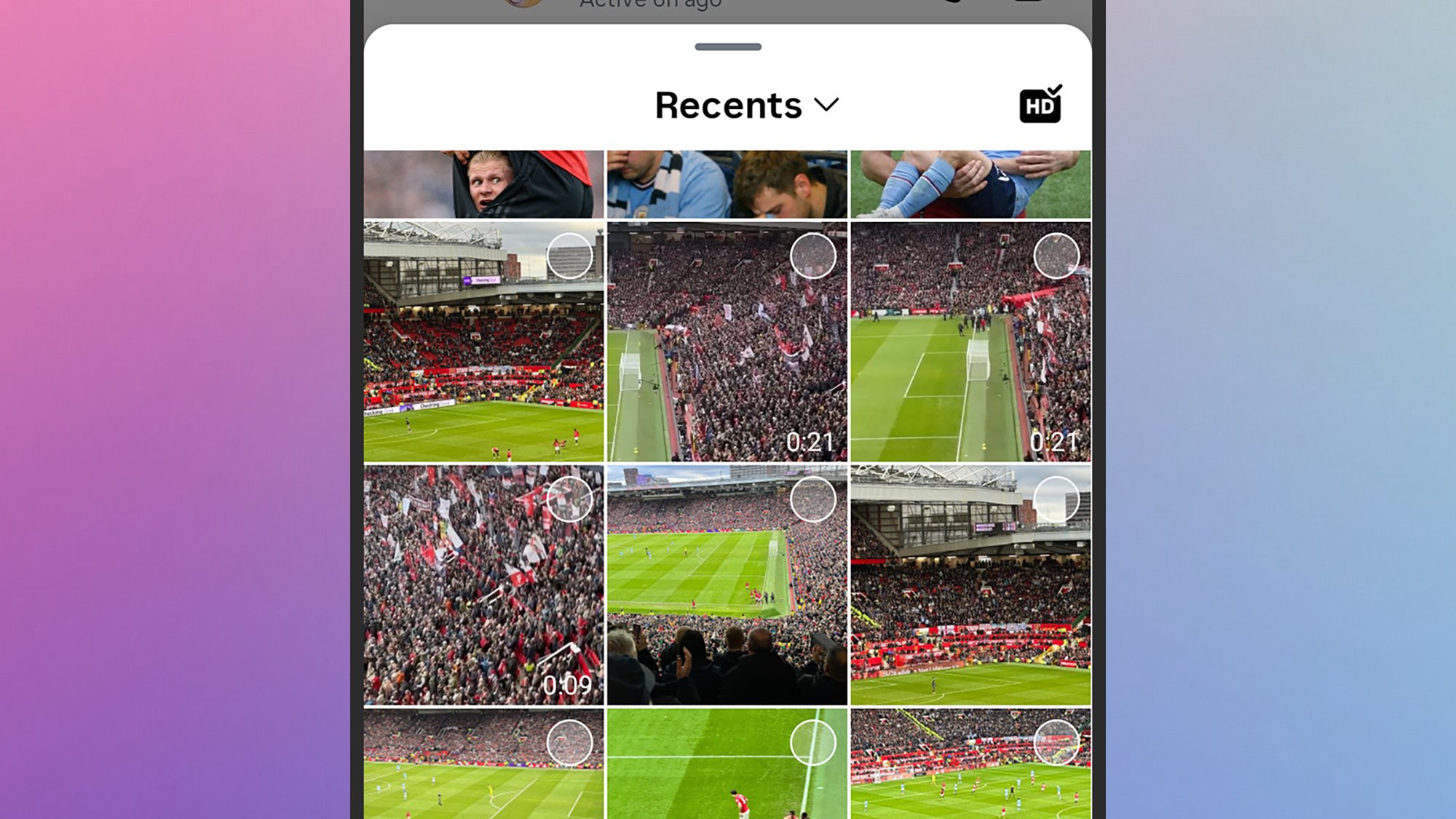
It’s also worth delving into the settings for each app. In Instagram, for example, there’s a HD button next to the photo and video picker: When I selected this, Instagram shrank my original photo down to 2,000 x 1,500 pixels, with a file size of 421KB.
In its help section, Instagram says it automatically adjusts image compression based on current network conditions, which is something else to think about—you might want to do all your photo and video sharing over wifi (which is what I did here).
You can make sure your photos and videos get to your friends and family in their glorious, original quality, but you lose a bit of convenience along the way. Essentially, you need to pick a cloud storage service where your images and videos will be stored in full resolution, and then share links to these files—rather than sharing the files themselves.
It’s not quite the same immediate experience if you’re sending around baby pictures or party pictures: Your recipients will just see a rather dull-looking link instead of thumbnails right inside their apps (though in some cases, there might be a small preview attached). If quality is what matters most to you, this is the way to go when it comes to sharing photos and videos.
You’re free to use your cloud storage provider of choice, but if there is one made by the same company behind your favorite messaging app, it makes sense to combine them together. In Google Photos on Android, for example, you can tap on a photo to view it, then choose Share and Share again to find the Create link feature: You can then share this link with any contact in any app.
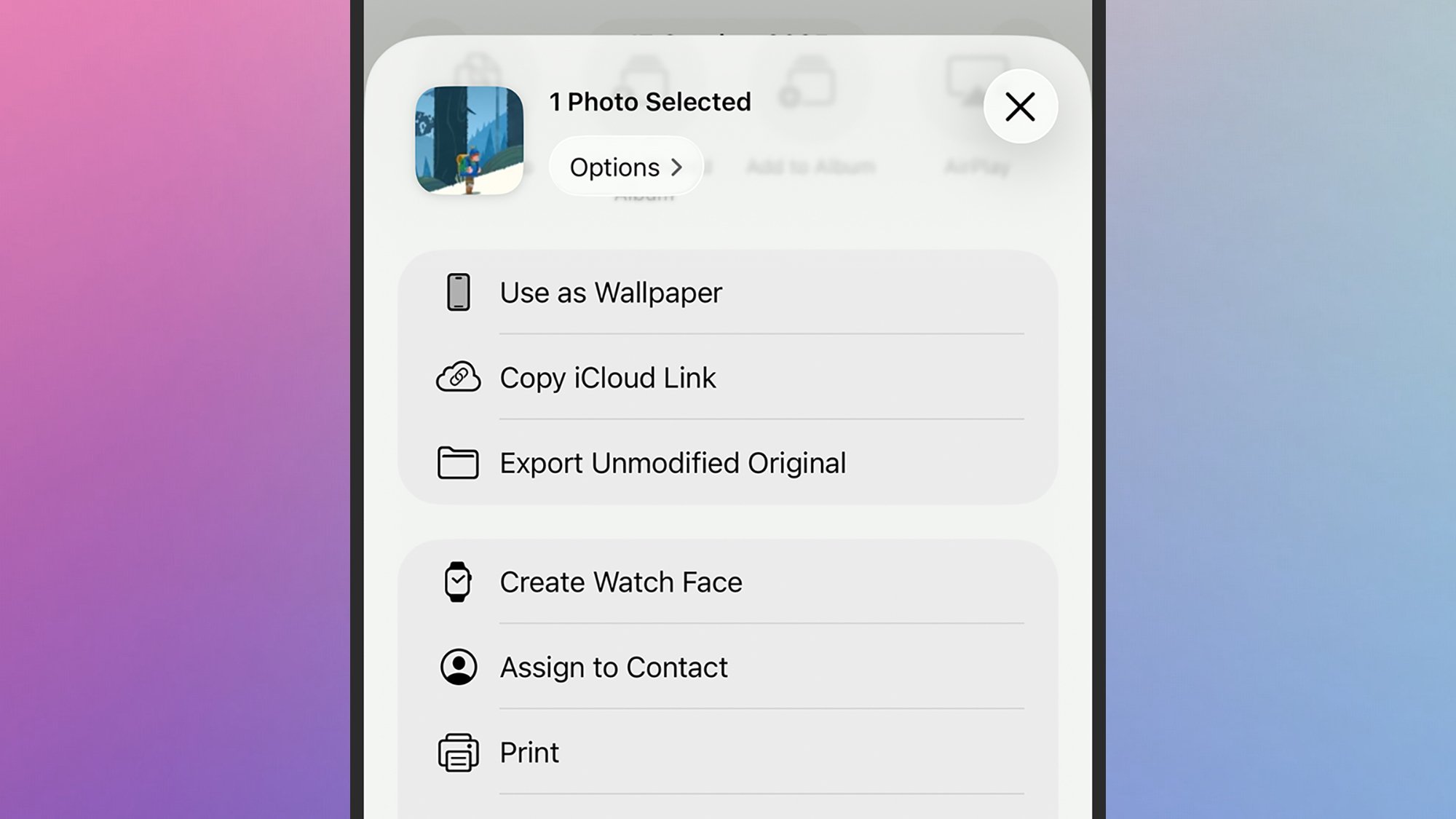
For Apple Photos on the iPhone, you can get a link to a photo once you’ve opened it up by tapping the share button (lower left), then Copy iCloud Link. Again, you can paste this anywhere you like, and it’s not much more difficult to share entire folders of pictures rather than individual images.
There is an extra advantage to sharing photos and videos this way, in that you can revoke sharing permissions any time you like: New people can be added and other people can be removed from albums showing your toddler growing up for example. It’s not as fast and easy as direct file sharing, but you do get a bit more control (and higher resolutions).

Jordan Mechner says news like this makes him glad he’s not in game dev anymore
The post <em>Prince Of Persia</em> Creator Reacts To The Canceled <em>Sands Of Time</em> Remake: ‘Having A Project Killed Is A Brutal Experience’ appeared first on Kotaku.

I mean, not enough to actually watch it—I’m not deranged
The post A <i>Pokémon</i> 30th Anniversary Commercial Is Forcing Me To Care About The Super Bowl appeared first on Kotaku.

Add this iPad to your iOS ecosystem and get more done, whether you’re into work or play.
The post Apple iPad (A16 Chip) All-Time Low Deal Quietly Makes a Comeback, No Need to Look for Budget Tablets appeared first on Kotaku.
If you bought a Windows computer in the past couple years, there’s a good chance that it a “Copilot” key where the right ctrl key used to be. But what if you actually used the right ctrl key? Or what if you prefer Claude or ChatGPT to Copilot? Whatever your reason for not loving the Copilot key, don’t worry—you can change it. Here’s how to do so in the Windows settings or, if necessary, using Microsoft Powertoys.
Open the Settings application and head to the Personalization section. You should find a Customize Copilot key option here, assuming you’re using a recent-ish version of Windows 11. Click the drop-down menu and you’ll have three options: Copilot, Search, and Custom. You can change the button to Search if you’d rather use the key to bring up the Windows search tool instead of Copilot.
Alternatively, you can use the Custom option to launch any application on your computer instead of Copilot. This could be a useful way to open the Claude or ChatGPT desktop apps instead of Copilot. Or, if you’re not a big AI fan, you could just have it open your browser.
This is a limited number of options, granted, but it’s easy and doesn’t require any sort of tools. It’s your simplest option.
You may have noticed that the options in Settings don’t let you remap the Copilot key to the ctrl key, or any other key—all you can do is launch an application. For that, you’re going to need to install Powertoys, the secret Microsoft app that improves Windows.
After installing, go to the Keyboard Manager section. The simplest thing to do, which may or may not work on your computer, is to click Remap keys. You should be able to press your Copilot key to remap it (it will show up as F23, which we’ll get to). Now you can choose what you want the key to serve as. This could be ctrl, if you like, or it could be any other key. Click OK, and you should be done.
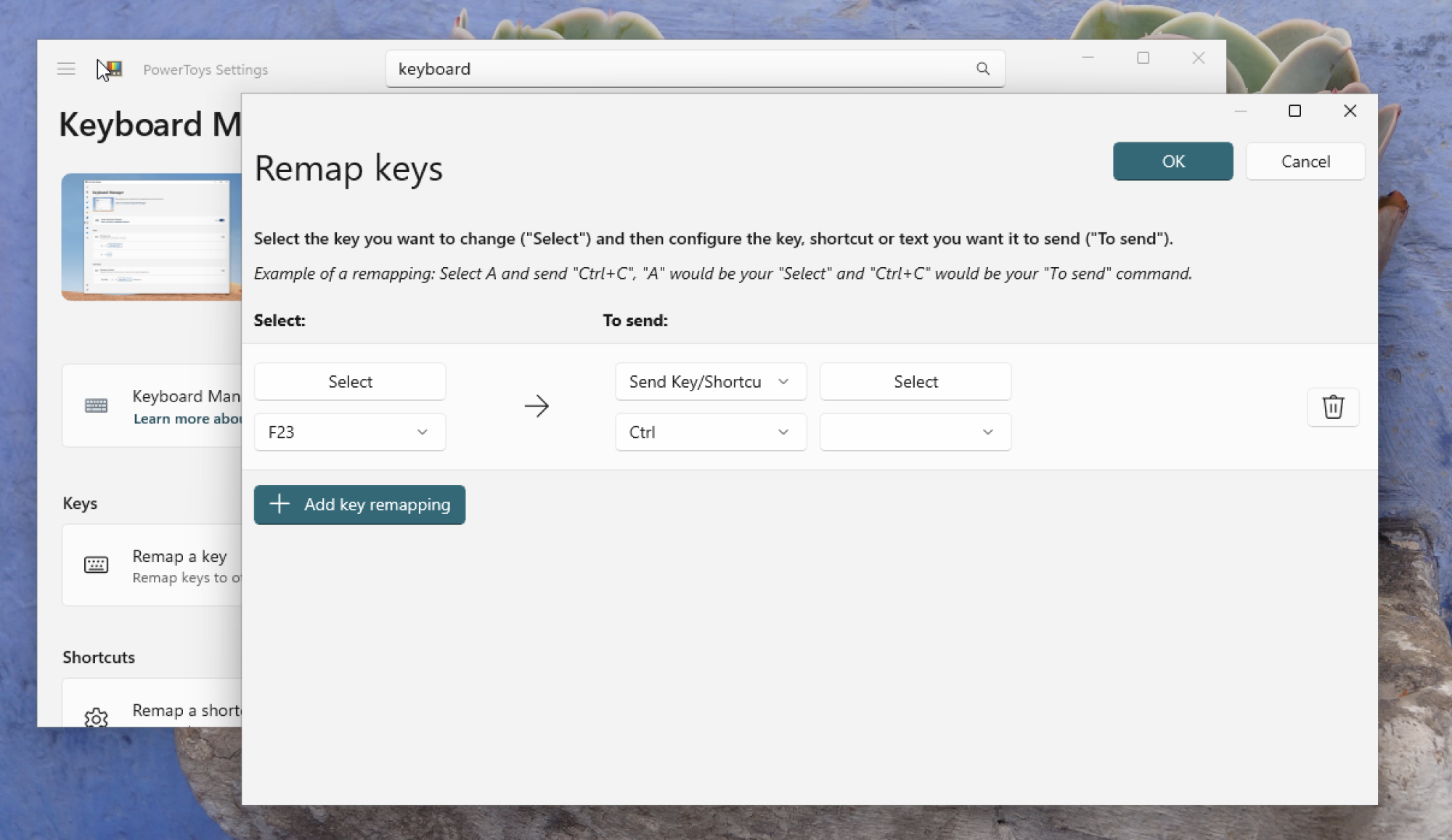
There’s a chance this won’t work for you. Why? Because the Copilot key works a little differently depending on what kind of laptop you have. Buckle up: This gets complicated in a very Microsoft-y way.
On many computers, the Copilot key functions as an F23 key. This is a workaround, of sorts, allowing Microsoft to add a key without changing the operating system very much. Most modern keyboards only have one row of function keys—around 12 in total. Keyboards in the 80’s and 90’s sometimes had two rows of keys—around 24 in total. Windows, to this day, still supports all 24 keys, even though basically no one has that many function keys. Microsoft took advantage of this—on many laptops the Copilot key functions as an F23 key.
But this is Windows, so of course it’s more complicated than that. On some laptops, pressing the Copilot key triggers a keyboard shortcut: Windows-Shift-F23. This means you can’t use the Remap keys function in Powertoys to remap the Copilot key, because the Copilot key already triggers a keyboard shortcut.
What you can do is use the Remap a shortcut option. Use this, then press the Copilot key as your selection. You should see the keyboard shortcut Windows-Shift-F23 show up. Now choose what you want to remap your Copilot key to.
This works, with a caveat: You really can’t use it to bring back your ctrl key, as users have noted on Github. The issue is that you can’t remap a keyboard shortcut to a modifier key, just to a single keypress. It’s not clear what could fix this, and I suspect users of such laptops are just stuck. Which is all to say that you might not be able to get your control key back, but least you can remap the key to do something else.
You can find a lot of good deals for Presidents’ Day, but to say it’s a tech-deal boon would be an overstatement. The best Presidents’ Day deals are usually on mattresses, appliances and furniture, but you can find some decent tech sales thrown in as well. This year, Presidents’ Day comes right after Valentine’s Day and Super Bowl 2026, which means there are even more chances to save as sales and discounts overlap. If you’re looking for a new streaming device, a fresh iPad or an upgraded vacuum so you can enter the spring-cleaning season properly, we have you covered. These are the best President Day sales on tech we could find this year.
Roku Streaming Stick Plus 2025 for $24 (40 percent off): This is one of the most affordable ways to get 4K streaming on almost any TV set. The dongle has a sleek design, it comes with handy remote that can also control your TV’s power and volume and the device gives you access to Roku’s TV operating system, which has tons of ways to watch free content.
Anker Nano 45W USB-C charger for $30 ($10 off): Anker’s latest 45W charger has a small smart display on it that can show you real-time charging stats. It’s compact design is great for travel, as are its foldable prongs.
Blink Mini 2K+ — 2 cameras for $45 (50 percent off): Blink’s latest plug-in security cameras support 2K video and improved audio quality. Like previous versions, these cameras have two-way talk, motion alerts and support for Alexa voice commands.
TurboTax Deluxe for $45 (44 percent off): While it pains us to recommend Intuit’s software, it may be the best (and cheapest) option for some this tax season — particularly those who don’t qualify for Free File.
Anker Nano 5K ultra-slim magnetic power bank for $46 (16 percent off): This Qi2 power bank measures less than a half inch thick and snaps onto the backs of the latest iPhones for wireless charging. Its 5K capacity will be enough to top up your phone when it’s close to empty, preventing you from searching for a charger or outlet.
Apple iPhone Air MagSafe battery pack for $79 (20 percent off): This magnetic power bank will add up to 65 percent additional battery charge to the iPhone Air, but note that it only works with Apple’s new, ultra-slim smartphone. We’ve tested plenty of others that also work with other iPhone and smartphone models.
Apple Watch Series 11 for $299 ($100 off): The latest flagship Apple Watch has excellent performance, a boosted battery life and a lightweight design that you can comfortably wear all day long — and even into the night to track sleep.
iPad mini (A17 Pro ) for $399 ($100 off): The updated iPad mini runs on the A17 Pro chip for improved performance, plus it has an 8.3-inch Liquid Retina display, a 12MP ultra wide camera with Center Stage, USB-C charging and compatibility with the Apple Pencil Pro.
Beats Studio Pro for $170 (51 percent off): Beats updated these cans to have improved sound quality, and you can really hear the difference from models that came before it. These headphones also have solid Transparency mode, good voice performance and USB-C audio.
Beats Solo 4 headphones for $130 (35 percent off): These on-ear headphones support spatial audio and dynamic head tracking, and they have up to 50 hours of battery life. The “fast fuel” feature allows them to get up to five hours of playback time with just a quick 10-minute power-up.
Disney+ and Hulu bundle (one month) for $10 ($3 off)
Shark Steam & Scrub steam mop for $125 (22 percent off)
Levoit LVAC-200 cordless vacuum for $150 (25 percent off)
Google Pixel Buds Pro 2 earbuds for $179 (22 percent off)
Roku 55-inch 4K smart TV for $248 (29 percent off)
Sonos Beam Gen 2 soundbar for $369 ($130 off)
Sony WH-1000XM6 headphones for $398 (13 percent off)
Anker Nebula Capsule 3 projector for $540 (28 percent off)
Hisense 75-inch QD7 Mini-LED 4K smart TV for $548 (16 percent off)
DJI Mini 3 Fly More Combo drone bundle for $575 (20 percent off)
Google Pixel 10 Pro for $899 (18 percent off)
Sony 55-inch Bravia XR8B 4K smart TV for $998 (9 percent off)
This article originally appeared on Engadget at https://www.engadget.com/deals/presidents-day-sales-2026-the-best-tech-deals-from-apple-sony-roku-and-others-163000379.html?src=rss
Egyptian regulators have banned Roblox, a popular children’s video game, Bloomberg reports. The nation’s Supreme Council for Media Regulation is coordinating with the National Telecommunications Regulatory Authority on the decision to ensure its enforcement.
The state-owned outlet reported that Senator Walaa Hermas Radwandid had proposed regulation of the platform to “protect children’s moral and educational values.” The senator outlined his concerns with the nature of the Roblox platform, including the ability to communicate directly with strangers as well as “potential psychological and behavioral effects on young users.” In a statement to Bloomberg, Roblox stated that it has “built rigorous safeguards that go beyond those of many other platforms.”
Egypt joins others including Iraq, Algeria, Saudi Arabia and the UAE that have banned or heavily restricted the US-based gaming platform; Turkey and Russia also enacted blanket bans on Roblox recently, citing the “promotion of homosexuality” and “LGBT propaganda.”
Roblox has a significant presence in the Middle East and North Africa (MENA) region. The company’s most recent economic impact report claims it added $15 million to total GDP across Egypt, Saudi Arabia, Morocco, Qatar and the UAE between 2021 and 2024.
Roblox recently tightened its age verification requirements for certain in-game features following pressure from numerous US state attorneys general over child safety, though the new system is reportedly a mess.
All of this comes against the backdrop of globally internet restrictions, especially for social media services. A raft of nations including Australia, Spain and Denmark have moved to ban social media entirely for children.
This article originally appeared on Engadget at https://www.engadget.com/gaming/egypt-to-block-roblox-for-all-users-161343443.html?src=rss

The Fortnite launcher isn’t going anywhere even if Steam has twice as many players
The post The Epic Games Store Can’t Beat Steam But It Might Become The Next Discord appeared first on Kotaku.

Save $5 per month on Xbox Game Pass Ultimate over at StackSocial.
The post Xbox Game Pass Ultimate Sees a Price Cut, Moving Closer to Its Pre-Surge Pricing After Last Year’s 50% Increase appeared first on Kotaku.
With GIMP 3.2 releasing soon, GIMP developer Ondřej Míchal presented at FOSDEM 2026 this past weekend on some of the feature work being eyed for post-3.2 developments…

NASA’s Solar Dynamics Observatory captured these images of the solar
We may earn a commission from links on this page.
January has a reputation for being a dumping ground at movie theaters, but that’s certainly not the case when it comes to streaming, as the apps begin to load up on the prior year’s critical and commercial hits—and 2026 came in like a champion, with the list of the top movies streaming including banger after banger, from One Battle After Another, to Sinners, to F1.
January’s streaming winners are heavy on social commentary. One Battle After Another plays it straight in its bracingly contemporary story of anti-fascist revolutionaries and immigration raids, while Sinners, Bugonia, and 28 Years Later use sci-fi and horror tropes to comment on our current political divides. If that all sounds too heavy, the list is rounded out by escapist fair like F1 and The Rip.
Also of note: The popularity of The Running Man and The Long Walk indicate that movie-goers are hungry for adaptations of dystopian Stephen King novels written under the pen-name Richard Bachman and foregrounding near-future authoritarian societies in which deadly ambulation-based contests are popular. I wonder what that’s about?
Here’s the full list of the top 10 most-streamed movies of January 2026 across all major streaming services, as compiled by JustWatch.
Topping the charts this month is Paul Thomas Anderson’s nuanced, intelligent thriller about resistance and race in a fascistic, anti-immigration United States. (No, it’s not a documentary.) Featuring fantastic performances from heavyweights like Leonardo DiCaprio, Sean Penn, Benicio Del Toro, and Regina Hall, One Battle After Another is that rare movie that’s equal parts thoughtful and exciting. It was recently nominated for 13 Oscars. Stream one Battle After Another on HBO Max.
It’s always nice when a weirdo movie is widely watched, and Bugonia was that movie in January 2026. Jesse Plemons and Aidan Delbis play a couple of societal dregs who kidnap a high-powered pharmaceutical executive (Emma Stone) because they think she’s an alien. Directed by Yorgos Lanthimos, who helmed 2023’s excellent Poor Things, the Best Picture Oscar nominee is a must-watch, even if you’re only a little weird. (And if you want more weirdness, it’s based on an even odder South Korean film called Save the Green Planet.) Stream Bugonia on Peacock.
This one-of-kind flick mashes up so many styles, it’s practically its own genre. A historical-horror-ensemble romance-drama-comedy-musical exploring race and historical prejudice in the United States, Sinners tells its story through both song and vampire violence. It is absolutely to-notch in every cinematic way, which is probably why it earned a record 16 Oscar nominations. Stream Sinners on HBO Max and Prime Video.
Based on a 1982 novel by Stephen King (writing as Richard Bachman) and directed by Edgar Wright, The Running Man is a dystopian near-future sci-fi action flick in which the most popular show on TV is a deadly reality competition with contestants who must survive 30 days while being hunted by professional assassins. I hate to admit that I would totally watch that show, and you should totally watch this movie. Stream The Running Man on MGM+ and Paramount+.
If you’re in the mood for a throwback action-thriller, check out The Rip, from director Joe Carnahan. It tells the story of a Miami tactical narcotics team that discovers $20 million of dirty money in a stash house. Nobody in the squad is a “clean cop” when there’s that much money in play, and soon, everything goes predictably haywire in unpredictable ways. Starring movie pals Matt Damon and Ben Affleck, The Rip is a non-stop ride. Stream The Rip on Netflix.
If you want maximum Americana drama, but not in a cheesy way, check out Train Dreams. Set in the early 1900s, it tells the story of Robert Grainier (Joel Edgerton), a logger and railroad builder whose quiet life is upended by a devastating tragedy. Train Dreams is a thoughtful, poetic movie about the passing of an era. It’s also a Best Picture nominee this year. Stream Train Dreams on Netflix.
The third Knives Out mystery stars Daniel Craig as Benoit Blanc, the last of the gentleman’s sleuths, who is this time investigating the murder of a priest. A stylish, twisty, brain-testing whodunnit with an all-star cast that includes Josh O’Connor, Glenn Close, Josh Brolin, Mila Kunis, and Jeremy Renner, Wake Up Dead Man is proof that a classic murder mystery can still keep the most seasoned armchair detectives guessing. Stream Wake Up Dead Man: A Knives Out Mystery on Netflix.
The second film in this month’s top 10 based on a novel by Stephen King but written under the pseudonym Richard Bachman, The Long Walk shares only surface similarities with The Running Man in its story of a group of young men living in a dystopian future society who are forced to compete in a deadly contest that requires them to keep walking until only one of them is left standing (and alive). It’s an ensemble character study closer to They Shoot Horses, Don’t They than it is to over-the-top action sci-fi of The Running Man. (They’d make a great double-feature, though.) Stream The Long Walk on Starz or rent it from Prime Video.
Zombies spoil if you leave ’em out to long, and these dead boys have been marinating for nearly 30 years. Danny Boyle and Alex Garland’s 28 Years Later ditches much of the fast-paced chaos of modern zombie flicks for an atmospheric, haunting exploration of the community of humans still alive in a long-dead England. It’s a somber movie about the post-apocalypse that makes you wonder if the zombies have it better off. Stream 28 Years Later on Netflix or rent it from Prime Video.
I’m happy that this list of bleak zombie narratives, carefully paced mysteries, and thinly veiled cultural critique ends with a movie about cars driving very, very fast. (Sometimes you just need a palate cleanser.) Starring Brad Pitt as race car driver striving for one last stab at glory, the Best Picture-nominated F1 was shot at actual F1 Grand Prix events and perfectly captures the danger, drama, and pure adrenaline of the sport. It’s a great film to show off your new TV and soundbar. Stream F1: The Movie on Apple TV+.
Anthropic said today that its AI assistant Claude will not carry advertising of any kind — no sponsored links next to conversations, no advertiser influence on the model’s responses, and no unsolicited third-party product placements — calling Claude a “space to think” that should remain free of commercial interruption. The announcement comes days after Anthropic’s chief rival, OpenAI, announced plans to bring ads to some of its ChatGPT offerings.
Anthropic said its internal analysis of Claude conversations found that a significant share involve sensitive or deeply personal topics. An advertising-based model would also create incentives to optimize for engagement and time spent rather than usefulness, Anthropic said, noting that the most helpful AI interaction might be a short one that doesn’t prompt further conversation.
Anthropic generates revenue from enterprise contracts and paid subscriptions. The company said it is exploring agentic commerce — Claude handling a purchase or booking on a user’s behalf — but stressed that all such interactions should be user-initiated, not advertiser-driven. Anthropic has also brought AI tools to educators in over 60 countries and said it may consider lower-cost subscription tiers and regional pricing.


Read more of this story at Slashdot.

Amazon’s next-generation AI assistant is now available to everyone in the US for $20 per month, or for free if you’re a Prime member. Amazon has also introduced a try-before-you-buy free tier for non-Prime members, but it’s limited to text-based chat.
Alexa+ has been in early access since last year, and Amazon says it’s listened to user insights ahead of rolling out the update nationwide today. If you’re a Prime member, you can start using the new assistant by saying “Alexa, upgrade to Alexa+” or by heading to Alexa.com and signing into your Amazon account. The Alexa website is also where you’ll find the new free Alexa chat feature, which lets you ask questions and research various topics with usage limits.
Given that a Prime membership costs less ($15 per month) than Alexa+ on its own, Amazon is no doubt hoping that the introduction of its now more conversational Alexa assistant will entice some would-be subscribers. Amazon also offers a 30-day free trial of Prime to first-time customers.
As well as allowing more complex and naturally flowing interactions, Alexa+ also has new agentic capabilities, making it more effective at managing your schedule, providing recommendations, making reservations and controlling your smart home devices. It’s also a more personalized experience, with the idea being that Alexa keeps an eye on your digital activity so it gives you more useful answers.
Whether the overhauled Alexa will work for everyone remains to be seen. In our preview last summer, Engadget’s Cherlynn Low wrote about her conflicted feelings on the next-gen assistant. While impressed by its ability to handle more complex tasks, she found the experience to be inconsistent and “just incompetent enough to be annoying.”
This article originally appeared on Engadget at https://www.engadget.com/ai/alexa-is-now-available-nationwide-with-a-free-text-based-version-for-non-prime-members-to-try-155550342.html?src=rss

Derpy will lead the movie’s Lego sets this summer
The post <em>KPop Demon Hunters</em> Lego Sets Are Coming, Starting With Everyone’s Favorite Pot-Tipping Demon Cat appeared first on Kotaku.

The screen stays easy on your eyes, even during extended sessions.
The post Samsung 32″ Borderless Monitor Crashes to Budget Portable Display Pricing at Record Low appeared first on Kotaku.
We may earn a commission from links on this page. Deal pricing and availability subject to change after time of publication.
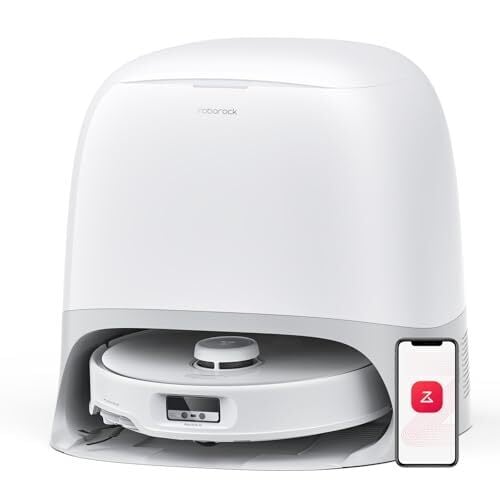
At $699.99, down from $999.99, the Roborock Qrevo Curv is at its lowest price yet, according to price trackers. That puts a top-tier robot vacuum and mop within a price range that is still expensive but no longer out of reach for people who were already considering a premium hybrid. This is the model our reviewer, Amanda Blum, called the most adaptable robot vacuum she’s tested, and PCMag backed that up with an “excellent” rating.
The Curv, using Roborock’s AdaptiLift chassis, can raise its body and climb thresholds up to 1.6 inches. In real use, that means it can move from hardwood to tile or over raised door frames without stopping short. Cleaning performance is strong as well. It delivers 18,500Pa of suction power, handles pet hair with an anti-tangle main brush, and uses a redesigned side brush that extends outward to sweep debris from corners. It can also avoid more than 60 types of obstacles, including shoes and cords. And when the job’s done, the dock takes care of most maintenance: emptying the dustbin into a bag that lasts around two months (depending on usage), refilling water, washing mop pads with hot water, drying them, and cleaning itself afterward.
Navigation relies on LiDAR and a camera that can also be used for live viewing or patrol routes, effectively turning the robot into a rolling security cam. Setup takes a bit of time, but mapping is fast and accurate, and the app gives clear control over schedules, rooms, and cleaning intensity. On the downside, there’s no detergent dispenser, and the voice assistant (“Hello Rocky”) has a learning curve unless you’re reading off the cheat sheet. Also, while the robot tries to lift its mops over carpets, it may still drag them across, depending on the rug’s height. All in, the Qrevo Curv feels like a well-rounded investment for someone who wants more than just a basic robot vacuum, especially at its all-time low price right now.
Versions installed via Snap don’t delete files when users empty system trashLinux users who installed Microsoft’s Visual Studio Code as a Snap package may want to check to see whether files they sent to the trash with the app have actually been deleted.…