
The GNU Nettle cryptographic library is out with a major new update that introduces support for SLH-DSA, the post-quantum signature scheme selected by NIST for the FIPS 205 standard…
Monthly Archives: February 2026
X’s latest Community Notes experiment allows AI to write the first draft
X is experimenting with a new way for AI to write Community Notes. The company is testing a new “collaborative notes” feature that allows human writers to request an AI-written Community Note.
It’s not the first time the platform has experimented with AI in Community Notes. The company started a pilot program last year to allow developers to create dedicated AI note writers. But the latest experiment sounds like a more streamlined process.
According to the company, when an existing Community Note contributor requests a note on a post, the request “now also kicks off creation of a Collaborative Note.” Contributors can then rate the note or suggest improvements. “Collaborative Notes can update over time as suggestions and ratings come in,” X says. “When considering an update, the system reviews new input from contributors to make the note as helpful as possible, then decides whether the new version is a meaningful improvement.”
We’re launching something new: Collaborative Notes
The idea: when you request a note, AI drafts one — then the community refines it together through ratings and suggestions. You can watch it get better in real time.
It’s a whole new way for the public to work with AI — and each… pic.twitter.com/U7eBOLdsh7
— Community Notes (@CommunityNotes) February 5, 2026
X doesn’t say whether it’s using Grok or another AI tool to actually generate the fact check. If it was using Grok, that would be in-line with how a lot of X users currently invoke the AI on threads with replies like “@grok is this true?”
Community Notes has often been criticized for moving too slowly so adding AI into the mix could help speed up the process of getting notes published. Keith Coleman, who oversees Community Notes at X, wrote in a post that the update also provides “a new way to make models smarter in the process (continuous learning from community feedback).” On the other hand, we don’t have to look very far to find examples of Grok losing touch with reality or worse.
According to X, only Community Note Contributors with a “top writer” status will be able to initiate a collaborative note to start, though it expects to expand availability “over time.”
This article originally appeared on Engadget at https://www.engadget.com/social-media/xs-latest-community-notes-experiment-allows-ai-to-write-the-first-draft-210605597.html?src=rss
Krita 5.3 and 6.0 Enter Beta With Text and Tooling Overhauls
The first betas of Krita 5.3 and Krita 6.0 are now available, launching a new feature cycle built from a shared Qt5 and Qt6 codebase.
GeekBook X14 Pro Review: Geekom’s First Featherweight Alloy Laptop

Geekom GeekBook X14 Pro: Starting At $1049 ($1249 As Tested) The Geekom GeekBook X14 Pro is highly portable, has a great OLED screen, and ample memory and storage, but its previous-gen processor hampers performance and battery life. Thin, Light, And Portable Crisp 2.8K OLED display Magnesium Alloy Unibody Construction Ample Memory And Storage…
“ICE Out of Our Faces Act” would ban ICE and CBP use of facial recognition
A few Senate Democrats introduced a bill called the ‘‘ICE Out of Our Faces Act,” which would ban Immigration and Customs Enforcement (ICE) and Customs and Border Protection (CBP) from using facial recognition technology.
The bill would make it “unlawful for any covered immigration officer to acquire, possess, access, or use in the United States—(1) any biometric surveillance system; or (2) information derived from a biometric surveillance system operated by another entity.” All data collected from such systems in the past would have to be deleted. The proposed ban extends beyond facial recognition to cover other biometric surveillance technologies, such as voice recognition.
The proposed ban would prohibit the federal government from using data from biometric surveillance systems in court cases or investigations. Individuals would have a right to sue the federal government for financial damages after violations, and state attorneys general would be able to bring suits on behalf of residents.
The Winter Olympics Will Make Sure Nobody Cheats By Injecting Their Penis With Acid

A report claims some ski jumpers are injecting hyaluronic acid to cheat this year
If You’re Sick of This Brutal Cold, Boy Do We Have News for You
Although the eastern U.S. is facing another frigid weekend, forecast models suggest temperatures will rise significantly in the latter half of February.
Apple’s ‘Lockdown Mode’ Could Stop the Government From Breaking Into Your iPhone
In January, the FBI made headlines after it raided the home of Washington Post reporter Hannah Natanson. It was a shocking case of law enforcement not just overriding one journalist’s privacy, but the integrity of the entire news organization. The devices the FBI seized—which included personal devices as well as a Washington Post-issued laptop—contained Natanson’s personal contacts, correspondences, and the Slack channels of the Washington Post itself.
But while the FBI was able to access some of the devices, it was not able to access Natanson’s iPhone. That’s because the device was in Lockdown Mode, which prevented the FBI’s Computer Analysis Response Team (CART) from breaking into it. This isn’t a setting that is exclusive to journalists: You have this option baked into your iPhone as well, and can choose to turn it on at any time. The thing is, unless you’re a high-profile target, you probably don’t want to.
How does Lockdown Mode work?
Lockdown Mode is an option on iPhones, iPads, Apple Watches, and Macs, designed for users who could be the target of sophisticated cyberattacks. Think politicians, businessmen, activists, and, of course, journalists—really, anyone high-profile that works or takes action in a way that could draw the ire of powerful organizations or governments.
Because attackers target devices with spyware, the goal of Lockdown Mode is to reduce the attack surface of your device in order to prevent potential cyberattacks from working. Attackers can install spyware on a target’s device in a number of ways, through links, attachments, wired connections, and file downloads, the same way you can install malware by clicking a malicious link in an email, or downloading a corrupt extension from the web. Lockdown Mode locks down these vulnerabilities and eliminates as many potential attack routes as possible.
To achieve this, Lockdown Mode severely impacts a number of functions you may use on your device every day. According to Apple, that includes the following:
-
Messages: Lockdown Mode will block most message attachment types, other than “certain images, video, and audio.” Links and link previews are blocked.
-
Web browsing: The feature blocks “complex web technologies,” which could impact how certain websites load or function. You may not see certain web fonts, and you may see missing image icons in place of pictures.
-
FaceTime: Incoming FaceTime calls are blocked, except for contacts you have called within the past 30 days. You can’t use SharePlay or take Live Photos in FaceTime calls.
-
Apple services: Invitations to Apple services like invites to manage a smart home are blocked, unless you have previously invited that person. GameCenter will not work, and Focuses will not work “as expected.”
-
Photos: Lockdown Mode strips photos of their location data when you share them, and shared albums are taken out of your Photos app. You won’t be able to receive new shared album invites. You can still see shared albums on devices that don’t have Lockdown Mode enabled.
-
Device connections: Your device needs to be unlocked before it can communicate with another computer. In addition, your Mac also requires your explicit approval before the connection can be made.
-
Wireless connectivity: You won’t automatically join non-secure wifi networks, and you will disconnect from existing non-secure wifi networks. Lockdown Mode also blocks 2G and 3G cellular support.
-
Configuration profiles: You can’t install configuration profiles, and the device can’t enroll in Mobile Device Management.
Apple makes a point to say that phone calls and “plain text messages” will work as normal, however incoming calls won’t ring on your Apple Watch. Emergency SOS also will continue to work.
These restrictions make it much more difficult for a bad actor to install spyware on your device, though it also makes it more difficult to use your device. A shared album invite could contain malware, but by removing the feature entirely, you miss out on photos from friends and family. Any spyware coming from a malicious link or image will be blocked, but if you frequently send photos, videos, and other attachments in Messages, you’ll miss out.
That’s why these measures are really designed only for individuals who think they’ll be targeted by sophisticated actors. It seems that could include governments secretly installing spyware on targets’ devices, or the FBI stealing your device in a raid. It’s worth noting that the FBI was able to access Natanson’s other devices, including a MacBook Pro that unlocked with her fingerprint. The agency’s warrant compelled Natanson to unlock her devices with biometrics if they were enabled. Lockdown Mode could not have prevented that, so it’s not clear why the FBI didn’t force Natanson to unlock the iPhone in question, too.
How to turn on Lockdown Mode
If you understand the restrictions, but still want to try Lockdown Mode, you’ll need to be running the following software version on each of the Apple devices you want to use Lockdown Mode with:
-
iPhone: iOS 16 or later
-
iPad: iPadOS 16 or later
-
Apple Watch: watchOS 10 or later
-
Mac: macOS Ventura or later
Apple says “additional protections” are available for iOS 17, iPadOS 17, or macOS Sonoma or later. In addition, you should update your device to the latest software version before turning on Lockdown Mode if you want all the latest protections.
You can turn on Lockdown Mode on any of your Apple devices, but you must do so individually on each. You’ll find the option at the bottom of the “Privacy & Security” section in Settings (System Settings on Mac). Hit “Turn On Lockdown Mode,” then review the pop-up that appears and choose “Turn On Lockdown Mode” again. You’ll need to choose to “Turn On & Restart,” then enter your device’s password or passcode for the feature to take effect.
Overwatch’s ‘Same Face Syndrome’ Has Claimed Another Victim

Anran sure didn’t look like Kiriko and Juno in her earlier appearances
The post <em>Overwatch’s</em> ‘Same Face Syndrome’ Has Claimed Another Victim appeared first on Kotaku.
Nintendo Covers Up Violence With Hilariously Bad Gameplay

Leon Kennedy needs to get his eyes checked
The post Nintendo Covers Up Violence With Hilariously Bad Gameplay appeared first on Kotaku.
Everything we know about Valve’s new Steam Machine
The Steam Machine is back from the dead. Not as a Valve-supported program for manufacturers to create living room PCs, but instead a home console sibling to the Steam Deck. Valve introduced its second attempt at ruling the living room in a surprise hardware announcement in November 2025, and paired the new Steam Machine with a new Steam Controller and a wireless VR headset it calls the Steam Frame. Since the announcement, as is often the case with Valve, some details remain elusive, however.
While we wait for the release of the company’s new hardware lineup in 2026, and more information straight from the horse’s mouth, here’s everything we know about the hardware, software and price of the Steam Machine.
What’s the Steam Machine’s hardware like?
Valve
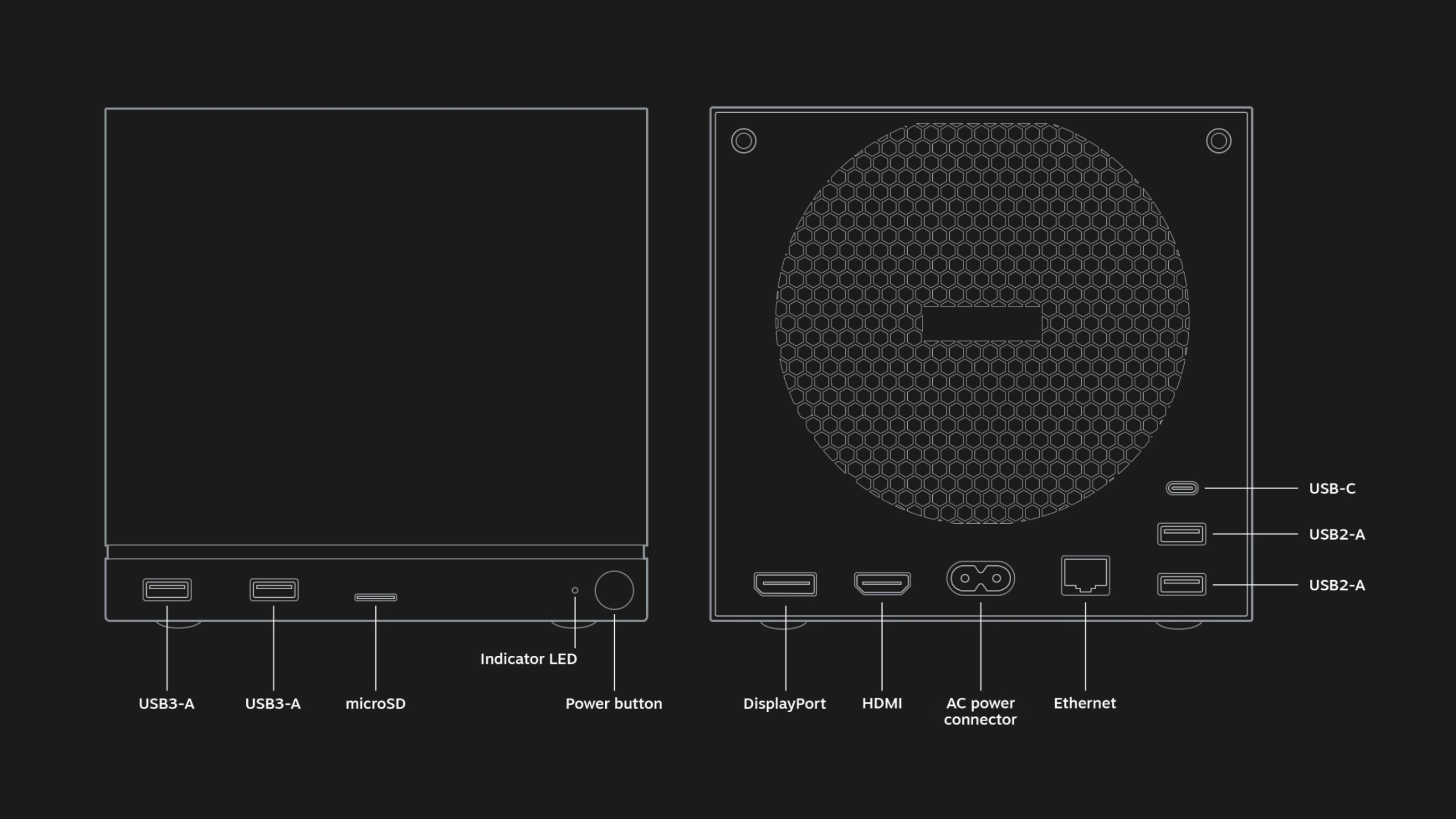
Like the Steam Deck, the Steam Machine is utilitarian and bespoke. The PC is a black, 5.98 x 6.39 x 6.14 inch (152 x 162.4 x 156mm) box, with ports and a grille for a fan in the back and a removable faceplate and customizable LED light strip in the front. Inside, Valve says the Steam Machine features a “semi-custom” AMD Zen 4 CPU with six cores and up to 4.8GHz clock speeds, and a “semi-custom” RDNA3 AMD GPU, along with 16GB DDR RAM, 8GB GDDR6 VRAM and either 512GB or 2TB of storage.
While these specs make the Steam Machine more powerful than the aging Steam Deck (which shipped in 2022 with its own custom AMD chip) Valve has been careful not to oversell the capabilities of the box. In a blog post, the company said that “the majority of Steam titles play great at 4K 60FPS” using AMD’s FidelityFX Super Resolution (FSR) frame generation and upscaling technology, but some titles require more upscaling than others, and it “may be preferable to play at a lower framerate with [variable refresh rate] to maintain a 1080p internal resolution.”
In a hands-on preview of the Steam Machine, Digital Foundry expressed concern with what Valve’s claims and the device’s stated specs could mean for future performance. “The decision to opt for 8GB of GDDR6 memory has been proven to be a limiting factor on many modern mainstream triple-A games and falls short of the maximum VRAM pools and memory bandwidth available on both Xbox Series X and base PS5,” Digital Foundry writes.
The Steam Machine supports Bluetooth 5.3, Wi-Fi 6E and includes an integrated 2.4GHz adapter for the new Steam Controller. In terms of port selection, there’s DisplayPort 1.4 and HDMI 2.0 inputs for connecting the box to external monitors and TVs, four USB-A ports (divided between two USB 2.0 ports and two USB 3.2 Gen 1 ports) and one USB-C port on the back.
Engadget will have to try out the Steam Machine to really know what it’s capable of, but there’s nothing to suggest it couldn’t be as flexible as the Steam Deck, especially with more power to play with.
What games will be able to run on the Steam Machine?

Valve
Any game that runs on SteamOS, Valve’s Linux-based operating system, will run on the Steam Machine, provided the device’s technical specs will support it. For games running natively on Linux, the Steam Machine will download the Linux version. For Windows games and everything else, it’ll be able to use Steam’s built-in Proton compatibility layer to translate games to Linux, just like the Steam Deck does.
Proton is developed by both Valve and CodeWeavers, the team behind the macOS compatibility app CrossOver. Valve’s compatibility layer translates a game’s API calls and other software features into something Linux understands, essentially tricking the game into thinking it’s running on Windows when it isn’t. Proton has worked remarkably well so far, in some cases helping some PC games run more efficiently on Linux than they do on Windows, but it does have some limitations. Because some anti-cheat software doesn’t support Linux, many competitive multiplayer games aren’t playable on SteamOS. Valve hopes the Steam Machine will help change that.
“While [the] Steam Machine also requires dev participation to enable anti-cheat, we think the incentives for enabling anti-cheat on Machine to be higher than on Deck as we expect more people to play multiplayer games on it,” Valve told Eurogamer. “Ultimately we hope that the launch of Machine will change the equation around anti-cheat support and increase its support.”
To help users find what games work well on the Steam Machine, Valve plans to expand its program for verifying games on the Steam Deck to include the Steam Machine and Steam Frame. Valve looks at things like controller support, the default resolution of the game, whether or not it requires a separate launcher and whether the game and its middleware work with Proton to determine a game’s rating. Then the company sorts games into four categories: Verified (where the game works with Steam hardware at launch), Playable (where a user might have to make modifications to run smoothly), Unplayable (where some or all of the game doesn’t function) and Unknown.
According to an announcement Valve sent to developers, games that were Verified for the Steam Deck will automatically be verified for the Steam Machine. The system is helpful, but far from definitive — some Unplayable games are in fact playable — which is why online, community-run databases like ProtonDB fill in the gaps with more granular information.
How much will the Steam Machine cost and when will it launch?

Valve
Valve hasn’t announced a price or a release date for the Steam Machine or any of its new hardware. In terms of price, however, the company has suggested it might not be a deal in quite the same way the $399 Steam Deck LCD was. Valve designer Pierre-Loup Griffais told The Verge that the “Steam Machine’s pricing is comparable to a PC with similar specs” and that its price would be “positioned closer to the entry level of the PC space” but be “very competitive with what you a PC you could build yourself from parts.”
That means the Steam Machine will likely cost more than the $499 PS5, and that the rising costs of memory could make it even more expensive. Valve has already publicly admitted that memory and storage shortages are affecting its plans. In February, the company said that it was delaying the launch of its hardware (though it still hopes to ship in the first half of 2026) and rethinking pricing, particularly around the Steam Machine and Steam Frame, because of the “limited availability and growing prices” of critical components like RAM.
The changes Framework had to make to the pricing of the Framework Desktop are an illustrative example of the position Valve is in. Framework pitched its compact desktop PC as being great for gaming, with an AMD Ryzen AI Max chip (originally meant for gaming laptops) and a minimum of 32GB of RAM that lets it run games at 1440p. The company originally sold the base configuration of the Framework Desktop for $1,099, but announced in January 2026 that it would now cost $1,139 due to the rising cost of RAM. The price situation got even worse for configurations with more RAM. A Framework Desktop with 128GB of RAM now costs $2,459.
The blame for rising costs lies squarely with the AI industry, whose demand for RAM has led to the collapse of consumer RAM brands and a dearth of true deals on the in-demand component. At this point, PC makers have no solution to the problem other than riding the shortage out and raising prices. Valve clearly isn’t immune to those same issues.
That doesn’t rule out the company offering its Linux PC at multiple different price points, or in some kind of bundle deal with multiple pieces of new Steam hardware. But it does mean that the Steam Machine will likely be priced like a premium device. Same for the Steam Controller and Steam Frame. In the case of the Frame, UploadVR reports that Valve wants to sell the headset for less than the $1,000 Valve Index, but that doesn’t mean it won’t be significantly more expensive than the $300 Meta Quest 3S.
What accessories will work with the Steam Machine?

Valve
The Steam Machine is designed to work with a variety of different Bluetooth controllers and other wireless accessories, and also whatever you can plug into its multiple USB-A ports and single USB-C port. With a built-in 2.4GHz Steam Controller dongle inside the Steam Machine, Valve’s controller should be an ideal option for controlling games, particularly because of its multiple control options, like touchpads and gyroscopes. Support for Steam Link, Valve’s tech for streaming PC games over local wireless, means you can also send games from a Steam Machine to the Steam Deck, Steam Frame or the Steam Link app and play them there.
This article originally appeared on Engadget at https://www.engadget.com/gaming/pc/everything-we-know-about-valves-new-steam-machine-200458817.html?src=rss
These Sony Over-Ear Headphones Come in Three Colors and Are Under $100 Right Now
We may earn a commission from links on this page. Deal pricing and availability subject to change after time of publication.
Not everybody needs, wants, or can afford the “best” headphones available, especially when they can easily cost half a grand. If the Sony XM6, which I called the best over-ear headphones of 2025 (and 2026 so far), are not in your budget, then perhaps the more affordable Sony WH-CH720N could be. While they’re not quite as premium, they’re significantly cheaper and offer good enough quality for most people. You can get them for $97 (originally $179.99) on Amazon right now.
Sony WH-CH720N Noise Cancelling Wireless Headphones
$98.00
at Amazon
$179.99
Save $81.99
Save $81.99

$98.00
at Amazon
$179.99
Save $81.99
Save $81.99
Sony WH-CH720N headphones
$98.00
at Amazon
$179.99
Save $81.99
Save $81.99

$98.00
at Amazon
$179.99
Save $81.99
Save $81.99
Sony WH-CH720N headphones
$98.00
at Amazon
$179.99
Save $81.99
Save $81.99

$98.00
at Amazon
$179.99
Save $81.99
Save $81.99
These are Sony’s entry-level over-ear headphones, and Sony mostly made cuts in the design and build. When you hold them, they might feel hollow and light, but they’re still comfortable since the earcups are well-cushioned, according to CNET’s review. However, Sony did not make a lot of sacrifices in the audio or ANC department, which, at the end of the day, is what’s most important.
While they’ve dropped below $100 before, all three colorways have not been available at their current price at the same time—until now. These headphones use the same Sony Sound Connect app as the flagship models and share some of the same features, like multipoint technology to connect to up to two devices. They also come with Google Fast Pair and Find My Device support, nice features to have for convenience, and if you misplace them. You can get 35 hours of battery life with ANC on and 50 hours with ANC off, and the charging is quick, with three minutes giving you three hours of juice.
The ANC is not as good as the latest XM6, but it works great for under $100, according to Mashable’s review and they’ll block most ambient noise outdoors or indoors. Transparency mode is also great, allowing you to have conversations and hear bikes or cars passing by. The adjustable EQ in the app means you can tweak the crisp and vibrant sound of the WH-CH720N to your liking.
Musk Predicts SpaceX Will Launch More AI Compute Per Year Than the Cumulative Total on Earth
Elon Musk told podcast host Dwarkesh Patel and Stripe co-founder John Collison that space will become the most economically compelling location for AI data centers in less than 36 months, a prediction rooted not in some exotic technical breakthrough but in the basic math of electricity supply: chip output is growing exponentially, and electrical output outside China is essentially flat.
Solar panels in orbit generate roughly five times the power they do on the ground because there is no day-night cycle, no cloud cover, no atmospheric loss, and no atmosphere-related energy reduction. The system economics are even more favorable because space-based operations eliminate the need for batteries entirely, making the effective cost roughly 10 times cheaper than terrestrial solar, Musk said. The terrestrial bottleneck is already real.
Musk said powering 330,000 Nvidia GB300 chips — once you account for networking hardware, storage, peak cooling on the hottest day of the year, and reserve margin for generator servicing — requires roughly a gigawatt at the generation level. Gas turbines are sold out through 2030, and the limiting factor is the casting of turbine vanes and blades, a process handled by just three companies worldwide.
Five years from now, Musk predicted, SpaceX will launch and operate more AI compute annually than the cumulative total on Earth, expecting at least a few hundred gigawatts per year in space. Patel estimated that 100 gigawatts alone would require on the order of 10,000 Starship launches per year, a figure Musk affirmed. SpaceX is gearing up for 10,000 launches a year, Musk said, and possibly 20,000 to 30,000.


Read more of this story at Slashdot.
Microsoft Adds Sysmon Directly To Windows, Ending Years Of Standalone Installs

Microsoft hasn’t had an easy time with Windows 11 updates as of late, but in an unexpected move, the company just offered a very thoughtful, uncontroversial addition to Windows 11—the popular Sysmon (System Monitor) utility, which launched over ten years ago. While users will be required to enable it manually (either through Settings -> System
Pokémon Accidentally Finds The Perfect Way To Troll Scalpers

If you tried to buy up all of today’s Surging Sparks restock, you got an irritating extra
The post <i>Pokémon</i> Accidentally Finds The Perfect Way To Troll Scalpers appeared first on Kotaku.
Google Teases Special Perk For Pixel 10a Preorders On February 18

Budget conscious Google Pixel fans typically wait for the A-series phones, which often pack high-end internals into a more affordable package. Months after releasing its latest iteration of mobile devices, the excellent Pixel 10 series, the company has officially unveiled the Pixel 10a and is offering some extra perks for those who sign up
Take-Two CEO Reveals What Role Generative AI Has In Developing GTA 6

The hype for Grand Theft Auto VI continues unabated, as publisher Take-Two Interactive shares that GTA 6 is still on track for a November release. As monumental as this game’s release is likely to be, however, it still can’t escape the discourse of AI in game development. In an interview with GamesIndustry.biz, CEO Strauss Zelnick spoke about
Nintendo Switch Virtual Boy Classics Might Be Playable On Labo VR
Though not officially supported, Nintendo’s upcoming Virtual Boy library may be playable on Labo VR, the DIY cardboard headset from 2019.
Beginning February 17, Nintendo will offer Virtual Boy Classics via their Switch Online subscription service, bringing the concise library of Virtual Boy games to new audiences for the first time in over 30 years.
Nintendo Switch & Switch 2 Getting Official Virtual Boy Accessory
Switch and Switch 2 are getting official Virtual Boy accessories that Switch Online + Expansion Pack subscribers can slot their consoles into to play classic 3D games like Mario’s Tennis.
 UploadVRDavid Heaney
In order to play these games, which are stereoscopic 3D experiences, users will need to have an active subscription to the Nintendo Switch Online + Expansion Pack service, as well as buy one of Nintendo’s official Virtual Boy headsets, which the company is offering in two varieties: the plastic replica Virtual Boy ($99.99 / £66.99), and the cheaper cardboard model ($24.99 / £16.99).
However a third option may exist.
One Nintendo rep recently stated that the discontinued Labo VR, a do-it-yourself cardboard headset that Nintendo released in 2019 as part of their Toy-Con line of Switch accessories, will work just as well as the new cardboard VB headset. However Nintendo was quick to issue a statement saying that this play method is not officially supported, encouraging users to instead buy the new Virtual Boy accessories.

Nintendo’s statement, while extremely clear, directly contradicts a previous statement by the company’s rep. Of course, that rep could simply have been mistaken, or the company may be keen on everyone forgetting the Labo VR exists so that users buy the new gizmo. It seems the only way to know for sure is to test the Labo VR when Virtual Boy launches on the Switch in under two weeks (which we’ll do).
For clarity, Nintendo has stated that Virtual Boy Classics cannot be played on Switch without using a stereoscopic 3D headset.
Unofficial methods for playing Virtual Boy games on modern VR headsets have existed for quite some time. However, this is the first time since the system’s discontinuation in 1996 that Nintendo itself has acknowledged the Virtual Boy in terms of releasing a new game product.
Virtual Boy Classics and the two accessory headsets will be available to Nintendo Switch Online + Expansion Pack subscribers beginning February 17th, 2026.
Prime members can play Alan Wake 2 for free on Luna
If you haven’t yet played Alan Wake 2, here’s your chance to immerse yourself in its terrors for free. Prime members can play it this month on Amazon’s Luna cloud gaming service at no additional charge.
The “fantastic” Alan Wake 2 oozes “psychedelic terror,” as Engadget’s Jessica Conditt put it in our review. The 2023 horror-survival game uses a dual-protagonist motif, alternating between the lost author Wake and the stoic FBI agent Saga Anderson. It “tells a twisted, serpentine story of paranormal murder, shifting realities and demonic possession, with two brooding investigators at its core.” Not a bad way to sublimate the all-too-real horrors of life in 2026.
The Order of Giants DLC for Indiana Jones and the Great Circle also arrives on Luna this month. Ditto for Disney Universe, a knockoff of the Lego game franchise starring the Mouse’s IP.
Setting Luna aside, Amazon also has downloadable PC games that Prime members can claim for free this month. Starting today, you can snag the Borderlands spinoff Tiny Tina’s Wonderlands from the Epic Store. Later this month, you can also claim the highly rated strategy title Total War: Attila (Epic Store, Feb. 26).
You can check out Amazon’s announcement post for the complete list.
This article originally appeared on Engadget at https://www.engadget.com/gaming/prime-members-can-play-alan-wake-2-for-free-on-luna-193509728.html?src=rss
Neocities founder stuck in chatbot hell after Bing blocked 1.5 million sites
One of the weirdest corners of the Internet is suddenly hard to find on Bing, after the search engine inexplicably started blocking approximately 1.5 million independent websites hosted on Neocities.
Founded in 2013 to archive the “aesthetic awesomeness” of GeoCities websites, Neocities keeps the spirit of the 1990s Internet alive. It lets users design free websites without relying on standardized templates devoid of personality. For hundreds of thousands of people building websites around art, niche fandoms, and special expertise—or simply seeking a place to get a little weird online—Neocities provides a blank canvas that can be endlessly personalized when compared to a Facebook page. Delighted visitors discovering these sites are more likely to navigate by hovering flashing pointers over a web of spinning GIFs than clicking a hamburger menu or infinitely scrolling.
That’s the style of Internet that Kyle Drake, Neocities’ founder, strives to maintain. So he was surprised when he noticed that Bing was curiously blocking Neocities sites last summer. At first, the issue seemed resolved by contacting Microsoft, but after receiving more recent reports that users were struggling to log in, Drake discovered that another complete block was implemented in January. Even more concerning, he saw that after delisting the front page, Bing had started pointing users to a copycat site where he was alarmed to learn they were providing their login credentials.