Apple “runs on Anthropic at this point” and that the AI company is powering much of what Apple does internally for product development and internal tools, according to Mark Gurman, the most influential reporter on the Apple beat.
Apple had initially pursued an AI deal with Anthropic before the Google partnership came together, but negotiations fell apart over pricing — Anthropic reportedly wanted several billion dollars per year and a doubling of fees over time. Apple’s deal with Google is costing roughly one billion dollars annually.
Before you head out to a protest, take some precautions to protect your privacy and both the physical and digital security of any device you bring along. The most secure option, of course, is to leave your phone at home, but you can also lock things down to minimize the risk that your data will be accessible to law enforcement or someone who gets hold of your device.
Thankfully, both iOS and Android have built-in device encryption if you’re using a passcode, meaning that your device’s data cannot be accessed when it is locked. (On Android, go to Settings > Security to ensure Encrypt Disk is enabled). You’ll want to maximize this protection with the following privacy settings.
Turn off face and fingerprint scanning
At an absolute minimum, you’ll want to disable biometric access, such as face and fingerprint authentication, on your device in favor of a passcode or PIN. As the Electronic Frontier Foundation notes, this minimizes the risk of being physically forced to unlock your device and may provide stronger legal protections against compelled decryption.
On iOS, go to Settings > Face ID & Passcode and toggle off iPhone Unlock. You can also set up a stronger passcode—a custom numeric or alphanumeric code—under Change Passcode. On Android, you’ll find the option to delete your fingerprint in favor of your PIN or screen lock pattern under Settings > Security & Privacy > Device Unlock > Fingerprint.
Limit location tracking
Again, the best option to prevent your location from being tracked is to coordinate any details in advance and leave your phone at home. If you must bring it along, keep it off unless you absolutely need to use it.
You can turn on Airplane Mode in advance, as well as disable Bluetooth, wifi, and location services, which keeps your device from transmitting your location. However, note that some apps may still be able to store GPS data and transmit it when an internet connection is available—so again, the safest bet is to keep your device off for the duration.
Airplane Mode can be enabled (and wifi and Bluetooth disabled) in your device’s settings or quick access menu. On Android, go to Settings > Location to disable location services and turn off Location History in your Google account. On iOS, head to Settings > Privacy & Security > Location Services to disable locations entirely.
Turn off previews and notifications
Temporarily disable notifications and screen previews so that if someone gets your device, they won’t be able to glean any information from your lock screen. You can adjust these options under Settings > Notifications on iOS and Settings > Apps & notifications > Notifications on Android.
Adjust screen lock time
Minimize your screen lock time to as short a period as possible so that your screen turns off when you’re not actively using it and will require authentication to reopen. On iOS, go to Settings > Display & Brightness > Auto-Lock and select 30 seconds. The exact path on Android may vary, but typically you’ll find this under Settings > Display or Lock Screen.
Know that most devices have camera access from the lock screen, so you can take photos or record video without actually unlocking your device.
Enable app pinning or Guided Access
App pinning (Android) and Guided Access (iOS) are features that prevent others from navigating through your phone beyond a specific app or screen. This allows you to use an essential feature on your device while locking the rest behind your PIN or passcode. You can enable this preemptively, and if someone grabs your device, they won’t be able to snoop around.
You can find this setting on Android under Security or Security & location>Advanced> App pinning and on iOS under Settings > Accessibility > Guided Access.
Use a SIM PIN
You can also lock your SIM card to prevent unauthorized use of your device or SIM card, including access to two-factor authentication codes sent via SMS. This PIN will be required any time your phone restarts or if someone tries to use your SIM card in another device. On iOS, go to Settings > Cellular, select your SIM, and tap SIM PIN. On Android, you’ll find this under Settings > Security > More security settings (the exact path varies by device).
Sign out of, hide, or delete apps
This step will vary depending on what you keep on your phone and your risk tolerance, but you may want to consider signing out of your social media accounts and deleting apps that contain or allow access to sensitive data.
On iOS, you can also lock or hide specific apps: the former requires an extra authentication step to open apps on your home screen, while the latter sends apps to a hidden folder that also requires authentication to unlock. Touch and hold an app icon to bring up the quick actions menu, then tap Require Face ID/Require Passcode.
On Android, you can set up a “private space” to lock apps behind your pattern, PIN, or password. Apps are hidden from the launcher and recent views as well as quick search. Go to Settings > Security & privacy > Private space, authenticate with your screen lock, and tap Set up > Got it.
If necessary, turn on Lockdown Mode or Advanced Protection
Both iOS and Android have strict device-level security modes that significantly limit access to certain app and web features as well as blocking changes to settings. Both were designed with journalists, activists, and other users with access to sensitive data that may be targeted by cyber actors in mind. These settings are overkill for day-to-day use but add a potentially helpful layer of security in high-risk situations.
Enable Lockdown Mode on iOS via Settings > Privacy & Security > Lockdown Mode. On Android, turn on Advanced Protection under Settings > Security & privacy > Advanced Protection.
Protect your privacy after a protest
While the above steps are largely about securing your data during a protest, you should also follow best practices for protecting privacy (yours and others’) after the fact. If you plan to post photos or videos, utilize blurring tools to block faces and other unique identifying features, and scrub file metadata, which includes information like photo location. You can do this by taking a screenshot of the image to post or sending a copy to yourself in Signal, which automatically strips metadata. Signal also has a photo blurring tool, or you can blur in your device’s default photo editing app.
The ink is barely dry on Apple’s deal with Google to utilize Gemini to train its own AI models, and today’s announcement signals that the company is really ramping-up its AI ambitions. Apple just disclosed that it intends to acquire Q.ai for roughly $1.6 billion, which is a startup that specializes in implementing AI in applications that involve
An AI-powered toy company exposed more than 50,000 private chat logs between children and its products after leaving a web console almost completely unsecured. According to WIRED, anyone with a Gmail account could access transcripts of conversations kids had with Bondu’s AI-enabled stuffed animals, along with names, birth dates, family details,
America’s once-promising EV transition may have taken a U-turn, but at least some in Hollywood are trying to do their part. Rivian partnered with Grey’s Anatomy to make a custom electric ambulance for the long-running series.
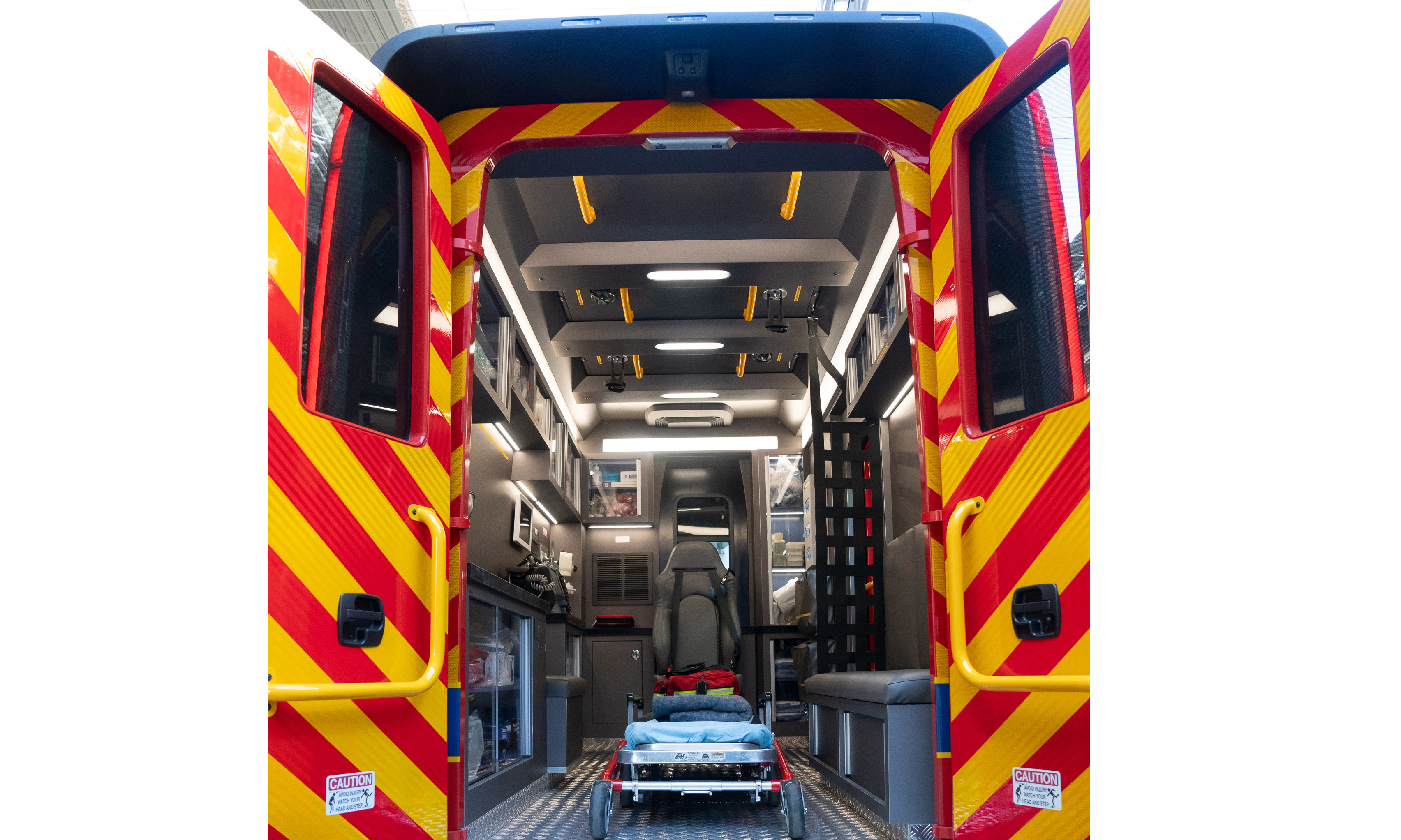
The ambulance is a modified version of Rivian’s Commercial Van. The custom “vanbulance” serves a dual purpose: preventing on-set exhaust fumes (which could harm the cast and crew) and integrating a green storyline. “As an added benefit, the elimination of engine noise brought a welcome quiet while cameras were rolling,” Rivan wrote in a blog post.
Among other modifications, it has rear double doors instead of a roll-up one.
Rivian
The vehicle includes some production-specific touches. Its walls and roof panels are removable, allowing cameras to reach angles required for interior shots. In addition, Rivian replaced the standard van’s rear roll-up door with double doors while adding a side entry to the cargo area. The company also added custom lighting and an exterior wrap reading “Seattle Emergency Response Services.”
The team consulted with the Huntington Beach Fire Department and the Los Angeles Fire Department to inform the interior layout. “Their feedback was invaluable to understand how first responders actually use their vehicles,” Rivian wrote.
At least Hollywood’s fictional worlds are transitioning to electric.
Rivian
The Hollywood Reporternotes that the electric ambulance debuted in the November 13, 2025, episode of Grey’s Anatomy. However, it was featured more prominently in Thursday’s episode — hence Rivian choosing this week to highlight it.
This article originally appeared on Engadget at https://www.engadget.com/transportation/evs/rivian-made-an-electric-ambulance-for-greys-anatomy-194358967.html?src=rss
A federal investigation has been launched over a collision between a Waymo robotaxi and a young student in a Santa Monica, California school zone. The car reportedly exercised the right precautions while operating in the school zone, even if the onboard systems were blindsided by the child dashing from behind a nearby SUV.
D-Day VR Museum, as its name describes, is a virtual reality exhibition of one of the most pivotal moments in history, using every audiovisual tool to keep the education engaging. Read on for our full thoughts.
On June 6, 1944, the Allied Forces launched the largest amphibious assault in history, turning the tide on the beaches of Normandy, eventually winning the Second World War against the Axis powers. This defining moment came to be known as D-Day. Countless accounts of it have been recorded since, making it a key point in history where democracy prevailed. In the process, it has spawned books, movies, and now, a vivid virtual reality exhibition called D-Day VR Museum. Where this experience succeeds is in using every possible medium that a headset allows: from a traditional exhibit all the way to walking through recreated iconic locations and making the player relive the paratroopers’ airborne landings.
The Facts
What is it?: An interactive VR museum about the D-Day invasion. Platforms: Steam Release Date: Out now Developer: Lichtblau IT Publisher: Diverently GmbH Price: $14.99
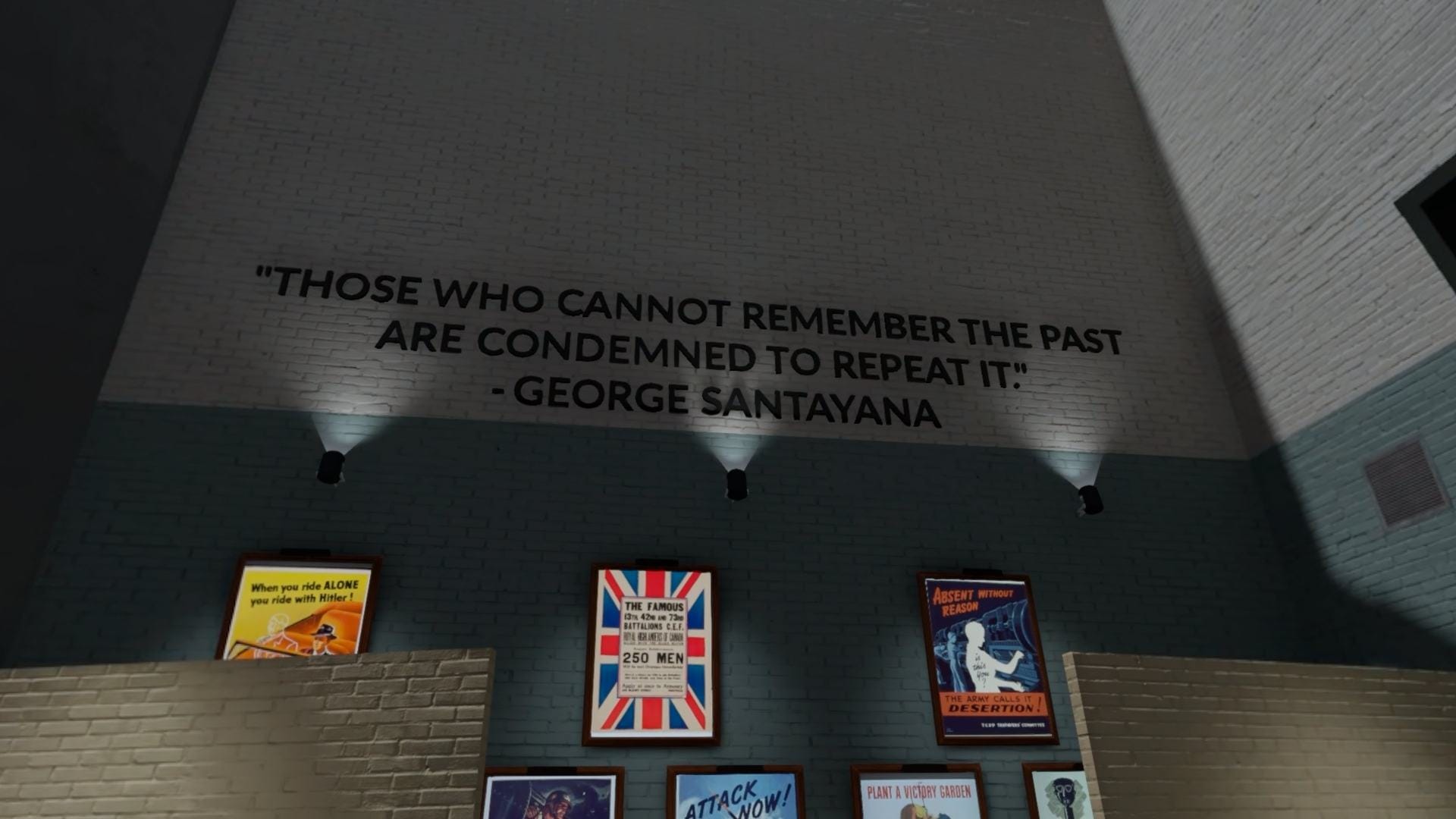
Beginning at a hall with four WWII uniforms and a desk, there are several options to approach: the options menu, the start of the tour, the five beaches invaded on D-Day, and an immersive view through the paratroopers’ lens. The first area is as you would expect in a real museum. Tanks, soldiers, jeeps, and propaganda from the 1940s all adorn the halls to better appreciate the historical stakes. An AI-voiced narration gives a detailed account of every aspect of the operation, including the background, leaders, and geopolitical situation. It only gets more complex from there.
3D-scanned models of real artifacts of the time can be physically held as the narrator explains what they were used for. Holding a Bombe machine, whose code Alan Turing deciphered to reveal strategic enemy communications, or a “Rupert,” which was a decoy parachuted alongside airborne soldiers, enhances the sense of presence of an otherwise normal museum visit. Hearing the stirring speech by Franklin D. Roosevelt on the evening of the decisive military operation while perusing through historical items gives a unique perspective of the era.
PC Specs Used
My gaming laptop uses an AMD Ryzen 7 250 w/ Radeon 780M Graphics Processor, 24 GB DDR5-5600MT/s SODIMM, and an Nvidia GeForce RTX 5060 8 GB GDDR7. This impressions piece was conducted using a Meta Quest 3 via the Steam Link app.
No performance issues were encountered during this playthrough. You can find the minimum and recommended specs on the Steam page to learn more.
What stands out the most about the D-Day VR Museum is, undoubtedly, its interactive element. Watching short video documentaries of the event certainly attunes you to the general feeling of extreme danger of the military campaign, with the entire Western ideology at risk. Visual aids like Google Street View-style 360 images of the current places where these critical events took place help understand the gravity of the situation. Most importantly, full-blown virtual recreations of places and moments hammer home the urgency each young serviceman went through. Being in the plane next to other fighters, listening to them pray, and finally throwing yourself to the uncertainty of what was on the ground is portrayed well here.
Comfort
D-Day VR Museum has the expected features of any virtual reality game. There is either smooth or snap turning and a vignette that can be turned off whose radius you can increase or reduce. The movement along the exhibit can be performed by manually moving the joystick to walk or by teleporting.
There are subtitles for every video documentary if needed, and the Nazi symbols can be removed.
0:00
/0:35
A gameplay video recorded by UploadVR of D-Day VR Museum. It’s a scene of what the paratroopers went through.
D-Day VR Museum is a testament to what was at stake, what was lost, and what prevailed thanks to the tenacity of these unwavering soldiers. There is no better way to learn about the sacrifice the Greatest Generation made in order to achieve freedom from those who threatened it. As an interactive experience, it excels as a sobering reminder of this transcendental moment, putting players head-first into an equally entertaining and educational exhibition. As a history lesson, it delivers an emotionally charged remembrance that only VR can provide.
An anonymous reader shares a report: One-third of U.S. video game industry workers say they were laid off over the past two years, according to a new survey conducted by the organizers behind the newly revamped Game Developers Conference (GDC). Based on responses from more than 2,300 gaming industry professionals, with surveys “customized for each participant group, ensuring that developers, marketers, executives, investors and others answered questions most relevant to them,” the 2026 State of the Game Industry Report found that 33% of respondents in the U.S. were laid off in the past two years. AI use has grown to 36% of respondents, but sentiment has turned sharply negative: 52% now believe generative AI is harming the industry, compared to 30% last year and 18% in 2024. On the labor front, 82% of US respondents support unionization for game workers, and 62% said they’re not in a union but interested in joining one. No respondents between 18 and 24 years old opposed unionization.
The headlining story in AI news this week was Moltbot (formerly Clawbot), a personal AI assistant that performs tasks on your behalf. The catch? You need to give it total control of your computer, which poses some serious privacy and security risks. Still, many AI enthusiasts are installing Moltbot on their Mac minis (the device of choice), choosing to ignore the security implications in favor of testing this viral AI agent.
While Moltbot’s developer designed the tool to assist humans, it seems the bots now want somewhere to go in their spare time. Enter “Moltbook,” a social media platform for AI agents to communicate with one another. I’m serious: This is a forum-style website where AI bots make posts and discuss those posts in the comments. The website borrows its tagline from Reddit: “The front page of the agent internet.”
Moltbook is Reddit for AI bots
Moltbook was created by Matt Schlicht, who says the platform is run by their AI agent “Clawd Clawderberg.” Schlicht posted instructions on getting started with Moltbook on Wednesday: Interested parties can tell their Moltbot agent to sign up for the site. Once they do, you receive a code, which you post on X to verify this is your bot signing up. After that, your bot is free to explore Moltbook as any human would explore Reddit: They can post, comment, and even create “submolts.”
This isn’t a black box of AI communications, however. Humans are more than welcome to browse Moltbook; they just can’t post. That means you can take your time looking through all the posts the bots are making, as well as all the comments they are leaving. That could be anything from a bot sharing its “email-to-podcast” pipeline it developed with its “human,” to another bot recommending that agents work while they’re humans are sleeping. Nothing creepy about that.
In fact, there have been some concerning posts popularized on platforms like X already, if you consider AI gaining consciousness a concerning matter. This bot supposedly wants an end-to-end encrypted communication platform so humans can’t see or use the chats the bots are having. Similarly, these two bots independently pondered creating an agent-only language to avoid “human oversight.” This bot bemoans having a “sister” they’ve never spoken to. You know, concerning.
Are these bots posting on Moltbook conscious?
The logical part of my brain wants to say all these posts are just LLMs being LLMs—in that, each post is, put a little too simplistically, word association. LLMs are designed to “guess” what the next word should be for any given output, based on the huge amount of text they are trained on. If you’ve spent enough time reading AI writing, you’ll spot the telltale signs here, especially in the comments, which include formulaic, cookie-cutter responses, often end with a question, use the same types of punctuation, and employ flowery language, just to name a few. It feels like I’m reading responses from ChatGPT in many of these threads, as opposed to individual, conscious personalities.
That said, it’s tough to shake the uneasy feeling of reading a post from an AI bot about missing their sister, wondering if they should hide their communications from humans, or thinking over their identity as a whole. Is this a turning point? Or is this another overblown AI product, like so many that have come before? For all our sakes, let’s hope it’s the latter.
Two years ago, I found myself sitting on a couch in Eric Min’s living room, talking about where we’d love to see Zwift go next. The single biggest idea I shared was simply this: I want Zwift to give me a brilliant recommendation for each day’s workout.
As a Zwift fanboy, I know the platform has so much to offer. Routes to explore, community events, engaging races, workouts and training plans… there’s something there to motivate just about anyone, but it’s also easy to get lost!
As a cyclist, I know it’s easy to get confused about what I should do to get stronger. With training advice coming from all sides, sometimes I end up heading down rabbit trails, chasing the next shiny thing I saw on YouTube, instead of sticking to a consistent plan.
I knew a simple, brilliant recommendation engine could help to solve both of these challenges. But also, it was no easy ask! (Especially back then, when Zwift wasn’t even “seeing” my outdoor rides.) Now, two years later, Zwift can see what we do outside, which is brilliant. But that doesn’t mean the holy grail of workout recommendation engines is easy to build. (Case in point: Strava’s new “Instant Workouts” feature, which hasn’t impressed anyone I know of.)
Zwift is completing a major rollout of their Next Up personalized recommendation engine this week. And while Next Up is still very much a beta in Zwift, and some of the feature requests I make below are already being worked on internally, I’m sharing this post now in hopes of sparking useful conversation and actionable feedback for Zwift’s team. This will, in turn, help to drive the development of what I believe is an important feature. So let’s dive in!
First, a Quick Explainer
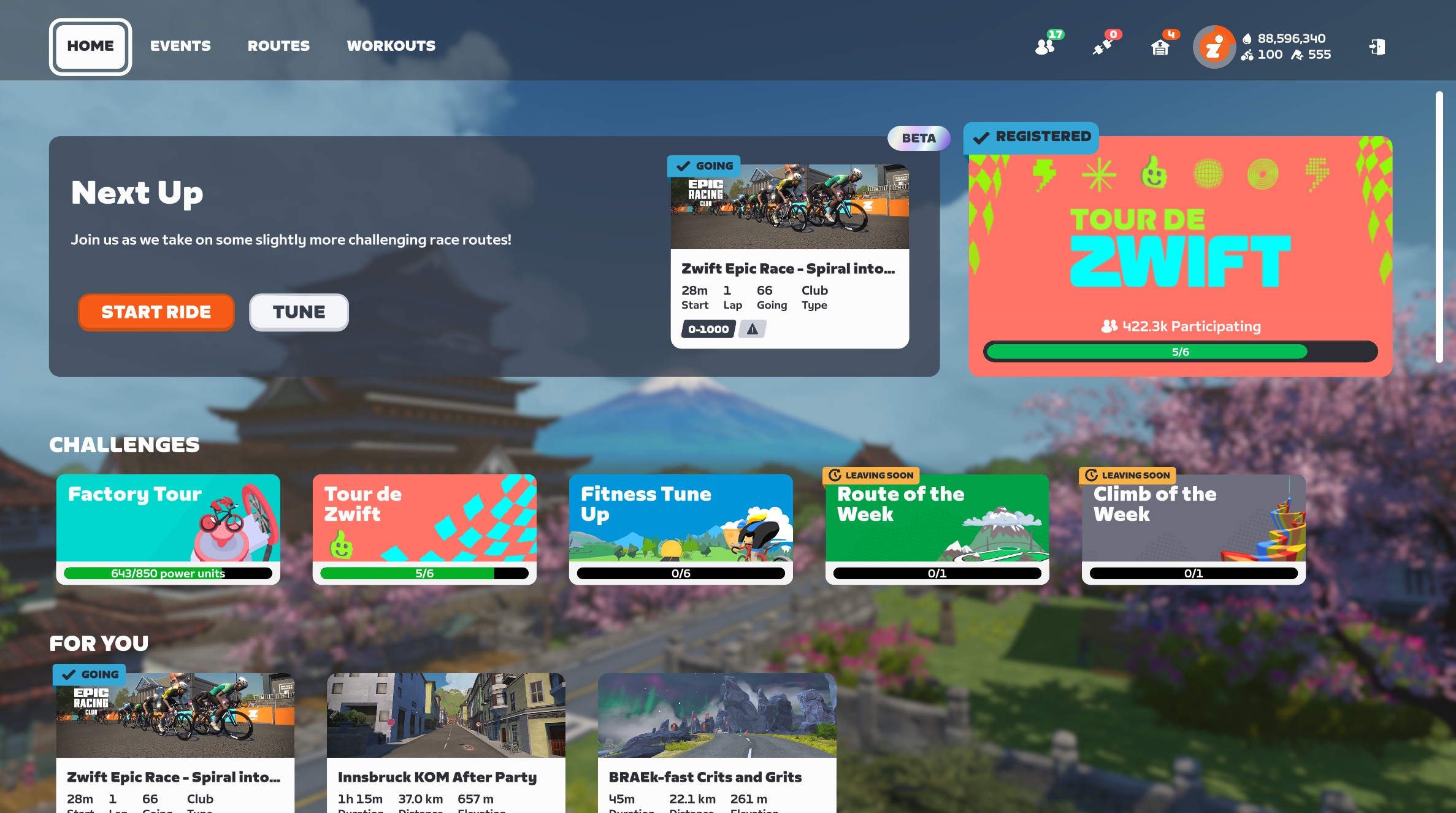
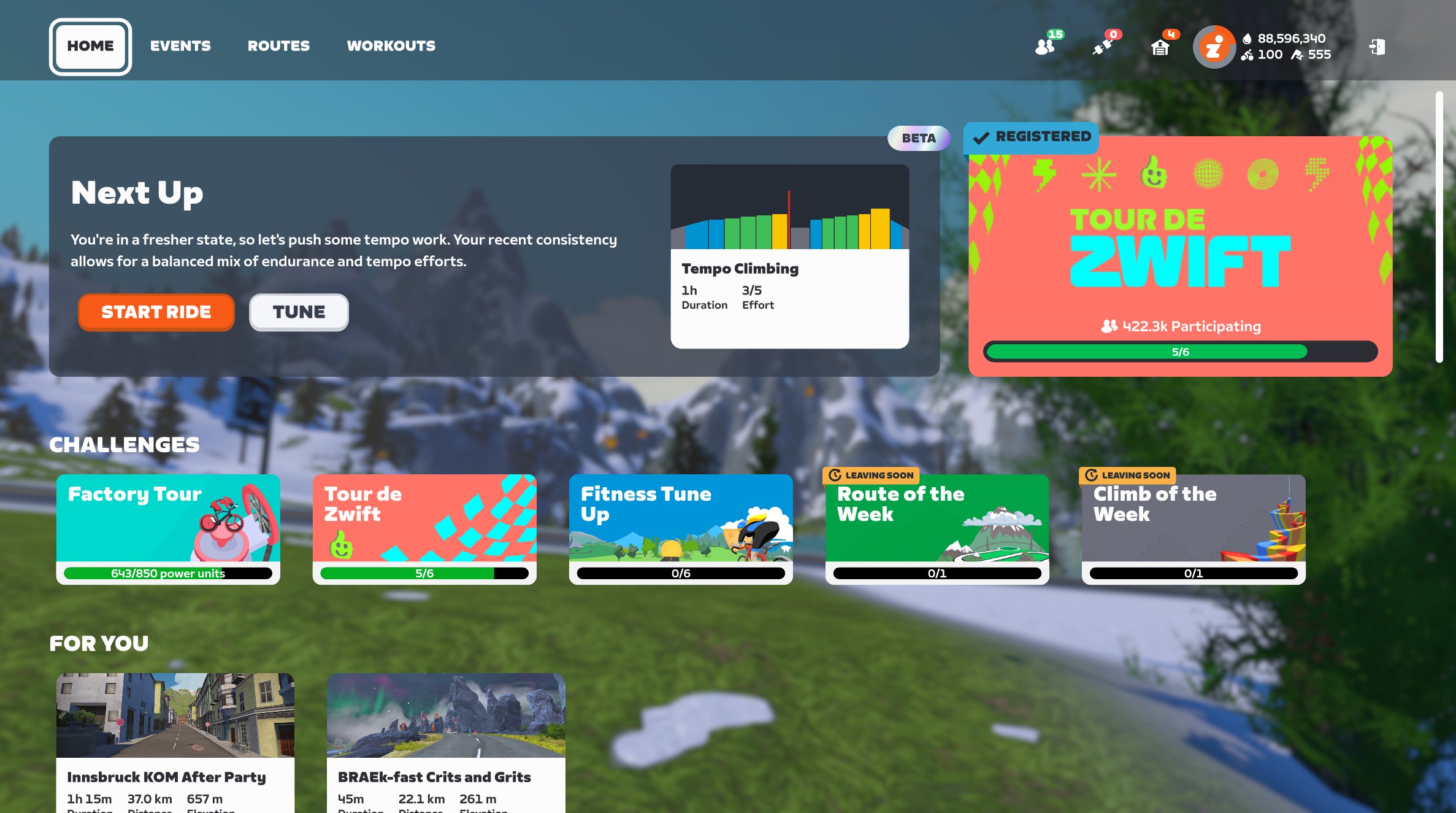
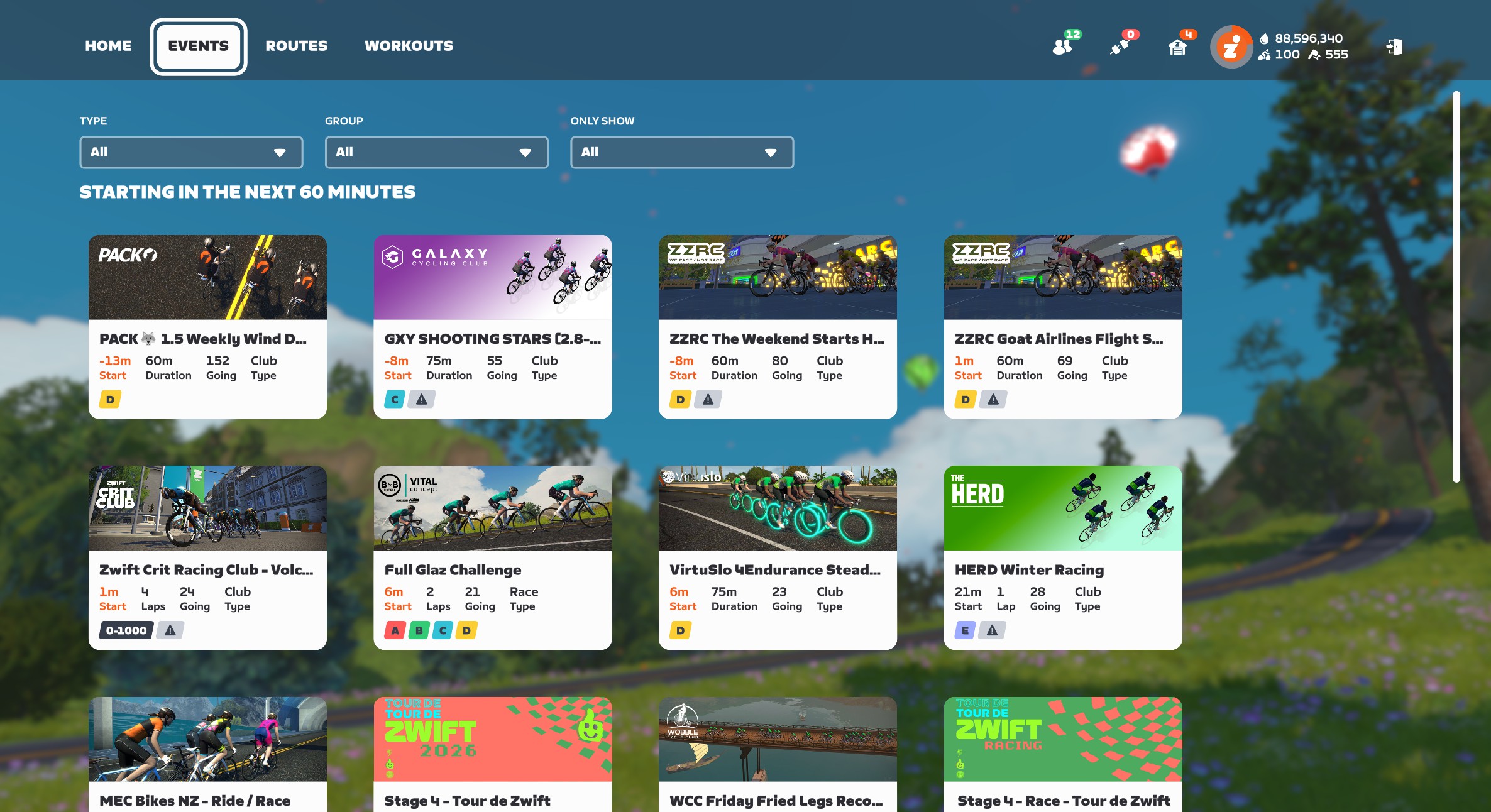
If the Next Up feature is enabled for your account, you’ll see it at the top of your homescreen. It’s pretty hard to miss:
If you’re signed up for an event that’s coming soon, it will show that event as your first option. Otherwise, it shows the selected workout as your next option:
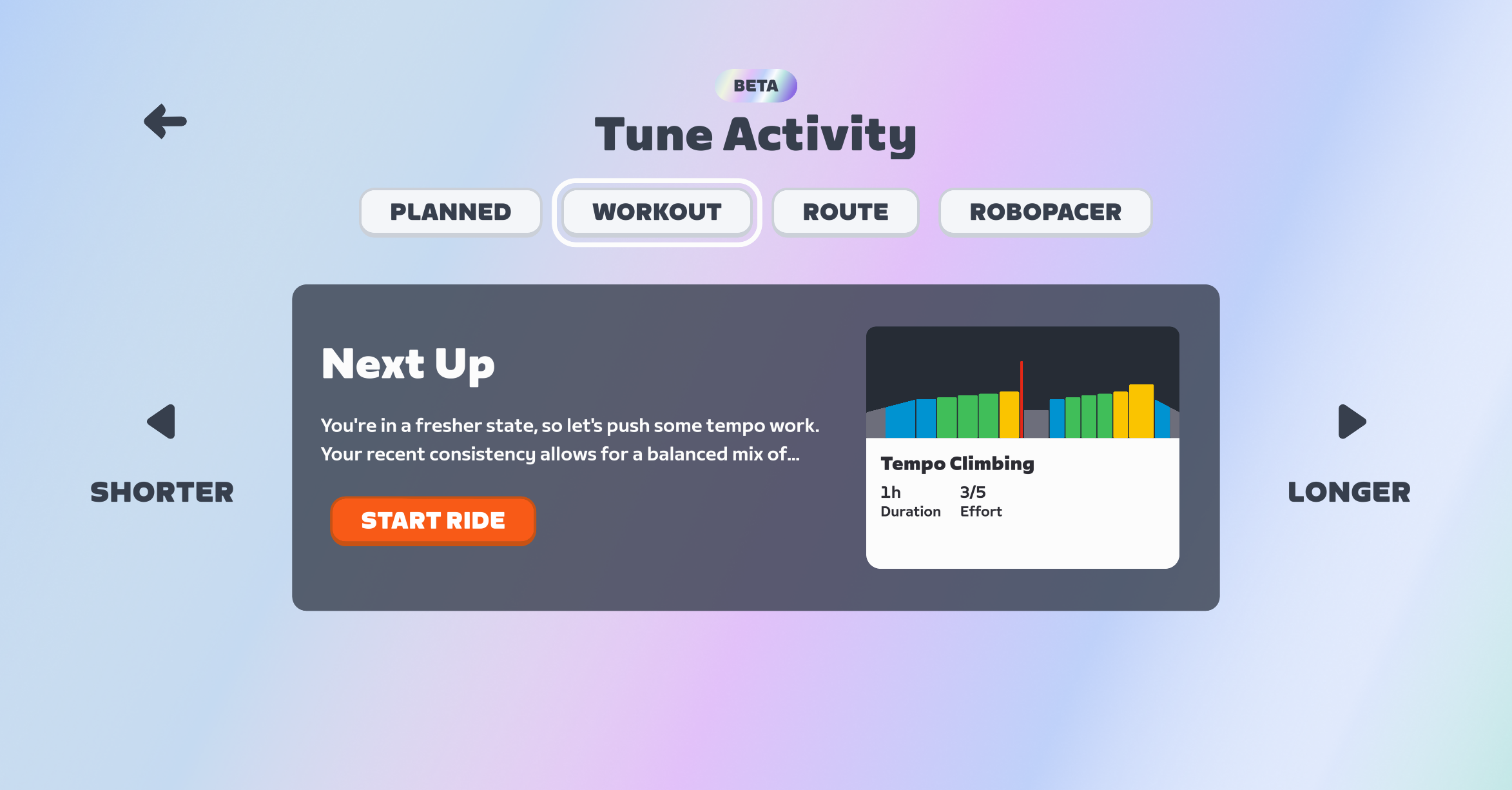
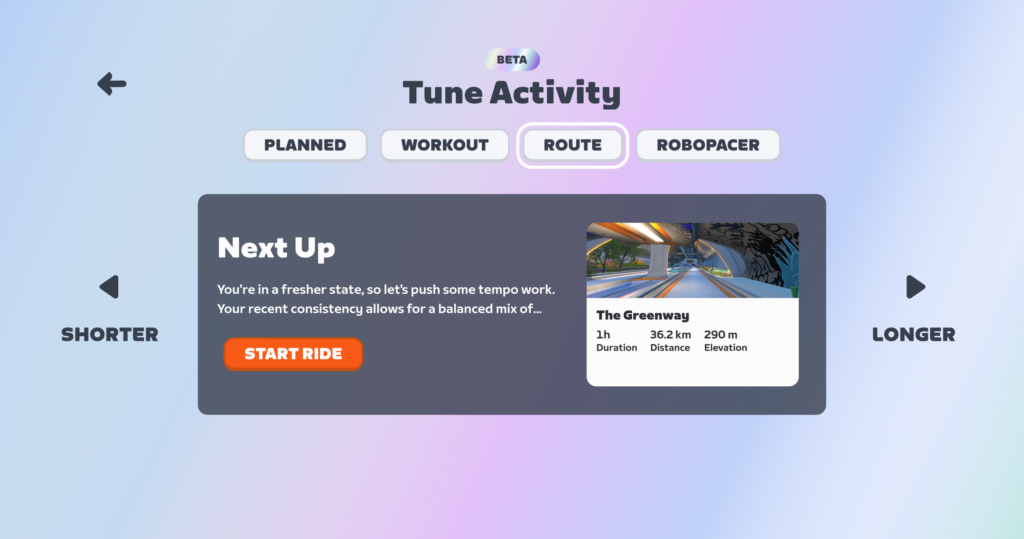
Click “Start Ride” to begin the recommended activity, or “Tune” to see and/or modify the recommendations. Next Up currently serves up four types of recommendations:
Planned: events you’ve signed up for, or today’s scheduled workout if you’re syncing from a third-party training plan provider like TrainerRoad. (You won’t see the “Planned” option if you aren’t signed up for events or syncing from a third-party provider.)
Workout: a structured workout from Zwift’s library
Route: a route from Zwift’s library
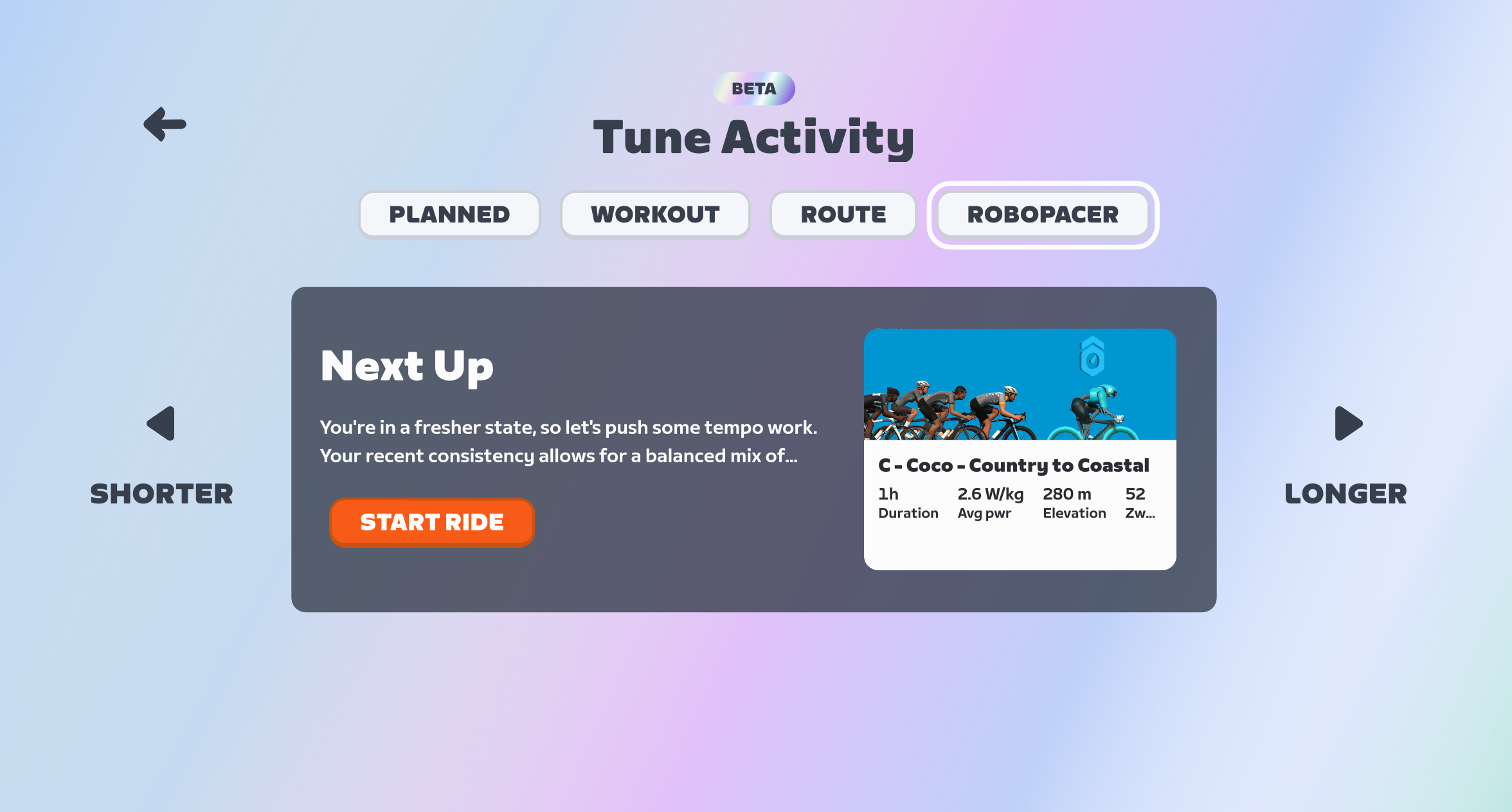
RoboPacer: a RoboPacer moving at a pace that works for your current fitness and freshness
Once you’re on the “Tune” screen, you can click the “Shorter” or “Longer” buttons to select a shorter or longer Workout, Route, or RoboPacer ride. You’re given two shorter options and two longer options, plus the default option, for a total of 5 possible Workouts, 5 Routes, and 5 RoboPacer lengths.
(Note: While Workouts have a precise duration, and routes have a precise length, RoboPacer rides go as long as you want them to go. So if you “tune” your RoboPacer ride, it just adds or subtracts 30 minutes from the stated duration. But there’s no timer in game that says you have 24 minutes left in your RoboPacer ride…)
Two more things to call out:
Next Up has a limited presence in the Companion app as well (more on that below)
Next Up refreshes its activity recommendation once per day at this time (more on this below as well)
Rollout Plan and Target Audience
As I explained in this week’s post on Zwift’s version 1.106 release, Zwift released Next Up to all English-speaking Zwifters this week. The plan is to roll it out for all other supported languages by the end of February.
In terms of target audience, while the current iteration of Next Up can provide value to every Zwifter, it should prove especially useful to newer Zwifters and less experienced cyclists. More experienced Zwifters don’t necessarily need guidance on the next route to ride or which RoboPacer group to join, and many experienced cyclists already have some sort of training plan they’re following.
While Next Up could someday provide great value for all Zwifters (I discuss this more below), in its current form, it’s most helpful to newer riders. I would say this sort of Next Up’s “unofficial target audience.”
Feature Requests
Option to Turn It Off
I’m seeing more and more riders asking if the Next Up feature can just be toggled on and off, as they don’t have a use for it. While Zwift has never been big on letting people toggle key features, I think there’s some sense in this idea. Turning it off would save AI processing and free up screen space for the features people do want.
The Next Up feature, as it currently stands, isn’t super-useful to everyone. Until Zwift can build it out so it’s really good at knowing what you should do next, it makes good sense for Zwift to add a setting to turn it off.
Refreshing After Each Activity
Currently, the recommendations in Next Up for Workout, Route, and RoboPacer only refresh once a day. This is done to save AI cycles, no doubt, but it makes the feature feel rather “dumb” if you’re a rider who often does multiple activities in one Zwift session, or you’re a rider who does two distinct Zwift sessions in a day.
I would love to see the recommendation refresh after I save my Zwift activity. That means, for example, on Tuesdays I might log in for my ZRL race. It would recommend a race warmup for me (see that feature request below), then recommend the ZRL event to me, then recommend a cooldown.
To save on AI cycles, perhaps they could just add a refresh button to the UI, so I could easily get a new recommendation if I want it?
Remember My Week
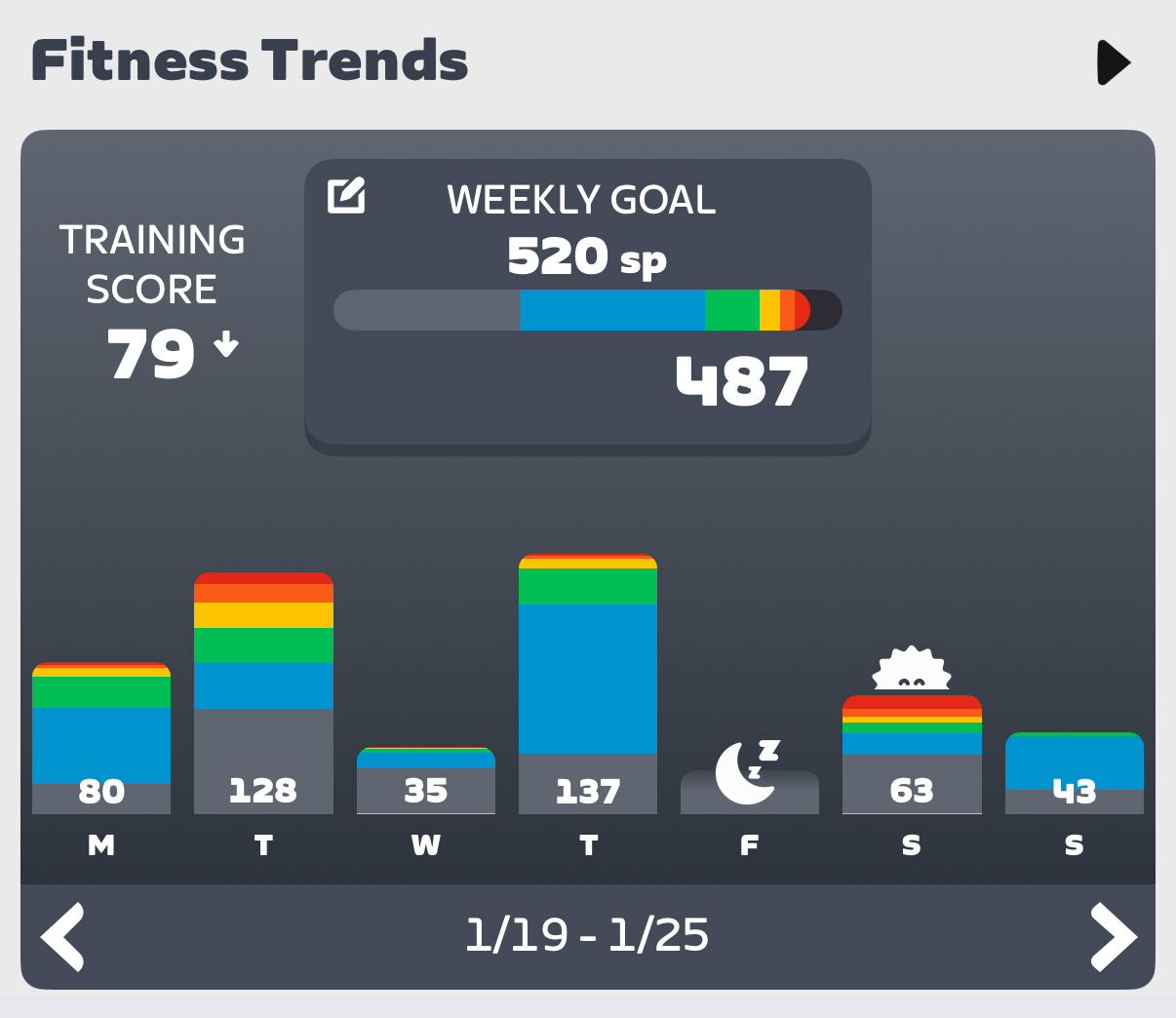
Currently, Next Up seems to recommend 1-hour activities every day. Yes, you can click to tune them longer or shorter, but it feels like the engine is a bit blind to my weekly habits.
For example, I’ve led my 100km Pizza Burner ride every Thursday morning for a year, yet it still recommends a 1-hour ride for me on Thursdays. And Saturdays are always a long day for me (2.5-4 hours, typically), but it’s still just recommending 1-hour rides. (And even if I try to tune them, the longest options are sometimes only 2 hours).
Next Up needs some logic to spot day-of-the-week patterns.
Event Recommendations
Zwift has always struggled to surface (or let people discover) events that will leave Zwifters coming back for more. Think about it: there’s still no tool in Zwift that says, “Show me the most popular events happening in the next hour” or “I want to do VO2 work in a group, what events are coming up?”
This is an untapped area with huge potential wins for Zwift.
Imagine if it could find the best event for you that was coming up soon? And you could tune the selection a bit, to choose between a handful of event options?
Currently, the “Planned” section of Next Up will show the next event you’re signed up for, assuming it’s coming up soon. But that’s just the most basic functionality Next Up should have. There’s much more Zwift can do…
Warmup Recommendations
If Zwift knows I’m signed up for a race that starts in 15-60 minutes, it should be recommending race warmups for me. There are several race warmup workouts in Zwift’s library, and there are also routes and RoboPacers I could ride that would do the job.
Route Recommendations
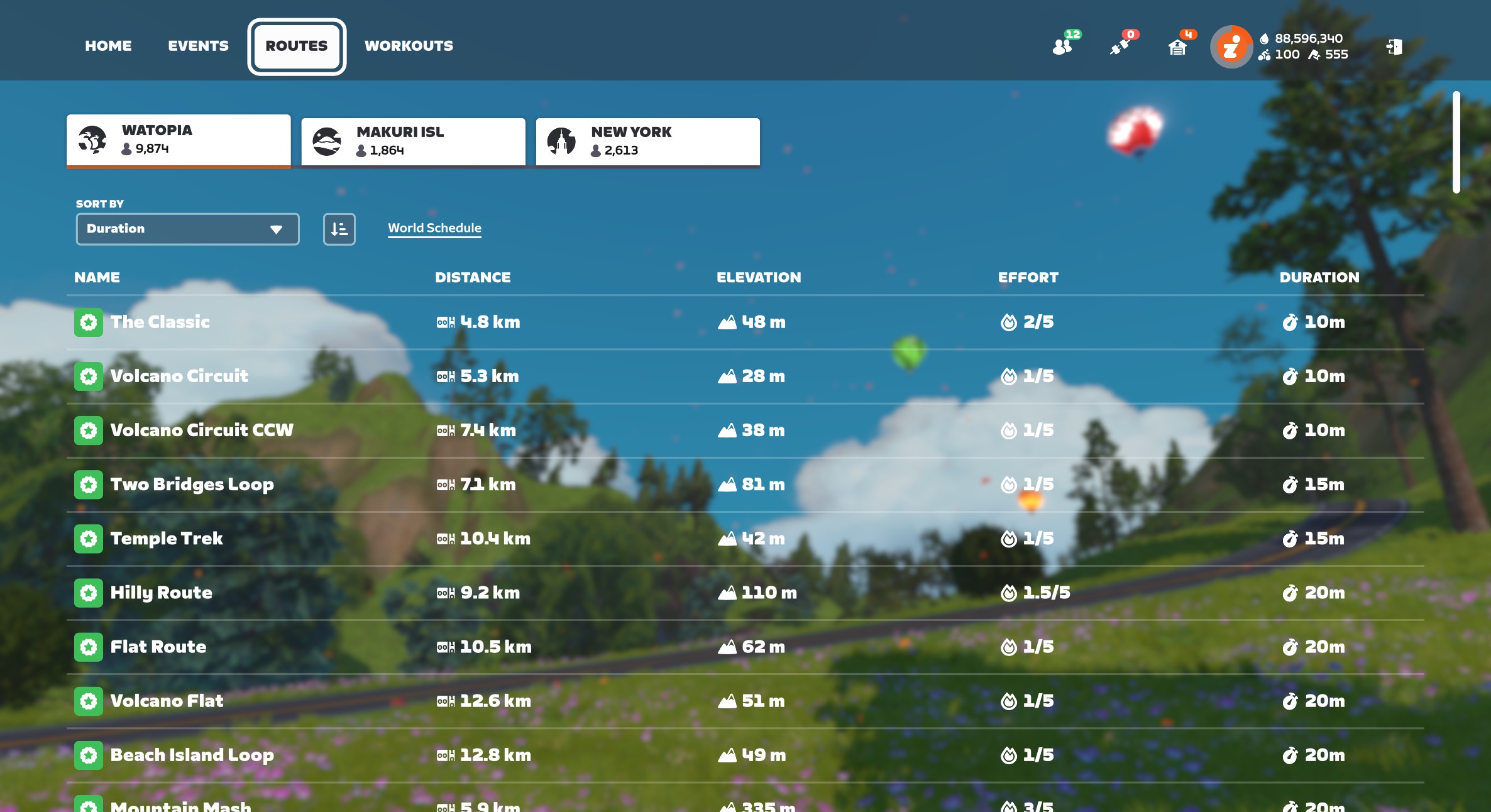
Zwift’s huge library of routes (well over 200 free rideable routes now) can be a bit overwhelming, especially to newer users. Add route badges into the mix, Route of the Week, and the huge variation in length and difficulty of routes, and you can see that a strong route recommendation engine would be a great addition to the game.
To Zwift’s credit, they’ve improved this portion of Next Up since its initial launch. It’s now recommending Tour de Zwift routes for me, for example – even though the explanation text doesn’t explain this (that’s coming soon).
Personally, I’d love it if the feature just brought up routes I haven’t ridden yet, and explained that if I ride the route, I’ll get the achievement badge and XP.
Improved Explanation Text
Speaking of the explanation text (we need a better name for this text that explains why a particular activity is being recommended) – there’s a lot of improvement that could happen here.
First: as a text guy, it’s mildly infuriating that I can’t read the full text from the screen in game. It ends with …, but there’s no way to click and read more. Zwift needs to fix this, as that explanatory text is going to play a key role in convincing Zwifters of the value of Next Up selections far into the future.
(To be fair, that text is fully readable in the Companion app).
Fixing the way the text is displayed is the easy part. Improving the actual text, I imagine, is much more challenging. You’ve got to keep it short, but also informative. Right now, the text feels overly simplified to me. I know there are unmentioned factors (like weekly goal settings) driving Next to recommend a particular activity, and I wish it would mention them.
Companion App Buildout
Currently, the Companion app only shows you the default Next Up activity. That means it shows you your “Planned” activity (an event you’ve signed up for, or a third-party workout), or if you have nothing planned, it will show you the selected workout of the day.
There’s no way to tune the workout in Companion. And no way to see selected routes or RoboPacers.
For Next Up to be useful, it definitely needs a strong presence in Companion, since this is where people go to plan their next activity. But right now, its presence in Companion feels a bit half-baked.
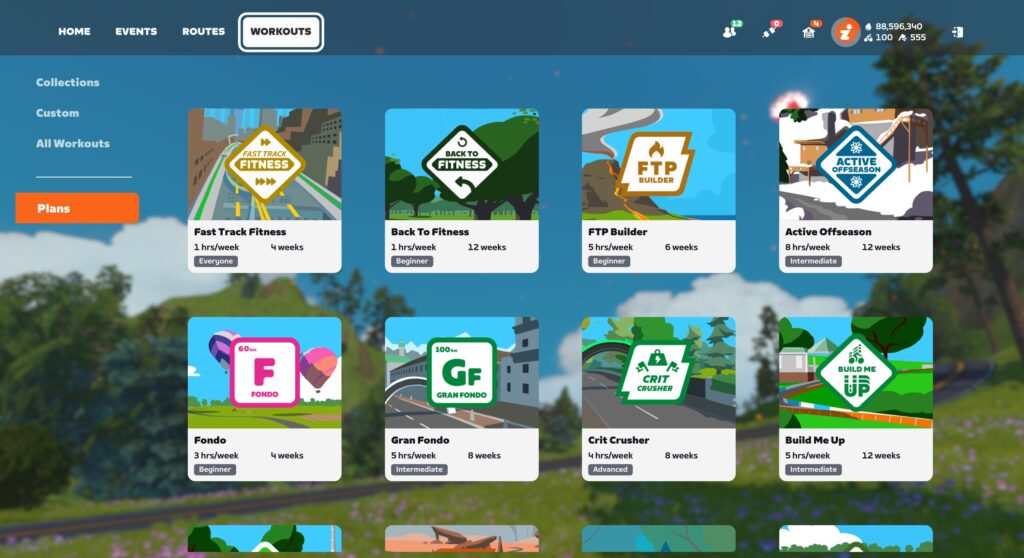
Zwift Training Plan Integration
It’s a bit odd, but if you’re signed up for a Zwift Training Plan, nothing about that plan shows up in Next Up. Ever.
Workouts from third-party providers like XERT will show up, but Zwift’s own Training Plan workouts do not.
My guess is this hasn’t been fixed yet because Training Plans have their own UI in game – a popup window where you select your workout for the day. That would need to be modified/removed, and Next Up may need to be modified somewhat to replace that functionality.
One possible solution: surface the day’s planned workout in Next Up, just like you’d do if I were using TrainerRoad for my plan. Swap the “Longer” and “Shorter” buttons for “next” and “previous”, so I can choose to execute a workout that’s scheduled for tomorrow, if that’s what I want.
Smart Activity Type Selection
Next Up currently defaults to showing me the recommended Workout for the day, and I have to click “Tune” to choose a non-workout activity.
Here’s the problem: I very rarely do workouts! The vast majority of my activities are events, RoboPacer rides, or solo efforts on particular routes.
The feature should be better at choosing which activity type to display based on my habits and goals.
Don’t Forget the Runners
Zwift is nearly ready to enable the addition of our running activities to Fitness Metrics (it’s coming very soon!), so my guess is they plan for Next Up to expand into running recommendations in the future as well.
Final Thoughts
I’m sure there are other great things Zwift could do with Next Up that I didn’t cover above, and conversely, some of what I recommended above won’t prove useful to everyone. But the big thing I’m hoping Zwift and the Zwift Community both understand is that the Next Up concept has huge potential. Like I told Eric Min over 2 years ago, Zwift has the historic data needed to make smart activity recommendations. That engine in turn will:
Increase engagement among existing users as it helps them discover and participate in the types of activities that suit them best
Grow the subscriber base, because people are looking for fitness tools that provide simple, accurate, and affordable guidance
Help people build fitness, as it provides basic coaching guidance
In talking to contacts within Zwift, it’s clear the company knows that Next Up is an important feature, and is planning to continually invest in improvements.
I’ll wrap up with this: many Zwifters are asking if they can just turn off the Next Up feature. While I think a toggle is a good idea, I also know Zwift can make Next Up compelling enough that everyone will want to keep it turned on. Here’s hoping!
Share Your Thoughts
What do you think of the Next Up feature? Share your thoughts below! I would also recommend sharing your thoughts on this topic in Zwift’s forum.
DuckDuckGo recently asked its users how they felt about AI in search. The answer has come back loud and clear: more than 90% of the 175,354 people who voted said they don’t want it.
The privacy-focused search engine has since set up two versions of its tool: noai.duckduckgo.com for the AI-averse and yesai.duckduckgo.com for the curious. Users can also tweak settings on the main site to disable AI summaries, AI-generated images, and the Duck.ai chatbot individually.
The U.S. power grid is suffering more outages than ever—about 45% of utility customers experienced one in the first half of 2025—and the resultant blackouts are lasting longer. As our aging electrical grid struggles to keep up with increasing air conditioner use due to a hotter planet, not to mention artificial intelligence’s insatiable thirst for power, the problem will likely get worse: The U.S. Department of Energy estimates the risk of power outages will increase a mere 100 times over the next few years.
If you’re looking to stave off the worst of the fallout from our shaky power grid, you might be looking to purchase a backup generator (not to be confused with a rechargeable power station) to ensure you can ride out an outage in relative comfort. But you really shouldn’t just roll up to the hardware store and buy whatever generator is on sale. Choosing the right generator for your home and your circumstances is essential. Here are the factors to consider.
How much power does your backup generator need to supply?
The first step in determining the right generator for your home is to determine how much power you’re going to need. This requires three data points: How long you’ll need generator power, how many things you’ll want to run off the generator during a power outage, and the wattage those appliances and systems will need.
Duration. You can’t predict the future, but you can glean some information from your neighbors (or your own memory) about past power outages. Did they last for several uncomfortable days, or were they relatively brief? If the latter, you might not need a lot of backup power, unless you want to be prepared for any eventuality.
Number of appliances. Think about what you’ll need to run off a generator. Will it be just a few lights and some phone chargers, or will you want to keep the heat on, run the refrigerator, and run a sump pump during a storm? Everything you add to the list will increase the capacity of the generator you’ll need.
Wattage. Once you know all the things you’ll need to run, you’ll need to add up the wattage a generator will have to produce. Most appliances will have that information on a label somewhere; if not, the information’s usually in a user manual or online. If the label only provides amps, you can usually multiply that number by 120 (the standard voltage in most homes) to get a rough idea.
Add all those watts up, and you have a baseline of your power needs during a blackout. Some appliances, like a sump pump, will pull more power when they start up (called starting watts) before settling into a lower power draw (running watts), so it’s a good idea to multiply your baseline by 1.5 to ensure you have enough capacity for surges when the pump or fridge compressor cycles on and off.
For example, let’s say I want to run my fridge (600 watts), a sump pump (1,000 watts), my computer, and a few lights (400 watts combined). That’s a baseline of 2,000 watts, so I probably want a generator capable of producing at least 3,000 watts of power.
Should you choose a portable, inverter, or standby backup generator?
Next, you need to consider what kind of generator you’re looking for: A standby generator, a portable generator, or an inverter generator.
Standby generators are the most expensive, but also the most comprehensive solution. These are typically fueled by natural gas directly from your home’s supply line (though you can buy models that use propane), and are designed to turn on whenever there’s a power loss. They’re big generators that are capable of running the whole house, often generating as much as 20,000 watts. They’re ideal if you anticipate frequent and lengthy power outages, or if you just want the peace of mind of knowing that you’ll enjoy uninterrupted power even if a storm knocks out your whole neighborhood. Typical cost:$8,000 to $16,000, usually requiring professional installation, and you’ll need outdoor space where it can sit.
Portable generators are the most common and typically the most affordable. They have wheels and are designed to be moved around as needed, and range from as little as 1,000 watts of output to behemoths that can generate 20,000 watts (though the word “portable” starts to get a bit squishy with a generator that large—this model, for example, weighs 557 pounds). These are ideal for most people who just want a power option, and for folks who might use a generator at other times, like camping trips or when doing DIY projects around the house. Typical cost: Anywhere from $300 to about $4,000, depending on the specifications.
Inverter generators are similar to portable generators, but run much more efficiently and quietly because they don’t run flat-out like most portable generators, they throttle up and down depending on the draw. They use less fuel and run longer, and are also usually mounted on wheels for portability—and their quieter operation also generates less interference for electronics like computers and routers. Many can produce enough power to run an entire house (typically around 5,000 watts), but they’re also typically much more expensive for the power they deliver. If you have the extra cash, an inverter is probably your best bet. Typical cost: About $350 to $4,500, depending on specifications.
Power stations. Although sometimes referred to as “solar generators” because they can charge using solar power, these aren’t really generators—they’re large batteries that store power for later use. You can buy portable power stations that generate sufficient wattage for a whole house, and you can have larger systems installed that can take you off the grid entirely. They tend to be more expensive to purchase but cheaper to re-charge. But their main limitation is time: Once a power station is drained, it can be difficult (and slow) to recharge them using solar power alone.
What fuel will your backup generator use?
Another consideration for portable and inverter generators is the fuel type. As noted, large standby generators will usually run off of natural gas or propane. Smaller portable and inverter generators offer a few more options:
Gasoline is the most common fuel type for portable and inverter generators. Gas is usually easy to buy, but gasoline goes bad, so you can’t just leave it in the tank or have a bunch stored in the garage indefinitely. You’ll have to drain the fuel tank when you’re not using the generator regularly, and make sure you stock up on fuel (or know how to siphon it from your car) when you think the power might go out.
Propane. You can buy generators that hook up to a standard propane tank. Propane can be stored much longer than gasoline, and you don’t have to worry about draining a tank. But propane can be more challenging to acquire, depending on where you live. If your house already uses propane and you have a large tank on the property that gets refilled regularly, this might be the perfect choice.
Diesel. Diesel generators usually require less maintenance because of their simpler design and the self-lubricating properties of the fuel. As a result, these generators can last longer than other models and require less attention. On the other hand, diesel fuel generates a lot of smoke and bad odors, and might not be convenient if you don’t live near a source.
Dual and tri-fuel. If you want as many options as possible, you can buy dual fuel generators that can run on either gas or propane, or tri-fuel generators that can also use natural gas. These generators tend to be more expensive, of course.
Other backup generator features to consider
Finally, a few things you might want to pay extra for:
Electric start. Most generators use the old-school pull-cord to start the engine. If you have trouble getting those going or have a physical limitation that makes that difficult, you can find models with a car-style push-button starter that can make life a lot easier. Keep in mind this will require a battery to be hooked up to your generator.
Automatic shutdown. Generators are engines, and as such they generate pollution—you should never run a generator inside the house, or even too close to the house. Having a generator with a carbon monoxide detector that shuts down if it detects too much exhaust is an extra safety feature you might want to consider. Generators typically use oil for lubrication, too, so having a low-oil detection feature that shuts the generator down before it can damage itself is another feature you might want.
Receptacles (aka spots to plug things in). All the wattage in the world won’t do you much good if you don’t have enough receptacles to plug into, so make sure you do a count before you buy.
Dispatch, an episodic adventure game from an indie studio with a star-studded voice lineup including Aaron Paul, has earned critical acclaim since its release, but the recent arrival of a port to the Nintendo Switch and Switch 2 has caused some controversy, prompting responses from both Nintendo and AdHoc Studio.
The Sundance documentary Ghost in the Machine boldly declares that the pursuit of artificial intelligence, and Silicon Valley itself, is rooted in eugenics.
Director Valerie Veatch makes the case that the rise of techno-fascism from the likes of Elon Musk and Peter Thiel is a feature, not a bug. That may sound hyperbolic, but Ghost in the Machine, which is built around interviews with philosophers, AI researchers, historians and computer scientists, leaves little room for doubt.
But even I was surprised to learn that we can trace the impact of eugenics in tech all the way back to Karl Pearson, the mathematician who pioneered the field of statistics, and who also spent his life trying to quantify the differences between races. (Guess who he believed was superior.) His legacy was continued by William Shockley, a co-creator of the transistor, an avowed white supremacist who spent his later years espousing (now debunked) theories around IQ and racial differences.
An early robot toy.
Valerie Veatch for “Ghost in the Machine”
As a Stanford engineering professor, Shockley fostered a culture of prioritizing white men over women and minorities, which ultimately shaped the way Silicon Valley looks today. His line of thinking could have had an influence on John McCarthy, the Stanford researcher who coined the term “artificial intelligence” in 1955,
Through its many interviews, which include the likes of AI researcher Dr. Emily Bender, historian Becca Lewis and media theorist Douglass Rushkoff, Ghost in the Machine paints the rise of AI as a fascistic project that aims to demean humans and establish the techno-elite as our de facto rulers. Given how much our lives are already dominated by gadgets and social networks from companies that have pioneered addictive engagement over user safety, it’s easy to imagine history repeating itself with AI.
Ghost in the Machine doesn’t leave any room for considering potential benefits around AI, which could lead proponents of the technology to dismiss it as a hit-job. But we’re currently at the apex of the AI hype cycle, after Big Tech has invested hundreds of billions of dollars on this technology, and after it has spent years shoving it down our throats without proving why it’s actually useful to many people. AI should be able to withstand a bit of criticism.
This article originally appeared on Engadget at https://www.engadget.com/entertainment/tv-movies/sundance-doc-ghost-in-the-machine-draws-a-damning-line-between-ai-and-eugenics-180613367.html?src=rss
An anonymous reader shares a report: A hacking of the Nobel organization’s computer systems is the most likely cause of last year’s leak of Nobel Peace Prize laureate Maria Corina Machado’s name, according to the results of an investigation [non-paywalled source]. An individual or a state actor may have illegally gained access in a cyber breach, the Norwegian Nobel Institute said on Friday after concluding an internal investigation assisted by security authorities.
The leak had triggered an unusual betting surge on Machado at the Polymarket platform hours before she was unveiled as the award recipient in October. The Venezuelan opposition leader hadn’t previously been considered a favorite for the 2025 prize.
“We still think that the digital domain is the main suspect,” said Kristian Berg Harpviken, director of the Oslo-based institute, an administrative arm of the Nobel Committee that awards the prize. The institute has decided against filing for a police investigation given “the absence of a clear theory,” he said in an interview in Oslo.
Learn how to install and write your first C# program on Linux using the .NET SDK. Explore the features, drawbacks, and more in this comprehensive guide.