
Filesystems seem to be one of those many areas where the problems are well
understood, but there is always somebody working toward a better solution.
As a result, filesystem development in the Linux kernel continues at a fast
pace even after all these years. In recent news, the EROFS filesystem is
on the path to gain a useful page-cache-sharing feature, there is a new
NTFS implementation on the horizon, and XFS may be about to get an
infrastructure for self healing.
Monthly Archives: January 2026
Samsung Galaxy S26 Ultra Leak Claims You Won’t Need A Screen Protector
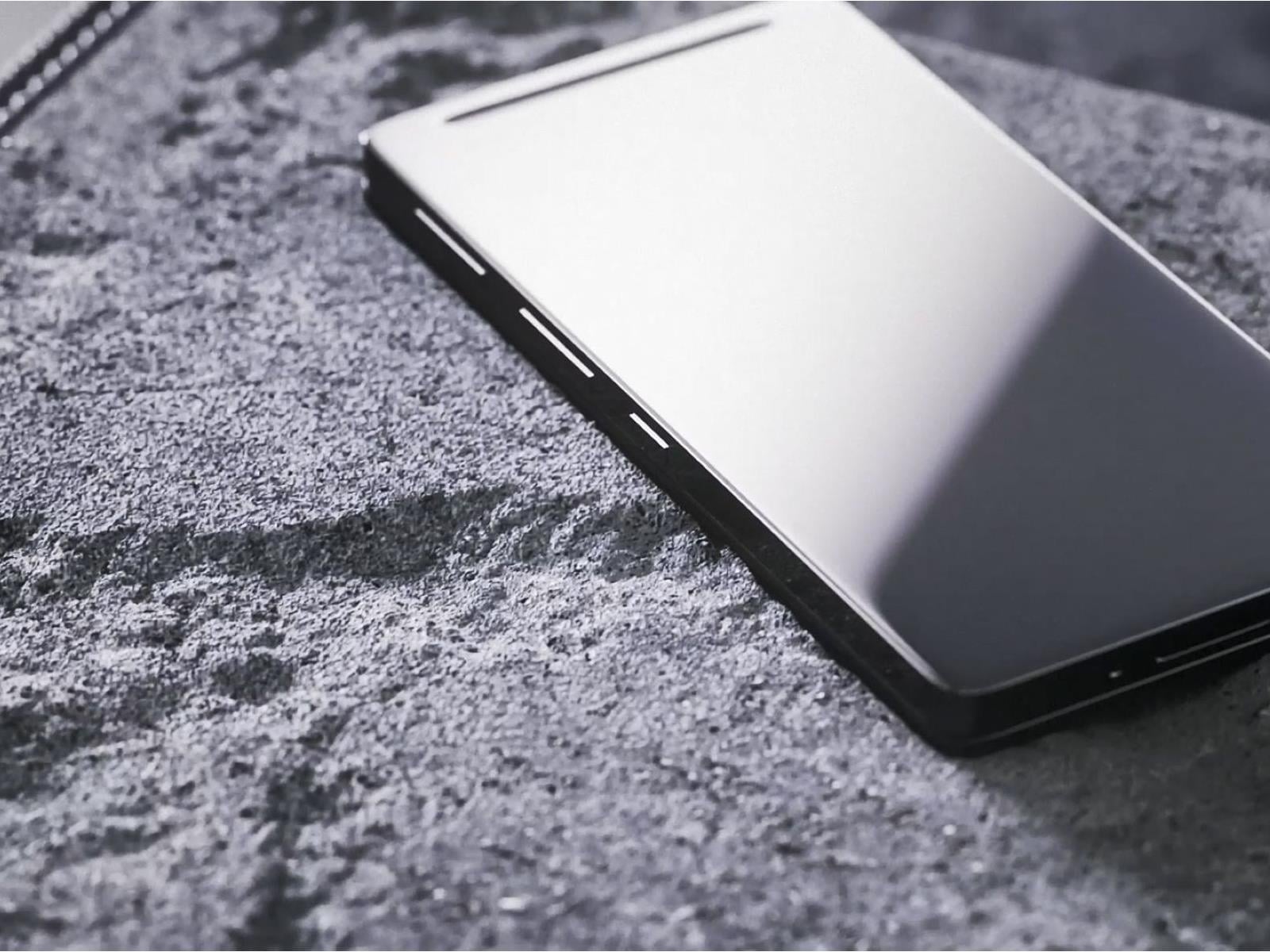
Samsung believes it can put a major dent in the screen protector industry with a revolutionary new glass for the upcoming Galaxy S26 Ultra. If latest rumors are to be believed, the phone’s next generation Gorilla Glass boasts unprecedented scratch and crack resistance, while possessing anti-reflective and screen privacy tech.
Leak!
Samsung
Gaze Deeply Into Nature With These Award-Winning Ecology Photos
Winning shots from the Capturing Ecology competition highlight the complex relationships that shape ecosystems.
Vulkan Roadmap 2026 Milestone: Variable Rate Shading, Host Image Copies & More
In addition to the release today of Vulkan 1.4.340 with the new descriptor heap “VK_EXT_descriptor_heap” extension and three other new extensions, The Khronos Group’s Vulkan Working Group has also published the Vulkan Roadmap 2026 Milestone…
AMD Ryzen AI Max+ 495 Specs Leak Reveals Boosted CPU And GPU Clocks

You’ve heard of Gorgon Point, which emerged as the Ryzen AI 400 series at the Consumer Electronics Show earlier this month, but what about Gorgon Halo? Rumor has those chips are en route too, though they’re not yet official. While we wait for an unveiling, a notable leaker has posted to Facebook what they claim are several upcoming Gorgon
Govee LED Floor Lamp Drops Again to a New Record Low After Another Surprise Price Cut on Amazon

Turn off “The Big Light” and go with this Alexa-controlled floor lamp instead—now for $35 off.
The post Govee LED Floor Lamp Drops Again to a New Record Low After Another Surprise Price Cut on Amazon appeared first on Kotaku.
‘Almost Everyone’ Laid Off at Vimeo Following Bending Spoons Buyout
Vimeo is laying off employees around the world just months after Italian software company Bending Spoons completed its $1.38 billion acquisition of the video hosting platform. Dave Brown, Vimeo’s former brand VP, described the cuts on LinkedIn as affecting “a large portion of the company.” One video engineer claimed “almost everyone” was laid off, “including the entire video team,” and another software engineer said he lost his job alongside “a gigantic amount of the company.”
This marks Vimeo’s second round of layoffs in less than six months. The company cut 10% of its workforce in September, just one week before Bending Spoons announced its acquisition plans. Bending Spoons has a history of post-acquisition layoffs at companies including WeTransfer, Filmic, and Evernote.


Read more of this story at Slashdot.
The Third Final Fantasy VII Remake Game Is Playable And Has An Even Better Version Of Queen’s Blood

Queen’s Blood will return in the FF7 Remake finale
The post The Third <em>Final Fantasy VII</em> Remake Game Is Playable And Has An Even Better Version Of Queen’s Blood appeared first on Kotaku.
Amazon Starts a Streaming Device Clearance, Fire TV Stick 4K Plus (Newest Model) Hits Its Lowest Price of the Year

It’s not everyday you get to snag the latest Fire TV stick at a 50% discount.
The post Amazon Starts a Streaming Device Clearance, Fire TV Stick 4K Plus (Newest Model) Hits Its Lowest Price of the Year appeared first on Kotaku.
Rocket Report: Chinese rockets fail twice in 12 hours; Rocket Lab reports setback
Welcome to Edition 8.26 of the Rocket Report! The past week has been one of advancements and setbacks in the rocket business. NASA rolled the massive rocket for the Artemis II mission to its launch pad in Florida, while Chinese launchers suffered back-to-back failures within a span of approximately 12 hours. Rocket Lab’s march toward a debut of its new Neutron launch vehicle in the coming months may have stalled after a failure during a key qualification test. We cover all this and more in this week’s Rocket Report.
As always, we welcome reader submissions. If you don’t want to miss an issue, please subscribe using the box below (the form will not appear on AMP-enabled versions of the site). Each report will include information on small-, medium-, and heavy-lift rockets, as well as a quick look ahead at the next three launches on the calendar.

Australia invests in sovereign launch. Six months after its first orbital rocket cleared the launch tower for just 14 seconds before crashing back to Earth, Gilmour Space Technologies has secured 217 million Australian dollars ($148 million) in funding that CEO Adam Gilmour says finally gives Australia a fighting chance in the global space race, the Sydney Morning Herald reports. The funding round, led by the federal government’s National Reconstruction Fund Corporation and superannuation giant Hostplus with $75 million each, makes the Queensland company Australia’s newest unicorn—a fast-growth start-up valued at more than $1 billion—and one of the country’s most heavily backed private technology ventures.
Intel Beats Q4 Estimates, Guides Lower But Nova Lake Desktop CPUs Arrive In 2026

Intel’s fourth quarter earnings are in and they reflect a 4.1% year-over-year loss to $13.7 billion (same as the previous quarter), bringing the full-year tally to a flat $52.9 billion. According to Intel CEO Lip-Bu Tan, the company “delivered a solid finish to the year” despite the loss, which along with downward guidance for the current
Nintendo Announces Super Mario Galaxy Movie Direct For This Weekend

It’ll feature new footage of the April 3 movie, but no gaming news
The post Nintendo Announces <i>Super Mario Galaxy Movie</i> Direct For This Weekend appeared first on Kotaku.
AMD Ryzen AI Software 1.7 Released For Improved Performance On NPUs, New Model Support
AMD today released a new version of Ryzen AI Software, the user-space packages for Microsoft Windows and Linux for making use of the Ryzen AI NPUs for various AI software tasks like Stable Diffusion, ONNX, and more…
GNU Guix 1.5.0 released
Version
1.5.0 of the GNU Guix package manager and the Guix System have
been released. Notable improvements include the ability to run the
Guix daemon without root privileges, support for 64-bit RISC-V, and
experimental support for the GNU Hurd kernel.
The release comes with ISO-9660 installation images, virtual
machine images, and with tarballs to install the package manager on
top of your GNU/Linux distro, either from source or from
binaries—check out the download page. Guix users can update by running
guix pull.It’s been 3 years since the previous release. That’s a lot of time,
reflecting both the fact that, as a rolling release, users
continuously get new features and update by running guix pull; but it
also shows a lack of processes, something that we had to address
before another release could be made.During that time, Guix received about 71,338 commits by 744 people,
which include many new features.
LWN last looked at Guix in
February 2024.
Tiny falcons are helping keep the food supply safe on cherry farms
Every spring, raptors return to nesting sites across northern Michigan. The smallest of these birds of prey, a falcon called the American kestrel (Falco sparverius), flies through the region’s many cherry orchards and spends its days hunting for even tinier creatures to eat. This quest keeps the kestrels fed, but it also benefits the region’s cherry farmers.
Fruit farmers have been working symbiotically with kestrels for decades, adding nesting boxes and reaping the benefits of the birds eliminating the mice, voles, songbirds, and other pests that wreak havoc by feeding on not-yet-harvested crops. In addition to limiting the crop damage caused by hungry critters, new research suggests kestrels also lower the risk of food-borne illnesses.
The study, published in November in the Journal of Applied Ecology, suggests the kestrels help keep harmful pathogens off of fruit headed to consumers by eating and scaring off small birds that carry those pathogens. Orchards housing the birds in nest boxes saw fewer cherry-eating birds than orchards without kestrels on site. This translated to an 81 percent reduction in crop damage—such as bite marks or missing fruit—and a 66 percent decrease in branches contaminated with bird feces.
Cyberpunk 2077 VR Modder Locks Out Subscribers After New DMCA: ‘People On The Web Are Thirsty For Blood’

The publisher of Ghostrunner issues a takedown notice as well
The post <i>Cyberpunk 2077</i> VR Modder Locks Out Subscribers After New DMCA: ‘People On The Web Are Thirsty For Blood’ appeared first on Kotaku.
Amazon Goes Clearance on Docking Stations at a Record Low With UGREEN’s 7-in-1 USB-C Hub

Tidy up your workspace and be more organized all while saving some cash.
The post Amazon Goes Clearance on Docking Stations at a Record Low With UGREEN’s 7-in-1 USB-C Hub appeared first on Kotaku.
Two new stable kernels for Friday
Samsung Bespoke Fridge with AI review: All the bells and whistles
At their core, refrigerators are relatively simple devices. If you’re the type of person to view every extra feature as a component that could potentially go wrong, basic iceboxes are probably the kind you go for. But for those on the other end of the spectrum, Samsung’s latest Bespoke Refrigerators with AI inside have more bells and whistles than you might think possible — including an optional 32-inch screen.
Editor’s note: The model we tested for this review came out in the second half of 2025 and will continue to be on sale throughout 2026. Hardware will remain the same, the only changes will come in the form of an OTA software update slated for later this year that will add support for Google Gemini, improved food recognition/labeling and more.
Design: As sleek as a fridge can be
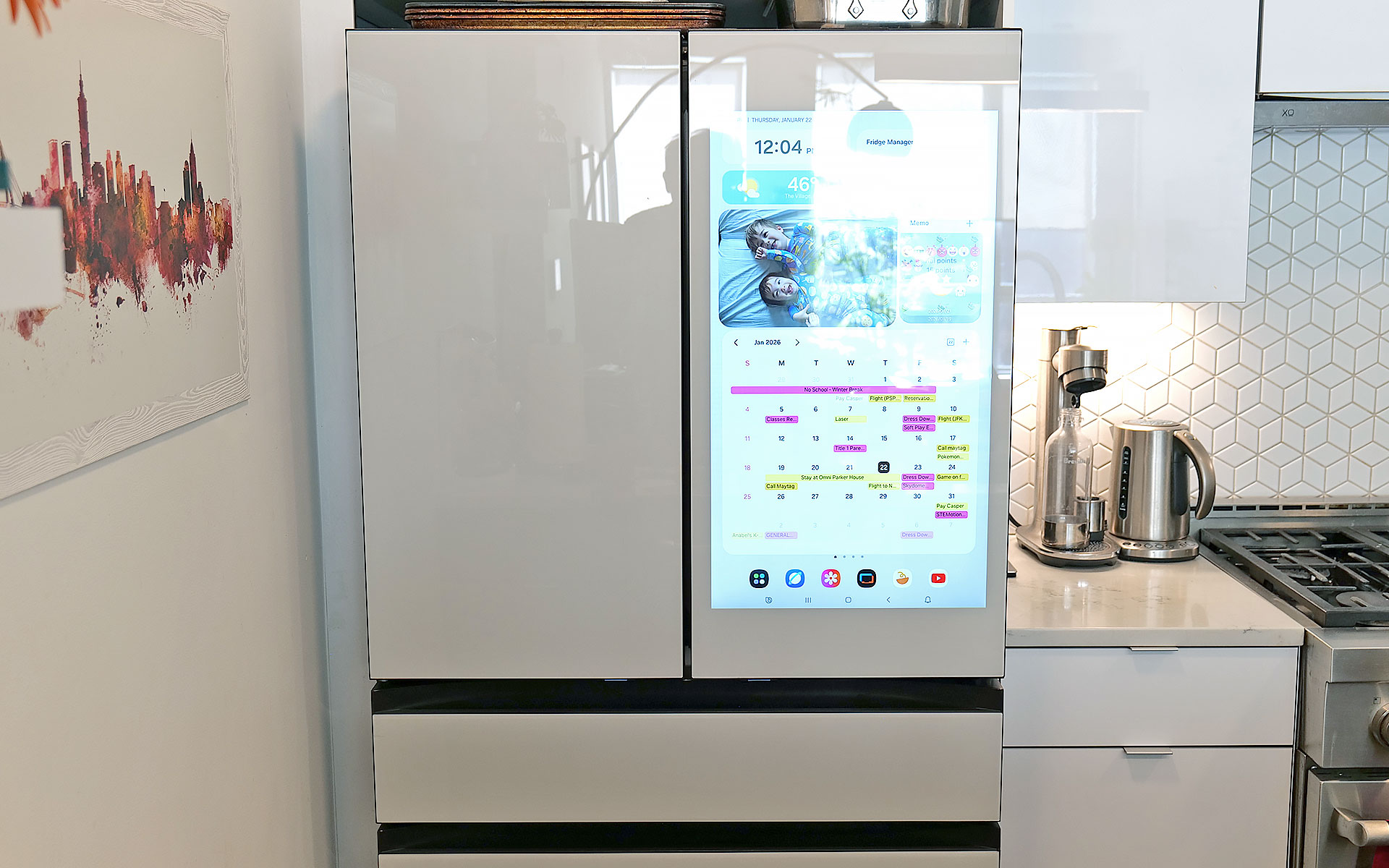
If you’re into faux vintage appliances like Smeg’s retro-inspired models, Samsung’s offerings might not be for you. For everyone else, the Bespoke family does minimalist design better than practically any other line of fridges on the market. Granted, the counter-depth French Door AI model I tested is a bit of a departure thanks to a huge 32-inch screen embedded in its right-side door. That said, there are a ton of configurations, including the choice of a smaller 9-inch panel or models without a display at all. The latter looks like a big rectangle, but in a way that Dieter Rams would probably appreciate (I’m just guessing, I don’t have his contact info). Other options include setups ranging from four-door models to side-by-side two-door variants or even a single-panel upright model.
Sam Rutherford for Engadget
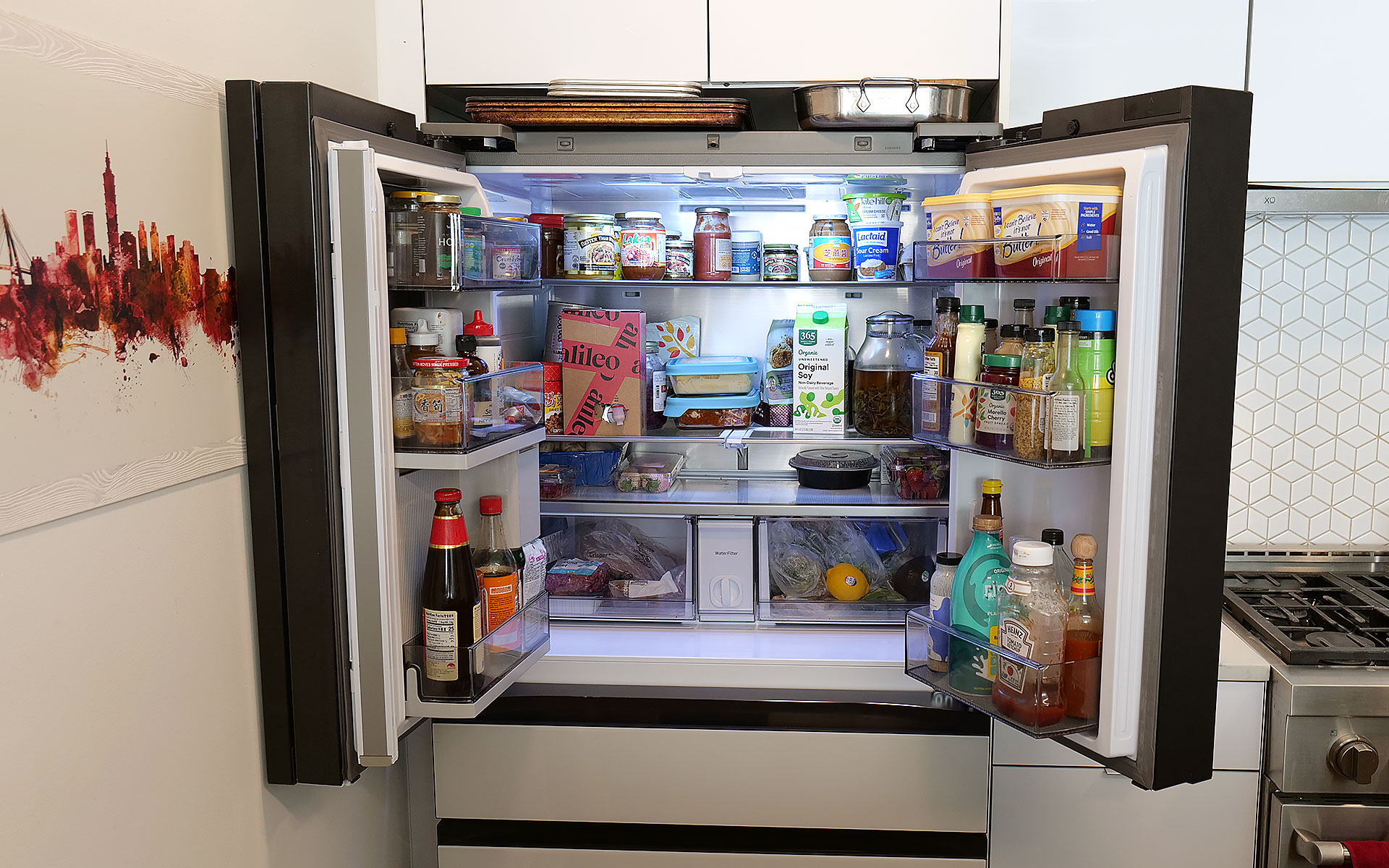
On my review unit, the fresh food section is a touch smaller (16.5 cubic feet) than you might expect from a fridge this size, though I’ve never really felt limited by the amount of available storage. Samsung does a good job of optimizing interior space by providing a number of adjustable shelves, including a sliding one on the right side that makes it easy to store taller items without completely sacrificing flat space for others. The shelves are also spill proof and made out of tempered glass, so they resist scratches and just look a bit nicer than those made from lower-quality materials. I also appreciate how Samsung found a spot between the two crisper drawers for the water filter, instead of just sticking it in the top corner like a lot of competitors.
Sam Rutherford for Engadget
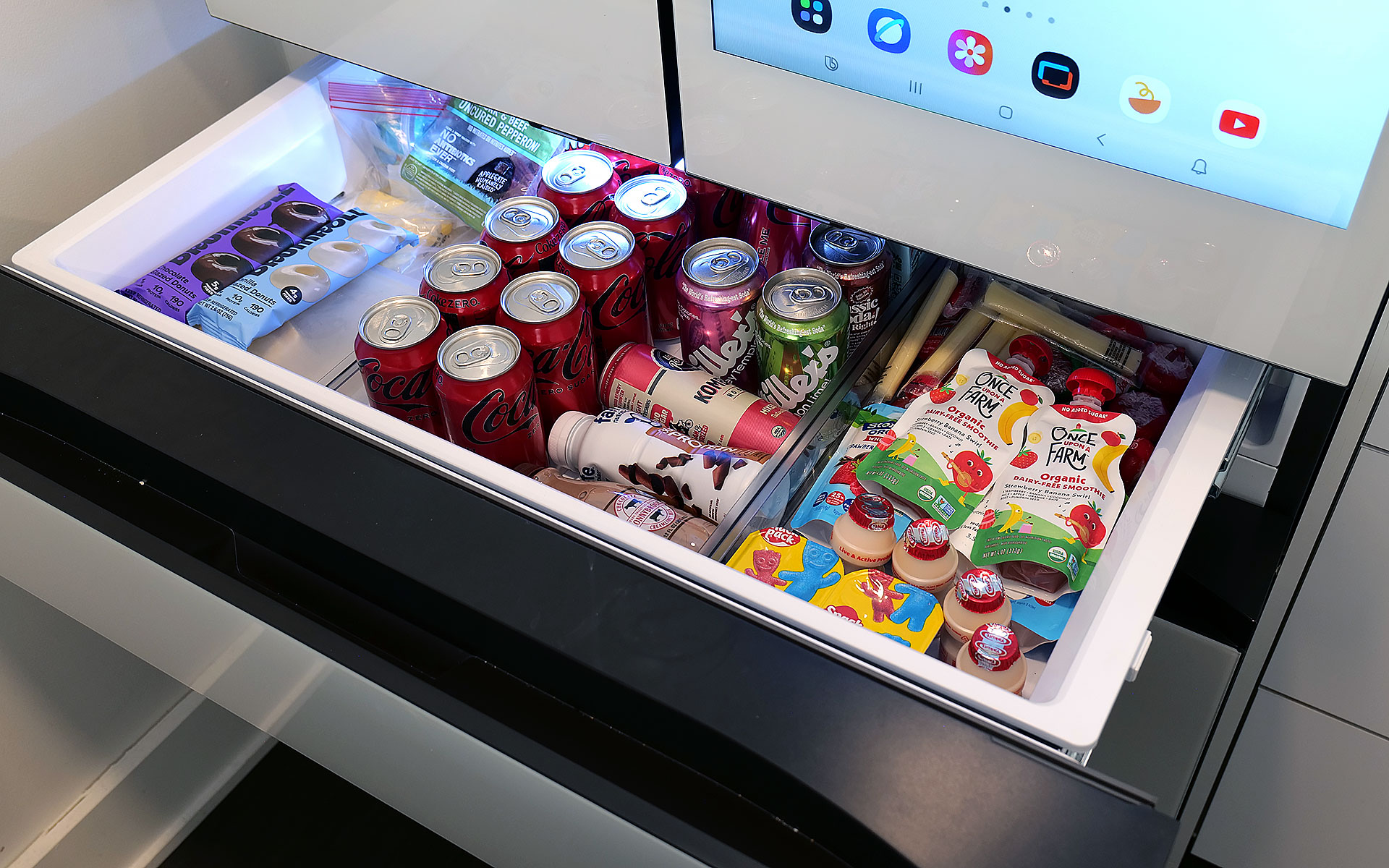
Meanwhile, in exchange for a slightly smaller main cabinet, this model has what Samsung calls a FlexZone drawer, which might be my second favorite thing about this fridge. It’s perfectly designed for storing things like 12-ounce cans and juice boxes, and as someone who always likes to keep a couple of chilled Coke Zeros on standby, it’s super convenient. That said, taller bottled drinks may need to be stored on their sides, which doesn’t feel quite as efficient. But really, you can put anything you want in there and if you have young children like me, it’s an excellent place to keep refrigerated kids’ snacks. My four-year-old can go in there on his own without needing help from an adult to reach stuff higher up. Samsung even gives you the ability to set a different temperature for the FlexDrawer, which is a nice touch.
Sam Rutherford for Engadget
Additionally, along with some rivals from LG, this fridge also has touch sensors at the bottom of each door that let you open them with a light tap. While I still prefer to just grab the built-in handles (which are located both above and below each door), this is a nice inclusion, particularly on a fridge that doesn’t have giant handgrips bolted to the outside. My one small gripe with Samsung’s exterior design is that its top isn’t completely flat as it dips down in back. Admittedly, this hasn’t stopped me from storing stuff like sheet pans and roasting trays above the fridge, but it would be nicer if things were fully level up there.
Water and ice dispensing: Samsung’s Beverage Center reigns supreme
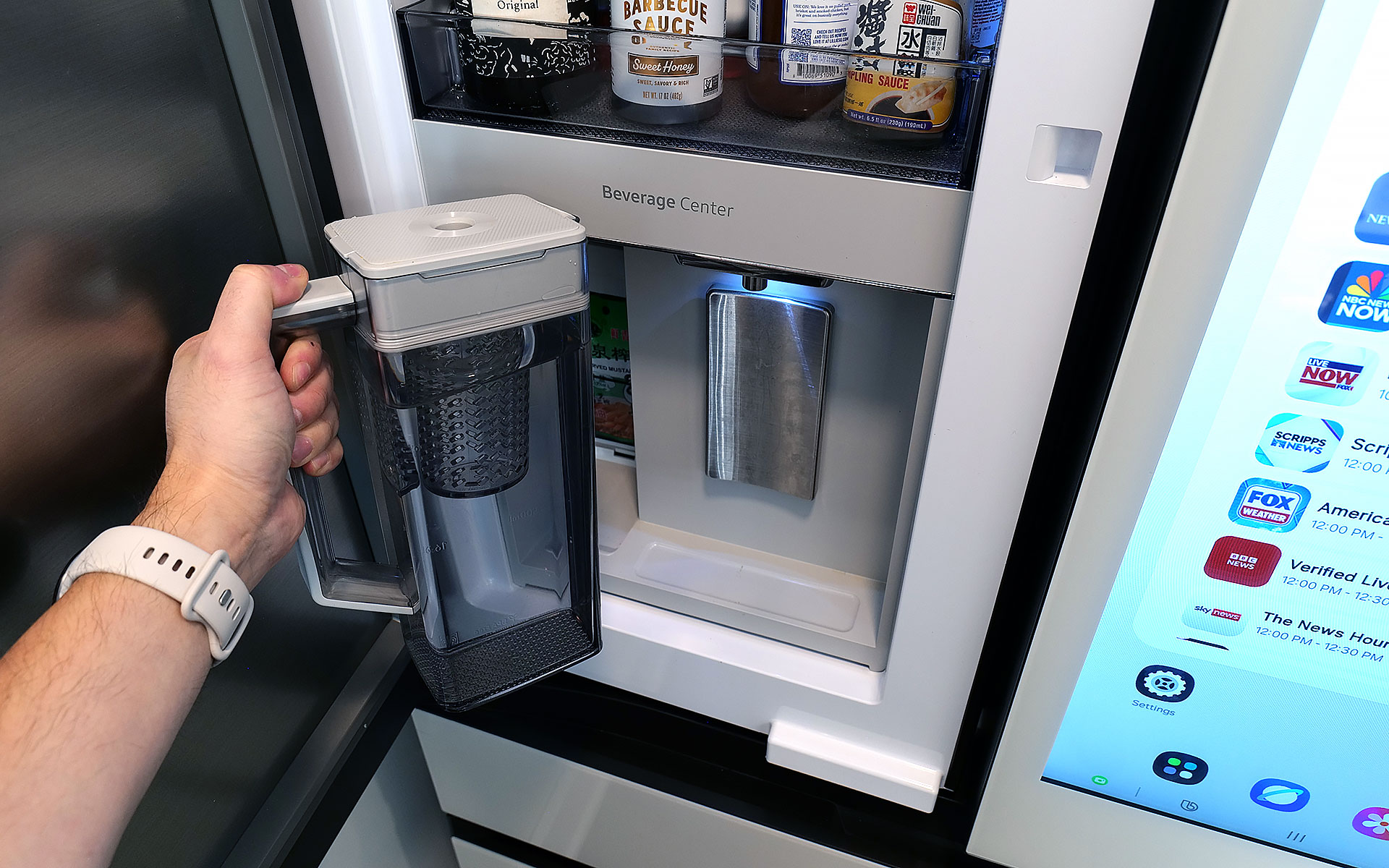
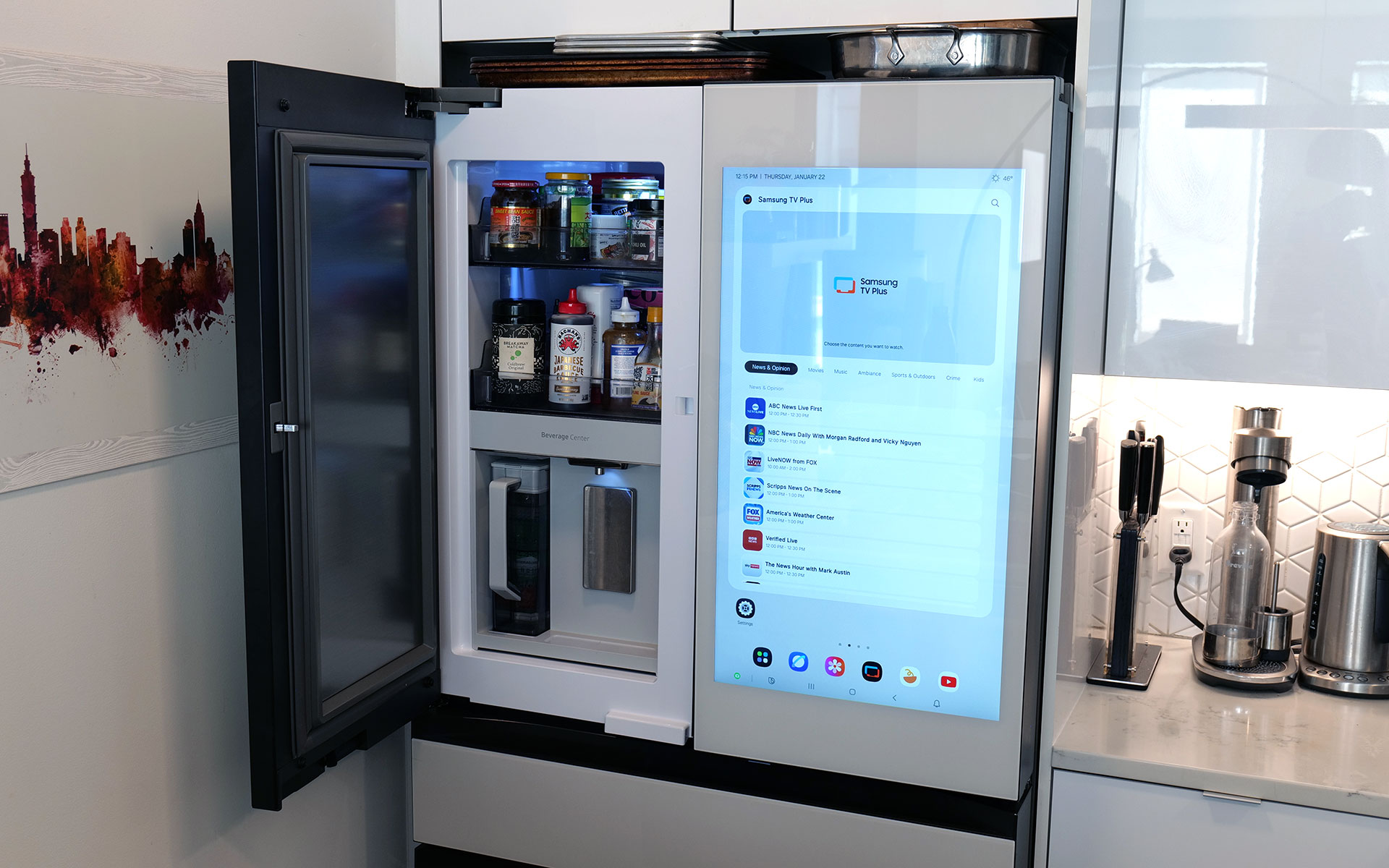
I’ve already gone on record about how Samsung’s Beverage Center is the best new feature to land on any fridge in years, so without belaboring the point, but I’ll happily wax poetic about it again. Instead of having a water dispenser installed smack dab on the outside of the door, Samsung opted to hide things behind an exterior flap on the left side of the fridge. This accomplishes several things. Not only does it feel a bit more hygienic because the spigot isn’t subjected directly to all the germs swirling around the kitchen or a cough or sneeze from anyone passing by, it also simplifies the fridge’s exterior design. This might sound a bit weird, but I’ve always thought that putting water dispensers on the outside of a fridge was kind of like installing a shower in the middle of a room. It’s just kind of awkward. Furthermore, by opening the Beverage Center’s door, you also have access to one of the fridge’s interior shelves, which makes it quick and easy to grab things like ketchup, mustard or any other sauces you might need for a meal. My wife stashes her matcha there, so it’s readily available first thing in the morning.
Sam Rutherford for Engadget
But the most important thing is that right next to the spigot, there’s also a built-in water pitcher that automatically refills itself after every use. This means there’s pretty much always 40+ ounces of ice-cold water (depending on the specific model) that you can pull out and pour. This allows you to fill up everyone’s cup in seconds like a server at a restaurant, instead of blocking the entire fridge while you slowly top off each glass individually. To me, it’s the difference between an active process where you can dictate your own pace versus having to stand there while the machine takes its sweet time. Plus, if you like infusing your water with fruit or tea, there’s a built-in basket filter for that too. The Beverage Center is a truly useful innovation and one of Samsung’s biggest advantages over its rivals, and because the company patented it, it’ll be years before competitors can come up with copies.
Sam Rutherford for Engadget
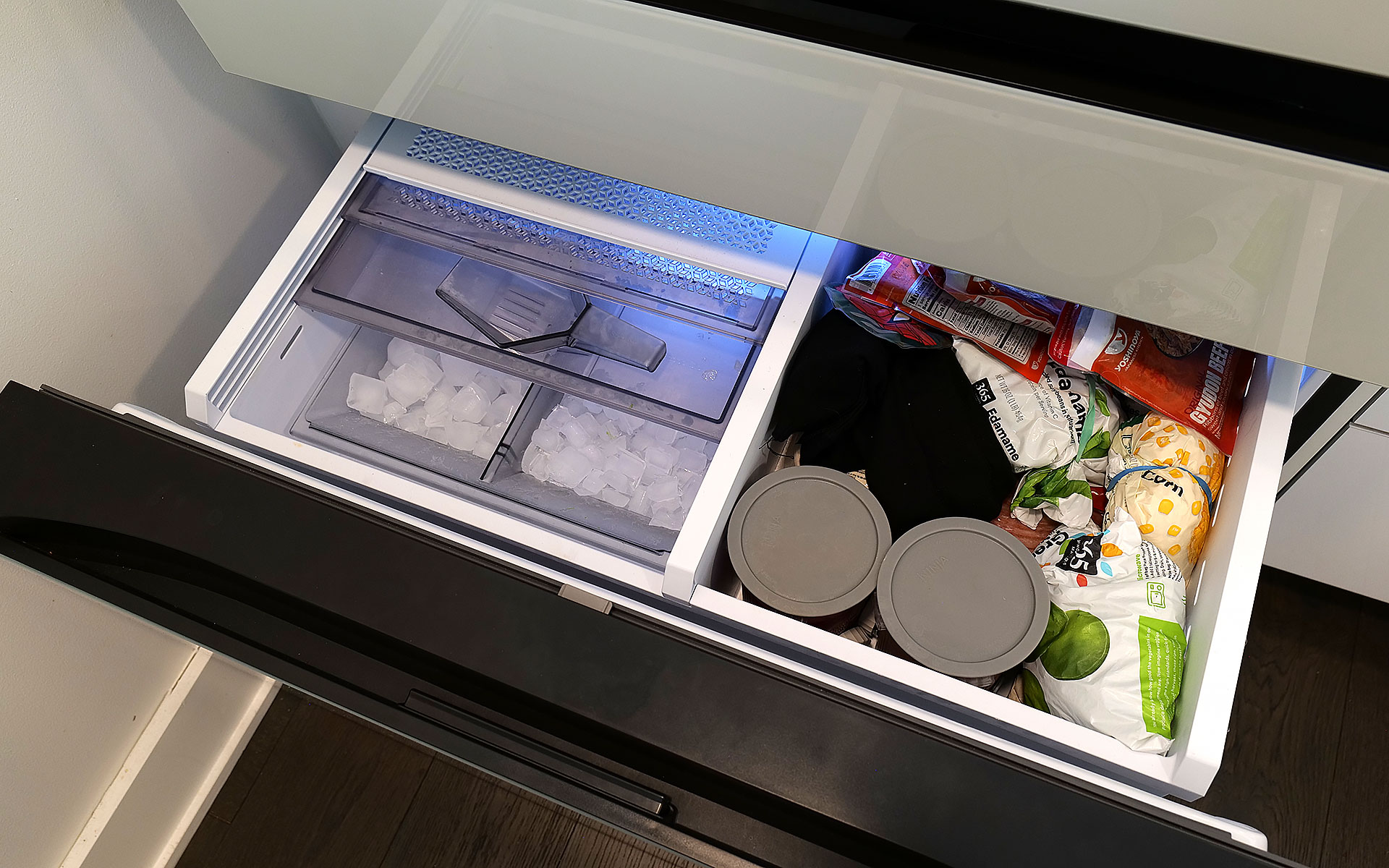
As for ice, the model I’m testing can produce two different types: regular cubes and smaller pebbles. There’s also an included scooper and a dedicated shelf for storing it. Now I will admit that the smaller pebbles aren’t quite as good as what you get from a standalone nugget-style icemaker, but in my experience they’re more than good enough for anyone who likes variety in their frozen water. My small critique for Samsung is that I’ve heard the ice trays on other models come with sliders that have actual ball bearings instead of plastic rails and I wish the latter were a standard inclusion on every model. There’s never so much friction that anything would get properly stuck, it would just be nice if things slid a bit more smoothly.
The screen: A welcome addition to a digital lifestyle
Sam Rutherford for Engadget
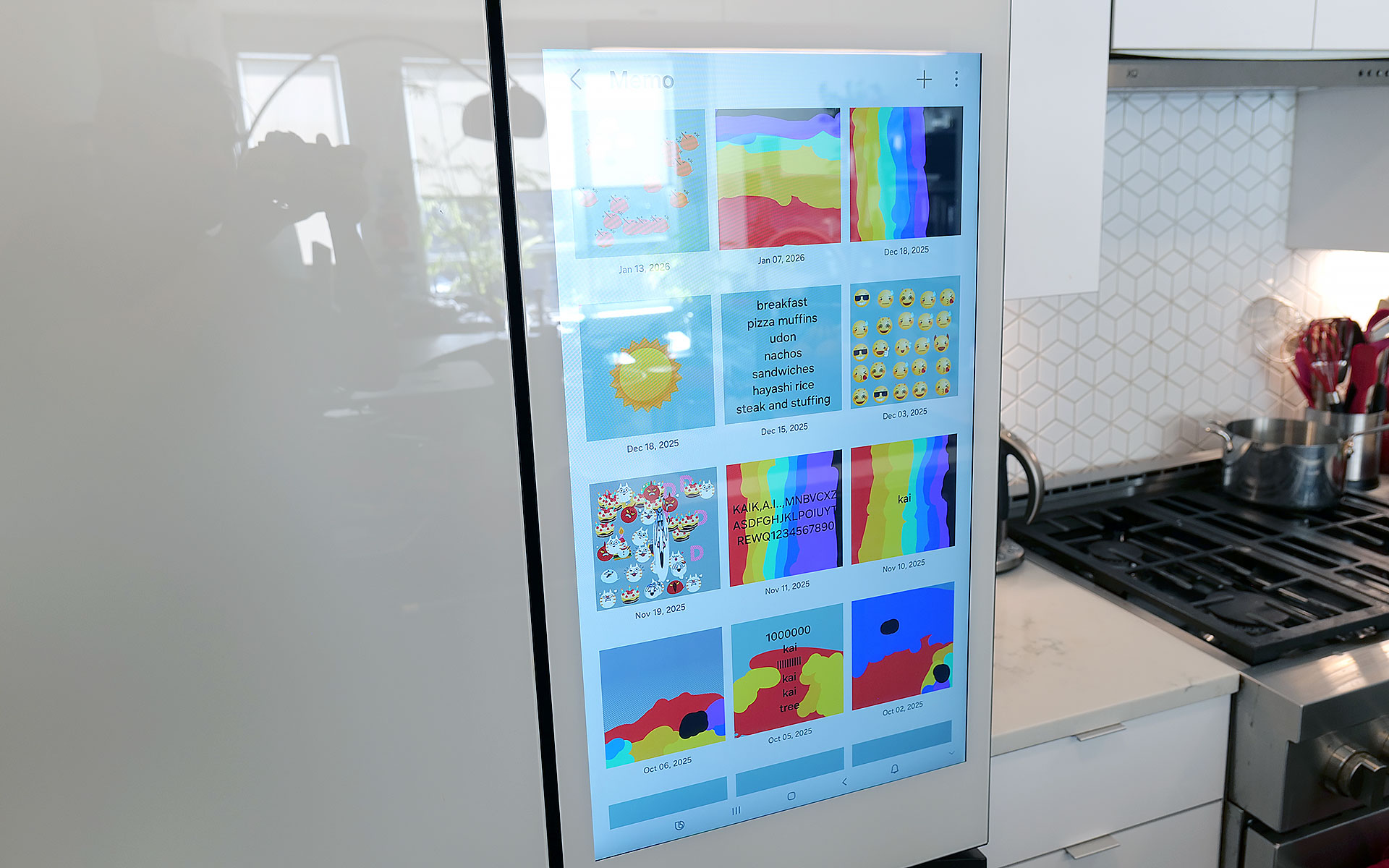
Of course, one of the biggest potential objections about Samsung’s latest fridges may also be one of its biggest strengths: their optional displays. With the continued intrusion of screens into our daily lives, I’m not here to tell you that you need one more. However, even though I was skeptical at first, I’ve grown to really appreciate having one on the fridge and I’d argue that unless you’re skipping the feature entirely, the larger 32-inch panel is what you want.
The main reason is that, at least for my family, so much of what we do is already digital. Things like calendars, shopping lists, recipes and family photos already live on my phone and being able to share all of that with the fridge directly via Wi-Fi is a major plus. Frankly, it’s easier to upload a picture to the fridge’s display than it is to print one out and post it, which goes double for Samsung’s Bespoke line since its glass front means magnets don’t stick. Even though I already have a smart display in our kitchen, the size of Samsung’s screen, along with support for a handful of important apps, have turned the fridge into a better family hub than anything else we own. Because there’s so much space, there’s room for photos, memos, the weather, filter status and a full 30-day calendar — the latter of which has significantly improved my family’s planning and coordination.
Sam Rutherford for Engadget
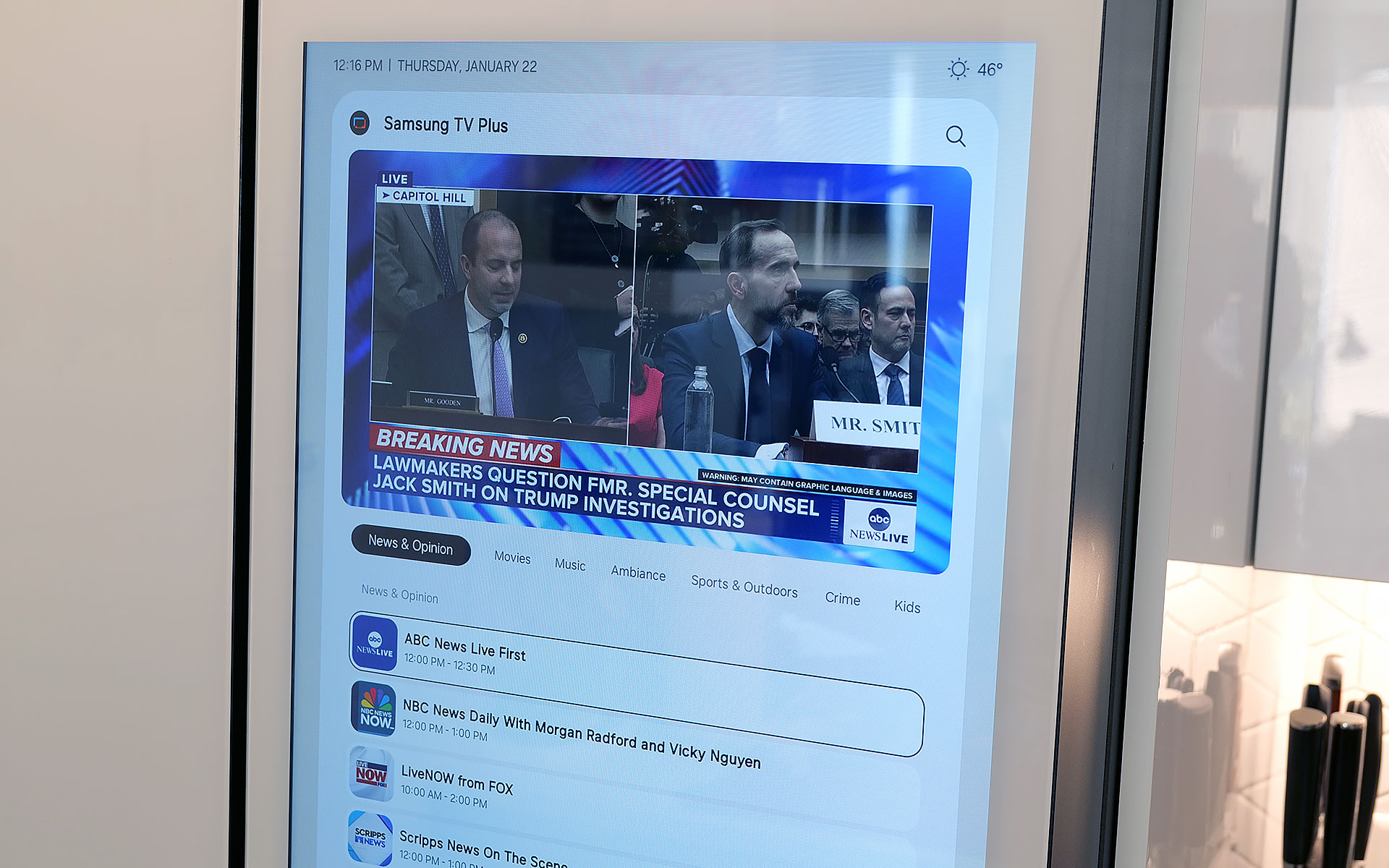
The fridge runs Samsung’s Tizen OS, which is basically the company’s lightweight take on Android, so it’s super easy to use. You can swipe left and right to add additional widgets to your screen, play music or even watch videos (YouTube, Samsung TV Plus, etc.) if you’re so inclined. That said, sometimes I wish the screen was a bit more responsive, because even though I don’t think it’s a dealbreaker, after having reviewed several generations of the company’s phones, I know Samsung can do better. There are also some settings from its handsets that I wish would get ported over to its fridges — like a dedicated dark mode. When I grab a glass of water later at night, the last thing I need is the entire display blasting my kitchen like a pair of hi-beams.
AI Inside: A work in progress with benefits today
With seemingly every tech company trying to shoehorn AI into its latest products, it’s easy to roll your eyes at the idea of adding that into a fridge as well. And I think even Samsung would admit that its efforts to integrate machine learning into the Bespoke line are a work in progress. I’ve found that while it certainly isn’t essential, the AI features found here can be a handy bonus in the right situations.
Sam Rutherford for Engadget
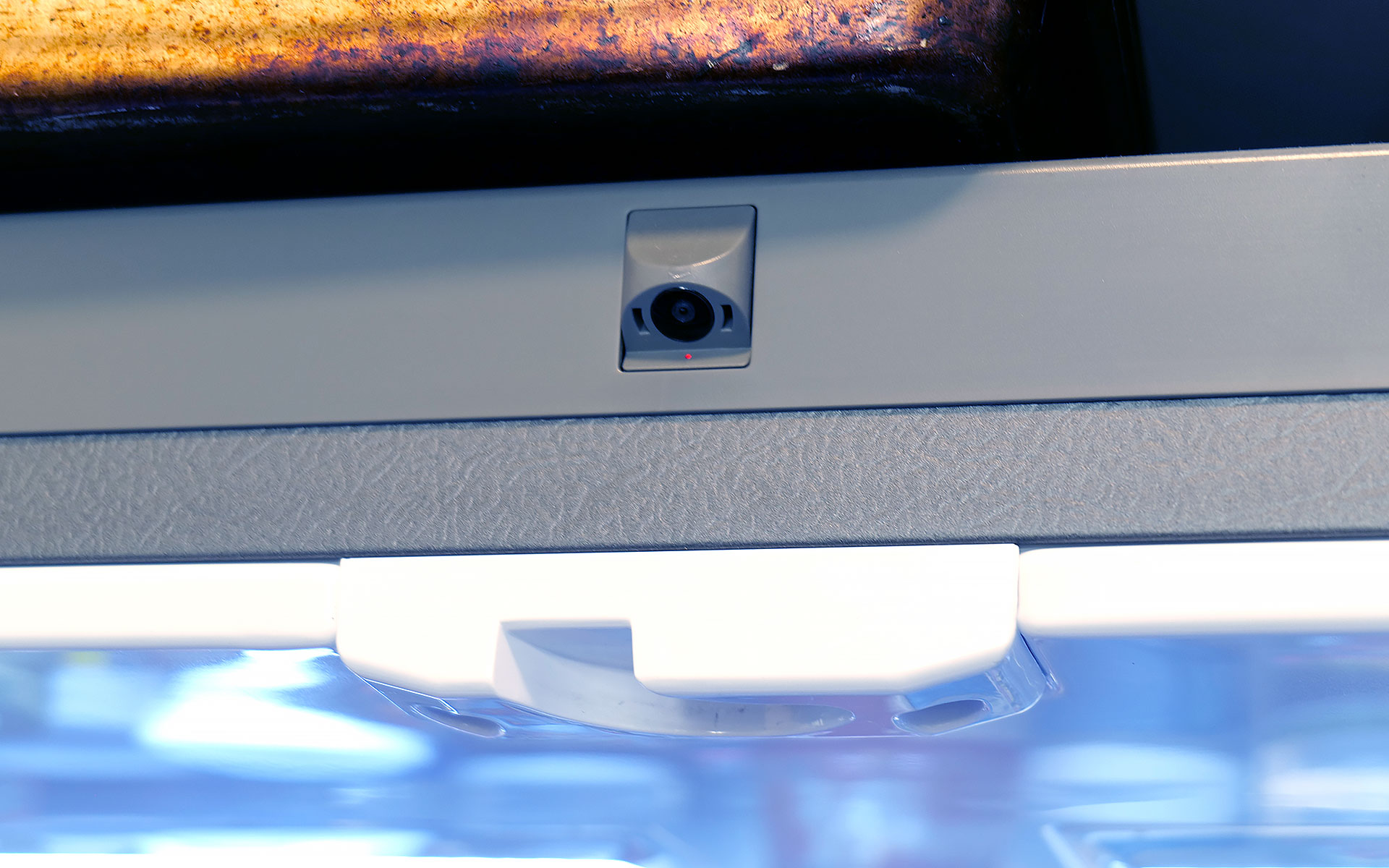
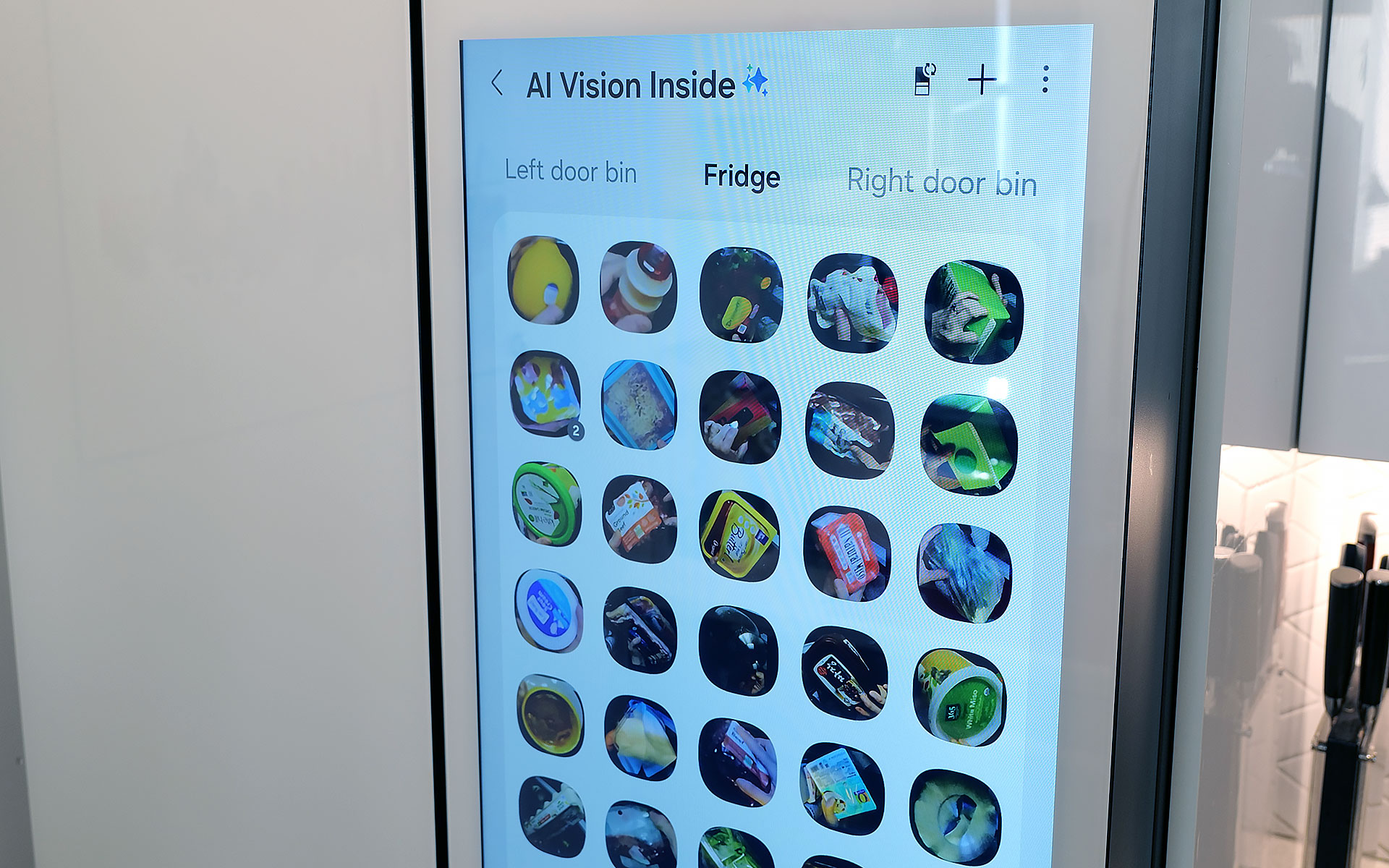
AI Vision is the headline feature in Samsung’s package, which uses machine learning and a camera mounted to the roof of the fridge to automatically recognize and record items you put inside. However, there are some limitations. Currently, Samsung’s AI can detect 37 different food items like fresh fruit and veggies, along with an additional 50 kinds of packaged goods like yogurt. Furthermore, the camera only records what goes into the fridge’s main cabinet, so anything you put in the FlexZone drawer, freezer or either door won’t get recorded. Regardless of whether an item is recognized or not, the fridge will then take a photo of the item (and tag it with the name of the food if it can be properly identified). You can then view a list of everything in the fridge via a dedicated tab on its screen (assuming your model has one) or from your phone via Samsung’s SmartThings app. From there, you can do things like set names for anything uncategorized or add an expiration date, though I wish the fridge would do that last part on its own.
Sam Rutherford for Engadget
In practice, this means you just put items in the fridge like you would normally and let the AI sort things out on its own. You can always go through the main list to see if you have a specific item or let the fridge automatically delete things when you take them out. That said, the AI doesn’t get things right every time, because while Samsung’s programming does clear things out after a certain amount of time, you will still need to delete food manually from time to time. Thankfully, for items in the door, the fridge can show you a live feed of what’s there, so if you’re at the store and can’t remember if you have milk or not, you can simply pull out your phone and see for yourself.
Because the camera is mounted to the top of the fridge, you might not get the clearest picture or you may end up with your hand covering part of the food as the fridge takes a picture as you put items inside. Even so, that’s still more than enough for me to be able to tell what something is just by looking at a small icon. I’ve found that Samsung AI Vision legitimately makes it easier to grocery shop by allowing me to see what food I have at a glance, regardless of whether I’m at home or at the store.
Sam Rutherford for Engadget
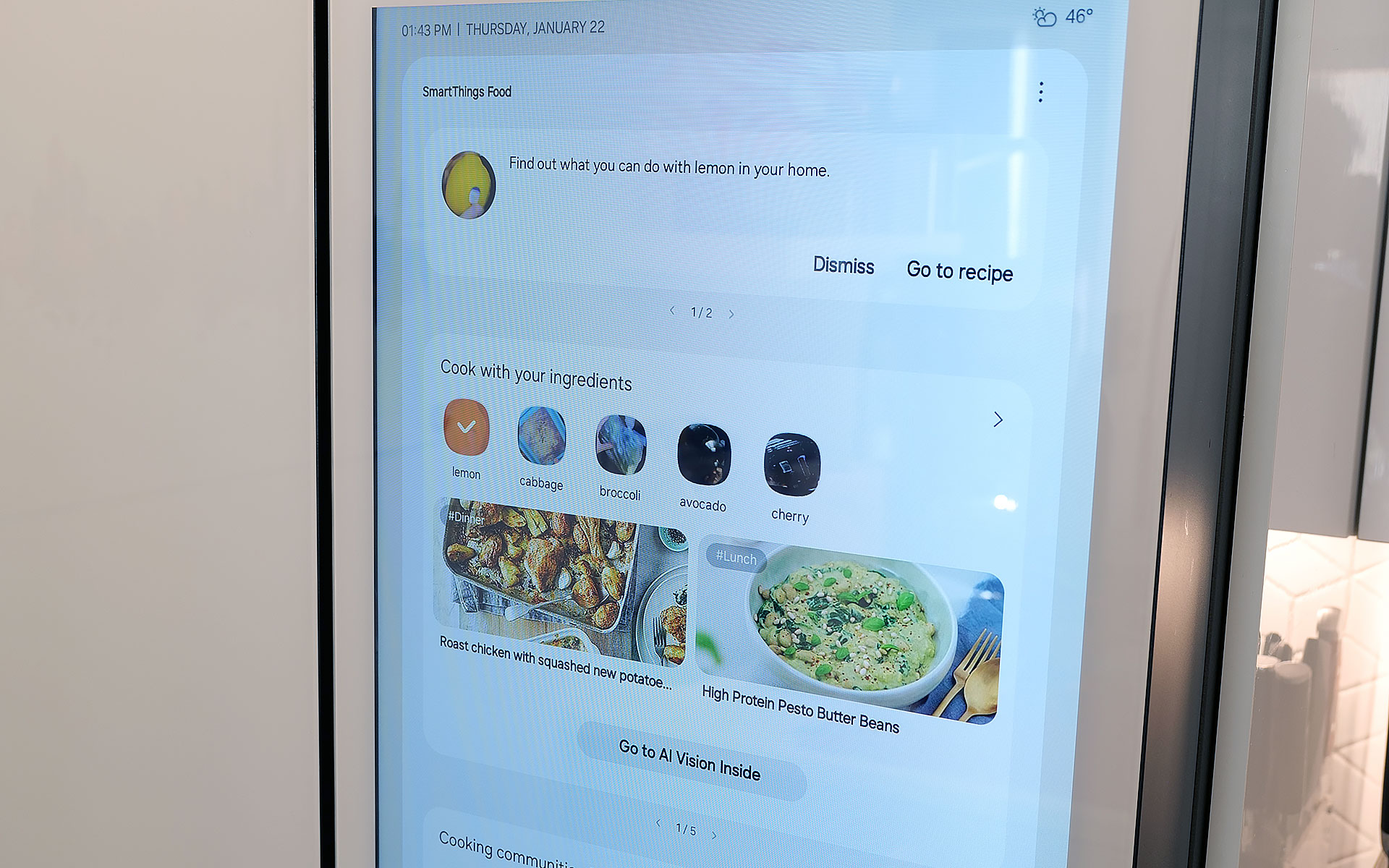
On top of that, the fridge also has built-in meal planning capabilities. This means you can ask the fridge to come up with a dish based on ingredients you already have, and it’s surprisingly good. Not only do you have the ability to specify preferences and dietary restrictions, there’s a wide variety of recipes it can choose from. On several occasions, I even found that when asked to suggest a recipe, the fridge came up with dishes I already had in mind. Alternatively, it will highlight when you’re missing items for a potential dish, so you can grab them the next time you’re at the store. This is one of the most helpful features, because often at the end of the week, I find myself with a handful of leftover ingredients. So when the fridge uses that info to suggest recipes that use those items, it helps reduce food waste.
Sadly, the weakest part of Samsung’s AI is Bixby. In addition to being overeager when listening for voice prompts, which ended up causing a lot of inadvertent triggers, Samsung also put the Bixby icon near the bottom left corner of the screen. That’s right next to the sensor and handle for the door, resulting in even more unwanted summons. After using this fridge for four months, I wish Bixby would just go away, and it seems Samsung agrees. Sometime later this year, the company is adding support for Google Gemini, which should deliver a massive upgrade to the fridge’s voice-controlled capabilities.
A word on ads
Sam Rutherford for Engadget
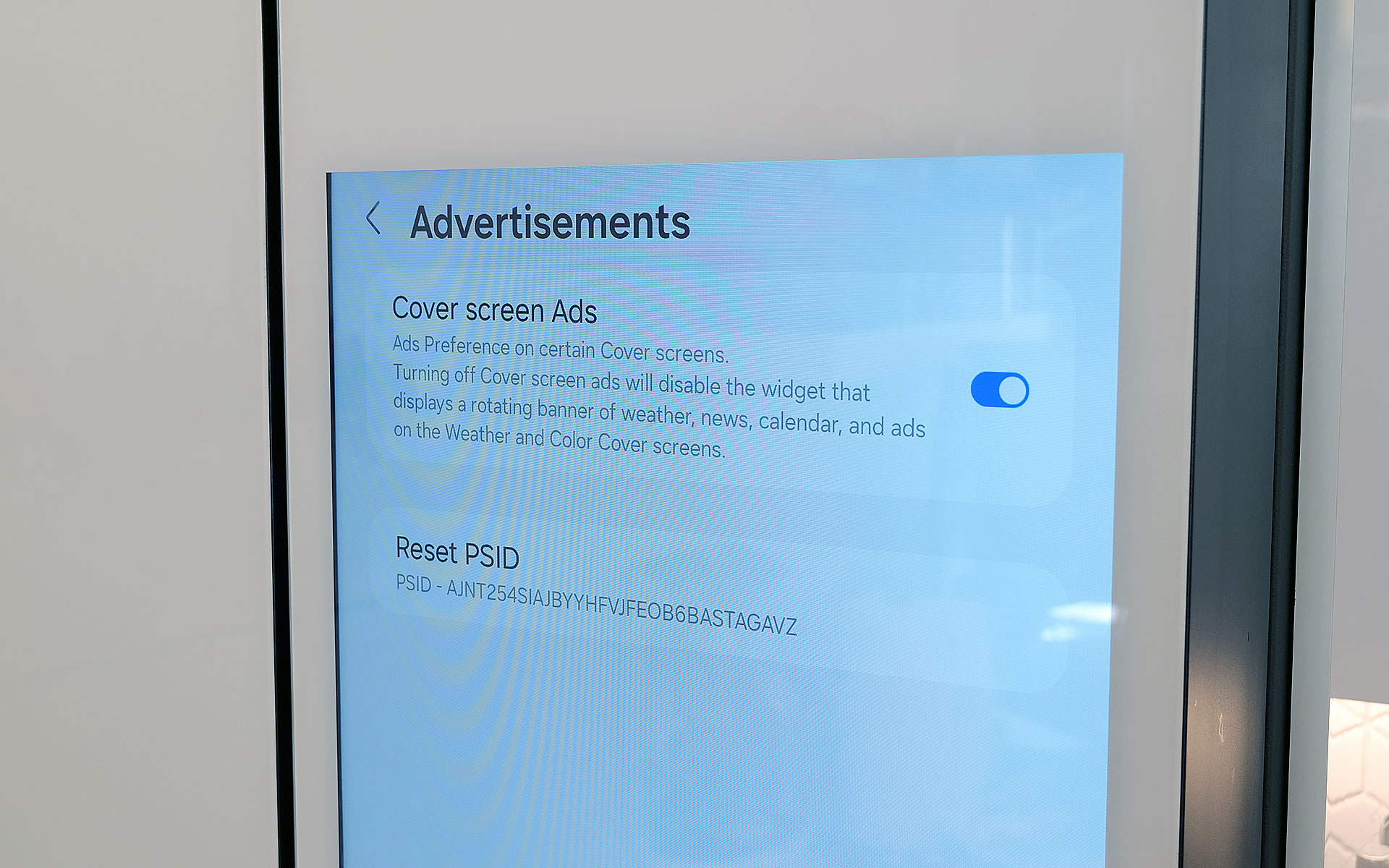
Last fall, to the dismay of many, Samsung announced that it was adding ads to its Family Hub fridges, including Bespoke models with built-in displays. Now no one likes being taunted with commercials, especially when they’re on expensive appliances located in the busiest room of their home. Thankfully, I’ve found that these ads only show up on the Cover Screen, which only appears after no one has used the fridge in a while, kind of like a screensaver on a desktop. Furthermore, you can disable these ads entirely. The downside is that doing so also gets rid of the rotating news and weather widgets that appear on the home screen. But in my experience, that’s just fine, because I don’t need what is effectively the fridge’s lock screen to have that much going on. Plus, when you open the fridge or touch its screen, it instantly reverts to the main home menu, which includes its own set of widgets that you can customize how you like.
Some quick notes and observations
Sam Rutherford for Engadget
The Bespoke fridge’s screen does collect smudges, but so does stainless steel, and it doesn’t really impact viewability. And on white glass models like my review unit, the simple design makes it easier to clean and maintain than typical metal-clad rivals.
The door to the Beverage Center doesn’t soft-close like you’d normally expect on a fridge. It’s more of a clack, which isn’t a bad thing on its own, though I hope Samsung changes its design to match the other doors on future models for consistency’s sake.
Because the fridge runs Tizen and not full Android, there aren’t nearly as many choices for widgets. For example, there’s a widget for Spotify and Amazon Music, but not YouTube or Apple Music. There’s also only a single option for weather and a widget for pinning your favorite websites, but very little choice when it comes to dedicated news options. In my testing, the SmartThings integration worked better on Samsung phones compared to standard Android handsets, but your experience may vary.
If you are so inclined, you can create shopping lists directly on the fridge and then order them from partners including Instacart, Amazon Fresh, Walmart and others.
Wrap-up
AI in a fridge might sound ridiculous, but it allows for some genuinely useful features, even if the tech suffers from growing pains. And while this might sound preposterous, I think Samsung should actually double down on the tech by adding even more cameras, so the fridge has more angles and viewpoints to choose from as its algorithms evolve. The ability to automatically track what goes in and out of the fridge makes it easier to both shop and plan meals, and this is just in the early stages of the tech.
That said, obsessing over AI is sort of besides the point because even without it, Samsung’s Bespoke French Door fridge is a first-class icebox. For tech-savvy people, its big screen helps simplify and organize our digital lives while simultaneously allowing the fridge to be helpful in ways you might not have even considered. It’s also well-built and exquisitely designed to fit in seamlessly with other modern devices, which feels refreshing considering how often appliances feel like they are lagging years or decades behind gadgets like phones and laptops. And I can’t overstate how much I like Samsung’s Beverage Center, which in my opinion, is so good it’s worth going with a Bespoke fridge just for that one feature.
In the end, the two biggest factors you’ll need to consider are price and your appetite to digitize your kitchen, and by extension, your life. Starting at $3,500 for AI-equipped Bespoke models, Samsung’s top-of-the-line fridges are far from cheap. Thankfully, versions without machine learning can be had for much less. But more importantly, you have to be willing to embrace technology’s role in your home. You may not agree or want to pay this much for features like this just yet, but Samsung’s Bespoke AI 4-Door French Door refrigerator has convinced me there’s a happy home for smarter iceboxes.
This article originally appeared on Engadget at https://www.engadget.com/home/kitchen-tech/samsung-bespoke-fridge-with-ai-review-all-the-bells-and-whistles-140000099.html?src=rss
Ring can now verify if a video has been altered
Ring has launched a new tool that can tell you if a video clip captured by its camera has been altered or not. The company says that every video downloaded from Ring starting in December 2025 going forward will come with a digital security seal. “Think of it like the tamper-evident seal on a medicine bottle,” it explained. Its new tool, called Ring Verify, can tell you if a video has been altered in any way. Even adjusting a video clip’s brightness or trimming a few seconds off will break that seal, and the tool will tell you that it cannot be verified. All you have to do is visit the tool’s web page and upload the video you want to check.
In the era of AI, you can also use the tool to make sure you’re looking at a real Ring video instead of something generated by artificial intelligence models. OpenAI’s Sora, for instance, can easily create Ring video doorbell footage with just a prompt or two, leading to a lot of fake security cam footage on social media apps. The company suggests asking the owner of the camera to share videos straight from the Ring app to make sure they’re unaltered. It also doesn’t matter what camera it is: All of the company’s models now embed digital security seals to downloaded videos and videos shared from Ring’s cloud storage. However, the tool can only tell you if a video has been tampered with or can’t be verified at all. It can’t tell you what has been edited or if it’s AI-generated.
This article originally appeared on Engadget at https://www.engadget.com/home/smart-home/ring-can-now-verify-if-a-video-has-been-altered-140000140.html?src=rss