The world’s most famous bike mechanic is retiring

Even if you don’t know his name, the likelihood is you’ve seen his moustachioed face and even followed his maintenance advice. That’s because Park Tool’s director of education, Calvin Jones, has become cycling’s most famous mechanic since he began at the company way back in 1997.

But Park Tool announced yesterday “with gratitude and a little sadness” that Jones is retiring after 28 years at the cycling tool company. 

Park Tool said Jones is probably best known for his work on the company’s YouTube channel, where he has presented bike maintenance videos for 15 years. But his role at Park Tool has extended far beyond presenting. 

“In addition to his contributions to product development and thousands of hours logged fielding customer feedback, Calvin has applied his deep knowledge of bikes and his aptitude for instruction to projects large and small,” an official press release said.  

“I think the thing I admire most about Calvin is that to this day he lives and breathes what he teaches,” said Eric Hawkins, Park Tool’s CEO. 

“He’s passionate about the science of bikes and is a gifted teacher who can clearly explain even the most complex concepts. Through his writings, videos, and personal interactions he’s helped millions understand how their bike works and how to best keep it working. It’s been an amazing run, and now, nearly 29 years later we owe a lot to Calvin for his unique ability to demystify bike repair and maintenance.”

Park Tool's Calvin Jones at a bike race in 1997.
Jones at a bike race in 1997. Park Tool

Jones joined Park Tool with a wealth of experience already under his belt. He got his first job in a bike shop in 1973 and worked as a team mechanic for USA national teams. He was also a mechanics’ instructor for the US Olympic Training Centre and a chief instructor at Barnett Bicycle Institute.

“Moving on from Park Tool, there are some educational projects that I would like to be part of. Plus, I am looking forward to focusing more on my riding,” Jones said. 

Jones will continue to be involved in the Stillwater chapter of the Minnesota Cycling Association and will stay on the board of Project Bike Tech. He’ll also attend *iceBike 2026 in London and Frostbike 2026 in Minneapolis for anyone in the industry who would like to wish him well. 

Jones might not be disappearing from our screens forever. In a video announcing his retirement, he said: “If I think of something I think you need to know, you may find me here at this YouTube channel.” 

MSI Cubi NUC AI+ 3MG Boasts Intel Panther Lake In A Half-Liter Form Factor

MSI Cubi NUC AI+ 3MG Boasts Intel Panther Lake In A Half-Liter Form Factor
MSI is joining the modern NUC race and showing off one of the first Intel Panther Lake mini PCs of its kind at CES 2026. Meet the MSI Cubi NUC AI+ 3MG, the latest in MSI’s Cubi NUC AI+ series, which you can outfit with up to an Intel Core Ultra 9 386H. That’s is one of the highest-end Core Ultra Series 3 offerings, flaunting 16 cores and a

An AI-Generated NWS Map Invented Fake Towns In Idaho

National Weather Service pulled an AI-generated forecast graphic after it hallucinated fake town names in Idaho. “The blunder — not the first of its kind to be posted by the NWS in the past year — comes as the agency experiments with a wide range of AI uses, from advanced forecasting to graphic design,” reports the Washington Post. “Experts worry that without properly trained officials, mistakes could erode trust in the agency and the technology.” From the report: At first glance, there was nothing out of the ordinary about Saturday’s wind forecast for Camas Prairie, Idaho. “Hold onto your hats!” said a social media post from the local weather office in Missoula, Montana. “Orangeotild” had a 10 percent chance of high winds, while just south, “Whata Bod” would be spared larger gusts. The problem? Neither of those places exist. Nor do a handful of the other spots marked on the National Weather Service’s forecast graphic, riddled with spelling and geographical errors that the agency confirmed were linked to the use of generative AI.

NWS said AI is not commonly used for public-facing content, nor is its use prohibited. The agency said it is exploring ways to employ AI to inform the public and acknowledged mistakes have been made. “Recently, a local office used AI to create a base map to display forecast information, however the map inadvertently displayed illegible city names,” said NWS spokeswoman Erica Grow Cei. “The map was quickly corrected and updated social media posts were distributed.”

A post with the inaccurate map was deleted Monday, the same day The Washington Post contacted officials with questions about the image.
Cei added that “NWS is exploring strategic ways to continue optimizing our service delivery for Americans, including the implementation of AI where it makes sense. NWS will continue to carefully evaluate results in cases where AI is implemented to ensure accuracy and efficiency, and will discontinue use in scenarios where AI is not effective.” A Nov. 25 tweet out of the Rapid City, South Dakota, office also had misspelled locations and the Google Gemini logo in its forecast. NWS did not confirm whether the Rapid City image was made with generative AI.


Read more of this story at Slashdot.

ADLINK Express-PTL and COM-HPC-mPTL pair Intel Core Ultra Series 3 processors with Arc Xe3 graphics

ADLINK Technology has introduced the Express-PTL and COM-HPC-mPTL modules, built on Intel Core Ultra Processor Series 3 (Panther Lake-H), targeting edge AI, graphics-intensive, and general embedded systems that require high compute density, standards-based form factors, and long-term availability. Both modules are based on Intel Core Ultra Series 3 processors featuring a hybrid CPU architecture with […]

CES 2026: Nvidia’s Updated DLSS Makes Games Run Worse on Older GPUs

Unless you run an AI data center, Nvidia’s announcements this CES have been more on the quiet end. There were updates to GeForce Now cloud streaming and its DLSS upscaling tech, but no new graphic cards. That’s fine—it’s normal for Nvidia to have a quiet year on consumer tech every now and then, and the RTX 50-series GPUs just came out last year. Unfortunately, it turns out those DLSS updates are actually making games run worse on older GPUs.

The new version of DLSS, called DLSS 4.5, is pretty great when it works. It already makes lighting appear far more realistic even when ray tracing or HDR isn’t being used, and in the spring, it will introduce dynamic frame generation, which can adjust how many AI frames are inserted into your game on the fly, so that it doesn’t waste compute producing more frames than necessary, or than your monitor can produce. I saw examples of both of these use cases in person at CES, and as someone who mostly plays without upscaling when I can, I was impressed enough that I might want to get a new GPU and make the swap.

And I stress that “new GPU” part. Unfortunately, DLSS 4.5 only seems to work best on Nvidia’s newest cards. It released in beta for all Nvidia GeForce RTX cards yesterday, but gamers on older RTX 3000-series cards are already reporting issues. According to a report from X user Mostly Positive Reviews (via Tom’s Hardware), users on the Nvidia GeForce RTX 3080 Ti GPU could see up to a 24% dip in performance in Cyberpunk 2077, and a 14% drop in The Last of Us Part 2. Those are just a few examples, but others in the comments posted their own headaches, as did users on Reddit.

That’s not a small issue. The RTX 3080 Ti might be a few generations behind, but it was near the top of the line when it was current. More importantly, according to Steam’s own data, the RTX 3060 is currently the most common graphics card on Steam, and it’s weaker than the RTX 3080 Ti. And technically, DLSS 4.5 is available for the even weaker RTX 2000-series, which are bound to run into even more severe problems.

So where’s this massive performance loss coming from, and what can you do about it? Likely, it has to do with the new AI transformer model powering DLSS, which Nvidia said was built with RTX 40-series and RTX 50-series cards in mind. While you can use DLSS 4.5 with an older GPU, it doesn’t seem like it’s intended.

Thankfully, if you decided to try out DLSS 4.5 on an older card and you don’t like what you’re seeing, you’re not stuck with it. Currently, public DLSS 4.5 implementation is in beta, and needs to be applied to games by choosing either the “Model M” or “Model L” preset in the Nvidia app (under “Latest” and “Custom,” respectively). Choosing another model, like Model K, should get you back to normal. When DLSS 4.5 gets a full release on January 13, I assume this will get even simpler.

Still, it’s not a great look that most Nvidia gamers can’t use its exciting new feature. Because it can be reversed, it doesn’t break anything, but it also shows that Nvidia is starting to leave all but its most loyal GPU customers behind. And as someone who mostly only uses upscaling while on weaker hardware like the Steam Deck, what I find especially weird is that upscaling is already all about using software to improve performance when you’re lacking raw power. That should theoretically make gamers with weaker cards the target audience.

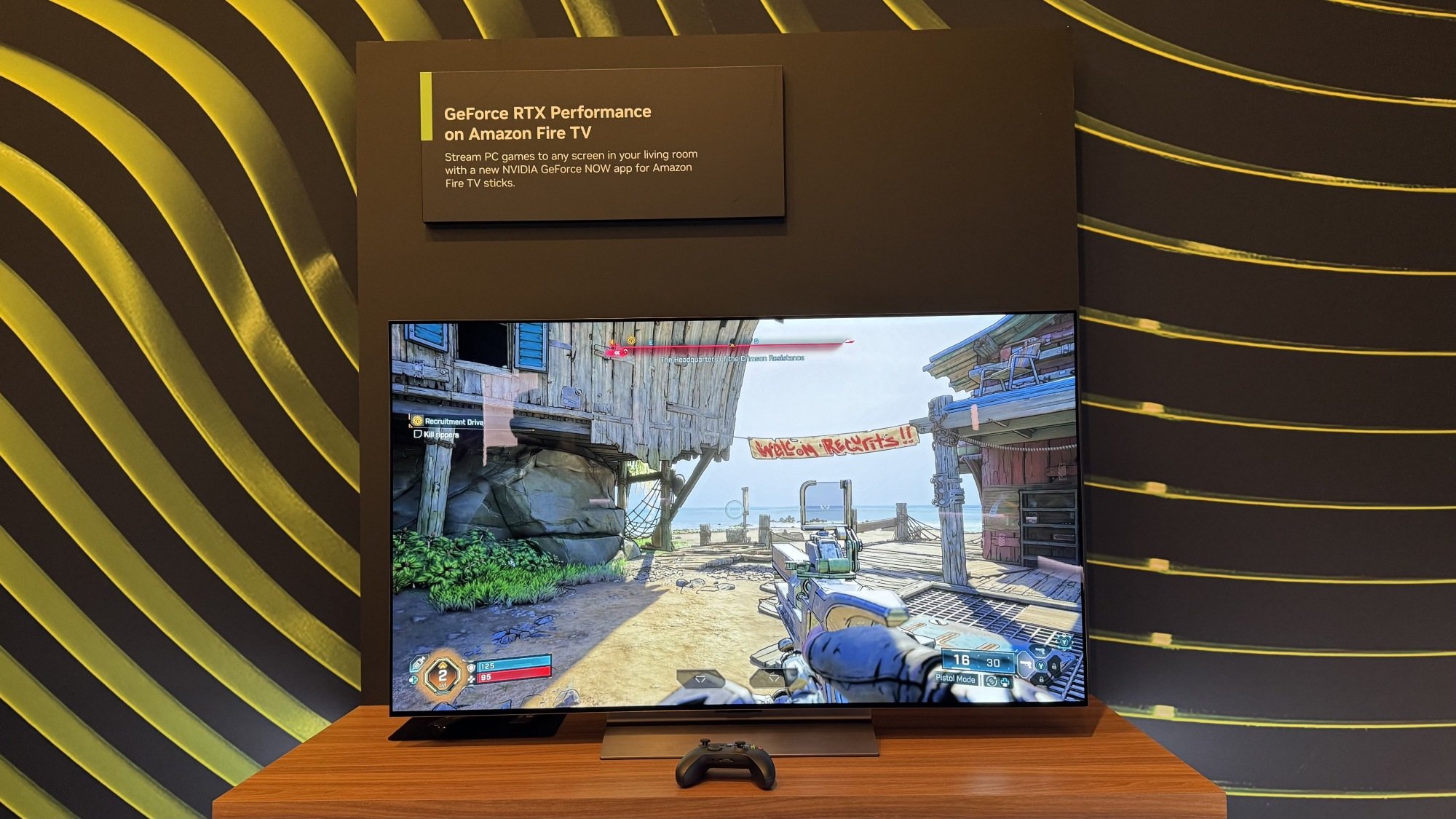
GeForce Now app on Amazon Fire TV

Credit: Michelle Ehrhardt

But it’s not all doom-and-gloom for my fellow cheap gamers. Alongside DLSS 4.5, Nvidia also announced a native Linux client for Nvidia GeForce Now, alongside a native Amazon Fire TV app. That extends the cloud gaming platform to even more users, and because GeForce Now has a free tier, it’s a pretty sweet deal. Play it right, say by getting a Fire TV on sale and loading up a free game, and you could game using Nvidia’s latest GPUs on the big screen while spending less than $20. Sure, you might have to deal with some latency and video compression while doing it—as is the tradeoff with cloud gaming—but as DLSS 4.5 shows, even using local hardware comes with its own problems.

This Radar-Equipped Stove Shutoff Is One of the Most Practical Things I Saw at CES

We may earn a commission from links on this page.

Radar-based sensors seem to be having a moment at CES, especially in tech meant for people to keep tabs on their aging family members. One product in particular caught my eye because it’s focused on a single important function—preventing kitchen fires caused by a person wandering away from the stove. 

iGuardStove is essentially a smart shutoff for a stove or cooktop. Its new, radar-equipped version costs $399 and can work on gas or electric stoves. (For gas, you’ll need to have a plumber install a shutoff valve.) If you leave the kitchen while cooking, a five-minute timer starts. If you don’t return by the time it goes off, the device either cuts the power to your electric stove, or shuts off the supply line to your gas stove. It can also notify a caregiver that a shutoff event occurred.

Why this is aging-in-place tech

A big theme in smart tech this year is aging-in-place. Most older adults would prefer to live at home as long as they can, but health challenges can make that difficult. When it comes to cooking or other activities that require a sharp mind, mental health issues like dementia come into play, as do medications that can have cognitive side effects. With all that in mind, caregivers often worry about a parent leaving the kitchen while cooking, forgetting that the stove is on. 

The National Fire Protection Association reports that cooking fires are the top cause of home fires, the top cause of fire-related injuries, and the number three cause of fire-related deaths. Unattended cooking equipment causes half of those deaths. Older adults are overrepresented as fire casualties compared to younger and middle-aged people.

The device has a five-minute timer, specifically, because that was a safety margin the company developed with safety organization UL, chief marketing officer Jon Landers told me. You can also override the five-minute timer if you’re roasting a turkey or preparing a slow-simmered sauce. In this case you tell the device how long the food is expected to cook, and it lets this cook time complete before resetting to the usual five-minute timer behavior.

Why radar is involved

A previous version of the iGuardStove used motion detectors, but if you’ve ever worked in an office that had lights on motion sensors, you know why that wasn’t a great solution: sit still at a table for too long, and the lights go off. The older version of the device could potentially shut off while you’re just waiting for your dinner to cook, and could be triggered by motion from pets. Radar solves those problems, since it can more accurately identify when a person is in the room.

I’ve been seeing radar in a number of aging-in-place products at CES this year. The Silver Shield from PontoSense uses radar to monitor a person’s presence and movement in a room, reporting movement and potential falls to a caregiver’s app. Luna, a conversation and reminder device from Cairns Health, includes radar that can monitor heart rate and breathing (even through blankets!) when positioned near a person’s bed. The iGuardStove has some monitoring features in common with those devices, but it stays focused on its main task of ensuring stoves aren’t left running unattended. 

Radar can “see” a lot, but it doesn’t feel quite as privacy-invading as a camera. Having a device in the kitchen is also a bit less intrusive than in a bedroom, for those who would feel creeped out knowing that a tech device is watching them sleep. 

Besides shutting off the stove, the iGuardStove can report to a caregiver (via an app, of course) things like what time each day a person first enters the kitchen. It can catch nighttime wandering if the person visits the kitchen at night; it can also send an alert if the person doesn’t seem to be up and active at their usual time. For example, if your mom usually makes coffee around 9:00 every morning, you can ask the app to notify you if the kitchen is still empty at 10:00. 

Other monitoring and safety features

Besides shutting off the stove and reporting on the presence of a person in the kitchen, the iGuardStove has a few other clever features. The version of the device made for gas stoves can detect unburned gas, in case somebody left it on without a burner running. 

The device can also be configured to keep the stove from being turned on by pets or children, or it can be locked to not allow cooking during certain hours or days (say, at night). The app can also alert a caregiver if temperatures get too hot or cold, prompting them to check in if a heat wave or a cold snap is bad enough to affect indoor temperatures.

While a lot of products I’ve seen at CES are speculative or hopeful in their use cases—I often find myself asking “who would actually use this?”—the iGuardStove seems thoughtfully designed and has a concrete use case and benefit. I was impressed! The new device is expected to ship later this year.


This game controller has a force feedback steering wheel lodged in the middle

Not everyone remembers the unique controllers that never quite made it. As third-party peripheral makers attempt to offer gamers something different to the likes of DualSense and Joy-Cons, they often have to go in a different direction. GameSir’s Swift Drive (apparently a working product name) is definitely that. And if you remember 1998’s JogCon for the PS1, there’s definitely some shared DNA.

It features a compact steering wheel at the center of an otherwise typical controller design. It’s also got force feedback, tech usually found in (full-size!) steering wheel controllers. GameSir says it has a “high precision” Hall Effect encoder built in for “ultra-accurate” steering.

GameSir Swiftdrive hands-on at CES 2026
Mat Smith for Engadget

You will be able to adjust the steering range from 30 to 1080 degrees, but you’d likely want to keep it high – it’s the entire point of this controller. GameSir has added Hall-effect sensors to its more typical joysticks and buttons, while each trigger has its own haptic motor to simulate wheel slip and braking. Several RGB lights across the top of the controller will even attempt to replicate your in-game RPMs, which is a cute touch.

On the show floor at CES, I drove a big rig in a demonstration area that was stripped down to wireframe ramps and curved surfaces. The force-feedback is powerful and it’s a surprisingly satisfying driving experience as I wheeled around, rotating the steering wheel with both thumbs. The steering wheel can also be customized with different plates. It felt like a miniaturized steering-wheel controller and would lock out when I oversteered or stopped. You may be concerned about battery life, but the controller should last 20-30 hours on a single charge.

A GameSir spokesperson said the controller is expected to go on sale later this year, but pricing has not yet been confirmed.

This article originally appeared on Engadget at https://www.engadget.com/gaming/this-game-controller-has-a-force-feedback-steering-wheel-lodged-in-the-middle-034521141.html?src=rss

Creator of Claude Code Reveals His Workflow

Boris Cherny, the creator of Claude Code at Anthropic, revealed a deceptively simple workflow that uses parallel AI agents, verification loops, and shared memory to let one developer operate with the output of an entire engineering team. “I run 5 Claudes in parallel in my terminal,” Cherny wrote. “I number my tabs 1-5, and use system notifications to know when a Claude needs input.” He also runs “5-10 Claudes on claude.ai” in his browser, using a “teleport” command to hand off work between the web and his local machine. This validates the “do more with less” strategy Anthropic’s President Daniela Amodei recently pitched during an interview with CNBC. VentureBeat reports: For the past week, the engineering community has been dissecting a thread on X from Boris Cherny, the creator and head of Claude Code at Anthropic. What began as a casual sharing of his personal terminal setup has spiraled into a viral manifesto on the future of software development, with industry insiders calling it a watershed moment for the startup.

“If you’re not reading the Claude Code best practices straight from its creator, you’re behind as a programmer,” wrote Jeff Tang, a prominent voice in the developer community. Kyle McNease, another industry observer, went further, declaring that with Cherny’s “game-changing updates,” Anthropic is “on fire,” potentially facing “their ChatGPT moment.”

The excitement stems from a paradox: Cherny’s workflow is surprisingly simple, yet it allows a single human to operate with the output capacity of a small engineering department. As one user noted on X after implementing Cherny’s setup, the experience “feels more like Starcraft” than traditional coding — a shift from typing syntax to commanding autonomous units.


Read more of this story at Slashdot.

AAEON Reveals BOXER-8742AI Embedded AI Box PC Based on NVIDIA Jetson T4000

AAEON has outlined plans for the BOXER-8742AI, a fanless embedded AI box PC built around the NVIDIA Jetson T4000 module for edge AI deployments requiring high compute density and multi-sensor connectivity. The BOXER-8742AI is based on the NVIDIA Jetson T4000 module, which combines a 12-core Arm Neoverse-V3AE CPU with a Blackwell-architecture GPU featuring 1,536 CUDA […]

Discord Files Confidentially For IPO

According to Bloomberg, Discord has confidentially filed for a U.S. IPO. Reuters reports: The U.S. IPO market regained momentum in 2025 after nearly three years of sluggish activity, but hopes for a stronger rebound were tempered by tariff-driven volatility, a prolonged government shutdown and a late-year selloff in artificial intelligence stocks. Discord, which was founded in 2015, offers voice, video and text chatting capabilities aimed at gamers and streamers. According to a statement in December, the platform has more than 200 million monthly users.


Read more of this story at Slashdot.

NYC Wegmans Is Storing Biometric Data On Shoppers’ Eyes, Voices and Faces

schwit1 shares a report from Gothamist: Wegmans in New York City has begun collecting biometric data from anyone who enters its supermarkets, according to new signage posted at the chain’s Manhattan and Brooklyn locations earlier this month. Anyone entering the store could have data on their face, eyes and voices collected and stored by the Rochester-headquartered supermarket chain. The information is used to “protect the safety and security of our patrons and employees,” according to the signage. The new scanning policy is an expansion of a 2024 pilot.
The chain had initially said that the scanning system was only for a small group of employees and promised to delete any biometric data it collected from shoppers during the pilot rollout. The new notice makes no such assurances. Wegmans representatives did not reply to questions about how the data would be stored, why it changed its policy or if it would share the data with law enforcement.


Read more of this story at Slashdot.

Lenovo just revealed a concept for AI-powered smartglasses at CES

Lenovo just revealed a new smartglasses concept design at CES 2026. The appropriately-named Lenovo AI Glasses Concept promises to transform “how users interact with their surroundings and unifies their workflow.”

They look like a standard pair of specs and not all that different from something like Meta’s Ray-Ban Display glasses. A pair weighs just 45 grams and the battery lasts eight hours, which is just enough time to get through a standard workday.

The glasses are wirelessly tethered to a smart device, which is what does most of the computational heavy lifting. They do include Lenovo and Motorola’s proprietary AI platform called Qira, which delivers “sub-millisecond live translation and intelligent image recognition.” There’s also something called the Catch Me Up feature, which is an AI-generated recap of various notifications from various devices.

The hardware allows for touch and voice control and includes teleprompter software. The concept glasses include speakers, as Lenovo is advertising music playback as a feature.

We don’t know when or if these smart glasses will ever hit store shelves. Lenovo tends to drop several intriguing concept designs each year at CES and not all of them make it to market.

This article originally appeared on Engadget at https://www.engadget.com/wearables/lenovo-just-revealed-a-concept-for-ai-powered-smartglasses-at-ces-010057822.html?src=rss

Lenovo updates its Legion and LOQ gaming laptops for CES

Lenovo has brought a slew of updates to its Legion and LOQ line of gaming laptops for CES 2026. The refreshed laptops are all built around Nvidia RTX 50-series GPUs.

The new Legion 7a is both thinner and lighter than the previous generation and is aimed at gamers, creators, and working professionals. Lenovo says the new 7a will be powered by AMD Ryzen AI 400 CPUs and RTX 50-series GPUs, delivering up to 125W of total system power. 

Presumably this means buyers will choose from multiple CPU and GPU configurations, and Lenovo says the 7a will support up to a Ryzen AI 9 HX 470 and up to an RTX 5060 GPU, but precise details on other configurations have not been made available.

The laptop sports a 16-inch OLED display and Lenovo says the laptop’s “AI-optimized” performance is ready to handle complex coding, simulation, and 3D modeling projects. The 7a runs on Windows 11 Copilot+ and uses on-board software to dynamically tune power use and thermals depending on the workload the laptop is under. The Legion 7a will start at $2,000, with availability “expected” in April.

Lenovo is also refreshing the Legion 5 line with the Legion 5i powered by the new Intel Core Ultra Series 3 and Legion 5a with a choice of an AMD Ryzen AI 400 or Ryzen 200. Both will offer RTX 50-series GPUs, OLED displays and the same software-based tuning features as the 7a. Lenovo says the 5i can be figured up to an Intel Ultra 9 386H with an RTX 5060 GPU, and the 5a up to a Ryzen AI 9 465 with RTX 5060. Here again we don’t yet have details on alternate configurations.

The Legion 5 laptops run on Windows 11 Copilot+, and Lenovo says they are ready for gaming, streaming, building presentations and video editing. Pricing starts at $1,550 for the 5i, $1,500 for the 5a with Ryzen AI 400 and $1,300 for the 5a with Ryzen 200. Lenovo also expects these laptops to be available in April.

At the entry level, the LOQ 15AHP11 and LOQ 15IPH11 target students with RTX 50-series graphics and a WQXGA (2560 x 1600) LCD display up to 15.3 inches. The 15AHP11 will start from $1,150 with availability expected in April, while the 15IPH11 will not be sold in the US.

This article originally appeared on Engadget at https://www.engadget.com/gaming/pc/lenovo-updates-its-legion-and-loq-gaming-laptops-for-ces-010042509.html?src=rss

Motorola just announced a foldable phone to rival Samsung and Google at CES

Motorola just announced its very first side-foldable smartphone, joining the ranks of the Pixel 10 Pro Fold and the Galaxy Z Fold 7. The Razr Fold boasts an impressive 6.6-inch external screen and an 8.1-inch flexible main display. The company hasn’t provided dimensions, so we don’t know how thick it is.

We do know, however, that it’ll include support for the Moto Pen Ultra stylus. This is actually a fairly big deal, as Samsung dropped the feature for the Z Fold 7. Modern foldables basically double as tablets, so a stylus is always appreciated.

A phone.
Motorola

There’s a robust camera system here, with a 50MP Sony sensor, a 50MP ultra-wide/macro, a 50MP telephoto, a 32MP external selfie lens and a 20MP internal camera. It also offers the ability to record in Dolby Vision.

The Razr Fold will be available in blue and white. We don’t have any information regarding internal specs, pricing or availability. Motorola says that “more specifications will be shared in the coming months.”

It’s worth noting that while this is the company’s first side-folding camera, Motorola has always made top-folding phones. After all, that’s what a flip phone is. The company continues to refine this basic idea with its standard Razr line of midrange top-folding smartphones.

This article originally appeared on Engadget at https://www.engadget.com/mobile/smartphones/motorola-just-announced-a-foldable-phone-to-rival-samsung-and-google-at-ces-010015323.html?src=rss

CES 2026: This Lenovo Gaming Laptop Can Stretch From 16:9 to ‘Ultrawide’ With the Push of a Button

We may earn a commission from links on this page.

Choosing a gaming monitor is a tough choice. Do you want a standard, 16:9 monitor that takes up a small amount of desk space, or a larger 21:9 or even 32:9 ultrawide monitor that takes up more space, but will also show you more of your game? This goes double for laptops, where ultrawide models are few-and-far between, and are absolutely gigantic. Lenovo’s new concept for CES, the Lenovo Legion Pro Rollable, aims to give you the best of both worlds.

When the laptop is closed, or when you first open it up, the Legion Pro Rollable looks like any other gaming laptop. It’s a little thick, with RGB keys and a full numpad, but otherwise isn’t notable. It’s also got a bog standard, 16:9 aspect ratio. But with the press of a button, it can extend to a 21:9 ultrawide screen. And while it’s not quite as fancy as the 32:9 screens the most spoiled gamers use, you can actually extend it further to a 24:9 screen if you want.

That trick is possible thanks to a rollable OLED panel, something Lenovo’s shown off and even released before, but for laptops that extend vertically, and aren’t meant for gamers. The transformation is quick and quiet, and Windows doesn’t even need time to adjust to match your new aspect ratio. It kind of feels like you’re unfurling a scroll.

In total, the screen space can extend from 16-inches in 16:9 (or “Focus”) mode to 21-inches in 21:9 (or “Tactical”) mode to 24-inches in 24:9 (or “Arena” mode). Aspect ratio numbers don’t always match screen space measurements that neatly, but hey, they’re easy to keep track of here.

Having up to 24 inches of screen space on-the-go could be a life changer, and not just for gamers. Currently, I’m writing this article while traveling, which means I’m stuck with just my laptop screen. I’m sorely missing the second monitor I have at home, and being able to swap my screen into an ultrawide mode could easily fix that issue. Plus, I could just shrink it back down to a more standard form factor when it comes time to pack it away.

The only real catches would be weight and price. I don’t have specific numbers for how heavy this is, but it didn’t feel too different from any other gaming laptop in my hands. Beefy, but not back-breaking.

As for price, here’s the kicker. Because this is just a concept, there’s no pricing or availability info, since it’s not guaranteed to come out. Lenovo does say the unit I saw is based on a top-specced Lenovo Legion Pro 7i, though, which currently goes for around $3,000.

That would be a lot to pay, especially because the extending screen would probably add a couple hundred dollars to the price tag. I wouldn’t put too much stock into the demo unit right now, though—if this does make it to market, you’ll probably be able to configure it to better match your needs.

Personally, though, I might be willing to pay that $3,000. Not only is this truly unique in the space, but it also conveniently solves one of my biggest pain points when I have to use my laptop, which is the lack of a two-screen setup. It could even be useful for desktop gamers looking to make the transition to portable gaming—no more having to choose which type of monitor you want.

Motorola reveals the Razr Fold, a book-style foldable launching this summer

Motorola is no stranger to foldables, having revived the Razr as a flip-style foldable phone in 2020. Now that it has a few iterations of modern flip phones under its belt, Moto is embarking on a new challenge: big foldables. The new (and thoroughly leaked) Motorola Razr Fold is a book-style foldable like Samsung’s Galaxy Z Fold and Google’s Pixel Fold lines, offering a smartphone-sized external display with a big foldable panel inside.

Motorola is taking the opportunity to reveal the phone at CES, but it’s far from ready for launch. Currently, Motorola is aiming to release the Razr Fold this coming summer for an unknown amount of money—Motorola won’t confirm pricing or really much of anything about the Razr Fold at this time.

What we do know is the device will be about as big as other large foldable phones, featuring a 6.6-inch external display and an 8.1-inch internal one. Moto says the main foldable OLED panel will have a 2K resolution, which means roughly 2,000 pixels tall. Again, this is similar to existing foldables.

Read full article

Comments

CES 2026: Lenovo Just Quietly Announced the Most Powerful ‘Steam Deck’ Yet

We may earn a commission from links on this page.

2025 was a great year for handheld gaming, with the Nintendo Switch finally getting a sequel and older handhelds like the Nintendo DS getting unofficial successors from companies like AYN and Ayaneo. Steam Deck fans did take a bit of a hit towards the end of the year, when Valve announced it was discontinuing the $400 Steam Deck LCD, but for gamers on the other side of the price spectrum, Lenovo just announced the most powerful SteamOS handheld yet.

It’s technically not a new device, but instead, a reissue of a handheld from last year. Called the Lenovo Legion Go 2, it packs up to an AMD Ryzen Z2 Extreme chip, up to 32GB of RAM, and up to 2TB of storage. It’s also got detachable controllers like the Nintendo Switch, and uniquely, an 8.8-inch OLED display. And now, you can buy it with SteamOS officially installed out of the box (last year’s release only came with Windows).

If it’s anything like the Legion Go S with SteamOS preinstalled, that means booting it up and navigating through your games will feel just like using a Steam Deck, which is great news for anyone who’s a fan of Valve’s lightweight and simple-to-use operating system, but is starting to feel like it might be showing its age. Not only should it prove easier to use than last year’s Legion Go 2 with Windows installed on it, but the more powerful chip means the handheld will be able to play games much more smoothly and at higher resolutions than any other official SteamOS device yet. The hardware isn’t made by Valve, but effectively, this is now a new, ultra-powerful Steam Deck sequel, and should be able to bump up your fps by up to dozens of frames in the right circumstances. For a measure of how transformative this can be, when the Legion Go S got SteamOS, it went from one of my least favorite handheld gaming PCs to my best pick for most people.

Even those who already have the Windows version could see a performance increase, since SteamOS typically takes fewer resources to run than Windows, which can translate to smoother gameplay. You can see my review of the Legion Go 2 with Windows for more there, where I compare it to SteamOS devices. With this hardware combined with this operating system, this might be the most powerful handheld gaming PC you can buy right now, period.

The only catch? This is still a bulky device, and while the SteamOS version of the Legion Go S saw a price cut over the Windows version (likely due to Valve not charging a licensing fee like Microsoft), the SteamOS version of the Legion Go 2 actually starts off more expensive than the Windows version, at $1,199 rather than $1,099. That could be due to shortages on key components like RAM, but it is disappointing to see an already high price tag get higher when the precedent for SteamOS versions of these devices is for prices to come down.

Still, the cheapest Windows model for the Legion Go 2 is actually a bit hard to find anywhere other than Lenovo’s official store right now anyway, so it’s possible that model could face its own price bumps in the near future as supply dwindles. And above four figures, one could argue that quality matters more than an extra $100 on the price tag.

Granted, you could get a Windows version and install SteamOS on it yourself, but doing so is a bit arduous, and can result in some unintuitive button mapping. The version with SteamOS installed out of the box, meanwhile, has a dedicated Steam button set-up from the get go. You’ll have fewer headaches and a more intuitive setup by going for it.

Aside from that button and the operating system, everything else about the device is the same as the Windows version, but that’s not a bad thing. I called it “overkill” in my review, but that large OLED screen is gorgeous, and perfect for gamers who want the best looking graphics possible on the go. The original Legion Go 2 was my favorite premium gaming handheld of last year, and the model with SteamOS installed on it is only set to make it better.

Valve gamers who think the Steam Deck OLED or Legion Go S aren’t quite ritzy enough for them should stay tuned for the official release date, currently expected for June. This could be the premium handheld gaming PC they’ve been waiting for, marrying SteamOS convenience with modern specs that even the similarly priced Xbox handheld can’t match. Finally, there’s a “Steam Deck” for the 1%.

CES 2026: Lenovo’s New ‘AI Frame’ Gaming Monitor Might Actually Just Be Cheating

It’s easy to take this for granted, but not everyone is able to immediately look at a shooting or strategy game and find the reticle or map. Gaming UIs can get complicated, and for less-seasoned gamers, they can be pretty intimidating, too. Lenovo’s new concept “AI Frame” monitor, shown off at CES 2026, aims to make some games a bit more approachable, although experts might consider it cheating.

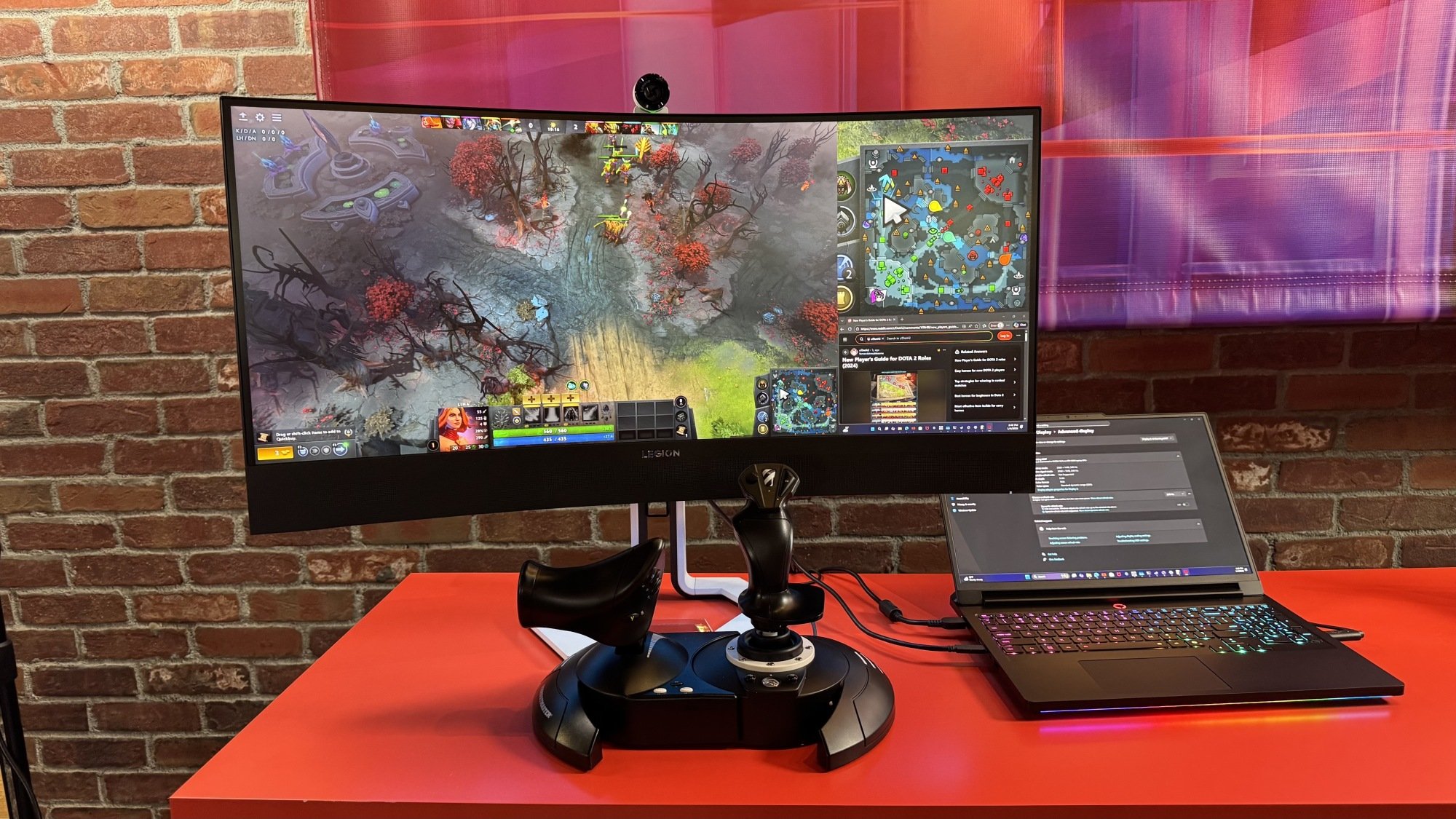
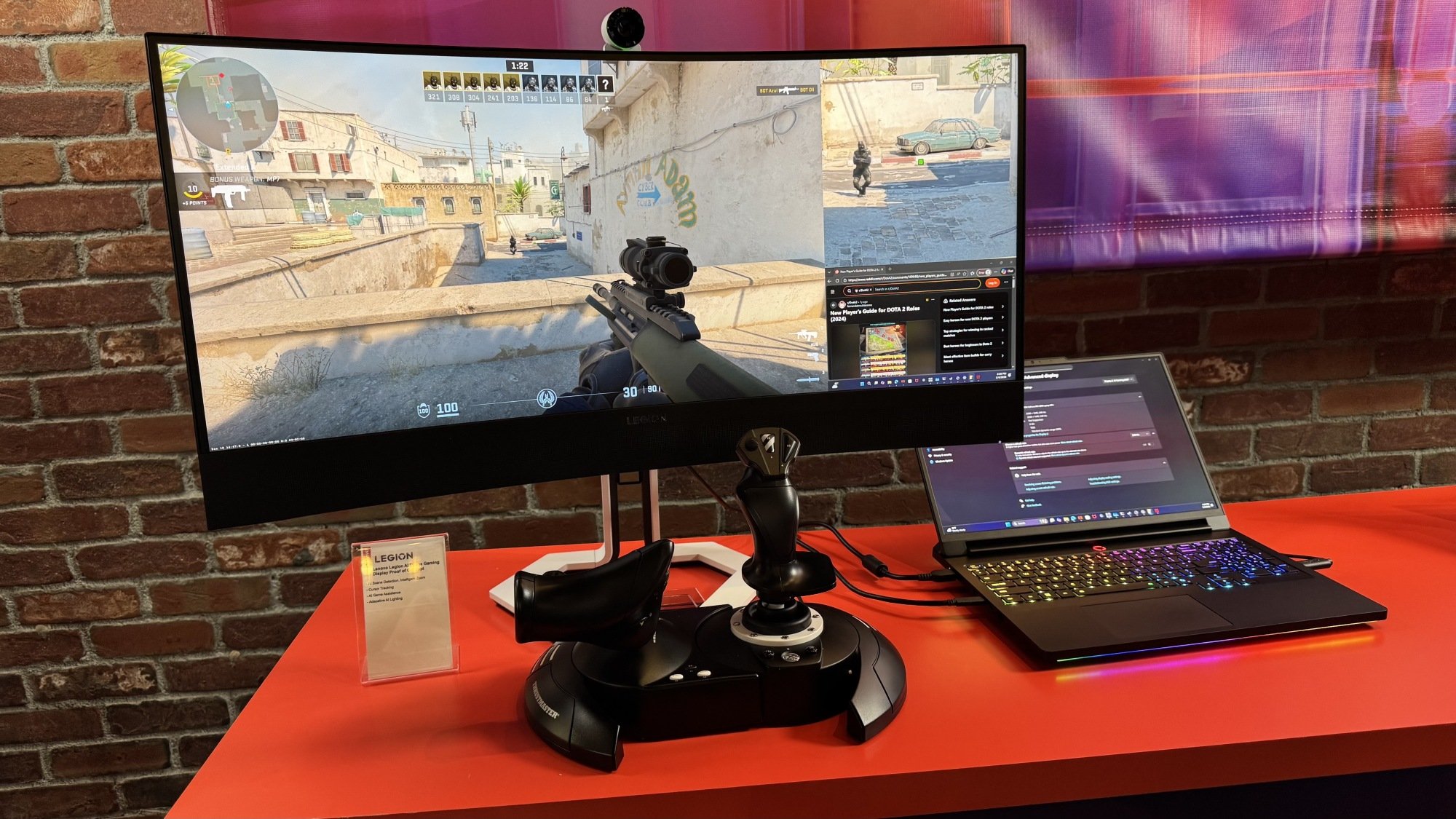
Hardware-wise, this is a normal 21:9 ultrawide gaming monitor, but it’s not actually meant to be used like that. Instead, you play your game in a left-justified 16:9 rectangle that takes up most of the screen, and in the remaining space, the AI will automatically zoom in on part of your gameplay and show a blown-up version of it. For instance, it might show you a zoomed-in map in a MOBA, so you don’t have to look at the tiny mini-map in your main gameplay to know where you or your team are. Or, it might zoom in on your reticle in a shooter, letting you better see your targets. There’s even enough space left over for you to pull up an internet browser and look up some help.

Lenovo AI Frame Monitor showing a map in a MOBA

Credit: Michelle Ehrhardt

It worked pretty well for me in-person. Again, it doesn’t actually generate any visuals, but instead just blows up the most important parts of your game screen so you can more easily glance at them or see them in more detail. That does mean resolution can suffer a little, but that’s what your main gameplay screen is for. For getting across information, it’s a good option.

Plus, while some games will automatically know what to zoom in on, there’s also a generic zoom mode that will just blow up whatever your mouse is hovering over, so it can work with any content. The AI Frame is being pitched for games, but you could also use it like a digital magnifying glass on an article in your browser, for instance.

Lenovo AI Frame monitor displaying a shooter

Credit: Michelle Ehrhardt

The catch? It’s maybe not exactly “fair” to play this way. While a bigger map in a MOBA might just save you some eyestrain, an AI-assisted zoom on a shooting reticle basically lets anyone act like a sniper, regardless of what character you’re playing or gun you have equipped. For me, characters in the distance that were basically ants became immediately visible on the AI Frame, which made gunfights much easier to handle.

I suppose we’ll cross that bridge when we come to it. The AI Frame is just a proof-of-concept for now, so there’s no hard specs sheet or pricing or release date as of yet. But if this does ever actually make it to market, Lenovo might have to contend with companies like Valve. The developer has banned similar “this is arguably cheating” peripherals from its games before, and the AI Frame could be the next battlefront in an ongoing war between peripheral makers (who want to sell you on the idea that buying their products can make you a better player) and developers (who, at least theoretically, want all of their players to be on an even playing field).