10 Hacks Every Google Maps User Should Know

Google Maps is the only navigation service I use, and I’ve learned many of its tricks over the years. The default settings do a good enough job for most people, but it’s worth reviewing all of its features to ensure that you’re getting exactly what you need. For instance, avoiding tolls may be great where you live, but if you’re driving in a different state or country, that same feature could land you in some serious trouble. These tips will help you make the most of Google Maps’ many features, and reduce the chances of losing your way while using the app.

Double-check route settings before leaving

Even if you ignore everything else in this article, don’t ignore this. I’ve observed that, sometimes, Google Maps automatically enables route options I did not select, which can lead to some sticky situations. Whenever I’m on a long road trip to unknown destinations, I like to double-check route settings before I head out. To do this, tap the profile icon in the top-right corner in the Google Maps app, and go to Settings > Navigation > Route options. This has four options: Avoid tolls, Avoid highways, Avoid ferries, and Prefer fuel-efficient routes. I like to disable all of these to ensure that I reach my destination safely and quickly.

If you’re in an area you know fairly well, you can enable some of these options to find a cheaper route, or one with less traffic. But in unfamiliar territory, I prefer to play it safe.

Use offline maps to your advantage

I often travel to places with poor or no cellular signal, and Google Maps’ offline mode has been a lifesaver in these locations. It lets you download Google Maps data for specific locations, and I’ve set up the app to automatically download and update this data when new information becomes available. This makes it a lot easier to navigate when the internet disappears.

You can easily do this by searching for a destination on Google Maps and swiping left on the controls that appear below its name. Tap More > Download offline map > Download to save it for offline use. To automatically update offline maps, go to your Google maps settings and select Offline. Now hit the gear icon in the top-right corner and select Auto-update offline maps.

Select the correct vehicle type

Google Maps shows you better search results and improves recommendations for fuel-efficient routes if you choose the correct type of vehicle. Go to your Google Maps settings and navigate to Your vehicles. Select the correct engine type for your vehicle to ensure better recommendations. If you’re using an EV, you can also use this page to set the type of charger it uses. This helps Google Maps send you to compatible EV charging stations when you’re out and about.

Connect your music streaming account to Google Maps
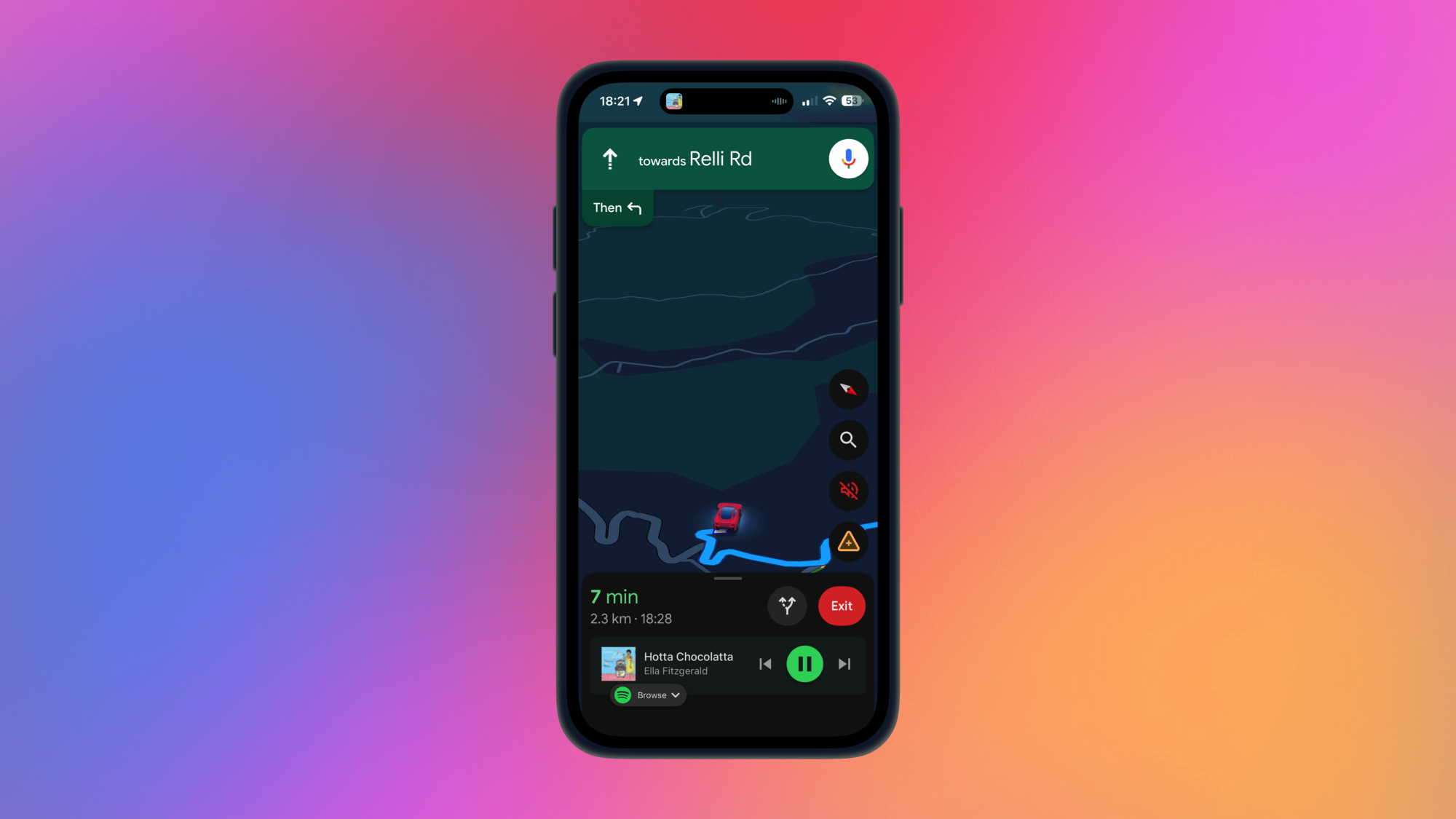
Spotify streaming controls in the Google Maps app.

Credit: Pranay Parab

If you often stream music while driving, you should consider connecting your streaming accounts with Google Maps, which supports both Apple Music and Spotify. Once you’ve connected the navigation app with either of these services, you’ll be able to control music playback and choose playlists from your library, all without leaving the Google Maps app. I don’t recommend looking at your phone when you’re driving, but you can use this feature to control playback or quickly change songs while your car’s stopped. It’s a lot faster than switching to a different app to change music.

Some of you will prefer to use voice assistants to do this, but on an iPhone in particular, I haven’t had much luck with using Siri to change music. That’s why I’ve connected my streaming accounts to Google Maps instead.

Get accessibility information on Google Maps

Google Maps can highlight accessibility information for you. This can be extremely helpful if you’re traveling with people who have mobility challenges or are living with disabilities. I never thought much about these options until I started traveling with my senior citizen parents, who can no longer climb lots of stairs or stand for long hours. That’s why I went to the Google Maps settings, navigated to App & display, and enabled Emphasize accessibility info. This feature prominently shows if a destination has accessible entrances, seating, reserved parking spots, and if restrooms are available (and accessible), etc.

Note that this information isn’t always accurate, so if accessibility is your top priority, I still recommend calling ahead to confirm if your destination’s accessible features are available and in working order. Similarly, when you’re using walking directions to get somewhere, try tapping the options button, which is next to the share icon. This will reveal the Trip options page, where you can select Wheelchair accessible to avoid routes with stairs and choose ones that have elevators instead.

Improve directions while walking

I use Google Maps a lot while I’m walking around, and I have a few tips to make it easier to find where you’re going. The first is to use Google Maps when you’re wearing an Apple Watch or an Android smartwatch, if you have one. Google Maps buzzes your watch when you have a direction coming up, and you can quickly look at the watch to see which way to go. With this, I don’t have to keep looking at my phone for directions. This approach worked really well on a recent trip to Singapore in rainy weather, where it wasn’t always possible to keep looking at my phone while also holding my water bottle and umbrella.

You can also use Live View to get even more detailed walking directions. It uses your phone’s camera to identify shops, signs, and other landmarks near you. Then, it gives you directions in a camera view, which is like a live video walkthrough taking you to your destination. This makes it great for navigating indoors, like in airports or malls.

Hide your Google Maps profile

When you review listings on Google Maps, or make other contributions, others may be able to view your profile and all your ratings, reviews, photos, and other contributions. If you don’t want this information to be visible, you can make your profile private on Google Maps. To do this, go to Google Maps settings > Location & privacy > Profile and enable Restricted profile.

Delete your Google Maps history and timeline data

Google Maps also keeps track of all the places you’ve visited, and not everyone is comfortable storing that data on Google’s servers. Now, I should say that this information is legitimately useful sometimes. Once, a friend’s car was wrongly sent a speeding ticket from a different state. He was able to use his Google Maps timeline data to prove to law enforcement that he was, in fact, not in that state at the time.

Having said that, you’ll be able to better preserve your privacy by not storing this information in the first place. To do that, go to Google Maps settings > Location & privacy. Review all the options in the Timeline section to see what fits your preferences. I’ve switched off Timeline entirely, and I also chose Delete all Timeline data, but your needs may be different, so you may choose to delete a specific range of timeline data or automatically delete it after a certain period of time instead.

To delete your search history from Google Maps, scroll down on this page and select Maps history.

Use incognito mode in Google Maps
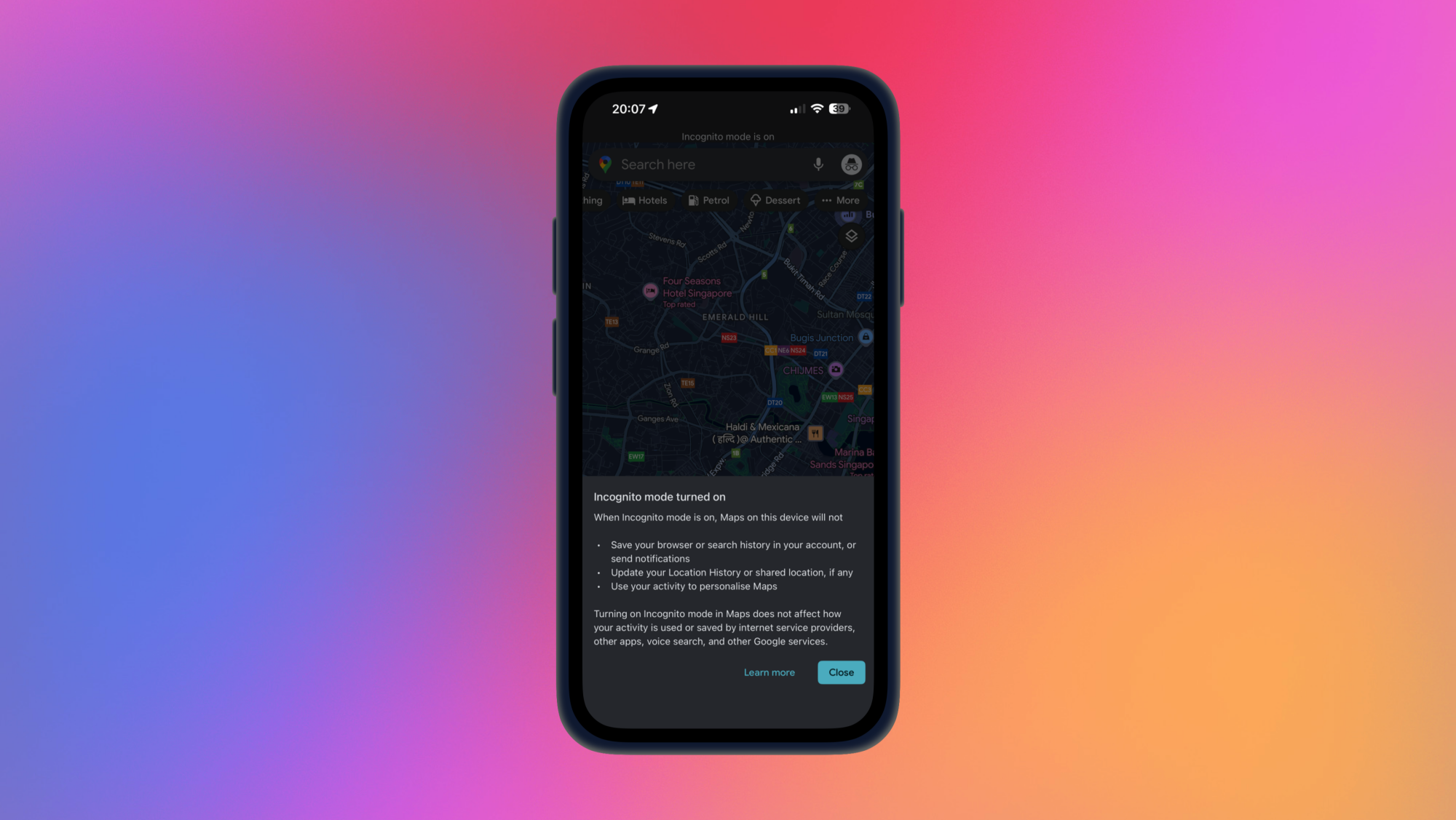
Incognito mode in Google Maps.

Credit: Pranay Parab

If deleting your Google Maps data permanently isn’t the ideal solution for you, then you may want to try incognito mode instead. This works exactly like it does in web browsers, meaning that it won’t save your Google Maps data as long as you’re in that mode. You can enable it by tapping the profile icon in Google Maps and selecting Turn on incognito mode. You can check if it’s enabled by looking at the profile icon, where your picture will be replaced by the incognito icon.

Save your favorite places in lists

If you have trouble remembering all of the trips you want to take, you can quickly save your favorites in Google Maps, and add them to various lists. For instance, if you’re planning a trip to Florida and you want to save all of the destinations you’ve heard about in one spot, you can look for each one individually on Google Maps and hit the Save button on their listings. This lets you save the destination to a new list, where you can keep a tab on all the places you want to go to. You can also share these lists with others, and everyone can add the places they’re interested in to your list, too. I used this feature during my London trip last year, where I bookmarked restaurants that served authentic fare from around the world. It allowed me to taste food that I’d never tried before, and helped me better organize my daily plan to fit a couple of museums or other attractions around my meals.

Intel Core Ultra 9 290K Plus Battles Ryzen 9 9950X3D In Benchmark Leak

Intel Core Ultra 9 290K Plus Battles Ryzen 9 9950X3D In Benchmark Leak
To our surprise, CES came and went without a roll out of Intel’s upcoming Arrow Lake Refresh processors that it’s hinted about in recent months, though on hindsight it’s probably because it wanted Panther Lake to have the spotlight all to itself. Nevertheless, we’re one day closer to an Arrow Lake Refresh launch, and also another leaked benchmark

Microsoft Pledges Full Power Costs, No Tax Breaks in Response To AI Data Center Backlash

Microsoft announced Tuesday what it calls a “community first” initiative for its AI data centers, pledging to pay full electricity costs and reject local property tax breaks following months of growing opposition from residents facing higher power bills. The announcement in Washington, D.C. marks a clear departure from past practices; Microsoft has previously accepted tax abatements for data centers in Ohio and Iowa.

Brad Smith, Microsoft’s president, said the company has been developing the initiative since September. Residential power prices in data center hubs like Virginia, Illinois, and Ohio jumped 12-16% over the past year, faster than the U.S. average. Three Democratic senators launched an investigation last month into whether tech giants are raising residential bills. Microsoft also pledged a 40% improvement in water efficiency by 2030 and committed to replenishing more water than it uses in each district where it operates.


Read more of this story at Slashdot.

Tesla launches a seven-seat version of the 2026 Model Y

Tesla’s 2026 Model Y is now available on the company’s site and it comes with a new (and old) option: a seven-seat version via a third row. The extra seating costs $2,500 and is only available if you order the Premium All-Wheel-Drive Long Range model. Tesla first teased the option last year via an email to prospective buyers with the promise of “seating for up to seven and enough room for everyone’s gear,” Electrek reported at the time. 

The new seats appear to be designed mainly for children as they don’t offer much legroom, according to images on Tesla’s configurator. Tesla notes that the seven-seat interior “features fold-flat second-row and third-row seats,” though it’s not clear if those seats fold down electrically like the second row. 

Tesla's 2026 Model Y launches with a new third row
Tesla

Tesla is facing increased competition, especially in the crossover/SUV category, and saw another sales decline last quarter. The company previously sold a seven-seat version of the Model Y in the US for a short time before it was refreshed early last year. Since then, though, it has only been available with five seats. Tesla launched a six-seat “Model YL” version in China in August 2025 with a six-inch wheelbase extension that the US model lacks. Elon Musk said that model would come to the US market in late 2026 or maybe “never.” 

Otherwise, changes to the Model Y lineup are minor and confined to the Premium version. Those include a 20-inch dark-grey “Helix” “wheel option, a new black headliner, a bigger, higher-resolution 16-inch display and darker rear badging. 

This article originally appeared on Engadget at https://www.engadget.com/transportation/evs/tesla-launches-a-seven-seat-version-of-the-2026-model-y-130039385.html?src=rss

Find Free Movies (Legally) With WikiFlix, a Database of Films in the Public Domain

I love movies, and especially when I can watch them for free: And while streaming the latest Hollywood blockbusters might come at a price (at least for those wanting to stay on the right side of the law), there’s an ever-growing collection of older films that you can get at online without paying a dime.

The site WikiFlix (as spotted by the fine folks at Gizmodo) lists movies available to stream that are now in the public domain. The way that copyright works in the U.S. basically means that copyright expires on films after a period of 95 years—so with every year that passes, a batch of new flicks become available to view by anyone, free of charge.

If you’re looking for something classic for your next movie night, it’s well worth a look.

WikiFlix site
There are plenty of categories to choose from.
Credit: Lifehacker

WikiFlix is straightforward to use, right from the homepage. It tracks films added to sites such as Wikimedia Commons, YouTube, and the Internet Archive, and whenever you click through on a movie, you can also see where it has come from. When you’ve made your pick, it streams right in your browser window.

The home page is split up into categories that you can browse through—including female directions, animations, and biographical films, the last time I checked—and there’s also a search button up in the top right corner if you know what you’re looking for. Next to the search button is an account button, which enables you to sign up for a MediaWiki account if you want to be able to contribute to the site too.

Hover over the main WikiFlix heading at the top of the page and a quick link to Movies by year pops up. This is a useful way of finding the most recent flicks added to WikiFlix, and digging back into the archive—not all of the movies here are in the public domain because their copyright has expired, and you will find more recent titles too.

Click through on any thumbnail to get more information about each movie. You can typically get information on the director, cast, and running time, and a plot summary is included too. Some of the entries come with trailers (although you can also search for these separately on sites like YouTube).

WikiFlix site
Each movie comes with a cast list.
Credit: Lifehacker

Start streaming a movie, and the usual playback controls appear, though the interface does depend to some extent on the site that’s hosting the movie. For films hosted on YouTube, for example, you can typically adjust the playback quality and speed. Some movies come with subtitles too.

Obviously a site like this is going to skew towards older, classic movies, but there’s plenty to explore here: Metropolis, It’s a Wonderful Life, All Quiet on the Western Front, Nosferatu, Charlie Chaplin comedy The Gold Rush, and lots more.

Free movie repositories aren’t quite as rare online as you might think. We’ve written before about the best free and legal streaming services for movies and TV, featuring ad-supported streaming platforms such as Tubi and PlutoTV. Again, the emphasis is on older films, but there’s a huge amount on offer at no charge.

Star Wars Outlaws developer Massive Entertainment and Ubisoft Stockholm face layoffs

We aren’t even two weeks into the new year and Ubisoft is already looking to carry out its second round of layoffs in 2026. The company has informed workers at Massive Entertainment and Ubisoft Stockholm of a “proposed organizational restructure” that could affect around 55 roles across its two Swedish studios. Workers at Massive (the developer of The Division series, Star Wars Outlaws and Avatar: Frontiers of Pandora) were offered voluntary buyouts late last year as part of Ubisoft’s ongoing cost-cutting efforts.

“This restructure follows the completion of the Voluntary Leave Program launched during the fall of 2025, a finalized long-term roadmap and a completed staffing and appointment process, which together have provided clearer visibility into the structure and capacity required to support the two studios’ work and sustainably over time,” Ubisoft told IGN in a statement. “These proposed changes are forward-looking and structural, they are not related to individual performance, recent deliveries or the quality of the work produced by the teams.”

Ubisoft claims that the “long-term direction for the studios remains unchanged.” Massive will continue working on projects that include The Division 3. Ubisoft Stockholm, meanwhile, is beavering away on a new franchise that’s still under wraps for now. That project is harnessing the studio’s Ubisoft Scalar cloud computing tech, according to Game Developer.

Earlier in January, the company said it was shutting down Ubisoft Halifax, resulting in the loss of 71 jobs. Workers at that studio unionized just 16 days earlier. Ubisoft said its decision was part of “company-wide actions to streamline operations.”

This article originally appeared on Engadget at https://www.engadget.com/gaming/star-wars-outlaws-developer-massive-entertainment-and-ubisoft-stockholm-face-layoffs-134234968.html?src=rss

These Beats Studio Pro Headphones Are Under $100 Right Now

We may earn a commission from links on this page. Deal pricing and availability subject to change after time of publication.

A comfortable, good-looking pair of headphones with bass-forward sound and deep Apple integration doesn’t usually dip below the $100 mark, but this one just did. The Beats Studio Pro headphones in factory-reconditioned condition are down to $94.99 on Woot.

For comparison, the same model listed as “refurbished: excellent” costs $135 on Amazon, while a brand-new pair is currently $199.99 (marked down from $349.99). This deal runs for two days or until it sells out, and Prime members get free standard shipping (while everyone else pays a $6 shipping fee). Note that shipping isn’t available to Alaska, Hawaii, PO boxes, or APO addresses.

The Beats Studio Pro are a premium-feeling set of noise-canceling headphones that lean heavily into comfort and polish. The build feels sturdy, the padding is generous, and they’re easy to wear for long stretches without pressure fatigue. Sound quality sticks to the familiar Beats formula: pronounced bass with crisp, slightly elevated highs. It’s not the most neutral tuning—listeners who prefer a flatter, studio-style sound may find it colored—but it works well for pop, hip-hop, and electronic playlists. Plugging in via USB-C unlocks hi-res audio and three preset EQ modes, which noticeably improve clarity. The downside is that those EQ presets aren’t available over Bluetooth, and there’s no manual EQ option at all.

Codec support is another limitation. Wireless audio tops out at SBC and AAC, meaning Android users miss out on higher-quality options like AptX or LDAC. As for its ANC, it is competent but unremarkable. It does a decent job with low-frequency noise but struggles more in crowded or high-pitched environments, and you can hear a faint hiss when ANC is enabled, notes this PCMag review. Battery life, however, holds up well: Expect around 24 hours with ANC on, or up to 40 hours without it. The Studio Pro won’t dethrone Sony or Bose if noise cancellation or deep audio customization is your top priority. But for casual listeners who value comfort, long battery life, and smooth Apple device integration, this price makes the trade-offs much easier to accept.


Deals are selected by our commerce team

A Resident Evil showcase is taking place on January 15

Resident Evil Requiem, the first new mainline entry in the series since 2021’s Resident Evil Village, is just over a month away and Capcom is ready to share more details. The publisher will air a Resident Evil Showcase on January 15 at 5PM ET. You’ll be able to watch it on Twitch and YouTube (in English and Japanese).

The stream will run for around 12 minutes. It will feature “all the latest info on Resident Evil Requiem,” which will almost certainly include some gameplay ahead of it hitting PS5, Xbox Series X/S, Nintendo Switch 2 and Steam on February 27. Capcom might have more in store, though. An announcement for the showcase on the Resident Evil website states that, “Some of the games included in the show aren’t suitable for children.”

That suggests the company will share details about other RE titles. It may just be a case of Capcom offering a reminder that it’s also bringing ports of Resident Evil 7 and Village to Switch 2 on February 27. Still, there’s a chance we’ll hear news of more ports. There’s also the possibility that we get a glimpse of the next Resident Evil movie, a reboot of the series from Barbarian and Weapons filmmaker Zack Cregger that’s set to hit theaters in September. 

This article originally appeared on Engadget at https://www.engadget.com/gaming/a-resident-evil-showcase-is-taking-place-on-january-15-133000548.html?src=rss

Canyon’s Spectral:ON and Torque:ON go back on sale with new battery after safety recall

Canyon has announced its Spectral:ON and Torque:ON eMTBs are back in stock after being pulled by the brand due to concerns over battery safety.

The brand issued a stop-use notice and recalled batteries at the end of 2024 after a small number of battery housings developed cracks that enabled moisture to enter the battery.

At the time, it was said this had the potential to trigger a short-circuit that bypassed the fail-safe protection mechanisms in the battery.

Canyon new battery
The previous battery was a proprietary Canyon part, with the new one being made by Darfon. Canyon

Now Canyon has relaunched the electric mountain bikes with an 800Wh battery that is 150g lighter than the previous 900Wh battery.

To ease these safety concerns, Canyon says it now uses a reinforced, highly durable aluminium housing, with every interface point being double-sealed to prevent water ingress.

There is a new internal membrane to prevent moisture build-up. 

Canyon says this results in a waterproof rating of IP7, up from IP4, meaning the bike can be submerged in up to one metre of water – although it doesn’t recommend you try this.

Canyon Torque:ON with Shimano EP8 motor
Shimano’s EP801 motor still sits at the heart of the bikes. Canyon

Canyon also claims the Darfon battery is the first complete aluminium battery on the market, with aluminium end caps that should increase durability. 

While the battery is smaller at 800Wh compared to the 900Wh of the previous bikes, Canyon says it has been able to take advantage of faster charging times, smart charging, more efficient battery cells and a better distribution of weight.

Apart from the new 800Wh battery and the lighter weight, Canyon says the bikes remain the same as they were before they were taken off sale.

Despite the bikes being first released in May 2023, they remain a serious value proposition, featuring impressive spec sheets and credentials.

Both bikes continue to use Shimano’s EP801 motor, which churns out 85Nm of torque and up to 600 watts.

Canyon Spectral ON CF7
Canyon’s Spectral:ON CF7 looks great value for money. Canyon

The Spectral:ON is the brand’s full-power trail bike, with 155mm of rear travel matched to a 160mm fork.

It starts at £3,749 / $3,899 / €3,999 for the CF7 build, featuring a RockShox Lyrik fork and Deluxe Select R shock, and tops out at £5,599 / €5,999 for the CFR build that features Fox Factory suspension and SRAM’s X0 Eagle AXS.

Canyon Torque ON CF7
The Torque:ON CF7 comes well-specced for blitzing bike-park laps, and comes in under £4,000 / €4,000. Canyon

The Torque:ON is the brand’s beefiest offering, designed as a self-shuttling bike-park shredder with 175mm rear travel and a burly 180mm fork.

Prices start at £3,749 / €3,999 for the CF7, which sees a RockShox Zeb Select fork paired with a Super Deluxe Coil Select, with the top-spec CF9 priced at £4,649 / €4,999 with a Fox Factory 38 fork and Float X2 shock.

FFmpeg Merges A Number Of Vulkan Improvements To Start 2026

FFmpeg developer Lynne has landed a number of Vulkan-related imporvements to this widely-used open-source multimedia library. Over the past year FFmpeg saw Vulkan shader-based decoding for more video formats, AV1 and VP9 extension work, performance improvements, and other work around Vulkan Video. It will be very exciting to see how FFmpeg delivers in 2026 with Vulkan Video and how the software ecosystem as a whole begins taking up this cross-platform, open industry standard for video encode/decode…

Insta360 releases AI-powered follow-up to its Link webcams

Insta360, a company most known for its action cameras, has released two new AI-powered 4K webcams, the Link 2 Pro and Link 2C Pro, aimed at creators, educators and remote professionals. The company’s goal with these models is “a webcam experience that looks and sounds remarkably close to a professional camera and microphone setup.”

Both models use a larger 1/1.3-inch sensor with dual native ISO for improved low-light performance over the previous generation, and both support HDR. Insta360 says the audio on both models leverages beamforming technology as well as AI noise canceling to help voices sound clearer in noisy environments. Users can choose from four pickup modes designed for different sound sources like “Focus” that isolates a single voice or “Wide” if there are multiple speakers.

Video resolution on both models tops out 4K at 30 fps, and Insta360 says its updated True Focus system uses phase-detection autofocus to lock onto subjects, keeping them in focus while they move. There’s also a “Natural Bokeh” mode meant to mimic the shallow depth-of-field look of a traditional DSLR camera, for users who enjoy that look.

As for what sets them apart, the Link 2 Pro sports a 2-axis gimbal for AI-assisted tracking, which offers single or group-mode framing, while the Link 2C Pro is static and designed for fixed-position setups. Both models offer gesture control features, allowing users to control certain functions hands-free. These include starting or stopping tracking and zooming in or out. Both models also include a magnetic mount for easy placement on metal surfaces.

Several different modes are offered that aid in teaching and presenting. Among them are Smart Whiteboard mode, which will automatically detect a user’s whiteboard and keep it clearly in frame, and DeskView mode, which captures an overhead view of a user’s desk. There’s also a green screen mode, a portrait mode and support for virtual backgrounds.

The new webcams also support Insta360 InSight, the company’s subscription AI-powered meeting assistant. InSight can record meetings, generate transcripts, create summaries and more.

The Link 2 Pro will retail for $250 while the Link 2C Pro will go for $200. Both models are available for purchase now.

This article originally appeared on Engadget at https://www.engadget.com/cameras/insta360-releases-ai-powered-follow-up-to-its-link-webcams-130003572.html?src=rss

Trump Says Microsoft To Make Changes To Curb Data Center Power Costs For Americans

An anonymous reader quotes a report from CNBC: President Donald Trump said in a social media post on Monday that Microsoft will announce changes to ensure that Americans won’t see rising utility bills as the company builds more data centers to meet rising artificial intelligence demand. “I never want Americans to pay higher Electricity bills because of Data Centers,” Trump wrote on Truth Social. “Therefore, my Administration is working with major American Technology Companies to secure their commitment to the American People, and we will have much to announce in the coming weeks.”

[…] Trump congratulated Microsoft on its efforts to keep prices in check, suggesting that other companies will make similar commitments. “First up is Microsoft, who my team has been working with, and which will make major changes beginning this week to ensure that Americans don’t ‘pick up the tab’ for their POWER consumption, in the form of paying higher Utility bills,” Trump wrote on Monday. Utilities charged U.S. consumers 6% more for electricity in August from a year earlier, including in states with many data centers, CNBC reported in November.

Microsoft is paying close to attention to the impact of its data centers on local residents. “I just want you to know we are doing everything we can, and I believe we’re succeeding, in managing this issue well, so that you all don’t have to pay more for electricity because of our presence,” Brad Smith, the company’s president and vice chair, said at a September town hall meeting in Wisconsin, where Microsoft is building an AI data center. While Microsoft is moving forward with some facilities, the company withdrew plans for a data center in Caledonia, Wisconsin, amid loud opposition to its efforts there. The project would would have been located 20 miles away from a data center in the village of Mount Pleasant.


Read more of this story at Slashdot.

Learning from Code Clubs around the world: How approaches differ but values are shared

Every week, young people around the world gather in libraries, classrooms, community centres, and makerspaces to create with code. From Gujarat to Glasgow, Nairobi to New Jersey, the settings may differ, but the energy is unmistakable. 

Code Club meeting at the shared hub at AEF Reuben in Kenya

We set out to learn from the wealth of experiences within the global Code Club community: how clubs adapt to local needs, and which practices consistently support young people’s learning. Although we found small differences in how clubs make Code Club work locally, what stands out far more are the shared principles that make it work everywhere. Here we share stories from across our network that collectively paint a vibrant picture of what makes this movement work.

Inspiration from the people who make Code Club thrive

One theme runs through every story: Code Club is powered by people who really understand the needs of their community.

During a visit to a set of Code Clubs in India, our team met a group of girls who once faced barriers to attending school. Now, they are confidently creating Scratch projects and exploring new technologies. Their club leader explained how a simple change — allowing girls to attend school wearing traditional attire — opened doors for families. Seeing these young creators code with pride is a vivid reminder of how opportunity can reshape futures.

Welspun Vapi Code Club in Gujarat

A club leader at Better Juniors Digital Club at Better Life Primary and Junior School in Kenya described how their programme began with just one laptop. Rather than letting that limit what learners could do, he found solutions everywhere: applying for grants, borrowing digital space from a nearby hub, and setting up equipment so children could work on projects together. His determination effectively created a bridge between schools and resources, opening up real opportunities for every child to learn.

We also heard from educators whose clubs have become long-standing pillars of their communities. At Rhiwbina Library in Wales, leaders have been running Code Club for over a decade, creating a space where older creators naturally guide new ones. When asked about club rules, one child replied: “There’s only one and that’s ‘respect’.” That simple principle continues to shape a joyful, collaborative atmosphere.

Fiona Lindsay and pupils at Hillside Primary School in Scotland

And sometimes the inspiration comes from the young people themselves. At Hillside Primary in Scotland, an enthusiastic creator took it upon himself to run taster sessions and codealongs for new members, helping them discover whether Code Club was right for them. His enthusiasm and leadership were infectious, and that spirit of young people lifting up their peers is something we’ve seen in clubs all over the world.

Moments of joyful learning capture the spirit of Code Club

In one club that meets across three different venues in Pennsylvania, USA — a creative arts centre, a coffee shop, and a library — the excitement became contagious. The librarian, Miss Sandy, was so inspired by the learners’ projects — including the moment they added “Shredder Cat”, the library’s pet mascot, into their digital creations — that she has begun learning to code alongside them.

Miss Sandy, Ruth, and her Code Club in Pennsylvania
Miss Sandy, Ruth, and her Code Club in Pennsylvania 

At one showcase event in India, learners proudly demonstrated text-to-speech and video-sensing projects — remarkable achievements for many of them in their first year of coding. They explained their ideas with confidence and clarity, sharing the logic behind their work as parents, teachers, and mentors looked on with pride. 

In the UK, we experienced a beautiful moment at Fakenham Academy where the room filled with a chorus of squarks, clicking, tapping, and squeaking sounds as learners adapted the Grow a Dragonfly project in their own creative ways.

From applause erupting whenever a project is finished to a room buzzing with micro:bits or young people debugging together on a shared laptop, these snapshots show Code Club at its best.

All about community: Belonging, identity, and a resourceful spirit

Whatever the context or setting, Code Club leaders are resourceful. They are not waiting for others to solve their challenges; together with their creators, they are finding local solutions that work. Communities share equipment, mentor each other, offer space, and build continuity for learners in imaginative ways. Young people are gaining far more than digital skills: they are developing belonging, confidence, and a clear sense that they are part of something bigger.

For example, in a club in Kenya, two groups learnt side by side in a shared space. Younger learners were welcomed by older peers who acted as mentors, creating a real sense of community — collaborative, vibrant, and full of pride in each other’s achievements.

Learners in a Code Club in Kenya.

We also saw how deeply this work is woven into people’s identities. One team member visiting three clubs in Malvern, UK, wrote about Bob Bilsland, a Code Club champion for 13 years, describing how naturally he connected with learners at their own level and how fully he embodied the role of mentor and champion:

“Seeing his versatility as he mentored, sparked excitement and connected with creators at their own level was a thing to behold… he truly walks the talk.”

The impact can sometimes show up in unexpected ways. Holly, a leader from Illinois, USA, shared that her learners wear their Code Club t-shirts to school as “spirit gear” on Fridays. She told us how much this meant to her students:

“They absolutely love their shirts and are thrilled to be able to wear them… It makes them feel like a team.” A reminder that belonging matters just as much as skills.

Across every example, we saw resilience, creativity, and generosity in action because Code Clubs grow from strong communities.

Locally rooted but globally informed

These stories underscore something essential: Code Club grows not because of any one model, but because communities everywhere make it their own. Sandra Keeru, Programme Coordinator in Kenya, put it beautifully when she reflected that:

“Code Club is locally rooted but globally informed.” 

Each club reflects the needs, culture, and creativity of its community, yet everywhere the same shared values shine through: curiosity, inclusion, and the belief that young people can achieve remarkable things.

Code Club is more than just learning to code; it’s about creating opportunities, encouraging confidence, and building a global network of digital creators. Whether you’re a mentor, educator, or young digital maker, there’s a place for you in the community. Start your Code Club journey today and join a global community of digital creators.

The post Learning from Code Clubs around the world: How approaches differ but values are shared appeared first on Raspberry Pi Foundation.