Sperm donor with rare cancer mutation fathered nearly 200 children in Europe

A single sperm donor who carries a rare cancer-causing genetic mutation has fathered at least 197 children across 14 countries in Europe, according to a collaborative investigation by 14 European news groups.

According to their investigative report, some of the children have already died, and many others are expected to develop deadly cancers.

The man—Donor 7069, alias “Kjeld”—carries a rare mutation in the TP53 gene, which codes for a critical tumor suppressor called protein 53 or p53. This protein (which is a transcription factor) keeps cells from dividing uncontrollably, can activate DNA repair processes amid damage, and can trigger cell death when a cell is beyond repair. Many cancers are linked to mutations in p53.

Read full article

Comments

HDMI Forum Continues To Block HDMI 2.1 For Linux, Valve Says

New submitter emangwiro shares a report: The HDMI Forum, responsible for the HDMI specification, continues to stonewall open source. Valve’s Steam Machine theoretically supports HDMI 2.1, but the mini-PC is software-limited to HDMI 2.0. As a result, more than 60 frames per second at 4K resolution are only possible with limitations. In a statement to Ars Technica, a Valve spokesperson confirmed that HDMI 2.1 support is “still a work-in-progress on the software side.” “We’ve been working on trying to unblock things there.”

The Steam Machine uses an AMD Ryzen APU with a Radeon graphics unit. Valve strictly adheres to open-source drivers, but the HDMI Forum is unwilling to disclose the 2.1 specification. According to Valve, they have validated the HDMI 2.1 hardware under Windows to ensure basic functionality.


Read more of this story at Slashdot.

What’s New on Netflix in January 2026

Netflix’s January lineup is on the lighter side, but includes the return of period romance series Bridgerton (Jan. 29). Season four centers on Benedict, the second-eldest sibling, and Sophie, who he meets at Lady Bridgerton’s masquerade ball. The first four episodes drop in January, with the remaining four coming at the end of February.

Another original series worth watching is Agatha Christie’s Seven Dials (Jan. 15), an adaptation of crime author’s novel The Seven Dials Mystery. Mia McKenna-Bruce plays sleuth Lady Eileen “Bundle” Brent, who is attempting to solve a murder mystery at a country house party in 1920s England. Martin Freeman and Helena Bonham Carter also star.

On the film side, rom-com People We Meet on Vacation (Jan. 9) is an adaptation of Emily Henry’s novel of the same name and stars Tom Blyth and Emily Bader. The Rip (Jan. 16) is an action thriller starring Ben Affleck and Matt Damon as Miami cops who discover millions of dollars in cash at a stash house.

Netflix is also releasing true crime documentary Kidnapped: Elizabeth Smart (Jan. 21) about the 2002 abduction of the 14-year-old from her home in Salt Lake City, and her return several years later.

In addition to hosting WWE’s Monday Night Raw every week, Netflix is also streaming Skyscraper Live (Jan. 23), in which free solo climber Alex Honnold will attempt one of the world’s tallest skyscrapers in Taipei, Taiwan.

Here’s everything else coming to Netflix in January, and everything that’s leaving.

What’s coming to Netflix in January 2026

Coming soon

  • Free Bert—Netflix Series

  • Take That—Netflix Documentary

  • Undercover Miss Hong—Netflix Series

Available January 1

  • Dr. Seuss’s Red Fish, Blue Fish: Season 2—Netflix Family

  • Love from 9 to 5—Netflix Series

  • My Korean Boyfriend—Netflix Series

  • Run Away—Netflix Series

  • Time Flies—Netflix Series

  • 12 Years a Slave

  • 30 Minutes or Less

  • Becky

  • Brüno

  • Colombiana

  • Conan the Destroyer

  • Dawn of the Dead

  • Despicable Me

  • Despicable Me 2

  • District 9

  • Dune

  • Erin Brockovich

  • Falling Skies: Seasons 1-5

  • Forever My Girl

  • Free Solo

  • Ghostbusters: Answer the Call

  • Green Room

  • Harry and the Hendersons

  • Hellboy

  • Johnny Mnemonic

  • Just Go With It

  • Lone Survivor

  • Man on Fire

  • Monty Python’s The Meaning of Life

  • My Girl

  • Only the Brave

  • Pitch Perfect

  • Priscilla

  • Twins

  • Wild Things

Available January 2

Available January 3

  • The Following: Seasons 1-3

Available January 5

Available January 6

Available January 7

Available January 8

Available January 9

Available January 12

Available January 13

Available January 14

Available January 15

Available January 16

Available January 19

Available January 20

Available January 21

Available January 22

Available January 23

Available January 26

Available January 27

  • Mike Epps: Delusional—Netflix Comedy Special

Available January 29

What’s leaving Netflix in January 2026

Leaving January 1

  • Agatha Christie’s Crooked House

  • Aquaman and the Lost Kingdom

  • Baby Driver

  • Blue Beetle

  • Blue Crush

  • Blue Streak

  • Captain Phillips

  • Clear and Present Danger

  • Coach Carter

  • Crazy Rich Asians

  • Death Becomes Her

  • Dirty Dancing

  • Doctor Sleep

  • Don’t Worry Darling

  • Dreamgirls

  • Fifty Shades Darker

  • Fifty Shades Freed

  • Fifty Shades of Grey

  • G.I. Joe: Retaliation

  • G.I. Joe: The Rise of Cobra

  • Ghost

  • The Goonies

  • The Hangover

  • The Hangover: Part II

  • The Hangover: Part III

  • How to Be Single

  • I Love You, Man

  • Isn’t It Romantic

  • Kung Fu Panda

  • Kung Fu Panda 2

  • Kung Fu Panda 3

  • Lara Croft Tomb Raider: The Cradle of Life

  • Lara Croft: Tomb Raider

  • Life of the Party

  • Lost: Seasons 1-6

  • Mad Max: Fury Road

  • The Martian

  • The Mask

  • Meet Joe Black

  • Ocean’s 8

  • Runaway Bride

  • Scarface

  • Star Trek

  • Star Trek Beyond

  • Star Trek Into Darkness

  • The Sweetest Thing

  • Taxi Driver

  • Training Day

  • Zero Dark Thirty

Leaving January 2

  • Dodgeball: A True Underdog Story

Leaving January 3

  • Mr. Robot: Seasons 1-4

Leaving January 9

  • Maze Runner: Death Cure

  • Maze Runner: The Scorch Trials

  • The Maze Runner

Leaving January 16

  • Confessions of a Shopaholic

Leaving January 18

  • Donnie Darko

Leaving January 23

  • House of Lies: Seasons 1-5

Leaving January 29

  • Prison Break: Seasons 1-5

Petco accidentally exposed heaps of customer information

Petco has accidentally exposed a whole lot of customer data and personal information, according to a report by TechCrunch. This is thanks to a security lapse involving its Vetco clinics website, forcing the company to take a portion of that site offline.

Petco has confirmed the leak and TechCrunch noted that the security lapse allowed anyone to download customer records without login information. The exposed data includes customer names, driver’s license numbers, dates of birth, Social Security numbers and even financial information. It also includes customer records from visits to Vetco, like medical histories, pet names, vaccination records and other stuff like that.

This was due to an incorrect software setting that made a number of files accessible online, according to a notice filed by California’s attorney general and reported on by Mashable. The company has since corrected the setting, removed the exposed files and implemented security measures.

However, Petco hasn’t said if any data was actually extracted during the security lapse or if it even has the means to suss out that kind of thing. Vetco customers should probably perform some due diligence to shore up personal security. The company is offering credit and identity monitoring services to impacted customers, but only in some states. We recommend giving Petco a call to discuss options. 

Data breaches of this sort are becoming an unfortunate part of modern life. Recent security breaches have impacted entities like AT&T, Discord, the social network Tea and the human resources company Workday, among others.

This article originally appeared on Engadget at https://www.engadget.com/big-tech/petco-accidentally-exposed-heaps-of-customer-information-163825302.html?src=rss

This Volume App for Mac Lets You Do More With Your Earbuds and Speakers

SoundSource, my preferred volume control app on the Mac, just got a major upgrade. The developer, Rogue Amoeba, recently released SoundSource 6 for Mac, which adds support for AirPlay devices, per-app equalizers, output device groups, and much more. It’s an incredibly polished app packed with features, but my favorite feature is its ability to turn any random group of earbuds and speakers into a multi-room audio setup.

Multi-room audio with SoundSource 6

SoundSource on the Mac, showing grouped audio devices

Credit: Pranay Parab

You can use SoundSource 6 to create a group of audio output devices, including Bluetooth speakers, wired headphones, AirPods, AirPlay speakers, and literally any other audio device your Mac can connect to. Then, you can send audio from any app to all of these devices at the same time, making for the ideal multi-room audio setup. I’ve used this to play Apple Music songs simultaneously on my AirPods, Bluetooth speakers, my Mac’s speaker, and my HomePod. It’s a great way to get music playing throughout your whole house.

To get started, click SoundSource’s menu bar icon to open the app, and click the drop-down menu next to any app’s volume slider. You’ll see a button called Create Output Group or Edit Output Groups. Click this button and select New Group. You can now add as many audio devices as you want to the group.

In theory, you could also use this to chain a bunch of Bluetooth speakers from different brands to enjoy a more immersive audio experience while watching a movie, but in practice, latency makes the experience less than ideal. Even a slight lag in one of the speakers can ruin an immersive audio experience, but that’s not SoundSource’s fault. It’s a difficult job to get multiple speakers from different brands, which use different audio output standards, to work as a perfect surround sound setup. Given the barriers in place, SoundSource does an admirable job with its task.

I found that the multi-room audio feature works best when you’re listening to music with one speaker in each room. That way, the slight latency won’t bother you at all, and you can have music to keep you company as you run through household chores.

AirPlay support is great to have

SoundSource on the Mac, showing AirPlay speakers

Credit: Pranay Parab

As someone who’s used SoundSource since 2017, I’ve always missed the ability to send audio to AirPlay devices. Until recently, Rogue Amoeba had left that feature to another of its apps—Airfoil. However, SoundSource’s latest release adds support for AirPlay devices, which means that you can finally use it to send audio from any app on your Mac to a HomePod, Apple TV, or other AirPlay-enabled device.

I use SoundSource to redirect audio from certain apps to specific speakers, and with AirPlay support, I can send music straight to my HomePod, while restricting notification sounds from messaging apps to the Mac’s built-in speakers.

Per-app EQ is a big deal

SoundSource on the Mac, with the per-app EQ feature displayed

Credit: Pranay Parab

I first started using SoundSource for its ability to let you set a custom volume level for each app on your Mac. I used this to reduce the volume of notifications from Messages and Slack, while keeping sounds from other apps at a higher level. SoundSource 6 has added another layer to this feature by shipping a per-app equalizer, which lets you set a different sound profile for every single app you use. It ships with nearly two dozen EQ presets for you to choose from. You can choose one EQ preset for music streaming apps and a different one for the apps you use to watch movies. You can locate this feature by clicking the right-arrow button under the FX section in SoundSource.

Set a custom audio level for each device

SoundSource on the Mac, with the max volume feature on-screen

Credit: Pranay Parab

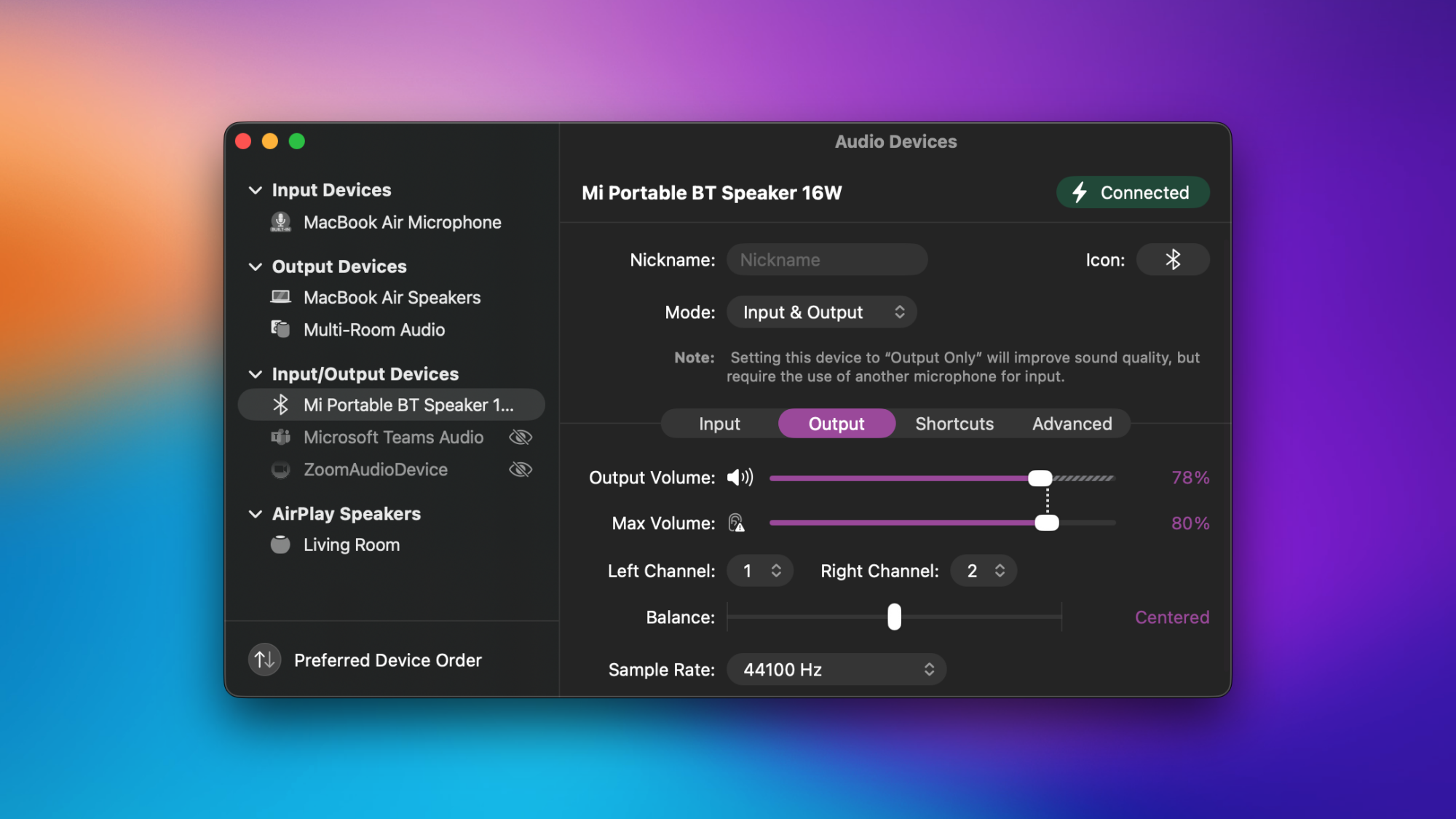
SoundSource also lets you set a custom volume level for each audio device your Mac is connected to. This lets me reduce the volume on a particularly loud Bluetooth speaker I own, while keeping my Mac’s speaker volume a little higher. The app also allows you to set a maximum volume limit for each audio device, which you should use for two reasons: To prevent hearing loss if you’re using headphones, and to avoid damaging your speakers. I’ve accidentally damaged a speaker by keeping it at 100% volume for a few hours in an outdoor venue, which isn’t what the speaker was designed for. Since then, I’ve shied away from running speakers at full volume, and you can use the maximum volume limit feature here to help with that.

To use this feature, open SoundSource and click the speaker icon in the top-right corner. This will show you all your input and output devices. Select any device and locate the Output tab in the right pane. Here, move the Max Volume slider to an acceptable limit.

More features

SoundSource on the Mac, with the device order settings page displayed

Credit: Pranay Parab

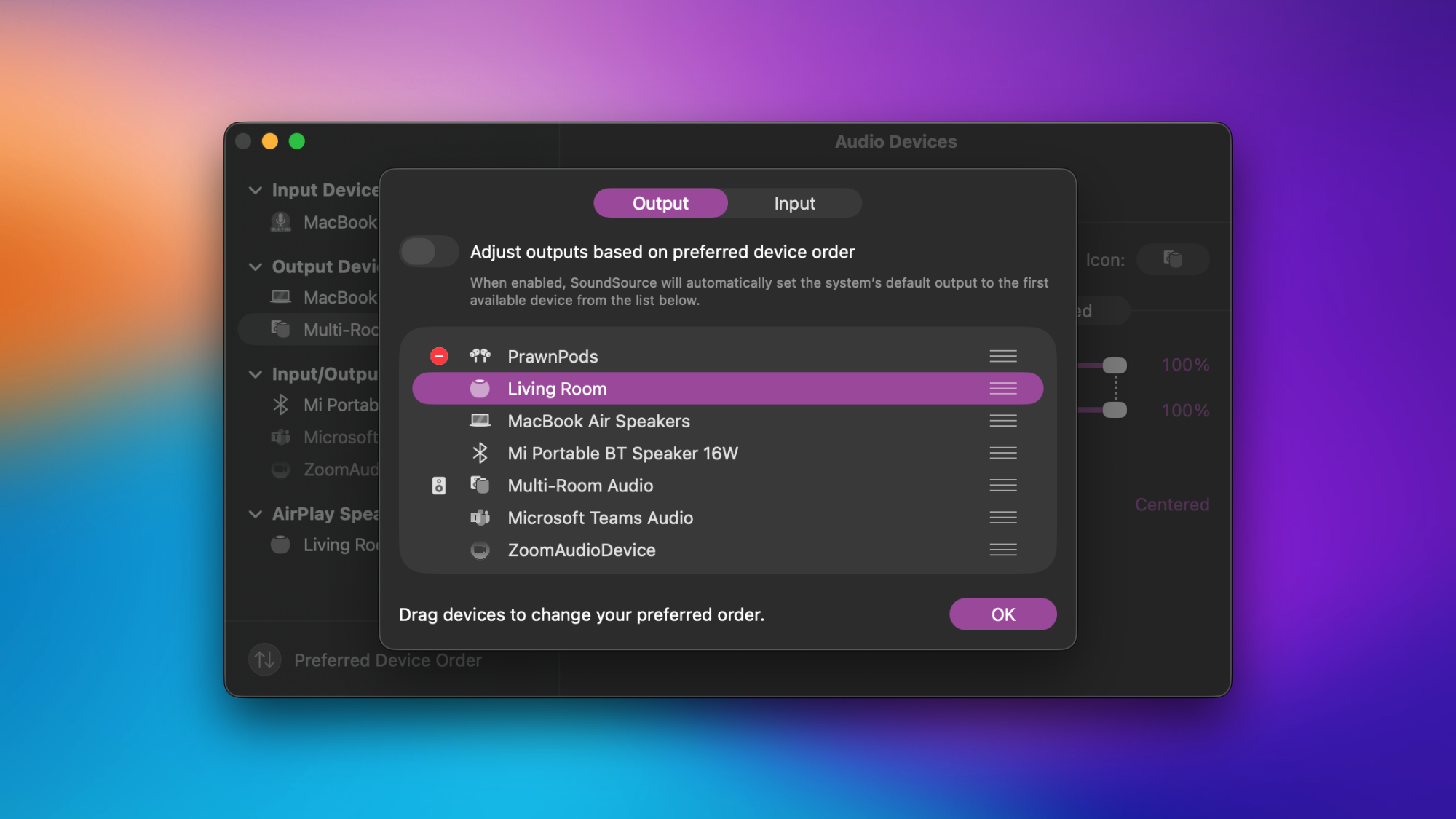
SoundSource 6 has many other new features that make it worth the upgrade. You can set a preferred device order to ensure that your Mac doesn’t accidentally connect to the wrong audio devices. I use this to set my AirPods as my preferred speaker, followed by my HomePod, my Mac’s own speakers, and my Bluetooth speaker comes in last. The app also allows you to add volume controls for individual apps to the menu bar, which means that you can control the audio level of Chrome, Music, Spotify, or any other app without opening the main SoundSource window. This is great for the times when you only want to adjust a single app’s volume.

There’s also a neat feature where SoundSource can set your AirPods to ‘output-only’ mode, which means that every app will use the Mac’s built-in mic for input and send the audio to the AirPods. Rogue Amoeba says this improves audio quality on the AirPods significantly.

There are many such quality-of-life improvements in this app, which made it an easy decision for me to buy its sixth version. If you’ve never used SoundSource before, you’ll have to pay $49 to use the app. There is a trial mode that lets you try the app for up to 20 minutes for free, after which it degrades the audio. Those upgrading from previous versions of SoundSource can get the updated app for $25.

[$] Mix and match Linux distributions with Distrobox

Linux containers have made it reasonably easy to develop, distribute, and
deploy server applications along with all the distribution dependencies that they
need. For example, anyone can deploy and run a Debian-based PostgreSQL container
on a Fedora Linux host. Distrobox is a project that is designed to
bring the cross-distribution compatibility to the desktop and allow users to
mix-and-match Linux distributions without fussing with dual-booting, virtual
machines, or multiple computers. It is an ideal way to install
additional software on image-based systems, such as Fedora’s Atomic Desktops
or Bazzite, and also
provides a convenient way to move a development environment or
favorite applications to a new system.

Meta’s New AI Superstars Are Chafing Against the Rest of the Company

Meta’s newly recruited AI “superstars” have developed an us-versus-them mentality against the company’s longtime executive leadership, creating internal friction over whether the team should focus on catching up to rivals like OpenAI and Google or improving Meta’s core advertising and social media businesses. Alexandr Wang, the 28-year-old entrepreneur Mark Zuckerberg hired in June to be chief AI officer, leads a team called TBD Lab from a siloed space next to Zuckerberg’s office. In meetings this fall, Wang privately told people he disagreed with chief product officer Chris Cox and chief technology officer Andrew Bosworth, according to the New York Times.

Cox and Bosworth wanted Wang’s team to use Instagram and Facebook data to train Meta’s new foundational AI model for improving feeds and advertising. Wang pushed back, arguing the goal should be catching up to rival models before focusing on products. TBD Lab researchers view many Meta executives as interested only in the social media business, while the lab’s ambition is to create “godlike A.I. superintelligence.” Bosworth was recently asked to slash $2 billion from Reality Labs’ proposed budget for next year to fund Wang’s team — a claim Meta disputes.


Read more of this story at Slashdot.

These Nearly Indestructible JBL Earbuds Are 40% Off Right Now

We may earn a commission from links on this page. Deal pricing and availability subject to change after time of publication.

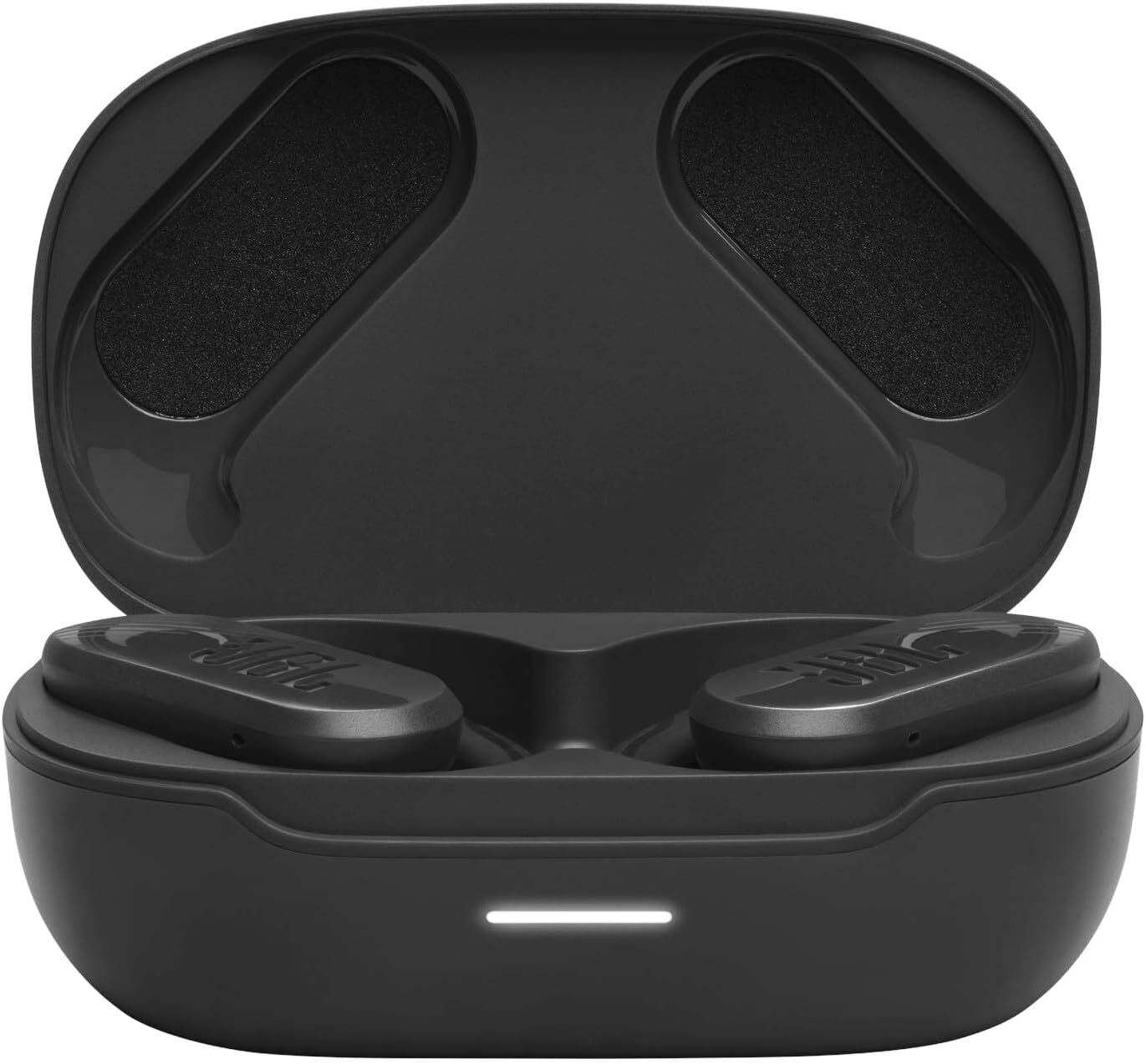
For gym-goers and fitness enthusiasts, finding earbuds that are the right blend of durable and comfortable can be difficult —especially if you’re on a budget. JBL excels in this area; they’re known for delivering strong, bass-y sound, and some models, like the JBL Endurance Peak 3 earbuds, can withstand even the toughest workouts. Right now, they’re $59.95 (originally $99.95),  a 40% drop that brings them down to their lowest price ever. 

These exercise earbuds don’t include active noise cancellation, but they do have what PCMag—which gives them an Editors’ Choice Award—calls a “powerful, bass-forward sound signature.” They’re also completely waterproof and dust-tight with an IP68 rating, meaning they can be submerged in water for more than 30 minutes, making them suitable for heavy rain or rinsing under running water.

To keep them in place during intense movement, the earpieces have sport ear hooks that gently but securely clamp them into place without interfering with glasses. The hooks also double as a power switch: wWhen the tips magnetically connect with the main body of the earpiece, they turn off. This can be frustrating if you need to take them off briefly, since you’ll need to stop the tips from touching the body to avoid powering down. Touch controls are on the outside of each earbud.

They last around 10 hours per charge, and the IPX charging case holds an extra 40 hours of battery life. According to JBL, around 10 minutes of charging will get you an hour of playback, and they fully charge in about two hours. The case, it should be said, is large, clunky, and hard to open, and its slippery exterior makes it hard to grip. The companion app allows you to adjust EQ, view battery life, switch between or turn off Ambient Aware and TalkThru modes, and customize touch controls.

These might not be the best choice if you’re looking for noise-canceling buds or a more compact case. However, if you’re in the market for ultra-durable workout earbuds with a secure fit, long battery life, and great value, the JBL Endurance Peak 3 earbuds are a solid choice for sporty people, especially at the $60 price point. 

GeForce RTX 50 Gaming PC Deals: Save Hundreds On These Holiday Desktop Sales

GeForce RTX 50 Gaming PC Deals: Save Hundreds On These Holiday Desktop Sales
The writing is on the wall in bright neon colors for gamers on the PC platform—pricing is going up and, if you’re planning to buy a new system, do it now before we enter into 2026. That’s not just coming from us, but directly from manufacturers like Maingear and others. Driving the point home, Micron recently announced it was ending its Crucial

CloverPit, a Balatro-style game with a grungy slot machine, hits iOS and Android on December 17

CloverPit is one of my favorite games of the year so far. Developer Panik Arcade took the formula that helped make Balatro so successful — using various tools to bend the rules of the game to help you rack up obscenely high scores — and based it around a slot machine rather than poker. It’s been a hit so far on PC, where it has sold more than a million copies since September, and on Xbox. CloverPit has been among the top 20 most-played titles on Game Pass since its surprise debut there last month. Now, the horror-tinged roguelite is venturing into new territory, as it’s coming to iOS and Android on December 17.

The mobile versions of the game are said to have a fully-optimized interface, as well as all of the post-launch updates, such as the Hard Mode that Panik Arcade recently added. CloverPit will cost $5 on mobile and it will have no microtransactions or “predatory mechanics.” That might seem surprising for a game centered around a slot machine, but CloverPit isn’t really about gambling (which the developers say they don’t like anyway). It’s about breaking the rules to tilt the odds in your favor.

The setup is pretty straightforward. You’re imprisoned in a rusty cell and you have a rapidly increasing debt to pay off. The only way to do that, and hopefully leave through the door, is to earn enough coins from the slot machine to pay what you owe. There are more than 150 items (which are called charms here) to experiment with that affect things like the number of spins, how much each symbol or pattern is worth and how many tickets you earn. Tickets are what you need to buy more charms.

Figuring out combinations of items that work well together is key to quickly scaling up the number of coins and tickets you can earn from each visit to the slot machine. Fail to pay off your debt by a deadline (i.e. after a certain number of spins) and it’s game over, as you plunge into the titular pit.

CloverPit is strange and beguiling and heaps of fun. I’ve plowed around 39 hours into it on Steam, and I’m sure it’ll take up much of my attention on my phone after it hits mobile next week. Doomspinning seems slightly healthier for my brain than doomscrolling.

This article originally appeared on Engadget at https://www.engadget.com/gaming/cloverpit-a-balatro-style-game-with-a-grungy-slot-machine-hits-ios-and-android-on-december-17-154500028.html?src=rss

Pebble’s Affordable $75 AI Ring With On-Device LLM Never Needs Charging

Pebble's Affordable $75 AI Ring With On-Device LLM Never Needs Charging
Eric Migicovsky, the visionary who captivated the early wearable market with the beloved Pebble smartwatch (as well as its recent relaunch), is diversifying the product range with a minimalist, AI-powered device called the Index 01 ring. It’s not a smart ring (because technically it isn’t) and has only one function: to capture fleeting thoughts.

So