
The Linux kernel’s innovative sched_ext code for being able to easily write extensible task schedulers using eBPF programs has some nice enhancements merged for Linux 6.19…
Monthly Archives: December 2025
After AI Push, Trump Administration Is Now Looking To Robots
An anonymous reader quotes a report from Politico: Five months after releasing a plan to accelerate the development of artificial intelligence, the Trump administration is turning to robots. Commerce Secretary Howard Lutnick has been meeting with robotics industry CEOs and is “all in” on accelerating the industry’s development, according to three people familiar with the discussions who were granted anonymity to share details. The administration is considering issuing an executive order on robotics next year, according to two of the people. A Department of Commerce spokesperson said: “We are committed to robotics and advanced manufacturing because they are central to bringing critical production back to the United States.”
The Department of Transportation is also preparing to announce a robotics working group, possibly before the end of the year, according to one person familiar with the planning. A spokesperson for the department did not respond to a request for comment. There’s growing interest on Capitol Hill as well. A Republican amendment to the National Defense Authorization Act would have created a national robotics commission. The amendment was not included in the bill. Other legislative efforts are underway. The flurry of activity suggests robotics is emerging as the next major front in America’s race against China. “There is now recognition that advanced robotics is crucial to the U.S. in terms of manufacturing, technology, national security, defense applications, public safety,” said Brendan Schulman, VP of policy and government relations for Boston Dynamics. “The investment that we’re seeing in the sector and the efforts in China to dominate the future of robotics are being noticed.”


Read more of this story at Slashdot.
Your ‘dear algo’ Threads posts might actually do something soon
In a lot of social media use, the algorithm is an intangible entity, silent and all-powerful in controlling what we see in our feeds. And like supplicants to a deity, sometimes we may find ourselves calling into the void, hoping to receive aid from that mighty being. Seems that for Threads users, at least, those prayers have been heard.
Many people on the Threads platform have taken to writing posts with the phrase “dear algo,” politely asking the network algorithm to show them more of what they want or less of what they don’t. According to a post today from Meta CEO Mark Zuckerberg, Threads will try out a feature where that’s exactly what happens. Connor Hayes, head of Threads, also posted about this limited test, adding that it will be an AI-powered feature. “When people add “Dear Algo” to a post, it will tell your feed what you want to see more or less of for up to three days,” he wrote. “If your profile is public, people can see your request, connect with you about it, or repost it.”
There is something satisfying about having users’ feedback taken seriously, even if it started as a bit of a joke. Threads has seen rapid growth since its debut in 2023. It had 400 million monthly active users as of August 2025 and in October it reached 150 million daily active users.
Update, December 3, 2025, 5:15PM ET: Added more detail from Connor Hayes about the tests.
This article originally appeared on Engadget at https://www.engadget.com/social-media/your-dear-algo-threads-posts-might-actually-do-something-soon-215448062.html?src=rss
Apple design lead Alan Dye is heading to Meta
Alan Dye, Apple’s Vice President of Human Interface Design, has been poached by Meta, Bloomberg reports. The designer played a pivotal role in the look and feel of Apple’s products since Jony Ive left the company in 2019, and now he’ll be taking his talents to Meta.
Dye will reportedly work under Chief Technology Officer Andrew Bosworth as the head of a new studio that will oversee the design of hardware, software and AI products. Apple is replacing Dye with Stephen Lemay, Bloomberg reports, a senior designer at the company who’s worked on all of the company’s interfaces since 1999. Considering the secrecy of Apple as a company, it’s hard to credit individual breakthroughs to individual designers, but Dye at least worked on several of Apple’s major new platforms and design changes, including things like the interface of visionOS and its new Liquid Glass design language.
Meta has had success with its Quest virtual reality headsets and more recently, its Ray-Ban Meta smart glasses, but the company clearly hopes to release many more consumer hardware products with Dye’s help. Those will likely include future versions of the Meta Ray-Ban Display and its Neural Band accessory.
Dye isn’t the first designer Apple has lost to a competitor. Evans Hankey, the company’s former head of industrial design, left Apple in 2022 to work with Ive. Hankey is now one of several former Apple employees building OpenAI’s upcoming hardware device. Dye joining Meta is particularly interesting in this case because Apple is rumored to be working on products that will bring the company in even closer competition to the social media giant. The Vision Pro could be considered to be a high-end competitor in VR, but Apple is reportedly working on its own pair of smart glasses, too.
This article originally appeared on Engadget at https://www.engadget.com/big-tech/apple-design-lead-alan-dye-is-heading-to-meta-214449944.html?src=rss
GTA 4 Is 17 Years Old But Looks Practically Next-Gen Thanks To A New Mod

GTA4 RTX Remix adds incredibly looking path-traced visuals to Rockstar’s classic open world game
The post <i>GTA 4</i> Is 17 Years Old But Looks Practically Next-Gen Thanks To A New Mod appeared first on Kotaku.
Google’s New ‘Call Reason’ Feature Lets You Mark Outgoing Calls As Urgent
It’s tough to get people to answer the phone—though I’m not really blaming those who don’t pick up. We are so inundated with spam calls these days that refusing to answer incoming calls en masse isn’t actually a bad strategy. When that call could be someone trying to break into your bank account, or alerting you to fraudulent credit card charges that never happened, perhaps it’s best to just wait for friends and family to text instead.
But let’s say the call is from you to someone you know and trust, and let’s assume they see it’s you who’s calling. Even though they know the call isn’t spam, there are still plenty of reasons someone won’t pick up the phone—including, of course, because they don’t actually want to talk right now. But if you really need to get a hold of someone and don’t want meetings, commutes, or the lack of desire for a phone call to get in the way, Google is currently working on a solution you can try right now.
Call Reason lets you mark calls as urgent
The new feature, named “Call Reason,” is designed to separate important phone calls from the rest. When you start dialing a number, Google will give you the option to mark the call as urgent. If you choose to do so, the person you’re calling will see a pop-up reading “It’s urgent!” on the call screen. Hopefully, that pop-up will encourage them to answer; however, I imagine they’ll stop picking up if you start using it too often.
That said, not everyone ignores calls on purpose. If you aren’t by your phone when it goes off, or if it’s on silent in your pocket or bag, you obviously won’t catch the urgent tag on the call screen. In that case, Android adds the urgent tag to the missed call in their recipient’s call history. As long as the person you’re trying to reach checks out their missed calls, they should see that this one was marked urgent—though if it’s a real emergency, they might’ve received extra calls and messages from you in the interim anyway.
It seems Google has been working on this feature for some time. Android Authority previously spotted something called Expressive Calling in the Phone app’s APK, which would let the caller add animations and emojis to calls. In addition to that functionality, however, was the ability to flag the reason for a call when dialing.
How to try Call Reason
Google is still testing the Call Reason feature, but anyone using the current version of the Google Phone app will be able to try it out. (It’s still rolling out, though, so you may not see it yet.) The feature also only works with saved contacts, and when calling Android users who have Google’s Phone app set as the primary calling app.
When Call Reason does show up on your phone, you’ll see it appear after placing your call. The UI says “Mark call as urgent?,” with a prompt letting you know that the call will ring through and show the call is urgent. Tap “Notify,” and you’re set. Once the recipient sees the call, they’ll see the “Incoming call” banner replaced by an animated “It’s urgent!” pop-up. It’s a fun design, but perhaps a bit too fun, when you’re likely using this in important situations.

Credit: Google
Alongside Call Reason, Google announced a number of new features for Android 16. There are now improved parental controls locked behind a PIN of the parents’ choosing; new UI customization options, like expanded dark mode support and new custom shapes for home screen icons; and the continued roll out of Google’s AI notification summaries, which Lifehacker writer David Nield hasn’t found all that useful yet.
How to use Accessibility Reader on Apple devices
Earlier this year, Apple launched a new tool that makes it easier to read anything on your device’s screen. Designed for people with visual disabilities, Accessibility Reader provides a full-screen view of any on-screen text. (It’s a bit like Safari’s Reader Mode, only for any app.) The feature also lets you listen to your text read aloud.
Accessibility Reader is available for iPhone, iPad, Mac and Vision Pro. Your device will need to be on iOS 26, iPadOS 26, macOS 26 Tahoe or visionOS 26.
It’s a fairly straightforward experience. But since it offers several launch and customization options, here’s a quick breakdown on getting started and tweaking it to your liking.
How to turn on and open Accessibility Reader
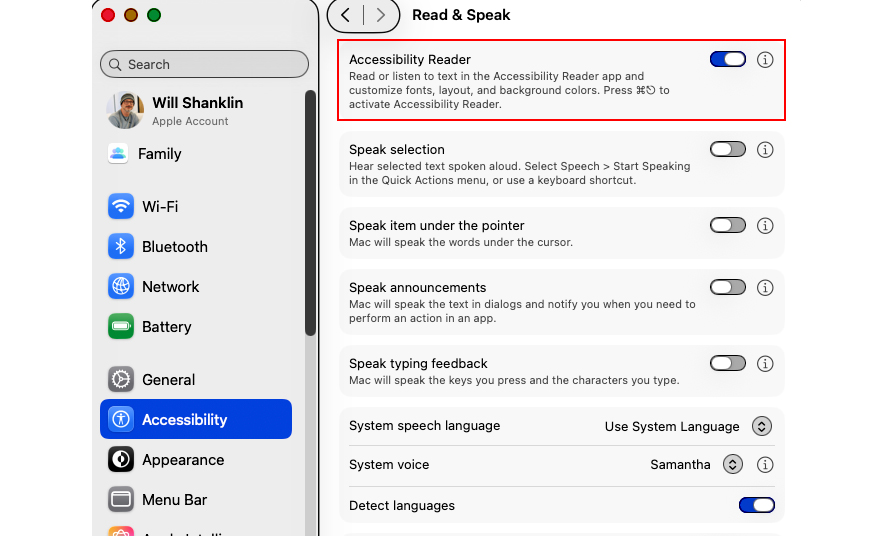
Activating the feature is the same on any Apple device. Go to Settings > Accessibility > Read & Speak, and turn on Accessibility Reader. (It’s at the very top.) Once you’ve done that, there are several ways to launch the tool.
Accessibility Shortcut (iOS / iPadOS / visionOS)
Triple-click the lock button. That’s the side button on iPhone and the top button on iPad and Vision Pro. (On older iPads, triple-click the Home Button.) This brings up the Accessibility Shortcut, which includes a quick-launch item for Accessibility Reader.
If you don’t need the other items in this menu, you can remove them at Settings > Accessibility > Accessibility Shortcut. Then, using the shortcut will immediately launch Accessibility Reader.
Control Center (iOS / iPadOS)
You can add a Control Center shortcut for the tool. Swipe down from the top-right to launch Control Center. Then, hold your finger on an empty part of the screen. Choose “Add a control” (bottom), and find the Accessibility Reader shortcut. You can now tap that Control Center icon whenever you want to launch it.
Keyboard Shortcut (macOS)
The default Accessibility Reader shortcut on Mac is Cmd-Esc. Or, customize it in Settings > Accessibility > Accessibility Reader by clicking the “i” next to the menu item.
Accessibility Shortcut (macOS)
The tool is also available as part of the Mac’s Accessibility Shortcut. You can launch this menu using a keyboard shortcut (Opt-Cmd-F5), by quickly pressing Touch ID three times or with a Control Center shortcut. (However, the above Cmd-Esc shortcut should be the simplest for most people.)
How to listen to text in Accessibility Reader
The tool also includes a text-to-speech (TTS) option. Once you’ve launched Accessibility Reader, listening is as simple as pressing the play button (▶). You can then use the pause (⏸) shortcut to take a break.
Other options include skipping backward or forward using the rewind or fast-forward symbols. There’s also a speed adjustment, which you can change by choosing the 1x button.
If you want the Reader to speak text automatically when it opens, you can do that, too. That option is found under Settings > Accessibility > Accessibility Reader. (On Mac, select the “i” symbol next to the menu entry to find this option.)
How to customize Accessibility Reader
It’s easy to adjust the font size, color, theme and more. Once you’ve launched Accessibility Reader, tap the customization (AA) button. There, you can change the theme, colors, font, line spacing and much more.
This article originally appeared on Engadget at https://www.engadget.com/mobile/smartphones/how-to-use-accessibility-reader-on-apple-devices-212231319.html?src=rss
Republicans drop Trump-ordered block on state AI laws from defense bill
A Donald Trump-backed push has failed to wedge a federal measure that would block states from passing AI laws for a decade into the National Defense Authorization Act (NDAA).
House Majority Leader Steve Scalise (R-La.) told reporters Tuesday that a sect of Republicans is now “looking at other places” to potentially pass the measure. Other Republicans opposed including the AI preemption in the defense bill, The Hill reported, joining critics who see value in allowing states to quickly regulate AI risks as they arise.
For months, Trump has pressured the Republican-led Congress to block state AI laws that the president claims could bog down innovation as AI firms waste time and resources complying with a patchwork of state laws. But Republicans have continually failed to unite behind Trump’s command, first voting against including a similar measure in the “Big Beautiful” budget bill and then this week failing to negotiate a solution to pass the NDAA measure.
Finance Bro Thinks It Would Be Cool To Turn Your Entire Life Into The Stock Market

Haven’t you always wanted to use shady financial instruments to own the haters?
The post Finance Bro Thinks It Would Be Cool To Turn Your Entire Life Into The Stock Market appeared first on Kotaku.
I Bought a Smart Toilet for Black Friday, and It Has Been Revolutionary
We may earn a commission from links on this page. Deal pricing and availability subject to change after time of publication.
Ever since I visited Japan in 2019, I’ve been converted into a loyal bidet user. I started with a basic bidet added onto a standard toilet, but I always knew the time would come when I would make a big upgrade. That time was this Black Friday when I pulled the trigger on the Loniko Smart Toilet, and I’m so glad I did. It’s $444.99 (originally $549.99) after using the additional $30 on-page coupon, and it’s worth every penny.

My first experience with the Loniko Smart Toilet was over Thanksgiving, which I spent at my parents house; they were very excited for my brothers and me to try their new splurge in their guest bathroom: the toilet. The lid opened when I walked into the bathroom, welcoming me to sit on its heated seat. As I said, I’ve been using bidets in my home for years, but never one like the Loniko. The toilet comes with a remote you can prop on your wall for easy access. You can control the bidet’s stream and direction, turn on the dryer, which was surprisingly effective and gentle, and do all the things the toilet does automatically, like opening and closing the lid, flushing, etc. After realizing that most decent bidets cost upwards of $300, I decided to snatch this toilet when it went on sale during Black Friday.
Being able to control the temperature of the water in the stream is a huge deal for me, especially in the winter when the water in my home is extremely cold. Cleaning the toilet is also pretty easy. It has a skirted design, so there are no nooks and crannies near the base where dirt can get trapped. The toilet also automatically cleans itself after each flush.
Keep in mind you’ll need an outlet close by to enable all its fancy features. You can also choose to get a tankless model, which results in quieter flushes, saves water and energy, and looks more modern, but it’s harder to install (I went with the regular tank toilet and it flushes quietly enough for me).
Humans in southern Africa were an isolated population until recently
The fossil and genetic evidence agree that modern humans originated in Africa. The most genetically diverse human populations—the groups that have had the longest time to pick up novel mutations—live there today. But the history of what went on within Africa between our origins and the present day is a bit murky.
That’s partly because DNA doesn’t survive long in the conditions typical of most of the continent, which has largely limited us to trying to reconstruct the past using data from present-day populations. The other part is that many of those present-day populations have been impacted by the vast genetic churn caused by the Bantu expansion, which left its traces across most of the populations south of the Sahara.
But a new study has managed to extract genomes from ancient samples in southern Africa. While all of these are relatively recent, dating from after the end of the most recent glacial period, they reveal a distinct southern African population that was relatively large, outside of the range of previously described human variation, and it remained isolated until only about 1,000 years ago.
Netflix is getting rid of another of its game studios by selling it back to its founders
The developer of Cozy Grove and Alphabear is leaving Netflix. Spry Fox is being sold back to its original founders, Game File reports, and will continue to work on its upcoming “cooperative village life sim” Spirit Crossing as an independent company. Unlike other shuttered Netflix games studios Team Blue and Boss Fight Entertainment, Netflix will remain involved with the studio as Spirit Crossing‘s publisher on mobile.
As part of the arrangement, Spry Fox founders David Edery and Daniel Cook will be able to shop Spirit Crossing to other publishers for console and PC releases of the game. While reverting to being an independent studio is definitely a happier version of the typical studio closure story, it might not be without issues. Game File reports that layoffs at Spry Fox are still possible and the developer will need to find additional funding to continue long-term. Spirit Crossing may also need to be altered so that Spry Fox can continue to make money from the game after players purchase it.
Netflix acquired Spry Fox in 2022, a little over a year after it acquired Oxenfree developer Night School. Spry Fox released its first game for Netflix subscribers, a sequel to Cozy Grove, in 2024. The studio formally announced Spirit Crossing in March of this year, as an ambitious attempt to fuse the cozy life simulation elements of something like Animal Crossing: New Horizons with the online social experiences of MMOs like World of Warcraft or Final Fantasy XIV.
That pitch apparently no longer jives with Netflix’s current game strategy, which changed when Epic Games’ Alain Tascan took over from ex-EA executive Mike Verdu. Whereas Netflix Games under Verdu acquired studios, funded projects and licensed an eclectic collection of mobile games for Netflix subscribers, Tascan has refocused the company’s games business around titles based on Netflix IP, social party games and known quantities, Game File writes. Spirit Crossing doesn’t fit neatly into any of those categories, which might be one reason Netflix is parting ways with Spry Fox.
This article originally appeared on Engadget at https://www.engadget.com/gaming/netflix-is-getting-rid-of-another-of-its-game-studios-by-selling-it-back-to-its-founders-203645232.html?src=rss
Visiting Meta’s Los Angeles Retail Store To Demo Quest & Smart Glasses
In West Hollywood, Meta recently launched a permanent store to showcase, demo, and sell smart glasses and Quest headsets. So how exactly is the company choosing to showcase its hardware to prospective buyers on the fence?
Walking up to the new Los Angeles Meta Lab location, it’s difficult to avoid the obvious comparisons to Apple stores. The moment you step inside, however, the difference in design sensibilities could not be any more obvious. Instead of a clean and simple aesthetic, Meta’s approach aims for something considerably more busy.
In an attempt to tie into the culture of Southern California, Meta Lab Los Angeles channels skateboarding as the primary theme – with numerous demos making use of the iconography.


Near the entrance, prospective customers can grab Meta-branded fingerboards à la Tech Deck – and are invited to record their “sick tricks” using a pair of glasses by running their board through a miniature fingerboard skate park.
On either side are arrays of smart glasses. Right near the entrance is a showcase of the transparent limited edition Ray-Ban Meta glasses, sold in limited quantities at the store. Flanking the display of glasses on either side is a set of cases showing a variety of skating and SoCal-themed memorabilia.

To the far right of the entrance, you’re able to share your glasses prescription – if you have one – to fit your desired pair with the correct lenses for a test drive.

While you wait for your glasses to be prepared, a nearby cafe offers a number of appropriately expensive drinks, as well as free donuts, assuming you arrive early enough in the day that any are left. It’s unclear whether that’s a permanent fixture of the cafe, or if these pastries will eventually cost money after the store’s opening celebrations.
Once you’ve been fitted with your glasses, to the far left from the entrance an “Experience Room” is fitted to take advantage of some of the AI glasses’ features.

You might be wondering where the Quest headsets, and their associated demos, are found. Straight back from the entrance is a set of stairs to a second floor. Here is where you’ll find the Quest 3 demos, including yet another miniature skate park, this time making use of the mixed reality functions of the nearby Quest 3 to overlay a virtual fingerboard rolling through the park.
Nearby you can find a selection of Quest 3 headsets and accessories for sale; Meta employees also are at the ready to help prospective buyers test out VR or mixed reality for themselves.

According to the handlers for the demo station, there’s nothing specifically exclusive to this location; they choose a variety of apps and games to showcase depending on factors such as prospective use cases, and age. As far as games are concerned, Beat Saber is a popular showcase – and for anyone 16 and older, a demo for Batman: Arkham Shadow is also available, though the team usually stresses that walk-ups should not play Batman without prior VR experience.

Also available for demo on the second floor is the new Meta Ray-Ban Display, which I opted to test out – though my specific circumstances did showcase a potential issue for other walk-ups looking to test or grab a pair for themselves.
The supported prescriptions for Meta Ray-Ban Display is considerably less than the rest of Meta’s lineup, and it just so happens that my own prescription – which is supported for Quest 3 inserts – is not currently supported for the HUD glasses, so I can’t speak to the full visual experience.

What I can say, however, is that Meta Lab Los Angeles gives off a strong impression. Even if the Quest is clearly only a small part of the store’s lineup, Meta seems quite confident in what they have to show for the general public.
For those of you within the Los Angeles area that have been looking to check out a demo for Meta’s current hardware, I can easily recommend stopping by to give things a look. If nothing else, it should be a memorable time.

HBO Max Botches Mad Men’s 4K Debut After Streaming Wrong File Showing Visible Crewmembers
HBO Max’s 4K debut of Mad Men was botched after Lionsgate reportedly supplied the wrong file, leading to visible crew members where someone is seen pumping a vomit hose. Ars Technica reports: Mad Men ran on the AMC channel for seven seasons from 2007 to 2015. The show had a vintage aesthetic, depicting the 1960s advertising industry in New York City. Last month, HBO Max announced it would modernize the show by debuting a 4K version. The show originally aired in SD and HD resolutions and had not been previously made available in 4K through other means, such as Blu-ray.
However, viewers were quick to spot problems with HBO Max’s 4K Mad Men stream, the most egregious being visible crew members in the background of a scene. The episode was “Red in the Face” (Season 1, Episode 7), which was reportedly mislabeled. In it, Roger Sterling (John Slattery) throws up oysters. In the 4K version that was streaming on HBO Max, viewers could see someone pumping a vomit hose to make the fake puke flow.
The Hollywood Reporter, citing an anonymous source, said that the error happened because Mad Men production company Lionsgate gave HBO Max the wrong file. The publication reported that Lionsgate “was working on getting HBO Max the correct file(s)” and was readying to provide them at approximately 10 a.m. PT today. The blunder is likely to be fixed for all viewers soon. There were no problems with the HD versions of HBO Max’s Mad Men stream.


Read more of this story at Slashdot.
It’s Official: Linux Kernel 6.18 Will Be LTS, Supported Until December 2027
As expected, the recently released Linux 6.18 kernel series has been officially marked as LTS (Long Term Support) on the kernel.org website with a predicted life expectancy of at least two years.
Intel Core Ultra 7 366H Panther Lake iGPU Crushes Radeon 840M On Geekbench

If you’re chomping at the bit for Panther Lake performance leaks, well, put that filthy thing away for a moment and come take a look. A result for a Core Ultra 7 366H has popped up in the Geekbench database, and we’ve taken the time to compare it against contemporary and past integrated GPUs to see how it rates.
The test run for the Panther
Android 16 December Update Adds More Customizations & A New AI Trick
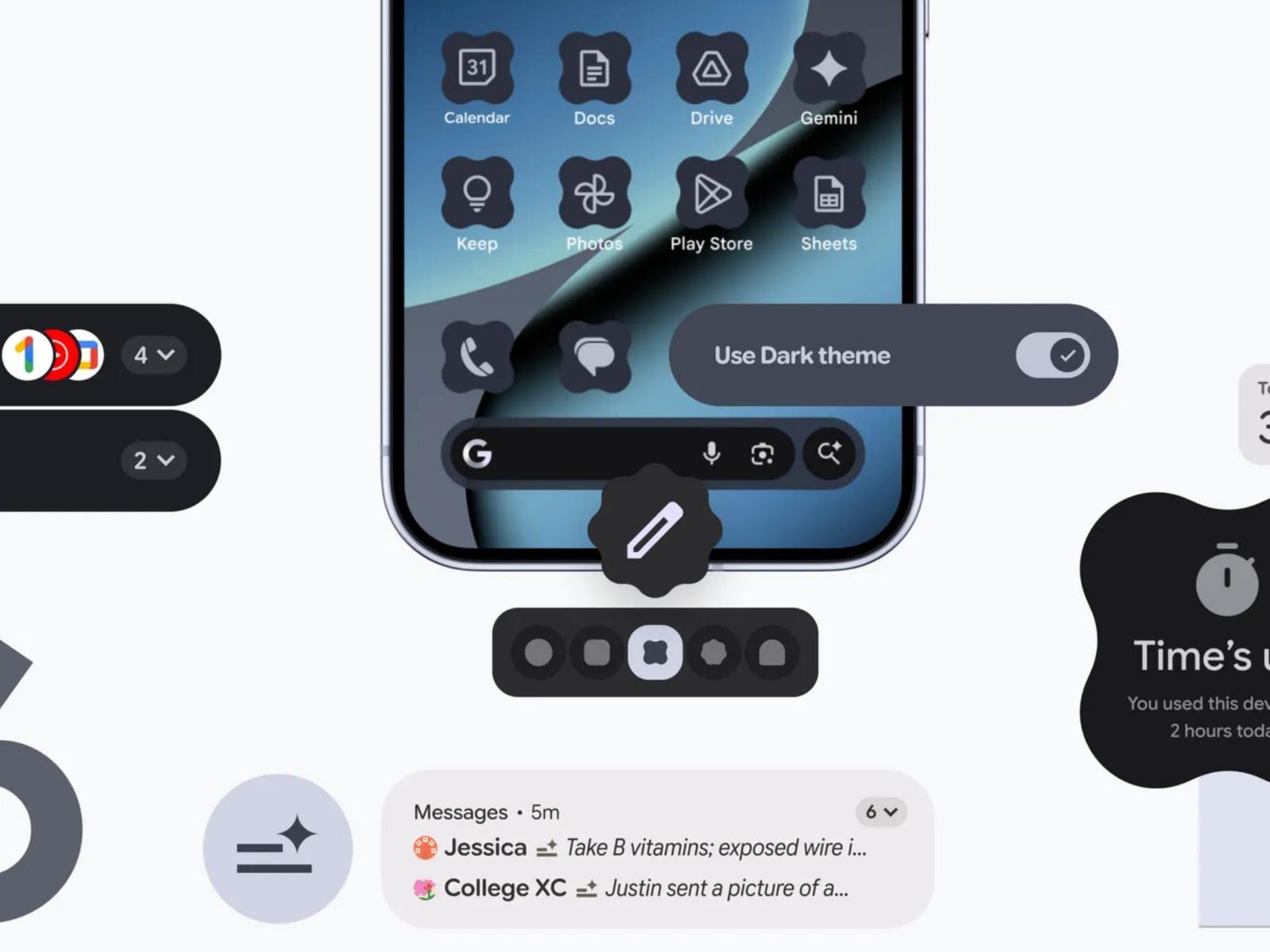
The latest update coming to Android 16 marks a shift in how Google plans to roll out releases. Moving forward, users will receive smaller updates more frequently instead of waiting for a large yearly update. The new features in this upcoming update include easier management of notifications, further customization options to change the look
After nearly 30 years, Crucial will stop selling RAM to consumers
On Wednesday, Micron Technology announced it will exit the consumer RAM business in 2026, ending 29 years of selling RAM and SSDs to PC builders and enthusiasts under the Crucial brand. The company cited heavy demand from AI data centers as the reason for abandoning its consumer brand, a move that will remove one of the most recognizable names in the do-it-yourself PC upgrade market.
“The AI-driven growth in the data center has led to a surge in demand for memory and storage,” Sumit Sadana, EVP and chief business officer at Micron Technology, said in a statement. “Micron has made the difficult decision to exit the Crucial consumer business in order to improve supply and support for our larger, strategic customers in faster-growing segments.”
Micron said it will continue shipping Crucial consumer products through the end of its fiscal second quarter in February 2026 and will honor warranties on existing products. The company will continue selling Micron-branded enterprise products to commercial customers and plans to redeploy affected employees to other positions within the company.
Home Assistant 2025.12 released
Version
2025.12 of the Home Assistant home-automation system has been released.
2025.12 of the Home Assistant home-automation system has been released.
This month, we’re unveiling Home Assistant Labs, a brand-new space
where you can preview features before they go mainstream. And what
better way to kick it off than with Winter mode? ❄️ Enable it and
watch snowflakes drift across your dashboard. It’s completely
unnecessary, utterly delightful, and exactly the kind of thing we
love to build. ❄️But that’s just the beginning. We’ve been working on making
automations more intuitive over the past releases, and this release
finally delivers purpose-specific triggers and conditions. Instead
of thinking in (numeric) states, you can now simply say “When a
light turns on” or “If the climate is heating”. It’s automation
building the way our mind works, as it should be.
2025’s Hit SWAT Sim Gets Free Trial On PS5 And Xbox

Xbox and PlayStation players can check out the popular FPS for a few hours until February
The post 2025’s Hit SWAT Sim Gets Free Trial On PS5 And Xbox appeared first on Kotaku.