Asked why we need Golden Dome, the man in charge points to a Hollywood film

Near the end of the film A House of Dynamite, a fictional American president portrayed by Idris Elba sums up the theory of nuclear deterrence.

“Just being ready is the point, right?” Elba says. “It keeps people in check. Keeps the world straight. If they see how prepared we are, no one starts a nuclear war.”

There’s a lot that goes wrong in the film, namely the collapse of deterrence itself. For more than 60 years, the US military has used its vast arsenal of nuclear weapons, constantly deployed on Navy submarines, at Air Force bomber bases, and in Minuteman missile fields, as a way of saying don’t mess with us. In the event of a first strike against the United States, an adversary would be assured of an overwhelming nuclear response, giving rise to the concept of Mutual Assured Destruction.

Read full article

Comments

Apple’s New iPhone Update Will Make Sure You’ll Never Miss a Reminder Again

Apple’s various apps and utilities are finally starting to talk to each other, and it’s great news for iPhone users. Last year, Apple added the ability to sync Reminders with Calendar, which added time-based reminders directly into your Calendar view—a feature I now regularly use. Now, with iOS 26.2, Apple is finally integrating Reminders with the Alarms app; you’ll be able to set an accompanying alarm for any reminder.

If, like me, you tend to be forgetful—if you need a reminder for your reminder—this will be a handy feature. The alarm will sound, taking up your entire screen until you dismiss it. And yes, you can snooze it.

How to add an alarm to any reminder on your iPhone

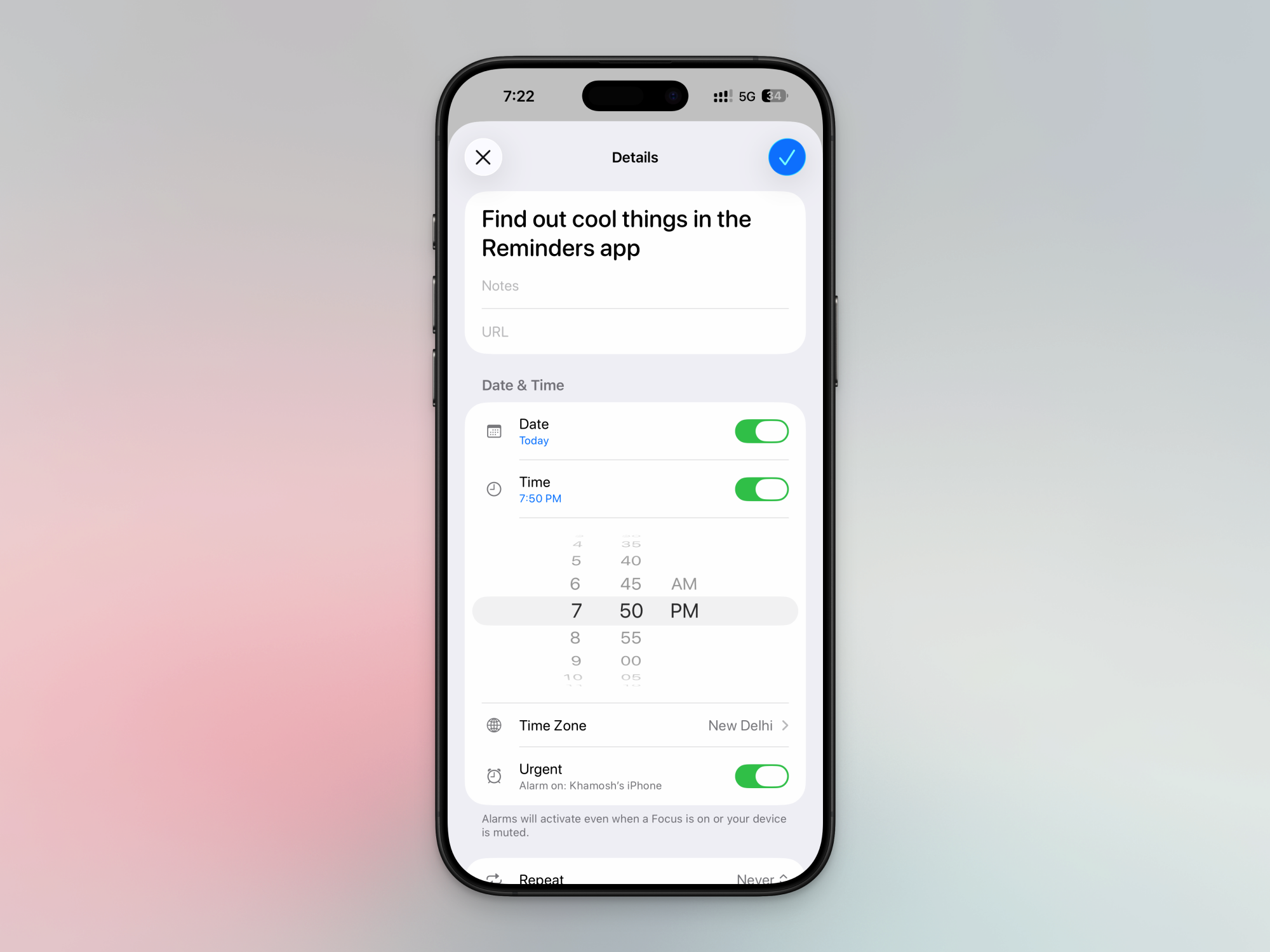
To get started, open the Reminder app, navigate to a task list, and either create a new reminder, or edit it. When you’re adding a date and time, you’ll see a new Urgent toggle. When you enable the Urgent mode, it will turn on an alarm that will go off when the reminder is due. The alarm will trigger even when your iPhone is in silent mode or in a Do Not Disturb Focus mode, so be careful when setting it up.

Urgent setting in Reminders app for alarm.

Credit: Khamosh Pathak

When you enable this for the first time, you’ll get a connection request for integrating Reminders with Alarms. Here, tap Allow. If you don’t see this popup, or if you’ve dismissed it before, go to Settings > Apps > Reminders, and in the “Allow Reminders to Access” section, enable the Alarms toggle.

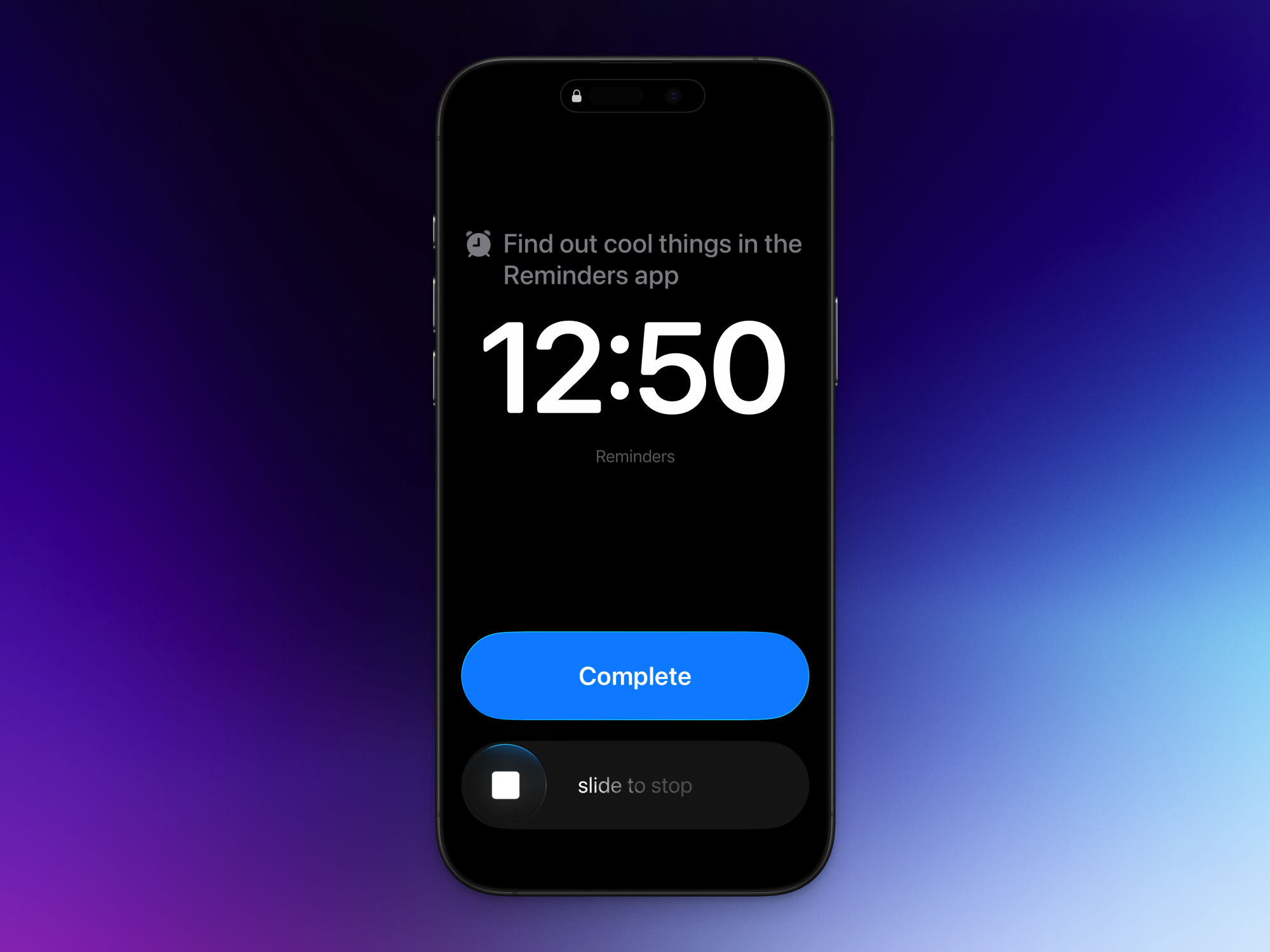
When the reminder is due, you’ll see a full-screen reminder interface, with the reminder up top, and an option to slide to stop (using Apple’s new sliding interface for dismissing alarms, which you can disable if you want). You’ll also see a big blue Snooze button. This will snooze the reminder for nine minutes.

Whether you hit the Snooze button or you use the slider to stop the alarm, Apple will add the Reminder to the top of the notifications list, as a Live Activity. You’ll see the reminder, with the snooze duration (if enabled), and the task. To actually complete the task, you’ll have to check it off from the Live Activity or the Reminders app.

Complete button in Reminders alarm.

Credit: Khamosh Pathak

Unlike in the new alarm feature, there’s no way to edit the Snooze duration for reminders, or to disable the slider. If you don’t like the Snooze feature or the two-tap approach to completing reminders, you can switch it out for a Complete button instead. Go to Settings > Apps > Reminders and in the “Urgent Reminders” section, enable the Complete from Alarm feature. Now, when the alarm goes off, you’ll see two buttons instead: Slide to Stop and Complete. When you tap Complete, the alarm will disappear, and the task will be marked as Complete.

The AI boom could soon send GPU prices soaring, so now’s a good time to buy one

When someone asks me for gadget buying advice, I normally tell them to stick with their current device. In 2025, most new tech products aren’t a worthwhile upgrade over even something that was released a few years ago — and with the price of everything going up, that new iPhone can wait. But things aren’t normal right now. 

On December 3, The Wall Street Journal reported memory manufacturer Micron would wind down Crucial, its consumer business, to focus on components for the AI industry. The PC I’m writing this article on has an SSD and RAM from Crucial. Overnight, Micron decided to end a business it spent decades building, and from a certain perspective, I guess it makes sense. In recent months, OpenAI has signed more than $1.4 trillion worth of infrastructure deals, creating unprecedented demand for server-grade solid-state storage and RAM. 

To meet the moment, manufacturers have been allocating more of their production capacity and wafers to high-margin commercial customers. For consumers, the result has been skyrocketing RAM prices, with some DDR5 kits now costing as much as two or three times as much as they did a couple of months ago. Recent analysis from TrendForce shows the price of some consumer-grade SSDs increased between 20 and 60 percent in November for the same reason. Then there’s LPDDR5X memory, which is used in both smartphones and NVIDIA’s Grace Blackwell and Vera Rubin platforms. In 2026, it’s expected to increase in price as well. The demand for AI infrastructure is such that all consumer electronics may cost more in the coming months.

Price Changes Coming December 7th 2025, Due To Market Conditions �‼️ pic.twitter.com/et0HADhc08

— CyberPowerPC (@CYBERPOWERPC) November 25, 2025

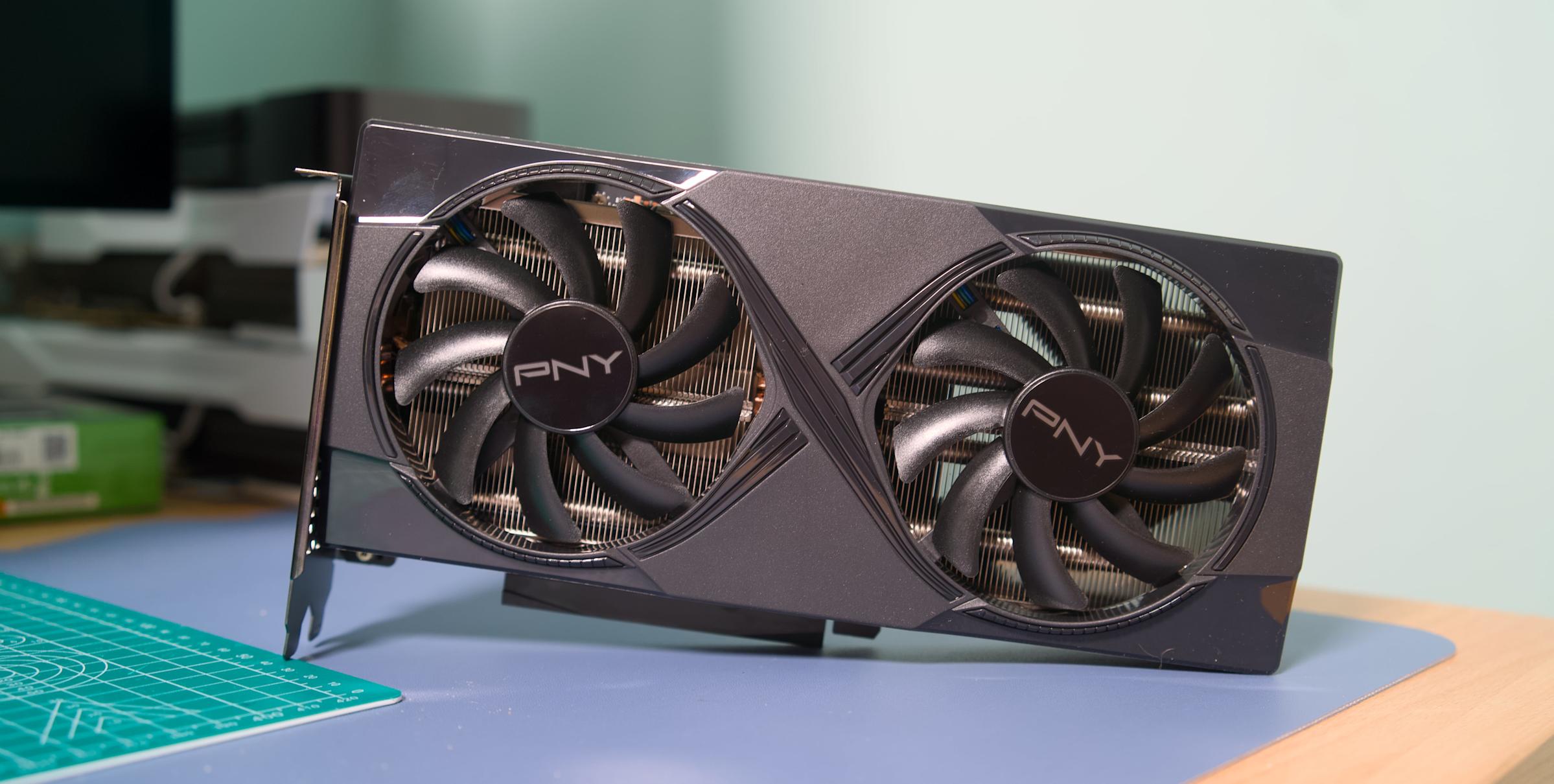
That gets me to the purpose of this article. If you’ve been thinking about upgrading to a new graphics card, I would recommend you buy one sooner rather than later. The AI boom came for RAM first, and there are already signs it will come for GPU pricing next. A recent report suggests AMD is considering raising the MSRP of its 8GB models by $20 and 16GB models by $40 due to the price of GDDR6 memory. NVIDIA, meanwhile, is rumored to have recently told its board partners it would no longer supply them with VRAM for their cards.     

Neither NVIDIA nor AMD responded to comment requests from Engadget requesting they share how they plan to work with their board partners to ensure GPU prices remain stable. NVIDIA also did not comment on reports the company will stop providing VRAM to its board partners. 

Separate from the memory shortage, neither NVIDIA nor AMD are expected to release new GPUs soon. According to recent rumors, the earliest a Super refresh of the Blackwell line could arrive is sometime in the middle of 2026 — not at CES in January as the 40-series Super cards did in 2024. The memory crunch could complicate things there too, since the company has typically relied on more and faster VRAM to offer better performance on its Super cards. With 50-series Super GPUs, it might not be the case that NVIDIA announces them at the same MSRP as their non-Super predecessors, which was the case with the 40-series. 

As for AMD, the company debuted its RDNA 4 cards at the start of the year. We know it’s already working on RDNA 5, and if a recent chat with Sony’s Mark Cerny is any indication, the new architecture will be a major step change for AMD. However, right now rumors indicate the earliest RDNA 5 could arrive is sometime in 2027.

In other words, with nothing new on the horizon and pricing of existing stock likely to increase, there might be only a short window where you can get a new GPU at a reasonable price. It’s impossible to predict the future, but if you’re in need of an upgrade and have the means to purchase, there might not be a better opportunity before the end of 2026.  

Recommendations

The recommendations in Engadget’s recent GPU guide are still as relevant today as they were a few months ago. Once again, the best advice I can give is to buy a card with at least 12GB of VRAM, and preferably 16GB if your budget allows for it. Unless you mostly plan to play older games on a 1080p monitor, it’s not worth considering a model with 8GB of VRAM — it won’t last you long enough to warrant the purchase price. 

Our recommendations are grouped from most affordable to most expensive. Where possible, I’ve tried to find options from both Newegg and Amazon. You won’t find any high-end picks like the RTX 5080 since if you can afford that card, this guide isn’t for you.  

Intel Arc B580

Intel's Arc B580 is a great budget option, as long as you can put up with some driver issues.
Intel’s Arc B580 is a great budget option, as long as you can put up with some driver issues.
Devindra Hardawar for Engadget

For those on a tight budget, I would start and end my search with the Intel Arc B580. Newegg has models from ASRock and Onix at or under the card’s $250 MSRP. I can’t speak to the quality of ONIX cards, but ASRock is well-regarded. Over on Amazon, you can find the B580 for $300. With Intel cards you sometimes need to put up with odd driver issues, but as far as budget options go, the B580 offers value that’s hard to beat. The one thing about budget cards like the B580 is they’re likely to face the most pricing pressure from the memory crunch due to the smaller margins manufacturers are making on them.   

NVIDIA RTX 5060 Ti 16GB

If you decide to go with the RTX 5060 Ti, be sure to buy the 16GB model.
Devindra Hardawar for Engadget

If you have more than $250 to spend on a GPU, the RTX 5060 Ti is the GPU to buy. Avoid the 8GB model and go straight for the 16GB variant. NVIDIA announced the 5060 Ti at an MSRP of $429, and luckily as of the writing of this article, you can still find one close to that price.

Newegg, for instance, is selling the MSI Ventus Black Plus version of the card for $440. Amazon has the silver colorway of that same GPU listed for $460 currently. The retailer also has models from Gigabyte and Zotac in and around that same price. 

If I had to pick between the 5060 Ti and 5070, which NVIDIA only offers with 12GB of VRAM, I would pick the former. The 5060 Ti is a safer bet, and offers nearly as much performance, particularly in games that include ray tracing as an option.    

AMD Radeon RX 9070 and RX 9070 XT  

If you're a fan of Team Red, the Radeon RX 9070 and 9070 XT are among the best cards of this generation.
If you’re a fan of Team Red, the Radeon RX 9070 and 9070 XT are among the best cards of this generation.
Devindra Hardawar for Engadget

For a mid-range option, the Radeon RX 9070 and 9070 XT offer excellent value. Of the two cards, the 9070 is the better purchase for most people due to its less demanding power requirements, but if you got a PSU that can handle the 9070 XT, go for it. 

Right now, Newegg has a few 9070 models from ASRock and Sapphire just under the card’s $549 MSRP. My friend recently bought the Sapphire card linked above, and has had nothing but good things to say about it. You’ll pay more going through Amazon, but the company has a couple of options around $600 from XFX and Gigabyte. 

When it comes to the 9070 XT, Newegg has an ASRock model priced right at the card’s $599 MSRP. Many of the other options from Sapphire and XFX are unfortunately priced between $650 and $700. The same is true on Amazon, where the cheapest model I could find was $630.   

NVIDIA RTX 5070 Ti

If you have more money to spend, the RTX 5070 Ti is a performance beast.
Devindra Hardawar for Engadget

For our final recommendation, consider the RTX 5070 Ti. It’s a great option if you want to play games at 4K for less than what the 5080 and 5090 cost. Newegg has MSI and Zotac models on sale for $750, the card’s recommended price. There are also a handful of other options from ASUS and Gigabyte that are just over $800. Amazon, meanwhile, is selling one Gigabyte variant for $749. 

This article originally appeared on Engadget at https://www.engadget.com/gaming/pc/the-ai-boom-could-soon-send-gpu-prices-soaring-so-nows-a-good-time-to-buy-one-153000063.html?src=rss

‘Colleges Oversold Education. Now They Must Sell Connection’

A tenured USC professor is arguing that universities need to fundamentally rethink their value proposition as AI rapidly closes the gap on human instruction and a loneliness epidemic grips the generation most likely to be sitting in their lecture halls. Eric Anicich, an associate professor at USC’s Marshall School of Business, wrote in the Los Angeles Times that nearly three-quarters of 16- to 24-year-olds now report feeling lonely, young adults spend 70% less time with friends in person compared to two decades ago, and a growing majority of Gen Z college graduates say their degree was a “waste of money.”

Anicich points to a recent Harvard study finding that students using an AI tutor learned more than twice as much as those in traditional active-learning classes, and did so in less time. The implication is stark: if instruction becomes abundant and cheap, colleges must sell what remains scarce — genuine human community. He notes that his doctoral training included zero coursework on teaching, a norm he says persists across academia. His proposal: fund student life as seriously as research labs, hire professional “experience designers,” and treat rituals and collaborative projects as core curriculum rather than amenities.


Read more of this story at Slashdot.

[$] Bazzite: a gem for Linux gamers

One of the things that has historically stood between Linux and the
fabled “year of the Linux desktop” is its lack of support for video
games. Many users who would have happily abandoned Windows have,
reluctantly, stayed for the video games or had to deal with dual
booting. In the past few years, though, Linux support for
games—including those that only have Windows versions—has
improved dramatically, if one is willing to put the pieces
together. Bazzite, an image-based
Fedora derivative, is a project that aims to let users play games and
use the Linux desktop with almost no assembly required.

Our favorite Anker MagSafe power bank is 34 percent off right now

Holiday travel is almost upon us and, while it likely won’t be something out of a Richard Curtis film, there are ways to make it easier. You can raid our list of best travel gifts for 2025 and pick up our favorite MagSafe power bank: Anker’s MagGo 10,000mAh Power Bank.

Even better, the Anker MagGo power bank is currently on sale for $60, down from $90. This 34 percent discount brings the power bank to only $5 more than its all-time low price. We’re big fans of Anker’s MagGo power bank — one of the first and best Qi2-certified products available. You can get about 1.7 iPhone 15 charges out of it and bring your phone from five percent to 60 percent in a little more than 45 minutes. Plus, the stand makes it easy to keep using your phone while it charges. 

Two of our other picks for best MagSafe power bank are also on sale — and down to record-low prices. The Baseus Picogo 25W Power Bank is 24 percent off and down to $53 from $70. Meanwhile, the Ugreen MagFlow 10,000mAh 25W Power Bank has dropped to $60 from $90 — a 33 percent discount. 

Follow @EngadgetDeals on X for the latest tech deals and buying advice.

This article originally appeared on Engadget at https://www.engadget.com/deals/our-favorite-anker-magsafe-power-bank-is-34-percent-off-right-now-151039224.html?src=rss

Rare Pokémon Cards Worth $100K Stolen In Brazen Heist Caught On Camera

Rare Pokémon Cards Worth $100K Stolen In Brazen Heist Caught On Camera
A brazen and high-speed robbery hit a collectible store in Southern California, whereby a trio of masked thieves made off with over $100,000 worth of rare Pokémon trading cards and sports memorabilia in a heist that lasted just three minutes.

The target was LA Sports Cards in Burbank, which was raided by a band of synchronized card bandits.

Pebble maker announces Index 01, a smart-ish ring for under $100

Nearly a decade after Pebble’s nascent smartwatch empire crumbled, the brand is staging a comeback with new wearables. The Pebble Core Duo 2 and Core Time 2 are a natural evolution of the company’s low-power smartwatch designs, but its next wearable is something different. The Index 01 is a ring, but you probably shouldn’t call it a smart ring. The Index does just one thing—capture voice notes—but the firm says it does that one thing extremely well.

Most of today’s smart rings offer users the ability to track health stats, along with various minor smartphone integrations. With all the sensors and data collection, these devices can cost as much as a smartwatch and require frequent charging. The Index 01 doesn’t do any of that. It contains a Bluetooth radio, a microphone, a hearing aid battery, and a physical button. You press the button, record your note, and that’s it. The company says the Index 01 will run for years on a charge and will cost just $75 during the preorder period. After that, it will go up to $99.

Core Devices, the new home of Pebble, says the Index is designed to be worn on your index finger (get it?), where you can easily mash the device’s button with your thumb. Unlike recording notes with a phone or smartwatch, you don’t need both hands to create voice notes with the Index.

Read full article

Comments

Spotify finally brings music videos to the US

Spotify is finally letting the United States join its music video party. Music Videos have started rolling out in beta today to Premium users across the US and Canada, offering not only official artist videos but also new formats like live performances and covers.

Music Videos first arrived last year in 11 countries, but the United States wasn’t one of them. The reason for that was simple — Spotify simply didn’t have the rights. However, last month the streaming service struck a deal with the National Music Publishers’ Association (NMPA) that included new provisions for video content, paving the way for the new feature. 

Here’s how to access Music Videos. If you’re a Premium subscriber in one of Spotify’s beta markets, you can simply open a track (on TV, desktop, IOS and Android devices) and tap “Switch to video.” The music video will then start playing where the song left off. To return to background listening, hit “Switch to audio.” You can get a full-screen experience by turning your device to landscape mode. 

When the service first launched, it was limited to “thousands” of music videos, but Spotify promised that the list would expand rapidly. In discussing the benefits to artists, the company said early this year that “users who discover a song and then watch the music video on Spotify are 34 percent more likely to stream the song again the following week.” In a job listing spotted by The Verge, Spotify said it planned to build a “best-in-class video experience to rival the biggest players, like YouTube or TikTok.” 

This article originally appeared on Engadget at https://www.engadget.com/entertainment/music/spotify-finally-brings-music-videos-to-the-us-150037974.html?src=rss

How the Fitness Tech Boom Is Making Health Inequality Worse

The latest Apple Watch costs $429. A basic Peloton Bike is $1,395, plus a $49.99 monthly subscription. Throw in a WHOOP membership at $149 annually, maybe an Oura Ring for another $349, and suddenly you’re looking at thousands of dollars to participate in what’s become the standard way many Americans approach their health. For some, that price tag is steep. For others, it’s a non-starter.

I’m no stranger to the appeal of the latest, greatest wearables and smart health devices. But as all this wellness technology become the norm, what does this mean for people who don’t strap a smartwatch onto their wrists? If comprehensive health data—and the insights it provides—becomes a luxury good, the existing digital health divide will only get worse.

The digital health divide

The issue starts well before anyone considers buying a fitness tracker. Digital equity in healthcare is already a fundamental access issue. “In many ways, access to healthcare means access to technology,” says Amy Gonzales, an associate professor in UC Santa Barbara’s Department of Communication. “Especially since [the COVID-19 pandemic], the healthcare industry relies heavily on technology for their services. Text reminders about your appointment, scanning a QR code to check in, needing an e-health account to see your test results, or some providers only being available via telehealth, and so on.”

The basic infrastructure of modern healthcare—patient portals, appointment scheduling apps, prescription management systems—demands a level of digital literacy and access that not everyone can meet. Seniors may struggle with smartphone interfaces. Low-income families might rely on limited mobile data or shared devices. People with certain disabilities may find standard health apps difficult or impossible to navigate. And the problem compounds: Gonzales notes the populations most likely to face barriers with technology are often the same groups who may need that healthcare the most.

Fitness trackers are becoming the norm—for some

Against this backdrop of baseline digital inequity, fitness trackers and wearables have gotten more and more popular. These aren’t essential medical devices in the traditional sense—nobody’s life support depends on their Fitbit—but they’ve become cultural markers of health optimization. More concerning, they’re increasingly becoming tools that provide genuinely useful health information that simply isn’t available to people without the resources to buy in. Heart rate, blood oxygen saturation, sleep stages, stress levels, and more: We’re living in a time of unprecedented insight into what our bodies are doing, if you can afford it.

IN some circles, these devices have become simply how health-conscious people approach their wellbeing. Studies have shown that wearables can help detect abnormal heart rhythms, encourage increased physical activity, and provide early warning signs of illness. Some insurance companies offer discounts for users who share their fitness tracking data. Employers incorporate wearables into wellness programs.

While this is promising for those who can afford it, others get left behind. “The digital divide is even more problematic with ‘bonus devices,’ or health ‘accoutrements,’ like smart wearables,” says Gonzales. If at-risk health populations are already at-risk for digital access, it tracks that this access gap is only getting wider.

The problem with ubquitous fitness tech

The creation of a two-tiered information system is perhaps the most insidious aspect of fitness tech inequality. A person with an Apple Watch receives detailed daily reports about their cardiovascular health, activity levels, and sleep quality. They get alerts when their heart rate becomes irregular, or they can share comprehensive data with their physician that provides context for symptoms and conditions. Someone without these devices? They’re left with subjective assessments and whatever gets captured during periodic doctor visits.

“If you don’t have the same resources to track your blood pressure, blood pressure, or physical activity,” says Gonzales, “you are certainly being left behind on useful healthcare.” Consider two people with similar cardiovascular risk factors. The one with a wearable device might receive an alert and seek immediate treatment, potentially preventing a stroke. The other person might not notice symptoms until a serious cardiac event occurs. Both deserved that potentially life-saving alert, but only one could afford the device that provided it.

As more people in higher-income brackets adopt these technologies and share data with healthcare providers, medical understanding itself may become skewed toward populations who can afford comprehensive self-monitoring. If research studies increasingly incorporate wearable data, but if that data predominantly comes from affluent, educated users, the resulting insights may not apply equally across all demographics.

Another perspective

Access isn’t the only lens through which to view this fitness tech. “There’s this implicit assumption that wearables are inherently good,” says Gonzales. “What about privacy risks?” After all, if you think you own all your health data, think again.

Think of the history of the healthcare industry’s relationship with marginalized communities. The Tuskegee syphilis study, forced sterilizations, and ongoing disparities in pain management and maternal mortality have created a pretty understandable skepticism toward giving up data, to say the least. “Given the history of experimentation and exploitation of certain low-income populations, there’s a natural distrust in these sub-groups,” Gonzales says. “Maybe these demographics intentionally avoid third parties collecting their data.”

So, the same communities that might benefit most from health monitoring technology may also have the most legitimate reasons to be wary of it. As I’ve previously covered, data privacy protections remain inconsistent, and the long-term implications of sharing detailed biometric data with corporations are still unclear. For populations that have historically been surveilled, exploited, or discriminated against, choosing not to participate in constant data collection might be a rational decision, rather than simply a matter of access. There’s something to be said for health approaches that don’t involve third-party corporations accumulating detailed records of your body’s functions.

Finding solutions

Naturally, budget options for fitness tech do exist, and these options can help some people access these technologies. But even “affordable” options still cost money that many families simply don’t have for what remains, technically speaking, optional equipment. When you’re choosing between a $50 fitness tracker and groceries, the choice isn’t really a choice at all.

All of this is to say that the fitness tech inequality problem can’t be solved by individual purchasing decisions or corporate discount programs. It’s embedded in broader questions about healthcare access, digital equity, and what we consider essential versus optional in maintaining health. Glucose monitors, fertility trackers, or blood pressure cuffs could more easily qualify as medical equipment, where an Oura ring is still a luxury good. Addressing the gap requires reimagining what counts as necessary healthcare technology. Otherwise, we could be approaching a future where your ability to detect health problems early, track chronic conditions, and optimize your fitness depends on whether you can afford a monthly subscription.

The bottom line

Healthcare has become digitized, creating new opportunities for monitoring and intervention, but also new mechanisms for inequality. As fitness technology continues advancing, offering more sophisticated monitoring and more actionable insights, that fundamental inequality will only get worse. Because at the intersection of healthcare and technology, “the people who struggle with one are often the same people who need the other,” Gonzales says.

The Apple Watch on your wrist may feel like a personal choice, a small investment in your personal wellness. But scale that up across millions of people and billions of data points, and individual choices become structural inequalities. Technology that was supposed to democratize health information may instead be creating new hierarchies of who gets to know what about their own bodies. And those who need that knowledge most may be the least likely to access it.

Amazon is rolling out new shopping features for Alexa+, because of course it is

Congrats to any budding Nostradamus out there who peered into the future to boldly predict that Amazon would bring more shopping features to Alexa+ sooner rather than later. A gold star for you. Yes, it hasn’t taken too long for Amazon to weave more features into the generative AI-powered version of Alexa that are designed to get you to buy more stuff.

Shopping features were part of the original Alexa from the jump, of course, but Amazon is doing some interesting things with the latest iteration. For instance, the company is rolling out a new price tracking feature. Tell it the product you want and how much you’re willing to pay for it. As soon as the item goes on sale for below that price, Alexa+ will automatically order it for you using your default payment method and delivery address. This deal tracking feature also keeps an eye on items in your cart and wishlists. Maybe remember to turn this off when you’re going out of town for a while, though.

Another feature that Alexa+ users can start trying today is a Shopping Essentials tool on Echo Show 15 and 21. You’ll be able to see real-time tracking for your orders, your recent orders, household essentials that it may be time to reorder, saved items and your shopping list. Tap the screen and you can find out more info about products, add them to your cart and complete your purchase. You’ll soon be able to add a shopping widget to your Echo Show home screen, but for now you can check this out by saying “Open Shopping Essentials” or “Alexa, where’s my stuff?”

Elsewhere, Alexa+ can offer personalized product recommendations after you share details about a special occasion or a person you’re buying for. That could be handy if you haven’t completed your gift shopping yet. There’s also an option to add extra items onto a current order until just before it leaves an Amazon warehouse. Alexa+ might make some suggestions here, such as asking if you need batteries for a new gadget or toy.

Amazon was always going to be interested in tapping into Alexa+ to prompt you to buy more goods from the company, but some of these features are pretty interesting, especially for deal hawks and those who order items frequently. It makes even more sense now as to why Amazon is trying to prevent third-party AI agents (such as the one in Perplexity’s Comet browser) from carrying out purchases on the platform.

This article originally appeared on Engadget at https://www.engadget.com/ai/amazon-is-rolling-out-new-shopping-features-for-alexa-because-of-course-it-is-150000355.html?src=rss

New BBB Signal Radar rear light works without a head unit

BBB Cycling has launched the Signal Radar rearview radar/tail light. It’s priced competitively, at £119.99, and includes a speaker, so you don’t need a separate device to alert you when a vehicle is detected. It can also be used with a cycling computer or BBB’s app.

BBB claims a detection range of up to 190 metres for the Signal Radar, which it says can simultaneously identify up to eight vehicles. 

“It’s our most advanced rear light to date: powerful, smart, and built to protect cyclists in every situation,” says Tjerk Bakker, senior product manager at BBB.

Full range of rearview-radar functionality

A built-in speaker enables you to use the Signal Radar without a head unit.

As with other rearview radars, the BBB Signal Radar detects an approaching vehicle and includes a tail light that can be programmed to change its lighting and flashing pattern as the vehicle approaches, with the aim of attracting the driver’s attention. 

With other radars, you then need another device to alert you as you ride. That’s typically a cycling computer, although you can use some cycling watches, and brands usually have a smartphone app to go with their radars, which you can use as an alert device, if you want to use your phone as a handlebar display. 

Like other rearview radars, the Signal Radar can be linked to your chosen head unit using ANT+ or BLE. BBB has co-developed the phone app for its radar with Cannondale, which partnered with Garmin for the SmartSense 2 radar on its Synapse, our 2025 road Bike of the Year.

The 80-lumen peak output in flashing mode should help get you noticed.

A first for the BBB Signal Radar is a built-in speaker, so it can be operated without a head unit. It has six lighting modes, with a peak 80-lumen flashing mode its maximum output. BBB says the unit weighs 78g and has a maximum runtime of 14 hours.

Before the BBB Signal Radar, the closest thing to a head-unit-free radar device was the Lezyne Radar Drive, which can be bought in a set with the brand’s React Drive front light. The front light includes red LEDs under a translucent cover at its rear to provide the display function, as well as offering a 1,200-lumen peak output.

The BBB Signal Radar is priced at £119.99 / €139.95 – significantly less than many other radar rear lights, such as the Lezyne Radar Drive and the Garmin RTL515, both priced at £170, and the £180 Wahoo Trackr Radar. Its price is comparable to the MagicShine SeeMe 508 and the Bryton Gardia R300L, both of which need to be used with a head unit, as do the Garmin and Wahoo radars.

Firefox 146 released

Version
146.0
of the Firefox web browser has been released. One feature of
particular interest to Linux users is that Firefox now natively
supports fractional scaled displays on Wayland. Firefox Labs has also
been made available to all users even if they opt out of telemetry or
participating in studies. “This means more experimental features
are now available to more people.
“

This release also adds support for Module-Lattice-Based
Key-Encapsulation Mechanism (ML-KEM) for WebRTC. ML-KEM is
“believed to be secure against attackers with large quantum
computers
“. See the release notes for all changes.

‘Teenage Mutant Ninja Turtles: Empire City’ Hands-on – A Radical VR Beat’em Up in the Making

Teenage Mutant Ninja Turtles: Empire City is coming to Quest, Pico and SteamVR headsets sometime next year, making it the first Turtles game in VR. Ahead of launch, Cortopia Studios gave us a 15-minute demo on Quest to show off just what sort of radical action this co-op beat’em up has in store.

In TMNT: Empire City, you get to tackle the Foot Clan with all four titular Turtles—Leonardo, Raphael, Donatello, and Michelangelo—which also means getting to grips with with each of their signature weapons: katanta, sai, bo staff and nunchaku.

And just like the cartoons (and live action films), you won’t be actually ganking dudes, but rather knocking them out as you explore deeper into the various levels, be it alone or with up to three other friends.

Image captured by Road to VR

I can’t say I was expecting much more beyond combat in the game, although there seems to be a fair share of adventure-style objectives too, like solving casual puzzles, exploring levels for specific items, and scavenging craftable bits to bring back to your humble sewer abode, which lets you craft upgrades for each Turtle.

You also have a nifty smart watch that can display your health bars, real-world time, and a map to help you navigate through what promises to be a good smattering of NYC-inspired levels. I saw tunnels (blocked off for me) to China Town, the Lower East Side, and some sort of ‘Port’.

Image captured by Road to VR

What’s more, the demo does an awesome job of showing off the game’s decidedly ’90s sidescroller roots, making it definitively Turtles to the core: you can jump, kick, dash, and ping around the place at high speed as you take on the dreaded Foot.

While melee isn’t physics-based, there is a block, parry and strike system in place that feels like it needs a little more refinement before I’d consider it super reliable.

Image courtesy Cortopia Studios

You can technically ‘play it by the books’ and engage with enemies like the game wants you to, i.e. by blocking or parrying and then striking them when dazed. Or you can do what I did, and just slice around without a care until dudes fell over.

That said, I’ll need to play a lot more to see how combat actually shakes out, although it has the potential to be a pretty good experience provided more difficult enemies can stop me from cheesing the combat system. As it is, some enemies do have unblockable moves, like the demo’s level boss, which could make combat a lot more tactical than the low level Foot displayed.

Image courtesy Cortopia Studios

It’s hard to tell for now if this is the Turtles VR game of my dreams, since the 15-minute demo is pretty heavy on the tutorialization of each Turtle’s weapon and secondary move, although it seems pretty promising at this point. I want to see more of the story, and also get in with a crew of three other heroes in a half-shell to see how multiplayer will work.

Reservations aside, one thing I can say for sure is it has absolutely nailed the Turtles aesthetic and vibe. Visually, the game has a consistently cool cel shading throughout, making it feel like it’s been ripped out of the comic books. Voice acting is also spot on, and really reminds me of the ’90s cartoons more than the various reboots.

While we don’t know exactly when TMNT: Empire City is set to launch, in the meantime you can wishlist on the Horizon Store for Quest, the Pico Store for Pico 4 and above, and Steam for PC VR headsets.

The post ‘Teenage Mutant Ninja Turtles: Empire City’ Hands-on – A Radical VR Beat’em Up in the Making appeared first on Road to VR.

NVIDIA H200 AI Chip Exports To China Approved With New Terms, Is It Too Late?

NVIDIA H200 AI Chip Exports To China Approved With New Terms, Is It Too Late?
In a post on Truth Social, U.S. President Donald Trump confirmed the administration has finally given NVIDIA approval to begin shipping Hopper H200 AI chips to China, though at a higher royalty rate that previously agreed to. Instead of forking over 15% of AI chip sale revenue to the U.S. government, NVIDIA will pay a 25% rate to “support