15 Movies and Shows Like ‘Pluribus’ You Should Watch Next

We may earn a commission from links on this page.

Breaking Bad creator Vince Gilligan’s new series Pluribus has earned a perfect score on Rotten Tomatoes. It’s just an excellent show, featuring an end-of-the-world science fiction story with a wildly inventive apocalypse: instead of zombies or nuclear bombs, Pluribus’ world ends with humanity literally coming together. Through a transmission from space, everyone on Earth is melded into a single consciousness, so there’s no more conflict or hunger, but there’s no more individuality, either. Mysteriously, a handful of people were left out of the great melting, including Carol (Rhea Seehorn) a cynical, hard-drinking writer who refuses to give in to the collective.

The only thing I don’t like about Pluribus is that I can’t watch all the episodes right now. If you’re in the same place, below are 15 movies and TV shows you can watch while you wait for the new episode of Pluribus to drop on Friday.

Invasion of the Body Snatchers

If you like fiction where everyone has been taken over by a collective, you have to start with Invasion of the Body Snatchers. The 1950s red scare paranoia-fest created the blueprint that’s been followed since. Snatchers is rebooted every few decades, with the pod people representing a different cultural fear—they were communists in the original, “Me Generation” therapy addicts in the 1978 version, and suburban normies and military types in 1993’s Body Snatchers—but the core “I’m the only individual left and everyone is out to get me” undercurrent is consistent and fits in perfectly with Pluribus.

Where to stream: Prime, MGM+

Breaking Bad

Vince Gilligan created Pluribus and Breaking Bad, and while the two series are very different on the surface, they share a surprising amount of DNA. Gilligan’s gritty “science teacher makes meth” series and his sci-fi “author is the last human on Earth” series both are meticulously plotted but unpredictable stories set in sun-blasted middle-of-nowhere locations where morality is a complicated gray area.

Where to stream: Netflix

Mrs. Davis

We might all be linked together as a hive mind like Pluribus, but Mrs. Davis is evidence that there’s something to the idea of a collective consciousness. It was developed at the same time as Pluribus by another famous show creator (Damon Lindelof, father of Lost) and features a similar central plot device: an AI has taken over and everyone on Earth does its bidding in exchange for peace and prosperity. Mrs. Davis feels like a first draft of Pluribus, before the creator decided to make the tone more serious and take out all the goofy claptrap about The Holy Grail.

Where to stream: Peacock

The Leftovers

Like Pluribus, The Leftovers features ordinary people navigating a world-altering catastrophe. The catastrophe in The Leftover is the sudden, inexplicable disappearance of 2% of the world’s population. Like Pluribus, the human drama is as important and weighty as the sci-fi premise, and both series are driven by “what does this all mean?” energy.

Where to stream: HBO Max

Children of Men

The gigantic, mysterious event at the center of Pluribus makes the world a better place in a lot of ways, but when women inexplicably become infertile in Children of Men, the result is bleakness and chaos. If you like a combination of action and philosophical questions, watch (or re-watch) Children of Men.

Where to stream: Rent or buy on Prime or YouTube

Black Mirror

Pluribus could be an extended episode of Black Mirror. The British anthology series came out of nowhere in 2011 and captured the world’s imagination with its speculative, near-future (usually) sci-fi stories that explore the point where technology meets humanity. Standout episodes for Pluribus fans include S3, E6 “Hated in the Nation,” in which Autonomous Drone Insects start murdering people based on a hashtag; S6,E1, “Joan is Awful” with its black comedy vibe and maximum paranoia premise; and S7, E4’s “Plaything,” in which a nerdy writer’s obsession with a 1990s video game sets off a world-altering technological revolution.

Where to stream: Netflix

The Twilight Zone

Pluribus could be also be an extended episode of the original Twilight Zone, a series that used science fiction and fantasy to explore human ethics and morality before most Pluribus fans were born. If you can put up with the stage-like vibe of the show, there are a lot of great episodes that cover the same ground as Pluribus, like S1, E22, “The Monster Are Due on Maple Street,” in which a nice suburban community unravels over fear of a alien invasion; and S5, E20, “Stopover in a Quiet Town” a darkly funny episode in which an ordinary couple confronts an all-encompassing mystery. Also, don’t miss S1, E21, “Mirror Image.” It doesn’t have a lot to do with Pluribus, but it’s the creepiest, most suspenseful television episode ever made and I think you should watch it.

Where to stream: Tubi, Prime

12 Monkeys

12 Monkeys pairs perfectly with Pluribus. In it, a virus wipes out most of humanity, and one man is sent back in time to stop the end of everything. Like Pluribus, it’s a carefully plotted story rife with moral ambiguity, dark humor, and characters struggling against forces far bigger than themselves.

Where to stream: Available to rent or buy on Prime

The Prisoner

The Prisoner was way ahead of its time, and its portrayal of an MI5 secret agent trapped in a mysterious town for reasons unknown is a perfect precursor to the existential paranoia and surveillance-heavy themes in Pluribus. A mash-up of spy thriller, psychological drama, and allegorical science fiction, The Prisoner’s exploration of the tension between individuality and conformity still works. Plus, it’s occasionally unhinged in that specific 1960s way that Austin Powers parodied.

Where to stream: Prime

Her

It hasn’t taken long for real life to catch up with 2013’s Her. This strange rom-com details the relationship between nerdy everyman Theodore and the AI he falls in love with. Like Pluribus, Her questions how technology and modernity are changing our idea of what it means to be human, but Her is intensive instead of extensive, deeply exploring one person’s (and one bot’s) story without as much focus on the larger world.

Where to stream: Available to rent or buy on Prime and Apple TV+

Severance

One of the things I like about Pluribus is that it’s clear Vince Gilligan was provided with the resources, freedom, and time to fully realize his vision, a luxury that seems to be becoming increasingly rare in entertainment. Severance is another example of a high concept, intelligent science fiction story that feels creatively free. Its exploration of alienation and identity is a perfect match with Pluribus.

Where to stream: Apple TV+

The Man Who Fell to Earth

Modern science fiction shows like Pluribus and Severance remind me of the heady, pre-Star Wars sci-fi of the 1970s, where science fiction tropes like spaceships and aliens were used to explore philosophical and cultural ideas in ways realism can’t reach. The Man Who Fell to Earth takes on big ideas like isolation, the corrupting influence of capitalism, and what it means to be human (or not human) while wrapping them in a surreal, otherworldly story. Plus, it stars David Bowie as an alien, so it’s a must-watch.

Where to stream: Tubi, Pluto TV.

Russian Doll

Russian Doll follows Nadia, an average, urban woman stuck in a time loop. She repeatedly dies and wakes up at her birthday party, like an edgier version of Groundhog Day. Like Pluribus, Russian Doll blends high-concept science fiction with dark humor and explorations of identity, choice, and the meaning of life. The show is clever, fast-paced, and smart—perfect for viewers who like their fantastical stories with a side of introspection and absurdity.

Where to stream: Netflix

The Good Place

There haven’t been many (or maybe any) straight-up comedies that explore philosophical ideas like The Good Place does, so it’s hard to believe that its big ideas and sit-com style jokes could blend together so smoothly. But they do, and the result is a wholly original show. If Pluribus was played strictly for laughs instead of partly for laughs, it might look something like The Good Place.

Where to stream: Apple TV+

Ex Machina

Ex Machina is a cerebral thriller about a young programmer administering the Turing test to an AI-powered robot named Ava. Like Pluribus, it explores big questions about consciousness and free will, while also playing with the blurred lines between creator and creation. This smart, stylish flick is a must-watch for anyone interested in the philosophical side of sci-fi.

Where to stream: Buy or rent on Prime or YouTube

7 Best Buy Black Friday Deals: Huge Savings On Laptops, TVs & Other Top Tech

7 Best Buy Black Friday Deals: Huge Savings On Laptops, TVs & Other Top Tech
Best Buy has been aggressive in serving up Black Friday deals this year, including so-called ‘doorbuster’ bargains way ahead of the actual Black Friday date. That’s just fine by us—in recent years, Black Friday has morphed from a single day of in-store bargains to a holiday season of deals that can be purchased online at big discounts. How

Marvel’s Deadpool VR Review: Merc With A Meta Quest

After being completely spoiled by Camouflaj’s Iron Man VR and Batman: Arkham Shadow, one could be forgiven for going into Marvel’s Deadpool VR with a dangerous cocktail of excitement and trepidation.

VR has already proven itself to be a spectacular vehicle for superhero power fantasy, and so far, Meta’s big-budget approach to the genre has landed well. With arguably Marvel’s most marketable antihero now getting the full VR treatment from Twisted Pixel Games, the bar of expectation couldn’t be higher. But while Deadpool VR absolutely nails the look, feel, and humor of the titular character’s comic-book world, it’s also a game that plays like its own punchlines: fantastic one moment, sometimes frustrating the next.

The Facts

What is it?: Superhero action romp with an adults-only sense of humor.
Platforms: Quest 3/3S (reviewed on Quest 3)
Release Date: November 18, 2025
Developer: Twisted Pixel Games
Publisher: Oculus Studios
Price: $49.99

I May Be Super, But I’m No Hero

For anyone unfamiliar with Marvel’s ‘Merc with a Mouth,’ Deadpool is the perfect antihero: a wisecracking, fourth-wall-breaking mercenary with a healing factor to rival Wolverine’s and a mouth that could make a sailor blush. Deadpool VR stays true to that lineage.

Narratively, we’re not breaking any molds here; you (Deadpool) are kidnapped by an intergalactic TV producer with a flair for violence named Mojo. From here you are thrown into a carnage-clad reality show that splits your time between hunting down Marvel villains to join the show and competing in a series of Death Battle Arena mini-games. It’s all gleefully absurd and knowingly self-referential, but you can have too much of a good thing, especially if you stay in for longer sessions. I recommend breaking your playthrough into one or two-hour chunks to keep both the combat and the pithy dialogue fresh.

The story itself is little more than scaffolding for some profanity-laden chaos, letting the game bounce from one wildly stylized comic-book set piece to the next amidst an avalanche of eyebrow-raising, off-color dialogue. Thankfully, the script is funny and the performances are great, which stops Deadpool’s constant chatter from feeling intrusive, assuming you’re a fan. This is no small blessing due to the sheer volume of it that players will be listening to.  

Fourth Wall? What Fourth Wall?

At its heart, Deadpool VR is an arcade-style action game: a high-energy cocktail of hack-and-slash melee, over-the-top gunplay, and comic-book spectacle. Across its ten-to-twelve-hour campaign, you’ll carve your way through legions of thugs, demons, and cybernetically enhanced space zombies (because why not?) all the while juggling twin katanas, dual pistols, grenades, and a gravity gun that lets you toss enemies around like rag dolls.

You can also unlock new variants of these weapons, as well as new ‘special attacks’ once your ‘viewer meter’ charges, which will give you temporary access to some of Marvel’s most iconic weapons. From Thor’s hammer to Star-Lord’s blasters, these special weapons add even more flair to the carnage. Not to mention the fact that when you activate these specials, some ‘name brand psych-up songs’ start blaring over the top of the action.

For me, one of the game’s highlights came the first time I accessed Gambit’s deck of kinetically charged cards while “You’re the Best” by Joe Esposito kicked in at full volume. It’s one of the most gleefully nerdy moments in recent memory, leaving me grinning like an absolute idiot while I throw glowing purple death into waves of comic book ninjas, urged on by the soundtrack from The Karate Kid.

I Aim to Misbehave

My first impression of Deadpool VR was great. There’s something deeply satisfying about pinning an enemy to the wall with your sword, bouncing a pistol off an enemy’s face to reload it mid-air, and then slide-kicking into a group of bad guys. All while Deadpool artfully cracks wise in your ear. On paper, it’s everything you’d want from a Deadpool game: frenetic, over-the-top violence that borders on the absurd.

Unfortunately, the magic doesn’t hold. Beneath the spectacle lies a combat system that, for all its positives, feels disappointingly weightless. Weapons clip through each other, hands pass through the environments, and two-handed weapons feel like they’re made of paper. You can parry attacks, but the system feels inconsistent and finicky. Your swords pass through enemies without convincing resistance. This leaves melee encounters lacking the satisfying physicality found in titles like Asgard’s Wrath 2.

With gunplay, enemies are all varying shades of sponge. While you can finish off a bad guy with a clean shot to the head, headshots don’t seem to count for much at all until you deplete their health. This takes away any real need to try to finesse a fight. Just spray and pray, as it all ends up the same.

It’s this lack of nuance in the heat of battle that robs the world of a sense of physicality, relegating what should be a visceral dance of violence into something that after the first few hours begins to feel unfortunately shallow. The problem isn’t that the mechanics are broken; they just lack some impact. Combat looks spectacular, yet doesn’t consistently feel it, and that disconnect grows more noticeable as the game goes on.

Time to Make the Chimichangas!

Twisted Pixel breaks up the action with platforming, mini-games, and tonal shifts that keep things unpredictable. Each level is themed around a different villain, bringing a fresh visual palette, though the basic loop remains consistent: kill waves of enemies, listen to (occasionally) lengthy exposition and move on. Occasionally there will be new interactive mechanics, but nothing cerebral enough that you could call a puzzle, and these parts just feel like VR busywork.

There were also a few repetitive sequences mixed in that feel like playtime padding at its most obvious. The game knows it, too. Deadpool even breaks the fourth wall to call out the “lazy game design” mid-mission. It’s funny, sure, but it doesn’t stop these sequences from being a chore.

Between the main ‘acquisition missions,’ Deadpool also competes in Mojo’s “Battle Arena.” These sections are short, self-contained, mini-game style challenges that exist across a spectrum of entertainment. Some are genuinely fun (and even hint at multiplayer potential), while others feel more uninspired.

Comfort

Marvel’s Deadpool VR is an intense experience, and players with susceptibility to VR motion sickness should approach with caution.

There are basic comfort options including snap turning and vignettes. Gameplay is very much centered around artificial stick-based locomotion, including parkour elements, so there is no option for teleport movement. There are also two very intense cinematic set pieces, but these can be skipped if needed.

A Bad Guy Paid To F**K Up Worse Guys

The boss fights, unfortunately, are the weakest link in the action. They’re standard multi-phase bullet sponges, complete with Quick Time Event sections that drain any sense of danger or satisfaction. They’re functional but deeply forgettable (except for one), and for a game this focused on memorable action, that’s a shame.

Thankfully, Deadpool VR has a few cinematic set pieces that almost redeem this. The opening sequence, for example, is less about gameplay and more about tone-setting; it’s essentially a low-difficulty rail shooter while also being a pure burst of Deadpool energy that’s equal parts spectacle and slapstick.

Later, there’s a particular sequence featuring one of the game’s many Marvel Comics cameos that, although similar in terms of gameplay, still ranks among the coolest things I’ve done in VR this year. It’s these flashes of brilliance that remind you how much potential is buried under the game’s uneven execution.

Maximum Effort

Visually, I think it’s fair to say that I’m in love with Deadpool VR.

Twisted Pixel’s decision to go full comic-book cell-shaded pays off beautifully, delivering the best implementation of that style I’ve seen. Bold outlines, vibrant color palettes, and perfectly balanced shading make every scene feel like you’ve stepped directly into a Marvel panel.

Each environment bursts with character from its grimy back alleys to neon-soaked intergalactic arenas. While there isn’t much environmental interactivity, the sheer quality of the art direction makes up for it. The visual design alone is worth celebrating; it’s a genuine showcase of how comic-book aesthetics can thrive in virtual reality and is the perfect accompaniment to the quintessentially Deadpool tone that the game delivers so well.

Initially, Deadpool VR maintains solid frame rates, but as the set pieces grow larger and the enemy count spikes, performance begins to suffer. Late-game sequences, particularly those filled with explosions and higher enemy counts, see some serious issues. Things become pixelated and framerates drop to a point that really makes it hard to enjoy the action.

Cue the Music

If the visuals define Deadpool VR’s look, then the sound defines its character. The voice performances are universally superb, led by Neil Patrick Harris’s pitch-perfect turn as Deadpool. His comedic timing and delivery are on point, breathing a depth of personality into a game that could easily drown in its own irreverence.

Whether you love or hate the character’s relentless banter, there’s no denying that Harris absolutely gets Deadpool – to the point where it is easily on par with Ryan Reynolds in the films. That commitment is echoed from the voice cast across every supporting role, giving the entire game a premium, Hollywood-grade sheen.

For a game that will often trap you in static dialogue scenes, the entertainment value of the voice acting is what keeps you from giving the “Skip” button a workout. Had more of the main exposition been administered while you were free to play around, it wouldn’t have affected the pacing so much and allowed players to better appreciate the excellent voice performances.

The soundtrack, meanwhile, is gloriously over-the-top, particularly in the special weapon sequences where pop anthems take over. Overall, the sound design heavily hints at big-time Marvel money in the production, with the overall score feeling like something straight out of one of the movies.

Marvel’s Deadpool VR – Final Verdict

Deadpool VR is a paradox. It captures the antihero’s essence perfectly but wraps it around mechanics that just never feel like they completely deliver – great presentation carrying combat that never quite lives up to its potential. It’s also marred by performance issues that ultimately undermine the game’s otherwise exceptional presentation. If Twisted Pixel can iron out these technical issues, I’d be inclined to give it a higher score.

If you love Deadpool in general or just want to step into the pages of a Marvel comic, then Deadpool VR is worth experiencing. When it works, it’s joyful, absurd, and seriously fun. When it doesn’t, it’s weightless, repetitive, and oddly empty, so temper your expectations: this isn’t the next Iron Man VR or Arkham Shadow. It’s something stranger, sillier, and rougher around the edges – much like the Merc with a Mouth himself.


UploadVR uses a 5-Star rating system for our game reviews – you can read a breakdown of each star rating in our review guidelines.

Seven Basic Home Improvement Tools That Deserve an Upgrade

We may earn a commission from links on this page.

When it comes to the common, everyday tools we use to do quick maintenance and repair work around the house, there’s a tendency to just stick with what you have. If you have a measuring tape or clamp in your tool chest, you’re probably not going to think about getting a new one until the old one breaks. Usually, that’s a good practice—if a tool is doing its job, why waste money on a new one? One reason is to upgrade that tool. Just because the standard spirit level you’ve been using for the last decade still does the job doesn’t mean an upgraded version won’t do the job better. These upgraded versions of common, everyday tools make every project just a bit easier—and that makes them worth the investment.

A waterproof notebook

If you’re like me, you have to make a lot of notes when you’re working around the house. I learned long ago that I need to be a “measure 15 times, cut once” kind of DIYer, so I tend to jot down measurements and other details in a little notebook—it’s much better than writing on the wall, or your hand. That is, unless you’re working in damp conditions that turn your notebook into mush. That’s why buying a few of these weatherproof notebooks is such a powerful upgrade: Water, oil, dirt, sweat—it all just beads and rolls off, but you can write on it with a #2 pencil or a pen designed for all-weather use (you can use any old pen or pencil when its dry). Even when you’re knee-deep in a flooded crawl space, you’ll be able to make notes easily.

Improved markers

Though I like my little notebook, sometimes you’re in a tight space and you just need to mark something or make a notation anywhere. A standard marker is usually fine for this, but if you’re working in damp, dirty spaces, not only will standard markers fail, they’ll also get damaged. Enter these Inkzall markers. They’ll write on anything, even if it’s wet, dirty, or greasy. And if you’ve ever tried to write on a rough surface like concrete, you know that it will chew up a standard marker tip. These markers are made to handle rough surfaces, though, and will write just fine.

Double-sided measuring tapes

It’s such a small innovation, but having a tape measure with markings on both sides removes one minor frustration with standard tape measures: When the tape gets twisted around, or you need to hook it onto something but read from underneath. This tape measure from Lufkin is not only double-sided, it has hooks on both sides as well, so you can just slap it into place and get a measurement. Plus, the matte black finish means zero glare from work lights, and makes it a little easier to read in dim spots.

An adjustable clamp

Clamps are the DIYer’s best friend—they’re the second set of hands you need to get things done on your own. Standard bar clamps have one limitation: their length. If you need to clamp something larger than the span of the clamp, you’ve got a problem—unless you have this clever clamp. Using 2×4 lumber, you can create a clamp of just about any length on the fly. The heads can be positioned anywhere along the 2×4, secured in place, and moved as needed.

Stable work lights

Working in dark, constricted spaces can be stressful and frustrating. I can’t tell you how many times I’ve set up a work light in my crawl space or in a tight spot under a floor, only to knock it over when I’m awkwardly moving about. That’s why the Wobblelight is a godsend. It’s a powerful work light that you literally can’t knock over. It will just … wobble, and right itself. This way, even if you do accidentally knock into it, you can just keep working without having to extricate yourself, retrieve your light, and re-insert yourself to get back to work.

A digital level

We all have a spirit level in our tool collection. Whether it’s a small, plastic number or a more robust version, they all work the same way: You place the level on top of something and then squint to see the tiny bubble and judge whether it’s exactly level or maybe just slightly off. And if you’re me, you always realize it’s “slightly off” after you’ve finished the job. That’s where a digital level comes in. With a large display screen (and a second display on top), you’ll get an extremely accurate measurement from various angles or from a distance. And an audible beep will tell you when you’re level, so you don’t even have to look at it while you work.

A universal socket

The standard procedure in my house when working with sockets is a) choose the wrong size; b) become frustrated; c) repeat until you pick the right socket. But with this universal socket, it just fits automatically every time. While you might not want to throw your socket set away in favor of this, you’ll definitely be using it less, especially for those random moments when you need a socket to remove a stuck bolt or have bolts of varying sizes to deal with.


Apple AirPods 4 Wireless Earbuds


—
$84.99

(List Price $129.00)


Amazon Fire HD 10 (2023)


—
$69.99

(List Price $139.99)


Sony WH-1000XM5


—
$248.00

(List Price $399.99)


Amazon Fire TV Stick 4K Plus


—
$24.99

(List Price $49.99)

Deals are selected by our commerce team

Bezos Returns To CEO Role With AI Startup Project Prometheus

Jeff Bezos has founded an AI startup called Project Prometheus and will serve as its co-chief executive. This is his first formal operational role since stepping down as chief executive of Amazon in July 2021. The company has raised $6.2 billion in funding, The New York Times reports, partly from Bezos. The funding makes Project Prometheus one of the most well-financed early-stage startups in the world.

Bezos’s co-founder and co-chief executive is Vik Bajaj, a physicist and chemist who worked closely with Google co-founder Sergey Brin at Google X. Dr. Bajaj was among the founders of Verily in 2015 and co-founded Foresite Labs in 2018. He recently left that position to focus on Project Prometheus. The company is focusing on AI for engineering and manufacturing in computers, aerospace, and automobiles. The startup has already hired nearly 100 employees, the report said. Researchers from OpenAI, DeepMind, and Meta are among the hires. Project Prometheus is building AI systems that learn from physical experiments rather than just analyzing digital text.


Read more of this story at Slashdot.

Belkin Recalls A Bunch Of Power Banks & Wireless Chargers Over Fire Risk

Belkin Recalls A Bunch Of Power Banks & Wireless Chargers Over Fire Risk
Belkin is coordinating with the United States Consumer Product Safety Commission on a recall of tens of thousands of portable battery banks and wireless charging stands. That’s far less thank Anker’s power bank recall in September, but still a significant number.

Most of the affected models were sold in the U.S., though a couple thousand

Ancient Egyptians likely used opiates regularly

Scientists have found traces of ancient opiates in the residue lining an Egyptian alabaster vase, indicating that opiate use was woven into the fabric of the culture. And the Egyptians didn’t just indulge occasionally: according to a paper published in the Journal of Eastern Mediterranean Archaeology, opiate use may have been a fixture of daily life.

In recent years, archaeologists have been applying the tools of pharmacology to excavated artifacts in collections around the world. As previously reported, there is ample evidence that humans in many cultures throughout history used various hallucinogenic substances in religious ceremonies or shamanic rituals. That includes not just ancient Egypt but also ancient Greek, Vedic, Maya, Inca, and Aztec cultures. The Urarina people who live in the Peruvian Amazon Basin still use a psychoactive brew called ayahuasca in their rituals, and Westerners seeking their own brand of enlightenment have also been known to participate.

For instance, in 2023, David Tanasi, of the University of South Florida, posted a preprint on his preliminary analysis of a ceremonial mug decorated with the head of Bes, a popular deity believed to confer protection on households, especially mothers and children. After collecting sample residues from the vessel, Tanasi applied various techniques—including proteomic and genetic analyses and synchrotron radiation-based Fourier-transform infrared microspectroscopy—to characterize the residues.

Read full article

Comments

Try ‘Pomodoro 2.0’ to Focus on Deep Work

When it comes to productivity hacks, there are two things I love: the tried-and-true classics, like the Pomodoro method, and shaking them up with a few customizations. I’ve written before about other ways to mold Pomodoro to match what you need, but today’s idea, Pomodoro 2.0, is one of the easiest and most effective adaptations.

What do I mean by “Pomodoro 2.0?”

First, a refresher on what the Pomodoro technique even is. When you’re using this technique to focus and be productive, you set an alarm for 25 minutes, work for that time, then take a five-minute break. You complete that cycle four times, then give yourself a longer break at the end, up to half an hour, before starting again. That’s it. It works because you spend those relatively short bursts concentrating on the task at hand, knowing a reprieve is coming. Since they’re not too long, it doesn’t feel insurmountable.

It also works because those breaks play an important role. Taking periodic breaks can make you more productive, both because they give your brain a rest and because they stop you from toiling to the point that your output gets shoddy.

I saw the idea of “Pomodoro 2.0” mentioned on a forum a while back and started Googling. What I found impressed me—it addresses one of the main critiques I have of the original, which is that 25 minutes isn’t always enough time to get into a state of deep work, or work that is uninterrupted, purely focused, and effortless enough that time seems to be flowing by.

Over at Beyond Productivity, Dr. Christian Poensgen recommends starting the Pomodoro session with a 30-minute work block, then adding more time to it after the break, tacking on between 15 or 60 minutes. I recommend doing this incrementally, adding 15 every time, so you work for 30, then 45, then 60, and finally 75 minutes before your big break. Adding too much too soon—or working in too-large chunks all the way through—defeats one of the main purposes of the technique, which is to not get overwhelmed, so taking it slower and easier while still adding on time is the best bet.

If you’re not sure how much time to add on, familiarize yourself with the concept of flowtime. Also known as “flowmodoro,” the idea here is that you should track how long you can work on a given task before you feel drained, track how long your breaks need to be to make you feel reenergized, and start creating custom, Pomodoro-esque work and rest blocks for every kind of task you do in a given day. It takes a bit of data collection and planning, but it can help you master the general technique while still prioritizing deep work and breaks.

Why use Pomodoro 2.0?

The Pomodoro technique shines (and has been so popular for so long) because it helps you ease into your work, motivated by the small work sprints and promise of rewards. It’s absolutely true that you need to take breaks to keep your productivity up, so that part should never be altered or skipped, but sometimes, 25-minute grind sessions just aren’t enough and five minutes to reset isn’t, either. Getting into a state of deep work takes time. Repeatedly stopping yourself before you hit that point is counter-productive.

Giving yourself more time to work on harder, more complex tasks is critical in some instances, just like taking breaks. Adding time to the work blocks in increments helps you settle in and get more done without overwhelming yourself. You should consider this alteration if you have a major project that demands a lot of resources or energy, letting yourself build up to the hard parts as you add minutes to your timer.

If you’re trying this out and not getting the results you want, you can shake it up another way, too. Remember the idea of “eating the frog,” or tackling your biggest to-do list item first thing in the morning? Consider eating the frog in Pomodoro 2.0, starting with your 75-minute block and working backward to 60, 45, and 30. Remember, none of these rules are hard and fast; you can make changes that match your needs and personal preferences. If you’re someone who doesn’t get overwhelmed and has the ability to jump in on long-term work, this structure could suit you, as the promise of shorter and shorter work sessions can feel like a motivator of its own.

For the Steam Machine to change PC gaming, Valve must solve Linux’s anti-cheat problem

Following months of rumors, Valve finally announced the new Steam Machine earlier this week. And while I might question the company’s decision to ship a system with only 8GB of VRAM in 2026, I believe the “Gabecube” will do more for PC gaming than anything Microsoft has done in the last decade. 

With SteamOS and Linux, Valve has polished away many of the things that make PC gaming unapproachable to some people. Want to set a frame limit to extend your Steam Deck’s battery life? It’s an easy-to-find option in the Performance overlay, not something you need to dig through multiple menus to find. Want to suspend a game? That’s possible on SteamOS.

And now with the Steam Machine, Valve is poised to bring the fun of PC gaming to an entirely new audience: home console gamers. Even though I don’t plan to buy one, selfishly I hope it’s a runaway success. Like a lot of PC gamers I imagine, I’m ready to leave Windows behind. Over the last few years, Microsoft has proven to be a poor steward of the platform. The company seems more interested in pushing AI features few care for, rather than solving the issues that have plagued Windows for years. After all, it was only recently that Microsoft said it would tackle shader stutter, a problem that has plagued many recent AAA games. Worse yet, that solution may take years to fully implement. 

I want the Steam Machine to be the revolution that brings SteamOS to desktop PCs, but before that can happen, Valve must solve Linux’s cheating problem. Right now, the Steam Deck covers two of the three pillars of PC gaming: indies and singleplayer AAA games. For some people, that’s enough, but it leaves out a huge section of the PC market. Nearly four years after its release, you can’t play some of the most popular competitive games, and it’s all because of how easy it is to make cheating software for Linux-based operating systems.

In a 2024 interview with The Verge, Riot’s Phillip Koskinas summarized the issue concisely. “You can freely manipulate the kernel, and there’s no user mode calls to attest that it’s even genuine,” he told the outlet. “You could make a Linux distribution that’s purpose-built for cheating and we’d be smoked.”

When Valve released the Steam Deck at the start of 2022, there was some hope games like Fortnite and Rainbow Six Siege would eventually be playable on the handheld, and for a while things looked positive. Toward the end of 2021, Valve announced Proton compatibility with BattlEye. A few months later, the company did the same for Epic’s Easy Anti-Cheat. There’s also Valve’s in-house solution, VAC, which is fully supported and means the company’s own games, including Counter-Strike 2 and Dota 2, are playable on Steam Deck.   

However, despite Valve’s support for some of the most popular anti-cheat solutions on the market, many studios chose not to bring their competitive games to SteamOS, citing cheating concerns. Some notable examples include Fortnite, Valorant and PUBG. Those games have never been playable on Steam Deck. In fact, last fall EA withdrew Linux and Steam Deck support for Apex Legends, one of the few competitive shooters you could play on Valve’s handheld. 

“In our efforts to combat cheating in Apex, we’ve identified Linux OS as being a path for a variety of impactful exploits and cheats. As a result, we’ve decided to block Linux OS access to the game,” the company said at the time. “We believe the decision will meaningfully reduce instances of cheating in our game.” 

For EA, Riot, Epic and developers of other popular competitive games, the issue is two-fold: Cheating software is harder to detect when it’s used on Linux. More importantly, for many of them there aren’t enough Linux players to justify the resources needed to secure their games for every Linux distribution. For example, when Riot made its Vanguard software a requirement to play League of Legends in 2024, the studio said there were just over 800 daily users playing the game on Linux. For context, millions of people League every day. Put another way, it’s a chicken and egg problem. 

The Steam Machine represents an opportunity for Valve. According to Are We Anti-Cheat Yet, a crowd-sourced database listing games that require anti-cheat software and whether they work through Linux or Valve’s Proton compatibility layer, 682 games don’t work for one reason or another. That means more than half of the 1,136 games that require anti-cheat software can’t be played on SteamOS. 

With the nature of Linux being what it is, it’s unlikely Valve could make even the most popular kernel-level anti-cheat apps work across every Linux distribution, and based on the company’s approach, it doesn’t have an interest in doing that. However, if Valve made a better sandbox for developers to secure their games, we could absolutely see a SteamOS version of Valorant, for instance.     

Studios will go where their players are. The Steam Deck has proven that. And if the Steam Machine becomes popular enough to warrant companies like EA to bring their games to SteamOS and Linux, the PC gaming landscape will suddenly be very different. 

This article originally appeared on Engadget at https://www.engadget.com/gaming/pc/for-the-steam-machine-to-change-pc-gaming-valve-must-solve-linuxs-anti-cheat-problem-130000088.html?src=rss

Zwift Camp: Build – Stage 2 Walkthrough

Zwift Camp: Build is now underway. This is a 5-stage route-based workout series, with each stage lasting one week and focusing on developing power over a specific time interval.

My plan is to do each of the five workouts before their weeks begin, so I can write a post unpacking the workout and delivering some tips along the way. This post covers Stage 2’s anaerobic workout on France’s Bon Voyage. Let’s dive in!

I pulled the 7-Eleven bike out for this ride in France

Stage 2 Walkthrough: Anaerobic Capacity (~1 minute)

The second stage of Zwift Camp: Build focuses on what you might call “long sprint power,” with efforts lasting 20-60 seconds. To do so, you’ll ride a lap of France’s Bon Voyage route (31.4km, 155m).

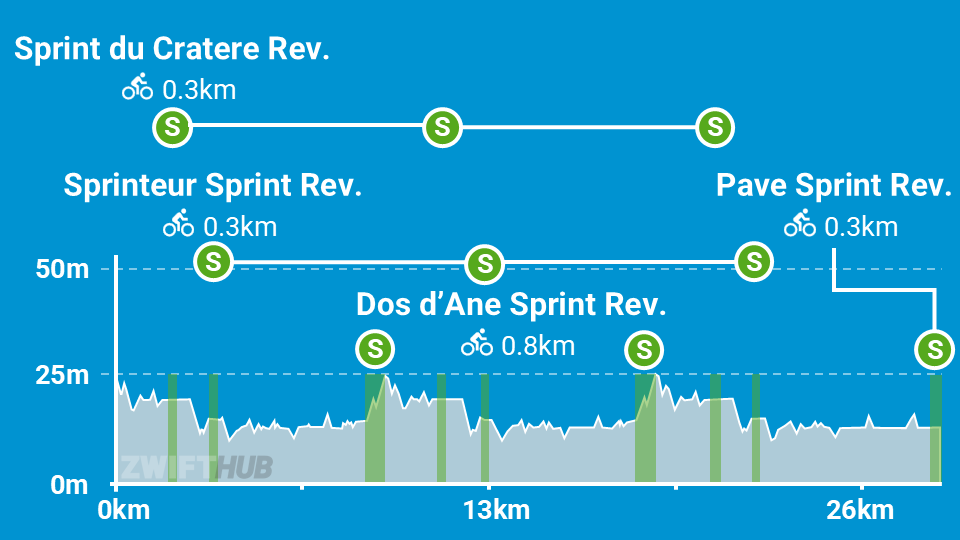
Here’s a profile of the route, not including the lead-in. As you can see, there are 9 sprints on the route itself. But watch out! You’ve got one more on the lead-in, for a total of 10.

The sprints you’ll hit are thus:

  1. Dos d’Âne Sprint Reverse (0.75km, 1.7%) – at the end of the lead-in
  2. Sprint du Cratère (0.3km, 0.1%)
  3. Sprinteur Sprint Reverse (0.25km, 0%)
  4. Dos d’Âne Sprint Reverse (0.75km, 1.4%)
  5. Sprint du Cratère (0.3km, 0%)
  6. Sprinteur Sprint Reverse (.25km, -1.8%)
  7. Dos d’Âne Sprint Reverse (0.75km, 1.4%)
  8. Sprint du Cratère (0.3km, 0%)
  9. Sprinteur Sprint Reverse (.25km, -1.8%)
  10. Pavé Sprint Reverse (0.33km, 0%)

Executing the workout is simple enough: just hit every sprint segment hard. (I said simple, not easy!) 10 sprints is a lot, especially when three of them are 1-minute efforts. So expect some suffering.

I went into the workout with semi-tired legs, but figured I could put in a decent effort because I thought we would only be doing three 1-minute efforts, based on the event description.

Unfortunately for me, this workout had more sprints than anticipated. But lucky for you, now that you’re reading this, you know what you’re getting yourself into!

My first sprint, Dos d’Âne Sprint Reverse, began 2.4km into the event. It was a little off, for a few reasons:

  • It wasn’t clear to me from the on-screen instructions that I was supposed to sprint at the line. (The messaging before most of the subsequent sprints makes this more clear, but this first one did not.)
  • When I went to turn my Wahoo Headwind fan up partway through the sprint, the fan turned completely off! So I had to fumble around with that.
  • My legs clearly needed this to be a recovery day.
  • The sprint was longer than anticipated, taking me 74 seconds to complete.

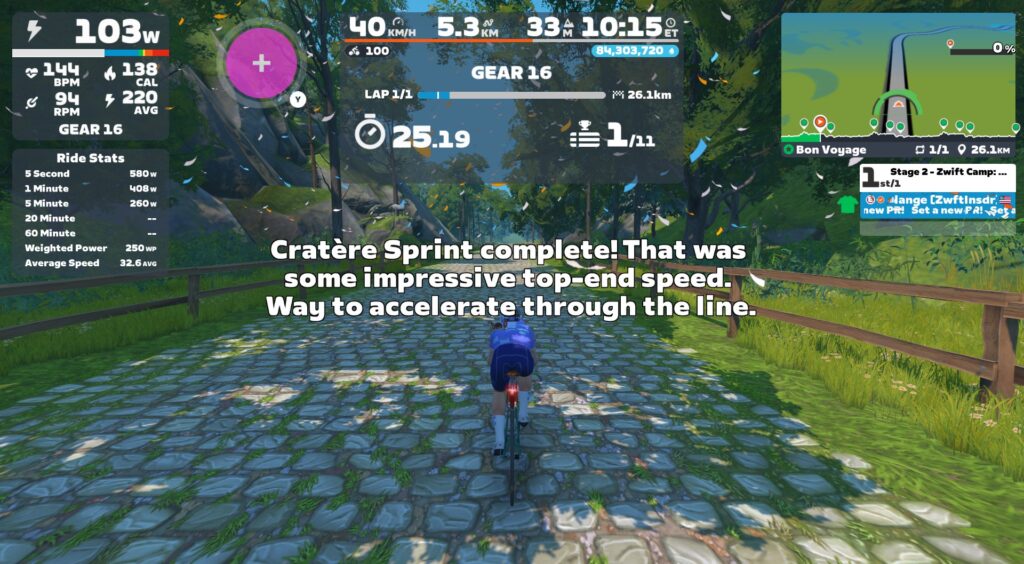
It wasn’t until 4.5km into the ride that a message popped up telling me the next sprint was coming up – Sprint du Cratère – and that I was supposed to sprint on it. That’s when I realized I would be sprinting on every segment on this route. Uh oh. I picked a bad day to have bad legs!

I sprinted rather halfheartedly my first time over Cratère, but the game was very impressed:

Wouldn’t it be cool if Zwift had some intelligence built into these messages, so the response reflected your actual performance? Maybe with a “Snark Slider” in Settings so we could determine how acerbic our coach was. My screen should have said something more like:

This route uses some of the newer HUD features I mentioned in stage 1’s writeup, showing the Ride Stats panel as well as the Lap Splits.

Like stage 1, Ride Stats was more useful than Lap Splits. I appreciated seeing the 1-minute power field on Ride Stats, as that gave me something to chase. But Lap Splits? Totally useless for this workout, because of how the route is laid out and how the Splits were used. (More on this topic in the Suggestion Box below.)

On-screen messaging does a good job of telling you when the next sprint is about to arrive, plus you can see the finish lines approaching on the mini-map profile.

There isn’t much more to say about this workout from an execution standpoint: just sprint hard at every sprint segment, and rest in between.

Again, same warning as stage 1:if you ride this in a group event, it may be harder to dial it down and spin between sprints. But you’ll definitely want to do so, if you want to have the energy for maximal sprint efforts.

HoloReplay Bug

I found Zwift’s HoloReplay to be helpful as a motivator on the sprints, but the same bug is in this workout as in stage 1, causing two different ghosts to appear, instead of just my previous effort. (More on this in the Suggestion Box below.)

Watch My Video

More On Anaerobic Power

A few interesting things about the anaerobic energy system that stage 2 focuses on (read much more on this excellent TrainerRoad post):

  • Anaerobic capacity is typically measured with a 30-second sprint test
  • Unlike the neuromuscular system from stage 1, the anaerobic system is highly responsive to training
  • Strong anaerobic performance is particularly useful in “spiky” cycling disciplines like cyclocross, crits, and MTB racing

Anaerobic Training Tips

The anaerobic system is very adaptable to training, so if you find this is an area you’d like to focus on, you can execute stage 2’s workout more than once! You can also try making your own workout, or using workouts from Zwift’s library.

One classic anaerobic workout is called “Thirty Thirties”. 30 seconds on, 30 seconds off. Repeat this 5-10x, rest for a few minutes, then repeat it again. Do 2 or 3 sets. Fit riders can typically do 3 sets of 10 30-30s. You can do the 30-second hard efforts as free ride segments in a workout, or set them to 130-150% of your FTP if you like ERG mode. You can even do this during a free ride, simply using the game clock as your timekeeper. It’s a simple yet effective workout.

Three tips to maximize your anaerobic workouts:

  • Fuel properly: Anaerobic work is almost entirely glycolytic, which means it’s fueled by sugar. If you don’t have glycogen stored up to fuel the workout, you won’t be able to put in repeated full efforts in your anaerobic zone.
  • Go in recovered: If you’re dealing with residual muscle fatigue from yesterday’s workout or tiredness from a poor night’s sleep, you’ll have a really hard time executing a quality anaerobic workout. These efforts are sharp, hard, and repeated. They take focus and mental (as well as physical) energy.
  • Set accurate targets: if you’re doing these as an ERG workout, make sure your FTP is accurate and your targets are realistic (130-150% of FTP is normal). As with all ERG workouts, an inaccurate FTP means you won’t be training the systems you thought you were training. And nobody’s got time for that!

Suggestion Box

The second workout of Zwift Camp: Build would have gone better if I’d known, going in, that there would be 10 sprints. I would have gone easier the day before, knowing I needed more in the tank.

Here are my suggestions for improvements Zwift could make to stage 2:

  • No Lap Splits: This route is basically two laps of a circuit, plus a lead-in at the start, and a “lead-out” at the end. So at best, you could time two “laps”. But the way it’s set up, the first lap isn’t auto-triggered until the second time through the Dos d’Âne Sprint, meaning the first lap’s time includes the lead-in. That means you can’t compare it to the second lap’s time… which makes the Splits timers useless for this workout.
  • Fix HoloReplays: It’s clear that Zwift has hard-coded the HoloReplay functionality into these events, because changing my settings doesn’t seem to make a difference! It wasn’t a big deal for me, and the ghosts still motivated me to push hard. But Zwift should fix these events so they automatically show HoloReplays (just one ghost of your previous effort) for everyone.
  • Improve the event description: I already mentioned this for stage 1, but stage 2 is a perfect example of how a simple line or two in the event description would clarify what people are signing up for. (Also, the description of stage 2 says “Target Effort: Three 1-Minute Efforts”. But the actual event has you sprinting 10 efforts of various lengths.)
  • In-game messages that are realistic: OK, this is sort of silly and a major stretch goal at best. But it sure would be cool if the game could respond accurately to my actual efforts on the segments. It has the data necessary to do so. Just hook it up to ChatGPT and let ‘er rip!

Sign Up For Stage 2

Sign up for stage 2 events in-game, in the Companion app, or go to zwift.com/events/tag/zwiftcampbuild2025wo2.

Questions or Comments?

Have you done this workout yet? Share your thoughts below, or any questions you may have heading into the workout.

Sony’s WH-1000XM5 headphones are $152 off for Black Friday

Sony’s still excellent WH-1000XM5 wireless headphones are down to $250 for Black Friday. That’s $150 off the list price and equal to the all-time low (give or take a single cent) we saw on Prime Day. They may no longer be Sony’s flagship noise-canceling headphones, but if the WH-1000XM6 are out of your price range, these former Engadget favorites are well worth considering at this heavily reduced price.

We awarded the WH-1000XM5 a score of 95 in our 2022 review, praising the supremely comfortable redesign, sound quality and powerful ANC. Battery life is also very respectable at 30 hours. We found the punchy bass an improvement over their predecessors, and the overall sound deeper and more immersive than the M4 headphones. As for noise-canceling, Sony’s decision to double the number of microphones and processors used for ANC means an improvement in blocking higher frequency sounds, such as human voices. They aren’t entirely baby scream-proof, but then few headphones are.

Naturally, the WH-1000XM6 that this year replaced the M5 as Sony’s flagship model offers even better sound quality and noise cancellation, while remaining extremely comfortable throughout long listening sessions. But they’re also a lot more expensive at $450, and if you’re deal-hunting this Black Friday, the WH-1000XM5 headphones are the ones to go for.

This article originally appeared on Engadget at https://www.engadget.com/deals/sonys-wh-1000xm5-headphones-are-152-off-for-black-friday-124434564.html?src=rss

How Should the Linux Kernel Handle AI-Generated Contributions?

Linux kernel maintainers “are grappling with how to integrate AI-generated contributions without compromising the project’s integrity,” reports WebProNews:

The latest push comes from a proposal by Sasha Levin, a prominent kernel developer at NVIDIA, who has outlined guidelines for tool-generated submissions. Posted to the kernel mailing list, these guidelines aim to standardize how AI-assisted patches are handled. According to Phoronix, the v3 iteration of the proposal [posted by Intel engineer Dave Hansen] emphasizes transparency and accountability, requiring developers to disclose AI involvement in their contributions. This move reflects broader industry concerns about the quality and copyright implications of machine-generated code.

Linus Torvalds, the creator of Linux, has weighed in on the debate, advocating for treating AI tools no differently than traditional coding aids. As reported by heise online, Torvalds sees no need for special copyright treatment for AI contributions, stating that they should be viewed as extensions of the developer’s work. This perspective aligns with the kernel’s pragmatic approach to innovation. The proposal, initially put forward by Levin in July 2025, includes a ‘Co-developed-by’ tag for AI-assisted patches, ensuring credit and traceability. OSTechNix details how tools like GitHub Copilot and Claude are specifically addressed, with configurations to guide their use in kernel development… ZDNET warns that without official policy, AI could ‘creep’ into the kernel and cause chaos…

The New Stack provides insight into how AI is already assisting kernel maintainers with mundane tasks. According to The New Stack, large language models (LLMs) are being used like ‘novice interns’ for drudgery work, freeing up experienced developers for complex problems… The Linux kernel’s approach could set precedents for other open-source projects. With AI integration accelerating, projects like those in the Linux Foundation are watching closely… Recent kernel releases, such as 6.17.7, include performance improvements that indirectly support AI applications, as noted in Linux Compatible.


Read more of this story at Slashdot.