Spotify now includes a built-in tool for importing your playlists from other services

Spotify definitely wants you to only use Spotify for streaming music, but it’s willing to admit that you might have used another service in the past. Those people can now more easily import their playlists into the Spotify app, thanks to its latest integration with TuneMyMusic.

Available through Spotify mobile users and rolling out globally from today, you can access the new feature through Your Library in the Spotify app. Scroll to the bottom and you’ll see an option to import your music by connecting to TuneMyMusic (it looks like it boots you into your browser at this stage) and choosing the service you want to transfer from. Apple Music already lets you do something similar directly from within your settings on an iPhone, iPad or Android device, or through the web.

TuneMyMusic supports transfers into Spotify from a wide range of streaming platforms, including Apple Music, YouTube Music, Amazon Music and Tidal. You won’t lose your playlists in the source location. It’ll just copy them over so they appear in your Spotify library.

If you aren’t already aware, Spotify lets you customize playlists in a number of ways, from inviting friends to add their own songs, to designing the cover art yourself. So if you’ve been considering a jump from elsewhere, this new feature should make the transition a little easier.

This article originally appeared on Engadget at https://www.engadget.com/apps/spotify-now-includes-a-built-in-tool-for-importing-your-playlists-from-other-services-175100343.html?src=rss

Google’s latest swing at Chromebook gaming is a free year of GeForce Now

Earlier this year, Google announced the end of its efforts to get Steam running on Chromebooks, but it’s not done trying to make these low-power laptops into gaming machines. Google has teamed up with Nvidia to offer a version of GeForce Now cloud streaming that is perplexingly limited in some ways and generous in others. Starting today, anyone who buys a Chromebook will get a free year of a new service called GeForce Now Fast Pass. There are no ads and less waiting for server slots, but you don’t get to play very long.

Back before Google killed its Stadia game streaming service, it would often throw in a few months of the Pro subscription with Chromebook purchases. In the absence of its own gaming platform, Google has turned to Nvidia to level up Chromebook gaming. GeForce Now (GFN), which has been around in one form or another for more than a decade, allows you to render games on a remote server and stream the video output to the device of your choice. It works on computers, phones, TVs, and yes, Chromebooks.

The new Chromebook feature is not the same GeForce Now subscription you can get from Nvidia. Fast Pass, which is exclusive to Chromebooks, includes a mishmash of limits and bonuses that make it a pretty strange offering. Fast Pass is based on the free tier of GeForce Now, but users will get priority access to server slots. So no queuing for five or 10 minutes to start playing. It also lacks the ads that Nvidia’s standard free tier includes. Fast Pass also uses the more powerful RTX servers, which are otherwise limited to the $10-per-month ($100 yearly) Performance tier.

Read full article

Comments

Android Quick Share now works with Apple’s AirDrop feature on Pixel 10 phones

Count this as the latest unexpected detente between Apple and Google. Today, Google announced that the Pixel 10 series of phones can use Android Quick Share with the iPhone’s AirDrop feature, meaning it’ll be much easier to shoot files and photos between the two platforms. While this feature is currently limited to Pixel 10 series phones, Google says it is looking to expand the feature to other devices.

Google dropped details on how it made this work from a privacy and security standpoint in its technical blog if you want to get into the nitty-gritty. But functionally, it sounds like this will work the same as Quick Share currently does. The receiving Apple device (this will work with iPads and Macs as well as iPhones) needs to set their Airdrop visibility preferences to “anyone for 10 minutes.” This means that people outside of your contact list will be able to initiate an AirDrop or Quick Share transfer. From there, the Pixel 10 user should be able to see the receiving Apple device when they go to share things via Quick Share as normal.

Google also notes that Android devices can receive files from Apple devices that are using AirDrop. They’ll just need to make sure their Quick Share visibility settings are similarly set to “everyone for 10 minutes” or that they’re in “receive” mode on the Quick Share page.

It’s not clear if Apple was involved in making this new feature work or if Google did this all on its own. Apple hasn’t released a corresponding post on its own newsroom. If Apple wasn’t involved, the obvious question is whethere or not they’ll treat this as a security breach and release a software update that undos Google’s work. And if they do, it’s entirely possible that we’re going to head down another long road of the company’s bickering about security versus openness.

We’ve reached out to Apple and Google to get more details and will update this post if we learn anything.

This article originally appeared on Engadget at https://www.engadget.com/mobile/android-quick-share-now-works-with-apples-airdrop-feature-on-pixel-10-phones-173646458.html?src=rss

Updated Steam Runtime Switches To Debian 13 Libraries, SDL2 Using Compatibility Layer

An updated version of the Steam Linux Runtime 4 branch was rolled out that has now shifted from Debian 11 to Debian 13 libraries for some significant upgrades. In the process more libraries have gone x86_64 only in foregoing the i386 builds. In addition, the SDL 2 library support for the Steam Runtime is now provided by sdl2-compat as the compatibility layer for SDL2 atop SDL3…

You Can Finally AirDrop Files Between Android and iPhone, Starting with Pixel 10

Android’s Quick Share file transfer service can now work with Apple’s AirDrop, allowing users to send files between iPhones and Android devices. Google has started rolling out the feature to its Pixel 10 family of smartphones. The cross-platform compatibility includes security protections that the company says independent security experts tested. Google said it built the feature in response to user requests for simpler file sharing between devices regardless of manufacturer. The company plans to expand availability to additional Android devices.


Read more of this story at Slashdot.

New Chromebooks Are Getting GeForce Now for Free Without Ads

We may earn a commission from links on this page.

Ever since Google introduced its Chromebook Plus program in 2023, which promises a certain amount of power and screen resolution for your device, it’s been trying its best to get people to game on their Chromebooks. There are Chromebooks with OLED screens, high refresh rates, and even light-up keyboards, but no matter how many bells and whistles you slap on a Chromebook, it’s still not going to have nearly as much raw processing power as a more traditional laptop.

That’s where cloud gaming comes in. This lets you stream games from the cloud, if you’re willing to put up with a certain amount of video compression and input delay. One of the most popular cloud gaming services is Nvidia’s GeForce Now, which lets you play select free-to-play titles and PC games you already own using the company’s own data centers. The catch is that you either have to watch ads or pay up—but today, Google’s Chromebooks are getting an exclusive new tier of GeForce Now that fixes both of these issues.

Called GeForce Now Fast Pass, this version of GeForce Now is sort of like an expanded version of the existing free tier. You’ll still be limited to playing at 1080p and 60fps—higher specs will require you to pay—and you won’t have access to GeForce Now’s “Install-to-Play” games, which means the library of compatible titles will be closer to 2,000 than 4,000. But unlike the free tier, you won’t have to watch any ads, and you won’t have to wait in a queue to start playing. Nvidia says the typical free-tier queue is only two minutes long, but hey, the sooner you can hop into the action, the better.

Starting today, all new Chromebook purchases will come with a free year of GeForce Now Fast Pass, but there are some caveats. The big one is that you only get 10 free Fast Pass hours per month, although up to five unused hours will roll over to the next month.

That means you’ll still have to keep track of your time while playing, even if you don’t have to watch ads. A Google spokesperson told me over email that once your Fast Pass hours are up, you’ll be downgraded to the basic, ad-supported free tier, or you can purchase more Fast Pass hours a la carte. I wasn’t told exactly how much these hours will cost, but given that a day pass (meaning 24 hours of play) of GeForce Now with no ads and higher specs than Fast Pass costs just $3.99, I can’t imagine they’ll be too expensive.

As for when your year of Fast Pass is over, I’m still waiting for an answer on how to renew. I’ll update this post once I hear back. I’ve also asked whether users that already have Chromebooks will be able to sign up for GeForce Now Fast Pass.

One last bonus for Fast Pass, though, is that you don’t have to actually use it on your Chromebook. You’ll need a Chromebook to sign up (I’m also still waiting on exact steps for that), but once you’ve redeemed the offer, you’ll be able to use it on any GeForce Now compatible device, like a phone or tablet.

Overall, it doesn’t exactly seem like something I’d go out of my way to buy a Chromebook for, but it could be a decent way to get good enough performance to play through about one short game per month, all without having to pay for GeForce Now or deal with ads or wait times. Combine that with the free games that sites like Epic give out on a regular basis, and you could essentially game casually for a year without buying anything other than your Chromebook.

Flying with whales: Drones are remaking marine mammal research

In 2010, the Deepwater Horizon oil rig exploded in the Gulf of Mexico, causing one of the largest marine oil spills ever. In the aftermath of the disaster, whale scientist Iain Kerr traveled to the area to study how the spill had affected sperm whales, aiming specialized darts at the animals to collect pencil eraser-sized tissue samples.

It wasn’t going well. Each time his boat approached a whale surfacing for air, the animal vanished beneath the waves before he could reach it. “I felt like I was playing Whac-A-Mole,” he says.

As darkness fell, a whale dove in front of Kerr and covered him in whale snot. That unpleasant experience gave Kerr, who works at the conservation group Ocean Alliance, an idea: What if he could collect that same snot by somehow flying over the whale? Researchers can glean much information from whale snot, including the animal’s DNA sequence, its sex, whether it is pregnant, and the makeup of its microbiome.

Read full article

Comments

Uber Eats will use Starship robots in the UK to make deliveries

Uber Eats has announced it’ll soon start using Starship robots to complete food deliveries in certain parts of the UK, beginning in the Leeds and Sheffield areas. These little robo-couriers will only be able to handle deliveries from “select merchants” for the time being.

The robots won’t accept tips, for obvious reasons, but customers can still rate their experience via the app. We aren’t sure what happens to a particular robot with enough bad ratings. Maybe it gets sent to a farm in the countryside somewhere. 

The service launches in December and the platform says it’ll share more information at that date. Uber Eats also says it plans on expanding the operating territory in the near future. To that end, Starship robots are coming to “additional European markets in 2026” and more US markets in 2027.

This isn’t Uber’s first foray into robot deliveries. Uber Eats has used robots from Serve Robotics and Avride in the past to deliver food.

As for Starship, these diminutive delivery robots have actually been around since 2018. The company says there are currently around 3,000 robots in operation across the world in more than 270 different locations. They can be found at several college campuses, including Purdue University and George Mason.

This article originally appeared on Engadget at https://www.engadget.com/transportation/uber-eats-will-use-starship-robots-in-the-uk-to-make-deliveries-171928694.html?src=rss

Intel Teases Panther Lake Launch As 18A Chip Yield Update Shows Strength

Intel Teases Panther Lake Launch As 18A Chip Yield Update Shows Strength
Intel’s next truly interesting processor release—sorry, Arrow Lake Refresh—is going to be the launch of its Panther Lake mobile processors. As it turns out, we now know exactly when that’s happening: not Q4 ’25 as rumored, but indeed Q1 ’26, at the Consumer Electronics Show in lovely Las Vegas. We know that because Intel itself said so. In

WhatsApp is bringing back its very first feature

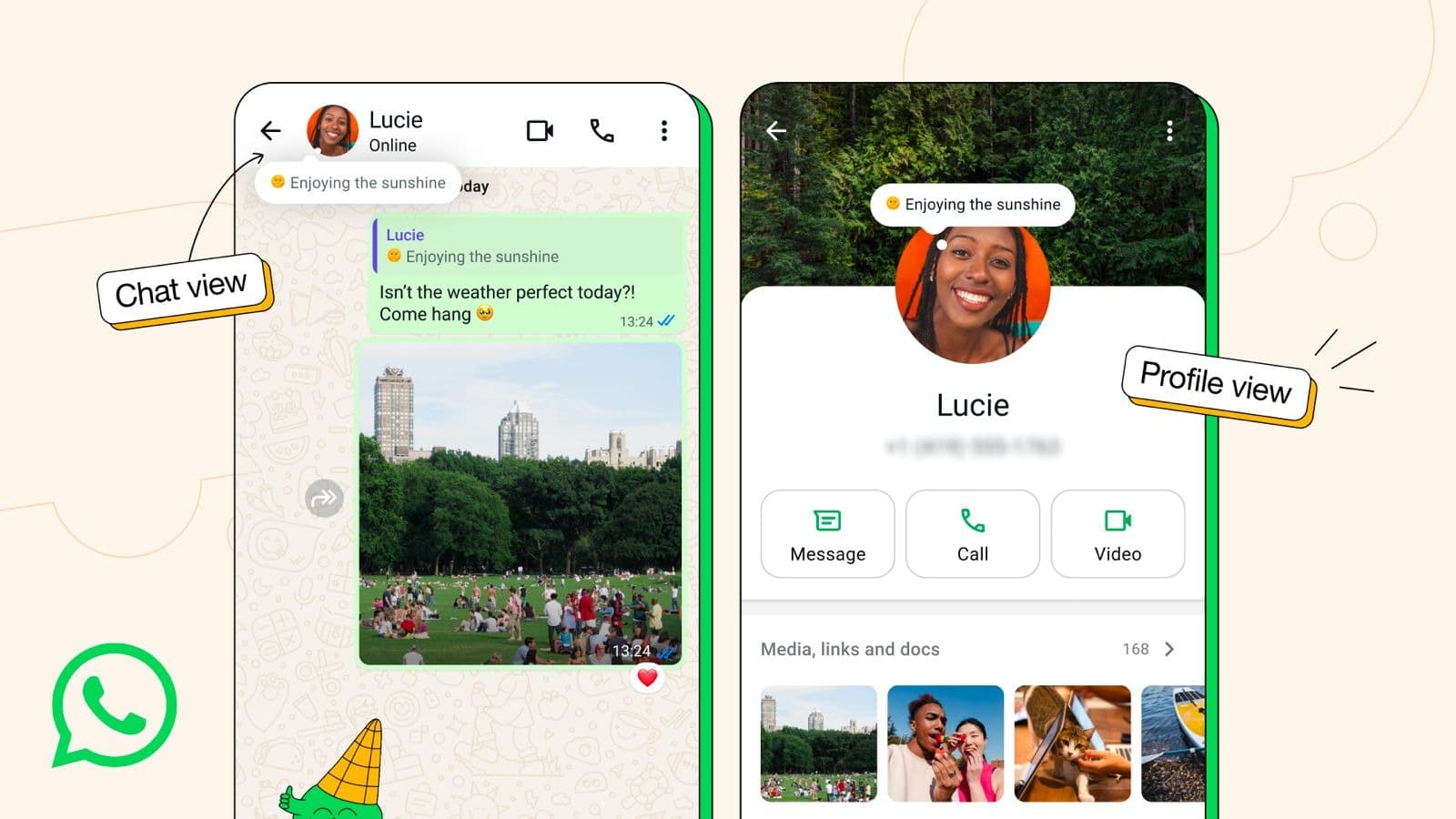
WhatsApp is going back to the past for its latest feature. In fact, it’s going all the way back, because it’s reviving the very first WhatsApp feature. You can think of About (the creators were really not very good at naming things, huh?) as a status update or WhatsApp’s version of an AIM away message. It’s designed to let your contacts know at a glance what you’ve got going on, such as something that’s keeping you busy and might make you slow to respond to messages.

The About message appears on both your profile and at the top of one-on-one chats. By default, the About message will vanish after 24 hours, but you can set it to vanish earlier or stick around for longer. You can do this by going to the “set about” option in the WhatsApp settings. You also have control over who is able to see your About message — you can restrict it to your contacts or allow anyone to view it from your profile.

This is a handy little update that apes the notes feature in sibling apps Instagram and Facebook. WhatsApp is starting to roll About (back) out to all users on mobile devices this week.

Illustration of the About feature in WhatsApp
Meta

This article originally appeared on Engadget at https://www.engadget.com/apps/whatsapp-is-bringing-back-its-very-first-feature-170100513.html?src=rss

Gemini arrives on Android Auto

Google is gradually replacing the outgoing Assistant with Gemini in all of its apps, and now it’s the turn of Android Auto. In the next few months, any Android users who have made the jump to Gemini on their phones will be able to interact with the next-generation AI assistant while driving using natural language.

The Gemini-ification of Google Maps has already happened, and its new features are also coming to Android Auto. You can do things like ask the AI about restaurants that serve a specific cuisine on your current route, and ask follow-up questions about the menu or its proximity to your destination. From there, Maps can guide you to the restaurant. Gemini lets you ask questions as you would when talking to another human, which theoretically means you can focus more on the road and less on how to construct a prompt that it will understand.

The same applies to sending messages while driving. Where before, you’d have to say exactly what you wanted to write. You can just give the AI the gist and it will use the relevant information, such as your ETA if you’re meeting someone, and it can add extra details if requested without you needing to restart the message from scratch. Gemini will also summarize grouped messages.

Gemini can also access your Gmail account and pick out things like hotel addresses, as well as running you through your unread emails. Other apps you might want to use while driving, such as Calendar, can also be accessed by the more conversational Gemini.

Gemini doubles as a DJ of sorts too, and is able to create on-the-fly playlists with specific conditions relating to genre, length or your general mood. You can even ask it to choose songs that fit the current weather outside. It can also act as a tour guide, running you through some facts about a destination, and if you’re on the way to the wedding, Google even suggests practicing your speech in the car. Gemini likely won’t judge you for calling on its services for some last-minute speech-writing either.

As long as you have the Gemini app on your phone, it should start appearing on your Android Auto-enabled infotainment system. You can either say “Hey Google”, tap the on-screen mic button or press the voice control button on the steering wheel. 45 languages are supported and you can translate any message into a language that Gemini knows in real-time.

This article originally appeared on Engadget at https://www.engadget.com/ai/gemini-arrives-on-android-auto-170012688.html?src=rss

“Hey Google, did you upgrade your AI in my Android Auto?”

Google’s platform for casting audio and navigation apps from a smartphone to a car’s infotainment system beat Apple’s to market by a good while, but that headstart has not always kept Android Auto in the lead ahead of CarPlay. But an upgrade rolls out today—provided you already have Gemini on your phone, now it can interact with you while you drive.

What has sometimes felt like a hands-off approach by Google toward Android Auto didn’t reflect an indifference to making inroads into the automotive world. Apple might have its flashy CarPlay Ultra that lets Cupertino take over the look and feel of a car’s digital UI, but outside of an Aston Martin, where will any of us encounter that?

Meanwhile the confusingly similarly named Android Automotive OS—a version of Android developed to run with the kind of stability required in a vehicle as opposed to a handheld—has made solid inroads with automakers, and you’ll find AAOS running in dozens of makes from OEMs like General Motors, Volkswagen Group, Stellantis, Geely, and more, although not always with the Google Automotive Services—Google Maps, Google Play, and Google Assistant—that impressed us back in 2021 when we drove the original Polestar 2.

Read full article

Comments