Meta announced WorldGen, a new AI tool that could soon let you generate navigable 3D worlds in minutes from a single text prompt.
The News
Meta Reality Labs announced WorldGen in a blog post, a research-stage system for generating fully navigable, stylistically coherent 3D worlds from a single text prompt.
As outlined in WorldGen’s research paper, instead of producing only a single viewpoint or small environment, the AI-driven system creates large, consistent scenes up to 50 × 50 meters that you can walk through, explore, and load directly into engines like Unity or Unreal Engine.
The pipeline combines several components: procedural layout generation, image-based planning, diffusion-driven 3D reconstruction, navmesh extraction, scene decomposition, mesh refinement, and texturing, Meta says.
Additionally, Meta says WorldGen can also decompose scenes into objects using an accelerated AutoPartGen process, making the environments more reusable and editable.
It’s not out yet though, as Meta says there are several limitations to wide-spread usage:
“Currently, WorldGen relies on generating a single reference view of the scene, which restricts the scale of scenes that can be produced,” Reality Labs’ paper says. “Large open worlds spanning kilometers are not supported natively and would require generating and stitching multiple local regions, which risks introducing non-smooth transitions or visual artifacts at region boundaries.”
Other limitations include the inability to model multi-layered environments, like multi-floor dungeons or seamless interior-exterior transitions. And unlike human-created environments, WorldGen doesn’t reuse textures or geometry, which is often done for rendering efficiency—something Meta says they’re exploring in future versions to push scalability.
My Take
Horizon Worlds needs high-quality content to attract and keep users coming back for more. Although I can’t say rando-generated AI worlds will solve that problem, doing some of the grunt work of creating set pieces could demonstrably improve the baseline of current worlds.
To boot, the company has already released a host of AI features for Horizon Worlds creators, including an AI-powered ‘Creator Assistant’ co-pilot, as well as AI-driven 3D mesh and texture generation, typescript code creation, sky and audio generation for sound effects and ambient environments; WorldGen ostensibly packages a lot of these disparate systems into a monolithic prompt box.
Granted, it’s not out yet, although these early steps do feel a bit like inching up to the cusp of fully AI-generated games, and not just 50 × 50 meter levels. Whatever the case, it appears Horizon Worlds hopes to one day play host to worlds essentially vibe developed into existence.
We’ve had less than a year to mourn the loss of Dell’s iconic XPS laptop brand, and frankly, I’m still not over it. But time moves on. Engadget has already reviewed the Dell 14 Premium, formerly the XPS 14, and now I’ve finally had a chance to put the larger Dell 16 Premium through its paces. My conclusion? It’s still as beautiful as the last XPS 16, but I also think Dell seriously needs to rethink its ultramodern design strategy.
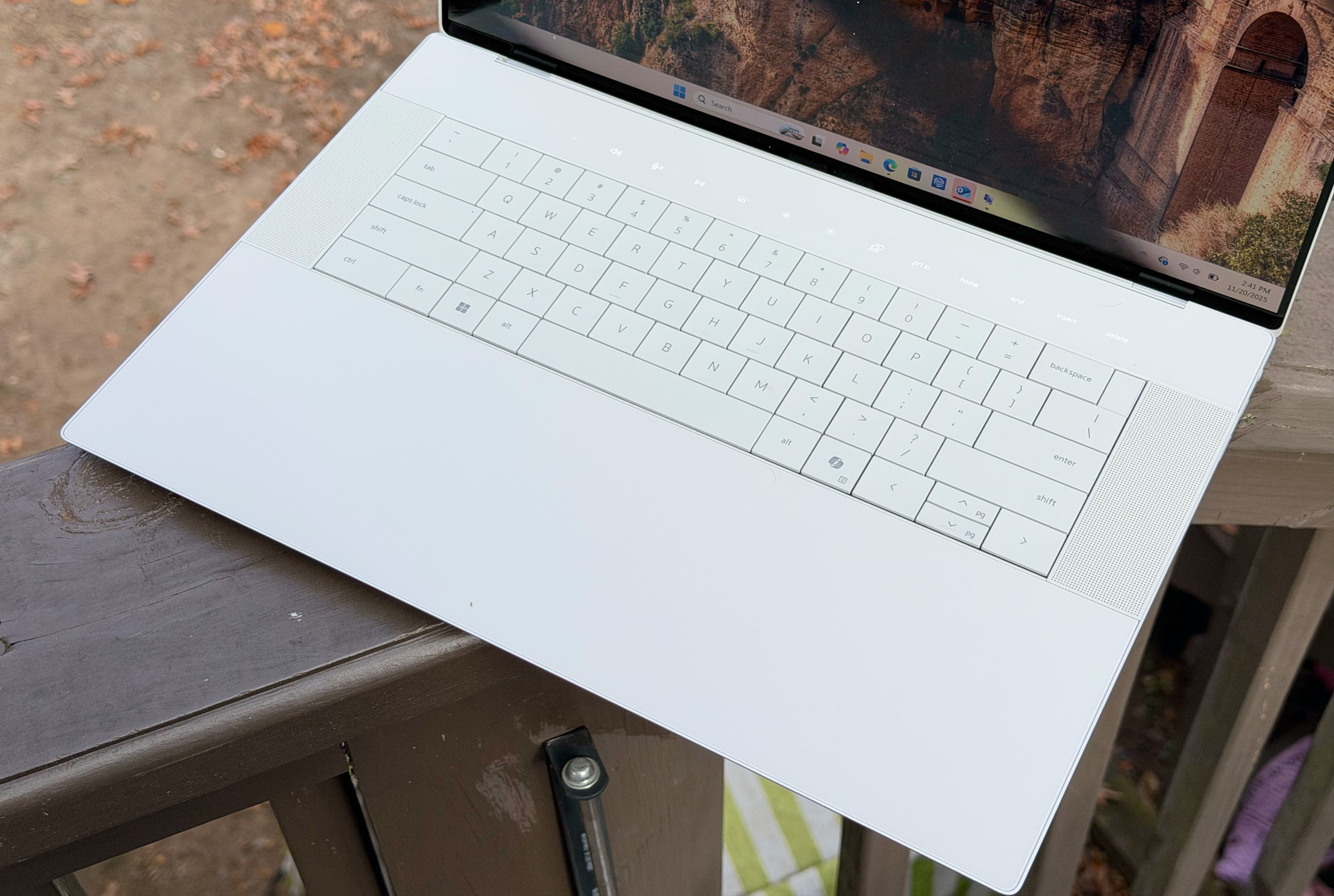
With its minimalist design (look Ma, no visible trackpad!), smooth metal case and clean lines, the Dell 16 Premium looks like a work of art. It’s the sort of thing I’d imagine someone creating as a prop for a sci-fi movie in the ’90s, when we could barely imagine real notebooks moving beyond chunky grey bricks. But those good looks come at a cost — both in terms of price (it starts at $2,000) and basic functionality.
If you’ve read my reviews of the XPS 16 and XPS 13 Plus, Dell’s first models to use this aesthetic, you might think I’m just beating a dead horse. But it’s worth pointing out again, more than three years after I first chastised Dell for chasing style over function, that the company seemingly hasn’t learned anything. Sure, it’s a bit faster than before, thanks to Intel’s Core Ultra chips and NVIDIA’s RTX 50-series GPUs, but that’s not saying much.
I still have trouble using the 16 Premium’s borderless trackpad because it’s tough to tell where the clickable zones are. I still hate the capacitive function row, both because it becomes miraculously invisible in bright light and it’s tough to build muscle memory for specific keys (like changing the brightness or volume). And honestly, I still don’t know how Dell can justify offering only USB-C ports and a microSD card slot on a laptop meant for serious work. Even Apple realized that it had to include a wider variety of ports for professionals, and that’s also something other PC makers like ASUS and Acer offer. Did Dell miss the memo?
Worst of all, the 16 Premium’s 4K OLED screen seriously hampers its battery life. It only lasted six hours and five minutes during a basic video rundown, whereas the previous XPS 16 lasted eight and a half hours in the much more demanding PCMark 10 battery test. (For some reason, that benchmark didn’t run properly on my review 16 Premium review unit.) Larger laptops often stuff in bigger batteries than smaller models, but the 16 Premium can’t even manage that.
At least it’s faster than before. The Dell 16 Premium I reviewed was equipped with Intel’s Core Ultra 7 255H chip and a low-wattage version of NVIDIA’s RTX 5070 GPU. It scored around 10 percent higher than last year’s XPS 16 in PCMark 10, and it was notably faster in the Geekbench AI benchmark thanks to Intel’s revamped NPU. I was even able to play Cyberpunk 2077 in 4K at 84 fps thanks to the 5070, though I had to enable DLSS 4 frame generation to do so. For some reason though, the system would slow to an absolute crawl whenever I enabled ray tracing features. At best, I only saw around 60 fps in 1080p while using the low ray tracing settings.
The Dell 16 Premium from the rear.
Devindra Hardawar for Engadget
Sure, it’s not a gaming laptop, so I can’t directly compare it to something like the Razer Blade 16. But it’s strange to see one of NVIDIA’s latest GPUs handle ray tracing so poorly. As you’d expect, the Dell 16 Premium also got pretty loud whenever its fans spun up. At least they managed to keep the system relatively cool though: Its CPU and GPU sat at 68C and 70C, respectively, under load.
The more I looked at the Dell 16 Premium’s beautiful facade, the more I wanted something… more. It needs more usable ports, like HDMI and a full-sized SD card reader. It needs more useful function keys that are visible in bright light — and also stay in one place — so I can touch type more easily. And for the love of god, just give up on the invisible trackpad. It’s a parlor trick that just makes it harder to tell left and right mouse clicks apart, despite the impressively large trackpad area.
The 16 Premium’s “invisible” trackpad blends seamlessly into its wrist rest, while the keyboard lays perfectly flat and a row of capacitive function keys sits above.
Devindra Hardawar for Engadget
Given its premium positioning, I also expected more from the laptop’s speakers. They sound fine compared to most Windows laptops, but they can’t hold a candle to the audio sorcery Apple accomplishes with the 16-inch MacBook Pro. When playing music, the 16 Premium doesn’t have much dynamic range or low-end tone, whereas Apple’s speakers often surprise me with their depth and enveloping sound. During late night writing sessions, I often find myself playing music straight through the 16-inch MacBook Pro, rather than casting it off to my Sonos speakers like the 16 Premium forces me to do.
To avoid being entirely negative, I’ll reiterate that I genuinely enjoy looking at the Dell 16 Premium. I love the way its keyboard and large key caps lay perfectly flat along the notebook’s lower half. And I’ll admit, the 16-inch OLED screen looks lusciously colorful when it needs to. I’m just asking for Dell’s designers to consider a better balance of style and functionality for their next stab at a premium 16-inch laptop.
This article originally appeared on Engadget at https://www.engadget.com/computing/laptops/dell-16-premium-review-stylish-to-a-fault-130000463.html?src=rss
Zwift Camp: Build is now underway. This is a 5-stage route-based workout series, with each stage lasting one week and focusing on developing power over a specific time interval.
My plan is to do each of the five workouts before their weeks begin, so I can write a post unpacking the workout and delivering some tips along the way. This post covers Stage 3’s workout on Watopia’s new Hot Laps route. Let’s roll!
Once again, I pulled the 7-Eleven bike out for this session…
Stage 3 Walkthrough: Chase Your Rival
The third stage of Zwift Camp: Build is focused on “Three 5-minute efforts” according to the event description. But it’s probably not laid out how you’d expect!
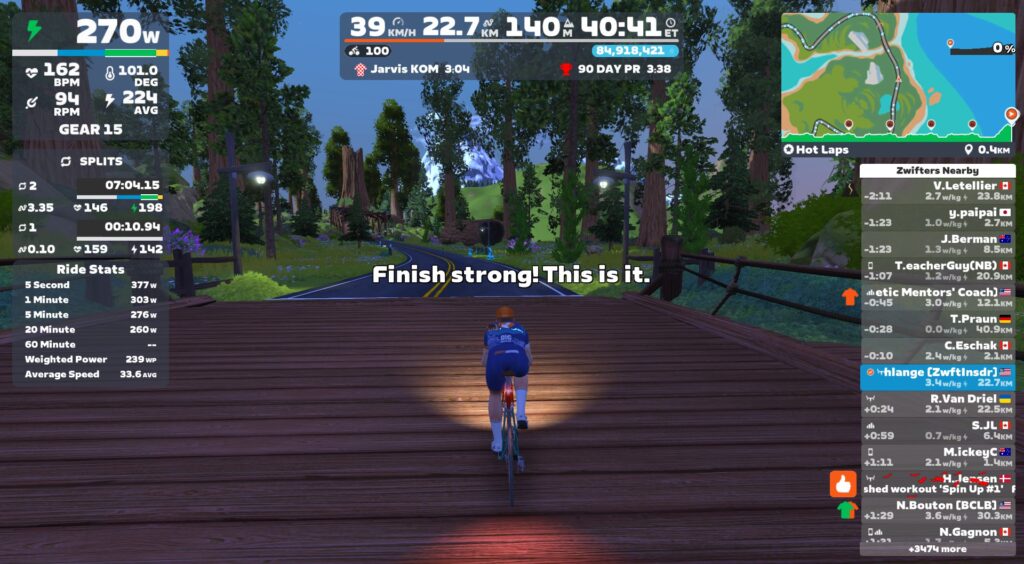
The stage is built around the new Hot Laps route in Watopia, which takes riders on 4 full laps of the Volcano Circuit, followed by a finish up the Jarvis KOM:
Follow the instructions on screen and you’ll use the first lap as a warmup and a bit of recon, learning where that little kicker is at, where you can recover a bit on descents, etc. The instructions have you begin your effort in earnest at the start of the second lap, and there are really two stated goals here:
Put in a hard, steady effort on laps 2, 3, and 4 while also
Negative splitting your lap times (that is, going faster each lap)
So you don’t want to start off with a maximal effort on lap 2, because you won’t be able to beat that effort the next lap!
My legs were tired from a metric century the day before, so I just targeted power numbers I knew I could hold:
Lap 2: 250W
Lap 3: 260W
Lap 4: 270W
I also kept an eye on my previous effort HoloReplay, making sure I beat him each lap.
You might think it would be hard to manage your power well enough to precisely hit power targets, but thanks to the average power number on the Splits HUD, I found it pretty easy. I was bang on my target for laps 2 and 3, then pushed extra hard on lap 4 just because I could, coming in a few watts above my 270W target.
What power targets should you shoot for? You won’t be able to hold true VO2 max power for three continuous laps, but if your legs are fresh, you should be able to push at or just above your FTP for all three laps. Something like this should be doable with fresh legs:
Lap 2: 100% of FTP
Lap 3: 103% of FTP
Lap 4: 106% of FTP
Or you could skip trying to hit a power target, and simply try to stay away from your previous effort HoloReplay every lap. Put in a hard but not maximal effort on lap 2, then just make sure you beat your HoloReplay on laps 3 and 4!
After finishing the fourth lap, the route takes you into Jarvis for a finishing effort up the Jarvis KOM. This short climb will take most riders 3.5-5 minutes to complete, so it’s actually a proper traditional VO2 max interval in terms of its length and the 5 minutes of recovery you get just before it begins. My advice? Just empty the tank. It’s the end of the workout, so put in a maximal effort up that KOM segment and see what you can do!
Overall, I found this the most fun Zwift Camp: Build stage yet. The challenge of pacing myself so I was both working hard but also negative splitting the laps kept me engaged, even if my tired legs didn’t let me ride anywhere near VO2 max targets. And while the HoloReplay bug persists (see below), my previous effort ghosts proved very motivating!
Drafting Note
Your previous effort ghost is an exact replay of your avatar from the previous lap, which means if you drafted on the previous lap, that ghost is moving at the speeds you attained while drafting.
This could make things difficult when you try to beat your ghost on the next lap, and you aren’t drafting.
It worked out fine for me in my on-demand workout, even though I was on a road bike, as I never drafted for a meaningful length of time. But basically, you’ll want to be either drafting most of the time, or not drafting most of the time. One simple way to make sure you don’t draft: ride a TT bike! It looks like they’re allowed in the events, and of course you can always use a TT bike in an on-demand ride.
What Is This Workout?
After Stage 1’s short neuromuscular sprint efforts, and Stage 2’s longer anaerobic sprints, you might expect stage 3 to focus on VO2 max power. And it does… sort of. Since the three laps are back-to-back-to-back, you won’t get the rest/recovery needed to execute traditional VO2 max intervals. Instead, you can work at pacing yourself at or just above FTP, finishing with a maximal effort on lap 4, then recovering a bit before doing one more hard VO2 max interval up the Jarvis KOM.
It’s not a traditional VO2 max workout, but it’s engaging and fun work. Plus, pacing the three Volcano Circuit laps for negative splits is good practice for Stage 4’s effort up The Grade. (Turning in your best effort on that climb really comes down to pacing it well, and starting a bit below your power target while finishing a bit above it is the best way to make that happen.)
Watch My Video
More On VO2 Max Power
VO2 max measures the maximal amount of oxygen your body can consume. It is a key measure of aerobic capacity and thus a key determinant of performance potential (read much more inthis TrainerRoad post). A few interesting things about VO2 max:
Genetics play a significant role in VO2 capacity, but untrained athletes can often improve by as much as 25%.
You might think that lung volume is what drives VO2 max, but in fact it’s largely determined by four factors: cardiac output (how much blood the heart can move), the oxygen-carrying capacity of that blood, the circulatory system itself, and muscular efficiency.
Strong anaerobic performance is particularly useful in “spiky” cycling disciplines like cyclocross, crits, and MTB racing
While world-class male cyclists have a VO2 max in the 75-90ml/kg/min range (recent studies are saying Tadej Pogačar may have the highest VO2 max of any winner in TdF history at 96ml/kg/min), mere mortals (good amateurs) are closer to 65-80ml/kg/min.
VO2 Max Training Tips
Traditional VO2 max training has you executing repeating intervals that are 2-6 minutes long, each 106-120% of your FTP, with very easy rest intervals in between roughly the same length as the VO2 max interval.
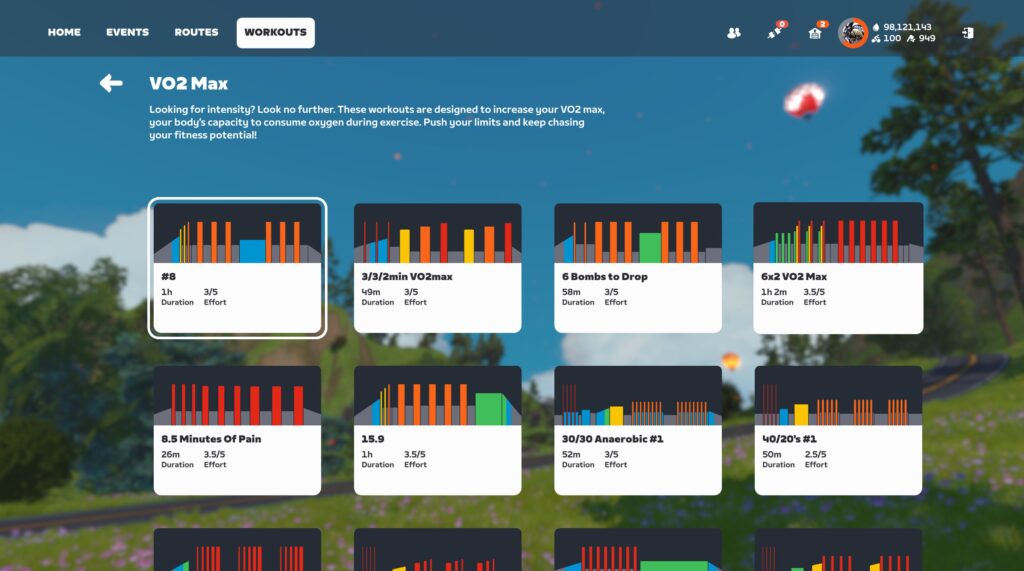
But there are other ways to do VO2 max work. Zwift has a “VO2 Max” folder in its workout directory, with 37 workouts to choose from at the time of this post:
Some of these workouts feature the more traditional, longer VO2 max intervals, while others have you doing high numbers of much shorter intervals (20-30 seconds). The important thing is accumulating time working at VO2 max levels.
You might also try Zwift Insider’s popular Saturday Tiny Races. This is a set of 4 short races completed in under an hour, making it basically a VO2 max workout disguised as a race.
Lastly, hill repeats are a classic outdoor VO2 max workout. Find a climb you can finish in 3-6 minutes, then hit it hard. Turn around at the top, taking your time coming down so you can recover nicely, then do it again. Aim for at least 4 repeats.
Suggestion Box
The third workout of Zwift Camp: Build was my favorite yet, even if my legs weren’t very fresh. Still, there were some things Zwift could change to improve the experience. Here are my suggestions:
Clean Up Lap Splits: Unlike stages 1 and 2, the Splits HUD was really useful for this workout. But there are two tweaks that would make it better: making sure splits finish right at the lap arch (the first few fire early, the last fires late), and keeping the Splits HUD up even after you finish the final volcano lap.
Fix HoloReplays: I set up my HoloReplay settings as suggested, to only show a single ghost from my previous effort. But it still showed two ghosts every time, from two different efforts, even though both were labeled “Previous.” Fix it, Zwift!
Improve the event description: I already mentioned this for earlier stages, but once again, a simple line or two in the event description would clarify what people are signing up for. The current description for this workout (“Target Effort: Three 5-minute efforts”) really isn’t accurate at all. It’s misleading at best.
Marvel’s Deadpool VR is currently the top-earning game in the Quest weekly revenue charts.
Marking Meta’s latest first-party title exclusive to Quest 3 and 3S, Marvel’s Deadpool VR secured the top spot following last week’s launch for $50. Developed by Twisted Pixel Games, this arcade-style action game sees you playing as the titular merc with a mouth after he’s kidnapped by the supervillain Mojo. It currently sits at a 4.5-star rating on the Meta Horizon Store with 546 reviews.
Meta Horizon Store: Top-earning games this week by revenue as of November 24, 2025
This week’s other big debut is Demeo x Dungeons & Dragons: Battlemarked, an official crossover between Resolution Games’ tabletop adventure from 2021 and Wizards of the Coast’s fantasy hit. Featuring two campaigns with more to come, it’s taken #4 in the weekly revenue charts following last week’s multiplatform launch for $30, sitting at a 4.2-star rating after 224 reviews.
Otherwise, it’s familiar names with UG sitting at #2 and Beat Saber close behind at #3. Animal Company at #5, respectively followed by Gorilla Tag, VRChat, Blade & Sorcery: Nomad, Yeeps, and PokerStars – Vegas Infinite to round out the top 10. Despite reaching #6 two weeks ago, Triangle Factory’s 16v16 shooter Forefront has moved out of the top 10 but still charts at #13.
This list may evolve as the week goes on, and you can find the full charts here for more details on the top 50 weekly earners. We’ll continue monitoring these standings as we approach the end of this year.
In 2018 researchers claimed evidence of a lake beneath the surface of Mars, detected by the Mars Advanced Radar for Subsurface and Ionosphere Sounding instrument (or Marsis for short).
But new Mars observations “are not consistent with the presence of liquid water in this location and an alternative explanation, such as very smooth basal materials, is needed.” Phys.org explains
Aboard the Mars Reconnaissance Orbiter, the Shallow Radar (SHARAD) uses higher frequencies than MARSIS. Until recently, though, SHARAD’s signals couldn’t reach deep enough into Mars to bounce off the base layer of the ice where the potential water lies — meaning its results couldn’t be compared with those from MARSIS. However, the Mars Reconnaissance Orbiter team recently tested a new maneuver that rolls the spacecraft on its flight axis by 120 degrees — whereas it previously could roll only up to 28 degrees. The new maneuver, termed a “very large roll,” or VLR, can increase SHARAD’s signal strength and penetration depth, allowing researchers to examine the base of the ice in the enigmatic high-reflectivity zone. Gareth Morgan and colleagues, for their article published in Geophysical Research Letters, examined 91 SHARAD observations that crossed the high-reflectivity zone.
Only when using the VLR maneuver was a SHARAD basal echo detected at the site. In contrast to the MARSIS detection, the SHARAD detection was very weak, meaning it is unlikely that liquid water is present in the high-reflectivity zone.
In this article, I will give you some links and short reviews of a few of the Linux books that have been released within the last years. Many of them are literally in front of me on my shelves right now!
The company that pioneered small launch has had a big year.
Rocket Lab broke its annual launch record with the Electron booster—17 successful missions this year, and counting—and is close to bringing its much larger Neutron rocket to the launch pad.
The company also expanded its in-space business, including playing a key role in supporting the landing of Firefly’s Blue Ghost mission on the Moon and building two small satellites just launched to Mars.
Uber is apparently feeling generous this holiday season. The company is launching family sharing for Uber One members, allowing individuals to add another adult to their account for free. They can also include an unlimited number of teens.
Anyone added to the membership can access all of the same benefits, including free delivery. They will also earn unique credits for rides. You can attach someone to your membership by clicking Account and then Uber One. From there, you can tap manage membership and then family sharing.
Uber
Uber is also giving members additional perks, like prioritized complimentary upgrades. The company claims that it will upgrade over one million rides for members between December 2 and 25. Plus, members traveling between today and Thursday for Thanksgiving should get 10 percent off if booking an Uber Black to or from an airport.
Tech lovers with an Uber One subscription will be happy to hear that you can get early access to $25 off if you spend $75 or more at Best Buy — through Uber Eats, of course.
This article originally appeared on Engadget at https://www.engadget.com/apps/uber-one-subscribers-can-now-share-free-deliveries-and-other-perks-with-their-family-120004629.html?src=rss
In 2016, the legendary Japanese filmmaker Hayao Miyazaki was shown a bizarre AI-generated video of a misshapen human body crawling across a floor.
Miyazaki declared himself “utterly disgusted” by the technology demo, which he considered an “insult to life itself.”
“If you really want to make creepy stuff, you can go ahead and do it,” Miyazaki said. “I would never wish to incorporate this technology into my work at all.”
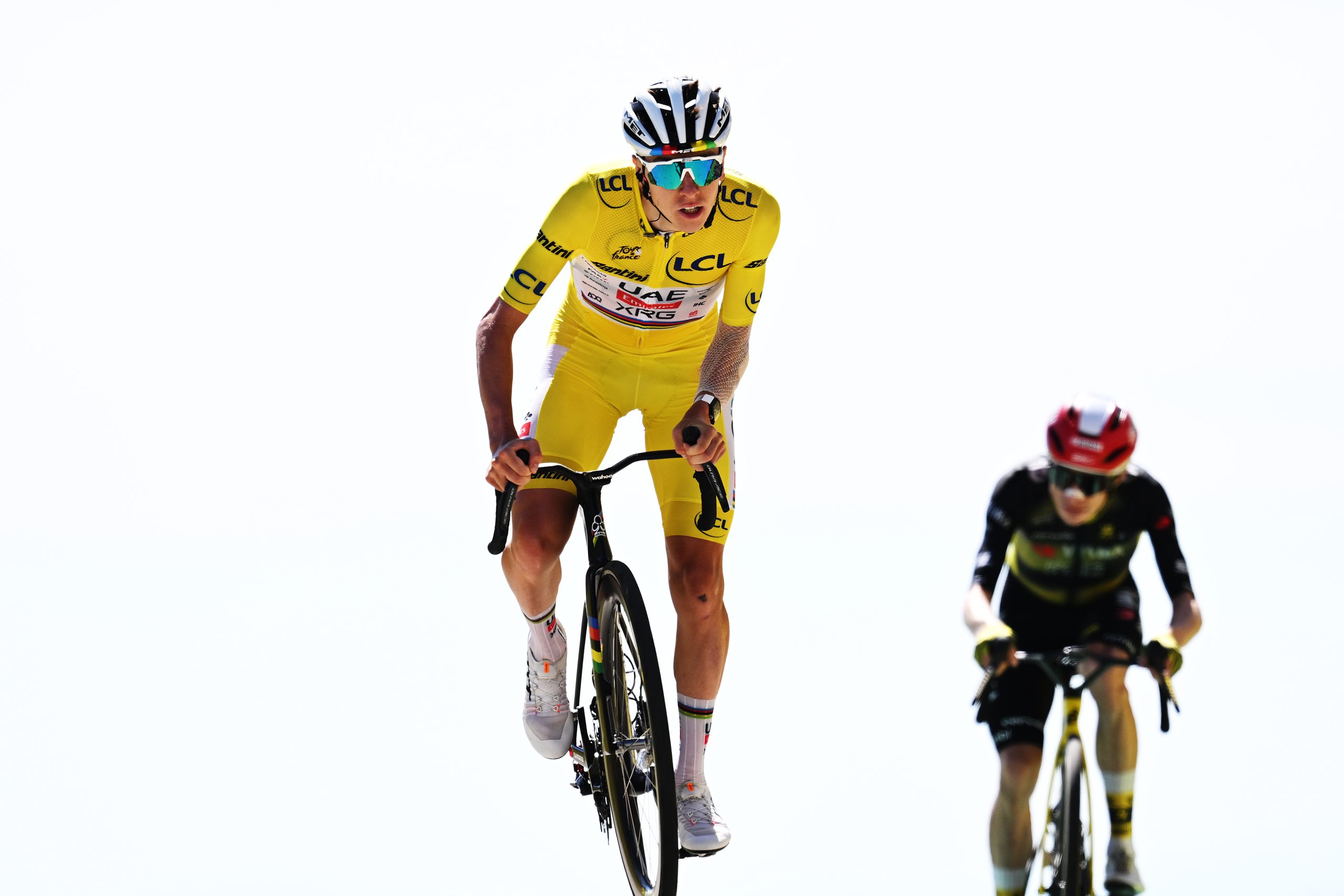
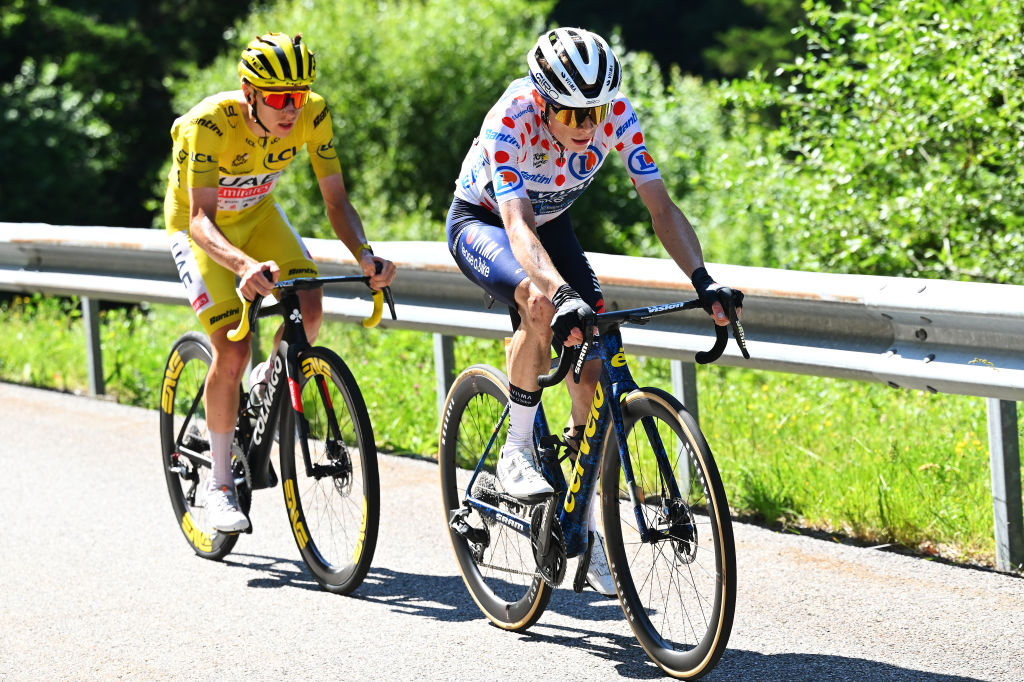
‘Superhuman’ is a word bandied about for Tadej Pogačar’s race performances. His ability to just ride away from the best cyclists in the world on climbs, often seated, is truly impressive.
Now Ole Kristian Berg at Molde University in Norway has put numbers to the results. His paper, published in the Journal of Science and Cycling, estimates Pogačar’s VO2 max and power output in six climbs on the 2024 and 2025 Tours de France: Plateau de Beille, Isola 2000, Col de la Couillole, Hautacam, Peyragudes and Mont Ventoux.
Faster than Pantani
Berg estimates Pogačar averaged 421 watts on the climb of Mont Ventoux in the 2025 Tour de France. Tim de Waele/Getty Images
To estimate Pogačar’s power numbers, Berg started with Strava data for the six climbs and information on the UAE Team Emirates website.
Berg applied mechanical models of cycling power output and the results of previous studies to arrive at some truly remarkable figures.
He estimates Pogačar‘s mean power output over a climb of around 40 minutes as 442 watts (+/-15 watts).
To achieve that output, Berg estimates, requires a VO2 max of 80 mL/kg/min over the 40 minute climb, with a peak of 90 mL/kg/min. His estimates of power output in watts-per-kilogram across the various climbs are from 6.4 to 7.0.
Berg’s results are based on a few assumptions: he assumes zero wind and no drafting and estimates Pogačar‘s frontal area when racing, his race weight, his efficiency in turning energy into power and the air density. He also uses a pre-established number for the bike’s rolling resistance.
While Pogačar doesn’t publish his power data, Derek Gee, who has recently terminated his contract with Israel-Premier Tech, has, and Berg used this to validate his model of Pogačar‘s power output.
Berg suggests that Pogačar‘s peak outputs may have been even higher during his 1-2 with Vingegaard on the Plateau de Beille climb in the 2024 Tour de France. Tim de Waele/Getty Images
Berg points out that the finishing times of the first three finishers on the Plateau de Beille in the 2024 race were all faster than the previous record set by Marco Pantani in 1998. The peak performance numbers during moves such as the attack by Jonas Vingegaard and the counterattack by Pogačar on that climb were likely even higher, he states.
There have been reports of very high VO2 max numbers in lab tests of elite cyclists, including previous Tour de France winners, with numbers over 80 mL/kg/min and reaching over 90mL/kg/min. In previous posts, we’ve looked at why the Tour de France is getting faster and how Pogačar has become so good.
In 2019, we hooked up elite amateur climber Andrew Feather to an ergometer at the University of Bath to measure his VO2 max in the lab. Feather’s measured VO2 max was 78.7 mL/kg/min and his FTP was 350 watts.
That may not be enough to win him the Tour de France, but he was the only rider of 1,189 starters not to be overtaken by Pogačar on the recent Pogi Challenge hill climb in Slovenia. Feather did have a six minute start though.
The upcoming Linux 6.19 kernel cycle is set to introduce initial support for Xe3P graphics to be found initially with Nova Lake processors. While that initial support is landing for Linux 6.19, other extra Xe3P features are still to be added to the open-source kernel driver over coming release cycles. One of those extra features being currently tackled is a new element with Xe3P_LPD: the ability to use the system cache for FBC…
Canonical and AMI announced a partnership today so that there will be an Ubuntu Metbookt option added within AMI’s UEFI firmware to allow booting to the Ubuntu installer without the need for even having any install media…
If you’re a creator in the market for a good-quality wireless microphone, DJI has the best deal we’ve ever seen on one of its most popular products. This Mic Mini bundle, which includes two mics, a receiver and two charging docks (plus two windscreens and other accessories), is already a good deal at the regular $119 price. For Black Friday, however, it’s marked down to just $66 for a savings of 45 percent. If you only need a single wireless mic, you can also grab a Mic Mini with a mic, receiver, charging dock and accessories for $45, or 49 percent off the regular price.
DJI’s Mic Mini deal includes two mic transmitters and a receiver that can be connected to a camera or phone. The bundle also includes a pair of charging docks, two windscreens, a splitter USB-C cable for charging, a 3.5mm camera audio cable, two magnetic clips, a smartphone adapter, a charging cable and a compact carrying case. Note that the charging case is not included in this deal. And if you want a simpler setup with just a single mic and receiver, plus all the other accessories, that’s also on sale for $45, or 53 percent off.
The wireless mics weigh just a third of an ounce and attach easily to subjects via magnets or clips. Everything pairs automatically and they offer high quality 24-bit, 20Hz to 20K Hz recording. They also connect easily to smartphones over Bluetooth and other DJI devices like the Action 5 Pro and Osmo Pocket 3 cams using DJI’s OsmoAudio direct connection. With a range of 1300 feet and 48 hours of battery life with the charger case, they’re an excellent addition to a creator’s bag of tricks.
This article originally appeared on Engadget at https://www.engadget.com/audio/djis-mic-mini-bundle-drops-to-just-66-for-black-friday-102735161.html?src=rss