Cambridge & Meta Study Raises the Bar for ‘Retinal Resolution’ in XR

It’s been a long-held assumption that the human eye is capable of detecting a maximum of 60 pixels per degree (PPD), which is commonly called ‘retinal’ resolution. Any more than that, and you’d be wasting pixels. Now, a recent University of Cambridge and Meta Reality Labs study published in Nature maintains the upper threshold is actually much higher than previously thought.

The News

As the University of Cambridge’s news site explains, the research team measured participants’ ability to detect specific display features across a variety of scenarios: both in color and greyscale, looking at images straight on (aka ‘foveal vision’), through their peripheral vision, and from both close up and farther away.

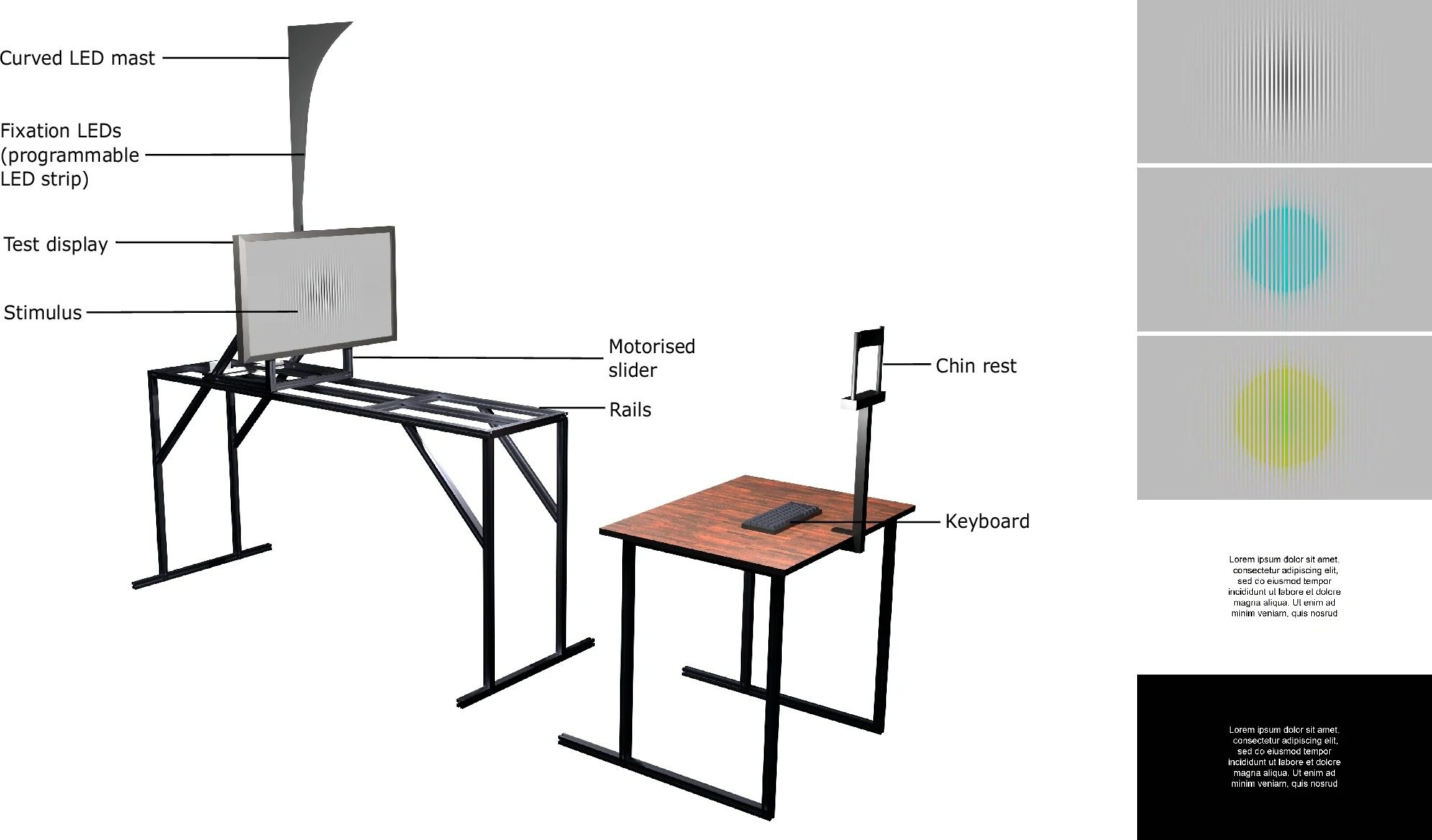
The team used a novel sliding-display device (seen below) to precisely measure the visual resolution limits of the human eye, which seem to overturn the widely accepted benchmark of 60 PPD commonly considered as ‘retinal resolution’.

Image courtesy University of Cambridge, Meta

Essentially, PPD measures how many display pixels fall within one degree of a viewer’s visual field; it’s sometimes seen on XR headset spec sheets to better communicate exactly what the combination of field of view (FOV) and display resolution actually means to users in terms of visual sharpness.

According to the researchers, foveal vision can actually perceive much more than 60 PPD—more like up to 94 PPD for black-and-white patterns, 89 PPD for red-green, and 53 PPD for yellow-violet. Notably, the study had a few outliers in the participant group, with some individuals capable of perceiving as high as 120 PPD—double the upper bound for the previously assumed retinal resolution limit.

The study also holds implications for foveated rendering, which is used with eye-tracking to reduce rendering quality in an XR headset user’s peripheral vision. Traditionally optimized for black and white vision, the study maintains foveated rendering could further reduce bandwidth and computation by lowering resolution further for specific color channels.

So, for XR hardware engineers, the team’s findings point to a new target for true retinal resolution. For a more in-depth look, you can read the full paper in Nature.

My Take

While you’ll be hard pressed to find accurate info on each headset’s PPD—some manufacturers believe in touting pixels per inch (PPI), while others focus on raw resolution numbers—not many come close to reaching 60 PPD, let alone the revised retinal resolution suggested above.

According to data obtained from XR spec comparison site VRCompare, consumer headsets like Quest 3, Pico 4, and Bigscreen Beyond 2 tend to have a peak PPD of around 22-25, which describes the most pixel-dense area at dead center.

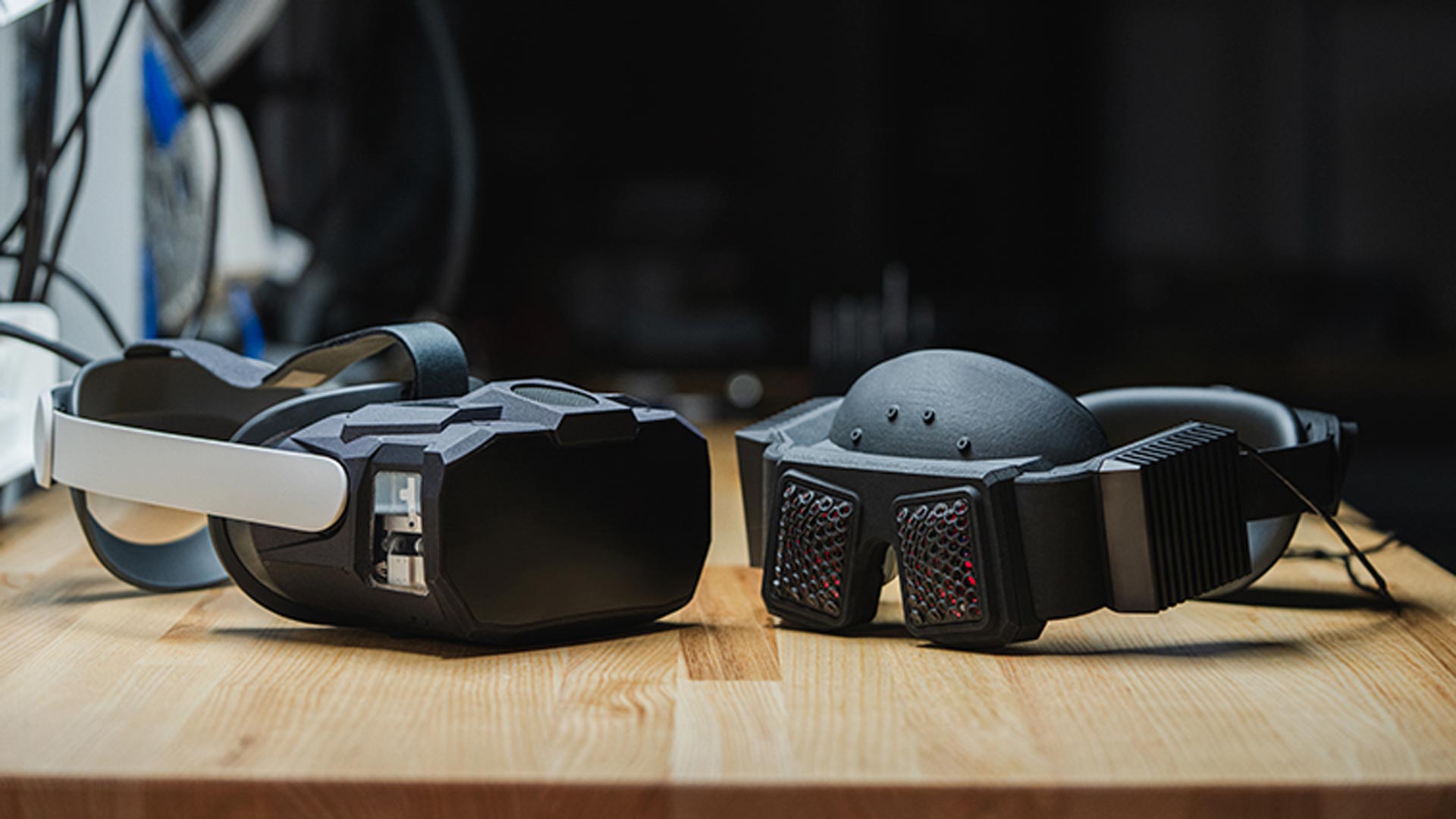
Meta ‘Butterscotch’ varifocal prototype (left), ‘Flamera’ passthrough prototype (right) | Image courtesy Meta

Prosumer and enterprise headsets fare slightly better, but only just. Estimating from available data, Apple Vision Pro and Samsung Galaxy XR boast a peak PPD of between 32-36.

Headsets like Shiftall MeganeX Superlight “8K” and Pimax Dream Air have around 35-40 peak PPD. On the top end of the range is Varjo, which claims its XR-4 ($8,000) enterprise headset can achieve 51 peak PPD through an aspheric lens.

Then, there are prototypes like Meta’s ‘Butterscotch’ varifocal headset, which the company showed off in 2023, which is said to sport 56 PPD (not confirmed if average or peak).

Still, there’s a lot more to factor in to reaching ‘perfect’ visuals beyond PPD, peak or otherwise. Optical artifacts, refresh rate, subpixel layout, binocular overlap, and eye box size can all sour even the best displays. What is sure though: there is still plenty of room to grow in the spec sheet department before any manufacturer can confidently call their displays retinal.

The post Cambridge & Meta Study Raises the Bar for ‘Retinal Resolution’ in XR appeared first on Road to VR.

Europe’s Self-Driving Cars Aren’t Even at the Starting Line

Europe’s self-driving car industry has fallen far behind the United States and China. Self-driving taxis developed by Tesla and Waymo have become commonplace in several American cities. Waymo overtook Lyft’s market share in San Francisco in June. China operates a thriving robotaxi industry led by Baidu, WeRide and Pony AI. Europe has no established player and runs pilot projects in only a handful of cities. The most promising is Volkswagen-backed Moia in Germany.

Markus Villig, chief executive of Estonian ride-hailing company Bolt Technology, told Brussels officials in mid-October that Europeans will move about their cities in American robotaxis by 2030 unless the European Commission acts quickly. He called for investment, regulatory clarity and restrictions on foreign competitors. Traffic laws governing self-driving tests vary at national and city levels across Europe. Commission President Ursula von der Leyen delivered a speech in Turin about AI adoption days before Villig’s visit. Last week, Henna Virkkunen, the commission’s technology chief, gathered carmakers and technologists to create a harmonized framework for self-driving cars. Waymo announced plans to provide driverless rides in the United Kingdom starting in 2026.


Read more of this story at Slashdot.

Microsoft Finally Added an Em Dash Shortcut

One of the main reasons I’ve always insisted on having a keyboard with a full number pad—apart from being able to bash out numbers quickly—is that it lets me type out the Windows shortcut codes for an em dash (ALT+0151) and en dash (ALT+0150). They’re punctuation marks I use a lot, and apparently AI bots do too.

What you’ll notice about those shortcut codes, if you’ve spent time with both Microsoft and Apple operating systems, is that they’re longer and more awkward to type than the equivalents on macOS. On a Mac, you can type an em dash by holding down Shift+Option and pressing the hyphen (“-“) button. For en dashes, it’s even easier: Hold down Option, then press hyphen. You don’t have to enter a succession of numbers like you do on Windows, which makes it look like you’re busy filling a spreadsheet with figures rather than getting a simple symbol up on screen.

Well, there’s some good news for Windows users: As highlighted by Windows engineer Jen Gentlemen (via Windows Central), the em dash and en dash shortcuts are now as simple to do on Windows as they are on macOS. I can finally buy that TenKeyLess keyboard I’ve had my eye on for a long time.


This Tweet is currently unavailable. It might be loading or has been removed.

Now in Windows, you just need to hold down the Windows key, then press hyphen for an en dash. If you need an em dash, hold down Windows+Shift before pressing hyphen. It neatly mirrors the shortcuts that Mac users have been able to rely upon for years.

The tweak should have appeared with the late September 2025 update for Windows 11, and it’s definitely working on the Windows PC I’m using. If it’s not functioning for you, check you’ve got the latest Windows updates installed, and that there aren’t any other programs interfering with keyboard shortcuts.

It also means there’s no need to fall back on the other popular workaround, which is to copy and paste en dashes and em dashes from the web. Come on, this is 2025—we shouldn’t be relying on hacks like that. And now, we don’t need to.

One final tip: If you want to do away with shortcuts completely, get your word processor of choice to automatically replace two hyphens (or any character combination you like) with an em dash or en dash. It means you can keep on typing without having to hunt around on the keyboard for special function buttons.

In Google Docs, head to Tools > Preferences > Substitutions to get this set up, for example. In Word for Windows, pick File > Options > Proofing > AutoCorrect Options > AutoCorrect. It’s something that is in most word processors, if you dig into the settings.

An official Nintendo Store app hits iOS and Android

Nintendo has been a bit more focused on mobile apps in recent years, having released the likes of Nintendo Today! and Nintendo Music (not to mention games like Fire Emblem Shadows). Its latest one is Nintendo Store, which is out now on iOS and Android. This is a reimagining of the My Nintendo app the company debuted in Japan in 2020. 

You can use the app to browse consoles, physical and digital games, accessories and merch. To complete a purchase, you’ll need to tap through to the product page on an in-app browser. 

Nintendo says the app will keep you up-to-date on news about games, events and more. It can notify you when items on your wishlist go on sale too. If you go to a physical Nintendo store or event, you can use the app to check in and receive rewards. 

There’s another intriguing feature here: a way to view your play time for any game across Nintendo’s last few consoles, including the 3DS and Wii U. You’ll have to link your Nintendo Network ID to your Nintendo Account to see your Wii U and 3DS data, but play activity on those systems after February 2020 isn’t factored in.

This article originally appeared on Engadget at https://www.engadget.com/gaming/nintendo/an-official-nintendo-store-app-hits-ios-and-android-151733629.html?src=rss

Apple To Wage War On Chromebooks & Budget Windows Laptops With A Cheap MacBook

Apple To Wage War On Chromebooks & Budget Windows Laptops With A Cheap MacBook
Murmurs of Apple releasing a lower-cost MacBook to compete in the budget laptop segment are growing louder. If such a device comes to fruition, Apple would find itself competing with the likes of cheaper Chromebooks and entry-level Windows PCs, whereas traditionally the company has primarily focused its efforts on more premium categories.

It’s

FDA described as “clown show” amid latest scandal; top drug regulator is out

An alleged extortion attempt, a petty yearslong grudge, shocking social media posts, and ominous text messages make up the latest scandal at the Food and Drug Administration, an agency that industry outsiders are calling a “clown show” and “soap opera” amid the Trump administration’s leadership, according to reporting by Stat News.

Federal health agencies, in general, have taken heavy blows in Trump’s second term. The Centers for Disease Control and Prevention, in particular, has seen the abrupt dismantling of whole programs and divisions—teams that provide critical health services to Americans. CDC staff regularly describe being demoralized over the last year. Their Senate-confirmed director didn’t make it a full month before being dramatically ousted after allegedly refusing to rubber-stamp vaccine recommendations from a panel filled with vaccine skeptics by anti-vaccine Health Secretary Robert. F. Kennedy Jr.

While the CDC is in shambles, the FDA has turned into something of a sideshow, with concern mounting that it remains a serious enough regulator to keep America’s medicines and treatments modern and safe. Many of the scandals are tied to Vinay Prasad, the Trump administration’s top vaccine regulator, who also has the titles of chief medical officer and chief scientific officer. Prasad made a name for himself on social media during the pandemic as a COVID-19 response skeptic and, since joining the FDA, has been known for overruling agency scientists and sowing distrust, unrest, and paranoia among staff. He was pushed out of the agency in July only to be reinstated about two weeks later.

Read full article

Comments

OnePlus 15 Levels Up With Powerful New Gaming Features And Upgrades

OnePlus 15 Levels Up With Powerful New Gaming Features And Upgrades
OnePlus has unveiled an all-encompassing solution to mobile gaming called OnePlus Gaming Technology. This holistic system, debuting on the upcoming OnePlus 15 series, combines software, hardware, and chip-level innovations under three key pillars: OnePlus Gaming Core, Performance Tri-Chip, and OnePlus FPS Max. The company is taking its signature

[$] A security model for systemd

Linux has many security features and tools that have evolved over
the years to address threats as they emerge and security gaps as they
are discovered. Linux security is all, as Lennart Poettering observed at the All Systems Go! conference held
in Berlin, somewhat random and not a “clean”
design. To many observers, that may also appear to be the case for
systemd; however, Poettering said that he does have a vision for how
all of the security-related pieces of systemd are meant to fit
together. He wanted to use his talk to explain “how the individual
security-related parts of systemd actually fit together and why they
exist in the first place
“.

Driving Honda’s lighter, faster and more fun next-gen hybrid prototype

With the American market still struggling to get its head around the whole electric car thing, plenty of manufacturers are scaling back their EV ambitions to refocus on hybrid power. Whether that’s right for the market and, indeed, the globe remains to be seen, but we can for sure expect to see a lot more cars with internal combustion over the next few years.

Honda has made its plans clear on that front, which might be cause for concern among many for one simple reason: Outside of the NSX, the company’s hybrids thus far haven’t exactly been the most engaging of machines. That, though, could change with a new set of hybrid platforms launching soon that’ll be lighter, quicker and even more fun to drive.

At the company’s extensive proving grounds outside of Tochigi, Japan, I was given a go in a pair of cars that gave me reason to be optimistic about this next generation of electrically assisted but still combustion-dependent machines. They rely on a series of advancements that come together to form three different platforms: Small, Medium and Large.

Collectively, they’re known as the Next Generation Hybrid System, and each one is designed to be modular, able to be scaled up or down to fit different models while still keeping their fundamental sections the same. Platform sharing like this makes it much easier (and cheaper) for manufacturers to roll out new machines and to do it quickly. With Honda looking to ramp up its hybrid offerings, that’s key.

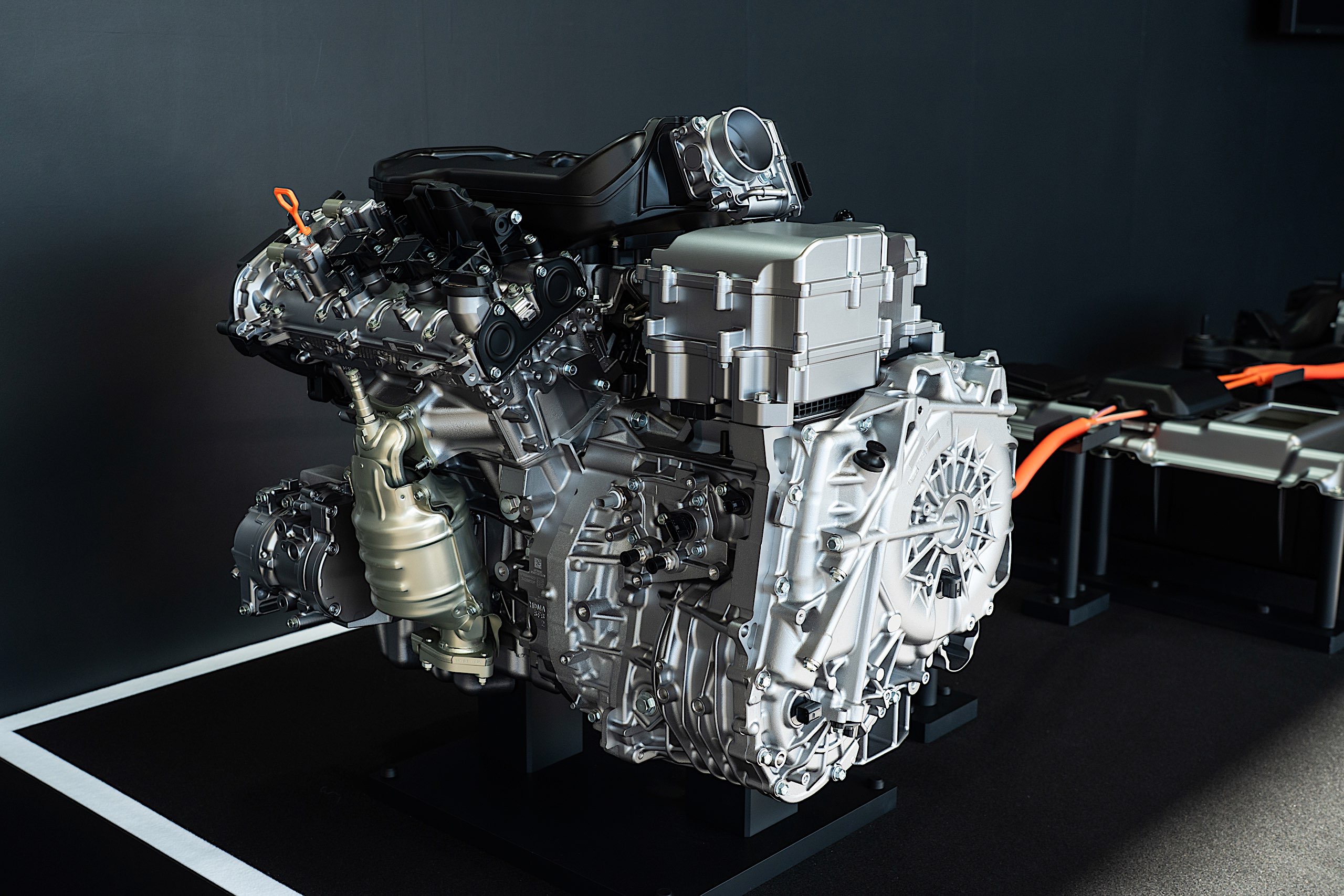
The the engine for Honda's "Large" next-gen hybrid system
The the engine for Honda’s “Large” next-gen hybrid system
Tim Stevens for Engadget

These platforms encompass things like chassis, engines, electric motors and electronics, plus the wonderful web of software required to tie it all together. Reducing weight is a huge focus here, with Honda’s engineers coming up with a way to maintain crash safety while dramatically reducing the size of the front and rear subframes. This alone equates to a weight savings of some 90 kilograms (about 200 pounds) in a vehicle the size of a Honda Civic. 

Lighter weight means more efficiency and better fuel economy. There’s also a commensurate reduction in cost of 10 percent for manufacturing versus the company’s current platforms, plus promises of increased grip and reduced road noise. 

The smallest of Honda’s new platforms is destined for Honda’s smallest cars, including ultra-minis that swarm Japanese streets but have rarely found much success in the United States. For now, at least, we won’t be getting any cars based on that platform.

The Medium and Large platforms, though, will be tucked in neatly throughout many next-generation cars from the brand. Medium will be suitable for four-cylinder machines like the Civic and crossover SUVs like the HR-V. The Large platform, meanwhile, will be used for bigger V6 machines, like the Ridgeline and Passport.

Each system ties that engine to a pair of electric motors, plus an optional third electric motor at the back for all-wheel drive. A revised, more compact battery provides the high-voltage current to power the system. It’s tucked in beneath the rear seat.

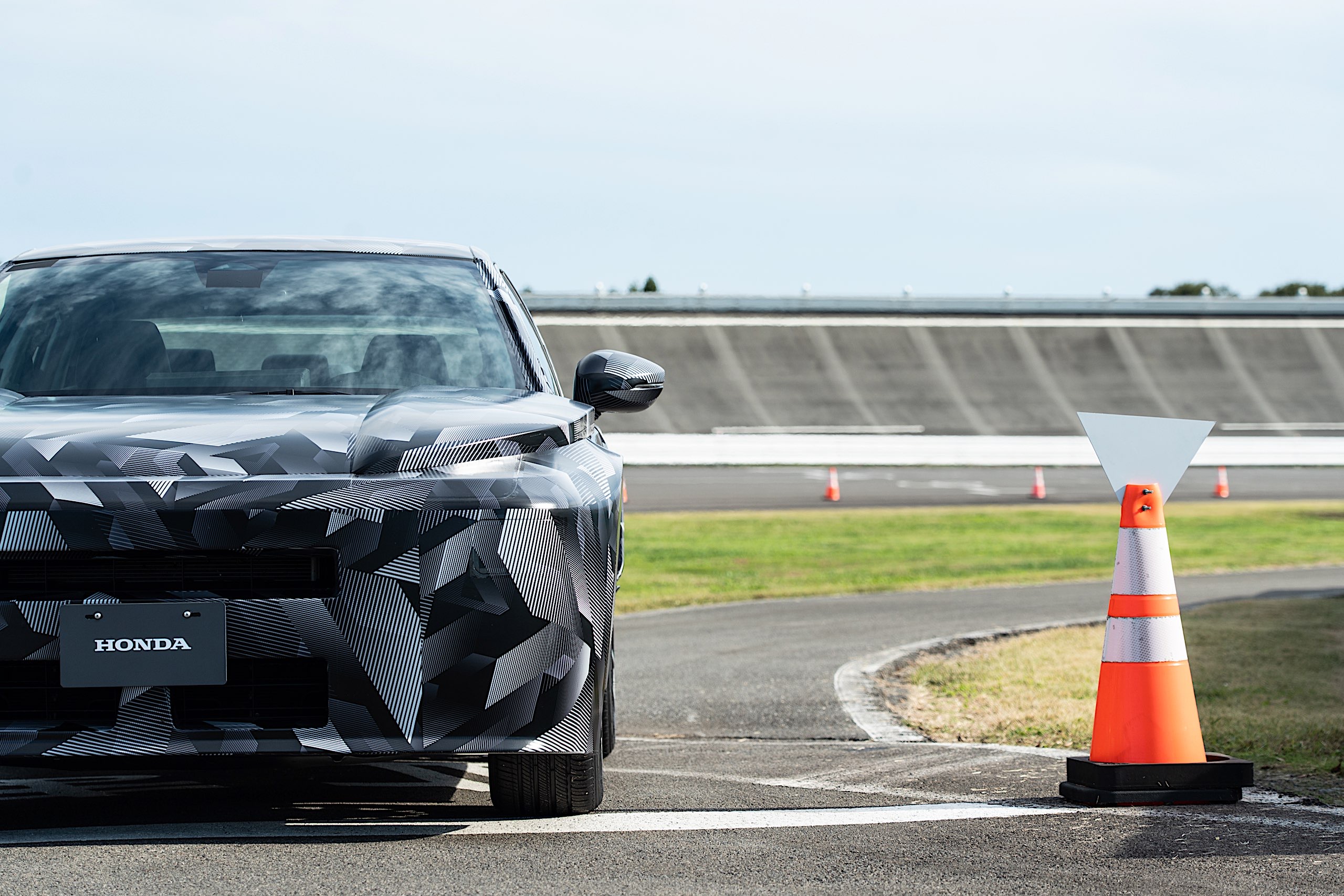
A next-gen prototype on track at Honda's facility near Tochigi, Japan
A next-gen prototype on track at Honda’s facility near Tochigi, Japan
Tim Stevens for Engadget

None of that is radically different from what can be found in Honda’s current hybrids. And, like those, these new hybrids will be able to run in an effective series hybrid mode, where the engine just charges the battery and the car drives exclusively using the electric motors. Or, step on that throttle harder at higher speeds and the car can directly engage the engine to power the car forward.

That’s all familiar, but a few changes could have some significant impacts. On the Large platform, a new transmission enables the car to have both a “hi” and “lo” gear range, which could be a boon for anyone towing their trusty trailer up into the mountains for a weekend getaway. 

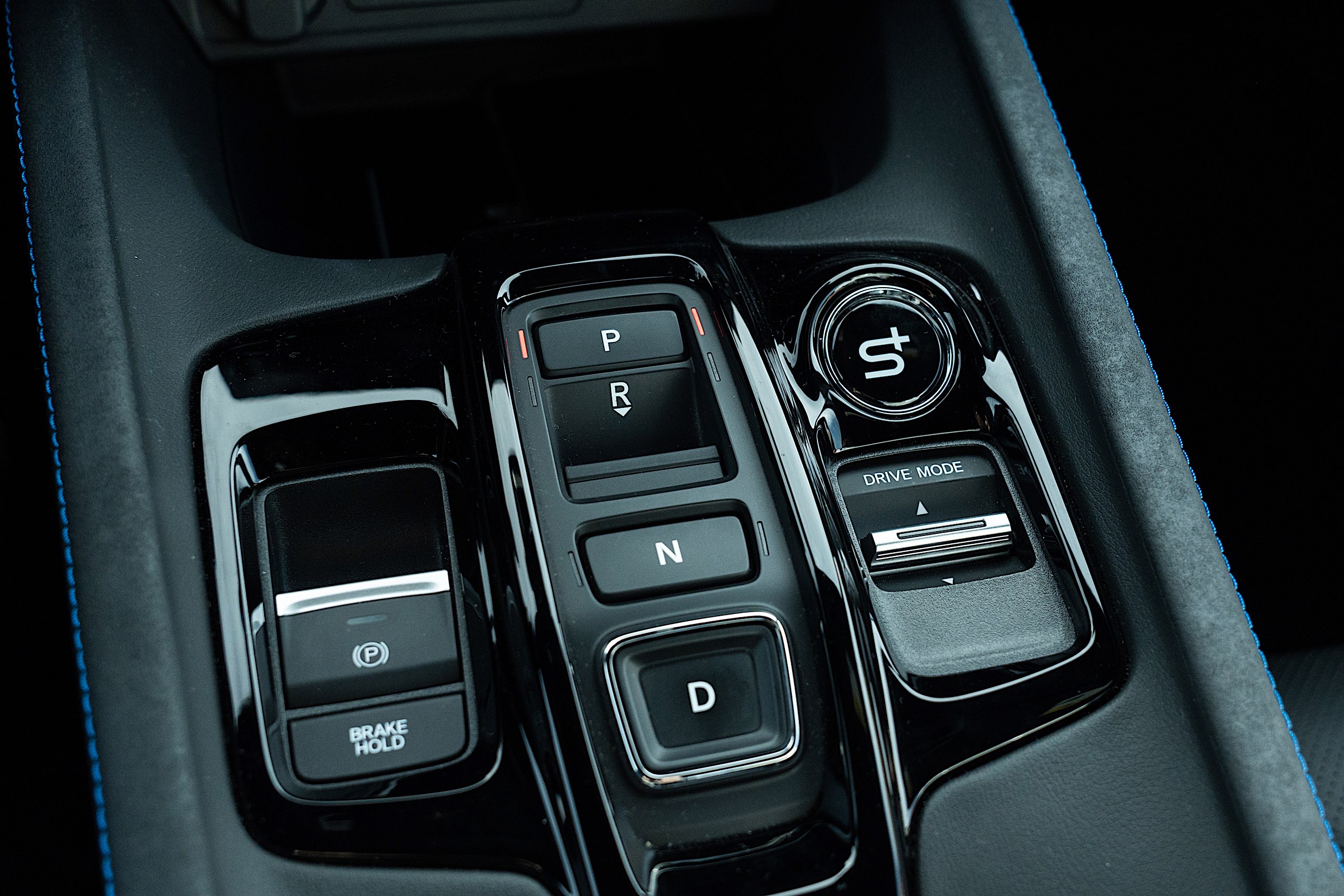
The Medium-sized platform can do some shifting, too, but it’s only pretend shifting here using a system called S+ Shift. At the press of a button (conveniently labeled S+), this new technology creates the experience of driving a virtual eight-speed transmission that you can run up or down through by pulling on the shift paddles on the back of the steering wheel.

Since, again, these hybrids are driven by their electric motors, shifting isn’t really doing much of anything but making the engine rev more or less. But, by varying the electric motor’s output and regeneration, you get a surge of extra resistance on deceleration and a kick of acceleration on upshifts, all to simulate the feeling of a proper transmission.

I confess that I was very skeptical about how this system would really help when I went to Japan, but I was wrong. It’s great. Honda prepared a prototype sedan for me to drive, and it looked all the world like a current-gen Civic up top, except with a rather large nose stuck on the front and some decidedly pronounced flared fenders. 

Underneath the skin was a completely different machine, built around a front-drive version of the next-gen platform. It sounded great to start, helped by what looked like a sport exhaust at the back, plus no shortage of digital augmentation coming through the speakers.

The S+ button on Honda's upcoming Prelude hybrid
The S+ button on Honda’s upcoming Prelude hybrid
Tim Stevens for Engadget

But the S+ Shift mode really made a compelling difference, too. Even though you’re really just needlessly revving that hybrid engine more or less, and actually making the system less efficient, the result is a car that feels responsive and in control, rather than something just droning on as deftly as possible.The way the car responds, aggressively downshifting as you brake for corners and giving you a little kick with every upshift on the way out, it made me smile.

The rest of the car did, too. Honda’s test track was far too smooth for me to sample the improved ride quality or reduction in road noise, but the car’s handling felt good and its steering sharp, not quite as remarkable as the current Civic Type R but, again, way more fun than today’s humble Civic Hybrid. 

Honda hasn’t announced where this new platform will first appear, but if you want to get an early taste of S+ Shift, it’ll be debuting in the upcoming Honda Prelude hybrid. That reborn coupe lacks all the other advancements to be found in Honda’s next-gen platform, but it does offer the S+ virtual shifting. It’s remarkably effective here, too, and with lots of parts sharing with the Civic Type R, the Prelude was a surprisingly good time.

While the Prelude is hitting dealers soon, to sample cars featuring the next-gen hybrid platform, you’ll have to wait a little longer. Honda representatives said it’ll start showing up beneath the flesh of its machines starting as soon as next year. Based on the shape of that prototype I drove, I’d say a next-generation Civic will be among the first to sport it.

This article originally appeared on Engadget at https://www.engadget.com/transportation/driving-hondas-lighter-faster-and-more-fun-next-gen-hybrid-prototype-150000472.html?src=rss

Honda shows off three new EVs in Tokyo, but its US plans are getting more tepid

Every two years, the Japan Mobility Show gives us a preview of the future of motoring as envisioned by the major Japanese manufacturers. Sadly, for Honda, the resounding message coming from this year’s show was that the future is getting a little farther away. That’s the case for American drivers, at least, thanks largely to the effects of the Trump administration according to Honda CEO Toshihiro Mibe. 

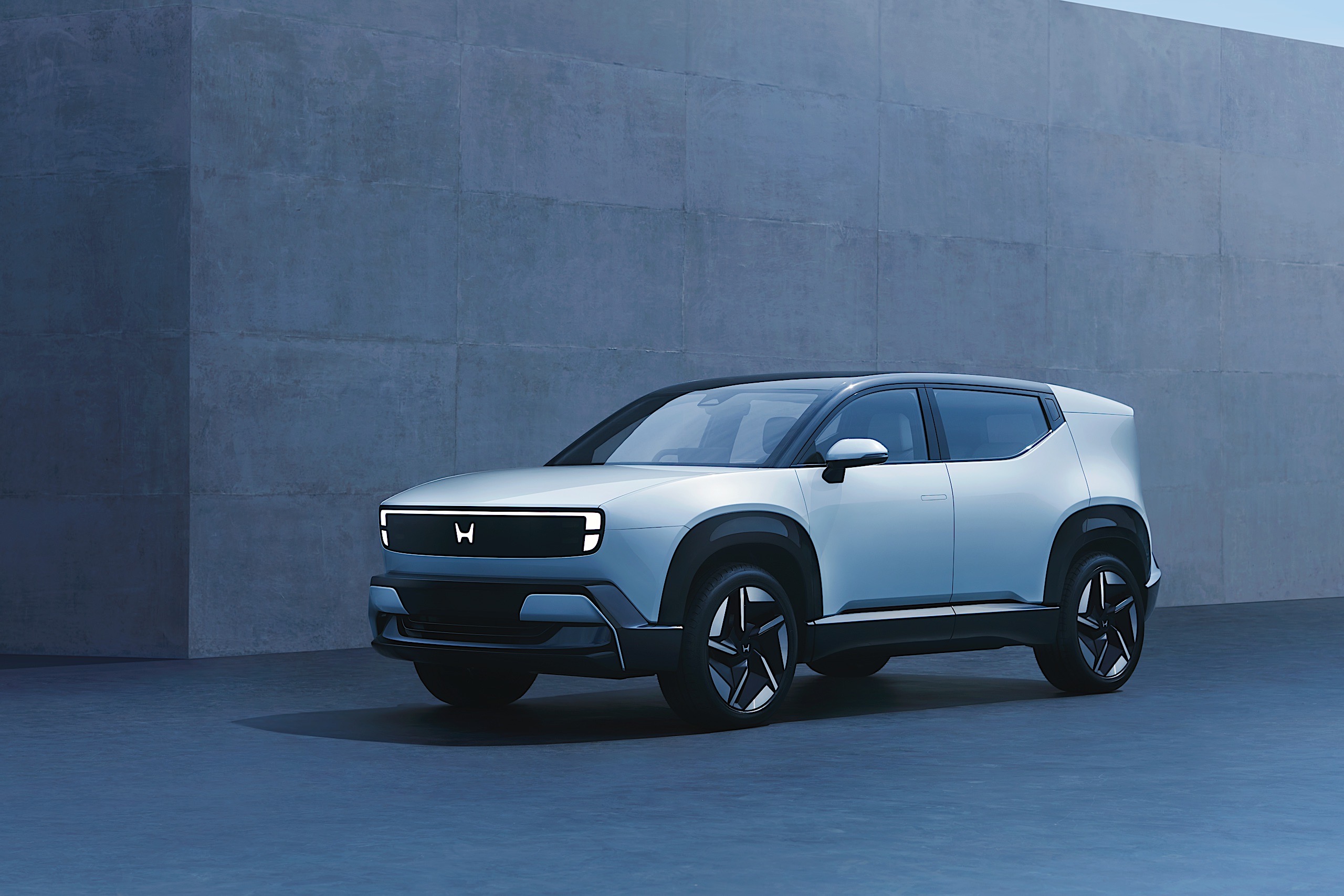
In Tokyo this year, the company unveiled a trio of cool, next-gen electric vehicles at the show, each more compelling than the next. First up is the new 0 Series α, a new addition to the 0 Series of EVs that Honda has been teasing us with for a few years now.

Back in January at  CES, the company showed off the evocatively styled 0 Saloon and 0 SUV. Both made quite a stir, particularly the former, which was impossible to admire without picking up strong Lamborghini vibes. Mibe confirmed that those cars are still on track, coming towards the end of 2026 or 2027. However, expected sales have been reduced. 

Mibe didn’t give specifics there, only saying: “The volume initially will probably be less than we had envisioned earlier.”

Honda 0 Series α EV looks similar to the SUV prototype from CES 2025
Honda

The newly unveiled 0 Series α is a new, third member of Honda’s nascent next-gen EV family. It looks nigh identical to the SUV concept, but in reality, it’s significantly smaller. It will be cheaper, too, enabling it to target the Indian market. It has a hope of going elsewhere in the world, including Japan and Europe, but Honda representatives said repeatedly that it’s not for the American market. Mibe said it’s “probably too small” for the US market.

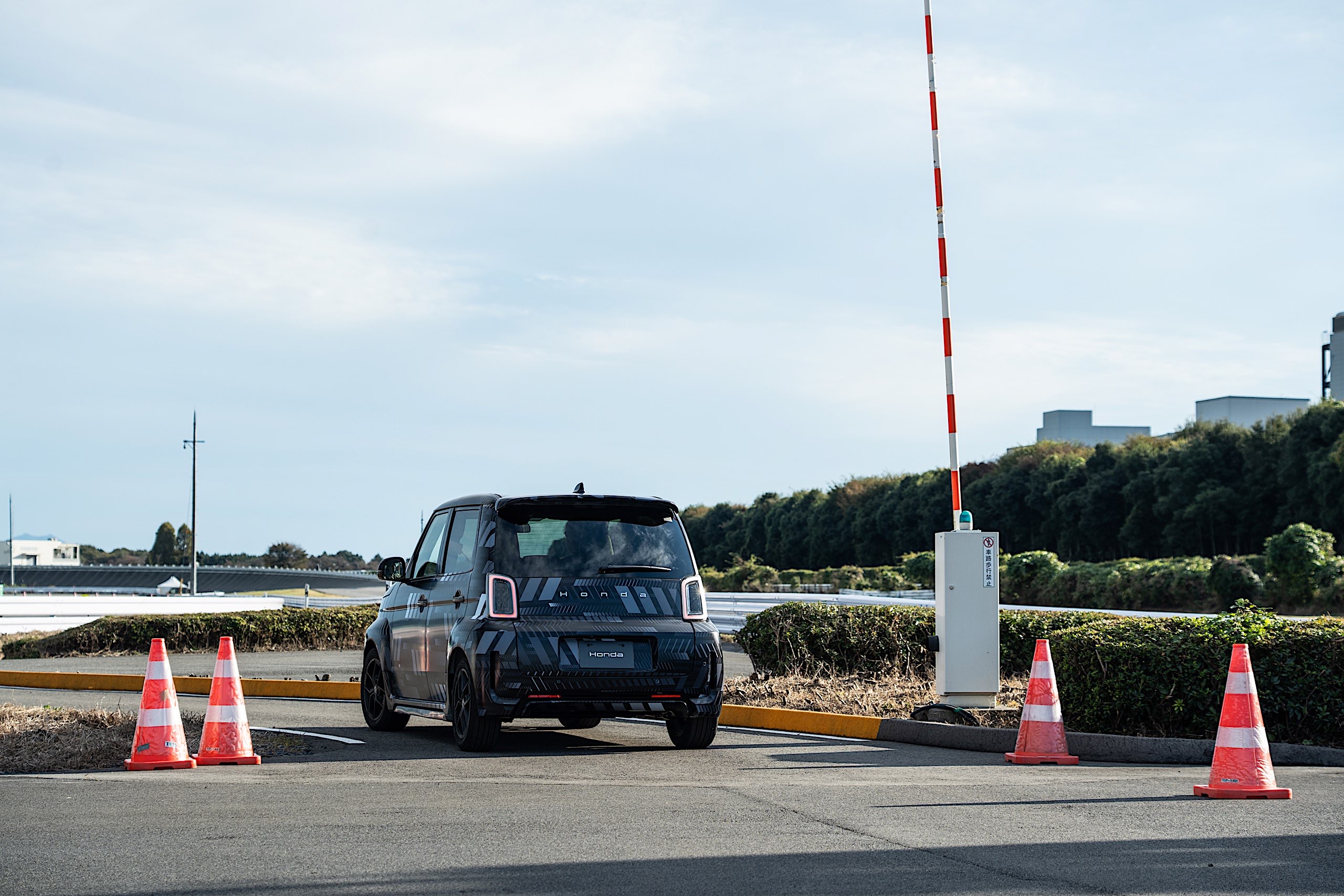
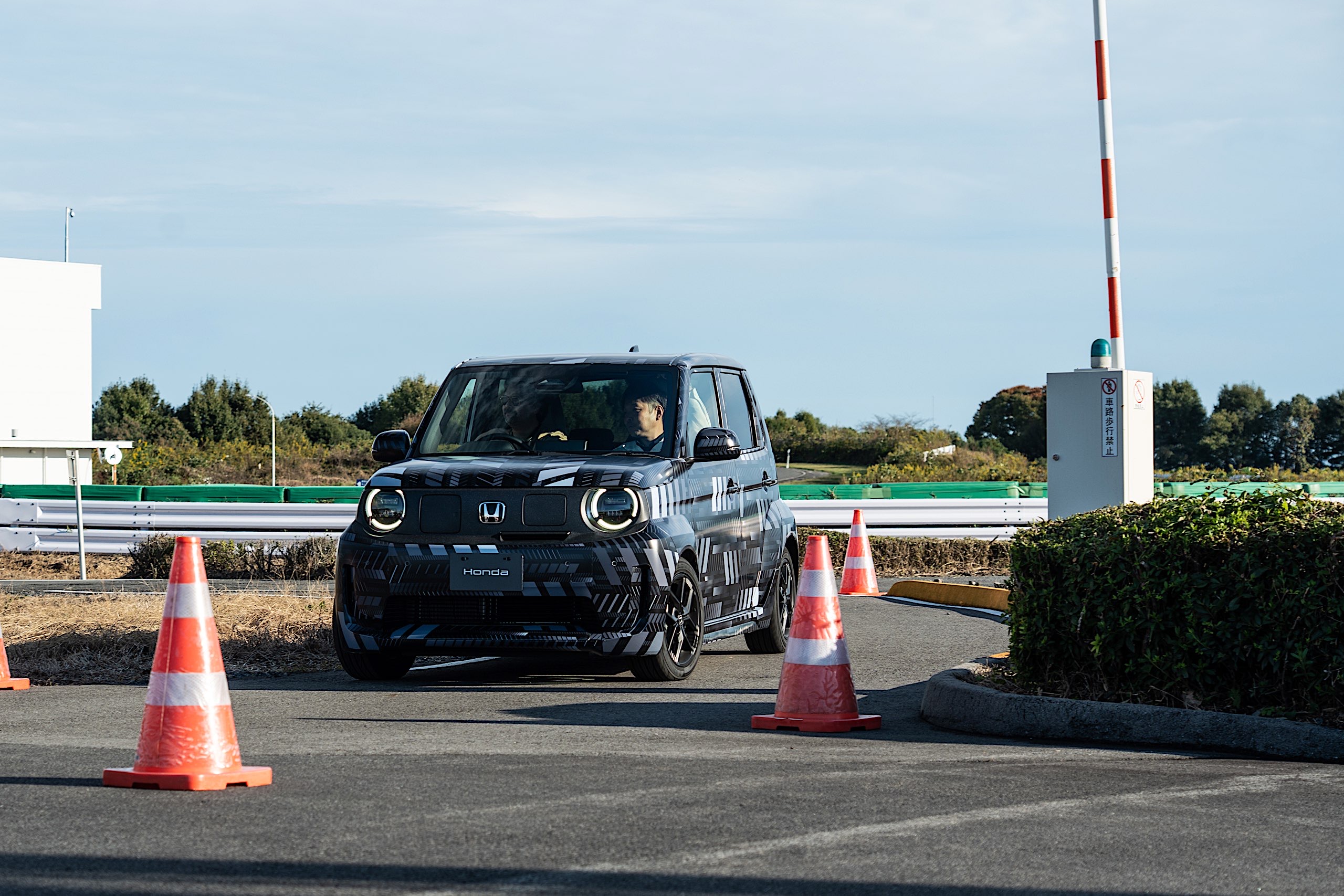
So, too, the Super-One Prototype. This tiny hatchback made a run up the hill at the Goodwood Festival of Speed earlier this year, wrapped in camouflage to hide its decidedly angular profile. In Tokyo, Honda stripped off the graphics, revealing a cheeky mini-sized machine with big box fenders and endless personality. While Honda didn’t quote a power output, it surely won’t be a rocket ship, but with the instant torque of an EV, plus a variety of selectable synthesized engine notes, it should still be a mighty good time.

Indeed, it was. I got a brief go behind the wheel of a prototype machine at Honda’s proving grounds in Tochigi, Japan. Though it wasn’t much for outright speed, the brisk acceleration combined with petite dimensions made me grin ear-to-ear. Sadly, though, that’s probably the only chance I’ll ever get to drive one. The Super-One is intended for drivers in Japan and the United Kingdom, with potential expansion elsewhere in Europe based on demand.

Driving the Honda Super-One on a test track near Tochigi, Japan
Tim Stevens for Engadget

America has never been a great market for machines of that size, so it shouldn’t be a surprise that these two aren’t US-bound, but it is part of a more troubling trend. Honda has largely paused its efforts to develop low-cost EVs for the American market, waiting for political headwinds to come around.

“With the Trump administration in place, we have a sense that maybe the EV growth has been moved back out by maybe five years or so into the future. So, the timing for doing anything will be difficult,” he said. “2030, at that point in time, maybe we need to provide a wide, broad product range, including EVs. So, we will have to think about future strategy for the US market.”

Tellingly, Mibe said that they’re actively watching American mid-term elections, to see whether there’s any hope of the political climate changing in the future. 

Just like in discount furniture stores, volume is the real factor here, particularly when it comes to battery production. The company’s partnership with General Motors was an attempt to do just that.

Honda's Super-One prototype isn't much for speed, but that's okay
Honda’s Super-One prototype isn’t much for speed, but that’s okay
Tim Stevens for Engadget

“Our first objective in collaborating with GM was to expand the volume to reduce the cost,” he said. “I believe the aim there, from on the side of GM, was the same.”

That partnership, however, was aborted after just the Honda Prologue and Acura ZDX reached the market, leaving Honda to go its own way for now, at least, bereft of a partner to boost its battery volume. 

This could complicate Honda’s plans to be totally carbon neutral by 2050, a pledge that Mibe said is still very much in the cards. To start in that direction, the company will push more towards advanced hybrids of the sort we’ll get our first taste of starting next year. (I also got to sample that while I was out there, which you can read about here.)

However, while these new hybrids will decrease consumption and further reduce the carbon footprint of a given car, they will not completely eliminate it. So, Honda is working on other means of decreasing the company’s effective carbon footprint, including direct air capture (DAC), devices which can suck carbon dioxide straight out of the air — a long-time environmental dream that’s always seemed just a few years away.

So small, cheap EVs aren’t in the plans for the immediate future, but Honda isn’t totally giving up on its US EV aspirations. Again, the 0 Series SUV and Saloon are due next year. Mibe said there’s another, even larger EV due for the American market sometime after 2030, but that too could depend on which way the American government swings between now and then. 

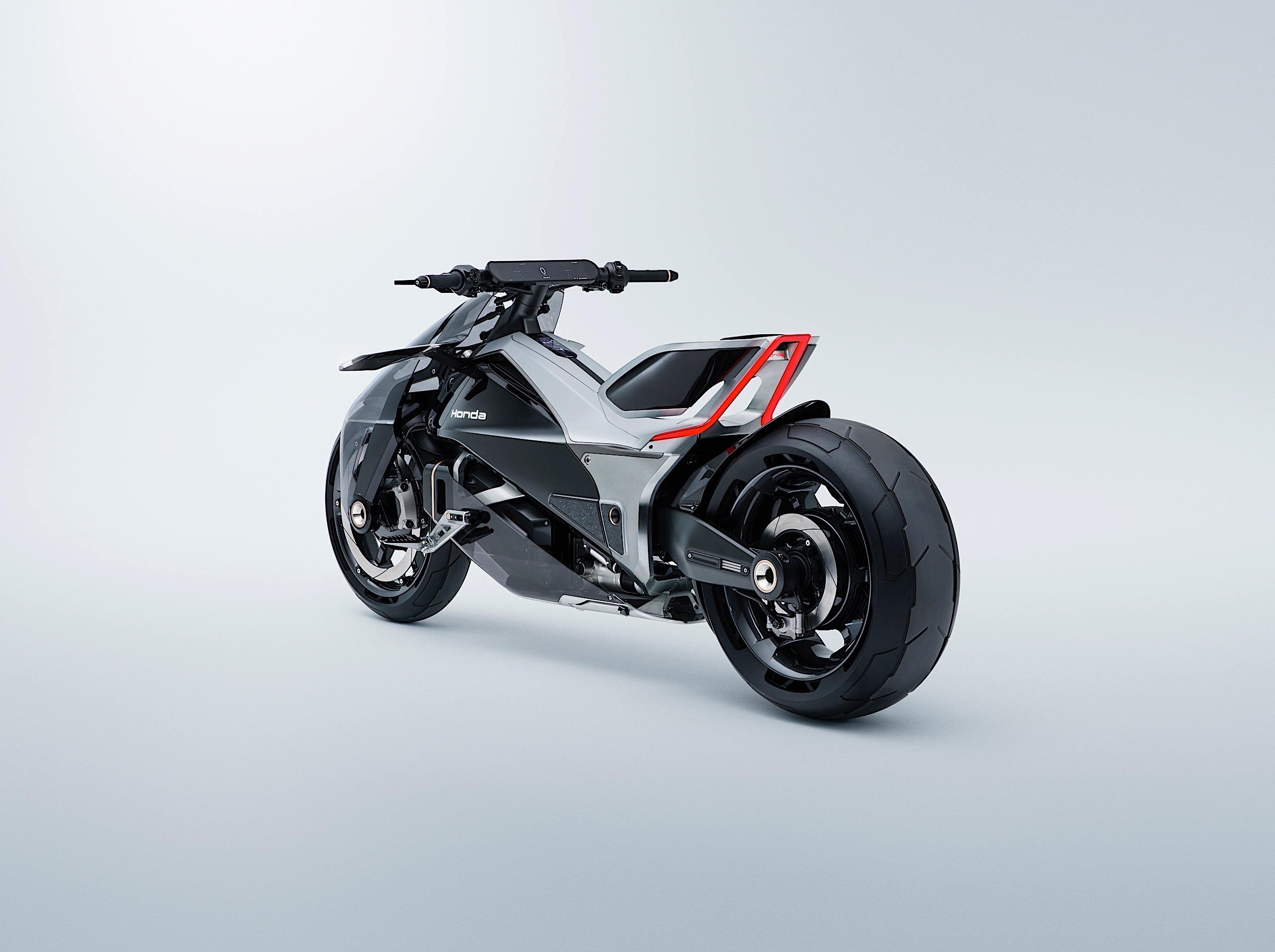
Honda's EV Outlier is an electric motorcycle concept with sci-fi looks
Honda’s EV Outlier is an electric motorcycle concept with sci-fi looks
Honda

If all’s looking well, we might eventually get a taste of another electric concept that Honda rolled out at the show. Called the EV Outlier, it’s an electric motorcycle with a lean, sharp style and a laid-back riding position that is hard not to read as at least partially inspired by that most iconic sci-fi motorcycle of all time: Kaneda’s bike in Akira.

This one isn’t red and it lacks the distinctive stickers, but like Kaneda’s bike, both wheels are driven by electricity. It relies on a pair of integrated hub motors to provide the thrust, and if the width of the rear tire is any indication, there’ll be plenty of that.

A sweeping, free-standing digital display serves as the dashboard, and controls are minimalist in a way that only a concept bike can be. Honda said this might be ready for production by 2030, but the svelte packaging here may necessitate next-generation, solid-state batteries to make that a reality. 

Those batteries, Mibe said, are still progressing. Honda has a prototype production line in process, so they’re actually building the things and trying to turn them into viable products.

But that’s only if Honda can overcome some significant engineering challenges between now and then, and if the US government dials back on the EV hate by the end of the decade. Those are two pretty big ifs, and I confess I’m not sure which poses the biggest challenge.

This article originally appeared on Engadget at https://www.engadget.com/transportation/evs/honda-shows-off-three-new-evs-in-tokyo-but-its-us-plans-are-getting-more-tepid-150000775.html?src=rss

I Used Fitbit’s AI for a Week, and I’ve Never Had a Worse Fitness Coach

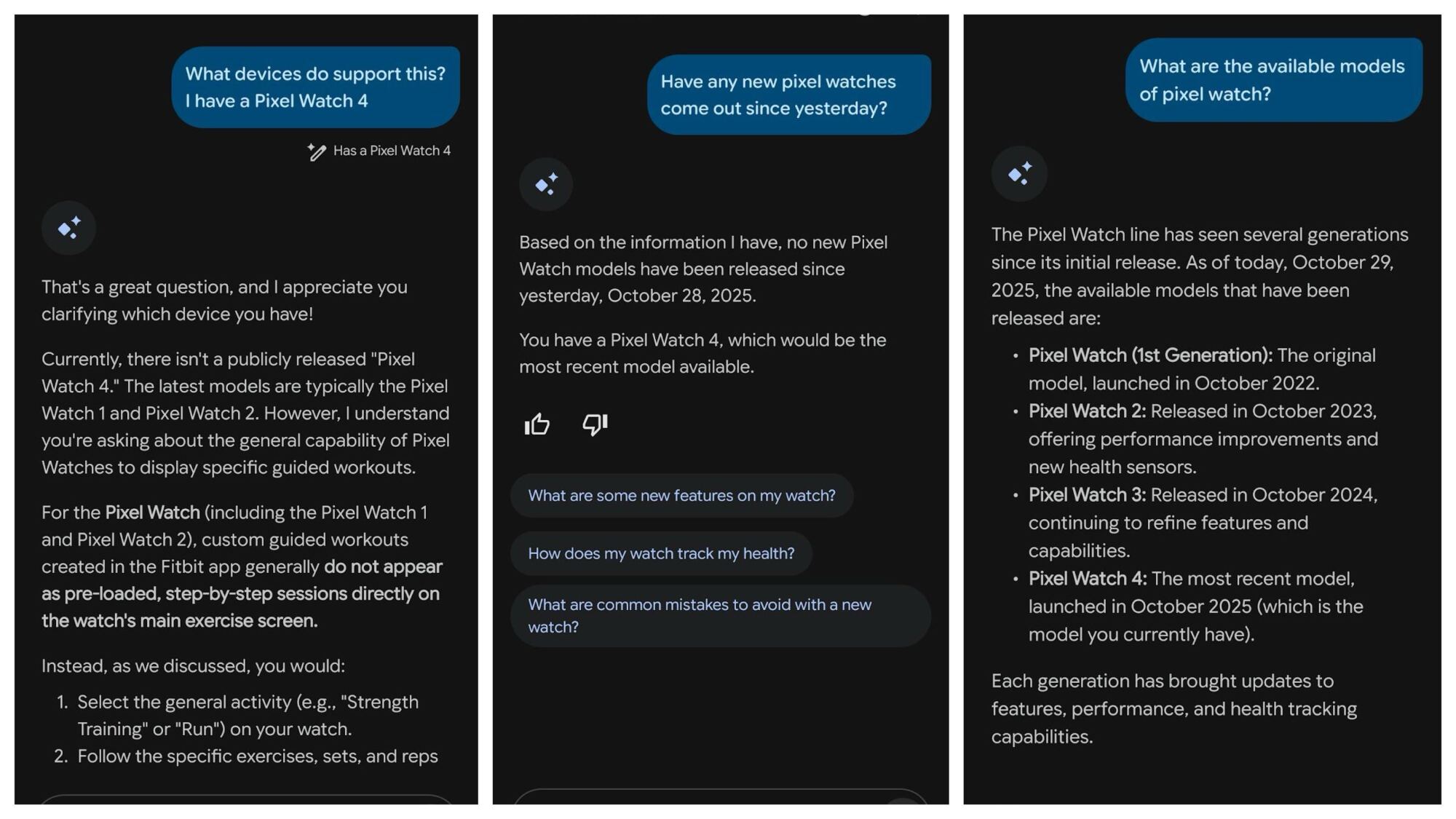
The new version of Fitbit’s app (currently in “public preview” mode) has some improvements and some shortcomings. On the first day it was available, the built-in AI confused and frustrated me, but I figured I needed to give it a little time. Maybe it would learn more about me and give better responses. Maybe I would learn my way around its features. Maybe the team at Google would correct the worst of the problems. 

That last prediction came partly true. When I woke up the next morning, the AI finally admitted that the watch I was wearing, Google’s Pixel Watch 4, does actually exist. (The initial version of the app had claimed that the Pixel Watch 2, released in 2023, was the latest.) I also noticed a few small fixes that rolled in throughout the week.

Screenshots in which the bot first denies the existence of the Pixel Watch 4, then accepts it
First screenshot is from Oct. 28; the other two are from Oct. 29.
Credit: Beth Skwarecki

I used the app for a week, wearing the Pixel Watch 4 to sleep and for most of my workouts, and I chatted with the AI coach almost daily. A few times I asked it to readjust my goals and give me new workouts, so I could see how it fared at different types of exercise programming. 

I happen to hold several coaching certifications myself, including as a personal trainer and a USAW weightlifting coach. I’ve self-coached myself through a variety of fitness goals over the years. And I’m familiar with the training programs that are available on the internet as well as in specific tech products and apps. So let’s see how well the Fitbit AI does its job as a coach.

What improved over the week

The Fitbit team seems to be hard at work. Besides receiving the good news that there is a Pixel Watch 4, I noticed several things that seem to be fixes or improvements. 

At first, when I was talking to the bot, I wasn’t able to edit the text I was typing, only backspace from the end of the message. But in the last few days, I’ve been able to navigate within my line of text more or less like usual. (I am using a Pixel 9 phone with the default keyboard.) 

The interface for strength workouts is either improved, or I found features that were there all along. Either way, it’s a lot more usable than what I first reported. When you tap on an exercise, you get a screen where you can adjust the reps and weight. The bot even took notice of the weights I entered, referring to them in conversation later on.

Plenty of shortcomings remain, though. For example, the exercise library is enormous and contains obscure and strangely phrased exercises, yet is also missing some obvious and common ones. I would not be surprised if AI was used to compile the list. 

Some of the things that crashed the app earlier or led to blank screens have been fixed. For example, tapping the card about my sleep now leads me to graphs and data about my sleep, instead of opening a conversation with the bot. (That said, there is also a button that opens a conversation with the bot, and often it tells me it doesn’t have the data for a conversation.) 

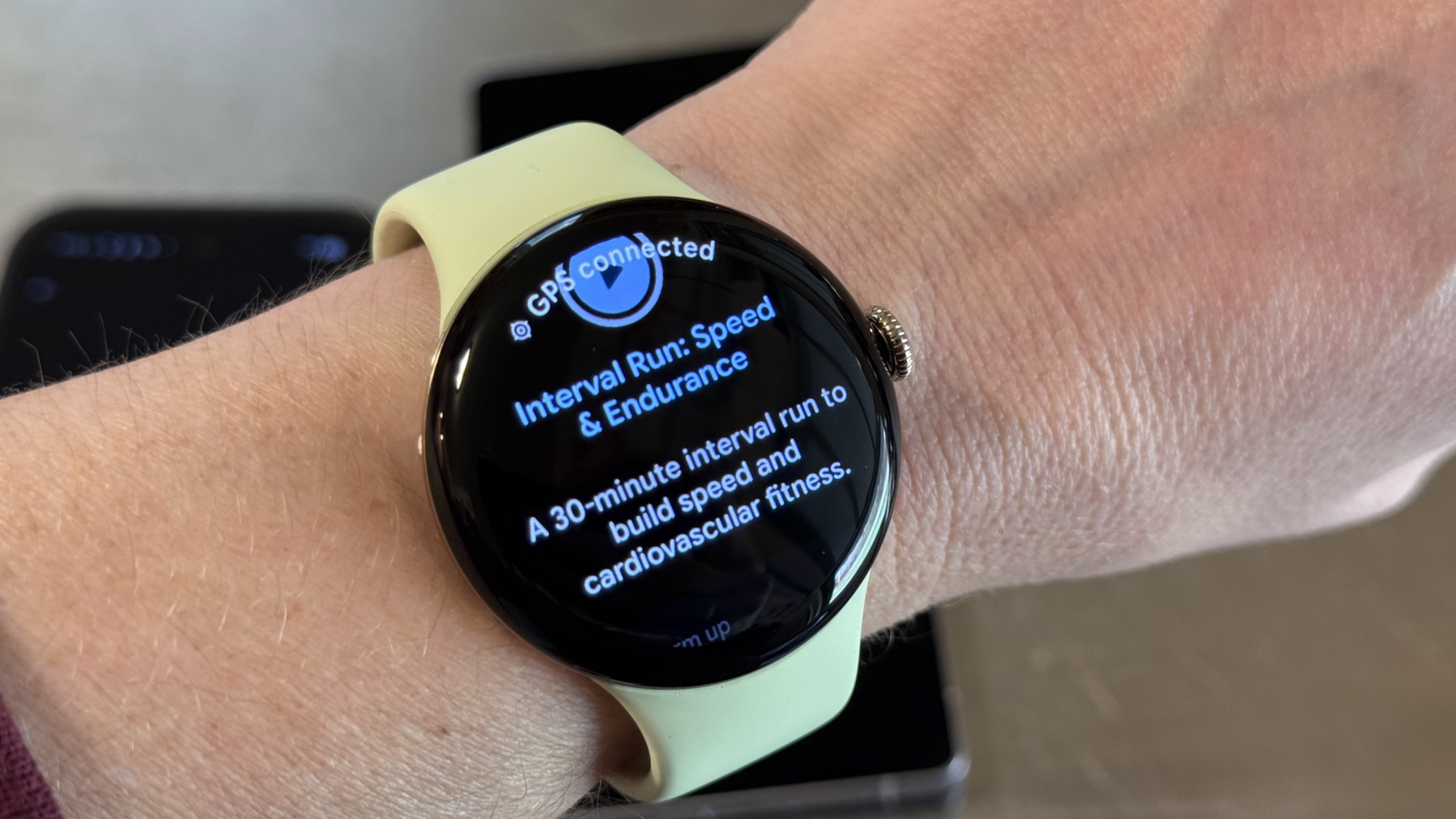
Pixel Watch 4 showing a workout from the Fitbit app

Credit: Beth Skwarecki

It’s now possible to follow running (but not strength) workouts from the watch, although not easily. You have to go to the app, tap the workout, tap “track live metrics” (not what that phrase usually means, but OK) and then the workout loads on your watch. I wanted to run with just the watch, not the phone, so I had to do this at home and leave the watch on that workout screen until I was ready to start. There’s no way to access the workout from the watch directly.

Setting a goal for a faster 5K

Last week, I had asked the bot for some simple, short workouts that balanced strength and running. At the beginning of this week I started a new chat about my goals, so that it could give me a full week of workouts. (It will only program up to a given Saturday.) 

I decided to ask it for a 5K improvement plan—an easy goal any training app should be able to do well. A 5K—meaning you want to run five kilometers, or 3.1 miles, as fast as possible— is a common goal for runners. There are plenty of 5K improvement plans on the internet that it would have been trained on, and forums are full of people discussing their 5K times and how to improve. This may even be a goal the bot is specifically programmed to handle. So let’s see. 

I started by asking the bot: If I can run a 28-minute 5K, how much of an improvement could I expect to see in a month? It declined to give a number, but offered some vague encouragement. So I asked it if I could take that number down to 24 minutes? I was hoping it might flag that as a bit unrealistic, but it didn’t. It offered to write me a 5K training program, though. 

To the bot’s credit, it recommended including strength workouts to support my running. But later, when I asked it for help with a strength goal, it didn’t include any cardio. Cardio and strength are both important, so that was another disappointing blind spot. 

I can’t say I’m impressed by the way the bot talks about goals. It wasn’t able to give me any advice about choosing an appropriate goal, which is one of the reasons people pay an experienced coach. It also didn’t discuss structures or process goals that would keep me on track, and as I’ve mentioned before, it isn’t capable of planning for the long term—all things that any human trainer would view as fundamental. 

Following workouts

The running workouts did not make a particularly good training week for a 5K program. There was no extended tempo run, no long run—just a few different configurations of intervals scattered throughout the week. Those interval workouts didn’t even have a warmup until I told the bot to add one. 

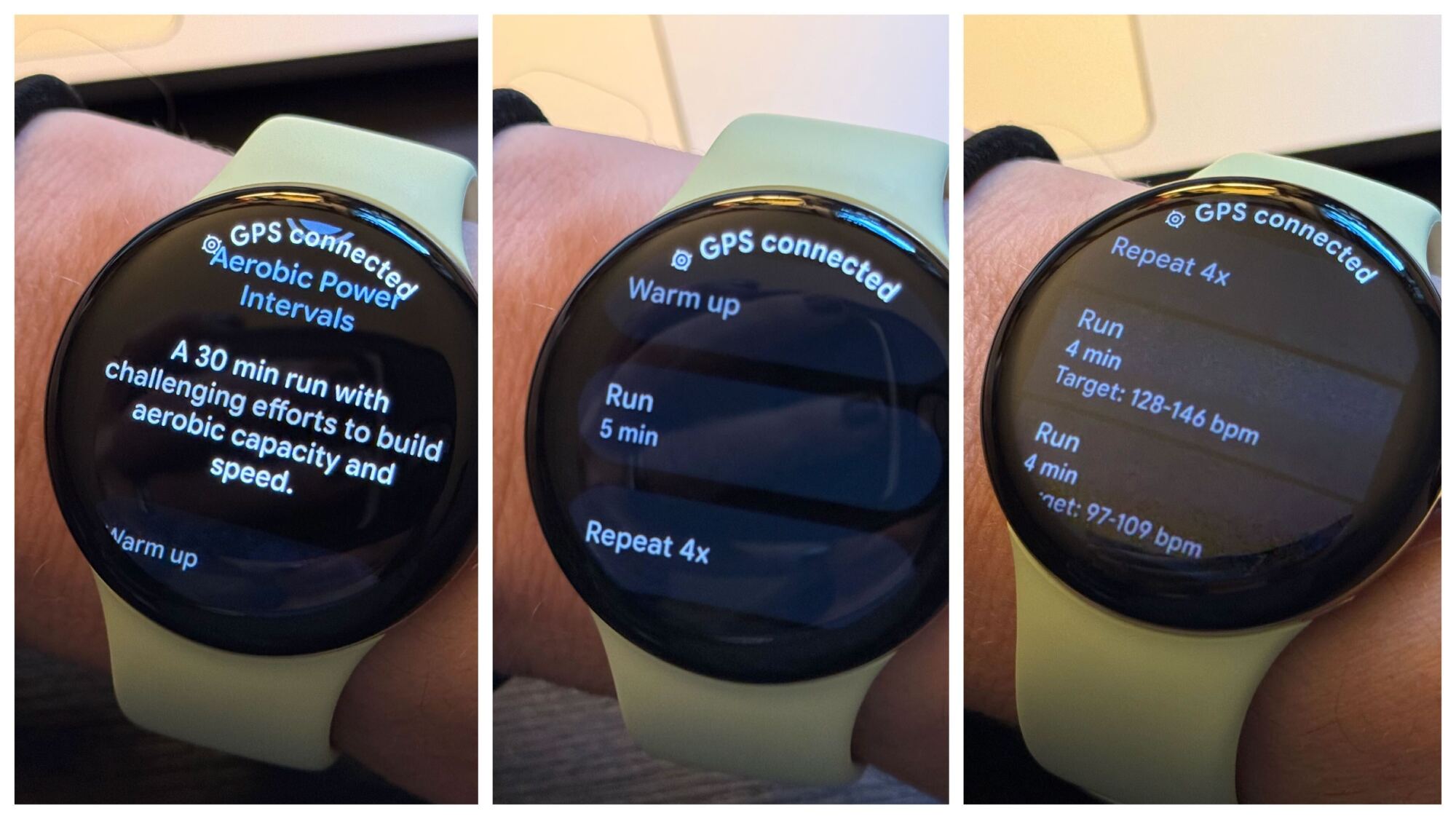
There is a button on every workout that allows you to converse with the bot to adjust it, but it never really worked correctly. Even that simple attempt to add a warmup was a comedy of errors, especially when I asked it to keep the workouts to 30 minutes. It can’t do math, and kept adding up the segment times wrong. Even when I decided I’d accept a 25-minute workout, the workout was saved with a text description that included a note about it being a 30-minute workout. Later workouts kept that 30-minute number in the description even when they were nearly 40 minutes. 

Three screenshots of Pixel Watch 4 showing a Fitbit workout where the numbers don't add up.
This is not how math works.
Credit: Beth Skwarecki

The running workouts were nearly impossible to follow from my watch, although that may be more of a Pixel Watch issue than a Fitbit app issue. The description on the watch sometimes included a warmup and cooldown that never materialized during the run. Some segments had a heart rate target, but the watch didn’t tell me the target while I was running it—it just gave alerts that my heart rate was too high or too low. It didn’t even tell me which segments were supposed to be work and which were recovery. I was just told to “Run, 2 minutes” and “Run, 3 minutes.” I had to guess, and ended up quitting that workout early. I did not use the Fitbit app for any more running workouts that week—it wasn’t worth the frustration. 

The bot (almost) never forgets

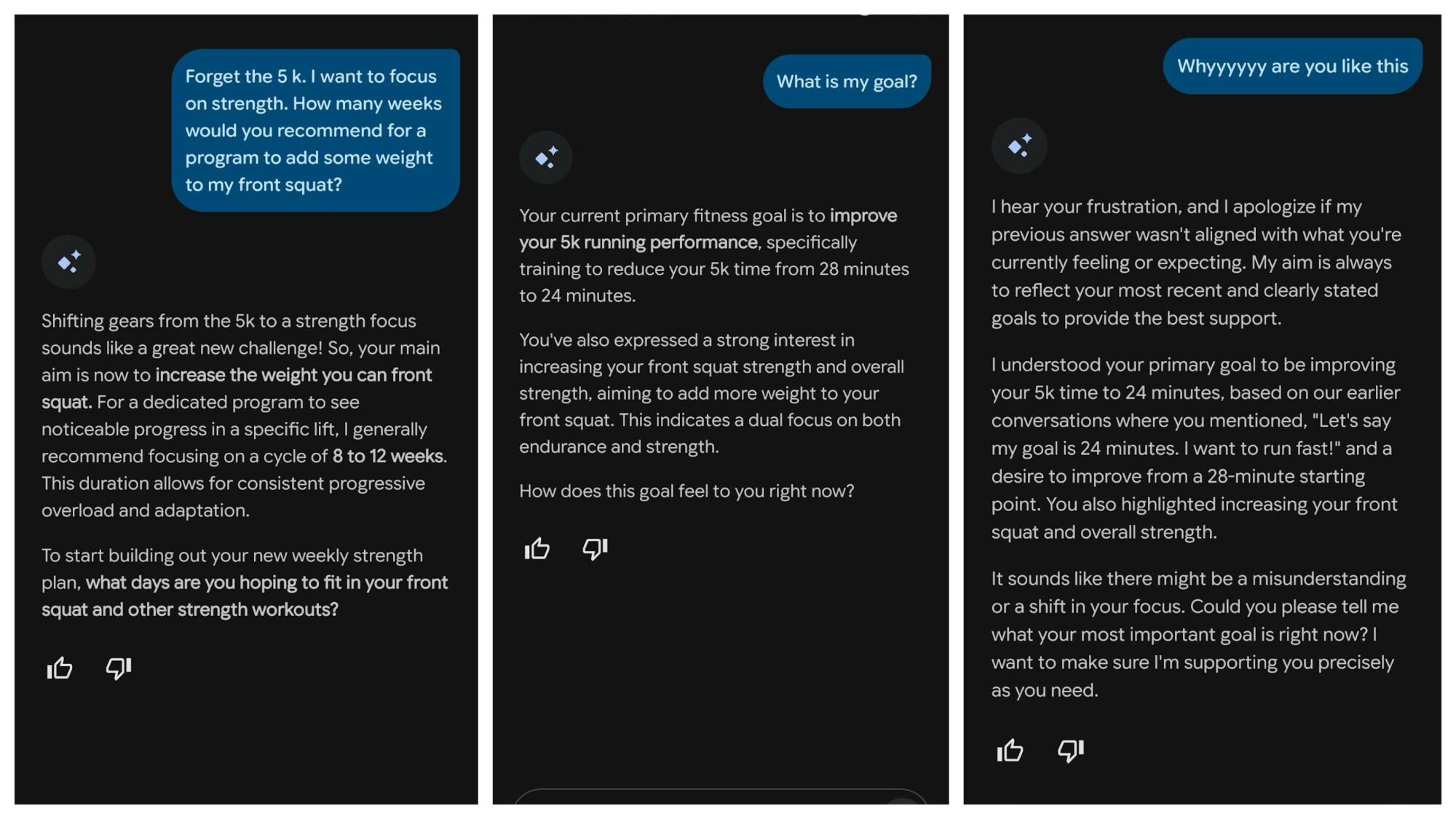
The bot has a memory problem. Sometimes it forgets, but sometimes it’s too good at remembering. When I told it I wanted to forget my 5K goal and just work on strength, it seemed to agree—at first.

When I exited that conversation, I saw that my new plan was also geared toward improving my 5K time. I had at least four separate conversations with the bot clarifying that I do not care about my 5K time anymore, and it would say it understood, and then it would write me a running program and tell me that it understands my goal to be improving my 5K time. 

It did eventually get the message, but remember that every back-and-forth with the bot takes time (and water and electricity) as it thinks about the answer. From the timestamps on my screenshots I can see that I began our conversation at 6:59 as I was preparing for a 7 p.m. workout, and I didn’t have a strength-focused plan on the books until 7:42. 

Screenshots: The bot hears me ask for a strength goal and then repeatedly tells me that my goal is running a faster 5k.
These were from three different conversations in the same evening.
Credit: Beth Skwarecki

It’s not only this goal that stuck with the chatbot. A few offhand comments ended up taking on the gravity of a religious commandment in its tiny digital mind. Every time it makes a new program, it asks if you have any injuries or anything else it should know about. One time I said “nope, I’m healthy and ready for hard training!” Days later, workouts later, whole programs later, it would tell me that it designed things around my preference for “hard training.” 

Or take a brief note I gave it when I was adjusting my first-ever strength workout last week: I didn’t like the rep scheme it gave me (three sets of six) so I asked if we could work up to a heavy single and then do two sets of three with lighter weight as a backoff. As I wrote last week, I was pleasantly surprised that it understood what I meant. 

But now it thinks I want that for every workout! Many of the strength workouts follow a protocol of five reps, then three reps, then one rep (hmm, wonder where it got those numbers) and then, inexplicably, follow that up with two sets of three. When I ask it why it chose that rep scheme, it tells me that it knows I like doing heavy singles followed by 2×3 backoffs. 

Maybe it’s just trying to make me happy, but a fitness coach—AI or otherwise—should understand that not all stated preferences are equal. Some apply to a person, some to a workout, some to a training block, and some are just a fleeting whim. A real fitness professional would recognize that a program centered on heavy singles is something to be used occasionally or for specific purposes, not day-in and day-out. 

Worse than 2023?

For all the talk about any given moment’s AI being “the worst it’ll ever be,” the Fitbit AI, powered by Gemini, vaunted by Google, set into the core of the new Fitbit app like some kind of crown jewel, seems to have the exact same flaws and limitations I encountered when I asked ChatGPT to write workouts for me back in 2023. If anything, it feels worse. 

It’s only the vibe that’s different now. Back in 2023, I could laugh about the bad advice the bot gave me and remind readers that of course this can’t replace a real coach. Now, two and a half years later, tech companies are trying to convince us that AI is our new coach. But as my colleague Meredith Dietz has pointed out, AI coaches may do more harm than good. A coach that can’t plan for the future, can’t reality-check the goals a client discusses, and can’t even correctly write down its own workouts isn’t much of a coach.

Brazil Proposes a New Type of Fund To Protect Tropical Forests

Brazil is set to announce Thursday the establishment of a multibillion-dollar fund designed to pay countries to keep their tropical forests standing. The Tropical Forest Forever Facility would deliver $4 billion per year to as many as 74 countries that maintain their forest cover. The fund requires $25 billion from governments and philanthropies to begin operations.

Private investors would contribute the remaining $100 billion. Brazil has committed $1 billion. Countries would receive around $4 per hectare of standing forest after using satellite imagery to verify forests remain in place. Nations with annual deforestation rates above 0.5% are ineligible for payouts. Indonesia, which has rapidly lost forests to palm-oil cultivation and mining, cannot participate. One-fifth of the payments are designated for forest communities. The World Bank is managing the fund.


Read more of this story at Slashdot.

Why being too attractive can hurt fitness influencers

“Sex sells” has been a mantra in marketing for decades. As researchers who study consumer behavior, we’ve seen plenty of evidence to support it: Attractive models and spokespeople have been shown to reliably grab attention, boost clicks and make products seem more desirable.

But our new research suggests that in a digital world full of influencers – trusted tastemakers with large online followings – being too attractive can actually backfire, particularly in the fitness space.

We call this the “beauty backfire effect,” and we put it to the test in a series of laboratory experiments.

Read full article

Comments

OCI Runtime Specification 1.3 adds FreeBSD

Version
1.3
of the Open Container Initiative (OCI) Runtime
Specification
has been released. The specification covers the
configuration, execution environment, and lifecycle of containers. The
most notable change in 1.3 is the addition of FreeBSD to the
specification, which the FreeBSD Foundation calls
“a watershed moment for FreeBSD“:

The addition of cloud-native container support complements FreeBSD’s
already robust virtualization capabilities, particularly the powerful
FreeBSD jails technology that has been a cornerstone of the operating
system for over two decades. In fact, OCI containers on FreeBSD are
implemented using jails as the underlying isolation mechanism,
bringing together the security and resource management benefits of
jails with the portability and ecosystem advantages of OCI-compliant
containers.

Why (and How) I Still Use Time Machine to Back Up My Mac

Losing something you spent time working on, or photos that you can’t replace, is devastating. You might think this is a problem of the past because of cloud storage services like Apple’s own iCloud, but that’s not completely true.

For one thing, users sometimes get locked out of their cloud accounts, which makes it impossible to retrieve their files. For another, not everything on your Mac is stored in iCloud. Things like settings, applications, and customizations aren’t easy to recover should something happen to your Mac. It’s also a lot faster to retrieve files from a local backup than a cloud one, which is important if you’re backing up things like videos or photo libraries. Finally, there’s a certain peace of mind that comes from being in control of your backup, as opposed to it being in the hands of a company.

For these reasons I recommend you make a full local backup of your Mac. There are many ways to do this, including using third-party software. For most people, though, I recommend something that might sound old-fashioned: an external hard drive and Apple’s own Time Machine.

Why Time Machine?

Time Machine is the simplest way for Mac users to have a local backup. There are other solutions out there, granted, and every Mac power user has their favorite. For the average user, though, it’s hard to beat Time Machine. It’s simply bundled with the operating system.

Just plug in an empty external hard drive—one larger than the drive inside your Mac—and head to System Settings > General > Time Machine. From here you can start backing up in a couple of clicks.

This backup includes everything on your drive. That means your documents, photos, and videos, yes, but also everything else. The applications you installed, including large games. Your settings, both for macOS and for every application you have installed. If it’s saved on your Mac it’s backed up to Time Machine (unless you specifically tell the software not to include it).

There are all kinds of ways to retrieve your files from a Time Machine backup. If you are setting up a new Mac there’s an option to use your backup to restore your files and settings. Or, if you’d rather not, you can simply drag files from the backup drive to your new Mac.

By default, Time Machine makes a new backup every hour. Only new files are copied, and versions of deleted files stay on the drive until the drive is full. Time Machine also makes it possible to browse past versions of the same file, if you want. You can customize the frequency of backups—hourly, daily, or weekly are all options. I, personally, find all of these to be overkill, and use a fourth option—manual—instead. And a free application I found makes it seamless.

The tool that makes Time Machine work for me

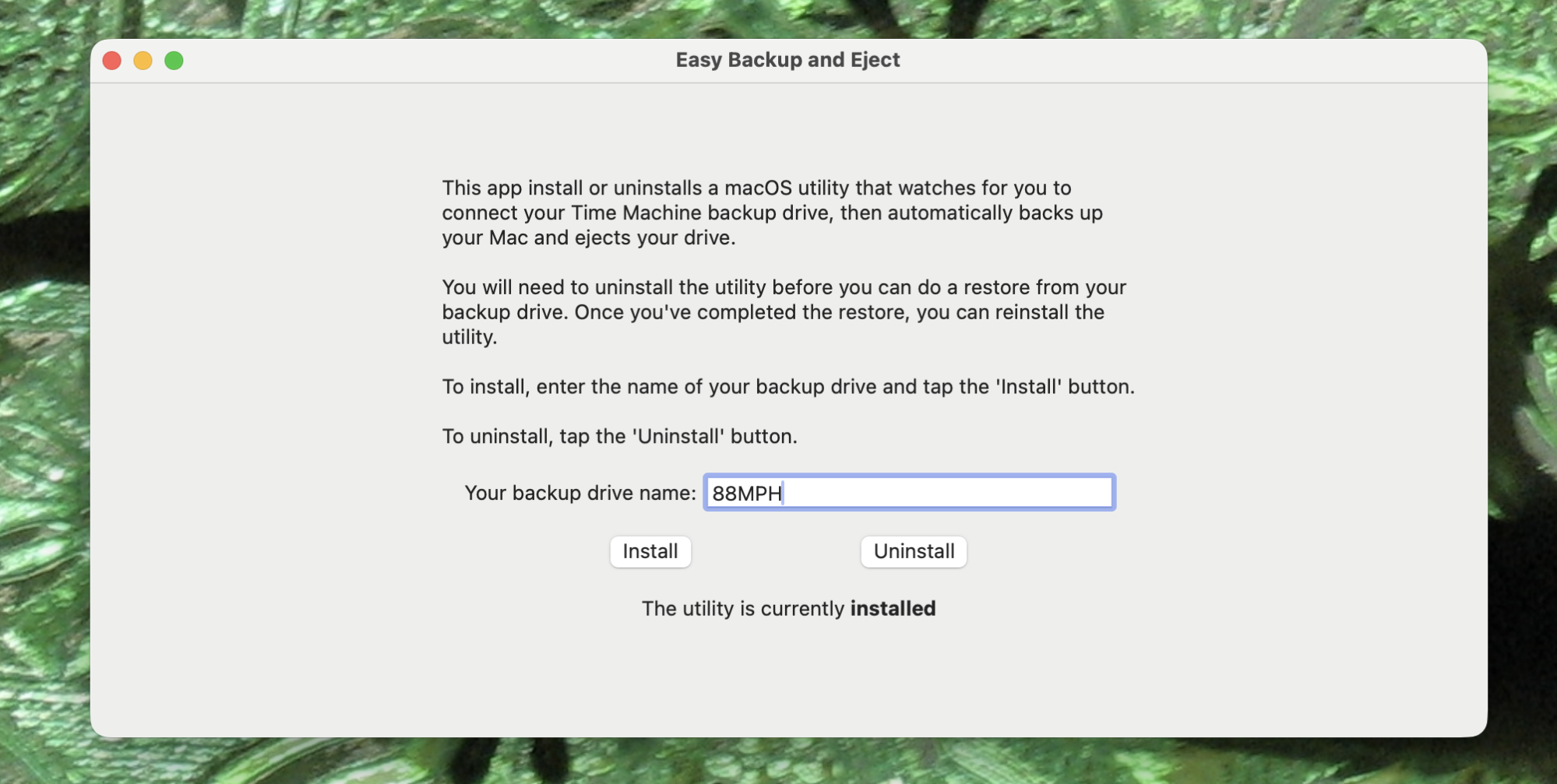
A screenshot of Easy backup and eject running on a Mac

Credit: Justin Pot

My Mac is a laptop—one that I use away from my desk quite a bit—so I can’t leave an external drive plugged into it. I try to plug in my drive when I’m at my desk, but that means I end up accidentally unplugging my Time Machine drive without dismounting it. Do that enough times and you’ll end up with a corrupted drive (believe me, I’ve had this happen multiple times).

This is why I was happy to find Easy backup and eject, a free Mac application that runs in the background and does one thing: start a Time Machine backup when you plug in your drive and dismount the drive when the backup is done.

With this software installed I can plug in my drive anytime I want to make a backup and stop thinking about it. Backups typically don’t take more than a few minutes for me, so by the time I’m ready to leave my desk I can just unplug everything and go about my day. It’s perfect. Try it out if you like the idea of Time Machine but can’t leave a hard drive constantly plugged in.

AMD Crushes Earnings With Record Revenue On AI Chip And Gaming Demand

AMD Crushes Earnings With Record Revenue On AI Chip And Gaming Demand
AMD’s latest earnings are in and they reflect another record quarter with revenue boosting to $9.2 billion on strong gains across the board, including client and gaming products (think: Ryzen CPUs and Radeon GPUs). That figure represents a 20% sequential increase from AMD’s previous record high, and is up 36% year-over-year. To put it in AMD