Google’s AI Mode Can Now Arrange Your Appointments and Event Tickets

Google’s AI Mode has new agentic capabilities for booking event tickets and beauty and wellness appointments, so AI will do most of the work to find and curate the best options based on your inputs.

Google first launched agentic capabilities for AI Mode in August: The initial feature could help locate restaurant reservations based on inputs like party size, location, cuisine, and preferred dates and times. For example, you can enter “find me a table for 8 people next Saturday for a birthday dinner … thinking outdoor rustic garden vibes with live music” and AI Mode will return suggestions with links to book. While they won’t actually finalize the reservation for you, Google’s AI agents can present you with real-time availability using live web browsing as well as integrations with OpenTable, Resy, Tock, Ticketmaster, StubHub, SeatGeek, and Booksy.

Google Flights also has an AI tool called Flight Deals, which can suggest itineraries based on a general search query (or simply your current location) and then connect you to the main Google Flights interface with links for booking.

Use AI Mode to book tickets and appointments

As with restaurant reservations, AI Mode can conduct searches for tickets to events, such as concerts, as well as wellness appointments like haircuts and massages. Enter parameters like performer name or preferred service and pricing, and the AI agent will return recommendations with instructions on how to finalize your booking.

For example, I used queries like “I’d like to get a massage in the next two weeks with someone specializing in sports massage. Prefer availability on Fridays or in the evenings.” and “Find me tickets for the upcoming Nate Bargatze show in Utah. Prefer mid-range pricing.” AI Mode compiled ticket options broken down by show date and ticket price and provide links to the booking platforms (like StubHub, SeatGeek, and Vivid Seats) with the cheapest tickets for each event. Again, the agent can’t actually complete the transaction, but it can get you all the way to that final step.

According to Google’s Search Labs page, these agentic features are available to U.S. users ages 18 and over who are signed into their personal Google Account. You must have Web & App Activity turned on and enable Agentic capabilites in AI Mode.

China Bans Foreign AI Chips From State-Funded Data Centres

The Chinese government has issued guidance requiring new data centre projects that have received any state funds to only use domestically-made AI chips, Reuters reported Wednesday, citing sources familiar with the matter. From the report: In recent weeks, Chinese regulatory authorities have ordered such data centres that are less than 30% complete to remove all installed foreign chips, or cancel plans to purchase them, while projects in a more advanced stage will be decided on a case-by-case basis, the sources said.

The move could represent one of China’s most aggressive steps yet to eliminate foreign technology from its critical infrastructure amid a pause in trade hostilities between Washington and Beijing, and achieve its quest for AI chip self-sufficiency. China’s access to advanced AI chips, including those made by Nvidia, has been a key point of friction with the U.S., as the two wrestle for dominance in high-end computing power and AI. U.S. President Donald Trump said in an interview aired on Sunday following talks with Chinese President Xi Jinping last week that Washington will “let them deal with Nvidia but not in terms of the most advanced” chips.


Read more of this story at Slashdot.

How We Lost ‘Gym Culture’ (and How You Can Reclaim It)

At my local Blink Fitness—which is now a PureGym—I recently worked in sets with another woman on the assisted pull-up machine. For me, the vibe was utter relief. No one was being rude about sharing equipment, it didn’t feel remotely competitive, and there was a safety and solidarity in being the only two women in that quadrant of the gym at that moment. For a brief window, the gym felt like a space for both catharsis and camaraderie. Unfortunately, this moment only made me realize how rare this sort of shared gym culture has become.

Truthfully, I don’t know if gym culture was ever for me. The stereotype is it’s all bros, right? I’m no Joey Swoll, self-described “CEO of gym positivity,” one of those influencer types with a manic positivity that’s either repellent or inspiring, depending on who you ask. As a casual gym-goer and as a woman, I’ve always felt the need to strike the perfect balance between exuding confidence and staying somewhat invisible. That’s not exactly a recipe for community.

So I could say a lot about what this piece is not about. It’s not about “being a woman” and dodging sexual harassment. It’s not about class studios, either, which have their own worlds and Pilates-based politics.

My focus today is on something simpler and broader: the quiet disappearance of gym culture, and what’s been lost as solo at-home workouts become increasingly high-tech and accessible. My job has deepened this strange distance. I spend my days testing the latest smart rowing machines, adjustable dumbbells, and stair steppers—equipment so sophisticated and convenient that the question isn’t whether you can replicate a gym experience at home, but why you’d bother leaving at all. I’ve cycled through enough gear to outfit a small fitness studio, each piece promising to deliver professional results without the commute, the membership fees, or the potential for uncomfortable interactions. And it works. The technology is legitimately impressive.

But something has been lost in this seamless transition to convenience. I write this now with a bit of a naive, romanticized gaze, wondering what life could’ve been like for me if I were a big, friendly man in the idealized gym culture of yore. From this vantage point, what is this ideal gym culture that I’m even imagining? And is it worth mourning something that may have never truly existed for everyone?

The quiet disappearance of shared gym culture

As smart home fitness tech increases, we’re trading community for convenience, and we might not get it back. Echo Wang, a certified yoga teacher and founder of Yoga Kawa, says, “the gym used to be a social anchor. People went not just to work out, but to belong.” Now that home fitness equipment has made working out at home simple, that gym atmosphere is fading. Wang says that watching someone push themselves hard beside you provided extra motivation—it was infectious. Those conversations between sets kept people engaged, while exercising alone at home makes it simpler to skip workouts and lose momentum.

Even those who still attend gyms exist in isolated worlds, noise-canceling headphones blocking out the sounds of clanking weights and ambient energy that once made gyms feel alive. Eye contact has disappeared, small talk has vanished—only repetitions and personal playlists remain. “Convenience gets you going,” Wang says, “but being part of something keeps you coming back.”

Dr. Jesse Shaw, associate professor of sports medicine at University of Western States, says he built his training philosophy around competitive energy. From his military days through his current work in collegiate athletics, he’s pursued being the biggest and fastest person in the gym—and when he wasn’t, that drove him to train harder. He sees how home technology can fill this gap, pointing to how Peloton created a community and culture around their equipment that mimics this motivational aspect.

But Shaw has also witnessed troubling changes. He’s observed an unfortunate shift for dedicated gym-goers who want to focus on serious training without being filmed or waiting for someone to complete their “workout” content creation. As I recently covered, posting workouts online has become less about documenting personal progress and more about performing fitness for an audience—a shift that fundamentally changes the gym environment itself. The era of classic “meat heads”—big, burly people moving serious weight—has largely disappeared. Shaw also notes the changing group dynamics: During his military service, he was comfortable training alone and would simply ask someone nearby for a spot when needed. Now, he sees most people arrive in groups and tend to avoid lifting heavy weight efficiently.

Shaw believes the at-home workout convenience that emerged from social and medical necessity remains a valuable exercise option. However, he’s witnessed numerous gym closures due to weak attendance and poor recovery of membership numbers. Technology has altered both the pace and focus of current gym-goers, creating a need to document and share workouts online to feel a sense of accomplishment. Some home technologies, like Peloton, depend heavily on social features, building a culture and shared drive to improve and compete on leaderboards.

The type of gym you go to matters

Cost and type play a huge role in gym dynamics. My colleague Lindsey Ellefson shared how when she taught spin at the NYU community gym, which is free for students, she found the environment to be talkative, friendly, and wildly collegiate. But where she works now, a “luxury gym,” feels much more insular and everyone is kind of closed off. In the same vein, I spoke with a friend who has a gym in his apartment building, who told me how interacting with people you know are your neighbors can feel safer and easier compared to walking up to total strangers at a bigger establishment.

For Kris Herbert, founder and owner of The Gym Venice, the cultural deterioration goes deeper. He’s particularly concerned about low-cost, high-volume “value” gyms, where minimal financial and personal investment leads to vanishing individual responsibility. This lack of ownership creates spaces that are frequently dirty, disorganized, and dangerous. These gyms are places people use, rather than belong to.

Herbert has tracked a clear cultural transformation: People once trained together, spotted each other, and conversed between sets—now most members train in isolation, earbuds inserted, eyes averted. There was a time when entering the gym felt like walking into “Cheers,” where everyone knew your name. That community feeling has been largely replaced by convenience.

Part of this shift stems from accessibility: Today, you can find answers to virtually any training question online without human interaction. While access to credible information can accelerate progress, it can’t replicate the accountability, camaraderie, and shared energy of training with others.

Herbert emphasizes that the social dimension of training is one of the most undervalued performance enhancers available. When you work out alongside others who notice your effort, encourage your development, and hold you accountable, you naturally push harder, maintain better consistency, and enjoy the experience more. That sense of belonging fuels not only better gym results but also enhanced mood, confidence, and overall mental health.

How we can rebuild gym culture

To rebuild this culture, Herbert suggests starting small. Introduce yourself to regulars, offer to spot someone, ask a question, acknowledge someone’s consistency. These simple interactions remind us that fitness encompasses social, emotional, and deeply human elements beyond the physical. The gym should be somewhere people not only grow stronger but also belong.

Smart fitness technology has made training more accessible—you can follow programs, track metrics, and receive feedback from your living room. But while this convenience eliminates friction, it also eliminates connection. The human elements of training—the cues, corrections, and shared energy—truly drive long-term progress and fulfillment. Smart technology might make working out easier, but it will never replace the power of human connection.

I still test equipment at home. I still appreciate the convenience of rolling out of bed and onto a rowing machine without navigating complicated social dynamics or waiting for equipment. But I’ve started going back to the gym twice a week, trying to figure out what this whole gym culture thing could mean for someone like me.

Maybe that ideal gym culture I’m imagining—the one where people belonged, where community thrived—was always more accessible to some than others. Maybe it was never perfect. But hey, even an imperfect community beats isolation. And maybe, if we’re intentional about it, we can build something better than what came before—one shared set on the assisted pull-up machine at a time.

Removing XSLT from Chromium

Mason Freed and Dominik Röttsches have published a document
with a timeline and plans for removing Extensible Stylesheet Language
Transformations (XSLT) from the Chromium project and Chrome
browser:

Chromium has officially deprecated XSLT, including the XSLTProcessor
JavaScript API and the XML stylesheet processing instruction. We
intend to remove support from version 155 (November 17, 2026). The
Firefox and WebKit projects have also indicated plans to remove XSLT
from their browser engines. This document provides some history and
context, explains how we are removing XSLT to make Chrome safer, and
provides a path for migrating before these features are removed from
the browser.

LWN covered the Web
Hypertext Application Technology Working Group (WHATWG) discussion
about XSLT in August.

Pac-Man and other Namco games are coming to Atari 50 as part of a paid expansion on November 13

Atari 50: The Anniversary Celebration is a fascinating journey through the history of Atari, but that timeline couldn’t be truly rounded without the inclusion of some Namco classics like Pac-Man and Galaga. To remedy that, Atari and developer Digital Eclipse are releasing another paid expansion for the retro collection. It’s called The Namco Legendary Pack and it will be available on November 13 on PS4, PS5, Xbox One, Xbox Series X/S, Nintendo Switch and Steam for $8.

The DLC adds a new interactive timeline that will take you through the history of Namco games on Atari systems, with the help of video interviews with developers and archival materials including photos and other documents. The expansion features versions of Pac-Man for Atari 2600, Atari 5200 and Atari 8-bit. Pac-Man was the best-selling game on Atari 2600, but it’s safe to say that version doesn’t exactly hold up. 

The Namco Legendary Pack also includes the US arcade versions of Dig Dug and Xevius. In addition, you’ll get home console versions of those two games, Galaga and Galaxian.

The DLC will make Atari 50 even more of a comprehensive overview of the company’s history. An expansion that arrived last November charted the rivalry between Atari and Intellivision, aka the first console war. Atari finally brought that to a decisive end when it bought the Intellivision brand last year.

This article originally appeared on Engadget at https://www.engadget.com/gaming/pac-man-and-other-namco-games-are-coming-to-atari-50-as-part-of-a-paid-expansion-on-november-13-175131686.html?src=rss

The MPA tells Meta to stop using PG-13 to describe teen accounts

The Motion Picture Association doesn’t share Meta’s view that the content people under the age of 18 might encounter on an Instagram Teen Account is comparable to what you might find in a PG-13 movie. The MPA has reportedly hit Mark Zuckerberg’s company with a cease-and-desist letter that objects to Meta’s use of the term “PG-13.”

To rewind, Meta revamped its teen-specific accounts — which were first introduced last year — last month, claiming that going forward the account content would be guided by PG-13 movie ratings. In a blog post explaining the change, it said: “Just like you might see some suggestive content or hear some strong language in a PG-13 movie, teens may occasionally see something like that on Instagram — but we’re going to keep doing all we can to keep those instances as rare as possible.”

As Engadget’s Karissa Bell pointed out at the time, while Meta openly acknowledged that no system is without its flaws, the analogy is a bit vague and confusing, especially as the company has tightened up some of its rules so that teens are no longer supposed to see any “sexually suggestive” content on the app. This is despite content of that nature often being present in a PG-13 movie.

In the cease-and-desist letter that The Wall Street Journal claims to have seen, the MPA has called Meta’s use of its ratings system in describing how the new teen account restrictions work “literally false and highly misleading.” It said that the established movie-ratings system is not comparable to Meta’s system, which it added appears to “rely heavily on artificial intelligence.” It also warned that potential issues with Meta’s classification metrics would “inevitably cause the public to question the integrity of the MPA’s rating system.”

Meta did also directly reference the PG-13 ratings system in its blog post when discussing its AI experiences, where it said that teens interacting with chatbots would not receive “age-inappropriate responses that would feel out of place in a PG-13 movie.” Meta told the WSJ that the changes were intended to make it easier for parents to understand its content policies by measuring them against something familiar, and that it was aware that “social media isn’t the same as movies.” Responding to the cease-and-desist letter, it said that it never tried to claim or imply any official PG-13 certification from the MPA.

This article originally appeared on Engadget at https://www.engadget.com/big-tech/the-mpa-tells-meta-to-stop-using-pg-13-to-describe-teen-accounts-174251843.html?src=rss

Teenage Engineering made a reggae-inspired sampler, complete with a weird microphone for vocals

Teenage Engineering just revealed the EP-40 Riddim sampler. This reggae-inspired groovebox is another redesign of the pre-existing EP-133 KO II sampler. It has the same square body and button-based workflow, but there are several changes here.

First of all, the entire exterior has been redesigned to make that reggae theme really pop. It’s green and off-white, with fun fonts aplenty. The thing just screams “play me,” much like the original KO II.

Perhaps the biggest internal feature is the addition of an actual synth engine called Supertone. The previous models in this series were just samplers. The company promises that this engine can deliver thick bass sounds and classic leads. It also offers access to a dub-inspired siren mode that’s pressure sensitive. It oscillates faster the harder you press it.

The machine also boasts double the storage and an additional main effect. All told, there are seven main effects and 12 punch-in effects. These have all been inspired by reggae tunes. It comes pre-loaded with hundreds of samples which have also primarily been pulled from the genre.

This isn’t just for reggae, as sounds are sounds and people can do whatever they want with them. Also, it’s really easy to load your own samples into this machine via a web tool. I’ve used the tool often with the original KO II and it truly is drag-and-drop.

A microphone.
Teenage Engineering

There’s one final fascinating element here. The sampler ships with something called the EP-2350 Ting microphone. This handheld mic resembles something out of a CB radio and is “lo-fi by design.” It features four voice-changing effects, including one that combines echo and spring reverb. This is an essential effect for dub reggae vocals. In theory, this microphone could be used with other devices, but it’s only available as a combo pack with the Riddim.

Everything else is in line with the KO II. It has a speaker that’ll likely be pretty crappy, but also plenty of inputs and outputs. It operates via AA batteries and there are 12 buttons to trigger samples.

The Riddim is slightly more expensive than its counterparts, at $329. However, this does include the aforementioned Ting microphone. It’s available right now for purchase.

This is the second off-kilter rebrand of the KO II. Teenage Engineering already released the EP-1320 Medieval, which is filled with samples of screaming peasants, flutes and Gregorian chants. The menus were also completely in Latin which, dear readers, made it very hard to use for this dumb American.

This article originally appeared on Engadget at https://www.engadget.com/audio/teenage-engineering-made-a-reggae-inspired-sampler-complete-with-a-weird-microphone-for-vocals-173812774.html?src=rss

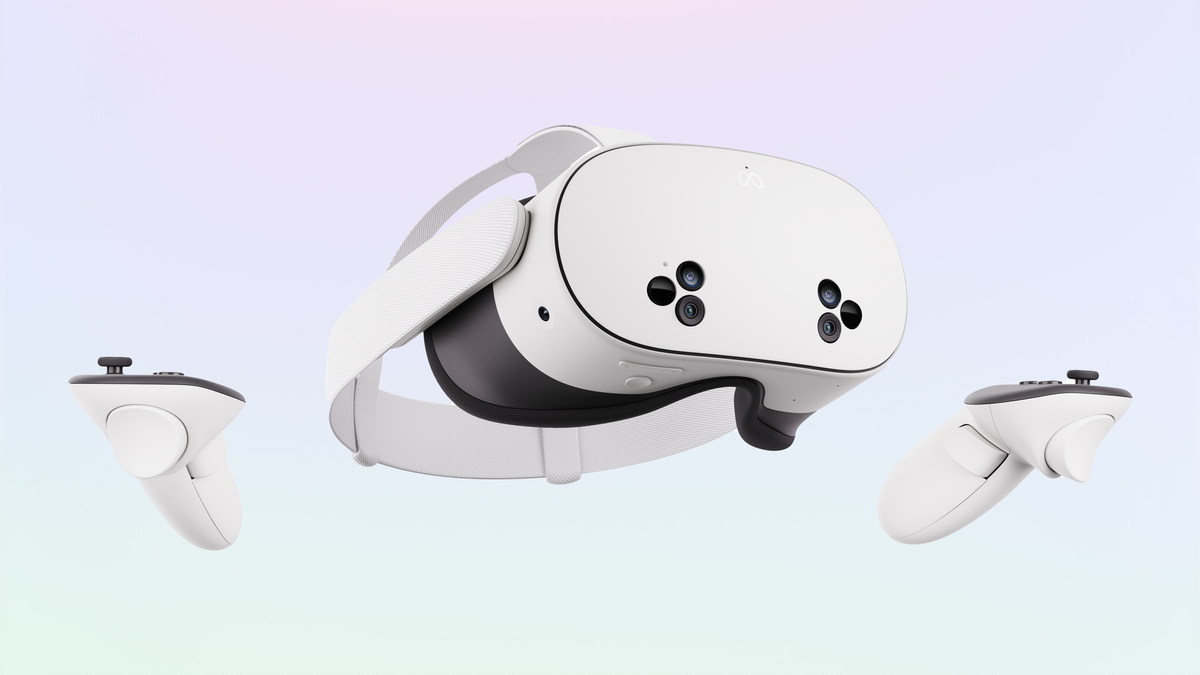
Quest 3S Certified Refurbished Is Just $216 With This Discount Code

Quest 3S certified refurbished is just $216 this week, and the 512GB Quest 3 certified refurbished is $360, on Meta’s official eBay page.

First spotted by IGN, you can find the Quest 3S deal here and the Quest 3 deal here.

For both headsets, you need to enter eBay’s discount code TECH4THEM to get the lowest price, and this code expires after 11:59pm Pacific Time on Sunday, the end of this week.

Meta claims that its certified refurbished headsets “are inspected and thoroughly tested, professionally cleaned, and restored to original factory settings so they function and look like new and include the same accessories and cables as new devices”. And eBay is offering a two-year certified refurbished warranty, a year longer than you’d get even if buying a new headset from Meta.com.

Meta Now Sells Quest 3S Refurbished For $270
Meta now offers Quest 3S refurbished from $270, though you can get the headset new for that price for the next few days.
UploadVRDavid Heaney

Quest 3S certified refurbished is normally $270, and the lowest we’ve seen it sold at brand new is $250, so the offer here represents by far the lowest price we’ve ever seen for a fully standalone headset with included tracked controllers, hand tracking, and color mixed reality.

Meanwhile, Quest 3 certified refurbished at $360 is arguably an even better deal, as the only remaining 512GB model certified refurbished is normally $450.

While Quest 3S can run all the same content as Quest 3, and has the same fundamental capabilities (including the same chip and RAM), if you have the funds we always recommend Quest 3 over Quest 3S, because it features Meta’s advanced pancake lenses which are clearer, sharper, wider, and fully horizontally adjustable, suitable for essentially everyone’s eyes. These pancake lenses also enable Quest 3 to be thinner, which makes the headset feel less heavy.

Google Maps Will Soon Let You Talk to Gemini While Driving

Google isn’t new to adding AI to its products, and that includes Google Maps. The company already has AI tools that let you ask Gemini for directions to your destination, or get more info about it, and today, it’s rolling out new features to help turn the chatbot into a (to borrow a term from Microsoft) copilot.

With Gemini in Google Maps, you’ll be able to ask open-ended questions and even have the AI take action for you, based on its responses. The idea is to make the app easier to work with while driving, which, yes, means you can also wake the bot with a simple “Hey Google.”

Let’s say you get peckish while driving. You’ll be able to wake the bot with your voice, ask it for restaurants along your drive, and then have it alter your route to direct you to one of them. Or, if you have a passenger with you, they could also summon the bot with a Gemini icon in the top-right corner of the Google Maps screen.

This is a major update compared to prior AI integration in Maps, which was mostly restricted to asking questions about certain routes or destinations before you started driving.

Gemini will purportedly make Google Maps routes easier to follow

But even if you’re not actively talking to the AI to help you navigate, it’ll still supposedly make Maps better for you. Rather than relying on generic instructions like “turn right in 500 feet,” Google says Maps will now also sometimes direct users by pointing out easy-to-spot landmarks along their route instead. That means you might get an instruction saying “turn right after the Thai Siam Restaurant,” with the restaurant itself being highlighted on your Maps app as you approach.

To do this, the bot will cross-reference Google Street View photos with your route. I’ll admit I’m a little skeptical that it might pick an easy-to-miss landmark—I don’t trust myself to be able to spot the right restaurant while driving—but if it works, it could be more intuitive than trying to figure out how many feet are between me and my turn.

Gemini will work with other apps from within Maps

There’s also integration to help you better interact with Google’s other apps while in Maps, like Calendar. The company says that, while talking to the bot about your route, you could also ping it to add an event to Calendar; assuming you’ve already given it permission to do so, it’ll automatically follow through on your request. The company’s also added a Google Lens button to Maps, so once you arrive at wherever you’re going, you’ll be able to point your phone at landmarks or your destination and ask Gemini for more details about them without having to leave Maps.

Smarter commutes

Outside of connecting with other apps, Maps is also getting some of the same features as Waze, but with a twist. Google is adding a feature called Proactive Traffic Alerts to Maps, which sets Gemini to monitor disruptions to your most commonly traveled routes in the background. The idea is that you likely don’t open Maps or Waze for your daily commute, which means you’re not getting traffic alerts while you drive. Now, the AI will work for you while the app is closed, too, and will notify you on its own if it detects a crash or road closure while you’re on one of your routine drives.

The catch to all of this? There are plenty of ways it could go wrong, and there’s no way to test it yet. Imagine the AI hallucinates a landmark that isn’t there or has closed, and you miss a needed turn. In a roundtable with journalists (h/t The Verge), Google Maps product director Amanda Moore insisted that all training is “using the actual place information in the real world” and said “there should be no hallucinations on places to stop at or things like that,” but this is definitely something I’d want to try out first in a low stakes environment, rather than diving into it immediately on a cross-country road trip. (Even if a landmark is real, that doesn’t automatically mean pointing it out will be useful.)

When you can try Gemini in Google Maps

Unfortunately, it’ll take a little while before you can try out any of these new features. Gemini-based navigation starts rolling out “in the coming weeks” and Lens in Maps is set for “later this month.” Proactive traffic alerts and landmark-based navigation start their rollouts today, but it might still be a bit until they hit your iOS and Android device.

Epic and Google Settle Antitrust Case With Global Fee Cuts and Easier Third-Party Store Access

Epic Games and Google have agreed to settle their long-running antitrust lawsuit. The settlement converts Judge James Donato’s United States-only injunction into a global agreement extending through June 2032. Google will reduce its standard app store fees to either 20% or 9% depending on the transaction type.

The company will also create a program in the next major Android release allowing alternative app stores to register and become what Google calls first-class citizens. Users will be able to install these registered app stores from a website with a single click using neutral language.

The settlement addresses Epic’s concerns about friction and scare screens that discouraged sideloading. Google will charge a 5% fee for transactions using Google Play Billing, separate from its service fee. Alternative payment options must be shown alongside Google Play Billing.


Read more of this story at Slashdot.

Intel Xeon 6 Performance Feature Benchmarks: Latency Optimized Mode

A new feature of Intel Xeon 6 “Birch Stream” platforms is the “Latency Optimized Mode” performance setting. The Intel Latency Optimized Mode will keep the uncore clock frequencies higher for more consistent performance but at the cost of increased power use. For those wondering about the performance and power impact, here are some comparison benchmarks of engaging this Latency Optimized Mode with Intel Xeon 6980P “Granite Rapids” server processors.

Google adds an AI Mode shortcut to Chrome on mobile

Well, I suppose it was only a matter of time, but Google is making AI Mode harder to avoid. In the US, the company has begun rolling out an update for Chrome on Android and iOS that adds an AI Mode shortcut to the browser’s new tab page. It’s predominantly featured, appearing right below the browser’s signature search bar.

“This will let you ask more complex, multi-part questions, and then dive even deeper into a topic with follow-up questions and relevant links,” the company said of the update. In the near future, Google plans to bring the shortcut to 160 additional countries, with support for other languages — including Hindi, Indonesian, Japanese, Korean, Portuguese — on the way as well. 

Google introduced AI Mode at the start of March when it previewed the feature through its Labs program. Since then, it has been aggressively rolling out AI Mode in nearly every market it operates, beginning this past May at I/O 2025 May when the company made the chatbot available to all US users.

This article originally appeared on Engadget at https://www.engadget.com/ai/google-adds-an-ai-mode-shortcut-to-chrome-on-mobile-170042622.html?src=rss

How to Play ‘Shuffalo,’ the New Yorker’s Answer to Wordle

I’ve been enjoying Shuffalo, a quick daily word game from the New Yorker that I can’t help but compare to the New York Times’s Wordle, which is so popular we publish hints for it every day. But it really feels like an improvement on a different New York Times game, Spelling Bee—quicker and with more useful hints. 

What is Shuffalo? 

Shuffalo lives on the New Yorker games page, with a different puzzle each day. For each day’s puzzle, you get a collection of letters that you have to form into a word. 

First you get four letters, and you need to use them all to make a four-letter word. Once you do that, a fifth letter is added, then a sixth, and so on up to eight. Get that far, and you’ve won—but there’s also a bonus round with nine letters if you’re up for the challenge.

How to play (and win) Shuffalo

The letters you have to work with appear in a circle. It looks a lot like Spelling Bee, if you’re familiar with that, but in Shuffalo you can only use each letter once per word. Once you select a letter, it turns gray and unusable. 

If you’re stumped, there are three ways to get your brain un-stuck: 

  • Hit the recycle button in the center of the wheel to shuffle the letters.

  • Select a few letters that might go together (for example, E and R if you’re wondering about an -ER ending) and it will be easier to see patterns in the remaining yellow letters. 

  • Click the Hint button at the bottom of the screen. It will reveal one letter in the answer. You do not get to choose which letter it is.

I found that the first two tricks helped me get most words, but the hints were nice to have if I ever felt that a level was taking too long. There is no limit to how many hints you can use, although if you use a lot you’ll get “Baby Shuffalo” as your rank. A perfect game earned me a “Super Shuffalo.” 

Note that you can enter letters into any part of the answer, not just type from the beginning like in Wordle. This is a great feature to use with the hints—maybe you get a C mid-word, so then you can try putting an H right after it and see what letters that leaves. 

At the end of the game, you get a graphic that shows which letters you guessed correctly, and you can also get an emoji result to share with friends. 

Screenshots of Shuffalo results
Left and top: a game where I used many hints. Bottom right: a perfect game.
Credit: Beth Skwarecki/New Yorker

How Shuffalo compares to other daily word games

Shuffalo is a pure word game. You don’t need to know what the words mean or be able to group them according to trivia or wordplay, making it more focused than something like word-grouping game Connections or word search game Strands. You just have to put letters together to make recognizable words. In that sense, it’s a lot like Wordle.

I like this game a lot, because it reminds me of my favorite way to play Spelling Bee—as a one-word quickie. Spelling Bee is a New York Times game where you’re supposed to find as many words as possible in a jumble of seven letters, reusing letters as needed. But every day there is at least one “pangram” that uses all seven. Sometimes I open the app, and stare at it until I find the pangram. Shuffalo gives me that same experience, but with five increasingly difficult levels, and a helpful hint structure. I’m really enjoying it.

Discord gives parents more insight into their teens’ activity through Family Center

Discord has been trying to strike a balance between affording teen users their privacy and allowing for parental oversight. Over the next week, the platform is rolling out some updates for its Family Center with the aim of helping parents gain more understanding of what their teens are doing on Discord, while giving them the ability to manage certain settings. 

Parents and guardians were already able to see an overview of some of their teens’ Discord activity. Now, they’ll be able to view all purchases for the previous seven days; exactly how long teens have spent in voice and video calls across direct messages, servers and group DMs; and the five users and servers that a teen has called and messaged most often over the last week.

Teens will have the option to notify a guardian when they report another user or a piece of content to Discord. The guardian will receive an email telling them that their teen filed a report but not the details. The idea behind that is to have a conversation about the report and for the guardian to lend their support.

In addition, Discord is adding guardian-managed settings to Family Center. These include the ability to determine who can DM a teen and if sensitive content filters are enabled. Guardians will have access to some data privacy controls too.

Discord said it designed the updates with teens in mind and to make sure they can maintain their independence while having the parental support they might need. Guardians can’t see the content of messages that their teens send. Teens can also view the same information as their guardians in Family Center. 

To use Family Center, guardians and teens need to link their accounts. They can do so by going to User Settings > Family Center in the Discord app.

As with other social platforms, Discord is under the spotlight when it comes to the safety of young users. Earlier this year, New Jersey’s attorney general sued Discord, claiming that it “misled parents about the efficacy of its safety controls and obscured the risks children faced when using the application.” 

Australia, meanwhile, is considering banning children under 16 from using Discord. Starting on December 10, the country will prohibit Reddit, Kick, Facebook, X, Snapchat, TikTok, YouTube and Instagram from allowing under 16s to use their platforms.

This article originally appeared on Engadget at https://www.engadget.com/apps/discord-gives-parents-more-insight-into-their-teens-activity-through-family-center-170000419.html?src=rss

AMD Ryzen AI Max+ 388 Breaks Cover With Beastly Discrete-Class Radeon 8060S iGPU

AMD Ryzen AI Max+ 388 Breaks Cover With Beastly Discrete-Class Radeon 8060S iGPU
When AMD revealed the Ryzen AI Max 300 series, also known by its codename “Strix Halo”, there were only three models: the eight-core 385, the twelve-core 390, and the 16-core “Max+ 395”. That plus sign on the “Max” in the product name is meaningful; it indicates that the Ryzen AI Max+ 395 has the complete GPU, with no less than 20 RDNA 3.5

Flock haters cross political divides to remove error-prone cameras

Flock Safety—the surveillance company behind the country’s largest network of automated license plate readers (ALPRs)—currently faces attacks on multiple fronts seeking to tear down the invasive and error-prone cameras across the US.

This week, two lawmakers, Senator Ron Wyden (D-Ore.) and Representative Raja Krishnamoorthi (D-Ill.), called for a federal investigation, alleging that Flock has been “negligently handling Americans’ personal data” by failing to use cybersecurity best practices. The month prior, Wyden wrote a letter to Flock CEO Garrett Langley, alleging that Flock’s security failures mean that “abuse of Flock cameras is inevitable” and that they threaten to expose billions of people’s harvested data should a catastrophic breach occur.

“In my view, local elected officials can best protect their constituents from the inevitable abuses of Flock cameras by removing Flock from their communities,” Wyden wrote.

Read full article

Comments

Kodak Quietly Begins Directly Selling Kodak Gold and Ultramax Film Again

An anonymous reader shares a report: Kodak quietly acknowledged this week that it will begin selling two famous types of film stock — Kodak Gold 200 and Kodak Ultramax 400 — directly to retailers and distributors in the U.S., another indication that the historic company is taking back control over how people buy its film.

The release comes on the heels of Kodak announcing that it would make and sell two new stocks of film called Kodacolor 100 and Kodacolor 200 in October. On Monday, both Kodak Gold and Kodak Ultramax showed back up on Kodak’s website as film stocks that it makes and sells. When asked by 404 Media, a company spokesperson said that it has “launched” these film stocks and will begin to “sell the films directly to distributors in the U.S. and Canada, giving Kodak greater control over our participation in the consumer film market.”


Read more of this story at Slashdot.