VR Games Showcase Brings Fresh Game Reveals on November 13, in Partnership with Road to VR

VR Games Showcase is back next week for its final show of the year, and it’s filled with new game announcements, trailers, and updates. For the first time, VRGS is proud to officially partner with Road to VR to bring expanded coverage of the show.

The next VR Games Showcase will be livestreamed on November 13 at 9am PT (your timezone here).

We think of VRGS as VR’s answer to a Nintendo Direct or Sony State of Play. It’s all about providing a space for the most exciting games coming to headsets in the near future. Our Fall 2025 show will be no exception; we’re lining up over five brand new reveals from veteran VR studios like CharacterBank as well as traditional game developers jumping into VR for the first time. Join us for some of the biggest announcements in VRGS history.

We’ll also have new looks at titles arriving this holiday season and beyond, including new trailers for Star Trek: Infection, Deadly Delivery, Glassbreakers: Champions of Moss and more. Plus, there’s updates on some of our favorite released titles, including Among Us 3D and Bootstrap Island.

All of that, and we’ll be back with our indie and MR-focused pre-show Kick Off, spotlighting great news titles from teams both big and small. That airs shortly ahead of the main show, and we’ll have the final timing to confirm closer to the event.

Our partnership with Road to VR will bring you exclusive insights into the development of some of the titles featuring in next week’s show, as well as a recap of each and every announcement from the event.

So, just to recap. VR Games Showcase returns on YouTube on November 13 at 9am PT (your timezone here). We’ll have more than 5 new game announcements and over 20 titles total. We can’t wait to show you what’s in store for the future of VR.

A word from Road to VR Executive Editor, Ben Lang

We think the VR Games Showcase has done an excellent job of creating a platform to highlight top upcoming VR content to an enthusiastic audience. So I’m happy to announce that Road to VR has signed on as the official media partner of VRGS.

This partnership will enable us to bring you more comprehensive and meaningful coverage of the games and developers featured in VRGS events, while avoiding conflicts of interest that could come from hosting our own showcase.

The post VR Games Showcase Brings Fresh Game Reveals on November 13, in Partnership with Road to VR appeared first on Road to VR.

True Facts About Praying Mantises

This is Ze Frank’s ‘True Facts: The Science of the Praying Mantis’, an incredibly in-depth look at the lives of praying mantises, discussing everything you’ve ever wanted (and not wanted) to know about them. Not to brag about my own amateur entomology or anything, but most of this stuff I already knew because I used to be really into bugs. Truthfully, I still am, but I keep it on the down-low because I don’t want my girlfriend to find out I’ve been raising beetles in shoeboxes under the bed.

Cambridge & Meta Researchers Confirm “Retinal” Resolution Is Far Higher Than 60 PPD

Cambridge and Meta researchers conducted a study confirming that “retinal” resolution is far higher than the 60 pixels per degree figure often cited.

While you’ll usually see only the panel resolution of a headset mentioned on its spec sheet, what really matters is its angular resolution, or how many pixels occupy each degree of your vision, the pixels per degree (PPD). For an extreme example, if two headsets used the exact same panels but one had a field of view twice as wide, it would have half the angular resolution.

Since Oculus widely demoed the DK1 over a decade ago, we’ve seen the angular resolution of affordable headsets advance from 6 PPD, an acuity that would classify a person as legally blind, to now 25 PPD, while higher-end headsets like Apple Vision Pro and Samsung Galaxy XR reach around 35 PPD, and Varjo XR-4 even achieves 51 PPD in the center. But how high can PPD go before hitting diminishing returns?

Meta Tiramisu “Hyperrealistic VR” Hands-On: A Stunning Window Into Another World
We also went hands-on with Tiramisu, Meta’s prototype that combines beyond-retinal resolution, high brightness, and high contrast.
UploadVRDavid Heaney

In the XR industry, people often say that it’s “generally accepted” that 60 PPD is the limit of what the human eye can discern, since in theory, on paper, it offers 20/20 vision. Meta’s Butterscotch prototype from a few years ago with 56 PPD was described as “near-retinal”, for example. However, there has been significant skepticism of the 60 PPD figure for years.

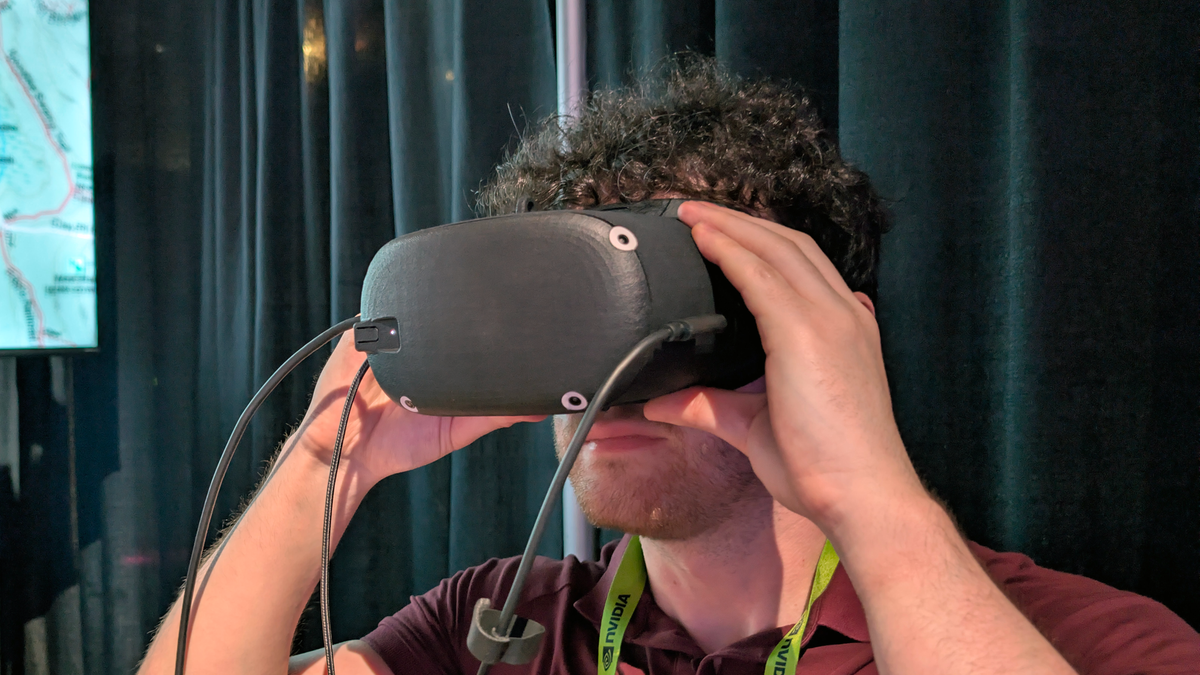
I tried Meta’s 90 PPD “beyond retinal” Tiramisu prototype earlier this year, and while the demo wasn’t set up to allow dynamically adjusting the resolution, the researchers behind it told me that they have done so in the lab and could clearly see a difference between 60 and 90. But this was only anecdotal.

Now, three researchers have conducted a study at the University of Cambridge experimentally confirming this idea that 60 PPD is not the limit of human perception of detail.

One is a Cambridge researcher, one is from Meta’s Applied Perception Science team, and the third researcher is both.

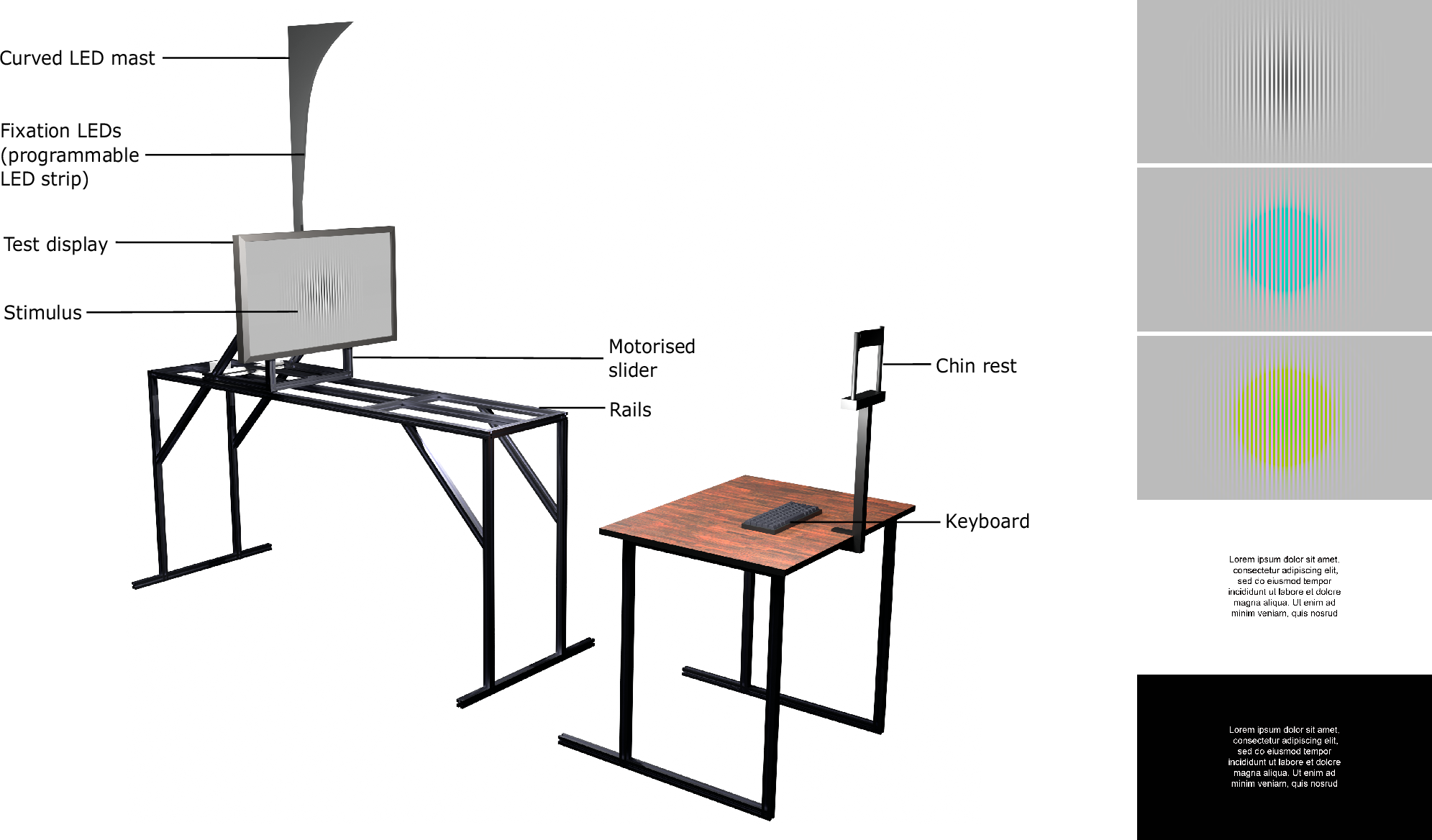
The experiment setup.

Their experiment placed a 27-inch 4K monitor on a 1.6-meter motorized sliding rail in front of the participants, who had their heads fixed on a chin rest and were asked to discern specific visual features head-on as the conditions were varied.

The participants were presented with two different types of stimuli throughout the experiment: square-wave grating patterns (both with and without color) and text (both white-on-black and black-on-white).

Square-wave gratings, the researchers explain in the paper, are used in vision experiments because prior research suggests that “the foundational visual detectors of the human visual system are likely optimised for similar waveforms”.

The resolution was varied both by moving the display closer or further away (between 1.1m and 2.7m, distance) and by upsampling or downsampling the spatial frequency of the patterns. The researchers also adjusted the viewing angle between 0°, 1°, and 20°.

If you’re interested in the full details of the experimental methods, you should read the paper in Nature Communications. It’s the results that have fascinating implications for VR and AR.

The findings of the experiments.

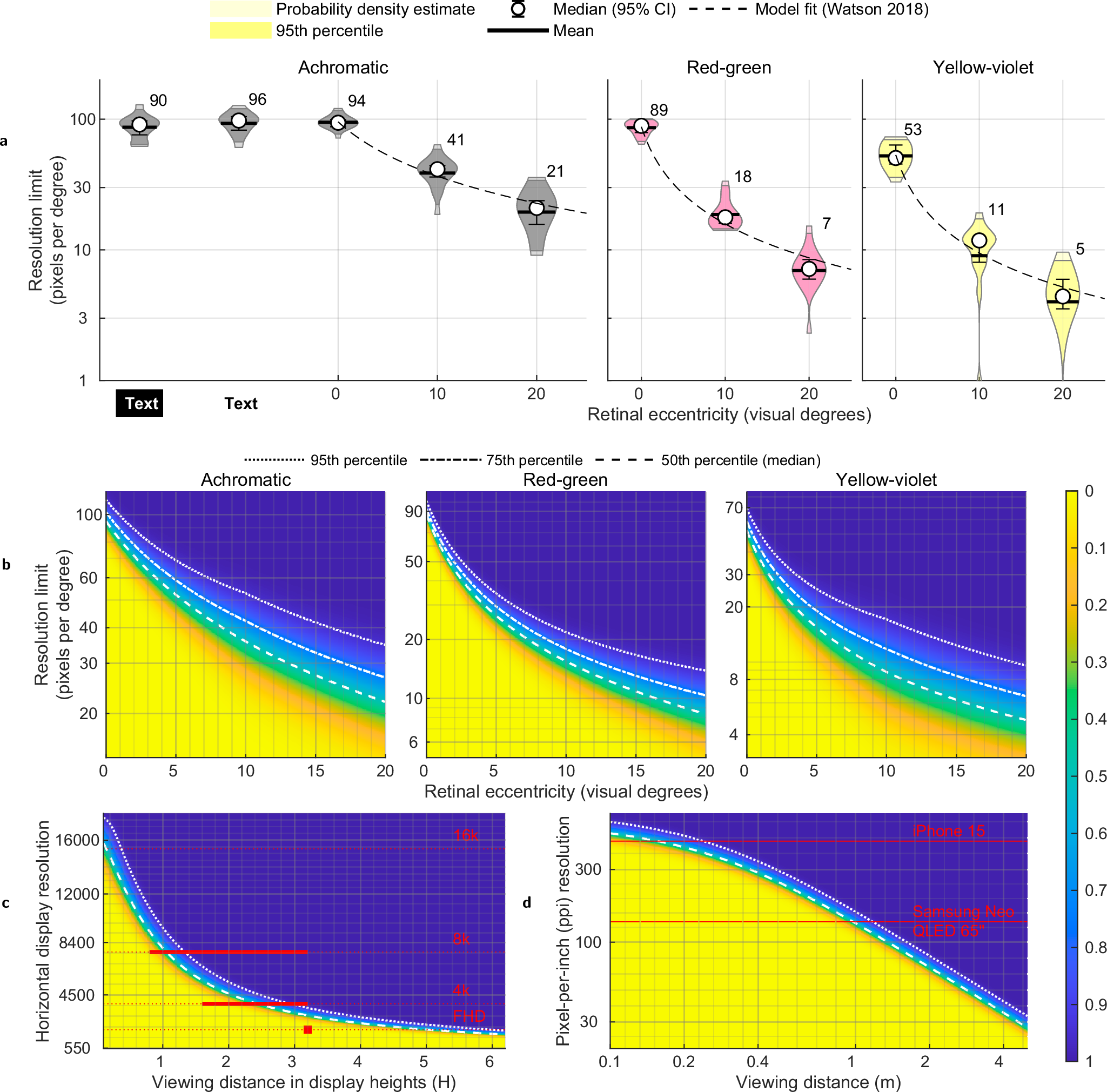
The findings of the experiment, according to the researchers, are that the participants could discern grayscale details up to 94 PPD on average, red-green patterns at 89 PPD, and 53 PPD for yellow-violet patterns.

One participant in the study was even able to reach 120 PPD, suggesting that for some people the threshold for “retinal” is double the generally accepted figure.

It will be a long, long time before shipping headsets reach anywhere near these figures. Meta’s Tiramisu prototype hit 90 PPD only over a tiny 33°×33° field of view, and Tiramisu 2 is aiming for 60 PPD over a 90° field of view instead. And while the study demonstrates that there is a difference, in my experience headsets with even 50 PPD can feel incredibly real to the point where I suspect we won’t want to trade off other aspects for further resolution any time soon.

Still, it’s important that a study has been conducted to discover exactly where the limit to what the human eye can truly discern truly lies, and it reinforces the fact that while smartphones and tablets are plateauing, VR and AR hardware still has decades of runway for meaningful improvements to steadily arrive.

Can Wearing Virtual Reality Goggles and Smart Glasses Actually Damage Your Eyes?

As Lifehacker’s smart glasses and virtual reality expert, I spend a lot of time flooding my eyes with bright light. Last night, I was testing a pair of soon-to-be released display style glasses that blast out 1,200 nits of light. That’s roughly car-headlight-bright, squeezed into a postage-stamp-sized image projected on glass about a half inch from my eyes. I thought to myself, “Wait, am I frying my eyeballs?” 

So I called up Dr. Sunir Garg, a spokesperson for the American Academy of Ophthalmology and professor of ophthalmology at Wills Eye Hospital, and asked him point blank: What am I doing to my eyes with this stuff? “We think not much,” Garg replied. “If the light is not physically causing you to look away—if it’s a bright screen but it’s not uncomfortable—we don’t think that that’s going to cause any harm to the eye.”

There’s not a ton of research on the long-term effects of VR headsets on vision, but the data out there isn’t raising alarms among eye professionals. According to the AAO, ophthalmologists agree that there is no reason to be concerned that VR headsets and/or smart glasses will damage eye health, function, or development. 

To close the case, I asked Garg whether he’d ever seen or heard of any eye injuries from virtual reality, and he said, “The only scenario [in which] we’ve seen eye injuries is when people were doing something like boxing and tripped over the coffee table and fell down and hit their head.”

How young is too young for using virtual reality? 

“But what about the children?” you might be asking (you hand-wringer, you). Good news there too: Virtual reality headset manufacturers may have age-based guidelines for their products—Meta recommends a minimum age of 10 years for its headsets, and Apple says its Vision Pro should not be used by children under 13—but they aren’t based on research about eyesight. “There’s not a lot of data that suggests that the VR headsets are problematic for kids,” Garg said. “I think we’ll have to kind of hit [Meta and Apple] up for where that justification is coming from,” Garg said, ”because it’s not something that we are really concerned about, per se.”

There’s also no reason to think virtual reality helmets cause long-term vision problems in kids, but if a child is inside all day using VR, it could lead to nearsightedness. It’s not from the VR though—it’s the “being inside” part. “Something about being outside with natural sunlight seems to help regulate the growth of the eye and helps to reduce the amount of near-sightedness that people could be at risk of developing,” Garg said.

So it seems there’s some truth to the old trope of bookworms wearing glasses. Exactly why being an indoor-kid correlates with nearsightedness isn’t clear though; more research needs to be done. 

Virtual reality can cause eyestrain, though

Even if VR gear and smart glasses don’t damage your eyes, they can still cause uncomfortable eyestrain. According to Garg, when you’re using VR or staring at any digital screen, your eyes are not moving much and you tend to blink less, so your eyes dry out, and that can lead to irritation and eyestrain. 

“The fix for that is either moving your eyes around consciously, blinking a bit more consciously, or following the American Academy of Ophthalmology’s ’20/20/20 rule.’” That is: When using any kind of screen, every 20 minutes you should look at something 20 feet away for at least 20 seconds.

Motion sickness and dizziness in virtual reality 

Along with eyestrain, common pitfalls of using VR can include headaches, dizziness, and nausea. While your vision might have something to do with these things, the main cause of general VR sickness seems to be the inner ear, not the eyes. “Some people are just really sensitive to the motion component of virtual reality,” Garg said, “It’s less clear to me how much of it is from the eyeballs.” 

Your eyes can handle 1,200 nits because they are tough

To sum up: Available evidence suggests your eyes will not be damaged if you go crazy with the VR, as long as you take breaks every once in a while and blink enough to avoid discomfort. It’s too late for us to save our 20/20 vision by soaking up more sunlight as a child, but at least we’re not frying our eyeballs—and it’s reassuring to know that the biggest health risk from using virtual reality is barking your shins on the coffee table.

T-Mobile Brings Free 911 Emergency Texting To AT&T and Verizon Customers

An anonymous reader shares a report: T-Mobile is opening up access to its Starlink-powered emergency texting service. The carrier announced on Wednesday that anyone with a compatible phone — even AT&T and Verizon customers — can sign up to text 911 over satellite for free.

In July, T-Mobile launched its “T-Satellite” service to customers across the US for $10 per month, allowing both T-Mobile and non-T-Mobile customers to send messages, share their location, and access select apps over satellite. This service also includes texts to 911, but now, that’s available for free.


Read more of this story at Slashdot.

Metroid Prime 4: Beyond Trailer Shows Off Akira Slide & Motorbike Gameplay On Switch 2

Metroid Prime 4: Beyond Trailer Shows Off Akira Slide & Motorbike Gameplay On Switch 2
Metroid Prime 4 is right around the corner after being teased since 2017, and Samus Aran is drifting smoother than ever with her slick new motorbike. Ahead of the long-delayed game’s December 4th launch, Nintendo has dropped another trailer, this time showcasing the Switch 2 version of the game at a super-clean 4K 60 FPS and showing more gameplay

DHS offers “disturbing new excuses” to seize kids’ biometric data, expert says

Civil and digital rights experts are horrified by a proposed rule change that would allow the Department of Homeland Security to collect a wide range of sensitive biometric data on all immigrants, without age restrictions, and store that data throughout each person’s “lifecycle” in the immigration system.

If adopted, the rule change would allow DHS agencies, including Immigration and Customs Enforcement (ICE), to broadly collect facial imagery, finger and palm prints, iris scans, and voice prints. They may also request DNA, which DHS claimed “would only be collected in limited circumstances,” like to verify family relations. These updates would cost taxpayers $288.7 million annually, DHS estimated, including $57.1 million for DNA collection alone. Annual individual charges to immigrants submitting data will likely be similarly high, estimated at around $231.5 million.

Costs could be higher, DHS admitted, especially if DNA testing is conducted more widely than projected.

Read full article

Comments

Cloud Gaming Has Finally Officially Arrived on the PlayStation Portal

Finally—two years after its release, and one year-long beta later—the PlayStation Plus handheld can finally officially play games without needing to connect to a PS5 console first. The portable machine is not strictly playing them all by itself, and you do need a PlayStation Plus Premium subscription to do it, but the latest system update brings the PlayStation Portal a lot closer to being a true PSP successor.

The news came earlier today via the official PlayStation blog, where Sony announced that cloud streaming for the PS Portal will soon officially go live for everyone with a compatible subscription, a little less than a year after the company started testing it with an optional beta. That means that the device can finally live untethered from a console, without any additional setup.

It’s a breath of fresh air for the Portal, which, when it launched back in 2023, garnered negative reviews for its limited power and portability. While previous Sony handhelds like the PSP and PS Vita were able to play games on their own, disconnected from the internet, at launch the PS Portal could only play games by remotely connecting to a PS5—something gamers could already do on other devices like mobile phones.

That severely limited the device’s usefulness, essentially turning it into an accessory rather than its own console. After today’s update, it still needs an internet connection, but the handheld is a lot more useful as a standalone experience.

How to cloud game on the PlayStation Portal

PlayStation Portal Cloud Streaming

Credit: Sony

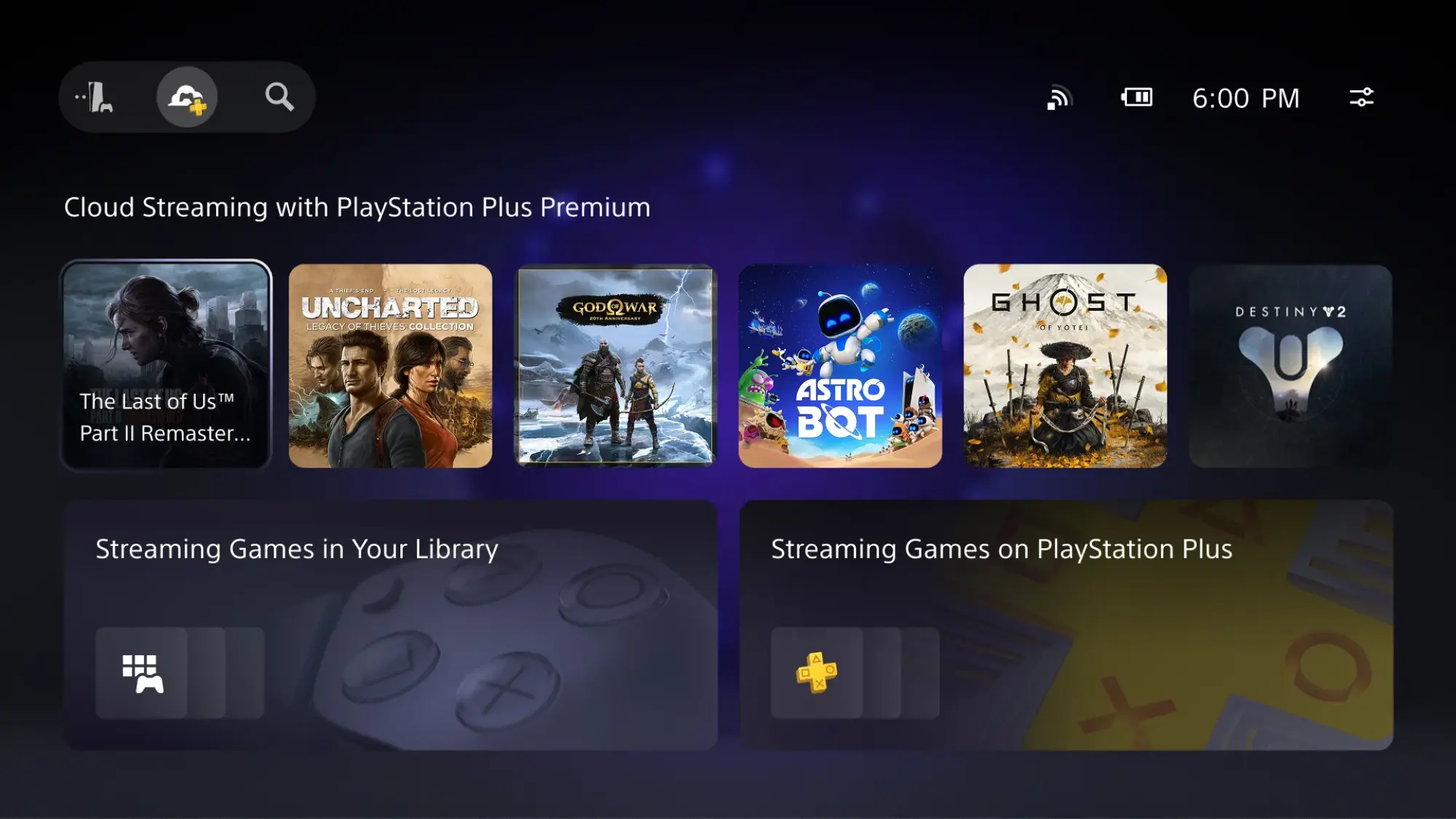
Starting at 6 p.m. PT today, Nov. 5, Sony will start pushing the update live. Once it hits your device, you should see a new UI that, if you weren’t in the beta already, will add the option to select a cloud icon to the device’s top-left corner. Click through, and as long as you have a PlayStation Plus Premium subscription, you’ll be taken to a brand new menu (new even to beta users) that shows all cloud-compatible games, either from games you own or from the PlayStation Plus library. Choose one, and you’ll connect directly to Sony’s servers, where you can start playing without getting your home console involved.

It’s not a perfect solution, but Sony advertises it as a way to play its games “even when your PS5 console back home is powered off or is in use by another account.” Personally, I’d also like to point out that you could now technically buy a Portal and not get a PS5, instead playing only through the cloud rather than using a console and remote play. At $200, the Portal is less than half the cost of a PS5, so it would save you a decent amount of upfront cost.

Still not a perfect handheld solution

That said, there are still drawbacks. While a cloud connection frees you from having to connect to a PS5 for remote play, it still won’t allow you to play in areas without reliable high-speed internet, like on an airplane. It also risks introducing input lag into your gameplay, which means it’s not a great choice for competitive titles. Visuals also might appear compressed, depending on your internet speed, and only certain titles are available via the cloud (although hundreds of games are already compatible).

The biggest caveat, though, is the required PlayStation Plus Premium subscription. That’ll run you $18/month. It’s up to you whether that’s worth it over connecting to a console via remote play.

On the plus side, Sony promises that it has improved support for public wifi on the Portal, which should make for a smoother experience when playing in a coffee shop or at a hotel. Cloud gaming also now comes with access to features that weren’t available during the beta, like in-game purchases, multiplayer invites, and new accessibility options like a screen reader. Outside of cloud gaming, the new update also adds 3D audio support to the PS Portal as a whole, so long as you’re using wired headphones or Sony’s own Pulse earbuds or headset.

It’s definitely still a stopgap when compared to an entirely standalone device that can play its own games instead of streaming them (like the Nintendo Switch 2), but if you’re a Sony gamer who misses being able to play on the go, the PS Portal should now be able to bring back some of those fond PSP memories—as long as you’re in a spot with good wifi.

Windows 11 Store Gets Ninite-Style Multi-App Installer Feature

An anonymous reader shares a report: The Microsoft Store on the web now lets you create a multi-app install package on Windows 11 that installs multiple applications from a single installer. This means you can now install multiple apps simultaneously without having to download each one manually. The experience is similar to that of the third-party app Ninite, a package manager that lets you install multiple apps at once.


Read more of this story at Slashdot.

Apple will reportedly use a custom version of Gemini to power the new Siri

When Apple introduces its more capable version of Siri in 2026, it increasingly sounds like it’ll have Google to thank. Bloomberg reports that Apple is finalizing plans to use a custom version of Gemini to power the new Siri and plans to pay Google handsomely for the privilege.

The new Siri will still use some of Apple’s homegrown models, but will also rely on a version of Gemini running on the company’s Private Cloud Compute servers to “handle Siri’s summarizer and planner functions,” Bloomberg writes. Those functions “help the voice assistant synthesize information and decide how to execute complex tasks.” Since using apps on people’s behalf is core to Apple’s pitch for its updated assistant, Gemini appears to be playing a critical role.

Apple will reportedly pay $1 billion annually to use Google’s technology, a fraction of what Google has reportedly paid the company to make Google Search the default search option on Apple’s devices. The partnership will likely not be advertised, though, and Apple plans to eventually replace Google’s model with its own. Specifically, with “a one trillion parameter cloud-based model that it hopes to have ready for consumer applications as early as next year,” according to Bloomberg.

Siri can use ChatGPT for specific requests as part of Apple Intelligence, and Gemini was rumored to be added as another AI option in March 2024. After Apple delayed Siri a year later in 2025, though, the need for more substantial help reportedly became necessary. The possibility of Siri being backed by Gemini was first reported in August, when Google was asked to create a version of its model that could run securely on Apple’s servers. The iPhone maker was previously rumored to have explored deals with both Anthropic and OpenAI before that.

This article originally appeared on Engadget at https://www.engadget.com/ai/apple-will-reportedly-use-a-custom-version-of-gemini-to-power-the-new-siri-203046995.html?src=rss

NotebookLM Can Now Turn Your Notes Into a Video

Google’s NotebookLM, by far my favorite AI tool, rolled out two new features this week. The app that can turn your notes into a podcast can now generate an educational video based on your study materials. It can also create a report or document from suggested, pre-made templates.

How the new NotebookLM tools work

If you’re unfamiliar, NotebookLM is a large language model akin to the better-known chatbot ChatGPT, but instead of pulling information from all over the internet (with all the risks of inaccuracy that creates), it relies only on material you input directly. You can upload PDFs, links, YouTube videos, plain text, and more, then ask the chatbot questions and it will answer based only on what you’ve given it, even providing links to where it finds the answers in the source material. As noted, it can also generate AI podcasts, which feature two voices discussing your materials, as well as flashcards, mind maps, or practice quizzes.

Video and report generation are the latest additions to NotebookLM’s toolset. You can try them out by locating the appropriate tile along the right side of the screen within your NotebookLM notebook. (Though the app is, frankly, underwhelming, so I recommend always using a desktop computer or mobile browser instead.)

How video generation works

The educational videos are excellent for students or anyone trying to learn something new. I generated one based on the materials I’ve been using within NotebookLM to study for an upcoming certification exam, and though it definitely took over the promised five minutes to create, it came out surprisingly good:

Content from my study guides and materials is included, with key information highlighted visually and with further explanation from a voiceover.

How to generate reports with NotebookLM

The reports are a little more complex. When I pressed Report, I got options like, “Anatomy Explainer” and “Business Development Plan” as suggested choices based on my material. “Briefing,” “Study Guide,” and “Blog Post” are standard suggestions that are always available. I asked a friend who also uses NotebookLM to study for school, and their suggested formats for their Management Concepts class materials were “Strategic Analysis” and “Leadership Profile.”

So it seems that based on what your materials include, the software will create outlines in downloadable document format. I selected “Anatomy Explainer” and, after waiting a few minutes, got a detailed study doc divided into sections like “The Command Center: Your Nervous System” and “The Framework: Your Skeletal System.” It was outlined clearly, like a study guide with more explanation and context.

Why I love these new features

I am a major proponent of using NotebookLM for studying, particularly, because it’s such an easy way to organize your materials and make sure that your work aligns with what your teacher is looking for. Plus, unlike ChatGPT, you can’t exactly use it to do all the work for you; instead, it shows you where it got the information (from materials you provided), enabling you to study more efficiently. The videos and reports are another way to do that, so whether you study best by listing to audio, watching videos, mind-mapping, drilling flashcards, or reading summaries, it’s an ideal choice. You can even ask the chatbot followup questions on anything you don’t grasp.

The reports, especially, have implications for other kinds of work, beyond studying. I use NotebookLM to help me organize my files and materials for my job all the time, so the ability to create a briefing doc or business plan is an added bonus that could be helpful to people in a variety of fields.

The Foursquare founder’s new app is an AI-powered ‘DJ’ for neighborhood updates

Foursquare founder Dennis Crowley has unveiled his latest venture and yes, it’s another location-based social app. But, rather than the check-ins Crowley first popularized more than 15 years ago, “BeeBot” has a very 2025 take on the concept. Instead, the app is an AI-powered “DJ” that can deliver contextual audio updates to your ears as you move through your day. 

Crowley describes BeeBot as an “app for AirPods,” though it will work with any type of headphones, as well as smart glasses with audio capabilities like Meta’s. “Whenever you put your AirPods in, it turns on,” Crowley explains in a post on Medium. “Whenever you take your AirPods out it turns off. And when it’s ‘on’ it’ll push you snippets of audio about the people, places, and events that are nearby.’

To do this, you’ll need to give the app access to your location and share a handful of “keywords” about your interests. You can also share your contacts to get updates from friends who are using the app. The BeeBot “DJ,” which of course has an AI voice, will then be able to talk to you as you throughout the dat and alert you to interesting events, landmarks or updates from friends who happen to be nearby. 

In some ways, it sounds like Crowley is trying to re-create some of the serendipitous IRL social interactions enabled by the original version of Foursquare. BeeBot doesn’t have “mayorships,” badges or any of the gamification features that helped popularize FourSquare, but it’s meant to have some of the “same playful spirit,” of OG Foursquare, according to Crowley. (Foursquare shut down its city guide app of the same name earlier this year, though its check-in app, Swarm, lives on.)

 And, because it’s 2025, there’s also a whole bunch of AI thrown in, including “a mix of different LLMs” and “synthetic voices.” The app is “powered by a TikTok-style algorithm,” Crowley says, “but one that’s focused on what’s happening nearby and IRL.” 

There also seems to be a bit of DNA from Marsbot, the short-lived (and IMO very underrated) chat-based app Foursquare launched in 2016 that could proactively provide personalized restaurant recommendations. While BeeBot isn’t as heavily focused on neighborhood recommendations as Foursquare, it is meant to proactively let you know about nearby happenings you might be interested in or even a bit of gossip from friends. In addition to friends’ status updates, the app will draw on local Substacks and newsletters for relevant info about a given area.  

Crowley says the DJ’s audio cues may “occasionally” interrupt your music or podcast to give an update, though users should expect to hear these only a couple times throughout the day. BeeBot won’t interrupt voice or video calls. 

BeeBot, which is the inaugural project of Crowley’s new company Hopscotch Labs, is out now in the App Store, though it’s still “very much a work in progress,” according to Crowley. “I feel like the version of the product we’re sharing with folks today is kind of where Foursquare was when it launched at SXSW in 2009 – an interesting vision, a good-enough execution, but something that still needs to be shaped by the people using it to fully blossom.”

This article originally appeared on Engadget at https://www.engadget.com/apps/the-foursquare-founders-new-app-is-an-ai-powered-dj-for-neighborhood-updates-202326296.html?src=rss

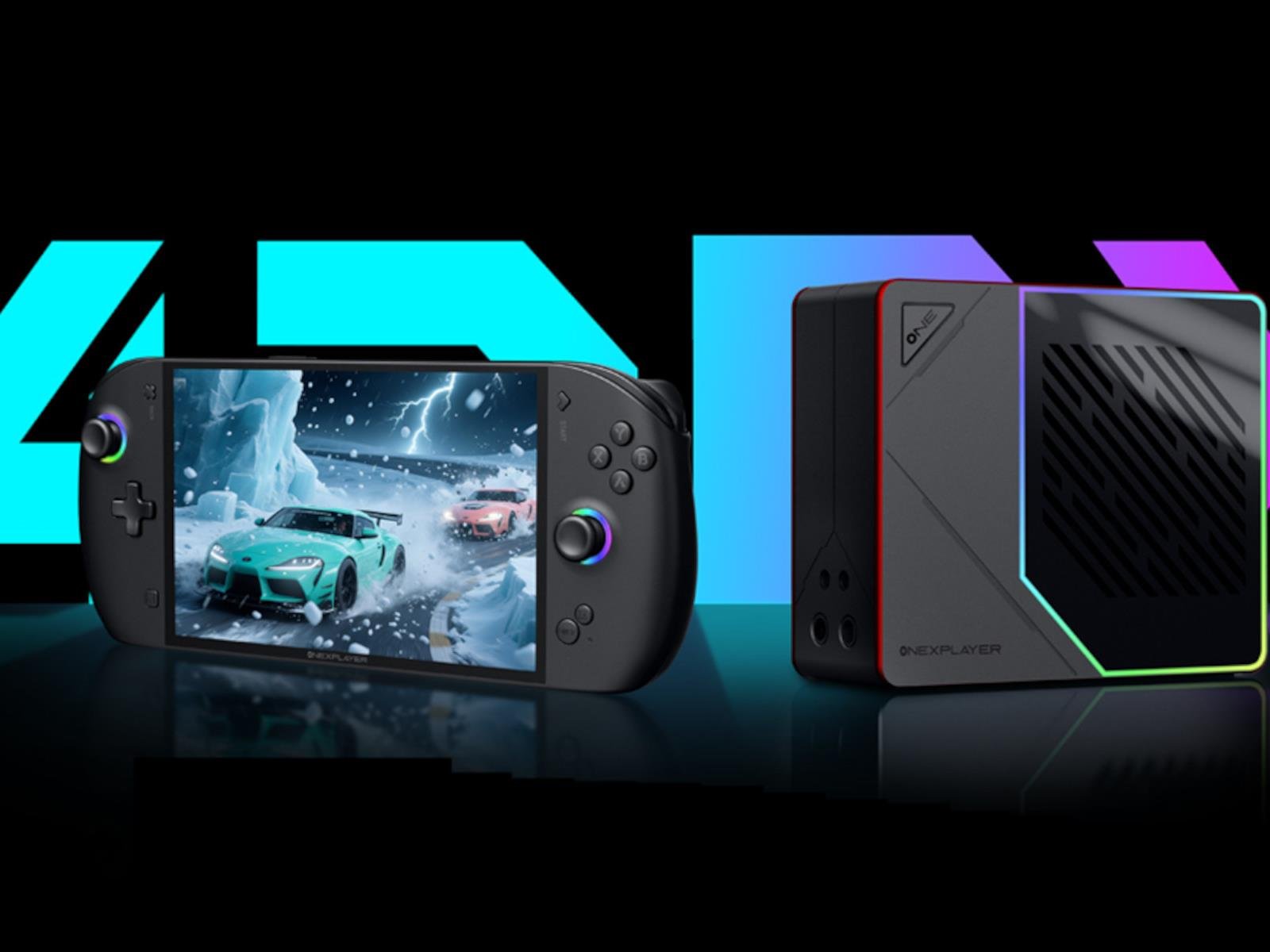
OneXFly Apex Strix Halo-Powered PC Gaming Handheld Pricing And Launch Date Revealed

OneXFly Apex Strix Halo-Powered PC Gaming Handheld Pricing And Launch Date Revealed
One-Netbook’s highly anticipated OneXPlayer OneXFly Apex handheld has finally received US pricing and release date information after being announced in late September and launching in China last month. We also have a clearer look at the handheld’s external liquid cooling AIO solution (pictured above), and have learned that it costs about $60