An anonymous reader shares a report: Microsoft, eager to boost downloads of its Copilot chatbot, has recruited some of the most popular influencers in America to push a message to young consumers that might be summed up as: Our AI assistant is as cool as ChatGPT. Microsoft could use the help. The company recently said its family of Copilot assistants attracts 150 million active users each month. But OpenAI’s ChatGPT claims 800 million weekly active users, and Google’s Gemini boasts 650 million a month. Microsoft has an edge with corporate customers, thanks to a long history of selling them software and cloud services. But it has struggled to crack the consumer market — especially people under 30.
“We’re a challenger brand in this area, and we’re kind of up and coming,” Consumer Chief Marketing Officer Yusuf Mehdi said in an interview. Mehdi hopes to persuade key influencers to make Copilot their chatbot of choice and then use their popularity to market the assistant to their millions of followers. He says Microsoft is already getting more bang for the buck with influencers than with traditional media, but didn’t provide any metrics.
[…] Using non-techies as spokespeople is meant to reinforce Microsoft’s campaign to sell its chatbot as a life coach for everyone. Or as Consumer AI chief Mustafa Suleyman wrote in a recent essay, an AI companion that “helps you think, plan and dream.”
Version
9.0.0 of pytest has been released. Notable changes in this release
include the addition of subtests,
native support for TOML configuration files, and a new strict
mode. See the changelog
for a complete list of new features, enhancements, and bug fixes.
Your personal productivity may be dependent on your unique needs, personality, and circumstances, but there are still general “laws” governing time management and potential output that apply to pretty much everyone—like, actual “laws” named after the people who came up with them. Economists, philosophers, and scientists have spent a lot of their own time researching what practices make a person more productive. Here’s an overview of the rules all that research has given us.
The Yerkes-Dodson Law
The Yerkes-Dodson Law says a person is most productive when they have just the right amount of stress pushing them—not too much and not too little. It models the relationship between stress levels and performance, resulting in an upside-down, U-shaped curve on a quadrant. Across the X axis, you have your low-stress moments on the left, high-stress moments on the right, and a peak of productivity in the middle. The Y axis shows your peak performance at the top, which is aligned with times when you have just a the right amount of stress behind your work.
This means that you shouldn’t give yourself too much time to do a task, but should definitely not wait until the last minute. The way to do this is to create airtight to-do lists. Try the 1-3-5 method, which has you structure your day around one major task, three medium-sized ones, and five little ones. By breaking your day down and timing it just right, you can make sure everything gets done when it needs to, optimizing your stress in honor of psychologists Robert Yerkes and John Dillingham Dodson.
Parkinson’s Law
Parkinson’s Law is another one that governs how long you should spend on any given task. In fact, it goes hand-in-hand with Yerkes-Dodson, because it says that the longer you give yourself to do something, the longer you’ll naturally take to get it done. C. Northcote Parkinson popularized it in a 1955 essay for The Economist, concluding that you’ll ultimately procrastinate or over-complicate the task, dragging it out by not working on it enough or working on it way too long.
Here, it helps to prioritize your to-dos and schedule your days and weeks thoroughly. Having a smaller window in which to work on pressing tasks will up the urgency, aligning you more with the peak of Yerkes-Dodson. Pre-plan your weeks using prioritization techniques like the Eisenhower Matrix and task batching, thinking about when you’ll have just the right amount of urgency to motivate you to do each task.
Once you’ve pre-plannned, try shaving the amount of time you give yourself to do things. If a project is due a week from now, don’t give yourself a whole week to get it done. Instead, Give yourself a personal deadline of five or even four days from now. Setting private deadlines ahead of your real ones is a good way to give your work some urgency while leaving a little wiggle room in case you don’t finish up in time for your personal deadline. It stops you from procrastinating or getting too in the weeds on busywork at the end.
Illich’s Law
The third law here is cautioning against the same thing as the first two: You shouldn’t have too much time to work on any one thing. The reasons behind all three laws are different, though, which means the solutions to overcoming them are unique, too. Illich’s Law, or the Law of Diminishing Returns, says that after working for a while, your productivity decreases. Eventually, it goes negative, meaning your work isn’t even good anymore. At best, you’re churning out something less than ideal. At worst, you’ll waste more time in the future having to redo it.
To defeat it, don’t just cut your deadlines down to combat Parkinson’s Law; cut down how long you have to work on each task on your to-do list. Use time-tracking software or a simple spreadsheet for two weeks to track how long your usual duties typically take you, as well as when you start feeling bored or unproductive. After two weeks, cut the time you give yourself to do each task, ideally down to exactly how long it takes you to get bored or unproductive. In the gaps that appear in your schedule, make sure you take breaks. What Yerkes-Dodson and Parkinson’s Law don’t fully account for is the value of breaks to productivity. Giving yourself set times to work and set times to chill is foundational to all kinds of productivity methods because burnout is an output killer. You can (and should) always get back to work once you’re done with a little personal time.
Carlson’s Law
Finally, the fourth law, Carlson’s Law, is all about how you work, not how much you work. Swedish economist Sune Carlson’s assertion was that interrupted work is always less effective and more time-consuming than uninterrupted work. If you’re distracted, your work will be of a poorer quality and take longer—and as you can tell, work that takes longer is no good, for all kinds of reasons.
Like the other laws, the trick to nailing this one is to schedule carefully every day. Not only do you need to schedule your day based on what needs to be done and how long it will take, but on when you can reasonably do it all without distraction. Time boxing, or the practice of scheduling every minute of your day in your calendar, blocking it all out down to the minute, is central to basically every productivity tip.
In line with both Illich’s and Carlson’s Laws, not only should you keep in mind that you should give yourself less time to work than you think you need, but you should reflect that cut-down in your time boxes. When you do that, you’ll see gaps or breaks start to appear in your daily calendar. Embrace those. Breaks are elemental to productivity, so you should be scheduling those as seriously as you do your work.
Finally, when you’re aiming to defeat Carlson’s Law, you should take the extra step of making sure your now-thorough calendar is viewable by others in your organization or anyone who might interrupt you. If you’re likely to be distracted at a given time, don’t try to work on anything important then; wait until you can give it your full attention. In addition, never multitask. You can’t do two things at once. That’s just another form of distraction. Move from chore to chore, one at a time, to make sure you’re being efficient at all of them.
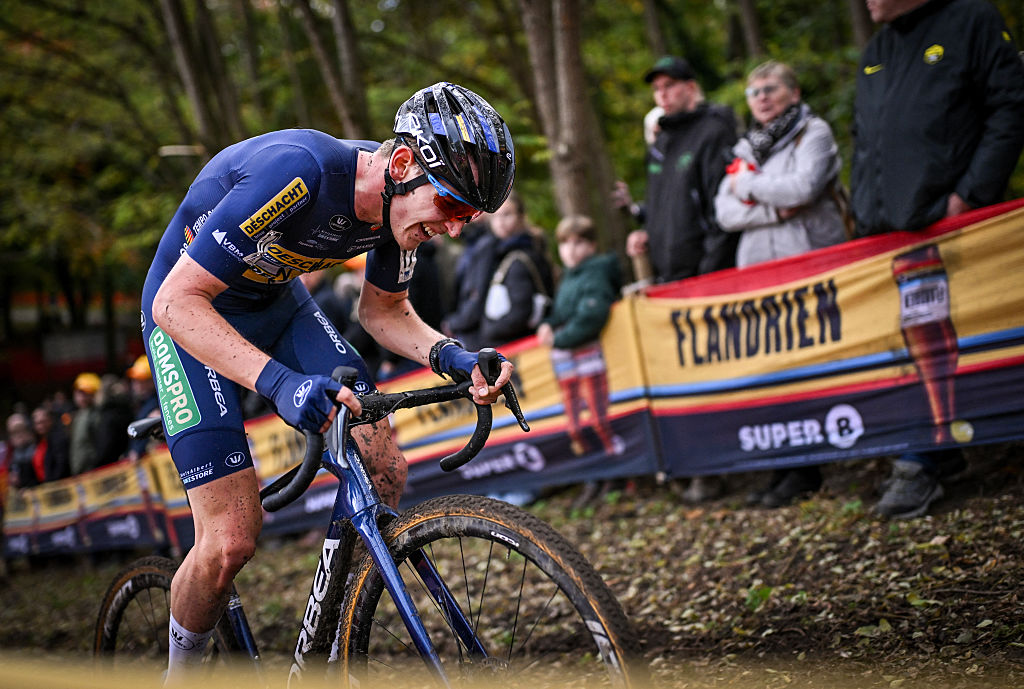
Toon Aerts of Belgium won the elite men’s European Cyclocross Championships over the weekend, not on a specialist cyclocross bike – something of a rarity nowadays – nor on the now more common gravel/cyclocross race hybrid, but on an Orbea Orca OMX road bike.
Like many brands, Orbea has a gravel race bike in its line-up, the Terra Race, which is available for the riders from its sponsored Deschacht-Hens-Maes cyclocross team to use. But Aerts instead opted to adapt the Orca road bike for his ride.
In its more usual road-going form, the Orca has a claimed weight of only 6.7kg, so it’s a bike that’s easy to carry over the obstacles on a cyclocross course. Orbea says it has kept the frame stiff, too, with a robust down tube, chainstays and head tube to resist torsion – advantages for the low-cadence, high-torque riding typically needed for cyclocross.
Orbea quotes a frame weight of 750g for the top-spec Orca OMX, while the Terra Race frame weighs a claimed 910g, so there’s a useful 160g weight saving there.
Aerts has been riding the Orca throughout this season, including here at the Rapencross Lokeren, where he finished sixth. David Pintens/Belga/AFP via Getty Images
Other components were more typically cyclocross, with Aerts running A Dugast (now owned by Vittoria) Pipistrello 33mm tubular tyres on Icon T3.5 Disc carbon tubular wheels.
You can buy the Pipistrello as a tubeless tyre too, but tubulars are still preferred for elite cyclocross racing because they can be run at ultra-low pressures without the risk of burping air, and can be ridden to the pits flat if the rider suffers a puncture.
Tyre width in UCI-sanctioned cyclocross races is limited to 33mm, while the Orca has a nominal 32mm clearance, so Aerts is pushing the frame’s capabilities. He swapped out the fork for the Terra Race’s gravel fork with 45mm clearance and a longer 55mm rake rather than the road fork’s 43mm, though.
Aerts outsprinted fellow Belgian rider Thibau Nys to win the European Championships nine years after his previous victory. Luc Claessen/Getty Images
Other spec details carried over from the road included a Shimano Dura-Ace groupset, although with the cyclocross favourite 46/36t chainrings, and a 40mm handlebar width – apparently the better leverage claimed for wide gravel bars isn’t needed to win in cyclocross.
Aerts was emotional at the finish. It’s a race he’s won once before, a full nine years ago.
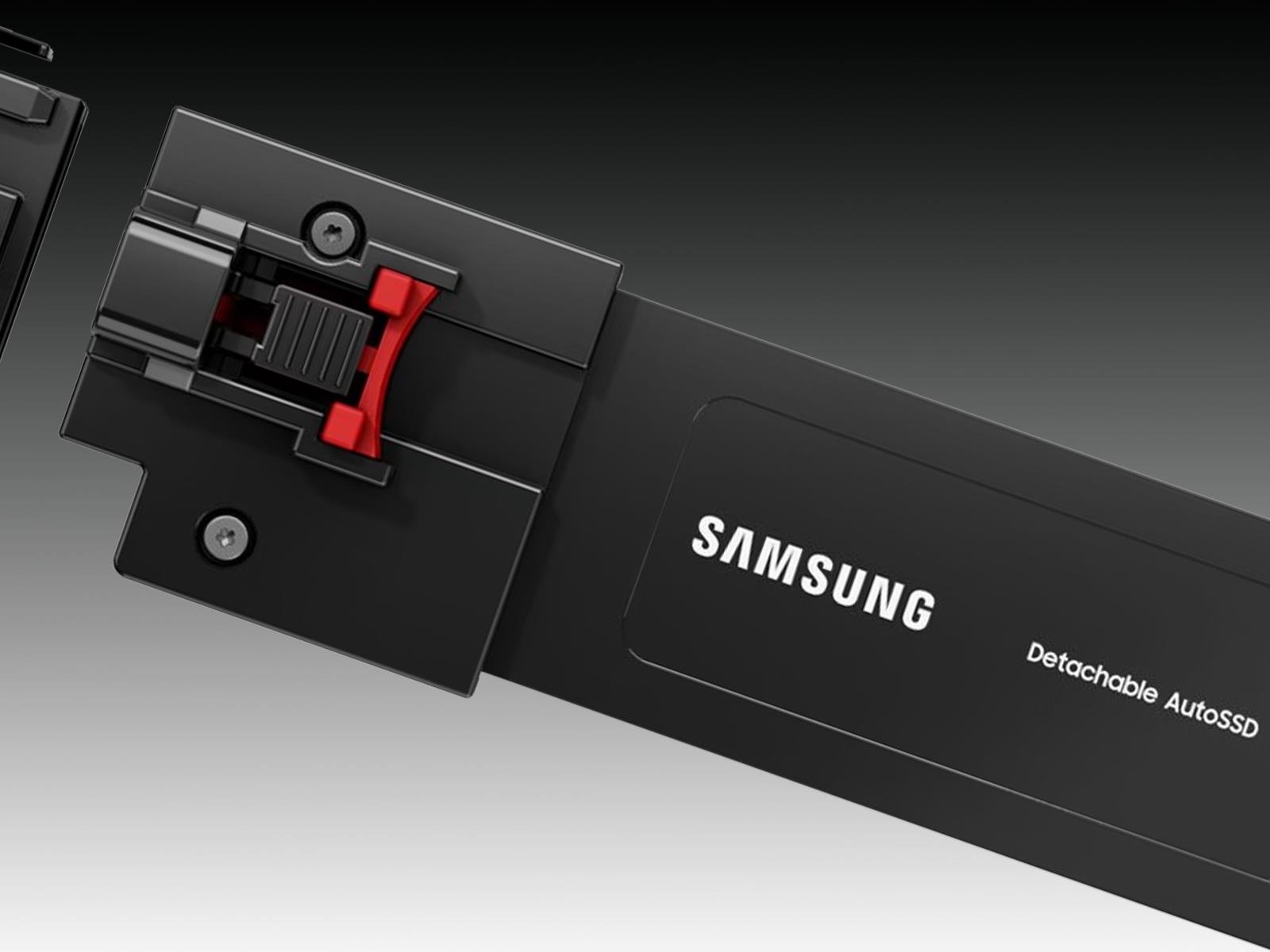
Samsung is showing off a couple of new storage products that it plans to showcase at the Consumer Electronics Show (CES) in January 2026, one of which is a cleverly designed solid state drive (SSD) with a modular aspect to it. Called the Detachable AutoSSD, the drive takes aim at automobiles and sports a modular makeup to make upgrades a little
Sony is bringing things home with State of Play Japan. The “special episode” will feature the same type of PlayStation gaming announcements as a typical State of Play broadcast, but with a focus solely on Japan and Asia.
While we don’t know exactly what Sony will unveil, it promises 40 minutes of everything “from beloved series to distinctive indie creations, the show, hosted by voice actor Yuki Kaji, will be packed with great games, interviews, and new looks at anticipated titles.” Maybe if we all think hard enough we can manifest updates on Phantom Blade Zero or Marvel Tokon: Fighting Souls, which we first learned about at Playstation’s State of Play in June.
The whole show will air in Japanese on the PlayStation YouTube channel for Japan, but the general PlayStation YouTube channel will show State of Play Japan with English subtitles.
Catch State of Play Japan live on Tuesday, November 11 at 2PM PT / 5pm ET.
This article originally appeared on Engadget at https://www.engadget.com/gaming/playstation/how-to-watch-playstations-state-of-play-japan-tomorrow-140519040.html?src=rss
TCL just announced a new line up of budget-friendly QLED TVs with plenty of bells and whistles. The T7 Series offers quantum dot technology and a native refresh rate of 144Hz. The sets are available in multiple sizes, from 55-inches all the way up to 85-inches. That last one will certainly fill up the living room.
They also ship with the company’s proprietary AI processor that automatically optimizes color, contrast and clarity. This should lead to some stunning 4K HDR performance. To that end, the TVs integrate with Dolby Vision and HDR10+.
The sound is also on point here. The televisions offer Dolby Atmos and Dolby Digital+ audio processing. The whole thing is powered via Google TV that allows for hands-free voice control via built-in microphones.
The prices here are fairly reasonable, considering the tech involved. These TVs start at $600 for the 55-inch model and go up to $1,400 for the 85-inch model. We don’t have a release date just yet.
These aren’t the only interesting displays the company has announced this year. The QM6K Mini LED is available in sizes up to 98-inches, with a starting price of $700 for the smallest model. The QM7K is another Mini LED that ships with Bang & Olufsen speakers.
This article originally appeared on Engadget at https://www.engadget.com/home/home-theater/tcls-new-budget-friendly-qled-tv-line-starts-at-600-140024183.html?src=rss
Visa and Mastercard are nearing a settlement with merchants that aims to end a 20-year-old legal dispute by lowering fees stores pay and giving them more power to reject certain credit cards, WSJ reports, citing people familiar with the matter. From the report: Under terms being discussed, Visa and Mastercard would lower credit-card interchange fees, which are often between 2% and 2.5%, by an average of around 0.1 percentage point over several years, the people said. They would also loosen rules that require merchants that accept one of a network’s credit cards to accept all of them.
A deal could be announced soon, the people said, and would require court approval to take effect. If an agreement is finalized, consumers could see big changes at the register. Merchants that accept one kind of Visa credit card wouldn’t have to accept all Visa credit cards, for example. Under the current talks, credit-card acceptance would be divided into several categories including rewards credit cards, credit cards with no rewards programs, and commercial cards, the people familiar with the matter said.
Some stores might turn away rewards cards, which charge them higher fees and in recent years have become very popular with consumers. But stores that reject those cards would face the risk of declining sales.
Samsung has partnered with iFit to bring its guided workouts to the Samsung Health app. The integration gives Samsung Health users limited free access to iFit content, offering one video from each of the seven workout categories — high-intensity interval training (HIIT), Pilates, yoga, strength, recovery, barre and mindfulness — per month. For access to a bigger catalog, Samsung Health users can also snag an iFit subscription for cheaper than the usual cost ($15 per month) of the basic plan, with the option for $10 per month or $100 per year.
There are also perks for anyone buying a new Samsung device. You can get 30 days free when buying a Galaxy phone, three months with the Galaxy Buds 3 Pro and six months with any of the latest Galaxy Watch models. Samsung and iFit announced their partnership in July, and just a few weeks ago rolled out Galaxy Watch compatibility for some NordicTrack and ProForm machines, which can now display certain metrics, like live heart rate, on-screen while you work out.
This article originally appeared on Engadget at https://www.engadget.com/apps/ifit-workouts-are-coming-to-samsung-health-with-free-and-paid-options-140000756.html?src=rss
Last week when delivering some CachyOS benchmarks against Fedora 43 and Ubuntu 25.10 on the Framework Desktop with AMD Ryzen AI Max+, a few Phoronix readers wrote in with the question or belief that openSUSE Tumbleweed would better perform against CachyOS given the distribution’s select x86_64-v3 packages and other advantages. As it’s been a while since running any benchmarks of the rolling-release openSUSE Tumbleweed, here are those benchmarks now in the mix for seeing how the performance compares.
To do deep work, you have to focus on one task, and to focus, you have to avoid distractions. That’s a common-sense idea, and it’s the basis for Carlson’s Law, named for Swedish economist Sune Carlson. He determined that interrupted work is always less effective and more time-consuming than un-interrupted work.
It’s a lofty goal, but that doesn’t mean a distraction-free zone is easy to achieve. If you want to beat Carlson’s Law, you have to have a plan.
How to eliminate distractions when trying to focus
Before getting to work on anything, make sure your space is free from distractions—not just physically, but mentally. Here are a few ways to do that:
Work somewhere with a door and keep it closed so others know you’re busy and not to interrupt you.
Turn on a white noise machine to drown out distractions. I sometimes use white noise playlists on Spotify or white noise channels on my Roku, depending where I am and what I have access to. (They’re free!) Here are some of my favorite white noise YouTube channels, too.
Use apps, extensions, and software that prevent you from accessing social media or other distracting platforms. I have two favorites: Steppin, which blocks all your distracting apps and forces you to trade minutes you earn by walking around to access them; and FocusPomo, which initiates “focus sessions” that block your apps for a pre-determined period.
If you don’t think you can work on something without getting distracted—say, if your kids are due home from school and will burst in loudly, or there are free bagels in the break room and everyone is walking past you to get one—don’t. Carlson’s Law is all about how the work you do if you’re distracted will be lower quality than what you can do if you’re focused. When you’re focused, it takes less time, too, so you’ll make up for skipping work if it’s not feasible to do it at a given time. If you work when you’re distracted, not only will you produce something subpar, but you’ll waste even more time going back and redoing it. Sometimes, strategizing and choosing to do nothing for the moment is the most productive thing you can do.
Strategically allocate your time
In addition to blocking out external distractions, you have to tamp down on your personal distractions, too. That means no multitasking. Every task you do should be a single mission. Don’t answer emails and work on a project. Don’t plan dinner while you’re in a meeting. When you’re doing two things, you’re distracted and neither of them will be done as efficiently as they would be if you did them one at a time. It might seem counterintuitive, but I’ve noticed improvements in the personal projects I care most about now that I’ve abandoned multitasking.
To accomplish this, you need a few rules and guidelines in place. First, organize your responsibilities in order of importance. Try using the 1-3-5 method to make your to-do list every morning, planning on completing one big task, three medium-sized tasks, and five small ones. You can use the Eisenhower matrix to figure out what those nine task should be, organizing them by urgency and timeliness using a quadrant.
Once you figure out your tasks and the order they need to happen in, put time on your calendar for them. Even the small tasks should get their own designated “timebox” on the calendar—as should your downtime and breaks, which are as elemental to true productivity as working without distractions.
When you glance at the calendar, you’ll see each item separated and know exactly how much time you have for it. This way, they won’t run into each other, you won’t end up multitasking, and you’ll be able to focus on each action item one by one. Bonus points if you do this on a shared office calendar or one that’s visible to people around you, so they can easily see when you’re busy—and not come around and distract you.
The Apple Watch SE series has long been the option for parents to buy for their kids or other dependents, or people who are dipping their toe into the world of smartwatches. But with the introduction of an always-on-display (AOD), on-device Siri and faster charging, the Apple Watch SE 3 has shed most of its limitations and may well be good enough for most people. Throw in an onboard temperature sensor, support for 5G, media playback and gestures like double tap and wrist flick, and the latest Watch SE is not only a serious upgrade over its predecessor but also a compelling option for pretty much anyone.
I used the SE 3 for a few weeks to see if it’s good enough to replace the Apple Watch Series 11 I regularly wear, and, setting aside some small caveats, the short answer is yes.
What’s new in the Apple Watch SE 3?
The most important upgrades in this generation of the entry-level smartwatch are the arrival of the always-on-display, faster charging speeds and on-device Siri. That latter addition allowed me to ask the assistant to start workouts, reply to messages or check the weather without having to deal with the tiny buttons on the cramped screen. You’ll also be able to dismiss notifications and alarms with a flick of your wrist, or use the double tap gesture to navigate the smart stack and select or confirm items onscreen.
Older models of the Watch SE would not only require a connection to your iPhone to work with Siri, but those requests would also be a lot slower since the system would need to wait for the phone to deliver the answer. I also loathed how long it took for earlier Apple Watches to charge, and in my testing the Watch SE 3’s speed comes closer to more recent models like the Series 7 and newer. It still took noticeably more time to recharge than the Series 11, but it’s not slow enough to be a dealbreaker. You’ll just need to establish some sort of charging routine that allows at least a few hours for the Watch SE 3 to get back to 100 percent.
An always-on-display is something I missed when I tested the Watch SE 2, because I’m the sort of gym fiend that likes to be able to quickly glance at my wrist while pumping some pushups and see exactly what my heart rate is. Without AOD, you’d need to raise your wrist or wake the screen somehow to see your stats, which is annoying if you’re in the middle of a workout or are lugging heavy weights around. The Watch SE 3 delivered basically the same experience as the Series 11 when I wore both to my resistance and HIIT (high intensity interval training) sessions, though the latter’s larger display did make it easier to read my stats.
Speaking of the screen, the Watch SE 3 hasn’t gotten any brighter, with its peak of 1,000 nits being the same as the SE 2’s. But the latest SE can get as dim as 2 nits, which is very close to the Series 11’s 1 nit. You may wonder why this is worth noting, but trust me — your retinas will be grateful when you accidentally raise your wrist or get a notification in the middle of the night or are in a darkened theater. Older smartwatches were pretty disruptive in cinemas since their screens were bright enough to scorch any eyeballs that were accustomed to low-light environments.
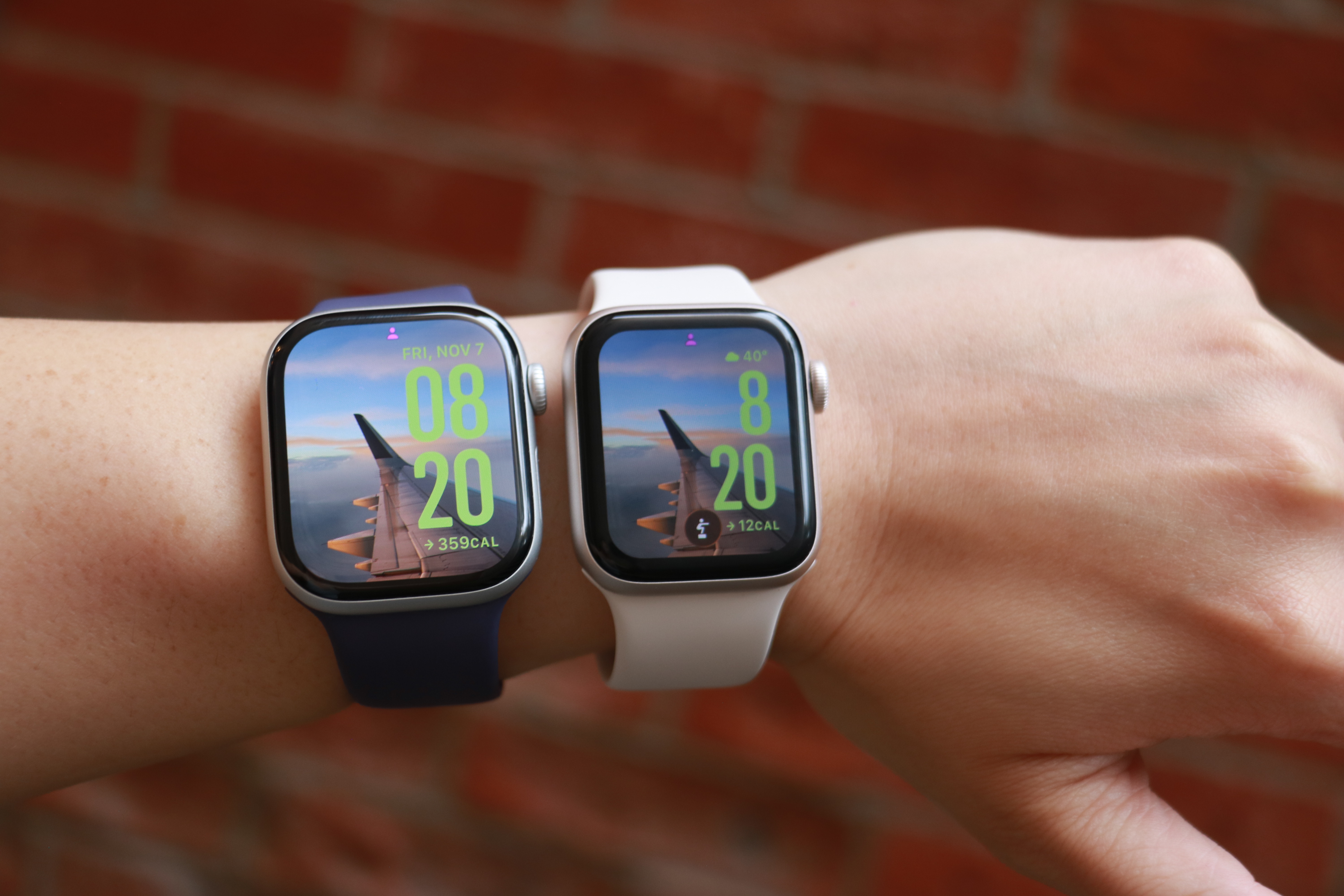
The Apple Watch Series 11 and Apple Watch SE 3 side by side on the same forearm.
Cherlynn Low for Engadget
Another screen-related update that isn’t immediately obvious is the Ion-X glass on the SE 3, which Apple says is four times more crack-resistant than the SE 2. I haven’t put this claim to the test, but the hardier material should help keep your smartwatch safe from more mishaps.
I should also point out that the Watch SE 3 uses the same S10 processor as the Series 11, which has a four-core neural engine that should help speed up Siri and Apple Intelligence tasks. In general, I found the SE 3 snappy and responsive, and mostly as fast as the Series 11. Previous Watch SE models tended to be a bit sluggish, so it’s nice to see the SE 3 get this particular bump.
The impact of most of the other improvements to the SE 3 depend on how you use a smartwatch. The new 5G support, for example, would be helpful if you get a cellular model and want to leave your phone behind while you run errands or go on walks. The wrist temperature sensor is mostly there to help with predicting cycles, so if you don’t ovulate it is unlikely to be useful to you right now. Sleep apnea notifications don’t affect non-sufferers, though they’re a nice feature to have. And finally, though I appreciate the ability to play songs of media through the watch’s onboard speaker, I rarely find myself wanting to do so.
It might be worth noting that the SE 3 comes in one fewer color option than the SE 2. You can only choose between starlight (a warm light gray) or midnight (black), as the silver version is not available in the latest generation.
Apple Watch Series 11 vs the Watch SE 3
The main thing I wanted to determine when reviewing the Watch SE 3 was whether it’s good enough to replace the Series 11. Like I said earlier, the short answer is yes, but it depends on how you use these devices. I don’t wear smartwatches to bed, and as a result my Watch SE 3 still has plenty of power left in the morning when I need it, so I’m a lot less affected by its relatively slower charging speeds. If you use your Apple Watch all the time, you might find something that recharges faster a lot more suitable — the Series 10 or 11 are both better on that front.
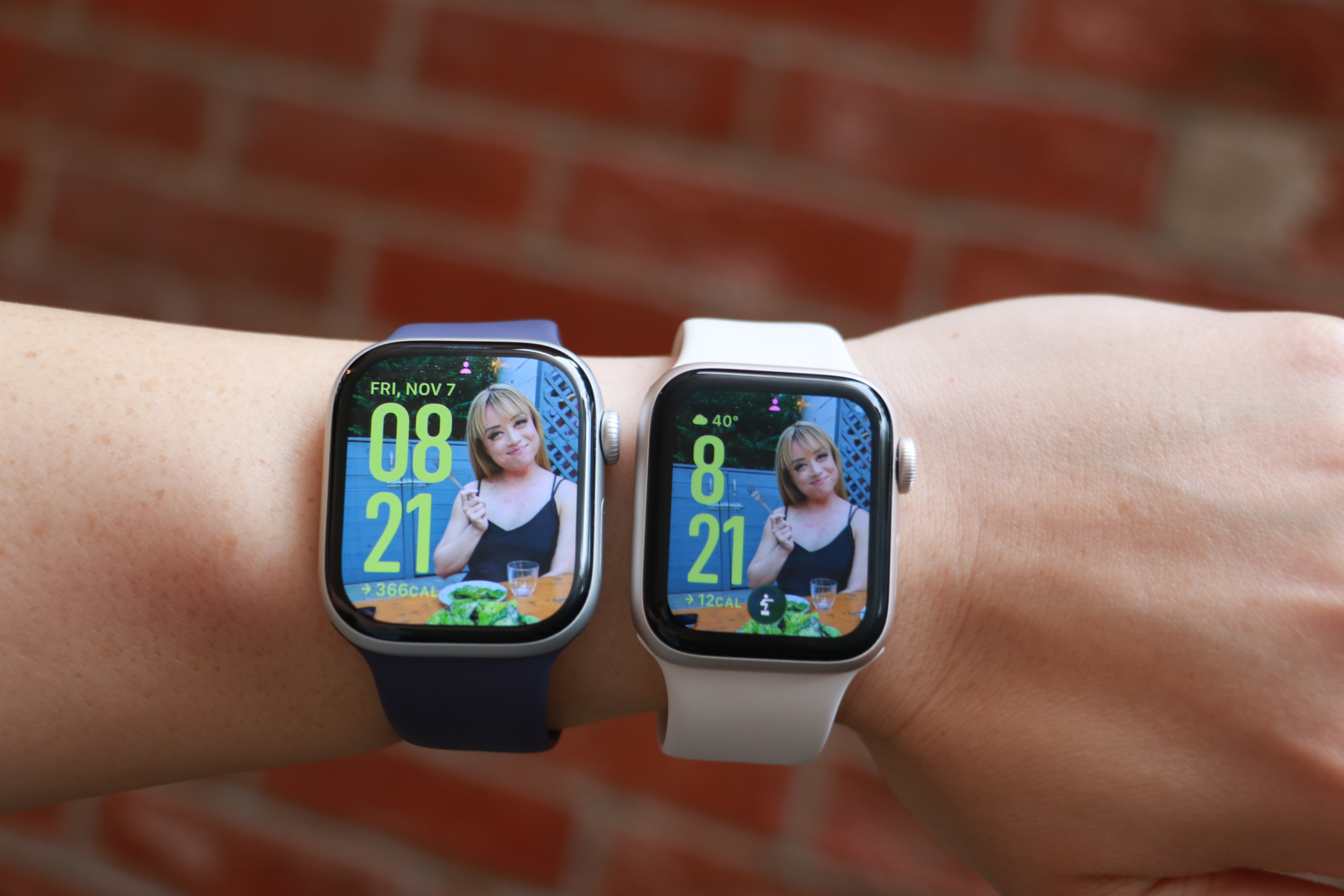
The Apple Watch Series 11 and Apple Watch SE 3 side by side on the same forearm, with the same photo watch face on their screens.
Cherlynn Low for Engadget
The Series 11’s larger screen and smaller bezels makes it a lot nicer to look at, though since the SE 3 also runs watchOS 26, I was able to use the same watch faces for both. Aesthetically, I didn’t find the two to be very far apart in terms of appearances, and if you’re not familiar with the latest Apple Watches like I am, you might not find the bezels as unsightly as I did. And though the SE 3 uses a flat OLED compared to the Series 11’s wide-angle OLED, I never really had an issue reading it, regardless of the position.
Thanks to their electrical heart rate sensors, the Series 11 and Series 10 support Apple’s newer health-centric features like hypertension alerts, as well as apps for ECG and blood oxygen readings. The SE 3’s optical sensor is older and doesn’t have those capabilities, but you’ll still get notifications for irregular rhythms, low cardio fitness, as well as high and low heart rate notifications. Those were more than enough for me, and though I occasionally run an ECG reading on my Series 11, it’s not something I’d miss (especially if a $150 difference in price were in the balance).
I’m also not a big swimmer or underwater enthusiast, so the SE 3’s lack of a depth gauge and water temperature sensor don’t bother me. All three watches I’ve mentioned in this section are water resistant to 50 meters, and that’s more than enough for my needs. If you want your watch to help with your underwater activities, it’s probably worth splurging on the Series 10 or 11.
The pricier watches are also certified IP6x for dust resistance, meaning they should offer a bit more peace of mind for those who work on beaches or on job sites, for example. I’ve not yet encountered a smartwatch that stopped working due to dust ingress, regardless of whether it was rated, so the SE 3 not having this certification doesn’t bother me either.
One thing that the most discerning tech fans might call out is the fact that the SE 3 doesn’t have the same ultra wideband (UWB) chip that the Series 10 and 11 do. This enables the greater precision in Find My that allows you to locate your iPhone or wearable down to the number of feet. But you’ll still get basic Find My support on the Watch SE 3, and honestly all I really did with this was to use my watch to ring my phone so I could confirm it was with me without having to dig through all the pockets in my gigantic purse. Still, if you use this Find My interface a lot, it’s worth considering when getting your next Apple Watch.
Finally, if you’re a fan of the titanium finish or multiple color options in Apple’s more-premium lineup, only the Series 10 and 11 come in the silver and rose gold colors for the aluminum case. The Series 11 is also available in Space Gray in aluminum, as well as Slate, Gold and Natural hues for the titanium finish. Again, the SE 3 is only available in two colors.
Using the Apple Watch SE 3 as a Series 11 wearer
I’m the sort of person who straps on my smartwatch when I head out and removes it when I get home. When I’m outside, I expect my Apple Watch to track my steps and activity, automatically detect and log extended walks, tell me when someone’s calling or texting and keep tabs on my workouts. For all those situations, the SE 3 was more than adequate. Occasionally I noticed it was a bit slower than the Series 11 at recognizing when I was done working out and suggesting I end the session, but not at a frequency that was concerning.
The SE 3 was also as capable as the Series 11 when it came to acting as a remote viewfinder for my iPhone’s camera, and Siri was satisfyingly responsive at launching my workouts or telling me about the weather. I also enjoyed having the double tap and wrist flick gestures at my disposal, and honestly kind of liked the watch’s smaller size.
But I did miss the Series 11’s brighter screen and smaller bezels. I also prefer the Series 11 for its ability to recharge more quickly, as well as its slightly longer-lasting battery. Both still were able to make it through an entire day before needing a charge, but the Series 11 generally did more in the background in that amount of time.
In the end, it wasn’t the features like blood oxygen readings or hypertension notifications that I wanted back. It boiled down to physical components like a brighter display or bigger battery and more durable case that I wanted around for peace of mind.
Wrap-up
Is peace of mind worth a $150 premium? In this economy, it’s hard to say. On one hand, it’s possible a $399 Apple Watch will outlast the $249 SE 3, mostly due to its harder materials, making it a more astute investment in the long run. But for those who currently have tight budgets and need to replace aging or broken smartwatches, the SE 3 is the way to go.
This article originally appeared on Engadget at https://www.engadget.com/wearables/apple-watch-se-3-review-good-enough-for-most-people-133000008.html?src=rss
Inu Atsume VR is a virtual pet simulator by Hit-Point, creators of the popular cat-collecting game Neko Atsume Purrfect, and it’s launching on Quest soon.
Similar in style to the studio’s feline-filled experience, Neko Atsume Purrfect, Inu Atsume VR offers puppy-loving players the chance to complete a Dog Encyclopedia and compete with their newfound companions across three competitions. It’s playable in both VR and MR, with the mixed reality mode allowing pups to roam freely around your living space without running the risk of a mess.
To find new pets, you can visit a park called the “Square,” where you can throw frisbees to earn the attention of your desired pet and play together. By continuously showering the pup with praise and attention, it will gradually inch closer and eventually become your new friend.
From here, the canine companions can be trained up and taught tricks like Shake, all while receiving gifts that fill out the virtual space. Those with a keen eye for interior design can also customize their in-game home by tweaking the colors of walls and doors.
While the store page lists a ‘November 2025’ release window, the official website confirms Inu Atsume VR will make its Quest debut on November 20 for $14.99.