Nintendo and The Pokémon Company are trying something a little different with Pokémon Pokopia. It’s a life sim game in the vein of Animal Crossing. Nintendo unveiled the game during a Direct in September, saying that it would arrive in spring 2026. Now, the company has revealed that Pokémon Pokopia will hit Nintendo Switch 2 on March 5.
There’s no new trailer for the game just yet — you’ll have to wait until Thursday, November 13 for that. Nor did Nintendo discuss more details about Pokémon Pokopia, other than to indicate the cartridge will be a Game Key Card(no game files are stored on such a cart, which is effectively a physical key that allows you to download a game). The company announced the release date with the most bare bones of tweets:
Koei Tecmo studio Omega Force is developing Pokémon Pokopia. We learned during the Nintendo Direct a couple of months ago that you’ll play as a Ditto who has taken on the guise of a human. You’ll meet more Pokémon and learn new abilities to help you upgrade your community and make your home just the way you want it.
Last month, there was another leak of files from Game Freak, the main developer of Pokémon games. Among other things, the details indicated that an expansion for Pokémon Pokopia is in the works.
Before Pokémon Pokopia arrives, you’ll be able to warm up for a Pokémon flavor of life sim by dipping back into Animal Crossing New Horizons, which is getting a major update and a Switch 2 version in January. It includes support for mouse controls, visual enhancements and other upgrades on Switch 2. An update that will also apply to the original Switch version will introduce a new hotel location, more cosmetic items, a Lego collaboration and much more.
This article originally appeared on Engadget at https://www.engadget.com/gaming/nintendo/pokemon-pokopia-an-animal-crossing-esque-life-sim-will-hit-switch-2-on-march-5-160000254.html?src=rss
Amid what one judge called an “epidemic” of fake AI-generated case citations bogging down courts, some common excuses are emerging from lawyers hoping to dodge the most severe sanctions for filings deemed misleading.
Using a database compiled by french lawyer and AI researcher Damien Charlotin, Ars reviewed 23 cases where lawyers were sanctioned for AI hallucinations. In many, judges noted that the simplest path to avoid or diminish sanctions was to admit that AI was used as soon as it’s detected, act humble, self-report the error to relevant legal associations, and voluntarily take classes on AI and law. But not every lawyer takes the path of least resistance, Ars’ review found, with many instead offering excuses that no judge found credible. Some even lie about their AI use, judges concluded.
Since 2023—when fake AI citations started being publicized—the most popular excuse has been that the lawyer didn’t know AI was used to draft a filing.
Leaked CAD renders, circulating after the apparent cancellation of the ultra-slim Galaxy S26 Edge, show Samsung returning to the stalwart Plus variant, this time sporting a different camera module design. For awhile now, Galaxy S phones have had an almost flush camera setup with individual lenses protruding from the backplate. Now, the Galaxy
Lenovo recently sent over their new ThinkPad P1 Gen 8 laptop for review under Linux. My Linux review on that ThinkPad P1 Gen 8 laptop will be coming up in the near future along with some other benchmarks from that premium mobile workstation. But with this being the first time I’ve had an Intel Core Ultra 7 255H “Arrow Lake H” device at Phoronix, here are some standalone benchmarks looking at the CPU performance of that 16-core mobile processor compared to various other Intel and AMD SoCs in different laptops while running Ubuntu Linux.
Sam Altman’s Tools for Humanity has verified around 17.5 million people through its iris-scanning Orb device. The company has set a goal of reaching 1 billion users, so it is less than 2% of the way there. The startup has raised $240 million from investors including Andreessen Horowitz, Bain Capital and Khosla Ventures. PitchBook estimates its valuation at $2.5 billion.
The Orb is a volleyball-sized metal sphere that scans irises to generate a World ID. Users can claim tokens of the cryptocurrency Worldcoin, currently worth around 80 cents per coin. Business Insider spoke to former Tools for Humanity employees, a former Orb operator from Kenya, and a former head of operations in Mexico City. Some questioned whether the company had a clear long-term strategy. Nick Maynard, vice president of fintech market research at Juniper Research, said he does not see a killer use case that will drive major traction. The company also continues to face regulatory headwinds. In October, agencies in the Philippines, Colombia and Thailand took action to halt operations. German authorities determined last year that the company’s data protection measures would not be sufficient to protect against cybercriminals or state attackers.
Pirelli’s sensor-embedded Cyber Tire is starting to find a whole new niche helping traffic agencies. When we first learned of the smart tire, it was making its debut fitted to McLaren’s then-new plug-in hybrid supercar. As an alternative to a tire pressure monitoring system fitted to the car’s wheels, the Cyber Tire wirelessly reports its temperature and pressure to its car via Bluetooth Low Energy, along with some specific information about the tire itself.
Since then, Pirelli has continued to develop the technology. When it created Cyber Tires for the Pagani Utopia, it allowed a car to tailor its antilock braking and electronic stability control to the specific rubber fitted to the wheels. Right now, a car’s ABS or ESC will be tuned regardless of the tires it’s fitted to.
But a high-performance summer tire acts quite differently from a winter tire, not just because of the composition of the rubber but also due to the tread pattern, depth, and stiffness, not to mention factors like sidewall stiffness. And the Utopia can take advantage of that fact.
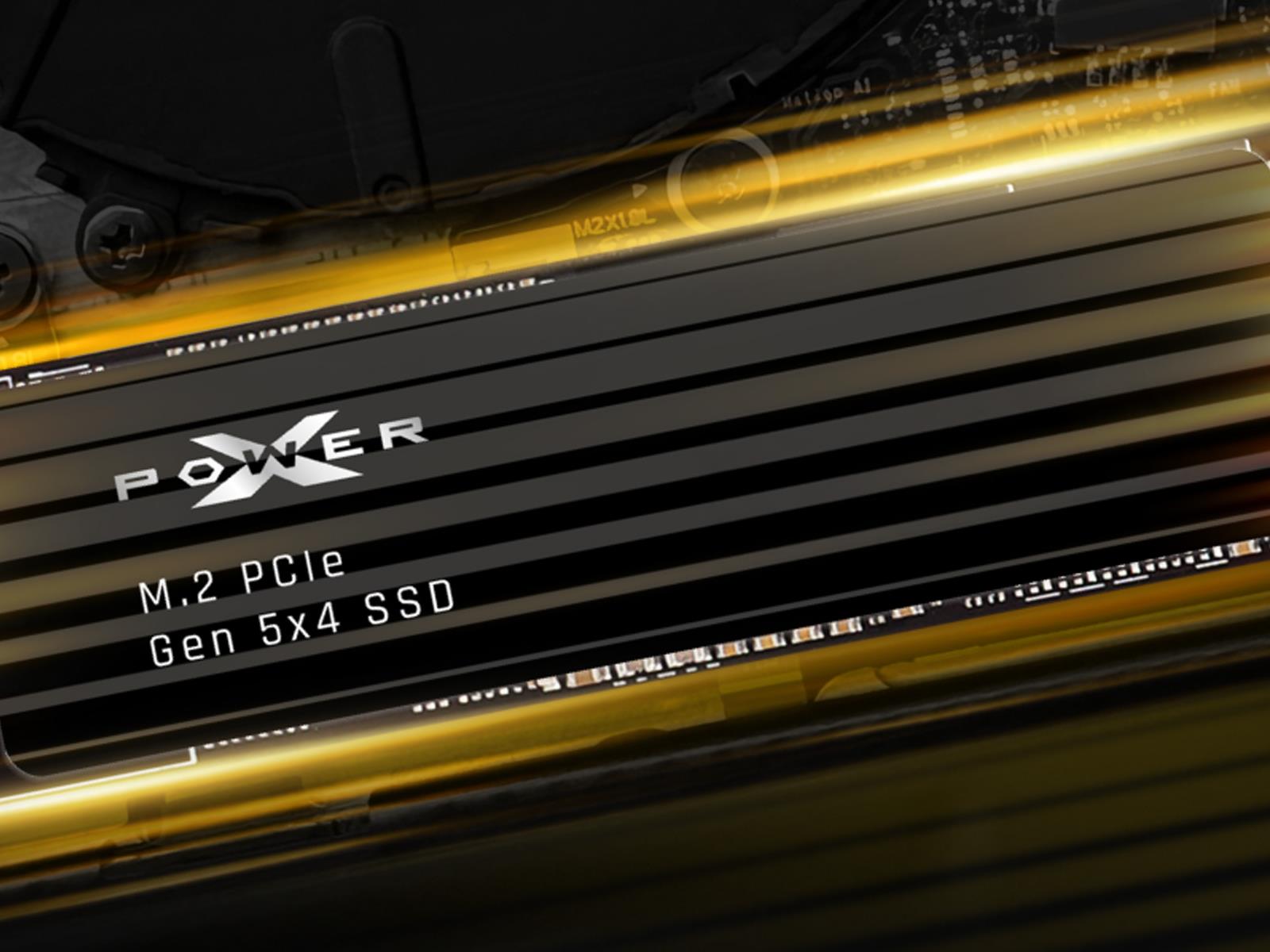
Storage prices may be on the rise (boo!), but flagship solid state drives are also getting faster (hooray!). We’ve seen a handful of new SSDs push the envelope lately, and Silicon Power’s new XPower XS90 Gen 5 SSD joins the bunch with blazing-fast sequential read speeds of up to 14,300MB/s (14.3GB/s) and sequential writes of up to 13,400MB/s
Spatially tracked styluses from Logitech for Apple Vision Pro and Quest paint an unfinished picture for creative input in headsets.
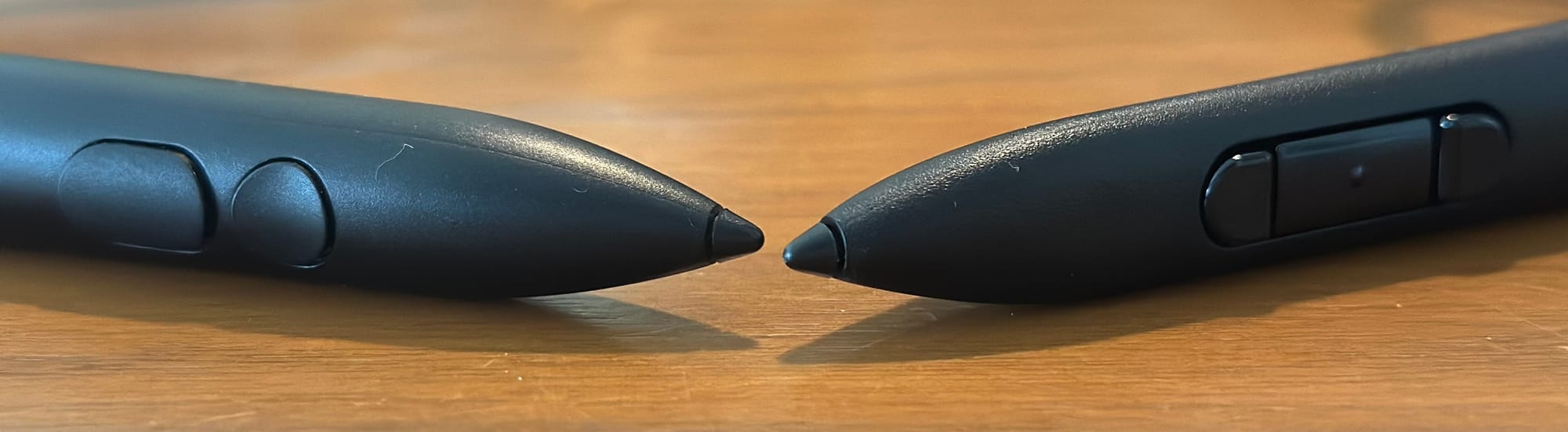
Priced around $130 from Logitech, the MX Ink is for Quest 2, 3 and 3S headsets, and Muse is for Apple Vision Pro. The Ink has been available for Meta headsets for more than a year and Muse debuted recently for Apple with a beta for visionOS 26.2 adding system level support for the input for the first time.
Logitech Muse at left and Logitech MX Ink at right.
The Logitech MX Ink for Quest has been supported in the menu systems for Horizon OS for some time, allowing for a kind of easy laser pointer or remote control across the entire Quest menu experience. You can launch apps like Figmin XR, Vermillion, ShapesXR and Gravity Sketch using the Ink in one hand, just clicking a button with the index finger.
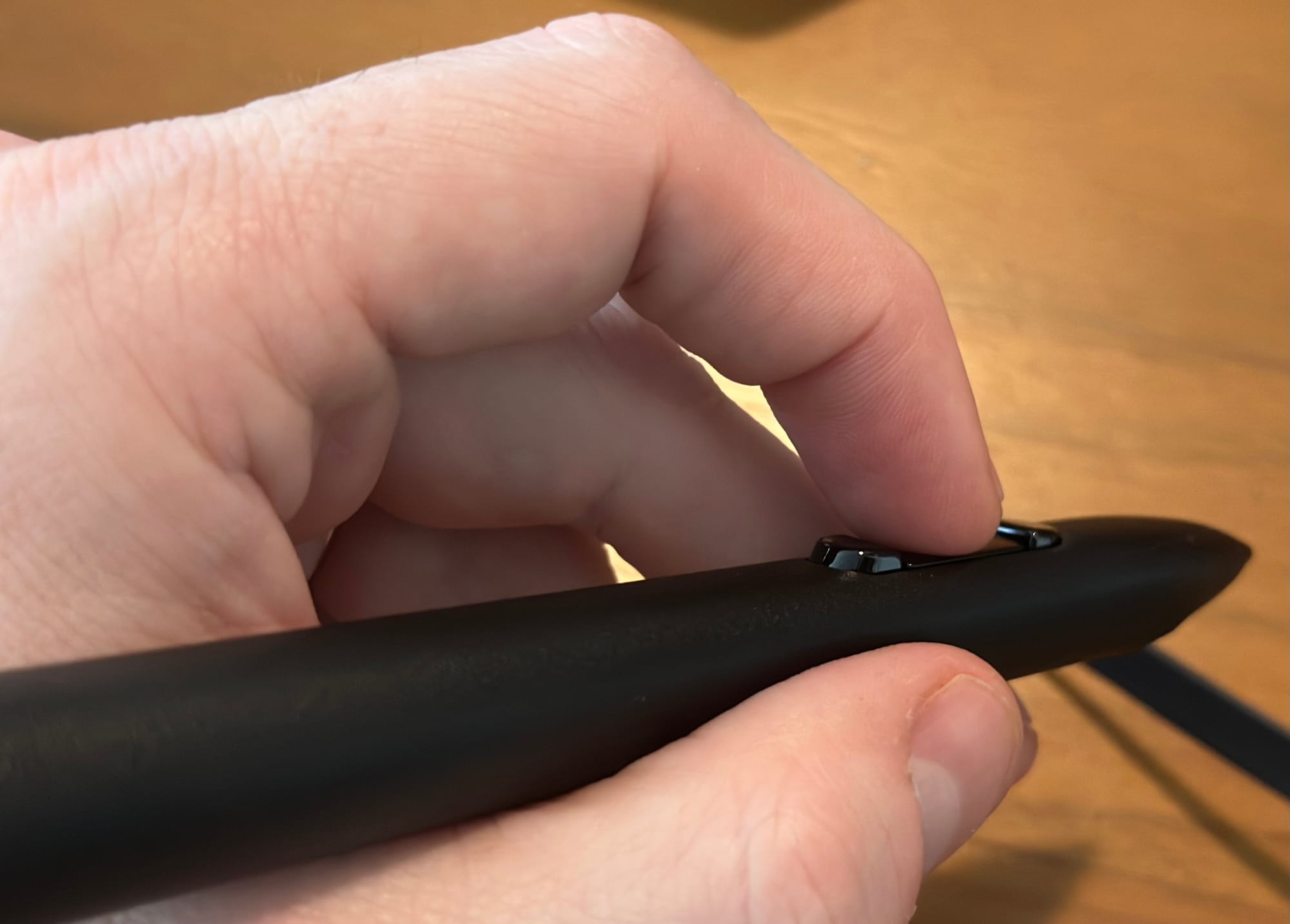
MX Ink with pressure-sensitive main button, as well as buttons behind and in front.
On Quest, the apps usually also want a Touch controller in the off hand as well. I activated a setting in the app Jigsaw Night on Quest 3 to show interaction with the MX Ink in the dominant hand and simultaneous hand tracking in the off hand.
0:00
/0:32
Dual-mode input with MX Ink and hand tracking on Quest is rare in apps on Horizon OS as of November 2025, but Jigsaw Night from Steve Lukas supports it.
The Logitech Muse for Vision Pro is much newer, released near the launch of visionOS 26, and marks the beginning of Apple’s support for “motion tracking in six degrees of freedom” as a way to change how you “work, create, and collaborate with Apple Vision Pro”. As of visionOS 26.2, apps like Freeform and Notes bundled by Apple support the Muse pen, allowing for quick and intuitive sketching on a vertical 2D surface anywhere. Apps are rolling out on an ongoing basis that integrate the pen as a 3D tracked object.
Both Ink and Muse charge over USB-C connections near the rear of the stylus. The MX Ink also has an optional charging stand called the MX Inkwell, selling for $50, that the stylus can fit into. If you plug the pens into a long USB-C cord they appear to charge without issue while in use. That’s not something a Quest controller or a PlayStation VR2 controller supports. Battery life is likely to vary by use, especially as new apps release using all the features. I haven’t encountered any battery anxiety, particularly after discovering they could charge in use.
0:00
/0:37
Logitech Muse in Freeform for Vision Pro as of visionOS 26.2
In theory, MX Ink and Muse can travel in pockets where a wider controller can’t fit. In practice, at least from this writing, creative software with Quest seems to demand traveling with the Ink plus at least one controller. Support for hand tracking, if supported at all, seems to be treated by many apps as a different mode of input rather than hand in hand with the pen.
We could paint in Tilt Brush in 3D using a Vive wand in 2016 as a precision 3D instrument, albeit quite bulky in hand. We’re nearly in 2026 and a much smaller pocket-sized wand can access Open Brush on Quest. When the MX Ink is used, I see the shape of an old bulky tool in hand, standing in for the marker-sized object actually held in hand with Quest roughly a decade later.
Apple and Meta both see a future for 3D tracked precision input for headsets, but their operating systems and developer ecosystems are still actively developing support for tools like the MX Ink and Muse alongside other input systems.
The Best Input For Thrasher?
Surprisingly, MX Ink support in Thrasher on Quest is wildly fun. Conceptually, any game involving wands, whether for conducting music or for wielding magic, would find itself a nice match with either of these tools.
Thrasher makes a key example of how spatial inputs and their tracking systems are in a completely different place from where they were in 2016 and 2017. Holding the MX Ink at my side in a dark room while playing Thrasher sees the 3D object in my hand seemingly drift into strange orientations. Nonetheless, the slithering thrashing beast under my control moves as expected across the flat vertical plane across from me, consistent with each flick of the controller. Other developers can’t expect their games to fit into the same constraints that make control work so well in Thrasher.
MX Ink is well supported in some of Quest’s best creative apps, but holding a Touch controller in the off hand doesn’t make a whole lot of sense in the long term when hand tracking works well at the system level.
On Vision Pro, PlayStation VR2 controllers and Muse arrived as spatial inputs within weeks of one another. As of visionOS 26.2’s latest testing release this week, each input supports system level control secondary to hand tracking and gaze. Some Apple developers are just now starting to think about their precision input integrations with Vision Pro, while some Meta developers are wondering why they should update theirs with Quest. Circuit Flux became one of the first apps on Apple’s platform to support both Sony and Logitech spatial input systems, and Meta is offering developers a chance at funding with a competition.
As developers roll out additional support for MX Ink and Muse, and operating systems improve overall in their support for these inputs alongside hand tracking, we’ll plan to cover this picture more as it starts to fill in. Please reach out if you’re doing something interesting with these tools.
Tails is an unusual Linux
distribution developed by the Tor Project; it
is designed to help users work around internet censorship and avoid
surveillance. It is a “portable” operating system that is meant to be
run from a USB stick or ISO image and to leave no trace on the
computer it was run on. Tails routes connections to the internet over
the Tor
network and includes a selection of applications and tools
suited to working with sensitive documents, communicating securely,
and preserving users’ anonymity. The tradeoff, of course, is that
Tails is less convenient and requires users to learn a new set of
tools to avoid compromising their own security and anonymity. Tails 7.1 was
released in October, and it seemed like as good a time as any to take
it for a spin.
WhatsApp is following in the footsteps of fellow Meta-owned companies, Instagram and Facebook. The European Commission will give WhatsApp’s open channels the designation of Very Large Online Platform (VLOP) under the Digital Services Act (DSA), Bloomberg reports. The Commission has yet to make a public announcement on the matter, but has reportedly told Meta.
This label gives the EU greater regulatory power over WhatsApp in areas such as content moderation and data sharing. WhatsApp will also need to conduct an annual independent audit and have transparent advertising practices, among other mandates.
The new label isn’t exactly a surprise. In February, WhatsApp announced that it had averaged about 46.8 million EU users in the second half of 2024. The DSA states that the VLOP designation should be given when a platform exceeds 45 million monthly EU users.
This designation will strictly be for WhatsApp’s open channels feature. Individual messaging should not be impacted in any way and should remain private between the parties involved. Alongside Facebook and Instagram, WhatsApp joins companies such as Amazon, Google and ByteDance in the VLOP designation.
This article originally appeared on Engadget at https://www.engadget.com/big-tech/whatsapp-will-reportedly-face-further-eu-regulation-150037042.html?src=rss
Samsung is rolling out new conversational AI across its 2025 TVs that lets users ask questions about what’s on the screen and beyond it. From a report: First announced in September, the generative AI update is rolling out now with support for several languages. Vision AI Companion is based on an upgraded, generative AI-based version of Samsung’s virtual assistant Bixby. Samsung suggests you can use it to ask questions about on-screen content — what that actor is famous for, who painted that artwork, or what the final score was in a football game. It can go beyond that though, offering TV and movie recommendations along with cooking advice, travel tips, and local restaurant discovery.
Having previously been tested as an experimental flag, Google Chrome’s Split View feature is now rolling out in the stable version of the browser (version 142). It doesn’t seem to be live for everyone at the same time, but some people are seeing it. (I’ve got it in Chrome on my Mac, but not yet on Windows.)
To check you’re on the latest version of Chrome, click the three dots (top right) in a browser tab, then choose Settings and About Chrome. If an update is available, it’ll be downloaded, and you can restart your browser to apply it.
If you’re running the latest version of Chrome and still don’t see Split View, you can either wait for the feature to reach you or switch the flag on. Type “chrome://flags/#side-by-side” into your browser address bar and hit Enter, then enable the feature and restart your browser. You should then have Split View.
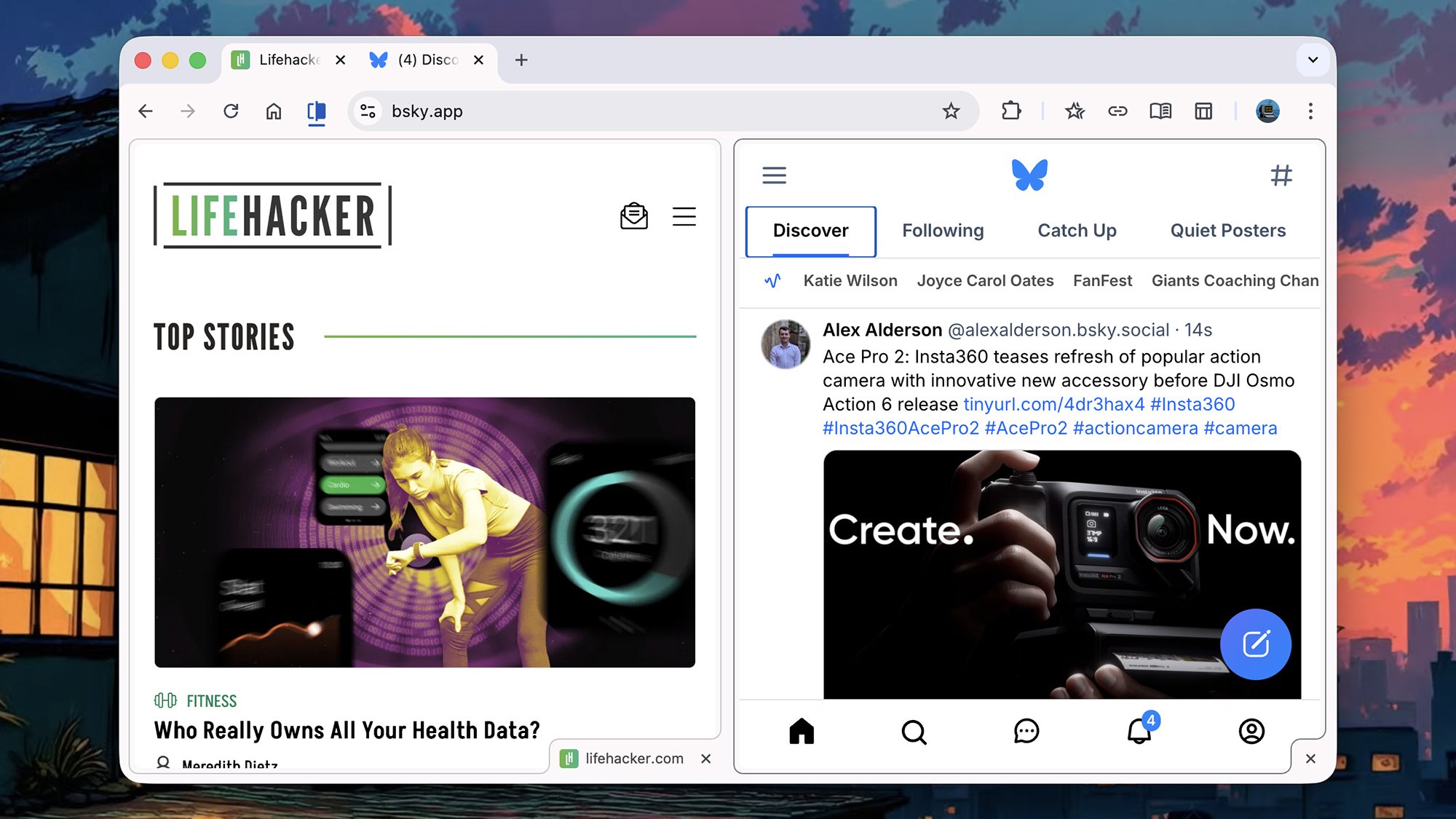
It works exactly as you might guess from the name: Split View enables you to have two sites or apps open in the same tab, so you can, for example, dive deep into a Lifehacker article while also keeping an eye on social media. It works much better than just having two Chrome windows up side-by-side in Windows or macOS.
How to create a Split View
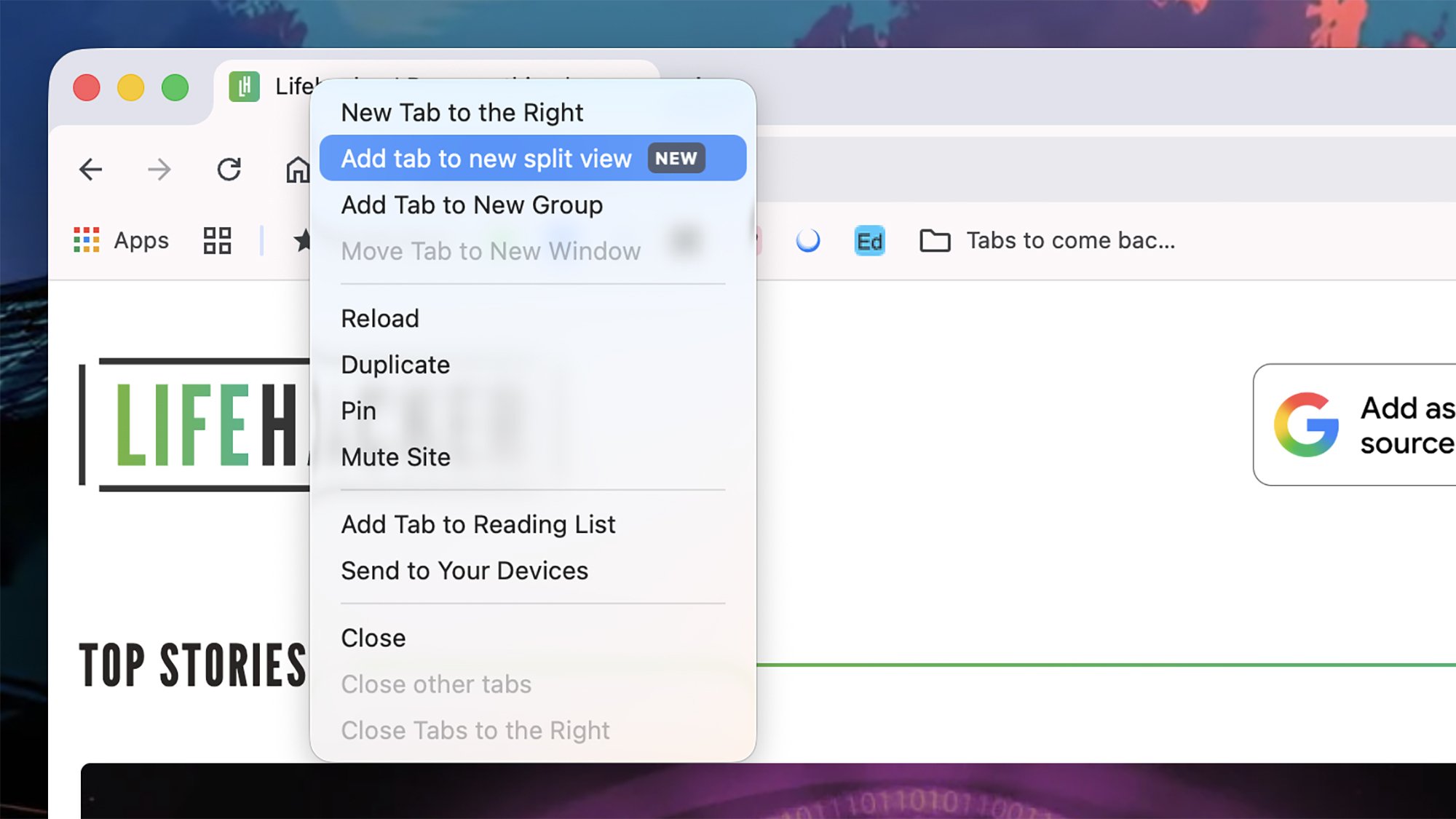
There are a couple of ways to create a Split View. One is to right-click on a tab header and then choose Add tab to new split view from the menu that pops up: The selected tab takes up one half of the Chrome window, and in the other half you can choose another open tab (if there aren’t any other open tabs, you’ll see the New Tab page).
The other method is to click and drag an open tab (using its header), or a web link, to the far left or far right of another tab—you should then see a small space open, with a Create split view label. Getting the dragging and positioning right can take a bit of practice, but once you get the hang of it, it’s pretty straightforward.
Look for a new Split View feature in Chrome. Credit: Lifehacker
After that, the split tab works more or less like any other normal tab. You can drag it into a different position or into a different window, and you can right-click on it to access the tab options (for muting or pinning, for example). The split view tab will have two small “x” icons on it, for closing either half of the tab separately—to close them both, right-click on the tab and choose Close.
Whenever you’re in a split tab, you’ll see a new icon on the Chrome toolbar, which you can click to access related features: You can separate the two views, close the left or the right view, or swap the views over from this toolbar button. The same options are available if you right-click on the Split View tab header.
How you can use Split View
Split view can help any time you need two webpages or web apps on screen at once. One of Google’s own suggestions is keeping a document open while you’re on a video call, so you can make notes more easily.
It’s going to work well for any kind of research or note-taking where you’re looking something up and then having to write about it. It may also be less than ideal for our attention spans, because you can load up a video on one half of your Split View, and then scroll through social media on the other half.
Two sites open in Split View. Credit: Lifehacker
You can adjust the sizes of each pane by dragging the divider in the middle, though you are limited overall by the size of the Chrome window. You’re also able to switch to different websites within a Split View by typing into the address bar as normal—just make sure you’ve selected the right half of the pane first.
The same sort of effect has long been possible in Windows and macOS by snapping two Chrome windows to each side of the screen, but there’s something more convenient and straightforward about having two pages up in the same tab. I can see this being something I make use of a lot, especially on an ultrawide monitor.