Requisition VR: Hunt & Extract, a PvPvE extraction shooter where you duct tape items to form new weapons, gets its SteamVR relaunch today.
Following its full Steam release in 2023, you may recall that the physics-based co-op game Requisition VR received a major revamp with July’s Quest launch. Turning this into a PvPvE (player vs. player vs. environment) extraction shooter with a post-apocalyptic setting, this new edition is out later today on PC VR.
Hunt & Extract maintains the original game’s crafting system, where you use duct tape to combine objects like sticks, cleavers, and more for new weapons. Environmental traps are also available but can attract zombie hordes, and you team up with friends to defeat AI and human opponents alike. Any loot obtained during these runs is then used to upgrade your base and weapons.
Stating it’s been rebuilding Requisition VR “from the ground up” across the last two years, developer Spheroom describes Hunt & Extract as “an entirely new game” that initially began as an update. Later becoming a “full-on reinvention,” the studio confirmed it’s launching a separate edition to preserve the original version for its fans.
Requisition VR: Hunt & Extract is out today on PC VR, and it’s live now on Quest. Owners of the original Requisition VR can also claim the new game for free via the official Discord server.
If you’ve got the funds and the need for more than one computer on your desk, then you may well want to use the same mouse and keyboard for both of them. It’s more convenient if you’re switching between systems, and it means you can find a keyboard and mouse combination you love and stick to it throughout.
This is particularly helpful if you’re working on a laptop and a desktop in tandem. Even the best laptops tend to have cramped keyboards, just through the limitations of the form factor, and a mouse is often preferable to a trackpad for several tasks (such as detailed image or video editing).
Sharing your mouse and keyboard between computers is actually easier than you might think—and certainly a lot easier than it was several years ago. You’ve got different options available depending on the different platforms you’re dealing with, and these are the tools for the job I’d recommend right now.
If you’re on Windows, use Mouse Without Borders
Mouse Without Borders is an official Microsoft program, but one of those official Microsoft programs that’s more like a side project. It lets you control up to four computers using the same mouse and keyboard, as long as they’re all running Windows.
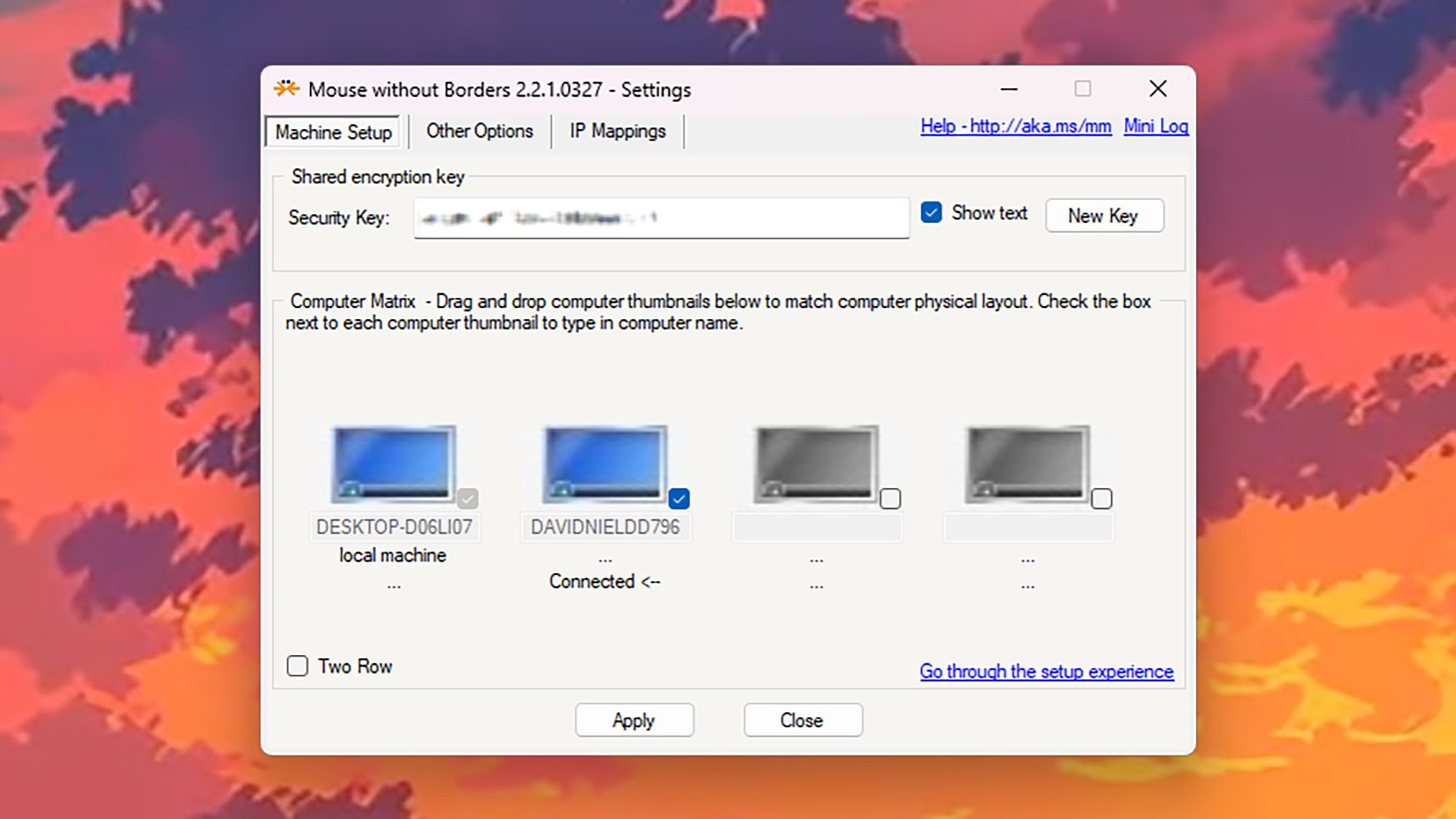
You don’t need any complicated cabling or software setup: You just need the application installed on all the Windows computers you want to connect, and a mouse and keyboard plugged into one of them. On the first computer you set up the tool on, you’ll be able to generate a code you can use to connect other computers.
Mouse Without Borders on Windows. Credit: Lifehacker
The main configuration screen lets you set the layout for your various Windows machines, which is important—to move from one system to another, you just drag the mouse cursor off the edge of one screen and on to another. The mouse and keyboard will interact with whatever computer the mouse cursor is currently active on.
Mouse Without Borders also lets you create a universal, shared clipboard across every computer it’s installed on, for easy transfer of files, text, and images. Note that Mouse Without Borders is also available as part of Microsoft PowerToys, a bundle of utilities that gives you a plethora of additional features and tweaks for Microsoft’s operating system.
If you’re on macOS, use Universal Control
If you’re using two or more Macs together, Universal Control is the way to go for your keyboard- and mouse-sharing needs. The functionality is built right into macOS (and iPadOS), and works pretty seamlessly out of the box. Plus, it includes a lot more than the sharing of input devices.
All you need is the latest version of macOS installed across your computers, the same Apple account linked to them all, and the mouse and keyboard you want to use as your main controllers. All your devices must have wifi and Bluetooth turned on, and your computers have to be fairly close together (as in, in the same room).
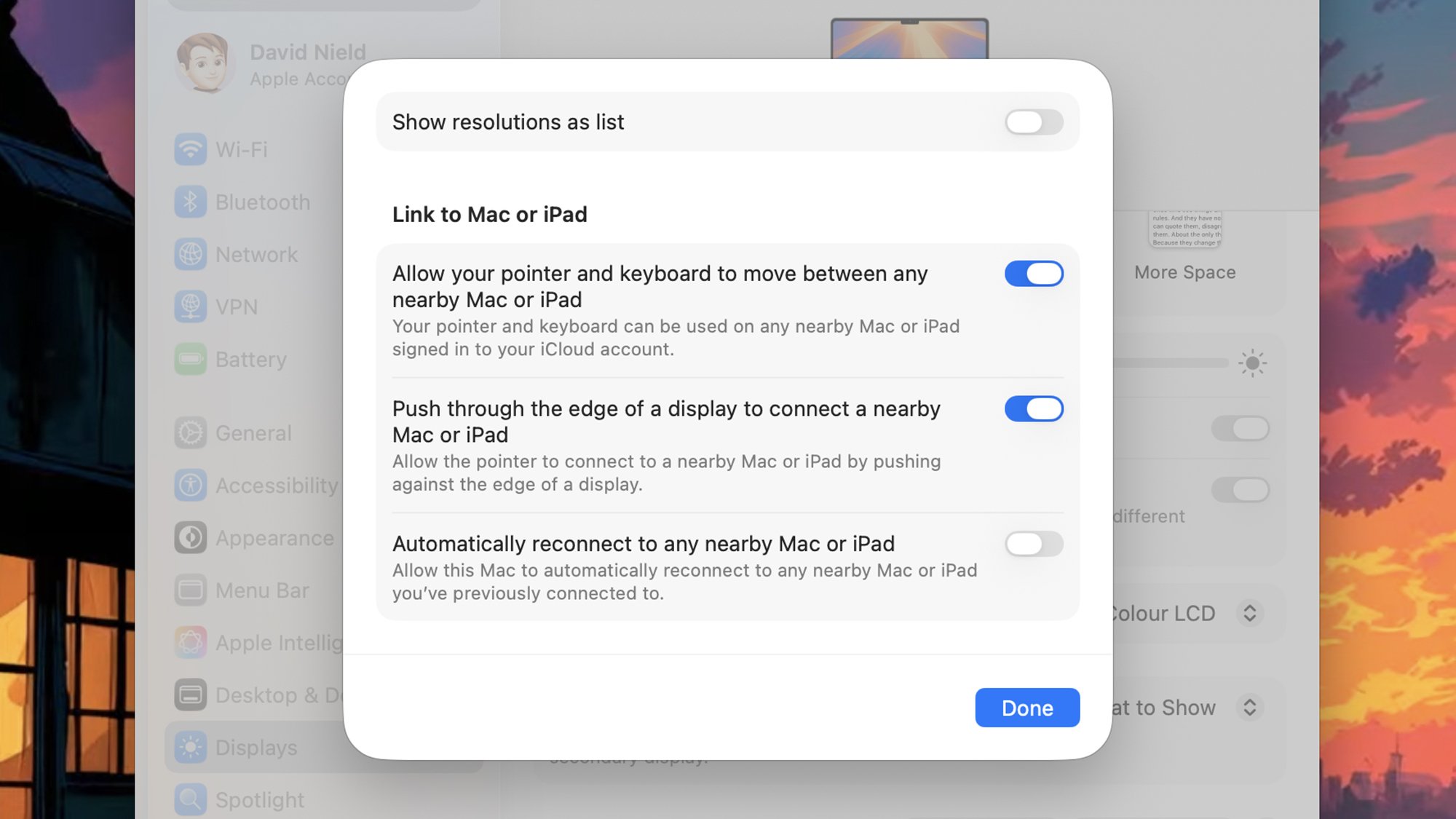
Universal Control on macOS. Credit: Lifehacker
You can find the relevant settings for this part of Universal Control by opening the Apple menu (top left), then choosing System Settings > Displays > Advanced—for best results, make sure every option here is enabled. With this done on every Mac, all that you need to do is push the mouse cursor through the left or right edge of the screen on your current Mac to switch control to the other one, depending on how they’re positioned.
This positioning can be tweaked via System Settings > Displays > Arrange, if needed. Universal Control goes beyond peripheral sharing, too—you can drag files across the screen edge border to transfer them between computers. You’ll also find there’s a shared clipboard available across your linked devices—so you can copy on one computer, and paste on the other.
If you’re on both Windows and macOS, use Synergy
For those bold enough to try and use both Windows and macOS machines on a regular basis, Synergy is the most comprehensive mouse and keyboard sharing software that I’ve come across. Once you’ve got it installed on every computer you want to connect, you can share a mouse and keyboard between all of them.
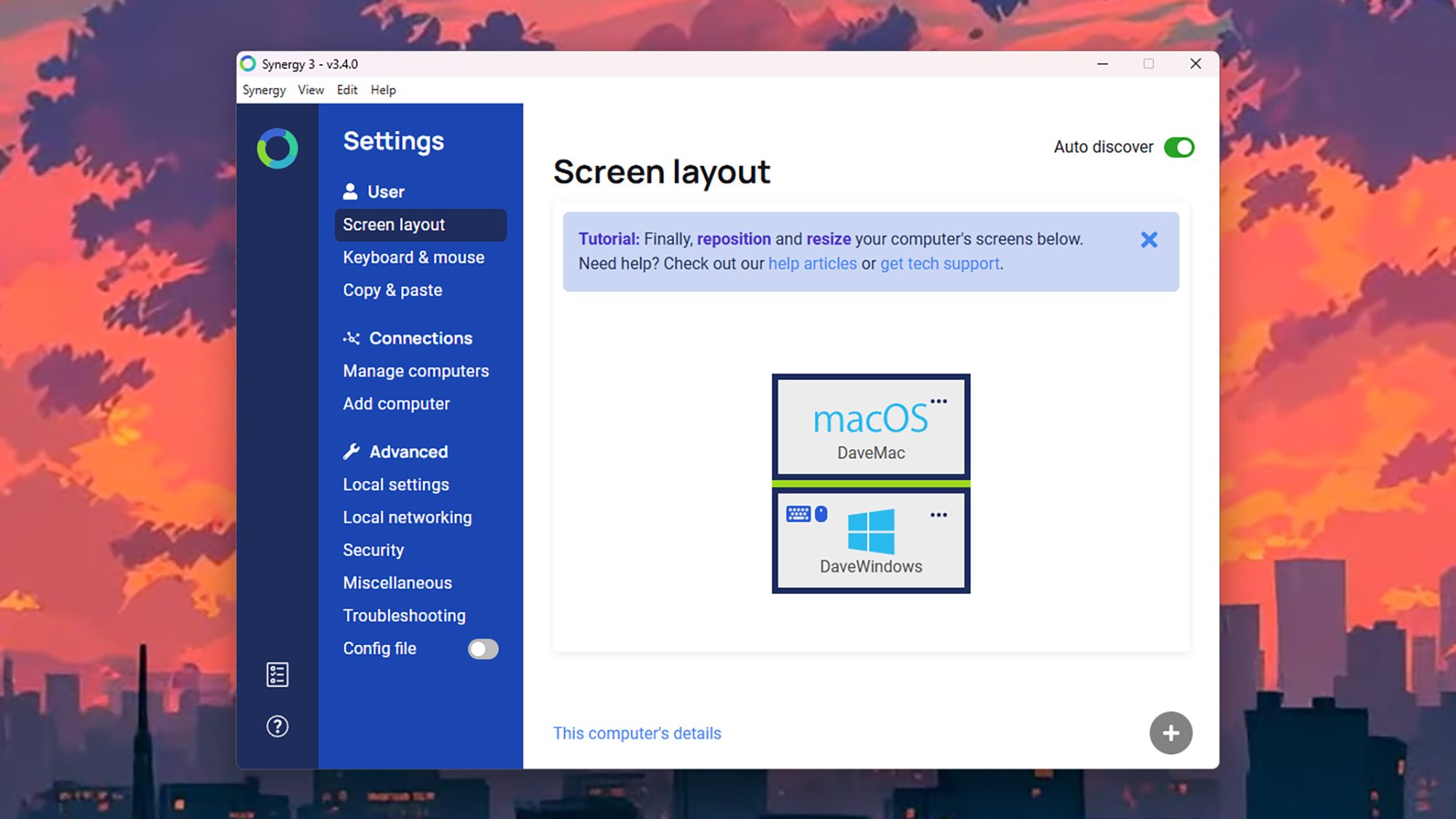
When you’ve got the desktop client up and running, you’re greeted with a straightforward interface that lets you manage all of the various options the program offers: You can set up how your computers are positioned in relation to each other, for example, and configure how the shared clipboard will work across different systems.
Synergy on Windows. Credit: Lifehacker
The Synergy app should be able to automatically add other computers with Synergy installed that are on your network, but you can do this manually too. Via the Screen layout tab you can customize how your screens are positioned, and designate the primary computer (connected to the keyboard and mouse you want to use). You can then just move the mouse cursor across your screens to switch between systems.
Synergy will cost you (though there is a free trial available): It’s a one-off fee of $29 for the standard software, which supports up to three computers. You can also pay a one-off fee of $49 for the Ultimate edition of Synergy, which works across as many as 15 different machines, and gives you other bonus extras such as custom hotkeys.
If you prefer, use a keyboard-video-mouse (KVM) switch
There’s one more option here, which is to use a traditional keyboard-video-mouse (KVM) switch. It’s a device you plug your keyboard and mouse into, and then connect to both your computers. As the name suggests, it lets you share a single monitor between two systems as well, if you need to.
Nowadays you’ll sometimes see this described as a hub, which is a more modern term for it. These hubs often come built into high-end monitors, so you plug your keyboard and mouse into the monitor, and then the monitor connects to your various computers through its multiple display ports—and you use controls on the monitor to jump between your systems as needed.
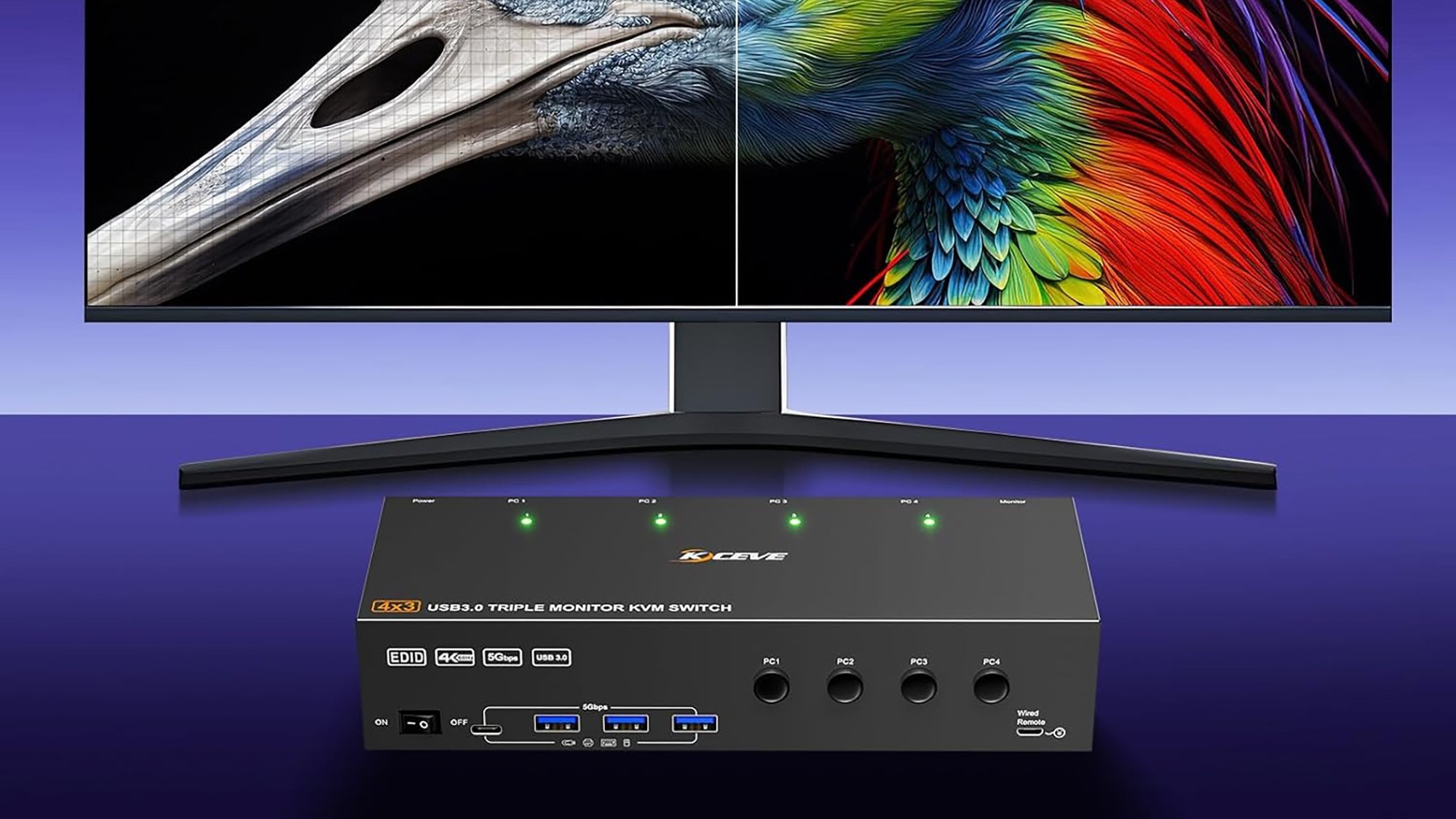
A 4K KVM switch Credit: Mleeda
More advanced KVM switches or hubs have support for multiple monitors, and other accessories and peripherals on top, but the more features you want the more money you’re going to have to spend. A basic one for two computers will set you back around $30, while a more advanced one with support for four computers and its own remote is going to be more like $105.
A Bluetooth keyboard/mouse combo
The $35 Logitech K480 will work with just about anything that supports Bluetooth, including computers, smartphones, and tablets. With this, switching among devices is as easy as turning a dial on the side of the keyboard.
Hyundai is sending out letters to potentially millions of drivers affected by a newly disclosed data breach that happened earlier this year. According to the letter, a “cyber incident” at Hyundai AutoEver America (HAEA), an IT solutions provider for the automotive industry, resulted in unauthorized access to systems starting on February 22
An anonymous reader shares a report: Costing tens of thousands of dollars each, Nvidia’s pioneering AI chips make up a hefty chunk of the $400 billion that Big Tech plans to invest this year — a bill expected to hit $3 trillion by 2029. But unlike 19th-century railroads, or the Dotcom boom’s fiber-optic cables, the GPUs fueling today’s AI mania are short-lived assets with a shelf life of perhaps five years.
As with your iPhone, this stuff tends to lose value and may need upgrading soon because Nvidia and its rivals aim to keep launching better models. Customers like OpenAI will have to deploy them to stay competitive. So while it’s comforting that the companies spending most wildly have mountains of cash to throw around (OpenAI aside), the brief useful life of the chips and the generous accounting assumptions underpinning all of this investment are less consoling.
Michael Burry, who made his name betting against US housing and who’s recently turned to the AI boom, waded in this week, warning on X that hyperscalers — industry jargon for the giant companies building gargantuan data centers — are underestimating depreciation. Far from being a one-off outlay, there’s a danger of AI capex becoming a huge recurring expense. That’s great for Nvidia and co., but not necessarily for hyperscalers such as Google and Microsoft. Some face a depreciation tsunami that’s forcing them to be extra vigilant about controlling other costs. Amazon has plans to eliminate roughly 14,000 jobs.
And while Wall Street is used to financing fast-depreciating assets such as aircraft and autos, it’s worrying that private credit funds are increasingly using GPUs as collateral to finance loans. This includes lending to more speculative startups known as neoclouds, who offer GPUs for rent. Microsoft alone has signed more than $60 billion of neocloud deals.
The shimmering Pleiades star cluster has just shed its millennia-old reputation as a collection of Seven Sisters. Thanks to new data gleaned from the TESS and Gaia star-tracking spacecrafts, astronomers have revealed that this iconic group is part of a diaspora up to 20 times larger than previously imagined. Published this week in The Astrophysical
The Alien franchise has been decidedly hit and miss since the near-universally beloved first two movies, but it’s in a very good place at the moment. 2024’s Alien: Romulus was a magnificent return to form, and this year that good run of form continued in the series’ first TV show, Alien: Earth, which has been renewed for a second season.
The first season wrapped up in September and ended on a pretty dramatic cliffhanger, so while it seemed pretty obvious that more episodes would be coming, it’s good to have it confirmed. Noah Hawley is once again heading up the project, and according to The Hollywood Reporterthe Fargo creator has signed a multi-year deal with Disney that will see him work on the ever-expanding entertainment empire’s other channels and services, including ABC and Hulu Originals, as well as continuing to produce shows for FX.
Variety reports that season two of Alien: Earth will start production in London in 2026, a pretty significant change from the debut season, which was shot in Thailand. Presumably that means we’ll be heading to some new locations in the show too, but we’ll have to wait for a trailer to find that out.
Set two years before the original Alien, Alien: Earth sees a retro-futuristic shipping vessel carrying some ominously familiar-looking extra-terrestrial cargo crash-land on Earth, where we meet a terminally ill girl who becomes the first human-synthetic hybrid. The season one cast includes Sydney Chandler, Alex Lawther, Timothy Olyphant, Essie Davis, Samuel Blenkin, Babou Ceesay, David Rysdahl, Adrian Edmondson, Adarsh Gourav, Jonathan Ajayi, Erana James, Lily Newmark, Diem Camille, and Moe Bar-El.
This article originally appeared on Engadget at https://www.engadget.com/entertainment/alien-earth-has-been-renewed-for-a-second-season-144124743.html?src=rss
qBittorrent 5.1.3 has been released today as the third maintenance update to the latest qBittorrent 5.1 series of this open-source, cross-platform, and free BitTorrent client for GNU/Linux, macOS, and Windows.
Following a teaser in September that confirmed the movie’s title, Nintendo and animation studio Illumination unleashed the first proper trailer for The Super Mario Galaxy Movie in a dedicated Nintendo Direct. The sequel to The Super Mario Bros. Movie, the highest-grossing movie based on video games, will hit theaters in the US on April 3.
The trailer opens with Bowser engaging in a little art therapy, which, honestly, could be really great for him. Mario can’t help put put down Bowser’s artwork, though. What a jerk. From there, the action riffs on Super Mario Galaxy as Peach and Toad use launch stars to travel to a different planet. I don’t want to give away everything that happens, so just watch the trailer. The visuals, as you’d expect from Illumination, look terrific.
The trailer also confirms the addition of two fan-favorite characters this time around: Rosalina (who takes out a giant robot with her abilities) and Bowser Jr, who is taking his father’s place as the sequel’s villain. Rosalina is played by Brie Larson, while Benny Safdie voice Bowser Jr.
An extra clip after the trailer shows Rosalina reading a story about Princess Peach to a group of Lumas. Another features Bowser Jr. promising that “the Bowser name shall be feared once more.” Ominous!
However, the Direct didn’t include any indication of Yoshi appearing in the film. An Easter egg at the end of the first movie showed Yoshi’s egg cracking. Plus, a Pillsbury cookie box — of all things — all but confirmed Yoshi would be in the movie, while hinting at the inclusion of Princess Rosalina and Bowser Jr. We’ll perhaps have to wait until the next trailer to get a glimpse of Mario’s dino pal, who’ll probably be green even though everyone knows in their heart blue Yoshi is the best Yoshi.
This article originally appeared on Engadget at https://www.engadget.com/entertainment/tv-movies/the-super-mario-galaxy-movie-trailer-confirms-rosalina-and-bowser-jr-are-in-the-sequel-142815627.html?src=rss
Red Hat Enterprise Linux 10.1 has reached general availability with a number of enhancements to this leading enterprise Linux distribution. As with so many things in 2025, AI is a big focus for RHEL 10.1…
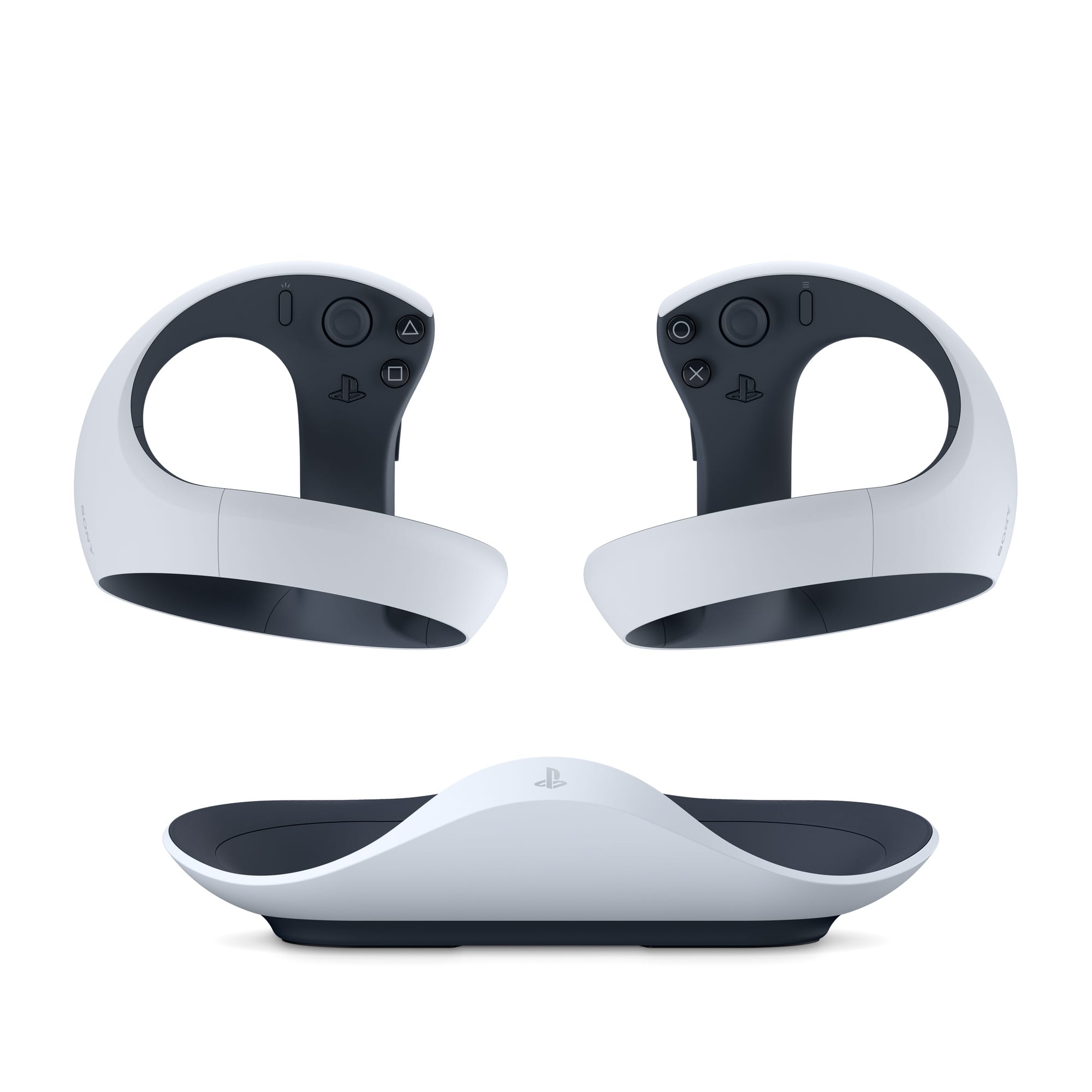
The PlayStation VR2 Sense Controllers are now sold by Apple, priced at $250, and the charging stand is included.
Apple added support for Sony’s tracked controllers to Vision Pro headsets with visionOS 26, which released in September, but Sony itself doesn’t sell them separately from its $400 VR headset.
The PS VR2 Sense controller support of visionOS includes 6DoF positional tracking, capacitive finger touch detection, and basic vibration support. The precision haptics of the controllers are not supported, however, and nor are their unique resistive triggers.
One of the first Vision Pro games to support the PS VR2 Sense controllers was the indie title Ping Pong Club, which we tested when visionOS 26 launched.
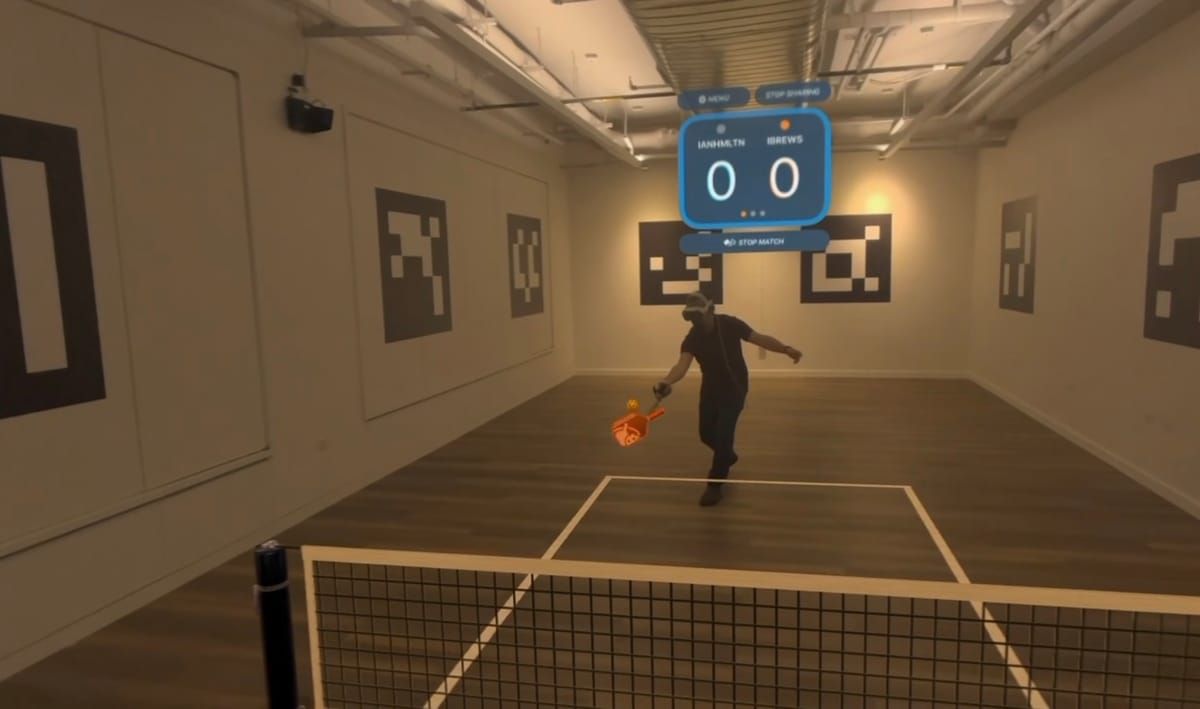
And three weeks ago, Resolution Games launched a title leveraging the controllers called Pickle Pro, a pickleball game with both local and remote SharePlay, so you can play against other Vision Pro owners in the same room or remotely over the internet as Personas.
The $250 price includes Sony’s official charging stand.
The PlayStation VR2 Sense Controllers are available on the online Apple Store in the US, priced at $250, with Sony’s official charging stand included.
There’s no word yet on availability outside the US.
Technically, PS VR2 headset owners who lose or damage both controllers could also buy the package from Apple instead of a new headset, though it would probably be a better idea to get used replacements on a marketplace like eBay instead.
During its State of Play event, Sony announced a PlayStation-branded gaming monitor that is coming to market next year. The display’s specs are rather underwhelming compared to a litany of existing options on the market, though it does sport a clever feature that PS5 owners will appreciate—a built in charging hook for DualSense and DualSense
2023 saw Triangle Factory release Breachers, a popular 5v5 tactical shooter often described as VR’s answer to Rainbow Six Siege. Now, the studio is scaling up its ambitions with Forefront, a 32-player shooter that aims to bring the large-scale warfare and destructible environments of games like Battlefield to virtual reality.
Recently launched in early access, I’ve spent the past week storming the beaches of Forefront, and it successfully replicates many of the elements that make games like Battlefield so compelling. With just a few small changes, I can see Forefront becoming one of the more popular and successful VR games of its type.
The Premise
Forefront takes place in the near future of 2035, a time when an energy corporation known as O.R.E. has declared war against nondescript local governments over control of a rare mineral. The story is perfunctory, a plausible backdrop for vague military entities to shoot at one another. You play as a dude on one side of the conflict, and you’ve got to shoot the dudes on the other side.
It’s structured around large-scale, squad-based multiplayer battles that pit infantry and land, sea, and air-based vehicles against each other. Each match unfolds with two 16-player teams fighting for control over sprawling maps full of semi-destructible environments.
Players choose to play as one of four (currently) classes: assault, engineer, medic, and recon (sniper). These class types will be familiar to most who have played shooters in the last 25 years, and each comes with their own sets of primary and secondary weapons, equipment, and abilities, and supplementary equipment. For example, the assault class can toss down an ammo resupply box while a medic can bring defibrillators out to revive fallen teammates.
Much of this will read as standard to the genre. And it is. The difference comes from VR.
0:00
/1:45
A montage of Forefront gameplay clips captured by UploadVR on Quest 3S
Gameplay
Forefront is rich with tactile mechanics. You manually reload weapons, grabbing and tossing an empty mag, replacing it with one ripped from your flak jacket, and chambering a round. Tossing a grenade requires stowing your primary weapon, yanking the grenade from its place on your body, and pointing with your free hand to direct where and how far you want the egg to go. Zip lines and parachutes need to be gripped.
Weapons respond differently depending on how they’re held (one or two-handed), and physical movement plays a large part in whether you’ll win a firefight. This immersion is a real strength. ADS (aiming down sights) feels realistic in VR. Tossing a grenade feels weighty. Despite a learning curve and the occasional awkward fumbling inherent in complex VR environments, the hands-on gameplay works really well to engage you in the moment.
The arsenal of weapons and vehicles is vast and impressive. Shotguns, SMGs, handguns, RPGs, assault rifles, and sniper rifles – everything that shooter fans likely expect is here. Tanks and helicopters and gunboats allow for drivers, passengers, and gunners to rip across the large environments fast and loud. There’s even a jet ski for when you want to fire up the Wave Race 64 soundtrack and take a break from all the fighting.
Progression is also familiar. Accomplishing in-game objectives, eliminating enemies, earning assists, etc., award experience for both you and your weapons. Leveling up provides character upgrades, load-outs, equipment unlocks, and more weapons.
Online network issues were non-existent in my time with Forefront on Quest 3S. There were plenty of available lobbies and matches, sessions packed with full squads, quick matchmaking, and reliable connections.
0:00
/0:27
A classic Battlefield-esque moment…
Visually it’s impressive, the lighting is generally striking, and if we take a moment to notice, the environments are actually rather beautiful. Sound design is handled well, with directional audio being well-implemented.
In short, the structure and mechanics of Forefront bring together the tactical class roles, robust gunplay, vehicular warfare, and compelling progression mechanics of the established games in the genre. If the developers’ target was “Battlefield in VR,” Forefront is mostly dead on. It’s a great and uniquely effective game that brings VR shooters to a more even footing with their flatscreen counterparts.
But Forefront is not perfect.
0:00
/0:25
The Recon (sniper) class could use some work.
Collateral Damage
The Recon class is woeful, almost useless. Sniper rifles are the only primary weapons that the class can use, and as these guns stand right now, they are currently underpowered (not a one-shot kill) and almost impossible to use effectively compared with other classes.
While aiming through the scope is novel, since you have to physically raise the gun up to your eye like we’ve often seen in VR, actually hitting your target is extremely difficult. I’ve made some absolutely ridiculous snipes in non-VR gaming, but holding the rifle here feels jittery and imprecise with no aim smoothing option like Sniper Elite VR offers. You could argue that this makes sniping more realistic, but is Forefront a marksman training app or a video game? After a few hours with the sniper rifle, I abandoned the class secure in my opinion that the devs should add a very subtle aim assist.
I could also complain about the vehicles being rather pointless, since they’re extremely fragile and short-lived. Also, the fully interactive guns can be finicky to use – instead of grabbing the stock, for example, our in-game hands grip the magazine or bolt. I’d also love to see the landscapes more densely populated by buildings and foliage.
Beyond these issues, which could be described as nitpicks or simply not my flavor, are several other almost glaring omissions of established genre norms. For example, Forefront doesn’t currently have any meaningfully implemented directional damage indicator, which means that you often can’t tell which direction you’re taking fire from. This is pretty irritating. There’s no pinging system, which makes communicating with teammates difficult for those who don’t want to mic up. Hit markers are vague, almost to the point of total irrelevance. There’s no party system.
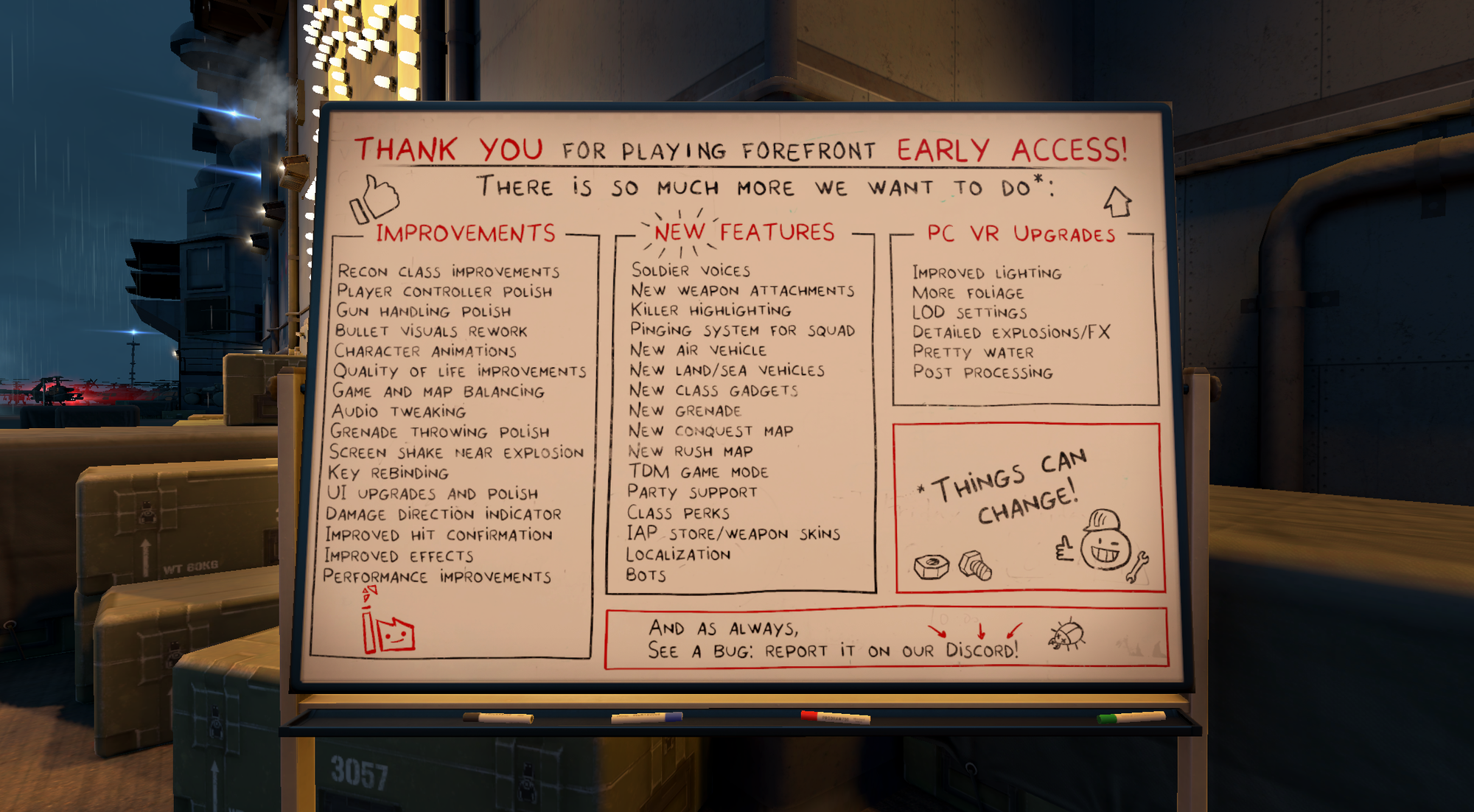
Of course, Forefront is currently in early access, so there’s still room to grow. Forefront’s current roadmap is extensive and displayed prominently on a whiteboard propped up on the deck of the virtual aircraft carrier that serves as the game’s main menu, and some of my issues are already noted. If Triangle Factory checks 60% of these boxes, they’ll have addressed 99% of the game’s current shortcomings.
But don’t be misled by those last few paragraphs of complaints; we’re striving for balance, and the problems noted are ultimately minor. Forefront’s core gameplay is solid, almost perfect for what it aims to be. Combat is exciting and tense, its VR gunplay is tactile and satisfying, and its environments are dynamic and engaging. Currently, it’s difficult to recommend another large-scale shooter over Forefront.
Forefront is out now in early access on Quest, Steam, and Pico.
Ninite has long been a godsend for anyone setting up a new computer. With it, you can install a number of applications in just a couple of clicks, as opposed to downloading a bunch of individual installers. Ninite is well known for simplicity, too. There’s no package manager to learn or commands to type; just visit the website and pick the apps you want to install, then download and run the installer. Installations all run in the background, with no prompts. It’s magical, and I’ve long wondered why Microsoft hasn’t built anything similar—something powerful, yet easy to use.
Well, it seems like someone at the company finally got around to it. A new Microsoft site called App Pack is exactly this. It allows you to visit a page on the Microsoft Store website, check from a selection of applications, and then install those applications by downloading and running a single installer. That’s exactly how Ninite works, though there are a few differences between these two options.
Credit: Justin Pot
The main difference is that Microsoft’s App Pack uses the Microsoft Store to install the applications, and the installer you download instructs the store to make the downloads. This means updates will also be handled by the store, which is a real benefit, but it also means the supported applications are limited to those offered in the store. That’s part of why Ninite offers a lot more software. App Pack offers 32 applications in four categories; Ninite offers over 90 distinct applications in all sorts of categories.
But there’s also the Microsoft of it all. You cannot use App Pack to install Chrome, which isn’t in the Microsoft Store. But you also can’t use it to install Firefox, which is. Given that one of the first things many Windows users do is replace Edge, that’s a real shortcoming; given that Microsoft seems to really want Windows users not to replace Edge, it’s not surprising. Meanwhile, Ninite lets you install Chrome and Firefox, as well as other browsers like Opera, Brave, and, ironically, Edge.
But it’s not as though App Pack only offers Microsoft software. Zoom is offered, as are several apps from Apple (iCloud, Music, and TV). There are desktop apps for all the big social media networks (TikTok, Facebook, Instagram, Discord, and LinkedIn). And there are a few customization tools, including TranslucentTB for customizing the taskbar and F.lux for adjusting the color temperature of your display. There are also multiple apps for working in media, including Photoshop, Audacity, and OBS Studio. It’s just that Ninite offers more, including power user staples like VLC, WinDirStat, 7-Zip, and Handbrake.
If you don’t need these additional apps, however, App Pack is a diverse set of tools, and I could imagine the one-click install saving a lot of time for many Windows users. You can find it here or by clicking the “Multi-app install” button in the top-right corner of the web version of the Microsoft Store.
Google has filed a lawsuit against a group of Chinese hackers running a platform called “Lighthouse” that sells phishing services for a monthly fee. The group offers clients its services to launch massive phishing and smishing (SMS phishing) campaigns. Google says the bad actors typically send out emails or text messages that link to fake websites pretending to be legitimate pages of established brands like USPS and E-Z Pass, in order to trick people into keying in their log-ins and other sensitive details. The company found at least 107 sign-in screen templates with Google branding, designed to steal people’s log-in information.
In its announcement, Google said that one million people from 121 countries have fallen victim to the online scams that used Lighthouse and that the bad actors have already stolen $1 billion. In the US alone, they’ve gotten their hands on between 12.7 million and 115 million credit card numbers. The most popular scheme involves pretending to be the USPS and telling victims that they’d have to pay for the redelivery of a package stuck at the post office.
As The Financial Times reports, Google cited data from cybersecurity company Silent Push in its lawsuit as an example, stating that Chinese criminal group “Smishing Triad” used Lighthouse earlier this year to create 200,000 fake websites. Those websites apparently received 50,000 visits a day and compromised millions of US credit cards within a 20-day period. The company is bringing claims under the US Racketeer Influenced and Corrupt Organizations Act, the Lanham Act, and the Computer Fraud and Abuse Act. If the company wins, it would allow Google to work with carriers and website hosts to take down the operation’s domain and servers.
In addition to filing the lawsuit, Google is also backing bipartisan bills in Congress that take aim at foreign cybercriminals. One bill would enable state and local law enforcement to use federal grant funding to investigate financial fraud targeting retirees. Another aims to establish a task force to block foreign robocalls in the US. The last one targets scam compounds, or centers that serve as bases for scam operations, and intends to provide support to the survivors who were trafficked and forced to work for those centers.
This article originally appeared on Engadget at https://www.engadget.com/big-tech/google-sues-group-running-massive-sms-scam-operation-133000168.html?src=rss