You Can Now Add Your Passport to Your iPhone

Back in 2021, Apple announced a new feature for the Wallet app, that allowed users to add their driver’s licenses or state IDs to their iPhones. To me, it sounded like the beginning of the end for physical wallets. In reality, it was anything but: Not only are the applications limited, but even after all this time, only 12 states and Puerto Rico actually support the feature.

While the rest of us wait for our respective states to get on board, many might have another option for these virtual documents. On Wednesday, Apple announced “Digital ID,” a new initiative that lets you create an ID in the Wallet app using your passport. This bypasses the waiting period for the 38 states that don’t yet support these ID features: If you have a passport, you can try this feature out today. Even if your state supports driver’s license and state ID uploads to the Wallet app, you’ll miss out on features if you don’t have a REAL ID. If you have a passport, however, you can use it instead, which opens up the wallet ID feature to even more users than before.

Like previous attempts at virtual IDs, however, don’t expect to be able to use this Digital ID just anywhere you’d normally show documentation. Right now, the main use for Digital ID is for flying: According to Apple, Digital ID is launching in beta at over 250 airports to be used at TSA checkpoints. Importantly, this feature only supports domestic flights, even though it uses your passport. As such, do not rely on your Digital ID when flying outside of the U.S. You’ll still need your physical passport in order to validate your identity. In the future, however, Apple says you’ll be able to use this Digital ID for other purposes, such as booking flights and hotels, as well as opening new accounts.

How to add your passport to your iPhone

To start, you’ll need a valid U.S. passport, an iPhone 11 or later with iOS 26.1 or later, or an Apple Watch Series 6 or later with WatchOS 26.1. First, open the Wallet app on your iPhone, then tap the (+) at the top of the screen. Here, tap “Digital ID” under “United States.” Here, you’ll see a pop-up which informs you about Digital ID. Tap “Continue,” then follow the on-screen instructions to scan different parts of your passport using your iPhone’s camera. You’ll next need to authenticate yourself by taking a Live Photo of your face. Once confirmed, you’ll need to capture more angles of your face and head, which the Wallet app directs you through.

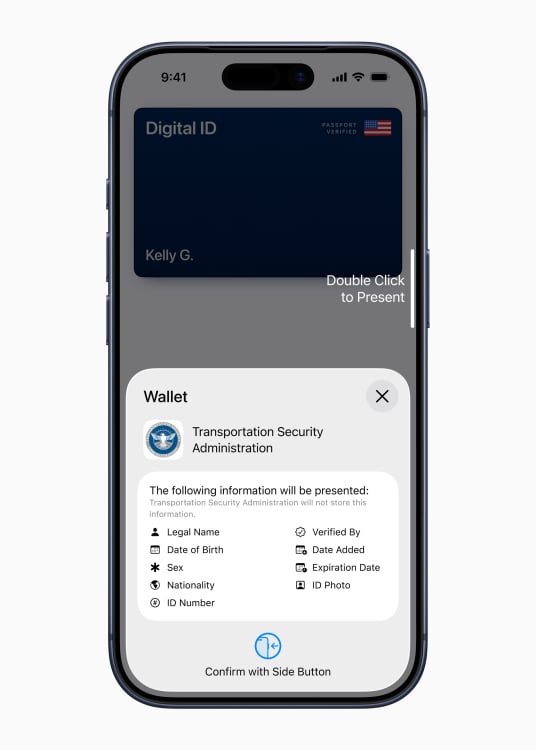
Once validated, the ID will live in your Wallet app. You can open the Wallet app, or double-click the Side or Home button, then choose the ID whenever you need to present it. When in line at the TSA, for example, you can hold your iPhone with your ID activated near the reader: Once the two connect, the reader will take your photo, while your iPhone will show you all the information you’ll be providing to TSA, which can include things like your legal name, date of birth, sex, nationality, ID number, ID photo, expiration date, the date the ID was added, and who verified the ID. You’ll need to double-click the Side or Home button to confirm you want to share this data.
apple wallet digital id

Credit: Apple

Is Digital ID secure?

Yes, at least according to Apple. The company says that any ID data you add to the Wallet app, be it a passport, driver’s license, or state ID, is encrypted and stored on-device. That means that only you have access to this data—not even Apple can see it. In addition, Apple cannot see when you use your ID, nor can they see what data you shared at the time of identification. You also need to use Face ID or Touch ID to authenticate yourself through this process, so even if someone steals your iPhone, they won’t be able to obtain that ID data.

As stated above, you will see a list of data that will be shared when authenticating with Digital ID. If you aren’t comfortable sharing this data with, say, TSA, you don’t have to double-click the Side or Home button, and can instead choose another form of authentication. Plus, the way this feature is set up, you don’t need to unlock your iPhone or physically hand it over to confirm your iPhone. By double-clicking the Side button or Home button, you can access the ID data without compromising your iPhone.

I’m pretty privacy conscious, but this is a feature I’d be willing to try—assuming I fly out of an airport that supports it. I could see how this might be a bridge too far for some people, especially considering the amount of face scanning you need to do to validate the ID. But Apple says in its Wallet app that this data is used to validate your identity and prevent fraud, and is retained only until the issuing authority approves or denies your ID. In other words, whether or not setup is successful, Apple will delete your face scans once the process is over. Seeing as the rest of the data is encrypted, that might just be enough for me to be comfortable testing this out.

You Can Get This Retropian Retro Gaming Console With 20,000 Classic Games on Sale for Just $90

We may earn a commission from links on this page. Deal pricing and availability subject to change after time of publication.

There’s something oddly comforting about holding an entire childhood in your hands. The Retropian X Handheld Retro Gaming Console is currently on sale for $89.99 at StackSocial, bringing back that exact feeling. Think of it as a portable time machine with over 20,000 preloaded games spanning more than 30 classic systems, all tucked into a body small enough to slip into a jacket pocket. No cartridges, adapters, or online sign-ins, just a black handheld with a sharp 5.1-inch IPS display and a simple mission: let you play the hits from your childhood, minus the hassle.

Inside, it runs on a Rockchip RK3326 quad-core CPU with a Mali-G31 GPU, which means it handles everything from 8-bit platformers to 3D-era titles smoothly enough for casual nostalgia trips. The 64GB of storage holds plenty out of the box, but you can expand it up to 256GB with a microSD card if you want to load your own ROMs or mods. Also, it runs an open-source Linux system, making it easy to customize your setup. As for its battery life and connections, the 3,200mAh battery provides around four to six hours of playtime, which is long enough for a train ride or a lazy afternoon. Meanwhile, Wi-Fi and Bluetooth allow you to connect controllers or download new titles without needing to plug in anything.

The Retropian X is designed for people who miss the sound of pixel explosions and 16-bit soundtracks. It’s lightweight, featuring an ergonomic design that prevents cramping in your hands mid-game, and comes pre-configured, allowing even non-techies to get started right away. The 854×480 resolution isn’t cutting-edge, and the speakers aren’t concert-grade, but when you’re revisiting Mario, Sonic, or Street Fighter in their old-school form, you’ll be glad for the simplicity of a straightforward, plug-and-play nostalgia box that requires nothing but your time and, perhaps, a fully charged battery.

Our Best Editor-Vetted Tech Deals Right Now


Apple AirPods 4 Wireless Earbuds


—
$84.99

(List Price $129.00)


Apple Watch Series 10


—
$309.99

(List Price $429.00)


Amazon Fire HD 10 (2023)


—
$69.99

(List Price $139.99)


Sony WH-1000XM5


—
$328.00

(List Price $399.99)

Deals are selected by our commerce team

With another record broken, the world’s busiest spaceport keeps getting busier

CAPE CANAVERAL, Florida—Another Falcon 9 rocket fired off its launch pad here on Monday night, taking with it another 29 Starlink Internet satellites to orbit.

This was the 94th orbital launch from Florida’s Space Coast so far in 2025, breaking the previous record for the most satellite launches in a calendar year from the world’s busiest spaceport. Monday night’s launch came two days after a Chinese Long March 11 rocket lifted off from an oceangoing platform on the opposite side of the world, marking humanity’s 255th mission to reach orbit this year, a new annual record for global launch activity.

As of Wednesday, a handful of additional missions have pushed the global figure this year to 259, putting the world on pace for around 300 orbital launches by the end of 2025. This will more than double the global tally of 135 orbital launches in 2021.

Read full article

Comments

IBM announces Nighthawk and Loon quantum chips

IBM has introduced two different quantum chips that it believes could help demonstrate “quantum advantage,” or the ability for a quantum computer to solve a problem faster than a classical computer, by the end of 2026. The new chips, Nighthawk and Loon, should help do that by taking different approaches to connecting qubits in a quantum computer, producing fewer errors and supporting more complex computations.

Of the two new chips, IBM Quantum Nighthawk is the one the company believes it can iterate on to produce quantum advantage. By the end of 2025, the version of Nighthawk IBM will provide to its partners will have “120 qubits linked together with 218 next-generation tunable couplers” arranged in a square lattice to connect with their neighbors. IBM claims this will allow Nighthawk to “execute circuits with 30 percent more complexity” while maintaining lower error rates. It’ll also let it handle more demanding computational problems “that require up to 5,000 two-qubit gates,” the company says.

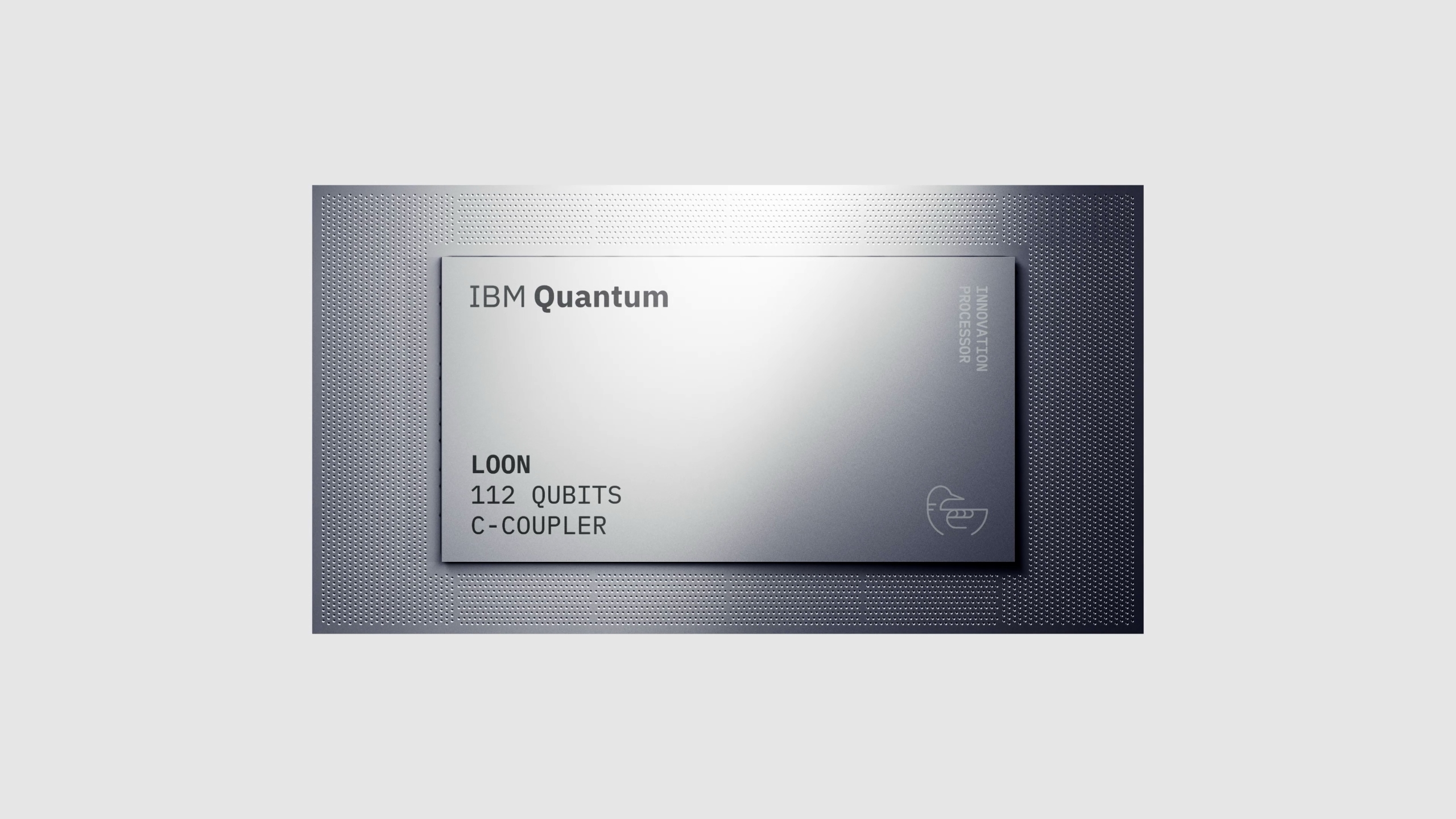
A silver, rectangular Quantum Loon chip.
The IBM Quantum Loon chip.
IBM

IBM Quantum Loon is the more experimental of the two chips, connecting qubits not just horizontally on the chip, but vertically, too, New Scientist writes. Whichever chip proves to be more useful, the added connectivity options allows for fewer errors and more complex computations, which could lead to new real-world applications for quantum computers.

To pair with its new chips, IBM says it’s also contributing to a new community-led quantum advantage tracker backed by Algorithmiq, researchers from the Flatiron Institute and BlueQubit. The tracker “supports three experiments for quantum advantage across observable estimation, variational problems, and problems with efficient classical verification,” IBM says, and the company has invited the wider research community to contribute to it.

As New Scientist notes, IBM’s approach is different from competitors like Google because it’s focused on connecting qubits together in smaller groups. Google introduced its Willow chip in 2024 as being theoretically capable of demonstrating quantum advantage. A year later in 2025, the company announced its “Quantum Echoes” algorithm for Willow, “the first-ever verifiable quantum advantage running the out-of-order time correlator (OTOC) algorithm.”

This article originally appeared on Engadget at https://www.engadget.com/science/ibm-announces-nighthawk-and-loon-quantum-chips-213603769.html?src=rss

OpenAI’s GPT-5.1 Brings Smarter Reasoning and More Personality Presets To ChatGPT

OpenAI today released GPT-5.1, an update to its flagship model line. The update includes two versions: GPT-5.1 Instant, which OpenAI says adds adaptive reasoning capabilities and improved instruction following, and GPT-5.1 Thinking, which adjusts its processing time based on query complexity.

The Thinking model responds roughly twice as fast on simple tasks and twice as slow on complex problems compared to its predecessor. The company began rolling out both models to paid subscribers and plans to extend access to free users in coming days. OpenAI added three personality presets — Professional, Candid, and Quirky — to its existing customization options. The previous GPT-5 models will remain available through a legacy dropdown menu for three months.


Read more of this story at Slashdot.

Even Realities’ G2 Smart Glasses Bring AI Into Your Real-Life Conversations

Smart glasses maker Even Realities today released its latest model, the Even G2 Display Smart Glasses. Featuring a monochrome display, stylish frames, and a unique ring controller, G2s are available now for $599. In contrast to Meta Ray-Ban Displays’ “do-everything” approach, G2s are designed to do one specific thing: provide a smart display that only the wearer can see.

Instead of a camera and speaker, the G2s feature a suite of basic apps, like a teleprompter and a map that you can see with a tilt of your head or a touch of your ring, packed into a pair of light, slick-looking designer frames. The idea is to create cool-looking everyday glasses that are useful instead of obtrusive.

Improvements over the last generation of Even Realities smart glasses

I reviewed Even Realities’ G1 smart glasses (and even used them to scam a free drink) and found them impressive. Well, Even Realities says these are even better. It has improved on the micro-LED display from the last generation—which is pretty great already—to provide a bigger, sharper, and brighter display that includes two-level 3D, so certain information can appear closer to your field of view.

Another new wrinkle is contextual AI: Switch it on during a conversation, and, according to the company at least, your glasses will silently display “suggestions for a more meaningful exchange” that only you will be able to see. If implemented correctly, this feature could be a useful way to augment your life—and if it can provide closed captioning for conversations, I’m fully on board.

All of the above is controlled via a smart ring that lets you click, tap, and scroll. It also monitors your vital signs and health information, so you could display a live-read of your heart-rate or the number of steps you’ve taken that day.

A new app infrastructure (and third-party support)

Those are all welcome upgrades, but maybe the most interesting improvement isn’t to the G2’s hardware. On its website, Even Realities promises third-party app support is coming soon. G1 glasses do everything they’re designed to do really well, but the actual use cases are fairly limited—a teleprompter is cool, but how often do you really give speeches? Opening the glasses up to developers who want to make something new on the Even OS could result in a must-have app, or at least improve apps the glasses already have.

Even Realities nailed the basics with the G1, and these technical improvements and G2’s app support could turn a great concept into an everyday essential. That is, if everything works. Once I test ’em out, I’ll let you know how they match up to what’s being promised.

Valve Enters the Console Wars

Valve has unveiled a new Steam Machine console, taking a second shot at living room gaming a decade after its 2015 Steam Machine initiative failed. The 6-inch cube runs Linux-based SteamOS but plays Windows games through Proton, a compatibility layer built on Wine that translates Microsoft graphical APIs.

Valve spent over a decade working on SteamOS and ways to run Windows games on Linux after the original Steam Machines failed. The device promises six times the performance of the Steam Deck handheld using AMD’s 2022-2023 technology. In an interaction with The Verge, Valve demonstrated Cyberpunk 2077 running at settings comparable to PS5 Pro or beyond on a 4K television. The console updates games in the background and includes automatic HDMI television control that Valve tested against a warehouse of home entertainment equipment. The system navigates entirely through gamepad controls and resumes games instantly from sleep mode.

Valve said pricing will be “comparable to a PC with similar specs” rather than subsidized like traditional consoles. PCs with similar GPUs have cost roughly $1,000 or more. Linux currently plays Windows games better than Windows in side-by-side tests.


Read more of this story at Slashdot.

Microsoft releases update-fixing update for update-eligible Windows 10 PCs

Officially, Windows 10 died last month, a little over a decade after its initial release. But the old operating system’s enduring popularity has prompted Microsoft to promise between one and three years of Extended Security Updates (ESUs) for many Windows 10 PCs. For individuals with Windows 10 PCs, it’s relatively easy to get an additional year of updates at no cost.

Or at least, it’s supposed to be. Bugs initially identified by Windows Latest were keeping some Windows 10 PCs from successfully enrolling in the ESU program, preventing those PCs from signing up to grab the free updates. And because each Windows 10 PC has to be manually enrolled in the program, a broken enrollment process also meant broken security updates.

To fix the problems, Microsoft released an update for Windows 10 22H2 (KB5071959) this week that both acknowledges and fixes an issue “where the enrollment wizard may fail during enrollment.” It’s being offered to all Windows 10 PCs regardless of whether they’re enrolled in the ESU program “as it resolves an issue that was preventing affected customers from receiving essential security updates.”

Read full article

Comments

An explosion 92 million miles away just grounded Jeff Bezos’ New Glenn rocket

CAPE CANAVERAL, Florida—The second flight of Blue Origin’s New Glenn rocket was postponed again Wednesday as a supercharged wave of magnetized plasma from the Sun enveloped the Earth, triggering colorful auroral displays and concerns over possible impacts to communications, navigation, and power grids.

Solar storms like the one this week can also affect satellite operations. That is the worry that caused NASA to hold off on launching a pair of science probes from Cape Canaveral Space Force Station, Florida, on Wednesday aboard Blue Origin’s New Glenn rocket.

In a statement, Blue Origin said NASA, its customer on the upcoming launch, decided to postpone the mission to send the agency’s two ESCAPADE spacecraft on a journey to Mars.

Read full article

Comments

Microsoft Is Offering Rewards Points for Using Edge Instead of Google Chrome

An anonymous reader shares a report: Microsoft employs various schemes to stop Edge users from switching to Chrome, and the latest includes financial rewards for sticking with the browser. As spotted by Windows Latest, select users who search on Bing within Microsoft Edge for a link to download Google Chrome are now shown an offer to stay with the browser. It gives users 1,300 Microsoft Rewards points, which can be redeemed for gift cards (examples include Amazon, Roblox, and Spotify) or donated to one of over 2 million nonprofits.


Read more of this story at Slashdot.

Valve Just Unveiled New Hardware: Meet Steam Frame, Steam Machine & Controller

Valve Just Unveiled New Hardware: Meet Steam Frame, Steam Machine & Controller
Valve is launching three new Steam Hardware projects in 2026, and two of them are quite familiar. The Steam Frame is the newest of the bunch, intended as a lower cost alternative to the ultra-premium Valve Index and joining the likes of Meta Quest and other standalone VR headsets with onboard Qualcomm hardware, but now with SteamOS and a highly

Google Is Cautiously Experimenting With One of Apple’s Most Controversial AI Features

Google is adding one of the iPhone’s most controversial features to its latest Pixel phones, but it’s promising to show a bit more restraint than Apple did. Yes, as part of the November 2025 Pixel feature drop, Pixel 9 and Pixel 10 phones (excluding the Pixel 9a) are getting AI notification summaries.

The problem with AI notification summaries

If you’re reeling back after reading that, I don’t blame you. This is one of the few AI features Apple beat Google to the punch on, and when they came out during the iOS 18.3 beta, the summaries were quickly criticized for handling hard topics like breakups with a cold tone, as well as for misreporting the news.

Apple quickly pulled news summaries (although they’ve since come back) and made it clearer when an AI was writing a notification, but it seems Google’s still being a bit more cautious with its launch.

How AI Notification Summaries on Pixel work

Notification summaries on Google Pixel

Credit: Google

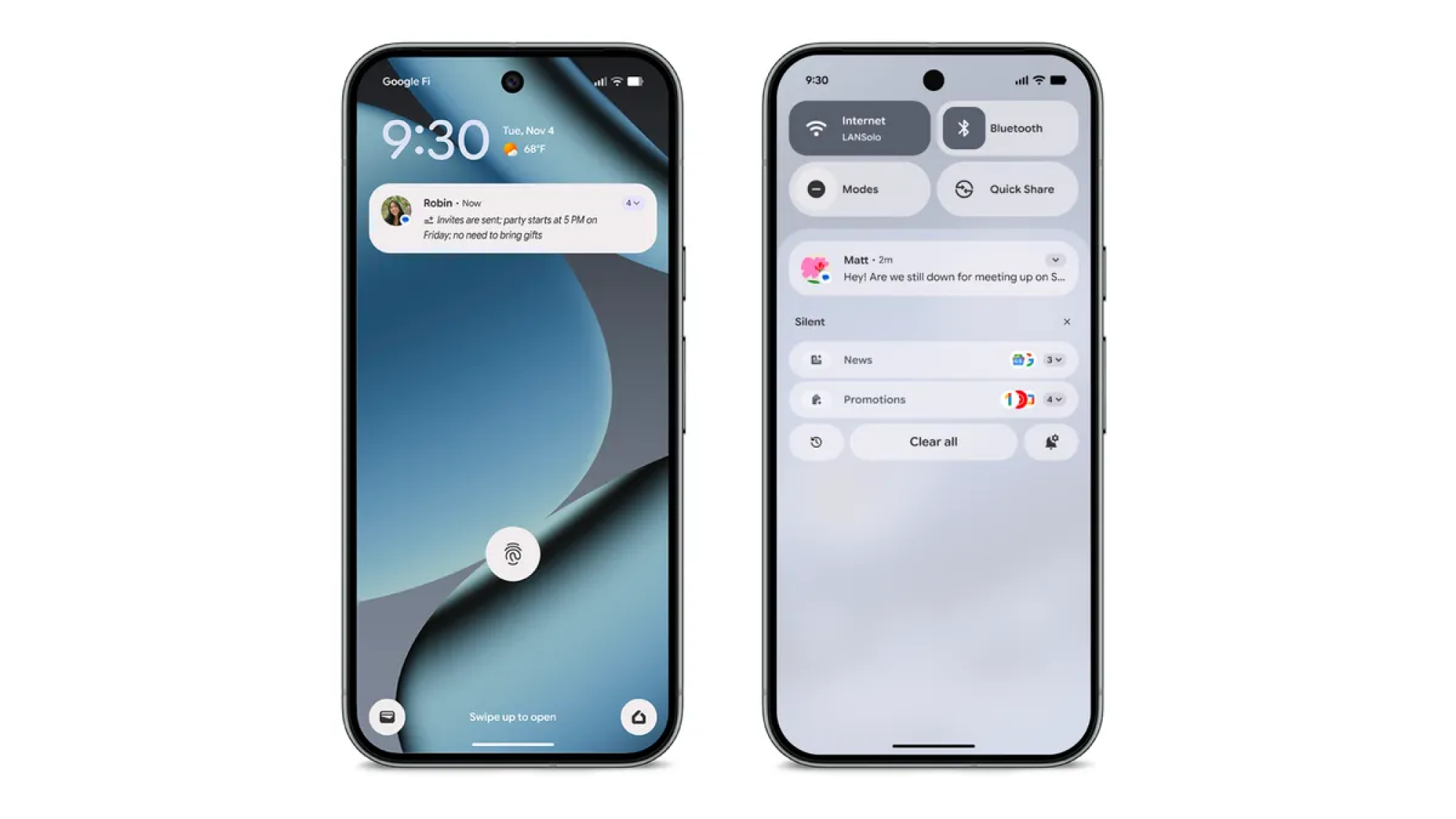
Rather than trying to organize every notification you might get, Google’s AI Summaries are just starting off with popular chat apps for now, including its own Messages app and alternatives like WhatsApp. Additionally, they’ll only kick in on “longer chats,” with the idea being to give you, “digestible conversation recaps.”

That means you’re going to see far fewer AI notifications than on the iPhone, which currently uses them for news, entertainment, chats, email, and more. That’s probably a safer approach for Google, but it does mean the AI summaries are meant to be used more to get you quickly back up to speed, rather than for organization (although that will change in the future).

As on the iPhone, AI notification summaries on the Pixel will be indicated by a small icon with a sparkle and a few lines below it, with the summary following. They’ll also be italicized for additional visual distinction.

How to turn on AI Notification Summaries on Pixel

Google is also exercising caution by making its AI notification summaries entirely opt-in. That means you’ll need to manually turn them on before you start seeing them, which you can do under Settings > Notifications > Notification Summaries. While on this page, you’ll also be able to exclude certain apps from sending AI notification summaries, by adding them to the “Don’t include these apps” list.

If you’re still not seeing the summaries after enabling them, ensure your Android System Intelligence is enabled under Settings > Notifications > Privacy > Notification read, reply & control. Additionally, summaries will not be generated while your phone is in battery saver mode, or while you’re actively using it (per Google, for them to kick in, “the screen must be off for a moment”).

When will my Pixel get AI Notification Summaries?

AI Notification summaries start rolling out today, alongside the November system patch. However, they’re not automatically included in the downloadable patch, so it might be a while before you see them (I don’t have them yet).

It’s still not a bad idea to get your phone fully up-to-date in the meantime. To download the November 2025 Pixel update, either wait for a notification from Google, or head to Settings > System > Software updates to manually check if it’s been rolled out to you yet.

What’s next for Pixel’s AI Notification Summaries?

While today’s update is clearly just Google dipping its toes in the water, the company does have bigger plans for December, where some Pixels will also start automatically silencing “lower-priority notifications” and will start automatically sorting them into categories like “News” and “Promotions.” Hopefully, Google will have learned some lessons from Apple by the time those features go live.

Alien Earth and series creator Noah Hawley will return for season 2

Alien Earth will return to FX (and Disney+ and Hulu) for a second season, thanks to a new deal between Disney and series creator Noah Hawley.

The new season has no air date yet, but we do know one thing about it: It will be shot in London. The first season was shot in Thailand, and most of the story took place in Southeast Asia, so the change in shooting location suggests a new setting for much of the next season. Production on season two will reportedly begin next year.

For those who watched season one to its conclusion, season two probably seemed like a sure thing; the finale resolved many of the core conflicts of that first batch of episodes, but also was clearly intended to be the launching point for a new storyline in season two.

Read full article

Comments

The Rogue Prince of Persia hits Switch and Switch 2 on December 16

The Rogue Prince of Persia is coming to Switch and Switch 2 consoles on December 16. The game was in early access for around a year before being officially released for PC and consoles back in August.

This version has been “optimized for handheld and hybrid play” and includes all content from the original release. That means players will be able access a wide variety of biomes, weapons and secrets.

This is a unique take on the Prince of Persia franchise, bringing parkour-style movement and combat to the roguelike genre. It’s a fun and frenetic experience that calls to mind another sidescrolling roguelike, Dead Cells. This game was actually co-developed by Evil Empire, the company behind Dead Cells.

This is a digital release, but collectors have something to look forward to. The Rogue Prince of Persia is getting a deluxe physical release on April 10 for Switch, Switch 2 and PS5.

This physical version ships with a game key card, a double-sided poster and a set of cards depicting scenes from the game. When flipped, the cards join together to make up a portion of the title’s world map. Incidentally, there’s no physical version coming for Xbox Series X/S, despite already being available to download.

This article originally appeared on Engadget at https://www.engadget.com/gaming/nintendo/the-rogue-prince-of-persia-hits-switch-and-switch-2-on-december-16-194828522.html?src=rss