Microsoft is reshaping Windows around AI, introducing capabilities that let users control their computers through voice and allow Copilot to take autonomous actions on their behalf. The company is now rolling out a “Hey, Copilot!” wake word on Windows 11 machines, positioning voice as a “third input mechanism” to supplement the keyboard and mouse.
Copilot Vision, which streams what a user sees on their screen, is rolling out globally, enabling the system to troubleshoot PC problems, help with app usage, and provide task guidance. Microsoft is simultaneously testing Copilot Actions through a limited preview, allowing the AI to take autonomous actions on local machines like editing folders of photos. The company is also integrating Copilot into the Windows taskbar and launching advertisements promoting these features, coinciding with Windows 10’s end-of-support earlier this week.
Yusuf Mehdi, Microsoft’s consumer chief marketing officer, said the company wants users upgrading to Windows 11 to “experience what it means to have a PC that’s not just a tool, but a true partner.” Microsoft attempted to popularize Cortana, a voice assistant, on Windows 10 a decade ago. Last year, the company released Recall, a feature that automatically captured screenshots, drawing criticism over privacy.
The Arlo Pro 5S 2K Spotlight Camera (2-Pack) is currently down to $129.99 from its usual $329.99 on Amazon, marking its lowest price yet, according to price trackers. That’s a big drop for a wireless home security setup that doesn’t require drilling, wiring, or professional installation.
Each camera records in 2K resolution, detailed enough to capture faces, license plates, and small movements clearly. The footage stays sharp even when you zoom in digitally, which cheaper models often struggle with, notes this PCMag review. Both cameras come with built-in spotlights and color night vision, so you’ll see what’s happening even in low light. The motion-activated lighting adds visibility, and you also get two-way audio, so you can talk to delivery drivers or scare away a raccoon if needed.
These cameras are easy to place anywhere since they run on rechargeable batteries and don’t need cables. You can mount them indoors, outdoors, by the garage, or overlooking a backyard gate. Plus, these cameras can operate on dual-band wifi (2.4GHz and 5GHz), which means a stronger and more reliable signal no matter where you place them. When they detect motion, you’ll get instant notifications on your phone and can view a live feed through the Arlo app. As for battery life, Arlo says each charge lasts a few months, depending on how often the cameras record, and you can easily check battery levels in the app.
There are a few catches, though. You don’t get local storage out of the box—you’ll either need to buy the Arlo Smart Hub ($99) or pay for an Arlo Secure subscription. The plans start at $7.99 per month for one camera and go up to $17.99 for unlimited ones, unlocking cloud storage, smart alerts, and object detection. Without a plan, you can still use live view and basic notifications. On the bright side, the Arlo Pro 5S 2K integrates well with Alexa, Google Assistant, SmartThings, and IFTTT, so it fits into most smart home setups (and even Apple HomeKit if you pair it with the hub).
After a picture popped up on Reddit showing several pallets of MSI-brand GeForce RTX 5090 graphics cards in China, MSI responded with a statement vehemently denying it had any role in the apparent large-scale smuggling operation. The reason MSI felt compelled to comment on the situation is because the United States has banned the export of
AOMP 22.0-1 was released on Wednesday as the newest routine update to this downstream of LLVM/Clang/Flang maintained by AMD that continues to carry their latest modifications for enhancing the C/C++/Fortran compiler offloading support to AMD Radeon/Instinct hardware using the likes of OpenMP and OpenACC…
Garmin watches are great for running, but are a bit tricky to work with when you’re trying to track strength training in the gym. (I have some tips here on how to make the most of that strange experience.) But an app called LiftTrack makes up for Garmin’s shortcomings, giving you the Garmin-based strength experience that maybe Garmin should have given you in the first place.
Workout creation makes more sense with LiftTrack
Credit: Beth Skwarecki
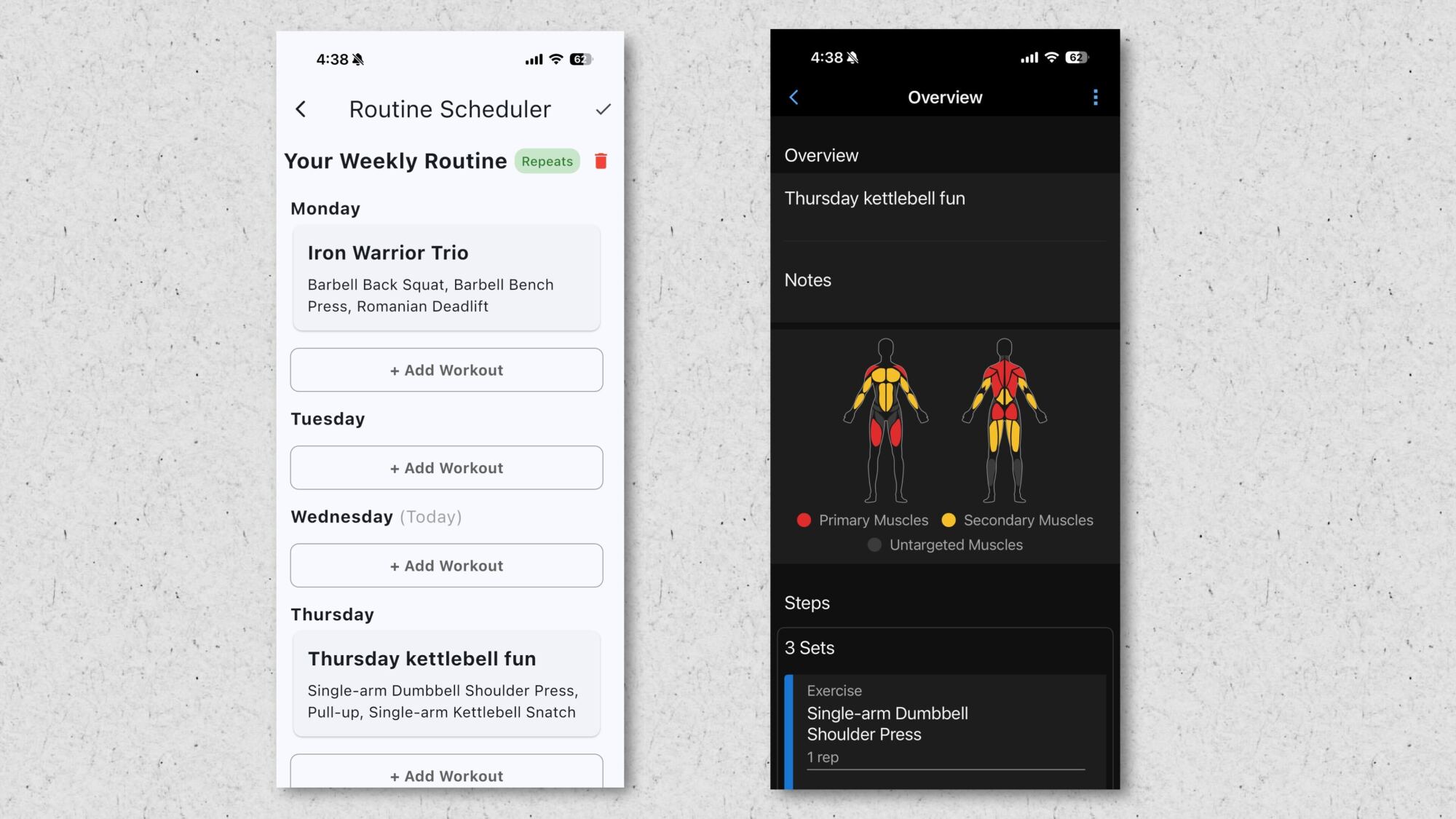
LiftTrack is an app (available for iOS and Android) that helps you to create workouts, schedule workouts, and view your history of workouts and lifts. If you’ve used an app like Hevy or Strong to track strength training, you’ll be familiar with the idea.
Create a workout in LiftTrack, and the experience is similar to those strength training apps: you’ll choose exercises, say how many sets and reps you plan to do, and arrange them into the order you’d like, supersetting pairs of them if you like.
In Garmin’s own app, the process is backwards: you arrange blocks of work and rest, assigning exercises to them afterward. You can’t change weight or reps from one set to another unless you break the exercise out of its little repeat loop and create a new block. It’s an interface that makes sense for HIIT but not so much for a traditional gym workout of squats and curls.
LiftTrack has some built-in strength programs (as does Garmin) and an AI routine builder (which Garmin does not). After creating a workout, you can sync it to your calendar for a given day, or set up a repeating schedule so that your bench press workout will appear every Monday.
Your Garmin watch will pick up on the routine
LiftTrack’s underlying features, like the ability to sync a workout to your calendar, are features Garmin has had all along. Garmin just doesn’t connect them to each other well. For example, there’s no simple way to tell Garmin that you want to bench every Monday. But Garmin does have a calendar that will automatically offer you a bench press workout if you set it up that way.
So to do the workout, you just show up to the gym, select Strength Training on your Garmin watch, and the day’s workout will pop up asking if you’re ready to start. As you go through the workout, your watch will record your reps and let you indicate the weight you used. Once the workout is finished, the data syncs back to LiftTrack.
LiftTrack lets you view your history and progress
Viewing a strength workout after the fact has never been super easy in the Garmin app. You can view today’s workout, yes, but you can’t easily get a big-picture view of things like how the weight you can squat has trended up over time.
LiftTrack, once again, provides what Garmin does not. I can see my strength training history on a calendar (without any runs or other workouts cluttering it up), view my most recent workouts, and see charts of my progress on each lift.
Based on that history, LiftTrack can then update your next workout, recommending that you go a little heavier if you were able to lift more than expected last week. In short, it’s everything that Garmin should have included in their strength training feature, but didn’t.
YT Industries UK is selling off all of its remaining assets in an online auction, with 30 bikes among the listings, after the brand entered insolvency in September.
Auction house Marriott and Co. is hosting the sale, with 144 lots on offer. The auction kicked off on 7 October and runs until 3pm on 22 October.
The listings include mountain bikes and eMTBs, with one lot consisting of a quantity of miscellaneous MTB parts with a claimed value of £170,000.
There are also two Transit vans, electric workstands, power tools and posh coffee equipment going under the hammer.
We’ve rounded up some of the most interesting lots you could bid on.
This YT Izzo Core 1 in XXL is lot number 10. Marriott & Co.
Firstly, there are some 30 bikes for sale. These are ex-demo bikes, so will have likely had some use, but they could sell for bargain prices.
All the lots containing bikes have already met their reserve price, so will sell for whatever price they reach.
The cheapest bike at the time of writing is lot 10, a YT Izzo Core 1 CF trail bike in XXL. Bidding has reached £694, with a full retail price of £2,699.
Most bikes on sale are eMTBs, but there are a few non-assisted bikes, such as lot 5 – a Jeffsy Core 4. Marriott & Co.
There is also a YT Jeffsy Core 4 in size Large with SRAM AXS Transmission, which is currently going for £1,010 and retails for £5,000.
Lot 34 is a YT Decoy Core 5 MX eMTB, which looks to have been used as a demonstrator. Marriott & Co.
There are electric mountain bikes galore and we like the look of lot 34: a YT Decoy MX Core 5, which has an RRP of £7,799 but is selling for £1,110 at the time of writing.
Lot 33 could be worth keeping an eye on. Marriott & Co.
The most valuable bike is lot 33, a YT Decoy SN 29 Core 4, which retails at £8,499, but is currently bid up to only £1,280.
Both these eMTB lots come with spare Fazua motors.
Parts bin special
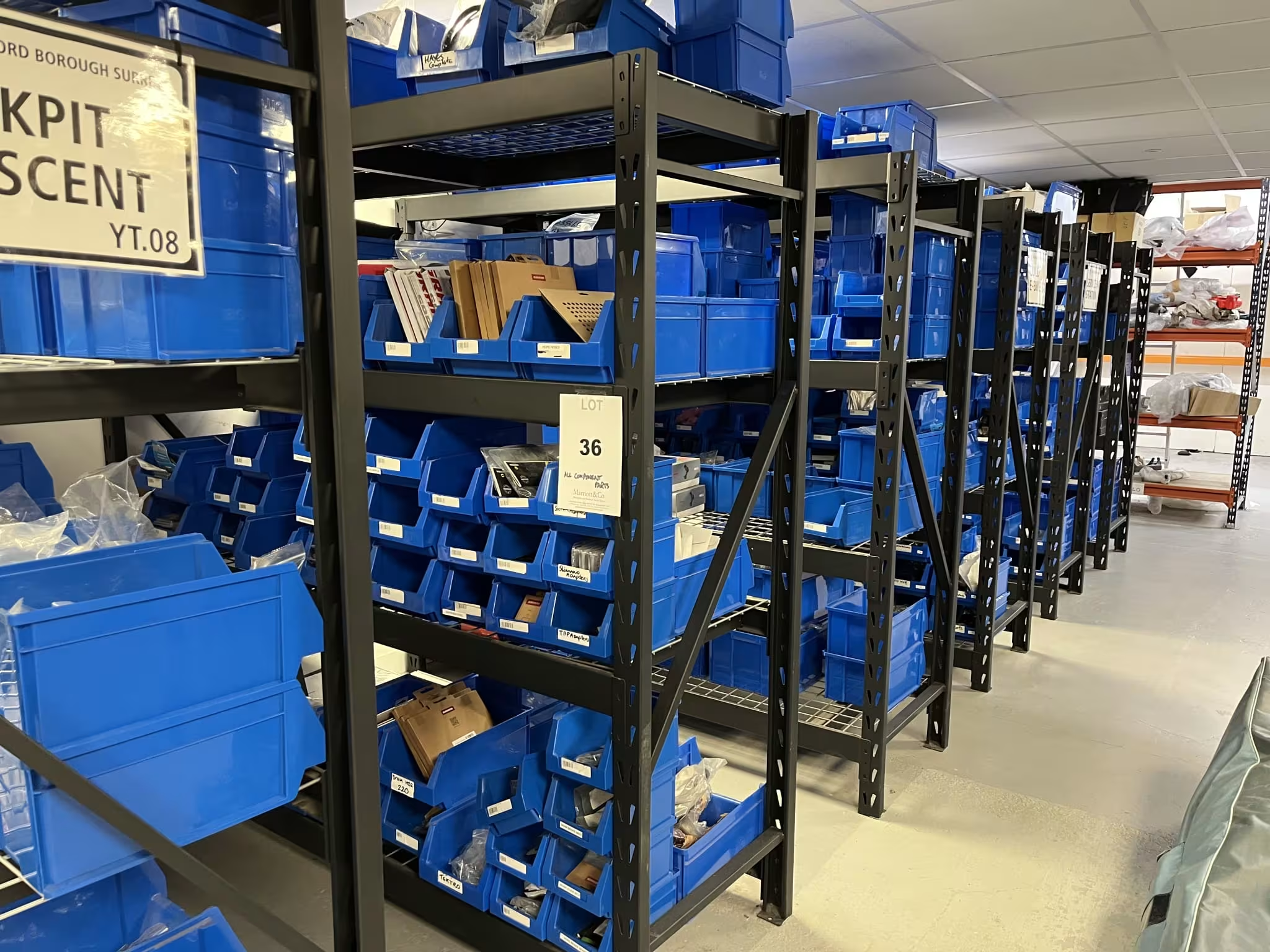
It’s difficult to make out the details of some lots from the photos, but lot 36 is valued at £170,000. Marriott & Co.
Lot 36 is made up of miscellaneous MTB parts, presumably destined for bike builds on frames that will now never arrive.
The listing’s description says the stock is worth £170,000 and it’s currently at £2,600 without meeting the reserve.
Looking at the photos, it’s possible to make out what appear to be brake rotors, cassettes and even a fork hidden high up on a shelf.
Van life
Lot 1 is a long-wheelbase Ford Transit van, which could make a great stealth-camper build. Marriott & Co.
If you fancy a new van, lot 1 is a long-wheelbase, high-top Ford Transit 350 for £10,000 (and the reserve has been met). It looks perfect for some van-life adventures.
YT wizardry
Lot 95 is for a set said to be made by the team who designed the Harry Potter set. Marriott & Co.
If you fancy redecorating your house with a bang, lot 95 could be for you. It’s a display set said to have been built by the Harry Potter set designers and includes a Mk1 Ford Transit van front end.
Caffeine fiends
YT UK’s two-group coffee machine is up for grabs if you need a caffiene fix. Marriott & Co.
Lot 114 is a two-group coffee machine from La Spaziale, which retails for £5,699 and is currently bid to £780 with the reserve met.
Capra collectables
Three goat masks are included in the auction. Marriott & Co.
With Halloween coming up, you might want a goat’s head mask. If so, you have three chances to be the winning bidder on lot 124, lot 125 and lot 126.
Apple introduced the next iteration of its custom silicon called M5 with the promise of massive performance uplifts in artificial intelligence, CPU workloads, and GPU chores. Built on a 3-nanometer manufacturing process, the Arm-based chip designed in-house comes with a series of big claims. One of those is Apple touting the “world’s fastest
Paxos mistakenly minted $300 trillion of PayPal’s PYUSD stablecoin on Wednesday during an internal transfer. Within minutes, the company identified the error and burned the excess tokens. The transaction appeared on Etherscan, then was quietly reversed before any funds moved or users were harmed.
Paxos said there was no security breach and customer funds were safe. The amount exceeded all US dollars in circulation and surpassed the entire cryptocurrency market combined. Stablecoin issuers possess the power to create or delete billions in synthetic dollars instantly — a capability that distinguishes them from Bitcoin transfers, which are irreversible. Tether mistakenly minted and burned $5 billion in USDT in 2019.
Ever since since 2018, the United States Mint has issued special $1 coins every year to honor American innovation and the “pioneering efforts of individuals or groups.” The Mint has just revealed the designs for 2026 $1 Innovation coins, and one of them features Apple co-founder and former CEO Steve Jobs. It features a young Jobs sitting cross-legged in front of a quintessential California landscape with rolling hills and oak trees. “His posture and expression, as he is captured in a moment of reflection, show how this environment inspired his vision to transform complex technology into something as intuitive and organic as nature itself,” the announcement reads.
Under the project, the US Mint showcases innovations and innovators from different states, the District of Columbia and the five US territories. It works with the governor and other officials of each state or region to determine the best design to represent the people and inventions being featured. Jobs, of course, represents California, where he was born and from where he ran Apple, which became one of the biggest companies in the world under his leadership.
In addition to Jobs’ design, the Mint is also issuing $1 coins featuring Iowa’s Dr. Norman Borlaug, who led initiatives to develop more resilient crops, and an aerial view of the Cray-1 supercomputer in Wisconsin. Finally, the design honoring mobile refrigeration, which represents Minnesota, features a 1940s-era truck with an early front-mounted refrigeration unit.
This article originally appeared on Engadget at https://www.engadget.com/big-tech/the-us-mint-is-honoring-steve-jobs-by-putting-him-on-a-1-innovation-coin-130033801.html?src=rss
Pinterest is taking new steps to reduce the amount of AI slop its users are seeing. The service is adding settings that allow people to “dial down” AI-generated content in a number of categories that are “highly-prone” to such imagery, the company said in an update.
While most social platforms have grappled with how to deal with the rise of AI-created content, Pinterest has been particularly inundated. Its image-board UI has proven particularly susceptible to AI slop, and users have complained about the difficulty of finding content created by humans.
Now, Pinterest is offering users more control over how much AI content appears in their recommendations. The service is adding a “refine your recommendations” setting that allows you to toggle generative AI content from specific categories, including art, architecture, beauty, fashion, entertainment, health, home decor and sport. According to the company, these topics have seen an influx of AI-generated content, but users should “expect even more additions in the future.”
Notably, Pinterest isn’t promising to root out generative AI content entirely. Rather, it says the new settings should “dial down” the amount of AI-based content they’re seeing in a particular category. A spokesperson for the company says this is because not all AI-generated content on the platform is low quality and some users are in fact open to seeing AI-generated material.
The setting also applies only to image pins, not video, so it likely won’t do much to prevent Sora or other AI-created video clips from appearing in your feeds. For AI-created or AI-edited content that does continue to surface, Pinterest says it will label these posts more prominently. The company started experimenting with labels back in May, but has now “ramped up” its tools for identifying such content.
Pinterest’s new settings are available now on desktop and Android and will be available on iOS in the next few weeks.
This article originally appeared on Engadget at https://www.engadget.com/social-media/pinterest-will-let-you-dial-down-ai-slop-in-your-feeds-130000337.html?src=rss
Over a decade since Microsoft tried to make talking to Cortana on PCs a thing — and spectacularly failed in the process — the Windows giant is taking another swing at voice commands with its Copilot AI assistant in Windows 11. Starting today, the company is rolling out an upgrade to its existing Copilot Voice and Vision features which will let you say “Hey, Copilot” and then ask your PC a question based on what’s on the screen. If you’re looking at pictures of Hawaii, for example, you could ask your Windows 11 PC where exactly they were taken, have it plot you a flight plan and potentially even give you some budgeting tips to afford that island vacation.
Microsoft’s jaunty promotional videos for the Copilot features, set to Vampire Weekend’s almost two-decade-old “A Punk,” make the process look practically seamless. One user asks Copilot to show them how to stream their music in the “best possible quality,” and the AI proceeds to highlight the exact location of the streaming settings in Spotify, while suggesting they choose the lossless option. Another person asks Copilot to write up a short biography based on their photo portfolio. Now Copilot isn’t just about searching the web or generating novelty AI art, it’s making it easy for users to perform practical tasks without much effort.
Microsoft is clearly striving for the convenience of the Star Trek ship computer, a dream that also pushed Amazon to invest billions in its Echo devices and Alexa. The difference with Copilot is that you’re not just talking to a faceless speaker — Microsoft is also trying to make Windows 11 aware of what you’re doing on your screen. The “Hey Copilot” feature and all of the Copilot Vision are cloud-based, so you’ll have to live with image data of your desktop making its way to Microsoft’s servers. That involves a level of trust the company has lost with many users, especially after the messy debut of Recall, its first flagship AI-powered feature.
It doesn’t help that many people are still peeved about the death of Windows 10 support this week. Unsurprisingly, the company stresses that “Hey, Copilot” is a purely opt-in feature that’s buried in the Copilot app settings. (Of course, that can always change, especially if the company wants to juice AI engagement stats in a few years.)
Copilot Actions
Microsoft
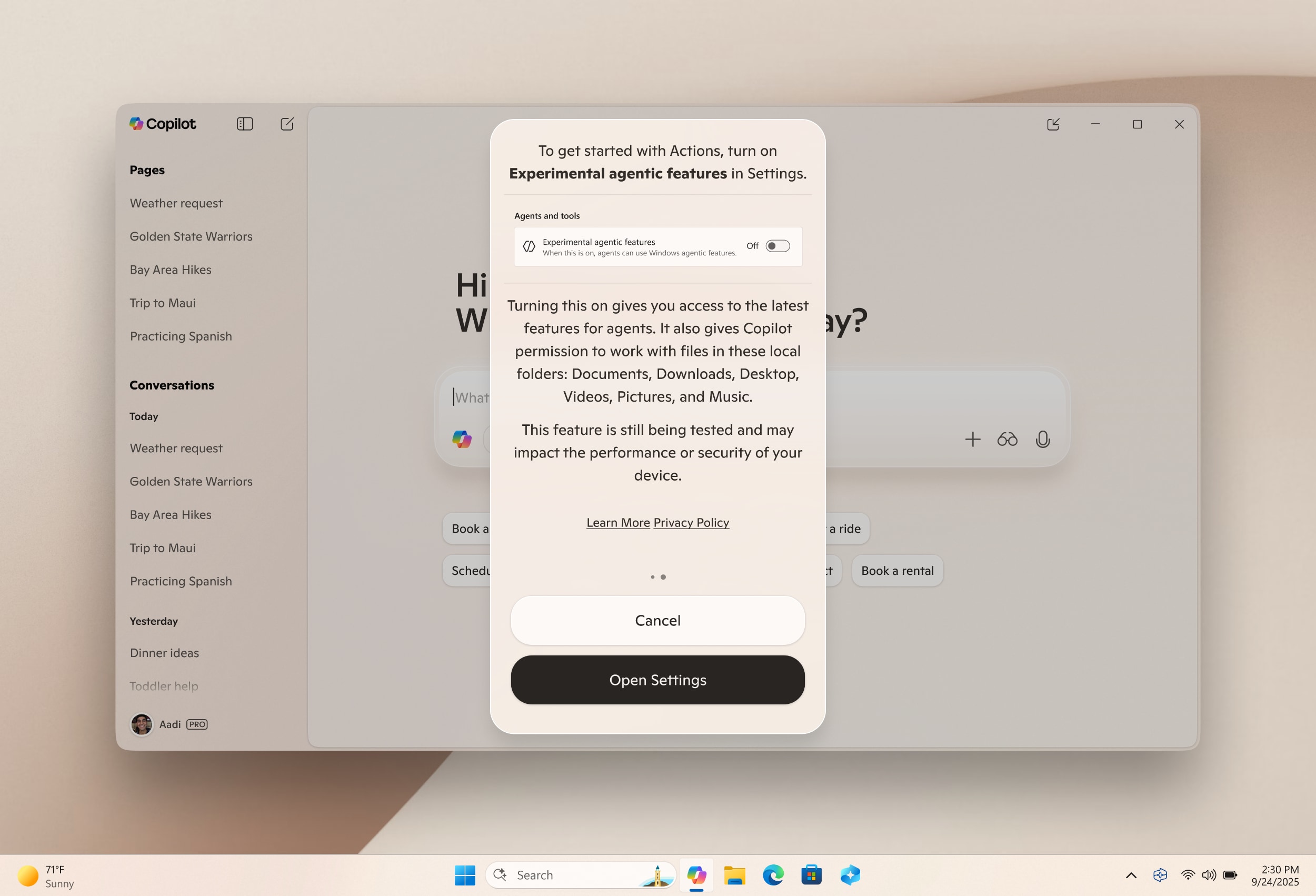
I suspect it’ll be even harder for users to swallow where Microsoft wants to take Copilot: Giving it the ability to perform Windows tasks on its own. That’s the goal of the experimental Copilot Actions feature, which initially debuted as a tool that could perform tasks on websites. Once enabled, Copilot Actions can be prompted to handle manual tasks, like resizing and straightening an a folder of photos. If any questions pop up, it can prompt you to answer them within the Copilot app. And as Copilot Actions is handling its job in the background, you’re free to do anything else you’d like on your computer.
Conceptually, Copilot Actions sounds similar to handing off a task to a real life assistant — but just like a human assistant, there’s always a chance something could go wrong along the way. It’s also not hard to imagine the feature being coopted by nefarious malware down the line, since it’s basically a Windows script in a better interface. Microsoft says it’s tested Copilot Actions “extensively” internally, and it’s rolling out the feature slowly to gather feedback.
Just like “Hey, Copilot,” it’s entirely opt-in, and you can see everything Copilot Actions is doing step-by-step in the Copilot app. Microsoft says you’l be able to jump in and take control of a Copilot Action job at any point, as well as control the permissions of AI agents in Windows 11’s user settings. Copilot tasks are also performed in a contained environment, according to Microsoft, which allows for even more specific permissions controls as well as runtime isolation (so Copilot can’t affect the rest of your system beyond its specific task).
And as if we’re not already inundated with Copilot all over Windows 11 already, Microsoft also plans to add an “Ask Copilot” search function right on Windows 11’s taskbar. The company claims it’s part of a mission to make the taskbar “a dynamic hub” for accomplishing tasks, but personally I like to keep my taskbar clear so I can cram in more app windows. Like everything Microsoft is announcing today, the Ask Copilot bar will also be entirely opt-in.
As someone who’s been skeptical of Microsoft’s Copilot initiatives so far, I could actually see myself using “Hey Copilot” if it works as advertised. It sounds far more practical than the old Siri voice commands, which were limited by simplistic language models from a decade ago. Microsoft is also expanding AI actions built into Windows 11, including a new integration with Manus, an AI agent that can do things like turn several documents into a website, as well as Filmora, which lets you create AI videos right from the File Explorer.
The new “Hey Copilot” and Copilot Vision features are available today on all Windows 11 PCs that have access to Copilot. Microsoft is also making Copilot Vision broadly available around the world today where Copilot is available. Copilot Actions and the Ask Copilot taskbar feature will “gradually” become available to Windows 11 Insiders, according to Microsoft.
This article originally appeared on Engadget at https://www.engadget.com/computing/microsofts-next-windows-11-ai-gamble-just-say-hey-copilot-130000875.html?src=rss
Ineos Grenadiers’ bike sponsor conundrum has been resolved with the most predictable of conclusions – the team has confirmed a three-year extension with Pinarello.
Pinarello has supplied Ineos with bikes since the British WorldTour outfit was established as Team Sky in 2010.
Ineos’ current agreement with Pinarello is due to expire at the end of 2025, and speculation earlier in the season suggested that the team may be forced to find a new supplier.
However, Sir Dave Brailsford’s team will now continue to use Pinarello bikes through 2026-2029.
While Daniel Benson reported for BikeRadar in July that a renewal was “the most logical outcome”, Pinarello’s relationship with Ineos has been under scrutiny owing to the extending influence of the brand’s owner, mining billionaire Ivan Glasenberg.
Glasenberg bought Pinarello from private equity firm L Catterton in 2023, and the South African also has a controlling interest in cycling clothing company, Q36.5.
Tom Pidcock, who finished third overall at the Vuelta, has rejuvenated Q36.5 Pro Cycling in 2025. The team, currently riding Scott bikes, is expected to switch to Pinarello in 2026. Getty Images
Q36.5 is the title sponsor of Tom Pidcock’s team, currently supplied with bikes by Scott (though Pidcock rides a Pinarello mountain bike when on off-road duty).
Glasenberg has been expected to align his interests at Pinarello and Q36.5 by putting the team’s riders on the Italian firm’s bikes when the current arrangement with Scott comes to an end later this year.
Bike brands rarely sponsor two prominent teams and Pinarello’s potential switch to Q36.5 could have left Ineos looking for a new sponsor, but Fausto Pinarello has now all but confirmed that the brand will supply both Q36.5 and Ineos in 2026.
“It’s not nice to see our rider use other bikes,” Fausto Pinarello told the Tuttobiciweb podcast, referring to Pidcock. “There’s a good chance that Tom will also use our road bikes [in 2026].”
While Q36.5’s switch is yet to be officially announced, the move would see Pinarello significantly increase its visibility in the pro peloton.
Pidcock’s transfer to Q36.5 has rejuvenated the second-tier team, with Pidcock finishing third overall at the Vuelta a España. The team has secured 14 victories in 2025, compared to only five in 2024.
ExpressVPN is one of the best VPNs on the market, with user-friendly apps, excellent speed test scores and a strong security record. In my ExpressVPN review, I found it to live up to its positive word of mouth, especially when unblocking foreign streaming sites. But no service is perfect, and my cup of VPN tea is not everybody’s. If you’re looking to switch away, follow this guide to cancel ExpressVPN.
How to cancel ExpressVPN on desktop
No matter where you originally signed up for ExpressVPN, you can cancel through your browser on a desktop platform. With any browser (i.e. Chrome, Safari, etc), the steps are as follows. Note that doing this will instantly cancel your ExpressVPN subscription and revoke your access to the service.
Go to expressvpn.com. In the top bar, click on My Account. Enter your username and password to sign in.
You’ll be taken to your account dashboard. In the menu on the left-hand side of the screen, click Subscription.
Scroll down until you find the words “Subscription details.” You should see a box containing the monthly cost of your subscription. At the right of that box, click Cancel Subscription.
From here, follow the on-screen prompts to complete cancellation.
Sam Chapman for Engadget
If you’re not ready to lose ExpressVPN service just yet, you can end auto-renewal instead of cancelling altogether. You’ll still be able to use ExpressVPN until your subscription runs out.
To cancel auto-renew, go to the subscription tab of your account dashboard and find the box with your subscription ID (it should be right at the top). In that box, click the link that says Edit subscription settings, then scroll down and click Turn Off Automatic Renewal. If you change your mind before your subscription lapses, you’ll be able to turn it back on later.
How to cancel ExpressVPN on mobile
You can also cancel ExpressVPN on your phone or tablet, but the process is largely the same — some buttons are just in different places. As above, this instantly ends your ExpressVPN subscription. Here’s how to do it.
Go to expressvpn.com in your mobile browser. Tap the three horizontal lines at the top-right, then in the menu that appears, tap My Account.
In the account dashboard, tap the three horizontal lines at the top-right once again. This time, scroll down to the expanded “My Account” menu and tap Subscription.
Scroll down to the “Subscription details” box and tap Cancel Subscription.
Follow the prompts on the screen to complete cancellation.
Like on desktop, you can also turn off auto-renewal so your subscription ends when your current pay period expires. Go to the subscription tab of your account dashboard as described in the steps, find the box with your subscription ID, then follow the steps from the last paragraph of the previous section.
Cancelling ExpressVPN through an app store
The website is almost always the right way to cancel ExpressVPN, but there is one exception: if you originally signed up through the Google Play Store or Apple App Store. This includes both paid subscriptions and the 7-day free trials ExpressVPN offers to app store users.
In this case, you’ll need to cancel through the app store where you originally made the purchase. On Apple, open the app store, then tap Subscriptions and scroll down to find ExpressVPN. On Android, open Google Play and tap Payment & subscriptions, then Subscriptions. In both cases, once you’ve found ExpressVPN, tap it and scroll down to find the button for cancellation.
How to get a refund from ExpressVPN
ExpressVPN offers a full refund to anyone who cancels a subscription within 30 days of purchase. You can also get a refund if your subscription renews without your consent — if that happens, you have 14 days to request your money back.
Sam Chapman for Engadget
There’s no dedicated button for asking for a refund. Instead, you’ll need to contact ExpressVPN. To do that, go to expressvpn.com/support, then click on the button in the bottom-right corner that says Need help? Chat with us! This will open a chat with a bot which you can use to ask for your money back. Unfortunately, there’s no public link to email the support team, so live chat is the only option here.
ExpressVPN alternatives
Depending on what made you want to cancel ExpressVPN, there are a few other VPNs you might like better. Proton VPN is my favorite provider at the moment, combining great apps with a unique focus on privacy rights (it’s also cheaper). NordVPN has a lot of useful features ExpressVPN leaves off its no-frills clients. And if you’re all about speed, Surfshark is the current fastest VPN in my tests.
This article originally appeared on Engadget at https://www.engadget.com/cybersecurity/vpn/how-to-cancel-expressvpn-and-get-a-full-refund-123020142.html?src=rss
Just days ago Valve developer Autumn Ashton announced initial NVIDIA DLSS upscaling for the open-source Mesa NVK driver. One of those needed Vulkan extensions, VK_NVX_image_view_handle, is already merged to Mesa Git…