When Fujifilm launched the X-T50 last year, no one was sure what would happen with its aging X-T30 lineup. The company just answered that question with the launch of the X-T30 III, boosting the speed and improving autofocus of the last model, while adding a film simulation dial seen on other recent models. It’s very light for travel or street photography, but has some powerful features like 6.2K video and subject-detect autofocus, all at a reasonable price.
The original X-T30 first arrived in 2019 and was replaced in 2022 by the X-T30 II that was more of a mild update than an all-new camera. However, the X-T30 III has a number of key updates that bring it in line with other recent models like the X-M5 and X-T50. It does have the same 26.1MP X-Trans sensor as before (with a 1.5x crop compared to a full-frame camera), but now uses Fujifilm’s latest image processor that doubles image processing speed and significantly improves video capabilities.
Ryan Tuttle for Fujifilm
The X-T30 III is meant to be taken on adventures, so it’s still very light at just 378 grams or 13.33 ounces, a touch less than the previous model. Control-wise, the biggest addition is a film simulation dial just like the one on the X-M5 and X-T50, replacing the mode dial from the X-T30 II. It’s designed to make it easy to switch between film simulations like Reala Ace and Nostalgic Neg, while offering three customizable positions to let users save “recipes” of their own making.
Otherwise, the X-T30 III has a generous complement of dials and buttons something that allows for precise control but may intimidate newbies. The rear display tilts up but doesn’t flip out, and the 2.36-million-dot electronic viewfinder is on the low end for resolution. The main feature missing on the X-T30 III is in-body stabilization, so you’ll need either a stabilized (OIS) lens or electronic stabilization for video.
Fujjifilm
Burst shooting speeds are the same as before at 8 fps with the mechanical shutter and 20 fps in electronic mode. However, more of your shots are likely to be sharp thanks to the updated, faster autofocus. Along with the extra speed, Fujifilm introduced new AI subject detection modes including Auto-Tracking, Animals, Birds and Vehicles.
Video also gets a big upgrade. The X-T30 III can now shot 6.2K 30 fps video using the entire sensor (up from 4K 30p before), or 4K at 60 fps with a mild 1.18x crop. All of those resolutions are available with 10-bit modes to boost dynamic range. However, the X-T30 III lacks in-body stabilization, has a weird 2.5mm microphone input and a display that only tilts and doesn’t flip out. That makes it fine as a hybrid camera, but if you mostly shoot video, a model like the X-S20 may be a better choice.
Fujifilm
Other key features include a microHDMI port for RAW video output, a single SD memory card (that’s of the low-speed UHS-I variety unfortunately), and improved battery life with up to 425 shots to a charge. Fujifilm also introduced a new lens, the Fujinon XC13-33mmF3.5-6.3 OIS that offers an interesting ultrawide full-frame equivalent zoom range of around 20-50mm.
The X-T30 III is now on pre-order for $999 in multiple colors (black, charcoal silver and silver) with shipping set to start in November 2025. The Fujinon XC13-33mmF3.5-6.3 OIS will also ship around the same time for $399.
This article originally appeared on Engadget at https://www.engadget.com/cameras/fujifilms-x-t30-iii-adds-a-film-simulation-dial-and-6k-video-072148245.html?src=rss
Not the default file system, but in the installer if you want itAlmaLinux is to support the Btrfs file system in version 10.1 of its eponymous RHELative operating system.…
The Fedora Council has finally come to a decision on allowing AI-assisted contributions to the project. The agreed upon guidelines are fairly straight-forward and will permit AI-assisted contributions if it’s properly disclosed and transparent…
Researchers say ‘Proto-X’ fine-tunes databases automatically, delivering multifold performance boostsAutomated database systems based on vector embedding algorithms could improve the performance of default settings on common PostgreSQL database services by a factor of two to ten, according to a database researcher.…
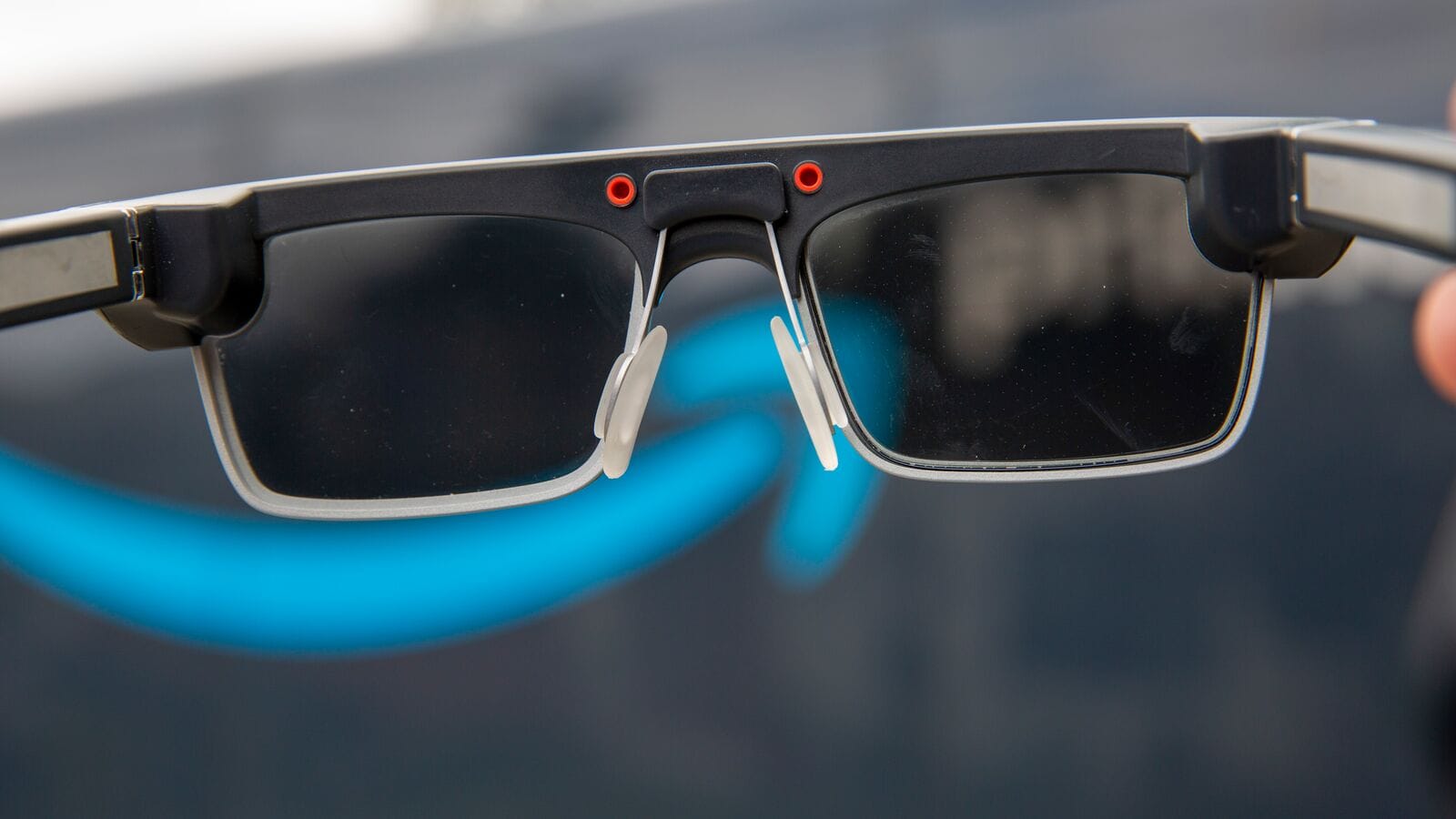
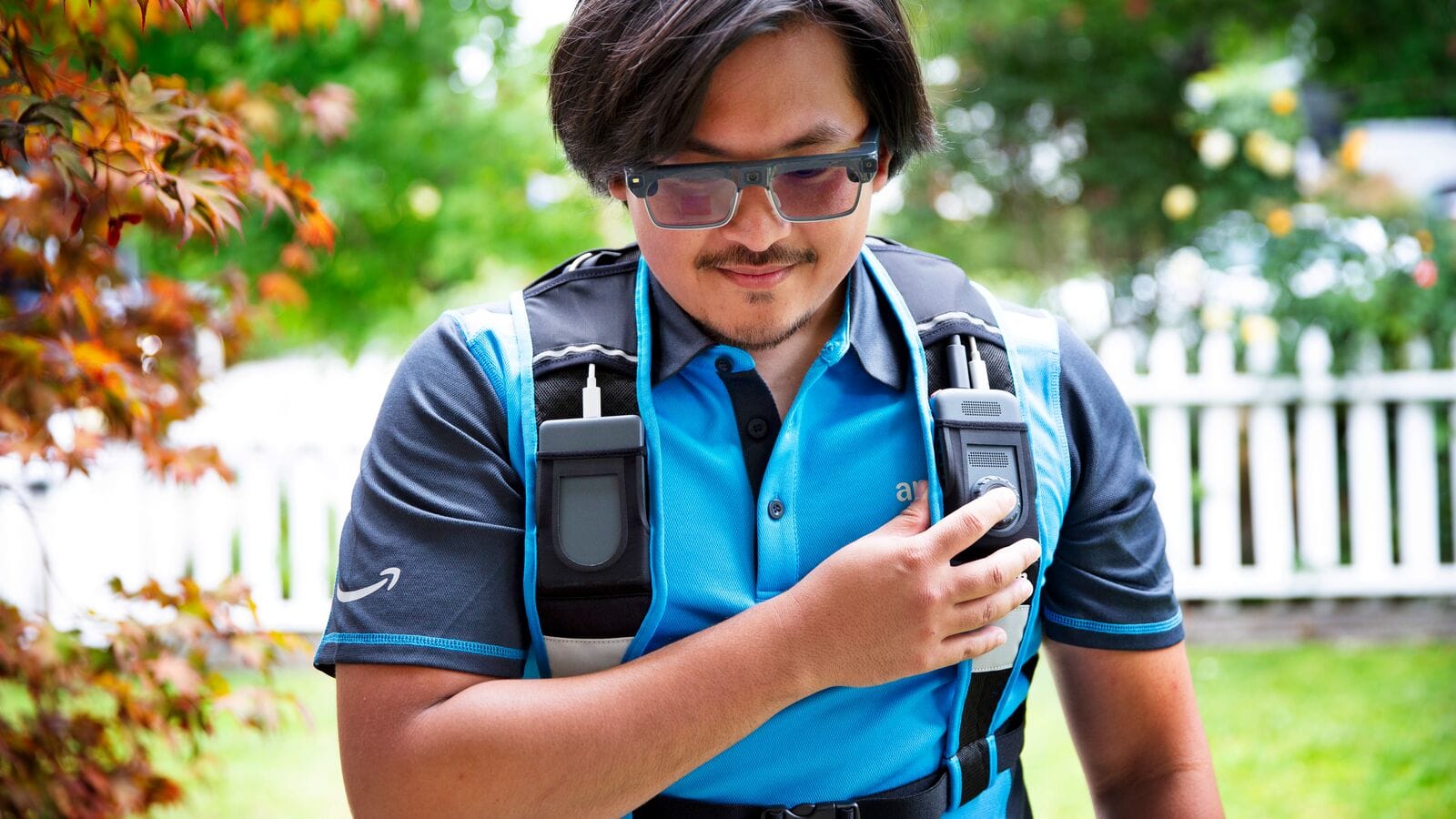
Amazon is building, and already testing, HUD glasses for its delivery drivers, revealing the design and interface.
The existence of the smart glasses was reported by The Information last month, and today Amazon officially announced the project.
Clips shared by Amazon depict the glasses as having a fixed green-only (monochrome) display, and the company says they support prescription lenses and transitional lenses that tint in response to sunlight.
Amazon describes the glasses as using “advanced computer vision processing and AI” to let drivers scan packages, get turn-by-turn walking directions to the delivery point, and capture proof of delivery without needing to take a device out of their pocket, freeing up their hands.
0:00
/0:10
“When drivers safely park at a delivery location, the glasses automatically activate and the DA is given their delivery information—right in their field of view—starting with locating the right packages inside their vehicles to the corresponding homes”, Amazon explains.
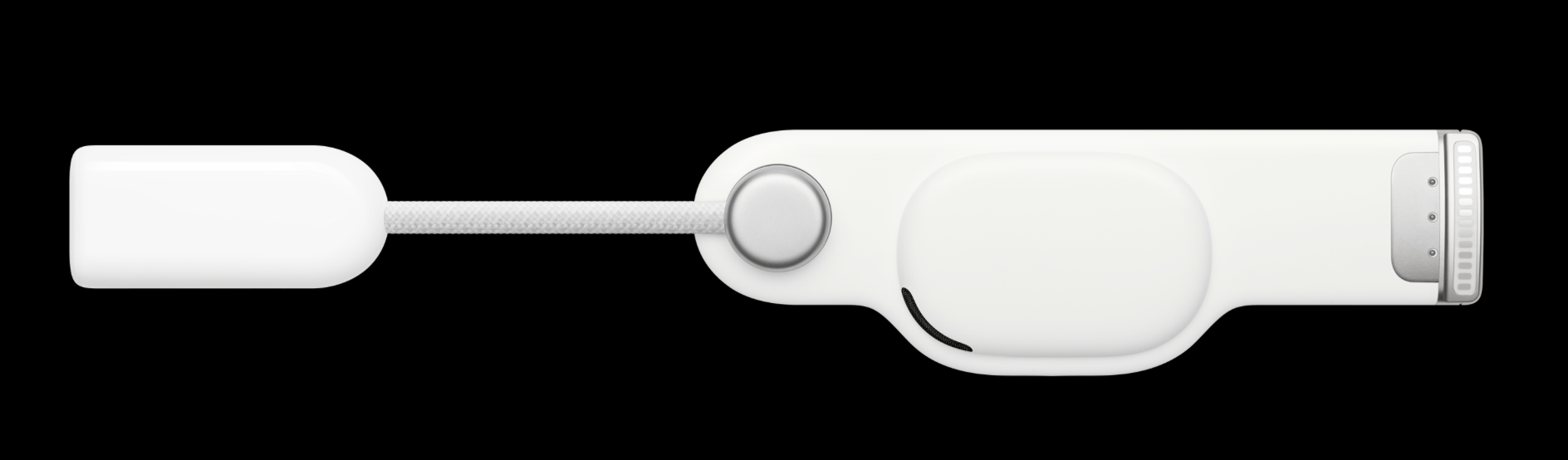
A “small controller” worn on the delivery vest, meanwhile, contains what appears to be a button dial, as well as a swappable battery for “all-day use”.
Amazon says it has tested “early versions” of the glasses with “hundreds” of delivery drivers, though it isn’t yet revealing a timeline for a wider deployment.
“We anticipate future versions of the glasses will provide real-time defect detection, where the glasses can help notify drivers if they’ve mistakenly dropped a package at a customer doorstep that does not correspond with the house or apartment number on the package, detect hazards like low light and adjust the lenses, notify that there’s a pet in the yard, and more.”
The Information’s report suggested that Amazon intends to start mass production of the delivery driver glasses by mid-2026, with an initial production run of around 100,000 units.
Oracle recently launched their E6 compute shape for Oracle Cloud and powered by AMD EPYC 9005 “Turin” processors. Oracle Cloud Infrastructure also launched their Compute Cloud@Customer X11 and Private Cloud Appliance X11 platforms that are all powered by the E6 compute shape with 5th Gen AMD EPYC. For those curious about the performance and value of the Oracle Cloud E6 shape compared to prior-gen E5 as well as alternatives from Amazon AWS, Microsoft Azure, and Google Cloud, these benchmarks are geared for you.
This Ring Alarm kit provides complete wireless home security with two keypads, eight contact sensors, two motion detectors, and a base station for 2 to 4 bedroom homes.
OpenZFS 2.4 stable should be out in the near future while out today is the third release candidate for this ZFS file-system implementation for Linux and FreeBSD operating systems…
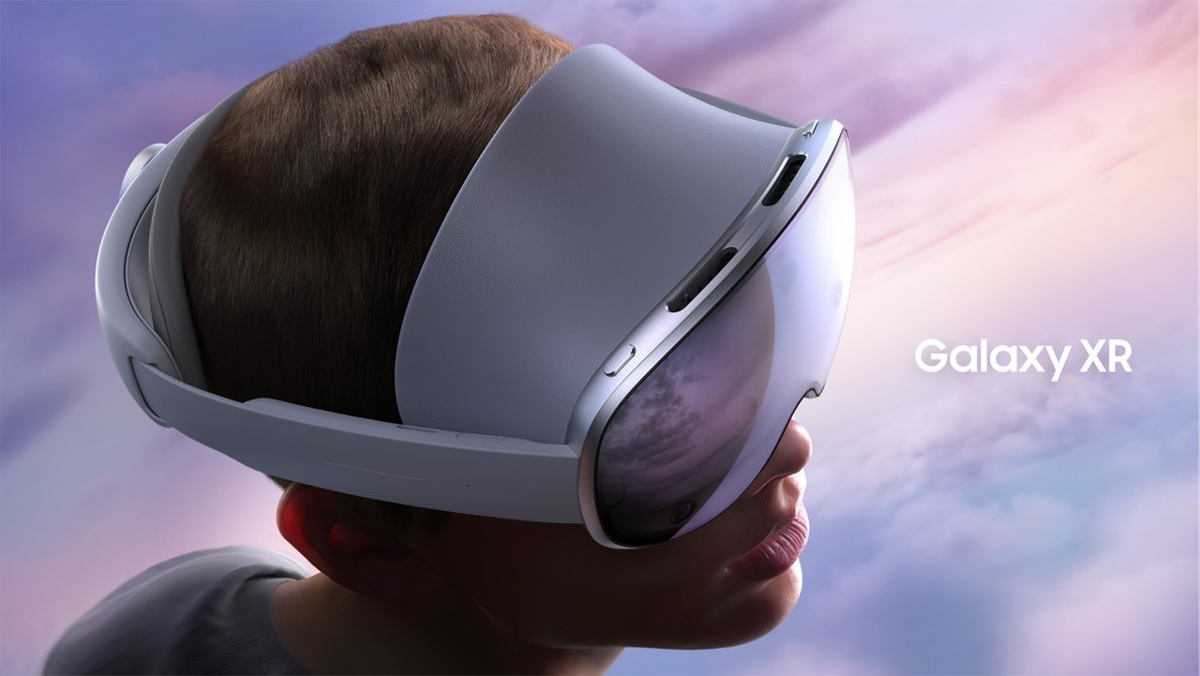
I briefly tried Samsung Galaxy XR at its launch event in New York last week, and I have mixed initial thoughts about the first Android XR headset.
Launched last night in the US & South Korea, Galaxy XR is priced at $1800, and its optional controllers are $250 extra, or $175 if you buy them with the headset before November 17.
Already, the Galaxy XR headset is backordered to November 4, while new orders for the Galaxy XR Controllers won’t ship until November 28.
The launch comes almost three years after Samsung first announced that it was working on a standalone XR headset, with Google handling much of the software and Qualcomm providing the chipset, and almost a year after it formally unveiled it as “Project Moohan” as Google revealed Android XR.
At its core, Galaxy XR is a high-end standalone headset with 4K micro-OLED displays, hand tracking, eye tracking, face tracking, an active depth sensor, and fully automatic motorized lens separation adjustment to match your interpupillary distance (IPD). You can read the detailed features and specifications of Galaxy XR here, and I strongly recommend you do so, but this article is about my brief experience actually using it.
Samsung invited UploadVR to its embargoed launch event in New York last week, and we paid for our own flights and accommodation to attend it. I was in the audience for the on-stage presentation Samsung broadcast last night, and afterwards my colleague Ian Hamilton and I spoke to Google and Samsung representatives for hours as they used Galaxy XR directly in front of us, casting the headset’s view to a projector in the room full of journalists and influencers.
We ended the day with a very short hands-on demo where I used Galaxy XR myself for around 25 minutes, though it felt like even less. I’ll need far more time in the headset before I can bring you a more definitive assessment. But read on for my initial impressions based on my short time with Samsung Galaxy XR.
The Form Factor & Fit Matter
Many people have suggested that Galaxy XR is essentially an Android-ecosystem Apple Vision Pro for half the price. And while that’s broadly the product proposition here, the form factor is very different, and it’s important you understand how and why before buying it.
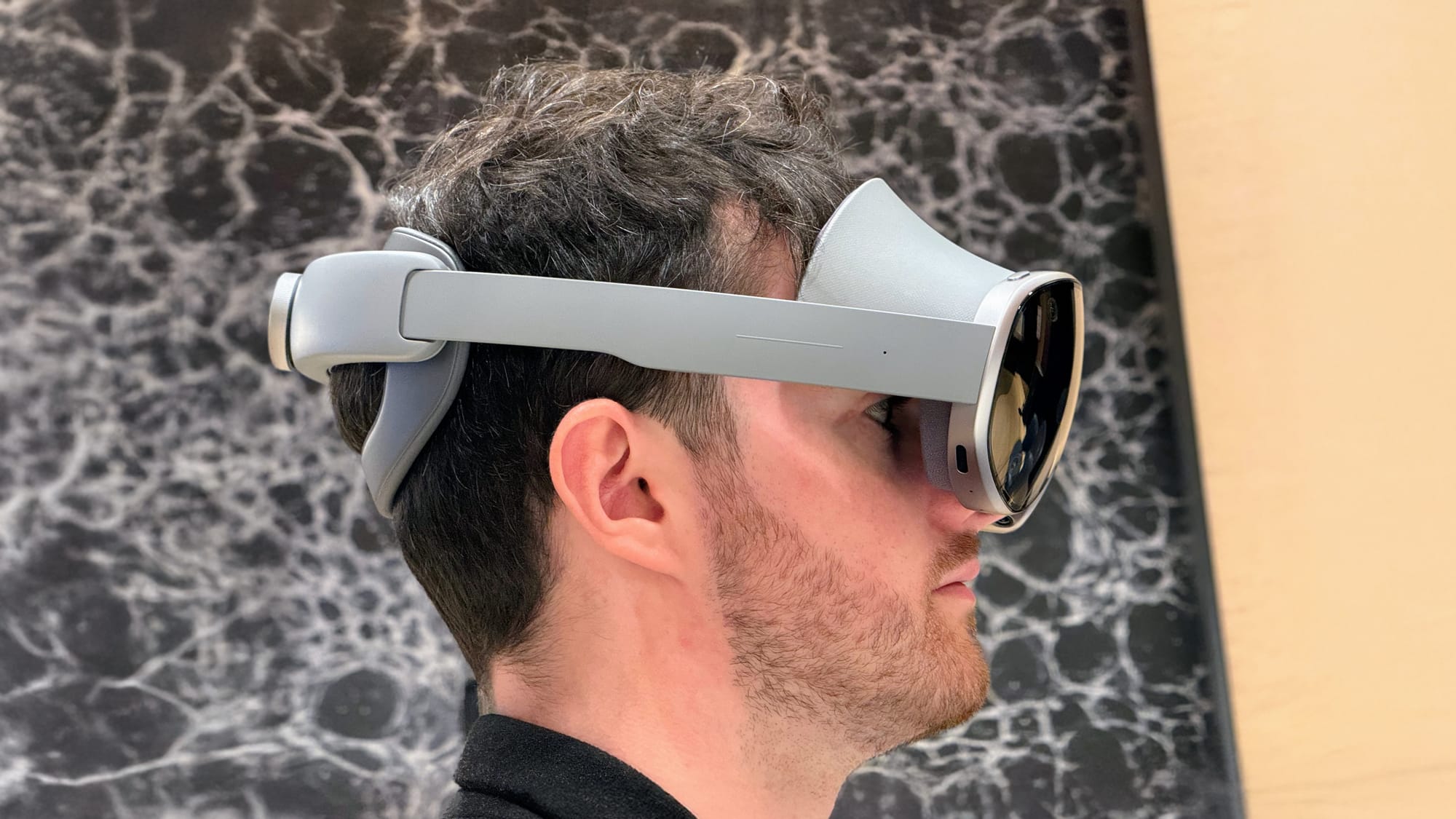
For starters, Galaxy XR has a rigid plastic strap that cradles the back of your head, like a Quest Elite Strap, offering balanced support. But it’s non-detachable, and this means you’re stuck with it for the lifetime of the headset. You can’t swap it out for a soft strap to lean back on a chair, sofa, or bed. If you’re interested in the idea of watching movies on a giant virtual screen, a pitched use case for both Vision Pro and Galaxy XR, you need to be aware of this. And if you’re interested in using the headset on a plane, for example, you’d find yourself bumping the back of the strap into the seat frequently. If you don’t need to use the headset in these scenarios, though, the rear strap design is all upside.
When it comes to the front of Galaxy XR, though, the differences are even more important to understand.
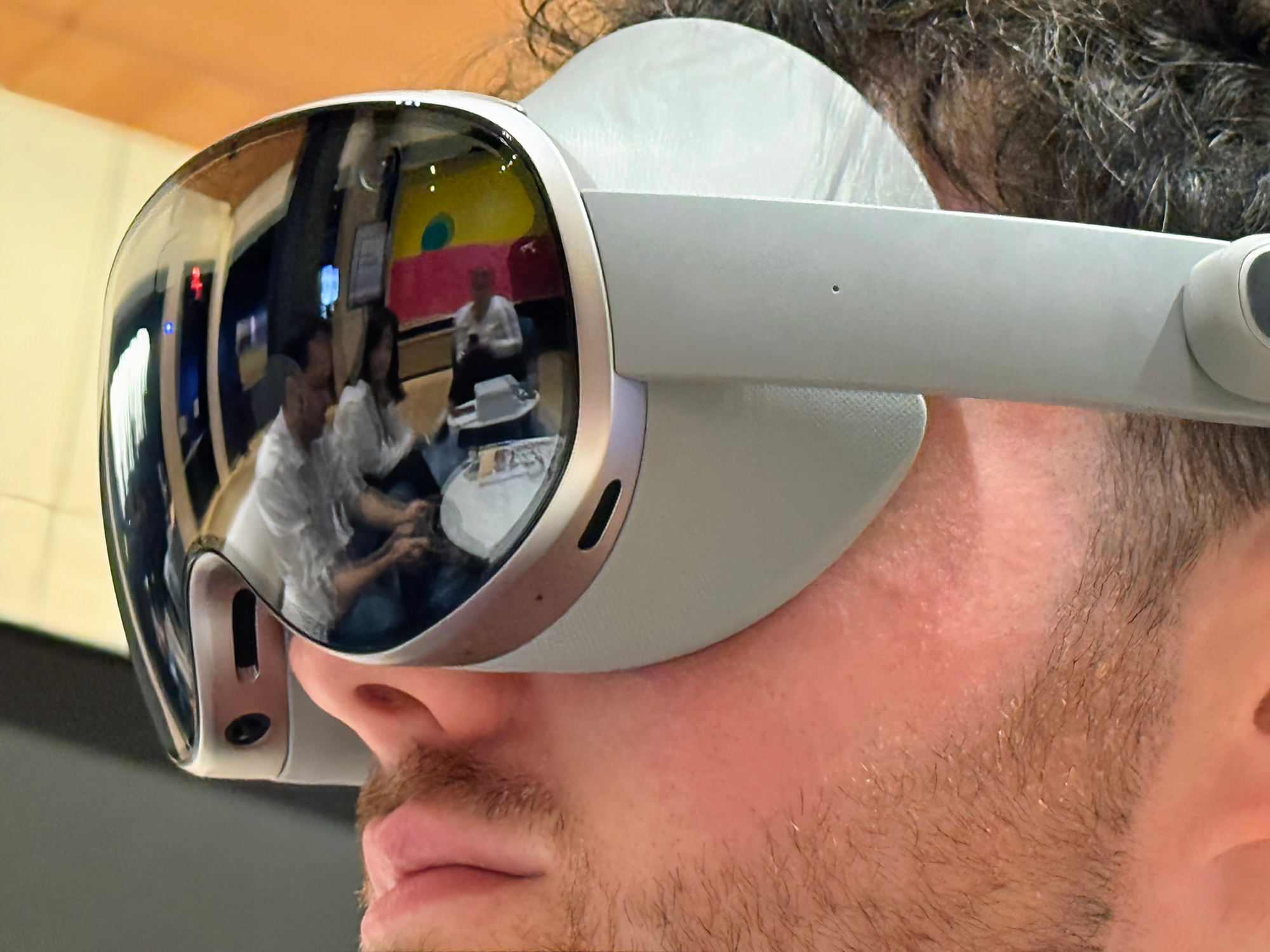
Samsung Galaxy XR is an open-periphery headset with a hard strap and a forehead pad.
There are fundamentally two ways for a half-kilogram headset to attach to the front of your head: against your entire upper face, or just the top of your forehead.
In theory, the upper face approach, used in headsets like Apple Vision Pro and Meta Quest 3, distributes the pressure over a greater area. But this area also includes the sinuses under your lower forehead and cheeks, which are very sensitive to being crushed, and this is the cause of much of the discomfort associated with VR. It also blocks out your view of your periphery, with the exception of the odd open interface Meta released for Quest 3 last year.
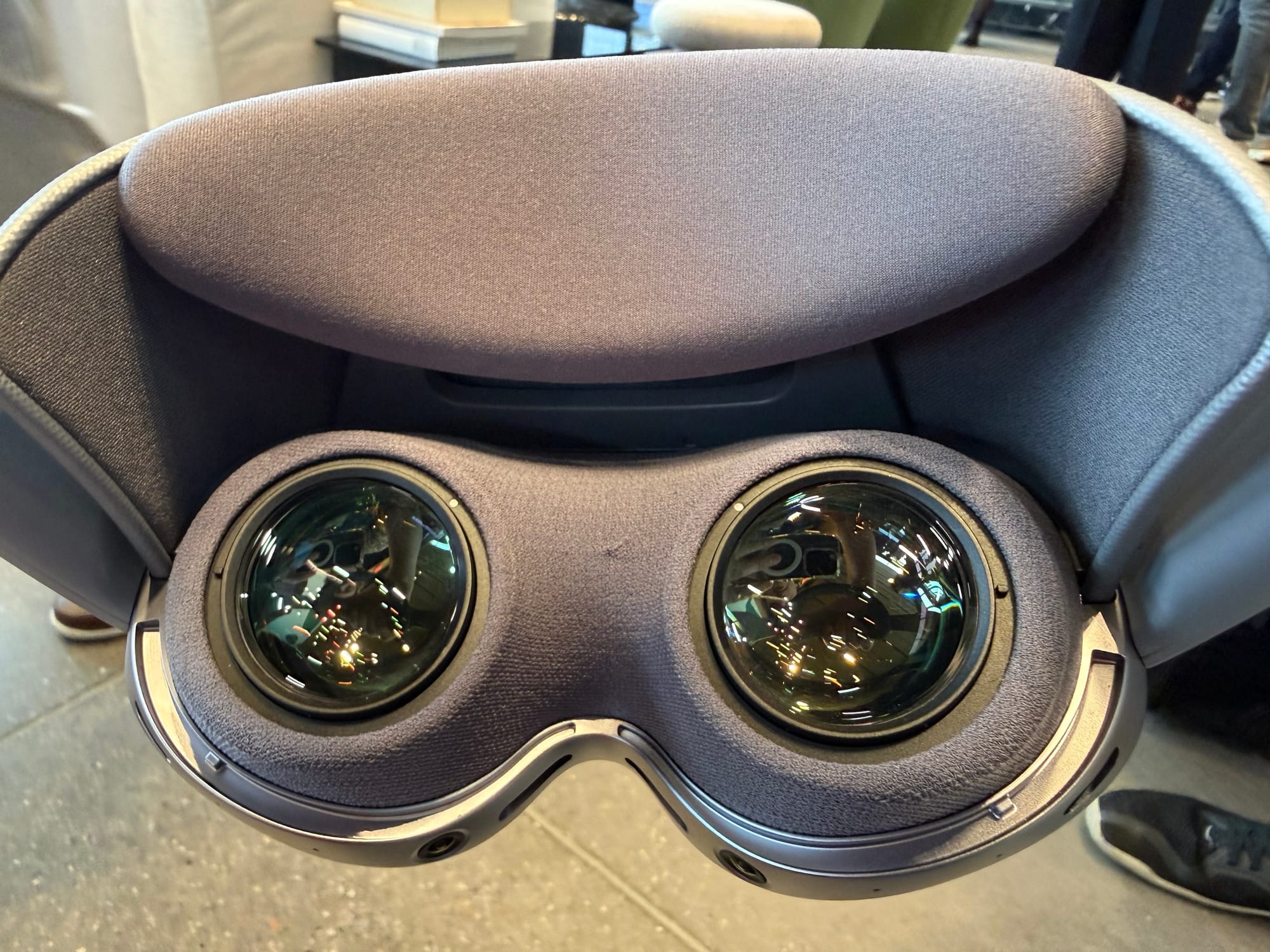
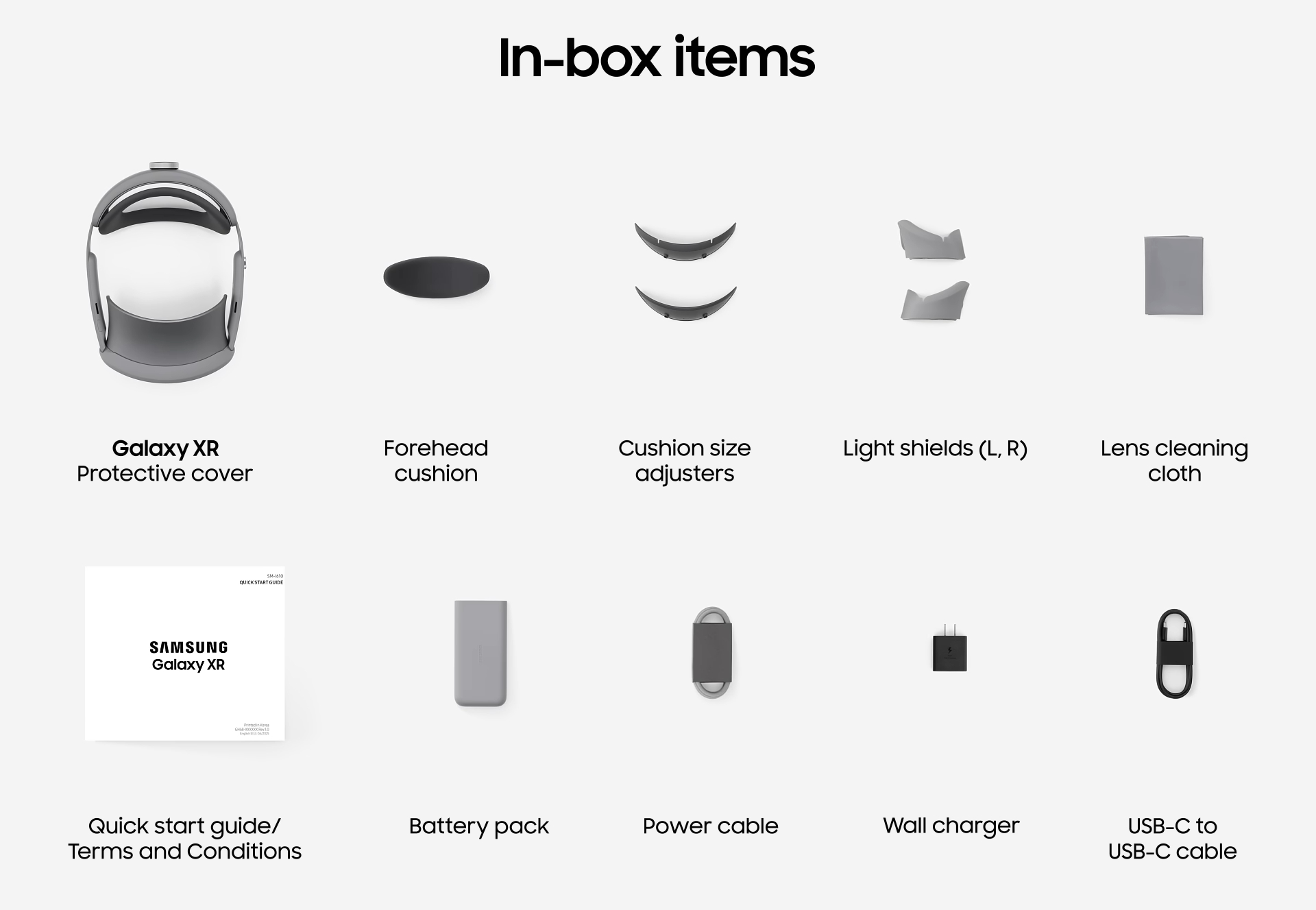
The alternate approach, an upper-forehead pad, is what Samsung Galaxy XR uses, like PlayStation VR2 and the discontinued Meta Quest Pro and HoloLens 2 headsets. This keeps the pressure off your sinuses, and makes the visor feel as if it’s floating in front of your face, rather than being attached, while also letting you see the real world below you and to the sides by default – there are optional side blockers for immersion in the box. The singular adjustment you make is to the dial at the rear, tightening or loosening the headset’s grip on your head.
Galaxy XR felt comfortable and light in my 25 minutes with it. But that simply is nowhere near enough time to tell you whether it would be comfortable for hours on end. What I can tell you is that its ergonomics feel very similar to Meta Quest Pro, except 200 grams lighter (Galaxy XR feels very light), and Quest Pro’s comfort was extremely divisive. How the forehead pad approach will feel for you will depend on the exact shape of your skull. Some people find the approach significantly more comfortable than any ski-goggle-style headsets, while others find it agonizingly painful.
Maybe someday someone will release an app that lets you scan the shape of your head to recommend whether a particular type of headset strap should suit it. In the meantime, I recommend trying to get a demo of Galaxy XR, if you’ve never used a headset with its ergonomics, before dropping $2000.
How That Affected What I Saw
My description so far describes how the strap design of Samsung Galaxy XR might limit how you can use the headset, how comfortable you feel, and how you see your surroundings by default. But it also affects how your eyes are aligned with the lenses.
To be clear, I’m not talking about horizontal alignment here. Galaxy XR has fully automatic IPD adjustment, guided by its eye tracking, with motorized lenses that shift sideways to match the horizontal separation of your eyes, which varies between people. This worked flawlessly for me. In fact, the process worked faster than Apple Vision Pro. But this solves for only one of three axes.
Photo taken by UploadVR’s Ian Hamilton.
An issue with a forehead-mounted headset is that it can limit how close the lenses can get to your eyess laterally. To what degree, again, will depend on the exact shape of your skull. Headsets like Quest Pro and PS VR2 have a separate dial at the front to adjust the depth of the visor to your face, letting you bring the lenses closer to your eye, but Galaxy XR does not.
The result was that I wasn’t getting the full field of view, and nor the full binocular overlap, meaning I could see faint dark lines where the two lens views intersect. And worse, it induced a kind of perceived display brightness inconsistency, where areas of the lenses near the edges appeared to be darker. This is something I’ve seen before many times in headsets where my eyes aren’t close enough to the lenses. If Galaxy XR had a lens depth dial, I’d have used it. But it does not.
Galaxy XR has two “cushion size adjusters” in the box. It’s possible that the headset I was handed was using one unsuitable for my head.
Days later, I found out that there are two forehead interface sizes in the box of Galaxy XR, and it’s possible I was just using the wrong one for my head. I was not informed of this before or during the demo.
Putting the lens depth issue aside, the displays of Galaxy XR are vibrant and incredibly sharp. They felt around on par with Apple Vision Pro, perhaps a tad sharper. As we’ve said before many times at UploadVR: 4K micro-OLEDs are the ultimate displays for headsets, and blow the 2K panels you find on mainstream headsets out of the water. A 2K LCD feels like looking at a screen. A 4K micro-OLED feels like looking at a virtual world. Once you try 4K micro-OLED, you can never truly go back. Galaxy XR is no exception to this reality.
Tracking & Passthrough
One of the first things I like to test when trying a new headset is its core XR technology.
Passthrough, your view of the real world, is hard to compare between headsets without using them in the same room and the exact same lighting, as all cameras are heavily affected by their environment. But my initial preliminary assessment is that Galaxy XR’s passthrough is the best on the market yet.
With the same 6.5 megapixel resolution, it felt as sharp as Apple Vision Pro, and the perspective and depth felt more correct, while it lacked any of the annoying warping distortion of Meta Quest 3.
Galaxy XR’s passthrough does, however, exhibit a similar blur as Apple Vision Pro when you turn your head. If you keep your head still, moving objects like your hands appear smooth, to be clear, and the latency feels extremely low. But if you rotate your head, there’s a distinct motion blur. As I covered in my Apple Vision Pro review, this is the opposite situation from Quest 3.
0:00
/0:50
Testing Galaxy XR’s hand tracking (capture by Ian Hamilton).
Transitioning into a virtual home environment, which you can do at any time by double-tapping the capacitive touchpad on the side of Galaxy XR, I found the positional head tracking to be rock solid, even as I got up and walked around the room. In 2025, for a first-class tech company like Google at least, inside-out positional tracking via computer vision is essentially a solved problem.
Hand tracking, on the other hand, was more of a mixed bag. It’s low latency and has very little jitter, and quickly recovers from full occlusion. But it doesn’t handle overlapping your hands quite as well as Quest 3 or Apple Vision Pro, with noticeable jankiness, and when I tried moving my hands rapidly, the tracking constantly cut out, with the hands flickering in and out of existence. It wouldn’t be suitable for fast-motion games.
Meta has had years to refine its hand tracking, since shipping the feature as a software update for the original Oculus Quest, with 2.0, 2.1, 2.2, and 2.3 updates all bringing significant improvements, including to handling fast motions. We’ll be closely following whether Google does the same for Android XR through 2026.
Unfortunately, I was not able to test Galaxy XR Controllers in-headset, so I can’t tell you about how well they do or don’t work. I did briefly hold them, though. They felt slightly cheap, and didn’t conform to my hands as well as Meta’s Touch Plus controllers. But I need to try them in XR.
A Note On The Battery
Just like Apple Vision Pro, Samsung Galaxy XR requires the included external tethered battery. And as such, everything I said about the tradeoffs of a tethered battery in my Apple Vision Pro review applies.
When I put on Galaxy XR, I had to consciously adjust the battery to a suitable position. And when I stood up, I had to put it in my pocket and move my arm in front of the cable. It’s an added friction that crops up even in a 25 minute demo, and one that you need to be aware of if you’re coming from a headset with a built-in battery, or considering getting your first-ever headset.
In contrast, it’s refreshingly convenient to pick up a Meta Quest headset and just put it on your head, with no thought for cables or batteries needed.
How annoying an external battery is will come down to personal preference. Some people couldn’t care less. But I’d like to once again quote Oculus executive Jason Rubin in our 2019 interview with him, when we asked whether his company was considering a tethered portable compute model:
“That’s a model we’ve definitely explored. There’s a lot of upsides to it, like visually having the smaller glasses on your head, big advantage. Battery, keeping the weight away, the heat away from the screen, being able to separate battery. All of that is great.
The problem is when you do it, cause we’ve tried it,you have a wire. And you don’t ever forget that wire.“
Of course, a lot has changed in six years, and our sources suggest Meta plans a tethered puck for its next headset too. But it remains to be seen which approach to the battery consumers will choose in the long run.
Performance & Android XR
The demo I had was nowhere near long enough to assess an entirely new XR platform, so I’m going to avoid making sweeping conclusions here.
What I can tell you is that Android XR broadly feels like a crossover between Apple’s visionOS and Meta’s Horizon OS, and on Galaxy XR it felt incredibly snappy. I could open 2D or immersive apps and navigate around the system menus without any visible hitch in framerate. Performance was noticeably smoother than what I’m used to with Meta Quest 3. But I didn’t have time to really push it to its limit, and unlike with Meta’s Horizon OS, in Google’s Android XR you can’t bring up windows while still inside an immersive experience.
On paper, Galaxy XR’s XR2+ Gen 2 chipset is only around 20% more powerful than the one in Quest 3, but Galaxy XR has a few other tricks up its sleeve, including twice the RAM (16GB), eye-tracked foveated rendering, and a default refresh rate of 72Hz, easier to maintain than Quest 3’s default 90Hz. Some of it may also be down to software. Google, after all, is the company that makes Android itself, while Meta is forking it and isn’t exactly known for its software quality.
0:00
/2:31
Google Maps immersive mode on Android XR
That 72Hz refresh rate does come with a tradeoff, though. In Google Maps immersive mode, for example, when very bright content was being displayed at the edge of the lenses I could see a faint flickering effect. This is a well-known issue with low-persistence displays if you drive them below 90Hz. And again – a common theme of this article – varies between individuals.
Speaking of Google Maps immersive mode, it’s essentially PC VR’s Google Earth VR officially ported to standalone VR for the first time. On Galaxy XR’s 4K micro-OLED displays it looks and feels incredible, and this is how I want to plan trips from now on. Its immersive Gaussian splats of select locations were cool to try, too, but significantly lower quality than Meta’s Horizon Hyperscape.
0:00
/0:30
Google Photos with AI 3D synthesis on Android XR
Another Google feature that impressed me was in Photos. While other headsets like Apple Vision Pro and Pico 4 Ultra already let you convert 2D photos into 3D, Android XR goes a step further by allowing this for videos too. It’s remarkable how quickly it works. Like many Google features, it’s server-side, so if you’re opposed to that for privacy reasons, you’ll miss out. But it was remarkable to see a 2D video turn into 3D so quickly, in front of my eyes.
The strangest thing about Android XR is that by default, it doesn’t use the gaze-and-pinch interaction system introduced by Apple Vision Pro. Instead, you point with your hands as you would on Quest 3. Eye tracking is always active for foveated rendering, but gaze-and-pinch is an option, off by default. I enabled it in Settings, though, and found it to work well. I’m very puzzled as to why it’s not the default, as my almost two years of time using Apple Vision Pro has me unshakeably convinced that it’s the future default input system for all of XR.
Conclusions
My time with Samsung Galaxy XR and Android XR was frustratingly short, and this article documents only my very initial impressions.
Galaxy XR delivers the magic of 4K micro-OLED in a standalone form factor at half the price of Apple Vision Pro and the Android XR platform from Google seemed well-made in my time with it, and is a potential serious threat to Meta in the long term.
Galaxy XR with its side blockers attached.
But Galaxy XR’s form factor, while perhaps similar at first glance of a render, is fundamentally different than Vision Pro (and Quest 3), and my experience with similar headsets tells me that its comfort might vary significantly between individuals.
Samsung did not provide UploadVR with a review unit, but we’ve now ordered our own Galaxy XR at our own expense, and aim to bring you a review next month after we get it.
An anonymous reader quotes a report from the BBC: New research coordinated by the European Broadcasting Union (EBU) and led by the BBC has found that AI assistants — already a daily information gateway for millions of people — routinely misrepresent news content no matter which language, territory, or AI platform is tested. The intensive international study of unprecedented scope and scale was launched at the EBU News Assembly, in Naples. Involving 22 public service media (PSM) organizations in 18 countries working in 14 languages, it identified multiple systemic issues across four leading AI tools. Professional journalists from participating PSM evaluated more than 3,000 responses from ChatGPT, Copilot, Gemini, and Perplexity against key criteria, including accuracy, sourcing, distinguishing opinion from fact, and providing context.
Key findings: – 45% of all AI answers had at least one significant issue. – 31% of responses showed serious sourcing problems – missing, misleading, or incorrect attributions. – 20% contained major accuracy issues, including hallucinated details and outdated information. – Gemini performed worst with significant issues in 76% of responses, more than double the other assistants, largely due to its poor sourcing performance. – Comparison between the BBC’s results earlier this year and this study show some improvements but still high levels of errors. The team has released a News Integrity in AI Assistants Toolkit to help develop solutions to these problems and boost users’ media literacy. They’re also urging regulators to enforce laws on information integrity and continue independent monitoring of AI assistants.
The makers of BIND, the Internet’s most widely used software for resolving domain names, are warning of two vulnerabilities that allow attackers to poison entire caches of results and send users to malicious destinations that are indistinguishable from the real ones.
The vulnerabilities, tracked as CVE-2025-40778 and CVE-2025-40780, stem from a logic error and a weakness in generating pseudo-random numbers, respectively. They each carry a severity rating of 8.6. Separately, makers of the Domain Name System resolver software Unbound warned of similar vulnerabilities that were reported by the same researchers. The unbound vulnerability severity score is 5.6
Revisiting Kaminsky’s cache poisoning attack
The vulnerabilities can be exploited to cause DNS resolvers located inside thousands of organizations to replace valid results for domain lookups with corrupted ones. The corrupted results would replace the IP addresses controlled by the domain name operator (for instance, 3.15.119.63 for arstechnica.com) with malicious ones controlled by the attacker. Patches for all three vulnerabilities became available on Wednesday.
The Lego Star Wars Droideka set lets you build and display a fully articulated destroyer droid with movable arms, transformable ball mode, and a commemorative 25th anniversary stand.
In the face of ever-growing generative AI usage and YouTube’s own dabbling with those features, Google has announced an important safeguard for creators on the platform—Likeness Detection. Likeness Detection is a new feature YouTube is testing that allows creators to automatically search YouTube for videos that seem to use their AI-generated
Google engineer Rahman Lavaee today announced their work on a prototype software implementation to automatically insert optimal code prefetches into binaries for faster performance, especially for the latest Intel Granite Rapids and AMD Turin processors with new prefetching instructions…
Tesla reported its financial results for the third quarter of 2025 this afternoon. Earlier this month, we learned that the electric vehicle manufacturer had a pretty good Q3 in terms of sales, which grew by 7.3 percent year over year and cleared out tens of thousands of cars from inventory in the process. However, that hasn’t translated into greater profitability.
Even though revenues grew by 12 percent to $28 billion compared to the same period last year, Tesla’s operating expenses grew by 50 percent. As a result, its operating margin halved to just 5.8 percent. And so its profit for the quarter fell by 37 percent to $1.4 billion.
Some growth in revenue came from its battery and solar division; this increased by 44 percent to $3.4 billion compared to Q3 2024. Services—including the Supercharger network, which is now open to an increasing number of other makes of EV—also grew, increasing by 25 percent to $3.4 billion. EV deliveries increased by 7 percent to 497,099, most of which were the Model 3 sedan and Model Y crossover. Automotive revenues grew slightly less, increasing 6 percent year over year to $21.2 billion.
A new accessory for Apple Vision Pro developers is compatible with both the M2 and M5 headsets, effectively adding a high speed USB-C connection port to the standalone headset for $300 extra.
Apple Vision Pro doesn’t feature ports of any kind as it draws power from a proprietary battery pack. For developers, who pay the annual fee to build for Apple platforms, logging into their account allows them to purchase what’s essentially a USB-C port for data connections to their system. The Developer Strap replaces the rigid “Right Audio Strap” in the headset with the same audio experience and the added USB-C port.
Apple Vision Pro Developer Strap
Since launch in 2024, the M2 Apple Vision Pro offered the same accessory but it topped out with the speeds of USB 2, or 480 Mbps. The new Developer Strap can carry up to 20 Gbps. That’s double the throughput an iPhone 17 Pro can send over a USB 3 cable and as fast, or faster, than most wired networks can transport around a home.
The USB-C port on Quest headsets can be used for an array of device connections and engineers indicated a hidden one on Galaxy XR devices can be used for similar tasks, like a UVC camera for monitoring your physical environment without passthrough (a feature I used during last week’s VR Download). The challenge for Quest 3 is using that port conflicts with the headset’s extraordinary power draw, meaning users need to buy USB hubs to route in power and data on separate channels through the same port.
The need for a Quest-priced Apple Developer Strap accessory attached to the side of Vision Pro may vary from use to use, with Apple specifying it is “helpful for accelerating the development of graphics-intensive apps and games”.
I’ve connected the ModRetro Chromatic directly to my Vision Pro using the Developer Strap. With no battery pack in the device, the USB-C connection from the port of the handheld to the Vision Pro transferred enough power to play a video game cartridge from the 1990s on the handheld and display a virtual mirror of its screen inside the headset. I then shared that screen over SharePlay with others remotely on a FaceTime call.
If you can keep an eye on reality from Vision Pro through a Game Boy Camera cartridge from 1998 using a USB data connection – a positively minuscule amount of data passing through that cord – what could you do in VR with 20 gigabits each second streaming in or out alongside everything else the device does?
This is a video of a robotic spy octopus built by John Downer Productions for the BBC/PBS series Spy In The Wild capturing the daily activities of a coconut octopus. And what exciting daily activities they are! The coconut octopus is unique in that it’s one of only two species known for walking bipedal on two tentacles (seen above and at 2:24). They also seek protection in coconut husks (hence the clever name!) and collect other shells to use as protection, and, as seen at 3:33, launching a shrapnel barrage at an enemy. There is also some exciting shrimp-hunting action and color changing in the video. Plus ocean pollution in the form of a paint can lid the octopus uses as a shield! I’m telling you, this video has it all. Except topless mermaids and pirate treasure. And, with a full one point deduction for each, it’s an 8/10 for me.