Porsche Can’t Add Wireless Charging To Macan, Taycan EV Because the Inductive Plate Doesn’t Fit

Porsche’s wireless charging system will not be available on the Macan Electric and Taycan because the inductive charging plate cannot physically fit between the front suspension on those models. Dr. Maximilian Muller, Porsche’s high voltage engineering lead, told The Drive during a visit to the company’s Leipzig facility that the Cayenne Electric’s larger dimensions create the necessary space for the charging hardware beneath the front motor. The Cayenne Electric is wider than both the Taycan and Macan Electric. The larger vehicle forced Porsche to design different suspension geometry even though it shares the PPE platform with the Macan Electric. The changes create additional packaging constraints that prevent retrofitting the wireless charging system into existing electric models.


Read more of this story at Slashdot.

Maxsun Intel Arc Pro B60 Dual 48GB Liquid Edition Arrives With Dual Battlemage GPUs

Maxsun Intel Arc Pro B60 Dual 48GB Liquid Edition Arrives With Dual Battlemage GPUs
When’s the last time you saw a dual-GPU video card? Probably back around Computex, when MAXSUN was quietly showing off its Intel Arc Pro B60 Dual, which is exactly what it sounds like: two Arc Pro B60s, replete with their own 24GB of GDDR6 memory, on a single card. That card is already available from MAXSUN in the Intel Arc Pro B60 Dual 48G

U-Boot v2025.10 released

Version 2025.10 of the U-Boot boot loader
has been released with new features, including Python tooling improvements,
cleanups for implicit header inclusions, better support for numerous Arm
platforms, support for new RISC-V platforms, better documentation, and
more. Maintainer Tom Rini also reports on some project news:

As I mentioned with the v2025.07
release, I was looking for a few people to step up and help with the
overall organization and management of the project. To that end, Peter
Robinson and Neil Armstrong have stepped up and have been helping me.
This has been part of the process for the project to join up under the
Software Freedom Conservancy’s (SFC) umbrella and have a legal entity
that can help the project work with other legal entities on things like
donations.

Some Workers Are Turning To Pay-Advance Apps for Basic Expenses

An anonymous reader shares a report: Pay-advance apps are marketed as a way to help workers living paycheck to paycheck pay for unexpected expenses, but workers are often using the apps to manage basic expenses like groceries, rent and other needs, a new report found. The tools, consumer advocates say, can carry costs akin to those of traditional payday loans.

An analysis of anonymous data found worrisome behavior among users of the apps, including quick increases in the number of advances, advances from multiple apps at the same time and more frequent bank overdraft fees. “These findings reveal persistent patterns of financial strain that raise serious concerns about the long-term effects of these loans,” said the report from the Center for Responsible Lending, a nonprofit consumer advocacy group. The group analyzed data from SaverLife, a nonprofit that promotes saving and sound financial practices among people with low or moderate incomes. The analysis found that heavy users of the apps paid $421, on average, in total loan and overdraft fees over a year, or almost triple the average paid by moderate users.


Read more of this story at Slashdot.

Ted Cruz picks a fight with Wikipedia, accusing platform of left-wing bias

Sen. Ted Cruz (R-Texas) sent a letter to the nonprofit operator of Wikipedia alleging a pattern of liberal bias in articles on the collaborative encyclopedia.

“I write to request information about ideological bias on the Wikipedia platform and at the Wikimedia Foundation,” Cruz wrote to Wikimedia Foundation CEO Maryana Iskander in a letter dated October 3. “Wikipedia began with a noble concept: crowdsource human knowledge using verifiable sources and make it free to the public. That’s what makes reports of Wikipedia’s systemic bias especially troubling.”

Citing research from the conservative Manhattan Institute, Cruz wrote that “researchers have found that articles on the site often reflect a left-wing bias.” Cruz alleged that “bias is particularly evident in Wikipedia’s reliable sources/perennial sources list” because it describes “MSNBC and CNN as ‘generally reliable’ sources, while listing Fox News as a ‘generally unreliable’ source for politics and science. The left-wing Southern Poverty Law Center gets a top rating, but the Heritage Foundation, a prominent conservative think tank, is a ‘blacklisted’ and ‘deprecated’ source that Wikipedia’s editors have determined ‘promotes disinformation.'”

Read full article

Comments

The Best Early Prime Deals on Fitness Trackers and Smartwatches

We may earn a commission from links on this page. Deal pricing and availability subject to change after time of publication.

Amazon Big Deal Days is coming October 7-8, and Lifehacker is sharing the best sales based on product reviews, comparisons, and price-tracking tools before it’s over.


October’s Prime sales have already begun, including deals on fitness trackers and smartwatches. Some of Garmin’s newest watches are on sale for the first time ever, including the Vivoactive 6 and the Venu X1. You can also catch deals on Fitbits and on some older models of Apple and Samsung watches. Here’s what I’ve found so far.

Garmin

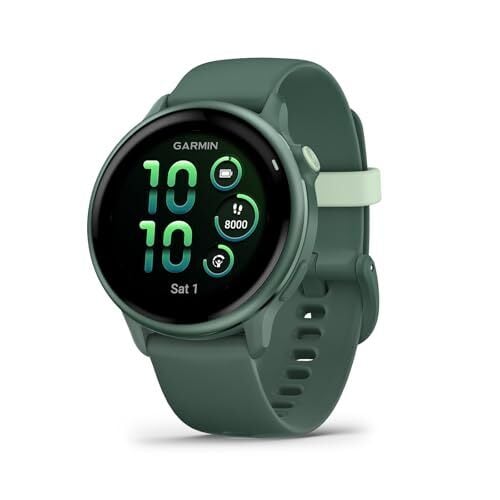
The Vivoactive 6 is on sale for what I believe is the first time ever, for $249.99 down from the original $299.99. The Vivoactive line is Garmin’s most underrated: It’s a great casual fitness watch with the accurate GPS and heart rate that you’d expect from a Garmin. It also has coached walking workouts, a smart alarm, and wheelchair fitness settings. 

The Venu X1 is also on a rare sale, $699.99 down from the original price of $799.99. This new smartwatch is Garmin’s answer to the Apple Watch Ultra, with a large rectangular display, sapphire glass, and built-in maps for navigation. Unlike its Apple counterpart, it has an LED flashlight and the battery lasts up to eight days. 

Among older Garmin watches, the Venu Sq 2, released in 2022, is on sale for $149.99, down from a list price of $249.99. (It was originally sold for $299.99.) This is a great budget option for a casual fitness watch, especially if you like the square screen format.

Apple

The GPS-only version of the Apple Watch SE is $179.99, down from $249.99. This is the second-generation of the SE, launched in 2022. It’s a great budget pick if you don’t want to splurge on a newer or fancier Apple Watch. 

The Series 10 Apple Watch is also discounted, starting at $329.99 for the GPS-only version, down from $399.99. This is last year’s mid-range Apple Watch, which our editor Michelle Ehrhardt crowned the best Apple Watch for most people. This year’s release, the Series 11, is only a mild upgrade. If you go for the Series 10 instead, you’re only missing out on tougher glass, a 5G modem, and a somewhat improved battery life. The Series 10 is worth considering if you don’t need those extra features. 

Samsung

The Galaxy Watch 7 is on sale starting at $199.99 today, normally $249.99. This watch is the slightly older model, since it was replaced with the Galaxy Watch 8 earlier this year. But it’s still a solid pick for an Android smartwatch. The $199.99 price is for the smaller size with Bluetooth-only connectivity, but both sizes and both connectivity styles (Bluetooth or LTE) are all on sale for around $50 off. 

The titanium gray color of the Galaxy Watch Ultra (released this year) is on sale for $599.99, down from $649.99. Other colors still seem to be full price. 

Fitbit

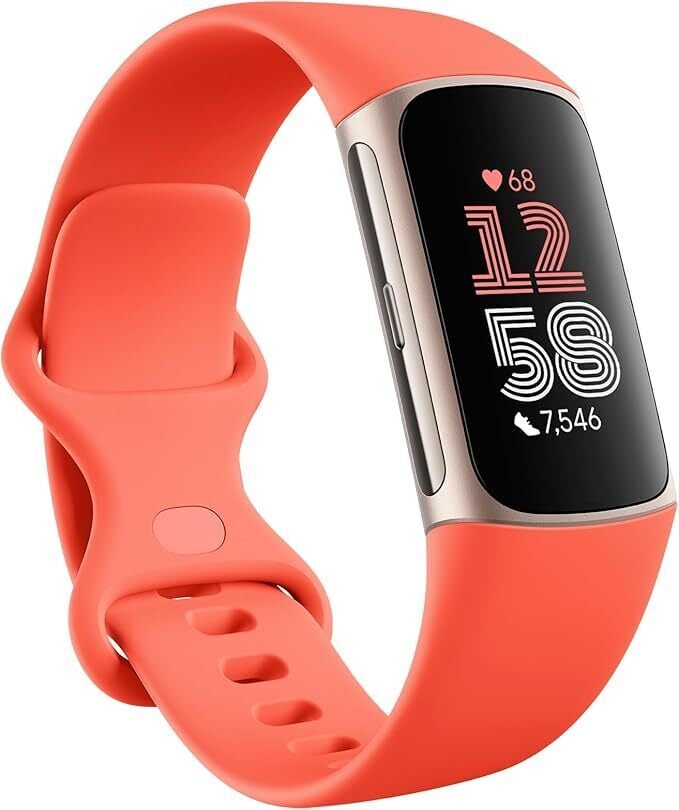
Fitbit’s best basic fitness tracker, the Charge 6, is on sale today for $119.95, down from $159.95. I like the Charge 6 as a no-nonsense tracker, great for somebody who just wants step and activity tracking without having to think about it too much. (That said, if you want a bigger screen or more features, check out the Garmins I mentioned above.) I have a review of the Charge 6 if you’d like to learn more.

The  Inspire 3 is also on sale for $79.95, down from $99.95. It doesn’t have its own GPS, and the screen is smaller. The smartwatch-styled Sense 2 is $199.95, down from $249.95. The Versa 4 is $149.95, down from $199.95.

Looking for something else? Retailers like Walmart and Best Buy have Prime Day competition sales that are especially useful if you don’t have Amazon Prime.


Our Best Editor-Vetted Early Prime Day Deals Right Now


Ring Battery Doorbell Plus


—
$79.99

(List Price $149.99)


Ring Indoor Cam (2nd Gen, 2-pack, White)


—
$49.98

(List Price $79.99)


Amazon Fire HD 10 (2023)


—
$69.99

(List Price $139.99)

Deals are selected by our commerce team

Microsoft Reveals Fate Of Xbox As Major Retailers Step Back From The Console

Microsoft Reveals Fate Of Xbox As Major Retailers Step Back From The Console
It has been a tumultuous month for the Xbox brand. In the face of near-simultaneous price hikes on Xbox consoles and Xbox Game Pass Ultimate, reports indicate that retailers like Costco are not only putting existing Xbox consoles on clearance pricing, but have no intentions of restocking them. This, as well as rumors of Xbox going third party

Ubuntu Linux 26.04 LTS Officially Named Resolute Raccoon

BrianFagioli writes: Canonical has revealed the codename for Ubuntu 26.04 LTS: Resolute Raccoon. The announcement came today on X through the official @ubuntu account, continuing the tradition of pairing an adjective with an animal for each release. As an LTS version, it will be supported for five years and serve as the foundation for servers, desktops, and cloud deployments when it launches in April 2026.

While the name itself is now public, the features of Ubuntu 26.04 remain under wraps. The community will be watching closely to see which kernel it ships with, how GNOME evolves, and what improvements land for enterprise and container use. For now, fans simply have a raccoon mascot to rally around as the countdown to April begins.


Read more of this story at Slashdot.

If You’re Ready to Stop Manually Plunging, This High-Pressure Plunger Is 20% Off

We may earn a commission from links on this page. Deal pricing and availability subject to change after time of publication.

Amazon Big Deal Days is coming October 7-8, and Lifehacker is sharing the best sales based on product reviews, comparisons, and price-tracking tools before it’s over.


You really don’t know what true panic feels like until you’re watching a toilet slowly, inevitably overflow. It’s like a little mini-horror movie you get to experience while you race around the house looking for that plunger you know you have somewhere.

But even when you find that plunger, there’s no guarantee it will work effectively. Old-style plungers require a good seal and some nerves of steel to be effective. A much better choice—that also works effectively on sink, floor, and shower drains—is a high-pressure plunger like this one from HimePro, which is currently 20% off for Prime Day.

High-pressure plungers work by building up air pressure inside (accomplished by pumping it up like a bicycle pump), then shooting a targeted blast of air into into the drain to blow the obstruction loose. This model produces 120 psi of pressure, which is plenty to clear most common drain and toilet clogs. It’s really easy to use, too. You just pump it up to your desired pressure (you can start at a lower psi if you’re worried about damaging your pipes), insert it into the drain, and pull the trigger.

The kit comes with different plugs for different drains, a storage bag (or a wall clip if you prefer), and, as a nice little extra, a pair of durable rubber gloves, since clearing drains and toilets can be messy work. At 20% off, this is a great deal you should jump on if you’re in one of those rare houses with drains and/or toilets in them.


Looking for something else? Retailers like Walmart and Best Buy have Prime Day competition sales that are especially useful if you don’t have Amazon Prime.

Our Best Editor-Vetted Early Prime Day Deals Right Now


Ring Battery Doorbell Plus


—
$79.99

(List Price $149.99)


Ring Indoor Cam (2nd Gen, 2-pack, White)


—
$49.98

(List Price $79.99)


Amazon Fire HD 10 (2023)


—
$69.99

(List Price $139.99)

Deals are selected by our commerce team

Spotify, Canva and other apps can now connect to ChatGPT

You’ll soon be able to interact with some of your favorite apps, including Spotify and Canva, right inside of ChatGPT. OpenAI announced the integration, which is enabled by the company’s new Apps SDK, during its DevDay presentation. As of today, ChatGPT can connect to a handful of apps, with more to come over time and OpenAI working on submission guidelines that will allow developers to monetize their work.

As a ChatGPT user, you can any access available third-party app by referencing it in your conversations with the chatbot. In the case of Spotify, for example, you can write “Spotify, make a playlist for my party this Friday.” The first time you mention an app in this way, you’ll be prompted to connect your account to ChatGPT. When working with Spotify, ChatGPT can make recommendations based on a mood, theme or a topic. The interface will eventually lead you to Spotify itself, where you can listen to what ChatGPT has created.

“It’s early days, so while we might not be able to deliver on every request just yet, we’ll continue to build, refine, and improve the experience over the coming weeks and months,” Spotify says of the integration.

OpenAI showed off other apps working inside of ChatGPT. For instance, an employee demoed Canva creating a few posters for a dog-walking business that they had talked to ChatGPT about starting. With today’s announcement, ChatGPT can connect to Canva, Coursera, Figma, Spotify and Zillow. In the coming weeks, DoorDash, OpenTable, Target and Uber will also work with the chatbot. And later this year, OpenAI says it will begin accepting app submissions for review and publication.

This article originally appeared on Engadget at https://www.engadget.com/spotify-canva-and-other-apps-can-now-connect-to-chatgpt-194830116.html?src=rss

Microsoft Assures Gamers It’s Not Abandoning Xbox Hardware

Microsoft said in a statement Monday it remains committed to developing first-party Xbox consoles. The reassurance came after rumors circulated suggesting the gaming division might abandon hardware manufacturing. The speculation gained traction following a 50% price increase for Xbox Game Pass Ultimate and retailers including Costco removing Xbox products from their shelves.

Microsoft said it is “actively investing in our future first-party consoles and devices designed, engineered and built by Xbox.” The company’s multi-year partnership with AMD for next-generation hardware also continues. Devices in development include the Xbox Ally range under codenames Omni and Horseman, according to Windows Central. Xbox Series X and Series S production has also not stopped, the report added.


Read more of this story at Slashdot.

OpenAI wants to make ChatGPT into a universal app frontend

At an OpenAI Dev Days keynote today, CEO Sam Altman announced that the company is launching an SDK preview that will allow developers the ability “to build real apps inside of ChatGPT.” Altman said that, starting today, the new SDK will give developers “full stack” control over app data, action triggers, and even interactive user interfaces for apps that can appear inline as part of an existing ChatGPT conversation window.

The SDK is built on the open source Model Context Protocol (MCP), Altman said. That means developers that already use MCP only need to add an HTML resource to enable ChatGPT integration, he added.

The new integration means a ChatGPT user can directly ask Figma to turn a sketch into a diagram, for instance, and get results integrated into their ChatGPT conversation. It also means that ChatGPT can suggest apps that might be suited to a more general query, like recommending and creating a Spotify playlist when someone asks for song suggestions.

Read full article

Comments

This Portable Shop Vac Is Nearly 20% Off for October Prime Day

We may earn a commission from links on this page. Deal pricing and availability subject to change after time of publication.

Amazon Big Deal Days is coming October 7-8, and Lifehacker is sharing the best sales based on product reviews, comparisons, and price-tracking tools before it’s over.


I live in a pretty small house. How small? People routinely ask me where the rest of it is, and when my wife’s relatives from Texas show up, all they can talk about is how they could never live in such a small place. I mean, it’s not that small, but it’s not exactly huge—and it definitely lacks storage.

I feel that lack of storage space most acutely when it comes to tools and home maintenance stuff, which tends to be bulky (and to accumulate over time as you pick up implements for specific needs). For a long time I was borrowing my brothers shop vac, for example, because I just didn’t have space to store one when I wasn’t actively using it. A wet/dry vac comes in mighty handy when you’re working on stuff around the house (or fighting the occasional flooded crawl space), so I was pretty stoked to find this cordless shop vacuum from DeWalt—and it’s currently discounted to $163 (originally $200) for October Prime Day

What I love about this shop vac is that it’s small, so you can tuck it away almost anywhere and it’s light enough to pop onto any shelf that’s available. And the combination of its low weight (just eight pounds) and cordless operations means it’s really easy to bring it literally anywhere—including my crawl space, which can only be accessed by the tiniest, least convenient hole cut literally into a closet floor. If you don’t have a DeWalt charger and battery for this, you have the option of just plugging it into the wall—slightly less convenient, but still very usable.

It’s powerful enough for most basic jobs, and on battery it will run for more than half an hour, which should be plenty of time to clean up the mess you’ve made during your latest adventures in DIY repair. With a two-gallon capacity, it’s perfect for draining a toilet before removal or sucking up wood shavings because you forgot to put down a drop cloth before cutting some planks.


Looking for something else? Retailers like Walmart and Best Buy have Prime Day competition sales that are especially useful if you don’t have Amazon Prime.


Ring Battery Doorbell Plus


—
$79.99

(List Price $149.99)


Ring Indoor Cam (2nd Gen, 2-pack, White)


—
$49.98

(List Price $79.99)


Amazon Fire HD 10 (2023)


—
$69.99

(List Price $139.99)

Deals are selected by our commerce team

Apple is bringing back Slide Over in iPadOS 26.1

The reaction to iPadOS 26 has been mostly positive, but some users have bemoaned the absence of the decade-old Slide Over multitasking feature. Well, Apple just announced that it’s coming back as part of iPadOS 26.1. It’s actually already available, though just as part of the beta build.

For the uninitiated, Slide Over is a multitasking tool that lets users quickly reveal and hide an app that slides in and out from the side of the screen. This is great for quickly revealing and hiding an app without permanently rearranging your workspace.

Apple also got rid of Split View with iPadOS 26, but the new windowing system can easily do something similar. There has been no way with the new OS to mimic Slide Over, which has become a source of frustration for tablet fans.

Whoa, Apple brought back Slide Over in iPadOS 26.1 Beta 2 and, unlike before, you can now resize it instead of just being a skinny window like it was on iPadOS 18 and earlier. It’s basically now just a way to pin an app on top of every other app. pic.twitter.com/tHZk0DAkRk

— Robb Weeks (@jrobertweeks) October 6, 2025

Slide Over has been redesigned to work with that new windowing system and there’s a major upgrade. Users can quickly resize the windows and change the aspect ratios, in addition to swiping right to completely hide them from view.

There is also one major downgrade, according to reporting by 9to5Mac. Users can only have one active app in Slide Over at a time. In iPadOS 18 (and earlier), folks could switch between multiple apps in a Slide Over window, but it looks like that option has been removed. 

Given how iPadOS 26 radically reworked the way the system handles multiple apps, it’s a safe bet that this old Slide Over behavior was incompatible with the latest OS. Engadget has reached out to Apple for clarification and will update this post when we hear back.

This article originally appeared on Engadget at https://www.engadget.com/mobile/tablets/apple-is-bringing-back-slide-over-in-ipados-261-190036025.html?src=rss

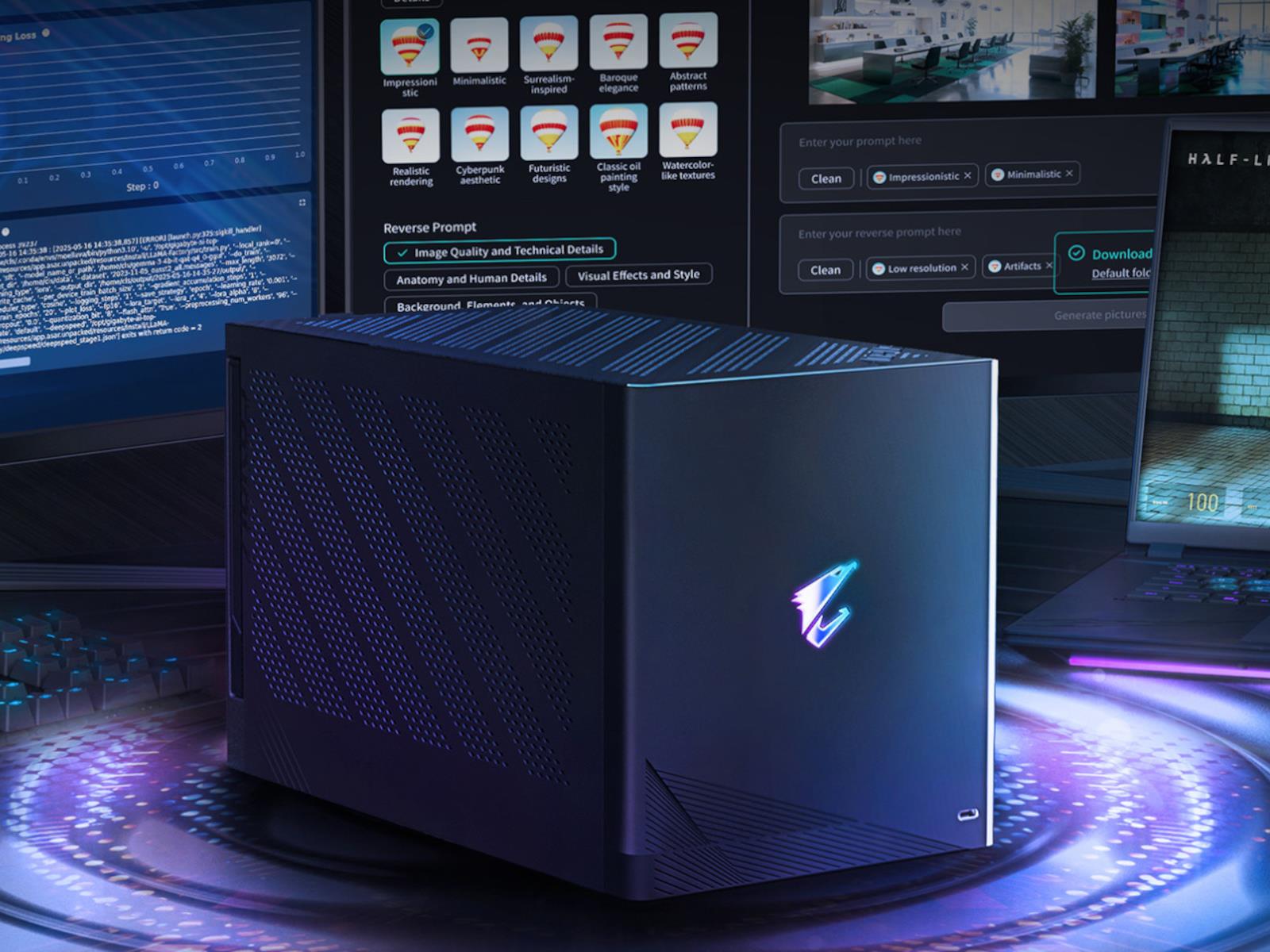
Gigabyte’s Aorus Thunderbolt 5 External GPU Box With RTX 5090 Is Now Available

Gigabyte's Aorus Thunderbolt 5 External GPU Box With RTX 5090 Is Now Available
Today, Gigabyte introduced its Gigabyte Aorus RTX 5090 AI Box, a Thunderbolt 5-powered eGPU solution for the NVIDIA GeForce RTX 5090 outfitted with 32GB of GDDR6X VRAM. As the name implies, it’s being marketed as a practical accelerator for AI workloads to help power laptops or PCs that need extra GPU horsepower, though of course an RTX 5090