Ball x Pit’s deeply satisfying grind keeps me coming back for more

For as long as I can remember, I’ve had trouble going to sleep. When I lay down, my mind inevitably starts racing a thousand miles an hour, thinking about anything and everything. 

On several recent nights, though, my pre-slumber thoughts had a singular focus. I mulled over possibilities like, “What if I fuse a ball that heals my character with one that splits into smaller balls with the same effect, and add a passive that fires a baby ball every time I’m healed?” Then I grab my PlayStation Portal and do just that until I doze off. This is the hold Ball x Pit has had over me. 

Kenny Sun and a small group of collaborators have cooked up a mesmerizing brick-breaking roguelite. Ball x Pit is a blend of dual-stick shoot-’em-up action, base building and about a dozen other things that keeps calling me back for one more run… and another, and another.

After a cataclysmic event wipes out the city of Ballbylon and leaves an enormous pit, hunters descend into the depths in search of treasure. For our purposes, this means playing levels to collect resources in order to build structures in New Ballbylon. These buildings unlock perks, such as new characters, that help with future runs. The sickly chaos of the levels and the calmer city building aspect feed into each other smartly and combine for a satisfying loop.

Base building in Ball x Pit
Kenny Sun/Devolver Digital

That’s not the only important interplay here. Like any good roguelite, Ball x Pit is all about finding synergies for maximum impact. It’s right there in the title, with the “x” denoting a relationship between two things (it’s derived from shipping in fandom parlance). 

In the pit, you battle monsters by — surprise! — firing balls at them. Along with regular “baby balls,” each character has a unique ability and a special starter ball. In the vein of Vampire Survivors, you’ll unlock more special balls and passive abilities when you collect enough gems to level up. One ball has a chance to freeze enemies and another is slower but deals much more damage. There are dozens of others.

The real fun comes in when you start fusing these balls and their effects together, freeing up space for another weapon. It gets even better when you’re able to evolve a pair of balls into something new. It’s possible to fuse evolved balls, or even evolve them again. There’s a strategic aspect to this, as you won’t want to fuse balls that can nearly cancel each other out, such as merging an area-of-effect ball with one that disappears on impact, or leave yourself with too few balls in the face of danger.

Once I unlocked the option to take two characters on a run and combine their passive abilities, that’s where things went into overdrive. The possibilities became very exciting at this point, and I ended up playing Ball x Pit way past my ideal bedtime as a result.

It does take a while to get to that point, though. Progression is slow at first. The repetition can get to be a little much as you need to beat each stage multiple times before moving onto the next. Also, I wish there was a bit more to the game narratively than a basic setup and some character descriptions.

But there’s so much to consider on each run, and that’s what keeps me coming back. Each of the nine levels is set in a different biome, with its own hazards, enemies and bosses. Some late-game characters turn the game on its head by shifting playstyles in surprising ways, but I don’t want to spoil those. Along with the absolute chaos and dopamine hits of slicing through enemies, discovering killer combinations between characters, special balls — especially the evolutions — and passives drives so much of the joy of this game.

Whenever you do fuse or evolve a pair of balls, rather than having to click an “OK” button to get back in the action, the prompt reads “Whoa.” That’s on the nose, but funny. And I’ll be damned if I didn’t say that very thing out loud many times when I saw what a new evolved ball could do.  

Ball x Pit is out now on Steam, PS5, Xbox Series X/S and Nintendo Switch for $15. It’s available via Game Pass Ultimate and PC Game Pass. A Nintendo Switch 2 version is coming later this fall with a free upgrade from the Switch version.

This article originally appeared on Engadget at https://www.engadget.com/gaming/ball-x-pits-deeply-satisfying-grind-keeps-me-coming-back-for-more-171000754.html?src=rss

Coros’s New Apex 4 Adds a Speaker and Microphone to the Apex Line

We may earn a commission from links on this page.

Did you know you can customize Google to filter out garbage? Take these steps for better search results, including adding Lifehacker as a preferred source for tech news.


Coros launched a new version of its Apex watch today, the Apex 4. Like the Nomad released earlier this year, it has a MIP screen, an action button for shortcuts, and maps with street names. 

How does the Apex compare to other Coros watches? 

Coros has three watch lines besides the Nomad: the Pace, Apex, and Vertix. I’ve written about the Pace 3 and Pace Pro, both of them solid watches that rival Garmin features at a lower price. (I swapped my Garmin for a Coros for a month this summer; you can read my thoughts on that here.) 

Compared to the Pace line, Apex has more rugged materials and is billed as an adventure watch. It has features geared toward skiing and mountain climbing, in addition to the usual running and fitness capabilities. Both this Apex model and the one before it have sapphire glass and offline mapping. The Apex 2 only has single-band GPS, while the Apex 2 Pro has dual-band like the new Apex 4.

What’s new in the Apex 4?

Before the Apex 4 were the Apex 2 and 2 Pro. (Yes, Coros skipped the 3.) Compared to them, the new Apex 4 adds: 

  • A speaker and microphone

  • The ability to log voice pins that get tied to locations (enabled by that microphone)

  • Trail and street names on the maps

  • An action button that can be programmed for shortcuts,  instead of a dedicated backlight button

  • Faster map rendering

  • More accurate elevation readings

Battery life is similar to the Apex 2 Pro, with 24 days of daily use or 17 hours of activity tracking in all-systems mode. 

The Apex 4 is $479 for the 46 mm size, and $429 for the 42 millimeter size. For comparison, the Apex 2 Pro is $449 and comes in a 46 millimeter size, and the Apex 2 is $349 and 43 millimeters.

US demand grows for Chinese cars despite privacy and security fears

More than half of American car buyers would consider a Chinese car brand for their next purchase, an increase of almost 25 percent compared to last year. That’s according to a survey of prospective car buyers conducted annually by the research firm AutoPacific. And yes, those car buyers are conscious of the privacy and security fears.

AutoPacific spoke to 18,000 people who said they were planning to buy or lease a new car within the next three years for its 2025 Future Attribution Demand Study, and the company has been releasing snippets of data as it analyzes them, ahead of the full report’s release later this year.

There has already been at least one surprise. Last year, partially automated driving systems like General Motors’ Super Cruise or Ford’s BlueCruise, or those developed by Tesla, were not in high demand. This year, that tech went to the top of the most-wanted list, with 43 percent of consumers saying they want hands-free partial automation. The same percentage also indicated a demand for rear automatic emergency braking. Wireless device charging, No. 1 in the list in 2024, didn’t make the top 15 for 2025.

Read full article

Comments

How to cancel Proton VPN and get a refund

Proton VPN currently tops my list of the best VPNs, and I gave it a glowing recommendation in my detailed Proton VPN review. It’s easy to use, fast, cheap and secure, with a large server network and one of the industry’s best scores at unblocking streaming sites. All that said, there’s no such thing as a perfect VPN, and you may find that Proton isn’t working for you. If that happens, here’s how to cancel your subscription.

How to cancel Proton VPN through a browser

If you initially signed up less than 30 days ago, you can cancel your subscription and request a refund by contacting tech support. See “How to get a refund from Proton VPN” below for details. If more than 30 days have passed, use the following steps to cancel your subscription.

  1. Open your browser and go to protonvpn.com. At the top-right, click Sign in, then enter your username and password. You’ll be taken to your account dashboard.

  2. At the left side of the dashboard, click the Subscription tab.

  3. Scroll all the way down to the section labeled Cancel subscription. Click the “Continue” button.

  4. A pop-up window will appear, asking if you’re sure. Click Cancel subscription.

Cancel Proton VPN on desktop
Sam Chapman for Engadget

Cancelling this way doesn’t immediately terminate service — it just means your subscription won’t auto-renew. You can still use Proton VPN’s paid features, including the entire server network, until the current period expires. After that, you’ll be automatically downgraded to the free plan. During this time, your account dashboard will still be active, so you can use it to turn renewal back on if you change your mind.

This method also works in mobile browser apps. Just follow the same steps on your mobile device and you’ll cancel in the same way, with service continuing until your subscription expires.

How to downgrade from Proton Unlimited to Proton VPN only

A Proton Unlimited subscription applies to all Proton products. Since it’s mainly founded on Proton Mail, though, downgrading to VPN service only is tricky and requires some extra steps.

First, downgrade Proton Unlimited to Proton Free from your main account dashboard. Log in at account.proton.me, then click Settings, All settings, Dashboard and Your plan. Under “Proton Unlimited,” click Explore other Proton plans. On the next page, select Proton Free. This will effectively cancel Proton Unlimited, though you can still use it until the end of the pay period.

Finally, go to the Proton VPN website (not the overall Proton site) and sign up for a Proton VPN Plus plan. Since you downgraded instead of deleting your account, you should be able to use the same account address.

How to delete your Proton account on mobile

You can also use the mobile app to delete your entire Proton account, instantly and irreversibly ending your subscriptions to Proton VPN, Proton Mail and any other products in the line. Taking this action permanently burns your Proton username, so you won’t be able to use it again if you decide to re-subscribe (in that case, you’ll just have to make a new one).

The process is the same on both Android and iOS — the apps have slight cosmetic differences, but everything is in the same place. Follow the steps below to nuke your Proton account from orbit.

  1. Open the Proton VPN app on your Android phone.

  2. Click Settings at the bottom of the window.

  3. At the top of the settings page, click your account email address. This will take you to Account settings.

  4. Click Delete account. A window will open in your web browser, showing your general Proton account page.

  5. Scroll down to the bottom of this page and click the red Delete your account button.

  6. Select a reason for deleting your account and leave feedback in the box provided. You have to pick an option from the menu and type at least 10 characters in the box, though feel free to keyboard mash if you don’t want to say anything.

  7. Check the box on the next page beside “Yes, I want to permanently delete this account and all its data.” Finally, click the red Delete account button.

Cancel Proton VPN on Android
Sam Chapman for Engadget

How to get a refund from Proton VPN

Proton VPN has a 30-day refund policy. As long as you paid for your VPN less than 30 days ago, you can get your money back. To request a refund, send a message through the contact form on the website. You can also email protonvpn@support.zendesk.com.

There’s a minimum of 100 characters in the “What happened?” box. Unlike when you’re simply deleting your account, I do recommend putting a brief real answer here, clearly stating that you would like to cancel your account and receive a refund.

Proton VPN contact form
Sam Chapman for Engadget

According to its terms of service, Proton will only refund you for the portion of the service you didn’t use. If you spend $10 for a one-month subscription and cancel after 15 days, you’ll get $5 back. The terms do state that the company “may also provide you with a full refund upon request” — directly asking for such a refund in your contact form makes this more likely.

If you cancel after 30 days are up, you may still be able to get a prorated payment for your remaining time, either in cash or account credit. You’ll have to ask for this specifically, as the default option is that your account just stays active until it runs out.

What to do if you subscribed through an app store

If you bought your Proton VPN subscription through the Apple App Store or Google Play Store, then Apple or Google processed your money and you’re subject to their refund policies.

If you subscribed through Apple, go to your Apple ID profile in iOS settings, click on Subscriptions, scroll to Proton VPN and click on Cancel subscription. You’ll then get the opportunity to request a refund.

On Android, log into the Google Play Store, click on your profile picture, then click Manage subscriptions. Find Proton VPN, click Cancel subscription and provide a reason. As with iOS, the steps will walk you through the refund process.

Proton VPN alternatives

Once you’ve fully cancelled Proton VPN, you may be in the market for an alternative. I recommend a few of my other favorites, depending on why Proton didn’t work for you. Surfshark is faster, ExpressVPN has some of the best app design and NordVPN has a wider range of interesting features.

This article originally appeared on Engadget at https://www.engadget.com/cybersecurity/vpn/how-to-cancel-proton-vpn-and-get-a-refund-170014128.html?src=rss

VSCO adds its first AI-powered photo editing tool

The VSCO photo editing and sharing app has been around for nearly as long as Instagram, positioning itself as the serious photographer’s choice for mobile editing. The original focus was on tasteful filters and editing tools, all of which got significantly more powerful and flexible over time; VSCO has long been doing the same sort of film emulations that have made Fujifilm’s cameras so desirable in recent years. The company also built up a loyal community of photographers who share their edits far and wide, both in the VSCO app as well as on more mainstream platforms like Instagram itself. 

Now, the company is making an unsurprising but potentially controversial move: it is releasing its first AI-powered image editing tool. “Remove,” as the name suggests, lets you erase “unwanted elements” from your photos without compromising the image’s full resolution. At first glance, it feels quite similar to tools like Google’s own Magic Eraser. You just pop open an image in the editor and highlight the portion you want to remove, and VSCO will do its best to obliterate the offending bits and fill in whatever is in the background that it deems appropriate. 

I haven’t had a chance to test how effective this tool is yet, but VSCO is using Black Forest Lab’s FLUX.1 Kontext model to do its magic, combined with its own proprietary technology specifically focused on making results that the company says look authentic. A quick look at Black Forest Lab and the FLUX.1 model show a tool that does appear to be well-suited to removing unwanted parts of an image and properly filling in the space that remains — but we’ll have to see it in action to judge whether it does the job well.

This new Remove tool isn’t the only AI-powered editor VSCO is working on. There’s also an Upscale tool in the works that the company says will “enhance image resolution” while keeping color and composition unchanged. These sorts of tools will live under a new umbrella the company is calling AI Lab, making it clear this will be an ongoing initiative and not just a one-off release.

On one hand, I’m not at all surprised to see VSCO jumping into AI-powered editing; it has to keep up with the rest of the industry. But on the other hand, the company has made its mark by building a community of photographers who value authenticity in their work, something that cannot help but be in conflict with AI tools, at least on the surface.

VSCO’s CEO Eric Wittman acknowledged that tension in a conversation with Engadget. “We have a very photographer-centric, creator-first point of view,” Wittman said. “But where we see AI fitting in is in support of those folks, and that work, and that vision. The intention isn’t to replace [that work], though — AI has a place, but it’s not to replace what creators, and photographers in particular, are doing.” 

That mindset makes sense with something like Remove, which duplicates something people have done with Photoshop for years. Rather than generating new images or radically changing the truth of a photo like you can do with some of Google’s tools on the Pixel phones, Remove is a bit more subtle. “You would use masks, you would manually painstakingly edit things at a pixel by pixel level,” Wittman said. “What a lot of Remove tools would do is basically like automate that.”

Wittman also cited preserving image quality as a key part of the work behind its own Remove tool. “We know that many people who were attempting to use AI in the early days, especially photographers, a lot of their disappointment was just in the preservation of the integrity and the quality of the work,” he said. “So what we’ve really tried to do is continue to help automate where we can and make things easier, but also preserve the quality.” To that end, VSCO is stressing that all these edits are non-destructive and the output will be in full, original resolution. 

As VSCO starts dabbling in more AI editing tools, Wittman emphasized that the company wants to stay on the side of helping photographers realize a creative vision rather than helping them make entirely unreal images, while also avoiding the mess of copyright issues and inauthentic content that is flooding the internet thanks to AI. “When you think about things like copyright, and the incredible importance of copyright, integrity, and authenticity — we’re big believers as a company in both the laws and the norms that have been around for many many years. But obviously on some platforms there are people who are maliciously manipulating things, and we don’t want to be participants in that.”

VSCO’s first AI Labs feature is available as of today in the VSCO app for iOS; it should come to Android eventually but there’s no word yet on specific timing. To use it, you’ll need an active VSCO Pro subscription, which runs $13 per month or $60 a year. A Pro plans contains a ton more than just AI Labs features, though — it unlocks a full editing suite on mobile and the web, professional profile and website creation, hundreds of presets and film emulation settings and a lot more. 

This article originally appeared on Engadget at https://www.engadget.com/apps/vsco-adds-its-first-ai-powered-photo-editing-tool-170000055.html?src=rss

Apple’s long-rumored smart display will reportedly cost $350

Apple has been expected to widen its smart home offering for a long time now, and if a new report is accurate, we could be getting a trio of new devices fairly soon. According to Bloomberg, Apple is working on an indoor camera and a smart display to arrive in 2026, as well as a tabletop robot, with the latter expected to launch in 2027.

An Apple-made smart display in particular has featured heavily in the rumor mill for a number of years, but it appears to be closer than ever. Bloomberg’s Mark Gurman reports that Apple’s new home hub will have a 7-inch square LCD display, a built-in FaceTime camera and an OS that dynamically adjusts depending on who’s using it. It will also ship with an improved version of Siri that will behave more like ChatGPT or other chatbots in how it uses the web to answer your questions. The product, along with the more advanced Siri chatbot, had been slated for release earlier this year, but Apple reportedly scrapped those plans in favor of a spring 2026 launch.

Bloomberg claims there will be two versions of the home hub, one code-named J940 which takes the form of a display mounted on a HomePod mini-like speaker, and the other (J491) designed to be hung on a wall. With both you’ll be able to control smart appliances, play music and presumably interact with Apple’s various apps on other devices. Apple is said to be targeting a price of around $350, although the Bloomberg report does not specify which version of the device that price refers to.

The tabletop robot scheduled to launch in 2027 will effectively be the smart display Apple could be releasing next year mounted into a motorized arm that can move the device to different positions, which sounds like the company’s take on Amazon’s (slightly creepy) swivelling Echo Show 10, first launched in 2021. This product will have a larger 9-inch display, but is said to be delayed after Apple encountered engineering challenges with the motor.

Bloomberg reports that all three of these devices will be built in Vietnam, which sources said represented a “major change” in how Apple launches a new product category, as it has traditionally relied on China at the outset. In 2020 it emerged that Apple was looking to diversify its production by moving some of its iPad and MacBook manufacturing to Vietnam, and the US’ trade war with China has only intensified during Trump’s second administration. Vietnam has not escaped tariffs of its own, but they’re less severe than imports from China.

This article originally appeared on Engadget at https://www.engadget.com/home/apples-long-rumored-smart-display-will-reportedly-cost-350-165801748.html?src=rss

Fujifilm’s refreshed Instax mini LiPlay has an extra camera for selfies

Fujifilm just announced the Instax mini LiPlay+ instant camera, which is a refresh of the original mini LiPlay from 2019. It’s been six long years, so the company has added some nifty features here.

First of all, there’s a second camera on the rear that’s intended for selfies. It features a wide-angle lens and joins the pre-existing front-facing camera. There’s a new functionality that lets users combine the content from both cameras to create unique layered images. That’s pretty nifty.

Introducing the next generation of hybrid instant camera: instax mini LiPlay+™

The updated mini LiPlay+ adds new creative tools and a refreshed design, giving image makers more ways to tell their stories with photos and sound.

Learn more at https://t.co/o9TNgyG12o. pic.twitter.com/cUArA0BeZt

— Fujifilm (@FujifilmUS) October 15, 2025

The design is mostly the same as before, but the rear LCD is larger. This should make it easier to accurately compose images before printing them out. To that end, there’s a new film type accompanying the launch of this camera. The Soft Glitter instant film is available in ten-exposure packs and offers gold accents and soft hues to “bring a calming shimmer” around the frames. Film packs cost around $18.

There’s also a redesigned app with plenty of new features, including the ability to add short audio clips to images. These multimedia creations can be viewed by scanning a QR code in the print, which will trigger the audio on a smartphone or similar device. The LiPlay+ app lets users further edit images before printing them via the camera.

The camera will be available for purchase by the end of the month and costs $235. There will be blue and beige versions. The original mini LiPlay didn’t quite make our list of the best instant cameras, but several Fujifilm Instax models did. The company makes good stuff.

This article originally appeared on Engadget at https://www.engadget.com/cameras/fujifilms-refreshed-instax-mini-liplay-has-an-extra-camera-for-selfies-164319167.html?src=rss

Nearly 40% of Kids Under 2 Years Old Interact With Smartphones, According To Their Parents

An anonymous reader shares a report: On Wednesday, Pew Research Center published a survey assessing how parents in the US with children under 12 manage their kids’ screen time, which revealed that 61% of respondents overall reported their child ever uses or interacts with smartphones — including 38% of those with children under 2 years old.

Much of this smartphone screen time is likely made up by parents streaming kid-friendly cartoons for their little ones to watch on the go: the study also found that YouTube use among children under 2 has risen sharply from 45% to 62% over the last five years. But it appears that most American toddlers only need to wait a few years before they can get devices of their very own. The same survey showed that almost one in four US parents overall allow their children aged 12 and under to have their own smartphones, and this ballooned to nearly 60% when just looking at kids aged 11-12 years old.


Read more of this story at Slashdot.

Reformer Pilates Classes Are Coming to Tonal

We may earn a commission from links on this page.

Did you know you can customize Google to filter out garbage? Take these steps for better search results, including adding Lifehacker as a preferred source for tech news.


I love going to a reformer Pilates studio for a (pricey) workout but I also love staying home to work out on my own. In the end, it just depends on my mood.

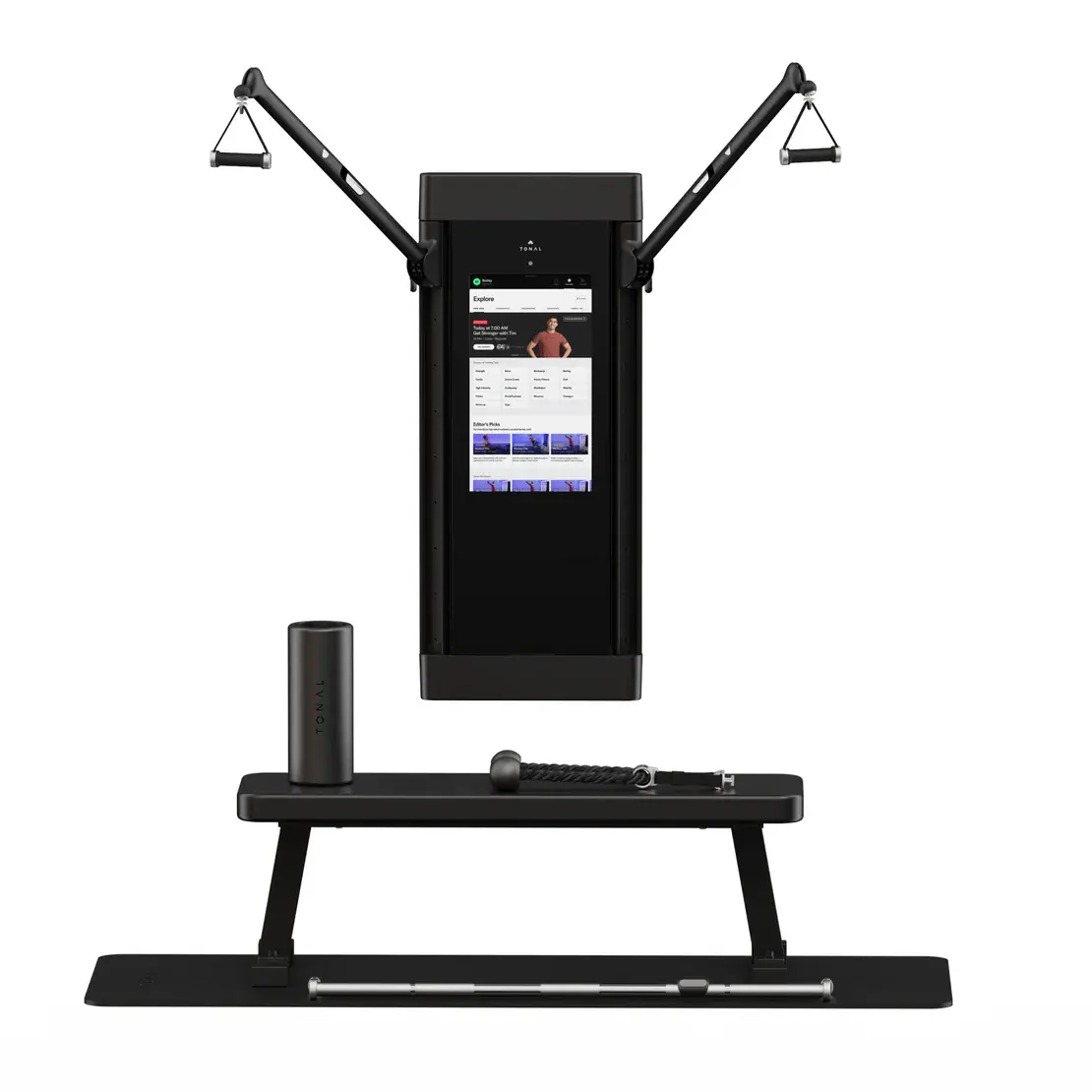
Good news for people like me: Tonal is rolling out reformer-style Pilates with its new update. If you have the at-home weight training device or are considering getting one, this could be major for you. Even if you’re not someone who wakes up on a Saturday morning excited to go trade $65 for 45 minutes on the reformer—or you’ve never even tried Pilates at all—this is nice because it can allow you to give it a whirl from the comfort of your home, using the same device you use for more traditional strength training. Led by yoga and Pilates instructor Kristin McGee, the classes are broken down by experience level and, like all Tonal workouts, customized to your strength.

How Tonal’s Pilates classes feel

I got to test out the new Pilates offering last week, which was exciting because I don’t have a Tonal machine (yet, since I’m planning to get one) but also daunting because, well, I don’t have a Tonal machine. I wasn’t sure what to expect. I knew, broadly, that these are digital devices you stick to your wall, calibrate, and work out with basically like you would with your gym’s cable machine. They use magnetic resistance to increase and decrease the weight that you’re pulling on.

First, I did a few regular lifting exercises so the machine could determine how strong I am. Any user will do these same four exercises to get a baseline. From then on, the machine will set up all weights for all exercises to align with what that person can do, progressively increasing the weight over time as the user gets stronger.

Then it was Pilates time. The big difference between the new Pilates offerings and the traditional strength training on Tonal is the same difference you find when you compare using a cable machine to using a reformer: With the Pilates moves, the resistance gets harder as you push or pull, whether because of the springs on the reformer or the settings on the Tonal.

I did some leg circles, some hundreds, and a handful of other standard Pilates moves—and besides the fact I was laying flat on the floor and interacting with a big digital machine, it did feel pretty similar to using a reformer.

The Tonal Pilates specs

This program won’t be out officially for Tonal users until Nov. 17, but you can order your loop attachments now. Made in partnership with Pilates Loops, they cost $100 and are similar to the straps you get on a standard reformer. There’s a long loop, a short loop, and a knot you can grab farther down, depending on the exercise you’re doing and how intense you want it to be.

Beyond the loops, no further equipment upgrade is necessary—software updates will hit Tonal 1 and Tonal 2 machines in November. The Pilates upgrade will work with the digital weight technology that comes along in all the equipment and will go up to 10 resistance levels. The machine makes small adjustments as you work through the moves, which are presented and demonstrated by McGee, so if you’re having a hard time or something is too easy, the adjustments are automatic.

Tonal did already offer mat Pilates classes and while I love those, they’re not quite the same as fighting against a machine custom-built for the struggle, which is why I still find myself trekking to a studio a few times a week even though I have access to mat Pilates classes through YouTube, Peloton, and my gym. The addition of this programming adds a more in-depth option for anyone looking for a workout that’s easy on the joints, engages the core, and boosts mobility and balance.

A Tonal 2 costs $4,295 and a monthly membership runs you $60.

[$] A new API for interrupt-aware spinlocks

Boqun Feng spoke at

Kangrejos 2025
about adding a frequently needed API for Rust drivers
that need to handle interrupts: interrupt-aware spinlocks. Most drivers will
need to communicate information from interrupt handlers to main driver code, and
this exchange is frequently synchronized with the use of spinlocks. While his
first attempts ran into problems, Feng’s ultimate solution could help prevent bugs
in C code as well, by tracking the number of nested scopes that have disabled
interrupts. The
patch set
, which contains work from Feng and Lyude Paul, is still under review.

Japan Asks OpenAI To Stop Sora 2 From Infringing on ‘Irreplaceable Treasures’ Anime and Manga

The Japanese government has made a formal request asking OpenAI to refrain from copyright infringement. The request came after Sora 2 began generating videos featuring copyrighted characters from anime and video games. Minoru Kiuchi spoke at the Cabinet Office press conference on Friday and described manga and anime as “irreplaceable treasures” that Japan boasts to the world.

The request was made online by the Cabinet Office’s Intellectual Property Strategy Headquarters. Sora 2, which launched recently, generates twenty-second videos at 1080p resolution. Social media is getting filled with videos showing characters from One Piece, Demon Slayer, Pokemon and Mario. Digital Minister Masaaki Taira expressed hopes that OpenAI would comply voluntarily. He indicated that measures under Japan’s AI Promotion Act may be invoked if the issue remains unresolved.


Read more of this story at Slashdot.

Google’s AI videos get a big upgrade with Veo 3.1

It’s getting harder to know what’s real on the Internet, and Google is not helping one bit with the announcement of Veo 3.1. The company’s new video model supposedly offers better audio and realism, along with greater prompt accuracy. The updated video AI will be available throughout the Google ecosystem, including the Flow filmmaking tool, where the new model will unlock additional features. And if you’re worried about the cost of conjuring all these AI videos, Google is also adding a “Fast” variant of Veo.

Veo made waves when it debuted earlier this year, demonstrating a staggering improvement in AI video quality just a few months after Veo 2’s release. It turns out that having all that video on YouTube is very useful for training AI models, so Google is already moving on to Veo 3.1 with a raft of new features.

Google says Veo 3.1 offers stronger prompt adherence, which results in better video outputs and fewer wasted compute cycles. Audio, which was a hallmark feature of the Veo 3 release, has reportedly improved, too. Veo 3’s text-to-video was limited to 720p landscape output, but there’s an ever-increasing volume of vertical video on the Internet. So Veo 3.1 can produce both landscape and portrait 16:9 video.

Read full article

Comments

All the New M5 Products Apple Just Announced

Did you know you can customize Google to filter out garbage? Take these steps for better search results, including adding my work at Lifehacker as a preferred source.


Sometimes, Apple hosts grand presentations to announce new products and services. Other times, the company simply drops the news on a random Wednesday morning. This Wednesday morning is one such example: Following a preview on social media, Apple has announced the M5 chip, as well as three products that will kick off this new era of Apple silicon: the M5 14-inch MacBook Pro, iPad Pros, and Vision Pro.

The M5 chip

The big news that unifies all updated Apple products today is the M5 chip. As the name might imply, this is the company’s fifth generation of Apple silicon, its custom system on a chip (SoC).

Apple is selling M5 as a chip optimized for AI. The company says the new 16-core Neural Engine delivers both performance and efficiency boosts for AI processes. That means Apple Intelligence features should be faster and more accurate, though I’m not sure that’s enough to get me to use it.

In addition, the chip’s 10-core GPU has a dedicated “Neural Accelerator” in each core, which offers over four times peak GPU compute over the M4 chip, and six times the compute of M1. Apple specifically touts the improvements for the new 14-inch MacBook Pro and iPad Pro, which can now take advantage of “accelerated processing” for AI tasks, like running diffusion models and large language models. 

In other graphics gains, M5’s GPU and enhanced shader cores can be up to 30% faster than M4 and up to 2.5 times faster than M1. It comes with Apple’s third-gen ray-tracing engine, which offers a boost for any process that uses ray tracing to calculate lighting effects. Those improved graphics means the new Apple Vision Pro can render 10% more pixels as well as handle refresh rates up to 120Hz.

M5’s unified memory now has a bandwidth of 153GB/s, a nearly 30% jump over M4 and over 2x boost over M1, according to Apple. All devices running M5 can access the entire memory pool at once, which Apple says makes it possible to run larger AI models entirely on-device. That’s great news for privacy for anyone using AI on these MacBooks, iPads, or Vision Pro. Users can configure M5 to come with up to 32GB of RAM.

MacBook Pro

m5 macbook pro

Credit: Apple

Apple did something interesting with its M5 kickoff for the Mac: It started only with the 14-inch MacBook Pro. If you want a 16-inch MacBook Pro with M5, you’ll need to wait.

This new 14-inch MacBook Pro comes with all the new performance gains that Apple advertises for the M5 chip, with some unique benefits as well. Apple says this machine has up to 24 hours of battery life, which, if true, would be huge: You could work two full 12-hour days before needing to find a charger for your MacBook.

M5 also brings upgrades to the SSD in this MacBook Pro, which Apple says will help in professional workflows like importing RAW images to exporting huge video files.

Other than that, this is the same 14-inch MacBook Pro that you otherwise know by now. You get the Liquid Retina XDR display with a 12MP Center Stage camera, HDMI port, SD card slot, and three USB-C ports, in either silver or black. It even starts at the same $1,599 price as the M4 MacBook Pro, for the model with 16GB of RAM and 512GB of storage.

iPad Pro

m5 ipad pro

Credit: Apple

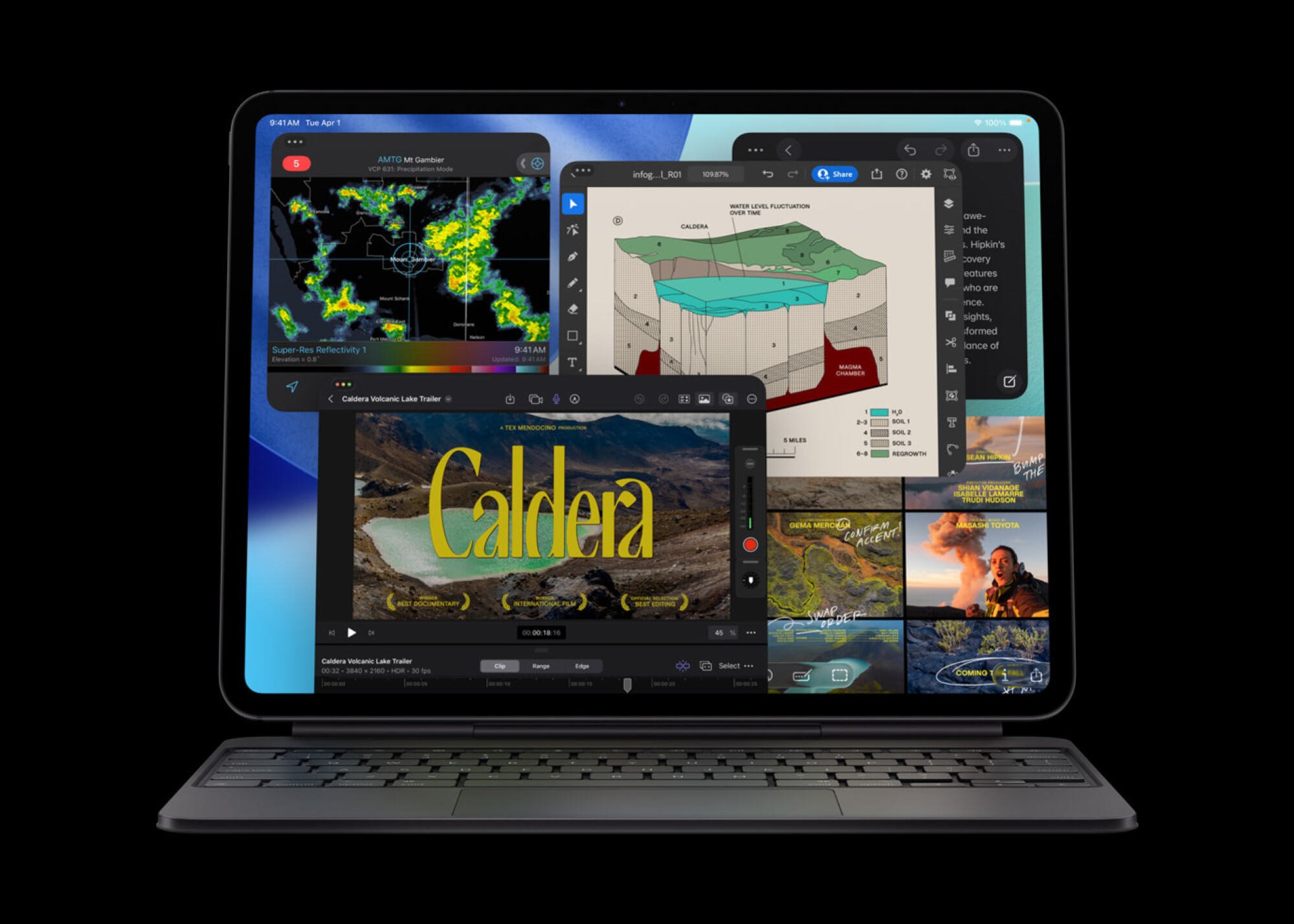
Like the new MacBook Pro, the iPad Pro looks unchanged, save for the new M5 and its performance gains. But there’s a little more under the hood here than just the new chip. Apple says the cellular iPad Pro models get the company’s C1X modem, which can offer up to 50% faster cellular data performance. If you opt for the cellular iPads, that’s good news, though I always opt for the wifi-only model, and use my iPhone as a hotspot. To each their own.

In addition to the C1X, these new iPads also get the N1 chip, which supports Wi-Fi 7, Bluetooth 6, and Thread. Apple says N1 supports better performance on 5GHz networks, and boosts performance of features including AirDrop and Personal Hotspot.

Apple says the 256GB and 512GB iPad Pros here start with 12GB of RAM. That’s 4GB more than the M4 iPad Pros, which started at 8GB each. You’ll also notice faster charging speeds on these new iPads: Apple says with the right adapter, such as the company’s new dynamic power adapter, you can reach 50% battery in about 30 minutes. These iPads also now support external displays running at up to 120Hz.

Vision Pro

m5 apple vision pro

Credit: Apple

The M5 chip is even coming to a refreshed Vision Pro. Apple’s mixed-reality headset might not be the success story the company wanted, but it hasn’t abandoned the device, either. To the contrary, this Vision Pro has a few upgrades here in addition to M5’s performance, efficiency, and AI gains.

As mentioned above, the new Vision Pro can now render 10% more pixels across its micro-OLED displays than the previous generation can. It can also boost the refresh rate to 120Hz when needed, which should help sell the virtual reality illusion, including when working with virtual displays.

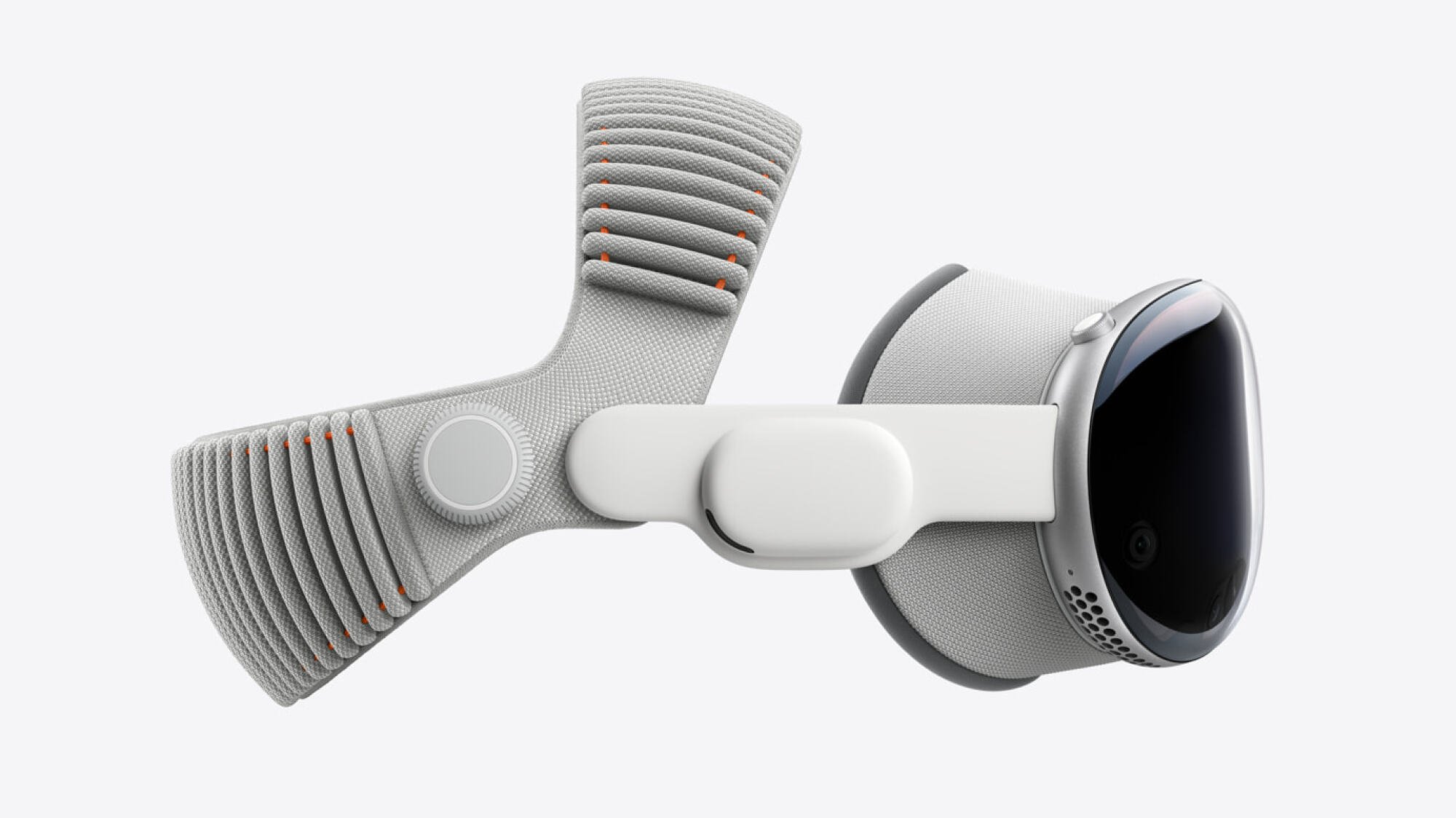
But it’s not just about the technology, here. Apple has upgraded the Vision Pro’s headband—specifically, the Dual Knit Band. Apple says this band should be more comfortable, with “3D-knitted” upper and lower straps. The lower strap in particular provides a counterweight, which should help take some of the pressure off the user when wearing it. Unfortunately, this strap is a separate $99 purchase. Like the current Vision Pro, this model starts at $3,499 for 256GB of internal storage.

All of these devices are available for pre-order starting today, and will be available in stores on Oct. 22.