‘Meta Ray-Ban Display’ Glasses Design & HUD Clips Leak Ahead Of Connect

Meta’s HUD glasses with sEMG wristband will in fact be Ray-Ban branded, a leaked clip which also depicts the HUD and wristband in action reveals.

0:00

/0:12

The Meta Ray-Ban Display segment from the video.

An unlisted video on Meta’s YouTube channel titled “Many Looks. Infinite Capabilities” shows Meta and EssilorLuxottica’s upcoming full lineup: the regular Ray-Ban Meta glasses, the Oakley Meta HSTN glasses, the rumored Oakley Spaera glasses, and the rumored HUD glasses with sEMG wristband, which are labeled as “Meta | Ray-Ban” with the word “Display” underneath.

This story is breaking and will be updated with more context shortly.

AI’s Economic Boost Isn’t Showing Up in US GDP, Goldman Says

AI is transforming corporate America, yet the boom remains understated in government growth statistics, according to Goldman Sachs. From a report: Analysts at Goldman pointed to the scale of the boom in a Saturday note: “Revenue at US companies providing AI infrastructure has risen by $400 billion since 2022, which at first glance seems to suggest that AI has been a meaningful driver of economic growth recently.” But official numbers tell a different story.

AI technology has lifted real US economic activity by about $160 billion since 2022, or 0.7% of GDP, the analysts calculated. Yet only around $45 billion, or 0.2% of GDP, of AI-spurred growth has been recorded in official statistics. That leaves roughly $115 billion uncounted, according to the analysts. That gap highlights the difference between what companies report and what the government measures due to the Commerce Department’s Bureau of Economic Analysis method for calculating growth.


Read more of this story at Slashdot.

AeroCoach’s new tri-spoke is the “fastest non-disc” wheel you can buy

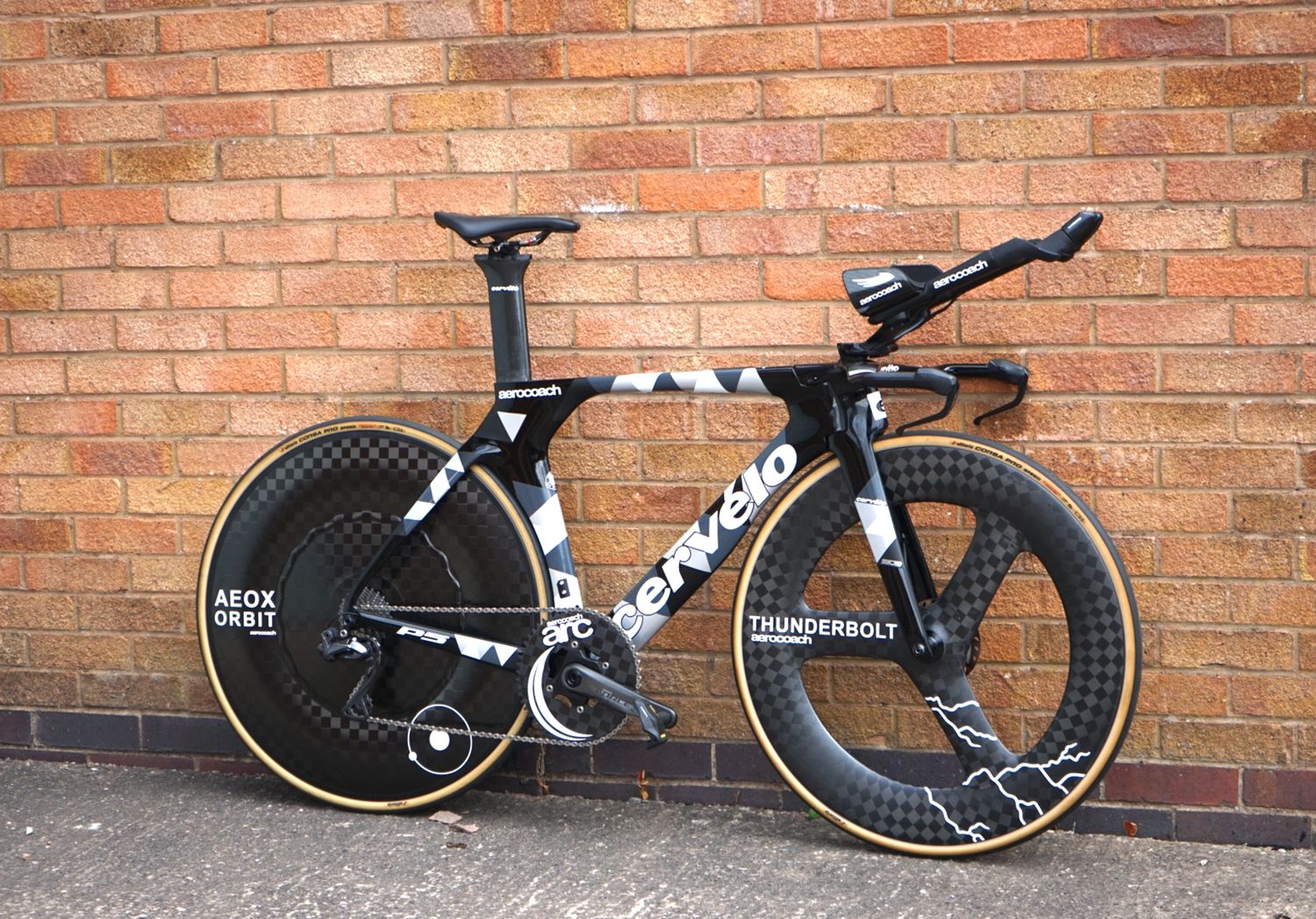
AeroCoach has announced the Thunderbolt tri-spoke, which is the “fastest non-disc” road bike wheel available, according to its wind tunnel data.

The result of almost two years of development, AeroCoach’s Dr Xavier Disley said the British brand set out to “push the boat out in terms of time trial performance, without having to resort to a front disc wheel”.

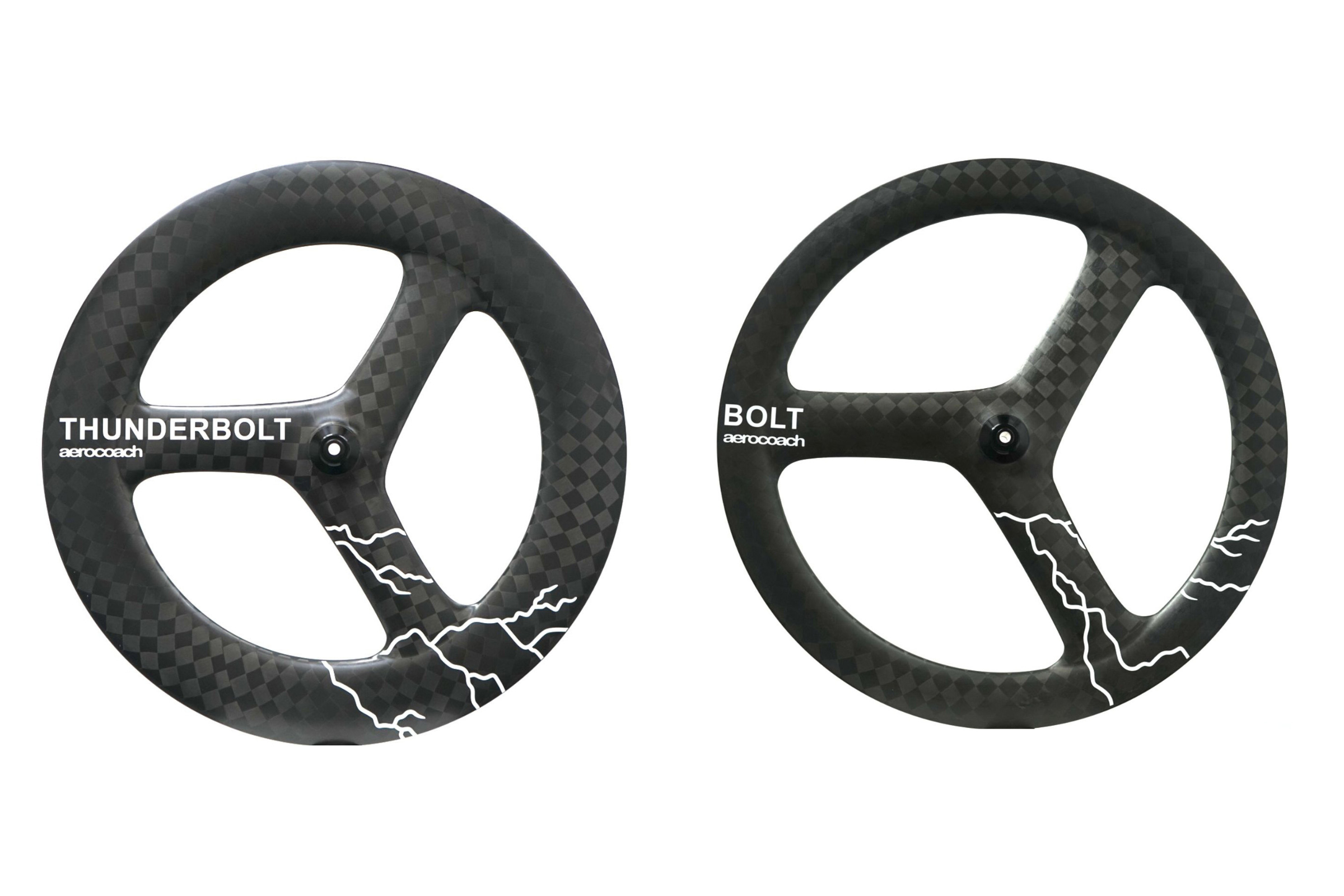
Featuring a 90mm-deep rim and three aero-profiled composite spokes, the Thunderbolt is said to be optimised around “modern wider tyres”, so that there’s “no compromise between rolling resistance and aerodynamics”.

The AeroCoach Thunderbolt launches alongside the Bolt tri-spoke, which features a similar tri-spoke design paired to a shallower rim, for improved handling in windy conditions.

Return of the tri-spoke

AeroCoach Thunderbolt wheel wind tunnel testing
AeroCoach developed the Thunderbolt to compete with front disc wheels in terms of speed. AeroCoach

Most commonly seen on time trial and triathlon bikes, tri-spoke wheels have waxed and waned in popularity over the years.

Scotland’s Graeme Obree used a set for his iconic UCI Hour Record aboard ‘Old Faithful’, while HED’s H3 had a resurgence during the Team Sky era when the likes of Bradley Wiggins and Chris Froome dominated Grand Tour time trials.

According to Disley, AeroCoach has received “a lot of questions from riders” about whether tri-spokes perform better than traditionally spoked wheels, either in terms of aerodynamic efficiency or handling.

The answer, Disley says, is to “ignore what the wheel looks like and go on each wheel’s individual performance.”

There are “tri-spokes that handle terribly in the wind and have bad aero performance, same with some deep-sections, and there are also tri-spokes that handle amazingly in the wind and have equally exceptional performance.”

Unsurprisingly, Disley says the Thunderbolt and Bolt are the latter.

AeroCoach Thunderbolt wheel wind tunnel data
AeroCoach’s wind tunnel data for the Thunderbolt is impressive. AeroCoach

According to the brand’s wind tunnel data, both wheels beat a number of competitor options used in the WorldTour, including Princeton CarbonWorks, Reserve, Zipp, Vision, DT Swiss and Cadex.

Disley notes “the margins are quite tight, as you’d expect”, but every watt counts to those competing at the pointy end of the sport.

The only wheel amongst the cohort to beat the Thunderbolt is AeroCoach’s AEOX front disc wheel.

Despite incoming changes to the UCI’s technical regulations limiting rim depth in mass start road races to 65mm, front disc wheels remain a UCI-legal option for time trials.

Beyond Wout Van Aert using front and rear disc wheels at the Paris Olympics, however, front discs have seen scant use at the highest level of the sport in recent years (presumably due to concerns about handling).

AeroCoach Thunderbolt front wheel in a Cervelo P5
Double discs are still faster, according to AeroCoach, though only by a slim margin. AeroCoach

The Bolt tri-spoke trails just behind the Thunderbolt in the wind tunnel data, but only by an average of 0.5 watts at 45kph.

Thanks to its shallower rim, though, AeroCoach says the Bolt is a “versatile option for challenging wind conditions.”

Hooked versus hookless development

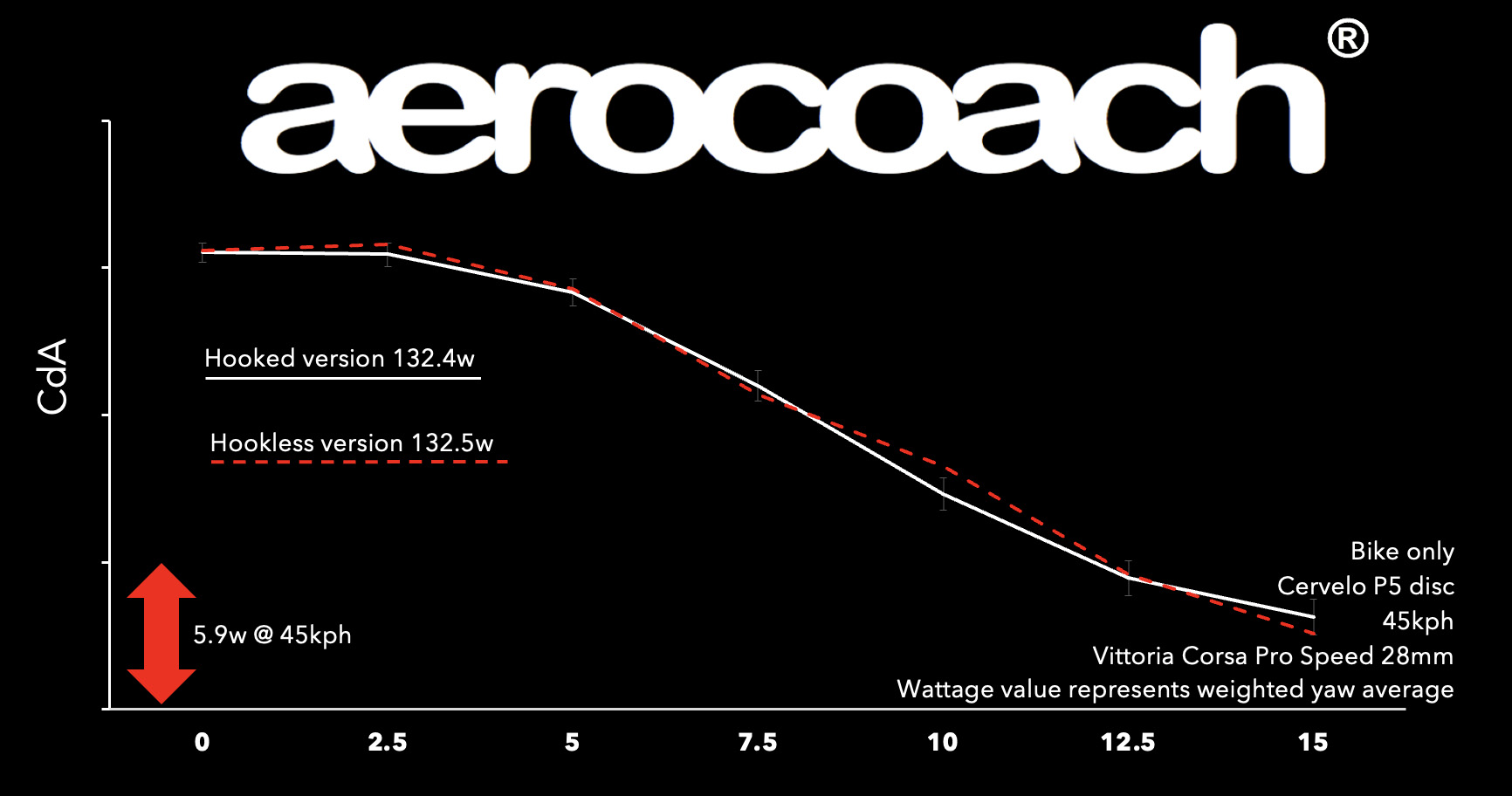
Notably, Disley says AeroCoach tested versions of the Thunderbolt wheel with both hooked and hookless rims during development.

As their wind tunnel testing showed no significant difference in performance between the two rim styles, Disley says the brand opted for hooked rims to allow greater tyre compatibility and a wider range of safe tyre pressures.

AeroCoach says hookless rims aren’t any more aerodynamic so it opted for the greater compatibility of hooked rims. AeroCoach

This was important, Disley says, because tyre choice is critical when it comes to wheel performance.

“Some wheels change handling characteristics depending on the tyres you put on them, and some are extremely sensitive to tyre changes for aero too.”

Both wheels are optimised around 25 and 28mm-wide tyres – specifically Vittoria’s Corsa Pro Speed and Continental’s GP5000 TT TR – although the brand says both can “accommodate tyres from different manufacturers without large changes in aero drag”.

AeroCoach Thunderbolt and Bolt prices and specifications

The Bolt (right) features a shallower rim for better handling in windy conditions. AeroCoach

The AeroCoach Thunderbolt and Bolt tri-spoke wheels cost £1,195 and £995 respectively. Both are available as front or rear wheels, with rear wheels costing an additional £100.

  • Rim depth: 90 / 60mm
  • Rim internal width: 21mm
  • Claimed weight: 900 / 795g
  • Material: Carbon fibre with aluminium hub
  • Weight limit: 100kg

Apple’s Mac mini M4 is up to $110 off right now

The Apple Mac mini M4 desktop computer is on sale via Amazon right now. This brings the price of the entry-level version, with 16GB of RAM and 256GB of storage, down to $499. The model with 16GB of RAM and 512GB of storage is down to $689, which is a discount of $110. You can also pick up one with 24GB of RAM for $904.

This is the model that came out at the tail-end of 2024 and represented the first major redesign of the product in ten years. We reviewed a version of this computer and called it “shockingly small” and “incredibly powerful.” It truly is teensy, resembling an Apple TV streaming box more than a desktop computer. All told, it’s five-inches by five-inches across and two inches tall.

There are two front-facing USB-C ports, which is extremely handy. The back of the computer boasts even more ports, including Thunderbolt, HDMI and Ethernet. As indicated by the name, this thing features the speedy M4 chip. The processor can easily handle garden variety computing tasks, like watching content, but also excels with creative pursuits like making music and editing videos.

This desktop doesn’t include an SD card reader, which could be a dealbreaker for those looking for an easy way to add more storage. We also found that the fan got loud every once in a while when dealing with heavy workloads. Otherwise, this is a near-perfect (and adorable) computer.

Check out our coverage of the best Apple deals for more discounts, and follow @EngadgetDeals on X for the latest tech deals and buying advice.

This article originally appeared on Engadget at https://www.engadget.com/deals/apples-mac-mini-m4-is-up-to-110-off-right-now-163438417.html?src=rss

How to Undo Your iPhone’s New Look After iOS 26

Did you know you can customize Google to filter out garbage? Take these steps for better search results, including adding Lifehacker as a preferred source for tech news.


Apple’s iOS 26 comes out today, and with it, a new design language called Liquid Glass. While the iPhone home screen has looked more or less the same ever since Apple ditched skeuomorphism in 2013, when you open up your phone today, after downloading the company’s latest update, you might be in for a surprise. Apple’s new look for the iPhone prioritizes transparency, and not everyone’s a fan.

Luckily, if you don’t like Liquid Glass, there’s something you can do about it. You can’t get rid of it entirely, but here’s how to make your iPhone look as close as possible to how it used to look before, across both the homescreen and apps like Safari.

What is Liquid Glass?

First, know thine enemy. If you ever used Windows Vista back in the day, you have an idea of what you’re facing here. That operating system was famous for adding transparency effects to Windows that drastically affected performance, and while the iPhone seems to have saved itself from any performance issues with its own update, the goal seems to be the same: let you see what’s below your buttons and overlays by blurring and obscuring your background before letting it bleed through.

In theory, this adds a bit of depth to your display, and might make it easier to understand how your various screen elements exist in relation to each other. But in practice, some have complained about it being distracting, flooding your screen with irrelevant information you can’t do anything with.

Apple’s actually addressed these complaints a bit throughout the iOS 26 beta, specifically making the Control Center look less busy. But it’s still moving forward with the design changes overall.

How to “fix” Liquid Glass

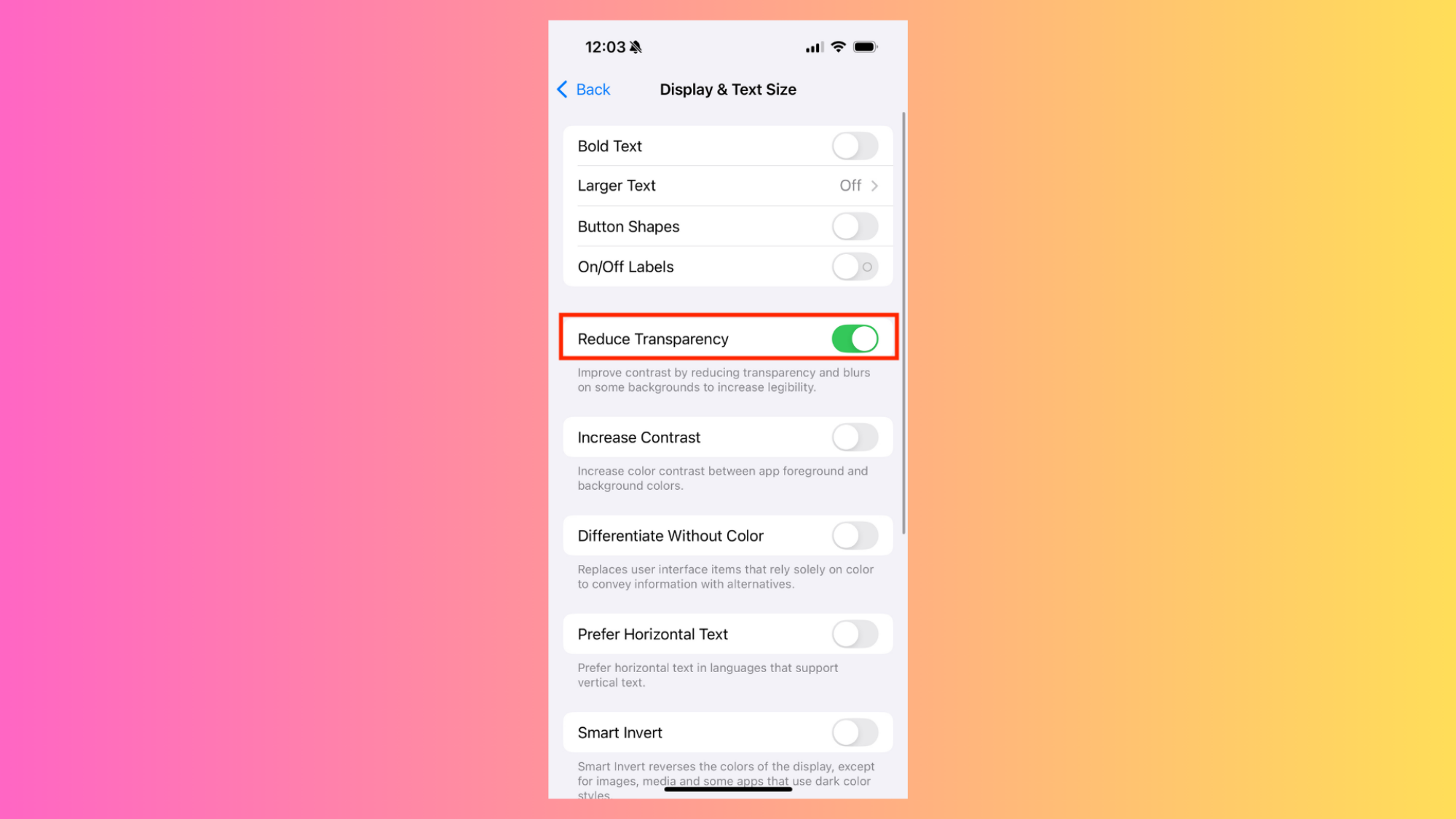
Reduce Transparency Control

Credit: Michelle Ehrhardt

If you’d rather Apple leave your iPhone’s design alone, though, you have options. During the beta, users discovered a pre-existing accessibility control within iOS that also, seemingly, neuters most of Liquid Glass’ changes. It won’t get rid of all of the updates—the new, wider toggle button is unaffected, for instance—but it goes a long way towards restoring your phone to how it looked before. 

Called Reduce Transparency, this control has been around for years, and was originally intended as a way to add a solid background to any pre-Liquid Glass elements that already had transparent or blurred backgrounds, like the Passcode entry screen. Now, though, it turns out it also affects Liquid Glass as a whole.

You can see the changes here. Notice how the play button on Apple Music no longer lets blurred album artwork bleed into it, allowing you to more clearly read the artist’s name?

While I haven’t gotten my hands on Liquid Glass yet, I think I’ll be turning this on right away. I like big, chunky buttons, and Reduce Transparency seems like the way to get just that, even as Apple insists transparency is the future. If that sounds like you, here’s where you can turn it on:

Settings > Accessibility > Display & Text Size.

And while it doesn’t necessarily have anything to do with Liquid Glass, while you’re in your accessibility controls, you might also want to turn on the Increase Contrast option, which will make your apps’ foreground elements pop from the background a bit more. After turning this on, you’ll see it right away on the Settings page’s toggles, which will take on a darker shade of gray when disabled. This is optional, but helps add to the chunky buttons look, and brings back a little bit of the depth Liquid Glass is going for, without making your screen busier.

Bring back the old Safari URL bar

Safari layout options

Credit: Pranay Parab

For the most part, once you’ve enabled “Reduce Transparency,” you’ve gotten rid of Liquid Glass’ most extreme design decisions. Technically, the update does also allow you to make your icons clear or adjust your lock screen widgets, but those changes have to be opted into. However, one important app will look pretty drastically different by default: Safari.

When you open Safari after installing iOS 26, you’ll notice that the URL bar is now just a small pill at the bottom of the screen, next to a tiny back button and an even smaller refresh button. All your other old navigation features are instead hidden away in either the three-dots menu, or behind various swipes and long presses.

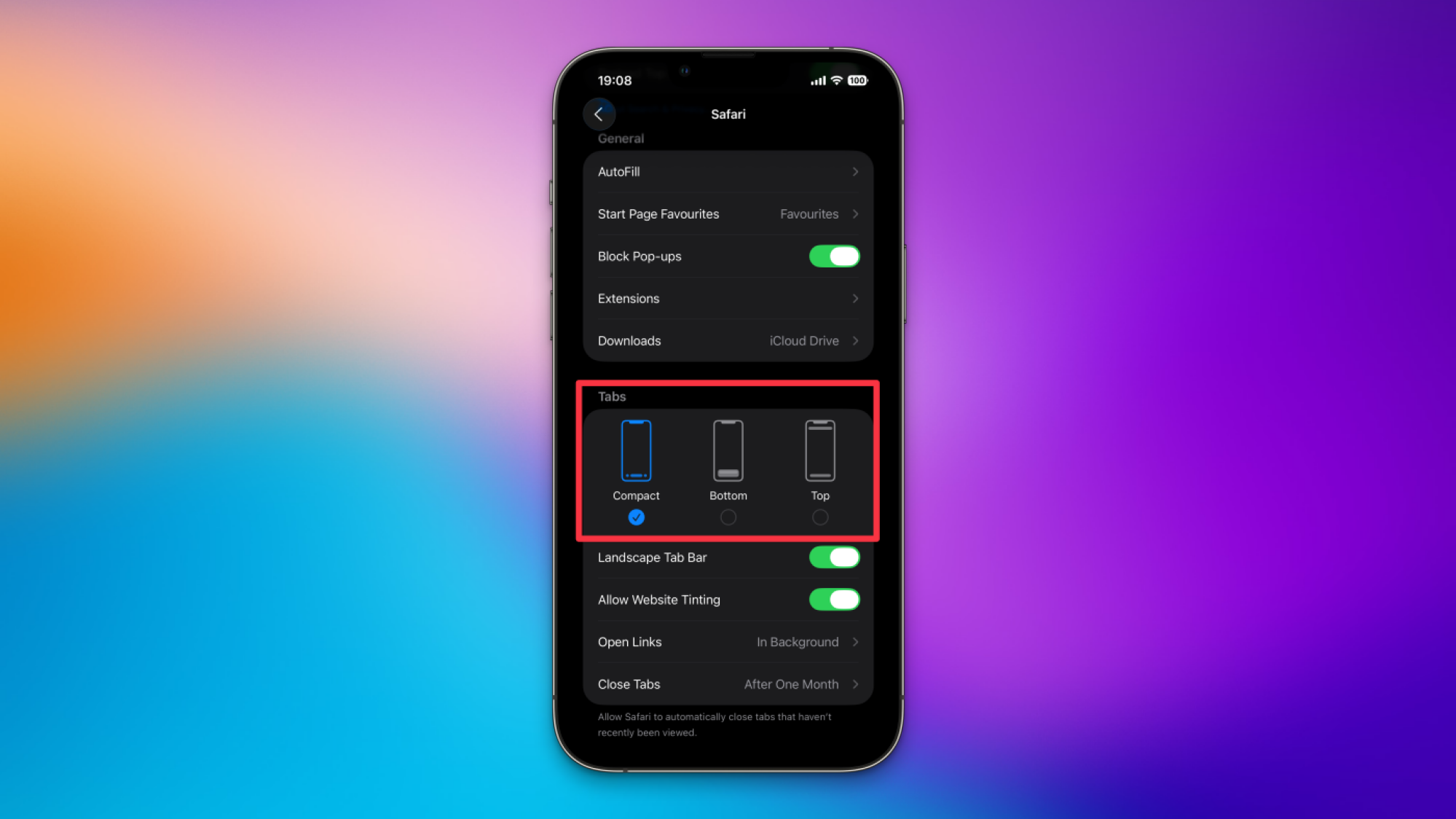
Personally, some of us at Lifehacker think the smaller address bar is worth it, but if you want to go back to the old URL bar, you can do that. Simply navigate to Settings > Apps > Safari. Under the Tabs section, you’ll see three layout options. Compact is the new default, but Bottom will bring back the old look, with full controls for back, forward, sharing, bookmarks, and tabs all laid out below the address. There’s also a new Top option, if you’d like, that moves the website address to the top of the screen but leaves navigation at the bottom.

Anthropic Finds Businesses Are Mainly Using AI To Automate Work

Businesses are overwhelmingly relying on Anthropic’s AI software to automate rather than collaborate on work, according to a new report from the OpenAI rival, adding to the risk that AI will upend livelihoods. From a report: More than three quarters (77%) of companies’ usage of Anthropic’s Claude AI software involved automation patterns, often including “full task delegation,” according to a research report the startup released on Monday. The finding was based on an analysis of traffic from Anthropic’s application programming interface, which is used by developers and businesses.

[…] On the whole, Anthropic found businesses primarily use Claude for administrative tasks and coding, the latter of which has been a key focus for the company and much of the AI industry. Anthropic, OpenAI and other AI developers have released more sophisticated AI tools that can write and debug code on a user’s behalf.


Read more of this story at Slashdot.

A TikTok deal may finally be happening

US Treasury Secretary Scott Bessent has said that the United States and China have reached a framework deal on TikTok. Speaking to reporters in Madrid after two days of talks with his Chinese counterparts, Bessent said, “It’s between two private parties, but the commercial terms have been agreed upon.” President Trump said in a Truth Social post that he will be speaking with Xi Jinping this Friday regarding the potential deal, among other things.

This breakthrough comes after the Trump administration extended the TikTok ban for a third time earlier this summer, giving the company until September 17 to undergo a sale or face a ban in the United States. The short-form video content app faced increasing scrutiny over national security concerns due to the Chinese ownership of its parent company, ByteDance.

President Trump issued an executive order in August 2020 banning the app in the United States unless it was divested from ByteDance, though courts halted enforcement of the order. In 2024 the United States Congress passed the Protecting Americans from Foreign Adversary Controlled Applications Act (PAFACA) which was signed into law by then-President Biden. The Trump administration has repeatedly delayed the enforcement of that law in hopes a deal could be made for a US-based acquisition, leaving the app online in the meantime.

As it stands, this appears to be a framework for how TikTok could come under some level of US control, and not a signed final deal. Companies from Oracle to Microsoft have expressed interest in acquiring TikTok, and the president is on record as saying he would be OK if a “very American company” buys it. It’s unclear if the September 17 deadline will be pushed once again, but US Trade Representative Jamieson Greer said on Monday that another delay may be needed in order to get the deal signed.

This article originally appeared on Engadget at https://www.engadget.com/general/a-tiktok-deal-may-finally-be-happening-160448732.html?src=rss

Open-Source Emulator Plays Virtual Boy Games On Quest, No Switch Needed

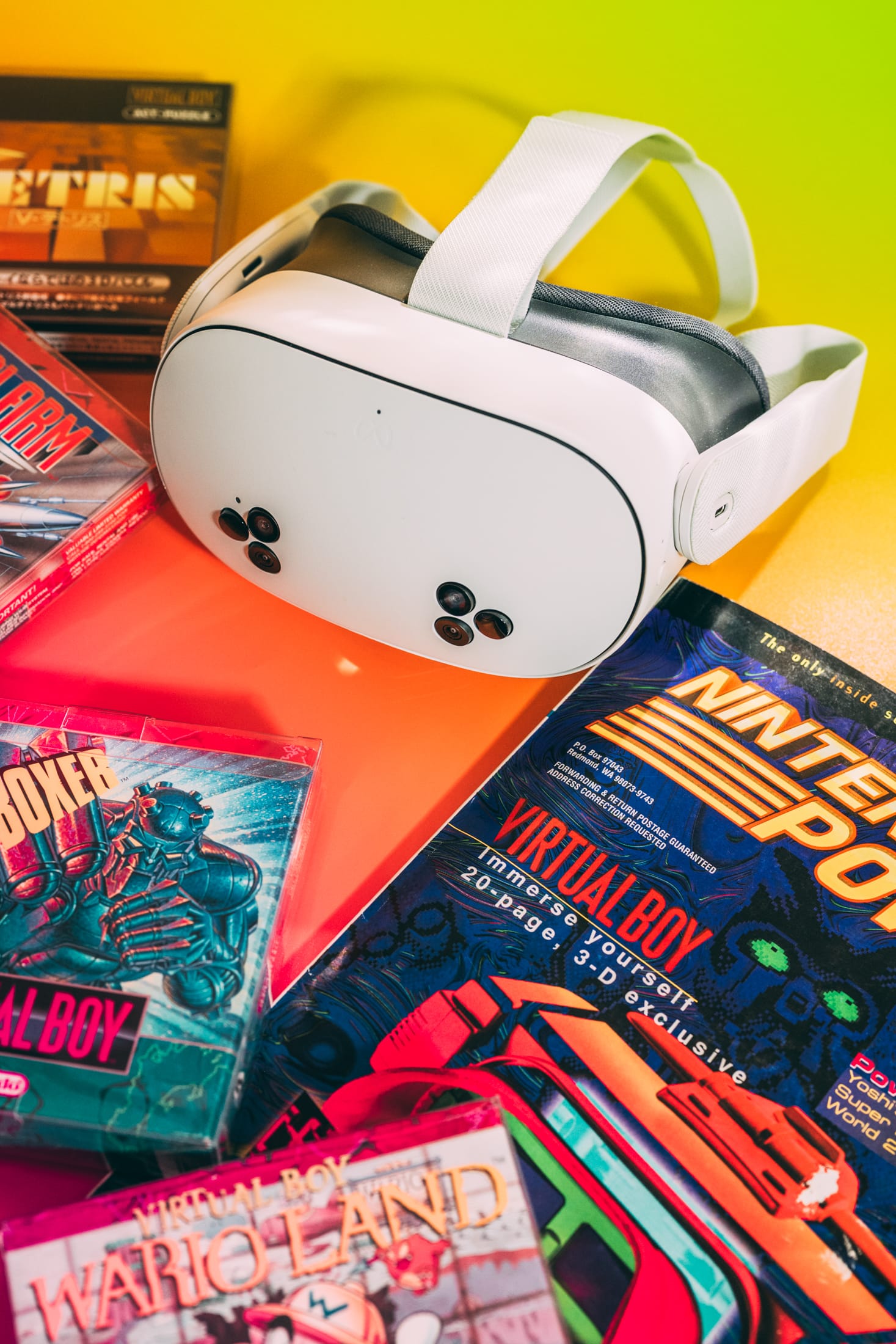
With Nintendo’s surprise announcement that Virtual Boy games are coming to the Switch 1 & 2, we thought it a good time to explore Virtual Boy Go, an open-source app for Quest that promises similar functionality.

I’m a real Virtual Boy freak. I was eleven years old in August, 1995, when Volume 75 of Nintendo Power Magazine arrived in my mailbox with a twenty-page feature on Nintendo’s new 32-bit ultra-immersive 3D headset. I devoured those pages for months, obsessing over the upcoming Teleroboxer, Mario’s Tennis, Jack Bros., and Red Alarm. When my Virtual Boy arrived on Christmas, it was love at first sight.

Hindsight (and an army of YouTubers who weren’t born when the thing debuted) tells us the Virtual Boy was Nintendo’s greatest failure, and it’s true that the system is weird and awkward and silly. But that’s also why I love it.

Photos by James Tocchio.

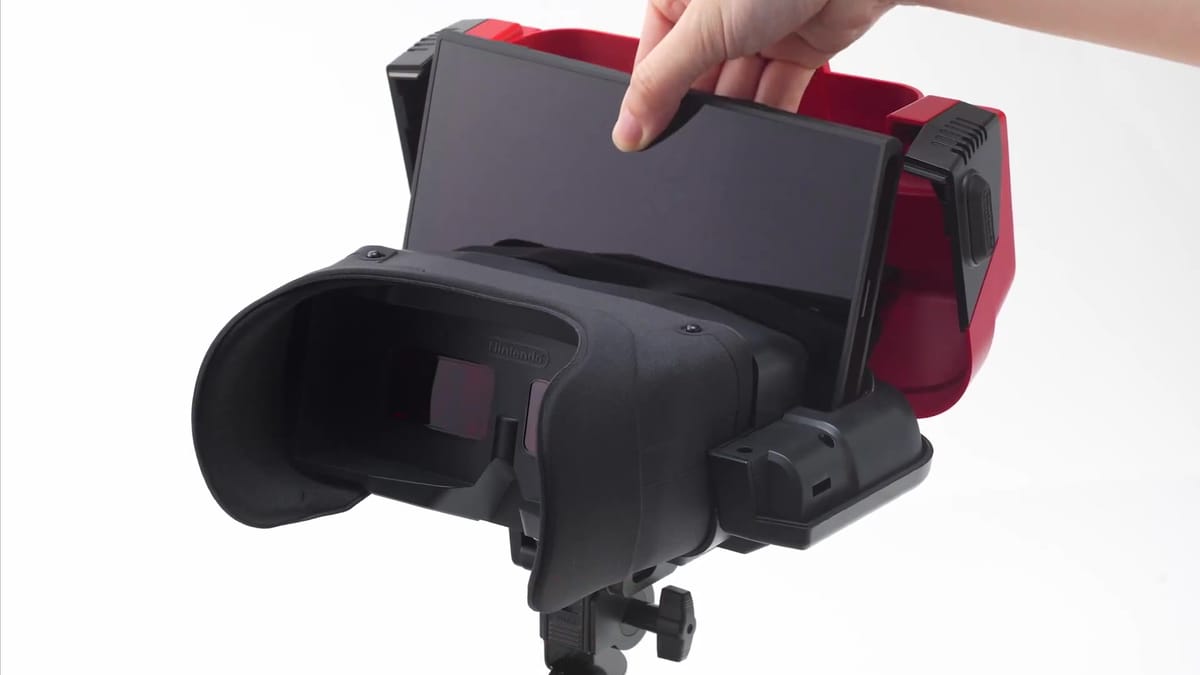
It’s 2025 now, and Nintendo has just announced that their Nintendo Switch Online + Expansion Pack subscription service will offer all 14 US released Virtual Boy games (eventually). These will be playable in stereoscopic 3D through the use of a special Virtual Boy accessory that the Switch and Switch 2 will slot into (a cheaper cardboard model will also be available for $25). All of this is coming in February, 2026.

But you don’t have to wait, if you don’t want to. By sideloading the open-source app Virtual Boy Go on a Quest headset, you can play Virtual Boy games in 3D today. It’s not as effortless a process as Nintendo’s offering will surely be, but it’s doable.

Nintendo Switch & Switch 2 Getting Official Virtual Boy Accessory
Switch and Switch 2 are getting official Virtual Boy accessories that Switch Online + Expansion Pack subscribers can slot their consoles into to play classic 3D games like Mario’s Tennis.
UploadVRDavid Heaney

The Virtual Boy Go Experience

Virtual Boy Go is a sideloaded app available through SideQuest, a platform that enables Quest users to install unofficial VR apps. Once installed, the results are remarkable.

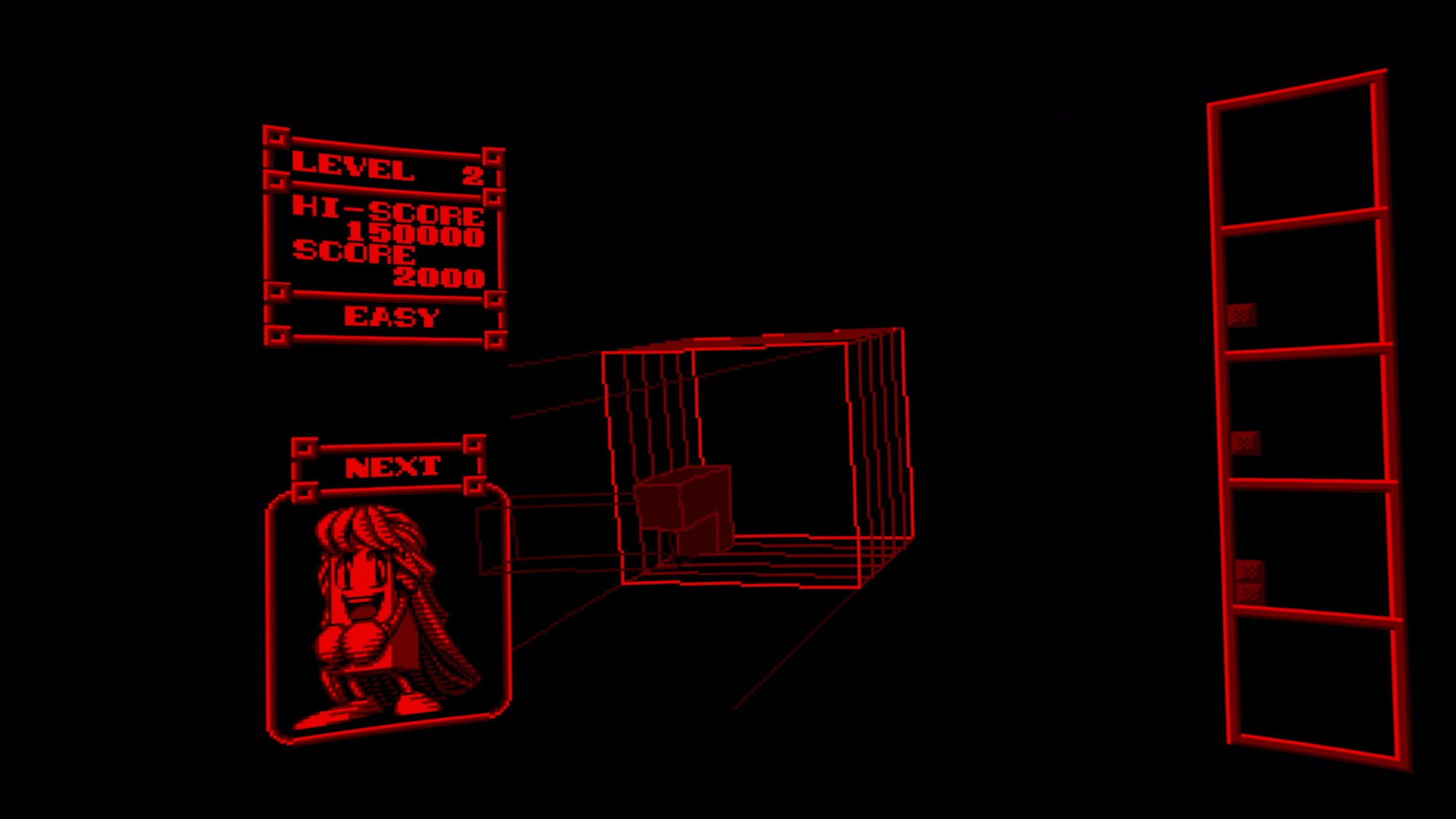
Virtual Boy Go runs games smoothly, and the app and headset faithfully recreate the depth-based visuals that are so distinctive to the original hardware. Images are sharp and punchy, with great contrast and vibrant reds. There’s a neat sort of wrapping effect which isn’t found in the original, where the play area very subtly shifts around you, which is nice.

Moreover the app is highly customizable, allowing you to change the color palette from the native red to more comfortable colorways (if you’re a coward), and to modify viewing modes from 3D to 2D (again, why?). There’s also complete button-mapping customization, which is great, a broader FOV, and the headset itself is intrinsically more comfortable than the Virtual Boy’s was back in the day.

0:00

/1:00

Captured by James Tocchio on Meta Quest 3S.

Rose-Colored Lenses

There are two unfortunate drawbacks; setup, and the questionable legality of using emulators.

The initial setup of SideQuest and Virtual Boy Go is tedious, bordering on painful. To get things running, you need to enable Developer Mode on your Quest, which requires registering as a developer and confirming your identity, download and install SideQuest, install Virtual Boy Go, and then transfer Virtual Boy games onto the headset.

3D Tetris, Red Alarm, WarioLand VB captured by James Tocchio on Meta Quest 3S.

Any conversation about emulation inevitably circles around to legality. Downloading ROMs of games that you don’t own is copyright infringement and you should not do this. You can purchase original cartridges from used markets and make backups of your own games. For most users, this isn’t viable. I own all of the Virtual Boy’s limited games and I’m very experienced at this. If not for these two facts, playing Virtual Boy games on my Quest would be problematic.

Of course, the alternative is to wait for Nintendo’s official solution in February. You’ll need to subscribe to Nintendo Switch Online + Expansion Pack, buy the accessory, and you’ll never truly own the games. Perhaps that’s all worth it to avoid operating in a legal gray area? Personally, I’ll be buying the new Virtual Boy, gimmick or not.

For those unwilling to wait and comfortable with a tedious onboarding process, the reward is worth it. Virtual Boy Go is a fantastic app, amounting to what is essentially the best way to play Virtual Boy through a headset today. I love it almost as much as I love my original machine from 1995. Who could’ve seen that coming?

Strava’s New ‘Power Skills’ Feature Gives Cyclists Even More Training Insights

We may earn a commission from links on this page.

Did you know you can customize Google to filter out garbage? Take these steps for better search results, including adding Lifehacker as a preferred source for tech news.


Strava’s latest Power Skills feature is a nice addition for data-driven cyclists. Built on technology from The Breakaway (which Strava acquired earlier this year), this tool transforms your power meter data into actionable training insights. Here’s everything you need to know about using it to improve your riding.

How does Strava’s Power Skills work

Power Skills uses your cycling power meter data to identify your strengths and areas for improvement across different types of efforts. Think of it as a fitness report card that analyzes your cycling performance across multiple disciplines. You’ll see twelve specific Power Intervals that you can work on, each benchmarked against thresholds adjusted for age, gender, weight, and so on. Then, each skill is made up of different combinations of these Power Intervals.

From here, Power Skills breaks down cycling performance into three main categories, each targeting different aspects of cycling fitness. Here’s how Strava describes them:

  • Sprinting: Short bursts of extremely high output. Reflects your ability to generate explosive power. Power Intervals: 15 sec, 30 sec, and 1 minute.

  • Attacking: Balanced efforts that combine sprinting power with climbing endurance. Useful for short climbs or race breakaways. Power Intervals: 2 minutes, 3 minutes, 5 minutes, and 10 minutes.

  • Climbing: Long, sustained efforts on climbs, flats, or workouts requiring steady pacing and endurance. Power Intervals: 15 minutes, 20 minutes, 30 minutes, 45 minutes, and 60 minutes.

Before going any further, I should clarify that to use Strava’s Power Skills, you do need a Strava subscription and actual power meter data from your bicycle or indoor bike. If you’re interested in making this serious biking upgrade (which Strava historically recommends), Garmin offers trusted options here.

What makes this special?

For cyclists, power meters measure the actual watts of energy they’re producing while pedaling; it’s like having a direct measurement of your engine’s output. The tool breaks down a rider’s personal power records across those 12 intervals and highlights strengths and weaknesses, with the option to compare recent efforts against lifetime bests.

What’s particularly helpful is that it ranks your performances against a standard that adjusts for age and body weight, showing where they stand relative to “what’s possible” (your potential) across eight levels. This means a 50-year-old cyclist isn’t being compared to 20-year-old pros, which is huge for Strava’s famously competitive social media ecosystem.

Understanding your Power Skills profile

Power Skills compares your recent efforts against lifetime bests, so you can see if your training is moving you in the right direction across different intervals. Here’s what else to know to really make the most of it.

The visual breakdown

Your Power Skills profile shows a visual representation of your 12 key power intervals, from 5-second sprints to 60-minute efforts. Each interval is color-coded to show your relative strength in that area.

Skill rankings

Like I describe above, this system ranks your performance across eight levels, adjusting for age and weight. This means you’re being compared to realistic benchmarks for your demographic, not just elite riders. These rankings help you understand where you sit in the broader cycling population.

Strength and growth areas

The main point of Power Skills is to identify your natural strengths and highlights areas with the most room for improvement. This is crucial for targeted training. Instead of generic “ride more,” you get specific guidance on which energy systems need work.

Limitations to keep in mind

Elephant in the room: This feature only works for cyclists, not runners. So as a runner myself, I’m holding out hope that Strava finds a way to make this feature work even without a physical power meter on a bike. For now, Garmin seems to have figured it out.

Some other limitations to keep in mind are that this sort of feature requires consistent power meter data to be meaningful. Plus, it’s historical analysis only; it doesn’t prescribe specific workouts. It’s probably best used as one tool in a broader training approach, not the only metric you look toward for guidance. Still, Power Skills is a cool way to use data-driven insights to train smarter, not just harder.

Get into the cockpit as new crop of “Top Gun” pilots get their wings

The blockbuster success of the 1986 film Top Gun—chronicling the paths of young naval aviators as they go through the grueling US Navy’s Fighter Weapons School (aka the titular Top Gun)—spawned more than just a successful multimedia franchise. It has also been credited with inspiring future generations of fighter pilots. National Geographic takes viewers behind the scenes to see the process play out for real, with its new documentary series, Top Guns: The Next Generation.

Each episode focuses on a specific aspect of the training, following a handful of students from the Navy and Marines through the highs and lows of their training. That includes practicing dive bombs at break-neck speeds; successfully landing on an aircraft carrier by “catching the wire”; learning the most effective offensive and defensive maneuvers in dogfighting; and, finally, engaging in a freestyle dogfight against a seasoned instructor to complete the program and (hopefully) earn their golden wings. NatGeo was granted unprecedented access, even using in-cockpit cameras to capture the pulse-pounding action of being in the air, as well as capturing behind-the-scenes candid moments.

How does reality stack up against its famous Hollywood depiction? “I think there is a lot of similarity,” Capt. Juston “Poker” Kuch, who oversees all training and operations at NAS Meridian, told Ars. “The execution portion of the mission gets focused in the movie so it is all about the flight and the dogfighting and dropping the bombs. What they don’t see is the countless hours of preparation that go into the mission, all the years and years of training that it took to get there. You see the battle scenes in Top Gun and you’re inspired, but there’s a lot of time and effort that goes in to get an individual to that point. It doesn’t make for good movies, I guess.”

Read full article

Comments

Walkabout Mini Golf’s Hardest And Easiest Holes Revealed Alongside Alice In Wonderland Course

Curiouser and curiouser.

The creators of Walkabout Mini Golf are teeing up two more courses for release in VR headsets at $3.99 this year. While next month’s release is yet to be revealed, Alice’s Adventures In Wonderland joins the “world of Walkabout” in December.

The announcement of the course and its upcoming release marks five years of Walkabout Mini Golf. To mark the occasion, studio Mighty Coconut released some data about the game including the easiest and hardest holes.

The studio also confirmed to UploadVR exclusively that, later this year, some courses will start to feature playable tabletop board games like chess.

Turn Off Stroke Limit

Night mode on hole 18 of Cherry Blossom is Walkabout Mini Golf’s most difficult hole.

For the Walkabout experts looking for a challenge, you might take the CocoVision camera out to hole 18 of Cherry Blossom’s night mode to film yourself putting there. Go into the settings to turn off stroke limit as you try to putt through the maze. If you can master that hole, you might be able to master just about any course in Walkabout Mini Golf because Mighty Coconut says that’s the hardest hole in the game. However many strokes it takes you to finish, take the video and send it to a Walkabout friend and see if they can do better. For those curious, Mighty Coconut says Mars Gardens hole 15 is the easiest hole in one to make.

Here are some more figures released by Mighty Coconut:

  • 2 Billion+ Putts
  • 23,004,672 Total Hours Played
  • 43,365,815 Total Sessions Played
  • ~55 Million Total Foxhunt Clues Found
  • ~84 Million Lost Balls Found
  • 1,178,475 Grip-to-Puppets Deployed

The grip-to-puppet figure means that, since April 1, Walkabout golfers spawned more than one million puppet friends.

In trying to map out the acreage of Walkabout Mini Golf such that people could understand the scale of the buildout in VR, Mighty Coconut’s artists estimate they curate just 26 acres of greens and interior spaces in VR after five years of development.

Of course, that’s just the playable green spaces of the core game of mini golf in Walkabout. The magic of the title – the “world of Walkabout” as the studio phrased it in its announcement – is that hundreds of thousands of people on those playable greens are merely staying on the Walkabout Path carefully planned by the artists. That path is actually encased within a much larger space most players barely touch. Just how much bigger? There are some 97,000 acres (393.4 square kilometers) explorable in Walkabout by flight, smooth locomotion, or teleportation.

“Walkabout for many people has almost started to function as a bit of a third place, whether it’s a college friend or a dad that you live far away from, that you’re not able to get together with very often, I feel like Walkabout has kind of become that place that a lot of people socialize,” Walkabout creator Lucas Martell said. “There is something kind of magical that happens with that sense of a shared space when you’re playing with someone else, especially with somebody that you’re close to. It’s just like in the real world. You can remember where you were sitting at or where you were standing at when you had a certain conversation.”

0:00

/1:31

Walkabout said it was also releasing a line of avatar outfits for subscribers to Meta’s Horizon+ subscription program.

With Alice In Wonderland, Walkabout senior art director Don Carson intends to “take fans back to the original story” drawing inspiration from 42 original artworks presented in the original book as well as the path Alice followed in Lewis Carroll’s original works.

Almost each new course Walkabout releases includes a new gameplay mechanic of some kind. The studio played with size changing balls and portals in the past on courses like Meow Wolf as well as miniatures in Holiday Hideaway, so the possibilities are ripe for Carson and the other Walkabout artists to make creative additions to Alice’s journey in Walkabout.

0:00

/0:25

Will TikTok go dark Wednesday? Trump claims deal with China avoids shutdown.

Once again, the Trump administration is hyping a deal that could see TikTok finally sold to US owners to avoid a nationwide ban that Congress successfully argued was otherwise necessary to protect national security.

On Monday, Treasury Secretary Scott Bessent confirmed that the US and China had ironed out a “framework” for the deal, but ultimately, Donald Trump will be responsible for closing the deal on a call this Friday with China’s president, Xi Jinping, CNBC reported. Critically, Bessent said that the framework pointed to a “switch to US-controlled ownership,” the South China Morning Post (SCMP) reported.

Presumably, TikTok won’t shut down ahead of Trump’s call with Xi, but TikTok risked going dark as soon as Wednesday. That’s the latest deadline for the forced sale after Trump extended the deadline three times as negotiations with China remained tense.

Read full article

Comments

China Accuses NVIDIA Of Violating Anti-Monopoly Law As Tensions With US Escalate

China Accuses NVIDIA Of Violating Anti-Monopoly Law As Tensions With US Escalate
China’s market regulators announced today a preliminary finding that U.S.-based chip giant NVIDIA has violated the country’s anti-monopoly law. The declaration from the State Administration for Market Regulation (SAMR) adds more sparks to the already tense trade and tech rivalry between the world’s two largest economies.

The investigation

‘USB-A Isn’t Going Anywhere, So Stop Removing the Port’

An anonymous reader shares a column: After nearly 30 years of USB-A connectivity, the market is now transitioning to the convenient USB-C standard, which makes sense given that it supports higher speeds, display data, and power delivery. The symmetrical connection is also smaller and more user-friendly, as it’s reversible and works with smartphones and tablets. I get that USB-C is inevitable, but tech brands should realize that the ubiquitous USB-A isn’t going anywhere soon and stop removing the ports we need to run our devices.

[…] It’s premature for brands to phase out USB-A when peripheral brands are still making compatible products in 2025. For example, Logitech’s current wireless pro gaming mice connect using a USB-A Lightspeed dongle, and most Seagate external drives still use USB-A as their connection method. The same can be said for other memory sticks, keyboards, wireless headsets, and other new devices that are still manufactured with a USB-A connection.

I have a gaming laptop with two USB-A and USB-C ports, and it’s a constant struggle to connect all my devices simultaneously without needing a hub. I use the two USB-A ports for my mouse and wireless headset dongles, while a phone charging cable and portable monitor take up the USB-Cs. This setup stresses me out because there’s no extra space to connect anything else without losing functionality.


Read more of this story at Slashdot.

Amazon may be announcing new Echo and Kindle devices on September 30

Amazon has a press event scheduled for September 30 at 10AM ET. Panos Panay, who leads the company’s Devices & Services team, will be on hand. This strongly suggests that Amazon will announce some new hardware.

We don’t exactly know what the company will reveal, but we do have a giant clue. The press invite also included a composite image of various Amazon devices. These appear to include a Kindle ereader, a Fire TV of some kind and an Echo speaker. Those are three of the company’s biggest product categories.

An invite.
Amazon

It’s been a while since we’ve gotten a new entry-level Kindle, though Amazon did recently refresh both the Scribe and the Colorsoft. It’s also possible the company will announce a refresh of the Paperwhite ereader.

It’s a similar story with Echo speakers. The company recently refreshed the Echo Dot and the Echo Pop, along with the Echo Show 8, but it’s been nearly five years since it redesigned the standard Echo speaker. It’s possible the company’s speakers will be getting some kind of new integration with the Alexa+ smart assistant.

It’s been a couple of years since we’ve gotten a big influx of new Fire TVs and related streaming sticks, so those could also be on the docket. However, that part of the invite image is a bit fuzzy and might be advertising an upcoming tablet and not new TVs. In any event, we only have a couple of weeks before finding out.

This article originally appeared on Engadget at https://www.engadget.com/audio/speakers/amazon-may-be-announcing-new-echo-and-kindle-devices-on-september-30-152044048.html?src=rss

[$] New kernel tools: wprobes, KStackWatch, and KFuzzTest

The kernel runs in a special environment that makes it difficult to use
many of the development tools that are available to user-space developers.
Kernel developers often respond by simply doing without, but the truth is
that they need good tools as much as anybody else. Three new tools for the
tracking down of bugs have recently landed on the linux-kernel mailing
list; here is an overview.