Valve has apparently updated its Steam Early Access policy to no longer accept games with what the company deems to be “mature themes.” As first reported by Gamesmarkt earlier this month, gaming studio Dammitbird, which develops the adult adventure game Heavy Hearts, was not allowed to put the title on Steam Early Access because of its content.
Payment processors like Mastercard and Visa have been mounting a pressure campaign on video game marketplaces Steam and Itch.io to remove certain adults-only content since early summer. After taking down a game called No Mercy in April at the behest of payment processors and an Australian anti-porn organization, there has been a steady expansion in the application of these new policies.
Steam, for its part, made some incredibly vague policy changes to appease the payment giants, adding a sweeping clause that promises to ban certain kinds of adults-only content before proceeding to remove hundreds of games. Itch.io made similar changes before removing more than 20,000 titles from its marketplace. Steam has removed hundreds of titles that we know of.
The apparent scope creep is of particular concern to small independent developers whose fairly innocuous games like VILE: Exhumed were banned from Steam and delisted from Itch.io. Exhumed is a mostly text-based game whose limited imagery and innuendo is worlds away from the sort of adult games that were first banned when this whole saga kicked off.
Part of the problem is how card payments are policed. Stores like Steam and Itch.io don’t contract with Visa or Mastercard directly but with acquiring banks and processors that must enforce the card networks’ brand-safety and anti-trafficking rules. This can end up influencing how companies like PayPal work with Steam across different regions, depending on how banks in those areas are responding to the pressure exerted by Visa and Mastercard.
The confusion will continue to cause consternation among developers and consumers alike until policies on these platforms are made clearer, or payment processors relieve some of the pressure by clarifying their own standards.
Engadget has reached out to Valve for comment and will update if we hear back.
This article originally appeared on Engadget at https://www.engadget.com/gaming/early-access-is-the-latest-place-where-steam-is-restricting-games-with-mature-themes-190806818.html?src=rss
With the launch of iOS 26, Apple has added a bunch of new features to the Fitness app—features that it has been sorely missing. Finally, you can track a workout from your phone without an Apple Watch, and you can pair a bluetooth heart rate monitor to your phone to get heart rate data. And though it seems like a small change, Apple Watch users will love the fact that you can now create and edit custom workouts on your phone.
How to get the new Fitness updates
The new features in the Fitness app are part of iOS 26, which comes out today. (That’s the version with the controversial “liquid glass” look, but you can turn it off if you hate it.) To install it, go to Settings, General, and then tap Software Update.
Once you’ve, you’ll find that the Fitness app has a new tab at the bottom, labeled Workout. This is where you’ll find the fun stuff.
How to track a workout from the Apple Fitness app (with or without a watch)
Credit: Beth Skwarecki
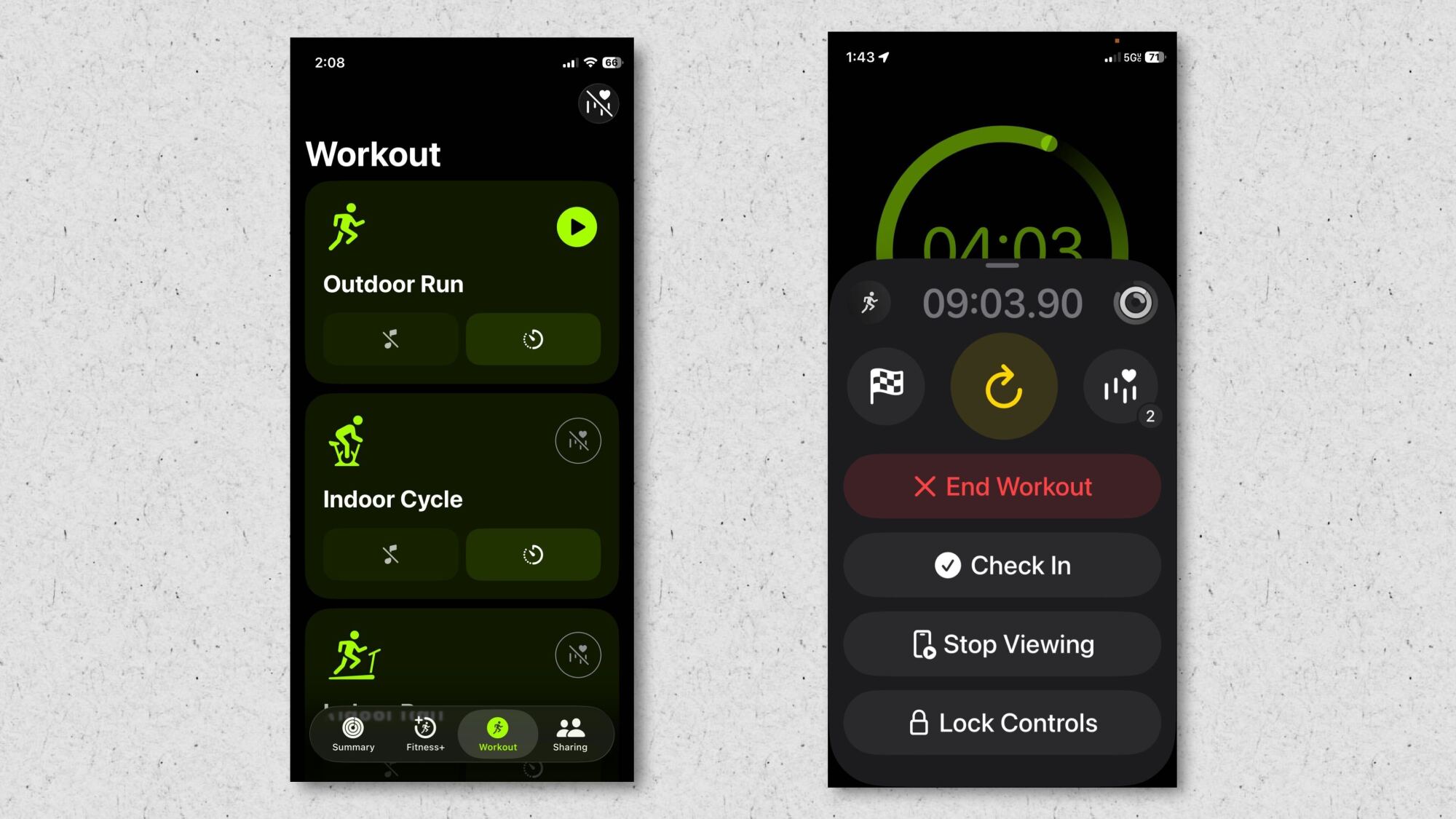
In the Workout tab, you’ll see a variety of workout types that you can start just by tapping the play button. Outdoor Run, Outdoor Walk, Outdoor Cycle, and Hiking are available for everyone. To access the other workout types, like Indoor Run, Indoor Cycle, Yoga, High Intensity Interval Training, and Traditional Strength Training, you’ll need to pair a heart rate monitor.
(The idea seems to be that the app needs some kind of data to track. If you run outdoors, GPS data tells the app how far and how fast you’re running. If you’re on a treadmill, it’s got nothing to go on—unless it has a device telling it your heart rate.)
So what counts as a heart rate data source? I had success with:
A third-party Bluetooth heart rate monitor (specifically my trusty Coospo)
I did four short runs today: three testing each of the above, plus one with just the phone by itself and no heart rate monitor. Each of the four tracked my speed and distance, made a map of where I’d been, and (if there was a heart rate monitor paired) recorded my heart rate data. I was able to view these workouts afterward from the Sessions card on the Summary tab, where Apple Watch-only workouts would normally be found.
To be clear, the three workouts I did without the Apple Watch did not require the watch at all. I left it behind in my car, and was able to track these workouts just fine.
How to mirror your workouts from Apple Watch on your phone
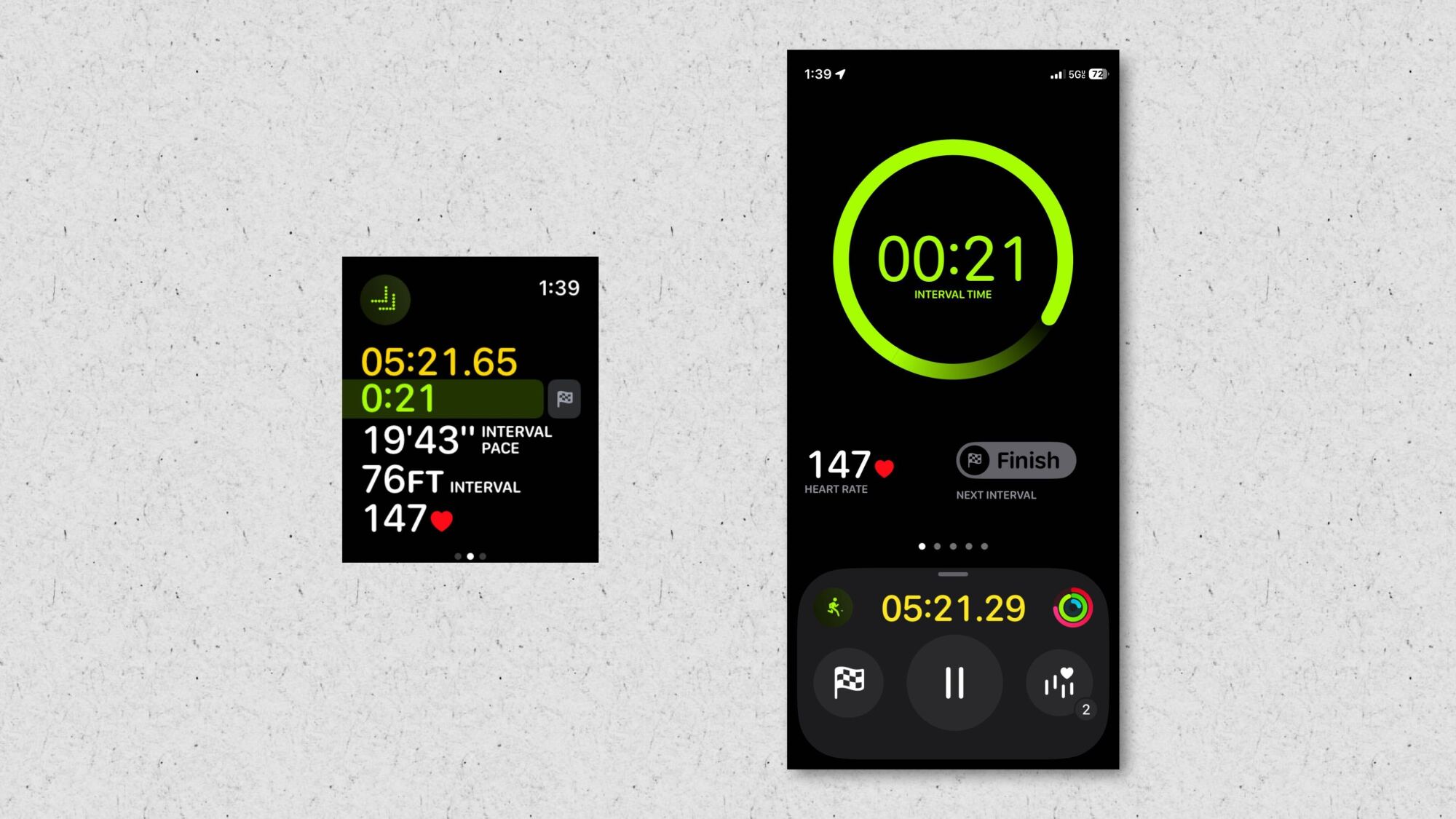
Apple Watch screenshot on left, iPhone screenshot on right. (I did my best to take these at the same time…I was close, OK?) Credit: Beth Skwarecki
The new mirrored workouts just work. You can start a workout from the Fitness app, or from your phone, and either way you get a Live Activity on your phone’s lock screen. Tap that, and you’ll see a screen in the Fitness app that shows the same data you see on your watch.
This can be handy for cardio machines especially—set your phone in front of you, and look at that instead of having to take your hand off the handlebars and turn your wrist to see how many seconds you have left in your interval.
If you don’t see the workout view on your phone, swipe right from the workout screen on your watch and select View to enable it.
How to create custom Apple Watch workouts on your phone
Credit: Beth Skwarecki
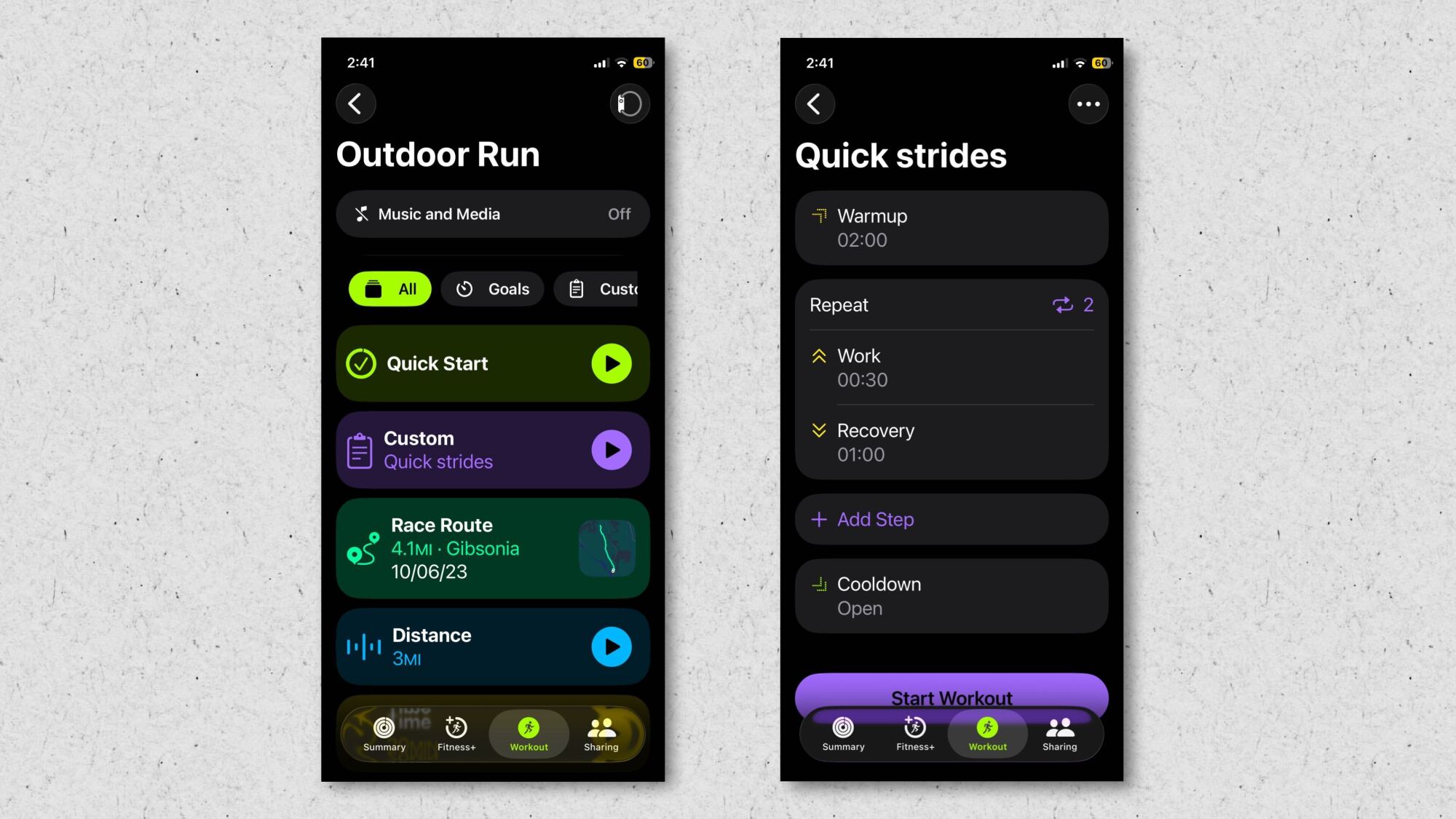
The Apple Watch already had a feature where you could create custom workouts, or set yourself a goal for a workout (like running for a certain amount of time, or racing your past self on a favorite route). Now, that’s all available in the fitness app.
To find it, go to the Workout tab of the Fitness app. instead of hitting the triangle play button on your phone to start a workout, tap the timer icon. This takes you to the screen with routes, goals, and custom workouts.
I had never before bothered with the custom workouts since they were so annoying to access on the watch, but today I created a short interval workout and ran it as part of my testing. (One thing to know: You need to create a work interval and a rest interval before creating a repeat loop—some apps have you do this in the opposite order, which tripped me up.)
In total, these new features make the Apple Fitness app a lot more useful. You no longer need a third-party app to use a Bluetooth heart rate monitor or to track a simple run around the neighborhood. It’s now a real workout app, rather than just something you open to check how many times you’ve closed your rings.
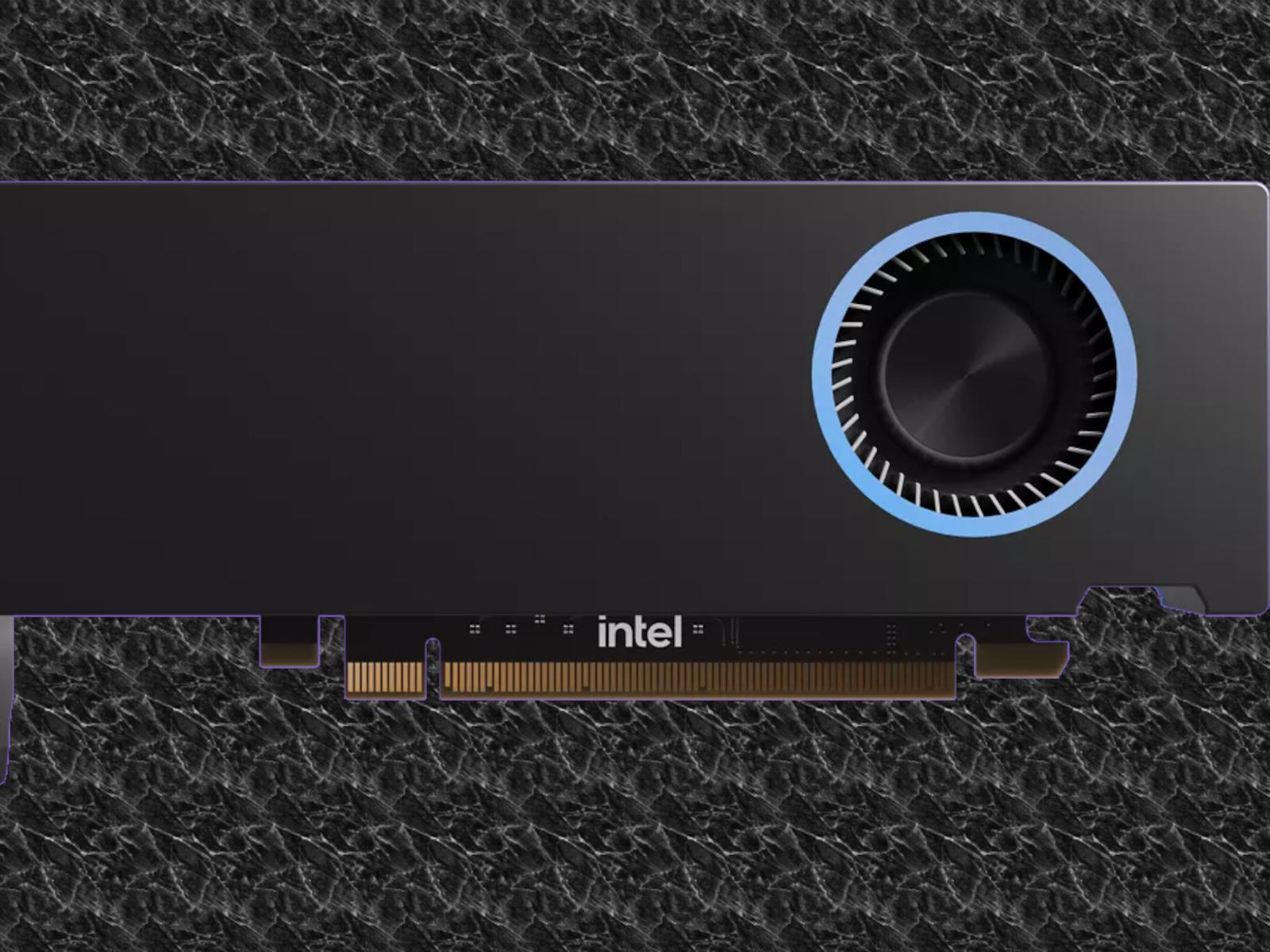
As of this week, the best-selling workstation GPU on popular PC products retailer Newegg isn’t from one of the usual suspects AMD or NVIDIA. Instead, Intel has secured the crown by nailing a key, neglected budget segment in the workstation GPU market with its Intel Arc Pro B50. This remarkable achievement, first spotted by @Haze2K1 on Twitter,
Japanese Twitter user Komenezumi (@komenezumi1006) purchased something quite curious: a GUNNIR “Intel Arc Sample1 TF 16G Graphics Card.” What is it? Well, Windows and the Intel Arc drivers think it’s a 16GB version of the Intel Arc A750. Officially, such a product doesn’t exist, but it doesn’t particularly surprise us that there are test boards
Toxic fumes from jet engines are leaking into aircraft cabins at an accelerating rate, reaching 108 incidents per million departures in 2024 compared to 12 in 2014, a Wall Street Journal investigation found. The fumes contain neurotoxins and carbon monoxide that have caused brain injuries in crew members. JetBlue flight attendant Florence Chesson suffered permanent neurological damage after inhaling engine oil vapors in 2018, diagnosed by neurologists as equivalent to an NFL linebacker’s concussion.
The surge is driven by Airbus A320 aircraft, particularly the A320neo model introduced in 2016. WSJ reports Airbus loosened maintenance requirements under airline pressure despite knowing the changes would increase incidents. The FAA received over 700 fume event reports from major U.S. airlines in 2024. Most commercial jets except Boeing’s 787 use a “bleed air” system that pulls cabin air through engines.
Apple has delivered its promise to release iOS 26 today, and as expected, it boasts a host of new features and functionality So we though it was a good idea to take you through some of iOS26’s most notable features and also show you how to prepare your iPhone for this pivotal upgrade.
Get Ready For Liquid Glass, Smart Tools And Live Translation
One
LG just announced two new earbuds in its xboom line of audio products, following the launch of the xboom Buds in January. The xboom Buds Plus and Buds Lite (which seems like a relatively confusing name to beer drinkers) both hit store shelves sometime this month.
The Buds Plus earbuds are filled with high-tech bells and whistles. These premium headphones boast adaptive EQ that continuously adjusts the sound profile in real time. This should ensure “optimal audio quality regardless of how the earbuds are worn.” The company says the design compensates for changes that would lead to signal degradation with other earbuds.
LG
They include ANC and a trio of microphones for making phone calls and the like. The charging case sanitizes the earbuds after each use with UV rays, with the company claiming that the process eliminates 99.9 percent of bacteria from the surface. This case also doubles as a Bluetooth transmitter, which is useful when enjoying some in-flight entertainment. It supports wireless charging, which is nice, with up to ten hours of playback per charge on the buds and 30 hours with the case.
The Buds Lite earbuds have one advantage over the standard Buds and the Buds Plus. The battery lasts up to 11.5 hours per charge, with the case bringing that up to 35 hours. Otherwise, these are standard earbuds that offer “clear, balanced audio for music, calls and more.”
They offer ANC, though a more streamlined version than with the Plus, and four customizable EQ modes. This allows users to “fine-tune their sound profile to match their preferences.” The Buds Lite ship with several different ear tips to accommodate multiple ear canal sizes.
LG
LG hasn’t revealed any pricing info on these products, but the original xboom Buds cost $109. It’s a safe bet the Buds Plus will cost more than that. Hopefully, the Buds Lite will cost a bit less.
These are just the latest xboom-branded audio products. The company announced a trio of speakers at CES this year.
This article originally appeared on Engadget at https://www.engadget.com/audio/headphones/lg-expands-its-line-of-xboom-earbuds-with-two-new-models-182220615.html?src=rss
A third of UK employers are using “bossware” technology to track workers’ activity with the most common methods including monitoring emails and web browsing. From a report: Private companies are most likely to deploy in-work surveillance and one in seven employers are recording or reviewing screen activity, according to a UK-wide survey that estimates the extent of office snooping.
The findings, shared with the Guardian by the Chartered Management Institute (CMI), are based on responses from hundreds of UK managers and suggest there has been a recent growth in computerised work surveillance. In 2023, less than a fifth of people thought they were being monitored by an employer, the Information Commissioner’s Office (ICO) found. The finding that about a third of managers report their organisations are monitoring workers’ online activities on employer-owned devices is probably an underestimate, as roughly the same proportion said they don’t know what tracking their organisations do.
Many monitoring systems are aimed at preventing insider threats and safeguarding sensitive information as well as detecting productivity dips. But the trend appears to be causing unease. A large minority of managers are opposed to the practice, saying it undermines trust with staff and invades their personal privacy, the CMI found.
Virtual shifting is arguably the biggest innovation Zwift has brought to the indoor cycling scene in recent years.
What’s so great about it, how does it work, and what hardware is required? Let’s dive in…
Virtual Shifting Basics
Unless you ride a single-speed bike, you’re using physical gears to make your riding more enjoyable. You’ll typically shift to an easier (lower) gear when riding uphill so you aren’t grinding away, and you may shift to a higher gear on a descent so you don’t spin out.
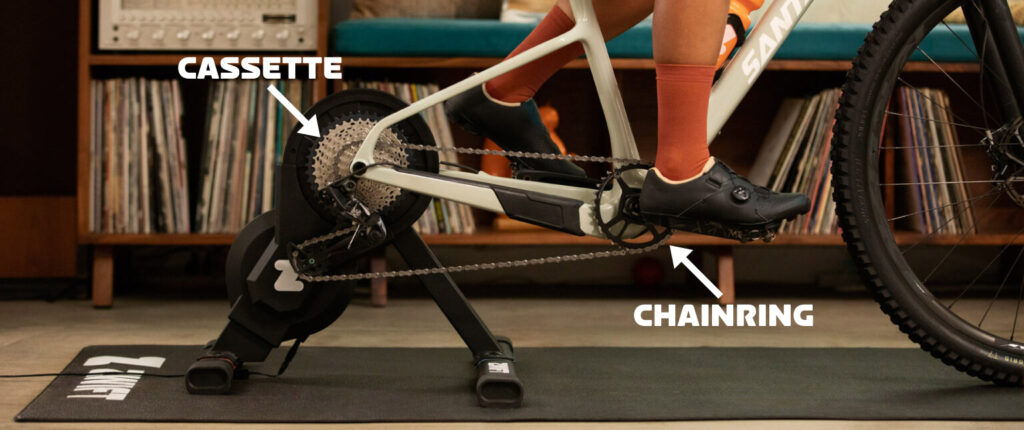
With virtual shifting, your chain doesn’t move between different front chainrings or rear cassette cogs when you shift. Instead, when you make a virtual shift, the resistance of your smart trainer changes so it feels like you’ve changed gears.
Virtual Shifting Benefits
Why do Zwifters like virtual shifting? Because it beats mechanical shifting in many ways:
Smooth and quiet: with no chains skipping between cogs, your shifts are completely silent, perfectly smooth, and fast.
Reduced drivetrain wear: your chain won’t wear out as quickly, and neither will your chainrings or cassette, since you’re reducing the damaging stresses of shifting.
Shift under full load: no need to ease off the pedals when shifting under big power, as your chain isn’t going to “skip” with virtual shifting like it can with mechanical shifting.
Shift under zero load: have you ever stopped riding, especially on a climb, then found it really hard to get going again because you’re in the wrong gear? With virtual shifting, you can shift to an easier gear without pedaling.
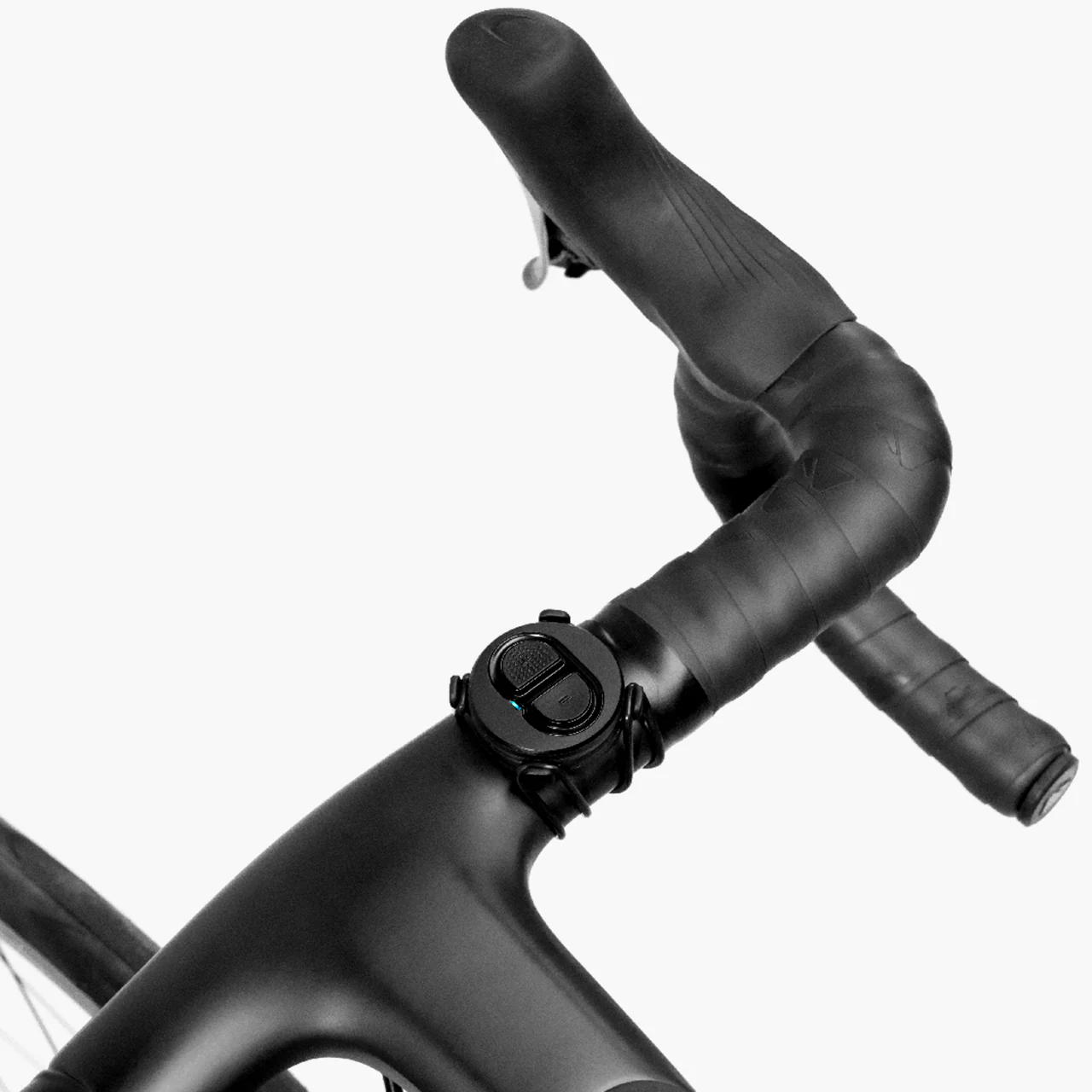
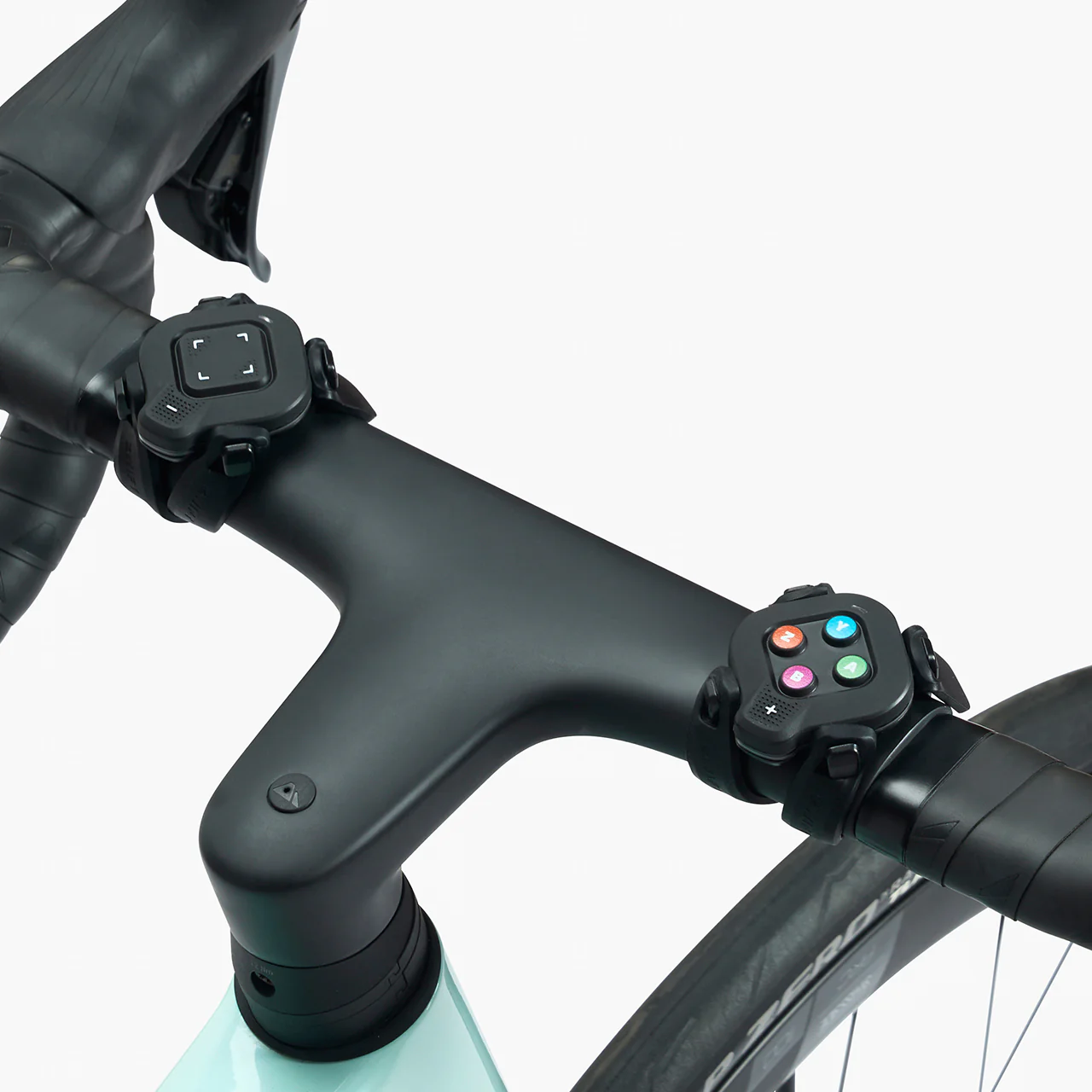
Compatible across many bikes: no more spinning out on your low-geared mountain bike, or wanting to swap trainer cassettes when you swap bikes. Virtual shifting works with almost any 8-12 speed bike and auto-calibrates to your physical gearing (more on this below).
Expanded gear range: Zwift’s virtual shifting currently supports a virtual 24-speed setup, which is more gears than most riders have on their outdoor setups. Additionally, the gear ratio range is very wide (from .75 to 5.49), meaning virtual shifting offers more high and low gears than your mechanical setup.
In-game visualization: with Zwift’s virtual shifting, you can always see what gear you’re in on screen.
No more fine-tuning: many riders have to adjust their physical shifting when moving between outdoor and indoor riding, since the cassette on their trainer isn’t positioned exactly like the cassette on their rear wheel. If you’re using the Zwift Cog (see below) you don’t need to do any such fine-tuning… just shift to a physical gear that has your chain lined up straight on the Cog and you’re ready to ride.
In-Game Usage and Settings
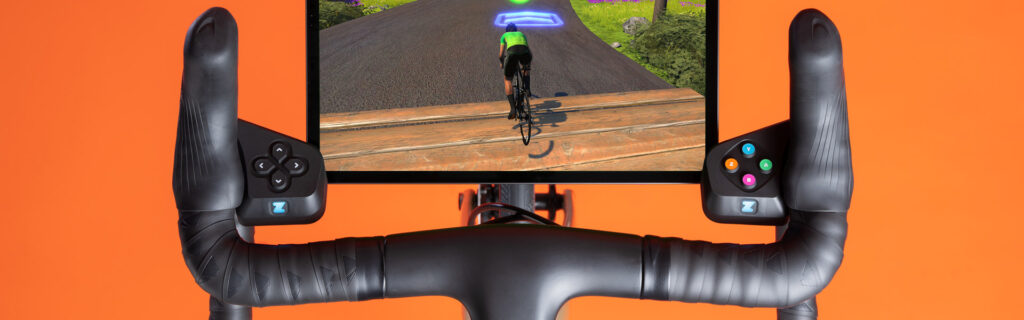
Watch a quick video showing how Zwift’s virtual shifting works in game using the Play or Click controllers:
This video is a bit outdated here in 2025, but it gives you a basic idea of how virtual shifting works in game, so we’ve included it here…
Virtual Shifting Hardware: Smart Trainers
Thanks to the popularity of Zwift’s virtual shifting, basically all new trainer models since 2024 have supported it, and some companies have updated firmware for older trainers to roll out virtual shifting support.
Currently, the following smart trainer models support virtual shifting:
Note: you must connect your trainer via Bluetooth, WiFi, or a direct ethernet connection in order to use Zwift’s virtual shifting. It is not supported over ANT+.
Virtual Shifting Hardware: Play vs Ride vs Click
PlayRideClickClick v2
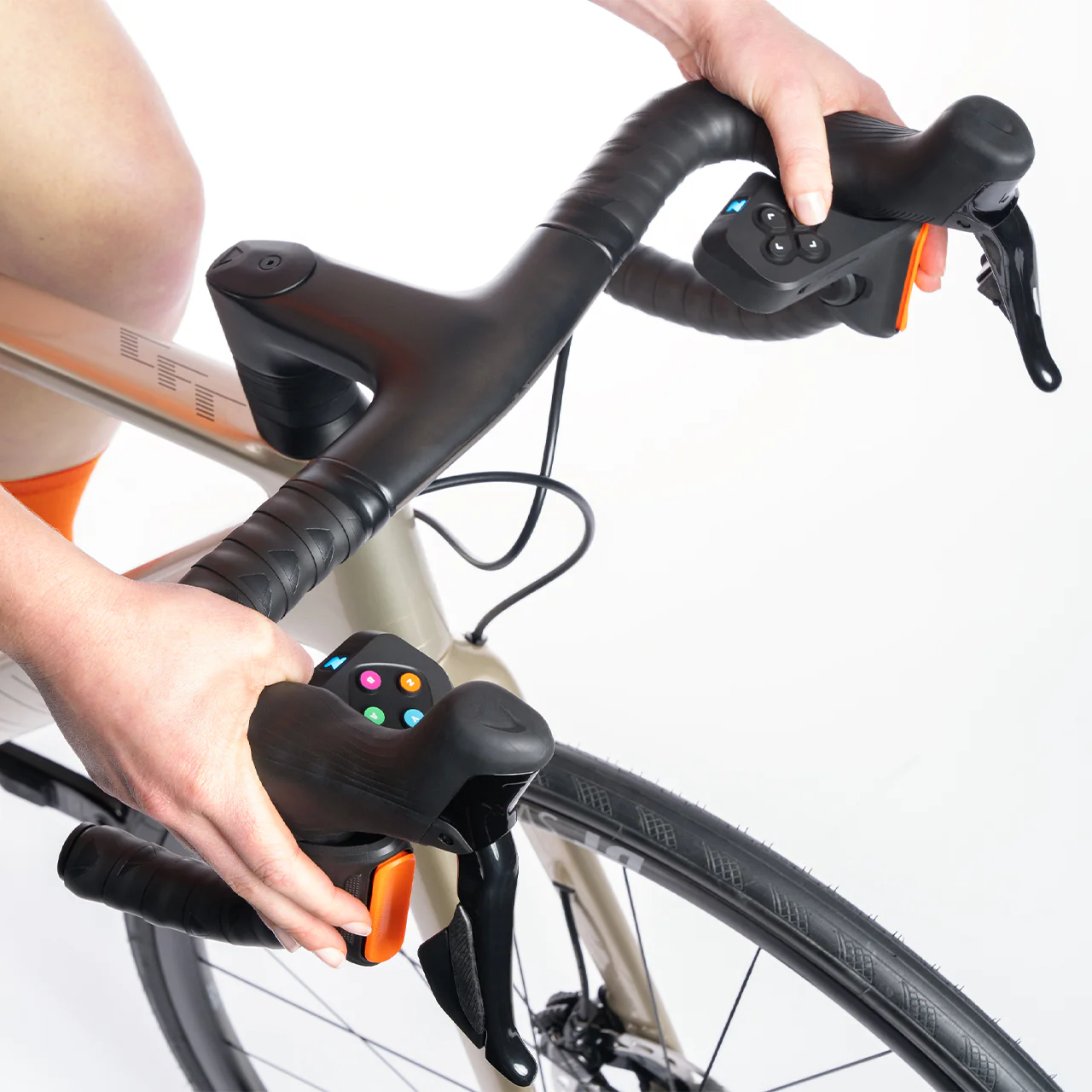
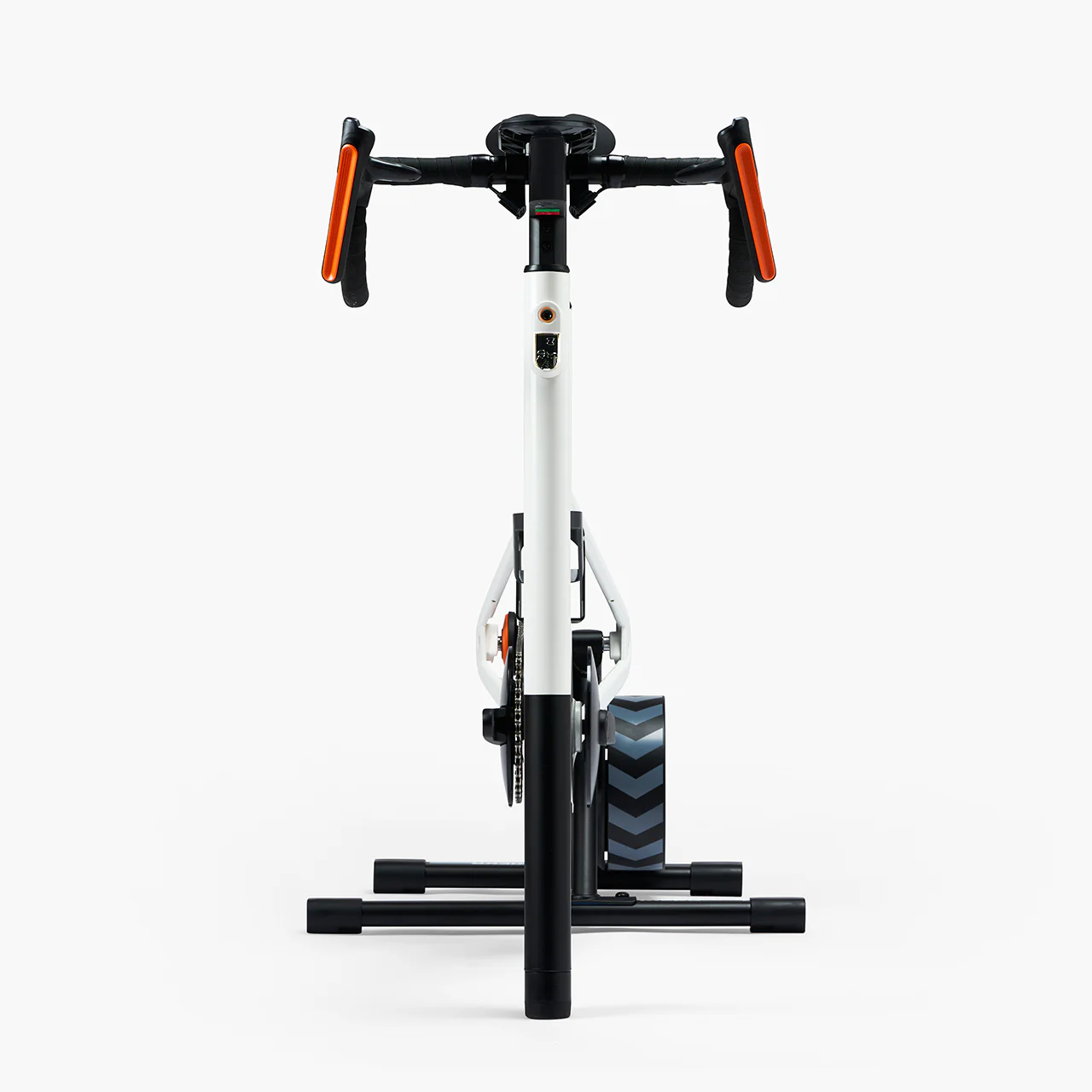
Interested in getting virtual shifting, but aren’t sure if you should buy the affordable Click v2, get a whole Zwift Ride Smart Bike, or something else? Here’s a rundown of features and specs for all the virtual shifting hardware Zwift has ever made:
*If you’re an Apple TV user, it’s worth noting that the Click and Ride controllers use just one Bluetooth connection, while Play requires two. Apple TV limits users to two Bluetooth connections, which means Play users on Apple TV must pair all devices through the Companion app (since you must also connect your smart trainer, which would make three connections if you add Play into the mix). The only way around this is via a smart trainer that can connect using WiFi (read more).
But if you use Click or Ride, you may still be able to pair directly through Apple TV, as long as you aren’t pairing a heart rate monitor as a separate device.
Virtual Shifting Hardware: Zwift Cog
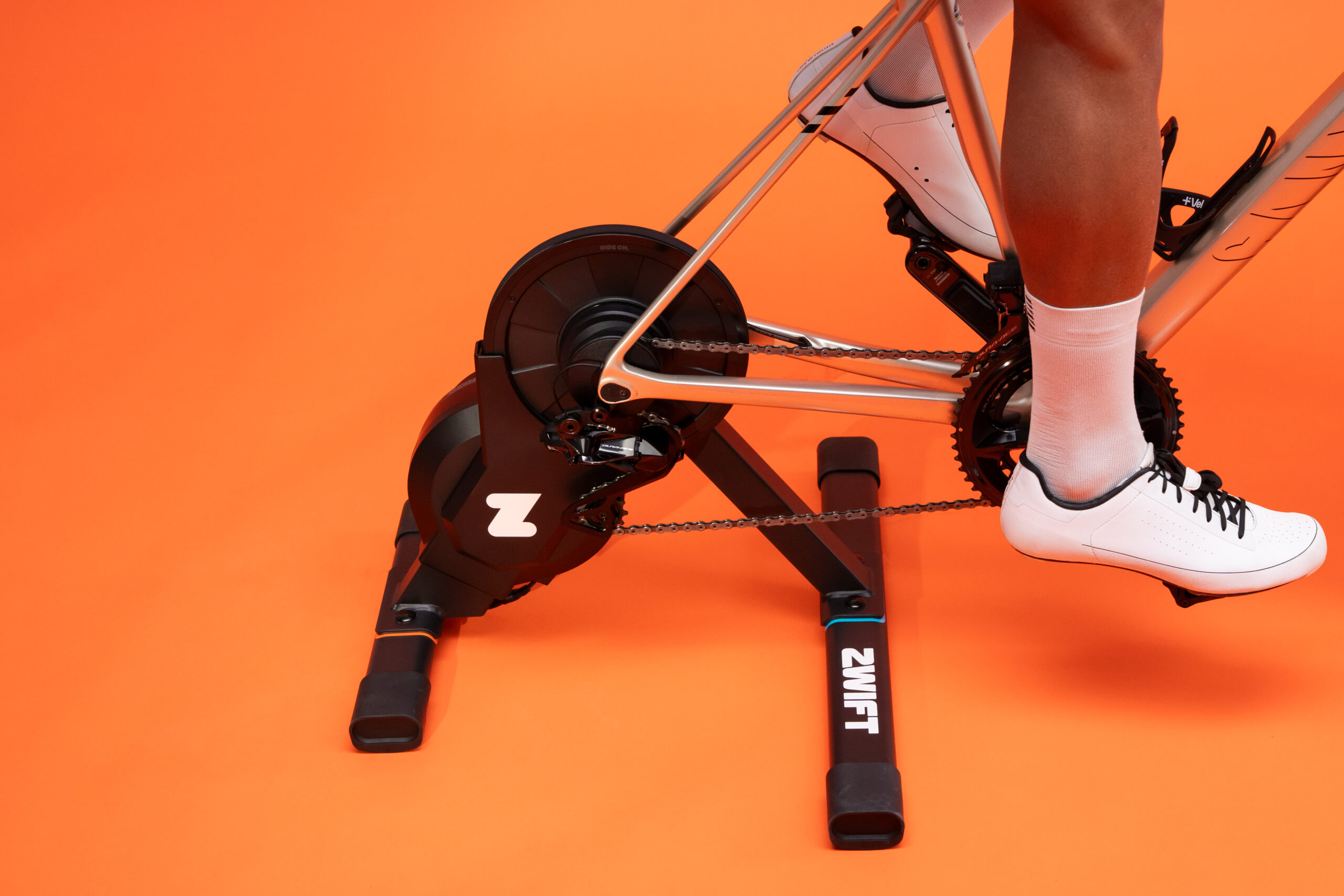
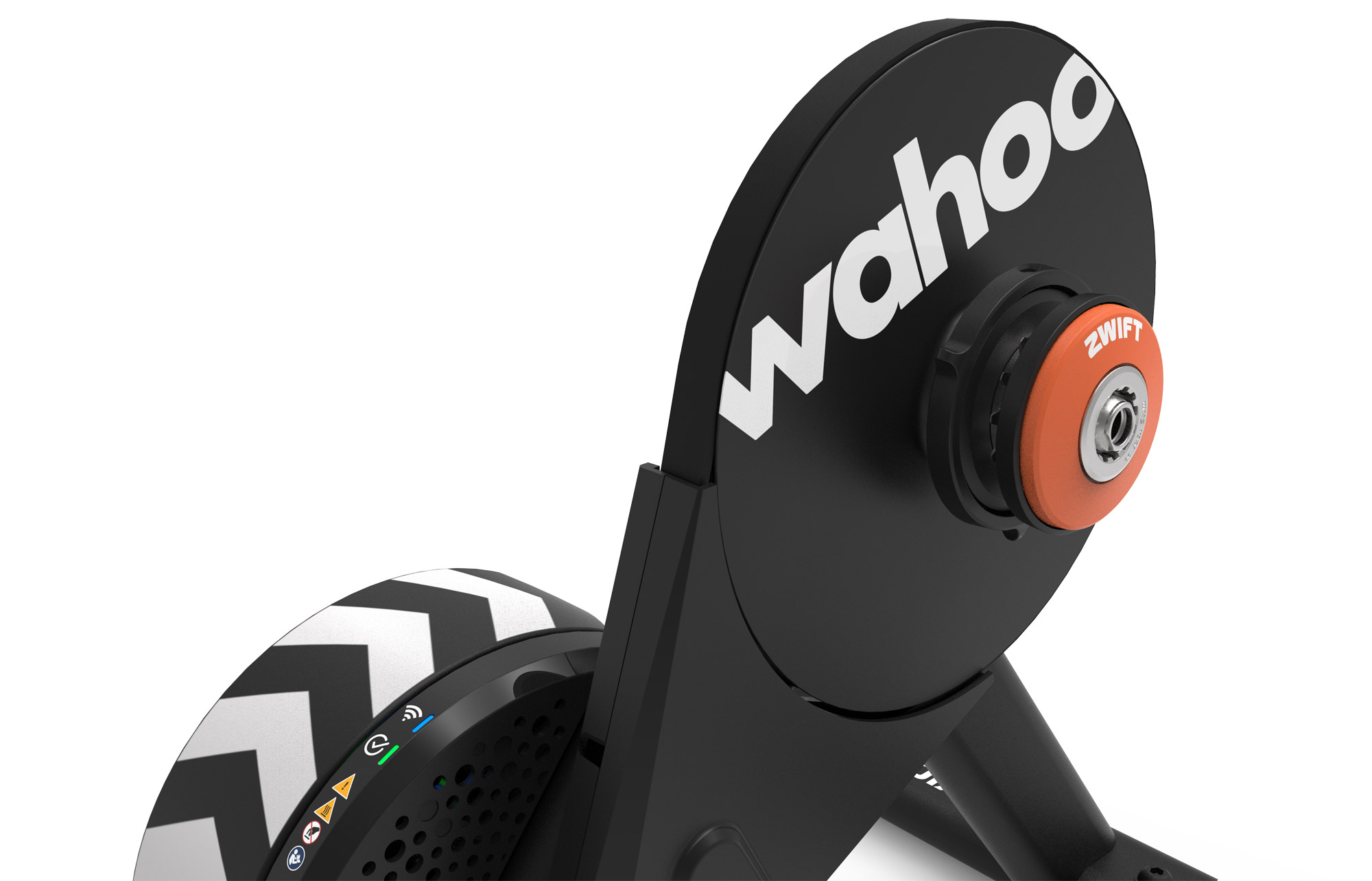
First released in October 2023, the Zwift Cog is a single-cog replacement for a standard rear cassette. It was initially sold with the Zwift Hub One smart trainer, and the latest version is now sold with various trainers, the Zwift Ride, and as a package with the Click v2.
Original Zwift Cog on Zwift Hub trainerNewest Zwift Cog on Wahoo KICKR CORE 2
While you’ll need virtual shifting to use the Cog, you definitely do not need to have the Cog in order to use virtual shifting! Virtual shifting works just fine on a standard bike drivetrain with multiple front chainrings and a standard rear cassette.
The Cog was created by Zwift to simplify setups, as it eliminates the need to adjust your trainer’s cassette or fine-tune your bike’s shifting when placing your bike on the trainer. Just shift to a gear where your chain is lined up nicely on the Cog, and you’re ready to go!
By default, Zwift gives you 24 virtual gears ranging from a gear ratio of 0.75 to 5.49:
Gear
Ratio
1
0.75
2
0.87
3
0.99
4
1.11
5
1.23
6
1.38
7
1.53
8
1.68
9
1.86
10
2.04
11
2.22
12
2.40
Gear
Ratio
13
2.61
14
2.82
15
3.03
16
3.24
17
3.49
18
3.74
19
3.99
20
4.24
21
4.54
22
4.84
23
5.14
24
5.49
This is more than enough gears for any rider. By comparison, typical mid-compact road bike gearing with an 11-28 cassette offers a much narrower range of gear ratios (1.29 to 4.73), and some of those gears will overlap. In fact, using bike gear calculators, we can see that you’d have to run 30t and 60t chainrings paired with an 11-40 cassette to match the gear ratio range of Zwift’s virtual shifting!
Because Zwift’s virtual gears don’t overlap, they’re able to space the gear ratios so the resistance change between each gear isn’t too large or too small. For us, it feels just right.
Customizing Your Shifting
If you’d like your shifting to better mimic mechanical shifting on your IRL bike, there are shift style options if you’re using Zwift Ride or Play:
Under Settings>Hardware, there are two settings to modify your virtual shifting experience:
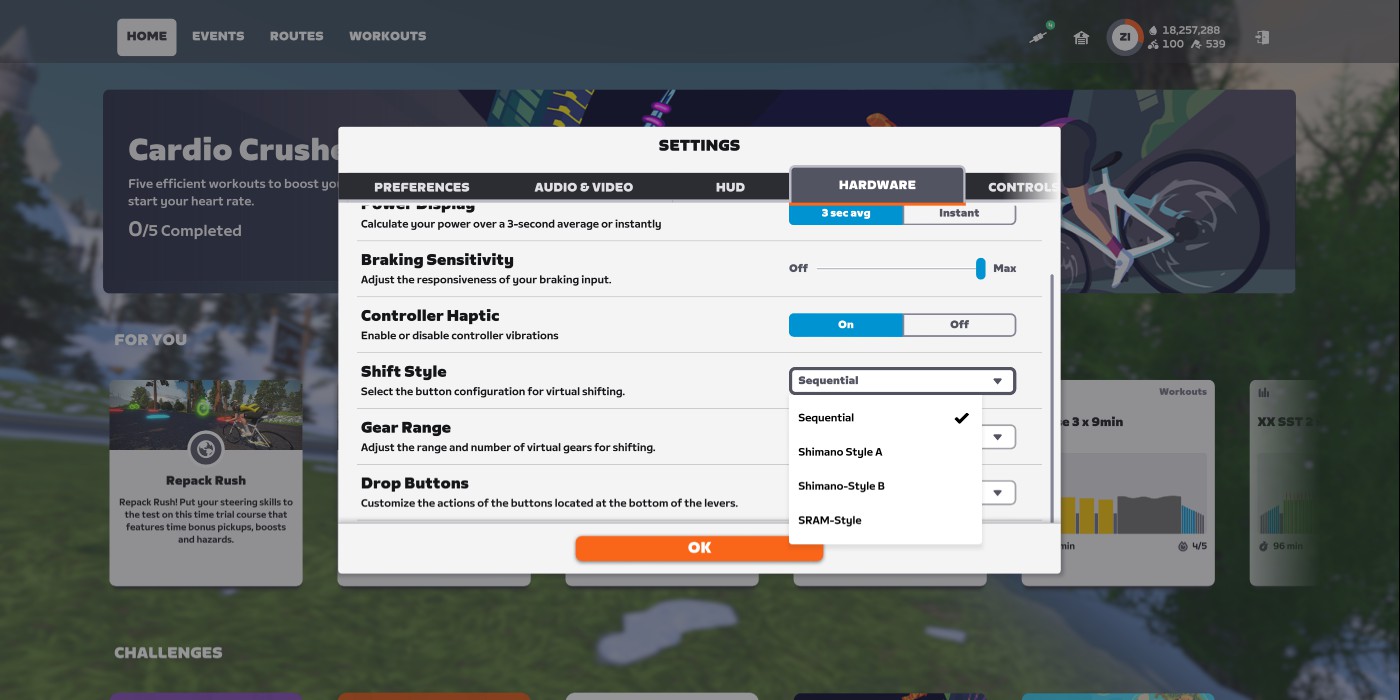
Shift Style: choose how your shifting buttons behave. Options are Sequential, Shimano Style A, Shimano Style B, and SRAM Style. Shimano styles are only available for Zwift Ride users, since you need two shift buttons on each controller.
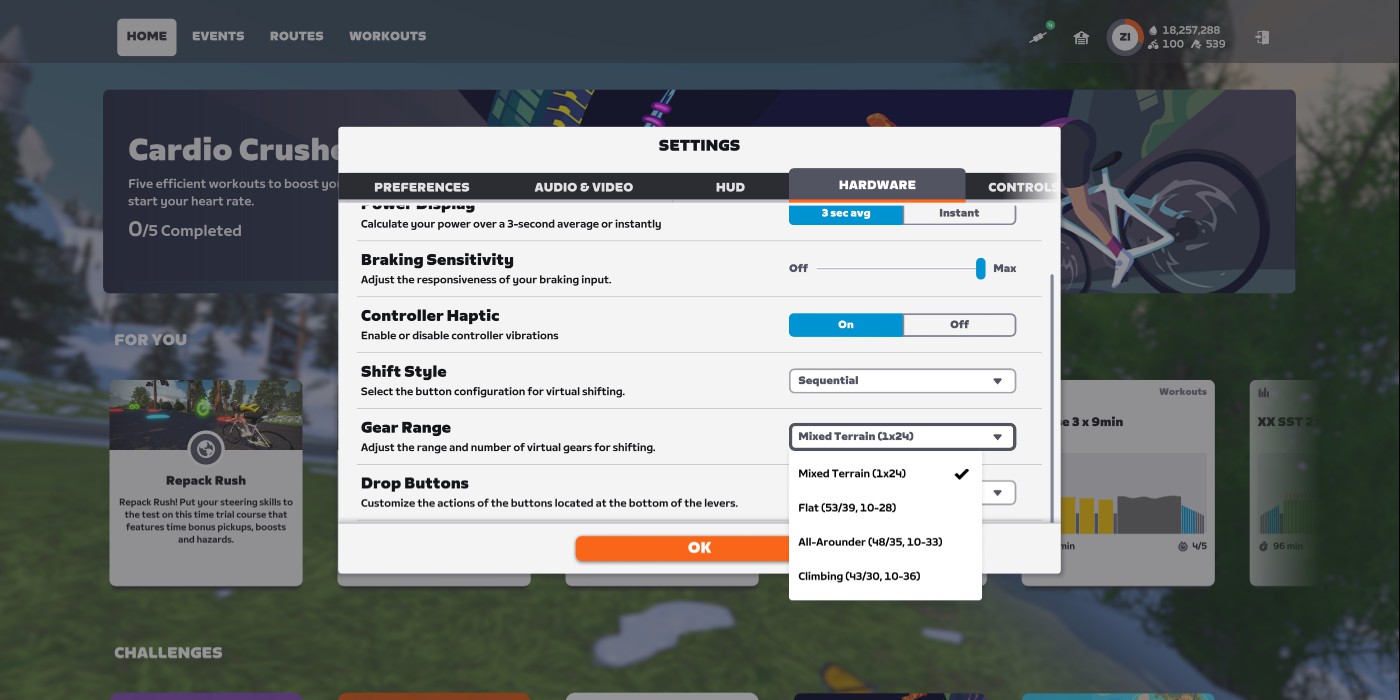
Gear Range: change the gearing range of your virtual shifting. Options are Mixed Terrain (1×24), Flat (53/39, 10-28), All-Arounder (43-35, 10-33), and Climbing (43/30, 10-36).
You can also completely disable virtual shifting from this same settings screen.
Virtual Gearing Meets Physical Bikes
One of the beautiful things about virtual shifting is that it works with whatever physical gearing your bike has. Are you on a road bike with a wide range of gears? A mountain bike with a lower gear range? A city bike with a limited gear range? No matter. If you have virtual shifting enabled, Zwift automatically detects your physical gearing in the first few seconds of pedaling after you enter the game. It then sets up your virtual gearing to match the table above, using whatever physical gear you are currently in.
Because of this, you’ll want to be in the right physical gear before you start riding in game. Which gear should you be in? Zwift recommends the small ring in front, and a lower gear on your cassette (perhaps 3rd or 4th) which gives you a decently straight chain line.
(Of course, if you have the single-cog Zwift Cog, you don’t need to worry about which gear you’re in on the back.)
Personally, we prefer the inertial feel of the big ring in front, and 4th gear or thereabouts on the cassette. This feels more like riding on flat ground – where you don’t have to push across the top and bottom of the pedal stroke – vs climbing in the small ring. And it puts less of a strain on your trainer.
Try different physical gears and see which feels best to you. If you want to force Zwift to re-detect your physical gearing and thus recompute the feel of virtual shifting, you’ll need to do one of the following:
Disconnect and reconnect your trainer
Power cycle your trainer
Restart the Zwift game
Questions or Comments?
Are you using Zwift’s virtual shifting? What do you think of it? Got questions? Share below!
The Federal Aviation Administration on Friday proposed fines of $3.1 million against Boeing for various safety violations related to the January 2024 door plug blowout and what the FAA called “interference with safety officials’ independence.”
An FAA statement said the proposed fine covers “safety violations that occurred from September 2023 through February 2024,” and is the “maximum statutory civil penalty authority consistent with law.” Boeing, which reported $22.7 billion in revenue and a net loss of $612 million last quarter, has 30 days to file a response with the agency.
“The FAA identified hundreds of quality system violations at Boeing’s 737 factory in Renton, Washington, and Boeing subcontractor Spirit AeroSystems’ 737 factory in Wichita, Kansas. Additionally, Boeing presented two unairworthy aircraft to the FAA for airworthiness certificates and failed to follow its quality system,” the FAA said.
Version
8.0.0 of Varnish Cache
has been released. In addition to a number
of changes to varnishd parameters, the ability to access some
runtime parameters using the Varnish Configuration Language, and other
improvements, 8.0.0 comes with big news; the project is forming an
organization called a forening
that will set out formal governance for the project.
The move also comes with a name change due to legal difficulties in
securing the Varnish Cache name:
The new association and the new project will be named “The Vinyl
Cache Project”, and this release 8.0.0, will be the last under the
“Varnish Cache” name. The next release, in March will be under the new
name, and will include compatility scripts, to make the transition as
smooth as possible for everybody.
I want to make it absolutely clear that this is 100% a mess of my
making: I should have insisted on a firm written agreement about the
name sharing, but I did not.
I will also state for the record, that there are no hard feelings
between Varnish Software and the FOSS project.
Varnish Software has always been, and still is, an important and
valued contributor to the FOSS project, but sometimes even friends can
make a mess of a situation.
As well as the Meta Ray-Ban Display glasses, the leaked video also reveals the design of the rumored Oakley Meta Sphaera glasses with a centered camera.
If you haven’t seen yet, Meta briefly posted and removed a video on its YouTube channel titled “Many Looks. Infinite Capabilities”, revealing that Meta’s HUD glasses with sEMG wristband will in fact be Ray-Ban branded, and depicting the HUD and wristband in action.
But the Ray-Ban HUD glasses are not the only new product seen in the video. It also clearly shows the rumored Oakley Meta Sphaera glasses.
The Ray-Ban Meta glasses, the Oakley Meta HSTN glasses, and the upcoming Meta Ray-Ban Display glasses all have their camera on one of the temples, capturing a slightly off-center perspective.
0:00
/0:06
The Oakley segment from the video.
For months now, Bloomberg’s Mark Gurman has reported that Meta and EssilorLuxottica are also working on smart glasses with a camera in the center too, leveraging Oakley’s Sphaera design. A centered camera would be more ideal for first-person footage, and the product will be marketed towards “cyclists and other athletes”, Gurman said.
Clips from the leaked Meta video clearly show the Oakley Meta Sphaera design, and depict it being used to capture centered footage of skiing and running.
Artificial intelligence (AI) can’t do everything (or at least it can’t do everything well), but one thing generative AI tools using large language models are very good at is creating text. If you bombed the verbal part of the SAT test and writing anything longer than a text is terrifying, the whole experience can seem pretty magical; being able to generate an email, essay, or cover letter without having to stare at a blank page for hours and fret over every vocabulary choice is a powerful tool. That’s why it’s estimated that nearly 20% of adults in the U.S. have used AI to write emails or essays.
Once that email or essay is polished up (and fact checked, right?), however, there’s a looming hurdle: AI detectors, ranging from humans being aware of the “tells” behind AI-generated writing to online tools that purport to scan text and identify whether it was written by human beings or AI. The accuracy of those detectors is questionable, but people use them, so you have to worry about that if you’re going to pass off an AI-generated cover letter or other piece of writing as something not written by AI.
Enter the AI “humanizer,” a tool designed to take your AI copy and turn it into something, well, more human by removing and rewording common AI tics and phrasing. It’s an appealing idea: You get AI to generate your essay, you run it through the humanizer, and the end result seems like it was written from scratch by a human (presumably, you). But do they work?
The test
To find out, I conducted a little experiment. While this isn’t exactly an exhaustive investigation, it definitely gave me a solid sense of whether any of these tools are worth using if you insist on having AI secretly write all of your correspondence, school assignments, or heartfelt emails to old friends.
First, I had ChatGPT generate an essay on … how to make AI writing more humanized. It spun up an essay in a few seconds, and the result was perfectly coherent. I didn’t fact-check it or massage the text in any way; its sole purpose is to be tested in humanizing tools.
Next, I ran the essay through a few AI detectors to make sure it was a fine example of mediocre AI writing. The results were as expected: QuillBot scored it as 94% AI, ZeroGPT scored it at 97%, and Copyleaks scored it a robust 100% AI-generated. The world of AI detectors agreed: This essay from ChatGPT reads like it was written by ChatGPT.
The results
Now, could AI humanizer tools fix that? There are a lot of humanizers out there—the explosion of AI chatbots has inspired a war between the detectors and the tools designed to fool them. So I chose a few popular ones to test out.
First, though, I wanted a bit more calibration, so I did something obvious: I fed ChatGPT’s text back into it and asked it to humanize the text. All of these tools are AI-based, after all, so maybe the easiest thing in the world is to just ask ChatGPT to be less like itself.
Now I had five “humanized” versions of an essay that three AI detectors had scored as pretty obviously AI. Would their scores improve? The answer is pretty much no, though one tool showed what you might generously call “promise”:
Paraphraser.io: Got murdered. Quillbot scored its version at 83% AI-generated, Copyleaks at a pretty firm 100%, and ZeroGPT at a suspiciously specific 99.94%.
ChatGPT: Bombed, although to be fair, it’s not specifically a humanizer, and perhaps a more thorough prompt would have yielded better results. Both QuillBot and Copyleaks scored it at 100% AI-gen, while ZeroGPT gave it 87.77%.
Grammarly: Also bombed pretty thoroughly, with QuillBot, Copyleaks, and ZeroGPT scoring its version 99%, 97.1%, and 99.97% respectively.
GPTHuman: This one had mixed results. QuillBot was totally fooled, scoring it 0% AI-gen, and ZeroGPT wasn’t sure of itself, scoring it just 60.96%. But Copyleaks had no doubt, slapping it with a 100% score.
StealthWriter: The most effective one tested here. While ZeroGPT was suspicious, scoring it as (again, curiously specific) 64.89% AI-gen, Copyleaks scored it at just 3%, and QuillBot was totally fooled with a 0% score.
One aspect of Stealthwriter that may have helped its effectiveness was the ability to keep running the humanizer over the text over and over again. The first run-through, StealthWriter claimed it would score as 65% human, so I ran it a second time, and the score jumped into the 80s, so I ran it again, and it hit 95%. After that, the score didn’t budge when I ran the humanizer tool over the text.
All of these tools state pretty plainly that you should review the results and make your own adjustments, and I didn’t review the humanized text for quality of writing or accuracy. I just wanted to see if they would fool AI detectors, and the answer is: Probably not, but StealthWriter might help.
Finally, consider that there are a lot of AI detector tools out there, which means the variability of scores (even with StealthWriter) is a concern: You can’t always know which detector tool someone is using. If they’re using a detector I didn’t use here and it’s better at detecting what StealthWriter is doing, for example, you’ll still get nailed. If you’re worried about your AI-generated text being detected as such, your best bet remains doing the writing yourself, or at least revising AI-generated text very, very thoroughly.
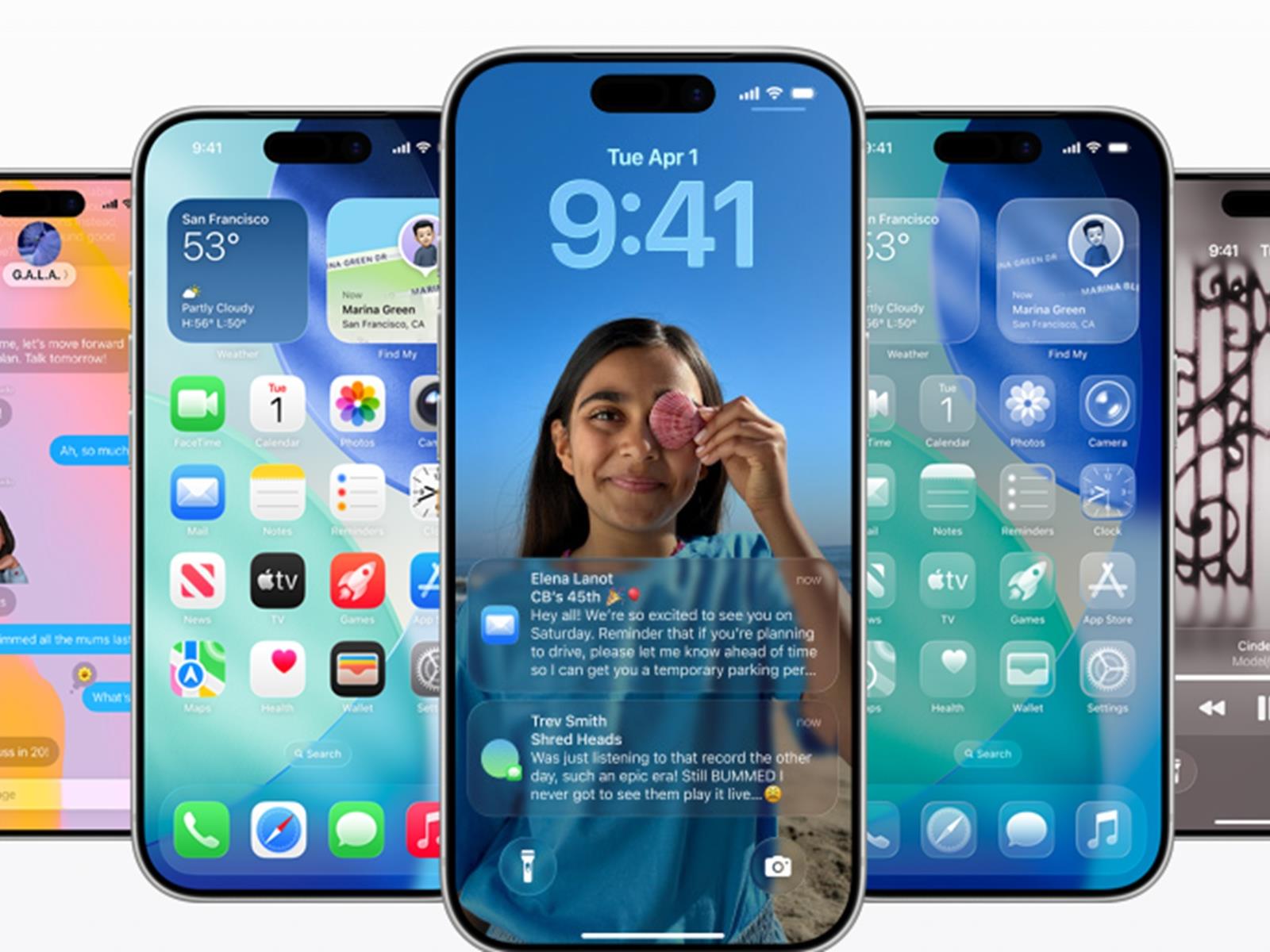
Apple released iOS 26, iPadOS 26 and macOS Tahoe 26 today, introducing Liquid Glass, a translucent design language that represents the biggest visual redesign since iOS 7 in 2013. The new interface elements dynamically refract and reflect background content across all three platforms. iOS 26 requires iPhone 11 or later and second-generation iPhone SE or newer. iPadOS 26 runs on the same hardware as iPadOS 18 except the 7th-generation iPad. macOS Tahoe 26 supports all Apple silicon Macs, the 2019 16-inch MacBook Pro, 2020 13-inch MacBook Pro, 2020 and later iMac, and 2019 and later Mac Pro. The transparent menu bar on macOS increases perceived display size.
iOS 26’s adaptive Lock Screen time display resizes around notifications and Live Activities. Desktop icons, folders, app icons and widgets support light, dark, tinted, and clear appearances across all systems. iOS 26 adds Visual Intelligence for on-screen content analysis through screenshot button combinations. Live Translation operates across Messages, FaceTime and Phone on all platforms, translating text and audio in real-time on-device. The Camera app received streamlined navigation and lens cleaning hints for iPhone 15 and later models.
iPadOS 26 brings Mac-style windowing and multitasking. Apps support free-form placement and menu bars. The Phone app and new Apple Games app arrived on iPad. macOS gained the Phone app through Continuity, including Call Screening and Hold Assist features. Spotlight executes hundreds of actions without opening applications and automatically assigns quick keys to frequent actions. Apple Intelligence expands across all systems. The Shortcuts app gained intelligent actions for text summarization and image generation. The Wallet app tracks orders across platforms, while Apple Music introduced AutoMix for song transitions.
After a summer of beta updates, iOS 26 is here. As long as you have a compatible iPhone, you can install the new software right now. Head to Settings > General > Software Update, and get ready for a Liquid Glass makeover.
iOS 26 offers Apple’s biggest visual change to its software since iOS 7. (That was when Jony Ive’s flat design replaced Scott Forstall’s skeuomorphic one.) This time around, the software adopts a translucent material theme: Liquid Glass. Although it isn’t a return to skeuomorphism, it does reincorporate a sense of depth, simulating a pleasantly refractive glass. Expect colors and visual effects that respond to their onscreen surroundings.
Apple
Apple has taken flak from industry pundits for not rushing headfirst into AI. (Or, at least it hasn’t with the same manic frenzy as its competitors.) The company is taking a more measured approach, gradually incorporating it into its software. This year’s Apple Intelligence additions include live translation in messages, FaceTime and Phone. Visual Intelligence also expands beyond the camera and into screenshots. And your Genmoji and Image Playground creations might look less… strange than last year’s versions.
Even Apple Music gets a new AI feature. Its new automix generates transitions between songs, aiming for DJ-like progressions. I find that it works best with danceable genres like EDM or hip-hop. It usually won’t bother trying to mix less beat-driven singer-songwriter-type stuff.
Apple
Arguably handier than new AI features is Apple’s revamp of its communication apps. Call screening lets you gather info from callers before deciding whether to pick up. Hold Assist saves you from having to listen to the Muzak. And the Messages app adds new screening options and filters. You can also add custom backgrounds and even conduct polls in your messaging threads. Finally, the Phone app cleans up its interface, unifying its tabs into a single list.
This article originally appeared on Engadget at https://www.engadget.com/mobile/smartphones/ios-26-is-now-available-heres-how-to-install-it-on-your-iphone-171233434.html?src=rss
The last time Apple gave macOS a fresh design was in 2020’s macOS 11 Big Sur.
That release was relatively light on new features and heavy on symbolism. Big Sur is also when Apple finally jettisoned the “10” in Mac OS X after two decades. More importantly, it was the first release installed on then-new Apple Silicon Macs, the culmination of a decade-plus of in-house chip design that began with single-core, low-power iPhone and iPad chips and culminated in something powerful enough for the Mac Pro.
Today’s macOS 26 Tahoe release holds up a translucent, glassy mirror to the Big Sur update. It comes with an all-new look, one that further unifies Apple’s design language across all its operating systems. And it even throws out the old version numbering system and introduces a new one.