Five iOS 26 Features That Changed How I Use My iPhone

Did you know you can customize Google to filter out garbage? Take these steps for better search results, including adding Lifehacker as a preferred source for tech news.


iOS 26 has been out for a few days now, and with it, a bunch of convenient little tweaks to how you use your phone. Not everything’s a keeper, and I’ve already written about how to disable the new Liquid Glass transparency effects or fix Dark Mode icons that appear tilted. Still, there are things to like about this update, even if you have to go out of your way to turn some of them on.

After spending a couple nights tweaking iOS 26 to my preferences, here are my favorite new features in Apple’s latest operating system.

Resize the clock

This one works well with my iPhone 15 Pro’s always-on display. As a millennial, I don’t always have old-school clocks conveniently placed around my apartment. Instead, I’ll just carry my phone around with me and plop it down somewhere in my peripheral vision where I can quickly glance at the always-on display to check the time. The problem was, until now, the clock was tiny.

With iOS 26, though, you can now resize the lock screen clock (and by extension, the always-on display clock). That makes for less wasted space on my screen, and makes it easier to see at a glance or from a distance. 

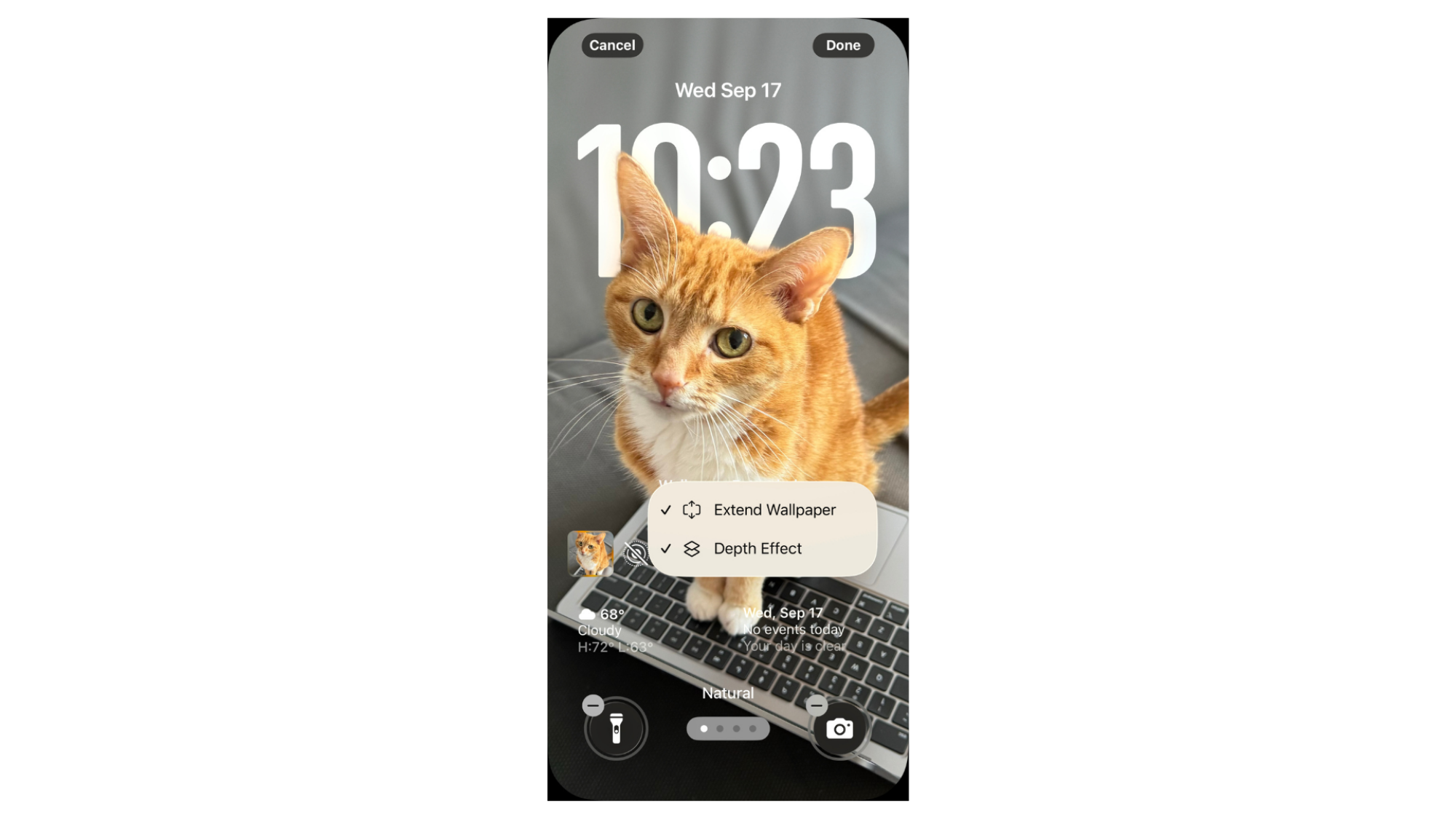
It’s a small change, but it’s probably made the biggest difference in how I actually use my phone. To resize your lock screen clock in iOS 26, simply navigate to your iPhone’s lock screen, then long press. Hit the customize button, and then drag the lower right corner of the clock widget until you’re satisfied with the clock’s size.

Note that the resized clock will only work with the first available font. If you don’t see a selection frame around the clock widget’s lower right corner, you’ll first need to tap into it and change the font before you can resize it.
Author's iPhone lock screen

Credit: Michelle Ehrhardt

Also, as a bonus, depending on your wallpaper, you can trigger a depth effect by clicking the three-dots icon in the lower right corner. This will allow you to place some photo elements in front of the clock, which could hurt legibility but might be worth it to see more of your background, depending on your tastes. For instance, here are my cat’s ears appearing over my lock screen clock. The clock still appears unobstructed on my black always-on display (on the iPhone 14 Pro and up, you can change how your always-on display looks under Settings > Display & Brightness > Always On Display).

Call screening

I pretty much never pick up phone calls anymore. As my grandparents used to say “if it’s important, they’ll call back.”

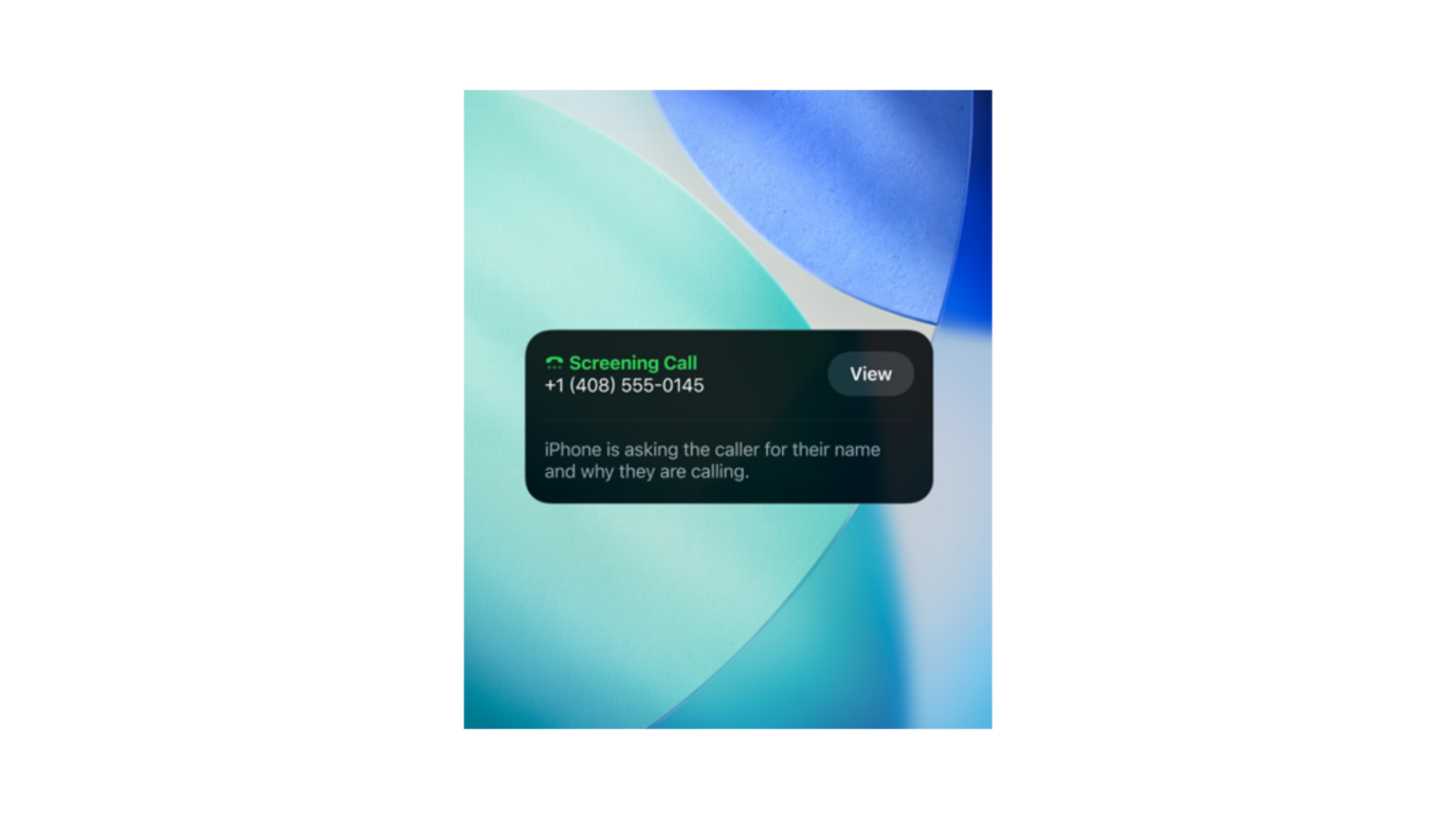
That said, sometimes I do worry about missing a chat I really needed to have, or just coming across as rude. That’s where iOS 26’s new Call Screening feature comes in.
Call screening

Credit: Apple

When enabled, under Settings > Apps > Phone > Screen Unknown Callers > Ask Reason for Calling, this will have your iPhone pick up calls from numbers you don’t know for you, then ask the caller their reason for calling. As they answer, a transcript of what they’re saying will appear on screen, and you’ll be able to pick up the phone if it seems important. I actually haven’t gotten a spam call since turning it on, so I haven’t personally tested it yet, but it seems like a great way to avoid spam while not worrying about missing something important along the way.

And if you want to go nuclear, you could instead toggle on Silence instead of Ask Reason for Calling, which will simply send all calls from unknown numbers straight to voicemail.

Note that Call Screening does not work for contacts, so you’ll still have to decide whether it’s worth picking up your long-winded uncle’s calls for yourself.

The improved fitness app

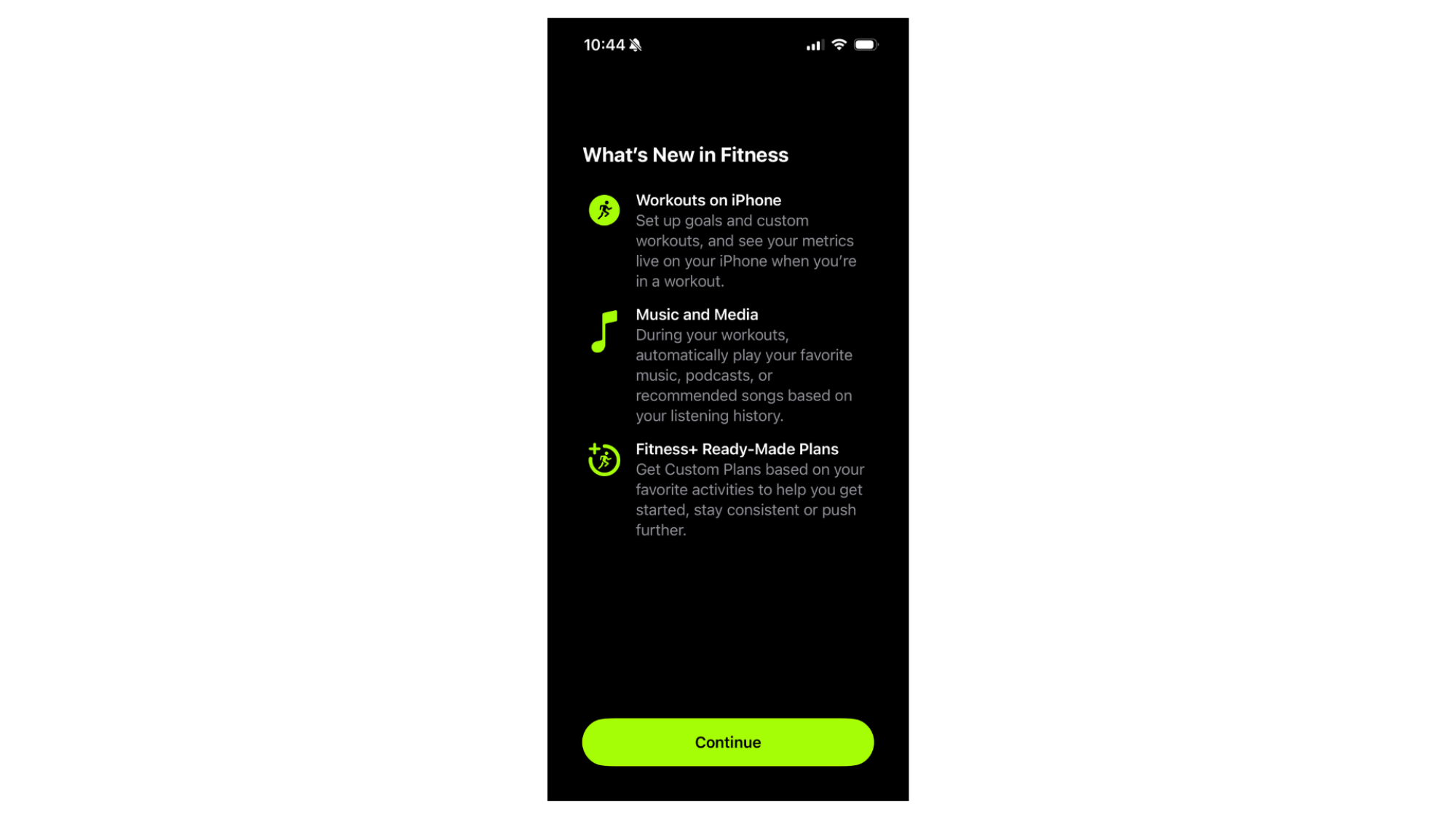
Until now, the iPhone’s Fitness app has been useful for getting a summary of your fitness data, or for accessing Apple Fitness+ workout videos, but not for actually tracking workouts while you’re on a run or in the gym. Now, though, that’s changed.
iOS 26 Fitness App update

Credit: Michelle Ehrhardt

Once you’ve updated your phone to iOS 26, open the Fitness app. You’ll see a new Workout tab in the navigation bar towards the bottom. Tap it, and you’ll see a number of workouts that you can start right from your phone.

These are all for outdoor exercises, like walking, running, cycling, and hiking. The idea is that, even if you don’t have a health tracker, your phone can use GPS data to estimate metrics for you (tapping on any of these will bring up a screen where your phone asks for location tracking permissions).

But that’s not all you can do. If you pair your phone with a heart rate tracker, like the one built into the Apple Watch (although you’re not limited to Apple’s own peripherals for this), you’ll also get access to other workout types, like Indoor Run, Yoga, and High Intensity Interval Training. You’ll just need to wear your tracker while exercising.

It doesn’t only work in the background, too. Start any workout, and you’ll see your metrics live on your phone while you’re exercising—no more peeking down at your smartwatch’s tiny screen to see your stats. This will also work for workouts started from your Apple Watch, as they’ll simply mirror to both the Fitness app and a Live Activity on your iPhone’s lock screen. Nice.

Hold assist

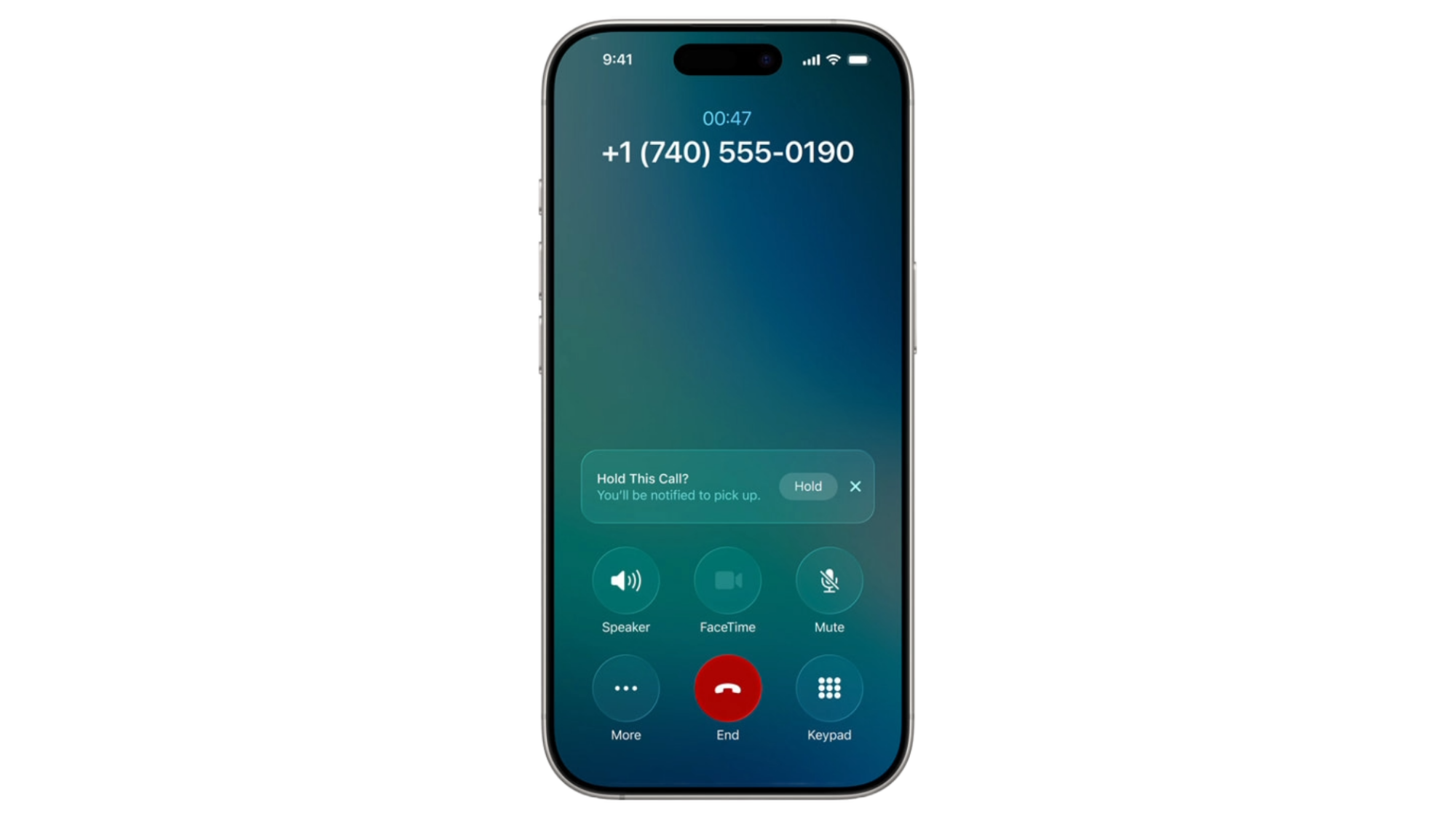
I have a trip coming up next week, and I need to call my pharmacy to get some prescription refills before I head out of town. Unfortunately, they love to leave me on hold for way too long. That’s where Apple’s new Hold Assist feature comes in.
Hold Assist iPhone

Credit: Apple

With this, your iPhone will detect when you’ve been put on hold (by listening for cues like hold music), and will offer to hold the call for you so you can step away. Press the “Hold This Call?” button that pops up, and your call will shrink to a small pill towards the top of your screen. Audio will be muted, and you’ll be able to walk away or use your iPhone as usual. When the other line takes you off hold, they’ll get a short message saying Hold Assist is active, and you’ll get a notification along with a ring and/or vibration to let you know you can pick up the call again. You’ll also see a transcription of what the other person said while they waited for you to pick up.

Hold Assist should be active for you by default after installing iOS 26, but to double check, simply navigate to Settings > Apps > Phone > Hold Assist Detection and ensure the toggle is enabled.

A spam folder for the Messages app

Finally, your iPhone will automatically sort away spam messages for you. I don’t know about you, but I’ve been getting so many scam texts as of late, like for unpaid traffic tickets (I don’t drive). Already, the new Spam folder in Messages has done a good job of keeping me from seeing these.

Essentially, it works just like the Spam folder in Gmail. Simply open your Messages app, and you’ll probably notice fewer scam texts or solicitations in there. To see where they’ve all gone, click the three-lines icon in the top right corner, then the Spam folder.
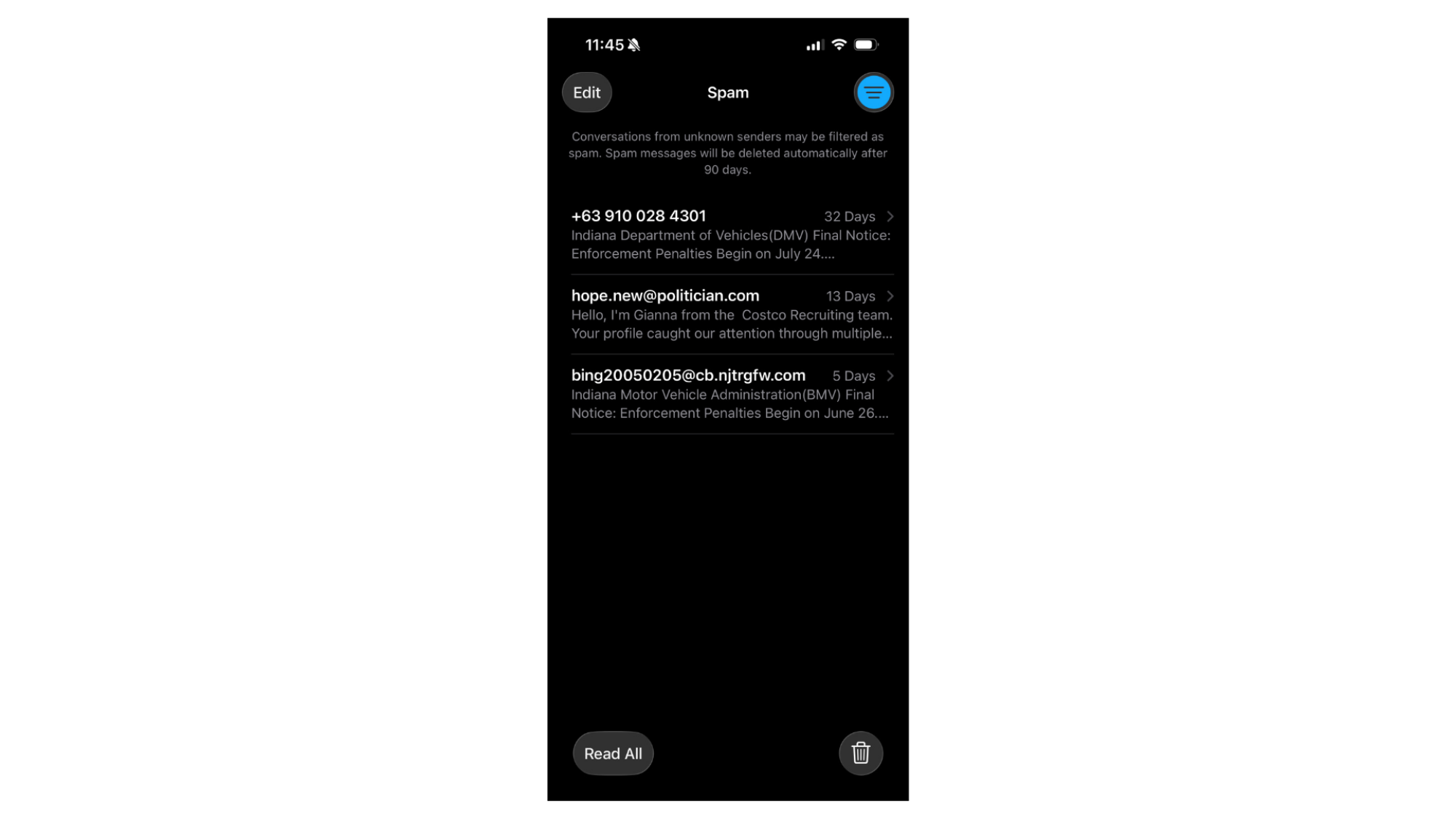
Spam Folder in iOS 26

Credit: Michelle Ehrhardt

You’ll see any texts your iPhone has decided to mark as spam, as well as buttons to mark them all as read or simply delete them. Of course, be careful when looking at these messages—you probably don’t want to click any links in them.

And that’s it. Note that, just like in Gmail, there is a chance for false positives, so you might want to check this folder if you’re expecting an important text and aren’t seeing it. If you leave a message in the Spam folder for more than 90 days, it will be deleted, but you can click Recover under a message you want to keep to send it back to the main text folder.

Like with Hold Assist, spam filtering should be enabled for you by default, but to double check, head over to Settings > Apps > Messages > Unknown Senders and ensure the Filter Spam toggle is on.

KDE Plasma 6.5 Adds ‘Saved Clipboard Items’ Feature After 22 Years, Plus More!

The Plasma desktop 6.5.0 now has a fantastic new feature: saved clipboard items! This isn’t just any update; this is a feature that people have wanted for 22 long years, making it possibly the oldest request ever implemented in KDE!

The post KDE Plasma 6.5 Adds ‘Saved Clipboard Items’ Feature After 22 Years, Plus More! appeared first on Linux Today.

Jackson: tag2upload in the first month of forky

Ian Jackson has published a blog
post
summarizing the tag2upload service’s
first month of handling uploads for the upcoming Debian 14 (“forky”) release:

We announced tag2upload’s open beta in mid-July. That was in the
middle of the the freeze for trixie, so usage was fairly light until
the forky floodgates opened.

Since then the service has successfully performed 637 uploads, of
which 420 were in the last 32 days. That’s an average of about 13 per
day. For comparison, during the first half of September up to today
there have been 2475 uploads to unstable. That’s about 176/day.

So, tag2upload is already handling around 7.5% of uploads. This is
very gratifying for a service which is advertised as still being in
beta!

LWN covered
tag2upload in July 2024.

Lamborghini’s Fighter Jet-Inspired Pregunta Concept With V12 Engine Is Up For Auction

Lamborghini's Fighter Jet-Inspired Pregunta Concept With V12 Engine Is Up For Auction
When the covers for the Lamborghini Pregunta concept car were pulled back in 1998, people were blown away by its futuristic aircraft-inspired design and engineering. Even if it was the last of the pre-Volkwagen-owned Raging Bulls, the one-off supercar has remained inspirational and futuristic more than two decades later. For the second time

Meta Connect Sale Discounts Asgard’s Wrath 2 & More On Quest

The Meta Horizon Store is running a Connect Sale for the rest of this week.

With Meta Connect 2025 starting today, hundreds of titles are on sale on Quest’s app store.

One notable deal is a bundle offering for the apocalyptic VR shooters Metro Awakening and Arizona Sunshine 2. Meta is selling the shooters together for $30, over 60% off the $80 it normally costs to buy the two games together.

Metro Awakening Review: A Mesmerizing Tale of Survival in Moscow’s Dark Underworld
Go deep underground into the Metro and experience the dystopian future of a post-nuclear apocalyptic Russia in Metro Awakening.
UploadVRDon Hopper

Arizona Sunshine 2 Review: Reanimating A Dying Genre
Arizona Sunshine 2 launches this week on Quest, PSVR 2 and PC VR. Here’s our review:
UploadVRPete Austin

When it comes to regular discounts, Meta’s blockbuster VR RPG Asgard’s Wrath 2 is on sale for $39, a 35% discount from its regular $60 price.

There are far too many games on sale to list them all, but here’s a selection of some of the key titles and their discount in the Meta Connect Sale:

The sale ends just before the midnight between Sunday and Monday in the Pacific Time Zone, 11:59pm PT on September 21.

Meta Connect 2025: What We Expect, And What We Don’t
Meta Connect 2025 starts on Wednesday. Here’s what we expect to see announced, and what we don’t.
UploadVRDavid Heaney

The main Meta Connect 2025 keynote is at 5pm PT today. UploadVR will be on-site at Meta’s HQ, and we’ll endeavor to bring you full coverage of all the biggest announcements.

Garmin’s new smartwatch for kids costs more than the Apple Watch SE

Garmin just announced a refresh of its Bounce smartwatch for kids and the big headline is the exorbitant price. It costs $300, which is twice the cost of the previous generation and $50 more than an Apple Watch SE.

The Bounce 2 still offers tracking and communication features, both powered by an LTE connection. The exterior has been completely redesigned, with a rounded 1.2-inch AMOLED display. The original model was square-ish, resembling an Apple Watch.

Communication is better here, which is good as this is a smartwatch intended for parents to keep track of kids. Voice messages sent to the watch will be transcribed and can be read or listened to. It also allows for actual phone calls, which the original did not. The Bounce 2 offers GPS tracking and the battery lasts two full days between charges.

It can play music, but only with an Amazon Music subscription. Also, all communication features require a subscription to one of Garmin’s in-house smartwatch plans. These cost $10 per month or $100 annually. The Bounce 2 is available to order right now and comes in three colors.

This article originally appeared on Engadget at https://www.engadget.com/wearables/garmins-new-smartwatch-for-kids-costs-more-than-the-apple-watch-se-153134955.html?src=rss

Setup Hyprland with ML4W Dotfiles DEV 2.9.9.3 via Dotfiles Installer on Fedora 43 Beta as second DE

Following below is an attempt to setup Hyprland with ML4W Dotfiles 2.9.9.3 (Stephan Raabe) on Fedora 43 Beta . Several Copr repositories , which may be easily detected via command `dnf5 repolist` , will be automatically activated.First step would be add the repository using using remote-add and installing com.ml4w.dotfilesinstaller . . .

Business Insider Reportedly Tells Journalists They Can Use AI To Draft Stories

An anonymous reader shares a report: Business Insider has told journalists they can use AI to create first drafts of stories and suggested it won’t notify readers that AI was used, according to Status, a newsletter covering the media industry. The policy makes the outlet one of the first to formally allow such extensive use of the technology.

The AI guidelines were reportedly circulated in an internal memo from editor-in-chief Jamie Heller on Thursday. The policy authorized journalists to deploy AI “like any other tool” for tasks like research and image editing, Status reported.


Read more of this story at Slashdot.

Libxml2 2.15.0 released

Version
2.15.0
of libxml2 has
been released. Notable changes include the disabling of Python
bindings by default, using Doxygen to generate API documentation, as
well as bringing HTML serialization and handling of character
encodings more in line with the HTML5 specification.

Nick Wellnhofer has also announced
that he is stepping down as libxml2 maintainer, and Iván Chavero has
volunteered
to take over. LWN covered libxml2 in
June.

Tesla Under Investigation After Electronic Door Handles Trap Child Riders Inside

Tesla Under Investigation After Electronic Door Handles Trap Child Riders Inside
Once again, the National Highway Traffic Safety Administration has launched a preliminary investigation into Tesla, this time focusing on the Model Y’s electronic door handles following multiple complaints from owners, including reports of children being trapped inside vehicles. NHTSA’s probe is centered on an estimated 174,290 Model Y SUVs

Inside the Apple audio lab where AirPods are tested and tuned

When you enter the building that houses Apple’s audio lab, venture just beyond reception and you’ll encounter a massive vintage stereo setup. The deck and accompanying speakers were a gift from Steve Jobs to the team of engineers who work in this office. The group sees the old-school tech as a source of inspiration, but also as a reminder of Jobs’ obsession with both music and sound.

More than inspiration, though, the stereo is a reminder to the experts in software, acoustics and sound design how important sound is to everything Apple builds.

Inside, I was led into a maze of nondescript halls, weaving from room to room with a trio of Apple engineers as my guides. I was in for a rare peek into the company’s product development facilities — a step further behind the curtain than what’s typically allowed during Apple events.

Validating the AirPods hearing test

Apple has audio metric booths where it verifies its hearing health features.
Billy Steele for Engadget

As Apple’s audio team works to correct and calibrate the AirPods’ fit for natural variations in ear geometry, they use a collection of audio metric booths to check their work. These rooms look like small, windowless offices. The walls are covered in sound-dampening panels and there’s a single workstation with a Mac and various tools for hearing analysis. If you’ll recall, one of the company’s major ambitions with AirPods has been the end-to-end hearing health experience that it debuted last year. In order to validate its claims of a “clinical grade hearing test,” engineers use devices you might see in an audiologist’s office, like audiometers. These spaces aren’t unlike the small booths you’ve probably sat in for a professionally-administered hearing test.

In one booth alone, the team ran thousands of tests on the feature to ensure that the hearing screening in your pocket was as accurate as what you could get from a doctor. Not only does this allow AirPods users to set up a hearing aid at home (if needed), but it also creates an accurate hearing profile so that you can hear music the way it was intended.

Another important step in the product design process was making sure there was a tuning baseline for every person that listens to music with AirPods. Everyone hears various frequencies differently, so there needs to be an adjustment to achieve the desired consistency. With the hearing test and accompanying audio profile, Apple then has a starting point to make both technical and artistic decisions. It’s here that the technology and liberal arts expertise among the audio lab team starts to mix.

When your office is a tuning studio

Apple's tuning studios are equal parts recording studio, music creation space and listening room.
Billy Steele for Engadget

The media tuning lab works on any product Apple makes that can reproduce recorded audio, including the iPhone, Mac and iPad. In order to bridge the gap between the art and science of that pursuit, this team comes from a variety of backgrounds — from live concert sound, to Broadway sound design and even traditional acoustic engineering. The various tuning studios in this area are set up like music creation rooms: complete mini studios with various instruments scattered around, a prime seat for listening in the back and a desk replacing the recording engineer’s sound board. As a nice touch, they’re all named after famous recording studios (like Abbey Road).

The main idea there is that the tuning team needs to reference what the recorded content sounded like at the time it was created. That, in turn, provides a better picture of the artist’s intention that can then be applied to products like the AirPods Pro 3. Due to the combination of the ear tips’ seal and the computational audio inside Apple’s latest earbuds model, the tuning engineers believe these AirPods provide the most authentic sound thus far in the company’s lineup because the team has been able to reduce so much of the variation across users and fits.

To create a sound profile that’s exciting for customers and still maintains all of that authenticity, the media tuning team listens to thousands of hours of music, movies, podcasts and YouTube videos in mono, stereo and Dolby Atmos. There’s also a lot of vinyl lining the shelves of these tuning studios. During the development process, the team will test multiple versions of hardware with tons of tuning variations using computational audio. The goal is for all of the tuning decisions to translate better to all users, with a desire that everyone hears the same sound from Apple’s products.

In addition to listening to music through speakers and headphones, microphones are also important to the tuning work. In order to create features like the studio-quality audio recording on AirPods Pro, the team captured clips from the earbuds in the studio and out in the real world before comparing them with benchmarks from high-end recording mics. That analysis allows the engineers to translate pro-grade audio features for consumer products like AirPods. Studio-quality audio, for example, replaces a lavalier with your earbuds for iPhone videos. It won’t ever replace a studio microphone, obviously, but it does put more capable audio tools in your pocket.

The completely silent room

A setup for testing spatial audio inside the anechoic chamber.
Billy Steele for Engadget

An important part of testing Apple’s audio products, and features like spatial audio, is to use them in a completely silent room. Known as an anechoic chamber, it’s a room within a room that’s physically separated from the rest of the building. This is essential because things like footsteps in the hall or cars driving by outside can create vibrational noise that would otherwise be transmitted into the chamber.

Inside, foam wedges on the walls, floor and ceiling absorb all sound that’s emitted in the space. There’s no echo (hence the name “anechoic”), so voices and claps just die. In fact, you have to walk on a suspended grid that looks like wire fencing, because the true “floor” of the room is more foam wedges meant to absorb sonic reflections from below. It’s an off-putting space to spend time in, since it looks like something out of a sci-fi movie — not to mention the lack of reverb.

Over the decades that Apple has been designing and manufacturing electronics, the company has learned a lot about all of the unwanted noise that its devices make. The anechoic chamber allows a dedicated team of acoustic engineers to listen very carefully to products like AirPods to determine if any sounds are unintended. They collaborate with other engineering teams to make sure the product isn’t doing anything the company doesn’t intend for it to do.

The anechoic chamber is also a vital part of spatial audio development. In its current configuration, there’s a chair in the room with a ring of tiny speakers around it. Engineers study the variable physiology of test subjects, like the way sound bounces off the body and around the inside of their ears. To then create the perception of sound coming from a particular direction, the team uses computational audio and signal processing to create the ideal angle for a person’s hearing signature. This sort of analysis was directly responsible for Personalized Spatial Audio, which takes a scan from an iPhone camera and analyzes it with various models and algorithms to tailor the sound to each person.

Fantasia Lab: Verifying ANC, transparency mode and spatial audio

The last stop on my tour was the most visually and sonically appealing. This room is called the Fantasia Lab, named for the first film that used surround sound. The name also speaks to the Apple engineers’ ability to generate (or simulate) any sound they can think of with the room’s spherical speaker setup. The audio lab team used this room to verify features on the AirPods Pro 3, including transparency mode, active noise cancellation (ANC) and spatial audio.

The array of dozens of loudspeakers enable the engineers to assess whether environmental sounds in transparency mode are as accurate and natural as possible. The team will have someone sit inside the sphere and have them indicate which direction the audio is coming from to eliminate any issues with the feature. To gauge ANC performance, different types of sounds at various volumes are piped in. This gives the engineers insight into the workings of the adaptation and oversight algorithms, the bits of software employed to make sure the ANC is steadily and effectively blocking as much noise as possible. And for spatial audio, the team will play sounds at different locations and angles from real speakers before trying to recreate the perception that sound is coming from the same place inside of the AirPods.

I was able to take a seat for a few seconds to get a sense of what the Fantasia Lab is capable of. One of the engineers played a live recording of a concert in spatial audio. With speakers all around me, sound was coming from all directions — including the roar of the crowd singing along. I closed my eyes and I was there, vibing to Omar Apollo with tens of thousands of people. Except, of course, I wasn’t. I was surrounded by speakers in a small room with four other people, through a maze of corridors, tucked into one of Apple’s myriad buildings around Cupertino.

Imagine my disappointment when I opened my eyes.

This article originally appeared on Engadget at https://www.engadget.com/audio/inside-the-apple-audio-lab-where-airpods-are-tested-and-tuned-150025891.html?src=rss

Tesla Model Y door handles now under federal safety scrutiny

When Elon Musk’s Department of Government Efficiency began wielding its ax at the National Highway Traffic Safety Administration earlier this year, many believed this was done to weaken the agency’s oversight over Tesla. But despite the Tesla CEO’s sometimes-close relationship with the Trump administration, it appears there is still some independence left within NHTSA: earlier this week, the agency opened a new safety investigation into the door handles of the Tesla Model Y.

The timing may not be coincidental; last week, the safety hazard posed by badly designed retractable door handles entered the spotlight thanks to a comprehensive report by Bloomberg’s Dana Hull. As Hull detailed, Tesla’s door handles rely on the car’s 12 V battery to work. Should this fail, there is no way to open the doors from the outside, something that has cost lives as first responders have been unable to free occupants from burning Teslas.

While front seat passengers have easily accessible interior emergency door releases, some Teslas lack any way of opening the rear doors from the inside after a crash. Other, more recent Models 3 and Y have manual releases located under a panel underneath the rear seat.

Read full article

Comments

Latest Open-Source AMD Improvements Allowing For Better Llama.cpp AI Performance Against Windows 11

When recently carrying out the Windows 11 25H2 vs. Ubuntu Linux benchmarks I also ended up carrying out some Llama.cpp AI benchmarks as the first time exploring the AI inferencing performance between Windows and Linux for both CPU and GPU-accelerated deployments. Here are those results for exploring the Llama.cpp performance between Windows and Linux with different large language models.