In the global race for technological supremacy, no company casts a longer shadow than NVIDIA. Its GPUs have become the undisputed engine of the AI revolution, transforming the company from a high-end gaming chipmaker into a geopolitical linchpin. But with great power comes great scrutiny, and NVIDIA now finds itself in the crosshairs of its largest and most determined rival. China’s recent charge that NVIDIA is an illegal monopoly is far more than a simple antitrust filing; it is a calculated move in the ongoing U.S.-China tech war, with profound implications for the entire semiconductor industry.
While it’s easy to dismiss this as political posturing, it’s crucial to analyze the move on its merits, understand who stands to gain and assess the very real pressure building against the world’s most important technology company.
The Facts Behind the Accusation
From a purely objective antitrust standpoint, China’s case is not without merit. The core of any monopoly charge rests on market dominance and anti-competitive behavior, and on the surface, NVIDIA checks several boxes. Globally, NVIDIA controls an estimated 80-95% of the AI accelerator market. This staggering market share gives it immense pricing power, allowing it to command premium prices for its highly sought after H100 and B-series GPUs.
However, the most potent weapon in NVIDIA’s arsenal isn’t just its hardware, but its software ecosystem: CUDA. CUDA is the proprietary software platform that allows developers to unlock the full potential of NVIDIA’s GPUs for general-purpose computing. Over the past 15 years, an entire generation of AI researchers and developers has been trained on CUDA. This has created a deep and powerful “moat” around NVIDIA’s business, making it incredibly difficult and expensive for customers to switch to a competitor’s hardware, which would require rewriting years of code. This vendor lock-in is a classic hallmark that attracts the attention of antitrust regulators worldwide.
Ironically, U.S. export controls have further complicated the situation. By restricting the sale of top-tier AI chips to China, Washington forced NVIDIA to create less powerful, China-specific variants like the H200. This has had the unintended consequence of cornering the permissible Chinese market, potentially strengthening NVIDIA’s monopoly within that specific segment and giving Chinese regulators a clear target.
The Beneficiaries of a Bruised NVIDIA
The charge against NVIDIA is a strategic move designed to create opportunities for others. The primary beneficiaries are, of course, China’s domestic technology champions. The Chinese government is pouring billions into achieving semiconductor self-sufficiency, and a legally constrained NVIDIA would provide the breathing room needed for local players like Huawei (with its Ascend AI chips), Biren Technology and Moore Threads to capture the massive domestic market. For Beijing, this isn’t just about fostering competition; it’s a matter of national security.
Outside of China, NVIDIA’s rivals are watching with keen interest. With its increasingly competitive Instinct MI-series AI accelerators, AMD stands to gain the most. Any chink in NVIDIA’s CUDA armor or any forced licensing of its technology could dramatically accelerate AMD’s market penetration. Similarly, Intel, with its Gaudi line of AI chips, would welcome any development that levels the playing field. Even NVIDIA’s own customers—the large cloud providers like Amazon, Google and Microsoft who are developing their own custom AI silicon—would benefit from a reduction in NVIDIA’s market power.
Will the Antitrust Charges Go Global?
China’s move will almost certainly have a ripple effect. The European Union, with its aggressive stance on reining in Big Tech through regulations like the Digital Markets Act (DMA), is a likely next mover. The EU has a long history of pursuing antitrust cases against dominant U.S. tech firms, and NVIDIA’s market share and the CUDA ecosystem present a textbook case for investigation.
The United States is the wild card. While the current FTC and DOJ have shown a renewed interest in antitrust enforcement, NVIDIA is also a U.S. national champion at the heart of America’s AI leadership. It’s difficult to imagine Washington taking any action that would seriously undermine its own standard-bearer in the global tech race against China. A U.S. investigation is possible, but significant penalties that would hamstring NVIDIA’s global competitiveness seem unlikely.
NVIDIA’s Dilemma and China’s End Game
Is there anything NVIDIA could have done to avoid this? Likely not. The company is caught in an inescapable geopolitical vise. Open-sourcing CUDA years ago might have fostered more goodwill, but it would have also sacrificed its single greatest competitive advantage. Complying with U.S. export controls was a legal necessity, even though it angered Beijing. NVIDIA is attempting to serve two masters who are fundamentally at odds.
The pressure from China is immense and multifaceted, combining regulatory threats with a state-sponsored push for domestic alternatives. The ultimate goal is clear: to achieve technological parity with the West in critical areas like AI. The question on everyone’s mind is when. While China has made impressive strides, closing the gap with NVIDIA is a monumental task. The consensus among many analysts is that while Chinese firms may reachhardware parity for specific AI tasks by the late 2020s (around 2028-2030), replicating the depth, maturity and broad adoption of the CUDA software ecosystem will take significantly longer.
Wrapping Up
China’s monopoly charge against NVIDIA is a hybrid weapon—part legitimate antitrust concern, part strategic lever in a broader geopolitical conflict. While the facts of NVIDIA’s market dominance are undeniable, the timing and motivation behind the charge are deeply rooted in China’s ambition for technological self-reliance. The move will undoubtedly benefit NVIDIA’s competitors, both in and out of China, and likely presages similar regulatory scrutiny from the EU. Trapped between the directives of Washington and the demands of Beijing, NVIDIA must navigate these treacherous waters with extreme care. This legal battle is more than just a corporate dispute; it’s a defining skirmish in the war for the future of technology.
If you’ve been waiting for a Kindle that holds more than just a handful of books, the Kindle Paperwhite Signature Edition is worth a closer look, especially at today’s price. This like-new version with 32GB of storage is selling for $126.99 on Amazon (its lowest price yet, according to price-trackers). For context, a brand-new unit currently lists at $199.99, so you’re saving a solid $73 while still getting a device that’s been tested, cleaned, and restored directly by Amazon. Every refurbished model goes through a diagnostic check, secure data wipe, and part replacement if needed, so you’re not rolling the dice on performance.
Its 7-inch glare-free display runs at 300 pixels per inch, making text sharp and easy to read, while the adjustable warm light takes the strain out of late-night sessions. This version also comes ad-free, which longtime Kindle owners know is a big quality-of-life upgrade, and with 32GB of storage, you won’t have to worry about deleting books to make space—there’s room for a huge library, plus heavier stuff like graphic novels and audiobooks (though, you’ll need Bluetooth headphones for Audible playback, since there’s no headphone jack). As for battery life, it stretches into months rather than days, and charging is flexible: Plug it in with USB-C, or just set it on a wireless charging dock and forget about it.
While the Signature Edition doesn’t reinvent the Kindle experience, as noted in this PCMag review, the wireless charging, IPX8 water resistance, and bumped-up storage make it the most complete version of Amazon’s e-reader lineup. That doesn’t mean it’s the best choice for everyone. For casual readers, the standard Paperwhite might be plenty. But for anyone who reads daily and wants the perks of more storage, wireless charging, and no ads, this refurbished Signature Edition at its lowest price yet is a strong deal. If you’re still weighing your options, Lifehacker has a guide on which Kindle is best for you, or you can check out a comparison between the Kindle Colorsoft and Kindle Paperwhite if you’re curious about how it stacks up against newer color-screen models.
Nothing has unveiled its latest premium earbuds, the Ear 3 ($179), which look ready to pair tastefully with its newest Phone 3. The company has refined its headphone series with an aluminum finish (in places) across both the buds and the case.
Also housed inside the case is the Ear 3’s new standout feature/gimmick: the Super Mic. It’s like a walkie-talkie for your wireless headphones, pitched as a noise-banishing mic option — but I’ll get to that later.
A slightly revamped design apparently gives the Ear 3 20 percent more signal sensitivity for less audio dropout, something that the company’s buds have occasionally been guilty of in the past. The design revamp should also mean the buds fit better. There’s a “more natural” stem angle, according to Nothing, and internal venting to reduce in-ear pressure.
Image by Mat Smith for Engadget
The case is a similar blend of recycled aluminum and plastic, but made with a new nano-injection process that fuses together the metal and plastic parts. That means there’s no glue, which normally means a win for repairability. However, you can wrench off glue. Fused-together plastic and aluminum will probably be far more challenging. Alongside the USB-C charger, there’s the grill of the aforementioned Super Mic, small enough to be confused for a 3mm headphone jack. Another nice design touch is a lanyard loop on the opposite side of the ports. Companies like lanyards now.
What is a Super Mic? It’s a second pair of mics that live inside the charging case. The premise is that — thanks to beamforming tech and the ability to be positioned just like a traditional handheld mic — the Super Mic is better able to block out everything that isn’t your voice. The process feels like you’re still talking on earbuds, but with a walkie-talkie from the distant future. That distant future doesn’t have full software support, however. Supported in-app calls include Zoom, Teams, Google Meet, WhatsAppand WeChat.
However, voice recordings are a little different. There is support for native voice memos on both Android and iOS, as well as in Blackmagic’s third-party video app. But if you like sending voice notes in Messages, WhatsApp and the like, you’re out of luck. Nothing told me that it couldn’t force the Super Mic to override the default mic inputs on smartphones. Likewise, you can’t use it as a remote mic for video recording either — unless you use the Blackmagic app.
In use, the Super Mic makes calls and voice notes sound clearer. That was the verdict from both my own iOS Voice Memos and a handful of calls I made with friends and family, switching between just the Ear 3 bud mics and the Super Mic. I was surprised that listeners didn’t detect any significant reduction in environmental noise when I made calls in a coffee shop, but conversation partners said I sounded clearer. What I liked was being able to talk at a lower volume and still be picked up by the Super Mic — a notable difference from the buds.
Image by Mat Smith for Engadget
There are upgrades within the buds themselves, too. Each has three directional mics and a bone conduction VPU (voice pickup unit) to improve how well it can pick up speech. We’ve seen countless bone conduction headphones and headsets over the years, but Nothing’s implementation is a little subtler. The benefit of bone-conducted signals is that they’re less likely to be affected by wind and other noises. Nothing says its noise cancellation tech can reduce external noise by over 25 dB.
However, while listening to them over the last few days, the Ear 3 doesn’t seem to isolate sound well enough from noise. I’d often hear an environmental hiss while using the ANC. Compared to recent buds I’ve tested like the Pixel Buds Pro 2 and AirPods Pro 2, the noise cancellation seems a little weak. Priced at $179, the Ear 3 aren’t as keenly priced as its predecessors (Ear 2 launched at $149, while the Ear Stick was $99), which means expectations are higher.
Nothing has improved the sound of the Ear 3, thanks to the redesign of the 12mm dynamic driver and other adjustments. I noticed far more prominent bass tones compared to the Ear 2, while trebles sounded richer and less whistly. You can also use Nothing X companion app to tweak the equalizers for your preferred listening experience.
Image by Mat Smith for Engadget
That’s not the only software hook. Nothing has integrated a handful of AI features, but these require a recent Nothing phone to be used. Essential Space — the company’s take on pulling together voice notes, reminders, screenshots and more — can be directly connected to the Super Mic. Outside of call apps, you can press and hold to record voice notes, which will sync and be transcribed automatically. (There’s also ChatGPT functionality built in; by double-pinching, you can make requests to OpenAI’s chatbot.)
The Ear 3 lasts longer than its predecessor, too. On Nothing’s Ear 2, you could expect around four hours of listening with ANC, with the case adding 22.5 hours of listening. On the upgraded model, Nothing estimates you’ll get roughly 5.5 hours of ANC listening, and then a further 22 hours from the case. With a five-minute charge, Nothing claims the buds will last up to an hour of audio (without ANC).
The Ear 3 will launch in both white and black colors on September 25 for $179, and preorders are open now on Nothing’s site and retail partners.
This article originally appeared on Engadget at https://www.engadget.com/audio/headphones/nothing-ear-3-buds-price-release-date-impressions-123006913.html?src=rss
Nvidia has agreed to invest $5 billion in its struggling rival Intel [non-paywalled source] as part of a deal to develop new chips for PCs and data centres, the latest reordering of the tech industry spurred by AI. From a report: The deal comes a month after the US government agreed to take a 10 per cent stake in Intel, as Donald Trump’s administration looks to secure the future of American chip manufacturing.
However, the pair’s announcement makes no reference to Nvidia using Intel’s foundry to produce its chips. Intel, which has struggled to gain a foothold in the booming AI server market, lost its crown as the world’s most valuable chipmaker to Nvidia in 2020. On Thursday Jensen Huang, Nvidia’s chief executive, hailed a “historic collaboration” and “a fusion of two world-class platforms,” combining its graphics processing units, which dominate the market for AI infrastructure, with Intel’s general-purpose chips. Further reading: Intel Weighed $20 Billion Nvidia Takeover in 2005.
NVIDIA has today announced it will invest $5 billion in Intel as part of a new collaboration between the two companies. In a statement, NVIDIA said it would work with its ailing rival to “jointly develop multiple generations of custom data center and PC products.” The partnership will focus on “seamlessly integrating” NVIDIA’s class-leading GPUs and AI chips with Intel’s ailing x86 CPUs. Some of that work will be based on harnessing NVLink, NVIDIA’s existing system to marry-up x86 CPUs with its own silicon in big data center setups. And Intel will also be tasked with building “NVIDIA-custom x86 CPUs” for integration with the latter company’s AI products.
More interestingly for consumers, however, is the news Intel will “build” what’s being described as “x86 system-on-chips (SOCs) that integrate NVIDIA RTX GPU chiplets.” The quote says these “RTX SOXs will power a wide range of PCs that demand integration of world-class CPUs and GPUs.” Now, it’s not clear if this means the end of Intel’s in-house graphics silicon, or if they’ll be built in Intel’s own foundries. But the consequences of such a move could be wide-ranging if the focus is on broadening access to NVIDIA’s high-end GPU technology.
The statement includes personal remarks from both NVIDIA CEO Jensen Huang, who says the deal “tightly couples” Intel’s x86 CPUs with NVIDIA’s AI technology. Intel CEO Lip-Bu Tan, meanwhile, says the deal will combine its CPU know-how, its “process technology, manufacturing and advanced packaging capabilities” with NVIDIA’s. If we take that at face value, it could be that NVIDIA has opted to use Intel’s foundry — chip manufacturing for third parties — business to build some of its own silicon. But given Intel has struggled to find customers for that business, and the repeated failure of its ability to build its own chips, we’ll be interested in seeing how this all shakes out. Especially if NVIDIA, for far less than the cost of buying Intel outright, has essentially turned its former rival into a sales front for its own tech.
Intel’s leadership space in the chip world has been eroded over the last two decades as momentum shifted toward its rivals. It developed, and then passed on, the EUV manufacturing technology that enables the chips found in most smartphones and GPUs. It was given the opportunity to invest and collaborate with OpenAI back in 2017, but passed on that and therefore missed its shot with the AI Boom. And, of course, its own engineering momentum slowed as it became harder to make faster chips with its older processes while TSMC, who went all-in on EUV, scored a galaxy of blue chip clients like Apple, Qualcomm and NVIDIA. Intel then fired then-CEO Pat Gelsinger at the end of 2024, who was widely known as the only figure who would have been able to pull Intel back from the brink. Meanwhile, rivals like Qualcomm and ARM began circling in the hope of buying some or all of the company.
And while Intel has seen its previously-healthy revenues fall, NVIDIA has seen record profits on the back of the AI boom.
This article originally appeared on Engadget at https://www.engadget.com/computing/nvidia-throws-intel-a-5-billion-lifeline-to-build-pc-and-data-center-cpus-122030186.html?src=rss
Uber Eats is testing out drone deliveries yet again, this time in partnership with Flytrex. To note, Flytrex is one of the drone operators behind Walmart’s drone deliveries and already delivers food in some parts of the US. It’s one of the four providers that received authorization by the FAA for Beyond Visual Line of Sight (BVLOS) operations, in which pilots can’t see the aircraft they’re controlling directly. The partnership, the companies said, will enable Uber Eats customers to receive orders within minutes while reducing road congestion. They’re planning to launch their drone delivery service for pilot markets in the US by the end of the year.
As part of their partnership, Uber is also making an investment in Flytrex, giving it the resources needed to be able to accelerate the deployment of its drone technology in the US. “Autonomous technology is transforming mobility and delivery faster than ever before” said Sarfraz Maredia, the President of Autonomous Mobility and Delivery at Uber. “With Flytrex, we’re entering the next chapter — bringing the speed and sustainability of drone delivery to the Uber Eats platform, at scale, for the first time.”
It sounds like Uber is expecting this pilot testing program to have a much wider reach that its previous attempt. Way back in 2018, Uber CEO Dara Khosrowshahi talked about the possibility of starting a drone-based food delivery service by 2021. Uber, under a product called Uber Elevate, then made a few test deliveries in partnership with McDonald’s in 2020, but the service didn’t get a wide release. The company also unveiled its own unmanned aerial system capable of vertical take-off and landing that was designed to carry meals for two people, but it’s unclear what happened to that particular project.
This article originally appeared on Engadget at https://www.engadget.com/apps/uber-will-once-again-test-delivering-food-by-drone-this-year-120017602.html?src=rss
Zwift Camp: Baseline is now underway, with several thousand Zwifters participating so far in this assessment-oriented training program.
I’m one of those Zwifters, and plan to share my experience in four posts – one for each workout in the program:
5-second power (Zone 6+)
1-minute power (Zone 6)
5-minute power (Zone 5)
20-minute power (Zone 4)
Red Zone Repeats
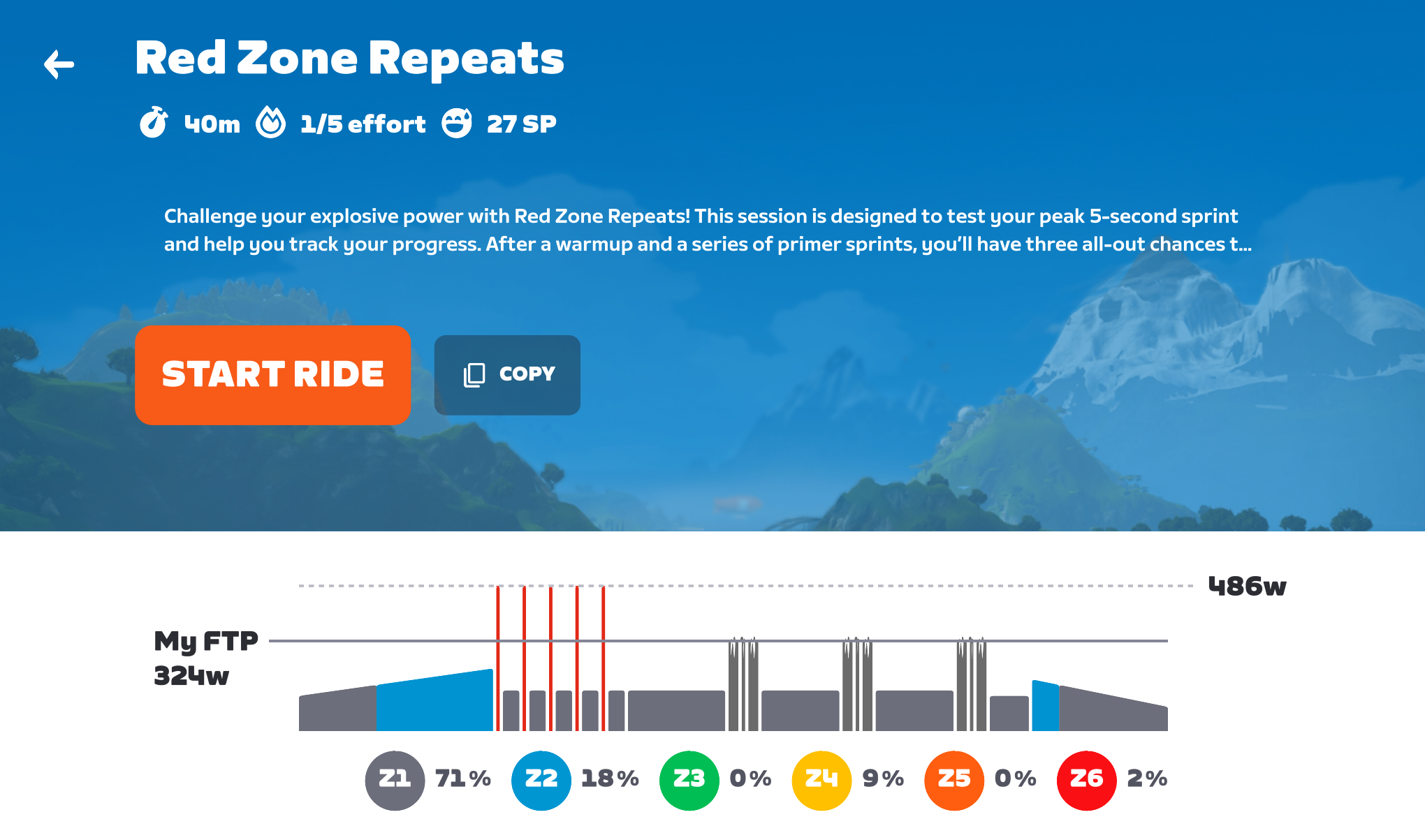
The first workout of Zwift Camp: Baseline is all about sprinting. It’s 40 minutes long and consists of a warmup punctuated by 5x 10-second primer efforts, followed by 3x maximal 10-second sprints, followed by a cooldown. In between the important bits you’ve got zone 1 and free riding blocks to keep your legs moving and give you time to ramp up your effort into a maximal sprint.
I did this first workout as a group ride, just to see what that experience was like and how Zwift had set up the events. (You can also do the workouts as an on-demand activity on your own, whenever you’d like.)
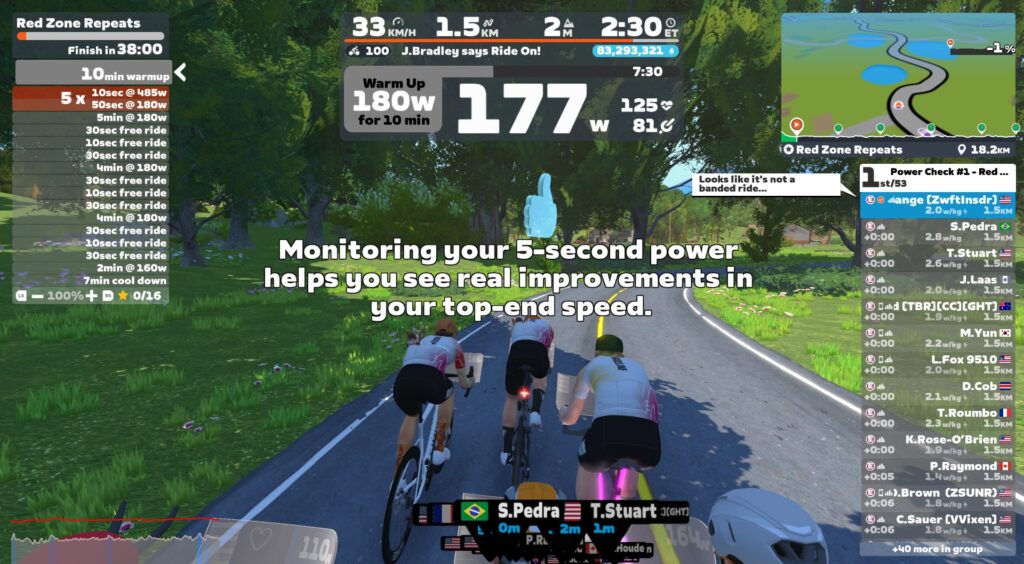
53 riders were in the event, and I was on my Cadex TT bike because I’m still working on upgrading it to its max level. I was surprised to see that the event didn’t have rubberbanding enabled like you typically see in group workouts, so the group sort of split apart, although people were still blobbed together for the most part thanks to the magic of drafting:
Since most of the ride is in ERG mode, you can’t really push harder to change your position in the group or bridge up to the next pack. Being on a TT right, my avatar didn’t draft, so for most of the ride I found myself on the front of a small group, pulling them along as we worked our way through the various intervals.
Overall, I found the workout to be pretty easy – which was a good thing, since my legs were tired from two hard rides the day before. (I can do a few maximal 10-second efforts on tired legs, but I definitely don’t want to do the 5 or 20-minute efforts later in this program unless my legs are fresh!)
One callout worth mentioning is that Zwift has put a 30-second free-ride block before each of the 10-second sprint blocks. This allows you to ramp up your speed and gearing so you can hit your sprint section in a high gear, ready to put out maximum power. (This is especially important for anyone using Zwift’s virtual shifting, since it reverts to gear 8 at the start of a free ride section, and you wouldn’t want to be working your way to the right gear during a short, 10-second sprint effort.)
For me, that meant shifting into gear 18 when doing out-of-the-saddle sprints, while gear 16 felt good for my one seated sprint attempt. Gearing is extremely important when sprinting, as you need to find just the right mix of torque and cadence to achieve maximum power!
Watch My Video
Results
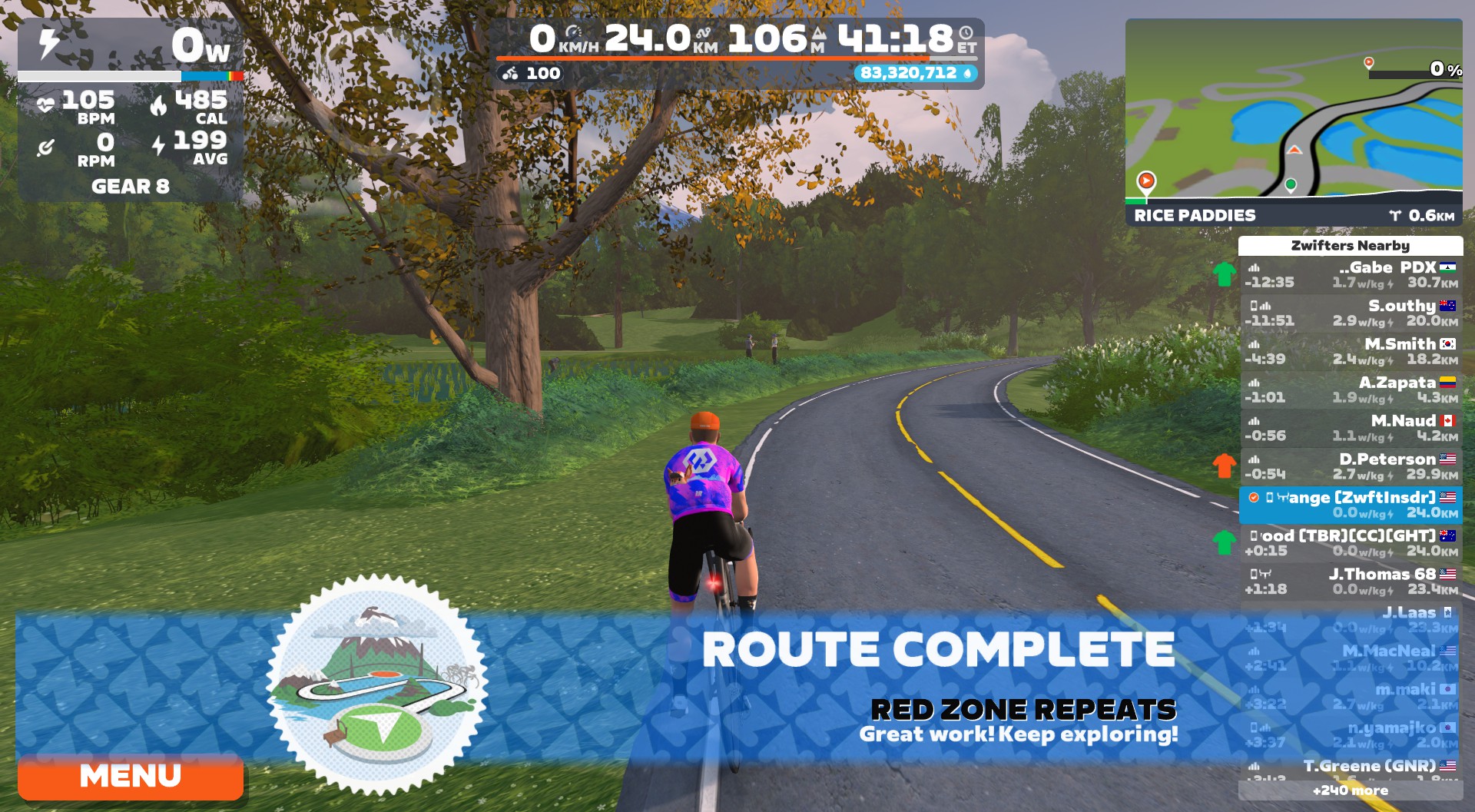
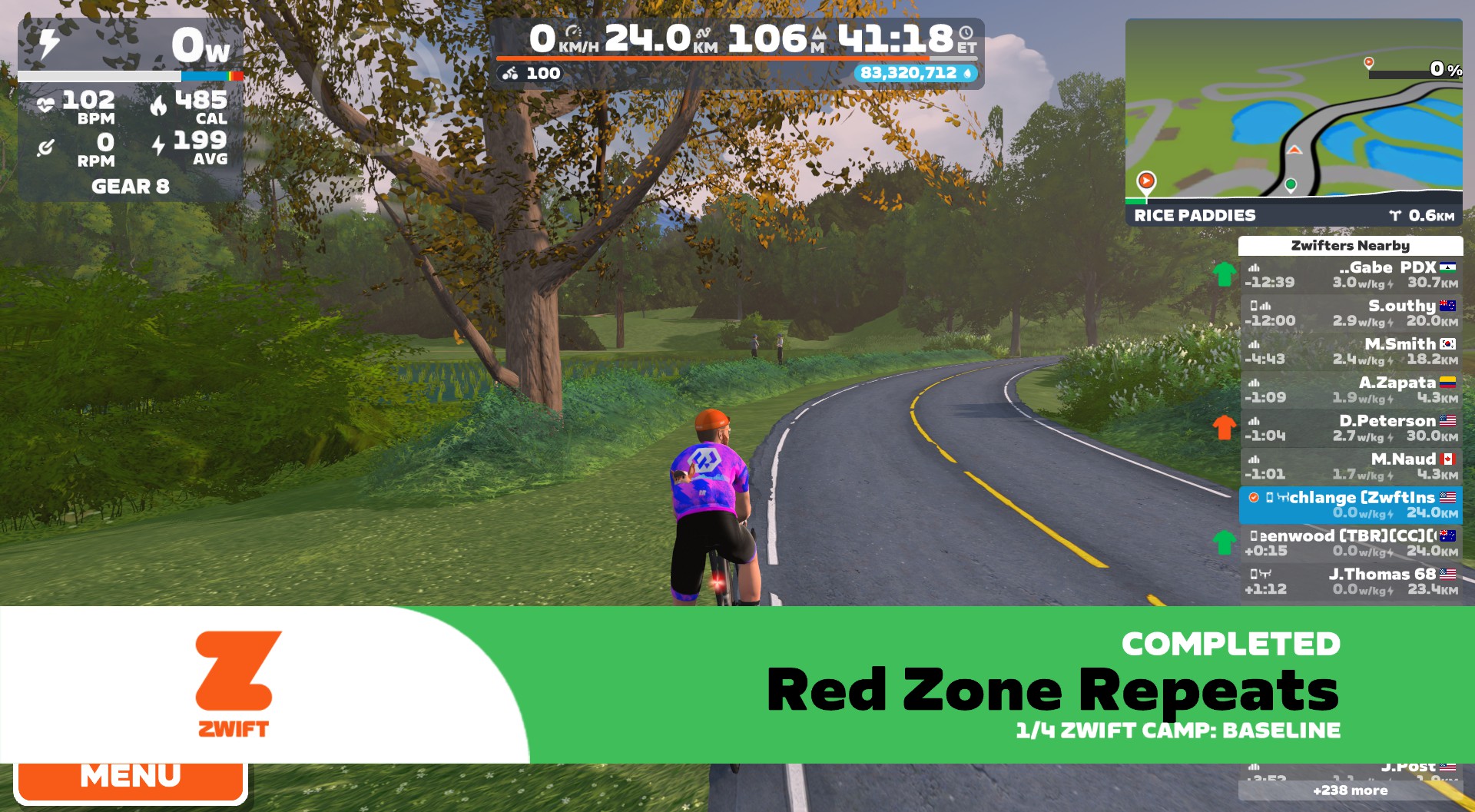
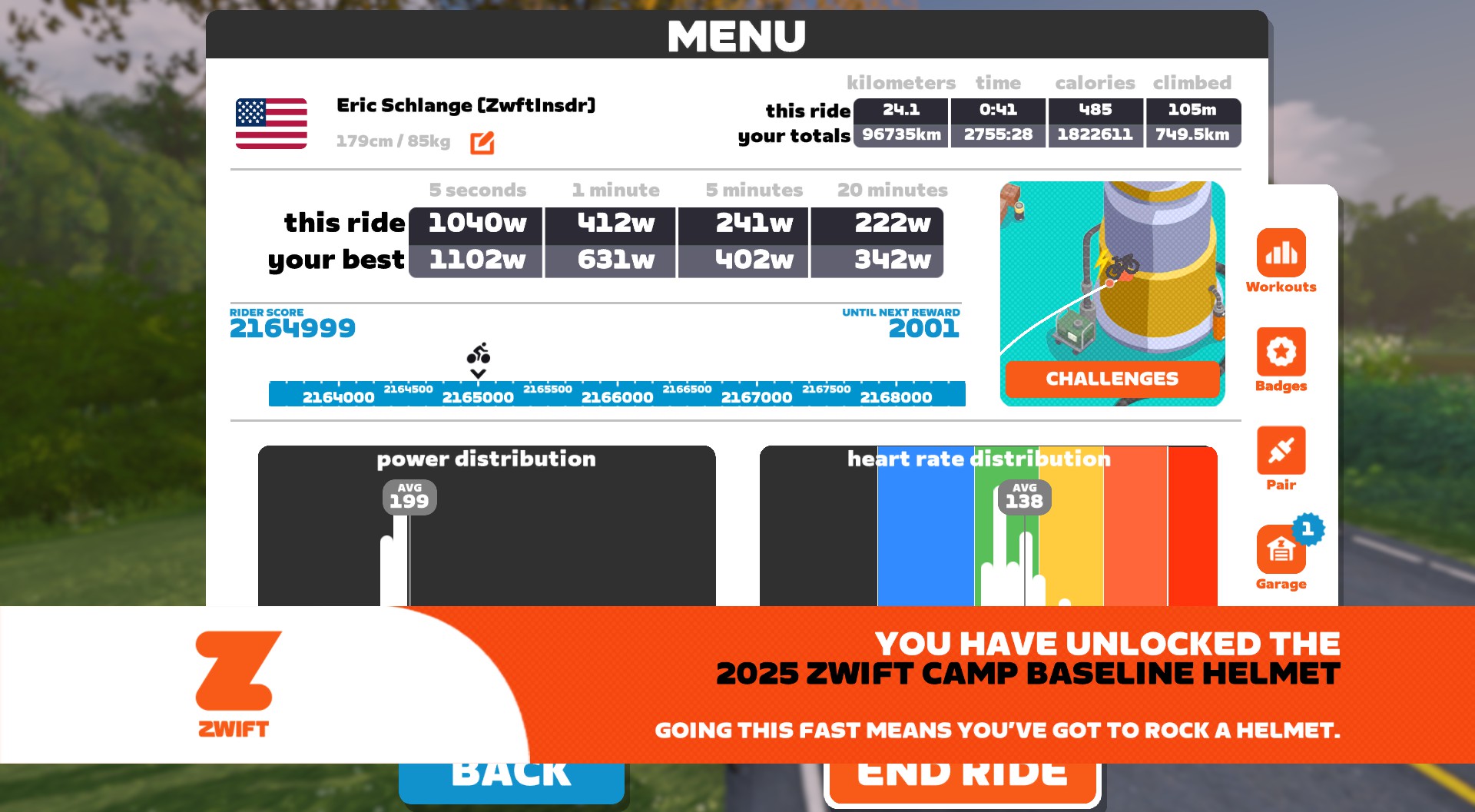
I completed the Red Zone Repeats route during the cooldown portion of the workout, but it wasn’t until I clicked to end the ride that I was greeted with a few achievement banners:
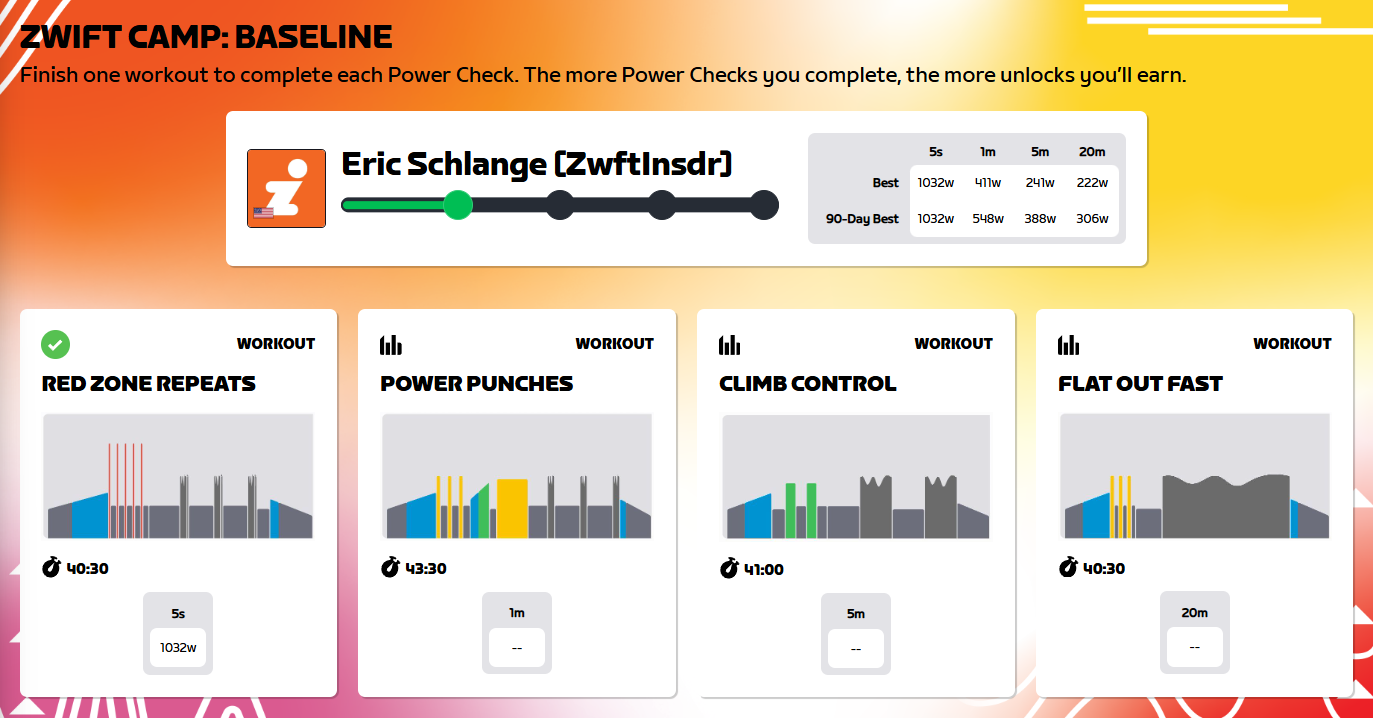
I received an email from Zwift, subject line “Power Check Complete ”, as soon as the workout was finished. It included a link to my Zwift Camp Dashboard, which now looked like this:
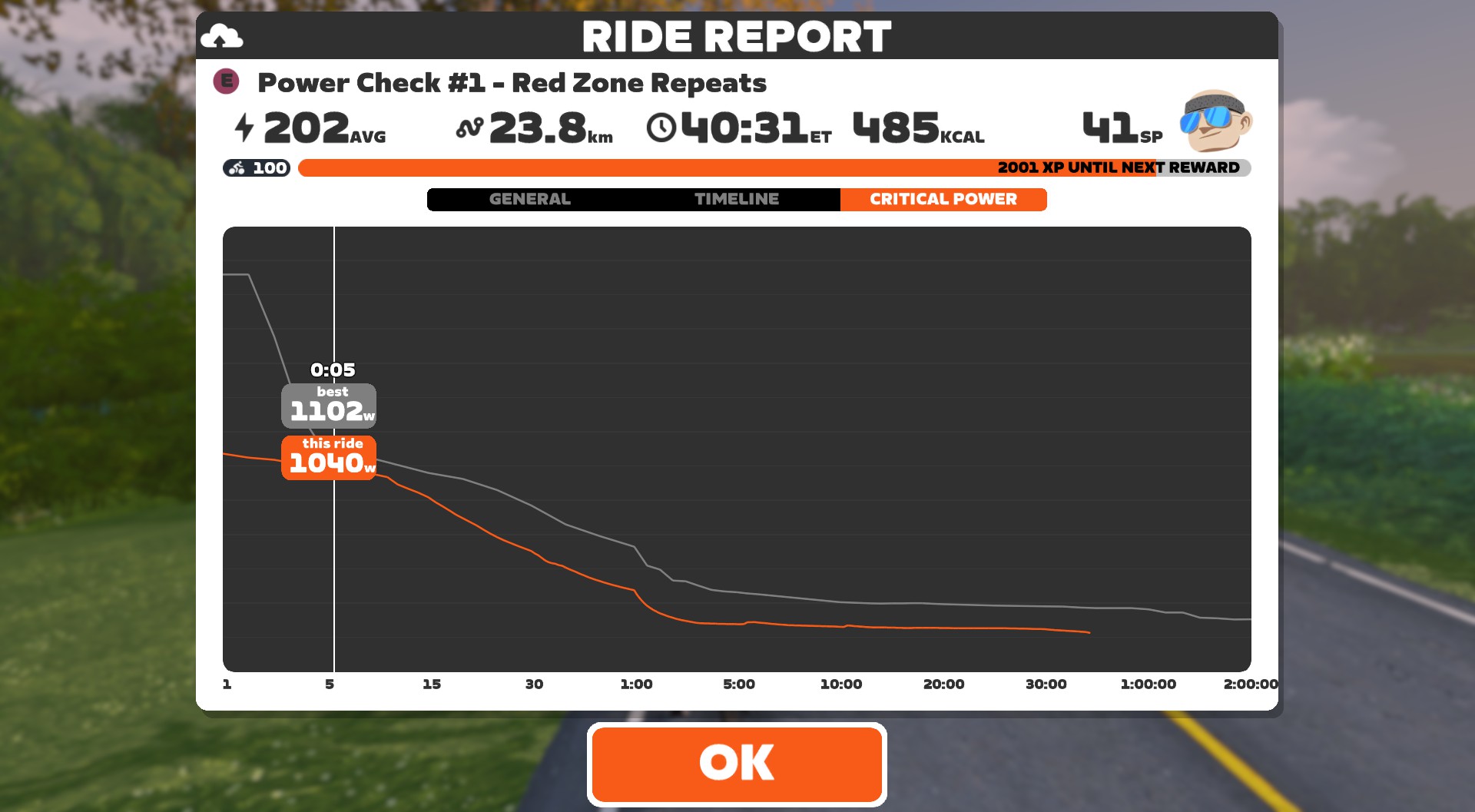
The dashboard compares your power numbers in the Zwift Camp workouts to your 90-day best numbers. Zwift computed my best 5-second power in the workout as 1032W, which I’m happy with even though their critical power curve for the workout showed 1040W:
In fact, I set new power bests for 1-10 seconds for 2025 in this workout, according to my Strava power curve. I’ll take it!
Wrapping It Up
If you’re looking for a sprint workout, this really isn’t it. Sure, you get a few sprints in, but this is more of a sprint test. The training will come in future Zwift Camps, but for Baseline the goal is for riders to test and establish their power bests. To set baselines.
Overall, my experience with this first workout was fine, and I appreciate having quick access to my dashboard via the email link and Zwift Companion. There are a few things that would have made the workout itself a bit better, though. Here’s my list:
Show me my 5-second power after each sprint effort. Tell me how I’m doing, and give me something to shoot for.
Have my result match the critical power curve in the Ride Report screen.
Don’t drop me down to virtual gear 8 every. Single. Time. Just return me to whatever my last virtual gear was.
The power required at the start of the cooldown ramp should match the power I’m already doing. It always feels like a low blow when I’m spinning easy near the end of a workout, then the cooldown ramp kicks in and asks me to go harder. (For whatever reason, this is a common thing you see on Zwift workouts.)
Your Thoughts
Have you done this workout yet? How did it go for you? Share your experience below!
For years, the “regular” iPhone received hand-me-downs from the Pro models. This was less so with the iPhone 16 and 16 Plus, but the trickle-down philosophy was still there to a degree. For 2025 and the iPhone 17 ($799) is no longer the compromise that the base model used to be. Apple finally blessed it with a 120Hz display and this year’s most exciting camera feature, Center Stage.
While it may seem like Apple is no longer forcing iPhone users to compromise, or at least not to the degree it used to, there’s still one big thing to consider. With the introduction of the iPhone Air, the company has shaken up the screen sizes across the iPhone 17 lineup. Instead of the previous 6.1-inch iPhone and 6.7-inch Plus model, Apple is splitting the difference with the iPhone 17’s 6.3-inch screen. That also aligns it size-wise with the iPhone 17 Pro, while the Air sits in the middle of the series at 6.5 inches.
I guess I’m a big-phone guy now, because it’s been a rough week transitioning from the 16 Plus to the iPhone 17. At times I feel like my phone is a toy, and at others it’s like I stepped back in time. I don’t particularly like either sensation.
Putting my screen size preferences aside, the iPhone 17 remains the best iPhone for most people. Since Apple brought its best new features to this regular model this year, you don’t have to feel like you’re waiting for the exciting tools from the Air or Pro to make it to a more affordable iPhone model in 12 months. The upgraded display and new front camera are certainly the highlights, but the iPhone 17 remains a solidly built device with dependable all-day battery life and capable performance.
Finally, a 120Hz display
A big change on the iPhone 17 is the 6.3-inch ProMotion 120Hz display. Not only is it slightly bigger than the 6.1-inch iPhone 16, but it finally refreshes faster now. The higher refresh rate was one of the last remaining items Apple had yet to bring down from its Pro models, and this one makes a big difference to the overall experience. Swiping around iOS 26 feels a lot smoother. Apps like Instagram and Safari where I previously encountered some jitters now move effortlessly. When it’s time to venture outside, you’ll be glad that Apple boosted the peak brightness to 3,000 nits — a 1,000-nit increase from the iPhone 16. It’s a welcome upgrade for the times you need to use your phone in direct sunlight.
The company also equipped the iPhone 17 with an always-on display, which is useful for updates at a glance if you’ve missed a notification. And of course, Dynamic Island is still there, providing ongoing info for progress on things like live sports, music playback, navigation, ride sharing and more.
You won’t really notice the display upgrade until you start using the phone, so a quick glance won’t reveal any obvious hardware changes. Unless you do a side-by-side with the iPhone 16 and 16 Plus, where the size variation will be apparent, you won’t detect any difference. Flip over to the back though and there’s an almost entirely new color palette. Black and white remain, but Lavender, Sage and Mist Blue have replaced last year’s Ultramarine, Teal and Pink options. I prefer this year’s hues, as they aren’t as pastel-y as the 2024 lineup, and that Sage green looks really sharp in person.
Venture back to the front and there’s another important update that isn’t visible. Apple upgraded the scratch resistance with Ceramic Shield 2, which the company says provides three times better protection than on the iPhone 16. I needed to keep my iPhone 17 pristine for photos during my review, so I haven’t put it in situations with the potential for injury just yet. My mischievous cocker spaniel did get a hold of it for a few minutes, but there are no visible teeth marks or scratches from that harrowing (for me) incident.
Camera updates take Center Stage
Billy Steele for Engadget
For many, camera performance is the most essential aspect of an iPhone, and this year’s model got a significant upgrade there. The biggest change is the new 18MP Center Stage front camera that replaces the 12MP TrueDepth camera. This new version has a square sensor that enables the iPhone 17 to automatically switch from portrait to landscape when more people enter the frame for a selfie.
After using Center Stage for about a week, it’s easily the best new camera feature Apple has released in years. I can concede that the addition of macro mode and Photographic Styles in previous iPhones were also excellent, but Center Stage feels like magic. I’m not even a big selfie taker, but when I do need to snap one on a family outing, this 41 year old no longer feels like a Boomer holding his phone sideways. The adjustments happen quickly so you’re not left waiting, and if you don’t like it, you can disable the auto rotation, auto zoom or both.
Center Stage also works with video calls to keep you in the frame. This is particularly helpful if you’re walking or otherwise moving around while trying to have a chat. It does take a second for the system to make its adjustment after you move from the center of the frame, but it’s smooth and won’t be a distraction to anyone on the call.
Another update to the front-facing camera is a new Dual Capture mode. This simultaneously records footage with the front and rear cameras for things like reaction videos. As the parent of two kids in youth sports, I can see the utility for things like championship games, or even milestone moments at school. I think a lot of people will also film themselves singing along at concerts, but I’m not one of them.
Billy Steele for Engadget
The only issue I have with Dual Capture is that it’s a challenge to keep both the action and yourself in frame. You can’t look in two places at once, so if you want to maintain a centered reaction shot or ongoing commentary, you’ll have to figure out a way to juggle the shots. I’ve yet to master it myself and you’ll likely struggle if you prefer your selfie clips shot from a downward angle.
The front-facing camera isn’t the only photography-centric upgrade on the iPhone 17. Around back, there are now two 48MP Fusion cameras. On the iPhone 16, only the main was a Fusion camera while the ultra-wide has a 12MP sensor. You’ll get the same 0.5x, 1x and 2x zoom options as before, automatic macro mode, True Tone flash and the rest of the handy features from the iPhone 16 — like Portrait Lighting. If you’re into Apple’s Photographic Styles, there’s a new one called Bright that enhances skin tones and makes the rest of the image more vibrant. My colleague Cherlynn Low compared it to the now-retired Oslo filter on Instagram, and I think that’s an apt comparison.
By default, the main camera delivers shots in 24MP resolution for a balance of detail and brightness. In general, the photos I took with the iPhone 17 appeared to be slightly sharper than those I captured with my iPhone 16 Plus, especially in details like texture (as evidenced by the photos of pumpkins and my dog Biscuit). There isn’t a huge leap in rear camera performance here, but I noticed a slight improvement.
In lower-light settings, like in my pictures under the awning of my local produce stand and inside a local bar, colors remained accurate and crisp. Macro images were just as sharp and detailed as before, judging from my close-up of a sunflower which you can see here. Night time pics still produce accurate colors, especially when rendering the warmth or coolness of street lights, and those elements aren’t lacking in clarity either. Swap your camera settings to 48MP and you’ll notice enhanced detail in images that contain landscapes, as one example. Just keep in mind that those max-res photos are limited to 1x zoom and any Night mode or flash shots will always be saved at 12MP.
Besides the fact that it uses the non-Pro A19 processor, the cameras are the main area the iPhone 17 lags behind the 17 Pro and 17 Pro Max. They have a third camera around back — a 48MP Fusion telephoto — that’s equipped with 3D sensor-shift optical image stabilization. That three-camera array also provides additional zoom options at 4x and 8x. They also unlock ProRAW for stills and both ProRes and ProRes Raw for video, and come with a four-microphone setup for “studio-quality” audio capture. If you desire the pinnacle of Apple’s photographic prowess (currently, anyway), the iPhone 17 Pro starts at $1,099 — $300 more than the iPhone 17.
Performance
Billy Steele for Engadget
While Apple equipped the iPhone 17 with its latest A19 chip, there’s still a six-core CPU and five-core GPU — same as the iPhone 16. The difference here is that the GPU now has Neural Accelerators on each core, which Apple says will boost peak computing power for AI tasks. Unless you’re coming from an older iPhone, you probably won’t notice too much of an improvement year-to-year. Apple explains that the CPU performance in the iPhone 17 is up to 50 percent faster than the iPhone 13, but that phone is from four years ago — basically an eternity. Obviously, you’d expect to see a major uptick in speed when comparing the flashy new model to such an aging device.
That said, the iPhone 17 speedily handled any task I threw at it. During my everyday use, I didn’t encounter a single time the phone stuttered or struggled to complete the job. The only time I had to wait for anything was for Apple Intelligence and ChatGPT to generate my latest prompt or make a Genmoji in Image Playground (I don’t recommend asking for “a hot dog thunderstorm,” by the way). What’s more, I never noticed the iPhone 17 getting warm when using these AI tools on their own, but it did start to heat up when I simultaneously started multitasking (playing music, etc.). The iPhone 17 never got more than noticeably warm to the touch, though.
I’m not an avid mobile gamer, but I did play some Destiny: Rising (a recommendation from the Engadget staff) on the iPhone 17 for my due diligence. The combination of the A19 chip and the 120Hz display provided silky smooth action for the first-person shooter, even in chaotic skirmishes. Plus, the iPhone 17 didn’t get hot during my gaming sessions, despite not having the vapor chamber that the Pros do. This probably led me to play a lot longer than I should at times, since the device never got warm enough to remind me of how much time had passed. The iPhone 17 Pro, Pro Max and Air all have the more powerful A19 Pro chip, but the regular iPhone this year is a capable mobile gaming device too.
The arrival of iOS 26
My colleague Mat Smith covered all the new features of iOS 26 in detail, so I’ll refer you to his guide for the nitty gritty on the update. I will offer some quick thoughts on the new software overall, starting with Liquid Glass. After a week with the latest design, I’m still not a fan. In some areas the refresh is useful: I particularly like the changes to CarPlay, the phone app and Messages. I’m also starting to get onboard with the tweaks to the Camera app. But for every one update that’s helpful, I find five more I hate. I don’t like the new menu in Apple Music that sometimes requires an extra tap to reveal the options, which is one of my biggest annoyances.
I do love the combination of the iPhone 17’s always-on display and iOS 26’s Priority Notifications. It’s immensely helpful to glance over at my phone and see if there’s anything I need to address immediately. This pairing is also handy when it shows me things when I might’ve missed a notification as it first popped up. It’s only been a week, so I’m likely to find other elements I can put to good use as I spend more time with the new OS. And since iOS 26 is a bigger visual overhaul than Apple’s typical annual refresh, the iPhone 17 feels like even more of an upgrade.
Since I’ve also been using the AirPods Pro 3 for the last several days, two features I’ve tested a lot are the earbuds’ heart-rate tracking and Live Translation. It’s nice to not have to postpone a workout if my Apple Watch is charging, since I now know the AirPods Pro 3 will track my movement and properly credit my Activity Rings. I also can’t wait to travel abroad with Live Translation, since the tests I’ve conducted at home have already produced surprisingly helpful results.
Battery life
Billy Steele for Engadget
Once again, Apple promises “all day” battery life on the iPhone 17. Of course, the company doesn’t quantify that phrase, other than a commitment to 30 hours of video playback or 27 hours of streaming time. My colleague Sam Rutherford got nearly 25 hours while streaming a video as a comparison for his review of the iPhone Air. During a day of what I’d consider “regular” use — checking email, responding to Slack messages, listening to music, calls, texting, scrolling Instagram and watching a few episodes of The Bear — I still had 16 percent battery left by bed time. That’s after a day that started at 7AM and ended at 12AM, and I had the always-on display active the entire time.
Apple slightly increased the MagSafe wireless charging wattage on the iPhone 17. It’s now up to 25W (with a 30W adapter), which matches the iPhone 16 Plus, and is a 3W increase from the iPhone 16. If you don’t mind cables, you can expect to recharge to 50 percent in 20 minutes with a 40W (or higher) adapter and to get halfway with a 30W charging accessory in half an hour. That charging-to-50-percent time on the iPhone 17 is faster than what you get on the 16 and 16 Plus by 10 and 15 minutes respectively.
The competition
If you’re looking for a non-Apple alternative, Google’s Pixel 10 is your best bet. It has improved performance compared to its predecessor along with an upgraded telephoto camera with 5x zoom. There’s support for Google’s take on MagSafe (Pixelsnap) and the Gemini-powered Magic Cue feature is surprisingly handy. Plus, the Pixel 10 starts at $799, just like the iPhone 17.
Samsung’s latest entry-level flagship, the Galaxy S25, is less of an obvious choice. Since the series has long been a rival of Apple’s iPhone, it merits inclusion here. The S25’s display and cameras haven’t been upgraded over the S24’s, but it has a powerful new processor and excellent battery life. Gemini works better on the S25 than it did in the past and there’s the solid build quality that Samsung always offers at this price range. Speaking of cost, the S25 also costs the same as the iPhone 17.
Wrap-up
With the most significant update in years, the iPhone 17 is an easy choice for an upgrade for most people. Even if you’re coming from the iPhone 16, you’ll reap the benefits of the overhauled display and improved cameras. I don’t say any of that lightly as I’m not a person who recommends getting a new phone every year. Most of the time, there simply aren’t compelling enough changes to warrant it. That’s not the case this year, and if you’re coming from an iPhone that’s a few years old, you’ll likely feel as if you’ve stepped into the future.
I went into this review expecting to be eager to return to my iPhone 16 Plus when I was through testing. And while I do prefer the larger device after using it for a year, the updates Apple has amassed on the iPhone 17 — especially the Center Stage camera — have appeased that desire… for now. I don’t have much use for the performance boosts that the iPhone 17 Pro or Pro Max provide, and I can’t justify splurging just for a bigger display. So, I can confidently say that even though there’s one less option in the regular iPhone lineup than there was a year ago, the iPhone 17 is still the best iPhone for most of us.
This article originally appeared on Engadget at https://www.engadget.com/mobile/smartphones/iphone-17-review-closer-to-pro-110055511.html?src=rss
Following the recent release of Linux Mint 22.2 as the Linux Mint project’s premiere operating system currently built atop Ubuntu 24.04 LTS, today marks the beta release of Linux Mint Debian Edition 7…
The Fedora Forge has been soft-launched for Fedora contributors to help modernize the development and collaboration tools around the Linux distribution…
A new round of platform-drivers-x86 “fixes” were submitted today for the nearly-complete Linux 6.17 kernel cycle. While on the fixes stage of the kernel, the x86 platform driver changes can be interesting when it comes to new device IDs for enabling new products late in the kernel cycle…
At Meta Connect 2025’s kickoff event, Mark Zuckerberg unveiled a trio of new smart eyewear, including its first model with augmented reality. Meta’s boss also announced the second generation Ray-Ban Meta, as well as a pair of Oakley-branded sunglasses designed for athletes. In addition, Zuckerberg launched Horizon TV, a new entertainment hub for the Quest headsets, which will give you easy access to Disney+, Prime Video and other streaming services in virtual reality. Here’s everything you might have missed.
Ray-Ban Meta “Gen 2”
Meta
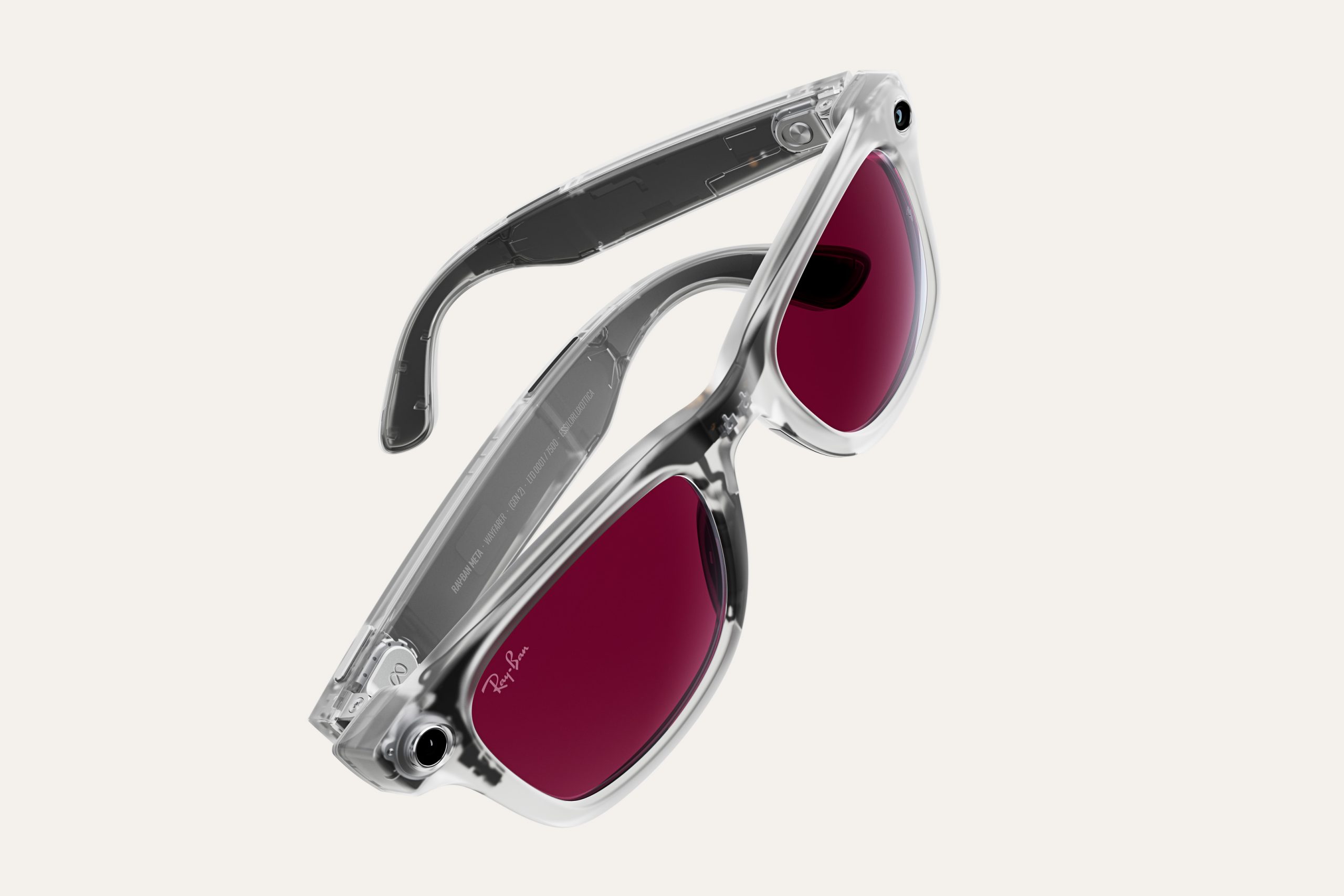
The second-gen Ray-Ban Meta glasses come with improved battery life that the company says can now last up to eight hours with “typical use.” Even their accompanying charging case provides an additional 48 hours of juice, compared to the previous version’s 32 hours. The model is equipped with a 12-megapixel camera that can capture videos in 3K Ultra HD, with up to 60 frames per second and HDR support, as well as 32GB of storage. This fall, Meta will also roll out updates that will bring hyperlapse and slow-motion video capture to all its glasses, including this one. The Gen 2 Ray-Ban Meta glasses are now available with the same three base frames as their predecessor, namely Wayfarer, Skyler and Headliner, and will cost you at least $379.
Unlike the original Oakley Meta glasses, the Vanguard was clearly designed to cater to athletes. It features the wraparound frames Oakley is known for, with reflective swappable lens in different colors. Due to how it curves around the face, Meta placed its 12-megapixel camera in the center of the frames so that helmets and hats don’t ruin your shots. The camera on this model has a wider 122-degree angle lens and adjustable video stabilization so that you can still take videos while moving. Meta told us that the device’s battery was optimized for a wider range of temperatures, as well, allowing it to hold up better in harsh environments. In addition to the better battery life, the Vanguard also has louder onboard speakers and will come with integrations for Strava and Garmin. The Oakley Meta Vanguard glasses are now available for preorder for $499 and will be officially available on October 21.
The Meta Ray-Ban Display is the company’s first pair of AR glasses. Its lenses function as translucent heads-up displays (HUD) that can show you texts, AI prompts, turn-by-turn pedestrian navigation and video calls. The dedicated EMG wristband it’s paired with will allow you to interact with the HUD’s interface and will even give you the ability to type out responses. Video calling didn’t work properly during its on-stage demo, but Zuckerberg was able to play a song on Spotify, demonstrate a real-time subtitle feature that could be a huge help for those with hearing impairments, as well as capture and view images. The Meta Ray-Ban Display will be available through a limited number of brick-and-mortar stores, including Best Buy, LensCrafters, Ray-Ban and Verizon, since you’ll have to be fitted for the wristband. You’ll be able to get it for $799 starting on September 30 in the US and starting early next year in Canada, France, Italy and the United Kingdom.
Near the end of the Meta Connect keynote, Zuckerberg announced a new entertainment hub for Quest headsets. Called Horizon TV, it’s a unified interface for the streaming services available on the device, including Prime Video and Peacock. The Meta CEO also revealed that Disney+ is coming to Quest headsets.
This article originally appeared on Engadget at https://www.engadget.com/wearables/everything-meta-announced-at-connect-2025-second-gen-ray-ban-meta-oakley-meta-vanguard-and-meta-ray-ban-display-100007120.html?src=rss
LimeWire, once notorious for fueling online piracy, has acquired the rights to the infamously disastrous Fyre Festival brand. “LimeWire Acquires Fyre Festival Brand — What Could Possibly Go Wrong?” the company titled its news release.
LimeWire said it would “unveil a reimagined vision for Fyre — one that expands beyond the digital realm and taps into real-world experiences, community, and surprise.” No additional details were announced about the relaunch.
“Fyre became a symbol of hype gone wrong, but it also made history,” LimeWire CEO Julian Zehetmayr said. “We’re not bringing the festival back — we’re bringing the brand and the meme back to life. This time with real experiences, and without the cheese sandwiches.”
Texas Instruments has introduced its most affordable C2000 real-time MCUs to date, aimed at appliances, digital power supplies, and power tools. The new F28E12x series, including the F28E120SC and F28E120SB, delivers a 30% performance boost over earlier C2000 devices while maintaining a cost-efficient design. The F28E12x devices integrate TI’s C28x digital signal processor core with […]
Oakley has revealed its Meta Vanguard glasses, a new line of eyewear that uses artificial intelligence to bring you “real-time personalised performance insights”.
For those who don’t know, Oakley is owned by the vision and eyewear company EssilorLuxottica, which also owns Ray-Ban. The new Oakley ‘smart glasses’ are described as the next step in EssilorLuxottica’s partnership with Meta Platforms, which has already brought us the Ray-Ban Meta sunglasses.
The Oakley Meta Vanguards were showcased at the Meta Connect keynote on Wednesday, alongside several other new collaborations between Meta and Ray-Ban.
Oakley Meta Vanguard details
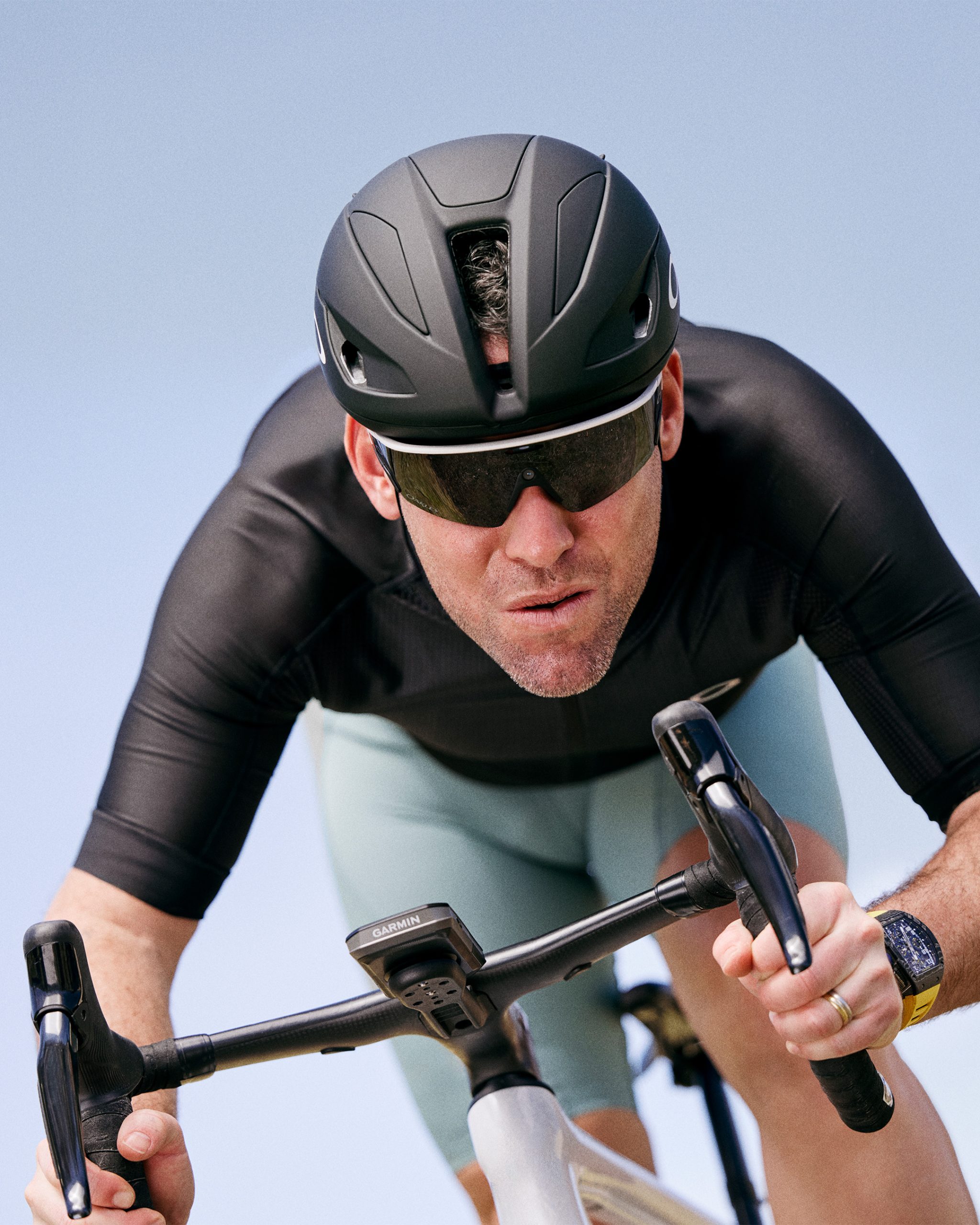
Mark Cavendish modelling the Oakley Meta Vanguard glasses. Oakley
Oaley’s new ‘smart glasses’ feature the brand’s signature Prizm lenses with a 12MP ultra-wide camera that has a 122-degree field of view.
The $499 / €549 glasses also feature high-decibel open-ear speakers with advanced wind noise reduction, which Oakley says is “perfect for running down a noisy road or biking through 30mph winds”.
Oakley says the glasses are also optimised for comfort during long workouts and they’re compatible with cycling helmets.
What is probably most remarkable about the new Oakley sunglasses is they can integrate with Strava and Garmin to provide you with real-time personalised performance insights, with up to nine hours of battery life to get you through “your entire marathon or century ride”.
However, details on what this will look like or how it will function are currently thin.
In its own press release, Strava says you’ll be able to use the glasses to graphically overlay performance metrics – such as distance, average pace and elevation gain – from your Strava activity onto videos and photos captured by the glasses.
As with many of the best Oakley sunglasses, you can switch the Prizm lens on the Meta Vanguards to customise your look and optimise the glasses for different conditions.
Two new Meta Ray-Ban glasses
The Meta Ray-Ban Wayfarers. Ray-Ban
Also revealed at Meta Connect were the new Meta Ray-Ban Display and second-generation Ray-Ban Meta glasses.
The Meta Ray-Ban Display glasses have an integrated display for the first time. The fully-colour visual display in the right lens is said to show weather, incoming messages, video calls and AI information such as step-by-step instructions, and more.
You can order the glasses with your own lens prescription, and they come with a Metal Neural Band, a wristband to control the glasses.
Costing $799, the glasses will be available in the US at the end of the month and in Canada, France, Italy and the UK next year.
The second-generation Ray-Ban Meta glasses have an extended battery life of up to eight hours, an ultra-wide 12MP camera that captures 3K ultra-HD videos, and a range of new styles and colours. The glasses are available now for $379 / €419.
Meta also revealed Conversion Focus at the Meta Connect keynote. Said to be coming soon, this new feature uses AI glasses’ open-ear speakers to amplify the voice of the person you’re talking to and distinguish it from other background noise.
Quest owners can watch an exclusive 3D trailer for James Cameron’s Avatar: Fire and Ash for a limited time in the Horizon TV app.
I watched the clip in a Quest 3 during Meta Connect 2025 earlier today, and found the quality to be excellent. It seems to be using compositor layers, also known as Timewarp layers, to maximize quality. Carmack would be proud.
The short 3D trailer is the first result, albeit small, of Meta’s exclusive multi-year partnership with James Cameron’s new company Lightstorm Vision, which has the goal of “making stereoscopic technology ubiquitous for all visual media by enabling stereoscopic 3D content creation in as seamless a manner as traditional 2D”.
The partnership, announced nine months ago, should help bring significantly more 3D video content to Quest headsets. At the time, Meta said it will bring “world-class 3D entertainment experiences spanning live sports and concerts, feature films, and TV series featuring big-name IP” to Horizon OS.
James Cameron appeared on-stage during the Meta Connect 2025 keynote for around twelve minutes, where he reiterated his views on how VR headsets are the ideal viewing platform for 3D content.
Apple’s competing visionOS offers hundreds of 3D movies through Apple TV and Disney+, but Meta’s platform currently lacks an equivalent offering.
“This is just the beginning of how fans can experience Pandora like never before in Quest, following its theatrical release this December”, Meta teased.
This week, our Linux distro gadabout takes a look at both the Cinnamon and Mate editions of Linux Mint 22.2 “Zara,” and finds absolutely nothing to complain about.




 ”, as soon as the workout was finished. It included a link to my