This $130 clearance-level bargain is good on all 9 colors of this Bluetooth speaker that has over 30,000 rave reviews at Amazon and puts $50 back in your pocket.
Google must pay $425 million to the plaintiffs of a class action lawsuit that accused the company of collecting users’ data even after they’ve turned off a tracking feature, a federal jury has decided. The lead plaintiff sued Google back in July 2020, arguing that the company still harvested data even though it tells users they can disable tracking under Web & App Activity through its connection with other apps, such as Uber and Instagram. US District Judge Richard Seeborg then certified the lawsuit as class action, involving 98 million Google users and 174 million devices.
The plaintiffs’ lawyers asked for $31 billion in damages, but the jury only found Google liable on two of the three privacy violation claims. Google didn’t violate the California Comprehensive Computer Data Access and Fraud Act and didn’t act out of malice, the jury found. As a result, the jury concluded that the plaintiffs aren’t entitled to any punitive damages.
In a statement, Google spokesperson Jose Castaneda said that the decision “misunderstands how [their] products work.” He added that the company’s privacy tools give users control over their data and insisted that Google honors people’s choice to turn off personalization. Castaneda said that Google plans to appeal.
The company faced several similar privacy lawsuits in the past. Another 2020 lawsuit accused Google of tracking users in Incognito mode, and the company agreed to settle the $5 billion lawsuit in 2023. A year later, it admitted that it can indeed collect information in Incognito and promised to destroy billions of data collected from Incognito tracking to settle the complaint.
This article originally appeared on Engadget at https://www.engadget.com/big-tech/google-ordered-to-pay-425-million-in-app-data-collection-lawsuit-120048799.html?src=rss
Since the start of last summer, DuckDuckGo has offered a handful of AI chatbots from OpenAI, Anthropic and others directly through its browser. And while it’s mostly low-cost models like GPT-4o mini and Claude 3.5 Haiku on offer, the feature, Duck.ai, allows you to use those tools without sacrificing your privacy. As a service, that appears to have resonated with DuckDuckGo users, and now the company is reorienting its Privacy Pro subscription around access to more advanced models from those providers.
The good news? The price of the service — either $10 per month or $100 billed annually — remains unchanged, and you still get all the previous perks included in the package. What is changing is the name. It’s now simply known as the DuckDuckGo subscription, and, in addition to offering access to the company’s own VPN, as well as its personal information removal and identity protection services, it allows you to use some of the latest models from OpenAI, Anthropic and Meta. The full list features GPT-4o, GPT-5, Sonnet 4.0 and Llama 4 Maverick. As before, any conversations you have with those chatbots through DuckDuckGo are anonymized and your data won’t be used for training future systems.
“Today, we’re expanding Duck.ai by giving DuckDuckGo subscribers access to more advanced AI models, covered by the same strong protections,” said DuckDuckGo. “The base version of Duck.ai is not changing; it’s still free to use, with no account necessary. We’re just adding more models for subscribers.”
If you don’t want to use the new AI perks, you don’t have to; DuckDuckGo allows users to hide all the AI buttons found in its browser’s search, desktop and mobile settings. That said, the company notes it’s exploring the option of offering higher subscription tiers with access to even more advanced AI models in the future.
This article originally appeared on Engadget at https://www.engadget.com/duckduckgos-subscription-now-offers-some-of-the-latest-chatbots-from-openai-and-anthropic-120000845.html?src=rss
Hue just did its biggest product launch ever as part of IFA 2025 and a key product is the new entry-level Essential smart bulb lineup. Though still not as cheap as some products you can find on Amazon, it’s designed to take on budget rivals like Govee and Aqara with bulbs starting under $20.
The new range includes A19 bulbs, GU10 spots and strip lights with and without color options. Effectively, you’re not losing a lot compared to the regular color/white bulbs. They still run on the same platform and offer Bluetooth out of the box along with extra features enabled when using a bridge or Matter-over-Thread.
To highlight the differences, Hue released a feature comparison sheet. You can’t dim the Essential bulbs as much, they offer a reduced range of whites (2200 to 6500K compared to 1000 to 20000K) and color quality is less accurate. The latter is arguably the most important feature for folks who use smart bulbs to sync with their TVs or require precise matching between bulbs.
Hue
You’ll be able to buy the Hue Essential bulbs starting this month, with the new A19 bulbs priced at $25 individually or $60 in a four-pack. The Essential strip light arrives in December for $60 in a 5 meter length (16 feet) or $100 for 10 meters (33 feet). You can also grab the A19 bulb in a starter kit in the US starting at $80 for the Essential E27 2 pieces and Hue Bridge V2, up to $100 for the Essential E27 4 pieces and Hue Bridge V2.
Another primary piece of Hue’s smart lighting puzzle is the Hue Bridge Pro. It has a more serious black look compared to the white models of the past to signify the extra power. That includes five times the processing performance and 15 times the memory of the Hue Bridge V2 that came out 10 years ago.
Hue
Along with the extra power, the Huge Bridge Pro debuts a new feature called Hue Motion Aware. That transforms Hue Bulbs (including 95 percent of existing models) into motion sensors able to detect movement and trigger actions or security alerts.
Hue says you can easily upgrade a current Hue Bridge “with just a few clicks,” and Signify will release support for combining multiple Bridges into a single Bridge Pro by year’s end. The Bridge Pro arrives in North America in September 2025 for $90.
Hue OmniGlow strip lighting
JuanCruzDuranPhotographer for Hue
Hue also refreshed its strip lighting with several new products including the flagship OmniGlow (starting at $140 for a 3 meter length and arriving in November), the first Hue strip with no visible hotspots via CSP tech to accent your decor with a seamless glow. It also introduced the Flux lineup with indoor, outdoor, ultra-bright and neon options (in sizes up to 10m) starting at $70 for 3 meters, for applications ranging from indoor accents to outdoor facades. Also new are the Festavia string lights that can be used for holiday decor or year round in a permanent model for rooflines, patios and balconies. Those start at $160 for 7m lengths or $120 for 9 meters for the permanent model with availability in September.
Signify also introduced a new A19 bulb that can replicate the entire spectrum of daylight while offering 40 percent great efficiency compared to its predecessor. Finally, the company announced a Sonos partnership that will allow you to operates Philips Hue lights using voice controls, and eventually “integrate light and sound in new intuitive ways.”
This article originally appeared on Engadget at https://www.engadget.com/home/smart-home/hue-takes-on-cheaper-rivals-with-the-entry-level-essential-smart-bulb-lineup-110415932.html?src=rss
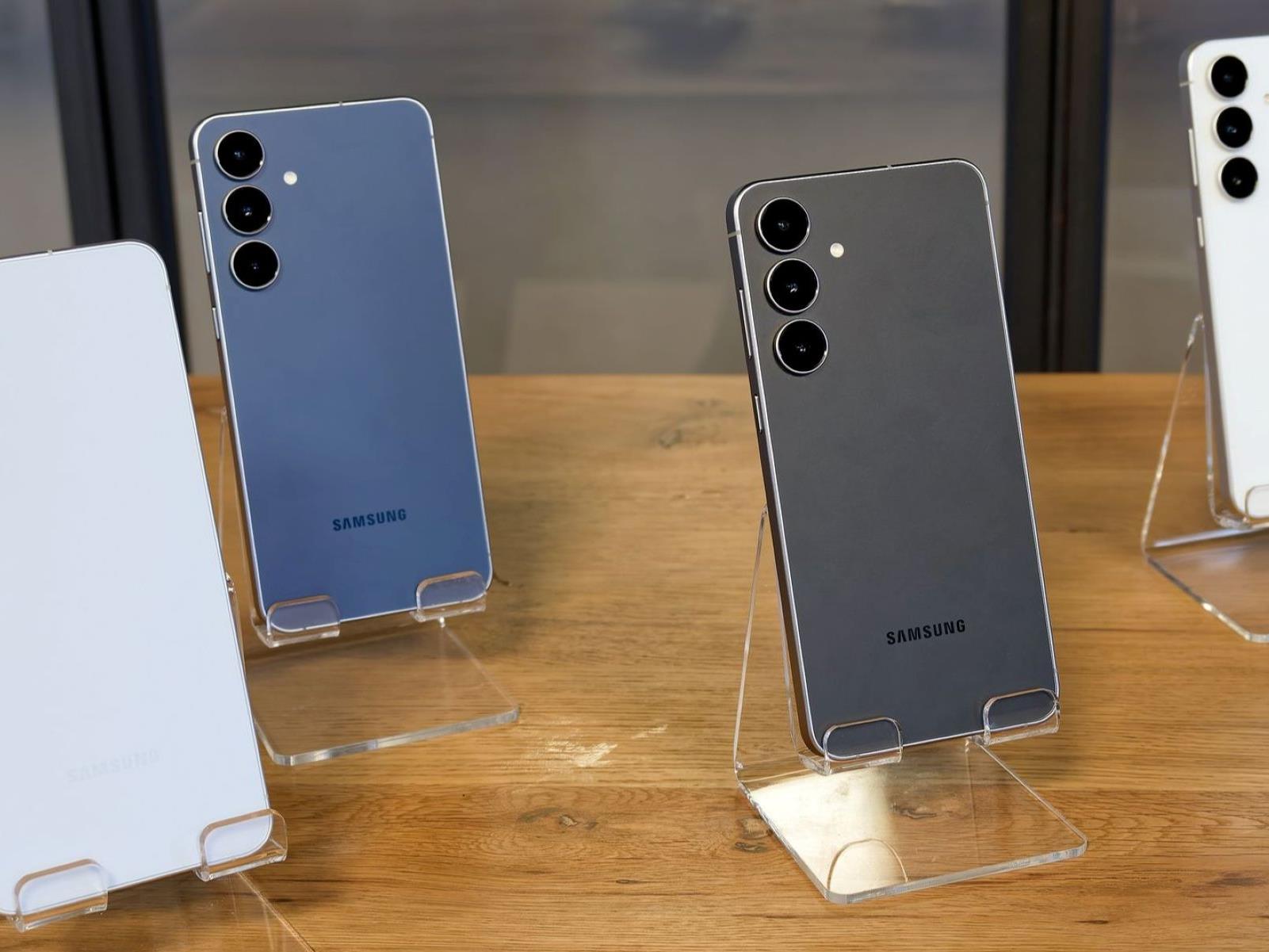
Samsung has officially unveiled some of the most anticipated devices in its portfolio this year, the Galaxy S25 FE and Galaxy Tab S11 series, and we were at the launch for an early look. The Tab S11 and the S25 FE are both slated for release today, with the former maintaining its predecessor’s price point and the latter offering flagship-level
While Blade & Sorcery (2024) studio Warpfrog is already developing its next “modder friendly” title, the studio isn’t done with VR’s favorite melee combat game just yet.
Now, the studio announced its releasing the ‘Rakta Update’, which patches in a fresh slate of East Asia-inspired weaponry, magic, and armor.
As the studio describes it on Steam, Rakta includes katanas, throwing stars, sai, kama (a type of hand scythe), kanabō (a long metal club), a bladed spear, zhanmadao (Chinese cavalry sword), and a dual-crystal bō staff capable of spitting out magic on both sides.
There is also a new piece of ‘Raike’ armor, although Warpfrog hasn’t revealed just what to expect yet. There is some cool concept art though, seen above the article.
Notably, the Rakta Update is only the first in its slate of free ‘Byeth Updates’, which will be rolling out from now until the end of 2026, adding more weapons, armor and what the studio calls “some small features to the sandbox and crystal hunt gamemodes.”
Other updates in Byeth include the ‘Sentara Update’, ‘Khar-Tib Update’ and ‘Madlu Update’, all of which will come at some point next year.
There’s no release date for Rakta yet, as the team says they’re still bug fixing, although the studio is aiming for release sometime in October across all supported platforms, including PC VR headsets via Steam and Quest 2 and above via the Horizon Store.
Valve applied for a trademark on the term ‘Steam Frame’.
First listed publicly this week, the name Steam Frame is to be used for “Computer hardware; computer networking hardware; computer peripherals; computer hardware and computer software for the reproduction, processing, and streaming of audio, video, data, text, and multimedia content.”
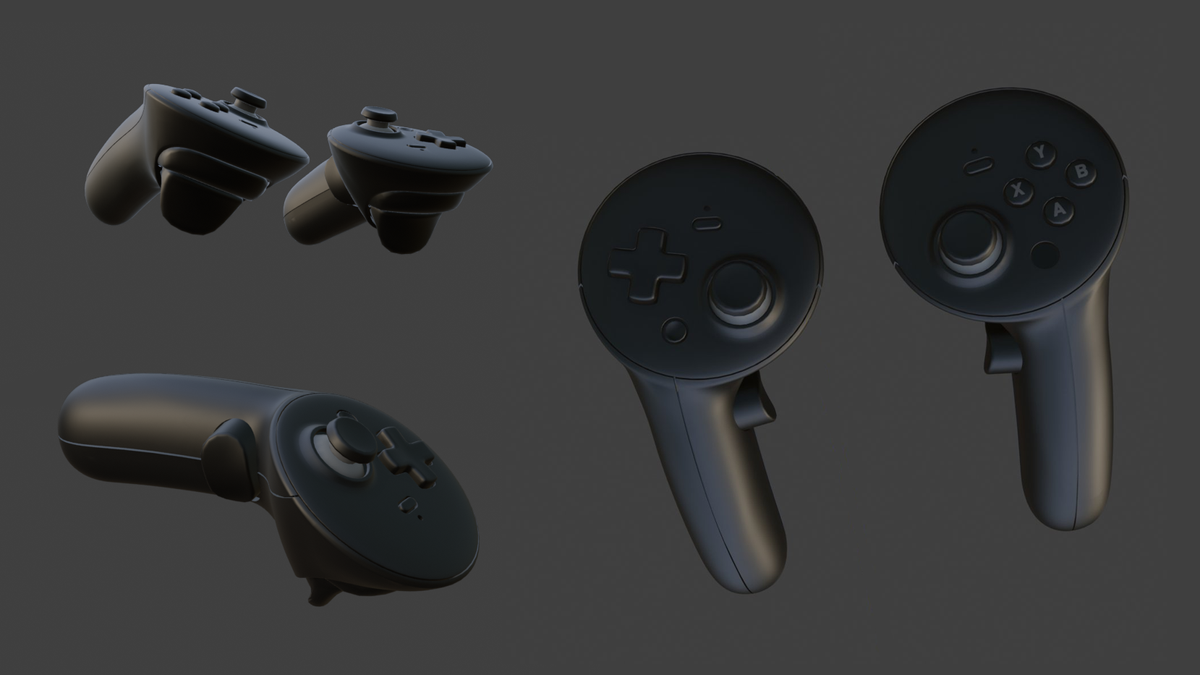
Over the past four years Valve has repeatedlyconfirmed that it’s working on a new headset, strongly hinting that it will have a focus on wireless streaming from your PC. In this time, many references to a Valve headset called “Deckard” have been found in the code of SteamVR, and “Roy” controller models were discovered late last year.
The Valve Index VR headset shipped in 2019 for $1000 for the full bundle, plus a PC capable of driving it. The bundle currently shows as out of stock, and as of August 2025, it accounted for 13% of the headsets in use on Steam. The Valve-backed HTC Vive, shipped in 2016, is still in use by 3% of the market after nearly a decade of consumer VR.
While Index released in 2019, Half-Life: Alyx didn’t make it out the door until 2020. Bringing Valve’s level of polish and quality to a virtual world with cool mechanics around every corner was a landmark moment for PC VR, but that was half a decade ago.
Meanwhile, since shortly after the release of Quest 2, standalone headsets linking to PCs for VR have taken up much of the SteamVR market, overshadowing single-mode headsets like the Index, Vive and many other devices that could only run when tethered to a powerful PC.
Is Valve planning Steam Frame to deliver some of the company’s core VR experience in standalone? Or will it double down on the PC, providing a streamlined wireless experience?
Valve updated SteamVR Beta to automatically install the Oasis driver for Windows MR headsets on Windows 11 24H2 and above.
If you missed it, a few days ago a lone Microsoft employee released an unofficial SteamVR driver for Windows MR headsets, called Oasis, re-enabling their use on Windows 11.
The Oasis driver arrived just under one year after Microsoft started rolling out Windows 11 24H2, which completely removed support for Windows MR. This meant Acer, Asus, Dell, HP, Lenovo, and Samsung PC VR headset owners could no longer use their headset at all, not even on Steam, since Windows MR had its own runtime and only supported SteamVR through a shim.
Matthieu Bucchianeri’s Oasis solved this problem, for free.
Now, Valve has released SteamVR Beta 2.13.1, and it will install the Oasis driver automatically when you try to use SteamVR with a Windows MR headset on Windows 11 24H2 or above.
This means that even people who haven’t heard about the Oasis driver, and Microsoft’s decision, will be able to use a Windows MR headset on SteamVR.
It’s easy to forget that most VR headset owners don’t actively follow VR news. Had Valve not made this change, people who bring an old Windows MR headset out of a closet, or pick one up secondhand, might not have realized why it wasn’t working.
SteamVR: • Fix a crash that could occur when the AMD GPU driver was installed but no AMD GPU was present. • Fixed compatibility mode bindings showing as custom bindings when they are remapped default bindings. • Automatically prefer installing the Oasis Driver for Windows Mixed Reality when running on a Windows version too new to support the Windows driver. • Roomview is independently enabled for VR vs non-VR gameplay. • Minor UX improvements to improve consistency with Steam (window reflectivity, colors, etc). • Added setting (general -> advanced) to disable IPD HUD. • Reduced memory usage for user interface textures (improved performance).
SteamVR Home: • Fixed crash when hosting or joining rooms.
Linux: • Fix rare crash when attempting to load render models. • Fix various URI links not working in menus (e.g. opening web console, setting OpenXR runtime). • Fix settings crash when navigating to “Developer” in SteamVR Settings.
Steam Link: • Fix excess CPU usage that could occur when the performance graph was never visible during a session. • New frame pacing: Improves “popping,” judder, and other smoothness / latency issues for controllers or other animated content. Note this change does affect timing for VR applications on the host PC; please report any new gameplay issues.
OpenXR: • Support XR_KHR_locate_spaces. • Fixed a bug where apps that didn’t submit projection layers would see a 100ms wait on alternating frames with some drivers. • When a requested time querying xrLocateSpace is outside of reasonable bounds, return XR_SUCCESS with an empty pose, instead of returning XR_ERROR_TIME_INVALID. • Support XR_META_recommended_layer_resolution.
Developer: • UX architecture improvements to improve consistency with Steam, including library versions and error handling. • Improved UX for ‘mirrored device debug rendering’.
Hue is best known for its smart lights, but recently the company ventured into home security with its Secure lineup of cameras. Now, parent Signify is releasing its first video doorbell, the Hue Secure, with several unique features it hopes will make it stand out against formidable competition from Nest and Amazon’s Ring.
To start with, the Hue doorbell comes with a 2K fisheye camera, more resolution than Nest and some of Ring’s doorbell products, potentially offering more detailed video. Hue is also offering a 24-hour video history for free, letting you avoid paying for a subscription if you only want to keep a day’s worth of clips. In addition, the camera can work with Google Home and Samsung SmartThings, along with Hue’s own app. It won’t be compatible with Apple Home at launch, but will be updated to work with it later. Signify will also add Matter support sometime this fall.
Hue
Along with 2.4GHz and 5GHz Wi-Fi compatibility, the Hue Secure video doorbell come with a Zigbee radio. That lets it pair with Hue lights, so you can set it up to automatically turn on other Hue lights (inside your foyer or outside the door, for instance) when someone approaches the front door. However, if you want a chime to compliment the Hue Secure by providing sound alerts when the doorbell rings, you’ll need to buy the $60 Hue Smart Chime that’s sold separately — as the new doorbell doesn’t work with any third-party chimes for now.
Hue’s Security video doorbell arrives in October in North America, Europe and the UK for $170 (£140). Signify will also release a new 2K wired camera in Europe that’s an update to the original Hue security cameras. That model will cost €180 or €200 with a stand, with no word yet on US availability.
This article originally appeared on Engadget at https://www.engadget.com/home/smart-home/hues-secure-video-doorbell-can-turn-on-hue-lights-when-someone-comes-to-the-door-100017068.html?src=rss
A long-term study of over 12,000 adults suggests that artificial sweeteners like aspartame, saccharin, and sugar alcohols may accelerate cognitive decline in middle age, equivalent to about 1.6 years of extra aging. The Guardian reports: Sweeteners’ association with cognitive decline is of such concern that consumers should instead use either tagatose, a natural sweetener, or alternatives such as honey or maple syrup, the researchers said. They looked at the impact of seven sweeteners on the health of the study’s participants — 12,772 civil servants in Brazil, with an average age of 52 — who were followed up for on average eight years. Participants completed questionnaires detailing their food and drink intake over the previous year, and later underwent tests of their cognitive skills such as verbal fluency and word recall.
People who consumed the most sweeteners experienced declines in their thinking and memory skills 62% faster than those with the lowest intake, the researchers found. This was “the equivalent of about 1.6 years of aging,” the researchers said. Consumption of combined and individual LNCs, particularly aspartame, saccharin, acesulfame K, erythritol, sorbitol and xylitol, was associated with cognitive loss. “Daily consumption of LNCs was associated with accelerated decline in memory, verbal fluency and global cognition,” the authors say in their paper, published in the American medical journal Neurology. However, the trend was only observed in participants under the age of 60. That shows that middle-aged adults need to be encouraged to use fewer sweeteners, they added.
This phone actually ships with the company’s One UI 8 operating system. The other S25 models shipped with One UI 7, but have since begun receiving software updates to bring them up to speed. This introduces a refreshed user interface with new icons and better animations, more AI integration and improved split-screen performance.
It features an Exynos 2400 CPU, which should get the job done but won’t be quite as snappy as the Qualcomm Snapdragon 8 Elite that ships with the rest of the lineup. There’s a 6.7-inch AMOLED screen with up to 1,900 nits of peak brightness. The camera system is decent, with a 50MP main camera, a 12MP ultra-wide lens and an 8MP telephoto lens. There’s also a 12MP front-facing camera.
Despite being a bit underpowered when compared to the rest of the lineup, the S25 FE still accommodates all of those fancy Galaxy AI bells and whistles. This includes the company’s Generative Edit photo software, an on-device assistant and more. So this is a relatively affordable entryway into that world.
This article originally appeared on Engadget at https://www.engadget.com/mobile/smartphones/samsung-launches-the-galaxy-s25-fe-at-ifa-2025-093026581.html?src=rss
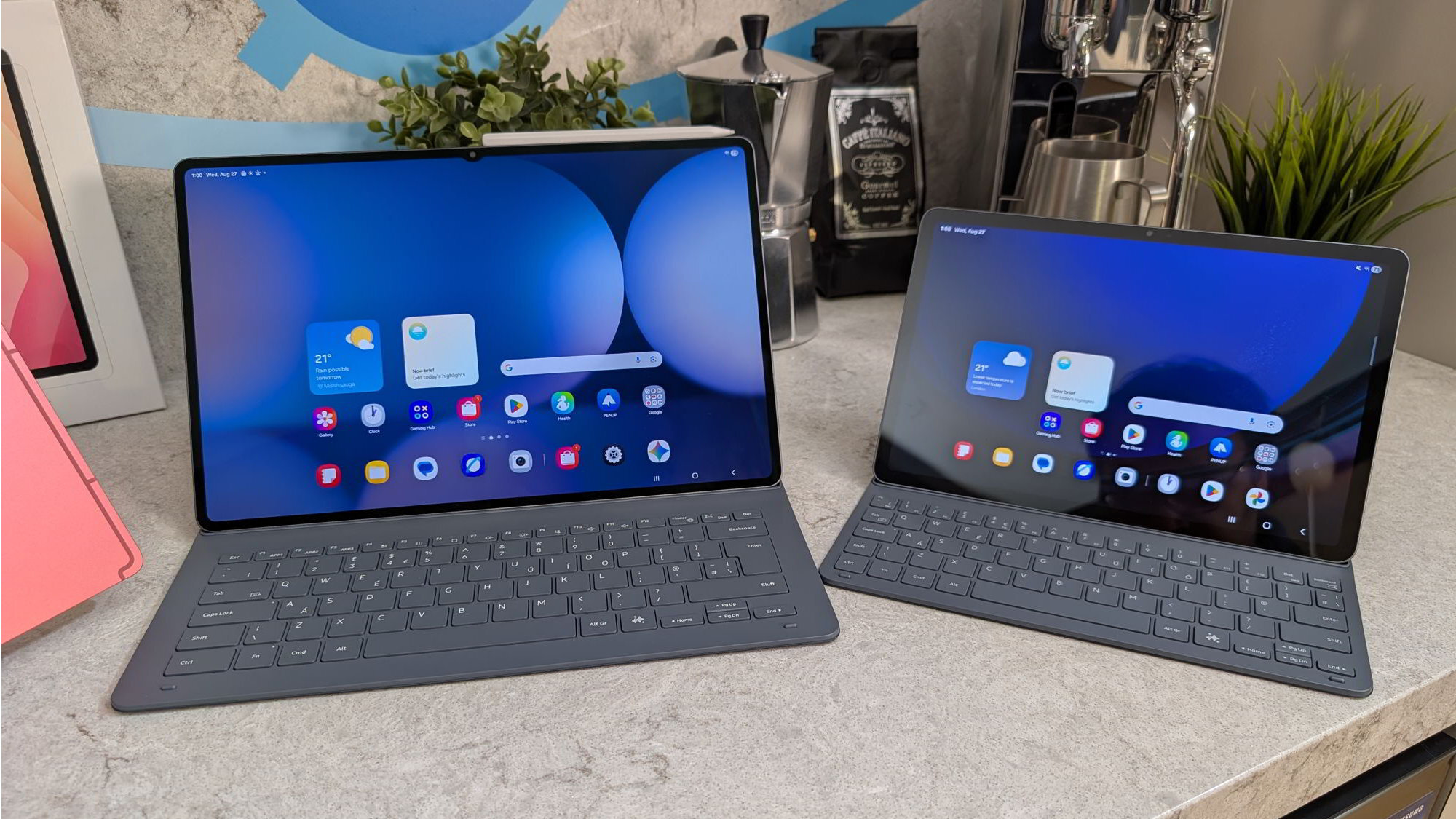
Someone recently asked me: Who even cares about Android tablets anymore? If that’s you, you’re probably feeling the same indifference towards premium Android tablets. Even Google has conceded it won’t be making new tablets and seems to have already forgotten about the Pixel Tablet. But that’s not stopping Samsung from releasing the 11th-generation Galaxy Tab S11 series, comprising the 11-inch standard model and 14.6-inch Ultra. The latter is the more interesting of the pair, as it’s not only what Samsung says is its thinnest tablet ever, but also offers new Dex multitasking features and, of course, AI tools. Plus, in case you forgot, the company’s hallmark S Pen stylus still exists, and has received yet another redesign alongside the launch of the series.
These days, my stylus use is limited to the ones for e-paper writing tablets like the reMarkable Paper Pro and the Kindle Scribe, but I remain a huge fan of the S Pen. I’ve loved Samsung’s stylus since my time as an Omnia II owner, back when it was like a mini retractable pointer that extended like old car antennas. The version accompanying the Tab S11 Ultra has a hexagonal shape to its grip that makes it more closely resemble a No. 2 pencil, and its nib has also been tweaked to be more conical.
From my brief time with it at a hands-on session, the latest S Pen didn’t feel remarkable. It’s certainly a lot lighter than the reMarkable Paper Pro’s Marker Plus. But despite its similarity to a No. 2 pencil, Samsung’s new stylus didn’t feel better to hold or write with than the Kindle Scribe’s pen, which is a simple cylindrical piece. I actually like how smooth the latter’s edges are, and both seemed to deliver similarly fluid and responsive writing. I didn’t feel much resistance as I dragged the S Pen’s nib across the Tab S11 Ultra’s screen to scrawl out “Hello Engadget.”
Cherlynn Low for Engadget
Unlike some previous S Pens that had Bluetooth-powered special features like remote camera control, this version has no additional connectivity. It draws power from the tablet’s screen like other EMR (electromagnetic resonance) tablets and won’t need to be charged. Samsung did make it attach magnetically to the S11 Ultra, which can help prevent you misplacing it in a cafe, for example. But from previous experience, I can say that the magnets aren’t strong enough to keep the S Pen on the tablet if you toss it in a purse or bag. You’ll need a case with a dedicated holder to truly secure the stylus.
Speaking of, Samsung has made some new covers and keyboards for the Tab S11 Ultra, since its pogo pins have been moved from the bottom edge to its rear. This means none of your old or existing Samsung keyboard cases will be compatible, and you’ll have to buy the new version if you want to turn the S11 Ultra into a competent 2-in-1. Samsung improved the cases for its latest tablet, though, and it seems the repositioned pogo pins have allowed the company to make its origami covers a single piece instead of a two-parter. The new Pro keyboard case won’t be available at launch, so you’ll have to wait to get it and perhaps rely on a Bluetooth accessory in the meantime. Or you can get the Slim Keyboard, which doesn’t have a trackpad.
Once you get a working keyboard connected, you’ll likely have a nice time getting work done on the S11 Ultra. That’s thanks in large part to the improved Dex mode, Samsung’s multitasking software for Android devices. The new tablet ships with One UI 8, which gets new multitasking features like Extended Mode and support for up to four dedicated customizable workspaces. The former basically lets you wirelessly extend your display to other screens, like another tablet or even a laptop or monitor, to simulate a dual-monitor setup. I didn’t get to see this for myself yet, so I can’t speak to the latency and ease of use, but the idea is nice in theory, and is something iPads can’t do yet.
You might not even need extra screens, though, since the Tab S11 Ultra’s display is a roomy 14.6 inches, which Samsung says is its largest yet. It offers the vibrancy and brightness that’s typical of the company’s AMOLEDs, meaning colors are richly saturated and make for an enjoyable multimedia experience. Like recent models, the S11 Ultra’s panel refreshes at up to 120Hz for smoother scrolling and animations, and has a fairly sharp resolution of 2,960 x 1,848. If you really care about numbers, then know that the Tab S11 Ultra gets up to 1,600 nits of brightness, as well.
All this is powered by a 3nm MediaTek Dimensity 9400+ processor, which the company said is a first for its tablets and brings 20 percent improved CPU and GPU performance over the previous generation. The neural processing unit (NPU) also sees a jump of 30 percent, according to Samsung. That means AI tools like Writing Assist and Drawing Assist should be faster and smoother.
Cherlynn Low for Engadget
In addition to those tools, which help you adjust the tone of your messages or turn your rough sketches into full-fledged art, the Tab S11 Ultra will also support Google’s Gemini Live so you can have more natural conversations with the assistant. Samsung is also rolling out a Galaxy AI overlay for its Notes and browser apps, allowing you to drag around a moveable panel on top of those windows for easier reference.
Despite how I started this article, I’ve actually long been a fan of Samsung’s Galaxy Tab S line. I love how thin and sturdy they are — they just feel like sharp gadgets to wield. And at just 5.1mm (0.2 inches) thin and weighing just 1.53 pounds (692 grams), the Tab S11 Ultra is impressively svelte. Holding it up with just one hand while I aimed my camera at it felt effortless, and despite measuring 8.2 x 12.8 inches, the tablet was relatively easy to maneuver.
By the way, the S11 Ultra’s bezels measure 5.2mm, meaning even the barely-there borders are thicker than the device. And in case you needed a comparison, the 13-inch iPad Pro from 2024 was also 5.1mm thin. The Tab S11 Ultra has a bigger screen while keeping that slim profile. It also is rated IP68 so it can withstand about the same amount of dust and water ingress as the average smartphone today.
While I wasn’t able to test the battery life of the Tab S11 and Tab S11 Ultra at the hands-on event, I think their respective 8,400mAh and 11,600mAh cells should provide ample runtime to get work done on the go. Samsung says they’ll both last about 13 hours on a charge. I’ll take this opportunity to point out that the Tab S11 is a much less premium device, with noticeably thicker bezels around its 10.9-inch screen. It supports Wi-Fi 6E, while the Ultra gets up to Wi-Fi 7, and it has a headphone jack if you still want one. The Ultra, meanwhile, does not have a 3.5mm audio socket.
Cherlynn Low for Engadget
In most other respects, the Tab S11 and its Ultra sibling share similar specs. Both have 13-megapixel rear cameras and 12MP front sensors, though the Ultra has an additional 8MP ultrawide setup. They support the redesigned S Pen, have in-screen fingerprint sensors, use the same processor, start at the same 12GB of RAM and go up to 2TB of storage, all while running Android 16.
I’m truly intrigued and tempted by the Tab S11 Ultra’s promise of portable productivity in a handsome package, but I simply don’t use tablets in my life. My personal laptop is a Samsung Galaxy Book, and that feels like a suitable medium-screen to join my small screen (phone), big screen (TV) and tiny screen (watch). I don’t need to throw a smedium screen into the mix. I already have a Kindle and a reMarkable Paper Pro that take the place of books and notebooks, too.
That said, for the non-Apple people who use tablets as laptop replacements, artists who want to sketch in color or simply anyone who just likes a 15-inch thin and light touchscreen for whatever reason, the Galaxy Tab S11 Ultra should be a worthy option. It’s just going to be quite the hefty investment at $1,200 to start. That’s costlier than most laptops, and doesn’t include accessories like keyboard cases or mice yet. The base Tab S11 goes for $800, which is also more expensive than the plethora of midrange laptops on the market, so you’ll be paying a premium for portability.
This article originally appeared on Engadget at https://www.engadget.com/mobile/tablets/samsung-galaxy-tab-s11-ultra-hands-on-really-thin-redesigned-s-pen-and-remember-dex-093015036.html?src=rss
Samsung is having a busy 2025. In July, the company revealed its latest foldables, the Galaxy Z Fold 7 and Z Flip 7. Now, two months later, Samsung is back with more news. At their latest Galaxy Event, the company unveiled four devices: the Galaxy S25 FE (the latest “budget” model in the Galaxy S25 series), along with the Galaxy Tab S11 series, Galaxy Tab S10 Lite, and the Galaxy Buds 3 FE.
Galaxy S25 FE
Credit: Sachin Bahal
The Galaxy S25 FE is Samsung’s latest entry in its “Fan Edition” of devices. This Galaxy comes with a 6.7-inch Dynamic AMOLED 2X display, with a FHD+ resolution of 2340 x 1080 and a 120Hz refresh rate. The S25 FE’s footprint is very similar to the S25+ from earlier this year.
Powering the phone is the Samsung Exynos 2400 chip, which features 8GB of RAM, instead of the Qualcomm Snapdragon 8 Elite processor found on the flagship S25 models. With the S25 FE, you’ll still get access to all the S25’s Galaxy AI features, such as the Now Bar and Now Brief, Circle to Search, and Auto Trim videos.
The S25 FE comes with a 4,900 mAh battery, which is up from 4,700 mAh on last year’s S24 FE, with 45W wired fast charging and 15W wireless charging. Storage options for the S25 FE include 128GB, 256GB and 512GB.
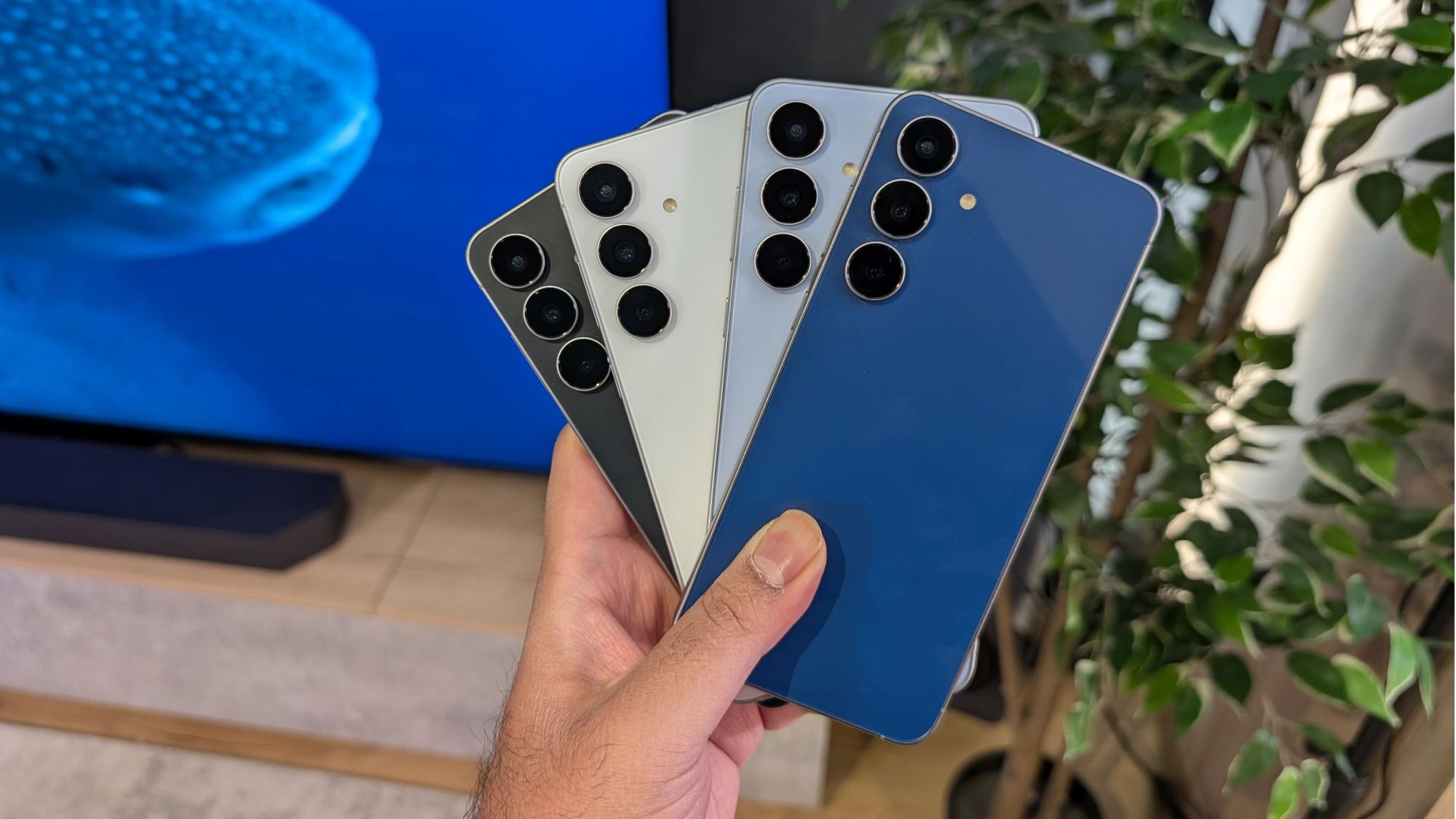
Turning to the cameras, the S25 FE has a 50MP primary wide lens, 12MP ultra-wide, and 8MP telephoto, along with a 12MP selfie camera. Other specs of the S25 FE include an in-display optical fingerprint sensor, facial recognition, and wireless support for Samsung DeX. The S25 FE comes in Jetblack, Navy, Icyblue, and White.
You can order the Galaxy S25 FE starting today.
Galaxy Tab S11 series
Credit: Sachin Bahal
Samsung also unveiled the Galaxy Tab S11 series, and for this year, there are only two models: a base version and an Ultra model. There’s no Plus model this time around.
The base Tab S11 has an 11-inch Dynamic AMOLED 2X display, while the Ultra has a larger 14.6-inch screen. Both models’ displays have a 120Hz refresh rate. Powering the tablets is the MediaTek Dimensity 2400+ chip with up to 16GB of RAM (depending on storage capacity).
Storage options include 128GB, 256GB, and 512GB for the base Tab S11, and 256GB, 512GB and 1TB for the Ultra. All models come with a microSD card slot with support for up to 2TB cards.
The Tab S11 has an 8,400 mAh battery, while the Tab S11 Ultra has an 11,600 mAh battery. Other specs include an on-screen fingerprint sensor, IP68 water and dust resistance, Wi-Fi 7 support, and an S Pen that connects via Bluetooth.
For cameras, the base Tab S11 has a 13MP main lens on the back and a 12MP selfie. The Tab S11 Ultra has a dual rear camera setup with a 13MP wide lens and 8MP ultra-wide, as well as a 12MP selfie lens. The tablets come in two colors: Grey and Silver.
The Galaxy Tab S11 series is available to order today.
Galaxy Tab S10 Lite
Credit: Sachin Bahal
Samsung also showed off the Galaxy Tab S10 Lite, which is a direct replacement for the Galaxy Tab S6 Lite. The Tab S10 Lite has a 10.9-inch LCD with a 90Hz refresh rate. Powering the tablet is the Exynos 1380 chip with up to 8GB of RAM.
Storage options for the tablet include 128GB or 256GB, along with a microSD card slot for expandable storage. The Lite has an 8,000 mAh battery, with an 8MP main camera lens on the back, and a 5MP selfie camera.
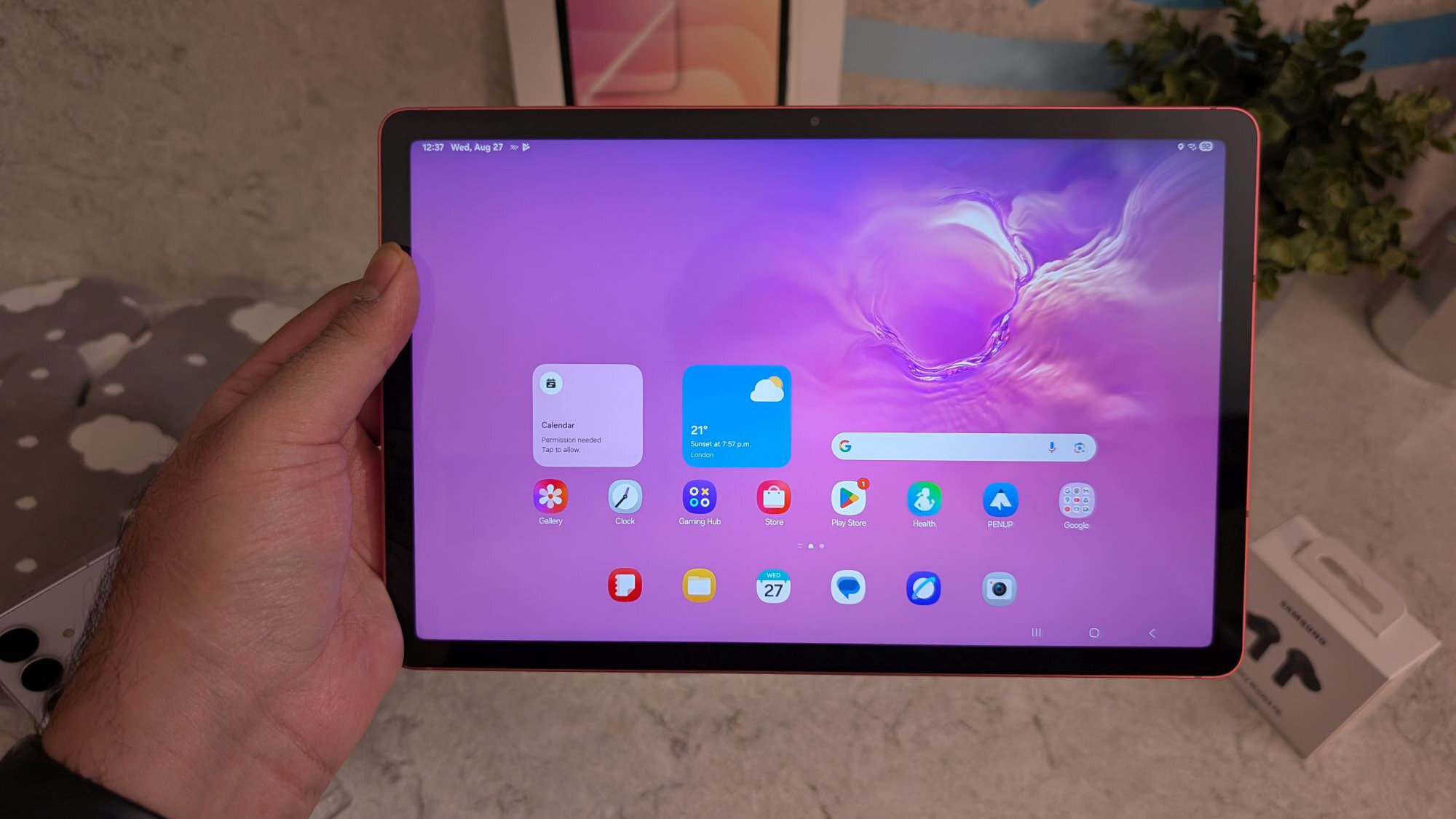
Other specs of the tablet include Wi-Fi 6, a Bluetooth S Pen, and IP42 water and dust resistance. The tablet will be available in Grey, Silver and Coralred.
The Galaxy Tab S10 Lite is available to order today.
Galaxy Buds 3 FE
Credit: Sachin Bahal
Finally, there’s the Galaxy Buds 3 FE, which is the Fan Edition of last year’s Galaxy Buds 3.
The earbuds come with an 11mm dynamic audio driver, Active Noise Cancellation (ANC), Ambient Custom EQ, and IP54 water and dust resistance. While the design is similar to the Galaxy Buds 3, the FE model has no blade lights.
The Galaxy Buds 3 FE offer up to six hours of listening time with ANC on and 8.5 hours with ANC off. You’ll get an additional 30 hours from the charging case. The earbuds come in two colors: Black and White.
The Galaxy Buds 3 FE are available to order today.
New research provides a framework for carbon capture driven by photochemistry, a potentially cheaper and less energy-intensive alternative to leading technologies.
Eufy just introduced a couple of new devices at the IFA conference in Germany, including something called the MarsWalker. This little doodad picks up robot vacuums and carries them up and down stairs. That’s pretty neat, considering stairs are the bane of any robovac’s existence.
The company says the MarsWalker automatically recognizes common stair types, including straight, L-shaped and U-shaped. It transports the vacuum between floors and drops it off at the base station when needed. Eufy boasts that the device allows for “truly hands-free, whole-home cleaning while avoiding the cost of buying multiple devices.”
It uses four control arms that “dynamically adapt to stair structures,” along with a track-drive system that “grips each step securely.” The company notes that it has been designed to prevent slips.
There are a couple of caveats here. First of all, we don’t have the price yet. If this ends up being around the price of an actual robot vacuum, it might be better just to get two for a multi-story home. Also, it only works with a few Eufy models and no third-party devices. Still, it’s cool to see robot vacuums finally adapting to stairs. It’s been a slow road to get here. The MarsWalker will be released in the first half of 2026.
Eufy
The company also announced a new robovac at IFA which fully integrates with the MarsWalker. The Omni S2 includes an aromatherapy system, which is fairly novel, and adaptive wheels to clear thresholds like thick rugs. It’ll be available in January, with a cost of $1,600.
This article originally appeared on Engadget at https://www.engadget.com/home/smart-home/eufys-marswalker-allows-its-robot-vacuums-to-climb-stairs-083020319.html?src=rss
Online trading has exploded in recent years, with brokers competing to offer faster, safer, and more flexible access to global markets. Among the platforms gaining traction is RakyaTrade.com, an award-winning broker that combines multi-asset access, mobile-first technology, and trader-focused conditions.
In this review, we’ll explore what RakyaTrade offers, its key strengths, risks, and whether it’s the right fit for your trading journey.
What is RakyaTrade?
RakyaTrade is an online CFD broker, allowing traders to speculate on market price movements without owning the underlying asset. This means you can profit whether the market rises or falls, provided you manage your risk effectively.
Forex – Over 50 currency pairs (majors, minors, exotics)
Indices – Global benchmarks like NASDAQ100, FTSE100, GER40, Nikkei
Crypto CFDs – Bitcoin, Ethereum, Solana, Cardano, Dogecoin & more
Key Features & Strengths
Multi-Asset Access in One Account
Diversify your portfolio by trading forex, stocks, commodities, indices, and crypto all from a single login. No need to juggle multiple brokers.
Award-Winning Mobile Trading
The mobile app delivers professional-grade charting, sub-second execution, and full account management. Features include:
One-tap trading execution
Dozens of technical indicators
Customizable alerts and notifications
Full trade history and balance tracking
Security
Multi-layer SSL/TLS encryption
Two-Factor Authentication (2FA) for logins and withdrawals
Segregated client funds
Continuous monitoring for suspicious activity
Margin Trading
Leverage provides flexibility but also adds risk. RakyaTrade offers:
Up to 1:250 on forex
Up to 1:250 on indices and commodities
Up to 1:250 on crypto CFDs
This allows small accounts to control larger positions — but requires disciplined risk management.
Islamic Swap-Free Accounts
For Muslim traders, RakyaTrade offers swap-free Islamic accounts. These accounts remove overnight interest charges while keeping spreads and trading conditions identical to standard accounts.
Account Types & Fees
RakyaTrade keeps its structure simple and transparent:
Standard Account – Spread from 1.6 pips, no commission
Pro Account – Spread from 0.4 pips, €6 commission per round lot
VIP Account – Custom conditions for high-volume traders
Islamic Account – Swap-free version of any account type
Other notes:
No deposit fees
No withdrawal fees (except small charges on some bank transfers)
Inactivity fee of €10/month after 6 months idle
Withdrawals & Funding
RakyaTrade supports multiple funding methods: cards, bank transfers, e-wallets, and USDT (TRC20/ ERC20).
Withdrawals are usually processed within 24 hours.
Crypto & e-wallet withdrawals: often same day.
Bank transfers: 2–5 business days depending on your bank.
Awards & Recognition
In the past year, RakyaTrade has received several high-profile awards, including:
Best Multi-Asset Trading Platform 2025
Outstanding Mobile Trading Experience
Most Trusted Emerging Broker – Asia Region
These recognitions underscore its growing credibility and appeal among traders worldwide.
Risks to Consider
Leverage can magnify losses as well as gains.
Educational resources are more basic compared to some larger brokers.
Conclusion – Is RakyaTrade Worth It?
RakyaTrade has positioned itself as a secure, award-winning, and mobile-first broker for traders who want access to multiple markets in one account. Its combination of tight spreads, leverage flexibility, and mobile convenience makes it attractive for both forex and crypto traders, as well as those exploring commodities and stocks.
It may not be the right fit for beginners who need extensive education or traders who demand Tier-1 regulation, but for experienced and growth-focused investors, RakyaTrade.com stands out as a strong option in 2025
Odoo is the ideal open-source enterprise software for teams and businesses that value flexibility, data privacy, and affordability.
Due to its vast array of productivity apps, one can simply build a unique CRM and ERP platform by choosing the right tools to meet their needs, whether it be project management, e-commerce, inventory management, email marketing or accounting.
While installing and configuring Odoo on Linux doesn’t sound like a difficult task, searching for the desired apps for your job might be challenging. Besides the official Odoo apps, there are thousands of third-party productivity tools that can be integrated into the platform.
Kopia is an open-source backup and restore tool that lets you create encrypted snapshots of your files and store them in cloud storage, on a remote server, on network-attached storage, or on your own computer. It doesn’t create a full image of your machine. Instead, you pick the files and folders you want to back up or restore.
It’s been a slow news week, but we got some nice gems, including major releases of the LibreOffice office suite, FFmpeg multimedia framework, Firefox web browser, and Thunderbird email client, as well as new updates to the Calibre e-book manager and CachyOS distribution.
On top of that, I tell you all about what’s coming in Firefox 143 and warn you about the end of life of Linux kernel 6.15, Below, you can check out this week’s hottest news and access all the distro and package downloads released this past week in the 9to5Linux weekly roundup for August 24th, 2025.