
As part of the Rust DRM drivers now having their own development tree, sent out today was the first pull request from the drm-rust-fixes branch…
Monthly Archives: September 2025
UK Government Trial of M365 Copilot Finds No Clear Productivity Boost
A UK government trial of Microsoft’s M365 Copilot found no clear productivity gains despite user satisfaction with tasks like summarizing meetings and writing emails. While the tool sped up some routine work, it actually slowed down more complex tasks like Excel analysis and PowerPoint creation, often producing lower-quality results. The Register reports: The Department for Business and Trade received 1,000 licenses for use between October and December 2024, with the majority of these allocated to volunteers and 30 percent to randomly selected participants. Some 300 of these people consented to their data being analyzed. An evaluation of time savings, quality assurance, and productivity was then calculated in the assessment (PDF). Overall, 72 percent of users were satisfied or very satisfied with their digital assistant and voiced disappointment when the test ended. However, the reality of productivity gains was more nuanced than Microsoft’s marketing materials might suggest. Around two-thirds of the employees in the trial used M365 at least once a week, and 30 percent used it at least once a day — which doesn’t sound like great value for money. […]
According to the M365 Copilot monitoring dashboard made available in the trial, an average of 72 M365 Copilot actions were taken per user. “Based on there being 63 working days during the pilot, this is an average of 1.14 M365 Copilot actions taken per user per day,” the study says. Word, Teams, and Outlook were the most used, and Loop and OneNote usage rates were described as “very low,” less than 1 percent and 3 percent per day, respectively. “PowerPoint and Excel were slightly more popular; both experienced peak activity of 7 percent of license holders using M365 Copilot in a single day within those applications,” the study states. The three most popular tasks involved transcribing or summarizing a meeting, writing an email, and summarizing written comms. These also had the highest satisfaction levels, we’re told.
Participants were asked to record the time taken for each task with M365 Copilot compared to colleagues not involved in the trial. The assessment report adds: “Observed task sessions showed that M365 Copilot users produced summaries of reports and wrote emails faster and to a higher quality and accuracy than non-users. Time savings observed for writing emails were extremely small. “However, M365 Copilot users completed Excel data analysis more slowly and to a worse quality and accuracy than non-users, conflicting time savings reported in the diary study for data analysis. PowerPoint slides [were] over 7 minutes faster on average, but to a worse quality and accuracy than non-users.” This means corrective action was required.
A cross-section of participants was asked questions in an interview — qualitative findings — and they claimed routine admin tasks could be carried out with greater efficiency with M365 Copilot, letting them “redirect time towards tasks seen as more strategic or of higher value, while others reported using these time savings to attend training sessions or take a lunchtime walk.” Nevertheless, M365 Copilot did not necessarily make them more productive, the assessment found. This is something Microsoft has worked on with customers to quantify the benefits and justify the greater expense of a license for M365 Copilot.


Read more of this story at Slashdot.
RISC-V Zalasr Support Now Under Review For The Linux Kernel
Linux kernel patches for supporting RISC-V’s Zalasr ISA extension are now under review. This extension provides “real” load acquire/store release instructions for RISC-V processors…
BMW debuts 6th-generation EV powertrain in the all-electric iX3
BMW has an all-electric replacement for its X3 crossover on the way. When it arrives in mid-2026, it will have the lowest carbon footprint of any BMW yet, thanks to an obsessive approach to sustainability during the design process. But we knew that already; what we couldn’t tell you then, but can now, is everything else we know about the first of the so-called Neue Klasse electric vehicles.
“The Neue Klasse is our biggest future-focused project and marks a huge leap forward in terms of technologies, driving experience, and design,” said BMW chairman Oliver Zipse. “Practically everything about it is new, yet it is also more BMW than ever. Our whole product range will benefit from the innovations brought by the Neue Klasse—whichever drive system technology is employed. What started as a bold vision has now become reality: the BMW iX3 is the first Neue Klasse model to go into series production, kicking off a new era for BMW.”
A new face
The iX3 also debuts a new corporate face for BMW’s SUVs: From now on, these will have tall, narrow kidney grilles like the one you see here, as opposed to the short, wide grille seen on the front of the Neue Klasse sedan (which is almost certainly the next 3 Series). LEDs replace chrome, and there’s a new take on BMW’s usual four headlights, although the illuminated kidney grill is an option, not mandatory. Despite the two-box shape, the iX3 manages a drag coefficient of just 0.24.
Fedora 44 Change Proposal Aims To Ensure A Nice Wine/Proton + NTSYNC Experience
A change proposal filed for next year’s Fedora 44 release wants to aim for a nice experience when running Wine or the Proton variants supporting the Linux kernel’s NTSYNC driver for better emulating the Microsoft Windows NT synchronization primitives…
HTTP 414 Error URI Too Long: What is it and how to fix it?
In this tutorial, we will explain what the HTTP 414 error URI too long is and how to fix it. HTTP 414, also known as Request-URI Too Long, indicates that the URL in the request sent by the client is exceptionally long. This means that it exceeds the server’s capacity to process it successfully. In the following paragraphs, we will provide a detailed explanation of the 414 error. We’ll include its definition, causes, troubleshooting steps, and remedial actions. Additionally, we will explore how it impacts the SEO of websites.
The post HTTP 414 Error URI Too Long: What is it and how to fix it? appeared first on Linux Today.
How to install CyberPanel with OpenLiteSpeed on AlmaLinux 9
In this tutorial, we will explain how to install CyberPanel with OpenLiteSpeed on AlmaLinux 9 OS. CyberPanel is a web hosting control panel powered by the OpenLiteSpeed web server and is used worldwide. The Cyber Panel is free only when used with the free OpenLiteSpeed, and it is paid when used with the LiteSpeed Enterprise edition. So that depends on the type of web server you want to use. CyberPanel offers a range of features, including web server management, SSL certificate management, FTP, Docker application management, DNS, firewall management, WordPress one-click installation, and more.
Installing CyberPanel with OpenLiteSpeed on AlmaLinux 9 is a straightforward process, and the installation may take up to 30 minutes. Let’s get started!
The post How to install CyberPanel with OpenLiteSpeed on AlmaLinux 9 appeared first on Linux Today.
n8n Is the Best Automation Tool That’s Free, Open Source, and Can Be Self-Hosted
n8n is a powerful open-source automation tool that lets you connect apps and build custom workflows. Learn how to install and use it on your own server.
The post n8n Is the Best Automation Tool That’s Free, Open Source, and Can Be Self-Hosted appeared first on Linux Today.
Arch Linux remains under attack as DDoS enters week 2 – here’s a workaround
Something mysterious is happening to the popular Linux distro’s website. Here’s what we know so far.
The post Arch Linux remains under attack as DDoS enters week 2 – here’s a workaround appeared first on Linux Today.
Chase Summer Down Under: Speak at ‘Everything Open’ 2026
Dream of hitting the stage and the beach? Your chance to shine—and skip winter—starts with Everything Open in sunny Canberra. Applications close soon, so don’t let this opportunity melt away.
The post Chase Summer Down Under: Speak at ‘Everything Open’ 2026 appeared first on Linux Today.
Miracle-WM 0.7 Brings Full Sway/I3 IPC Support
Miracle-WM 0.7 tiling Wayland window manager adds full Sway/I3 IPC support, new mouse and keyboard configurations, and Mir 2.22 compatibility.
Lenovo Demos New Legion Gaming Gear At IFA 2025, Including Go 2 Handheld
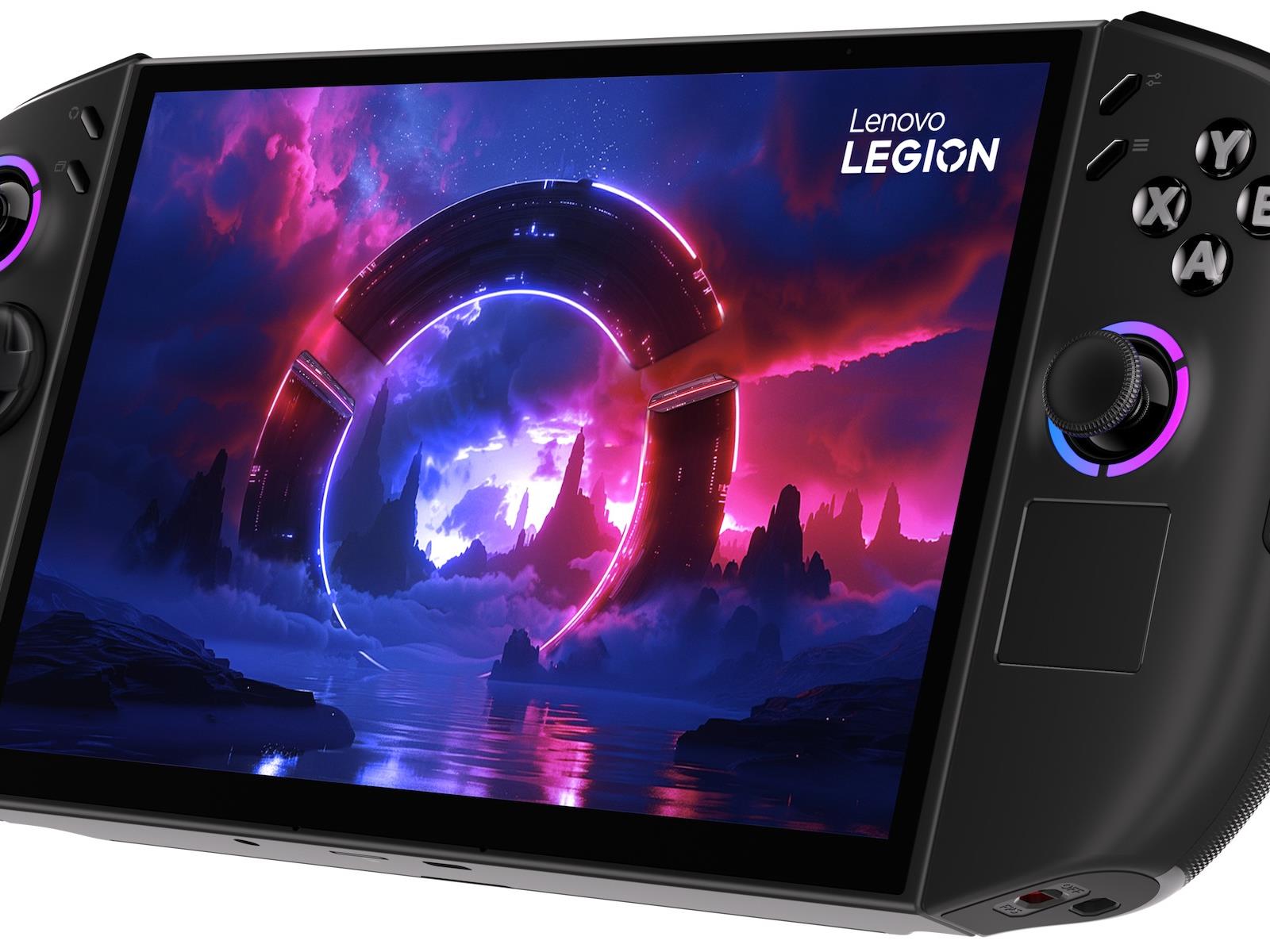
The sector of the PC market showing the greatest growth for many years past has continually been the gaming group. So it goes that at IFA 2025, Lenovo is showing off a solid selection of Legion gaming gear, starting right off with the second-generation Lenovo Legion Go, pictured above.
We have a review forthcoming of the Legion Go S with
Lenovo Legion Go 2 hands-on: Powerful upgrades but with an even higher price
At the beginning of the year, Lenovo gave us an early design preview of its next flagship gaming handheld — the Legion Go 2. Today, at IFA 2025, the company is fleshing out the rest of the system with more details regarding its specs, price and availability.
In terms of its overall appearance, not much has changed on the outside of the Legion Go 2. It has the same general shape and detachable controllers as the preview model, alongside an 8.8-inch OLED with a variable 144Hz refresh rate and VESA HDR TrueBlack 1000 certification. Lenovo has kept the ability to use the right controller as a vertical mouse (aka FPS mode) when paired with the handheld’s included puck/stand. And as before, you still get Hall Effect joysticks, a built-in touchpad and kickstand and dual USB 4 ports.
Sam Rutherford for Engadget
The only major change from what we saw in January is slightly different paint colors on elements like its shoulder buttons. That said, I do appreciate that unlike a lot of its rivals (aside from the Steam Deck), Legion Go 2 still comes bundled with a case, just like its predecessor. On the flipside, one thing I wish Lenovo had changed is the detachment process for Legion Go 2’s controllers. Like before, you can press a button in back before sliding each joypad off a small hidden rail. And while it works, after using the new magnetic system for the Switch 2’s Joy-Con, doing the same thing on the Legion Go 2 just feels clunky.
Meanwhile, the Legion Go 2’s internals are where most of its upgrades have gone. The handheld can now be equipped with up to an AMD Ryzen Z2 Extreme chip, 32GB of RAM and 2TB of PCIe Gen 4 storage. And if that’s not enough, there’s also a microSD card reader. But perhaps the most tantalizing improvement may be its battery life, as the Legion Go 2 comes with a 74Whr battery that’s 50 percent larger than the 49.2 Whr cell in the original.
Unfortunately, I only had a brief time with the demo unit and as it didn’t have a lot of games already installed (especially more resource-intensive ones), so I couldn’t really gauge how much better its performance was compared to the original model. However, I did notice that Lenovo’s Legion Space app felt much snappier and more polished, though it probably won’t be as seamless as the native game integration and new UI that’s coming on the ROG Xbox Ally.
All told, the Legion Go 2 is shaping up to be a more refined, powerful and longer-lasting follow-up while retaining pretty much every major good feature from its predecessor like a big OLED screen, detachable controllers and solid connectivity. Granted, it’s still quite chunky even with its curvier and more streamlined design, but that was always going to be the case considering its large 8.8-inch display. So if you can handle a Windows-based handheld (sorry SteamOS fans) that’s on the heftier side, this is one worth keeping an eye on.
Sam Rutherford for Engadget
But here’s the potential catch: the Legion Go 2 may be substantially more expensive too. It’s expected to go on sale sometime in October starting at $1,049, which is a significant jump up from the $700 base price of the original (let alone what it’s going for now, which can be as low as $550 depending on discounts). And that figure is likely for a model with a Ryzen Z2 chip, which means anyone who wants one with a more powerful Z2 Extreme processor will need to keep some wiggle room in their budget. So while I appreciate how Lenovo is chasing big performance on a portable gaming machine, the Legion Go 2’s price has me appreciating more affordable handheld rivals like the Steam Deck even more than I already do.
This article originally appeared on Engadget at https://www.engadget.com/gaming/pc/lenovo-legion-go-2-hands-on-powerful-upgrades-but-with-an-even-higher-price-060052114.html?src=rss
Evangelion: Cross Reflections Is A New Story Within The Original Anime’s Timeline
Evangelion: Cross Reflections is the official name of the Neon Genesis Evangelion VR game’s first installment.
You may recall Korean studio Pixelity Inc. (Teahouse of Souls) confirmed back in February that it’s working on a then-unnamed Neon Genesis Evangelion XR game. Revealing today that the first game is called Evangelion: Cross Reflections – stylized as EVANGELION: Δ CROSS REFLECTIONS – we’ve also got a look at the game’s logo, which you can see above.
Supporting both VR and mixed reality gameplay, Evangelion: Cross Reflections offers a new story set within the TV series timeline around episodes 1-11, returning to familiar locations from the anime. This unfolds from the perspective of an original protagonist who dreams of becoming a pilot, making connections between the anime’s “key episodes” and new characters.
“Players will enjoy the story set in the locations from the anime from their own perspective. Battles between Evangelions and Angels, various interactive elements, and engaging captivating storylines with original characters are also planned,” states Pixelity in a press release.
First aired in 1995 to critical acclaim, Neon Genesis Evangelion is a post-apocalyptic mech series focused on the fight between paramilitary group NERV and the Angels. Cross Reflections will kick off a planned trilogy of VR games based on the anime TV series, though it’s currently unknown which episodes the second or third entries are based on.
Specific platforms remain unconfirmed, and Evangelion: Cross Reflections still targets a 2026 launch. Pixelity also announced that a “special demo version” is planned and will be revealed in the first half of 2026.
Lenovo’s new Legion Pro 7 gaming laptop can be outfitted with up to a GeForce 5080 GPU
Lenovo just announced some new gaming products at IFA, including the Legion Pro 7 laptop. The specs here are impressive. The laptop ships with AMD’s newest Ryzen 9 9000 HX series processors and options go all the way up to the Ryzen 9955HX3D.
The Windows 11 computer also features NVIDIA GeForce RTX GPUs and purchasers can go up to the RTX 5080. There’s a 16-inch 240Hz OLED panel with a 0.08ms response time, which should make for some glorious gaming sessions.
Lenovo
It can be outfitted with up to 2TB of storage and up to 32GB of RAM. It also incorporates the company’s Coldfront thermal technology to keep things cool, which in turn lets gamers “run the highest-demand games at the highest settings.” The Legion Pro 7 will be available this November and prices start at $2,400.
The company also announced the LOQ Tower 26ADR10 desktop. The specs here are impressive, as the computers are powered by AMD Ryzen 8000 series processors and NVIDIA 50-Series GPUs. It can be topped off with up to 64GB of RAM and 4GB of SSD storage. It’ll be available later this month, with a starting price of $1,000.
Lenovo
Lenovo even announced a few new gaming monitors at IFA, all of which offer multiple connection options and speedy refresh rates. They will be available in October or November, depending on which model is selected, with prices ranging from $700 to $1,100.
This article originally appeared on Engadget at https://www.engadget.com/gaming/pc/lenovos-new-legion-pro-7-gaming-laptop-can-be-outfitted-with-up-to-a-geforce-5080-gpu-060017519.html?src=rss
Lenovo’s Legion Go 2 Isn’t the Premium Steam Deck I Wanted
Right now, Lenovo’s Legion Go S is my favorite gaming handheld. I’m more of a PC person than a console one, and this handheld gaming PC has just enough over the Steam Deck to make it worth it to me, from a more powerful chip to a bigger and higher resolution screen. But even with all that, it was only ever intended as a stopgap between the full-fledged Legion Go and Legion Go 2. Now, Lenovo’s officially announced the Legion Go 2, and while it brings back some features that the Legion Go S cut, it also loses out on some of what made the Legion Go S so special, which puts it in an odd middle ground.
A new look and feel
Credit: Michelle Ehrhardt
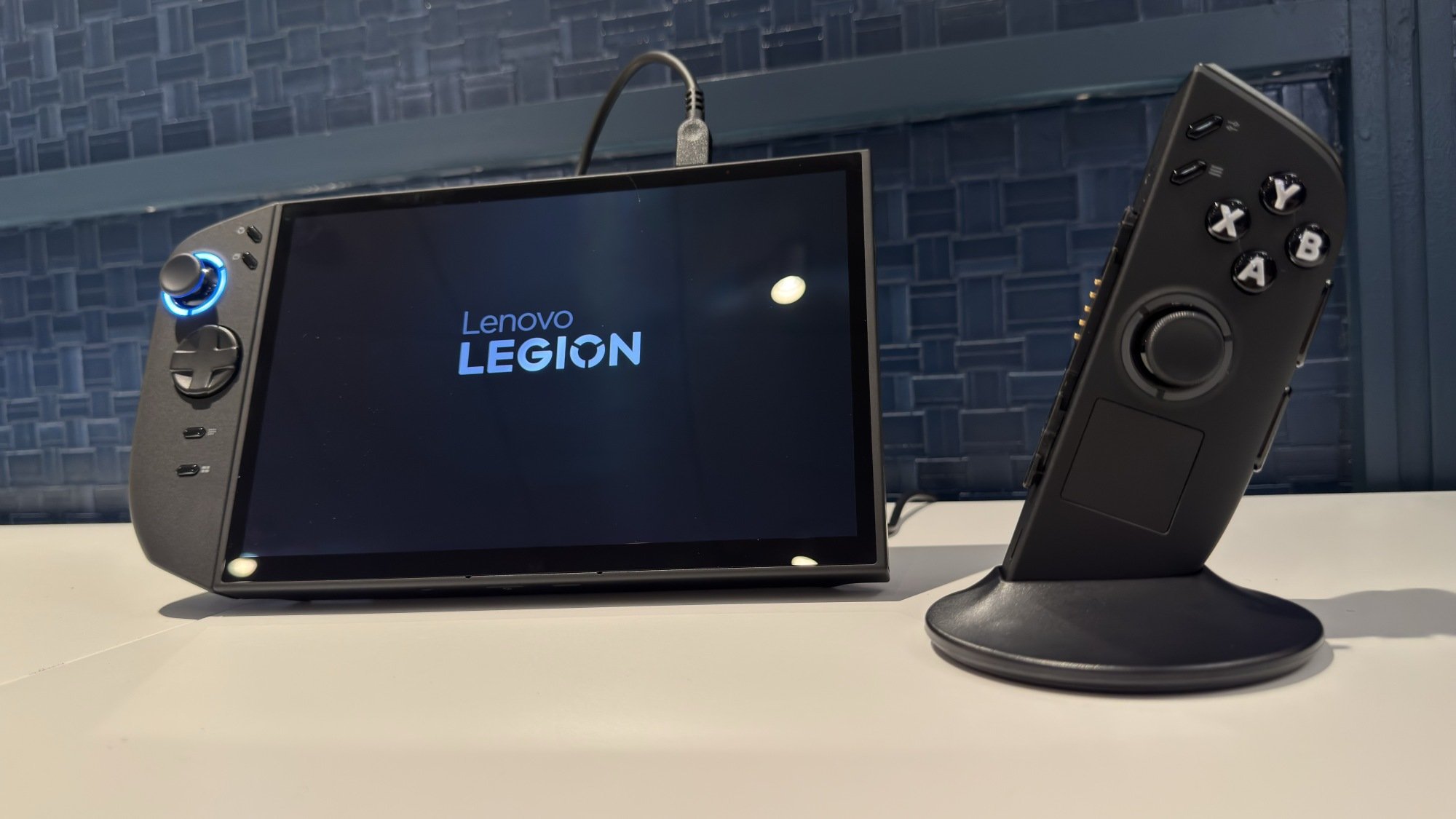
Starting off with the positives: the Legion Go 2 is now a heck of a lot nicer to hold and look at. The first Legion Go set itself apart with detachable wireless controllers on a rail system, similar to the original Nintendo Switch. Lenovo got rid of these on the S, but since those controllers were a little squarish and sharp on the original Go, I didn’t mind their absence. The Legion Go 2 brings the detachable controllers back, but updates them with a rounder, more ergonomic design, seemingly inspired by the S. Apart from looking a little less boxy, these felt way nicer in the hand when I tried them out. They even use the same rail system as the original Go, so any accessories you’ve bought or printed for that device’s controllers will work here. And yes, that means there’s still an optical sensor on the bottom of the right-hand controller, so you can still use it like a mouse (just like a Switch 2 joy-con). These are small touches, but they go a long way towards making the device click as “new” in my brain.
Upgraded chips
The big upgrade here is the new chips, which have been punched up to AMD’s Z2 family and go up to the Z2 Extreme. That’s a generational leap over the processor in most premium gaming handhelds these days, including the Legion Go S and the Asus ROG Ally. Given that the Z1 Extreme in the S was already giving me a good 8 to 10 extra frames over the Steam Deck even while running at higher resolutions, you can expect even more performance from this model, although Lenovo didn’t give me any estimates or hands-on gameplay demos. The memory can also be pushed to up to 32GB now (double the previous max of 16GB), which will help ensure smoother play, and the storage now goes up to 2TB, which doubles the first Legion Go’s capacity.
An OLED screen
Credit: Michelle Ehrhardt
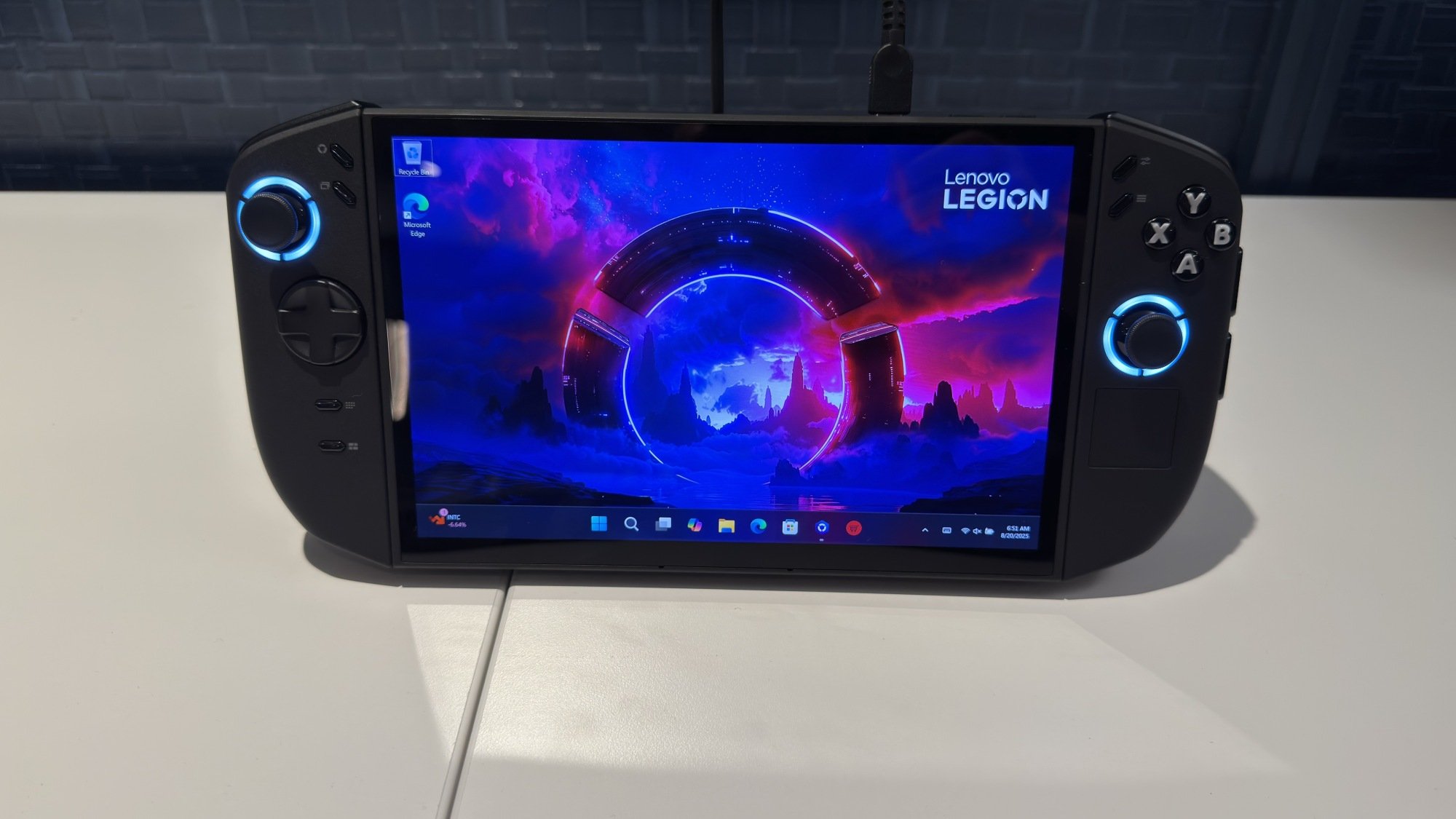
There are a few other extras as well, like an updated battery with 74WhR of capacity rather than the 49WhR on the first model, as well as a fingerprint reader. Most noteworthy is that while the screen is the same size as before, at 8.8 inches, it trades some resolution for OLED. While the prior IPS model was 1600P, this version is now 1200P, although that’s a compromise I’m willing to make for OLED-level contrast, especially since higher resolutions tend to have diminishing returns on handheld screens. Aside from that, it’s still 144Hz, touch compatible, and maxes out at 500 nits of brightness.
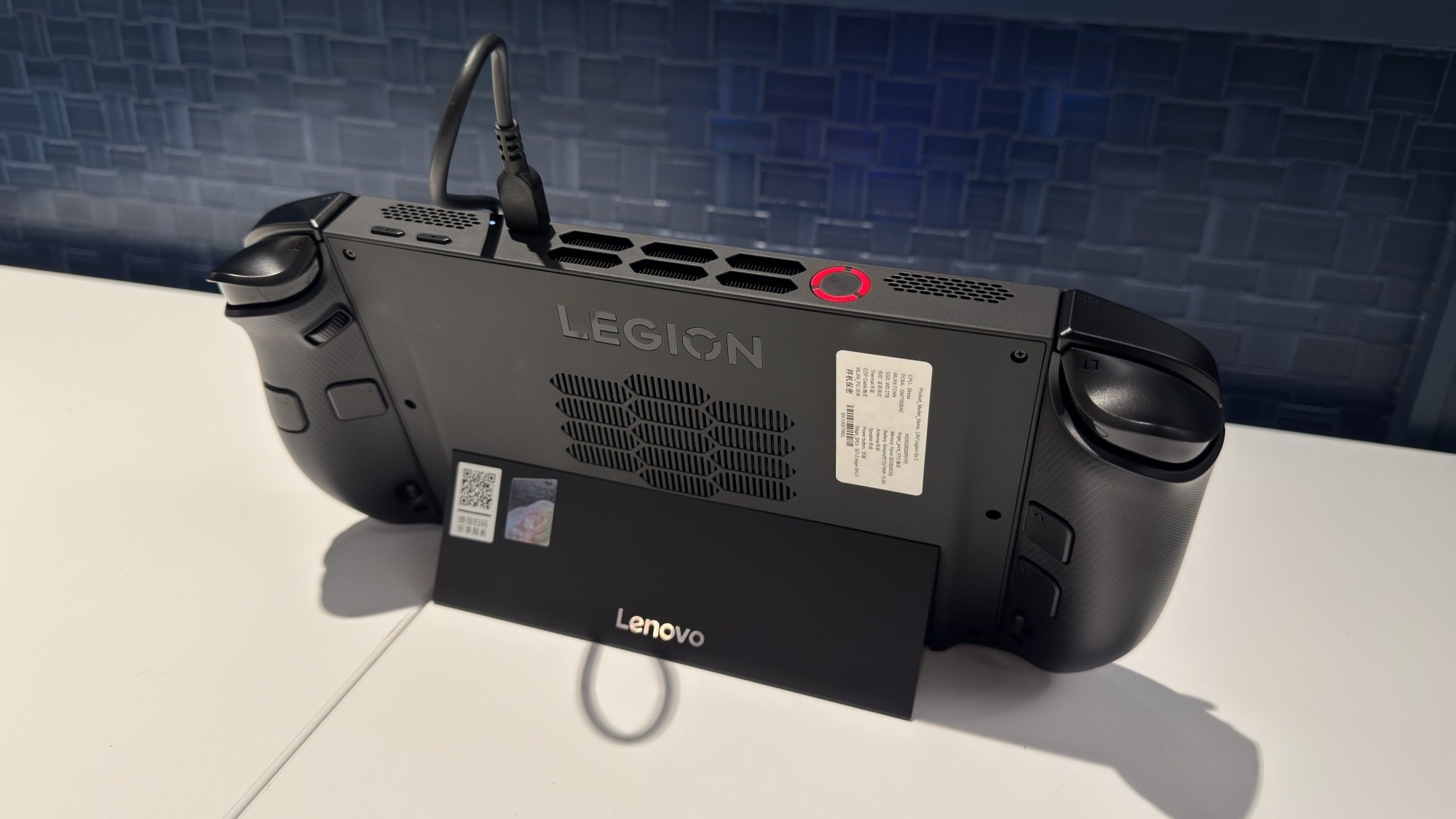
Otherwise, it’s largely the same unit, albeit a little thicker, which Lenovo says is for extra thermal headroom, and a little weightier, at around 2.03 pounds rather than 1.88 (I didn’t notice that during my short hands-on, although that could change over an extended play session). On top of those mouse controls, you still get a touchpad on the right controller, a sturdy kickstand across the length of the device, all the same buttons, and everything else you might have come to expect from the original Legion Go.
The downsides
Credit: Michelle Ehrhardt
I’ll admit that after the S, I’m a little torn. The first Legion Go always seemed a little over-engineered to me, with the controllers in particular being far less intuitive than Nintendo’s joy-cons. If you always struggled to remove or connect the Legion Go controllers before, or were disappointed that you couldn’t use them for two-player, this won’t change your mind, even if these controllers are easier to hold than the original model’s. The S was so seamless to use that, despite being more powerful, the Go 2 comes across as a little user-unfriendly. While keeping compatibility with previous accessories is a nice touch, after using the Switch 2, I can’t help but think magnets might have been the way to go here. Or even just controllers that are attached to the system, to be honest.
That user unfriendliness is also true of the operating system. Unlike the Legion Go S, The Legion Go 2 is only launching with Windows, and Lenovo refused to tell me whether SteamOS was planned to be added as an option further down the line. That’s a huge disappointment after the Legion Go S became the first non Steam Deck handheld to officially ship with Valve’s operating system as an option. While it sounds like a minor gripe, Windows has proven across multiple devices to be a pain to navigate with a controller, while SteamOS is built from the ground-up for controllers. It can also drag down performance, as it’s more resource hungry, and licensing Windows can inflate a device’s price. Microsoft says it’s working on addressing these issues, but we won’t see how that works out until the Xbox handheld hits the market. In the meantime, I would have loved to have more options.
Worth the price?
In other words, I don’t see this replacing the Legion Go S for me, and another big part of that is the price. The Legion Go S starts $200 more than the Steam Deck, and improves on that device just enough that I think it’s worth it. Meanwhile, the Legion Go 2 starts at $1,049, which is several hundred dollars more than the Legion Go S, the first model, or even competitors like the ROG Ally X. It’ll be available next month, and while I’d love for it to be a straight upgrade on the Legion Go S or even some kind of adult Nintendo Switch 2, I expect it’ll end up competing more with gaming laptops than anything else. That’s great for the rich kids who already go for devices like that, but after the Legion Go S, I can’t help but feel like Lenovo’s missing an opportunity to take the follow-up in a more attractive, less niche direction. I suppose I’ll wait for a Go S 2 in the meantime.
Lenovo’s latest laptop concept might be the ultimate doomscrolling machine
Lenovo is no stranger to laptops with funky displays. The company has made a notebook with a tri-fold screen, one with a rollable panel and multiple systems with flexible displays. But this year at IFA, Lenovo is testing out yet another new design with its latest concept laptop, and this time it may have created the ultimate doomscrolling machine.
Its official name is the ThinkBook Vertiflex Concept and when it’s closed, it looks almost exactly like a traditional 14-inch clamshell laptop. But if you look closer, you’ll notice that its screen has a secret feature: the ability to rotate 90 degrees into portrait mode. This means you can switch to a taller aspect ratio for tasks like coding, editing photos and videos, or simply browsing your favorite vertically-oriented social media app.
Naturally, to enhance its portrait mode capabilities, Lenovo included support for pairing the laptop with your phone via its Smart Connect app, which allows you to mirror or extend the latter’s display on a bigger screen or quickly transfer files just by dragging and dropping. In a lot of ways, the Vertiflex Concept feels like the laptop version of one of LG’s last phones — the LG Wing — while also sharing a lot of similarities with TVs like the rotating Samsung Sero. And given the continued rise in popularity of vertical photos and videos on social media, it’s actually kind of a surprise that it’s taken a mainstream PC maker this long to create a laptop like this.
On a more practical level, I really appreciate that even with a rotating display, it doesn’t feel like there’s much of a penalty when it comes to added heft or thickness. The Vertiflex Concept weighs just three pounds and measures 0.7 inches thin, which isn’t far off from what you’d get from a typical 14-inch ultraportable. And while Lenovo hasn’t provided much in the way of hardware specs (this is a concept device after all), I noticed that the laptop does feature a healthy number of connectivity options, including two USB-C ports, one USB-A connector, a full-size HDMI jack, 3.5mm audio and a microSD card reader.
Now, Lenovo has shown off more concept devices than practically any other major OEM in recent history, so of course, the Vertiflex wasn’t the only prototype the company had on display for IFA 2025. There was also the Smart Motion Concept, but that felt less impactful because instead of being a standalone product, this thing is merely a laptop stand. It uses the sensors on whatever it’s connected to to track your face and automatically reposition your laptop’s screen in the right position.
Sam Rutherford for Engadget
The idea is that if you’re making a presentation, the stand allows your laptop to better keep your face in frame while also making sure its mics and speakers are pointed in the optimal direction. Alternatively, if you’d rather control the stand yourself, the device can be paired to a ring with gesture support. Finally, Lenovo says the Smart Motion concept also has some features to do things like help you maintain ergonomically friendly postures.
However, as both products are experimental devices, there’s no word on whether Lenovo will turn these into proper retail offerings. But if either the Vertiflex or Smart Motion concepts strike your fancy, you might want to say something (maybe on social media for the social-media focused laptop) to give Lenovo a bit of extra encouragement.
This article originally appeared on Engadget at https://www.engadget.com/computing/laptops/lenovos-latest-laptop-concept-might-be-the-ultimate-doomscrolling-machine-060000162.html?src=rss
Fing Agent with Raspberry Pi Kit Now Available
Fing has introduced a dedicated plug-and-play version of its Fing Agent network monitoring system, built on Raspberry Pi hardware. The device is designed to provide continuous visibility into home and small office networks without requiring manual setup or assembly. The Fing Agent has been available previously as software for Raspberry Pi, NAS, and Docker containers. […]
How to Upgrade to Linux Mint 22.2 from Mint 22.1
Here’s how to upgrade to Linux Mint 22.2 “Zara” from 22.1 “Xia”, with all the steps you need to follow for a smooth, safe, and trouble-free system update.
Warner Bros. Discovery is suing Midjourney for copyright infringement
Warner Bros. Discovery has filed a lawsuit against popular AI image generator Midjourney, accusing it of stealing and exploiting its intellectual properties. The complaint revolves around the AI tool’s ability to generate images and videos of Warner Bros.’ popular fictional characters, including Superman, Batman, Wonder Woman, Scooby Doo, Bugs Bunny and his friends from Looney Tunes. “Midjourney thinks it is above the law,” the company wrote in its lawsuit. It said that the image generator sells a commercial subscription service powered by AI technology that was illegally trained using its copyrighted works.
The company argued that Midjourney has the technology to prevent users from generating images of the characters it owns. It apparently refused to generate videos based on Warner Bros.’ properties when it first launched its video model. But within the past couple of weeks, it allegedly removed those protections and told its users that they would encounter “fewer blocked jobs.” The ability to generate Warner Bros.’ characters are a clear draw for its subscription service that costs $10 to $120 a month, the media conglomerate said. “It is hard to imagine copyright infringement that is any more willful than what Midjourney is doing here,” the plaintiff added. “Midjourney has prioritized and sought to preserve the hundreds of millions of dollars it earns annually from its service by doubling down on its theft of copyrighted works.”
In the complaint, the company gave several examples of Midjourney-generated images and video stills next to images and screencaps of its movies and shows. The image above, for instance, shows Midjourney’s output from the prompt “Batman, screencap from The Dark Knight.” next to actual promotional materials from the Christian Bale-led movie. Further, generic prompts like “classic comic book superhero battle” could lead to output with WB characters even if they’re not specifically mentioned.
Midjourney is already facing a copyright infringement lawsuit filed by Disney and Universal Studios back in June. They accused the AI service of “help[ing] itself to countless” copyrighted works to train its models and for infringing on their copyright by allowing users to generate images of characters from Star Wars, Shrek, The Simpsons and Despicable Me, among other properties.
Warner Bros. Discovery is now asking the court for statutory damages of “up to $150,000 per infringed work by virtue of Midjourney’s willful infringement.” We’ve reached out to Midjourney and will update this post when we hear back.
This article originally appeared on Engadget at https://www.engadget.com/ai/warner-bros-discovery-is-suing-midjourney-for-copyright-infringement-035850831.html?src=rss