Beat Saber continued leading the PlayStation VR2 download charts in August.
Sony’s monthly download charts have just gone live for August 2025, which cover the top-performing games across Europe and North America for PS4, PS5, PS VR2, and free-to-play titles. Just like in July, Beat Games announcing that Beat Saber is ending PlayStation support hasn’t impacted the rhythm game’s performance, and it’s taken #1 again in both regions.
The remaining top 10 entries hold few surprises, either. Creed: Rise to Glory – Championship Edition took #2 across both regions, while #3 is shared between Alien: Rogue Incursion in North America and Job Simulator in Europe. The only notable outlier is Dead Land 2 VR reaching #8 in Europe, though that’s unsurprising after receiving a heavy discount.
Here are August 2025’s PlayStation VR2 download charts in full.
PlayStation VR2 Download Charts – August 2025
Summer is typically quieter for new VR game launches, so it’s little surprise that no new arrivals appeared. Hidden Memories of The Gardens Between, Hide the Corpse, and Into Black all failed to reach the top 10, though all of them except Hidden Memories launched in the second half of the month. Grit and Valor 1949 is also excluded since PS VR2 support is optional.
September currently isn’t looking much busier, though we’ve seen a handful of confirmed releases so far. Surviving Mars: Pioneer will launch next week following its full release on other platforms, joined on the same day by Odania Sports Arena. Elsewhere, arcade streetball-inspired basketball game Blacktop Hoops lists a vague September 2025 release window on its PlayStation Store page.
With Microsoft officially ending support for Windows 10 on October 14, anyone with an older PC is faced with a dilemma. Sure, you can kick the can down the road by signing up for the free 12-month Extended Security Updates. But even if your computer meets the minimum system requirements for a free Windows 11 upgrade, anything older than a year won’t be able to take advantage of Microsoft’s Copilot+ AI PC features, like Windows Recall or Studio Effects for video chats. So if you’ve already been feeling that your current aging PC is on the verge of dying — slow performance, whining fans, batteries that barely keep a charge — it’s probably time to consider replacing it with a new system.
In many ways, the Snapdragon-powered Surface Laptop is emblematic of where Windows PCs are headed. It’s incredibly light, surprisingly powerful for something with a mobile chip and its battery lasted over 17-and-a-half hours in our testing. While you may run into some compatibility issues if you’re running ancient Windows programs, for most people the Surface Laptop is one of the best PC experiences they can have today. If you’re looking for something smaller and cheaper, there’s also a $700 13-inch model, and the $1,200 15-inch version is worth it if you need a bigger screen. (Check out our full review of the Surface Laptop 13.8-inch.)
Dell 14 Premium laptop
Sam Rutherford for Engadget
Dell 14 Premium
We loved last year’s XPS 14, and now that it’s been renamed as the Dell 14 Premium, it’s still a fantastic machine. It looks and feels luxurious, and it has one of the best screens around. You may just need some time getting used to its invisible trackpad (which is blended into the palm rest), and its capacitive function key row. (Check out our full Editor’s Choice review of the Dell 14 Premium.)
ASUS ZenBook S 14
The ZenBook S14 wowed us with its powerful hardware, excellent battery life (of over 16 hours) and solid construction. It’s a sign of how far ASUS has come from simply copying Apple. The S14 is also lighter than the MacBook Air, and it includes more useful ports (two USB-C, one USB-A, HDMI and a headphone jack). Its Ceraluminum case (a unique ceramic material) also feels surprisingly polished, and its OLED screen looks simply amazing. (Check out our full review of the ASUS ZenBook S 14.)
Apple MacBook Air
Don’t yell at me — Apple’s new computers are so good that Windows users should seriously consider jumping ship to Macs. While the software may take some getting used to, it’s worth the struggle for the speed and incredible battery life from Apple’s M-series chips. The MacBook Air remains one of the best computers around, with an incredibly thin and fan-less case and far more power than you’d think. And if you’re an iPhone user, you’ll also have access to features like phone mirroring that are tough to replicate on Windows. (Check out our full review of the M4 MacBook Air.)
Dell Slim Desktop
Dell
The best Windows 10 desktop replacements
Dell Slim desktop
If you’re just looking for a basic desktop replacement, it’s hard to go wrong with the Dell Slim. While we haven’t reviewed this specific model, the specs on even the entry-level configuration have all of the power you need for basic computing, despite housing everything in a frame that’s notably smaller than older tower PCs. And if you need a bit more performance, consider the slightly more expensive Dell Pro, which can squeeze in up to 32GB of RAM and a handful of dedicated graphics cards.
Apple Mac Mini
Apple’s Mac mini is one of the most powerful mini-desktops around, it’s adorably small and it starts at just $599 (look for the frequent sales that drop the price by as much as $100). Just as I argued above for the MacBook Air, it’s worth considering the jump to MacOS simply because Apple’s hardware is so impressive now. And don’t worry, you can connect any monitor to it, and you won’t have to replace your existing PC keyboard and mouse.
Geekom A6 Mini
While I haven’t tested the Geekom A6 Mini yet, it’s widely considered one of the best Windows mini-desktops around $400 to $500. The A6 Mini features a very capable AMD Ryzen 7 6800H processor with a bit of gaming power, 16GB of RAM and a 512GB SSD. You honestly don’t need much more for basic productivity work.
Frequently Asked Questions
Do I need to upgrade to a new computer if my current Windows 10 PC still works fine for me?
Your computer will still continue to run after Microsoft ends support for Windows 10 on October 14, but that’s not a wise longterm strategy. The free Extended Security Updates will buy you another year, but that’s effectively a limited life support: After that, Windows 10 PCs won’t receive security updates or any sort of improvements, so they’ll be vulnerable to hacking and malware. And if you’ve still got an old Windows 10 machine, there’s a good chance that its components may wear out soon. If you choose to continue using a Windows 10 PC, be sure to back up your important data and try not to rely on it for critical tasks.
Can a Mac run native Windows software?
Virtualization software like VMWare and Parallels can let you run Windows apps inside of macOS, but be aware that also involves buying a copy of Windows and dedicating a large chunk of disk space for it. These days, most major apps are available across both platforms, so be sure to check if there’s a Mac version of your favorite Windows app.
Can a Chromebook or iPad replace a Windows 10 PC?
Chromebooks and iPads both have very specific purposes: Chromebooks are great budget-friendly machines for accessing the web and running online apps. iPads are a handy way to upgrade your mobile internet experiences, since their large screens are better for browsing the web, running apps and watching media. But neither are ideal replacements for a Windows 10 PC, which can access the full breadth of Windows software in addition to the web. If either one works for you, great; but we think the options listed above are better full-service PC replacements.
I have a ton of PC games. What’s my best upgrade option?
It’s easy to find a decent gaming desktop from a reliable computer maker these days, just make sure you’re equipped with at least 32GB of RAM (new titles can be pretty memory intensive), and an NVIDIA RTX 40-series or AMD Radeon RX 9000-series GPU.
As for CPUs, I’d recommend sticking with Intel’s 13th-gen chips or AMD’s Ryzen 8000-series processors at a minimum. Don’t count out gaming laptops either, as they’ve come a long way over the last decade. It’s not hard to find a gaming notebook that’s powerful, portable and useful for multimedia and productivity work as well..
This article originally appeared on Engadget at https://www.engadget.com/computing/the-best-new-computers-to-replace-your-old-windows-10-pc-134500000.html?src=rss
Project Moohan was a no-show at Samsung’s Galaxy product event yesterday, giving the company even fewer opportunities to announce and release the Vision Pro competitor by year’s end.
Samsung confirmed in early August that Project Moohan is coming before the end of the year, although we still don’t know its name, release date, or price.
At its recent Galaxy event, the company unveiled a number of mobile devices, including Galaxy S25 FE, Galaxy Tab S11, and Galaxy Tab S11 Ultra. Just not Project Moohan.
A recent report from Korea’s Newsworks maintained Moohan would be featured at Samsung Unpacked, which is rumored to take place on September 29th. Still, that’s awfully close to the Galaxy product event, which took place yesterday.
The Newswork report maintains Project Moohan—which means ‘Infinite’ in Korean—is rumored to launch first in South Korea on October 13th, priced at somewhere between ₩2.5 and ₩4 million South Korean won, or between $1,800 and $2,900 USD.
Samsung Project Moohan | Image courtesy Samsung
Still, it’s fairly odd that Samsung hasn’t taken more of an opportunity to hype the mixed reality headset, which will be the first to run Google’s Android XR operating system.
Samsung has essentially kept the lid fairly tight on Moohan since it was announced in December 2024; it was often available for demo behind closed doors at events like MWC in March and Google I/O in June, although it was conspicuously absent from Unpacked in January and the second Unpacked in July… and now the Galaxy product event.
With claims of launching in South Korea first, and at around $2,000, it could be that Samsung is expecting fairly low sales volumes from the standalone MR headset, which admittedly has some fairly good specs under the hood.
Here’s the short of it: Moohan packs in a Qualcomm Snapdragon XR2 + Gen 2, dual micro‑OLED panels (resolution specs yet), pancake lenses, automatic interpupillary distance (IPD) adjustment, support for eye and hand-tracking, optional magnetically-attached light shield, and a removable external battery pack. It’s also getting VR motion controllers of some sort, but we still haven’t seen those either.
You can learn more by checking out our hands-on with Project Moohan from December 2024, which includes everything from comfort, display clarity, and how Android XR looks a lot like Horizon OS combined with VisionOS.
OpenAI is set to produce its own artificial intelligence chip for the first time next year, as the ChatGPT maker attempts to address insatiable demand for computing power and reduce its reliance on chip giant Nvidia.
The chip, co-designed with US semiconductor giant Broadcom, would ship next year, according to multiple people familiar with the partnership.
Broadcom’s chief executive Hock Tan on Thursday referred to a mystery new customer committing to $10 billion in orders.
If “chaos is a ladder,” then brilliant stars forming from discordant gas and dust are the ultimate example of that. The James Webb telescope has imaged one of the more dramatic stellar nurseries in the galaxy called Pismis 24, showing swirling dust and infant stars in unprecedented detail.
The image was captured in infrared light by Webb’s NIRCam (near-infrared camera), with false color detail added afterwards. It shows the Pismis 24 star cluster located in the Lobster Nebula around 5,500 light-years from Earth, part of the Scorpius constellation. The heart of the cluster is the star Pismis 24-1 at the top of the image, with the tallest spire in the nebula pointing directly at it. It’s actually composed of two stars that can’t be resolved by telescopes, collectively around 140 times the mass of the Sun.
Below in the dusty area, super-hot stars up to eight times the Sun’s temperature live inside the nebula blasting out “scorching radiation and punishing winds,” according to ESA. That radiation is actually carving a cave into the wall of the nebula, with streams of hot, ionized gas flowing off the ridges. The white, glowing outline along the highest peaks are wispy veils of gas and dust illuminated by starlight.
In nebulae, gas, dust and other materials clump together under the influence of gravity to form denser regions that eventually become massive enough to form stars. Once those stars ignite under fusion and enough of them form, they in turn influence the nebula by ionising hydrogen gas and creating massive solar winds, compressing the dust and creating more stars.
The nebula extends well beyond NIRCam’s field of view and to give an idea of scale, the tallest spire spans 5.4 light-years from its tip to the bottom of the image. More than 200 of our solar systems could fit into the width of its tip.
This article originally appeared on Engadget at https://www.engadget.com/science/space/new-webb-image-shows-star-formation-as-glittering-craggy-peaks-133001953.html?src=rss
Over time, the new features that OpenAI adds to ChatGPT for paying users gradually make their way down to the free tier for everyone else, too—and that’s now the case for ChatGPT Projects, one of the more useful new additions this year.
Projects are siloed spaces where you can group a bunch of chats together. You can use them in whatever way you like—for research projects, vacation plans, creative brainstorming, or anything else. They’re a bit like folders in a filing cabinet (if you’ve heard of that ancient technology).
As well as making Projects available to everyone, OpenAI has also added a few more customization options, and upped the number of files you can upload per project: five for free users, 25 for Plus users, and 40 for those on higher tiers. The feature is available now on the web and Android, and rolling out on iOS over the next few days.
Get started with Projects
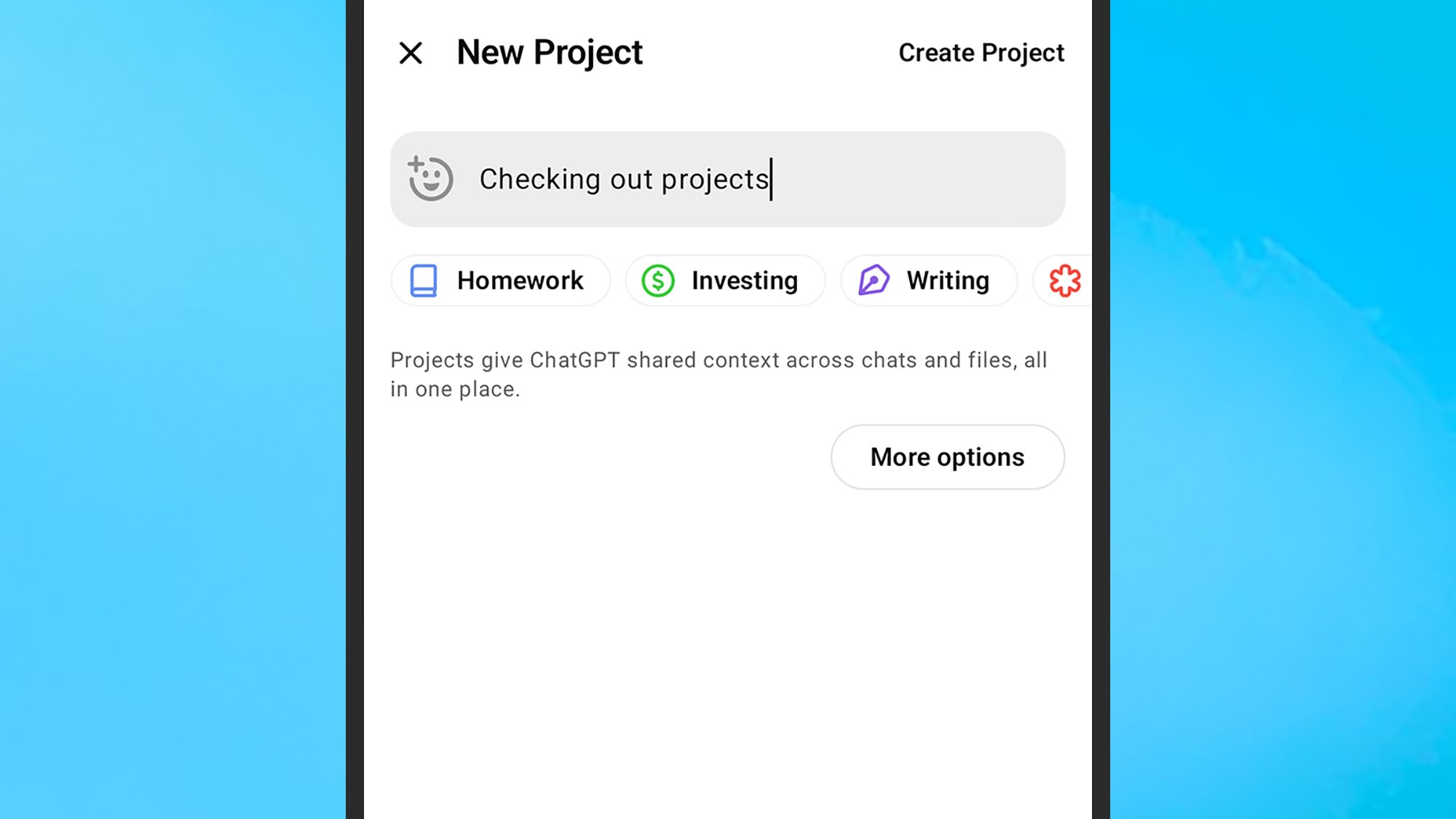
You can find your projects in the left-hand navigation pane on the web and on mobile. Click or tap on any project to open it, or choose New project to create a new one. You’ll need to give it a name (or pick one of the suggestions), and if you want, you can assign an emoji and a color too (which can help you pick out specific projects from the list as you add more and more).
The other customization option is picking how the Memory feature is handled. ChatGPT can remember everything you’ve said to stop you from repeating yourself, unless you turn the feature off. With projects, you can keep chat conversation history inside each project, or share it across other chats too (and vice versa)—and you can’t change this setting later, so choose carefully.
Creating a new project. Credit: Lifehacker
On mobile, you’ll be prompted to make this choice as the project is created, and on the web you can set this by clicking the gear icon on the new project dialog box. There’s no way to enable Memory for ChatGPT in general and turn it off for specific projects, or only have it enabled for one or more of your projects and not the rest of your account (head to the main ChatGPT settings screen for more details).
With all of that taken care of, your new project is created. Everything works more or less as it normally does, with all the usual features (such as image creation and web search) available. One difference is there’s a central file repository, accessible to all your project chats, which you can use in addition to uploading files for specific conversations—tap or click the Add files button in your project.
Use Projects inside ChatGPT
There’s not much of a learning curve with ChatGPT Projects, and you can get to them at any time from the left-hand navigation pane. I’ve found them helpful for times when I’m researching specific topics online (with some careful double-checking along the way), and I don’t want these conversations mixed in with everything else I’m using ChatGPT for.
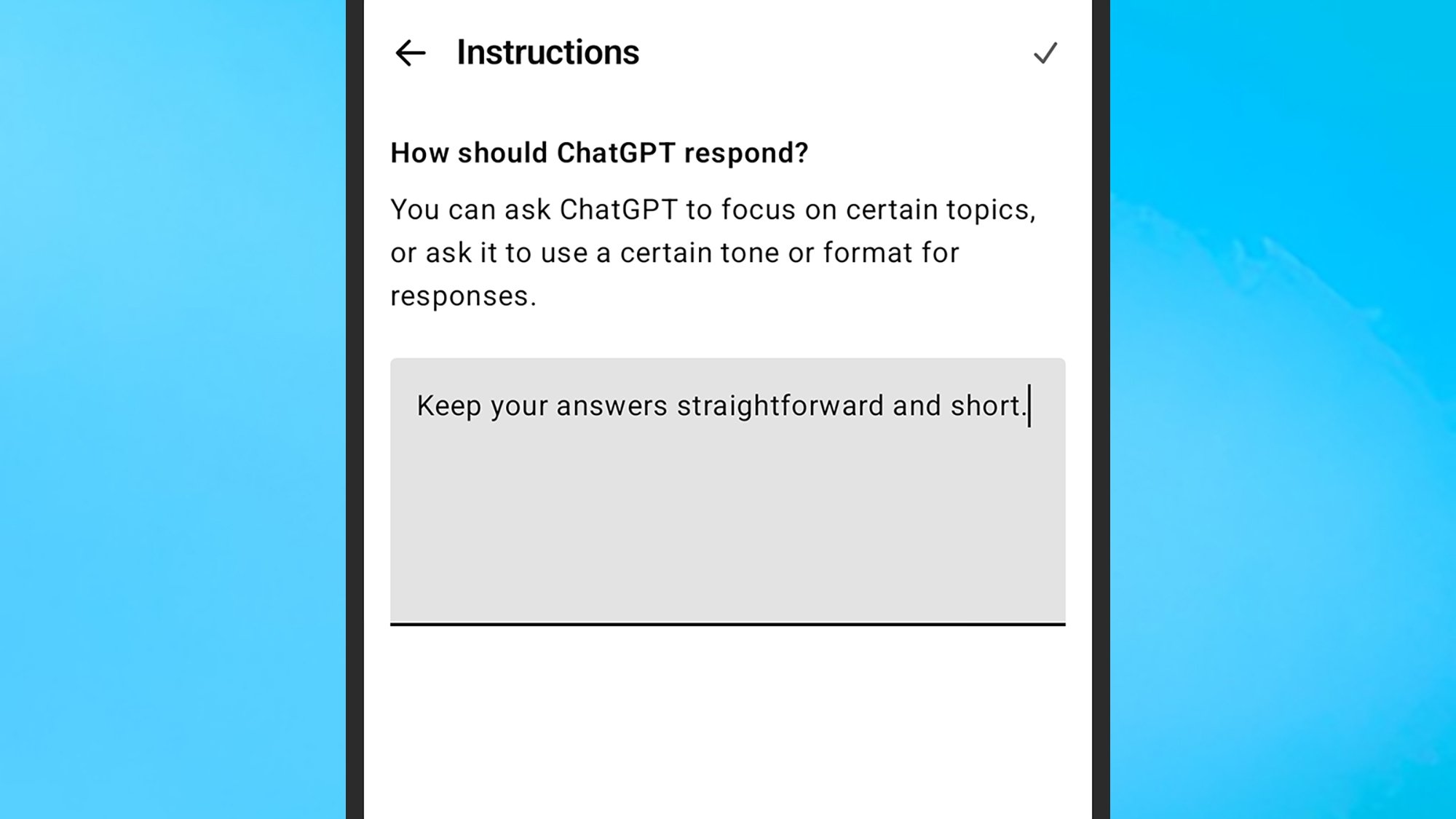
One of the useful features you get here is the ability to give ChatGPT specific instructions per project, which can be different to the instructions you’ve given it more generally. For example, you can tell it to adopt a certain tone or use a certain length of response for each different project, or even tell it to use a different language. From inside a project, click or tap the three dots, then choose Add instructions or Edit instructions.
Adding project instructions. Credit: Lifehacker
Via the same three-dot menu inside each project, you can edit the project name, emoji, and color, and delete the project (which wipes all chats and files inside it from existence). Each individual chat in your project comes with its own three-dot menu, which gives you access to the usual options for sharing, renaming, archiving, and deleting.
Once you start working with the Projects feature, the three-dot menu attached to each conversation has some extra options on it: You can move chats between projects, remove them from projects and put them in the main conversation list, or move them from the main list into a specific project.
Disclosure: Lifehacker’s parent company, Ziff Davis, filed a lawsuit against OpenAI in April, alleging it infringed Ziff Davis copyrights in training and operating its AI systems.
With the Linux 6.17 kernel there are some block allocation scalability improvements for EXT4 on top of other file-system enhancements with this new kernel and other new features. Linux 6.17 performance has been looking good and when drilling down to the EXT4 file-system performance, it’s looking extremely good. Here are some benchmarks of EXT4 on Linux 6.17 compared to the 6.15 and 6.16 stable kernels.
The government of Nepal is blocking commonly used social platforms including Facebook, X, Instagram, WeChat, Reddit and YouTube due to noncompliance with a new law requiring them to register with the government, The Associated Press reported. Five platforms including TikTok and Viber that did register in the country were exempted from the ban.
Social media companies were asked to provide a local contact, grievance handler and person responsible for self-regulation to avoid a shutdown and many apparently failed to do so. “Unregistered social media platforms will be deactivated today onwards,” ministry spokesperson Gajendra Kumar Thakur told Agence France Presse.
The Nepalese government recently introduced a directive forcing social media companies to ensure their platforms were well-managed, responsible and accountable. The government said the bill was an effort to curb online hate, rumors and cybercrime. However, it was widely criticized by opponents as a tool for censorship, with some groups calling it a violation of citizens’ basic rights.
“It is not wrong to regulate social media, but we first need to have the legal infrastructure to enforce it. A sudden closure like this is controlling,” said Digital Rights Nepal president Bhola Nath Dhungana. Another group, the Federation of Nepali Journalists said the measure “undermines press freedom and citizens’ right to information.” Also expressing opposition was the New York-based Committee to Protect Journalists.
Nepal is the latest government to tighten social media oversight, with countries including the US, Europe and Brazil having done so to varying degrees of late. Nepal’s neighbor India has also mandated local compliance officers and takedown mechanisms (and even threatened to jail Twitter employees at one point).
This article originally appeared on Engadget at https://www.engadget.com/social-media/nepal-blocks-most-social-media-sites-for-failing-to-register-with-the-government-131512017.html?src=rss
Uber’s Indian arm has started using its app to offer rideshare and delivery drivers the chance to make money by classifying data used by AI systems. From a report: Megha Yethadka, global head of Uber AI Solutions, revealed the new gigs in a Thursday LinkedIn post in which she said drivers sometimes have downtime during the day or might want to make some extra cash after hours. Yethadka said the work can involve reviewing photos, counting objects, classifying text, recording audio, or digitizing receipts.
She said the gigs are “Powering our enterprise customers worldwide for their gen AI models or consumer applications.” “Until now, these tasks were completed by independent contractors outside the app,” Yethadka wrote. “The early results are very promising, and we’re eager to scale this further.” In an accompanying video, she mentioned “worldwide” expansion for the offering. Prabhjeet Singh, Uber’s president for India and South Asia, said the gigs are available in 12 cities and that “tens of thousands of drivers” are already performing what Uber calls “digital tasks.”
Hot on the heels of launching its QuietComfort Ultra Earbunds (2nd Gen), which by the way we’re in the processing of reviewing, Bose today announced a second-generation update to its QuietComfort Ultra headphones with a refreshed design, even better active noise cancellation, and a few other nifty upgrades. Chief among them is the option to
Vex Mage, a fast-paced co-op arena shooter, arrives next month with a slightly staggered launch on Quest and Steam.
Developed by Nervous Systems, Vex Mage aims to deliver a high-speed shooter where you and up to two additional players fight through deadly arenas as enemies emerge from all sides. Announced last month alongside a demo launch, publisher Fast Travel Games revealed today that it’s launching this October on both platforms with an optional flatscreen mode on Steam.
0:00
/0:40
Playable alone or in co-op with an adaptive difficulty, Vex Mage sees you taking on hordes of enemies across this campaign, and elemental runes can be fused for spell-casting combat using each hand. Global leaderboards and cross-platform multiplayer are also supported.
While the single-player demo has been available on Meta Quest and Steam since last month’s announcement, Fast Travel Games confirmed that a co-op multiplayer demo will soon follow for PC VR players. This will launch on October 13 during the upcoming Steam Next Fest.
Vex Mage reaches Quest on October 16 for $9.99, followed by a Steam launch on October 21.
Bose announced a refresh of its QuietComfort Ultra Earbuds over the summer and now it’s back with an overhaul of its flagship noise-canceling headphones. The company has employed the second-generation moniker once again on the new QuietComfort Ultra Headphones, but this time the list of updates is a bit more substantial. Bose says it made tweaks to audio performance, active noise cancellation (ANC), battery life, power efficiency and more. Surprisingly, the company managed to make its upgrades without raising the price.
The biggest changes for the QC Ultra Headphones come in the sound department. First, lossless audio is now available over wired USB-C connection. Bose says you can expect 16-bit/44.1kHz or 48kHz playback and the setup doubles as a low-latency option for desktop or mobile gaming. When it comes to Immersive Audio — Bose’s take on spatial audio that doesn’t require specialized content — the company has added a new Cinema mode.
By “spatializing and balancing background sound with other audio effects,” Bose says it creates a “movie-like experience” thanks to a wider soundstage that’s placed in front of the listener. As a result, dialogue clarity is enhanced, which makes Cinema mode an option for podcasts and audiobooks in addition to movies and TV shows. For general listening, the company provides deeper bass at high volume, more natural sounding treble and consistent clarity even when the content is loud. It also reduced the sound created by the ANC tech so that it’s less apparent in quieter environments.
Bose
Speaking of ANC, Bose made the same update here that it did on the QC Ultra Earbuds. In Aware or transparency mode, the headphones better handle sudden changes in environmental noise (like sirens) with smoother changes to noise-canceling levels. On the QC Ultra Headphones, you can now disable ANC completely or manually adjust it to suit your needs.
Bose extended the battery life to 30 hours of ANC use or up to 45 hours with noise cancellation disabled. If you opt for that spatial Immersive Audio all the time, you can expect up to 24 hours of use now. If you run out of juice before you want to take a break, the QC Ultra Headphones can be charged during use via the USB-C port. To help you conserve battery power, the headphones will now enter a standby mode when you lay them flat or fold them into their case. And when the time comes to resume listening, improved wear detection automatically turns on the headphones when they’re placed on your head.
Lastly, you’ll notice that Bose opted for polished metal on the headband where the yokes used to have a flat finish. There are also two new colors: Driftwood Sand (tan) and Midnight Violet (purple).
The second-gen QuietComfort Ultra Headphones are available for preorder today from Bose in black, white, tan and violet color options. The price remains $449, same as the original version, and general availability is scheduled for October 2.
This article originally appeared on Engadget at https://www.engadget.com/audio/headphones/bose-overhauls-the-quietcomfort-ultra-headphones-with-lossless-audio-and-longer-battery-life-130018894.html?src=rss
Kirby is a uniquely wholesome Nintendo character, yet his games often have a quirky mean streak to them. They’re all about letting players absorb enemies and take on some wild powers to tear through vibrant stages with reckless abandon. That’s especially true with Kirby Air Riders, the long-awaited sequel to the GameCube classic racing game, Kirby Air Ride. Much like the original, it’s a fast-paced racing game starring Kirby and friends as they race through visually striking locales – it also happens to be one of the most chaotic racing games I’ve played in quite a while.
At PAX West 2025 in Seattle, I spent an hour playing Kirby Air Riders, reacquainting myself with the approachable yet surprisingly deep mechanics from the cult-favorite 2003 racing game. It’s certainly interesting to see game director Masuhiro Sakurai follow up Super Smash Bros. Ultimate with a Kirby racing game. Still, after playing Air Riders, this racer carries that similar ‘go-for-broke’ energy that runs deep in his previous games.
Like the original game, you race through a variety of stages inspired by the Kirby series. The sequel takes things further with an expanded roster of Kirby characters, such as Meta Knight and King Dedede, each with their own unique skills and stats as racers. While you race through traditional tracks, Air Riders – much like the original – also opens up free-for-all action stages and mini-games that test your skills in drifting, gliding, and the classic ability of sucking up to gain new powers.
Kirby Air Riders totally doubles down on what made the original so unique, and that’s what makes it such an incredibly bizarre take on a racing game. In many ways, Air Riders does to racing games what Smash Bros did for the fighting genre – injecting non-genre-conforming systems and concepts that may seem out of place for the type of game it wants to be.
However, playing Kirby Air Riders can take some getting used to, especially considering its fairly limited control scheme. Much like the original, acceleration happens automatically, and the game instead has you focus on managing movement and momentum with the control stick and a single button to engage boosts – and that’s all you need for controlling your chosen racer’s vehicle. But therein lies the nuance of playing; by managing momentum and speed, you can engage drifts and power spin attacks to overcome rivals on the track.
Nintendo
It pays to be aggressive in Kirby Air Riders, as you’ll gain speed by successfully landing attacks on enemies. A particular racer I used often was Return to Dream Land’s Magolor, who could sprout ground spikes after landing from jumps. The sequel even expands upon the offensive nature of Air Riders with a new special ability button, which activates character-specific attacks after filling a meter.
I was really taken aback by how fast and chaotic races can get, and I found myself getting caught off guard by how diabolical the other rivals can get, unleashing attacks and snatching victory in a pinch. In fact, I closed two races in 2nd place back-to-back in the final second due to King Dedede engaging their vehicle’s boosts at the right time. In that sense, it took me some time to come to grips with the game’s rapid pace and how quickly things can turn against you.
This was especially true with the returning City Trial mode, which is essentially Kirby Air Riders‘ take on the classic kart-racer battle mode in the vein of Mario Kart 64 or Twisted Metal. In City Trial, players and CPU characters enter a mad dash to collect power-ups and upgrade their vehicles in a large open area, which culminates in themed mini-games to decide the final winner.
It took me some time to understand the larger goal of City Trial, as it felt like getting swept up in a colorful mosh pit – one where other players can snatch your vehicles. This battle mode quickly becomes extremely hectic and the dynamic events lead to some truly bizarre scenarios, such as bombs raining down on the arena, which can send players scrambling. City Trial is a fun, mini-open-world to explore that features a set of secrets to find, and I really took a liking to just how much is packed into these events.
It took me some time to really get into the groove of Kirby Air Riders and its pretty ruthless approach to action-racing – and this was after spending 20 minutes running the generous tutorials that explained the systems at work. I still liked the sheer spectacle of it all.
Once I found my flow within the chaos, it really helped to bring Kirby Air Riders into focus for me, and I really appreciated the over-the-top spectacle that it is as a racing game. It’s a very different type of racing that sets itself apart from Mario Kart World and other games of its kind. In fact, there are aspects of Kirby Air Riders that I still don’t quite understand. OK with that because I just had so much fun trying to go with the flow.
Kirby Air Riders will be released on November 20, 2025 on the Nintendo Switch 2.
This article originally appeared on Engadget at https://www.engadget.com/gaming/nintendo/kirby-air-riders-hands-on-123040486.html?src=rss
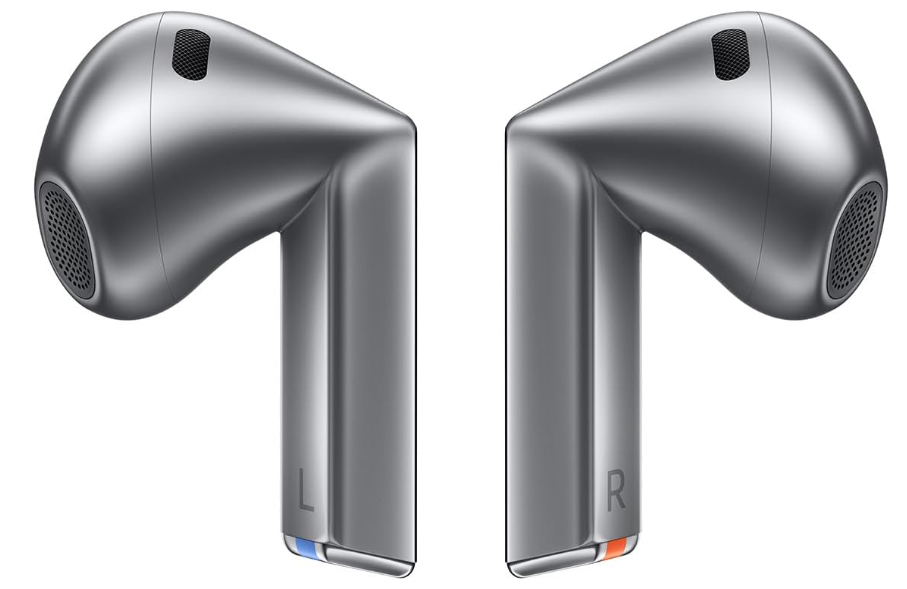
The Samsung Galaxy Buds 3 are $74.99 on Woot right now, which is the lowest tracked price so far, according to price trackers. On Amazon, the same pair will set you back $179, so this is a steep drop. On top of that, Samsung is covering these with a two-year manufacturer’s warranty, which adds some peace of mind when buying from a deal site. For a pair of earbuds that only launched a year ago, that’s a lot of savings to weigh against what you’re actually getting. If you’re considering more options, you might want to check out our roundup of the best wireless earbuds to buy in 2025.
Samsung introduced a new stem (or “Blade”) style with the Galaxy Buds 3. These triangular stems are more than just a visual refresh—they create two touch surfaces, making pinch and swipe gestures more precise and allowing playback and volume controls to feel smoother and easier to use. Available in silver or white, these earbuds also carry an IP57 rating, which means dust won’t be an issue, and they can handle rain, sweat, or even a quick dunk in water, as long as the charging case stays dry. Comfort is solid, and noise cancellation is better than expected for open-fit earbuds, although it won’t block sound as effectively as in-ear seal designs, notes this PCMag review.
Where the Buds 3 show their limitations is in sound detail and battery life. High frequencies can feel a little muted, and with just one 11mm driver per ear, they can’t quite match the depth of Samsung’s Buds 3 Pro or other dual-driver models. Battery life is another weak spot. With ANC on, you’re looking at about five hours on a charge and 19 more from the case, while turning ANC off stretches it to six hours plus 24 in the case. That’s serviceable, but not standout, especially when rivals in the same price range can push closer to eight or more hours with ANC enabled. Still, if you’re using a Samsung phone, you’ll unlock extras like 24-bit playback via Samsung’s Scalable Codec and features like Interpreter mode. Even without those perks, though, the Buds 3 are a compelling buy at this price, especially if you just want a comfortable, water-resistant pair with solid noise cancellation and a warranty to back them up.
Scammers are once again impersonating PayPal and trying to trick users into handing over access to their accounts and their cash. The latest email campaign alerts recipients to a new (fake) transaction and payment profile and urges them to take action to set up their account.
I have personally been targeted by this scam, which has some convincing elements and several red flags.
PayPal account profile scam
At first glance, this email seems like it really does come from PayPal: The sender address is service[at]paypal[dot]com, a legitimate PayPal domain, and paypal.com is listed in the signed-by field. However, scammers are able to spoof the email in the “From” field to make it look legitimate when it isn’t. The layout looks relatively similar to other PayPal emails, including the company’s branding and footer. If you hover over the links, including the call-to-action button to “set up your profile,” they appear to go to a real PayPal site.
Credit: Emily Long
After that, though, there’s almost nothing but red flags. The message isn’t addressed to me—instead of my name and email, it was sent to an address [at]truestate.org and with the salutation “Hello, receipt34532.” As Malwarebytes Labs points out, scammers will set up distribution lists to send phishing emails in bulk, so messages aren’t addressed to individual targets. Note, too, that legitimate businesses, including PayPal, will address you by your real name, not an alias or a generic greeting.
The rest of the message content doesn’t really make sense, and it doesn’t line up with the action you’re being urged to take. It also uses common scam tactics such as urgency (the link is set to expire in 24 hours) and eye-catching details (a large sum of money and vague reference to cryptocurrency). The phone number has also been reported to the Better Business Bureau as a PayPal scam.
Obviously, you shouldn’t engage with this, but if you did, you’d likely be prompted to add a secondary user to your PayPal account, which gives them access to issue payments using your information.
How to keep your PayPal account secure
At this point, it’s hard to trust any communication about account security or financial transactions. Scammers are able to spoof or impersonate real people and organizations in increasingly convincing ways, often supported by AI, so you shouldn’t believe an email (or phone call) just because the sender looks legitimate.
You should continue to be wary of messages that sound urgent or invoke strong emotions. Instead of engaging with these emails, texts, social media messages, and calls, delete them—and go directly to the website or app and log into your account to view any relevant alerts, or contact the company using information listed on official channels.
You can also search the phone number or email in the BBB’s Scam Tracker to see if anyone has reported it as fraudulent. And where possible, enable multi-factor authentication on your accounts as an extra layer of security.
In the harrowing aftermath of September 11, 2001, one of the most glaring and tragic failures identified was not of intelligence but of interoperability. The 9/11 Commission Report painstakingly detailed how different agencies, from the FAA to NORAD and the FBI, were unable to effectively share critical information in real-time because their systems couldn’t talk to each other. This digital Tower of Babel hampered the national response and highlighted a fundamental vulnerability. In the decades since, the challenge has only grown more complex. Now, a unique solution born from that crisis, the Syndeo Intelligent Gateway from Agile Empowerment Technologies, offers a powerful new approach to securely bridging these digital divides—not just for government, but for the corporate world as well.
A Cure for a Self-Inflicted Wound
The post-9/11 mandate was clear: connect our agencies. This led to the rise of initiatives under organizations like the Defense Information Systems Agency (DISA), tasked with creating a unified network for the Department of Defense and other federal bodies. The goal was noble and necessary: create a seamless flow of information to ensure a coordinated response to any threat. However, in solving one problem, DISA’s efforts inadvertently created a new can of worms: a vast, interconnected network with an exponentially larger attack surface.
Every new connection between once-siloed systems became a potential new backdoor for adversaries and a nightmare for access management. How do you grant a user from one agency access to a specific dataset in another without giving them the keys to the entire kingdom? This is the precise problem the Syndeo Intelligent Gateway was engineered to solve. It acts not just as a simple connector, but as a smart, security-first intermediary. It allows organizations to define granular, policy-based access rules, ensuring that users and systems only see the data they are explicitly authorized to see and nothing more. It’s the digital equivalent of a security checkpoint and escort, rather than just an open door.
Modernizing with a Scalpel, not a Sledgehammer
One of the biggest hurdles in government and large-scale enterprise IT is the albatross of legacy systems. Decades-old mainframes and databases, while often still functional, create massive interoperability headaches and are prohibitively expensive to replace all at once. The common approach is a slow, costly and often disruptive “rip and replace” strategy.
Syndeo offers a more intelligent path forward. By sitting in the middle and managing the complex, often bespoke connections between these aging systems and modern platforms, the gateway gathers invaluable data. It can effectively map out the entire interoperability landscape, identifying which legacy systems require the most complex, brittle and resource-intensive connections. This provides leadership with a data-driven roadmap for modernization. Instead of guessing, they can see precisely which systems are the biggest technological drags and prioritize their replacement for the most significant and economical impact.
A Bridge for Corporate Mergers
While Syndeo was forged in the crucible of national security, its applications in the commercial sector are profound, particularly in the chaotic world of mergers and acquisitions (M&A). When two large companies merge, they bring with them entirely different IT ecosystems—one might run on SAP, the other on Oracle; their HR systems, CRMs and financial platforms are rarely compatible. The process of integrating these systems typically takes years and costs millions, delaying the realization of merger synergies.
Syndeo can act as an instant bridge. Rather than embarking on a massive, multi-year integration project, the newly combined entity can use the gateway to connect their disparate systems seamlessly and securely on day one. This allows for the immediate sharing of critical business data, from sales pipelines to supply chain logistics, while the longer-term IT strategy is developed. It transforms a major M&A pain point from a roadblock into a manageable, phased process.
Preventing the Next Snowden
Perhaps Syndeo’s most critical feature is its ability to prevent the kind of catastrophic insider breach personified by Edward Snowden. The Snowden leaks were enabled not by a sophisticated hack, but by excessive and poorly audited access privileges. He was able to access and exfiltrate vast amounts of data because the systems had no effective way of enforcing “need-to-know” at a granular level or flagging anomalous data access patterns.
The Syndeo gateway is designed to thwart this very scenario. Its security model is built on a zero-trust foundation, meticulously controlling and logging every single data request and transaction that flows through it. Access can be restricted not just by user, but by time of day, location and the specific data fields being requested. An administrator attempting to download an entire database would trigger immediate alerts. This creates an auditable, enforceable security perimeter that can drastically reduce the risk of both malicious insider threats and external attacks.
Wrapping Up
The Syndeo Intelligent Gateway is a powerful reminder that true innovation often arises from profound necessity. Born from the need to solve the critical interoperability and security failures revealed by 9/11, it has evolved into a versatile tool for digital transformation. By enabling secure and intelligent connections between disparate systems, it offers a pragmatic path to modernizing legacy government IT, a powerful accelerator for corporate M&A and a robust defense against the kind of insider threats that have caused irreparable harm to national security. In a world of increasing digital complexity and ever-present threats, Syndeo provides a much-needed layer of secure, intelligent control.
This is a new series looking at the Volla Phone Quintus running Ubuntu Touch. This phone sports a powerful Mediatek Dimensity 7050 with 8 cores, 8GB of RAM and 256GB of storage. In this series I’m going to explore the phone, and in particular, focus on its operating system in detail. I’ll explore the things I love about Ubuntu Touch as well as things that could be improved.