A piece of cinematic history has found a new home, and a new record, in a galaxy very, very close by (sorry/not sorry we went there). The original dueling lightsaber prop used by Darth Vader in both “The Empire Strikes Back” and “Return of the Jedi” has sold for an astonishing $3,654,000 at auction, making it the most valuable Star Wars artifact
Real-time strategy games are undergoing a resurgence in the VR space. Can Iron Guard: Salvation capture the magic of classic RTS titles in a virtual environment?
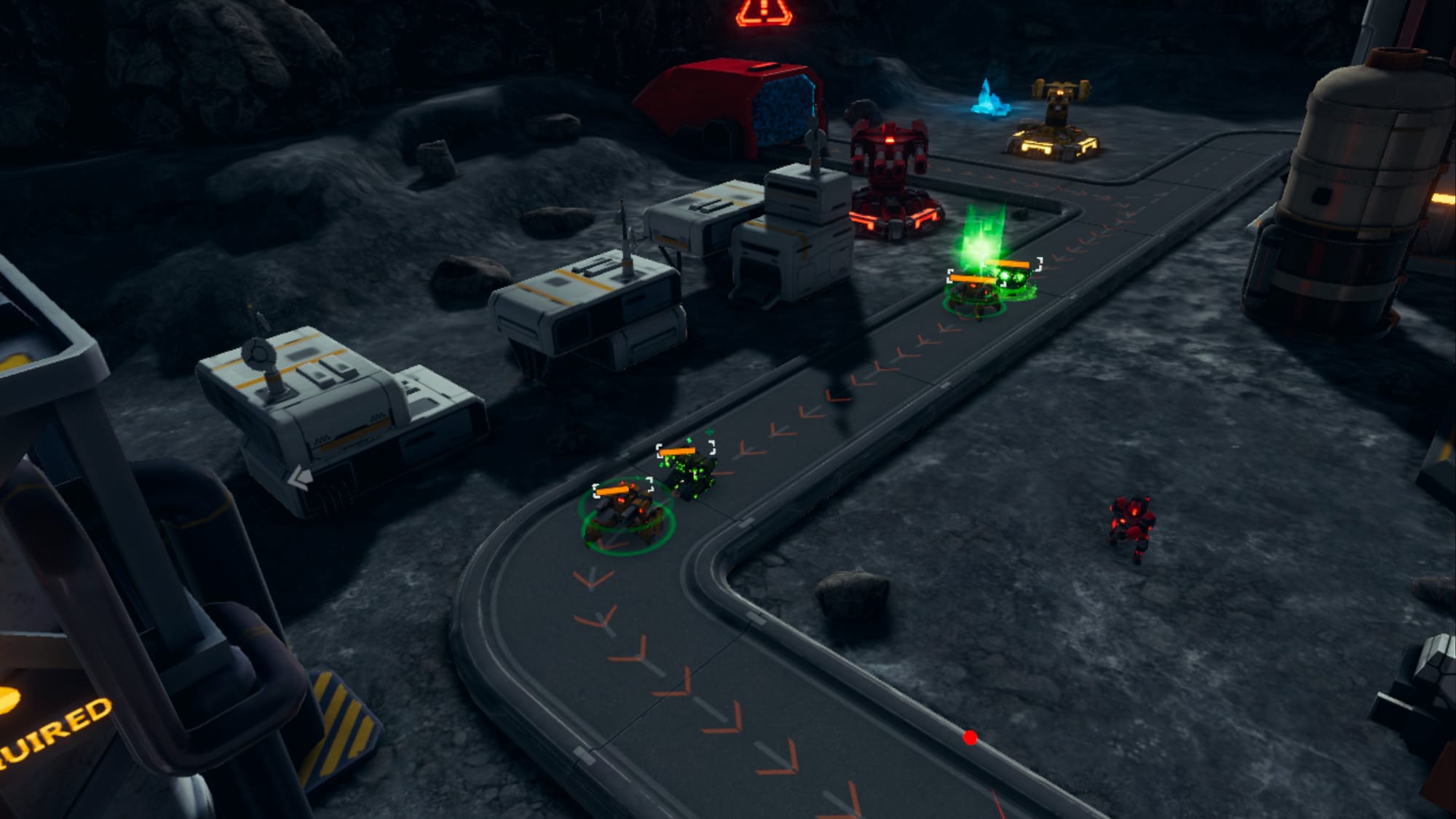
Iron Guard: Salvation is a follow-up to the previous entry in 2021, which was simply titled ‘Iron Guard.’ It’s a serviceable VR tower defense game, though developer Xlab Digital clearly had bigger plans for the sequel. It’s drawn inspiration from classic RTS games such as StarCraft and Command & Conquer to create what is aimed to be a more in-depth experience.
The Facts
What is it?: Tower defense and real-time strategy hybrid. Platforms: Quest (reviewed on Quest 3) Release Date: Out now (Quest), 2025 (PC VR, PS VR2, Pico) Developer/Publisher: Xlab Digital Price: $17.99
That inspiration is apparent from the moment you start playing Salvation. Your briefing is supplied by a gruff-voiced Space Marine type, and the voice that calls out warnings during a match is strikingly similar to the computerized voice from StarCraft. The rest of the sound design and music are fine, though sadly unmemorable.
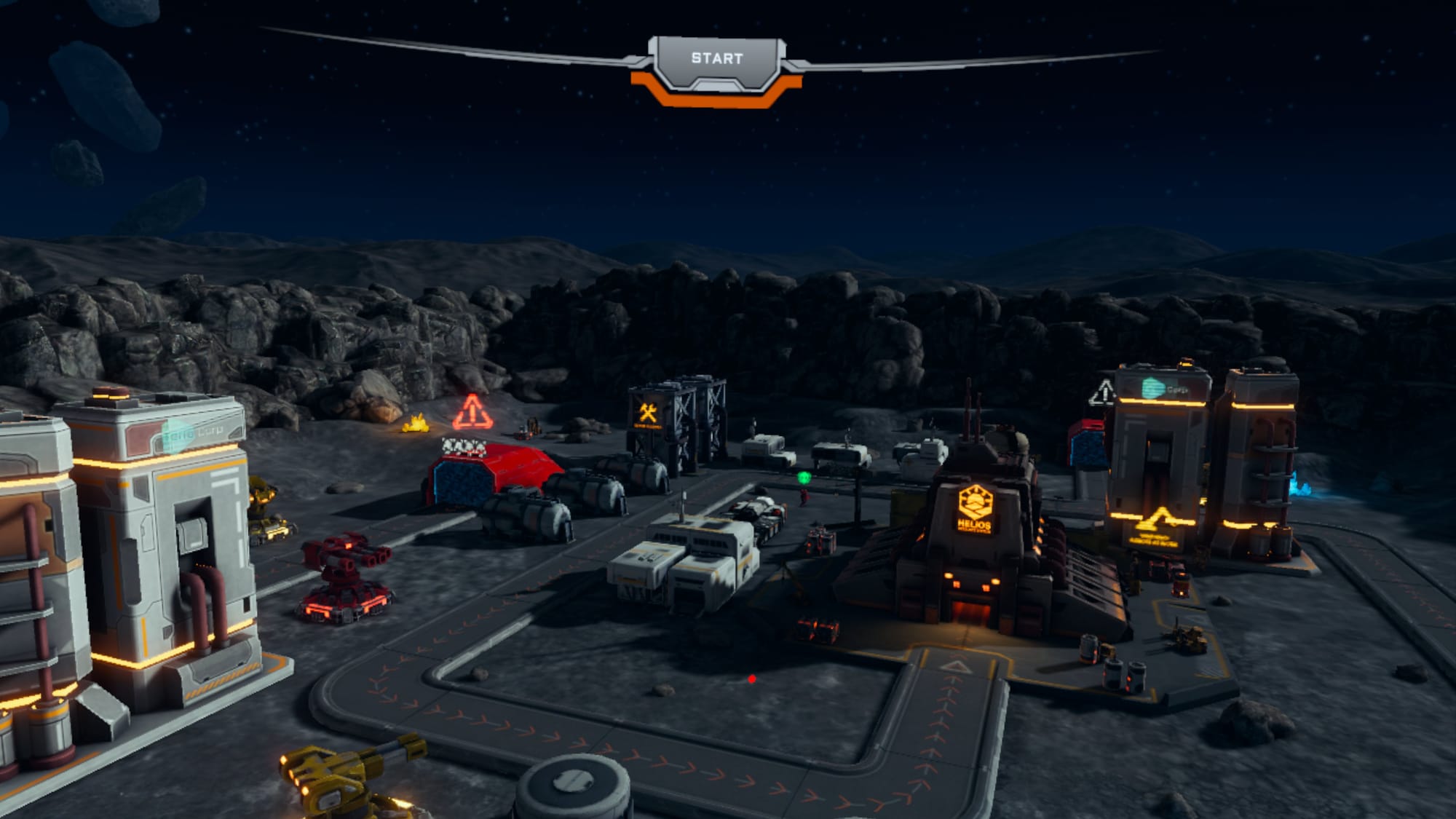
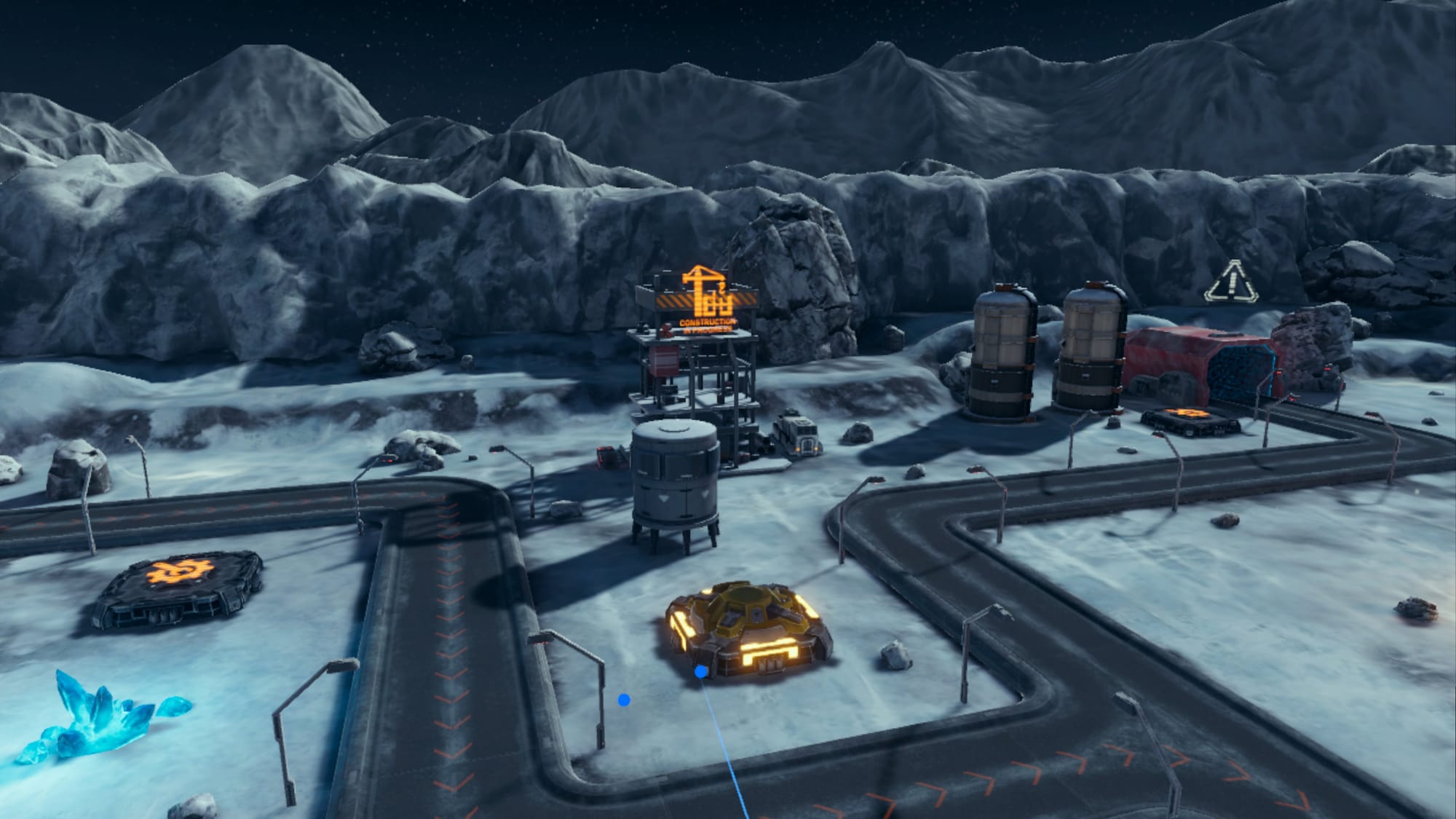
Aesthetically, Salvation packs a retro-futuristic feel. Since it is set in space on planets and moons like Pluto and Europa, the buildings and ships use a kind of 90s sci-fi style that at times reminds me of Colony Wars on the PS1. This is by no means a bad thing.
Despite the trappings of a sci-fi epic, there is little story here to speak of. What we are given is a generic plot involving robots going crazy and attacking people. The player – of course – is charged with stopping them. It’s not inspiring or original, which is disappointing. Especially when compared to the sprawling space opera that is StarCraft or the bonkers alternative history antics of the Command & Conquer games.
You’ll approach each map with a ‘god-view’ perspective, looking down over the battlefield. However, Iron Guard: Salvation also encourages you to get directly involved in the battle using a drone that is controlled by your right-hand controller.
This drone not only acts as your scout, but it also has weapons to directly engage the enemy. It even contains all the vital information, such as the health of the base, the number of resources you have, and the drone’s own energy level. Here we come to one of Iron Guard: Salvation’s major problems – to see any of this info, you either need to crane your head down to look or bring your arm up at an awkward angle. It isn’t comfortable.
Salvation’s gameplay owes much to classic tower defense. You can access several types of turrets that enable you to slow the enemy, fire artillery for widespread damage, and use plasma turrets to take out individual foes. These are mounted on platforms that can be conveniently moved mid-battle. This provides greater flexibility while keeping to the tower defense framework.
There’s welcome variety in these missions that avoids becoming repetitive survival tasks, including evacuation missions, mining challenges, and even boss encounters. Salvation’s RTS influences lie in the resource management for building and upgrading units. You need to master the usage of more powerful ‘Hero’ units.
Each of them – Graves, Irina, and Mitchell – all have special, unique abilities that require tactical use to achieve victory against incoming waves of robot enemies. From the orbital laser of Graves to the chemical warfare options offered by Mitchell, these abilities can be upgraded and modified using a skill tree, which forms a major part of game progression.
The developer is keeping the user interface as clean as possible, so there is no real HUD to speak of, leaving the drone as your only way to track these important numbers. It also introduces the issue of perspective. Is the player a godlike figure in the sky moving turrets and vehicles around like toys, or are they directly involved in the fight at ground level? I can’t help but feel that Xlab Digital needs to pick a lane and either put the player perspective at ground level or use the ‘military sand table’ approach used by many other RTS titles.
Iron Guard: Salvation’s roots are in tower defense games, despite the evident influence of RTS games. This does have something of a limiting factor. Many tower defense games are like puzzles; figure out what defenses to put where, and the level is solved.
One area where Salvation misses out compared to the RTS titles that inspired it is the lack of multiplayer. Many RTS games live far past their expected lifespan by virtue of community engagement. Without this multiplayer input, it’s hard to imagine returning to it time and again. Once the levels are ‘solved,’ there is very little else to do. Multiplayer would provide further life to this game.
To make sure I’m not missing something, I invited a friend who is a semi-professional StarCraft II player and content creator to take a look. He likewise believed the game would benefit from more of a strategic focus, where it is easier to adapt to things going wrong and come up with unique strategies. Presently, it feels more like a puzzle game than a true RTS experience. By removing the emphasis on tower defense and leaning further into the RTS mechanics, this could be improved.
Iron Guard: Salvation – Final Verdict
Iron Guard: Salvation offers more than a simple tower defense title in VR, but it’s not quite enough to make it a fully fledged RTS. There are good foundations here and welcome mission variety, but awkward design choices from Xlab Digital and a lack of depth are holding it back. Without any multiplayer options either, this hinders the game from living up to its full potential.
UploadVR uses a 5-Star rating system for our game reviews – you can read a breakdown of each star rating in our review guidelines.
Whether you’re running or lifting, it’s all too easy to overdo it during your workout. While I’m marathon training, 80% of my runs are much easier than you’d expect. Lately I’ve been a huge fan of how my Garmin Forerunner 165 (which I review here) helps me pace myself on these deliberately slower runs.
But you shouldn’t need a watch to be in touch with your body and know whether you’re pushing too hard (or not hard enough) during your workouts. There’s a simple solution that doesn’t require fancy gadgets or complex calculations: the talk test.
What is the talk test?
The talk test is exactly what it sounds like: Can you hold a conversation while exercising? This method uses your breathing patterns and ability to speak as indicators of how hard your body is working. The beauty of the talk test lies in its simplicity: no heart rate monitors, no complicated zones to memorize; just you and your ability to string words together.
Here’s how it breaks down:
Easy conversation: You can speak in full sentences without any trouble.
Somewhat breathless: You can speak, but in shorter phrases with some effort.
Very breathless: You can only manage a few words at a time.
Can’t speak: You’re breathing too hard to talk at all.
Your body’s ability to speak during exercise directly reflects how your cardiovascular and respiratory systems are handling the workload. As intensity increases and you cross into anaerobic territory (where your body can’t supply oxygen as efficiently), speaking becomes much more difficult. This is what makes the talk test so reliable—it’s based on your body’s natural physiological responses, not arbitrary numbers that might not match your individual fitness level.
How to use the talk test to find the right training intensity
Many beginners make the mistake of thinking every workout needs to leave them completely breathless. This “no pain, no gain” mentality often leads to burnout, injury, or simply giving up entirely. The talk test helps you avoid this trap by keeping most of your training at a sustainable intensity that you can maintain consistently over time.
Another common error is being too rigid about the test. Look, some days you might feel chatty at a pace that normally leaves you breathless. Other days, you might struggle to speak at what’s usually an easy pace. This is normal—factors like sleep, stress, weather, and hydration all affect how your body responds to exercise. If you’re new to exercise or feeling overwhelmed by conflicting advice about workout intensity, here are some straightforward ways to use the talk test:
Building fitness (aka 80% of your training). Most of your workouts should happen at a conversational pace. Yes, this might feel “too easy” at first, especially if you’re used to thinking that exercise has to be painful to be effective. You should be able to speak in short sentences, even if you need to take a breath between them. If you’re gasping for air or can only grunt responses, slow down.
Pushing your limits (20% of your training). Sometimes you’ll want to work harder—during interval training, hill climbs, or when you’re feeling strong. During these efforts, speaking should be difficult or even impossible. These harder efforts are important, but they shouldn’t make up the majority of your training time.
Just getting started. If you’re just starting out with an exercise routine and can only maintain conversational pace for 10 minutes, then that’s your starting point. Don’t worry about what others are doing or what a training plan says you “should” be able to handle. Your conversational pace will naturally get faster and last longer as your fitness improves.
Understanding conversational pace
When athletes talk about “conversational pace,” they’re referring to that sweet spot where you can still maintain a conversation, even if you’re working a bit harder than a leisurely stroll. This is where many people get confused, especially when they hear about training zones.
Conversational pace is not the same as “Zone 2” training, which you might have read about online. First of all, Zone 2 is overrated.While Zone 2 is typically described as an easy, aerobic base-building intensity, conversational pace actually includes most of Zone 3 as well. You might be breathing a bit harder and speaking in shorter sentences, but as long as you can still chat with a workout partner, you’re still within that conversational range.
Think of it this way: If you were walking with a friend and could easily discuss weekend plans, that’s easy conversational pace. If you were on a brisk hike and could still ask “How are you feeling?” and get a response, but longer conversations require some effort, that’s still conversational, just at the upper end.
The bottom line
The beauty of the talk test is that you can use it anywhere, anytime, with any type of exercise. Whether you’re walking, cycling, swimming, or dancing in your living room, your ability to speak (or in swimming’s case, how you feel you could speak if you weren’t underwater, I suppose) gives you immediate feedback about your effort level.
If you usually exercise alone, try the talk test by speaking out loud occasionally, singing along to music, or even just paying attention to your breathing rhythm. You’ll quickly develop a sense of what different intensities feel like for your body.
Remember, the goal isn’t to make exercise complicated—it’s to make it sustainable and effective. The talk test gives you a simple, reliable way to ensure you’re working at the right intensity for your goals, without needing to become an expert in heart rate zones. Start easy, stay conversational most of the time, and trust that consistency at the right intensity will take you much further than sporadic bursts of unsustainable effort.
Mahle has released an updated version of its X20 electric bike motor.
Here are three key things you need to know:
The X20 is Mahle’s flagship motor system, sitting above the X30 and X35.
Mahle has boosted the torque delivered by the X20 by 18 per cent, from 55Nm to 65Nm.
The peak power produced by the new X20 motor has increased from 250 watts to 275 watts.
The X20 is a drive system designed for premium and lightweight road, gravel and urban bikes that cut a similar silhouette to unassisted bikes.
The motor is housed in the hub of the rear wheel and, on the Orbea Gain pictured, a 350Wh battery is found in the down tube. Mahle says this provides a range of around 140km, and you can add a range extender to give you another 60km of motor-assisted pedal power.
With 275 watts of peak assistance, there’s plenty of power on tap for steep climbs. Beyond the increase in power, Mahle says one of the key features of the new X20 is the increase in torque, from 55Nm to 65Nm.
Torque plays an important role in how quickly an electric bike can deliver its power and, as a result, the acceleration, as well as its ability to handle a variety of terrain and surfaces, is ideal for e-gravel bikes.
Each bike manufacturer that works with Mahle defines specific motor mapping, so every bike brand has its own ‘riding DNA’ pre-configured from the factory. Riders can then fine-tune within the ranges defined by each brand via the app.
Mahle says the torque sensor is central to the natural pedaling feel: the more torque applied by the rider, the more assistance the system provides. The motor is also designed so that it doesn’t just cut out above 25km/h, it reduces resistance gradually until 27.5km/h, for a smoother ride, according to Mahle.
The total system – motor, torque system, a small 250Wh battery and a bike computer – weighs a claimed 3.2kg.
You can find the X20 on ebikes from mainstream brands including Van Rysel, Ribble, Rose, Ridley, 3T, Wilier, Bianchi and Mondraker – and smaller boutique brands such as Pashley, Origine, Conor and Nordic Bikes.
Of everything mentioned in the Fall 2025 “This Season on Zwift” Press Release, Zwift’s planned release of personalized recommendations carries the most potential as a game-changing feature. Launching this November, the promise of these AI-powered recommendations is that your fitness data and preferences can be used to serve up a recommended activity, any time you ask.
Let’s dive deeper into this, Zwift’s first public use of AI, and discuss planned features and future potential.
The Challenge: Maximizing Training and Fun for Everyone
Veteran Zwifters like myself are always asking for more. More roads, new features, fresh events. But do we consider what Zwift is like for someone new to the game and/or new to cycling?
It must be overwhelming.
There are thousands of events each week. Hundreds of routes you can ride and workouts to choose from. Thousands of riders milling about, around the clock.
In addition to all that content, numerous metrics are floating around that new cyclists don’t understand. What is FTP? Why does Companion say I’m “overreaching,” and how is that tied to my Training Score and Stress Score? What is XP, what are Drops, and do I care? What’s a good weekly goal? What’s an ideal cadence? Is my heart rate too high? How does Zwift Racing Score work? And let’s not even talk about zMAP and zFTP…
On top of all this, consider that, while every Zwifter wants to maximize their training results, everyone is targeting different results. Some are training for a particular outdoor event. Some want to lose weight. Some are just looking to maintain fitness until they can head outside again, while others are dedicated indoor riders training to win Zwift races. And fitness levels vary: while one rider might consider a full hour on the trainer to be a max effort, another may need two hours before it qualifies as a challenge.
A New Solution?
Zwift has built an ecosystem that can be leveraged to build cycling fitness efficiently and effectively, but many customers need help figuring out how to make that happen.
In the past, Zwifters who wanted to train with intentionality may have paid a cycling coach for a training plan, or dug in and done their own research, or perhaps asked a knowledgeable friend for advice. Zwift’s personalized recommendation engine will soon be the new option on this list. And it will be front and center in the game and Companion, a flagship feature continuously improving thanks to the constant influx of fresh data.
How It Works
No, I’m not going to dive into the depths of LLMs and other AI tech. But let’s talk about how Zwift’s personalized recommendations will work from the perspective of a common Zwifter.
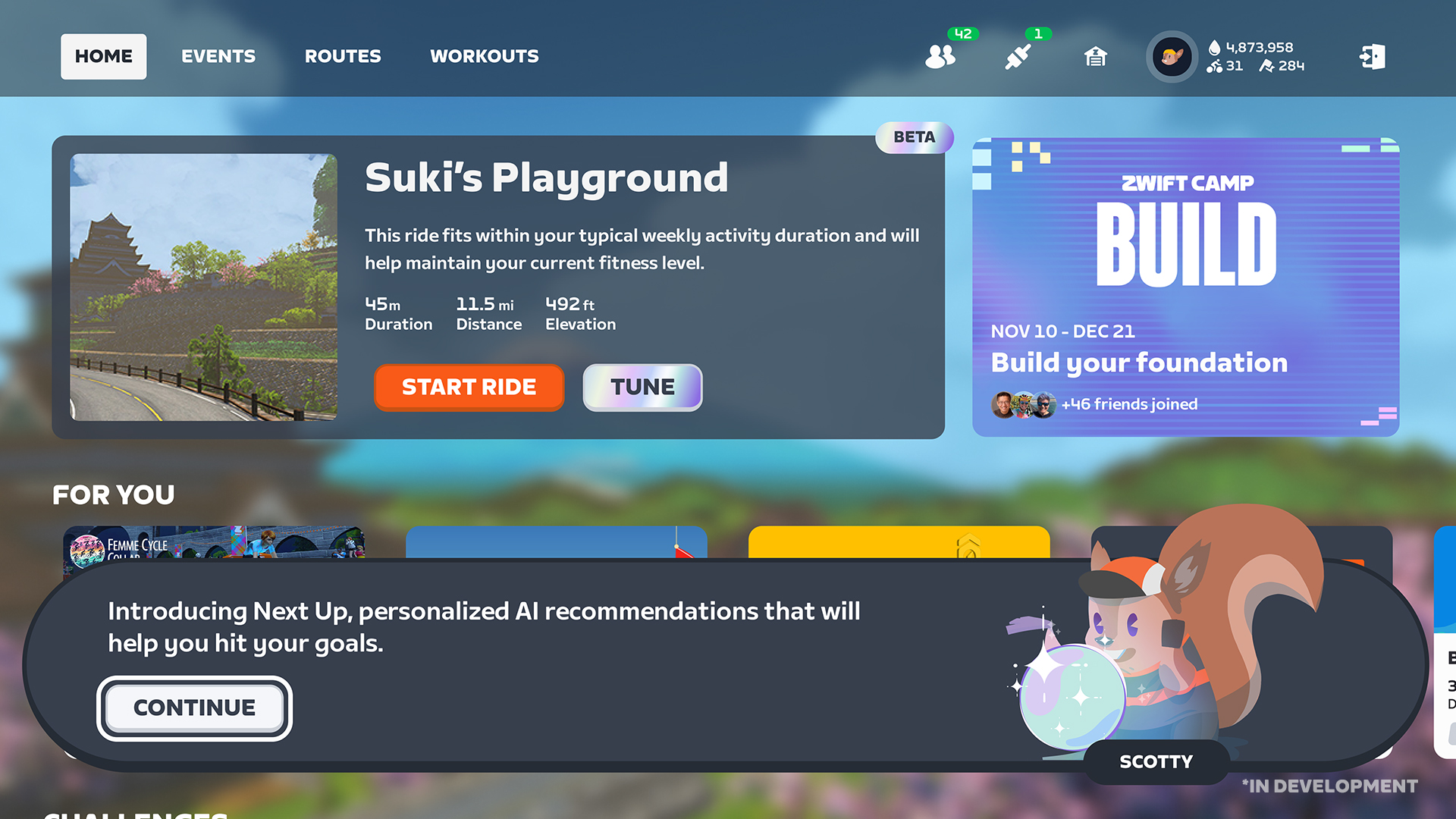
Here’s the first screenshot Zwift shared, showing the beta personalized recommendation block at the top-left of the homescreen:
A few things to note here:
The interface is very simple. If you want to take Zwift’s recommendation, just click “Start Ride” and go.
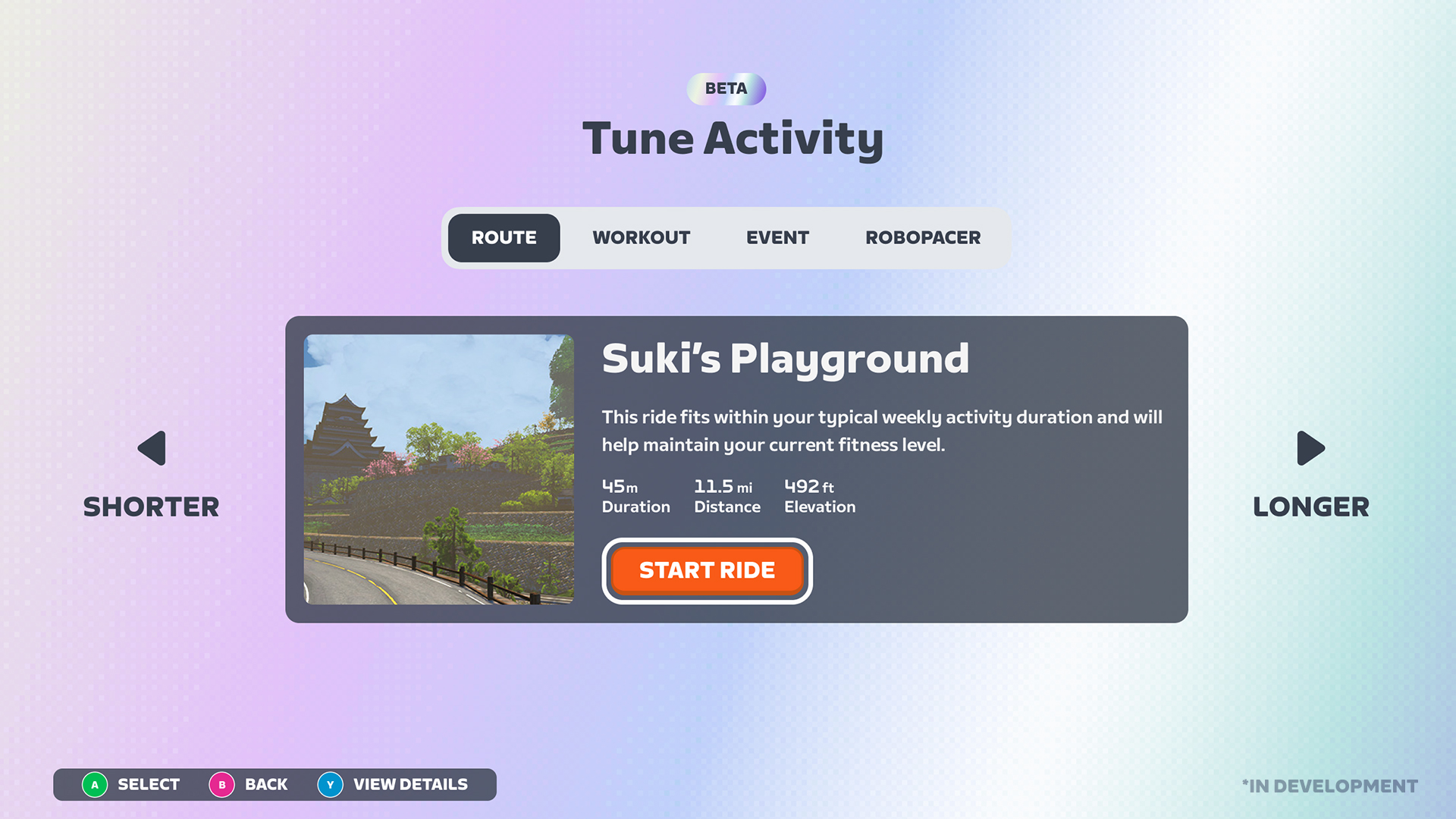
The card explains why this activity was recommended: “This ride fits within your typical weekly activity duration and will help maintain your current fitness level.”
It also notes the estimated activity duration, distance, and elevation.
If you want to do something different from what Zwift recommends, there’s a shiny “Tune” button, which takes you here:
The Tune screen gives you access to a vast array of recommendations, but through a very simple interface. There are just two things you can tune:
Activity Type: choose between riding a route, a workout, an event, or hopping into a RoboPacer group
Activity Length: click an arrow to generate a recommendation that is longer or shorter than what you’re currently seeing
The secret sauce, of course, is the recommendation engine at work behind the scenes. Since it is constantly learning from your activities and feedback, the recommendations it puts forth – regardless of the tuning options you choose – will be tailored to you. That means:
Routes you like to ride, and perhaps routes whose badges you haven’t yet earned, especially if they’re the type of route you typically ride
Workouts that help you improve a particular weakness, or work toward a fitness goal
Events you’ve enjoyed in the past, or similar events
Robopacer groups riding at the pace you would typically ride
Already working through a training plan, or working with a coach? No problem. Zwift tells me that, if you’re using a third-party workout provider like TrainerRoad, their workout of the day will take preference as the recommendation.
Companion and Game
Zwift says, “Personalized Recommendations will display both in the home screen in the main Zwift App and also in Zwift Companion.” That’s a very good thing, and I’m hoping the tuning tool is also available in Companion, so we can dial in our next activity before hopping on the bike.
Related New Features: Outdoor Connections and Goal Auto-Adjust
Zwift announced two features/changes rolling out in September that will work in tandem with personalized recommendations.
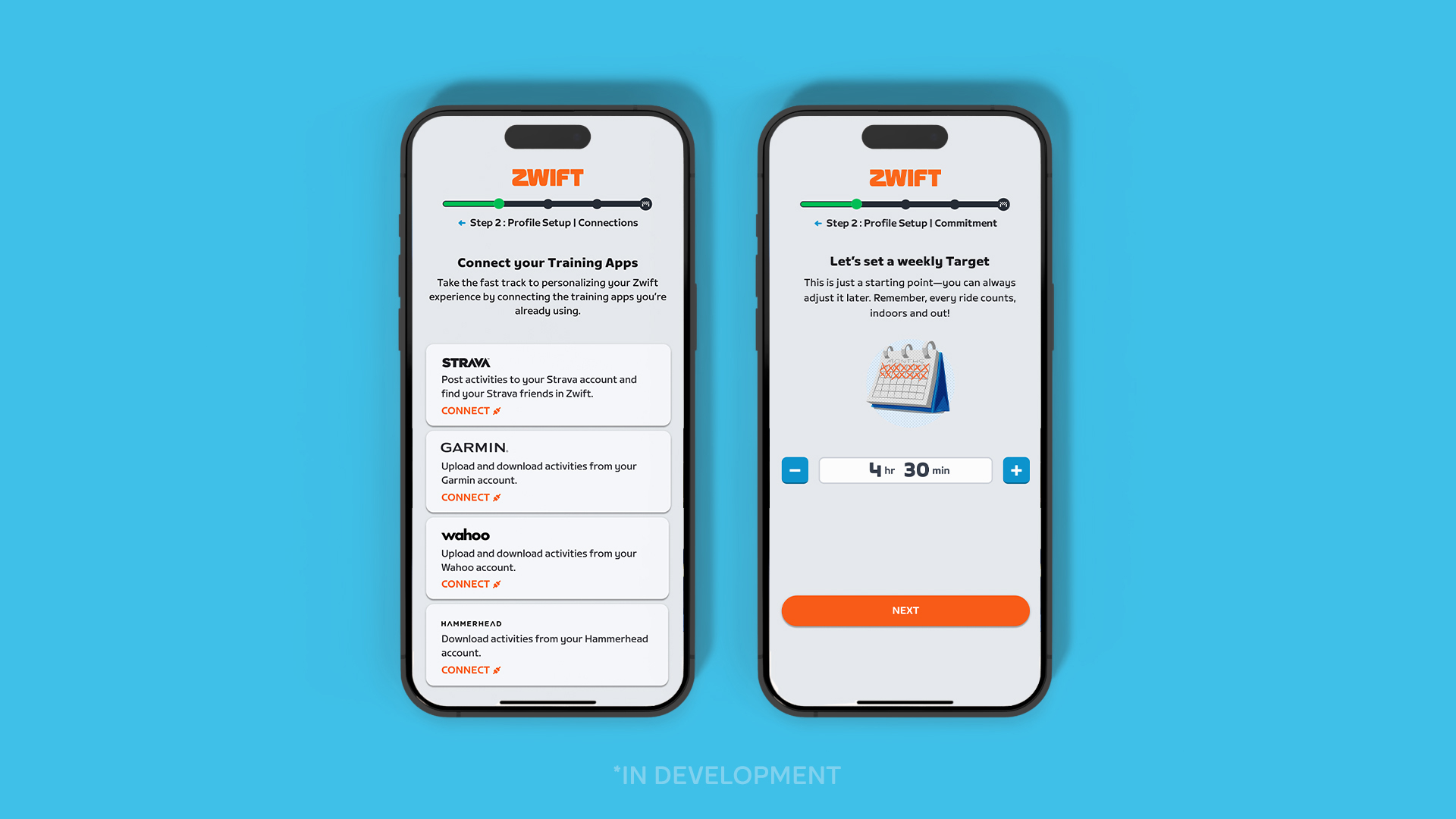
First, an improved onboarding experience will help more Zwifters hook up connections to Wahoo, Garmin, and Hammerhead so their outdoor rides are automatically brought into Zwift and included in key fitness metrics. Outdoor connections launched back in April 2025, and Zwift knows that if riders do significant training outdoors, Zwift needs to see those activities before providing helpful day-to-day recommendations.
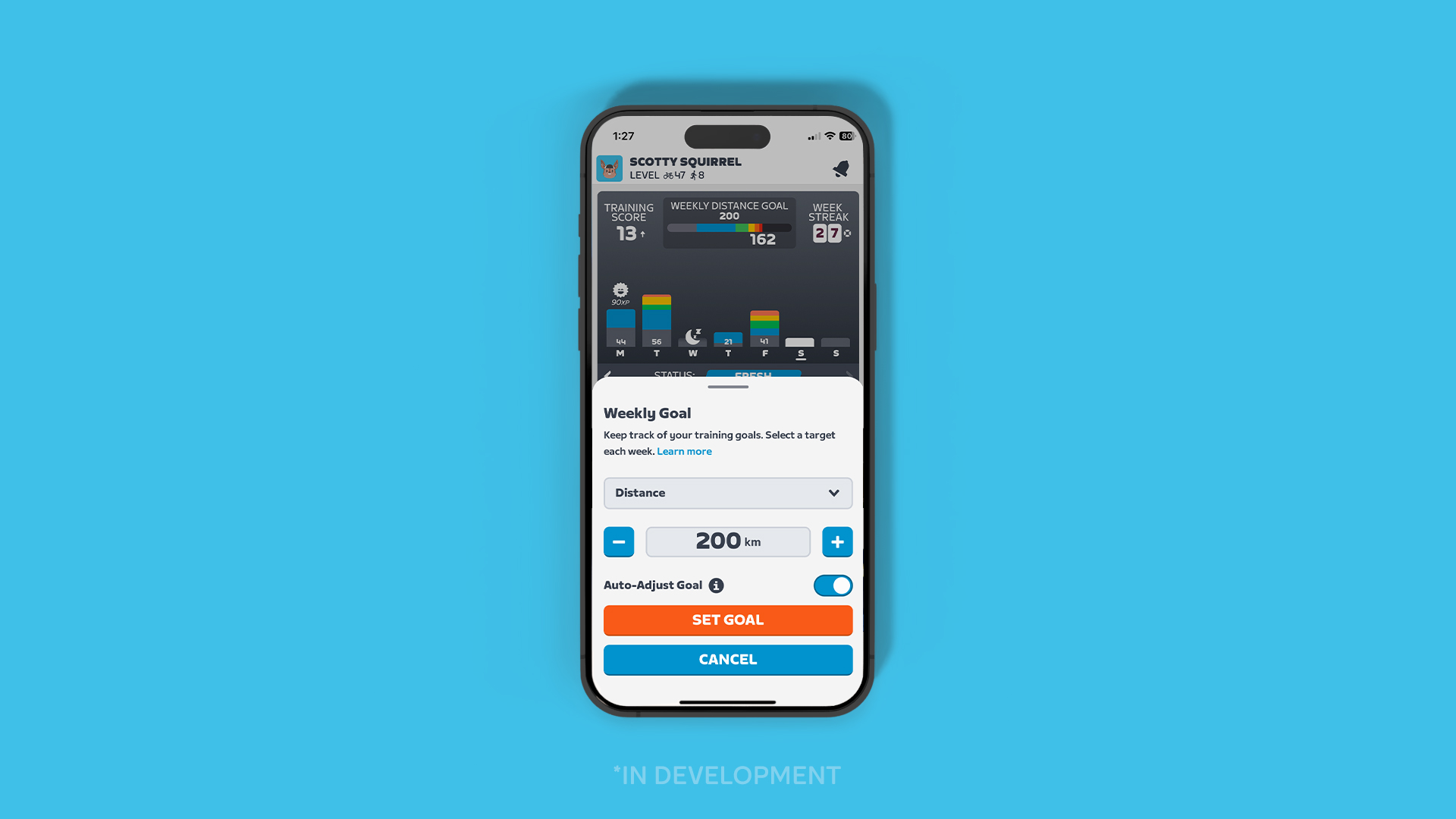
Second, Zwift is rolling out the option to have your weekly goal auto-adjust. Instead of having a static goal to hit a particular number for kilojoules, stress points, calories, distance, or time, Zwift will use your recent activities to “adjust your upcoming weekly target goal, helping to support your continual development.”
When?
Zwift says personalized recommendations will launch in November 2025.
Of course, the launch of this feature doesn’t mean the end of its development. That’s not how AI works! I’ve already heard many positive things from Zwift staffers who use the tool internally, and they’re promising that the recommendation engine will continue to improve as it receives feedback from an increasing number of users.
(You can improve an engine like this by changing the parameters used to make decisions, but you can also improve it by feeding in post-activity feedback, such as a star rating scale asking something like, “How well did this activity help you work toward your fitness goals?” Zwift will be doing both.)
What About Other Activities?
Ever since Zwift launched their Fitness Metrics in April, some Zwifters have been asking when running and other workout types will be included. This has been the only consistent complaint about Zwift’s fitness metrics, in fact.
It’s a fair question… because lots of Zwift riders don’t just ride. Many run, lift, ski, hike, swim… you get the picture.
For these athletes, Zwift’s Fitness Metrics, and therefore their personalized recommendations, may not prove useful until Zwift begins to support a wider variety of activities. And there are lots of activity types! As one reader commented recently, “After all, cycling is represented by about 8 of the ~180 activity profiles on a regular Garmin watch. In Strava, I believe cycling is 5-6 out of the 48 available activity types (but lots of activities there are logged under a false flag since the actual activity type is missing).”
Zwift has said they will support running in their Fitness Metrics, but they haven’t given an ETA. Hopefully they’ll figure out a way to do it sooner rather than later, and hopefully they’ll also figure out how to easily include other activity types.
Wrapping It Up
There are things about AI that concern me, such as search engines presenting AI-generated answers to questions and stealing traffic from actual content creators. (This impacts my bank account directly.) The unknowns of AI are even more concerning. Where will it all take us? What are the unintended consequences?
But using AI to deliver personalized recommendations? That’s a use case I can get behind. It’s been discussed for years, and some training platforms have actually done it. But if it can be done well by Zwift, in a way that leverages their massive community and content library, it will enhance the training of tens (hundreds?) of thousands of riders worldwide.
And that’s a big deal.
Your Thoughts
What do you think of Zwift’s plans to offer personalized recommendations? Share your thoughts below!
It has been a lot of fun over the past month looking at the performance of AMD’s Ryzen AI Max+ Strix Halo powering the Framework Desktop. The newest area being explored is how the upcoming Ubuntu 25.10 is looking compared to the current Ubuntu 25.04 release.
Yes folks, we’re well aware that the fall season doesn’t officially commence for a couple more weeks. But the school year is upon us, there’s a crispness to the air, and Alani Nu has been shipping its seasonal Witch’s Brew for a little while now (yum!). Oh, and the NFL season has begun too. So for all intents and purposes, fall is basically
Qualcomm’s driver-assistance system Snapdragon Ride Pilot will debut on the BMW iX3 electric SUV, offering hands-free highway driving, automatic lane changes and parking assistance. The jointly developed software stack announced today will be powered by Snapdragon Ride system-on-chips and will make its first formal appearance at IAA Mobility 2025.
Snapdragon Ride Pilot is a Level 2+ driver-assistance system, not self-driving, which means drivers will still be responsible for supervising the vehicle’s movements and paying attention to the road while these features are in use.
The software stack is structured into a series of layers that come together to power the autonomous features. The first is 360-degree perception, which uses a camera-based vision stack to detect objects, interpret traffic signs and provide parking assistance among other functions. An advanced context-aware driving layer uses a combination of rules-based and AI-based models to plan and predict behavior during complex driving scenarios.
The stack also uses what Qualcomm is calling a safety-first approach, which includes cybersecurity features and enforces strict global car safety rules like ISO’s Automotive Safety Integrity Levels and Functional Safety standards.
Snapdragon Ride Pilot is now being offered by Qualcomm to all global automakers, and the chipmaker says the system is already validated in 60 countries worldwide, with the aim of availability in more than 100 countries by 2026.
This new partnership is the latest high-tech product for cars from the semiconductor company. Last year they began working with Google on AI voice systems for vehicles. They have also worked with Volvo on the automaker’s infotainment systems.
Qualcomm is not the only player betting on self-driving, with companies like NVIDIA and Mobileye also developing chips and software to power advanced driver-assistance systems.
This article originally appeared on Engadget at https://www.engadget.com/transportation/evs/bmw-and-qualcomm-announce-jointly-developed-driver-assistance-system-144922600.html?src=rss
Like almost all human endeavors, open-source software development involves
a range of power dynamics. Companies, developers, and users are all
concerned with the power to influence the direction of the software — and,
often, to profit from it. At the 2025 Open
Source Summit Europe, Dawn Foster talked about how those dynamics can
play out, with an eye toward a couple of tactics — rug pulls and forks — that
are available to try to shift power in one direction or another.
AI agent system said to have found more than 100 zero-day flaws in production appsAI models get slammed for producing sloppy bug reports and burdening open source maintainers with hallucinated issues, but they also have the potential to transform application security through automation.…
An anonymous reader shares a report: Google’s CEO Sundar Pichai stood smiling in a leafy-green California garden in September 2020 and declared that the tech behemoth was entering the “most ambitious decade yet” in its climate action. “Today, I’m proud to announce that we intend to be the first major company to operate carbon free — 24 hours a day, seven days a week, 365 days a year,” he said, in a video announcement at the time.
Pichai added that he knew the “road ahead would not be easy,” but Google “aimed to prove that a carbon-free future is both possible and achievable fast enough to prevent the most dangerous impacts of climate change.” Five years on, just how hard Google’s “energy journey” would become is clear. In June, Google’s Sustainability website proudly boasted a headline pledge to achieve net-zero emissions by 2030. By July, that had all changed. An investigation by Canada’s National Observer has found that Google’s net-zero pledge has quietly been scrubbed, demoted from having its own section on the site to an entry in the appendices of the company’s sustainability report.
Ardent sky-watchers around the world are already preparing for this month’s total lunar eclipse, i.e. the Blood Moon, so don’t be left out of this family-friendly spectacle! The crimson eclipse is set to occur on the night of September 7 and into the early hours of September 8, especially for those living in certain parts of Asia, Australia,
We’re just days away from Apple’s September 9th iPhone 17 event, and the hype seems practically nonexistent. Did the many (many) leaks splash cold water on an enthusiasm, or are we just tired of annual iPhone events? In this episode, Deputy Editor Nathan Ingraham joins Devindra to discuss why even the rumored iPhone Air isn’t really tingling our gadget geek senses. Also, we dive into the final repercussions of the US. v. Google antitrust trial: Turns out Google doesn’t have to sell Chrome, or give up much of anything else.
The iPhone 17 is almost here, does anyone care? – 1:36
U.S. antitrust judge rules that Google won’t have to sell Chrome – 23:24
More Gemini-powered smart home products will be revealed on October 1 – 30:02
The Browser Company’s sale to Jira parent company Atlassian shows how hard upstart browsers have it – 33:15
After 15 years Instagram is finally getting an iPad app – 40:41
Dolby announces Dolby Vision 2 with a bunch of AI features that seem useful – 44:25
There’s AI in your pizza oven: Ooni’s Volt V2 will cook a pie in 90 seconds using machine learning – 49:02
Around Engadget: Remarkable Paper Pro Move, Acer Chromebook 14 Spin Plus, and Samsung Galaxy Tab S11 – 52:51
Working on – 56:55
Pop culture picks – 57:20
Credits
Hosts: Devindra Hardawar Guest: Nathan Ingraham Producer: Ben Ellman Music: Dale North and Terrence O’Brien
This article originally appeared on Engadget at https://www.engadget.com/mobile/smartphones/engadget-podcast-the-curious-calm-before-the-iphone-17-storm-143000763.html?src=rss
Amazon’s Project Kuiper has landed its first airline deal with JetBlue and plans to offer satellite-powered in-flight Wi-Fi starting in 2027. The Verge reports: Yesterday, Amazon’s Panos Panay showed off a speed test using an “enterprise-grade customer terminal” (aka, dish) to achieve a download speed of just over a gigabit. Fine, but we’ll have to wait to see how it performs once individuals using consumer dishes at scale. Amazon says the first customers will start using the service this year, ahead of a broader rollout in 2026.
Project Kuiper-powered Wi-Fi will be available on “select” aircraft initially. Amazon says its satellites will provide lower latency and “more reliable service” for passengers, as they orbit between 367 and 391 miles above Earth — far closer than the geostationary satellites that orbit around 22,369 miles above the planet. Amazon has also struck a deal with Airbus to build Project Kuiper’s satellite internet service into its aircraft.
An anonymous reader quotes a report from The Guardian: Fine-particulate air pollution can drive devastating forms of dementia by triggering the formation of toxic clumps of protein that destroy nerve cells as they spread through the brain, research suggests. Exposure to the airborne particles causes proteins in the brain to misfold into the clumps, which are hallmarks of Lewy body dementia, the second most common form of dementia after Alzheimer’s disease. The finding has “profound implications” for preventing the neurodegenerative disorder, which affects millions worldwide, with scientists calling for a concerted effort to improve air quality by cutting emissions from industrial activity and vehicle exhausts, improving wildfire management and reducing wood burning in homes.
The researchers began by analyzing hospital records of the 56.5 million US Medicare patients. They looked at those who were admitted for the first time between 2000 and 2014 with the protein damage. Armed with the patients’ zip codes, the scientists estimated their long-term exposure to PM2.5 pollution, airborne particles that are smaller than 2.5 thousandths of a millimeter. These can be inhaled deep into the lungs and are found in the bloodstream, brain and other organs. They found that long-term exposure to PM2.5 raised the risk of Lewy body dementia, but had less of an impact on rates of another neurodegenerative brain disease that is not driven by the toxic proteins. Lewy bodies are made from a protein called alpha-synuclein. The protein is crucial for healthy brain functioning, but can misfold in various ways to produce different kinds of harmful Lewy bodies. These can kill nerve cells and cause devastating disease by spreading through the brain.
To see if air pollution could trigger Lewy bodies, the team exposed mice to PM2.5 pollution every other day for 10 months. Some were normal mice, but others were genetically modified to prevent them making alpha-synuclein. The results were striking: in normal mice, nerve cells died off, leading to brain shrinkage and cognitive decline. The genetically modified mice were largely unaffected. Further work in mice showed that PM2.5 pollution drove the formation of aggressive, resilient and toxic clumps of alpha-synuclein clumps that looked very similar to Lewy bodies in humans. Although the work is in mice, the findings are considered compelling evidence. The work has been published in the journal Science.
On a random Saturday in August, I became the omnipotent caretaker of a newly formed planet, one born, according to the lore, from humankind’s collective love of Tamagotchis past and present. An egg hatched and a planet sprang forth. Then another egg hatched down on the surface of that planet and a critter sprang forth. In the few weeks since, I’ve raised half a dozen more creatures across three different virtual habitats, slowly but surely turning my planet into a bustling hub of adorable alien life.
Whereas previous Tamagotchi devices felt like they bestowed a personal challenge on players to keep individual characters alive and in their care as long as possible, Tamagotchi Paradise places more of an emphasis on populating, rewarding you for nurturing a revolving door of new characters that you will ultimately release to the peaceful wild. In a sense, Tamagotchi Paradise completely reimagines the classic toy not as a pet-keeping experience, but something more akin to wildlife conservation. It’s really cool.
Tamagotchi Paradise also introduces a new egg design, with a dial sticking out that has a stopwatch-like button. It’s another hefty device and brings back AAA batteries instead of charging via USB-C. The top of the plastic shell flips open to reveal a docking port (a throwback to design from the ’90s), where you can physically connect another Tamagotchi Paradise. And the updates don’t stop there, since the whole UI has been overhauled. It is a lot of change all at once, and some parts work better than others. I expect this to be a polarizing one among Tamagotchi fans, and a cursory glance at some of the online discussions would suggest that’s already the case — but consider me team Paradise. I am super into it.
The dial
The dial is one of the biggest new features of Tamagotchi Paradise. Its main purpose is to let you zoom into the planet to see all the goings-on there, but it can also be used to scroll through menu options and has a role in some of the games. While it was very exciting to play with for the first few days, the novelty has largely worn off in the month since, and it’s just a normal part of using the device now. It does feel nice to spin and click the dial, and I appreciate that as a person who likes to fidget with things. But frankly, it was just a relief to find that it doesn’t suck.
After the frustration of the flat, not-button buttons on Tamagotchi Pix, I was a bit nervous that the dial would end up being another feature that’s more gimmicky than practical, and cause a bunch of headaches. Thankfully, that’s not how things have panned out. The dial took a little getting used to, particularly when figuring out how far to spin it to get where I’m trying to go (planet level, the surface, one-on-one with your Tama and into the cells), but now it’s smooth sailing.
Cheyenne MacDonald for Engadget
In at least one way, it’s even an improvement. Thanks to the dial, you can finally go back to a menu icon or number/letter you accidentally skipped over, as opposed to pressing through all the rest of the options to get around to the beginning again. It is also still possible to do everything one-handed, though less comfortably than when all you had to deal with were three buttons.
Mostly, the dial just works as it’s intended to, and I certainly don’t hate the touch of whimsy it adds to my interactions with the device.
Caretaking
Tamagotchi Paradise takes a more gamified approach to raising Tamas than other models, and this makes for slow going when you first get started, as much of what it offers is locked away until you’ve leveled-up your planet by reaching certain milestones. You’ll have some games to begin with, both from the Mini Games section (to earn Gotchi Points) and the “Play” menu (to raise your Tama’s happiness), as well as some shopping options, but the bulk of the content is initially walled off.
Regardless of whether you have a Land, Sky or Water device, you’ll eventually have access to all three of those environments and the characters they can support. These areas exist as different “Fields” on your Tamagotchi planet. But you won’t have all three Fields unlocked until you hit Level 6, and that requires raising two Tamas to adulthood. Since that process takes a few days each time, it could be almost a week before you’re there.
Once you reach Level 10, at which point you’re onto your sixth adult Tama, everything is available. It’s a bit of a grind, and a slow one at that, but I actually enjoyed how it spaced out the discovery of new things. It reminded me a bit of the Tamagotchi On’s unlockable areas.
But this leveling system also led me to do things differently than I normally would. On all of the other recent color Tamagotchis, which let you continue caring for characters indefinitely as long as you don’t kill them, I’ll usually raise each one with the intention of hanging onto it for as long as feels right, be it weeks or months or more. Tamagotchi Paradise, on the other hand, had me raising new characters back to back to back. Only now that I’ve crossed Level 10 have I started aiming for characters that I feel like I’ll want to sit with for a while.
Despite the high turnaround, I’ve found Tamagotchi Paradise to be perhaps the least needy of all Tamagotchi models I’ve run. Beyond the baby stage, it doesn’t feel like I have to be super attentive to keep my Tama alive and happy. That might be a point against it for those who want something more actively demanding, but for me, the relatively easygoing nature of this one has been pretty refreshing.
The way Tamagotchi Paradise handles food gathering and feeding feels more forgiving, too. It’s very easy to feed your Tama for free (without making it choke down something it doesn’t like). You can send your Tamas on daily egg hunts to find food for themselves. You can buy them pre-made dishes from the shop, but you can also use the ingredients they’ve foraged to cook a meal that will fill them up and leave them happy. Or, they can just consume the raw ingredients. It is great, as is the fact that you can finally have more than three of a given food item in your inventory at a time.
Of course, the most important thing about Tamagotchi is the characters you can raise, and Paradise has a lot working in its favor on that front. Fans will recognize several beloved characters from older devices, but there are also a ton we’ve never seen before, and they’re so good. Even the one that’s just a straight-up rock is so cute it makes me want to scream.
And for the first time, the different care factors — which determine what adult you’ll end up with — are visualized, with icons to tell you exactly how many care mistakes you’ve made, how many times you’ve filled the happiness meter and more. It takes out the guesswork, not to mention the potential disappointment of not getting the character you wanted and not being entirely sure why.
Cheyenne MacDonald for Engadget
When you’re ready to move on and hatch another egg, you must release your current Tama to the Field, where it’ll remain in the background until the space fills up. You can have four released Tamas per Field. After that, the older ones will disappear and be replaced one by one by the new entrants.
It is a joy that my old Tamas will stick around after their time, and that I get to see them playing in the virtual wild. But this also brings me to my biggest gripe with Tamagotchi Paradise. While your three Fields may be brimming with Tamas, you can only have one active character to take care of at a time. This feels like a huge missed opportunity, and it was a bit of a letdown to find out after thinking — based on the promo materials — that Tamagotchi Paradise would allow you to simultaneously raise and care for a character in each Field. If that had been true, this would have been the ultimate Tamagotchi, or close to it.
I would have also liked to see more complex gene mixing like we’ve had on other devices, where you could breed two characters to create offspring that were either a delightful or mildly disturbing amalgamation of the parents’ traits. Gene mixing on Tamagotchi Paradise only goes as far as body color and eye design, which are then slapped onto the body of one of the existing characters from the pair. It’s still making for some fun results, but I wish it went a bit further into mad scientist territory.
Customization of the Tamas themselves is pretty limited. You can’t name them. You can dress up their environment with decorative items and you can accessorize the planet, but you can’t dress up the Tamas. You can, however, change the color and mood of your characters by buying certain snack items with Gotchi Points, which I really like. Doing this helped me create a perfect pink and yellow version of the adorably derpy Elizardotchi, one of my favorite new characters.
Is it worth it?
Tamagotchi Paradise has a lot going on. It contains a decent amount of games, and they’re good ones, with a mix of old and new. All of the Mini Games have multiple difficulty options, so you can up the challenge a bit if you so wish. Setting the game to a harder mode will make your potential reward of Gotchi Points higher, which is always a plus.
Every time you harvest enough poop to fuel a rocket (yes, that’s a thing), you can travel to different themed Tamagotchi planets. There are seven other worlds to visit, and on each you’ll be gifted a couple of special items. While it would have been better if these areas offered a little more to do, like a themed game and a shop, it’s still a nice way to keep unlocking new items for a while.
There are emergency events that will pop up out of nowhere, briefly upping the stakes. Miss the alert and your planet will get pummeled by meteorites or stampeding birds. In contrast to the overall chillness of the game otherwise, these emergencies make for some real heart-pounding excitement. I love it — even if I felt so bad when I saw the sad, beat-up state of my little Tama after the Dododotchi herd blew through.
Paradise also assigns you roughly two dozen “missions” to complete, which are achievements for succeeding at different tasks a certain number of times, like cleaning 500 poops. Similar to the care icons we saw on Tamagotchi Uni, these give you something to keep working toward even after you’ve unlocked everything the device has to offer. You can even be a completionist about Tamagotchi.
Cheyenne MacDonald for Engadget
The Connection feature, which requires a second device, is a fun way to swap items and experiment with gene mixing, or just observe how two Tamas will interact. And while there’s no Wi-Fi connectivity on this device, you can still get new items in other ways, from off-device to using download codes. The official Tamagotchi website has already released a few of these, and considering we’ve gotten two years of continued new material for Tamagotchi Uni, I’m hoping to see the same for Paradise.
With Tamagotchi Paradise also came Lab Tama, or in-store installations where fans can access exclusive games and items. These don’t seem to be particularly widespread, though, so that unfortunately seems like an experience most Paradise owners won’t get to take part in. (To the heroes who post these download codes online, thank you for your service).
All in all, Tamagotchi Paradise feels fuller than 2023’s Uni, especially as the latter existed at its launch before all the downloadable content started coming in. At $45 (if you can find it in stock and at retail price), Tamagotchi Paradise is also less expensive in the US than the Uni, Pix and On, which is a surprising but welcome development. There’s a lot of fun to be had with this one, so long as you’re open to a little (okay, a lot of) change.
This article originally appeared on Engadget at https://www.engadget.com/gaming/tamagotchi-paradise-trades-stressful-virtual-pet-parenting-for-nature-and-tranquility-130049511.html?src=rss
More PC gaming handhelds based on AMD’s Strix Halo silicon are coming, including the first one to flex a powerful Ryzen AI Max+ 395 chip. Of course, we knew this already because GamePad Digital (GPD) had teased its upcoming Win 5 handheld kitted with AMD’s flagship Strix Halo system-on-chip (SoC), but now we have a few more details to share.