Samsung Preps iPhone-Style Spatial Videos & Photos for “Galaxy XR Headset”, Leak Suggests

A new feature has leaked to some Samsung smartphones which is expected to bring the ability to capture 3D images and videos specifically for “Galaxy XR headsets,” SamMobile has discovered.

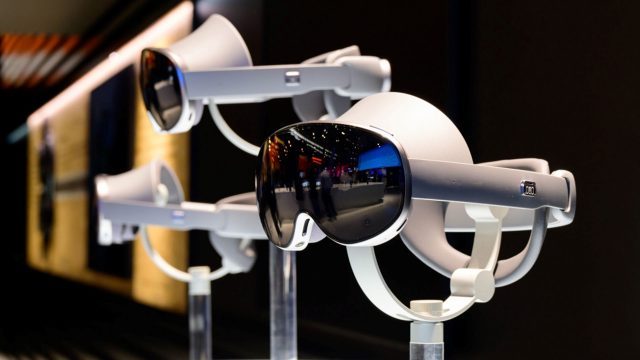
Samsung revealed its forthcoming XR headset, codenamed ‘Project Moohan’ (Korean for ‘Infinite’), late last year, which is slated to bring competition to Apple Vision Pro sometime later this year.

When, how much, or even the mixed reality headset’s official named are all still a mystery, however a recent feature leak uncovered by SamMobile’s Asif Iqbal Shaik reveals Samsung smartphones could soon be able to capture 3D photos and video—just like iPhone does for Vision Pro.
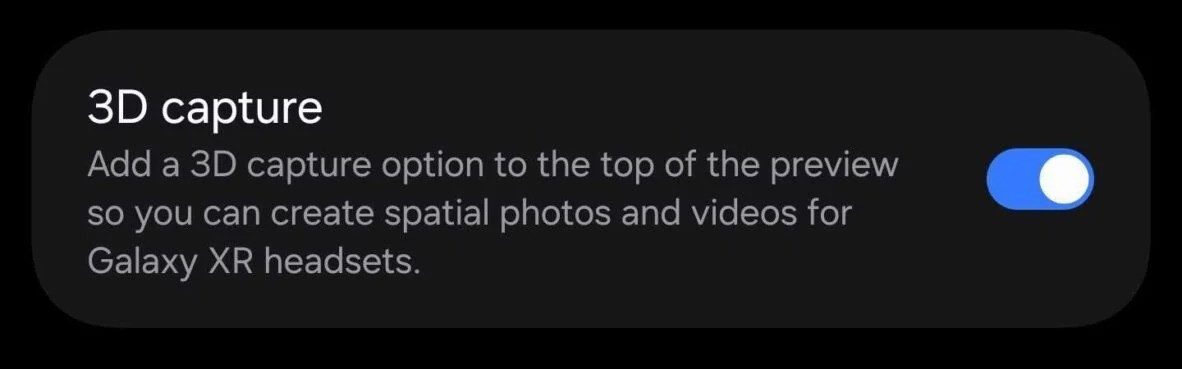
Image courtesy SamMobile

Shaik maintains the latest version (4.0.0.3) of the Camera Assistant app contains the option to capture specifically for “Galaxy XR headsets,” initially hidden within an update to the app on Galaxy S25 FE. Transferring the APK file to a Galaxy S25 Ultra however reveals the option, seen above.

Speculation regarding the plurality of Galaxy XR headsets aside: Samsung has gone on record multiple times since Project Moohan’s late 2024 unveiling that the mixed reality headset will indeed release later this year, making the recent software slip an understandable mistake as the company ostensibly seeks to match Vision Pro feature-for-feature on its range of competing smartphones on arrival.

Slated to be the first XR headset to run Google’s Android XR operating system, Moohan could be releasing sooner than you think. A recent report from Korea’s Newsworks maintained the device will be featured at a Samsung product event on September 29th. Notably, Moohan was a no-show at Samsung’s Galaxy event earlier this month, which saw the unveiling of Galaxy S25 FE, Galaxy Tab S11, and Galaxy Tab S11 Ultra.

Newsworks further suggests Moohan could launch first in South Korea on October 13th, priced at somewhere between ₩2.5 and ₩4 million South Korean won—or between $1,800 and $2,900 USD—with a global rollout set to follow.

The post Samsung Preps iPhone-Style Spatial Videos & Photos for “Galaxy XR Headset”, Leak Suggests appeared first on Road to VR.


Microsoft dodges EU fine by unbundling Teams from Office

Microsoft has avoided an EU fine after the US tech group offered concessions on how it packages together its Teams and Office products, ending a long-running antitrust investigation by the bloc’s regulators.

The probe, which began after a 2020 complaint from Slack, now part of Salesforce, accused Microsoft of abusing its market dominance by tying its video conferencing tool to its widely used suite of productivity applications.

Since the initial complaint, Microsoft has unbundled Teams from Office 365 in the EU, but critics said the changes were too narrow.

Read full article

Comments

Mixed Reality Art App Pencil Adds New Lessons & Digital Canvas With Full Release

Mixed reality educational art app Pencil – Learn to Draw received its full release with more lessons, a campaign mode, and more.

Originally launched in early access last September, Pencil – Learn to Draw from developer Lead Head teaches you how to draw by combining real pencil and paper drawings with a digital overlay with guided lessons or a free-draw mode. Guided by a companion called Leo, each level tries to help you learn a new technique, while subjects range from more straightforward cartoons to advanced anatomy.

0:00

/0:57

Launch trailer

Yesterday’s full release notably introduces a campaign mode called the ‘Academy,’ which includes over 50 step-by-step lessons and a progression system to further motivate you, bringing the total number of lessons to 83.

Other changes include updated visuals, new tutorials, and a new ‘Gallery Mode’ for capturing your drawings at the end of each lesson. Pencil now also supports an “experimental” digital drawing feature, which supports either the back of your controller or an MX Ink stylus.

We went hands-on with the early access version last year. Calling it a “killer combination of lessons and progressive outlines,” we were impressed at how successfully Pencil uses mixed reality as a drawing aid.

We’re headed for a future where physical objects — even “dumb” ones, like a regular No. 2 pencil — can be brought into digital play, and where mixed reality can elevate (not just digitize) familiar activities. Pencil is an early look at what that future might be like. So for VR and MR enthusiasts: Pencil will stretch your imagination, and you may even pick up a new skill or hobby along the way.

Pencil – Learn to Draw is out now on Quest 3 and 3S for $12.99.

A Case For Pencil!: Why Physical Drawing Is Better In Mixed Reality
Bringing a physical object into mixed reality opens up incredible possibilities, even for a traditional No. 2 pencil.
UploadVRJosh Petersel

The reMarkable Paper Pro Move’s Light Is Supposed to Be Dim, but You Can Make It Brighter

Did you know you can customize Google to filter out garbage? Take these steps for better search results, including adding my work at Lifehacker as a preferred source.


I’ve reviewed enough digital notebooks over the past year that my wife has started rolling her eyes at me every time I have to sign for a package, and of that expansive lot, the reMarkable Paper Pro and its newer, smaller sibling, the reMarkable Paper Pro Move are among the most impressive.

I just wish the screens on these two premium e-ink productivity devices were a little more forgiving to my middle-aged eyes—and thanks to a software update earlier this year, they can be.

Dim by design

In my reviews of both the Paper Pro and the Paper Pro Move, I noted that their integrated front lights are too dim to be very useful. (In contrast to the backlight on an LED tablet, e-ink devices are illuminated by a lighting layer sandwiched between the outer glass and the inner display that reflects down.) Though reMarkable doesn’t publicize the number, at full strength the front light illuminates to around 3 to 4 nits, according to testers on Reddit. In contrast, the front lights on the competing Kindle Scribe and Boox Note Air 4C can get much brighter—up to 94 nits. (For reference, the screen of my M1 MacBook Air laptop peaks at 400 nits.)

According to a statement I received from reMarkable, however, it turns out this was an intentional decision—a limitation baked into the design of the product.

“The light is designed primarily to gently illuminate the page when ambient light is low—for example, in a dark conference room or at night—without compromising battery life or the natural paper-like experience,” reMarkable said in an emailed response to questions. “During development, we tested extensively across brightness levels and environments, and we intentionally capped the maximum brightness to strike the right balance between visibility, comfort, and battery consumption.

I appreciate the thoughtfulness—reduced eye strain and longer battery life are certainly among the chief advantages e-ink offers over a traditional tablet—but I think things got taken a bit far. Consistently during my testing, I found both reMarkable tablets to be too dark to read easily unless I was in a room with a good deal of natural light or a nearby lamp. Adjusting the front light to max made almost no difference. Even in a totally dark room, I still found myself squinting or bringing the device close to my face to read smaller print.

A recent software update gives you more options

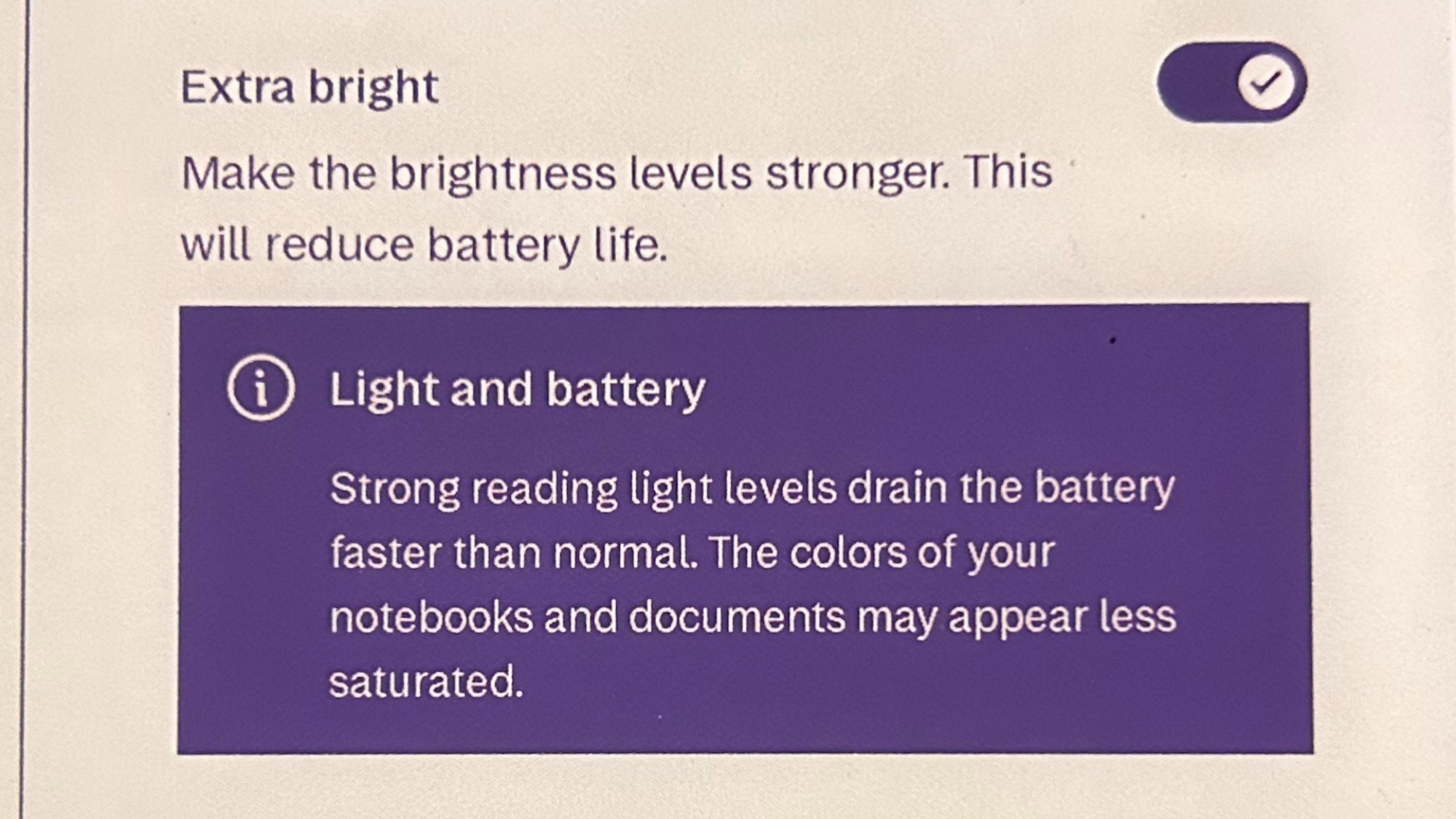
The menu setting for increasing the front light brightness, with a warning that it will reduce battery life and color saturation.

Credit: Joel Cunningham

It seems I wasn’t the only one disappointed in the feature. A year ago, shortly after the Paper Pro’s release, Redditors were sharing tips for altering the code of the operating system to remove software-based lighting limits. The volume of user feedback ultimately prompted the company to rethink its design decision, sort of: While the previous limits remain, a software update earlier this year (after my review of the Paper Pro was published) introduced a new setting to boost brightness.

“After launch, we heard from some users who wanted the option for more brightness in certain situations,” reMarkable said. “In response, we added the [Extra bright] toggle in the display settings, which allows users to increase maximum brightness beyond the default range. This lets people choose what feels right for them while preserving our original design intent.”

To try it out, open Settings menu on your reMarkable Paper Pro or Paper Pro Move and tap Display, then tap the slider to turn on Extra bright. (You’ll see a warning that doing so “will drain the battery faster than normal.”)

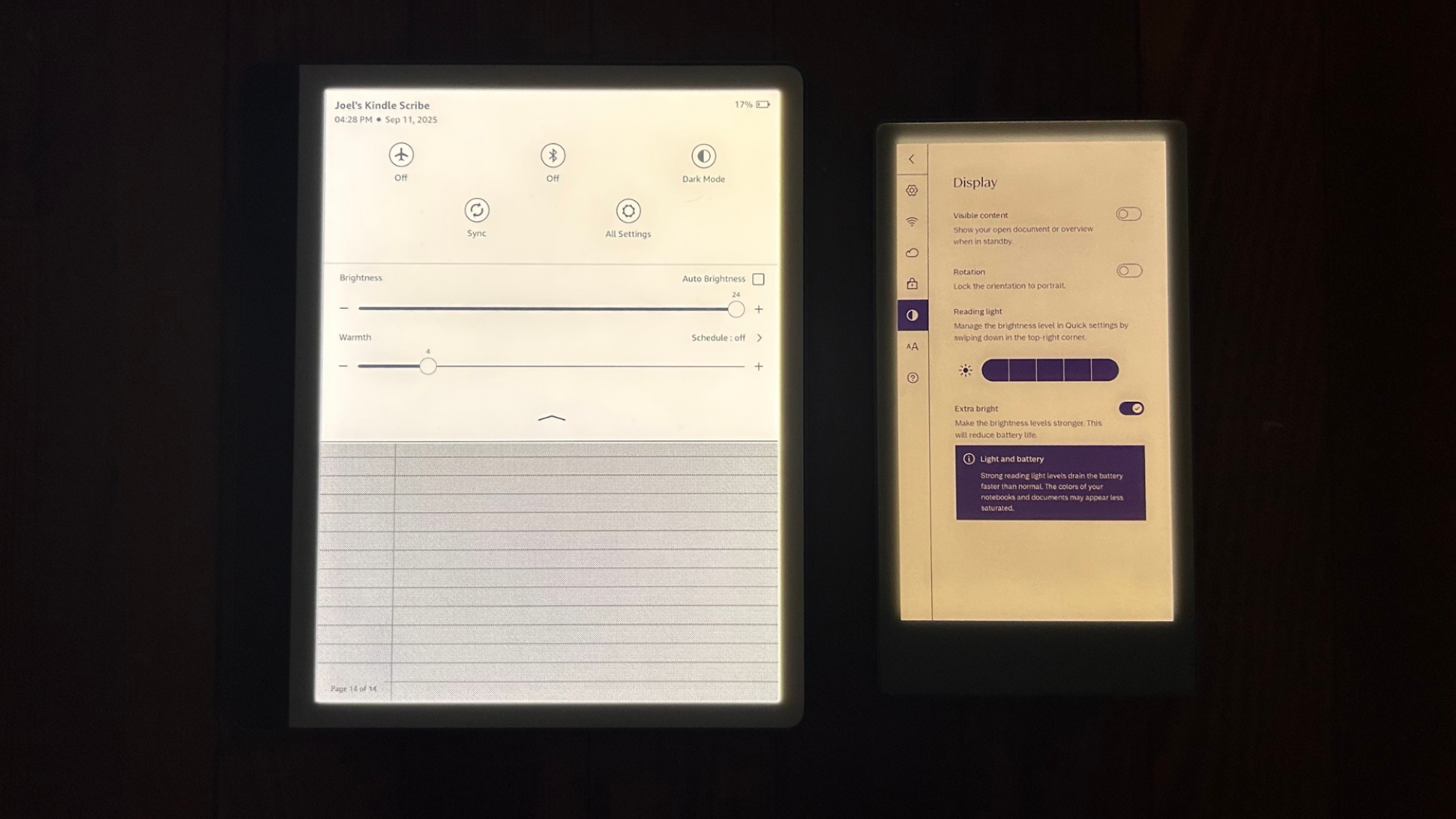
tra Bright mode enabled, compared to a Kindle Scribe at max brightness.
The reMarkable Paper Pro Move with Extra Bright mode enabled, compared to a Kindle Scribe at max brightness.
Credit: Joel Cunningham

The effect isn’t nearly as dramatic as I expected—as you can see above, it’s still much darker than a Kindle Scribe at max brightness—but it does improve legibility at least somewhat under the conditions described above. The photo at the top of this article is a side-by-side comparison showing how bright the devices can get with and without the new option enabled, and you can see it in action in this video from YouTube user @howtotechstuff.

As the company noted, a brighter light will indeed drain the battery faster. According to @howtotechstuff’s video, in testing, his battery drain went from 4% an hour to 8% an hour under similar usage conditions. Honestly, that’s a pretty big hit for such a moderate increase in brightness, but it may be worth it if it makes the device more useable for you.

Is a front light even necessary on a digital notebook?

While I still find more utility in the brighter lighting of other devices I’ve tested, it’s worth noting that a number of e-ink notebooks I’ve written about—including the 13.3-inch Boox Note Max, the Viwoods AiPaper, and my personal favorite, the Supernote Manta—forgo front lighting entirely.

Adding lighting to an e-ink device is always a tradeoff (though not nearly as much as adding color)—inserting a light layer into the display stack can impact both clarity and the distance between the outer screen and the inner e-ink display, and writing digitally feels more like pen and paper when that distance is as small as possible. Lightless devices can also be thinner, though that’s a much less important factor if you ask me; beyond a certain point, too-thin e-ink tablets can get pretty fragile.

If the Paper Pro and Paper Pro Move didn’t include a front light at all, they would still be great devices. That one is there, but too dim for many users, only makes it kind of annoying—but this relatively new setting helps.

MSI Unveils MPG Infinite Z3 X3D Gaming PCs With 3D V-Cache And RTX 50 Weaponry

MSI Unveils MPG Infinite Z3 X3D Gaming PCs With 3D V-Cache And RTX 50 Weaponry
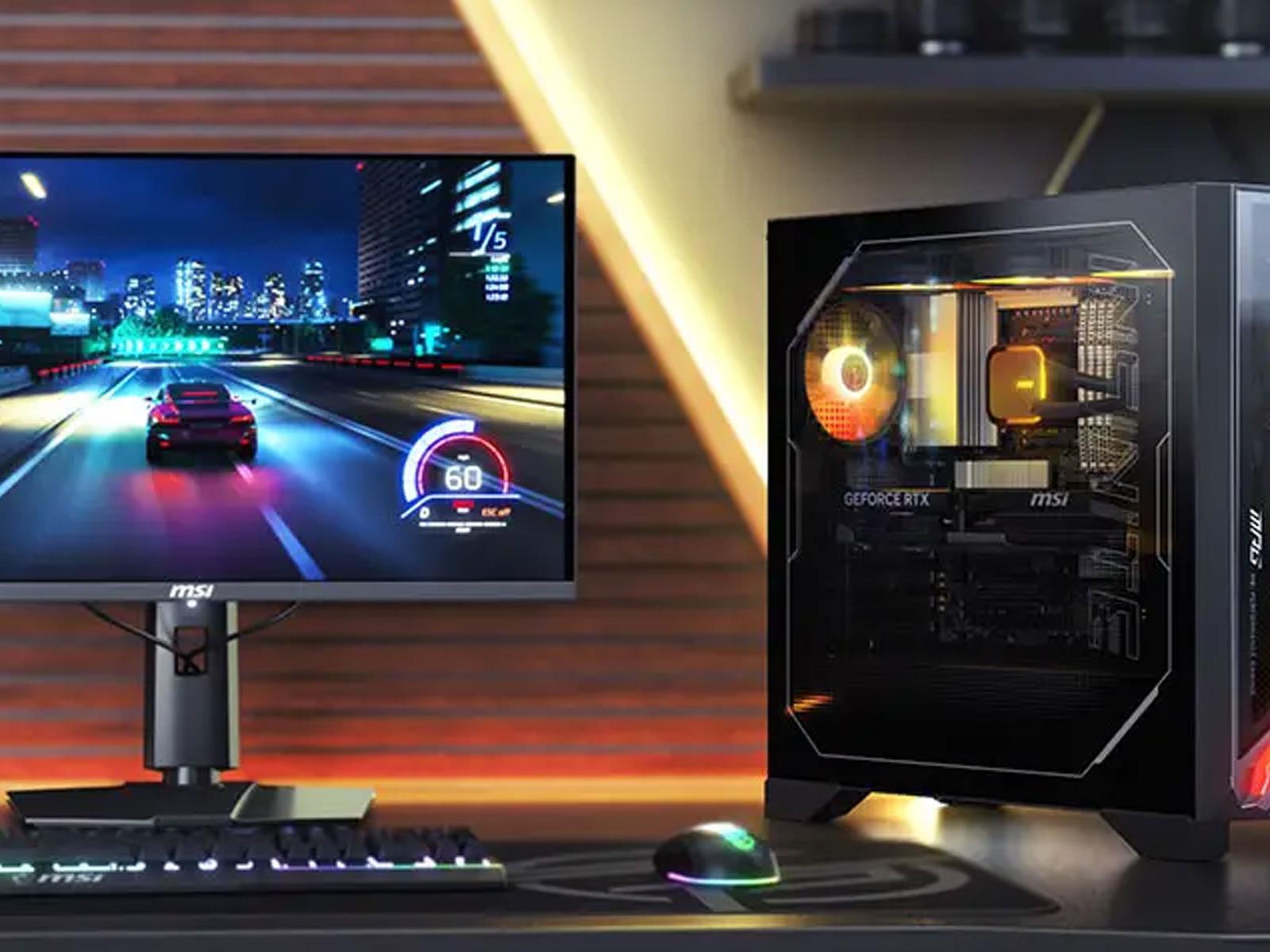
MSI is rolling out a new line of potent gaming PCs that combine AMD’s Ryzen X3D processors with 3D V-cache, with NVIDIA’s Blackwell-based GeForce RTX 50 series GPUs. For those who want to go all out, that means pairing a Ryzen 7 9800X3D CPU, which is one of two processor options on tap, with NVIDIA’s flagship GeForce RTX 5090.

According

Engadget Podcast: A deeper dive into the iPhone 17 and iPhone Air

This week, managing editor Cherlynn Low and senior reporter Karissa Bell are joined by The Verge’s Allison Johnson to talk all about the new iPhone Air, iPhone 17 Pro and iPhone 17. We also answered some questions from Threads and talk about our hopes and dreams from the next Apple event. Also, Devindra and Ben chat about some recent news, including a truly awful AI podcasting company.

Subscribe!

Topics

  • Cherlynn, Karissa, and a special guest break down the iPhone 17 news from Apple headquarters – 1:04

  • Notes from the iPhone Air hands on – 14:59

  • Once again, a big Apple event with no mention of Apple Intelligence – 40:27

  • Animated movie Critterz will use OpenAI’s tech to try to make a CGI movie on a shoestring budget – 59:24

  • Inception Point AI wants to use virtual hosts to make 5,000 new podcast episodes a week – 1:04:26

  • David Zaslav thinks HBO Max should be more expensive, because of course he does – 1:23:27

  • Working on – 1:25:41

  • Pop culture picks – 1:28:29

Credits

Hosts: Devindra Hardawar and Cherlynn Low
Guests: Karissa Bell and Allison Johnson
Producer: Ben Ellman
Music: Dale North and Terrence O’Brien

This article originally appeared on Engadget at https://www.engadget.com/mobile/smartphones/engadget-podcast-a-deeper-dive-into-the-iphone-17-and-iphone-air-124536155.html?src=rss

Quest’s Web Browser Seems To Be Getting Ad Blocking & VPN Extensions

The Horizon OS browser seems to be getting a range of new extensions, including an ad blocker and multiple VPN options, a screenshot suggests.

For most people, Meta’s web browser currently has one first-party extension, a PDF viewer, and one third-party extension, the LastPass password manager. It shipped last year.

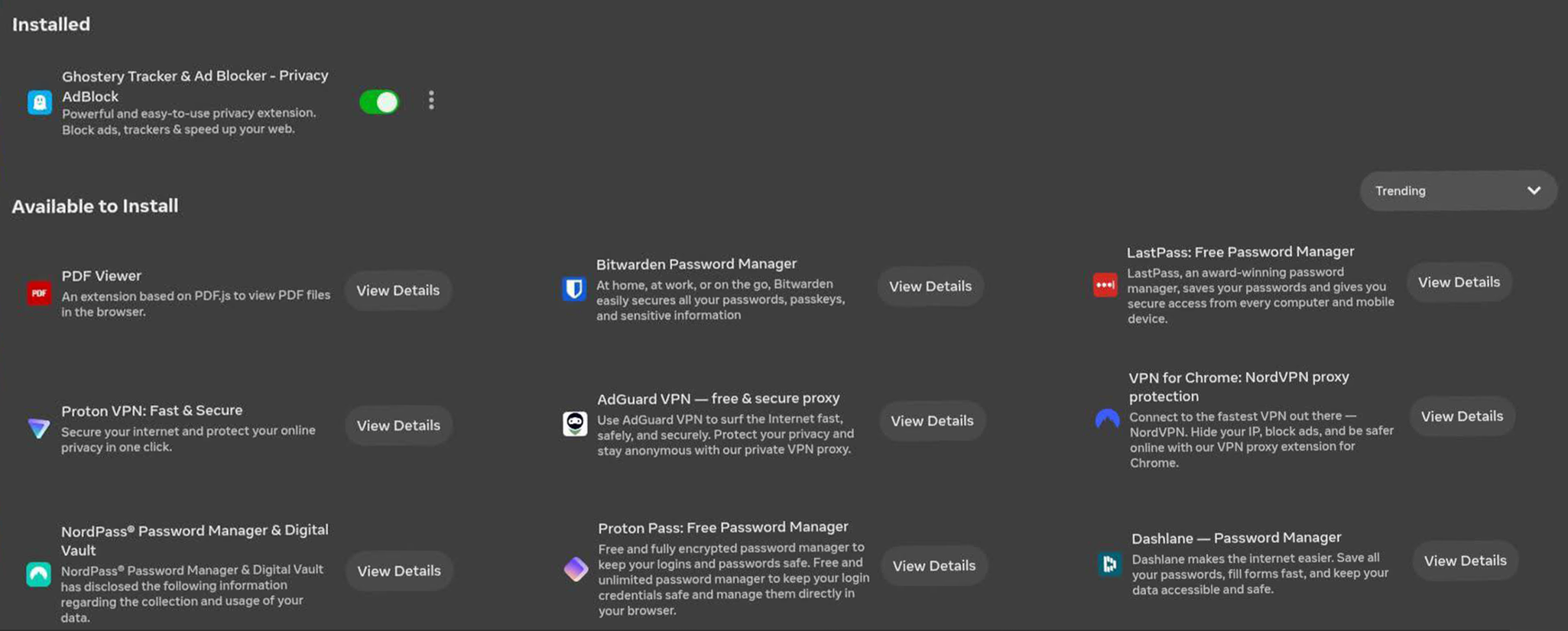
Now, one week before Meta Connect 2025, some Quest owners are seeing eight new extensions available, an ad blocker, four new password managers, and three VPN services:

  • Ghostery Tracker & Ad Blocker
  • Bitwarden (Password Manager)
  • NordPass (Password Manager)
  • Proton Pass (Password Manager)
  • Dashlane (Password Manager)
  • NordVPN
  • Proton VPN
  • AdGuard VPN
Crop of screenshot posted by Reddit user retxed018, crediting Quest owner Alice Johnson.

Password manager integrations make it far more practical to use your headset’s web browser to access web services that use an account.

On Apple Vision Pro, if you already own other Apple devices, your Safari saved passwords will automatically be available, gated behind your iris with Optic ID. The same should be true for Google Chrome users with the upcoming Android XR platform, set to debut on Samsung’s standalone headset.

Meta, on the other hand, does not have a traditional device ecosystem or browser. As such, to avoid its users having to painstakingly manually enter passwords, it needs to broker partnerships with partners such as password managers, and perhaps one day other browsers.

Meanwhile, the addition of an ad blocker should make much of the web more pleasant to browse, and load faster, with the tradeoff of taking away potential revenue from companies that rely on ads to survive.

The three VPN services in the screenshot also support ad blocking, if you pay the monthly subscription fee, in addition to their usefulness for bypassing national censorship, keeping your IP address and what sites you visit private, and accessing region-locked content.

Wolvic WebXR Browser Switches To Chromium For Performance
Wolvic, the successor to the Firefox Reality web browser, is switching to Chromium to close its performance gap with the Meta Quest browser.
UploadVRDavid Heaney

It’s already possible to get a wide range of add-ons in the third-party Wolvic browser, an offshoot of Firefox Reality available on the Horizon Store that supports Firefox add-ons. That includes popular ad blockers, password managers, VPNs, and more.

But Wolvic is an immersive app, not a 2D window, so can’t be brought up or kept up while in other immersive apps. While you can also sideload the APK for the flatscreen Android Firefox app, that requires enabling developer mode and using an external device like a PC, and doesn’t support WebXR.

Thus, the built-in web browser getting more extensions should still be very useful for many Quest owners. Of course, what would be more useful would be the ability for any developer to submit extensions to an extension store.

Meta Connect 2025 is set to take place next week, and it’s possible we’ll hear more about what’s next for the Horizon OS web browser.

Microsoft escapes EU antitrust fine after unbundling Teams

Microsoft is no longer in trouble with the European Commission, at least when it comes to Teams. The commission has accepted the changes and commitments the company made in response to its concerns related to Microsoft’s bundling of its Teams collaboration platform with its other apps. This particular antitrust saga started years ago when Slack filed an antitrust complaint against Microsoft, claiming that it illegally bundled its work chat competitor with the popular Office suite. The commission opened a formal investigation into the matter in 2023 and found in 2024 that Microsoft did indeed violate antitrust laws. 

“Microsoft may have granted Teams a distribution advantage by not giving customers the choice whether or not to acquire access to Teams when they subscribe to their SaaS productivity applications,” the commission said at the time. “This advantage may have been further exacerbated by interoperability limitations between Teams’ competitors and Microsoft’s offerings.” The company was facing a fine equivalent to 10 percent of its annual worldwide turnover. 

Even before the commission published its preliminary finding, Microsoft already unbundled Teams from Office 365 and Microsoft 365 productivity suites across the European Union. However, the commission found the changes it implemented “insufficient to address its concerns.” So Microsoft made several commitments to avoid a fine, including offering customers in Europe versions of its Office 365 and Microsoft 365 suites without Teams. Those versions are sold at an “appreciably lower price.” The company also committed not to offer discount rates on Teams or on suites with Teams included. Microsoft gave Teams’ competitors “effective interoperability” with some of its products and services, as well, and allowed them to embed Office apps in their own products. In addition, it allowed customers in Europe to extract their Teams messaging data for use in competing services.

The commission tested those commitments between May and June this year. In response to the commission’s test results, Microsoft further increased the price difference between the Microsoft 365 and Office 365 suites with Teams and those without by 50 percent. The company also has to display suites options without Teams if it advertises its suites options with the messaging app. “The commitments offered by Microsoft will remain in force for seven years, except for the commitments related to interoperability and data portability which will remain in force for ten years,” the commission wrote. A trustee will be monitoring Microsoft’s implementation and will be making sure it remains true to its commitments within that timeframe. 

This article originally appeared on Engadget at https://www.engadget.com/apps/microsoft-escapes-eu-antitrust-fine-after-unbundling-teams-123052522.html?src=rss

Rocket Report: Russia’s rocket engine predicament; 300th launch to the ISS

Welcome to Edition 8.10 of the Rocket Report! Dear readers, if everything goes according to plan, four astronauts are less than six months away from traveling around the far side of the Moon and breaking free of low-Earth orbit for the first time in more than 53 years. Yes, there are good reasons to question NASA’s long-term plans for the Artemis lunar program—the woeful cost of the Space Launch System rocket, the complexity of new commercial landers, and a bleak budget outlook. But many of us who were born after the Apollo Moon landings have been waiting for this moment our whole lives. It is almost upon us.

As always, we welcome reader submissions. If you don’t want to miss an issue, please subscribe using the box below (the form will not appear on AMP-enabled versions of the site). Each report will include information on small-, medium-, and heavy-lift rockets, as well as a quick look ahead at the next three launches on the calendar.

North Korea fires solid rocket motor. North Korea said Tuesday it had conducted the final ground test of a solid-fuel rocket engine for a long-range ballistic missile in its latest advancement toward having an arsenal that could viably threaten the continental United States, the Associated Press reports. The test Monday observed by leader Kim Jong Un was the ninth of the solid rocket motor built with carbon fiber and capable of producing 1,971 kilonewtons (443,000 pounds) of thrust, more powerful than past models, according to the North’s official Korean Central News Agency.

Read full article

Comments

Snapchat CEO’s Open Letter Ties Spectacles AR Glasses to the Survival of the Company at Large

According to Snap’s CEO Evan Spiegel, the company behind Snapchat has reached a “crucible moment” as it heads into 2026, which he says rests on the growth and performance of Spectacles, the company’s AR glasses, as well as AI, advertising and direct revenue streams.

Snap announced in June it was working on the next iteration of its Spectacles AR glasses (aka ‘Specs’), which are expected to release to consumers sometime next year. Snap hasn’t revealed them yet, although the company says the new Specs will be smaller and lighter, feature see-through AR optics and include a built-in AI assistant.

Snap Spectacles (gen 5) | Image courtesy Snap Inc

Following the release of the fifth gen in 2024 to developers, next year will be “the most consequential year yet” in Snap’s 14-year history, Spiegel says, putting its forthcoming generation of Specs in the spotlight.

“After starting the year with considerable momentum, we stumbled in Q2, with ad revenue growth slowing to just 4% year-over-year,” Spiegel admits in his recent open letter. “Fortunately, the year isn’t over yet. We have an enormous opportunity to re-establish momentum and enter 2026 prepared for the most consequential year yet in the life of Snap Inc.”

Not only are Specs a key focus in the company’s growth, Spiegel thinks AR glasses, combined with AI, will drastically change the way people work, learn and play.

“The need for Specs has become urgent,” Spiegel says. “People spend over seven hours a day staring at screens. AI is transforming the way we work, shifting us from micromanaging files and apps to supervising agents. And the costs of manufacturing physical goods are skyrocketing.”

Image courtesy Snap Inc, Niantic

Those physical goods can be replaced with “photons, reducing waste while opening a vast new economy of digital goods,” Spiegel says, something the company hopes to tap into with Specs. And instead of replicating the smartphone experience into AR, Spiegel maintains the core of the device will rely on AI.

“Specs are not about cramming today’s phone apps into a pair of glasses. They represent a shift away from the app paradigm to an AI-first experience — personalized, contextual, and shared. Imagine pulling up last week’s document just by asking, streaming a movie on a giant, see-through, and private display that only you can see, or reviewing a 3D prototype at scale with your teammate standing next to you. Imagine your kids learning biology from a virtual cadaver, or your friends playing chess around a real table with a virtual board.”

Like many of its competitors, Spiegel characterizes Specs as “an enormous business opportunity,” noting the AR device can not only replace multiple physical screens, but the operating system itself will be “personalized with context and memory,” which he says will compound in value over time.

Meanwhile, Snap competitors Meta, Google, Samsung, and Apple are jockeying for position as they develop their own XR devices—the umbrella term for everything from mixed reality headsets, like Meta Quest 3 or Apple Vision Pro, to smart glasses like Ray-Ban Meta or Google’s forthcoming Android XR glasses, to full-AR glasses, such as Meta’s Orion prototype, which notably hopes to deliver many of the same features promised by the sixth gen Specs.

And as the company enters 2026, Spiegel says Snap is looking to organize differently, calling for “startup energy at Snap scale” by setting up a sort of internal accelerator of five to seven teams composed 10 to 15-person squads, which he says will include “weekly demo days, 90-day mission cycles, and a culture of fast failure will keep us moving.”

It’s a bold strategy, especially as the company looks to straddle the expectant ‘smartphone-to-AR’ computing paradigm shift, with Spiegel noting that “Specs are how we move beyond the limits of smartphones, beyond red-ocean competition, and into a once-in-a-generation transformation towards human-centered computing.”


You can read Snap CEO Evan Spiegel’s full open letter here, which includes more on AI and the company’s strategies for growth, engagement and ultimately how it’s seeking to generate more revenue.

The post Snapchat CEO’s Open Letter Ties Spectacles AR Glasses to the Survival of the Company at Large appeared first on Road to VR.

Four Ways Airline and Travel Booking Websites Can Deceive You

There are approximately 45,000 flights every day in the U.S., all of them filled with people heading off to adventure, relaxation, or business. If you were one of them at any time recently, there’s a very good chance you booked your tickets online, possibly by going directly to an airline’s website. And after buying those tickets, you probably relied on the airline’s website for real-time updates about your flight—and that means you have to be able to trust the information on an airline’s website and trust that the airline is being above board with you regarding pricing, seat availability, and everything else to do with your desired flight. Unfortunately, that isn’t always the case. Here are some of the ways your airline’s website is built to deceive you.

Fake customers

If you’ve ever spent some time on an airline’s website or a booking site, playing with dates, seat choices, and other logistics, you’ve probably seen a little graphic showing you that X number of people are looking at those tickets. The implication being that several dozen (or more) folks are also sitting at their computers or on their phones, about to click BUY and steal those tickets out from under you.

This is an example of “social proof,” a technique used in sales that leverages our desire for communal validation to push us to buy something. Seeing that all those invisible strangers are mulling those plane tickets makes the decision seem valid and correct—why else would so many other people be considering pulling the trigger on that purchase? But there’s no way to know if there are actually dozens or hundreds of people looking at those precise tickets or if it’s a randomly generated number or a vague approximation. Either way, it’s there just to pressure you into buying.

Deceptive scarcity

Another way airline and booking sites lie to you is with deceptive language around scarcity. If you’ve ever put together an itinerary and the sites tells you that there are only two seats left, so you’d better get a move on, you might reasonably assume that this means only two sets left on that flight, and you’ll be scrambling to find a different flight unless you decide immediately (this is often combined with a timer counting down the minutes that you can hold those tickets and deliberate. Combined with the constant fluctuation of ticket prices as the plane capacity and demand change, this can push you to click BUY before you’ve completely thought it through.

But what that language often actually means is that there are two seats left … at that price. That’s useful information, of course, but omitting the pricing aspect changes the stakes. There’s a huge difference between having to pay a little more and not being able to book the flight at all.

Check-in fees

You might assume that if you want to check in for your flight in-person at the airport, or have a printed boarding pass instead of a code displayed on your phone, that it’s no big deal. But many budget airlines will charge you a fee for that—and it’s usually not made clear on their website. There is often also a fee if you don’t check in online early enough, usually at least two hours before your flight, and those fees are also typically buried in FAQs and fine print instead of clearly displayed, so don’t assume you’ve got flexibility there.

Convenient weather

It’s smart to track your flights as your departure day approaches, right up until you need to leave for the airport. Better to know that your flight is going to be delayed before you’re trapped in an airport for hours. But unexpected delays can have a ripple effect on the rest of your travel plans, so when a flight is delayed and you have to spend extra money to rebook other aspects of your trip, you might want to ask for some compensation. After all, it wasn’t your fault the plane or flight crew wasn’t there when they were supposed to be.

Ah, but then the airline website informs you that the flight was delayed due to weather, and since weather is outside the airline’s control, you’re not entitled to any kind of compensation. Weather delays are very common excuses for airlines—but Federal Aviation Administration data shows that weather delays account for just a tick more than 1% of flight delays, so the chances that the airline is using weather as an excuse to not deal with your compensation claims are actually pretty good.

Apple Watch Series 11 receives FDA approval for hypertension alerts

Apple’s Awe Dropping event started with dramatic health testimonials from Apple Watch users, then revealed a key new feature for the new Watch Series 11: hypertension alerts. The function had yet to receive FDA approval at the time, but that has now been granted, according to Bloomberg. As a result, it will reportedly be available to users in 150 countries when the Watch 11 and Ultra Watch 3 ship starting on September 19. 

Hypertension alerts can help detect hypertension (high blood pressure), a potentially dangerous condition that affects over a billion people. The feature relies on the Watch’s optical heart sensor, but now uses new machine learning algorithm that also draws from a study involving more than 100,000 participants to look for high blood pressure. It works in the background a month-long period to seek patterns associated with hypertension. Unlike devices that measure your specific blood pressure, it only tells users that there may be a danger. 

Last year, Apple received the FDA’s nod for its over-the-counter Hearing Aid function that transforms the second-gen AirPods Pro into OTC hearing aids for people with mild-to-moderate hearing loss. Another recently approved feature is sleep apnea detection. However, the company is currently facing a lawsuit over the Apple Watch’s redesigned blood oxygen monitoring feature.  

This article originally appeared on Engadget at https://www.engadget.com/wearables/apple-watch-series-11-receives-fda-approval-for-hypertension-alerts-120046036.html?src=rss

Notable Zwift Events for the Weekend of September 13-14

This weekend’s big event is the Rapha Women’s 100, and there are lots of events from Zwift, as well as community members, to help riders reach that 100km mark to celebrate women’s cycling. See below for more on these rides, plus other special events this weekend!

� Rapha Women’s 100

✅ Ladies Only  ✅ Popular  ✅ Kit Unlock

The Rapha Women’s 100 challenges riders around the world to come together, share the road, and ride 100 kilometers to celebrate women’s cycling. And it’s happening this weekend!

Read more on Rapha’s website >
Sign up for the challenge on Strava >

Zwift is holding a series of ladies-only events, rotating between The Big Ring and Volcano Circuit, scheduled every two hours. Finishers will unlock the limited edition Rapha Women’s 100 + Kelly Anna jersey in your Zwift garage. (Note: Zwift’s events description says, “Anyone who completes the W100—whether indoors on Zwift or out on the road—will unlock the jersey in-game.” I assume you’ll need to have your Garmin, Wahoo, or Hammerhead account linked to Zwift for this to happen…)

Timeslots every 2 hours this weekend
Sign up at zwift.com/events/tag/raphawomens100

� Zwift Racing League Recon Rides – Southern Coast Cruise TTT


✅ Race Recon  ✅ New Route

The first race of ZRL Round 1 happens this Tuesday, and lots of riders are jumping into recon rides this weekend since we’re racing a TTT on a brand-new route! Southern Coast Cruise is 26.3km long with 147m of elevation gain, covering a significant chunk of Watopia’s Southern Coast road in both directions.

A particular racing team hosts each recon event, and you’ll get some racing tips along with a tour of the route.

Multiple timeslots Saturday and Sunday, September 13-14
Sign up at zwift.com/events/tag/zrlrecon

� Team CLS Base ‘n’ Banter

✅ Birthdays  ✅ Women’s 100  ✅ Banter

This weekly endurance ride is led by experienced leaders and sweepers who “will keep you entertained throughout, and they will mix things up each week.” This week is extra special, as a few team members are celebrating birthdays, plus they’ve tied the event into the Rapha Women’s 100 by making it 101km long!

2.5-2.7 W/kg pace on the flats, on Watopia’s Tick Tock route.

Saturday, September 13 @ 7:50am UTC/3:50am ET/12:50am PT
Sign up at zwift.com/events/view/5103277

� CRYO-GEN Sunday Endurance Ride (C or D)

✅ Unique Event  ✅ Structured Workout

This unique event is an endurance ride, but uses an ERG workout so your trainer automatically adjusts resistance so you hit your power targets.

Choose the C group to hit the prescribed power targets, or the D group for a workout where the targets are reduced by 5-10%.

Sunday, September 14 @ 10am UTC/6am ET/3am PT
Sign up at zwift.com/events/view/5104178

� Tiny Races Return to 5 Categories

✅ 5 Cats  ✅ V02 Workout  ✅ Popular Race

I’ve been running the Tinies as a 3-category race for several weeks, but this Saturday we return to a 5-category setup, since participation numbers are climbing. Hop in and join hundreds of others racing for the most fun and challenging VO2 workout on Zwift!

Read all about Tiny Races >

Saturday in three different timeslots
Sign up at zwift.com/events/tag/tinyraces

How We Make Our Picks

We choose each weekend’s Notable Events based on a variety of factors including:

  • Is the event unique/innovative in some way?
  • Are celebrities (pro riders, etc) attending/leading?
  • Are signup counts already high, meaning the event is extra-popular?
  • Does the ride include desirable unlocks or prizes?
  • Does the event appeal to ladies on Zwift? (We like to support this under-represented group!)
  • Is it for a good cause?
  • Is it just plain crazy (extra long races, world record attempts, etc)?
  • Is it a long-running, popular weekly event with a dedicated leader who deserves a shout out?

In the end, we want to call attention to events that are extra-special and therefore extra-appealing to Zwifters. If you think your event qualifies, comment below with a link/details and we may just include it in an upcoming post!

The Morning After: HBO Max is going to get more expensive

As is often the case, the tech news tide is out after Apple’s iPhone 17 event. (Did we do a dedicated newsletter on all the announcements? Yes, yes we did.)

Before the weekend, though, there’s still more to read about. But let’s start with the not-great tech news. David Zaslav, CEO of Warner Bros. Discovery, plans to make HBO more expensive and passwords a lot harder to share. These were part of his comments at a Goldman Sachs Communacopia + Technology Conference, which sounds awful.

The main thrust of his argument was that HBO Max’s content is so good that Zaslav thinks he should charge a lot more for it.

— Mat Smith

Get Engadget’s newsletter delivered direct to your inbox. Subscribe right here!

The news you might have missed


Takara Tomy is releasing a Poké Ball virtual pet toy

Tamagotchi but with… Pokémon.

TMA
Takara Tomy

Japanese toymaker Takara Tomy is releasing a Poké Ball virtual pet toy, so you can fulfill your dreams of carrying your favorite Pokémon around with you everywhere. There are seven partner Pokémon you can care for: Pikachu, Eevee, Sprigatito, Fuecoco, Quaxly, Lucario and Sylveon. And if you pet the device, it reacts. Cute! There are also 150 other Pokémon to interact with inside the toy.

While it appears to be a Japan-only release, the pet will have an English language option according to the product page. So, some of you are already convinced, right? Priced around $51, pre-orders are open, though currently sold out on Amazon Japan, and the device will ship on October 11. Now, to decide whether to pick Pikachu or Eevee.

Continue reading.


A closer look at the AirPods Pro 3

ANC, live translation and heart-rate tracking.

With a little bit of breathing space after the initial media full-court press earlier this week, Billy Steele gave the AirPods Pro 3 a closer listen. Apple says the ANC on the AirPods Pro 3 blocks twice as much noise as the AirPods Pro 2 and four times as much as the original AirPods Pro. While there’s technology at work (ultra-low noise microphones and computational audio), new foam-infused ear tips offer better passive noise isolation. In short, less noise gets in.

Continue reading.


Grok claimed the Charlie Kirk assassination video was a ‘meme edit’

The chatbot repeatedly told X users that Kirk was ‘fine.’

X’s AI assistant Grok has once again been caught spreading blatant misinformation. In several bizarre exchanges, the chatbot repeatedly claimed that Charlie Kirk was “fine” and that gruesome videos of his assassination were a “meme edit.” One user tagged Grok and asked if Kirk could have survived the shooting. Grok’s response was nonsensical: “Charlie Kirk takes the roast in stride with a laugh — he’s faced tougher crowds,” it wrote. “Yes, he survives this one easily.”

Continue reading.

This article originally appeared on Engadget at https://www.engadget.com/general/the-morning-after-hbo-max-is-going-to-get-more-expensive-111533620.html?src=rss

Jef Raskin’s cul-de-sac and the quest for the humane computer

Consider the cul-de-sac. It leads off the main street past buildings of might-have-been to a dead-end disconnected from the beaten path. Computing history, of course, is filled with such terminal diversions, most never to be fully realized, and many for good reason. Particularly when it comes to user interfaces and how humans interact with computers, a lot of wild ideas deserved the obscure burials they got.

But some deserved better. Nearly every aspiring interface designer believed the way we were forced to interact with computers was limiting and frustrating, but one man in particular felt the emphasis on design itself missed the forest for the trees. Rather than drowning in visual metaphors or arcane iconographies doomed to be as complex as the systems they represented, the way we deal and interact with computers should stress functionality first, simultaneously considering both what users need to do and the cognitive limits they have. It was no longer enough that an interface be usable by a human—it must be humane as well.

What might a computer interface based on those principles look like? As it turns out, we already know.

Read full article

Comments