Final Fantasy Tactics is getting a remake in The Ivalice Chronicles

Remasters and remakes seem like they’re a dime a dozen these days, but here’s one I’m selfishly pretty stoked for. Square Enix announced during PlayStation’s State of Play event that is revisiting the 1997 strategy RPG chapter from its famous franchise. Final Fantasy Tactics – The Ivalice Chronicles is due out on September 25, 2025 for both the PlayStation 5 and PlayStation 4.

This updated version of the turn-based strategy game introduces some welcome additions to the original. You’ll find new graphics, an updated user interface and voiced dialogue in the enhanced version. It also brings some quality of life improvements, such as a more beginner-friendly Squire difficulty level. But if you want to immerse in the nostalgia and the challenge, you can swap back to the original graphics, gameplay and English translation. The original version also boasts a few modern upgrades, like an auto-save system.

As someone who has clocked several hundred hours in the Fire Emblem series, I’ve always had Final Fantasy Tactics hovering in my to-play queue. Whether you’re a first-timer like me or are already well versed in the political intrigues of Tactics, this fall seems like an excellent change to check out the game.

This article originally appeared on Engadget at https://www.engadget.com/gaming/playstation/final-fantasy-tactics-is-getting-a-remake-in-the-ivalice-chronicles-215000718.html?src=rss

Suda51 returns with a sword-swinging, gun-slinging, sci-fi action game

Grasshopper Manufacture founder Suda51 made an appearance at Sony’s State of Play showcase to reveal Romeo is a Dead Man — a game that has no relation to the 2000 action masterpiece Romeo Must Die, as far as we can tell. Romeo is a Dead Man stars Romeo Stargazer, a dude who was pulled back from the brink of death, gained time-shattering powers, and became a universe-hopping special agent for the FBI. Using a sword and guns, Romeo battles various sci-fi robots and beasts across multiple universes, featuring hyper-bloody gameplay.

By the time I finished watching the debut trailer for Romeo is a Dead Man, I’d completely forgotten that it started out with a hand-drawn cartoon family enjoying a nice curry dinner. It quickly devolves into a black-, white- and red-splattered fever dream of exploding heads and doorway demons, providing the first hint that this is definitely a Suda51 project. Grasshopper Manufacture’s previous games include Killer7, No More Heroes, Lollipop Chainsaw and Killer is Dead, and its latest release seems to fit right in with these titles.

Romeo is a Dead Man is a third-person action game, and it’s due to hit PlayStation 5 in 2026.

This article originally appeared on Engadget at https://www.engadget.com/gaming/playstation/suda51-returns-with-a-sword-swinging-gun-slinging-sci-fi-action-game-214628508.html?src=rss

Baby Steps finally has a release date, two years after it was originally slated to arrive

Baby Steps, a absurdist walking simulator, has been under construction for a long while now. But at today’s PlayStation State of Play event, the game finally got a release date: September 8, 2025. The game stars the hapless, chubby, bodysuit-wearing Nate (sigh), who, judging from the release date trailer, appears to be perpetually in search of a toilet? At one point, he knocks a porta-potty off the edge of a cliff. Tragedy abounds.

We checked out Baby Steps a few years ago, and a big part of the fun is in figuring out how to control Nate — each controller trigger moves one of his limbs, and keeping him upright is apparently quite the challenge. That’s part of the fun, I presume; watching your baby-man flop around the screen and fall over while doing the seemingly simple task of walking sounds a lot more amusing than I think. 

The game was originally supposed to come out for PS5 and PC in 2023, followed by a delay to 2024 that the team obviously didn’t hit. But now, we’ve got a real release date for this exceedingly goofy-looking game. 

This article originally appeared on Engadget at https://www.engadget.com/gaming/playstation/baby-steps-finally-has-a-release-date-two-years-after-it-was-originally-slated-to-arrive-214025574.html?src=rss

Pragmata, Capcom’s long-delayed PS5 game, is (probably) coming in 2026

Pragmata, a new sci-fi, third-person action game from Capcom, finally has a new release date. As part of Sony’s summer State of Play on June 4, Capacom shared a new trailer showing off gameplay from Pragmata and revealing that the game is now targeting a 2026 release. 

Based on the trailer and a blog post on the Playstation Blog, you’ll play as two characters in Pragmata: Hugh, a spacesuit-wearing lunk, and Diana, a young robot who appears to be able to hack into the lunar station you’ll spend the game navigating. You apparently have to use both characters’ abilities at the same time to get through rogue robots and other obstacles. In the trailer it look like a lot of hacking and smashing, but it’ll presumably have more variety in its final release.

Pragmata was announced all the way back in 2020, before the release of the PlayStation 5, targeting a 2022 release. The game has been delayed multiple different times since then, most recently in 2023 when Capcom delayed the game indefinitely. It’s not clear how much of Pragmata has been reworked since then.

Pragmata will be available in 2026 on PS5, presumably alongside releases on Xbox Series X / S and PC, as previously announced.

This article originally appeared on Engadget at https://www.engadget.com/gaming/playstation/pragmata-capcoms-long-delayed-ps5-game-is-probably-coming-in-2026-214011185.html?src=rss

Silent Hill f is coming to PS5, Xbox Series X/S and PC on September 25

It had only been a few months since our last look at Silent Hill f, so it was perhaps a little surprising to see the first Japan-set game in the series pop up during Sony’s latest State of Play stream on Wednesday. The trailer provided another chance to see some gameplay and those gorgeously grotesque visuals, but the key information was saved for the end: a release date. You’ll be able to experience the terrors of Silent Hill f yourself on September 25 on PS5, Xbox Series X/S and PC.

In this ’60s-set installment, you’ll take on the guise of high schooler Shimizu Hinako, who has to survive the horrors that plague her fog-ridden hometown of Ebisugaoka. You will have to solve puzzles (some of which involve scarecrows) and fend off enemies, including some creepy mannequin-like monsters. Producer Motoi Okamoto wrote on the PlayStation Blog that “the combat will have a heavier focus on melee and be more action-oriented compared to last year’s Silent Hill 2.“

This article originally appeared on Engadget at https://www.engadget.com/gaming/playstation/silent-hill-f-is-coming-to-ps5-xbox-series-xs-and-pc-on-september-25-213338755.html?src=rss

Jared Isaacman speaks out, and it’s clear that NASA lost a visionary leader

In a revealing interview published by the All-In Podcast on Wednesday, the private astronaut nominated to lead NASA, Jared Isaacman, spoke at length on what he thought about the nomination process, how he would have led NASA, and the factors that led to the abrupt rescission of his nomination by President Trump.

“I got a call Friday, of last week, that the president has decided to go in a different direction,” Isaacman said. “It was a real bummer.”

It was a real bummer for most of the space community, myself included. To be clear, I am biased. I have gotten to know Isaacman over the last five years rather well, talking with him about his passion for spaceflight, what is working, and what is not. What I have discovered in Isaacman is a person who cares deeply about the future of US spaceflight and wants to make a meaningful contribution to its advancement. To see him done wrong like this, well, it’s a very sordid affair.

Read full article

Comments

Microsoft’s LinkedIn Chief Is Now Running Office

Announced in an internal memo from Microsoft CEO Satya Nadella, LinkedIn CEO Ryan Roslansky has been appointed to also lead the Office, Outlook, and Microsoft 365 Copilot teams as part of an internal AI reorganization. Roslansky will report to Rajesh Jha for Office while continuing to run LinkedIn independently under Nadella. The Verge reports: “LinkedIn remains a top priority and will continue to operate as an independent subsidiary,” says Nadella in his memo. “This move brings us closer to the original vision we laid out nine years ago with the LinkedIn acquisition: connecting the world’s economic graph with the Microsoft Graph. And I look forward to how Ryan will bring his product ethos and leadership to entertainment and devices.” Sumit Chauhan and Gaurav Sareen, senior executives in the Office and Microsoft 365 teams, will remain on the entertainment and devices leadership team, but along with their teams they’ll join Jon Friedman and the UX team to work directly for Roslansky.

Charles Lamanna and his BIC team are also moving to report to Rajesh Jha as part of an AI shakeup. “Charles has consistently kept us focused on what it takes to win in business applications and the agent layer, and I look forward to the impact he and his team will have in entertainment and devices,” says Nadella. In a separate memo, Lamanna also announced that starting July 2nd Lili Cheng will take on the newly expanded role of CTO of the BIC team. Dan Lewis is also taking on the role of corporate vice president of Copilot Studio. “We are poised to reinvent every role and every business process, and start to reimagine organizations as composed of people and agents,” says Lamanna in an internal memo.

Both the Lamanna and Roslansky moves are very interesting, as the business Copilot team and Microsoft 365 Copilot team have been in separate parts of Microsoft’s sprawling AI and cloud teams up until this point. This has led to a situation where nobody really owns Copilot all up inside Microsoft, but now the separate leaders of Microsoft 365 Copilot and the business Copilot teams now both report to Rajesh Jha. The consumer Copilot will still be run by Microsoft AI CEO Mustafa Suleyman.


Read more of this story at Slashdot.

Lumines Arise Is Coming To PlayStation VR2 This Fall

Lumines Arise, the next game from the Tetris Effect team, is coming to PlayStation VR2 this fall.

Created by Enhance Inc, Lumines Arise is a sequel to 2004’s puzzle game by Tetsuya Mizuguchi where you rotate 2×2 blocks to align with each other, which then erase over time. Announced during PlayStation’s State of Play conference, the upcoming sequel will launch on PS5 with optional PlayStation VR2 support and features new music from Tetris Effect: Connected’s composer, Hydelic. Here’s the reveal trailer.

0:00

/2:04

“Lumines is back, and to everyone who’s been a fan since the original, I hope you’re excited about this new chapter built from the ground up to push the synergy of audio, visuals, and gameplay beyond any previous title in the franchise,” states director Takashi Ishihara on PlayStation Blog.

Featuring over 30 stages ranging from jungles to oceans, Enhance states it’s aiming for every stop in this campaign to evoke “a different and complex emotional response” as they attempt to incite synesthesia. Using haptic feedback in DualSense controllers – we’d assume the Sense Controllers, too – to build upon this sensation, you must create combos to clear these puzzle stages.

The sequel also features a new gameplay mechanic called Burst, which Enhance describes as a gauge that charges up while you play. Upon tapping the trigger button to activate Burst, you can then lock a formed square to the playfield to make it as large as possible before the time runs out, earning yourself more points. Avatars are also back, alongside the ability to customize your own.

Lumines Arise is heading to PS5 with optional PlayStation VR2 support this fall. A demo will follow “later this summer.”

The Tetris Effect team is back with Lumines Arise

The summer State of Play presentation form PlayStation kicked off with the announcement of Lumines Arise. It’s a gorgeous puzzle game being made by the same team as Tetris Effect, Enhance, so for the many of us who fell in love that game, this is a banger development from Sony.

The trailer shows the same dynamic blend between block drops, music and visuals that were the hallmarks of Tetris Effect. However, Lumines Arise is ditching the tetriminos for the slightly different box-dropping mechanics of Lumines. Bringing a new take on the core puzzle mechanics should make this feel like a nice blend of fresh and familiar. And considering how well their first go at reimagining a spatial puzzle game went, I have high hopes for this project. 

The game is slated for release in fall 2025, but we may get a chance for a sneak peak with both single and multiplayer demos later this summer. It’s coming to the PlayStation 5 with optional PS VR2 support for those who want the ultimate immersion experience. (And yes, you really do want that.)

This article originally appeared on Engadget at https://www.engadget.com/gaming/playstation/the-tetris-effect-team-is-back-with-lumines-arise-211729116.html?src=rss

How Old Is Too Old When Buying an Apple Watch?

We may earn a commission from links on this page.

In 2023, I decided to update my Apple Watch after consistently failing to wear my Series 4 for a number of years. I sold that one on Poshmark and began looking at newer models to find one with enough features to convince me to actually wear it. I opted to get a Series 8, although the Series 9 had just been released, as I was buying two: one for my mom and one for myself. As it turns out, that was a great decision.

If you’re searching for a new wearable or considering upgrading yours, you might also be wondering which of the older Apple Watch models is still useful today. My Series 8 is holding up beautifully three years after it was introduced, so I’m a big proponent of using older devices as long as possible. But not all Apple Watches will work as well as the Series 8 does in 2025.

Don’t buy a watch Apple doesn’t support anymore

We have to draw the line somewhere: Seven of Apple’s watches are no longer supported, meaning they won’t receive any software or security updates anymore. In addition, you run the risk that the watch will no longer be compatible with your iPhone or certain apps. In short, you shouldn’t buy a watch that Apple doesn’t support. That includes the following:

  • Apple Watch Series 0

  • Apple Watch Series 1

  • Apple Watch Series 2

  • Apple Watch Series 3

  • Apple Watch Series 4

  • Apple Watch Series 5

  • Apple Watch SE (first-gen)

While the company does currently support the Series 6, it is next in line to join this list. It’s not clear when that will happen, but you can be sure it will. We’ll see next week—when Apple reveals watchOS 26—whether the watch will be supported another year. If not, it’ll be stuck on watchOS 11 for good.

Performance and other generational Watch improvements

There are considerations for older Apple Watch models that extend beyond their ability to simply run the latest operating system. With each generation, improvements are made in some form or another. For instance, the Series 4 introduced the ECG sensor, while the Series 6 introduced the blood oxygen sensor (though Apple had to disable the feature for the Series 9 and Ultra 2 in the U.S. due to a lawsuit). The Series 7 charges faster than its predecessors, and Apple has included fast charging on most watch models since (sorry, Apple Watch SE users).

In general, each Apple Watch is faster than the last. Apple tends to put its newest S-Chip—the Apple Watch’s processor—in its latest watch series. Simply put, a newer S-chip gives you a faster, more productive product. The Series 6 has an S6 chip, Series 7 has S7, and so on until you hit the Ultras. (The first-generation Ultra has an S8 chip like the Series 8, while the Ultra 2 has an S9 chip like the Series 9.)

While there are some core features all currently supported watches share—like workout and swim tracking, sleep tracking, Apple Pay, ECG scanning, and the ability to read and respond to messages—newer models also each have some of their own special advancements and upgrades. Here’s a brief list:

  • The Series 7 introduced faster charging, a larger display, and more durable screen.

  • The Series 8 brought temperature sensing, crash detection, and a low-power mode for conserving battery (as did the second-gen Apple Watch SE).

  • The Series 9 debuted new gesture controls, on-device Siri access, more precise location tracking in Find My, and a display with double the brightness of the Series 8.

  • The first-gen Apple Watch Ultra introduced a more durable titanium casing, custom shortcuts to apps and modes via the Action button, a depth gauge and water temperature sensor, more accurate GPS, a 36-hour battery life, and an emergency siren.

  • The Apple Watch Ultra 2 introduced a display with a maximum brightness of 3,000 nits and on-device media playback.

  • The Series 10 introduced the largest display available on a standard Apple Watch and faster charging.

If you see a feature you absolutely need in a particular watch model, you’ll have to spring for it. But if you just want something for core Apple Watch tasks, you can start to consider older options. Apple’s watch comparison site can be a helpful tool for identifying different features among models.

Battery degradation

All tech degrades to some extent and the Apple Watch is no different—particularly when it comes to the battery. While there are ways to mitigate the problem, over time, the lithium-ion battery powering your wrist computer won’t last as long as it used to. That might be a bigger issue than your watch’s ability to download and support a new operating system. Apple’s warranty doesn’t cover batteries that wear down from normal use, and charges $99 for the repair, which you could instead put towards the purchase of a new watch. There is one exception: Battery service is free if you have AppleCare+ and your watch’s battery holds less than 80% of its original capacity. You need to take your watch in to an Apple Store or service provider to have it tested.

My watch was pre-owned, and while I have no way of knowing if it has its original battery, my battery life has not declined substantially in the two years I’ve been using it daily. I primarily use mine to track my workouts, vitals, and sleep, which means it’s always running. I charge it while I’m in the shower and occasionally for a few minutes before bed, and that’s about it. On an average day of constant notifications, mine lasts me a bit longer than the advertised 18-hour mark. Because I have little interest in the small improvements offered by the Series 9 and Series 10—like extra brightness, larger screen size, performance bumps, and advanced cycle tracking—the battery life is what would (or will) compel me to upgrade in the future, but for now, I have not noticed any problems. I asked my mom if she’s noticed any battery degradation on hers, since I bought it at the same time and place as mine, and she said no. She uses hers to track walking workouts, talk on the phone, and monitor her sleep and vitals, too.

Stick with the Series 7 or newer

Thoroughly consider which of the features on newer models are actually important to you before making any buying decision and, if you can, stay above a Series 7. The Series 6 is still functional, but, again, it’s a matter of time until the company stops acknowledging that one completely.

For now, I have been pleasantly surprised by how well my Series 8 has held up for two years. Its touchscreen has never faltered, the external buttons function perfectly, it syncs to all of my apps and devices with no problem, and it does exactly what I need it to do—which is to tell me how many steps I’m taking and how hard I’m exerting myself at the gym. If you’re in the market for a smart watch, I see no reason that an older version shouldn’t be considered, as long as it still runs the latest operating system. You can save a chunk of change by sourcing an older model from the resale or refurbished markets and put that money away for when Apple drops something super revolutionary in the wearable space.

Apple doesn’t sell anything below a Series 10 or SE directly anymore, so if you want a 6, 7, 8, or 9, you’ll have to check the resale and refurbished markets. You’ll definitely save some money that way (a new Series 10 starts at $399, though it can be found on sale, and the refurbished Series 8 I got is selling right now for $219).

Meta Apps Have Been Covertly Tracking Android Users’ Web Activity for Months

I don’t expect Meta to respect my data or my privacy, but the company continues to surprise me with how low they’re willing to go in the name of data collection. The latest such story comes to us from a report titled “Disclosure: Covert Web-to-App Tracking via Localhost on Android.” In short, Meta and Yandex (a Russian technology company) have been tracking potentially billions of Android users by abusing a security loophole in Android. That loophole allows the companies to access identifying browsing data from your web browser as long as you have their Android apps installed.

How does this tracking work?

As the report explains, Android allows any installed app with internet permissions to access the “loopback address” or localhost, an address a device uses to communicate with itself. As it happens, your web browser also has access to the localhost, which allows JavaScripts embedded on certain websites to connect to Android apps and share browsing data and identifiers.

What are those JavaScripts, you might ask? In this case, that’s Meta Pixel and Yandex Metrica, scripts that let companies track users on their sites. Trackers are an unfortunate part of the modern internet, but Meta Pixel is only supposed to be able to follow you while you browse the web. This loop lets Meta Pixel scripts send your browsing data, cookies, and identifiers back to installed Meta apps like Facebook and Instagram. The same goes for Yandex with its apps like Maps and Browser.

You certainly didn’t sign up for that when you installed Instagram on your Android device. But once you logged in, the next time you visited a website that embedded Meta Pixel, the script beamed your information back to the app. All of a sudden, Meta had identifying browsing data from your web activity, not via the browsing itself, but from the “unrelated” Instagram app.

Chrome, Firefox, and Edge were all affected in these findings. DuckDuckGo blocked some but not all of the domains here, so it was “minimally affected.” Brave does block requests to the localhost if you don’t consent to it, so it did successfully protect users from this tracking.

Researchers say Yandex has been doing this since February of 2017 on HTTP sites, and May of 2018 on HTTPS sites. Meta Pixel, on the other hand, hasn’t been tracking this way for long: It only started September of 2024 for HTTP, and ended that practice in October. It started via Websocket and WebRTC STUN in November, and WebRTC TURN in May.

Website owners apparently complained to Meta starting in September, asking why Meta Pixel communicates with the localhost. As far as researchers could find, Meta never responded.

Researchers make it clear that the type of tracking is possible on iOS, as developers can establish localhost connections and apps can “listen in” too. However, they found no evidence of this tracking on iOS devices, and hypothesize that it has to do with how iOS restricts native apps running in the background.

Meta has officially stopped this tracking

The good news is, as of June 3, researchers say they have not observed Meta Pixel communicating with the localhost. They didn’t say the same for Yandex Metrika, though Yandex told Ars Technica it was “discontinuing the practice.” Ars Technica also reports that Google has opened an investigation into these actions that “blatantly violate our security and privacy principles.”

However, even if Meta has stopped this tracking following the report, the damage could be widespread. As highlighted in the report, estimates put Meta Pixel adoption anywhere from 2.4 million to 5.8 million sites. From here, researchers found that just over 17,000 Meta Pixel sites in the U.S. attempt to connect to the localhost, and over 78% of those do so without any user consent needed, including sites like AP News, Buzzfeed, and The Verge. That’s a lot of websites that could have been sending your data back to your Facebook and Instagram apps. The report features a tool that you can use to look for affected sites, but notes the list is not exhaustive, and absence doesn’t mean the site is safe.

Meta sent me the following statement in response to my request for comment: “We are in discussions with Google to address a potential miscommunication regarding the application of their policies. Upon becoming aware of the concerns, we decided to pause the feature while we work with Google to resolve the issue.”

FCC Republican resigns, leaving agency with just two commissioners

Two commissioners of the Federal Communications Commission are resigning at the end of this week. For at least a little while, the FCC will have just two members: Chairman Brendan Carr, a Republican chosen by Trump to lead the agency, and Anna Gomez, a Democratic commissioner.

Democrat Geoffrey Starks announced in March that he would leave in the near future, and today he said that Friday will be his final day. Starks’ departure could have given Carr a 2-1 Republican majority, but it turns out Republican Commissioner Nathan Simington will leave at the same time as Starks.

“I will be concluding my tenure at the Federal Communications Commission at the end of this week,” Simington announced today. “It has been the greatest honor of my professional life to serve the American people as a Commissioner. I am deeply honored to have been entrusted with this responsibility by President Donald J. Trump during his first term.”

Read full article

Comments

OpenAI Slams Court Order To Save All ChatGPT Logs, Including Deleted Chats

An anonymous reader quotes a report from Ars Technica: OpenAI is now fighting a court order (PDF) to preserve all ChatGPT user logs—including deleted chats and sensitive chats logged through its API business offering — after news organizations suing over copyright claims accused the AI company of destroying evidence. “Before OpenAI had an opportunity to respond to those unfounded accusations, the court ordered OpenAI to ‘preserve and segregate all output log data that would otherwise be deleted on a going forward basis until further order of the Court (in essence, the output log data that OpenAI has been destroying),” OpenAI explained in a court filing (PDF) demanding oral arguments in a bid to block the controversial order.

In the filing, OpenAI alleged that the court rushed the order based only on a hunch raised by The New York Times and other news plaintiffs. And now, without “any just cause,” OpenAI argued, the order “continues to prevent OpenAI from respecting its users’ privacy decisions.” That risk extended to users of ChatGPT Free, Plus, and Pro, as well as users of OpenAI’s application programming interface (API), OpenAI said. The court order came after news organizations expressed concern that people using ChatGPT to skirt paywalls “might be more likely to ‘delete all [their] searches’ to cover their tracks,” OpenAI explained. Evidence to support that claim, news plaintiffs argued, was missing from the record because so far, OpenAI had only shared samples of chat logs that users had agreed that the company could retain. Sharing the news plaintiffs’ concerns, the judge, Ona Wang, ultimately agreed that OpenAI likely would never stop deleting that alleged evidence absent a court order, granting news plaintiffs’ request to preserve all chats.

OpenAI argued the May 13 order was premature and should be vacated, until, “at a minimum,” news organizations can establish a substantial need for OpenAI to preserve all chat logs. They warned that the privacy of hundreds of millions of ChatGPT users globally is at risk every day that the “sweeping, unprecedented” order continues to be enforced. “As a result, OpenAI is forced to jettison its commitment to allow users to control when and how their ChatGPT conversation data is used, and whether it is retained,” OpenAI argued. Meanwhile, there is no evidence beyond speculation yet supporting claims that “OpenAI had intentionally deleted data,” OpenAI alleged. And supposedly there is not “a single piece of evidence supporting” claims that copyright-infringing ChatGPT users are more likely to delete their chats. “OpenAI did not ‘destroy’ any data, and certainly did not delete any data in response to litigation events,” OpenAI argued. “The Order appears to have incorrectly assumed the contrary.” One tech worker on LinkedIn suggested the order created “a serious breach of contract for every company that uses OpenAI,” while privacy advocates on X warned, “every single AI service ‘powered by’ OpenAI should be concerned.”

Also on LinkedIn, a consultant rushed to warn clients to be “extra careful” sharing sensitive data “with ChatGPT or through OpenAI’s API for now,” warning, “your outputs could eventually be read by others, even if you opted out of training data sharing or used ‘temporary chat’!”


Read more of this story at Slashdot.

How to Reset Your Nintendo Switch Before You Sell It

The Switch 2 is finally out this week, if you were lucky enough to secure a preorder, anyway. If you’re upgrading, you might want to sell your older Switch, if only to offset the higher price tag this time around (to say nothing of tariff impacts). Before you pop your trusty console on eBay, you should make sure to clean it out properly.

Factory resetting any device you sell is good practice—it ensures the buyer doesn’t get access to your accounts, payment info, or other personal information that you might not want a stranger to have. On a device like the Switch, though, there’s a bit more to it. If you have any game save data, screenshots, or video clips you want to keep, you’ll need to take care to preserve those.

Use the System Transfer tool for simple upgrades

If you’re upgrading from a Switch to the Switch 2, then the System Transfer tool will walk you through transferring all your games, save files, screenshots, and clips from your old console to the new one. It’s the most straightforward process for moving into your new console, and it’s the path that’s likely to work for most people.

However, it’s worth noting a couple caveats to this process. First, you need both consoles in hand to start the process. If you’re planning to sell your Switch to help pay for your Switch 2, you might want to try the methods outlined below to back up your data before you have the new console in hand.

Second, the transfer tool is designed to work with a single Nintendo account on a personal console. If you share your Switch with your family or friends—and especially if they’re not part of a Switch Online family plan—then you might need to download or transfer some of their data manually using the processes below.

No matter what method you use for transferring data, you’ll always still need to factory reset your device before selling it. More on that below.

Backup (or transfer) your game save data

Most of your data is stored locally on the Switch, which is convenient for a portable console that might not always have internet access. It’s also a bit of a pain for backing up before you reset your device. To make matters slightly more annoying, Nintendo only supports backing up save data to the cloud if you have a Nintendo Switch Online subscription (fortunately, there are ways to get a free trial).

If you’re already a Switch Online subscriber, you’re (mostly) good to go. Cloud saves are automatically enabled for any games that support it. You can double check if a particular game supports cloud saves, and whether the data is backed up, by highlighting the game on your Home screen, pressing the + button, and selecting Save Data Cloud. Choose the user whose data you want to save and you’ll see when it was most recently backed up.

What about people without a Switch Online membership? Well, you still have an option, it just doesn’t involve the cloud. Head to System Settings from the Home screen, and scroll to Data Management. Here, you can choose Transfer Your Save Data.

This option will only work if your old and new console are in the same place, so if you’re upgrading, you’re better off just using the System Transfer tool mentioned above. For profiles besides the main account holder, though, this can be a helpful tool to make sure no one loses their saves.

Transfer or store your screenshots and clips

If you want to keep the copious amounts of screenshots and 30-second video clips you’ve snagged on your Switch over the years, you have a few options. The System Transfer tool moves them over to your new console, but you can also manually decide where and how to back them up.

Head to System Settings and scroll to Data Management. Here, select Manage Screenshots and Videos, and you’ll find a few useful options. The first is changing the location screenshots and videos are saved to—if you have a microSD card, I recommend changing this to the default save location. The Switch 2 has 256GB of internal space, and the original Switch only has a meager 32GB (or 64GB for the OLED model). Save that space for your games, and put your extra media on the card.

If you’ve done this in the past, your work here might already be done. You can choose to transfer your screenshots and videos from the system memory to the microSD card from this menu, either in total, or by selecting only the ones you want.

Finally, you can choose to connect your Switch to a computer and transfer via USB. This is a handy way to offload media if you don’t have a microSD card sitting around. Once you’ve moved your media to something other than the Switch’s internal memory, you’re finally ready for a reset.

Factory reset your Switch

Once you’ve made sure that all your data is backed up and stored safely outside the console, you can factory reset your console. Note: If you didn’t use the System Transfer tool, it’s up to you to make sure all your data is safely backed up. Being thorough is a virtue here.

When you’re ready, head to System Settings and scroll all the way to the bottom to find System. Then scroll all the way to the bottom of that menu to find Formatting Options. Then, you guessed it, scroll to the bottom of this section to Initialize Console. Nintendo really doesn’t want you hitting this button by accident, and even after burying it, you’ll see a little icon with an exclamation mark inside a diamond, so you know it’s important.

When you select this option, you’ll have to jump through a couple more warnings asking if you’re absolutely sure you’re ready to erase everything on the system memory. Double check that you’ve gotten everything you need—and connect your system to a power outlet while you’re at it—and confirm that you’re ready to go. The process will take a few minutes, and when it’s done it should restart as though it’s brand new.

Don’t forget to grab your cartridges and microSD cards!

After all that work to back up your data, it would be really embarrassing to sell your console with a game cartridge or the microSD card holding all your data still inside. Fortunately, now that you’ve read this, you won’t forget. Right? OK, good.

If you have a cartridge in the slot, make sure that the game is closed and you’re back on the Home screen before removing it. Nintendo advises this to make sure you don’t accidentally mess up any save data or cause other issues.

The microSD card is easier to miss, because on most Switch models, it’s tucked underneath the kickstand. Flip up the kickstand, gently press on the card, and it should pop right out. Once again, make sure that nothing is using the card when you do this. That can include any games that were installed on the card, or if you happen to be viewing any clips stored on it. If you’re not sure, the safest option is to turn the console all the way off.

Once you’ve followed all these steps, you’re ready to give away or sell your old console. If you backed up your data before getting your hands on a new console, then make sure to keep your microSD card in a safe place, and keep that Switch Online subscription handy for when you move in to your new device.


Nintendo Miis are post-gender on Switch 2

We are on the eve of the Nintendo Switch 2 launch, and a few last-minute details are still trickling in. Like many other Nintendo consoles, you’ll create a Mii to represent you during setup. With the Switch 2, the Mii isn’t given a gender. My Nintendo News first noticed this detail, and we were able to confirm it independently.

When you’re creating a new avatar, the console simply asks you to “Select a style for your Mii.” The styles look like the same stock models that several previous hardware generations used as their male and female models, but the Switch 2 has no pronouns or other gender signifiers attached to either one. Although Nintendo isn’t making any assumptions about Mii gender, it does acknowledge that some games might do so. The second line of the creator screen says, “Some games may use style as a gender indicator.”

Nintendo has previously used genderless language within individual games. That was the case for character creation in recent titles Splatoon 3 and Animal Crossing: New Horizons, so it seems in line with the company’s current approach to put that neutral attitude at the hardware level.

If you haven’t ordered your Switch 2 yet, here’s all the details you need to know about how to buy a console of your own. And be sure to read our hands-on preview so you can make an informed decision about whether or not you need to upgrade right away.

This article originally appeared on Engadget at https://www.engadget.com/gaming/nintendo/nintendo-miis-are-post-gender-on-switch-2-200426912.html?src=rss

So, We’ve Come To This: Pooping Dog Cakes

These are a couple videos of cakes that look like dogs, which, after the dog’s butt is lit, poop (I love the kid’s artwork on the wall behind you by the way). I’m not certain if the cake (if that’s actually a cake) or the poop is edible though. “Everything is edible if you believe in yourself and don’t mind the consequences.” Very true. And it wouldn’t be the first time I’ve eaten fireworks, or a fake cake. “Or dog poop.” Did my mom tell you that?!

Thanks to Allyson, who agrees what ever happened to a dry Funfetti cake?

GhatGPT Can Now Remember Conversations for Free Users Too

ChatGPT introduced its Memory feature more than a year ago now. This feature lets users save particular details about their life or work in the ChatGPT memory bank, so they don’t need to repeat them with each new prompt. But using the Memory feature as it launched frequently required manually checking which information was saved and managing it yourself, which meant it was pretty easy to let it fall behind.

OpenAI’s solution was to let ChatGPT remember way more about you. The Memory feature now builds a long-term memory bank based on all your saved ChatGPT conversations, rather than just key details. You can still save those key details, but you don’t have to rely only on them anymore. Until now, conversation memory was limited to paid users, meaning those with a ChatGPT Plus plan and higher.

Now, though, OpenAI is rolling out a limited version of this feature for all free and logged-in users. If you use ChatGPT multiple times a day, this might help reduce some back and forth in your conversations with it.

ChatGPT will now remember your recent conversations

Now, in addition to being able to remember key details about you, which was already available to free users, ChatGPT can reference your chat history, even if you don’t pay for it. However, chat history for free users will be limited to recent conversations, whereas paid users can have the AI remember all of their conversation history.

When this feature is enabled, ChatGPT will use your past conversations to automatically recall useful information about you that you’ve shared with it before. It will use this to learn about your interests, hobbies, or topics you frequently ask about, in order to make chats more personalized and relevant.

How far back the feature’s memory can pull from for free users isn’t exactly clear. OpenAI says the free version of this feature is “lightweight” and focuses on “short term continuity,” so don’t expect it to pull back from conversations that are a few years, or possibly even months, old.

ChatGPT describing me using my recent chats.

Credit: Khamosh Pathak

There is an unscientific way to test what ChatGPT knows about you, though. In addition to checking your saved memories (I’ll get to that in a second), you could ask the bot to describe you based on your chat history with it. ChatGPT will list what it knows about you based on the previous conversations available in its memory.

How to stop ChatGPT from remembering your recent conversations

I can see this feature being useful to people who use ChatGPT all the time. If you use ChatGPT to plan out workouts and meals based on specific information you’ve already given it about you, for instance, I can see how accessing information shared in a chat from a week ago can be helpful. Just be careful not to trust its advice too much.

On the flipside, there will be times when you either won’t want ChatGPT to remember something, or you’d rather it not check your conversation history when finding an answer.

To temporarily avoid the memory feature upgrade, you can try using ChatGPT’s Temporary Chat feature, which is like ChatGPT’s Incognito mode. The things you say here won’t be saved by ChatGPT history or by this new Memory feature. When you start a new chat, use the dotted Chat icon in the top-right corner to turn it into a Temporary chat.

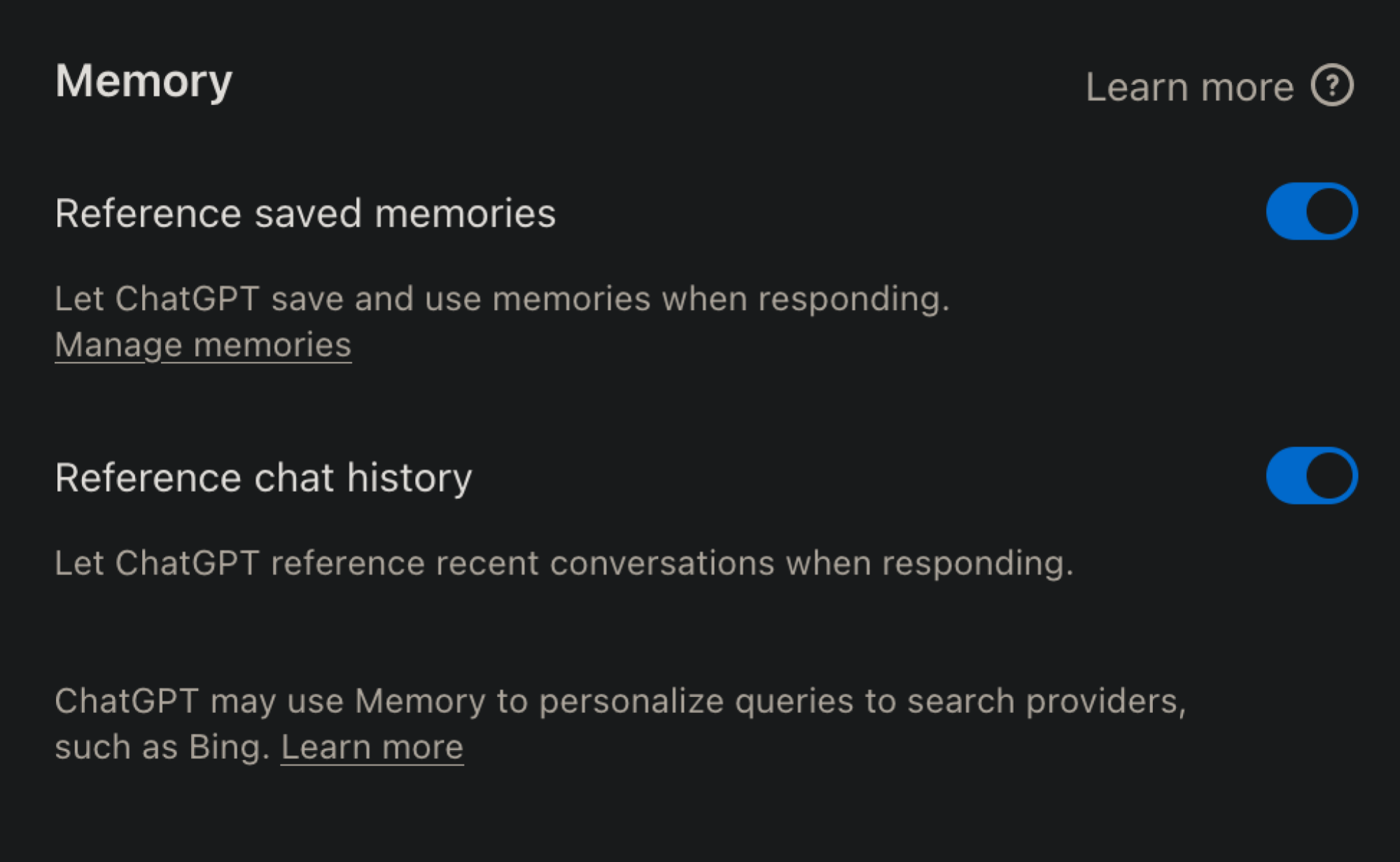
Disable ChatGPT reference chat feature.

Credit: Khamosh Pathak

A more permanent option is to turn off the feature altogether. This is good if you’d rather ChatGPT not remember any of your conversations. To do this, click your Profile icon in ChatGPT and choose Settings. Go to Personalization, and find the Memory section.

Now, disable the Reference chat history option. This will prevent the AI from remembering what you’ve said to it before. You can also disable Reference saved memories here, which both turns off chat history and keeps ChatGPT from remembering key details about you. Alternatively, click Manage memories to see a specific list of key details that ChatGPT knows about you, and delete them if you wish.